RDNE630K2VXP - Fridge BEKO - Free user manual and instructions
Find the device manual for free RDNE630K2VXP BEKO in PDF.


User questions about RDNE630K2VXP BEKO
0 question about this device. Answer the ones you know or ask your own.
Ask a new question about this device
Download the instructions for your Fridge in PDF format for free! Find your manual RDNE630K2VXP - BEKO and take your electronic device back in hand. On this page are published all the documents necessary for the use of your device. RDNE630K2VXP by BEKO.
USER MANUAL RDNE630K2VXP BEKO
natural_image
Simple line drawing of a pear and a carrot (no text or symbols)DN153720DXSKD-RDNE630K2VXP
Please read this manual first!
Dear Customer,
We hope that your product, which has been produced in modern plants and checked under the most meticulous quality control procedures, will provide you an effective service.
For this, we recommend you to carefully read the entire manual of your product before using it and keep it at hand for future references.
This manual
- Will help you use your appliance in a fast and safe way.
- Read the manual before installing and operating your product.
- Follow the instructions, especially those for safety.
- Keep the manual in an easily accessible place as you may need it later.
- Besides, read also the other documents provided with your product.
Please note that this manual may be valid for other models as well.
Symbols and their descriptions
This instruction manual contains the following symbols:
i Important information or useful usage tips.
Warning against dangerous conditions for life and property.
⚠ Warning against electric voltage.
1 The refrigerator 3
2 Important Safety Warnings 4
Intended use ....4
General safety ....4
For products with a 7
water dispenser; 7
Child safety 7
Compliance with WEEE Directive and Disposing of the Waste Product: .....7
Package information ....7
HC warning 8
Things to be done for energy saving ..8
Recommendations for the fresh food compartment ....8
3 Installation 9
Points to be considered when re-transporting your refrigerator .....9
Before operating your refrigerator .....9
Electric connection .....9
Disposing of the packaging .....10
Disposing of your old refrigerator .....10
Placing and Installation 10
Adjusting the legs 11
Changing the illumination lamp .....11
4 Preparation 12
5 Using your refrigerator Indicator Panel 13
Door Open Warning 16
Freezing fresh food 17
Recommendations for preservation of frozen food ....18
Placing the food 18
Deep-freeze information .....19
Description and cleaning of odor filter: 20
Egg holder ....20
Water Dispenser 21
Rotary storage container .....23
Blue light 24
Auto Icematic 24
Icematic and ice storage container ..25
6 Maintenance and cleaning 26
Protection of plastic surfaces .....26
7. Troubleshooting 27
1 The refrigerator
text_image
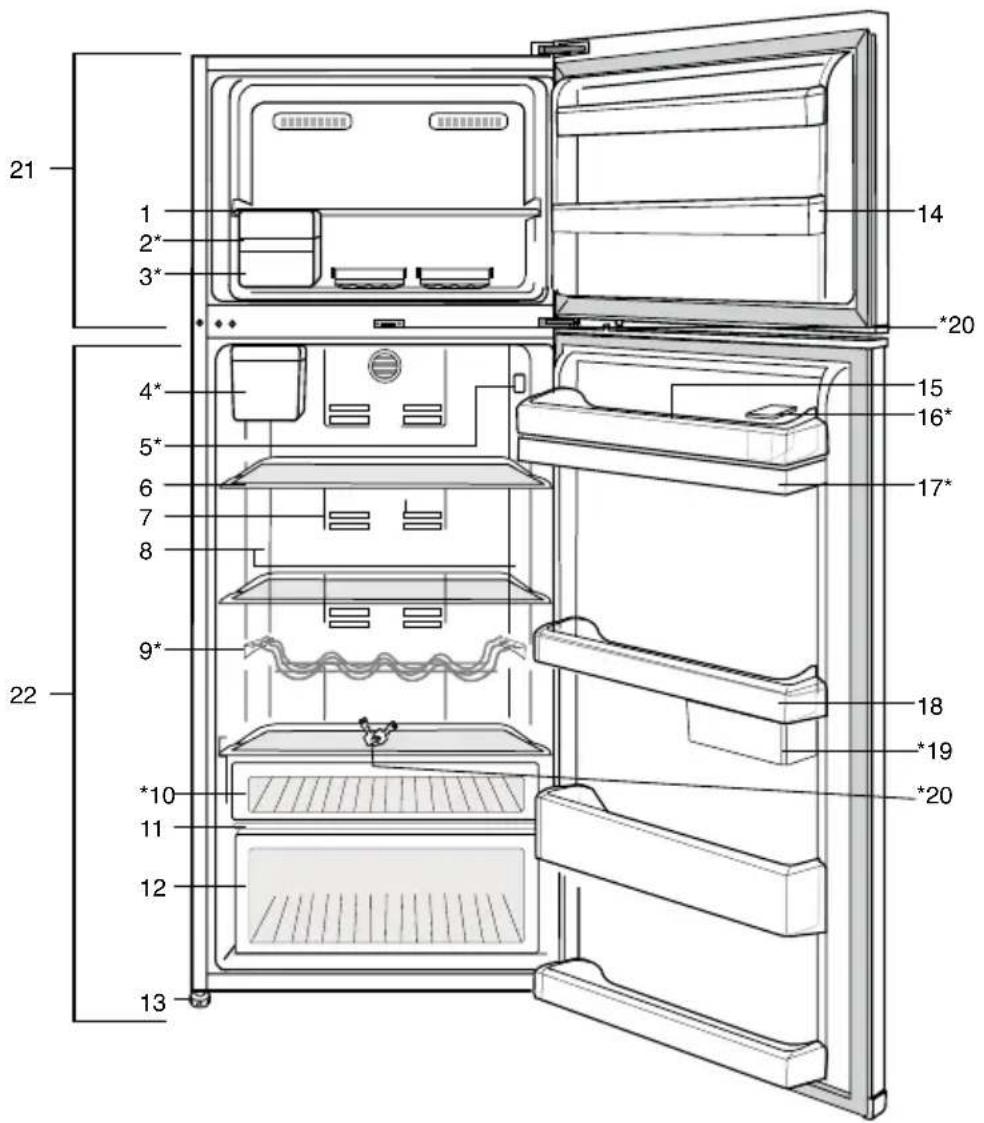
21 1 2* 3* 4* 5* 6 7 8 9* 22 *10 11 12 13 14 *20 15 16* 17* 18 *19 *20- Freezer compartment shelf
- Auto Icematic
- Ice storage container
- Auto Icematic water tank
- Temperature setting indicator
- Adjustable glass shelves
- Odor filter
- Illumination lens
- Bottle shelf
- Snack compartment
- Crisper cover
- Crisper
i Figures that take place in this instruction manual are schematic and may not correspond exactly with your product. If the subject parts are not included in the product you have purchased, then is valid for other models.
- Adjustable legs
- Freezer compartment door racks
- Egg holder
- Water dispenser filling container
- Water dispenser tank
- Fridge compartment door shelves
- Sliding and rotary storage containers
- Key
- Freezer compartment
- Fridge compartment
\*OPTIONAL
2 Important Safety Warnings
Please review the following information. Failure to observe this information may cause injuries or material damage.
Otherwise, all warranty and reliability commitments will become invalid.
Original spare parts will be provided for 10 years, following the product purchasing date.
Intended use
This product is intended to be used
• indoors and in closed areas such as homes;
- in closed working environments such as stores and offices;
- in closed accommodation areas such as farm houses, hotels, pensions.
• It should not be used outdoors.
General safety
- When you want to dispose/scrap the product, we recommend you to consult the authorized service in order to learn the required information and authorized bodies.
- Consult your authorized service for all your questions and problems related to the refrigerator. Do not intervene or let someone intervene to the refrigerator without notifying the authorised services.
- For products with a freezer compartment; Do not eat cone ice cream and ice cubes
immediately after you take them out of the freezer compartment! (This may cause frostbite in your mouth.)
- For products with a freezer compartment; Do not put bottled and canned liquid beverages in the freezer compartment. Otherwise, these may burst.
- Do not touch frozen food by hand; they may stick to your hand.
- Unplug your refrigerator before cleaning or defrosting.
Vapor and vaporized cleaning materials should never be used in cleaning and defrosting processes of your refrigerator. In such cases, the vapor may get in contact with the electrical parts and cause short circuit or electric shock. - Never use the parts on your refrigerator such as the door as a means of support or step.
- Do not use electrical devices inside the refrigerator.
- Do not damage the parts, where the refrigerant is circulating, with drilling or cutting tools. The refrigerant that might blow out when the gas channels of the evaporator, pipe extensions or surface coatings are punctured causes skin irritations and eye injuries.
-
Do not cover or block the ventilation holes on your refrigerator with any material.
-
Electrical devices must be repaired by only authorised persons. Repairs performed by incompetent persons create a risk for the user.
- In case of any failure or during a maintenance or repair work, disconnect your refrigerator's mains supply by either turning off the relevant fuse or unplugging your appliance.
- Do not pull by the cable when pulling off the plug.
- Ensure highly alcoholic beverages are stored securely with the lid fastened and placed upright.
- Never store spray cans containing flammable and explosive substances in the refrigerator.
- Do not use mechanical devices or other means to accelerate the defrosting process, other than those recommended by the manufacturer.
- This product is not intended to be used by persons with physical, sensory or mental disorders or unlearned or inexperienced people (including children) unless they are attended by a person who will be responsible for their safety or who will instruct them accordingly for use of the product
-
Do not operate a damaged refrigerator. Consult with the service agent if you have any concerns.
-
Electrical safety of your refrigerator shall be guaranteed only if the earth system in your house complies with standards.
- Exposing the product to rain, snow, sun and wind is dangerous with respect to electrical safety.
- Contact authorized service when there is a power cable damage to avoid danger.
- Never plug the refrigerator into the wall outlet during installation. Otherwise, risk of death or serious injury may arise.
- This refrigerator is intended for only storing food items. It must not be used for any other purpose.
- Label of technical specifications is located on the left wall inside the refrigerator.
- Never connect your refrigerator to electricity-saving systems; they may damage the refrigerator.
- If there is a blue light on the refrigerator, do not look at the blue light with optical tools.
- For manually controlled refrigerators, wait for at least 5 minutes to start the refrigerator after power failure.
- This operation manual should be handed in to the new owner of the product when it is given to others.
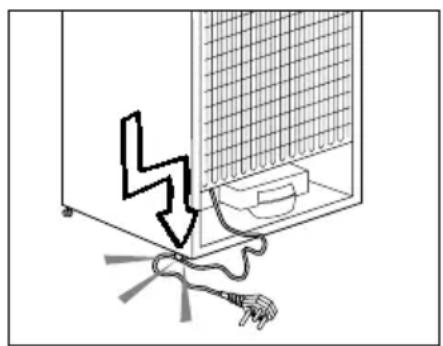
- Avoid causing damage on power cable when transporting the refrigerator. Bending cable
may cause fire. Never place heavy objects on power cable. Do not touch the plug with wet hands when plugging the product
natural_image
Diagram showing a device with a lightning bolt and cable, no text or symbols present- Do not plug the refrigerator if the wall outlet is loose.
• Water should not be sprayed on inner or outer parts of the product for safety purposes. - Do not spray substances containing inflammable gases such as propane gas near the refrigerator to avoid fire and explosion risk.
- Never place containers filled with water on top of the refrigerator; in the event of spillages, this may cause electric shock or fire.
- Do not overload the refrigerator with food. If overloaded, the food items may fall down and hurt you and damage refrigerator when you open the door.
- Never place objects on top of the refrigerator; otherwise, these objects may fall down when you open or close the refrigerator's door.
- As they require a precise temperature, vaccines, heat-
sensitive medicine and scientific materials and etc. should not be kept in the refrigerator.
- If not to be used for a long time, refrigerator should be unplugged. A possible problem in power cable may cause fire.
- The plug's tip should be cleaned regularly with a dry cloth; otherwise, it may cause fire.
- Refrigerator may move if adjustable legs are not properly secured on the floor. Properly securing adjustable legs on the floor can prevent the refrigerator to move.
- When carrying the refrigerator, do not hold it from door handle. Otherwise, it may be snapped.
- When you have to place your product next to another refrigerator or freezer, the distance between devices should be at least 8cm. Otherwise, adjacent side walls may be humidified.
- The product shall never be used while the compartment which is located at the top or back of your product and in which electronic boards are available (electronic board box cover) (1) is open.
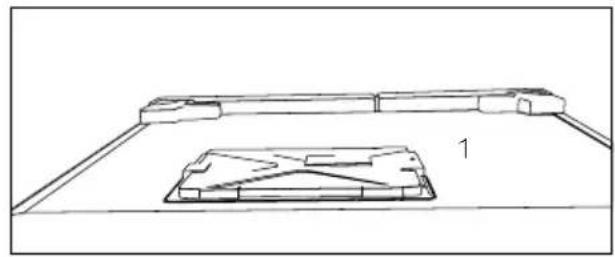
natural_image
Technical line drawing of a mechanical assembly with a base plate and support bracket (no text or symbols)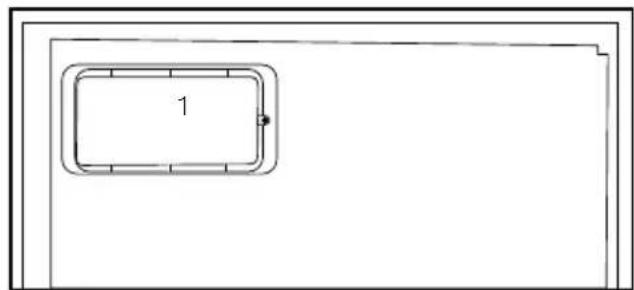
natural_image
Simple line drawing of a rectangular frame with a numbered label '1' (no text or symbols beyond the label)For products with a
water dispenser;
- Pressure for cold water inlet shall be maximum 90 psi (6.2 bar). If your water pressure exceeds 80 psi (5.5 bar), use a pressure limiting valve in your mains system. If you do not know how to check your water pressure, ask for the help of a professional plumber.
- If there is risk of water hammer effect in your installation, always use a water hammer prevention equipment in your installation. Consult Professional plumbers is you are not sure that there is no water hammer effect in your installation.
- Do not install on the hot water inlet. Take precautions against of the risk of freezing of the hoses. Water temperature operating
interval shall be 33^ F ( 0.6^ C) minimum and 100^ F ( 38^ C) maximum.
• Use only potable water.
Child safety
- If the door has a lock, the key should be kept away from reach of children.
- Children must be supervised to prevent them from tampering with the product.
Compliance with WEEE Directive and Disposing of the Waste Product:
natural_image
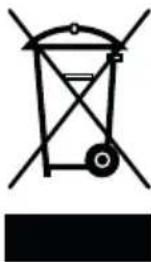
Pure electrical circuit lines without any symbolsThis product complies with EU WEEE Directive (2012/19/EU). This product bears a classification symbol for waste electrical and electronic equipment (WEEE).
This product has been
manufactured with high quality parts and materials which can be reused and are suitable for recycling. Therefore, do not dispose the product with normal domestic waste at the end of its service life. Take it to a collection point for the recycling of electrical and electronic equipment. Please consult your local authorities to learn the nearest collection point. Help protect the environment and natural resources by recycling used products. For children's safety, cut the power cable and break the locking mechanism of the door, if any, so that it will be non-functional before disposing of the product.
Package information
Packaging materials of the product are manufactured from recyclable materials in accordance with our National Environment Regulations. Do not dispose
of the packaging materials together with the domestic or other wastes. Take them to the packaging material collection points designated by the local authorities.
Do not forget...
Any recycled substance is an indispensable matter for nature and our national asset wealth.
If you want to contribute to the re-evaluation of the packaging materials, you can consult to your environmentalist organizations or the municipalities where you are located.
HC warning
If your product's cooling system contains R600a:
This gas is flammable. Therefore, pay attention to not damaging the cooling system and piping during usage and transportation. In the event of damage, keep your product away from potential fire sources that can cause the product catch a fire and ventilate the room in which the unit is placed.
Ignore this warning if your product's cooling system contains R134a.
Type of gas used in the product is stated in the type label which is on the left wall inside the refrigerator.
Never throw the product in fire for disposal.
Things to be done for energy saving
- Do not leave the doors of your refrigerator open for a long time.
- Do not put hot food or drinks in your refrigerator.
- Do not overload your refrigerator so that the air circulation inside of it is not prevented.
- Do not install your refrigerator under direct sunlight or near heat emitting appliances such as ovens, dishwashers or radiators. Keep your refrigerator at least 30cm away
from heat emitting sources and at least 5cm from electrical ovens.
- Pay attention to keep your food in closed containers.
- For products with a freezer compartment; You can store maximum amount of food items in the freezer when you remove the shelf or drawer of the freezer. Energy consumption value stated for your refrigerator has been determined by removing freezer shelf or drawer and under maximum load. There is no harm to use a shelf or drawer according to the shapes and size of food to be frozen.
- Thawing frozen food in fridge compartment will both provide energy saving and preserve the food quality.
Recommendations for the fresh food compartment
\*May not be available in all models
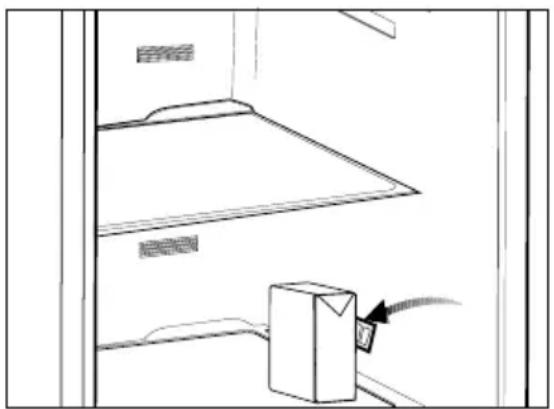
Do not allow the food to touch the temperature sensor in fresh food compartment. To allow the fresh food compartment keep its ideal storage temperature, sensor must not be hindered by food.
Do not place hot foods in the product.
text_image
Diagram showing a cabinet with labeled parts and an attached box, possibly indicating storage or installation instructions.3 Installation
⚠️ Please remember that the manufacturer shall not be held liable if the information given in the instruction manual is not observed.
Points to be considered when re-transporting your refrigerator
- Your refrigerator must be emptied and cleaned prior to any transportation.
- Shelves, accessories, crisper and etc. in your refrigerator must be fastened securely by adhesive tape against any jolt before repackaging.
- Packaging must be tied with thick tapes and strong ropes and the rules of transportation printed on the package must be followed.
Please do not forget...
Every recycled material is an indispensable source for the nature and for our national resources.
If you wish to contribute to recycling the packaging materials, you can get further information from the environmental bodies or local authorities.
Before operating your refrigerator
Before starting to use your refrigerator check the following:
- Is the interior of the refrigerator dry and can the air circulate freely in the rear of it?
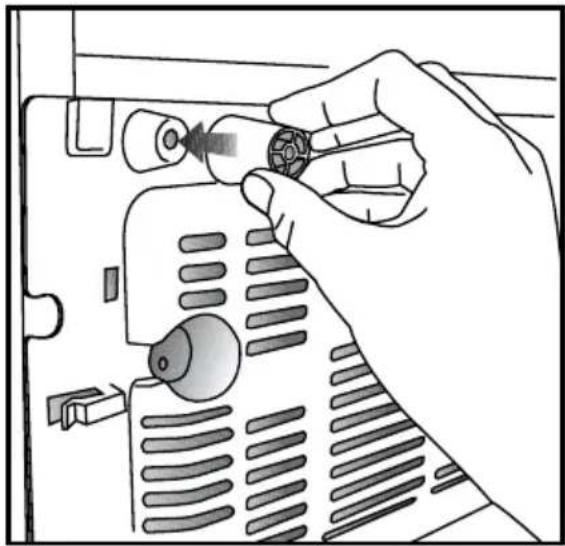
- Please install the 2 plastic wedges as illustrated in the figure. Plastic wedges will provide the required distance between your refrigerator and the wall in order to allow the air circulation. (The illustrated figure is only an example and does not match exactly with your product.)
natural_image
Illustration of a hand inserting a component into a device panel (no text or symbols visible)- Clean the interior of the refrigerator as recommended in the "Maintenance and cleaning" section.
- Plug the refrigerator into the wall outlet. When the fridge door is open, the fridge compartment interior light will come on.
- You will hear a noise as the compressor starts up. The liquid and gases sealed within the refrigeration system may also give rise to noise, even if the compressor is not running and this is quite normal.
- Front edges of the refrigerator may feel warm. This is normal. These areas are designed to be warm to avoid condensation.
Electric connection
Connect your product to a grounded socket which is being protected by a fuse with the appropriate capacity.
Important:
- The connection must be in compliance with national regulations.
- The power cable plug must be easily accessible after installation.
-
The specified voltage must be equal to your mains voltage.
-
Extension cables and multiway plugs must not be used for connection.
A damaged power cable must be replaced by a qualified electrician.
⚠️ Product must not be operated before it is repaired! There is danger of electric shock!
Disposing of the packaging
The packing materials may be dangerous for children. Keep the packing materials out of the reach of children or dispose them of by classifying them in accordance with the waste instructions. Do not dispose them of along with the normal household waste.
The packing of your refrigerator is produced from recyclable materials.
Disposing of your old refrigerator
Dispose of your old refrigerator without giving any harm to the environment.
- You may consult your authorised dealer or waste collection center of your municipality about the disposal of your refrigerator.
Before disposing of your refrigerator, cut out the electric plug and, if there are any locks on the door, make them inoperable in order to protect children against any danger.
Placing and Installation
⚠️ If the entrance door of the room where the refrigerator will be installed is not wide enough for the refrigerator to pass through, then call the authorised service to have them remove the doors of your refrigerator and pass it sideways through the door.
- Install your refrigerator to a place that allows ease of use.
- Keep your refrigerator away from heat sources, humid places and direct sunlight.
Your product requires adequate air circulation to function efficiently. If the product will be placed in an alcove, remember to leave at least 5 cm clearance between the product and the ceiling, rear wall and the side walls.
4. If the product will be placed in an alcove, remember to leave at least 5 cm clearance between the product and the ceiling, rear wall and the side walls. Check if the rear wall clearance protection component is present at its location (if provided with the product). If the component is not available, or if it is lost or fallen, position the product so that at least 5 cm clearance shall be left between the rear surface of the product and the wall of the room. The clearance at the rear is important for efficient operation of the product.
5. Do not keep your refrigerator in ambient temperatures under 10^ C.
Adjusting the legs
If your refrigerator is unbalanced;
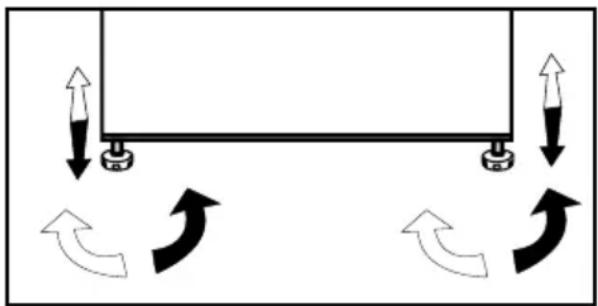
You can balance your refrigerator by turning the front legs of it as illustrated in the figure. The corner where the leg exists is lowered when you turn in the direction of black arrow and raised when you turn in the opposite direction. Taking help from someone to slightly lift the refrigerator will facilitate this process.
natural_image
Diagram showing a beam supported at both ends with curved arrows indicating rotational motion (no text or symbols)Changing the illumination lamp
To change the Bulb/LED used for illumination of your refrigerator, call your AuthorisedService.
The lamp(s) used in this appliance is not suitable for household room illumination. The intended purpose of this lamp is to assist the user to place foodstuffs in the refrigerator/freezer in a safe and comfortable way. The lamps used in this appliance have to withstand extreme physical conditions such as temperatures below -20 °C. (only chest and upright freezer)
4 Preparation
- Your refrigerator should be installed at least 30 cm away from heat sources such as hobs, ovens, central heater and stoves and at least 5 cm away from electrical ovens and should not be located under direct sunlight.
- The ambient temperature of the room where you install your refrigerator should at least be 10^ C. Operating your refrigerator under cooler conditions is not recommended with regard to its efficiency.
- Please make sure that the interior of your refrigerator is cleaned thoroughly.
- If two refrigerators are to be installed side by side, there should be at least 2 cm distance between them.
- When you operate your refrigerator for the first time, please observe the following instructions during the initial six hours.
- The door should not be opened frequently.
- It must be operated empty without any food in it.
- Do not unplug your refrigerator. If a power failure occurs out of your control, please see the warnings in the “Recommended solutions for the problems” section.
- Original packaging and foam materials should be kept for future transportations or moving.
-
The baskets/drawers that are provided with the chill compartment must always be in use for low energy consumption and for better storage conditions.
-
Food contact with the temperature sensor in the freezer compartment may increase energy consumption of the appliance. Thus any contact with the sensor(s) must be avoided.
- In some models, the instrument panel automatically turns off 5 minutes after the door has closed. It will be reactivated when the door has opened or pressed on any key.
- Due to temperature change as a result of opening/closing the product door during operation, condensation on the door/body shelves and the glass containers is normal
- Since hot and humid air will not directly penetrate into your product when the doors are not opened, your product will optimize itself in conditions sufficient to protect your food. Functions and components such as compressor, fan, heater, defrost, lighting, display and so on will operate according to the needs to consume minimum energy under these circumstances.
5 Using your refrigerator
Indicator Panel
Indicator panels may vary depending on your product's model.
text_image
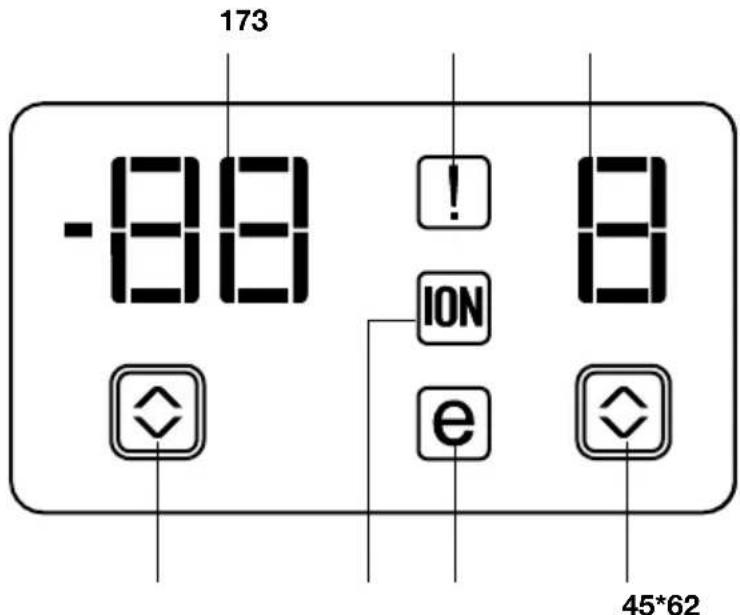
-88 173 ! 8 ION e 45*62Indicator panel aids in using your refrigerator indicator provides information about the with its audio and visual functions. error to the service personnel.
- Freezer Compartment Temperature Indicator
- Error Status Indicator
- Fridge Compartment Temperature Indicator
- Fridge Compartment Temperature Setting Button
- Economy Mode Indicator
- Ioniser Indicator
- Freezer Compartment Temperature Setting Button
1. Freezer Compartment Temperature Indicator
It indicates the temperature set for Freezer compartment.
2. Error Status Indicator
If your refrigerator does not cool adequately or if there is a sensor failure, this indicator will be activated. When this indicator is active, Freezer Compartment Temperature indicator will display "e" and Fridge Compartment Temperature Indicator will display numbers such as "1,2,3...". These numbers on the
3. Fridge Compartment Temperature Indicator
Indicates the temperature set for Fridge compartment.
4. Fridge Compartment Temperature Setting Button
Press this button to set the temperature of the fridge compartment to 8, 6, 4, 2, 8... respectively. Press this button to set the desired temperature for the fridge compartment.
5. Economy Mode Indicator
Indicates that the refrigerator is running in energy-efficient mode.
6. Ioniser Indicator
Indicator light lights up continuously. This light indicates that your refrigerator is protected against the bacteria.
7. Freezer Compartment Temperature Setting Button
Press this button to set the temperature of the freezer compartment to -18, -20, -22, -24, -18... respectively. Press this button to set the desired temperature for the freezer compartment.
text_image
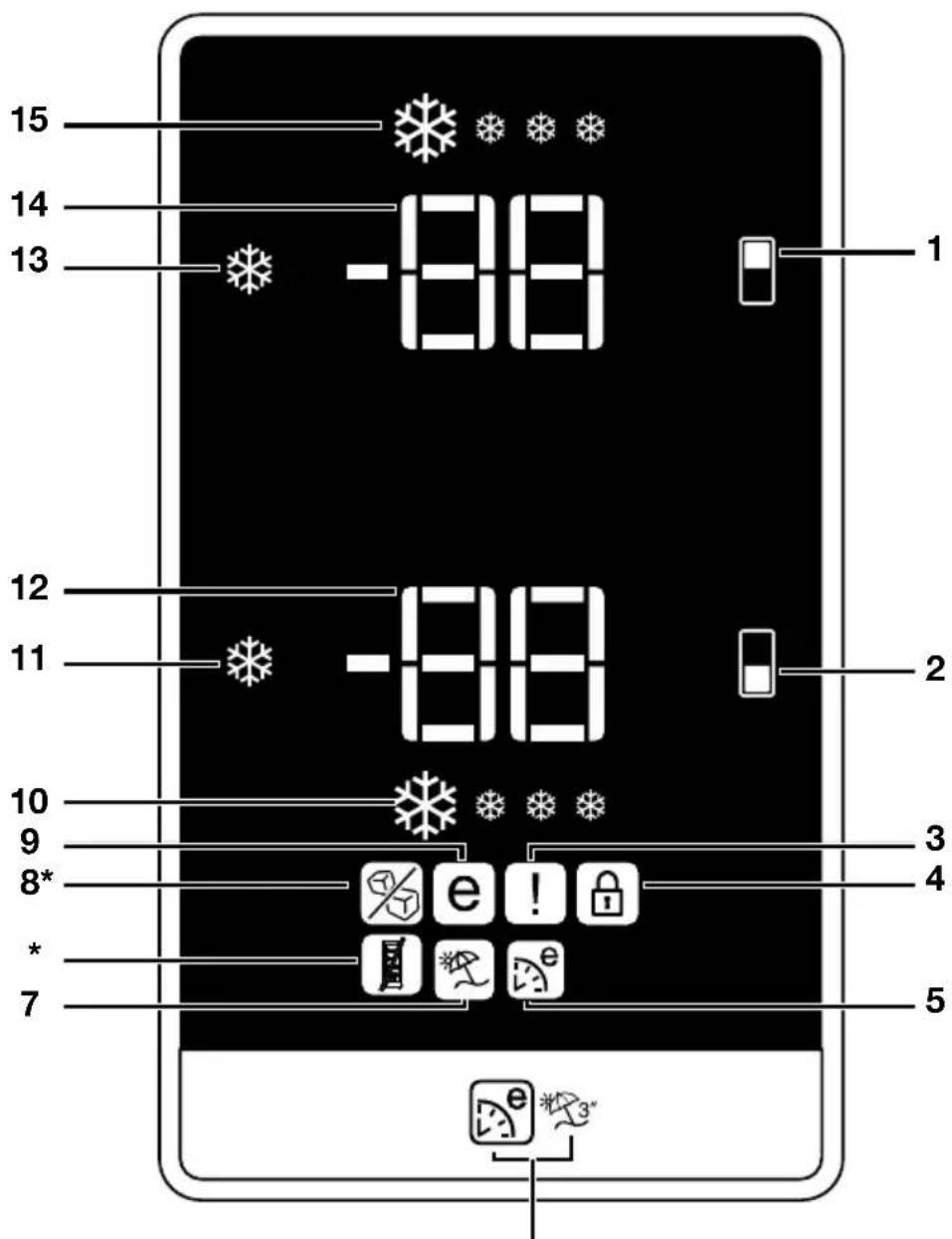
15 14 13 -88 1 12 11 -88 2 10 9 8* * 7 3 4 5 e! e e e *- Freezer compartment setting / Icematic on-off button
- Fridge compartment setting button
- Error status indicator
- Key lock indicator
- Eco Extra Function indicator
- Eco Extra/Vacation Button
- Vacation function indicator
-
Icematic off indicator (*in some models)
-
^6 Economic usage indicator
- Quick fridge function indicator
- Quick fridge function button
- Fridge compartment temperature setting indicator
- Quick freeze function button
- Freezer compartment temperature setting indicator
- Quick freeze function indicator
Figures that take place in this instruction manual are schematic and may not correspond exactly with your product. If the subject parts are not included in the product you have purchased, then it is valid for other models.
1. Freezer Compartment Setting / Icematic On-Off Button
This function allows you to make the freezer compartment temperature setting. Press this button to set the temperature of the freezer compartment to -18, -20, -22 and -24 respectively.
To stop ice formation, press Icematic on-off button for 3 seconds. Water flow from water tank will stop when this function is selected. However, ice made previously can be taken from the Icematic. To restart ice formation, press Icematic on-off button for 3 seconds.
2. Fridge Compartment Setting Button
This function allows you to make the fridge compartment temperature setting. Press this button to set the temperature of the fridge compartment to 8, 6, 4, 2 respectively.
3. Error Status Indicator
If your refrigerator does not cool adequately or if there is a sensor failure, this indicator will be activated. When this indicator is active, Freezer Compartment Temperature indicator will display "E" and Fridge Compartment Temperature Indicator will display numbers such as "1,2,3...". These numbers on the indicator provides information about the error to the service personnel.
When you place hot food into the freezer compartment or if you leave the door open for a long time, exclamation mark can illuminate for some time. This is not a failure; this warning will disappear when the food cools down.
4. Key Lock Indicator
Use this function if you do not want your refrigerator temperature setting changed. Press Fridge compartment setting button and Freezer compartment setting button simultaneously for a long time (3 sec) to activate this function.
5. Eco Extra Function Indicator
It indicates that the Eco-Extra function is active.
If this function is active, your refrigerator will automatically detect the least usage periods and energy-efficient cooling will be performed during those times. Economy indicator will be active while energy-efficient cooling is performed.
Press the relevant button again to deactivate this function.
6. Eco Extra/Vacation Button
Press this button briefly to activate the Eco Extra function. Press and hold this button for 3 sec. to activate the Vacation function. Press this button again to deactivate the selected function.
7. Vacation Function Indicator
Indicates that the vacation function is active. If this function is active, "-" appears on the indicator of the fridge compartment and no cooling is performed in the fridge compartment. Other compartments will be cooled in accordance with the temperature set for them.
Press the relevant button again to deactivate this function.
8. Ice Off indicator
Icematic will not run when the indicator of this function is active. See Item 1 to enable the Icematic.
9. Economy Mode Indicator
Indicates that the refrigerator is running in energy-efficient mode. Freezer Compartment temperature
This indicator will be active if the function is set to -18 or the energy efficient cooling is being performed due to Eco-Extra function.
10. Quick Fridge Indicator
This icon flashes in an animated style when the Quick Fridge function is active.
11. Quick Fridge Function
When you press the Quick Fridge button, the temperature of the compartment will be colder than the adjusted values.
This function can be used for food placed in the fridge compartment and required to be cooled down rapidly.
If you want to cool large amounts of fresh food, it is recommended to active this feature before putting the food into the fridge.
Quick Fridge indicator turns on when the Quick Fridge function is on. To cancel this function press Quick Fridge button again.
If you do not cancel it, Quick Fridge will cancel itself automatically after 4 hours or when the fridge compartment reaches to the required temperature.
This function is not recalled when power restores after a power failure.
12. Fridge Compartment Temperature Setting Indicator
Indicates the temperature set for the Fridge Compartment.
13. Freezer Compartment Temperature Setting Indicator
Indicates the temperature set for the Freezer Compartment.
14. Quick Freeze Function
Quick Freeze indicator turns on when the Quick Freeze function is active. To cancel this function press Quick Freeze button again. Quick Freeze indicator will turn off and return to its normal settings. If you do not cancel it, Quick Freeze will cancel itself automatically after 8 hours or when the freezer compartment reaches to the required temperature.
If you want to freeze large amounts of fresh food, press the Quick Freeze button before putting the food into the freezer compartment.
If you press the Quick Freeze button repeatedly with short intervals, the electronic circuit protection will be activated and the compressor will not start up immediately.
This function is not recalled when power restores after a power failure.
15. Quick Freeze Indicator
This icon flashes in an animated style when the Quick Freeze function is active.
Door Open Warning
(This feature may vary depending on the door of the product and may not exist in some models.)
A audio warning signal will be given when the door of your product is left open for at least 1 minute. This warning will be muted when the door is closed or any of the display buttons (if any) are pressed.
Freezing fresh food
- Wrap or cover the food before placing them in the refrigerator.
- Hot food must cool down to the room temperature before putting them in the refrigerator.
- The foodstuff that you want to freeze must be fresh and in good quality.
- Foodstuff must be divided into portions according to the family's daily or meal based consumption needs.
- The foodstuff must be packaged in an airtight manner to prevent them from drying even if they are going to be kept for a short time.
-
Materials to be used for packaging must be tear-proof and resistant to cold, humidity, odor, oils and acids and they must also be airtight. Moreover, they must be well closed and they must be made from easy-to-use materials that are suitable for deep freeze usage.
-
Frozen food must be used immediately after they are thawed and they should never be re-frozen.
-
Please observe the following instructions to obtain the best results.
-
Do not freeze too large quantities of food at one time. The quality of the food is best preserved when it is frozen right through to the core as quickly as possible.
- Placing warm food into the freezer compartment causes the cooling system to operate continuously until the food is frozen solid.
- Take special care not to mix already frozen food and fresh food.
| Freezer Compartment Setting | Fridge Compartment Setting | Explanations |
| -18°C 4°C This is the normal recommended setting. | ||
| -20,-22 or -24°C 4°C These settings are recommended when the ambient temperature exceeds 30°C. | ||
| Quick Freeze 4°C | Use when you wish to freeze your food in a short time. Your refrigerator will return to its previous mode when the process is over. | |
| -18°C or colder 2°C | If you think that your fridge compartment is not cold enough because of the hot conditions or frequent opening and closing of the door. | |
| -18°C or colder Quick Fridge | You can use it when your fridge compartment is overloaded or if you wish to cool down your food rapidly. It is recommended that you activate quick fridge function 4-8 hours before placing the food. | |
Recommendations for preservation of frozen food
- Prepacked commercially frozen food should be stored in accordance with the frozen food manufacturer's instructions for a ✦ (4 star) frozen food storage compartment.
-
To ensure that the high quality achieved by the frozen food manufacturer and the food retailer is maintained, the following should be remembered:
-
Put packages in the freezer as quickly as possible after purchase.
-
Ensure that contents are labeled and dated.
-
Do not exceed "Use By", "Best Before" dates on the packaging.
Defrosting
The freezer compartment defrosts automatically.
Placing the food
| Freezer compartment shelves | Various frozen food such as meat, fish, ice cream, vegetables and etc. |
| Egg holder Egg | |
| Fridge compartment shelves | Food in pans, covered plates and closed containers |
| Fridge compartment door shelves | Small and packaged food or drinks (such as milk, fruit juice and beer) |
| Crisper Vegetables and fruits | |
| Freshzone compartment | Delicatessen products (cheese, butter, salami and etc.) |
Deep-freeze information
Food must be frozen as rapidly as possible when they are put in a refrigerator in order to keep them in good quality.
It is possible to keep the food for a long time only at -18^ C or lower temperatures.
You can keep the freshness of food for many months (at -18^ C or lower temperatures in the deep freeze).
WARNING!
- Foodstuff must be divided into portions according to the family's daily or meal based consumption needs.
- Foodstuff must be packaged in an airtight manner to prevent them from drying even if they are going to be kept for a short time.
Materials necessary for packaging:
- Cold resistant adhesive tape
- Self adhesive label
- Rubber rings
- Pen
Materials to be used for packaging the foodstuff must be tear-proof and resistant to cold, humidity, odor, oils and acids.
Foodstuff to be frozen should not be allowed to come in contact with the previously frozen items to prevent their partial thawing.
Frozen food must be used immediately after they are thawed and they should never be re-frozen.
Description and cleaning of odor filter:
Odor filter prevents unpleasant odor build-up in your refrigerator.
Pull the cover, into which the odor filter is installed, downwards and remove as illustrated. Leave the filter under sunlight for one day. Filter will be cleaned during this time. Install the filter back to its place.
Odor filter must be cleaned once in a year.
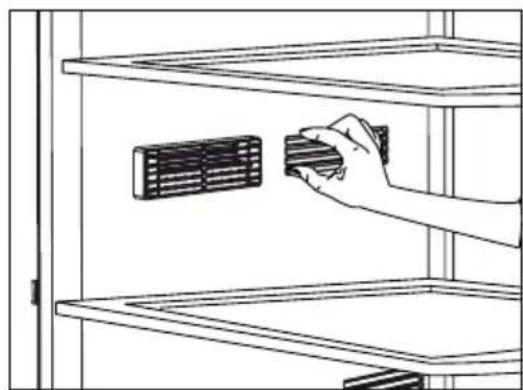
natural_image
Line drawing of a hand placing a component into a storage cabinet (no text or symbols)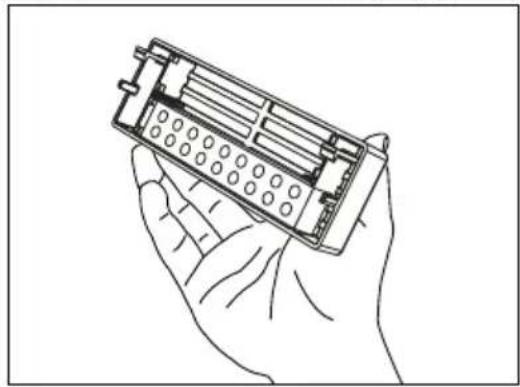
natural_image
Line drawing of a hand holding an electronic device with internal components (no text or symbols)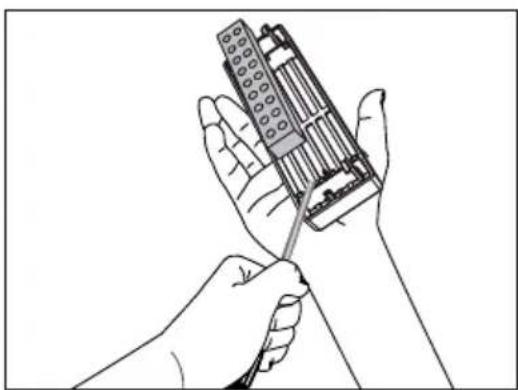
natural_image
Line drawing of two hands holding a handheld electronic device (no text or symbols visible)Snack compartments
Use these compartments for your food which you want store at a temperature a few degrees below the fridge compartment.
You can increase the inner volume of your refrigerator by removing any of the snack compartments.
- Pull the compartment towards yourself until it rests and stops against the stopper.
- Lift the front section and pull towards yourself to remove the compartment from its seating.
i You can place the food, that you want to freeze, in these compartments in order to prepare them for freezing.
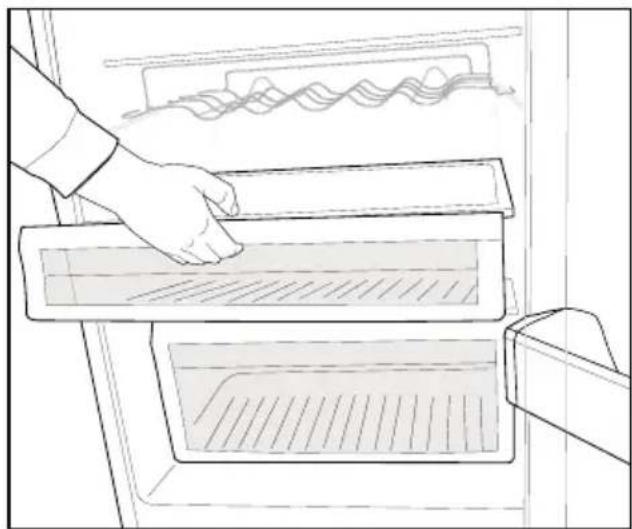
natural_image
Line drawing of a hand placing a rectangular appliance into a rack with a mesh pattern (no text or symbols)Egg holder
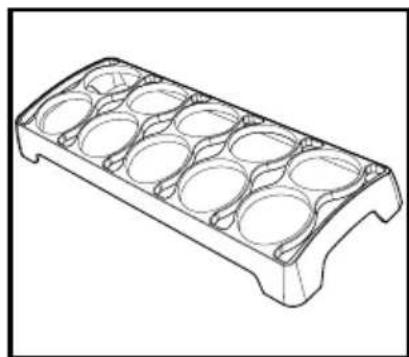
You can install the egg holder to the desired door or body shelf.
Never store the egg holder in the freezer compartment
natural_image
Technical line drawing of a mechanical component with circular cavities (no text or symbols)Water Dispenser
(in some models)
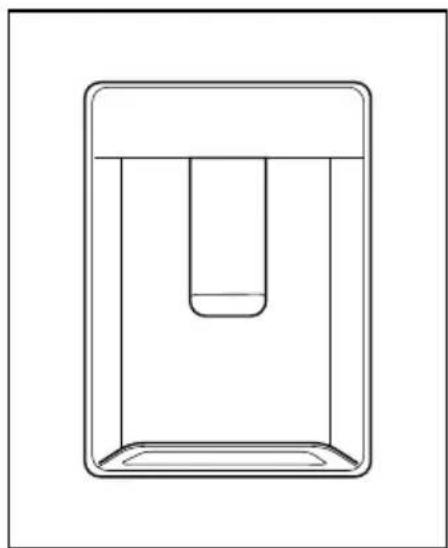
Water dispenser is a very useful feature based on reaching cold water without opening the door of your refrigerator. As you will not have to open your refrigerator door frequently, you will have saved energy.
natural_image
Simple line drawing of a rectangular container with a central depression (no text or symbols)Using the water spring
Push the arm of the water dispenser with your glass. The dispenser will cease operating once you release the arm.
When operating the water dispenser, maximum flow can be obtained by pressing the arm fully. Please remember that the amount of flow from the dispenser is subject to the degree you press the arm.
As the level of the water in your glass/container rises, slightly lessen the pressure on the arm to prevent the overspill. If you slightly press the arm, the water will drop; this is quite normal and not a failure.
Filling the water dispenser water tank
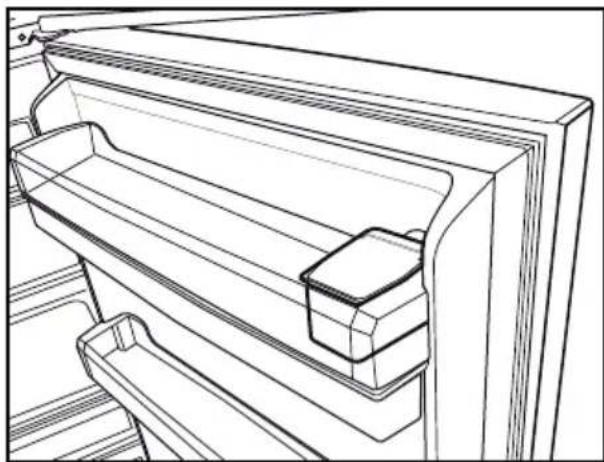
Water tank filling reservoir is located inside the door rack. Open the reservoir cover and fill in clean potable water. And then, close the lid.
natural_image
Line drawing of a refrigerator interior showing front and side compartments (no text or symbols)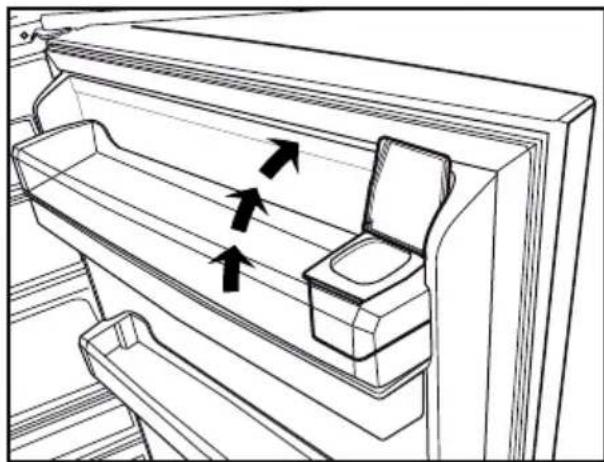
natural_image
Line drawing of a refrigerator interior with arrows indicating flow direction (no text or symbols)Warning!
- Do not fill the water tank with any other liquid except for water such as fruit juices, carbonated beverages or alcoholic drinks which are not suitable to use in the water dispenser. Water dispenser will be irreparably damaged if these kinds of liquids are used. Warranty does not cover such usages. Some chemical substances and additives contained in these kinds of drinks/liquids may damage the water tank material.
• Use clean and pure potable water only.
- Capacity of the water tank is 3 liters; do not overfill.
- Push the arm of the water dispenser with a rigid glass. If you are using disposable plastic glasses, push the arm with your fingers from behind the glass.
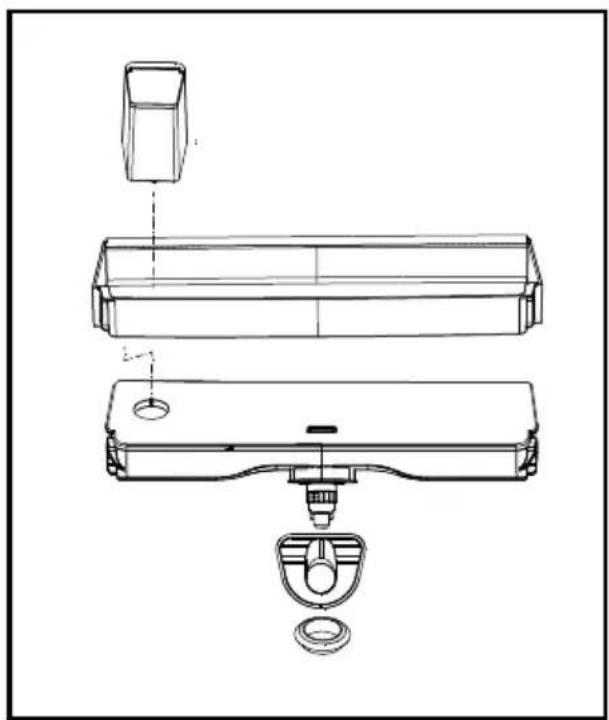
Cleaning the water tank
- Remove the water filling reservoir inside the door rack.
- Remove the door rack by holding from both sides.
- Grab the water tank from both sides and remove it with an angle of 45^ .
• Clean the water tank by removing its lid.
Important:
Components of the water tank and water dispenser should not be washed in dishwasher.
natural_image
Technical line drawing of a mechanical assembly with exploded view (no text or symbols)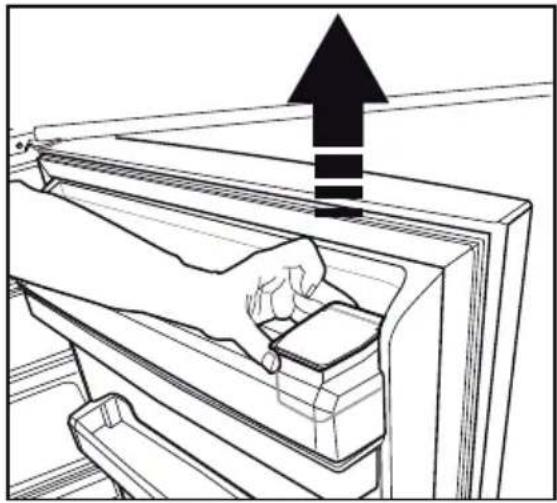
natural_image
Line drawing of a hand inserting a component into a rack, with an upward arrow indicating motion (no text or symbols)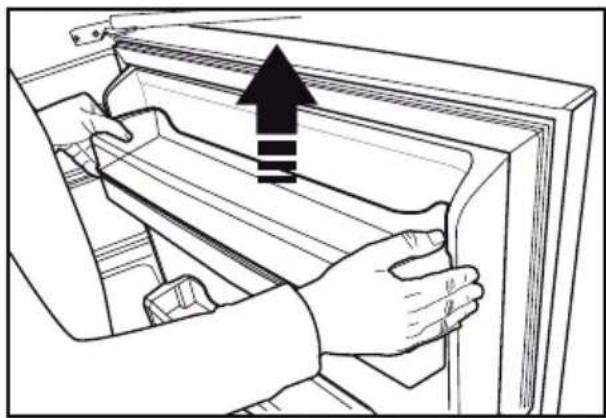
natural_image
Illustration of hands installing or adjusting a door panel with an upward arrow (no text or symbols)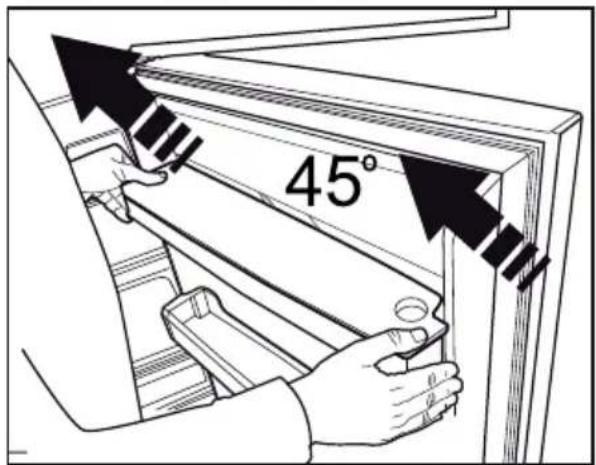
text_image
45°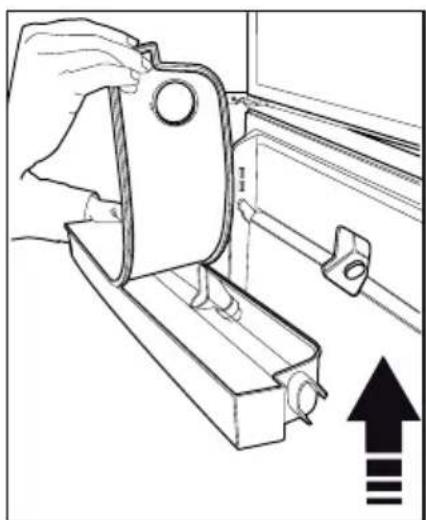
natural_image
Line drawing of a hand holding a metal bracket with an arrow indicating upward motion (no text or symbols)Water tray
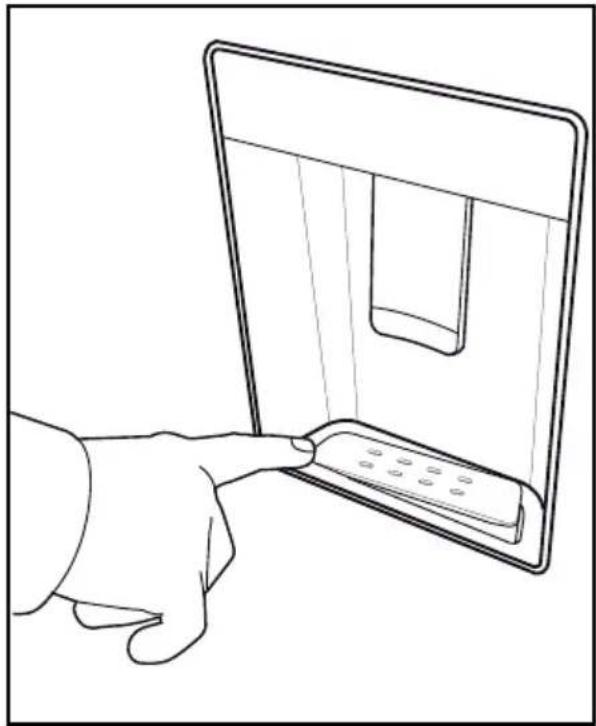
Water that dripped while using the water dispenser accumulates in the spillage tray.
Take out the plastic strainer as shown in the figure.
With a clean and dry cloth, remove the water that has accumulated
CAUTION: Connect only to a potable water line.
natural_image
Line drawing of a hand inserting a device into a screen (no text or symbols)Rotary storage container
(in some models)
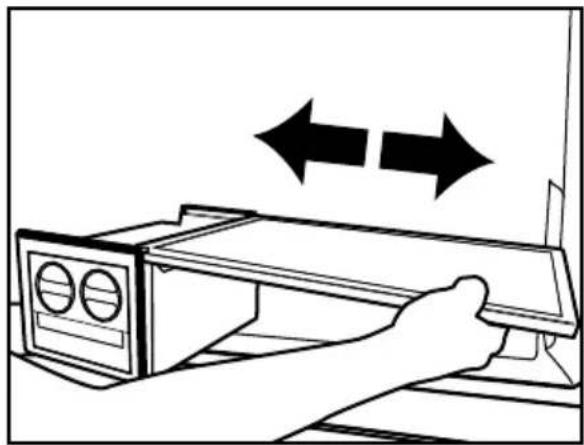
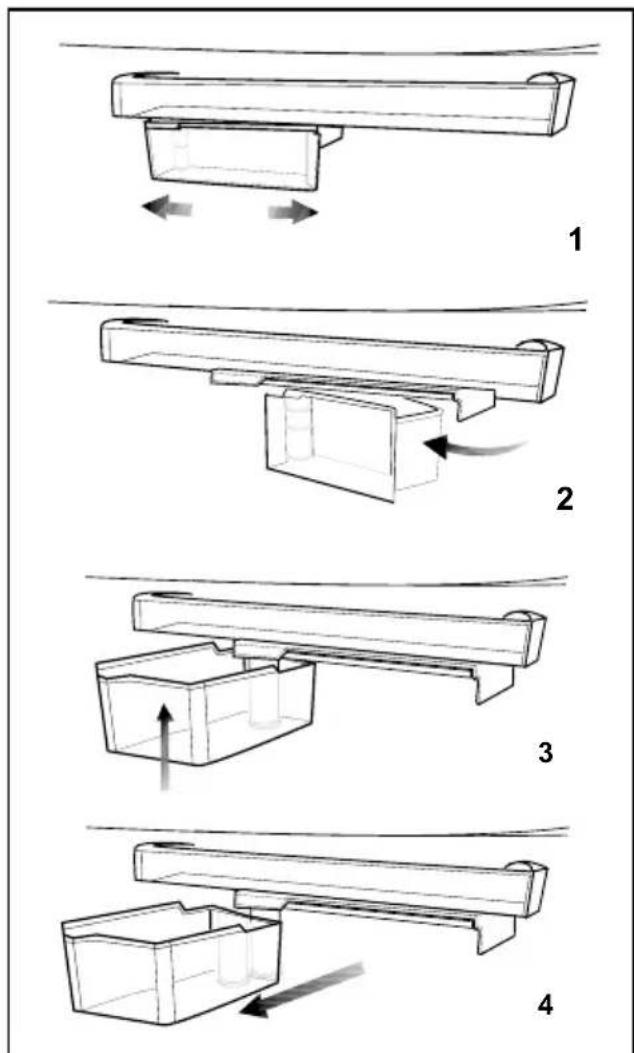
Sliding body shelf can be moved to left or right in order to allow you place long bottles, jars or boxes to a lower shelf (Fig. 1)
You can reach the food that you have placed into the shelf by grabbing and turning it from its right edge (Fig.2).
When you want to load or remove it to clean, turn it by 90 degrees, raise it up and pull towards yourself (Fig. 3-4).
text_image
Technical diagram showing four sequential steps of a mechanical assembly or lifting process, labeled 1 to 4.Blue light
(in some models)
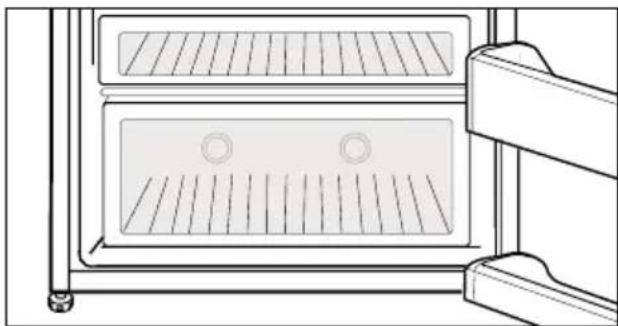
Foodstuff stored in the crispers that are enlightened with a blue light continue their photosynthesis by means of the wavelength effect of blue light and thus, preserve their freshness and increase their vitamin content.
natural_image
Line drawing of a double oven with ventilation grilles and cooling fins (no text or symbols)Auto Icematic
(in some models)
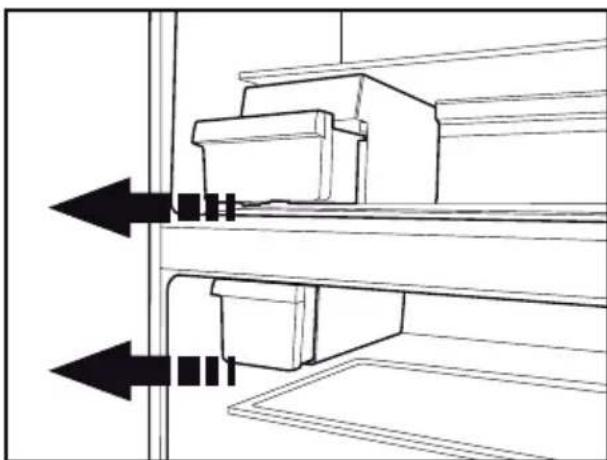
Auto Icematic system allows you to obtain ice from the refrigerator easily. Remove the water tank in the fridge compartment, fill it wilt water and install it back to obtain ice from the Icematic.
First ice cubes will be ready in approximately 2 hours in the Icematic drawer located in the freezer compartment..
If you fill the water tank completely, you will be able to obtain approximately 60-70 ice cubes.
Change the water in water tank if it has waited around 2-3 weeks.
natural_image
Diagram of a mechanical assembly with two arrows indicating direction, no text or symbols present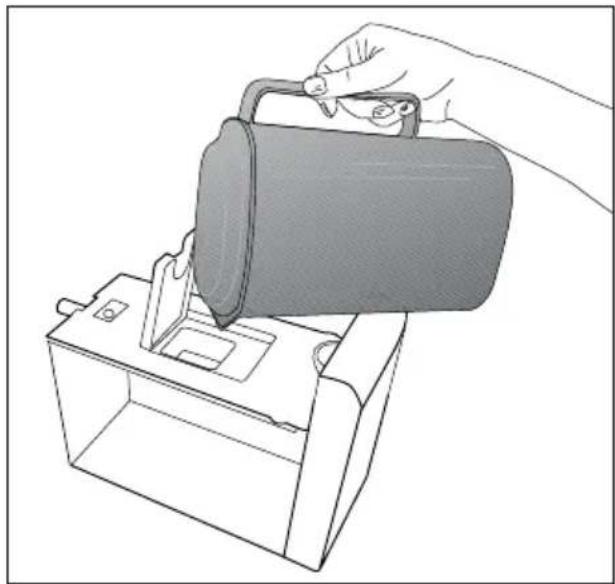
natural_image
Line drawing of a hand pouring liquid into a container using a bag (no text or symbols)Icematic and ice storage container
\*May not be available in all models Using the Icematic
Fill the Icematic with water and place it into its seat. Your ice will be ready approximately in two hours. Do not remove the Icematic from its seating to take ice.
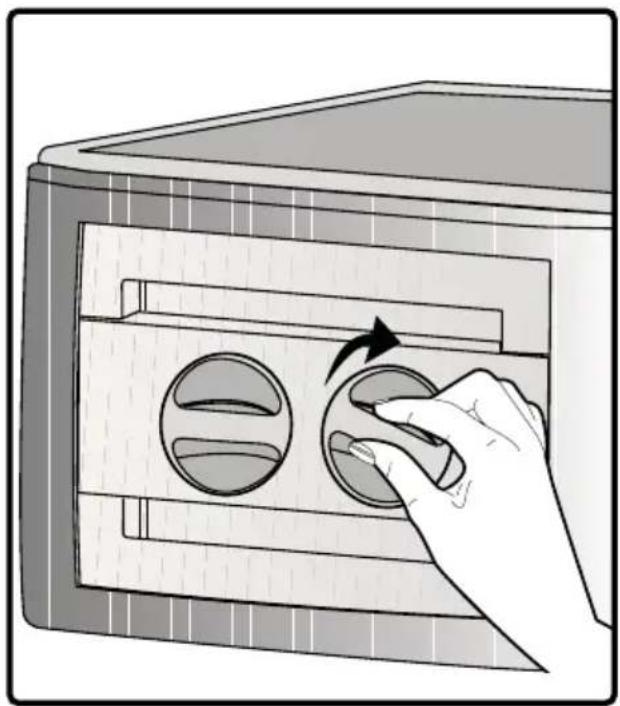
Turn the knobs on the ice reservoirs clockwise by 90 degrees.
Ice cubes in the reservoirs will fall down into the ice storage container below.
You may take out the ice storage container and serve the ice cubes.
If you wish, you may keep the ice cubes in the ice storage container.
Ice storage container
Ice storage container is only intended for accumulating the ice cubes. Do not put water in it. Otherwise, it will break.
natural_image
Illustration of a hand inserting a circular component into a wall-mounted device (no text or symbols)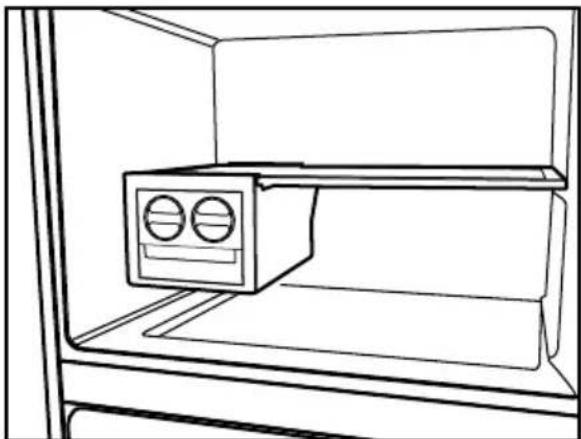
natural_image
Line drawing of a refrigerator interior showing the front shelf and front-mounted air conditioner unit (no text or symbols)
natural_image
Illustration of hands installing or adjusting a cabinet with two arrows indicating direction (no text or symbols)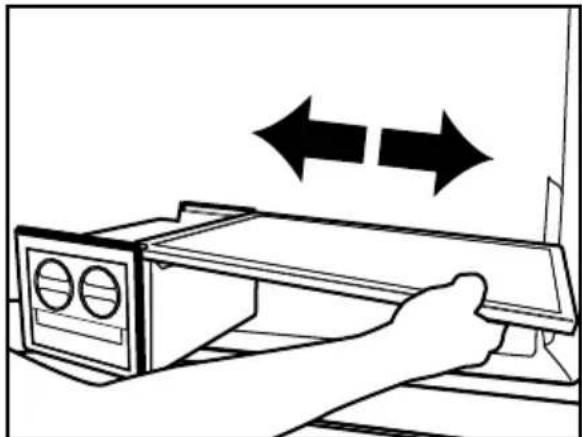
natural_image
Line drawing of a hand opening a microwave oven with double-headed arrows indicating bidirectional motion (no text or symbols)6 Maintenance and cleaning
⚠️Never use gasoline, benzene or similar substances for cleaning purposes.
⚠️ We recommend that you unplug the appliance before cleaning.
△Never use any sharp abrasive instrument, soap, household cleaner, detergent and wax polish for cleaning.
Use lukewarm water to clean the cabinet of your refrigerator and wipe it dry.
Use a damp cloth wrung out in a solution of one teaspoon of bicarbonate of soda to one pint of water to clean the interior and wipe it dry.
Make sure that no water enters the lamp housing and other electrical items.
△If your refrigerator is not going to be used for a long period of time, unplug the power cable, remove all food, clean it and leave the door ajar.
Check door seals regularly to ensure they are clean and free from food particles.
⚠️To remove door racks, remove all the contents and then simply push the door rack upwards from the base.
⚠️Never use cleaning agents or water that contain chlorine to clean the outer surfaces and chromium coated parts of the product. Chlorine causes corrosion on such metal surfaces.
⚠️Do not use sharp, abrasive tools, soap, household cleaning agents, detergents, kerosene, fuel oil, varnish etc. to prevent removal and deformation of the prints on the plastic part. Use lukewarm water and a soft cloth for cleaning and then wipe it dry.
Protection of plastic surfaces
Do not put the liquid oils or oil-cooked meals in your refrigerator in unsealed containers as they damage the plastic surfaces of your refrigerator. In case of spilling or smearing oil on the plastic surfaces, clean and rinse the relevant part of the surface at once with warm water.
7 Troubleshooting
Check this list before contacting the service. Doing so will save you time and money. This list includes frequent complaints that are not related to faulty workmanship or materials.
Certain features mentioned herein may not apply to your product.
The refrigerator is not working.
- The power plug is not fully settled. >>> Plug it in to settle completely into the socket.
- The fuse connected to the socket powering the product or the main fuse is blown. >>> Check the fuses.
Condensation on the side wall of the cooler compartment (MULTI ZONE, COOL, CONTROL and FLEXI ZONE).
- The door is opened too frequently >>> Take care not to open the product's door too frequently.
- The environment is too humid. >>> Do not install the product in humid environments.
- Foods containing liquids are kept in unsealed holders. >>> Keep the foods containing liquids in sealed holders.
- The product's door is left open. >>> Do not keep the product's door open for long periods.
- The thermostat is set to too low temperature. >>> Set the thermostat to appropriate temperature.
Compressor is not working.
- In case of sudden power failure or pulling the power plug off and putting back on, the gas pressure in the product's cooling system is not balanced, which triggers the compressor thermic safeguard. The product will restart after approximately 6 minutes. If the product does not restart after this period, contact the service.
- Defrosting is active. >>> This is normal for a fully-automatic defrosting product. The defrosting is carried out periodically.
-
The product is not plugged in. >>> Make sure the power cord is plugged in.
-
The temperature setting is incorrect.
Select the appropriate temperature setting.
- The power is out. >>> The product will continue to operate normally once the power is restored.
The refrigerator's operating noise is increasing while in use.
- The product's operating performance may vary depending on the ambient temperature variations. This is normal and not a malfunction.
The refrigerator runs too often or for too long.
- The new product may be larger than the previous one. Larger products will run for longer periods.
- The room temperature may be high. >>> The product will normally run for long periods in higher room temperature.
- The product may have been recently plugged in or a new food item is placed inside. >>> The product will take longer to reach the set temperature when recently plugged in or a new food item is placed inside. This is normal.
- Large quantities of hot food may have been recently placed into the product. >>> Do not place hot food into the product.
- The doors were opened frequently or kept open for long periods. >>> The warm air moving inside will cause the product to run longer. Do not open the doors too frequently.
-
The freezer or cooler door may be ajar.
Check that the doors are fully closed.
-
The product may be set to temperature too low. >>> Set the temperature to a higher degree and wait for the product to reach the adjusted temperature.
- The cooler or freezer door washer may be dirty, worn out, broken or not properly settled. >>> Clean or replace the washer. Damaged / torn door washer will cause the product to run for longer periods to preserve the current temperature.
The freezer temperature is very low, but the cooler temperature is adequate.
- The freezer compartment temperature is set to a very low degree. >>> Set the freezer compartment temperature to a higher degree and check again.
The cooler temperature is very low, but the freezer temperature is adequate.
- The cooler compartment temperature is set to a very low degree. >>> Set the freezer compartment temperature to a higher degree and check again.
The food items kept in cooler compartment drawers are frozen.
- The cooler compartment temperature is set to a very low degree. >>> Set the freezer compartment temperature to a higher degree and check again.
The temperature in the cooler or the freezer is too high.
- The cooler compartment temperature is set to a very high degree. >>> Temperature setting of the cooler compartment has an effect on the temperature in the freezer compartment. Wait until the temperature of relevant parts reach the sufficient level by changing the temperature of cooler or freezer compartments.
-
The doors were opened frequently or kept open for long periods. >>> Do not open the doors too frequently.
-
The door may be ajar. >>> Fully close the door.
- The product may have been recently plugged in or a new food item is placed inside. >>> This is normal. The product will take longer to reach the set temperature when recently plugged in or a new food item is placed inside.
- Large quantities of hot food may have been recently placed into the product. >>> Do not place hot food into the product.
Shaking or noise.
- The ground is not level or durable. >>> If the product is shaking when moved slowly, adjust the stands to balance the product. Also make sure the ground is sufficiently durable to bear the product.
- Any items placed on the product may cause noise. >>> Remove any items placed on the product.
The product is making noise of liquid flowing, spraying etc.
- The product's operating principles involve liquid and gas flows. >>> This is normal and not a malfunction.
There is sound of wind blowing coming from the product.
- The product uses a fan for the cooling process. This is normal and not a malfunction.
There is condensation on the product's internal walls.
- Hot or humid weather will increase icing and condensation. This is normal and not a malfunction.
- The doors were opened frequently or kept open for long periods. >>> Do not open the doors too frequently; if open, close the door.
- The door may be ajar. >>> Fully close the door.
There is condensation on the product's exterior or between the doors.
- The ambient weather may be humid, this is quite normal in humid weather. >>> The condensation will dissipate when the humidity is reduced.
The interior smells bad.
- The product is not cleaned regularly. >>> Clean the interior regularly using sponge, warm water and carbonated water.
- Certain holders and packaging materials may cause odour. >>> Use holders and packaging materials without free of odour.
- The foods were placed in unsealed holders. >>> Keep the foods in sealed holders. Micro-organisms may spread out of unsealed food items and cause malodour. Remove any expired or spoilt foods from the product.
The door is not closing.
- Food packages may be blocking the door. >>> Relocate any items blocking the doors.
- The product is not standing in full upright position on the ground. >>> Adjust the stands to balance the product.
- The ground is not level or durable.
Make sure the ground is level and sufficiently durable to bear the product.
The vegetable bin is jammed.
- The food items may be in contact with the upper section of the drawer. >>> Reorganize the food items in the drawer.
If The Surface Of The Product Is Hot.
- High temperatures may be observed between the two doors, on the side panels and at the rear grill while the product is operating. This is normal and does not require service maintenance! Be careful when touching these areas.
⚠ WARNING:
If the problem persists after following the instructions in this section, contact your vendor or an Authorised Service. Do not try to repair the product.
natural_image
Technical line drawing of a mechanical component with two views (top and side), no text or symbols present.FR
natural_image
Pure electrical circuit lines without any symbolsnatural_image
Simple line drawing of a kitchen appliance with eggs and a bag, no text or symbols present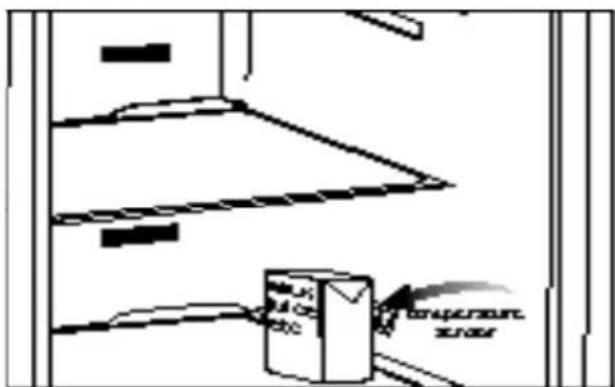
text_image
Temperature Sensor3 Installation
natural_image
Illustration of a hand inserting a component into a device casing (no text or symbols visible)natural_image
Diagram showing a beam supported at both ends with curved arrows indicating rotational motion (no text or symbols)natural_image
Line drawing of a hand placing a component into a storage cabinet shelf (no text or symbols)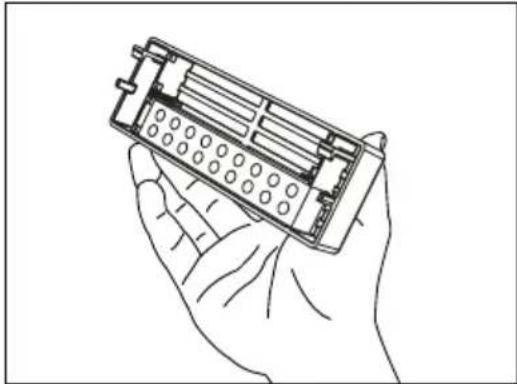
natural_image
Line drawing of a hand holding an open battery pack (no text or symbols)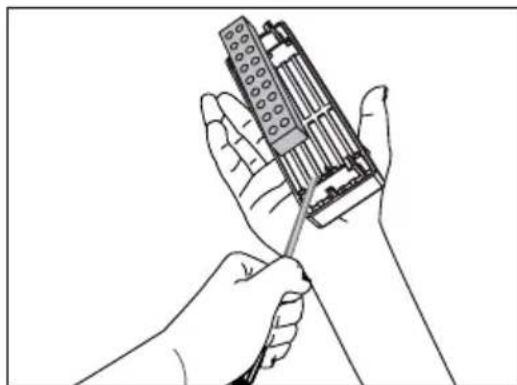
natural_image
Line drawing of two hands using a tool to adjust or install electronic components (no text or symbols visible)Compartiments amuse-gueule
natural_image
Line drawing of a hand placing a tray into a refrigerator with a rack inside (no text or symbols)Support à œufs
natural_image
Technical line drawing of a mechanical component with circular cavities (no text or symbols)Fontaine frigorifique
natural_image
Simple line drawing of a test tube submerged in a container (no text or symbols)natural_image
Line drawing of a refrigerator interior showing front and side views (no text or symbols)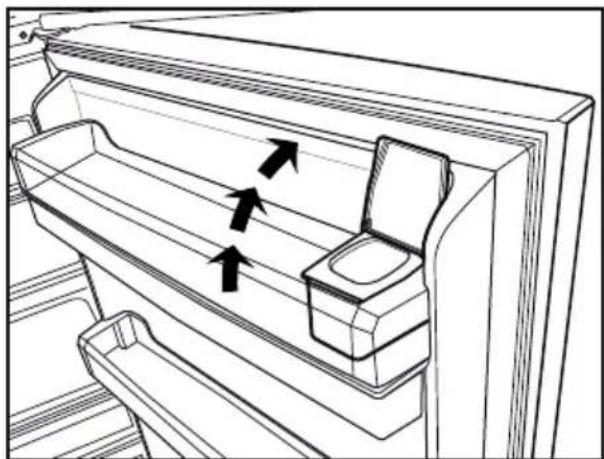
natural_image
Line drawing of a refrigerator interior showing internal compartments and doorways (no text or symbols)Avertissement !
natural_image
Technical line drawing of a mechanical assembly with exploded view (no text or symbols)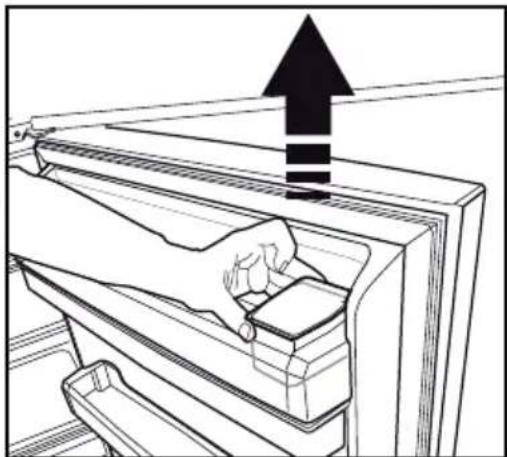
natural_image
Line drawing of a hand placing a component into a refrigerator with an upward arrow indicating motion (no text or symbols)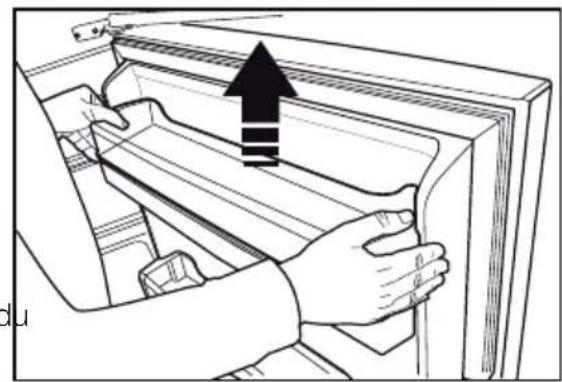
natural_image
Illustration of hands installing or adjusting a door panel with an upward arrow (no text or symbols)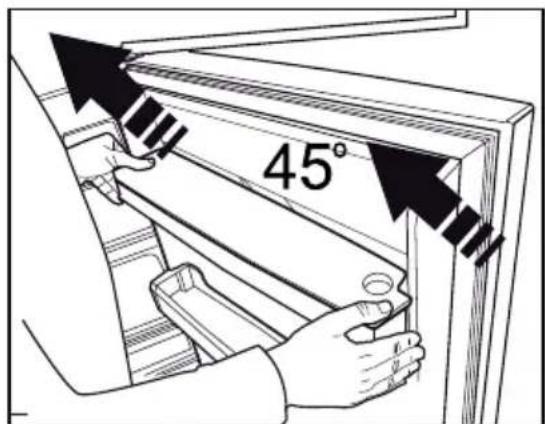
text_image
45°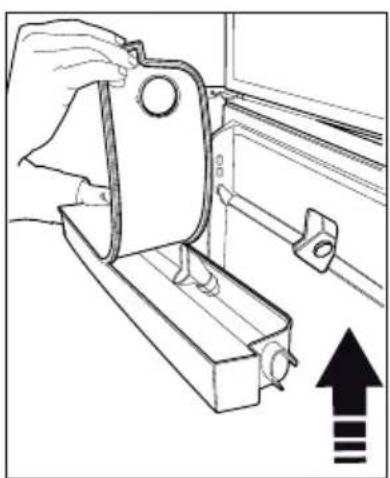
natural_image
Line drawing of a hand operating a mechanical clamp or bracket with an upward arrow indicating motion (no text or symbols)Bac à eau
natural_image
Line drawing of a hand inserting a card into a monitor (no text or symbols)text_image
Technical diagram showing four sequential steps of a mechanical assembly with directional arrows indicating motion or movement.Éclairage bleu
natural_image
Line drawing of a refrigerator interior showing ventilation grilles and doorways (no text or symbols)natural_image
Technical line drawing of a mechanical assembly with two arrows indicating direction (no text or symbols)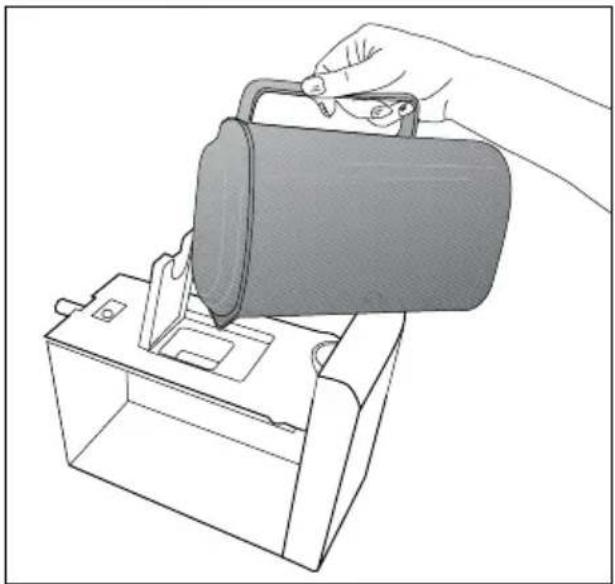
natural_image
Line drawing of a hand inserting a device into a box (no text or symbols)natural_image
Illustration of a hand inserting a circular component into a rectangular device with a handle (no text or symbols)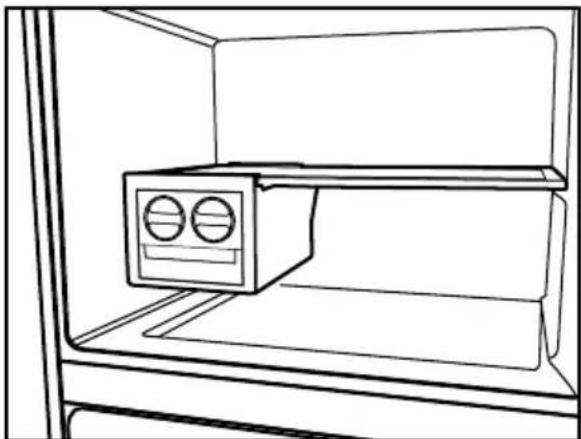
natural_image
Line drawing of an open refrigerator with a mounted air conditioner unit (no text or symbols)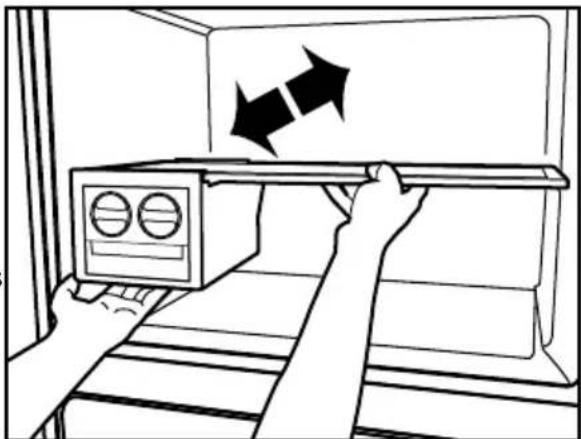
natural_image
Illustration of a hand placing a microwave oven into a rack with two arrows indicating direction (no text or symbols)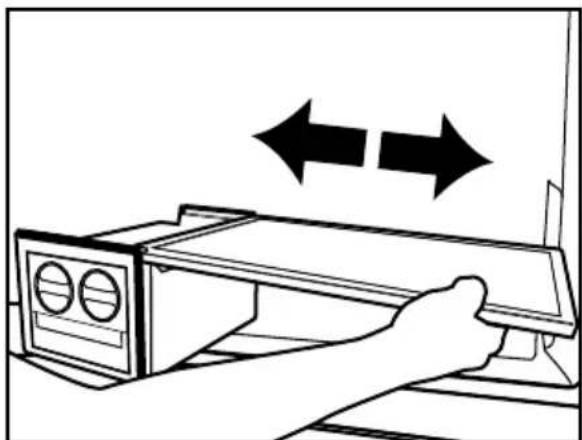
natural_image
Line drawing of a hand operating a device with two double-headed arrows indicating bidirectional motion (no text or symbols)natural_image
Diagram showing a device with a lightning bolt and cable, no text or symbols presentnatural_image
Technical line drawing of a mechanical component with a base and mounting bracket (no text or symbols)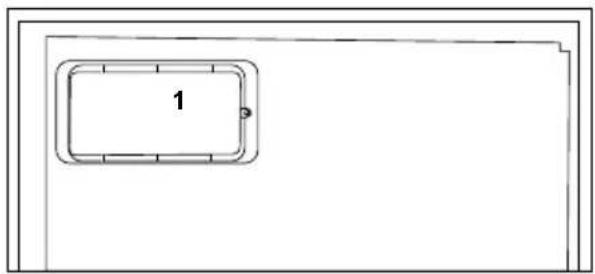
natural_image
Simple line drawing of a rectangular frame with a numbered label '1' in the center (no other text or symbols)تأمين سلامة الأطفال
natural_image
Pure electrical circuit lines without any symbols
natural_image
Simple line drawing of a kitchen appliance with a bag and a tray, no text or symbols present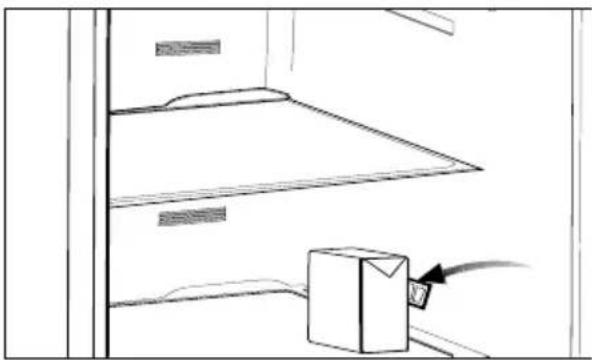
natural_image
Simple line drawing of a cabinet shelf with a box and cable inserted (no text or symbols)natural_image
Hand inserting a component into a device panel (no text or symbols visible)natural_image
Diagram showing a rectangular structure with upward and downward arrows indicating rotational or directional motion (no text or symbols)تغير مصباح الإضاءة
natural_image
Line drawing of a hand placing a grating into a refrigerator (no text or symbols)二十五 حامل البيض
natural_image
Technical line drawing of a mechanical component with multiple circular cavities (no text or symbols)natural_image
Line drawing of a hand placing a grid object into a rack (no text or symbols)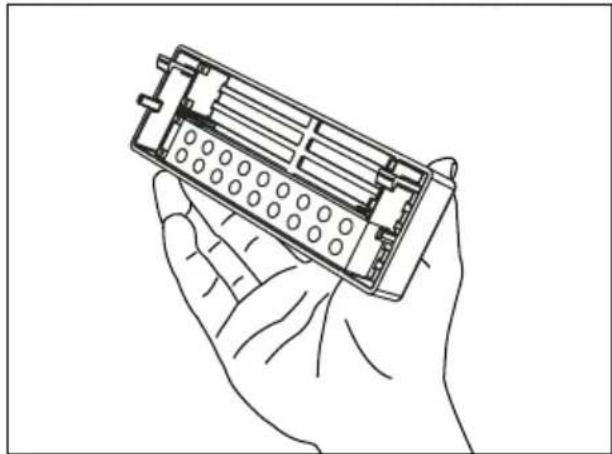
natural_image
Line drawing of a hand holding an open battery pack (no text or symbols)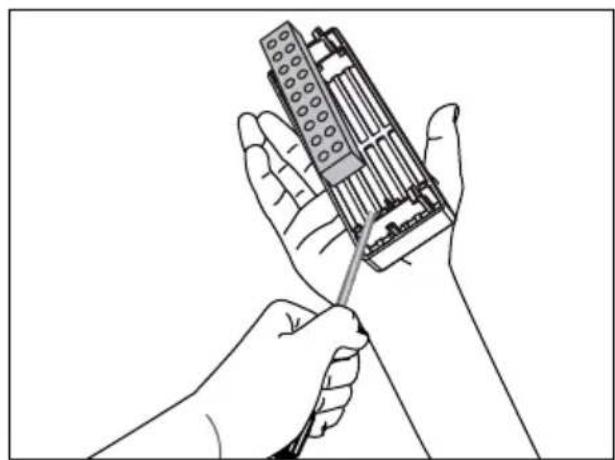
natural_image
Illustration of a hand holding a handheld electronic device with a screwdriver inserted (no text or symbols visible)natural_image
Line drawing of a refrigerator interior showing two doors with arrows indicating flow direction (no text or symbols)تحذير!
natural_image
Simple line drawing of a rectangular container with a central trough (no text or symbols)استخدام صنبور الماء
natural_image
Technical line drawing of a mechanical assembly with exploded view (no text or symbols)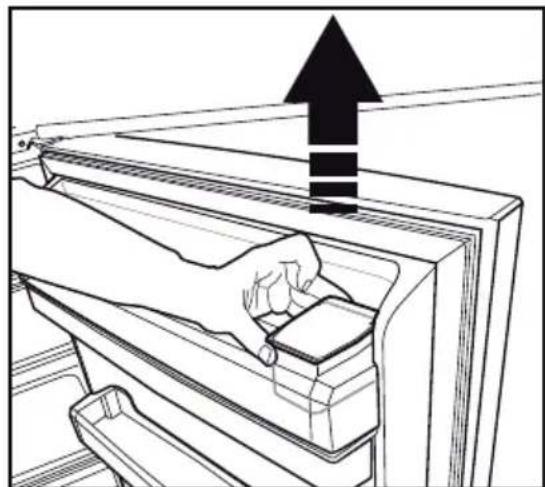
natural_image
Line drawing of a hand cleaning a refrigerator with an upward arrow (no text or symbols)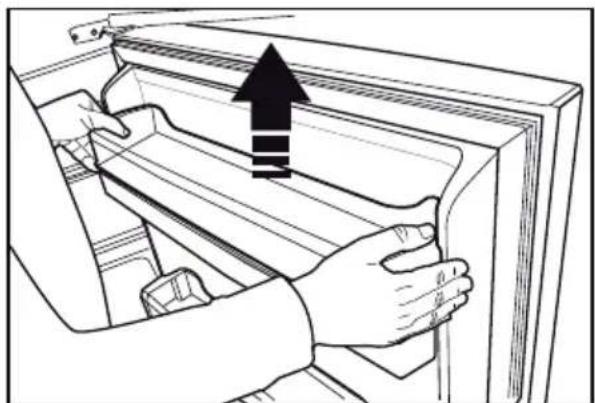
natural_image
Illustration of hands installing or adjusting a door panel with an upward arrow (no text or symbols)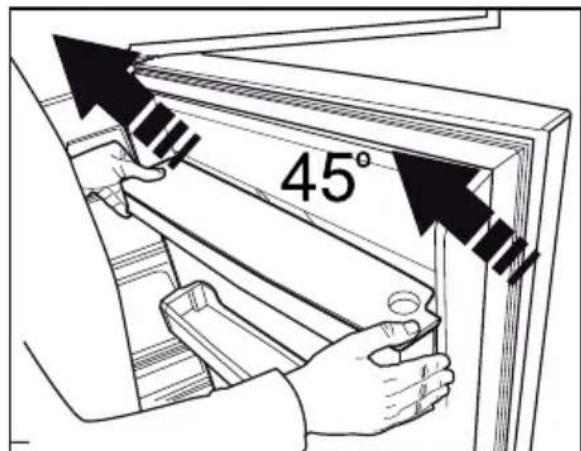
text_image
45°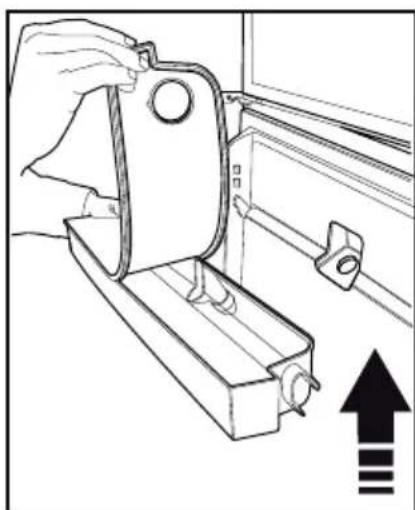
natural_image
Line drawing of a hand holding a mechanical bracket with an upward arrow and three vertical lines indicating alignment or movement (no text or symbols present)text_image
Technical diagram showing four sequential steps of a mechanical assembly or lifting process, labeled 1 to 4.درج المياه
natural_image
Line drawing of a hand inserting a remote control panel into a monitor (no text or symbols)التجميد التلقائي
(في بعض الموديلات)
natural_image
Technical line drawing of a mechanical assembly with two arrows indicating direction (no text or symbols)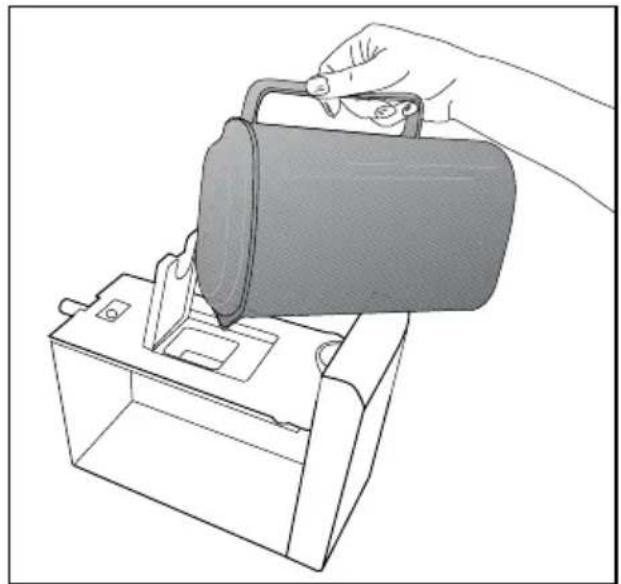
natural_image
Line drawing of a hand pouring liquid into a container using a bag (no text or symbols)مصباح أزرق
(في بعض الموديلات)
natural_image
Line drawing of an oven with grating and two circular components, no text or symbols presentnatural_image
Illustration of a hand inserting a circular button into a wall-mounted device (no text or symbols)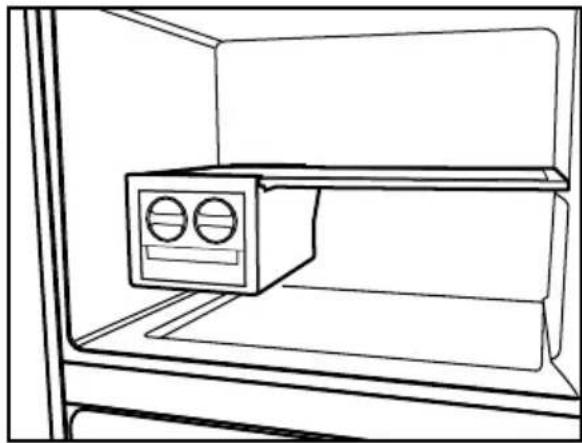
natural_image
Line drawing of an open refrigerator with a mounted air conditioner unit (no text or symbols)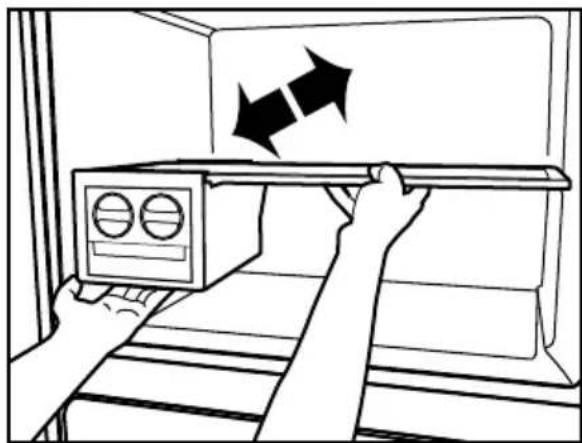
natural_image
Illustration of a hand opening a cabinet with two arrows indicating direction (no text or symbols)