Luna - Electric charger Charge Amps - Free user manual and instructions
Find the device manual for free Luna Charge Amps in PDF.


User questions about Luna Charge Amps
0 question about this device. Answer the ones you know or ask your own.
Ask a new question about this device
Download the instructions for your Electric charger in PDF format for free! Find your manual Luna - Charge Amps and take your electronic device back in hand. On this page are published all the documents necessary for the use of your device. Luna by Charge Amps.
USER MANUAL Luna Charge Amps
text_image
Charge Amps Luna M CHARGE AMPSQuick Guide
Dansk Nederlands
Deutsch Norsk
English Português
Español Suomi
Français Svenska
Charge Amps Luna
text_image
CHARGE AMPS A B CSupport
If you need service or repair, start by contacting the supplier from whom you purchased the product.
Charge Amps App
Please download our App for full control, adjusting settings and enabling smart charging and scheduling.

Charge Amps Cloud
Please create an account in the Charge Amps Cloud to configure, control and manage your charger via our web interface.

text_image
My charge space →https://my.charge.space/
Full product information
Visit www.chargeamps.com for Charge Amps Luna Installation manual, Charge Amps Luna User Manual and other product documentation.

text_image
Product information →https://www.chargeamps.com/product/charge-amps-luna/
Sikkerhed
Read all instructions before use.
- Improper use may create a risk of personal injury.
- The product must only be installed by a qualified electrician in accordance with the Installation Manual.
- National usage requirements and restrictions apply.
- Only use this product for charging compatible electric vehicles.
- Never use an adapter between the EV socket outlet and the charging cable.
- Cord extension sets are not allowed to be used.
- Inspect the product for visible damage before use.
- Never attempt to repair or use the product if it is damaged.
- Do not immerse the product in water, subject it to physical abuse or insert foreign objects in any part of the product.
- Never attempt to disassemble the product in any way.
- The owner is responsible for informing users of the compatibility of any charging point.
Neglecting to follow and carry out the abovementioned directions, instructions and safety precautions implies that any warranty provisions will be cancelled and that Charge Amps can reject any and all claims for compensation in connection with any injuries/damage or incidents – direct or indirect – that are a result of such negligence.
Hereby, Charge Amps declares that the radio equipment type Charge Amps Luna is in compliance with Directive 2014/53/EU. The full text of the EU declaration of conformity is available at the following internet address: https://www.chargeamps.com/product/charge-amps-luna/
© Copyright Charge Amps AB. All rights reserved. Copying, amending and translating are strictly forbidden without prior written approval from Charge Amps AB.
Technical data
| Charging mode Mode 3 | |
| EV power supply identifier | c |
| Metering 1 to 3 phase voltage, current and power | |
| Socket Type 2, 22 kW* | |
| Rated voltage (Un) 230/400 V | |
| Rated insulation voltage (Ui) 250/400 V | |
| Rated impulse withstand voltage (Uimp) | 4 kV |
| Rated frequency (f n) 50 Hz | |
| Rated current (In) 32 A | |
| Rated conditional short-circuit current (Icc) | 1,5 kA (measured at charger input terminals) |
| Rated diversity factor (RDF) 1 (can be lowered if used together with a load balancing functionality) | |
| Dimensions (W x D x H) 210 x 80 x 220 mm | |
| Characteristics of power supply and output | AC EV supply equipment connected to AC supply network, permanently connected |
| Assembly type AECVS | |
| RFID Type: ISO/IEC 14443 Typ A 13.56 MHz | |
| MifareRange: 13.553 – 13.567 MHzMax output: 24 dBm | |
Bluetooth Version: Bluetooth 5.0 (LE) and
Bluetooth LE 5.3 certified
Range: 2400 - 2480 MHz
Max output: 19 dBm
Wi-Fi Type: 802.11 b/g/n/ax
Range: 2412 - 2484 MHz
Max output: 20.5/20.0/19.0/19.0
dBm@802.11b/g/n/ax.
Cellular networks communication Type: LTE-FDD and GSM
Supported bands: B3/B7/B8/B20/B28
Range: 703–915/1710–1785/2500–
2570 MHz
Max output: 25 dBm @LTE-FDD,
35 dBm @GSM.
SIM-card: built-in
*The charging power is subject to external conditions, such as outside temperature, car battery state of charge, or if there's a load balancing function or charging schedule applied.
Start/Stop charging
Start
Connect the EV connector to the car. Lift the socket cover and connect the EV plug to the EV socket. If RFID is activated, briefly hold the RFID tag in front of the RFID reader to initiate charging.
Stop
Disconnect the EV connector from the car and disconnect the EV plug from the EV socket.
Model overview and status indications
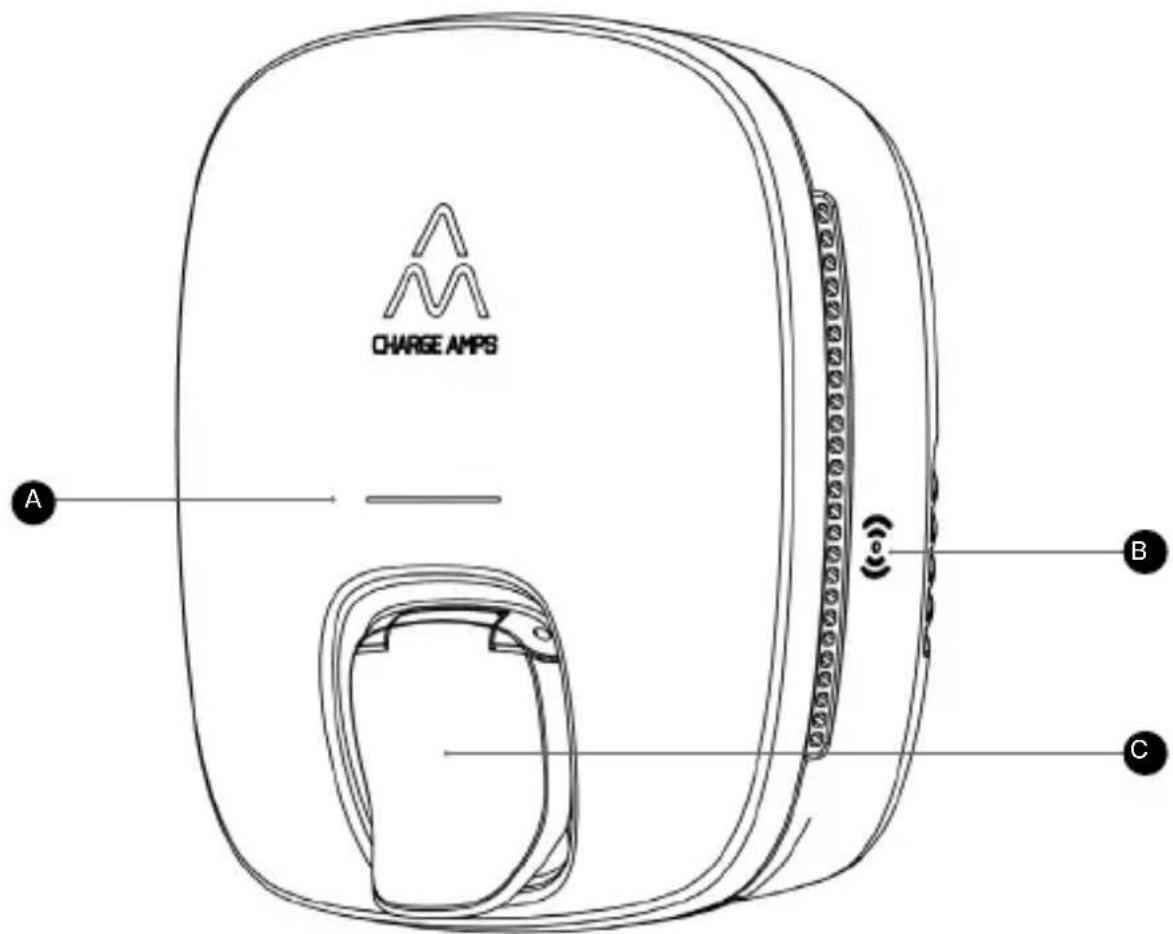
See the Model overview picture on page two as a reference:
A Status LED
B RFID reader
c EV socket
Status indications Status LED
| Ready to charge Green steady light |
| Charging Blue pulsating light |
| Charging complete Yellow steady light |
Error Red light
See Charge Amps Luna User Manual for a full explanation of all Status indications.
Seguridad
Frösundaleden 2B, 8th floor
SE-169 75 Solna, Sweden
Doc. Nr: 131464
Rev: 03
© Copyright Charge Amps AB.
All rights reserved