GHDSW4K3 - HDMI switch IOGEAR - Free user manual and instructions
Find the device manual for free GHDSW4K3 IOGEAR in PDF.


| Product Type | HDMI Switch |
| Brand | IOGEAR |
| Model | GHDSW4K3 |
| Number of HDMI Inputs | 3 |
| Number of HDMI Outputs | 1 |
| Maximum Resolution | 4K Ultra HD (4096 x 2160) at 60 Hz |
| HDMI Version | HDMI 2.0 |
| Supported Video Formats | 4:4:4, 4:2:2, 4:2:0 |
| Refresh Rate | 24/25/30/50/60 Hz |
| Input Connectors | 3 x HDMI Female |
| Output Connector | 1 x HDMI Female |
| Power | 5 V DC via micro-USB |
| Power Consumption | 2.5 W (max) |
| Remote Control Included | Yes, infrared |
| Selection Methods | Push button on front panel, IR remote control |
| LED Indicators | Power and port selection |
| Housing Material | ABS Plastic |
| Dimensions (L x W x H) | 120 x 60 x 20 mm |
| Weight | 100 g |
| Warranty | 3 years |
| Package Contents | Switch, IR remote, micro-USB cable, quick start guide, warranty card |
| Maintenance | Clean with a soft, dry cloth. Do not use chemicals. |
| Operating Temperature | 0°C to 40°C |
| Operating Humidity | 10% to 85% non-condensing |
Frequently Asked Questions - GHDSW4K3 IOGEAR
User questions about GHDSW4K3 IOGEAR
0 question about this device. Answer the ones you know or ask your own.
Ask a new question about this device
Download the instructions for your HDMI switch in PDF format for free! Find your manual GHDSW4K3 - IOGEAR and take your electronic device back in hand. On this page are published all the documents necessary for the use of your device. GHDSW4K3 by IOGEAR.
USER MANUAL GHDSW4K3 IOGEAR
3-Port True 4K UltraHD Switch with HDMI® Connectivity
1 x GHDSW4K3
1 x IR Remote Control
1 x Micro-USB Power Cable
1 x Quick Start Guide
1 x Warranty Card
System Requirements
• HDMI output from source
• HDMI input to display
- HDMI 18Gbps Cables (HDMI 2.0); compatible with HDMI 10.2Gbps cables (HDMI 1.4) but resolution limited to 4K@30Hz
• 2m HDMI2.0 Cable needed for 4K@60Hz
Introduction
The 3-Port True 4K UltraHD Switch allows you to quickly connect 3 Ultra High-Definition HDMI sources to your 4K HDMI display and easily switch between them via front panel pushbuttons or IR remote control. The front panel's LEDs indicate the source device selected for the display. The GHDSW4K3 supports True 4K at 4096 x 2160 @ 60Hz (4:4:4).
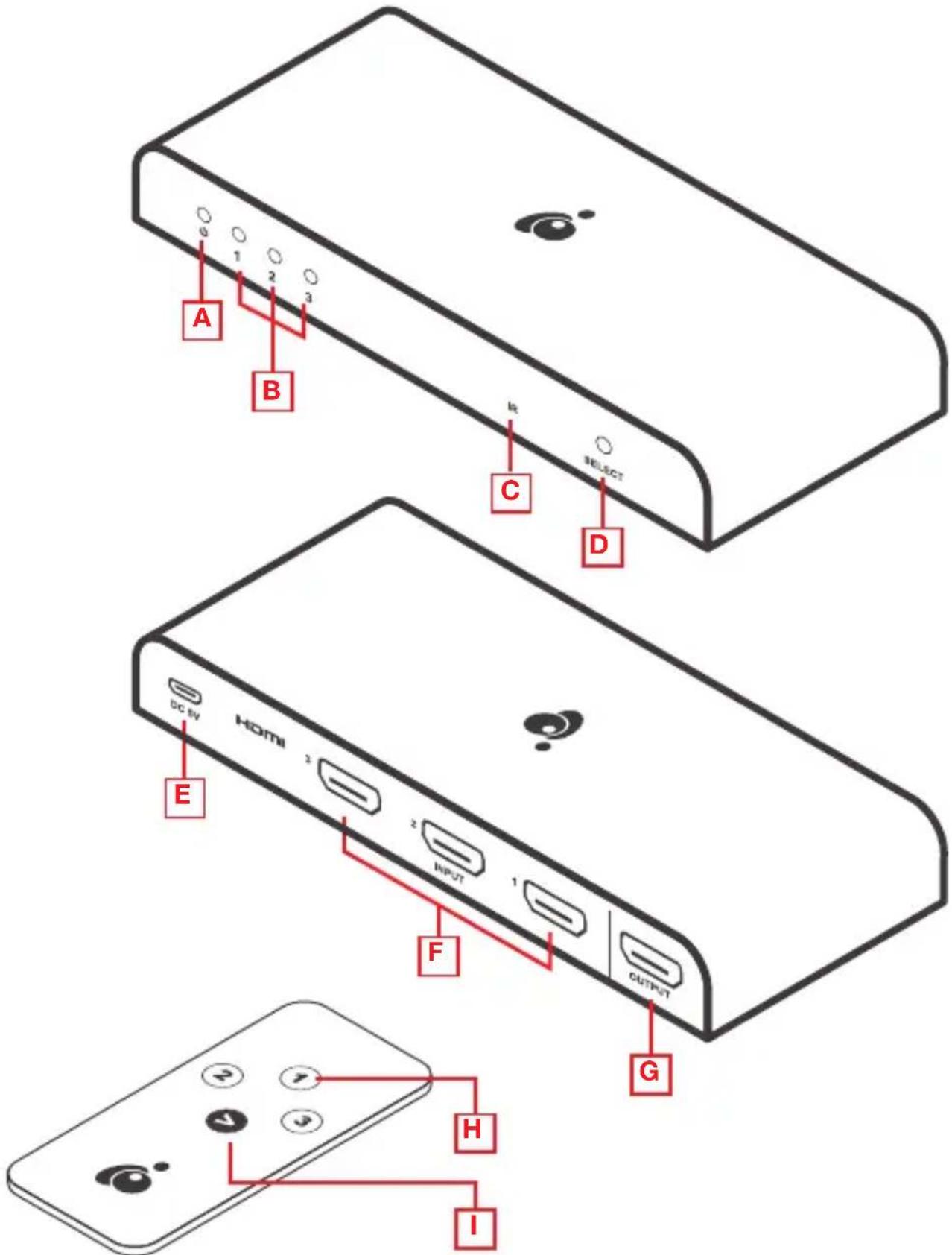
A. Power Indicator LED
B. Port Indicator LEDs
C. IR Receiver
D. Port Selection Switch
E. Power Jack
F. HDMI Input Ports
G. HDMI Output Port
H. Port Selection Buttons
I. Port Next Button
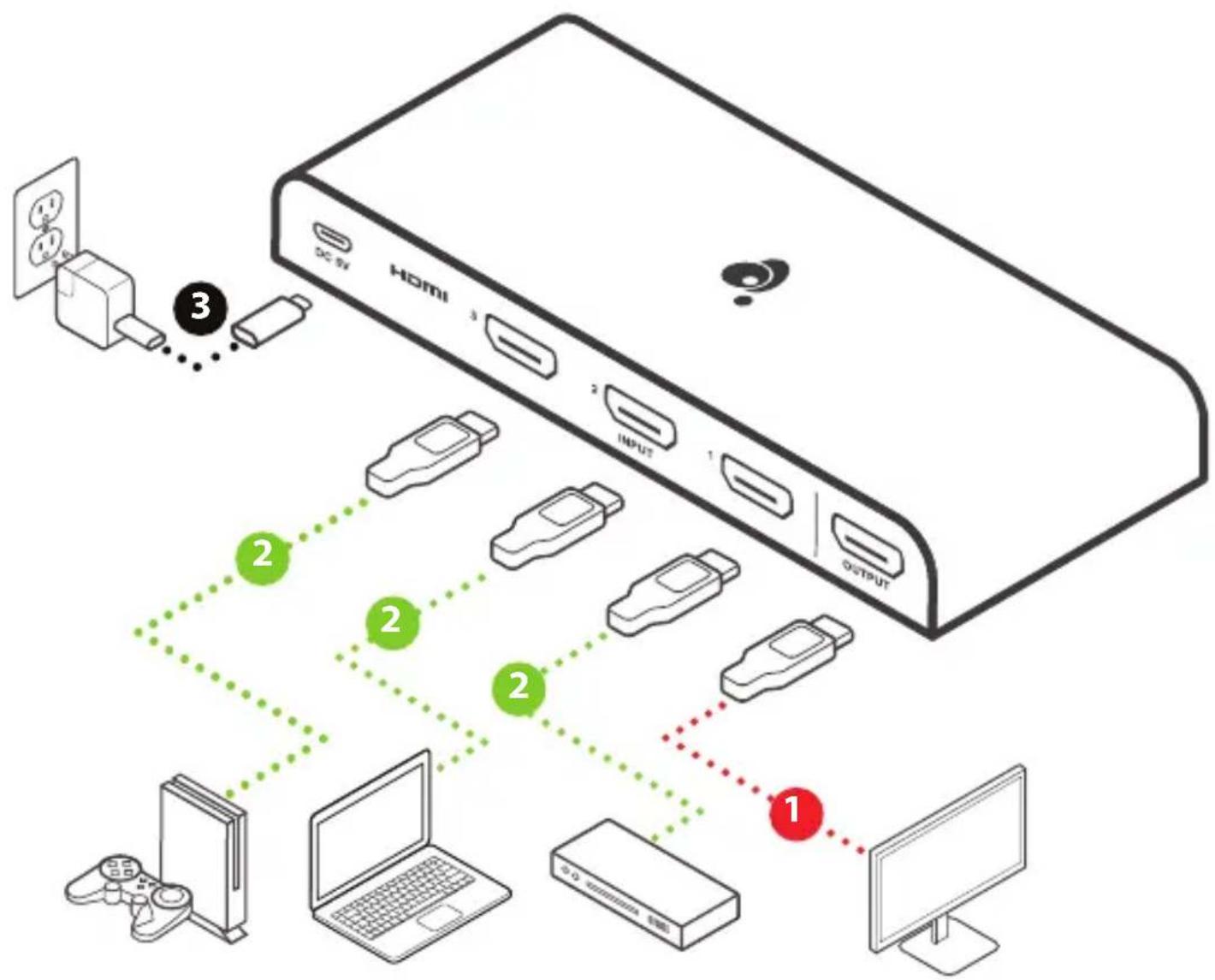
Step 1
Use an HDMI cable to connect to the HDMI input port of the video display to the HDMI output port on the rear of the GHDSW4K3.
Step 2
Use HDMI cables to connect to the HDMI output ports on the source devices to the HDMI input ports on the GHDSW4K3. The HDMI input ports are located on the rear of the switch.
Step 3
Plug the Micro USB power cable into the power port of the GHDSW4K3 and connect the other end to a USB port on your HDTV or to a USB power supply.
flowchart
graph TD
    A["Top Device"] -->|3| B["USB Port 1"]
    B --> C["USB Port 2"]
    C --> D["USB Port 3"]
    D --> E["Output"]
    E --> F["Computer"]
    G["Desktop Computer"] --> H["Laptop"]
    I["Video Player"] --> J["Laptop"]
    K["Digital Display"] --> L["Digital Display"]
The 3-Port True 4K UltraHD Switch offers two methods for source device selection — from the front panel using the pushbutton, or with the included IR remote.
Remote Control Selection
To select a source device with the remote control, press the number button that corresponds to the source you wish to view. Alternatively, you can cycle through the available source devices by pushing the Next button on the remote-control unit.
FAQ (Frequently Asked Questions)
- Which resolutions does the GHDSW4K3 support?
4096*2160@24/25/30/50/60Hz
3840*2160@24/25/30/50/60Hz
2560*1440@50/60Hz
1920*1080@50/60Hz
1920*1200@50/60Hz
1080i/720p/576p/576i/480p/480i@50/60Hz
- What version HDMI is the GHDSW4K3?
HDMI 2.0
- Can I use an HDMI 1.4 cable?
Yes, but maximum resolution is limited to 4K@30Hz
Limited Warranty
Warranty Information
This product carries a 3 Year Limited Warranty. For the terms and conditions of this warranty, please go to https://www.iogear.com/support/warranty
Register online at https://www.iogear.com/register
Important Product Information
Product Model
Serial Number
WE'RE HERE TO HELP YOU!
NEED ASSISTANCE SETTING UP THIS PRODUCT?
Make sure you:
- Visit www.iogear.com for more product information
- Visit www.iogear.com/support for live help and product support
IOGEAR
https://iogear.custhelp.com
support@iogear.com
www.iogear.com
Federal Communication Commission Interference Statement
This equipment has been tested and found to comply with the limits for a Class B digital service, pursuant to Part 15 of the FCC rules. These limits are designed to provide reasonable protection against harmful interference in a residential installation. Any changes or modifications made to this equipment may void the user's authority to operate this equipment. This equipment generates, uses, and can radiate radio frequency energy. If not installed and used in accordance with the instructions, may cause harmful interference to radio communications. However, there is no guarantee that interference will not occur in a particular installation. If this equipment does cause harmful interference to radio or television reception, which can be determined by turning the equipment off and on, the user is encouraged to try to correct the interference by one or more of the following measures:
- Reorient or relocate the receiving antenna
- Increase the separation between the equipment and receiver
- Connect the equipment into an outlet on a circuit different from that to which the receiver is connected
- Consult the dealer or an experienced radio/TV technician for help
FCC Caution: Any changes or modifications not expressly approved by the party responsible for compliance could void the user's authority to operate this equipment.
This device complies with Part 15 of the FCC Rules. Operation is subject to the following two conditions:
(1) this device may not cause harmful interference, and
(2) this device must accept any interference received, including interference that may cause undesired operation.
CE Statement:
This device has been tested and found to comply with the following European Union directives: Electromagnetic Capability (2004/108/EC), Low Voltage (2006/95/EC) and R&TTED (1999/5/EC).
1080i/720p/576p/576i/480p/480i@50/60Hz
https://iogear.custhelp.com
support@iogear.com
www.iogear.com
https://www.iogear.com/support/warranty
https://iogear.custhelp.com
support@iogear.com
www.iogear.com
- System Requirements
- Introduction
- Step 1
- Step 2
- Step 3
- Remote Control Selection
- FAQ (Frequently Asked Questions)
- Limited Warranty
- Warranty Information
- WE'RE HERE TO HELP YOU!
- NEED ASSISTANCE SETTING UP THIS PRODUCT?
- Make sure you:
- IOGEAR
- Federal Communication Commission Interference Statement
- CE Statement:
Brand : IOGEAR
Model : GHDSW4K3
Category : HDMI switch