
YC-01-SS-001 - Other computer accessories Vevor - Free user manual and instructions
Find the device manual for free YC-01-SS-001 Vevor in PDF.
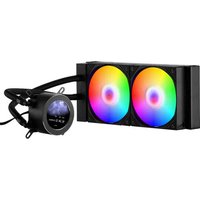


| Product Type | Water Cooler for Processor (AIO) |
| Brand | Vevor |
| Model | YC-01-SS-001 |
| Cooling Method | Water |
| Radiator Size | 240 mm |
| Radiator Dimensions | 274 x 120 x 27 mm (approx.) |
| Fan Size | 120 mm x 2 |
| Fan Type | PWM (Pulse Width Modulation) |
| Maximum Speed | 2200 RPM |
| Max. Noise Level | ≤ 33.7 dB(A) |
| Power Requirement | 12 V DC, 0.7 A |
| Intel Socket Compatibility | LGA 115X, 1366, 2011, 1700, 1200 |
| AMD Socket Compatibility | AM5, AM4 |
| LED Lighting | Addressable RGB Pump (5V A-RGB) |
| Control Software | Available for download |
| Accessories Included | Thermal paste, spatula, Intel/AMD brackets, screws, threaded rods |
| Net Weight | Approx. 1.5 kg (est.) |
| Radiator Material | Aluminum |
| Pump Material | Copper (cold plate) |
| Maintenance | Periodic cleaning of fans and radiator with compressed air |
| Safety | FCC compliant, WEEE directive 2012/19/EC |
| Warranty | See electronic warranty certificate at vevor.com/support |
Frequently Asked Questions - YC-01-SS-001 Vevor
User questions about YC-01-SS-001 Vevor
0 question about this device. Answer the ones you know or ask your own.
Ask a new question about this device
Download the instructions for your Other computer accessories in PDF format for free! Find your manual YC-01-SS-001 - Vevor and take your electronic device back in hand. On this page are published all the documents necessary for the use of your device. YC-01-SS-001 by Vevor.
USER MANUAL YC-01-SS-001 Vevor
Technical Support and E-Warranty Certificate
www.vevor.com/support
CPU COOLER
USER'S GUIDE
MODEL:YC-01-SS-001
We continue to be committed to provide you tools with competitive price. "Save Half", "Half Price" or any other similar expressions used by us only represents an estimate of savings you might benefit from buying certain tools with us compared to the major top brands and does not necessarily mean to cover all categories of tools offered by us. You are kindly reminded to verify carefully when you are placing an order with us if you are actually saving half in comparison with the top major brands.
MODEL:YC-01-SS-001

NEED HELP? CONTACT US!
Have product questions? Need technical support? Please feel free to contact us:
Technical Support and E-Warranty Certificate www.vevor.com/support
This is the original instruction, please read all manual instruction carefully before operating. VEVOR reserves a clear interpretation of the user manual. The appearance of the product shall be subject to the product you received. Please forgive us that we won't inform you of any technology or software updates on our product.
 | Warning-To reduce the risk of injury, user must read in manual carefully. |
 | This device complies with Part 15 of the FCC Rules. (1) This device is subject to the following two conditions: (1) this device cause harmful interference, and (2) this device must accept interference received, including interference that may cause undesired operation. |
 | This product is subject to the provision of European Di 2012/19/EC. The symbol showing a wheelie bin crossed through indicates that the product requires separate refuse collection in the European Union. This applies to the product and all accessories marked with this symbol. Products are such may not be discarded with normal domestic waste must be taken to a collection point for recycling electric electronic devices |
INSTRUCTIONS
●The CPU cooler is equipped with a 240mm radiator and two 120mm fans to ensure excellent heat transfer from the CPU. ●The LED lighting on the pump matches your PC build. ●The 120mm PWM fan delivers improved airflow for extreme CPU cooling performance. ●Compatible with multiple sockets like Intel 115X/1366/2011/1700/1200 & AMD AM5/AM4. ●Compatible with Windows 10 and Windows 11 operating systems.
Parameter
Model: YC-01-SS-001 Input: 12VDC 0.7A ▶ Cooling Method: Water ➢ Maximum Rotational Speed: 2200 RPM Noise Level: ≤33.7dB-A
Installation Steps
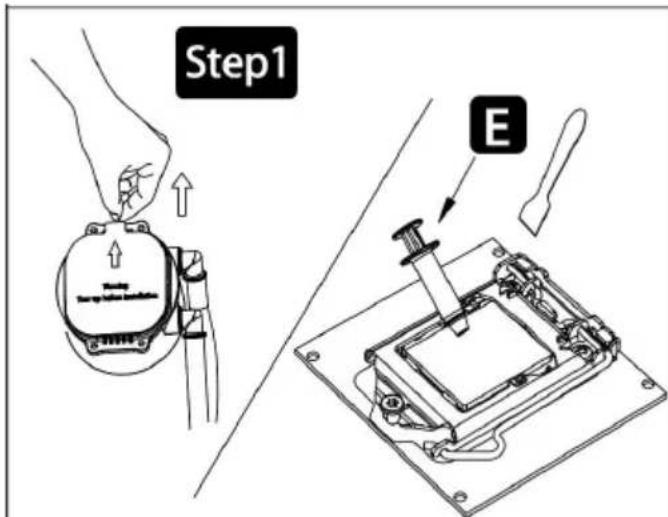
Remove the protection film / Apply thermal paste
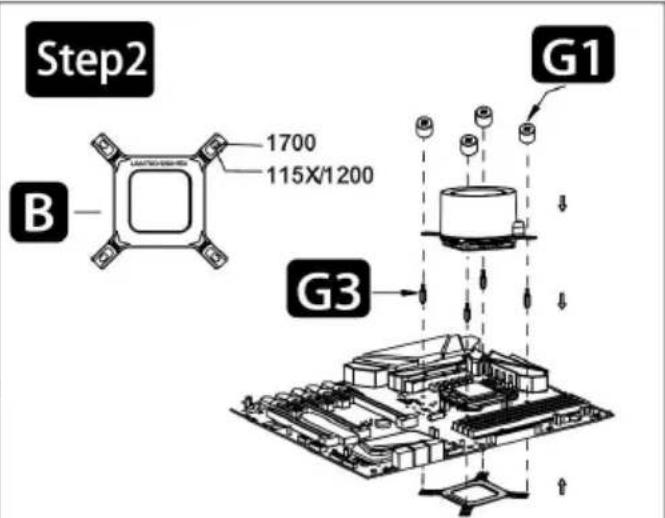
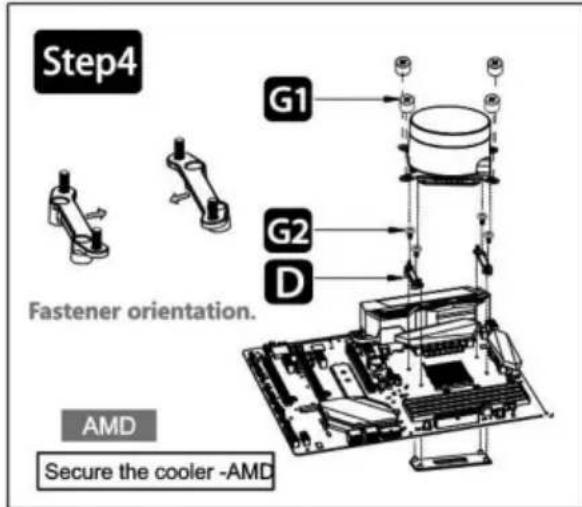
Secure the cooler - Intel LGA 115X/1200/1700
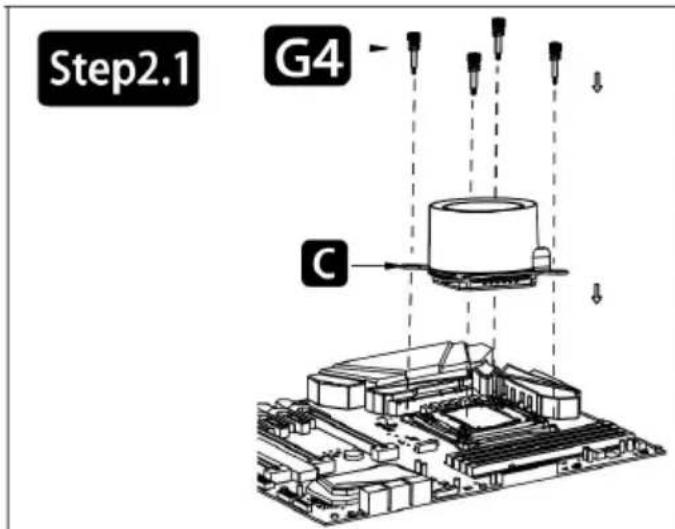
Secure the cooler - Intel LGA 2011

Remove the motherboard socket. Retain the backplane.
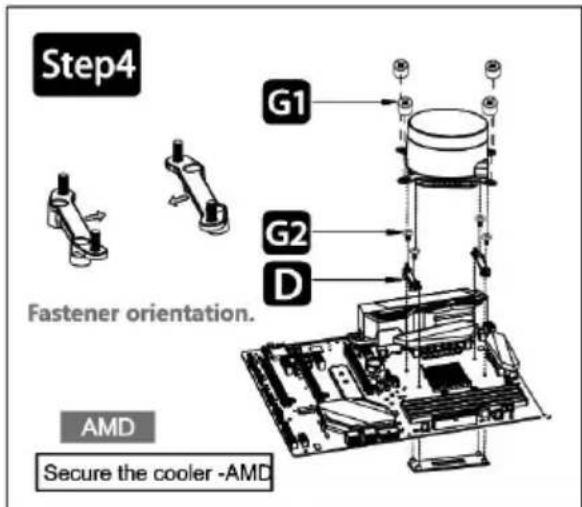
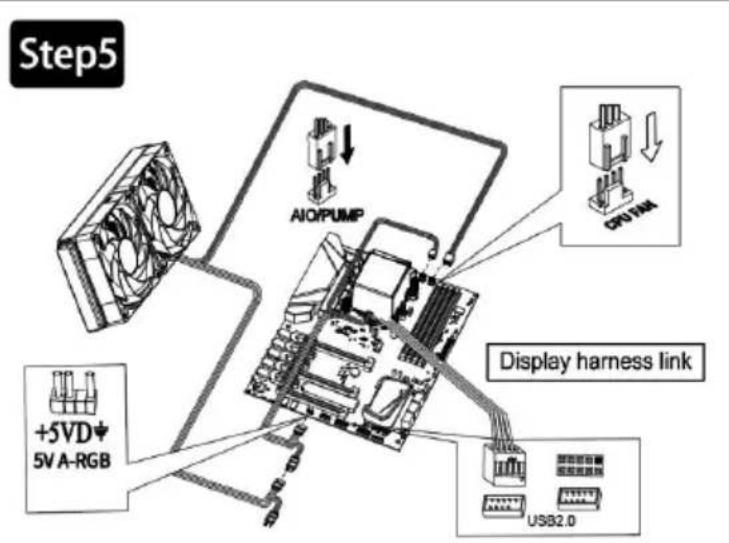
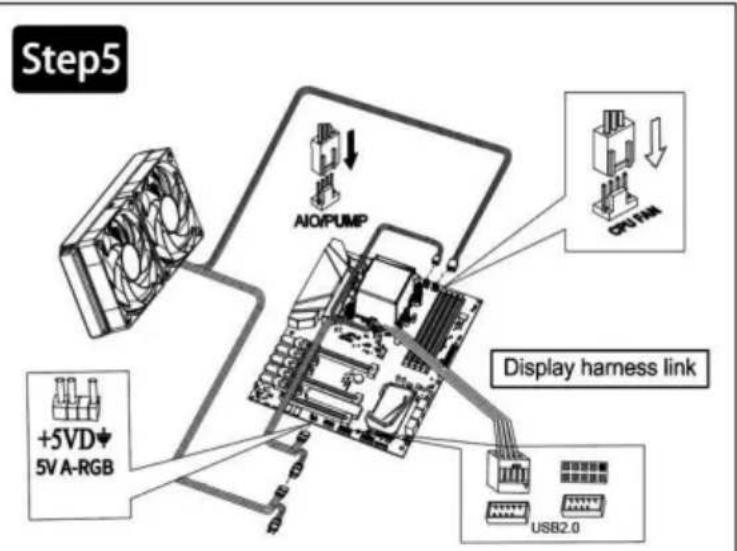
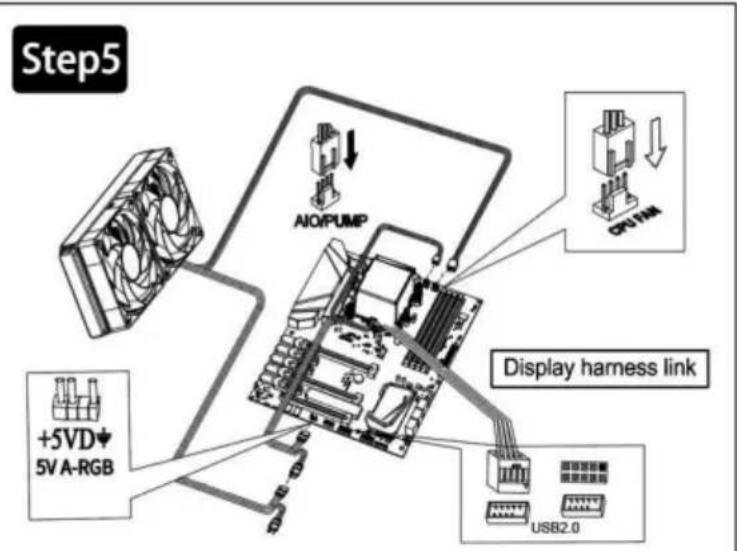
Connect the display to the motherboard's USB 2.0 interface (usually located at the bottom of the motherboard; align the connector with the gap and insert it. Refer to the motherboard manual for details).
Connect the 3-pin connector from the pump unit to the AIO/PUMP socket on the motherboard.
Connect the 4-pin fan PWM connector to the CPU_FAN socket on the motherboard.
Connect the fan to the 5V ARGB socket on the motherboard.
List of Accessories
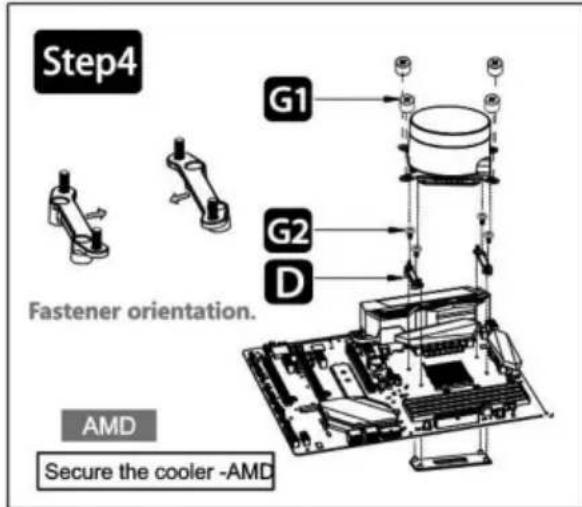
Intel backplate * 1, Intel bracket * 1, AMD bracket * 2, Thermal grease / scraper * 1, Installation nuts * 4, AMD bracket screws * 4, Intel screw rods * 4, 2011 studs * 4
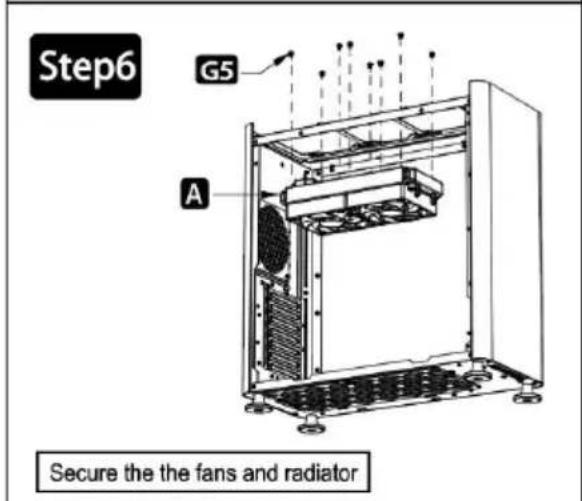
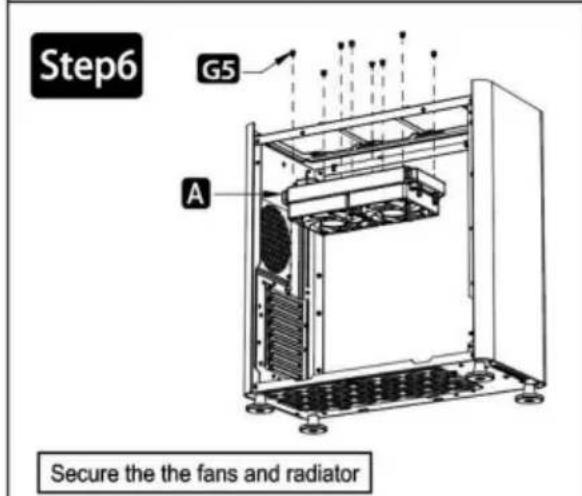
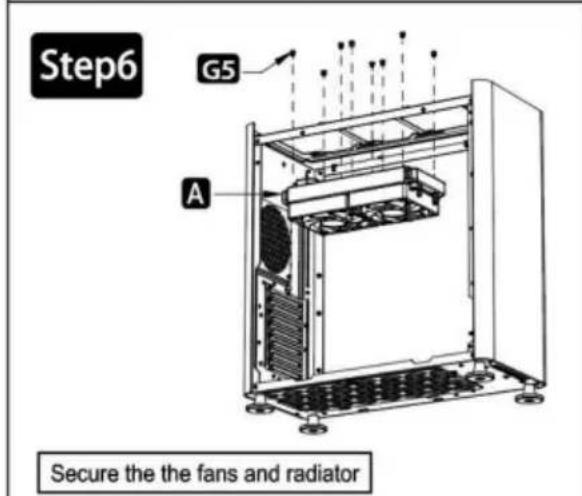
Chassis screws: 8 for 240 water cooling
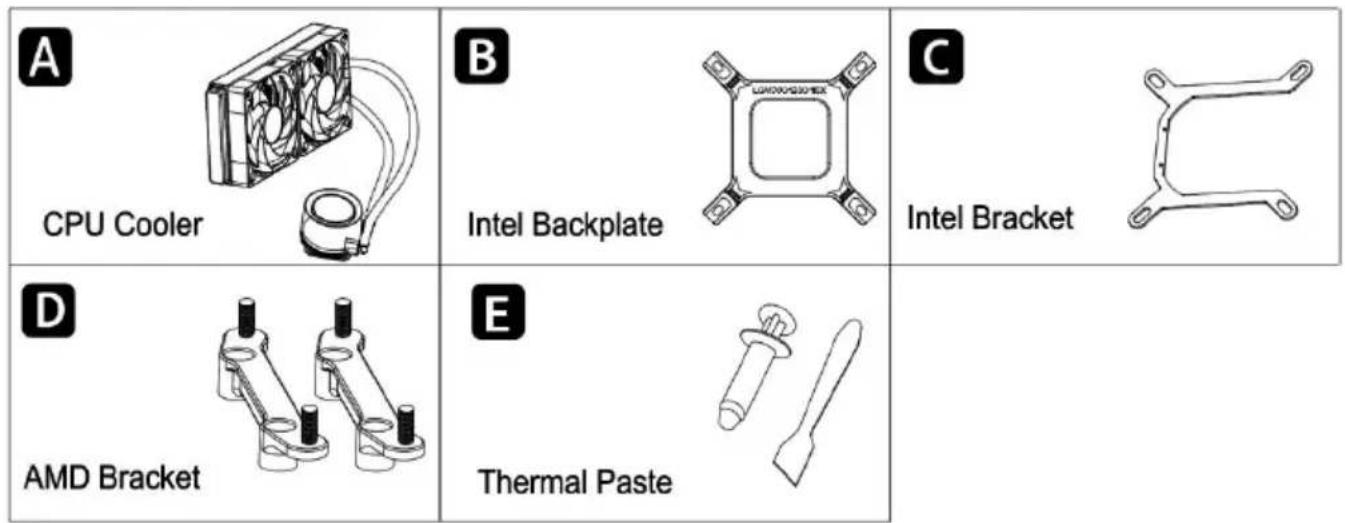
| G1 Screw x4 | G2 AMD Bracke Screw x4 | G3 Intel Screw Stud x4 |
| G4 2011 Screw Stud x4 | G5 Case Screws 240/280: x8 360: x12 |
Software Download Link
https://diy-ideas.oss-us-west-1.aliyuncs.com/wp-content/uploads/2024/11/Vevor_CPU_cooler_driver_SKU2-4.zip
Manufacturer: Shanghai Muxin Muye Youxian Gongsi
Address: Shuangchenglu 803nong11hao1602A-1609shi, Baoshan District, Shanghai 200000 CN.
Imported to AUS: SIHAO PTY LTD. 1 ROKEVA STREET EASTWOOD NSW 2122 Australia
Imported to USA: Sanven Technology Ltd. Suite 250, 9166 Anaheim Place Rancho Cucamonga, CA 91730
| EC | REP |
E-CrossStu GmbH
Mainzer Landstr.69, 60329 Frankfurt am Main
| UK | REP |
YH CONSULTING LIMITED.
C/O YH Consulting Limited Office 147, Centurion House, London Road, Staines-upon-Thames, Surrey, TW18 4
VEVOR®
TOUGH TOOLS, HALF PRICE
Technical Support and E-Warranty Certificate www.vevor.com/support
VEVOR®
TOUGH TOOLS, HALF PRICE
NEED HELP? CONTACT US!
Please connect the display to the motherboard USB2.0 interface (generally in the lowermost position of the motherboard, according to the direction of the interface gap can be inserted, guests can check according to the motherboard manual)
Connect the 3-pin connector from the pump unit to AIO/PUMP socket on the motherboard
Connect the 4-pin fan PWM connector to the CPU_FAN socket on the motherboard.
Connect the fan to the 5V ARGB socket on the motherboard.
Manufacturer: Shanghaimuxinmuyeyouxiangongsi
Address: Shuangchenglu 803nong11hao1602A-1609shi, baoshanqu, Shanghai 200000 CN.
Imported into Australia: SIHAO PTY LTD. 1 ROKEVA STREET EASTWOOD NSW 2122 Australia
C/O YH Consulting Limited Bureau 147, Centurion House, Route de Londres, Staines-upon-Thames, Surrey, TW18 4AX
VEVOR®
TOUGH TOOLS, HALF PRICE
www.vevor.com/support
CPU COOLER
USER MANUAL
MODEL: YC-01-SS-001
Secure the cooler - Intel LGA 2011
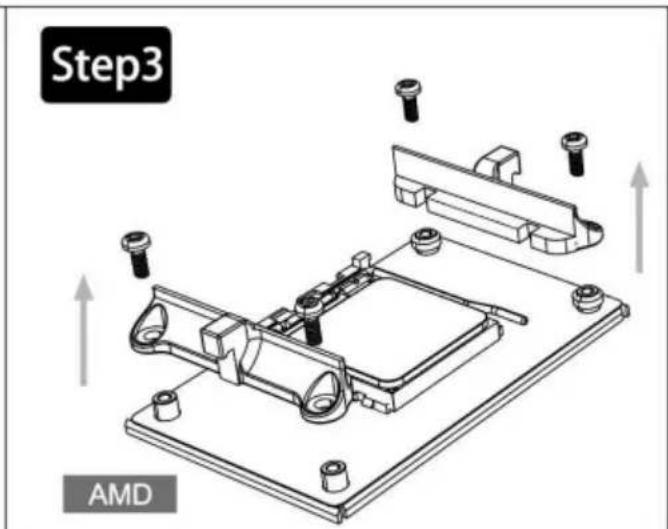
Remove the motherboard socket. Retain the backplane.
Connect the display to the motherboard's USB 2.0 interface (usually located at the bottom of the motherboard; align the connector with the notch and insert it. Refer to the motherboard manual for details).
Connect the 3-pin connector from the pump unit to the AIO/PUMP socket on the motherboard.
Connect the 4-pin fan PWM connector to the CPU_FAN socket on the motherboard.
Connect the fan to the 5V ARGB socket on the motherboard.
List of accessories
https://diy-ideas.oss-us-west-1.aliyuncs.com/wp-content/uploads/2024/11/Vevor_CPU_cooler_driver_SKU2-4.zip
Manufacturer: Shanghaimuxinmuyeyouxiangongsi
Address: Shuangchenglu 803nong11hao1602A-1609shi, baoshanqu, Shanghai 200000 CN.
Imported into Australia by: SIHAO PTY LTD. 1 ROKEVA STREETEASTWOOD NSW 2122 Australia
Imported into the USA by: Sanven Technology Ltd. Suite 250, 9166 Anaheim Place, Rancho Cucamonga, CA 91730
| Vertreter der EG |
E-CrossStu GmbH
Mainzer Landstr.69, 60329 Frankfurt am Main.
| UK REP |
YH CONSULTING LIMITED.
C/O YH Consulting Limited Office 147, Centurion House, London Road, Staines-upon-Thames, Surrey, TW18 4AX
VEVOR®
TOUGH TOOLS, HALF PRICE
electronics www.vevor.com/support
CPU COOLER
USER GUIDE
MODEL: YC-01-SS-001
Connect the display to the motherboard's USB 2.0 interface (usually located at the bottom of the motherboard; align the connector with the notch and insert it. Refer to the motherboard manual for details).
Connect the 3-pin connector from the pump unit to the AIO/PUMP socket on the motherboard.
Connect the 4-pin fan PWM connector to the CPU_FAN socket on the motherboard.
Connect the fan to the 5V ARGB socket on the motherboard.
https://diy-ideas.oss-us-west-1.aliyuncs.com/wp-content/uploads/2024/11/Vevor_CPU_cooler_driver_SKU2-4.zip
Imported into Australia: SIHAO PTY LTD. 1 ROKEVA STREET, EASTWOOD NSW 2122, Australia
Imported into the USA: Sanven Technology Ltd. Suite 250, 9166 Anaheim Place, Rancho Cucamonga, CA 91730
Connect the display to the motherboard's USB 2.0 interface (usually located at the bottom of the motherboard; align the connector with the notch and insert it. Refer to the motherboard manual for details).
Connect the 3-pin connector from the pump unit to the AIO/PUMP socket on the motherboard.
Connect the 4-pin fan PWM connector to the CPU_FAN socket on the motherboard.
Connect the fan to the 5V ARGB socket on the motherboard.
Accessories list
https://diy-ideas.oss-us-west-1.aliyuncs.com/wp-content/uploads/2024/11/
Vevor_CPU_cooler_driver_SKU2-4.zip
Manufacturer: Shanghaimuxinmuyeyouxiangongsi
Address: Shuangchenglu 803nong11hao1602A-1609shi, baoshanqu, shanghai 200000 CN.
Imported to Australia: SIHAO PTY LTD. 1 ROKEVA STREETEASTWOOD NSW 2122 Australia
Imported to USA: Sanven Technology Ltd. Suite 250, 9166 Anaheim Place, Rancho Cucamonga, CA 91730
E-CrossStu GmbH
NEED HELP? CONTACT US!
Connect the display to the motherboard USB2.0 interface (usually located at the lowest position on the motherboard; insert according to the direction of the interface gap. Refer to the motherboard manual for details).
Connect the 3-pin connector from the pump unit to the AIO/PUMP socket on the motherboard.
Connect the 4-pin fan PWM connector to the CPU_FAN socket on the motherboard.
Connect the fan to the 5V ARGB socket on the motherboard.
Accessories list
https://diy-ideas.oss-us-west-1.aliyuncs.com/wp-content/uploads/2024/11/
Vevor_CPU_cooler_driver_SKU2-4.zip
Manufacturer: Shanghaimuxinmuyeyouxiangongsi
Address: Shuangchenglu 803nong11hao1602A-1609shi, baoshanqu, Shanghai 200000 CN.
Imported into AUS: SIHAO PTY LTD. 1 ROKEVA STREETEASTWOOD NSW 2122 Australia
Imported into USA: Sanven Technology Ltd. Suite 250, 9166 Anaheim Place, Rancho Cucamonga, CA 91730
| Przedstaw ciel UE |
| REP WIELKIEJ BRYTANII |
E-CrossStu GmbH
Mainzer Landstr.69, 60329 Frankfurt am Main.
YH CONSULTING LIMITED.
C/O YH Consulting Limited Office 147, Centurion House, London Road, Staines-upon-Thames, Surrey, TW18 4AX
VEVOR®
TOUGH TOOLS, HALF PRICE
www.vevor.com/support
CPU COOLER
USER MANUAL
MODEL: YC-01-SS-001
NEED HELP? CONTACT US!
Secure the cooler - Intel LGA 2011
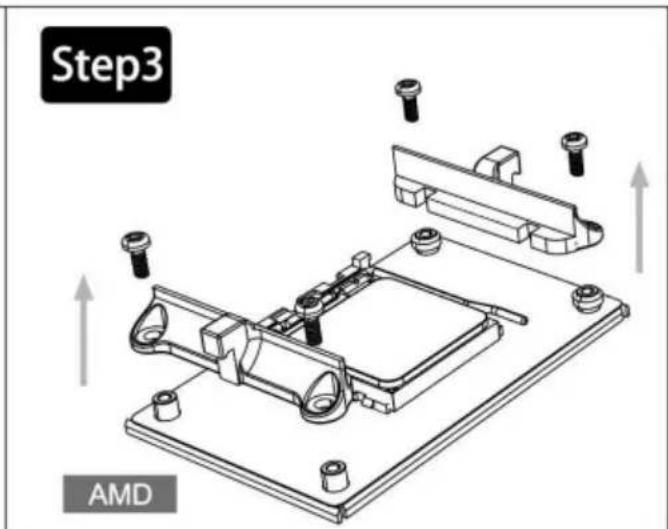
Remove the motherboard socket. Retain the backplane.
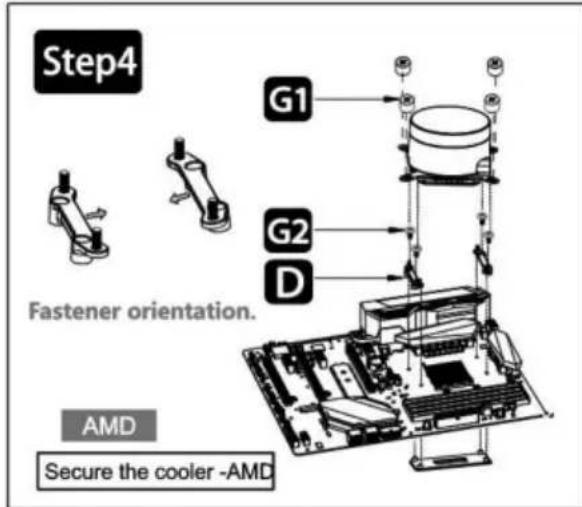
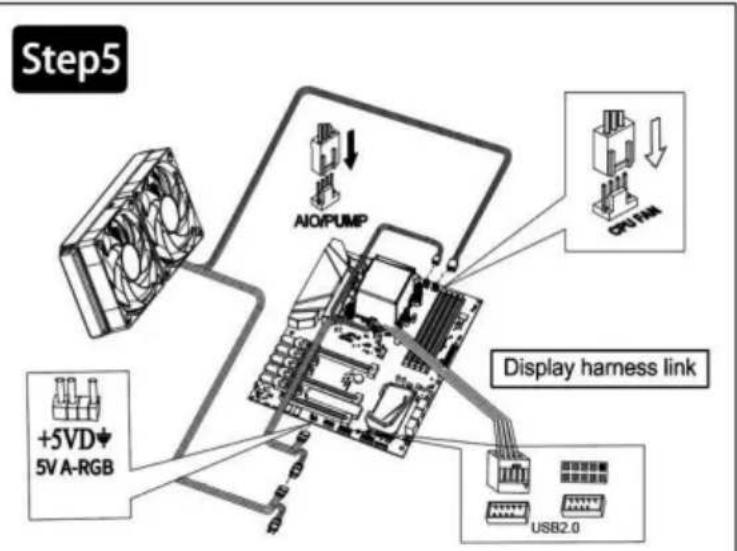
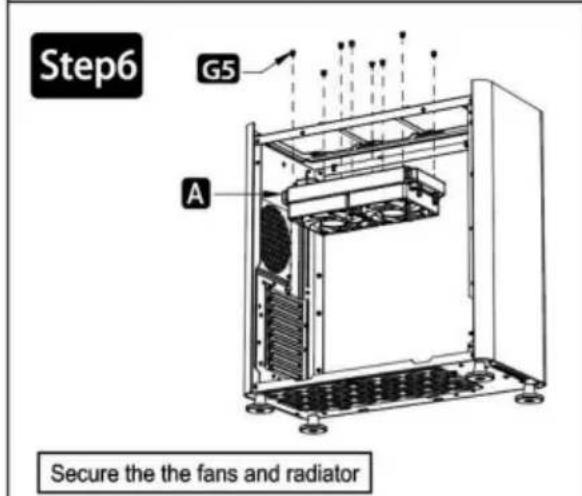
Connect the display to the motherboard USB 2.0 interface (usually located at the bottom of the motherboard; align the connector with the notch and insert. Refer to the motherboard manual for details).
Connect the 3-pin connector from the pump unit to the AIO/PUMP socket on the motherboard.
Connect the 4-pin fan PWM connector to the CPU_FAN socket on the motherboard.
Connect the fan to the 5V ARGB socket on the motherboard.
https://diy-ideas.oss-us-west-1.aliyuncs.com/wp-content/uploads/2024/11/Vevor_CPU_cooler_driver_SKU2-4.zip
Manufacturer: Shanghaimuxinmuyeyouxiangongsi
Address: Shuangchenglu 803nong11hao1602A-1609shi, baoshanqu, shanghai 200000 CN.
C/O YH Consulting Limited Office 147, Centurion House, London Road, Staines-upon-Thames, Surrey, TW18 4AX
VEVOR®
TOUGH TOOLS, HALF PRICE
Technical support and e-warranty certificate: www.vevor.com/support
VEVOR®
TOUGH TOOLS, HALF PRICE
www.vevor.com/support
CPU COOLER
USER GUIDE
MODEL: YC-01-SS-001
NEED HELP? CONTACT US!
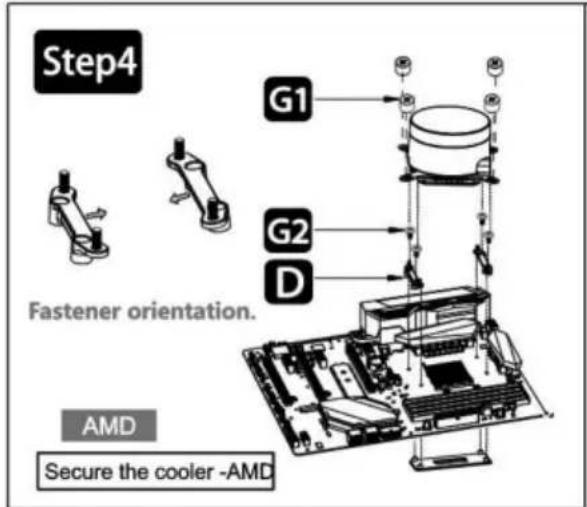
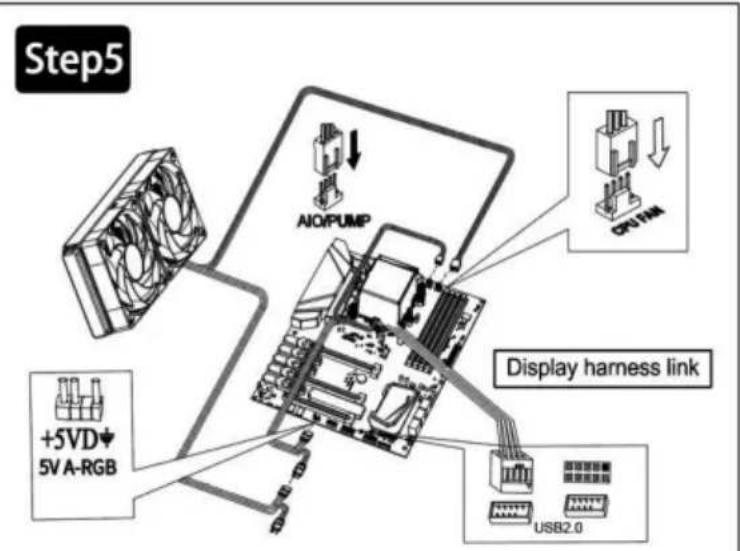
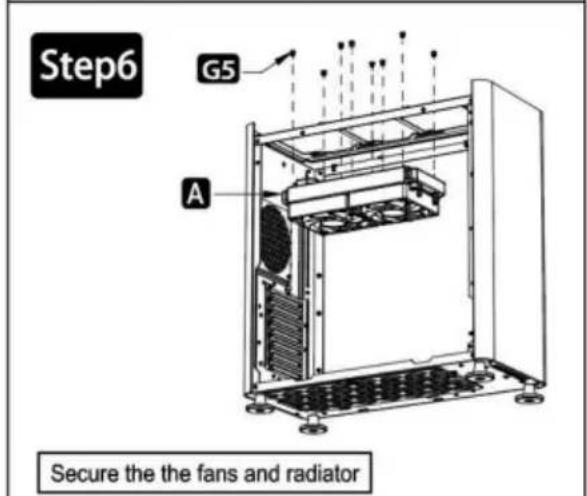
Connect the display to the motherboard's USB 2.0 interface (usually located at the bottom of the motherboard; align the connector with the interface gap. Refer to the motherboard manual for details).
Connect the 3-pin connector from the pump unit to the AIO/PUMP socket on the motherboard.
Connect the 4-pin fan PWM connector to the CPU_FAN socket on the motherboard.
Connect the fan to the 5V ARGB socket on the motherboard.
https://diy-ideas.oss-us-west-1.aliyuncs.com/wp-content/uploads/2024/11/
Vevor_CPU_cooler_driver_SKU2-4.zip
Manufacturer: Shanghaimuxinmuyeyouxiangongsi
Address: Shuangchenglu 803nong11hao1602A-1609shi, Baoshan District, Shanghai 200000 CN.
Imported to AUS: SIHAO PTY LTD. 1 ROKEVA STREET EASTWOOD NSW 2122 Australia
Imported to USA: Sanven Technology Ltd. Suite 250, 9166 Anaheim Place, Rancho Cucamonga, CA 91730
| EC | REP |
E-CrossStu GmbH
Mainzer Landstr. 69, 60329 Frankfurt am Main.
| UK | REP |
YH CONSULTING LIMITED.
C/O YH Consulting Limited Office 147, Centurion House, London Road, Staines-upon-Thames, Surrey, TW18 4AX
VEVOR®
TOUGH TOOLS, HALF PRICE
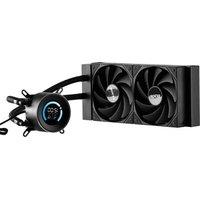
Brand : Vevor
Model : YC-01-SS-001
Category : Other computer accessories