Aton V2 - Headphones Newskill - Free user manual and instructions
Find the device manual for free Aton V2 Newskill in PDF.


| Product Type | Wireless Gaming Headset |
| Brand and Model | Newskill Aton V2 |
| Dimensions (L x W x H) | 203 x 85 x 195 mm |
| Weight | 310 g |
| Connection Type | USB Type-C, 2.4 GHz wireless, Bluetooth 5.0, 3.5 mm jack |
| Wireless Range | 10 meters |
| Battery | Lithium 3.7 V - 1500 mAh |
| Battery Life | 38 h (lighting on) / 60 h (lighting off) |
| Charging Time | Approximately 2.5 hours |
| Speakers | Diameter 50 mm, frequency response 20–20,000 Hz, impedance 32 Ω, sensitivity 118±3 dB |
| Microphone | Retractable, omnidirectional, sensitivity -38±3 dB, frequency response 100–10,000 Hz |
| Lighting | RGB: fast cycle, slow cycle, fixed colors, off |
| Earcup Material | Soft, breathable, sweat-resistant fabric |
| Headband | Metal, adjustable with 25 mm travel |
| Compatibility | PS4, PS5, Xbox Series X/S, Switch, PC, Mac, Smartphone |
| Box Contents | Headset, 2.4 GHz USB dongle, USB-C cable, 3.5 mm jack cable, dual jack adapter, accessories |
| Safety | High volume may damage hearing; packaging not suitable for children |
| Cleaning | Unplug before cleaning; use a soft, dry cloth; do not use corrosive liquids |
| Disposal | Recyclable according to local regulations |
Frequently Asked Questions - Aton V2 Newskill
User questions about Aton V2 Newskill
0 question about this device. Answer the ones you know or ask your own.
Ask a new question about this device
Download the instructions for your Headphones in PDF format for free! Find your manual Aton V2 - Newskill and take your electronic device back in hand. On this page are published all the documents necessary for the use of your device. Aton V2 by Newskill.
USER MANUAL Aton V2 Newskill
natural_image
Exterior view of a modern black and white headboard with a colorful illuminated bezel, against a solid blue background (no text or symbols visible)ATON V2
PROFESSIONAL WIRELESS GAMING HEADSET

Safety Instructions
- Listening at high-volume for prolonged periods of time can damage your hearing. Before using the headphones, set the volume to lowest level.
- Never leave children unsupervised with the packaging material. The packaging material poses a suffocation hazard. Children frequently underestimate the dangers.
- The packaging material is not a toy.
- This product does not contain any parts which can be serviced by the user.
Cleaning
- Disconnect the USB connection before cleaning.
- Only clean the outside of the product using a soft and dry cloth.
- Only use a clean, dry cloth for cleaning the product and never use any corrosive liquids.
Disposal
- Your product is designed and manufactured with high quality materials and components, which can be recycled and reused.
- Please be informed about the local separate collection system for electrical and electronic products.
- Please act according to your local rules and do not dispose of your old products with your normal household waste. The correct disposal of your old product will help prevent potential negative consequences to the environment and human health.
TECHNICAL SPECIFICATIONS
ENGLISH
| Model | Newskill ATON V2 |
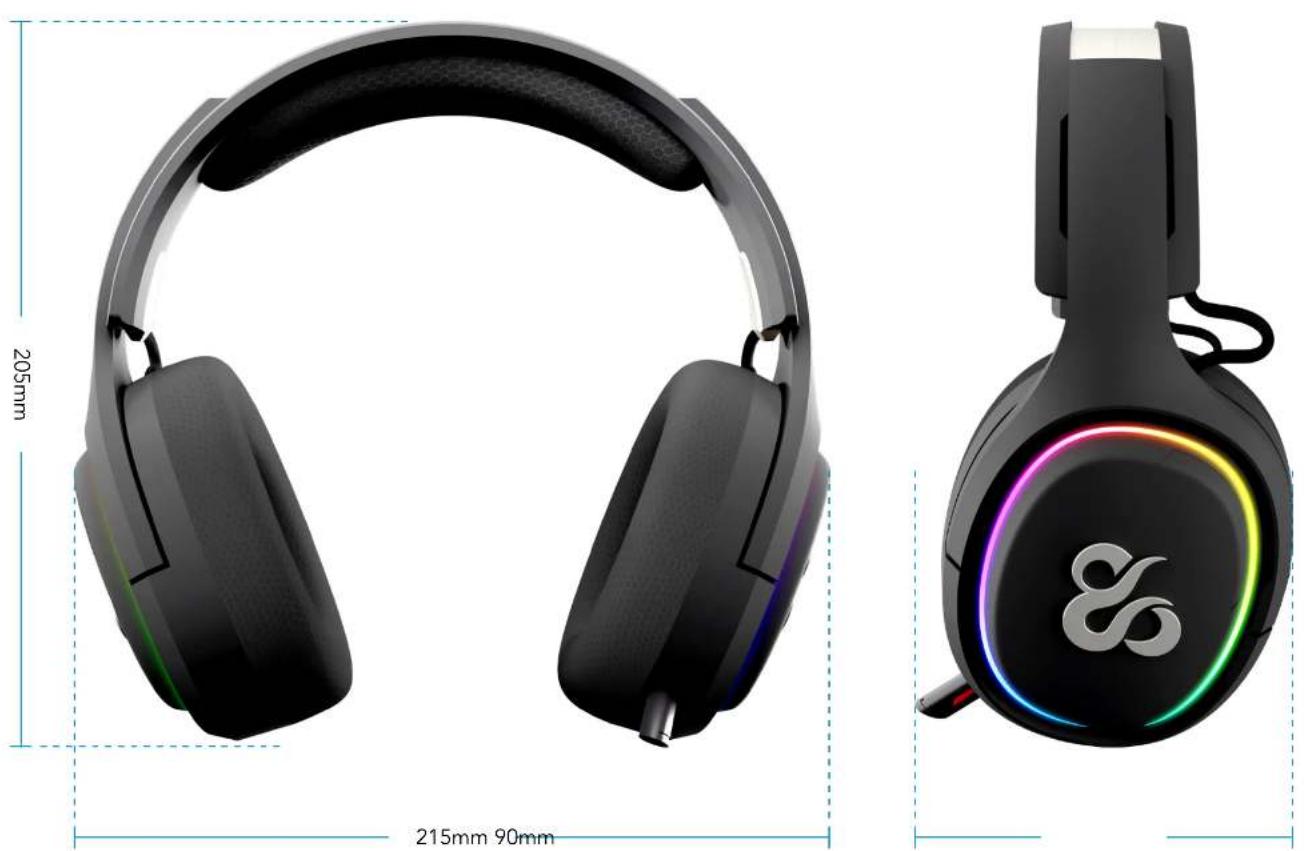
| Headset dimensions | 203*85*195MM (length*width*height) |
| Headset weight | 310 gr |
| Connection type | USB Type C to USB, 2.4Ghz Wireless Connection,Bluetooth 5.0 low latency, 3.5mm Jack to 3.5mm Jack (audio connection) |
| Connection Distance 10 Meters Approx | |
| Battery | 1500 mAh |
| Battery Durability | 38h (with lighting at a maximum of 60% volume) 60h (with lighting at a maximum of 60% volume) |
| RGB Fast RGB Cycle / Slow RGB Cycle / Fixed Colors / Off | |
| Wiring length 1.8m | |
| Earmuffs material Soft breathable sweat-resistant fabric | |
| Diadem Metallic, Dually adjustable with 25mm travel |
Microphone
| Type Retractable flexible microphone | |
| Polarity Omnidirectional | |
| pop Yes, removable | |
| Sensitivity -38±3dB | |
| response frequency | 100-10kHz |
| SPL Max. | -42±3dB |
| Backlight | Yes, Blue/Off |
Headphones
| Type | Stereo |
| Dimensions | 50mm |
| Sensitivity | 115±3dB |
| Impedance | 32 ±15% |
| Frequency range | 20-20,000Hz |
| Compatibility | PS4, PS5, Xbox Series X/S, Switch, PC, Smartphone |
| PS4/PS5 | Wireless 2.4Ghz |
| xbox series | 3.5mm jack |
| Switch Series | 3.5mm jack / Bluetooth 5.0 / WIred |
| smartphones Bluetooth 5 | 0 & Jack 3.5mm (depends on the terminal) |
| PC/Mac | Wireless 2.4Ghz / Bluetooth 5.0 / USB to USB Type C |
| Packaged Dimensions | 208*95*220mm (length*width*height) |
| Packaged Weight | 330gr |
WHAT IS IN THE BOX
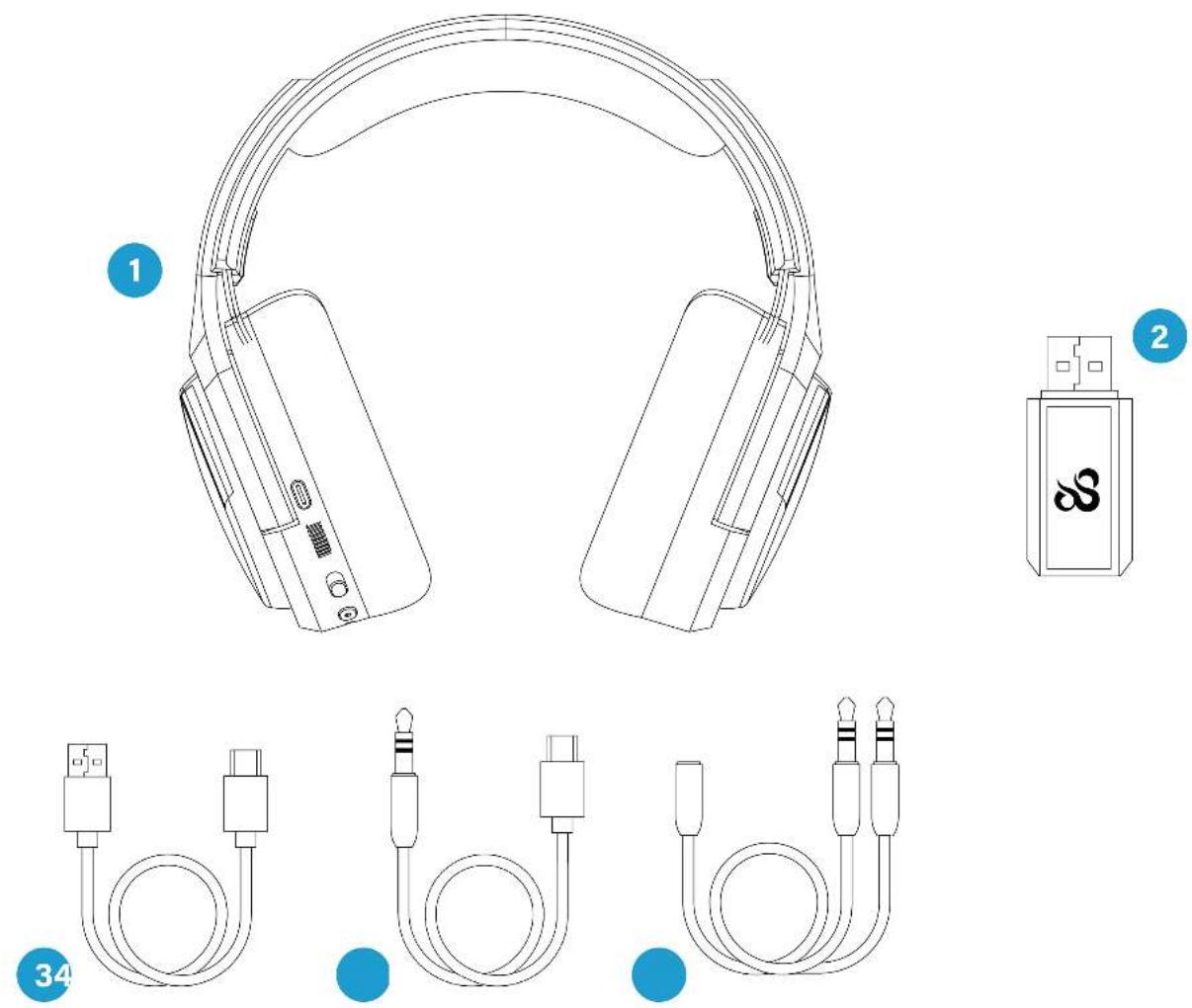
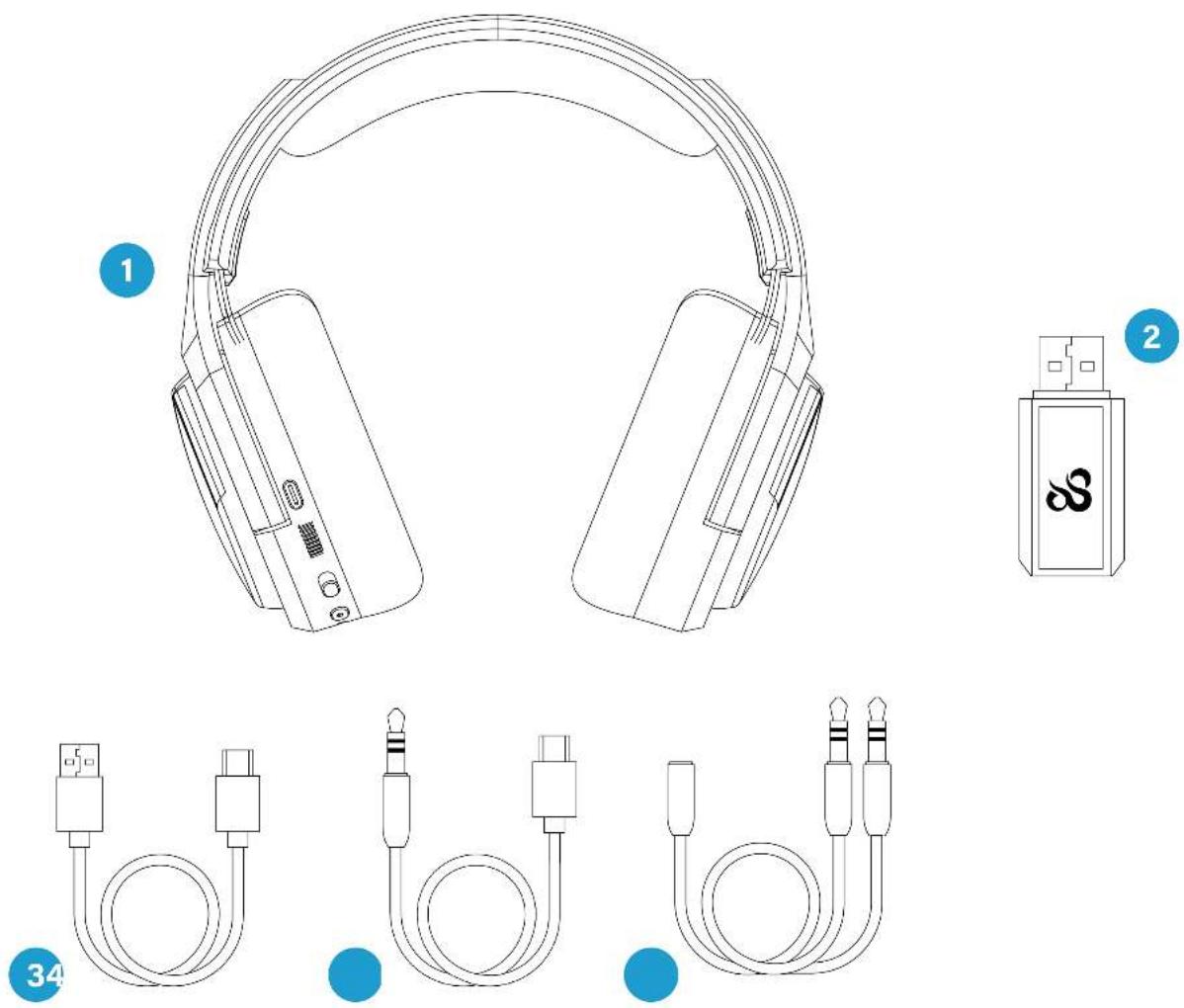
1 Headphones ATON
2 Wireless USB Dongle
3 USB to Type C cable
4 3.5mm Male to Type C cable
5 Adapter Jack 3.5mm x 2 to 1 Jack 3.5mm
6 Newskill Accessories
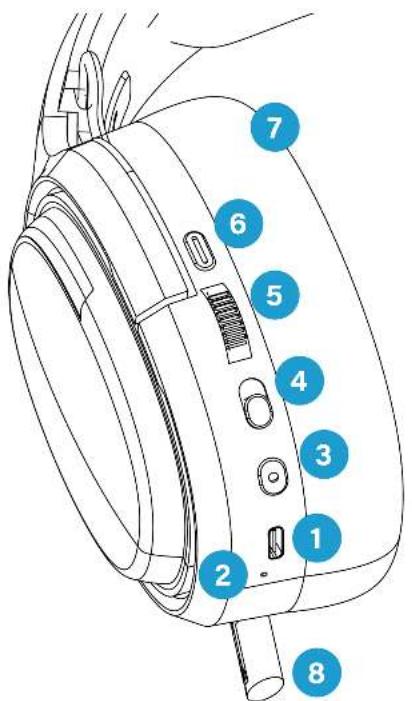
1 USB TYPE C input
2 LED status indicator
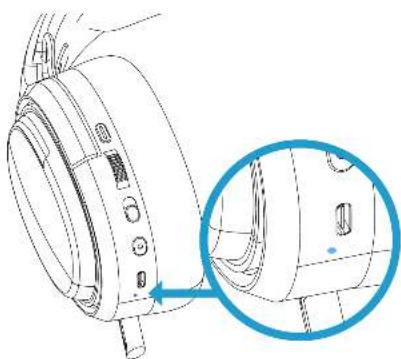
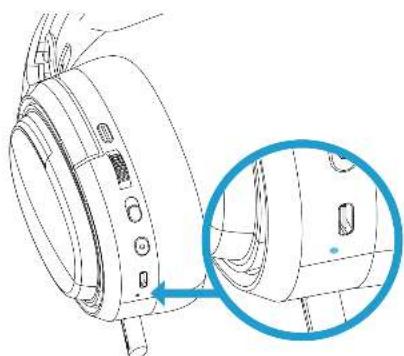
Red Led always on: Charging Blue Led flashing: Headset not paired Blue Led Fixed: Paired headset (Wireless)
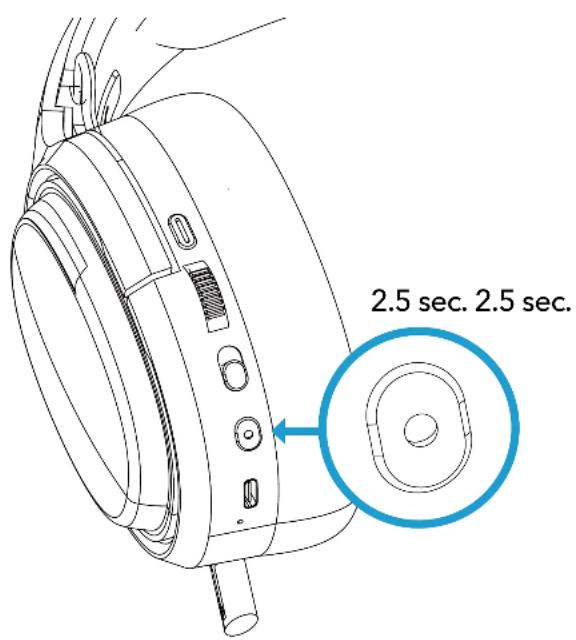
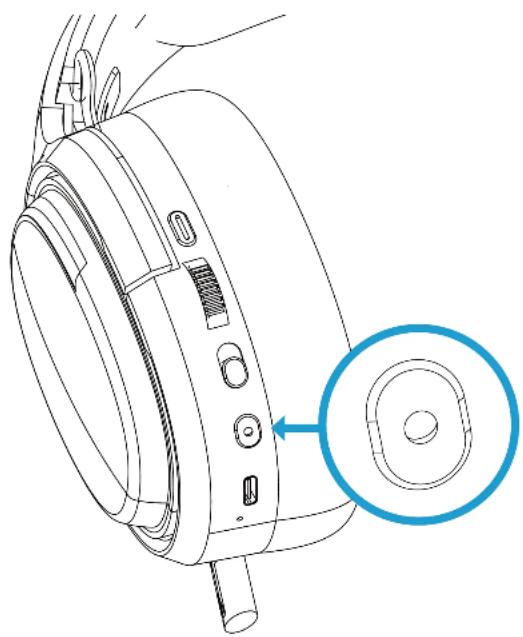
3 POWER
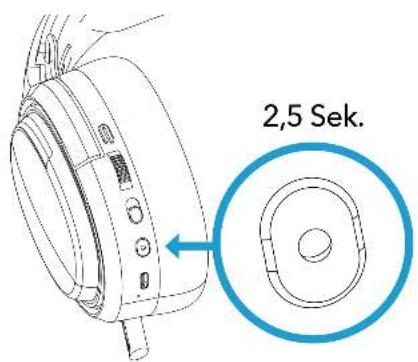
Long press to turn on/off
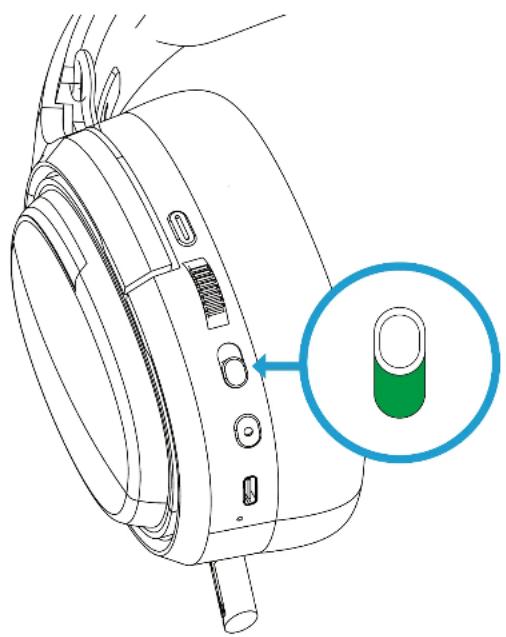
4 Choice of Connection
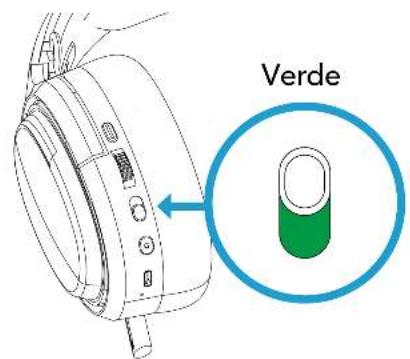
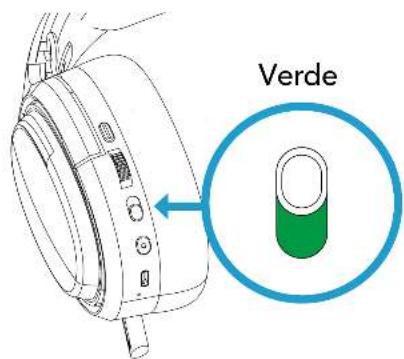
Flip the switch to swap between wireless connection types. Red: 2.4Ghz. Green: Bluetooth 5.0.
NOTE: To connect the headset by cable it is not necessary to turn it on, just connect it by USB Type C or by Jack 3.5mm (It is not necessary to have a battery)
5 Volume roulette
Volume + / Volume -
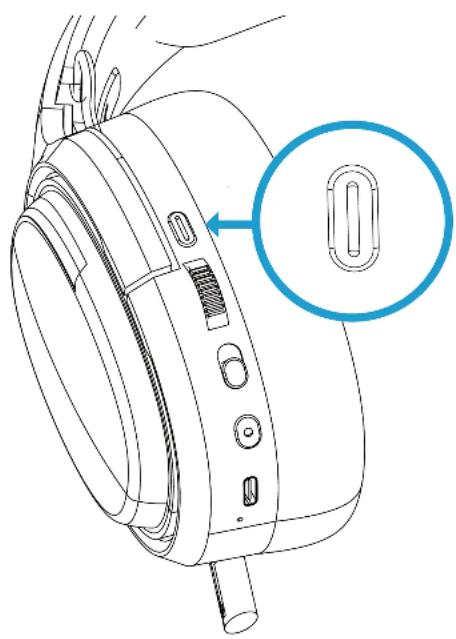
6 Mute / Lighting
Press once to turn the microphone on or off Long press to switch different light mode.
7 Removable breathable earmuffs
8 Retractable microphone with pop filter
natural_image
Technical line drawing of a mechanical device with a highlighted circular component (no text or symbols)Power on Power off
Press the power button for 2.5 seconds when the headset is off
- Press the power button for 2.5 seconds when the headset is on to turn off the device
- Press once to pause/hang up calls/answer calls

2.4Ghz WIRELESS
Press the power button for 2.5 seconds when the headset is off.
Move the switch to switch between wireless connection types.
RED COLOR, WIRELESS 2.4Ghz
natural_image
Technical line drawing of a mechanical device with a highlighted green component (no text or symbols)BLUETOOTH CONNECTION
Press the power button for 2.5 seconds when the headset is on to turn off the device.
Move the switch to switch between wireless connection type.
GREEN COLOR, WIRELESS BLUETOOTH 5.0
WIRELESS CONNECTION 2.4Ghz low latency
1
Connect to your PC, Mac, PlayStation 5 or 4 with 2.4Ghz wireless technology: Insert the receiver into the USB port of your device

flowchart
graph LR
    A["Input"] --> B["USB"]
    B --> C["Computer"]
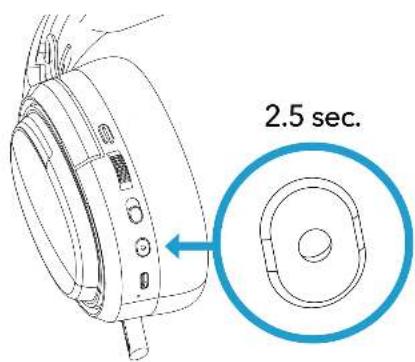
Press the power button for a minimum of 2.5 seconds
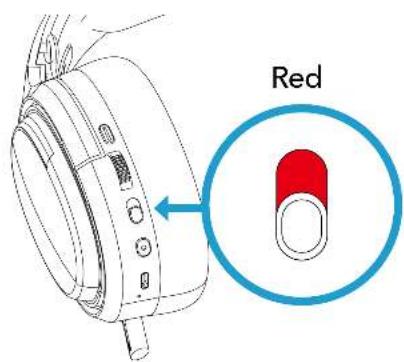
Make sure the connection selection switch is set to Red
natural_image
Technical line drawing of a mechanical component with an inset close-up view (no text or symbols)The BLUE LED will start blinking until it is not paired
natural_image
Technical line drawing of a mechanical component with an inset close-up view (no text or symbols)Once paired with the receiver the LED will remain Fixed in blue tone
BLUETOOTH 5.0 WIRELESS CONNECTION
Connect your ATON headset to any device with BLUETOOTH technology
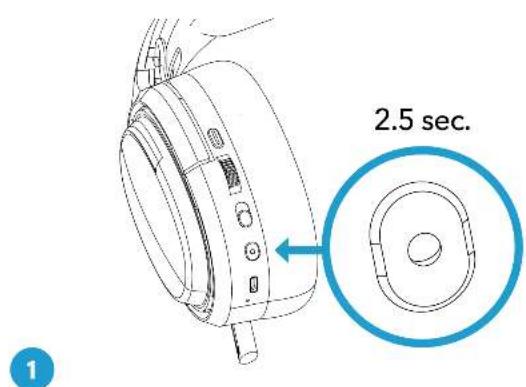
Press the power button for a minimum of 2.5 seconds
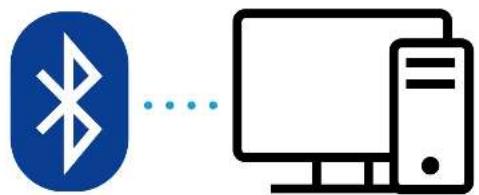
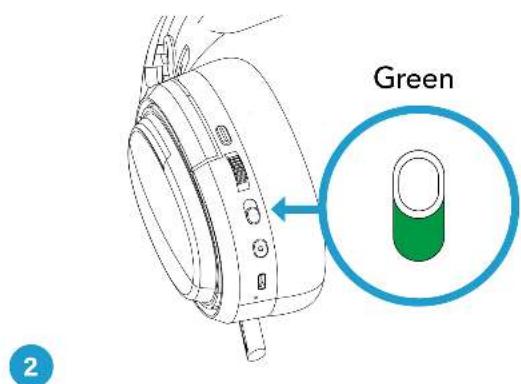
Make sure the connection selection switch is GREEN.
3
Select on your preferred device the name "ATON" and pair with the device
NOTE: ATON can only connect to one bluetooth device at a time.

flowchart
graph LR
    A["Bluetooth"] --> B["Computer"]
    B --> C["Server"]
3.5mm JACK CABLE CONNECTION
Aton works by 3.5mm audio cable connection.
We also include a dual 3.5mm to 1 x 3.5mm adapter so you can connect it to any audio device.
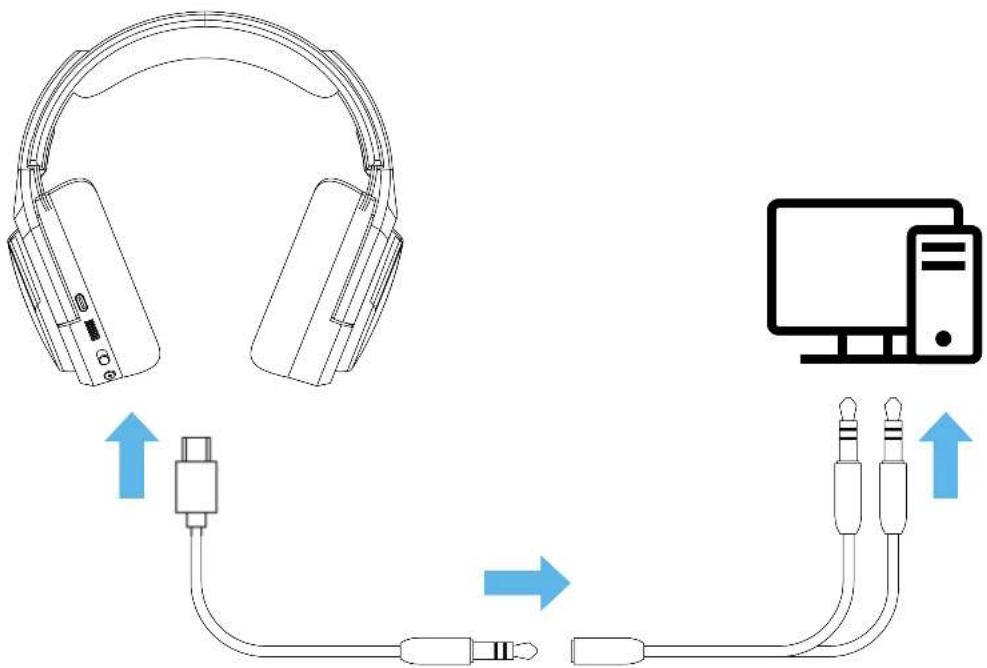
NOTE: ATON does not require power to connect by cable, so it can work without a battery.
NOTE 2: Audio cable connection does not power RGB lighting.
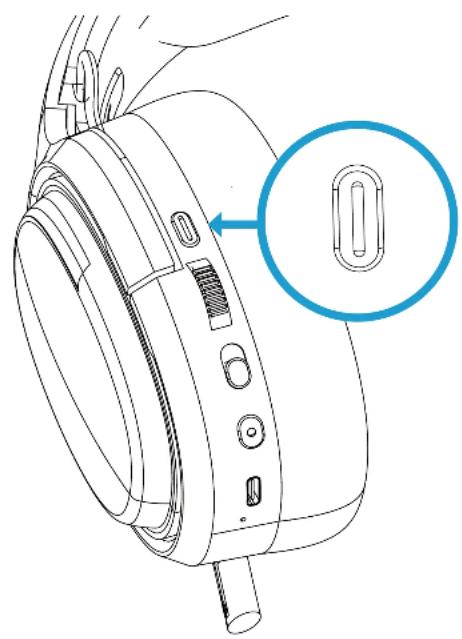
How to mute the microphone of ATON?
natural_image
Technical line drawing of a device casing with a highlighted internal component (no text or symbols)Aton has a microphone retractable with integrated blue LED.
Press to turn off the microphone, the blue light will turn off.
natural_image
Technical line drawing of a mechanical component with a highlighted circular detail (no text or symbols)Press again to activate the microphone again, the light will be on again.
How to change the backlight of ATON?
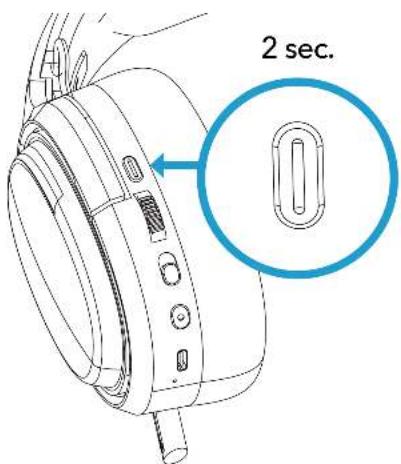
Press more than 2 seconds to switch between the different light cycles.
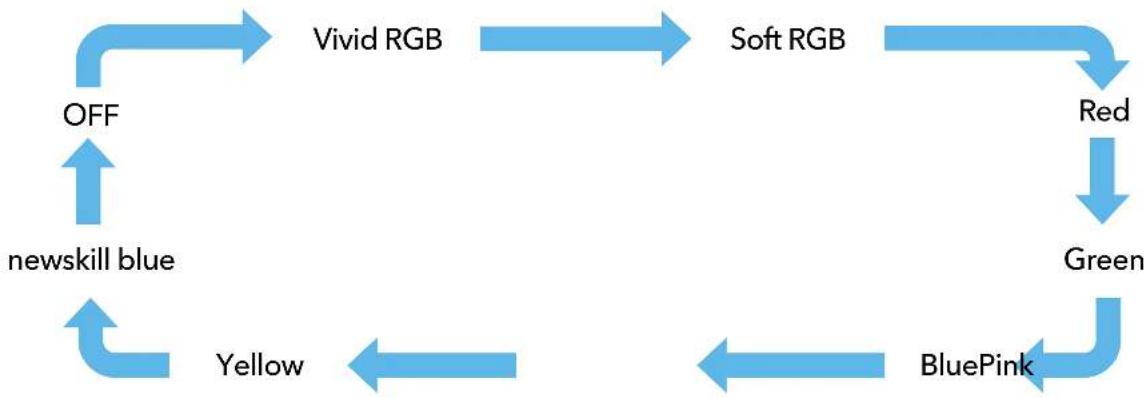
flowchart
graph TD
    A["Red"] --> B["Green"]
    B --> C["Soft RGB"]
    C --> D["Vivid RGB"]
    D --> E["OFF"]
    E --> F["newskill blue"]
    F --> G["Yellow"]
    G --> H["BluePink"]
NOTE: ATON has an internal memory which saves the backlight configuration, therefore, regardless of whether you turn the device off or on, the lighting chosen last time will remain.
INSTALLATION VERIFICATION
To ensure that ATON is configured correctly, follow the steps below
1
WIRELESS 2.4GHZ
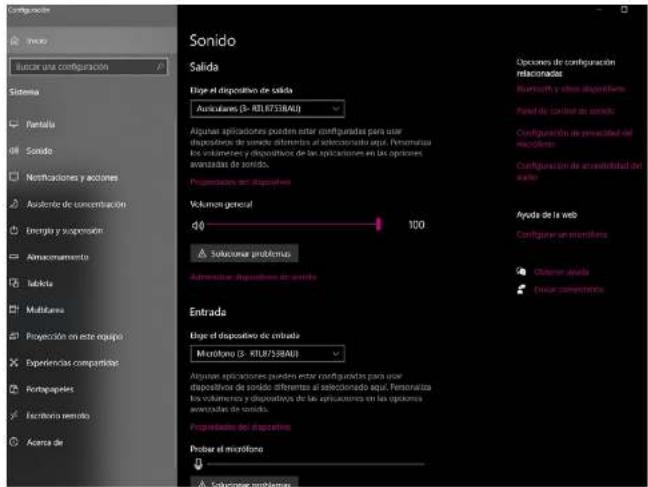
In Windows 10/11 we go to System > Sound and in the output section and select "R TL8753BAU".
2
CONNECTION BY 3.5mm JACK
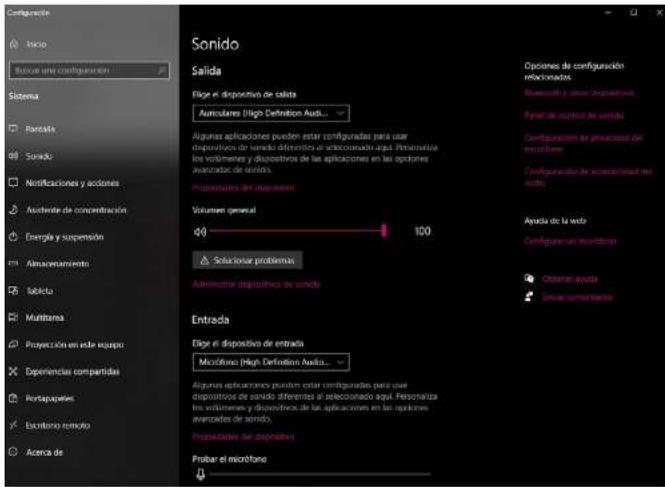
In Windows 10/11 we go to System > Sound and in the output section and select "R TL8753BAU".
BATTERY CHARGING AND OPTIMIZATION
ENGLISH
ATON includes a highly durable 3.7V/1500mAh Lithium battery Its duration is as follows:
38h (with lighting at a maximum of 60% volume)
60h (with lighting at a maximum of 60% volume)
When the battery charge reaches 5% ATON will start making sounds to connect it.
We include a USB A to USB Type C cable to connect the device and charge it, we recommend using a USB 3.0 PC socket for more efficient charging.
If this is not possible, we recommend charging with a low voltage USB charger (10-20W) Max.
The charging time is approximately 2.5 hours.
NOTE: ATON CANNOT be charged at the same time as using any of your wired or wireless connections.
natural_image
Side-by-side comparison of a black headboard with a glowing 'E' logo, shown from front and side views (no text or symbols on the devices themselves)QUÉ CONTIENE LA CAJA
ESPAÑOL
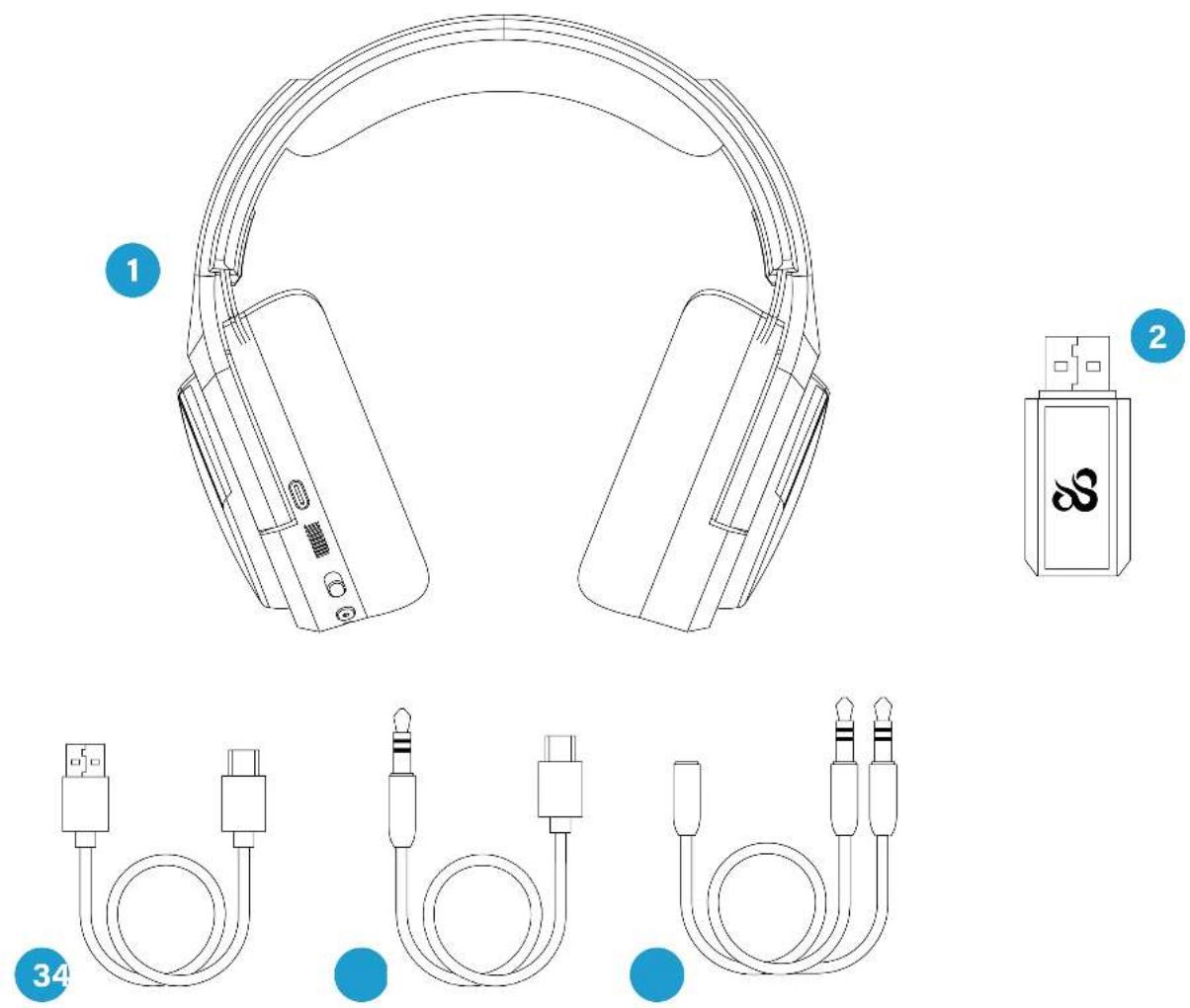
1 Auriculares ATON
2 Dongle USB inalámbrico
3 Cable USB a Tipo C
4 Cable jack macho a USB C
5 Adaptador Jack 3,5 mm x 2 a 1 Jack 3,5 mm
6 Accesorios Newskill
DESCRIPCIÓN GENERAL
1 Entrada USB TIPO C
natural_image
Technical line drawing of a mechanical component with a highlighted circular feature (no text or symbols)Encendido Apagar
natural_image
Technical line drawing of a device rear panel with a highlighted green component (no text or symbols)BLUETOOTH CONEXIÓN
natural_image
Technical line drawing of a mechanical component with an inset close-up view (no text or symbols)natural_image
Technical line drawing of a mechanical component with an inset close-up view (no text or symbols)2
natural_image
Technical line drawing of a device casing with a highlighted internal component (no text or symbols)natural_image
Technical line drawing of a mechanical component with a magnified inset showing a circular detail (no text or symbols)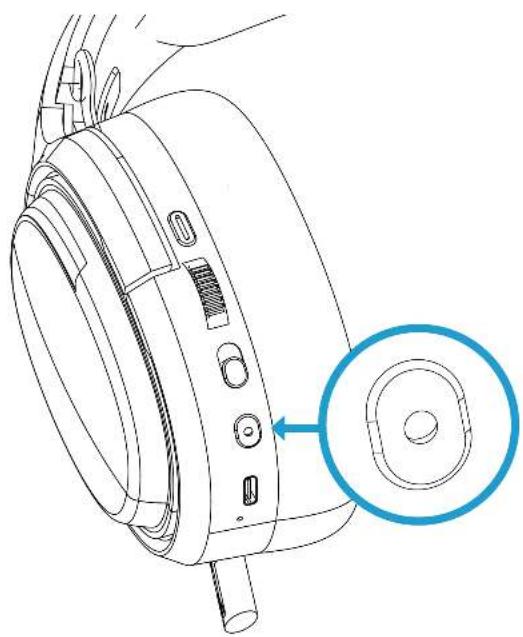
natural_image
Technical line drawing of a mechanical component with a highlighted circular feature (no text or symbols)natural_image
Technical line drawing of a mechanical device with a highlighted green component (no text or symbols)BLUETOOTH CONNEXION
natural_image
Technical line drawing of a mechanical component with an inset close-up view (no text or symbols)natural_image
Technical line drawing of a mechanical component with an inset close-up view (no text or symbols)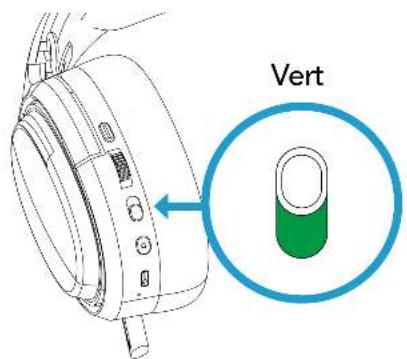
2
natural_image
Technical line drawing of a mechanical device with a highlighted circular component (no text or symbols)natural_image
Technical line drawing of a mechanical component with a magnified inset showing a circular detail (no text or symbols)natural_image
Technical line drawing of a device's rear panel with a highlighted circular component (no text or symbols)natural_image
Technical line drawing of a device rear panel with a highlighted green component (no text or symbols)BLUETOOTH ANSCHLUSS
flowchart
graph LR
    A["Email"] --> B["Computer"]
natural_image
Technical line drawing of a camera lens assembly with an inset close-up view (no text or symbols)natural_image
Technical line drawing of a mechanical component with an inset close-up view highlighting a detail (no text or symbols present)natural_image
Technical line drawing of a mechanical component with a highlighted circular detail (no text or symbols)natural_image
Technical line drawing of a mechanical component with a magnified inset showing a circular detail (no text or symbols)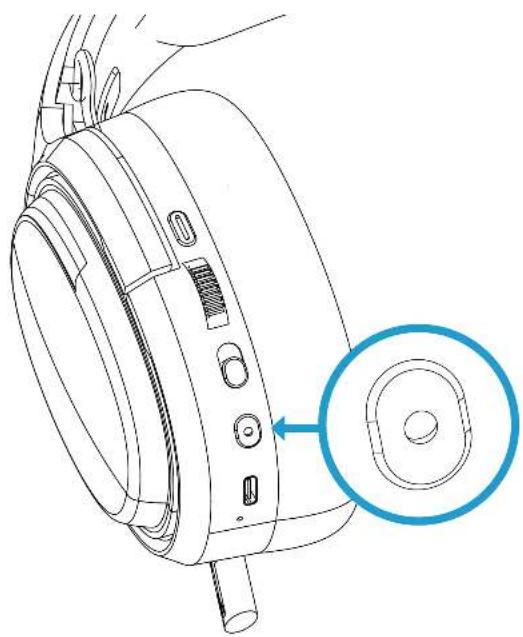
natural_image
Technical line drawing of a mechanical component with a highlighted circular feature (no text or symbols)natural_image
Technical line drawing of a device rear panel with a highlighted green component (no text or symbols)BLUETOOTH CONNESSIONE
natural_image
Technical line drawing of a mechanical component with an inset close-up view (no text or symbols)natural_image
Technical line drawing of a mechanical component with an inset close-up view (no text or symbols)CONNESSIONE CAVO JACK 3,5 mm
natural_image
Technical line drawing of a device casing with a highlighted internal component (no text or symbols)natural_image
Technical line drawing of a mechanical component with a magnified inset showing a circular detail (no text or symbols)natural_image
Side-by-side comparison of a black headboard with a colorful illuminated logo, shown from front and side views (no text or symbols on the devices themselves)O QUE ESTÁ NA CAIXA
1 Auscultadores ATON
4 Cabo de tomada macho para Tipo C
2 Dongle USB sem fios
5 Adaptador de tomada 3,5 mm x 2 para 1 tomada 3,5 mm
3 Cabo USB para Tipo C
6 Acessórios Newskill
DESCRIÇÃO GERAL
natural_image
Technical line drawing of a device's front panel with a highlighted circular component (no text or symbols)Ligar Desligar
natural_image
Technical line drawing of a mechanical device with a highlighted green component (no text or symbols)BLUETOOTH LIGAÇÃO
COR VERDE, SEM FIOS BLUETOOTH 5.0
natural_image
Technical line drawing of a mechanical component with an inset close-up view (no text or symbols)natural_image
Technical line drawing of a mechanical component with an inset close-up view (no text or symbols)2
natural_image
Technical line drawing of a mechanical device with a highlighted circular component (no text or symbols)natural_image
Technical line drawing of a mechanical component with a magnified inset showing a circular detail (no text or symbols)

- ATON V2
- Safety Instructions
- Cleaning
- Disposal
- TECHNICAL SPECIFICATIONS
- WHAT IS IN THE BOX
- Power on Power off
- 2.4Ghz WIRELESS
- BLUETOOTH CONNECTION
- WIRELESS CONNECTION 2.4Ghz low latency
- 1
- BLUETOOTH 5.0 WIRELESS CONNECTION
- 3
- 3.5mm JACK CABLE CONNECTION
- How to mute the microphone of ATON?
- How to change the backlight of ATON?
- INSTALLATION VERIFICATION
- WIRELESS 2.4GHZ
- 2
- CONNECTION BY 3.5mm JACK
- BATTERY CHARGING AND OPTIMIZATION
- QUÉ CONTIENE LA CAJA
- DESCRIPCIÓN GENERAL
- Entrada USB TIPO C
- Encendido Apagar
- BLUETOOTH CONEXIÓN
- BLUETOOTH CONNEXION
- BLUETOOTH ANSCHLUSS
- BLUETOOTH CONNESSIONE
- CONNESSIONE CAVO JACK 3,5 mm
- O QUE ESTÁ NA CAIXA
- DESCRIÇÃO GERAL
- Ligar Desligar
- BLUETOOTH LIGAÇÃO
Brand : Newskill
Model : Aton V2
Category : Headphones