
MD200C-P - Musical instrument Vevor - Free user manual and instructions
Find the device manual for free MD200C-P Vevor in PDF.
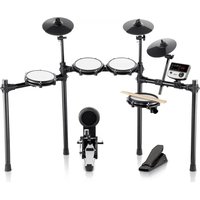


| Product Type | Electronic Drum Kit |
| Brand | Vevor |
| Model | MD200C-P |
| Number of Drum Kits | 32 preset kits |
| Number of Timbres | 480 timbres |
| Demo Songs | 30 tracks |
| Metronome Tempo Range | 30 to 250 BPM |
| Metronome Beat Types | 1 to 9 types |
| Training Modes | 3 modes (beat detection, silent stroke, speed) |
| Recording Functions | Record, playback, save, reset |
| USB-MIDI Interface | Yes |
| Display | Three-digit LED |
| Power Supply | DC 9V power adapter |
| Interfaces | DC power, USB-MIDI, headphone, audio in, audio out |
| Number and Type of Pads | 7 pads: 3 toms, 1 snare, 1 bass drum, 3 cymbals |
| Pad Settings | Sensitivity, trigger threshold, crosstalk |
| Maximum Expansion Width | 1.2 meters |
| Maintenance | Soft dry cloth; avoid heat, moisture and solvents |
| Compliance | FCC Part 15, WEEE Directive 2012/19/EC |
| Included Accessories | Sound module, rack, 3 cymbals, 3 toms, snare, bass drum, pedal, cables, adapter, screwdriver, key |
| Warranty | Electronic warranty certificate (see Vevor website) |
| Country of Manufacture | China (Shanghai) |
Frequently Asked Questions - MD200C-P Vevor
User questions about MD200C-P Vevor
0 question about this device. Answer the ones you know or ask your own.
Ask a new question about this device
Download the instructions for your Musical instrument in PDF format for free! Find your manual MD200C-P - Vevor and take your electronic device back in hand. On this page are published all the documents necessary for the use of your device. MD200C-P by Vevor.
USER MANUAL MD200C-P Vevor
Technical Support and E-Warranty Certificate
www.vevor.com/support
ELECTRONIC DRUM SET USER MANUAL
MODEL: MD200C-P, MD200D-P
We continue to be committed to providing you with tools at competitive prices.
"Save Half", "Half Price", or any other similar expressions used by us only represent an estimate of savings you might benefit from buying certain tools with us compared to the major top brands and do not necessarily mean to cover all categories of tools offered by us. You are kindly reminded to verify carefully when placing an order with us if you are actually saving half in comparison with the top major brands.
MODEL: MD200C-P, MD200D-P
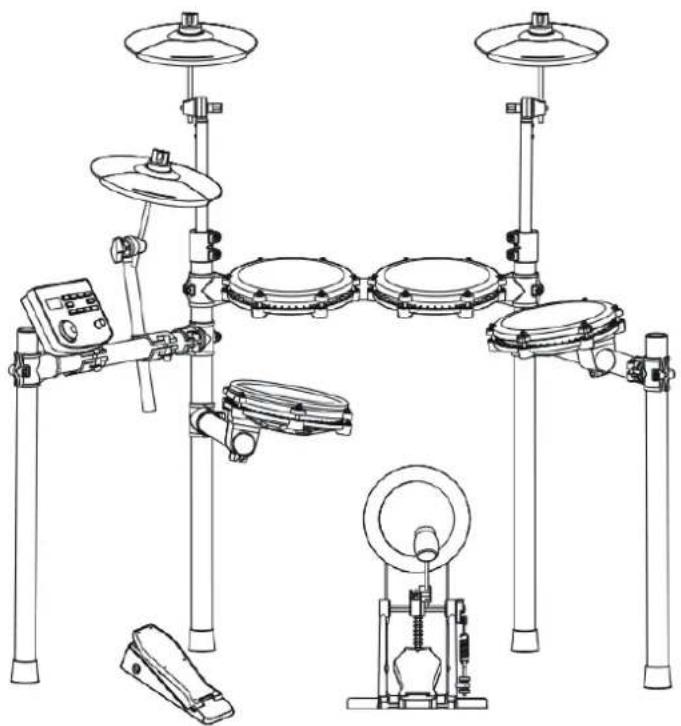
(The picture is for reference only, please refer to the actual object)
NEED HELP? CONTACT US!
Have product questions? Need technical support? Please feel free to contact us:
Technical Support and E-Warranty Certificate www.vevor.com/support
This is the original instruction. Please read all manual instructions carefully before operating. VEVOR reserves a clear interpretation of our user manual. The appearance of the product shall be subject to the product you received. Please forgive us that we won't inform you again if there are any technology or software updates on our product.
Thank you for choosing our electronic drum. Elegant and delicate electronic drum is the perfect combination of modern new electronic technology.
Before using this product, you must read the instructions in detail.
- 32 sets of drums, 480 timbres, 30 songs
- Support the adjustment of sensitivity parameters of each drum
- Three teaching modes
- Speed control: 30 250 beats / min
- Metronome: 1-9 types
- Other functions: parameter storage, reset and recording;
- three digit led display;
- interface: power supply dc, usbidi, earphone, audio input, audio output
REMARK!
- This product is an electro-acoustic instrument product. It is normal that there is a little current sound in the speaker or earphone after power-on.
Keep away from "radio, TV, antenna receiver, router, refrigerator, TV, motor and other RF electrical interference sources" during using.
FUNCTION INTRODUCTION 1
CONTENTS 2
INSTALLATION GUIDE 3
CHECK THE ATTACHED ITEMS 3
LRON PIPE HOLDER 4
TYMPANIC INTUBATION 4
MOUNTING STAND 5
INSTALL THE DRUM MODULE 5
INSTALL HITTING PARTS AND SOUND MODULE 6
INSTALL THE KICK DRUM
INSTALL THE HAMMER BAR 7
THE KICK DRUM IS FIXED WITH THE STEP HAMMER
PLUG IN THE STRIKING PART CONNECTION CABLE 7
ILLUSTRATION OF SOUND MODULE PORT 8
POWER CORD CONNECTION 8
USB MIDI PORT 8
AUDIO OUTPUT PORT 8
AUDIO INPUT PORT 8
EARPHONE PORT 8
INCREASE PORT 8
BT MODE 8
OPERATION GUIDE 9
POWER 9
DRUM KIT SELECTION 9
METRONOME 9
PRACTICE FUNCTION 9
COACH MODE 9
DEMO SONGS 10
DRUM PARAMETERS 10
RECORDING FUNCTION 10
SAVE/RESET 10
USB MIDI 11
APPENDIX 11
TIMBRE 11
PRESET DRUM KITS 11
USER DEFINED DRUM KITS 11
DEMONSTRATION SONG 11
PRODUCT MAINTENANCE 12
SAFETY PRECAUTIONS 13
REMARK!
- Please follow the instructions and read the "safety precautions" in the User Manual carefully before using.
- This product must be installed by an adult; do not let minors install it independently.
01
Check the attached items
- After opening the package, please check immediately whether all items are included. If any are missing, contact your dealer.
Sound module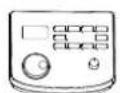
Module bracket
Cymbal *3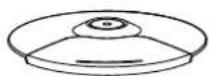
Tom (3 pcs)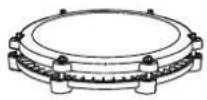
Snare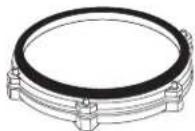
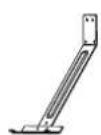

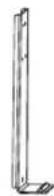
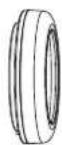
2PCS 2PCS 6PCS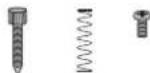
Kick front bracket, connecting bracket, rear support, foot pedal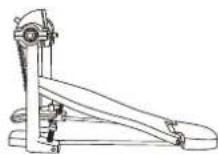
Cymbal arm (3 pcs)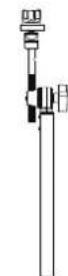
Hi-hat pedal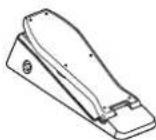
Bolt driver
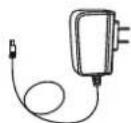
Signal connection cable, power adapter, drum key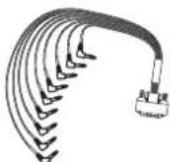

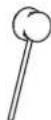
Drum stick, stick hammer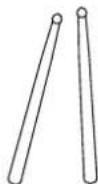
02
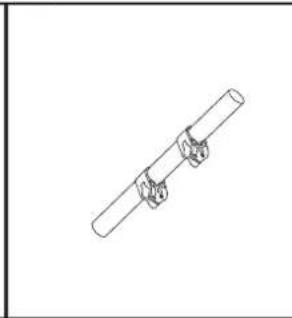
Iron pipe holder
The stand is located in a small individual package inside the box.
A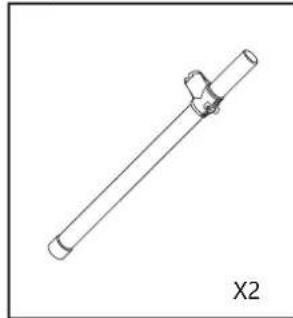
C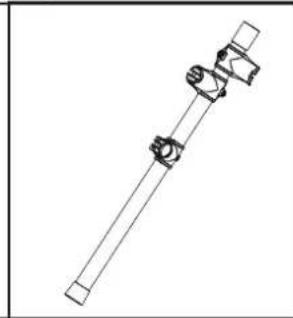
D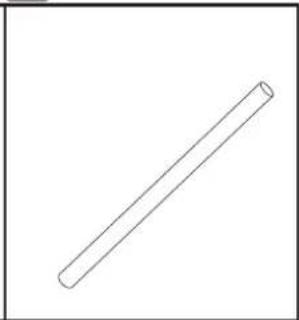
E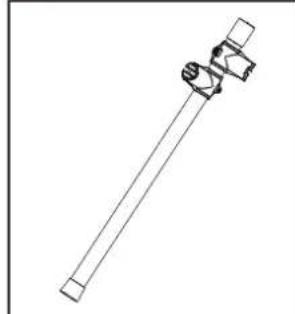
F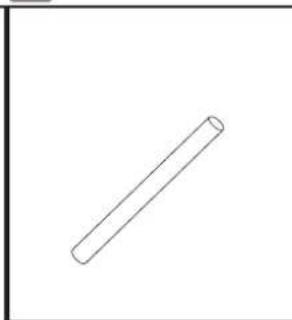
Tympanic intubation
Install the drum on the drum support bar.
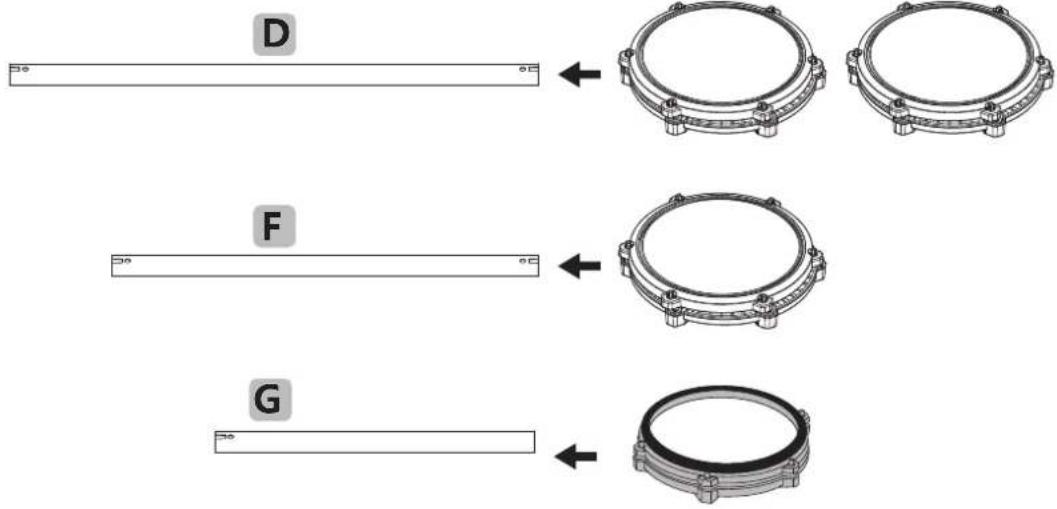
Mounting stand
- During installation, tighten the screws and be careful not to pinch your fingers.
- Assemble the bracket in the specified direction.
For safety reasons, the expansion width of the support should not exceed 1.2 meters.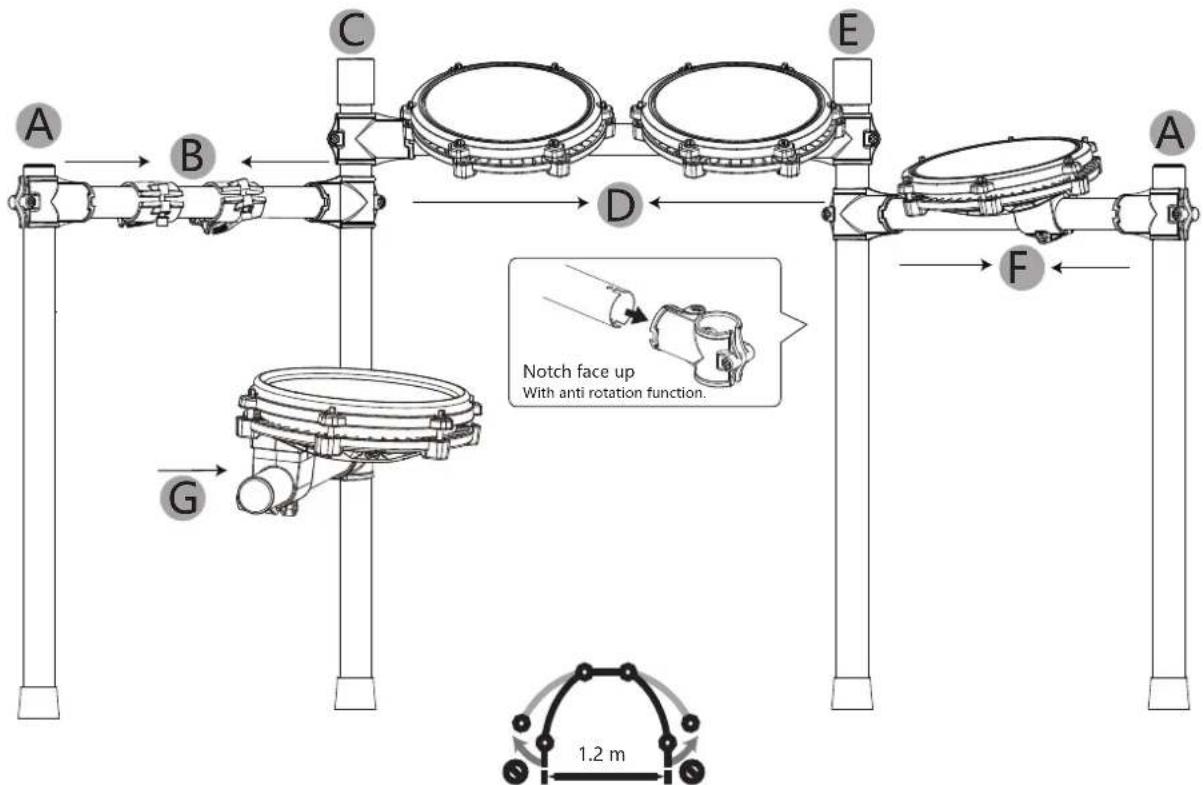
Install the drum module
- Insert it fully into place during installation.
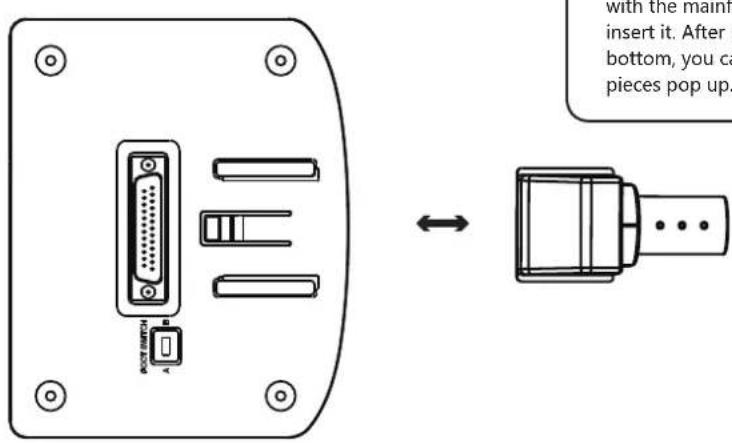
Align the mainframe drum module with the mainframe box track and insert it. After inserting it to the bottom, you will hear the snap pieces pop up.
Install hitting parts and sound module
- Tighten the screws after the drum is inserted to avoid loosening.
- Be sure not to tighten the cymbal too tightly; leave some space for them to move up and down.
Withdraw the nuts and circle cushions of the three cymbal arms, put the three cymbals into the corresponding arms, and screw on the nuts. Put 3 drums and 1 drum into the corresponding support rods respectively, and tighten the screws. Note: the functions of each cymbal, Tom drum, and snare drum are different, so it is necessary to refer to the accessory identification for correct installation!


Crash
Hi-hat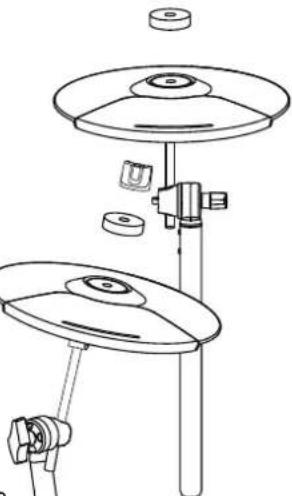
Ride

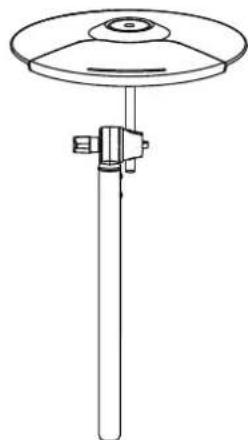
Sound Module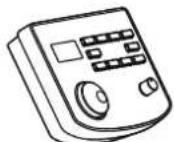
Tom1 Tom2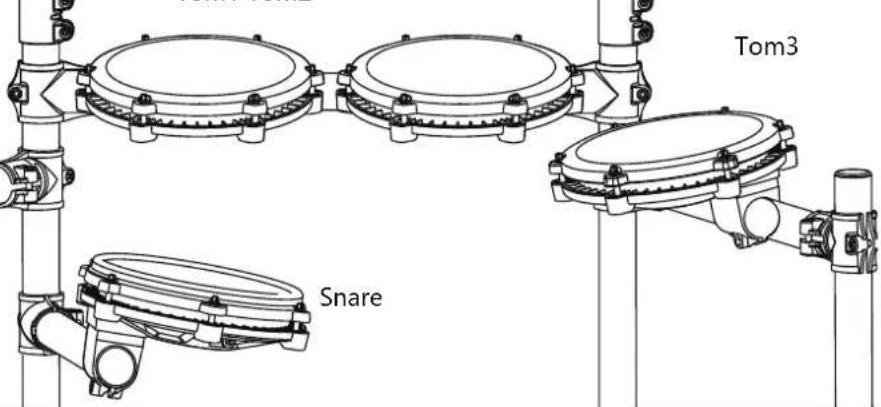
07
Install the kick drum
- When installing, please tighten the screws and be careful not to pinch your fingers.
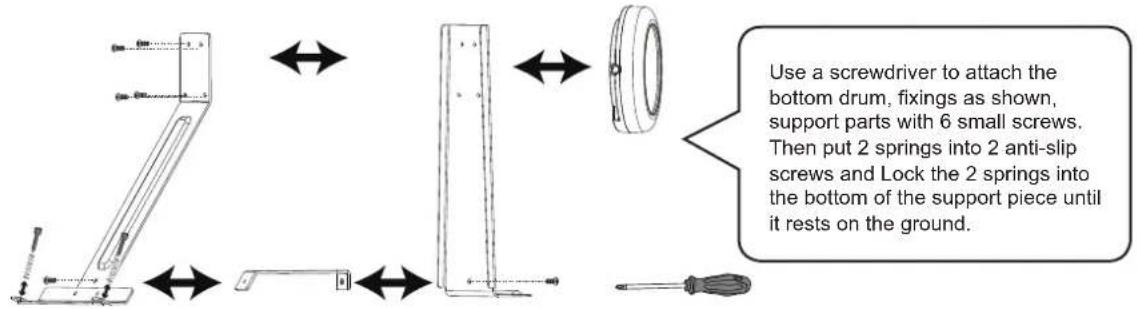
08
Install the hammer bar
The pole should be inserted in place and the screws should be tightened to avoid loosening.
Insert the hammer rod into the round hole as shown in the figure, rotate the wool hammer to align it with the drum surface, and then tighten it with the drum key.
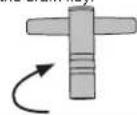
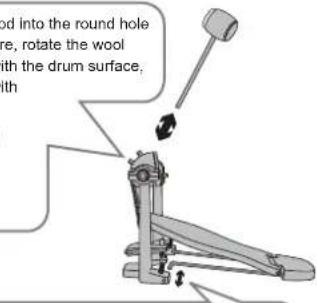
Insert the fixed iron bar into the hole as shown in the figure.
09
The kick drum is fixed with the step hammer.
- The bottom drum and the step hammer should be fixed and tightened to avoid falling off.
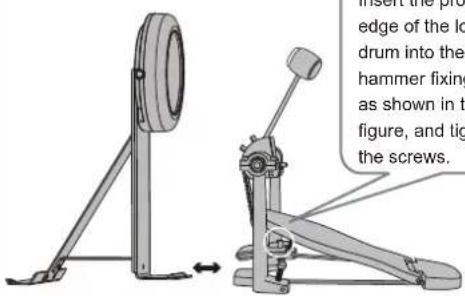
Insert the protruding edge of the low drum into the hammer fixing clip as shown in the
figure, and tighten the screws.

10
Plug in the striking part connection cable.
- Please insert the connection cable in place to avoid poor contact and insert it correctly as shown in the diagram.
Please check whether the bottom drum makes sound. If there is no sound, please turn the switch: Switch in A: mechanical kick drum mode. Switch in B: pedal mode.
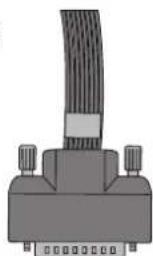


ILLUSTRATION OF SOUND MODULE PORT

POWER CORD CONNECTION
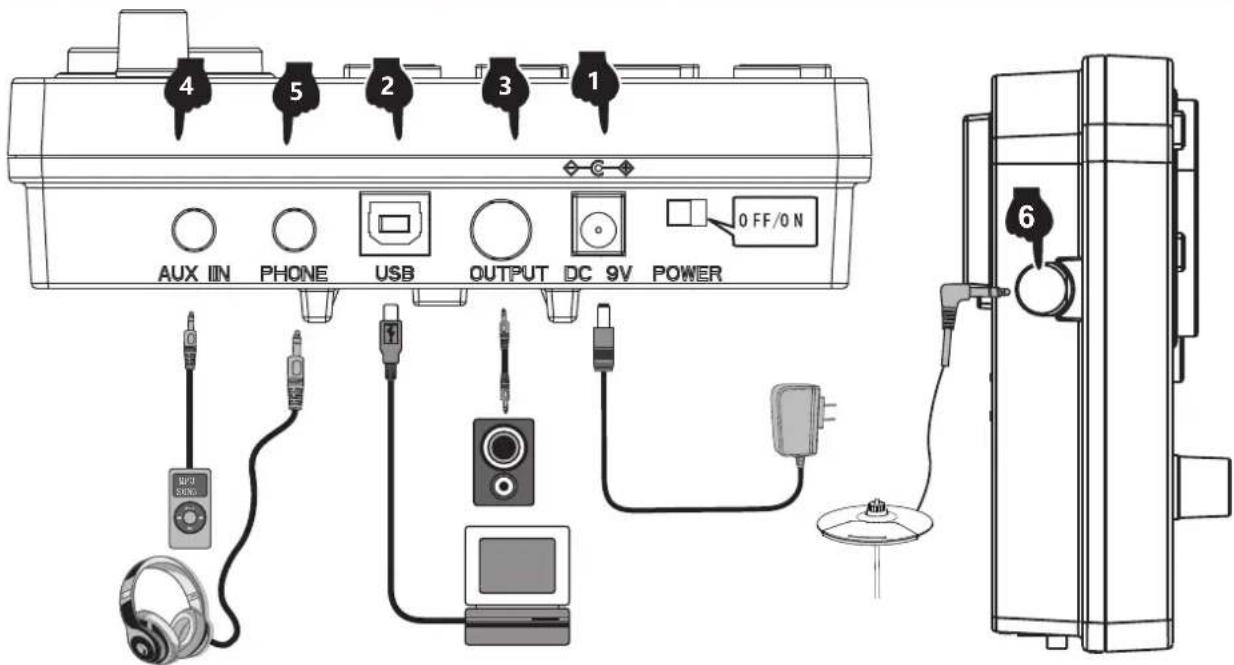
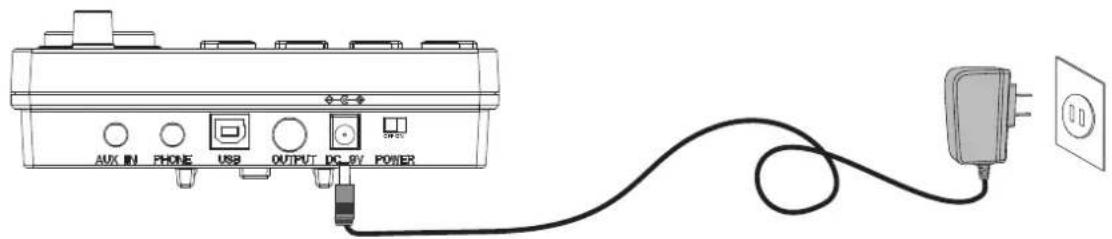
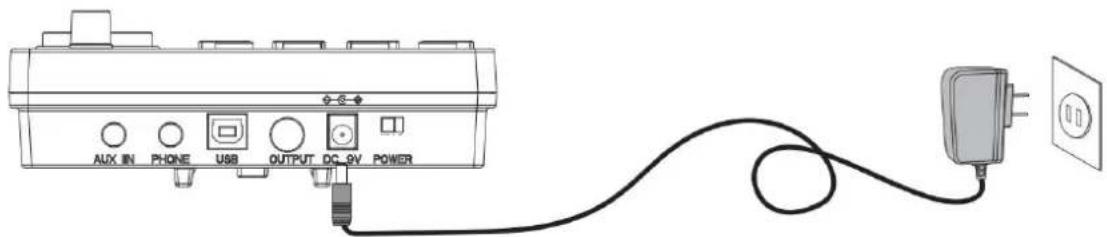
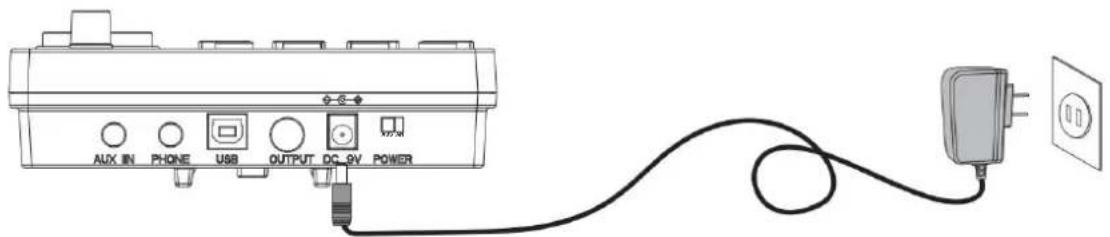
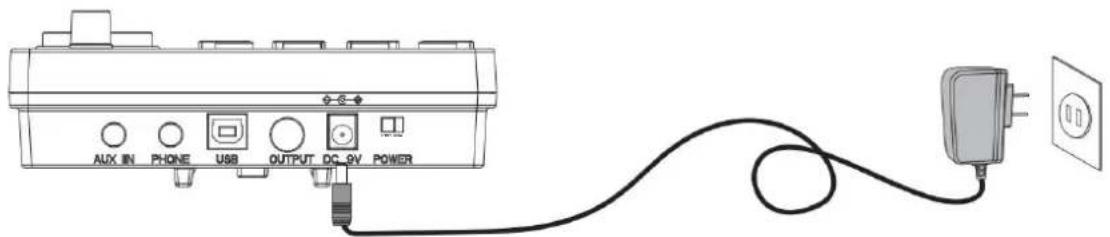
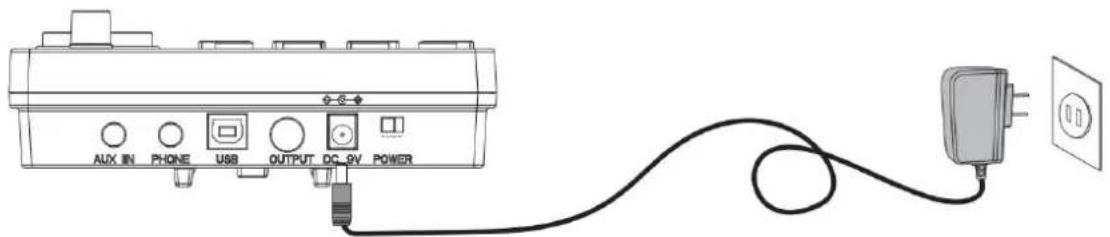
- When in use, connect the power terminal according to the diagram. Insert the power outlet of the sound module at one end and a 100-240V household power outlet at the other end. (Fig. 1)
- If you do not use this product for a long time, please pull out the power plug and keep it properly.

USB MIDI PORT
The electronic drum's MIDI USB interface can interact with music devices that support MIDI.
- Using the pre-installed music software on computers and mobile phones, you can learn to play, compose music, store data, and more. (Fig. 2)
- When connected to a computer or mobile phone, the device's audio output must be connected to the module box's audio input socket to synchronize sound effects. (Fig. 5)

AUDIO OUTPUT PORT
The audio output port can be connected to active speakers (special electronic drum speakers) and large audio equipment. (Fig. 3)

AUDIO INPUT PORT
The audio input port allows you to connect sound source playback devices (such as MP3 players, mobile phones, etc.) to the module box for playback. (Fig. 4)

EARPHONE PORT
Connecting headphones lets you monitor percussion details without disturbing others, and you can play without connecting speakers. (Fig. 5)

INCREASE PORT
This port allows you to add a cymbal for easy expansion. (Fig. 6)
1 POWER
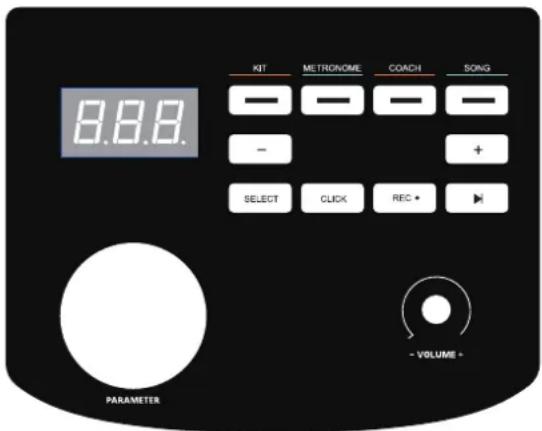
Insert the DC plug into the DC 9V port on the top of the control unit. Slide the POWER switch to the right (viewed from the front) to power up the drum kit. To turn the drum kit off, slide the switch to the left.
2 DRUM KIT SELECTION
Press the KIT button to display the current drum kit. Turn the parameter wheel or use the < - / + > buttons to select the desired drum kit. There are 32 drum kits to choose from - see the drum kit list on page 11.
3 METRONOME
- Press the METRONOME button to enter metronome mode.
- The screen will display the speed value (120 BPM default speed). Turn the parameter wheel or use the +/- buttons to change the metronome speed. Press the CLICK button to start the metronome.
- Press the SELECT button in metronome mode, and the screen will jump to the metronome parameter adjustment interface. You can press the +/- buttons to select the parameter you want to adjust:
A. r (beat type: 2, 4, 8, 16) B. b (beat number: 01-09) C. L (metronome volume: 00 (off) - 31), and then turn the parameter wheel to adjust the parameter settings.
- Once the parameters have been adjusted, press the SELECT button to confirm and exit the parameter interface. Then use the CLICK button to start and stop the metronome as desired.
4 PRACTICE FUNCTION
The "coach" mode of this product can help establish speed, accuracy and endurance, and help cultivate a better sense of rhythm. Make progress under the supervision of the "coach" mode! Press the "coach" button to enter coach mode. In this mode, there are three practice modes. Select the practice mode through the data wheel or the +/- buttons.
- Exercise mode 1: C-1 beat detection exercise: beat the drum at a fixed speed to train the accuracy of the blow.
- Practice mode 2: C-2 silent strike mode: the metronome will sound one section and mute one section to train strike accuracy without metronome prompt. It is an advanced version of practice mode 1.
- Practice mode 3: C-3 speed strike practice: the metronome will automatically change the speed, increase from the slowest to the fastest, and then reduce from the fastest to the slowest, so as to practice strike endurance.
5 COACH MODE
- The "coach" training mode of this product can help establish speed, accuracy and endurance. Press the COACH button to enter coach mode. In this mode, there are three practice modes. Use the parameter wheel to select which practice mode.
A. Exercise mode 1: C-1 beat detection exercise - beat the drum at a fixed speed to train the accuracy of the blow. B. Practice mode 2: C-2 silent strike mode - the metronome will sound one section and mute one section to train when there is no beat. C. Practice mode 3: C-3 speed strike practice - the metronome will automatically change the speed from the slowest to the fastest and then from the fastest to the slowest.
- Once the coaching mode has been chosen, press the Click button. The metronome beats will start and you can play along on the drum for practice.
- After four preliminary beats, the display will show:
(too slow)
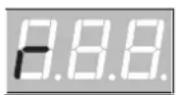
(good)
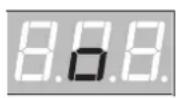
(too fast)
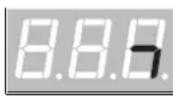
- Once you have completed the coaching mode a score will be displayed from 0-100 evaluating the accuracy of the exercise. C-1 mode: Press the SELECT button to enter the parameter setting interface. You can adjust the number of practice sessions as required (01-32). The number of sessions to practice determines the length of this exercise. C-2 mode: Press the SELECT button to enter the parameter setting interface. You can adjust the number of practice sessions as required (04-32). The number of sessions to practice determines the length of this exercise. C-3 mode: Press the SELECT button to enter the parameter setting interface. You can adjust the rate at which the BPM changes (01-09 BPM).
- Press the Click button again to end the coach mode.
6 DEMO SONGS
- Press the SONG button to enter the demo mode, there are 30 demos to choose from. The screen will display the current demo song number (01 -30).
- Press the < button to start playing the demo songs. To stop playing press the < button again.
- Turn the parameter wheel or press the + / - buttons to select a demo song.
- Press the SELECT button in song mode to jump to the song parameter setting interface. You can turn the drum sound on or off by turning the parameter wheel (the drum sound is on by default).
- Press the SELECT button to confirm and exit the parameter interface.
7 DRUM PARAMETERS
- Press the KIT button and the screen will display 01 (drum kit number). Press SELECT to enter the drum parameter adjustment mode.
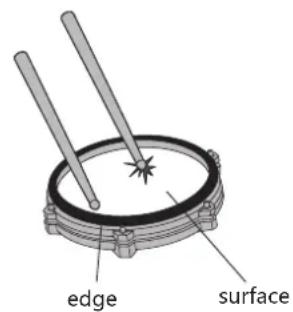
- Tap the drum you want to adjust, and then press the +/- buttons to select the parameter for adjustment. Sensitivity
A. S(01-06). Trigger threshold t(01 - 32). Crosstalk threshold c (01 -32) B. Repeated trigger r(01-32) Drum Force V(01-03). Drum volume L (00 - 31).
- Change the parameters by rotating the parameter wheel and long press the - button to save. The screen with display SAV to indicate the parameter adjustment has been saved successfully.
- To restore the drum parameters back to factory settings long press the + button until the screen displays RES.
- PLEASE NOTE: The parameters for the 3 tom drums can not be set individually.
- Press the < REC > button when the indicator light is in the "KIT" and "CLICK" states, and the screen displays the words "REC" in the breathing flashing state, entering the recording preparation state.
- Tap any drum and the metronome sounds. At this time, the screen displays "---" in the flashing state of breathing and starts recording.
- Press the < REC> key or < PLAY> key again, the recording stops and "A-1" is displayed on the screen.
- Press < to start playing the current recording, and press again to stop playback.
- If you enter the recording preparation state again without any knocking, the "A-1" recorded last time is played back.
SAVE/RESET
- To save parameters long press the < -> button and the screen will display SAV.
- To reset parameters, long press the < + > button and the screen will display RES.
10 USB MIDI
To use the drum kit's MIDI function, plug a USB-B data cable (not included with this drum kit) into the control unit and connect to a PC or smartphone.
Timbre
Kick
- Pop Kick
- Funk Kick
- Hard Kick
- Original Kick
- PopRock Kick
- Rock Kick
- Metal Kick
- PowerMetal Kick
- SpeedMetal Kick
- PopJazz Kick
- Jazz Kick 12.808 13 909
- Songo Kick 15.Standard Kick
- Acoustic Kick
- Session Kick
- Modern Kick
- Blues Kick
- Classic Kick
- Synthgaze Kick
- Freak Kick
- Sticks Kick
- Grunge Kick 25.70's Kick
- 80's Kick
- Popular Kick
- Slam Kick
- Attack Kick
- Old Kick
- Fairfax Kick
- Military Kick
Snare
- Pop Snare
- Funk Snare
- Hard Snare
- Original Snare
- PopRock Snare
- Rock Snare 39. Metal Snare
- PowerMetal Snare
- SpeedMetal Snare
- PopJazz Snare
- Jazz Snare 44. 808 45. 909
- Songo Snare 47. Standard Snare
- Acoustic Snare
- Session Snare 50. Modern Snare
- Blues Snare
- Classic Snare
- Synthgaze Snare
- Freak Snare
- Sticks Snare
- Grunge Snare 57. 70's Snare
- 80's Snare
- Popular Snare
- Slam Snare
- Attack Snare
- Old Snare
- Fairfax Snare
- Military Snare
- Pop Snare Rim
- Funk Snare Rim 67. Hard Snare Rim
- Original Snare Rim
- PopRock Snare Rim
- Rock Snare Rim 71. Metal Snare Rim
- PowerMetal Snare Rim
- SpeedMetal Snare Rim
- PopJazz Snare Rim
- Jazz Snare Rim 76. 808 77. 909
- Songo Snare Rim
- Standard Snare Rim
- Acoustic Snare Rim
- Session Snare Rim 82. Modern Snare Rim
- Blues Snare Rim
- Classic Snare Rim
- Synthgaze Snare Rim
- Freak Snare Rim
- Sticks Snare Rim
- Grunge Snare Rim
- Popular Snare Rim
- Slam Snare Rim
- Attack Snare Rim
- Old Snare Rim
- Fairfax Snare Rim
Tom
- Pop Tom1
- Fuck Tom1
- Hard Tom
- Original Tom1
- PopRock Tom1
- Rock Tom1 103.Metal Tom1
- PowerMetal Tom1
- SpeedMetal Tom1
- PopJazz Tom1
- Jazz Tom1 108.808 109.909
- Songo Tom1
- Standard Top
- Acoustic Tom1
- Session Tom1 114.Modem Tom1
- Blues Tom1
- Classic Tom1
- Synthgaze Tom1
- Freak Tom1
- Stucks Tom1
- Grunge Tom1 121.70's Tom1 122.80's Tom1
- Popular Tom1
- Slam Tom1
- Attack Tom1
- Old Tom
- Fairfax Tom1
- Military Tom1
- Pop Tom2
- Fuck Tom2
- Hard Tom2
- Original Tom2
- PopRock Tom2
- Rock Tom2
135.Metal Tom2
- PowerMetal Tom2
- SpeedMetal Tom2
- PopJazz Tom2
- Jazz Tom2
140.808
141.909
- Songa Tom2
143.Standard Tom2
- Acoustic Tom2
- Seesson Tom2
- Modern Tom2
- Blues Tom2
- Classic Tom2
- Synthgaze Tom2
- Freak Tom2
- Sticks Tom2
- Grunge Tom?
153.70's Tom2
154.80's Tom2
- Popular Tom2
- Slam Tom2
- Attack Tom2
- Old Tom2
- Fairfax Tom2
- Military Tom2
- Pop Tom3
- Fuck Tom
- Hard Tom3
- Original Tom3
- PopRock Tom3
- Rock Tom3
- Metal Tom3
- PowerMetal Tom3
- SpeedMetal Tom3
- PopJazz Tom3
- Jazz Tom3
172.808
173.909
- Songo Tom3
- Standard Tom3
- Acoustic Tom3
- Session Tom3
Modern Tom3
- Blues Tom3
- Classic Tom3
- Synthgaze Tom3
- Freak Tom3
- Sticks Tom3
- Grunge Tom3
185.70's Tom3
186.80's Tom3
- Popular Tom3
- Slam Tom3
- Attack Tom3
- Old Tom3
- Fairfax Tom
- Military Tom3
Crash
- Pop Crash1
- Funk Crash1
- Hard Crash
- Original Crash1
- PopRock Crash1
- Rock Crash1
199.Metal Crash1
- PowerMetal Crash1
- SpeedMetal Crash1
- PopJazz Crash1
- Jazz Crash1
204.808
205.909
- Songo Crash1
- Standard Crash1
- Acoustic Crash1
- Session Crash1
210.Modern Crash1
- Blues Crash1
- Classic Crash1
- Synthgaze Crash1
- Freak Crash1
- Sticks Crash1
- Grunge Crash1
- 70's Crash1
218.80's Crash1
- Popular Crash
220. Slam Crash1
- Attack Crash1
- Old Crash1
- Fairfax Crash1
- Military Crash1
- Pop Crash1 Rim
- Fuck Crash1 Rim
- Hard Crash1 Rim
- Original Crash1 Rim
- PopRock Crash1 Rim
- Rock Crash1 Rim
231.MetalCrash1Rim
- PowerMetal Crash1 Rim
- SpeedMetal Crash1 Rim
- PopJazz Crash1 Rim
- Jazz Crash1 Rim
236.808
237.909
- Songo Crash1 Rim
- Standard Crash1 Rim
- Acoustic Crash1 Rim
- Session Crash1 Rim
242.Modem Crash1 Rim
- Blues Crash1 Rim
- Classic Crash1 Rim
- Synthgaze Crash1 R
- Freak Crash1 Rim
- Sticks Crash1 Rim
- Grunge Crash1 Rim
249.70's Crash1 Rim
250.80's Crash1 Rim
- Popular Crash1 Rim
- Slam Crash1 Rim
- Attack Crash1 Rim
- Old Crash1 Rim
- Fairfax Crash1 Rim
- Military Crash1 Rim
Ride
- Pop Ride
- Funk Ride
- Hard Ride
- Original Ride
- PopRock Ride
- Rock Ride
263. Metal Ride
- Power Metal Ride
- Speed Metal Ride
- Pop Jazz Ride
- Jazz Ride
268. 808
269. 909
- Songo Ride
- Standard Ride
- Acoustic Ride
- Session Ride
- Modern Ride
- Blues Ride
276. Classic Ride
- Synthgaze Ride
- Freak Ride
- Sticks Ride
- Grunge Rides
281.70's Ride
282.80's Ride
- Popular Ride
284.Slam Ride
- Attack Ride
- Old Ride
- Fairfax Ride
- Military Ride
- Pop Ride Ring
- Fuck Ride Rim
- Hard Ride Rim
- Original Ride Rim
- PopRock Ride Rim
- Rock Ride Rim
295.Metal Ride Rim
- PowerMetal Ride Rim
297, SpeedMetal Ride Rim
- PopJazz Ride Rim
- Jazz Ride Rim
300.808
301.909
302.Songo Ride Rim
- Standard Ride Rim
- Acoustic Ride Rim
- Session Ride Rim
- Modern Ride Rim
- Blues Ride Rim
- Classic Ride Rim
- Synthgaze Ride Rim
- Freak Ride Rim
- Sticks Ride Rim
- Grunge Ride Rim
313.70's Ride Rim
314.80's Ride Rim
- Popular Ride Rim
- Slam Ride Rim
- Attack Ride Rim
- Old Ride Rim
- Fairfax Ride Rim
- Military Ride Rim
Hi-Hat.
- Pop Hi-Hat Open
- Funk Hi-Hat Open
- Hard Hi-Hat Open
- Original Hi-Hat Open
- PopRock Hi-Hat Open
- Rock Hi-Hat Open
- Metal Hi-Hat Open
- PowerMetal Hi-Hat Open
- SpeedMetal Hi-Hat Open
- PopJazz Hi-Hat Open
- Jazz Hi-Hat Open 332.808 333.909
- Songo Hi-Hat Open
- Standard Hi-Hat Open
- Acoustic Hi-Hat Open 337 Session Hi-Hat Open 338.Modem Hi-Hat Open
- Blues Hi-Hat Open
- Classic Hi-Hat Open
- Synthgaze Hi-Hat Open
- Freak Hi-Hat Open
- Sticks Hi-Hat Open
- Grunge Hi-Hat Open
- 70's Hi-Hat Open
- Popular Hi-Hat Open
- Slam Hi-Hat Open
- Attack Hi-Hat Open
- Old Hi-Hat Open
- Fairfax Hi-Hat Open
- Military Hi-Hat Open
- Pop Hi-Hat Close
- Funk Hi-Hat Close
- Hard Hi-Hat Close
- Original Hi-Hat Close
- PopRock Hi-Hat Close
- Rock Hi-Hat Close 359. Metal Hi-Hat Close
- PowerMetal Hi-Hat Close
- SpeedMetal Hi-Hat Close
- PopJazz Hi-Hat Close
- Jazz Hi-Hat Close 364. 808 365. 909
- Songo Hi-Hat Close 367. Standard Hi-Hat Close
- Acoustic Hi-Hat Close
- Session Hi-Hat Close 370. Modem Hi-Hat Close
- Blues Hi-Hat Close
- Classic Hi-Hat Close
- Synthgaze Hi-Hat Close
- Freak Hi-Hat Close
- Sticks Hi-Hat Close
- Grunge Hi-Hat Close
- 70's Hi-Hat Close 378.80's Hi-Hat Close
- Popular Hi-Hat Close
- Slam Hi-Hat Close
- Attack Hi-Hat Close
- Old Hi-Hat Close
- Fairfax Hi-Hat Close
- Military Hi-Hat Close
- Pop Hi-Hat Pedal
- Funk Hi-Hat Pedal
- Hard Hi-Hat Pedal
- Original Hi-Hat Pedal
- PopRock Hi-Hat Pedal
- Rock Hi-Hat Pedal
- Metal Hi-Hat Pedal 392.PowerMetal Hi-Hat Pedal
- SpeedMetal Hi-Hat Pedal
- PopJazz Hi-Hat Pedal
- Jazz Hi-Hat Pedal 396.808 397.909
- Songo Hi-Hat Pedal 399.Standard Hi-Hat Pedal

APPENDIX
- Acoustic Hi-Hat Pedal
- Seesion Hi-Hat Pedal 402.Modern Hi-Hat Pedal
- Blues Hi-Hat Paced
- Classic Hi-Hat Pedal
- Synthgaze Hi-Hat Pedal
- Freak HI-Hat Pedal
- Sticks Hi-Hat Pedal
- Grunge Hi-Hal Pedal 409.70's Hi-Hat Pedal 410.80's Hi-Hat Pedal
- Popular Hi-Hat Pedal 412.Slam Hi-Hat Pedal
- Atiack Hi-Hat Pedal
- Old Hi-Hai Pedal
- Fairfax Hi-Hat Pedal
- Military Hi-Hat Pedal
- Pop Crash2
- Fuck Crash2 419.Herd Graph3
- Original Crash2
- PopRock Crash2
- Rock Crash2
- Metal Crash2
- PowerMetal Crash2
- SpeedMetal Crash2
- PopJazz Crash2
- Jazz Crash2 428.808 429.909
- Songo Crash2
- Standard Crash2
- Acoustic Crash2
- Session Crash2 434.Modern Crash2
- Blues Crash2
- Classic Crash2
- Synthgaze Crash2
- Freak Crash2
- Sticks Crash2
- Grunge Crash2 441.70's Crash2 442.80's Crash2
- Popular Crash2
- Slam Crash2
- Attack Crash2
- Old Crash2
- Fairfax Crash?
- Military Crash2
- Pop Crash2 Rim
- Funk Crash2 Rim 451. Hard Crash2 Rim
- Original Crash2 Rim
- PopRock Crash2 Rim
- Rock Crash2 Rim 455. Metal Crash2 Rim
- PowerMetal Crash2 Rim
- SpeedMetal Crash2 Rim
- PopJazz Crash2 Rim
- Jazz Crash2 Rim 460. 808 461. 909 462. Songo Crash2 Rim 463. Standard Crash2 Rim
- Acoustic Crash2 Rim
- Session Crash2 Rim 466. Modern Crash2 Rim
- Blues Crash2 Rim
- Classic Crash2 Rim
- Synthgaze Crash2 Rim
- Freak Crash2 Rim
- Sticks Crash2 Rim
- Grunge Crash2 Rim
- 70's Crash2 Rim 474. 80's Crash2 Rim
- Popular Crash2 Rim 476. Slam Crash2 Rim
- Attack Crash2 Rim
- Old Crash2 Rim
- Fairfax Crash2 Rim
- Military Crash2 Rim
Crash 2
Drum combination timbre
| 01 | Pop | 09 | SpeedMetal | 17 | Session | 25 | 70's |
| 02 | Fuck | 10 | PopJazz | 18 | Modern | 26 | 80's |
| 03 | Hard | 11 | Jazz | 19 | Blues | 27 | Popular |
| 04 | Original | 12 | 808 | 20 | Classic | 28 | Slam |
| 05 | PopRock | 13 | 909 | 21 | Synthgaze | 29 | Attack |
| 06 | Rock | 14 | Songo | 22 | Freak | 30 | Old |
| 07 | Metal | 15 | Standard | 23 | Sticks | 31 | Fairfax |
| 08 | PowerMetal | 16 | Acoustic | 24 | Grunge | 32 | Military |
Demonstration music
| Song 001 | Song 007 | Song 013 | Song 019 | Song 025 |
| Song 002 | Song 008 | Song 014 | Song 020 | Song 026 |
| Song 003 | Song 009 | Song 015 | Song 021 | Song 027 |
| Song 004 | Song 010 | Song 016 | Song 022 | Song 028 |
| Song 005 | Song 011 | Song 017 | Song 023 | Song 029 |
| Song 006 | Song 012 | Song 018 | Song 024 | Song 030 |

PRODUCT MAINTENANCE
Careful maintenance and protection of this product plays a very important role in prolonging the service life of the product and reducing faults.

Avoid heat, moisture or direct sunlight
Do not over expose the product to direct sunlight, or place it near the air conditioner or extremely hot place.

Do not use near TV or radio
This product may cause video or audio interference to the reception of TV and radio. If this happens, remove the product from the TV or radio.
3 Do not use paint, thinner or similar chemicals for cleaning
Please use a soft and dirt free cleaning cloth dipped in a small amount of water or special detergent to clean the surface stains of this product.
4 Do not shake to avoid collision
The product should be handled with care when moving. Violent vibration and collision are strictly prohibited to avoid damage to the shell or internal electronic components.
SAFETY PRECAUTIONS
POWER SUPPLY
This product can be powered by standard indoor wall sockets. Please only use the power cord specified in this product. When not in use, please turn off the power supply. When not in use for a long time, pull out the power cord and keep it properly.
SIGN
To ensure that you use this product safely and correctly, to prevent harm to users and others and financial damage, this manual and products are marked with a series of safety signs. The various signs and their meanings are as follows:
WARNING
This sign indicates that there is a potential risk of death or serious injury if this mark is ignored and the product is mishandled.
BE CAREFUL
This sign indicates that there is a potential danger of injury to personnel or other financial damage if this sign is ignored and the product is operated incorrectly.
EXAMPLE OF LOGO

This triangle sign (△) indicates what users should pay attention to. (The left example is careful shocks)

A circular sign (⊙) with an oblique line indicates prohibitions. The icons in or beside the logo indicate the contents specifically prohibited. (The example on the left is no disassembly)

The round black bottom sign (●) indicates what must be observed. The diagrams in this sign indicate the contents of the specific matters that must be observed. (The example on the left is that the power plug must be pulled out of the socket)

WARNING
Smoke, odor, overheating
When the product smokes, smells or overheats, there is a danger of fire and electric shock when it is used continually. In case of the above situation, the following operations should be performed immediately:
- Turn off the power supply.
- Pull the plug out of the power outlet.
- Contact your dealer.
Power cord
- The improper use of power cord may cause fire and electric shock. The following precautions must be observed: The special power cord designated for this product must be used. The AC power supply with output voltage within the rated voltage range for household use must be used.
- Do not overload power sockets and extension lines.
- The improper treatment of power line will lead to its damage or breakage, which will cause fire and electric shock hazards. The following precautions must be observed:
- Do not place or heat heavy objects on power lines.
- Do not attempt to alter or bend the power cord too much.
- Do not twist or pull the power cord.
- If the power cord or plug is damaged, please replace the same type of power cord.
- Do not touch the power cord and plug with wet hands, otherwise there is a danger of electric shock.
- Please use the power cord where water will not splash. Water can cause fire and electric shock.
- Never place vases or any other container containing water on this product. Water can cause fire and electric shock.
- Do not allow minors to unplug and touch power lines or connection boards. Minors have no common sense of electricity safety, which may cause electric shock.


BE CAREFUL
The improper use of the power cord may cause fire and electric shock. The following precautions must be observed:
- Never put the power cord near the oven or other heat sources.
- Do not pull the cable when pulling out of the power socket. The main body of the plug must be grasped.
- The power cord plug must be inserted in the socket to the end.
- Make sure the power supply is off before connecting or disconnecting it.
- When thunderstorms occur or before traveling or other long-term departure, disconnect the power cord from the wall outlet.
- At least once a year, remove the power cord from the wall outlet and clean the dust accumulated around the plug.
Do not burn this product
Do not put this product in the fire, otherwise it will lead to product combustion and explosion of internal electronic components, which will cause fire and personnel injury.
Water and foreign bodies
Water, other liquids and (metal sheets, etc.) entering this product are in danger of causing fire and electric shock. In case of the above situation, the following operations shall be performed immediately:
- Turn off the power supply.
- If you are using a power cord for power supply, unplug it from the wall outlet.
- Contact your distributor.
Disassembly and transformation
Do not disassemble or transform the product in any way, otherwise there is a risk of electric shock, scald or other personal injury. All internal inspection, adjustment and maintenance operations should be entrusted to your distributor.


SAFETY PRECAUTIONS
Falling or colliding
If the product falls or is damaged by strong impact, it will be in danger of causing fire and electric shock. In case of the above situation, the following operations shall be performed immediately:
- Turn off the power supply.
- If you are using a power cord for power supply, you need to unplug it from the wall outlet.
- Contact your distributor.
Plastic bag
Do not let anyone put plastic bags for this product on his head or in his mouth. Otherwise, there is a risk of asphyxia. Families with young children should pay special attention to it.

Keep a distance from the product and the bracket
Climbing the bracket is dangerous of overturning or damage. Families with young children should pay special attention to it.

Put
Avoid placing the product on an uneven surface or any other unstable place. Otherwise, it will cause the product to fall down, which will lead to the risk of injury.

Product Mobility
Before moving this product, you must unplug the power cord plug from the wall outlet and pull out all other cables and connecting wires. Otherwise, it will lead to damage of power or connection wires, resulting in fire and electric shock.

Clean
Before cleaning this product, you must unplug the power cord plug from the wall outlet, otherwise there is a risk of fire and electric shock.

Jack
The socket of this product can only be connected to the designated equipment and devices. Connecting non-designated equipment or devices is dangerous of causing fire and electric shock.


Location selection
It should be avoided to place the product in the following places, otherwise there is a risk of fire and electric shock.

- High temperature or dusty places.
- Kitchen or other places with lampblack.
- Where the product is exposed to direct sunlight, or any other place where the product will produce high temperature.
Volume
Don't play music long and loud. Pay special attention when using headphones. Excessive volume can damage your hearing.

Heavy
Do not place heavy objects on this product. Otherwise, the top of the product will be overweight, causing the product to overturn or drop objects on it, which will lead to the risk of injury.

Correct assembly of scaffolds
The incorrect assembly of the bracket may overturn, causing the product to fall off and posing a risk of injury to personnel. Therefore, it must be assembled according to the instructions in the attached installation guide to ensure that the product is properly mounted on its bracket.

| Warning-To reduce the risk of injury, user must read instructions manual carefully. | |
| This device complies with Part 15 of the FCC Rules. Operation is subject to the following two conditions:(1)This device may not cause harmful interference, and (2)this device must accept any interference received, including interference that may cause undesired operation. | |
| This product is subject to the provision of European Directive 2012/19/EC. The symbol showing a wheelie bin crossed through indicates that the product requires separate refuse collection in the European Union. This applies to the product and all accessories marked with this symbol. Products marked as such may not be discarded with normal domestic waste, but must be taken to a collection point for recycling electrical and electronic devices |
Manufacturer: Shanghaiuxinmuyeyouxiangongsi
Address: Shuangchenglu 803nong11hao1602A-1609shi, baoshanqu, shanghai 200000 CN.
Imported to AUS: SIHAO PTY LTD, 1 ROKEVA STREETEASTWOOD NSW 2122 Australia
Imported to USA: Sanven Technology Ltd., Suite 250, 9166 Anaheim Place, Rancho Cucamonga, CA 91730
YH CONSULTING LIMITED. REPUK/O YH Consulting Limited Office 147, Centurion House, London Road, Staines-upon-Thames, Surrey, TW18 4AX
VEVOR®
TOUGH TOOLS, HALF PRICE
Technical Support and E-Warranty Certificate www.vevor.com/support
VEVOR®
TOUGH TOOLS, HALF PRICE
www.vevor.com/support
INTRODUCTION OF FUNCTIONS
INTRODUCTION OF FUNCTIONS
CONTENTS 2
INSTALLATION GUIDE 3
CHECK THE ENCLOSED ITEMS 3
LRON PIPE SUPPORT 4
TYMPANIC INTUBATION 4
MOUNTING SUPPORT 5
INSTALL THE DRUM MODULE 5
INSTALL THE STRIKING PARTS AND THE SOUND MODULE
INSTALL THE KICK DRUM 7
INSTALL THE HAMMER BAR 7
THE KICK DRUM IS FIXED WITH THE STEP HAMMER 7
CONNECT THE CONNECTION CABLE OF THE STRIKING PART
ILLUSTRATION OF THE SOUND MODULE PORT 8
POWER CORD CONNECTION 8
MIDI USB PORT 8
AUDIO OUTPUT PORT 8
AUDIO INPUT PORT 8
HEADPHONE PORT 8
INCREASE PORT 8
BT MODE 8
OPERATION GUIDE 9
POWER 9
DRUM KIT SELECTION 9
METRONOME 9
PRACTICE FUNCTION 9
TRAINER MODE 9
DEMO SONGS
B. Gomp et al. (2017)
8. Spedewel coup
10. April 26, 2018
11. January 17, 2017
12. 808
13. 608
14. June 3, 2008
10.12.4
- for, do, not
- Cooped in 1
20. Classic plicd coup
- Gauze dune in the
- Error accuracy
56. Scler a biterca
- Caaeehngpqr 57
Caieae dae dea annes 70
14 Cnunnnnnnnnnnnnnn
55. Calssd nals populine
60. Calss Clare Slam
61. Pkgo d'atiaque
62. Visua piece
63. Celence value. Felix
64. Pi#m mllb65
Janta de celtese date pop
F. Duck Scora Bm
- Jana de palaio cale duro
- Experimental principle
77.909
- Janke de Sasse, 1984
- Standard steel rim
01.06100000000000000000000000
- Modern light alloy rim
- Paaee Melaal Tum2
- Speed of light
Pam jeez Tom3
135
14.1.1.1.1
- Tomc &
171-
172 808
172.808
- Spreep Jan3
176.1053248
177 Balance Top3
- Ions regress
- BuaaToo3
(2)ChongqingTian
181.Sy4629Tc03
182.Monstro Tom3
121
- Tore 0
- Paragels, 100
- Cbequer Tor3
- Attaque Tom3
- Vieux Tom3
181.FaifexTrow3
- Mullane Tom3
Accident
133 Pro Graph
205.906
- Cnsh de Soreg1 207
Case standard
20
X
310.Case:00060a1
- PhotoEarp!
23.6001
21)GnO 314
Cn
- Ebsra Coah1
- Gnuw-wwm1 317
Gaae 701
310.
- Albique Crash!
- Viny, 10
- Grop, milipoint 205
- Jante Hard Crash 1
220Jn#GnH1F#rnn 229
Jape PaoRok Crab1 230-Jepe Rok
G
231 Janae Maiai Cnsh1
- Jante, Pwetfetal Gomp1
- Junti SoreeMol Coght 234
32.10000000000000000000
Ski show.
- Pao, chen, 300
- PuJan de charIosten suovr
131.
T1: Endpoints, control points
325PepRck
326StockChadasecouyet 327
- Eunm in stnne
- Characteristic and/or Forms 367
Chapter 1. Student Form
- Cheddar Rock Former
Cheddar Sanman
- Gwangneup Paepehme Fenn
361.
Charlesson, P., J. L. J. R. E. J. M.
- Cheddar Jazz Focn
364-825
385 900
- Chedatoo Sonoem Femer
- Charlester standard
- Charlesston Acoustique Former
- Chaturin the sunn (1)
- Charleston dos annos BD
- Charlester populiers
Sue. Sham Chandra Ram
- Ataque HHaH Forn
582 Vale chairns
- Farx Chexton Ecomax
1
7.减持主体承诺
Anonne pede de chareion 915.
- Pop-Crash2
- Putain de Crash2
10
420.Crash2
- PopRock Cresb2
- Cngh de mhe?
423.Craehde metal2
- Cnch de ProenMnl?
- PopJazz Cash2
427-1xCn+3
478.808
429.859
- Sengo Crash2
431.Crash.standart2
- Crash acousticlique2
- Crash de session2
- Crash moderation?
- BlueCreeh2
102
- Synthaze Cress2
439.Crashhizame2
439、Bilions Crash2
440.Crash gouns2
41.2002199970
47.10253698000000000000000000000
443.Crash2.souplae
444、SiamCrash2
- Attaque Crash2
- Year Cash2
447.Crash de Fairfax2
10.2.1
- lute Prog Girth 2
450. Kiss the Crash2 rim
- Janle Hard Crash2
452 Jeate Crash2 dorgine
451ForBrcsCash2Birr
- Rock Crash2 rim
- Metal Crash2 rim
- Power Metal Crash2 rim
- Speed Metal Crash2 rim
- PopJazz Crash2 rim
- Jazz Crash2 rim
460.608
461.909
- Jante Soreg, Cash2
- Janle Crash2 standard
465 Inpt. Ssion Cmab3
- Janle, Crash2, modern
- Jante Blues Crash2
- Janle Crash2 classique
- Balivis Gratn2 Game
This product can be powered by standard indoor wall sockets. Please only use the power cord specified in this product. When not in use, please turn off the power supply. When not in use for a long time, pull out the power cord and keep it properly.
SIGN
To ensure that you use this product safely and correctly, to prevent harm to users and others and financial damage, this manual and products are marked with a series of safety signs. The various signs and their meanings are as follows:

WARNING
This sign indicates that there is a potential risk of death or serious injury if this mark is ignored and the product is mishandled.

BE CAREFUL
This sign indicates that there is a potential danger of injury to personnel or other financial damage if this sign is ignored and the product is operated incorrectly.
EXAMPLE OF LOGO

This triangle sign (△) indicates what users should pay attention to. (The left example is careful shocks)

A circular sign (⊙) with an oblique line indicates prohibitions. The icons in or beside the logo indicate the contents specifically prohibited. (The example on the left is no disassembly)

The round black bottom sign (●) indicates what must be observed. The diagrams in this sign indicate the contents of the specific matters that must be observed. (The example on the left is that the power plug must be pulled out of the socket)
SAFETY PRECAUTIONS

WARNING
Smoke, odor, overheating
When the product smokes, smells or overheats, there is a danger of fire and electric shock when it is used continually. In case of the above situation, the following operations should be performed immediately:
- Turn off the power supply.
- Pull the plug out of the power outlet.
- Contact your dealer.
Power cord
- The improper use of power cord may cause fire and electric shock. The following precautions must be observed: The special power cord designated for this product must be used. The AC power supply with output voltage within the rated voltage range for household use must be used.
- Do not overload power sockets and extension lines.
- The improper treatment of power line will lead to its damage or breakage, which will cause fire and electric shock hazards. The following precautions must be observed:
- Do not place or heat heavy objects on power lines.
- Do not attempt to alter or bend the power cord too much.
- Do not twist or pull the power cord.
- If the power cord or plug is damaged, please replace the same type of power cord.
- Do not touch the power cord and plug with wet hands, otherwise there is a danger of electric shock.
- Please use the power cord where water will not splash. Water is dangerous and can cause fire and electric shock.
- Never place vases or any other container containing water on this product. Water is dangerous and can cause fire and electric shock.
- Do not allow minors to unplug and touch power lines or connection boards. Minors have no common sense of electricity safety, which may cause electric shock.


BE CAREFUL
The improper use of power cord may cause fire and electric shock. The following precautions must be observed:
- Never put the power cord near the oven or other heat source.
- Do not pull the cable when pulling out of the power socket. The main body of the plug must be grasped.
- The power cord plug must be inserted in the socket to the end.
- Make sure the power supply is off before connecting or disconnecting it.
- When thunderstorms occur or before traveling or other long-term departure, disconnect the power cord from the wall outlet.
- At least once a year, remove the power cord from the wall outlet and clean the dust accumulated around the plug.
Do not burn this product
Do not put this product in the fire, otherwise it will lead to product combustion and explosion of internal electronic components, which will cause fire and personnel injury.
Water and foreign bodies
Water, other liquids, and metal sheets, etc. entering this product can cause fire and electric shock. If such a situation occurs, immediately perform the following operations:
- Turn off the power supply.
- If you are using a power cord for power supply, unplug it from the wall outlet.
- Contact your distributor.
Disassembly and transformation
Do not disassemble or transform the product in any way, otherwise there is a risk of electric shock, scalding, or other personal injury. All internal inspection, adjustment, and maintenance operations should be entrusted to your distributor.


SAFETY PRECAUTIONS
Falling or colliding
If the product falls or is damaged by strong impact, it can cause fire and electric shock. If such a situation occurs, immediately perform the following operations:
- Turn off the power supply.
- If you are using a power cord for power supply, unplug it from the wall outlet.
- Contact your distributor.
Plastic bag
Do not let anyone put plastic bags for this product on his head or in his mouth. Otherwise, there is a risk of asphyxiation. Families with young children should pay special attention to this.

Keep a distance from the product and the bracket
Climbing on the bracket is dangerous and may cause overturning or damage. Families with young children should pay special attention to this.

Put
Avoid placing the product on an uneven surface or any other unstable place. Otherwise, it may fall down, leading to the risk of injury.

Product Mobility
Before moving this product, you must unplug the power cord from the wall outlet and pull out all other cables and connecting wires. Otherwise, it may damage the power or connection wires, resulting in fire and electric shock.

Clean
Before cleaning this product, you must unplug the power cord from the wall outlet, otherwise there is a risk of fire and electric shock.

Jack
The socket of this product can only be connected to the designated equipment and devices. Connecting non-designated equipment or devices is dangerous and may cause fire and electric shock.


Location selection
Avoid placing the product in the following places, otherwise there is a risk of fire and electric shock.

- High temperature or dusty places.
- Kitchen or other places with lampblack.
- Where the product is exposed to direct sunlight, or any other place where the product will produce high temperature.
Volume
Don't play music long and loud. Pay special attention when using headphones.

Excessive volume can damage your hearing.

Heavy
Do not place heavy objects on this product. Otherwise, the top of the product will be overweight, causing the product to overturn or drop objects on it, which will lead to the risk of injury.

Correct assembly of scaffolds
The incorrect assembly of the bracket may overturn, causing the product to fall off and posing a risk of injury to personnel.
Therefore, it must be assembled according to the instructions in the attached installation guide to ensure that the product is properly mounted on its bracket.
C/O YH Consulting Limited Bureau 147, Centurion House,
London Road, Staines-upon-Thames, Surrey, TW18 4AX
VEVOR
TOUGH TOOLS, HALF PRICE
Technical assistance and electronic warranty certificate www.vevor.com/support
VEVOR®
TOUGH TOOLS, HALF PRICE
2 PCS 2 PCS 6 PCS screws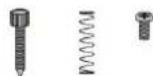
Drum machine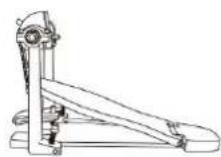
Cymbal arm (3 pieces)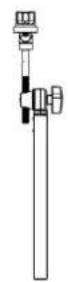
Hi-hat pedal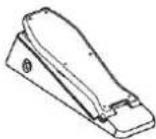
Bolt driver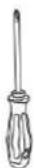
323. Hard Rock Hi-Hat off
- Original Hi-Hat off
- PopBook Hi-Hat Open
326. Rock Hi-Hat off 327.
Metal Hi-Hat off 328
PowerMetal Hi-Hat off 329
SpeedMetal Hi-Hat off 330
PopJazz Hi-Hat off 331. Jazz
Hi-Hat open
332.808
31.99
- Sango Hi Hat after 325
Standard HI-HAT often 336 Accurate
Hi-Hat offer 337. Session Hi-Hat
often 538. Modern Hi-Hat often
- Blues Hi Hat often 340
C1982HHS010341
Symbol 28 HpaHem 1342.1
Hi Hat after 343. Sticks Hi Hat 675
- Change the last column 043
offer 348, Sioa Hnt offer
- Attach Hslte 350
StHtstl 351.
Hat often 352 Military Hi-Hat
after 360. Pop Hi-Hat closed
354. Closed Hi-Hat
355. Hi-Hat Close up
- 357. Original Hi-Hat
PopRock Hi-Hat
- Rock Hi-Hat
- Metal Hi-Hat
- Power Metal Hi-Hat
- SpeedMetal Hi-Hat
PopJazz Hi-Hat
- Jazz Hi-Hat
364.808
355.609
356. Sengo Hi-Hat SchieBan
398. Songo Hi-Hat-Pedal
399. Standard Hi-Hat Pedal

APPENDIX
400. Acoustic Hi-Hat Pedal 401. Session Hi-Hat Pedal 1 402. Modern Hi-Hat Pedal 403. Buca Hi-Hat Pedal 404. Kearinthee Hldo
Synthgaze Hi-Hat Pedal
406. Ercak Hi-Hat Pedal 407. Slicks Hi-Hat Pedal 408. Grunge Hi-Hat Pedal 409. 700r Hi-Hat Pedal 412. 80er Hi-Hat Pedal
- Belobtes Hi-Hat Pedal
412. SlanHtHpPe
- Ate 2018-03-26 415. Fairfax Hi-Hat Pedal
- Militarieschos Hi-Hat Pedal
Abstrz 2
This product can be powered by standard indoor wall sockets. Please only use the power cord specified in this product. When not in use, please turn off the power supply. When not in use for a long time, pull out the power cord and keep it properly.
SIGN
To ensure that you use this product safely and correctly, to prevent harm to users and others and financial damage, this manual and products are marked with a series of safety signs. The various signs and their meanings are as follows:

WARNING
This sign indicates that there is a potential risk of death or serious injury if this mark is ignored and the product is mishandled.

BE CAREFUL
This sign indicates that there is a potential danger of injury to personnel or other financial damage if this sign is ignored and the product is operated incorrectly.
EXAMPLE OF LOGO

This triangle sign (△) indicates what users should pay attention to. (The left example is careful shocks)

A circular sign (⊙) with an oblique line indicates prohibitions. The icons in or beside the logo indicate the contents specifically prohibited. (The example on the left is no disassembly)

The round black bottom sign (●) indicates what must be observed. The diagrams in this sign indicate the contents of the specific matters that must be observed. (The example on the left is that the power plug must be pulled out of the socket)
SAFETY PRECAUTIONS

WARNING
Smoke, odor, overheating
When the product smokes, smells or overheats, there is a danger of fire and electric shock when it is used continually. In case of the above situation, the following operations should be performed immediately:
- Turn off the power supply.
- Pull the plug out of the power outlet.
- Contact your dealer.
Power cord
- The improper use of power cord may cause fire and electric shock. The following precautions must be observed: The special power cord designated for this product must be used. The AC power supply with output voltage within the rated voltage range for household use must be used.
- Do not overload power sockets and extension lines.
- The improper treatment of power line will lead to its damage or breakage, which will cause fire and electric shock hazards. The following precautions must be observed:
- Do not place or heat heavy objects on power lines.
- Do not attempt to alter or bend the power cord too much.
- Do not twist or pull the power cord.
- If the power cord or plug is damaged, please replace the same type of power cord.
- Do not touch the power cord and plug with wet hands, otherwise there is a danger of electric shock.
- Please use the power cord where water will not splash. Water is dangerous and can cause fire and electric shock.
- Never place vases or any other container containing water on this product. Water is dangerous and can cause fire and electric shock.
- Do not allow minors to unplug and touch power lines or connection boards. Minors have no common sense of electricity safety, which may cause electric shock.


BE CAREFUL
The improper use of power cord may cause fire and electric shock. The following precautions must be observed:
- Never put the power cord near the oven or other heat source.
- Do not pull the cable when pulling out of the power socket. The main body of the plug must be grasped.
- The power cord plug must be inserted in the socket to the end.
- Make sure the power supply is off before connecting or disconnecting it.
- When thunderstorms occur or before traveling or other long-term departure, disconnect the power cord from the wall outlet.
- At least once a year, remove the power cord from the wall outlet and clean the dust accumulated around the plug.
Do not burn this product
Do not put this product in the fire, otherwise it will lead to product combustion and explosion of internal electronic components, which will cause fire and personnel injury.
Water and foreign bodies
Water, other liquids, and metal sheets, etc. entering this product can cause fire and electric shock. In such a situation, perform the following operations immediately:
- Turn off the power supply.
- If you are using a power cord for power supply, unplug it from the wall outlet.
- Contact your distributor.
Disassembly and transformation
Do not disassemble or transform the product in any way, otherwise there is a risk of electric shock, scalding, or other personal injury. All internal inspection, adjustment, and maintenance operations should be entrusted to your distributor.


SAFETY PRECAUTIONS
Falling or colliding
If the product falls or is damaged by strong impact, it can cause fire and electric shock. In such a situation, perform the following operations immediately:
- Turn off the power supply.
- If you are using a power cord for power supply, unplug it from the wall outlet.
- Contact your distributor.
Plastic bag
Do not let anyone put plastic bags for this product on his head or in his mouth. Otherwise, there is a risk of asphyxiation. Families with young children should pay special attention to it.

Keep a distance from the product and the bracket
Climbing on the bracket is dangerous and may cause it to overturn or be damaged. Families with young children should pay special attention to this.

Put
Avoid placing the product on an uneven surface or any other unstable place. Otherwise, it may fall and cause injury.

Product Mobility
Before moving this product, you must unplug the power cord from the wall outlet and pull out all other cables and connecting wires. Otherwise, it may damage the power or connection wires, resulting in fire and electric shock.

Clean
Before cleaning this product, you must unplug the power cord from the wall outlet, otherwise there is a risk of fire and electric shock.

Jack
The socket of this product can only be connected to the designated equipment and devices. Connecting non-designated equipment or devices is dangerous and may cause fire and electric shock.


Location selection
Avoid placing the product in the following places, otherwise there is a risk of fire and electric shock.

- High temperature or dusty places.
- Kitchen or other places with lampblack.
- Where the product is exposed to direct sunlight, or any other place where the product will produce high temperature.
Volume
Don't play music long and loud. Pay special attention when using headphones.

Excessive volume can damage your hearing.

Heavy
Do not place heavy objects on this product. Otherwise, the top of the product will be overweight, causing the product to overturn or drop objects on it, which will lead to the risk of injury.

Correct assembly of scaffolds
The incorrect assembly of the bracket may overturn, causing the product to fall off and posing a risk of injury to personnel.
Therefore, it must be assembled according to the instructions in the attached installation guide to ensure that the product is properly mounted on its bracket.
C/O YH Consulting Limited Office 147, Centurion House, London Road, Staines-upon-Thames, Surrey, TW18 4AX
VEVOR
TOUGH TOOLS, HALF PRICE
elettronica www.vevor.com/support
BATTERIA ELETTRONICA
MANUALE D'USO
MODELLO: MD200C,PMID0200P-P
Bultane arr 70
- Rulfante anni '90
59.Rularto popolars 60
Pulante da sbathora
- Rulante dallacco
- Vezchia trappels
- Bularic Fairfax
- Bularte Mitang 65
Cerio de rularie paa
FancuIbema celulam
F. Garcho, n.
- Sorge Tami
- Tom standard
- Tom auship
- Consuiaesre Taun
- Tom andersen
- Blues Tom
- Tom classical
- Synthazole Tom
- Tom's name
- Bastoni Tom
- Gorge Tum1
- Tom's depth 70
- Tom's age and 80
- [om nəpəla]
174.Slaep.10cm
- Albosa Tom 1
- Vachie Toml
- Farax Tom
- Tom mitharol 129
Pop Tom2
- Fanule Tom2
- Tom durn2
- Tom2130 originals.
PoaRack Tom2
- Bapzia Tom2
135.Tum of mebla2
- Powarntal Tom2
- SpeedMetal Tom2 138.
PopJazz Tamz
- Jazz Tnp2
140.803
141.909
142.5000Tm2
143.Tam standard2
144.Tm gnuics2
- Consultszkne, Top2
156. SlamTam2
- Atroca Tom3
- Vecchio Tcm2
159. FairfaxTory2
160. Tem rillrra2 161
Pop Tom3
162. Fancuo Tcm3
- Tm p#3
- Tom3 165 original
PepFock Tom3
Poplazr Cnsh1 203. Jn7
204.808
205.909
- Songo Craehl 207
Creaah standard
208.Crashoutlook
- Season Onesh!
- Crash madmo1
- Blue Crash1
212.Crash classo#
- Synthesis Cryst 214.
Share incpartial
Pop Crash! Cardio 226.
Fenculo Creah! R
- Cercichic Hard Crash
- Cerchio origine Crash 229
PopRack Crash1 Corrno 200.Cerchia
RockCrush1
- Cerchio in metallo Crash
- Cerchic Power Metal Crash1
233.Cerchio SpeedMotal Gsah1 234
PopJazz Crash1 Rim 205. Jazz
Czah1 Cerchio
235.808
237.909
- Sange Crash Cershie 239
Cerchio Crash1 standard
240.Cerichic acustico C
241.Sasson crash 1Rim
- Cerchic Crash1 modern
- Blues Crash! Firm
244.CerichCrash1 classc
- Syngaze Creash Rm 245. Freak
Crash! Corthio
- Allsace Crash1 Rim
Peds and translation pop
- Fanculo I pedal with the charleston
37.Pda1111n
- Pseudo prime number 389
Pedal chafetion PopRok
- Pseudo rock del chareston
- Pala 50
- Podale Charbon PowerModel
- Pseudo character Spacifale 304
Pedalceel chantazion PopJazz
- Pedale de charleson jazz
206.208
087.509
- Hi-hat pedal Songo
- Standard hi-hat pedal

APPENDIX
- Acoustic pedal for hi-hat
- Hi-hat pedal Session
- Moserpoedie gel chardian
- Pedal de cherreroa yue
- 100.
- 100.
70.410 Rodible inspection
arrn 80 411 Papolera pedale
This product can be powered by standard indoor wall sockets. Please only use the power cord specified in this product. When not in use, please turn off the power supply. When not in use for a long time, pull out the power cord and keep it properly.
To ensure that you use this product safely and correctly, to prevent harm to users and others and financial damage, this manual and products are marked with a series of safety signs. The various signs and their meanings are as follows:

WARNING
This sign indicates that there is a potential risk of death or serious injury if this mark is ignored and the product is mishandled.

BE CAREFUL
This sign indicates that there is a potential danger of injury to personnel or other financial damage if this sign is ignored and the product is operated incorrectly.
EXAMPLE OF LOGO

This triangle sign (△) indicates what users should pay attention to. (The left example is careful shocks)

A circular sign (⊙) with an oblique line indicates prohibitions. The icons in or beside the logo indicate the contents specifically prohibited. (The example on the left is no disassembly)

The round black bottom sign (ⓘ) indicates what must be observed. The diagrams in this sign indicate the contents of the specific matters that must be observed. (The example on the left is that the power plug must be pulled out of the socket)
SAFETY PRECAUTIONS

WARNING
Smoke, odor, overheating
When the product smokes, smells or overheats, there is a danger of fire and electric shock when it is used continually. In case of the above situation, the following operations should be performed immediately:
- Turn off the power supply.
- Pull the plug out of the power outlet.
- Contact your dealer.
Power cord
- The improper use of power cord may cause fire and electric shock. The following precautions must be observed:
- The special power cord designated for this product must be used. The AC power supply with output voltage within the rated voltage range for household use must be used.
- Do not overload power sockets and extension lines.
- The improper treatment of power line will lead to its damage or breakage, which will cause fire and electric shock hazards. The following precautions must be observed:
- Do not place or heat heavy objects on power lines.
- Do not attempt to alter or bend the power cord too much.
- Do not twist or pull the power cord.
- If the power cord or plug is damaged, please replace the same type of power cord.
- Do not touch the power cord and plug with wet hands, otherwise there is a danger of electric shock.
- Please use the power cord where water will not splash. Water is dangerous and can cause fire and electric shock.
- Never place vases or any other container containing water on this product. Water is dangerous and can cause fire and electric shock.
- Do not allow minors to unplug and touch power lines or connection boards. Minors have no common sense of electricity safety, which may cause electric shock.


BE CAREFUL
The improper use of power cord may cause fire and electric shock. The following precautions must be observed:
- Never put the power cord near the oven or other heat source.
- Do not pull the cable when pulling out of the power socket. The main body of the plug must be grasped.
- The power cord plug must be inserted in the socket to the end.
- Make sure the power supply is off before connecting or disconnecting it.
- When thunderstorms occur or before traveling or other long-term departure, disconnect the power cord from the wall outlet.
- At least once a year, remove the power cord from the wall outlet and clean the dust accumulated around the plug.
Do not burn this product
Do not put this product in the fire, otherwise it will lead to product combustion and explosion of internal electronic components, which will cause fire and personnel injury.
Water and foreign bodies
Water, other liquids, and metal sheets, etc. entering this product can cause fire and electric shock. If such a situation occurs, immediately perform the following operations:
- Turn off the power supply.
- If you are using a power cord for power supply, unplug it from the wall outlet.
- Contact your distributor.
Disassembly and transformation
Do not disassemble or transform the product in any way, otherwise there is a risk of electric shock, burns, or other personal injury. All internal inspection, adjustment, and maintenance operations should be entrusted to your distributor.


SAFETY PRECAUTIONS
Falling or colliding
If the product falls or is damaged by strong impact, it can cause fire and electric shock. If such a situation occurs, immediately perform the following operations:
- Turn off the power supply.
- If you are using a power cord for power supply, unplug it from the wall outlet.
- Contact your distributor.
Plastic bag
Do not let anyone put plastic bags for this product on his head or in his mouth. Otherwise, there is a risk of asphyxiation. Families with young children should pay special attention to it.

Keep a distance from the product and the bracket.
Climbing on the bracket is dangerous and may cause overturning or damage. Families with young children should pay special attention to this.

Put
Avoid placing the product on an uneven surface or any other unstable place.
Otherwise, it may cause the product to fall, leading to the risk of injury.

Product Mobility
Before moving this product, you must unplug the power cord from the wall outlet and pull out all other cables and connecting wires. Otherwise, it may damage the power or connection wires, resulting in fire and electric shock.


Clean
Before cleaning this product, you must unplug the power cord from the wall outlet, otherwise there is a risk of fire and electric shock.

Jack
The socket of this product can only be connected to designated equipment and devices. Connecting non-designated equipment or devices is dangerous and may cause fire and electric shock.

Location Selection
Avoid placing the product in the following places, otherwise there is a risk of fire and electric shock.

- High temperature or dusty places.
- Kitchen or other places with lampblack.
- Where the product is exposed to direct sunlight, or any other place where the product will produce high temperature.
Volume
Don't play music long and loud. Pay special attention when using headphones.

Excessive volume can damage your hearing.

Heavy
Do not place heavy objects on this product. Otherwise, the top of the product will be overweight, causing the product to overturn or drop objects on it, which will lead to the risk of injury.

Correct assembly of scaffolds
The incorrect assembly of the bracket may overturn, causing the product to fall off and posing a risk of injury to personnel.
Therefore, it must be assembled according to the instructions in the attached installation guide to ensure that the product is properly mounted on its bracket.
Imported in AUS: SIHAO PTY LTD, 1 ROKEVA STREETEASTWOOD NSW 2122Australia
C/O YH Consulting Limited Office 147, Centurion House, London Road, Staines-upon-Thames, Surrey, TW18 4AX
VEVOR
TOUGH TOOLS, HALF PRICE
www.vevor.com/support
- metal box
49. Power Metal box
41. Speed Vocal box 42.
Pop/Jazz box 43. Jazz box
44. 608
45. 809
- Tramma Sonpo 47.
Cajaaebindu
48. Closed box
- Session trap
- trap, nolera
51. Blues box
52. Clinical box
53. Quench Synthgase 54
KARMA, ANGMS
- Stick trap
- Tampge gange 57.
trap of the
58. trap of the 50
59. Popular Box 60.
blow hits
- attack turn
- old trap
- Trample.Fairfax
This product can be powered by standard indoor wall sockets. Please only use the power cord specified in this product. When not in use, please turn off the power supply. When not in use for a long time, pull out the power cord and keep it properly.
To ensure that you use this product safely and correctly, to prevent harm to users and others and financial damage, this manual and products are marked with a series of safety signs. The various signs and their meanings are as follows:

This sign indicates that there is a potential risk of death or serious injury if this mark is ignored and the product is mishandled.

This sign indicates that there is a potential danger of injury to personnel or other financial damage if this sign is ignored and the product is operated incorrectly.

This triangle sign (△) indicates what users should pay attention to. (The example on the left is careful of electric shocks)

A circular sign (⊙) with an oblique line indicates prohibitions. The icons in or beside the logo indicate the contents specifically prohibited. (The example on the left is no disassembly)

The round black bottom sign (●) indicates what must be observed. The diagrams in this sign indicate the contents of the specific matters that must be observed. (The example on the left is that the power plug must be pulled out of the socket)
SAFETY PRECAUTIONS

WARNING
Smoke, odor, overheating
When the product smokes, smells or overheats, there is a danger of fire and electric shock when it is used continually. In case of the above situation, the following operations should be performed immediately:
- Turn off the power supply.
- Pull the plug out of the power outlet.
- Contact your dealer.
Power cord
- The improper use of power cord may cause fire and electric shock. The following precautions must be observed: The special power cord designated for this product must be used. The AC power supply with output voltage within the rated voltage range for household use must be used.
- Do not overload power sockets and extension lines.
- The improper treatment of power line will lead to its damage or breakage, which will cause fire and electric shock hazards. The following precautions must be observed:
- Do not place or heat heavy objects on power lines.
- Do not attempt to alter or bend the power cord too much.
- Do not twist or pull the power cord.
- If the power cord or plug is damaged, please replace the same type of power cord.
- Do not touch the power cord and plug with wet hands, otherwise there is a danger of electric shock.
- Please use the power cord where the water will not splash. Water is in danger of causing fire and electric shock.
- Never place vases or any other container containing water on this product. Water is dangerous of causing fire and electric shock.
- Do not allow minors to unplug and touch power lines or connection boards. Minors have no common sense of electricity safety, which may cause electric shock.


BE CAREFUL
The improper use of power cord may cause fire and electric shock. The following precautions must be observed:
- Never put the power cord near the oven or other heat source.
- Do not pull the cable when pulling out of the power socket. The main body of the plug must be grasped.
- The power cord plug must be inserted in the socket to the end.
- Make sure the power supply is off before connecting or disconnecting it.
- When thunderstorms occur or before traveling or other long-term departure, disconnect the power cord from the wall outlet.
- At least once a year, remove the power cord from the wall outlet and clean the dust accumulated around the plug.
Do not burn this product
Do not put this product in the fire, otherwise it will lead to product combustion and explosion of internal electronic components, which will cause fire and personnel injury.
Water and foreign bodies
Water, other liquids and (metal sheets, etc.) entering this product are in danger of causing fire and electric shock. In case of the above situation, the following operations shall be performed immediately:
- Turn off the power supply.
- If you are using a power cord for power supply, unplug it from the wall outlet.
- Contact your distributor
Disassembly and transformation
Do not disassemble or transform the product in any way, otherwise there is a risk of electric shock, scalding, or other personal injury. All internal inspection, adjustment, and maintenance operations should be entrusted to your distributor.


SAFETY PRECAUTIONS
Falling or colliding
If the product falls or is damaged by strong impact, it will be in danger of causing fire and electric shock. In case of the above situation, the following operations shall be performed immediately:
- Turn off the power supply.
- If you are using a power cord for power supply, you need to unplug it from the wall outlet.
- Contact your distributor.
Plastic bag
Do not let anyone put plastic bags for this product on his head or in his mouth. Otherwise, there is a risk of asphyxia. Families with young children should pay special attention to it.

Keep a distance from the product and the bracket
Climbing the bracket is dangerous of overturning or damage. Families with young children should pay special attention to it.

Put
Avoid placing the product on an uneven surface or any other unstable place.
Otherwise, it will cause the product to fall down, which will lead to the risk of injury.

Product Mobility
Before moving this product, you must unplug the power cord plug from the wall outlet and pull out all other cables and connecting wires. Otherwise, it will lead to damage of power or connection wires, resulting in fire and electric shock.


Cleaning
Before cleaning this product, you must unplug the power cord plug from the wall outlet, otherwise there is a risk of fire and electric shock.

Jack
The socket of this product can only be connected to the designated equipment and devices. Connecting non-designated equipment or devices is dangerous of causing fire and electric shock.

Location selection
It should be avoided to place the product in the following places, otherwise there is a risk of fire and electric shock.

- High temperature or dusty places.
- Kitchen or other places with lampblack.
- Where the product is exposed to direct sunlight, or any other place where the product will produce high temperature.
Volume
Don't play music long and loud. Pay special attention when using headphones.

Excessive volume can damage your hearing.

Heavy
Do not place heavy objects on this product. Otherwise, the top of the product will be overweight, causing the product to overturn or drop objects on it, which will lead to the risk of injury.

Correct assembly of scaffolds
The incorrect assembly of the bracket may overturn, causing the product to fall off and posing a risk of injury to personnel.
Therefore, it must be assembled according to the instructions in the attached installation guide to ensure that the product is properly mounted on its bracket.
Imported to AUS: SIHAO PTY LTD, 1 ROKEVA STREETEASTWOOD NSW 2122 Australia
Imported to USA: Sanven Technology Ltd., Suite 250, 9166 Anaheim Place, Rancho Cucamonga, CA 91730
E-Cr sStu GmbH os
Principalél Landstr.69, 60329 Frankfurt am Main.
YH CONSULTING LIMITED.
C/O YH Consulting Limited Office 147, Centurion House, London Road, Staines upon Thames, Surrey, TW18 4AX
VEVOR
TOUGH TOOLS, HALF PRICE
Technical support and electronic warranty certificate www.vevor.com/support
VEVOR®
TOUGH TOOLS, HALF PRICE
- Suppose koprjriie
- Sorensen
1. Performance benchmark
- Postage Tax: 32
12.898
15.909
16.
2.00%
38. Rock snare
44.102
45.909
- Shenzhen Stock Exchange
- Weber and Xue, 1982
- Season Share
- Noocany Werbel
- Buesoopaipka
- Kanyary Werbel
53. Siltsa Soutboge 54.
Dietary Sop9
SS. Kje Sieric
- Supervisory workers
2. April 1, 2017
- Any Snare Rim
- Snare drum rim
- Ohm, 1
Tamek.
- Pop Tom!
- Pizarryf Tom!
- Tyrandy Tom1
Therefore, m : x = 1 or 3x + 4y + 1 = 0
W. Zhao, 1
Therefore, m - 1 ≠ 0;
Therefore, m - 1 ≠ 0;
- 3.
423.
125
- Wyskowey Toml
129. Pap Tom2
130. PnncsTcns?
- Theory Tom?
170
- 2008 Tom
134. Rock Tam2
- Metalogy, Top 2
- EonrrrAalr Jn2
- SpeedMetal Top2 138
Therefore, m - 1 ≠ 0;
1967.
147.905
- Sgrae Tm2
143 Standard: Itra2
Therefore, m - 1 ≠ 0;
Therefore, m - 1 ≠ 0;
- RAOZESRY 10n2
- Dues Tom2
- Klaszyk, Topo?
Therefore, m - 1 ≠ 0;
- Grunge Tom2
- Tcm2 2 lot 70
154.1m2+10
156.4
Therefore, m : x = 1 or 3x + 4y + 1 = 0
Therefore, m - 1 ≠ 0 ;
Therefore, m - 1 ≠ 0 ;
- Farfax 1om2
- Wiskewy Top
(1)
14.2.1.1
- Original Tom3 165.
PegBak, Inc.
166, Rock Tom3
- McGalvey Tom3
- Power/Power Targ
160, SpocdMetal Tom3 170
Forklass, Jani
- Jazz Tom3
122
473.000
- Sango Tom3
1
205.192e202X8S#e6nHs#
306Exhibit Section 40
- Nnne nnnn nnne
- Copper Blues side
306 Kluwmann, prinsen, Dieder
316.500200
∴ m = 3/11
- Steady hot shot, blasing
383.7m#
- Fieocy, patal bhatu
387.
320.00元/张(含税)
- Pedal rocker hi-hat
- Make sure the pedal is in place
32. Previous front metal LiH-1t
- Pedal springs Mol, Hi-Hat, 294, Perse
A0P-127C9000H0
25. Pedal Jazwaneo hi-hat
396.208
- 909
- Pedal Snga Hi-Hat
- Standard hi-hat pedal

APPENDIX
nat 405, Pcdai Hi-Hat Synthgazc
- Freak HiHat pedal
407. Hi-Hat pedal rods 408.
Grunge hi-hat pedal 499
Hi-Hat pedal from the 70s. 410.
PedaH-HaHaJ 80,411
Popular pedal HiHa 412.
Hi-Hat pedal 413. Pedal
HiHat attack pedal 414. Old pedal
hi-hat 415. Fairfax pedal
This product can be powered by standard indoor wall sockets. Please only use the power cord specified in this product. When not in use, please turn off the power supply. When not in use for a long time, pull out the power cord and keep it properly.
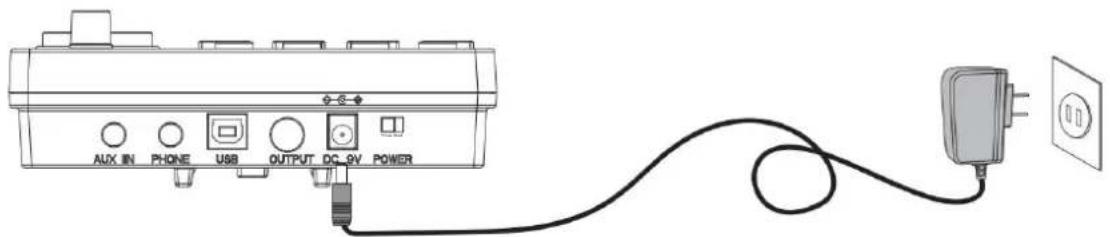
SIGN
To ensure that you use this product safely and correctly, to prevent harm to users and others and financial damage, this manual and products are marked with a series of safety signs. The various signs and their meanings are as follows:

WARNING
This sign indicates that there is a potential risk of death or serious injury if this mark is ignored and the product is mishandled.

BE CAREFUL
This sign indicates that there is a potential danger of injury to personnel or other financial damage if this sign is ignored and the product is operated incorrectly.
EXAMPLE OF LOGO

This triangle sign () indicates what users should pay attention to. (The left example is careful shocks)

A circular sign () with an oblique line indicates prohibitions. The icons in or beside the logo indicate the contents specifically prohibited. (The example on the left is no disassembly)

The round black bottom sign (飞) indicates what must be observed. The diagrams in this sign indicate the contents of the specific matters that must be observed. (The example on the left is that the power plug must be pulled out of the socket)
SAFETY PRECAUTIONS

WARNING
Smoke, odor, overheating
When the product smokes, smells or overheats, there is a danger of fire and electric shock when it is used continually. In case of the above situation, the following operations should be performed immediately:
- Turn off the power supply.
- Pull the plug out of the power outlet.
- Contact your dealer.
Power cord
- The improper use of power cord may cause fire and electric shock. The following precautions must be observed: The special power cord designated for this product must be used. The AC power supply with output voltage within the rated voltage range for household use must be used.
- Do not overload power sockets and extension lines.
- The improper treatment of power line will lead to its damage or breakage, which will cause fire and electric shock hazards. The following precautions must be observed:
- Do not place or heat heavy objects on power lines.
- Do not attempt to alter or bend the power cord too much.
- Do not twist or pull the power cord.
- If the power cord or plug is damaged, please replace the same type of power cord.
- Do not touch the power cord and plug with wet hands, otherwise there is a danger of electric shock.
- Please use the power cord where the water will not splash. Water is in danger of causing fire and electric shock.
- Never place vases or any other container containing water on this product. Water is dangerous and can cause fire and electric shock.
- Do not allow minors to unplug or touch power lines or connection boards. Minors have no common sense of electricity safety, which may cause electric shock.


BE CAREFUL
The improper use of the power cord may cause fire and electric shock. The following precautions must be observed:
- Never put the power cord near the oven or other heat source.
- Do not pull the cable when pulling it out of the power socket. Grasp the main body of the plug.
- The power cord plug must be inserted into the socket all the way.
- Make sure the power supply is off before connecting or disconnecting it.
- When thunderstorms occur, or before traveling or other long-term departure, disconnect the power cord from the wall outlet.
- At least once a year, remove the power cord from the wall outlet and clean the dust accumulated around the plug.
Do not burn this product.
Do not put this product in the fire, otherwise it will lead to product combustion and explosion of internal electronic components, which will cause fire and personal injury.
Water and foreign bodies
Water, other liquids, and (metal sheets, etc.) entering this product are in danger of causing fire and electric shock. In case of the above situation, the following operations shall be performed immediately:
- Turn off the power supply.
- If you are using a power cord for power supply, unplug it from the wall outlet.
- Contact your distributor.
Disassembly and transformation
Do not disassemble or transform the product in any way, otherwise there is a risk of electric shock, scald or other personal injury. All internal inspection, adjustment and maintenance operations should be entrusted to your distributor.


SAFETY PRECAUTIONS
Falling or colliding
If the product falls or is damaged by strong impact, it will be in danger of causing fire and electric shock. In case of the above situation, the following operations shall be performed immediately:
- Turn off the power supply.
- If you are using a power cord for power supply, you need to unplug it from the wall outlet.
- Contact your distributor.
Plastic bag
Do not let anyone put plastic bags for this product on his head or in his mouth. Otherwise, there is a risk of asphyxia. Families with young children should pay special attention to it.

Keep a distance from the product and the bracket
Climbing the bracket is dangerous of overturning or damage. Families with young children should pay special attention to it.

Put
Avoid placing the product on an uneven surface or any other unstable place. Otherwise, it will cause the product to fall down, which will lead to the risk of injury.

Product Mobility
Before moving this product, you must unplug the power cord plug from the wall outlet and pull out all other cables and connecting wires. Otherwise, it will lead to damage of power or connection wires, resulting in fire and electric shock.

Cleaning
Before cleaning this product, you must unplug the power cord plug from the wall outlet, otherwise there is a risk of fire and electric shock.

Jack
The socket of this product can only be connected to the designated equipment and devices. Connecting non-designated equipment or devices is dangerous of causing fire and electric shock.


Location selection
It should be avoided to place the product in the following places, otherwise there is a risk of fire and electric shock.

- High temperature or dusty places.
- Kitchen or other places with lampblack.
- Where the product is exposed to direct sunlight, or any other place where the product will produce high temperature.
Volume
Don't play music long and loud. Pay special attention when using headphones.

Excessive volume can damage your hearing.

Heavy
Do not place heavy objects on this product. Otherwise, the top of the product will be overweight, causing the product to overturn or drop objects on it, which will lead to the risk of injury.

Correct assembly of scaffolds
The incorrect assembly of the bracket may overturn, causing the product to fall off and posing a risk of injury to personnel.
Therefore, it must be assembled according to the instructions in the attached installation guide to ensure that the product is properly mounted on its bracket.
Import to AUS: SIHAO PTY LTD, 1 ROKEVA STREETEASTWOOD NSW
2122 Australia
Import to USA: Sanven Technology Ltd., Suite 250, 9166 Anaheim Place, Rancho Cucamonga, CA 91730
E-Cr sStu GmbH os
Glownyz on Landstr.69, 60329 Frankfurt am Main.
YH CONSULTING SP. Z O.O.
C/O YH Consulting Limited Office 147, Centurion House,
London Road, Staines-upon-Thames, Surrey, TW18 4AX
VEVOR
TOUGH TOOLS, HALF PRICE
NEED HELP? CONTACT US!
9 SAVE / RESET
PopJazzKick 11, Jazz
kck
12.808
13.908
14.Songotran 15
Standard trap
16.Acoustic kick
- Session kick
- Modern kick
- Blues kick
- Kassico kick
- Synthgaze-Kick 22
Freke Nick
64.14
- Synthgaze snare ranr
- Freak snare-rand
- Slicks snare and
88.Guoge sare-tan
- Sprechdrum uit de prun 70
- Poplar sparrow
- PgpRckTpm1
- Rota Tom 1
- Metaken Tom 1
- PowerMetal Tom 1
105 SpeedMetal Top
106 Pop juxxTomp1
- Jeazztop1
- 808
109.909
110. Sango Tom 1
Standard hi-hat open 338.
Acoustic hi-hat open 337.
Session hi-hat open 338
Modern hi-hat open 339
Blues hi-hat open 340
Classic hi-hat open 341.
Synth jazz hi-hat open 342. Frog
Hi-hat open 343. Stick
Hat open 344. Grunge hi
hat open 345. Hi-hat open 346
Hi-Hat open 349. Aardvark
hi-hat open 350. Old hi-hat
open 351. Fairfax hi-hat
- Pop Hi-Hat Closed
- Funk hi-hat closed
- Hard rock hi-hat closed
- Original Hi-Hat Closed
- Pop/Rock Hi-Hat Closed
- Rock hi-hat closed
- Metal hi-hat closed
- Power Metal Hi-Hat Closed
- Speed Metal Hi-Hat Closed 362
Pop Jazz Hi-Hat Closed
- Jazz Hi-Hat Closed
- 508
365.909
- Songo Hi-Hat Closed
- Standard Hat Closed
- Acoustic Hi-Hat Closed
- Session H-Hat Suite
- Modern hi-hat close
- Blues Hi-Hat Closed
- Classic Hi-Hat Closed
373.Synthgaze Hi-Hat Suihen
- Freak Hi-Hat Closed
- Hold the hi-hat closed
- Grunge Hi-Hat Shut
- Hi-hat from the 70s
378. Hi-hat from the 20th century
- Popular Hi-Hat Close
- Close the hi-hat
- Artisox Hi-Hat Solution
382. Close hi-hat
- Fairfax Hi-Hat Shutter
- Military Hi-Hat Shutter
- Pop hi-hat pedal
- Funk hi-hat pedal
- Hard hi-hat pedal
- Original hi-hat pedal
- Pop/Rock hi-hat pedal
- Rock hi-hat pedal
- Metal hi-hat pedal
- Power Metal hi-hat pedal
This product can be powered by standard indoor wall sockets. Please only use the power cord specified in this product. When not in use, please turn off the power supply. When not in use for a long time, pull out the power cord and keep it properly.
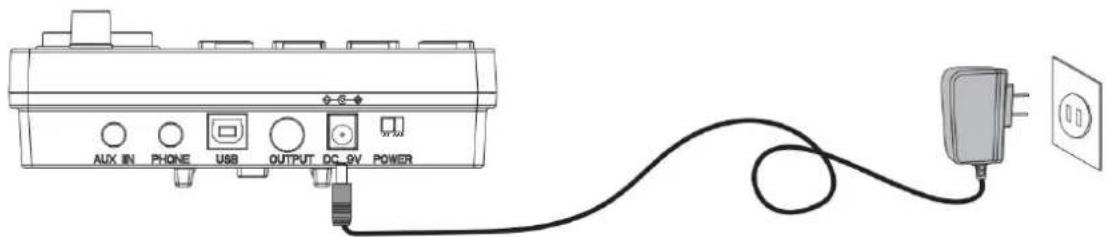
To ensure that you use this product safely and correctly, to prevent harm to users and others and financial damage, this manual and products are marked with a series of safety signs. The various signs and their meanings are as follows:

This sign indicates that there is a potential risk of death or serious injury if this mark is ignored and the product is mishandled.

This sign indicates that there is a potential danger of injury to personnel or other financial damage if this sign is ignored and the product is operated incorrectly.
EXAMPLE OF LOGO

This triangle sign () indicates what users should pay attention to. (The left example is careful shocks)

A circular sign () with an oblique line indicates prohibitions. The icons in or beside the logo indicate the contents specifically prohibited. (The example on the left is no disassembly)

The round black bottom sign (飞) indicates what must be observed. The diagrams in this sign indicate the contents of the specific matters that must be observed. (The example on the left is that the power plug must be pulled out of the socket)
SAFETY PRECAUTIONS

WARNING
Smoke, odor, overheating
When the product smokes, smells or overheats, there is a danger of fire and electric shock when it is used continually. In case of the above situation, the following operations should be performed immediately:
- Turn off the power supply.
- Pull the plug out of the power outlet.
- Contact your dealer.
Power cord
- The improper use of power cord may cause fire and electric shock. The following precautions must be observed: The special power cord designated for this product must be used. The AC power supply with output voltage within the rated voltage range for household use must be used.
- Do not overload power sockets and extension lines.
- The improper treatment of power line will lead to its damage or breakage, which will cause fire and electric shock hazards. The following precautions must be observed:
- Do not place or heat heavy objects on power lines.
- Do not attempt to alter or bend the power cord too much.
- Do not twist or pull the power cord.
- If the power cord or plug is damaged, please replace the same type of power cord.
- Do not touch the power cord and plug with wet hands, otherwise there is a danger of electric shock.
- Please use the power cord where the water will not splash. Water is in danger of causing fire and electric shock.
- Never place vases or any other container containing water on this product. Water is dangerous of causing fire and electric shock.
- Do not allow minors to unplug and touch power lines or connection boards. Minors have no common sense of electricity safety, which may cause electric shock.


BE CAREFUL
The improper use of power cord may cause fire and electric shock. The following precautions must be observed:
- Never put the power cord near the oven or other heat source.
- Do not pull the cable when pulling out of the power socket. The main body of the plug must be grasped.
- The power cord plug must be inserted in the socket to the end.
- Make sure the power supply is off before connecting or disconnecting it.
- When thunderstorms occur or before traveling or other long-term departure, disconnect the power cord from the wall outlet.
- At least once a year, remove the power cord from the wall outlet and clean the dust accumulated around the plug.
Do not burn this product
Do not put this product in the fire, otherwise it will lead to product combustion and explosion of internal electronic components, which will cause fire and personnel injury.
Water and foreign bodies
Water, other liquids and (metal sheets, etc.) entering this product are in danger of causing fire and electric shock. In case of the above situation, the following operations shall be performed immediately:
- Turn off the power supply.
- If you are using a power cord for power supply, unplug it from the wall outlet.
- Contact your distributor.
Disassembly and transformation
Do not disassemble or transform the product in any way, otherwise there is a risk of electric shock, scald or other personal injury. All internal inspection, adjustment and maintenance operations should be entrusted to your distributor.


SAFETY PRECAUTIONS
Falling or colliding
If the product falls or is damaged by strong impact, it may cause fire and electric shock. In such cases, the following operations shall be performed immediately:
- Turn off the power supply.
- If you are using a power cord for power supply, unplug it from the wall outlet.
- Contact your distributor.
Plastic bag
Do not let anyone put plastic bags for this product on their head or in their mouth. Otherwise, there is a risk of asphyxiation. Families with young children should pay special attention to this.

Keep a distance from the product and the bracket
Climbing the bracket is dangerous as it may overturn or cause damage. Families with young children should pay special attention to this.

Placement
Avoid placing the product on an uneven surface or any other unstable place.
Otherwise, it may cause the product to fall, leading to the risk of injury.

Product Mobility
Before moving this product, you must unplug the power cord from the wall outlet and pull out all other cables and connecting wires. Otherwise, it may damage the power or connection wires, resulting in fire and electric shock.


clean
Before cleaning this product, you must unplug the power cord plug from the wall outlet, otherwise there is a risk of fire and electric shock.

Jack
The socket of this product can only be connected to the designated equipment and devices. Connecting non-designated equipment or devices is dangerous of causing fire and electric shock.

Location selection
It should be avoided to place the product in the following places, otherwise there is a risk of fire and electric shock.

- High temperature or dusty places.
- Kitchen or other places with lampblack.
- Where the product is exposed to direct sunlight, or any other place where the product will produce high temperature.
Volume
Don't play music long and loud. Pay special attention when using headphones.

Excessive volume can damage your hearing.

Heavy
Do not place heavy objects on this product. Otherwise, the top of the product will be overweight, causing the product to overturn or drop objects on it, which will lead to the risk of injury.

Correct assembly of scaffolds
The incorrect assembly of the bracket may overturn, causing the product to fall off and posing a risk of injury to personnel.
Therefore, it must be assembled according to the instructions in the attached installation guide to ensure that the product is properly mounted on its bracket.
VEVOR®
TOUGH TOOLS, HALF PRICE
Technical support and e-warranty certificate www.vevor.com/support
VEVOR®
TOUGH TOOLS, HALF PRICE
FUNCTION INTRODUCTION
CONTENTS 2
INSTALLATION GUIDE 3
CHECK ATTACHED ITEMS 3
IRON PIPE HOLDER 4
TYMPANIC INTUBATION 4
MOUNTING STAND 5
INSTALL THE DRUM MODULE 5
INSTALL THE CYMBALS AND SOUND MODULE -6
INSTALL THE SNARE DRUM 7
INSTALL THE HAMMER HOLDER 7
THE SNARE DRUM IS FIXED WITH THE STEP HAMMER 7
CONNECT THE CONNECTION CABLE FOR THE STRIKING PART
ILLUSTRATION OF THE SOUND MODULE PORT 8
Switch in B: pedalage.
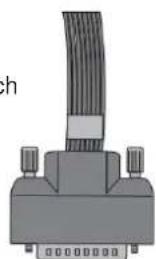
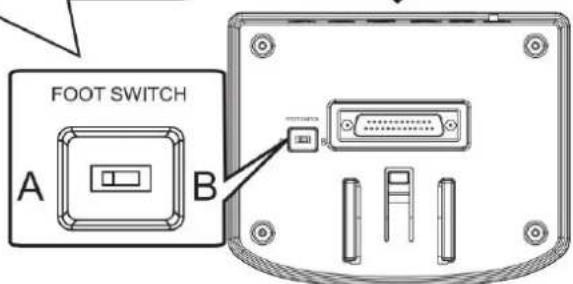

ILLUSTRATION OF THE SOUND MODULE PORT
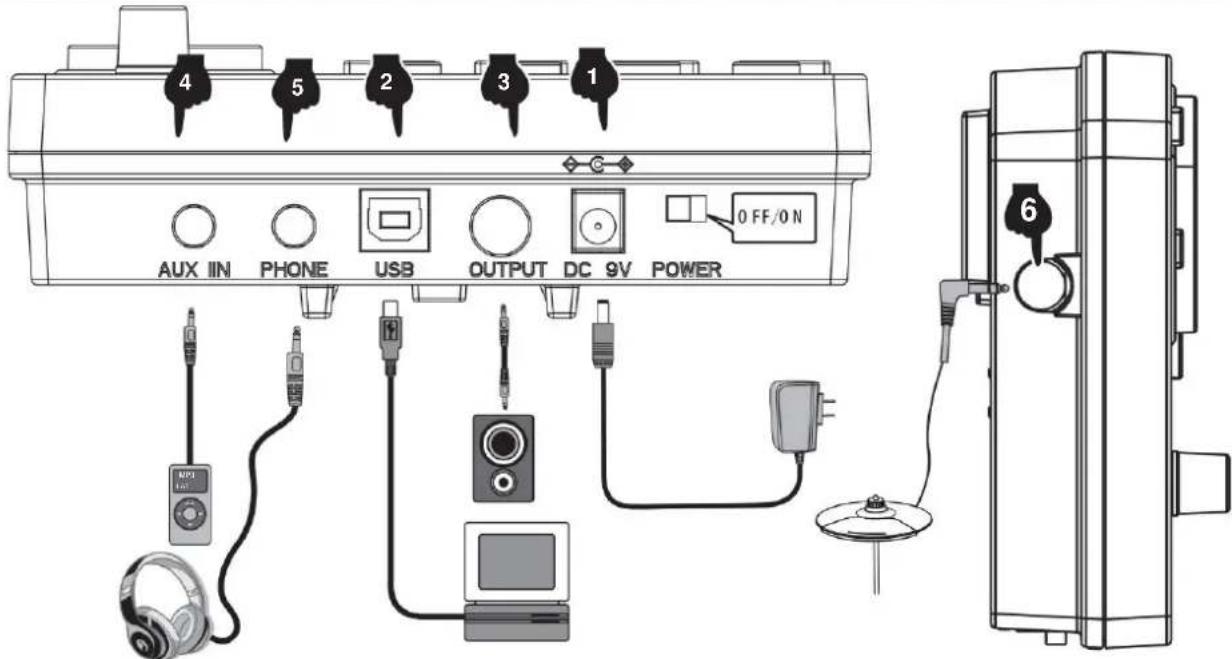
1 CONNECTION OF THE POWER CORD
- Acoustic Ride Rim
- Season Hilde Rim
306.Modern Ride Rim
- Blues Ride Rim
308. Classic Ride Rim
308 Synthaze Bid Rim
- Freak Bride Rim
- Sticks Ride Rim
- Grunge Ride Rim
313. 70-tals Ride Rim
- Ride Rim Iron 80 slot
- Popular Ride Rim
- Slam Ride Rim
- Attack Ride Rim
- Old Ride Rim
- Fairfax Ride Rim
- Military Ride Rim
Hi-Hat.
- Pop Hi-Hat Open
- Funk Hi-Hat Open
- Hard Hi-Hat Open
- Original Hi-Hat Open
- PopRock Hi-Hat Open
- Rock Hi-Hat Open 327.
Metal Hi-Hat Open 328
PowerMetal Hi-Hat Open 329.
SpoodMotal Hi-Hat Open 330
PopJazz Hi-Hat Open 331
Jazz Hi-Hat Open
332.658
333.909
- Songe Hi-Hat Open
- Standard Hi-Hat Open
- Acoustic Hi-Hat Open
- Session Hi-Hat Open
- Modern Hi-Hat Open
- Blues Hi-Hat Open
- Classic Hi-Hat Open
- Synthgaze Hi-Hat Open 342
Funk Hi-Hat Open 343
Sticks Hi-Hat Open 344
Grunge Hi-Hat Open 345.70
1aicts Hi-Hat Open 346
80 labels Hi-Hat Open
- Populare Hi-Hat Open
- Slam Hi-Hat Open
- Attack Hi-Hat Open
- Cold Hi-Hat Open
- Fairfax Hi-Hat Open
- Military Hi-Hat Open
- Pop Hi-Hat Close
- Funk Hi-Hat Close
- Hard Hi-Hat Close
- Original Hi-Hat Close
- PopRock Hi-Hat Stang
- Rock Hi-Hat Close
- Metal Hi-Hat Stung
- PowerModel Hi-Hat Stang
361 SpeedMetal Hi-Hat Close 362
PopJazz Hi-Hat Slang
- Jazz Hi-Hat Close to
364.608
365.909
- Songo Hi-Hat Close
- Standard Hi-Hat Stand
- Akustik Hi-Hat Close
- Session Hi-Hat Stand
370. Modern Hi-Hat Close
- Blues Hi-Hat Stand
- Klassik Hi-Hat Close
- Synthgaze Hi-Hat Close
- Freak Hi-Hat Close
- Sticks Hi-Hat nara
- Grunge Hi-Hat Stan
- 70-tails Hi-Hat Close to
- B4-C58 H1-H1C9
- Populär Hi-Hat Clos
- Siam Hi-Hat Close
- Alackera Hi Hal Close
- Gammal H-Hat nara
- Fairfax Hi-Hat Stang
- Millar Hi-Hat Close 385
Pop Hi-Hat Podai
- Fuck Hi Hal Pedal
387.Hard Hi-Hat-pedal
- Original Hi-Hat Pedal
- PopRock Hi-Hat Pedi
- Rock Hi-Hat Pocial
- Metal Hi-Hat Pedal
- Power Metal Hi-Hat Pedal
- Speed Metal Hi-Hat Pedal 394 Pop Jazz Hi-Hat Pedal
- Jazz Hi-Hat Pedal 396.608 397.909
- Songo Hi-Hat Pedal
- Standard Hi-Hat Pedal

APPENDIX
- Akustek Hi-Hat Pedal
- Session Hi-Hat Pedal
- Modern Hi-Hat Pedal
403, Blue Hi-Hat Pedal
604 Klassik Hi-Hat Pedal
405, Synthuaze Hi-Hat Pedal
606 Freak Hi-Hat Pedal
607 Stock Hi-Hat Pedal
405, Gunge Hi-Hat Pedal
609, 70-tals Hi-Hat Pedal
410, 80-fals Hi-Hat Pedal
- Popular Hi-Hat Pedal 412
Sharn Hi-Hat Pedal 413
Attack Hi-Hat Pedal 414
Garjalal Hi-Hat Pedal
615, Fairfax Hi-Hat Pedal
- Militar Hi-Hat Pedal
417. Pookresch2 418. EurxCrash2 419. OriginalCrash3 420. PooRockCrash2 421. Bock.Crash2 422. MetalCrash2 423. PowerMetalCrash2 424. GreenfieldGroup 425. PooJazzCras 426. Jazzkrasch 2 427. 806 428. 909 429. SpongCrash2 430. Standard Crash2 431. Anatomic Instability
- Session Crash2 432. Modern Crash2 433. BluesCrash2 434.
- Synthgaze, Crash2
- Freak Crash2 435. Slicks.Crash2
- Grungekrasch 2 436. 70-lalskrasch2
- BD-falskraschn2
- Popular Crash2
- Slam Crash?
- Attack Crash2
- Gammal, Crash2
- Fairfax Crash2
- Pop Crash2 Rim
- Fuck Crash2 Rim 437. HardCrash2faig
- Original Crash2 flag
- FpRock, CrsB2, Rhyme 454, BockCas2fag 455. MetalCrash2fBg
- PowerMalat Crash2 flag
- SpeedMetal Crash2 flag
- PopJazz Crash2 Rim
- Jazz Crash2 flag 460.808 461.509 462. SongoCrash2Bim 463. Standard Crash2-fig
- Acoustic Crash2 flag
- Session Crash2 jolp 466. ModernCrash2-falp
- Blues, Crash2, Rim
- Klassisk Crash2 f#p
- Cartan 100 470FreakCrash3.fjio 471FiekeGraebel 472, GnnpCrash2Bim 473. 70-talsCrash2Him 474. CsagBim180-tatei
- Populira Crash2 Rim
- Slam Crash2 flag
- Attack Crash2 Bin
- Gammal Crash2-fatq
- Fairfax Crash2 Falg
- Military Crash2 Rim
Drum combination timbre
| 01 Pop | 09 SpeedMetal | 17 Session | 25 70-talet |
| 02 Fan | 10 PopJazz | 18 Modern | 26 80-talet |
| 03 Svårt | 11 Jazz | 19 Blues | 27 Populär |
| 04 Original | 12 808 | 20 Klassisk | 28 Slam |
| 05 Poprock | 13 909 | 21 Synthgaze | 29 Attack |
| 06 Rock | 14 Songo | 22 Freak | 30 gammad |
| 07 Metall | 15 Standard | 23 pinnar | 31 Fairfax |
| 08 PowerMetal | 16 Akustisk | 24 Grunge | 32 Militär |
Demonstration music
| Láten 001 | Lát 007 | Lát 013 | Lát 019 | Sân g 025 |
| Láten 002 | Lát 008 | Lát 014 | Lát 020 | Sân g 026 |
| Láten 003 | Lát 009 | Lát 015 | Sân g 021 | Sân g 027 |
| Lát 004 | Láten 010 | Lát 016 | Sân g 022 | Sân g 028 |
| Lát 005 | Láten 011 | Lát 017 | Sân g 023 | Sân g 029 |
| Lát 006 | Láten 012 | Lát 018 | Sân g 024 | Sân g 030 |

PRODUCT MAINTENANCE
This product can be powered by standard indoor wall sockets. Please only use the power cord specified in this product. When not in use, please turn off the power supply. When not in use for a long time, pull out the power cord and keep it properly.
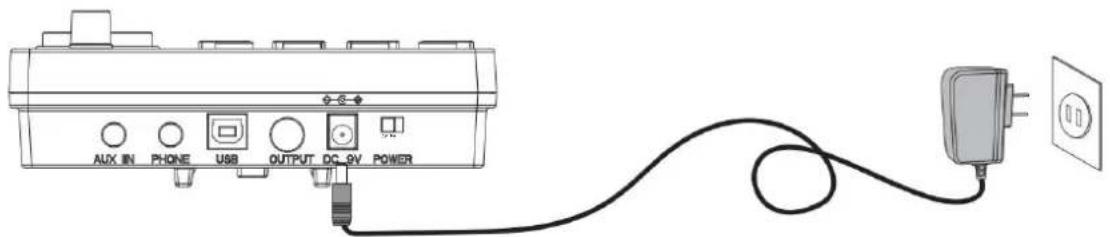
SIGN
To ensure that you use this product safely and correctly, to prevent harm to users and others and financial damage, this manual and products are marked with a series of safety signs. The various signs and their meanings are as follows:

WARNING
This sign indicates that there is a potential risk of death or serious injury if this mark is ignored and the product is mishandled.

BE CAREFUL
This sign indicates that there is a potential danger of injury to personnel or other financial damage if this sign is ignored and the product is operated incorrectly.
EXAMPLE OF LOGO

This triangle sign (△) indicates what users should pay attention to. (The example on the left indicates a risk of electric shock.)

A circular sign (⊙) with an oblique line indicates prohibitions. The icons in or beside the logo indicate the contents specifically prohibited. (The example on the left is "no disassembly".)

The round black bottom sign (●) indicates what must be observed. The diagrams in this sign indicate the contents of the specific matters that must be observed. (The example on the left is that the power plug must be pulled out of the socket.)
SAFETY PRECAUTIONS

WARNING
Smoke, odor, overheating
When the product smokes, smells, or overheats, there is a danger of fire and electric shock if it is used continually. In case of the above situation, the following operations should be performed immediately:
- Turn off the power supply.
- Pull the plug out of the power outlet.
- Contact your dealer.
Power cord
- The improper use of the power cord may cause fire and electric shock. The following precautions must be observed:
- The special power cord designated for this product must be used. The AC power supply with output voltage within the rated voltage range for household use must be used.
- Do not overload power sockets and extension lines.
- The improper treatment of power line will lead to its damage or breakage, which will cause fire and electric shock hazards. The following precautions must be observed:
- Do not place or heat heavy objects on power lines.
- Do not attempt to alter or bend the power cord too much.
- Do not twist or pull the power cord.
- If the power cord or plug is damaged, please replace the same type of power cord.
- Do not touch the power cord and plug with wet hands, otherwise there is a danger of electric shock.
- Please use the power cord where the water will not splash. Water is in danger of causing fire and electric shock.
- Never place vases or any other container containing water on this product. Water is dangerous of causing fire and electric shock.
- Do not allow minors to unplug and touch power lines or connection boards. Minors have no common sense of electricity safety, which may cause electric shock.


BE CAREFUL
The improper use of power cord may cause fire and electric shock. The following precautions must be observed:
- Never put the power cord near the oven or other heat source.
- Do not pull the cable when pulling out of the power socket. The main body of the plug must be grasped.
- The power cord plug must be inserted in the socket to the end.
- Make sure the power supply is off before connecting or disconnecting it.
- When thunderstorms occur or before traveling or other long-term departure, disconnect the power cord from the wall outlet.
- At least once a year, remove the power cord from the wall outlet and clean the dust accumulated around the plug.
Do not burn this product
Do not put this product in the fire, otherwise it will lead to product combustion and explosion of internal electronic components, which will cause fire and personnel injury.
Water and foreign bodies
Water, other liquids and (metal sheets, etc.) entering this product are in danger of causing fire and electric shock. In case of the above situation, the following operations shall be performed immediately:
- Turn off the power supply.
- If you are using a power cord for power supply, unplug it from the wall outlet.
- Contact your distributor.
Disassembly and transformation
Do not disassemble or transform the product in any way, otherwise there is a risk of electric shock, scald or other personal injury. All internal inspection, adjustment and maintenance operations should be entrusted to your distributor.


SAFETY PRECAUTIONS
Falling or colliding
If the product falls or is damaged by strong impact, it may cause fire and electric shock. In such a case, the following operations shall be performed immediately:
- Turn off the power supply.
- If you are using a power cord for power supply, unplug it from the wall outlet.
- Contact your distributor.
Plastic bag
Do not let anyone put plastic bags for this product on his head or in his mouth. Otherwise, there is a risk of asphyxiation. Families with young children should pay special attention to this.

Keep a distance from the product and the bracket
Climbing the bracket is dangerous as it may overturn or cause damage. Families with young children should pay special attention to this.

Placement
Avoid placing the product on an uneven surface or any other unstable place. Otherwise, the product may fall down, leading to the risk of injury.

Product Mobility
Before moving this product, you must unplug the power cord from the wall outlet and pull out all other cables and connecting wires. Otherwise, it may lead to damage of power or connection wires, resulting in fire and electric shock.

Cleaning
Before cleaning this product, you must unplug the power cord plug from the wall outlet, otherwise there is a risk of fire and electric shock.

The socket of this product can only be connected to the designated equipment and devices. Connecting non-designated equipment or devices is dangerous and can cause fire and electric shock.


Location selection
It should be avoided to place the product in the following places, otherwise there is a risk of fire and electric shock.

- High temperature or dusty places.
- Kitchen or other places with lampblack.
- Where the product is exposed to direct sunlight, or any other place where the product will produce high temperature.
Volume
Don't play music long and loud. Pay special attention when using headphones.

Excessive volume can damage your hearing.

Heavy
Do not place heavy objects on this product. Otherwise, the top of the product will be overweight, causing the product to overturn or drop objects on it, which will lead to the risk of injury.

Correct assembly of scaffolds
The incorrect assembly of the bracket may overturn, causing the product to fall off and posing a risk of injury to personnel.
Therefore, it must be assembled according to the instructions in the attached installation guide to ensure that the product is properly mounted on its bracket.
YH CONSULTING LIMITED. C/O YH Consulting Limited Office 147, Centurion House, London Road, Staines-upon-Thames, Surrey, TW18 4AX
VEVOR
TOUGH TOOLS, HALF PRICE
www.vevor.com/support




- ELECTRONIC DRUM SET USER MANUAL
- NEED HELP? CONTACT US
- REMARK
- FUNCTION INTRODUCTION
- CONTENTS
- INSTALLATION GUIDE
- CHECK THE ATTACHED ITEMS
- LRON PIPE HOLDER
- TYMPANIC INTUBATION
- MOUNTING STAND
- INSTALL THE DRUM MODULE
- INSTALL HITTING PARTS AND SOUND MODULE
- INSTALL THE KICK DRUM
- INSTALL THE HAMMER BAR
- THE KICK DRUM IS FIXED WITH THE STEP HAMMER
- PLUG IN THE STRIKING PART CONNECTION CABLE
- ILLUSTRATION OF SOUND MODULE PORT
- POWER CORD CONNECTION
- USB MIDI PORT
- AUDIO OUTPUT PORT
- AUDIO INPUT PORT
- EARPHONE PORT
- INCREASE PORT
- BT MODE
- OPERATION GUIDE
- POWER
- DRUM KIT SELECTION
- METRONOME
- PRACTICE FUNCTION
- COACH MODE
- DEMO SONGS
- DRUM PARAMETERS
- RECORDING FUNCTION
- SAVE/RESET
- USB MIDI
- APPENDIX
- TIMBRE
- PRESET DRUM KITS
- USER DEFINED DRUM KITS
- DEMONSTRATION SONG
- PRODUCT MAINTENANCE
- SAFETY PRECAUTIONS
- IRON PIPE HOLDER
- KICK
- SNARE
- TOM
- CRASH
- RIDE
- HI-HAT
- DRUM COMBINATION TIMBRE
- DEMONSTRATION MUSIC
- AVOID HEAT, MOISTURE OR DIRECT SUNLIGHT
- DO NOT USE NEAR TV OR RADIO
- DO NOT USE PAINT, THINNER OR SIMILAR CHEMICALS FOR CLEANING
- DO NOT SHAKE TO AVOID COLLISION
- POWER SUPPLY
- SIGN
- WARNING
- BE CAREFUL
- EXAMPLE OF LOGO
- SMOKE, ODOR, OVERHEATING
- POWER CORD
- DO NOT BURN THIS PRODUCT
- WATER AND FOREIGN BODIES
- DISASSEMBLY AND TRANSFORMATION
- FALLING OR COLLIDING
- PLASTIC BAG
- KEEP A DISTANCE FROM THE PRODUCT AND THE BRACKET
- PUT
- PRODUCT MOBILITY
- CLEAN
- JACK
- LOCATION SELECTION
- VOLUME
- HEAVY
- CORRECT ASSEMBLY OF SCAFFOLDS
- VEVOR®
- TOUGH TOOLS, HALF PRICE
- INTRODUCTION OF FUNCTIONS
- VEVOR
- BATTERIA ELETTRONICA
- MANUALE D'USO
- CLEANING
- SAVE / RESET
- PLACEMENT
- CHECK ATTACHED ITEMS
- INSTALL THE CYMBALS AND SOUND MODULE
- INSTALL THE SNARE DRUM
- INSTALL THE HAMMER HOLDER
- CONNECT THE CONNECTION CABLE FOR THE STRIKING PART
- ILLUSTRATION OF THE SOUND MODULE PORT
- CONNECTION OF THE POWER CORD
Brand : Vevor
Model : MD200C-P
Category : Musical instrument