
LX-C9358 - Storage organizer Vevor - Free user manual and instructions
Find the device manual for free LX-C9358 Vevor in PDF.
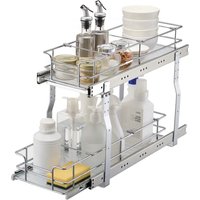


| Product Type | Sliding double basket storage organizer |
| Brand | Vevor |
| Model | LX-C9358 |
| Upper Basket Dimensions (W x D x H) | 161 x 516 x 85 mm |
| Lower Basket Dimensions (W x D x H) | 183 x 533 x 85 mm |
| Installation Dimensions (W x D x H) | 245 x 563 x 465 mm |
| Maximum Load Capacity (Total) | 30 kg (66 lb) |
| Load Capacity Per Tier | 15 kg (33 lb) |
| Material | Coated steel |
| Color | Not specified (usually silver or white) |
| Installation Type | To be mounted in a kitchen cabinet |
| Key Features | Sliding double basket, telescopic rails, optimized storage |
| Maintenance and Cleaning | Wipe with a damp cloth, use a glass cleaner |
| Safety | Do not sit or stand, do not use on the floor, do not exceed load, supervise children |
| Spare Parts Available | Rails, baskets, support frame, bars, screws, joints |
| Repairability | Spare parts listed, user repairable |
| General Information | Electronic warranty via www.vevor.com/support |
Frequently Asked Questions - LX-C9358 Vevor
User questions about LX-C9358 Vevor
0 question about this device. Answer the ones you know or ask your own.
Ask a new question about this device
Download the instructions for your Storage organizer in PDF format for free! Find your manual LX-C9358 - Vevor and take your electronic device back in hand. On this page are published all the documents necessary for the use of your device. LX-C9358 by Vevor.
USER MANUAL LX-C9358 Vevor
Technical Support and E-Warranty Certificate www.vevor.com/support
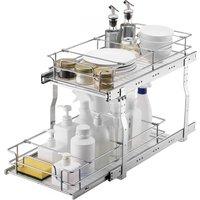
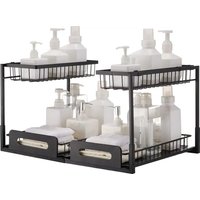
PLACE TYPE PULL-OUT ORGANIZERS
( DOUBLE LAYER BASKET)
Model: LX-C9359; LX-C9358
We continue to be committed to provide you tools with competitive price. "Save Half", "Half Price" or any other similar expressions used by us only represents an estimate of savings you might benefit from buying certain tools with us compared to the major top brands and does not necessarily mean to cover all categories of tools offered by us. You are kindly reminded to verify carefully when you are placing an order with us if you are actually saving half in comparison with the top major brands.
VEVOR®
TOUGH TOOLS, HALF PRICE
PLACE TYPE PULL-OUT ORGANIZER
( DOUBLE LAYER BASKET )
Thanks for purchasing one of our products, please read carefully the assembly instructions before the installation.
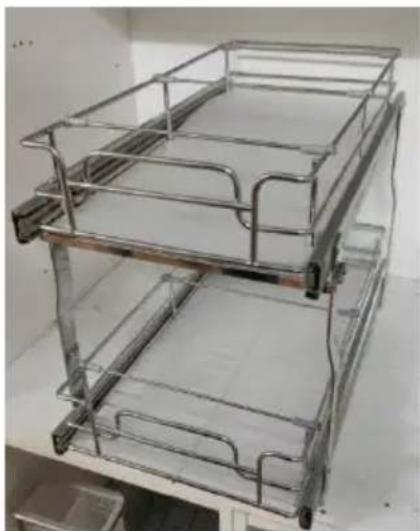
Model: LX-C9359; LX-C9358
NEED HELP? CONTACT US!
Have product questions? Need technical support? Please feel free to contact us:
Technical Support and E-Warranty Certificate www.vevor.com/support
This is the original instruction, please read all manual instructions carefully before operating. VEVOR reserves a clear interpretation of this user manual. The appearance of the product shall be subject to the product you received. Please forgive us that we won't inform you again if there are any technology or software updates on our product.
PRODUCT PARAMETERS
| Model | Product Size (mm)W*D*H | Loading Capacity | Installation size(mm)W*D*H |
| LX-C9359 | Top basket:250x516x85Bottom basket272 x533x 85 | 66 lbs (Max)(Single layer 33lbs) | 335 x563x 46 |
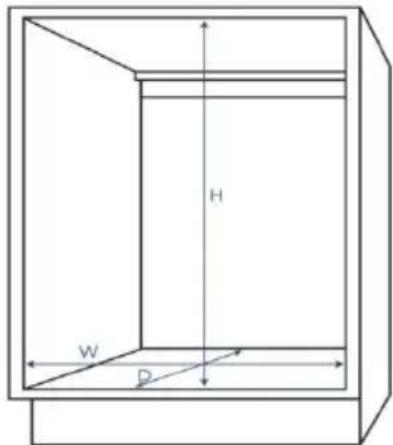
| LX-C9358 | Top basket:161 x516x85Bottom basket183x 533x 85 | 66 lbs (Max)(Single layer 33lbs) | 245x 563x 46 |
ASSEMBLY PRECAUTIONS
- Assembly must follow these instructions. Incorrect assembly can cause a hazard.
- Wear safety goggles and heavy-duty work gloves during assembly.
- Do not assemble when tired or when under the influence of alcohol, drugs, or medication.
- Weight capacity and other product capabilities apply only to a properly and completely assembled product.
- Keep the assembly area clean and well-lit.
- Keep bystanders out of the area during assembly.
- Check the installation size of the corresponding model of the pull basket, and select a cabinet that is consistent with or close to the installation size for installation.
USE PRECAUTIONS

WARNING: TO PREVENT SERIOUS INJURY AND DEATH FROM
TIPPING:
- This product is not a toy. Do not allow children to play with or approach this item.
- Use as intended only. Do not sit or stand on the product.
- Inspect before every use. Do not use it if parts are loose or damaged.
- Use on Kitchen cabinet only and Do not use it alone on the ground or on the desktop.
- Do not exceed the listed weight capacity. Tighten all knobs securely before applying load. Be aware of dynamic loading! The sudden load movement may briefly create an excess load, causing product failure.
PARTS LIST
| No. | A | B | C | D | E |
| Name | Slide rail | Bottom Basket | top Basket | support frame | Cross bar |
| Parts | 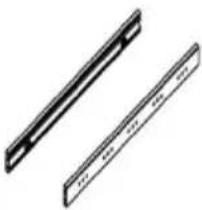 | 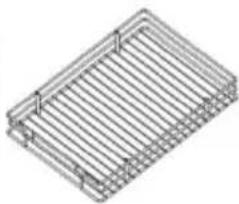 | 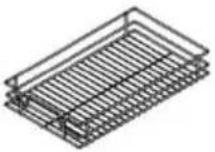 | 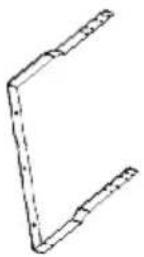 |  |
| Quantiy | 4 PCS | 1 PCS | 1 PCS | 2 PCS | 1PCS |
| No. | F | G | H | i | J |
| Name | Short Spacer bar | Long Spacer bar | Big gasket | Small gasket | Countersunk head screw ST4x14 |
| Parts | 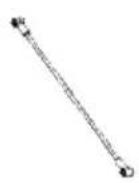 | 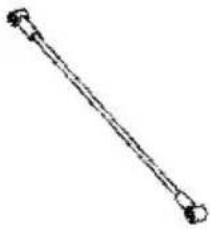 | 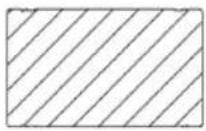 | 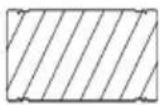 | 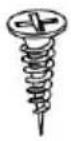 |
| Quantiy | 3PCS | 3 PCS | 1 PCS | 1 PCS | 6 PCS |
| No. | K | L | M |
| Name | M5x7 screw | M5x4 screw | Flat head screwST4x14 |
| Parts | 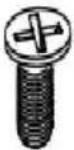 |  | 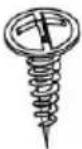 |
| Quantiy | 4PCS | 16 PCS | 4 PCS |
ASSEMBLY STEPS
STEP1
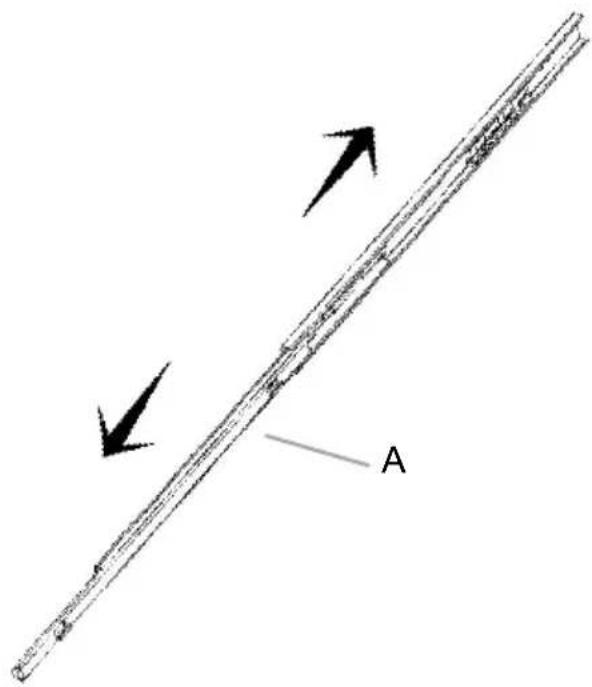
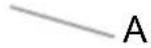
Pull the Slide rail
"A" apart first
STEP2
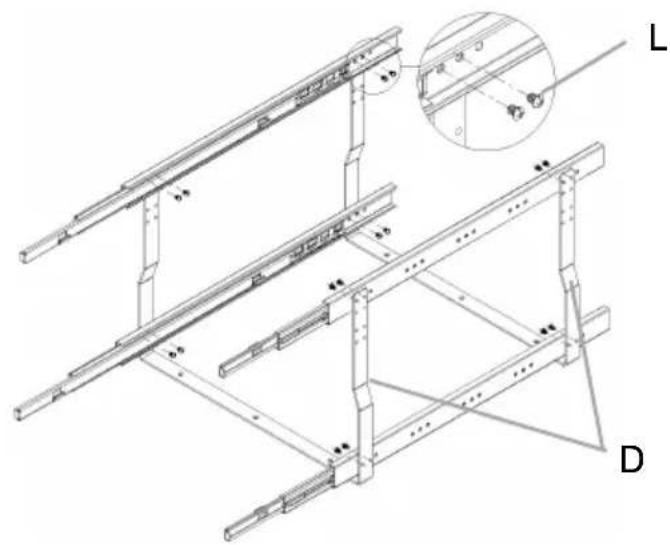
Install all the slide rails "A" on the support frame "D".
STEP 3
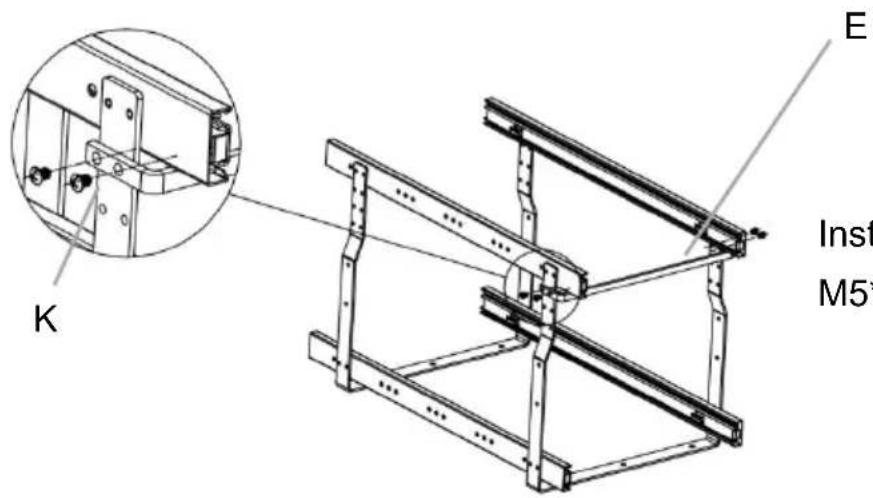
Install the crossbar "E" with M5*7 screws "K".
STEP 4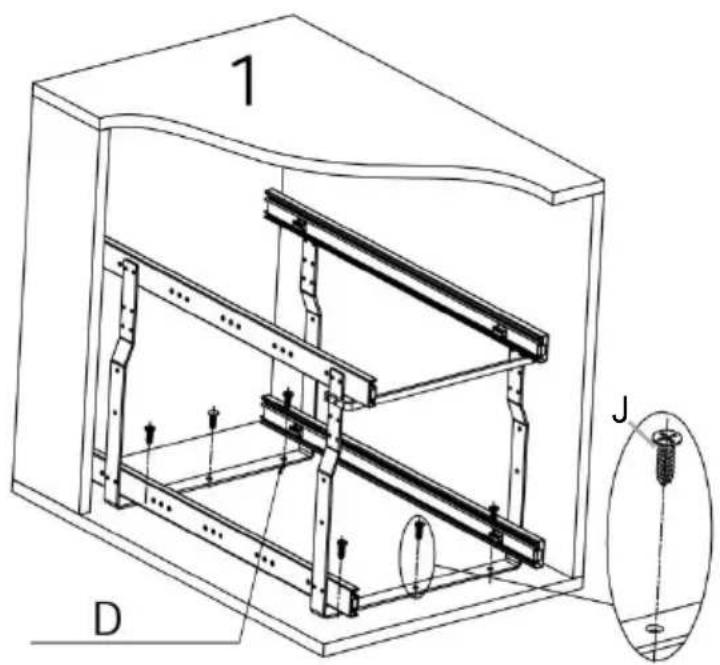
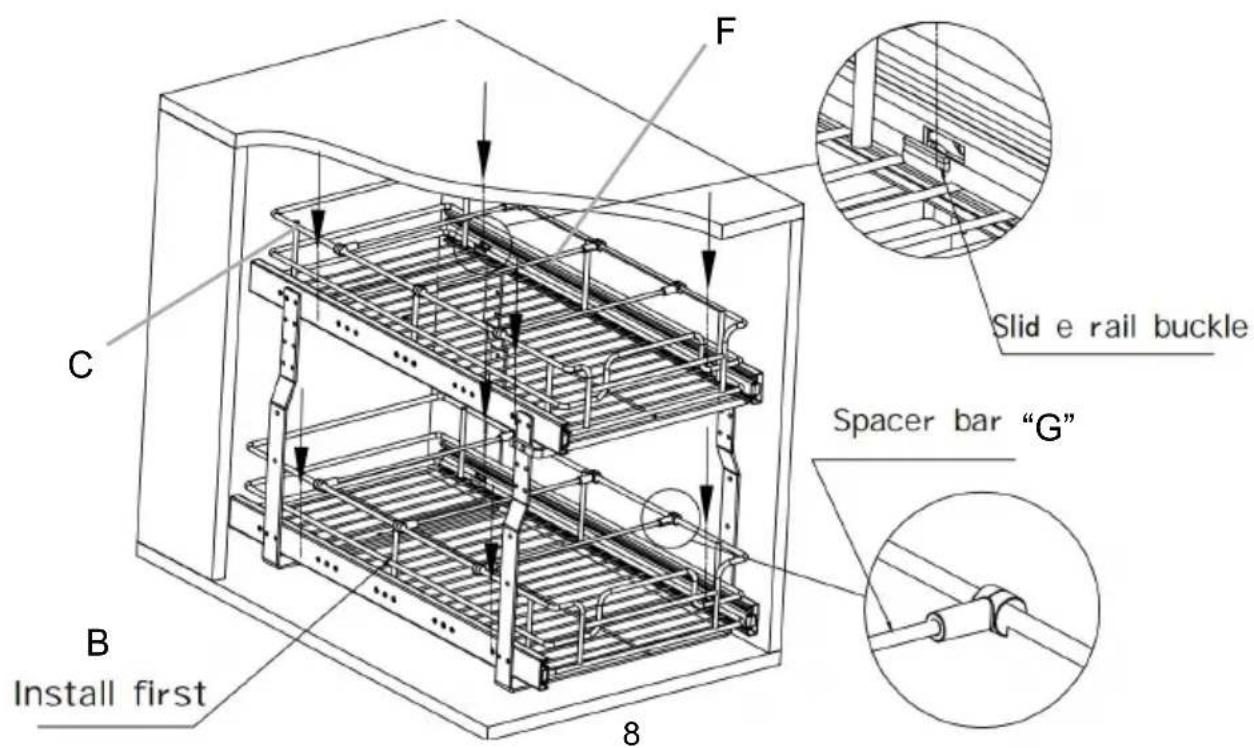
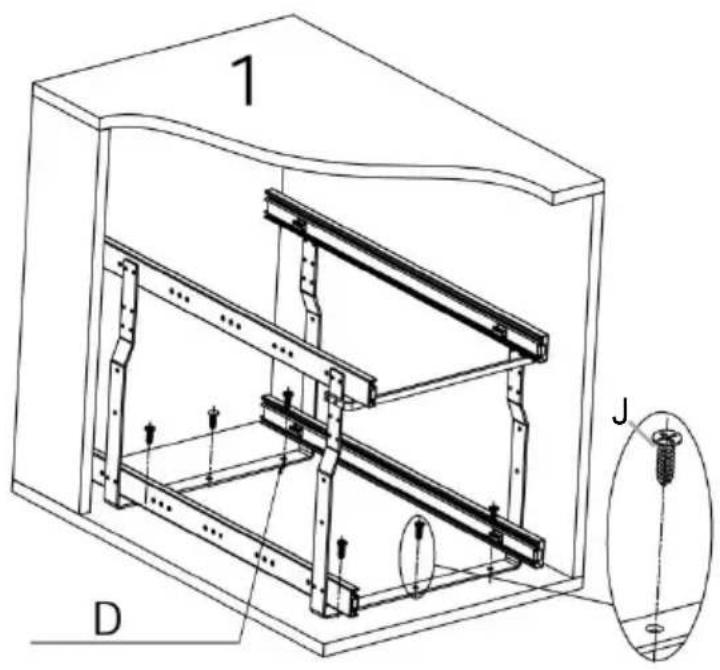
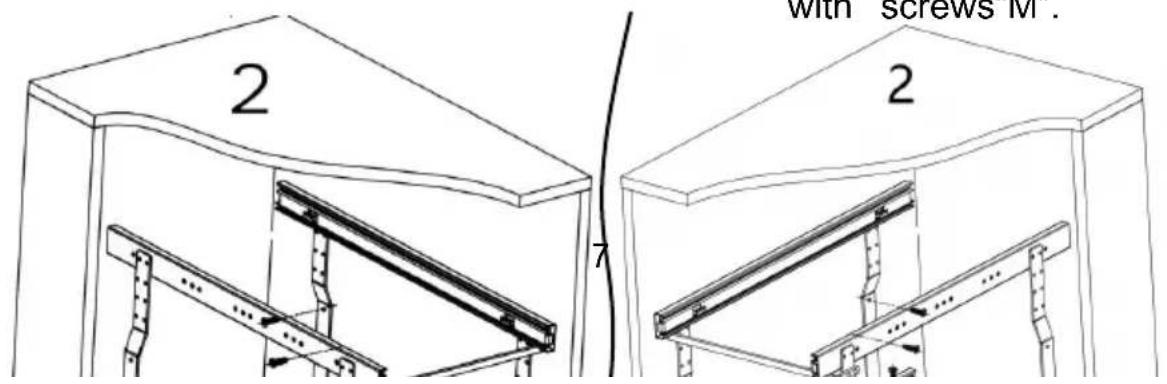
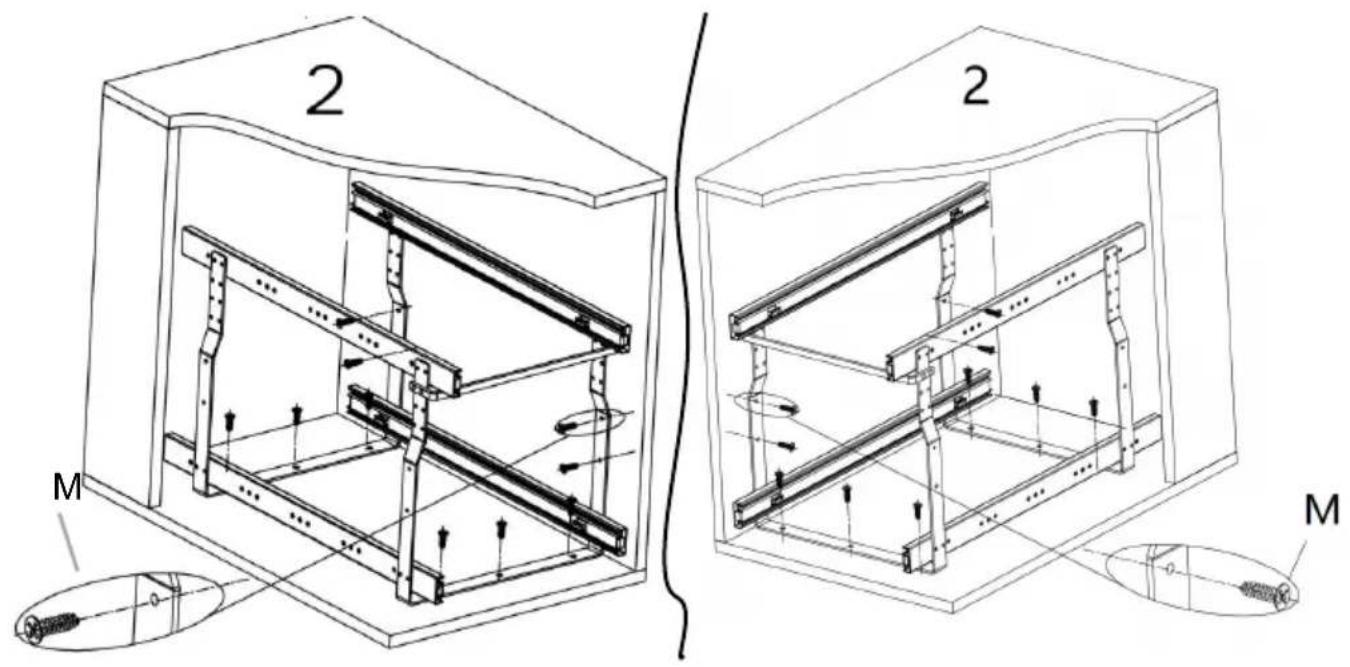
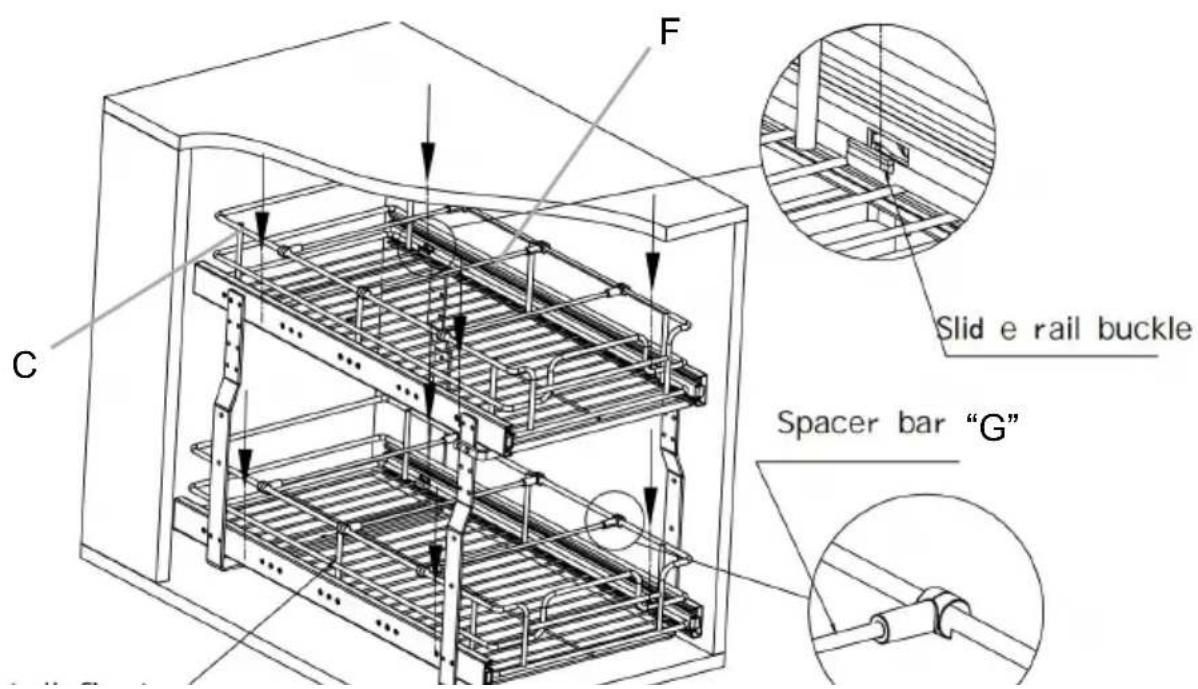
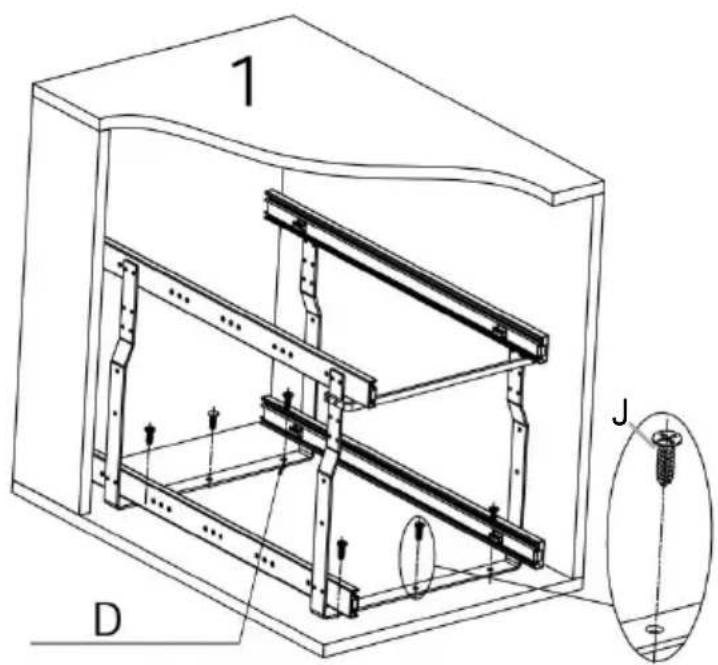
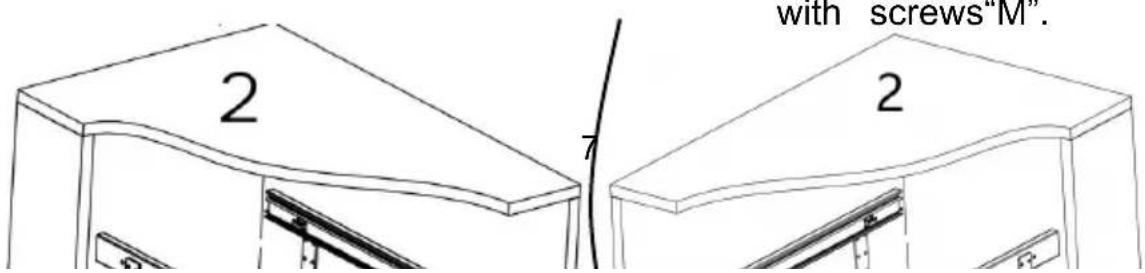
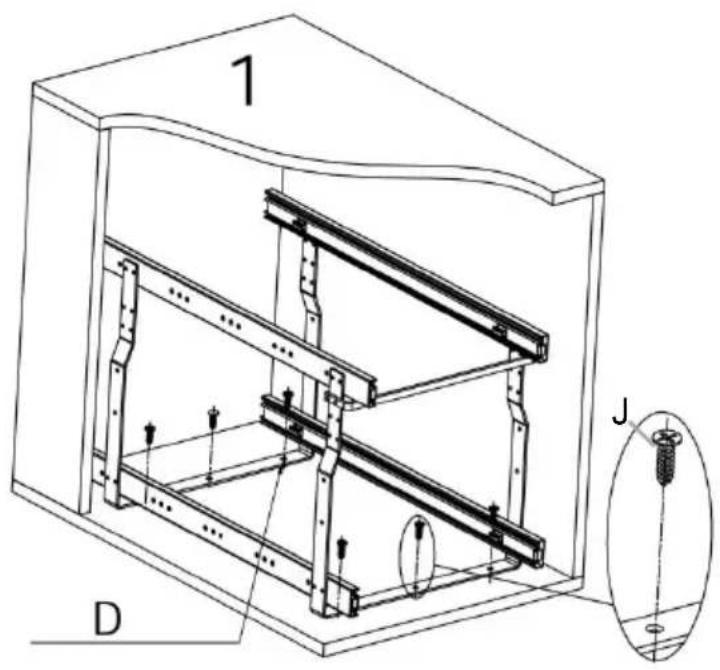
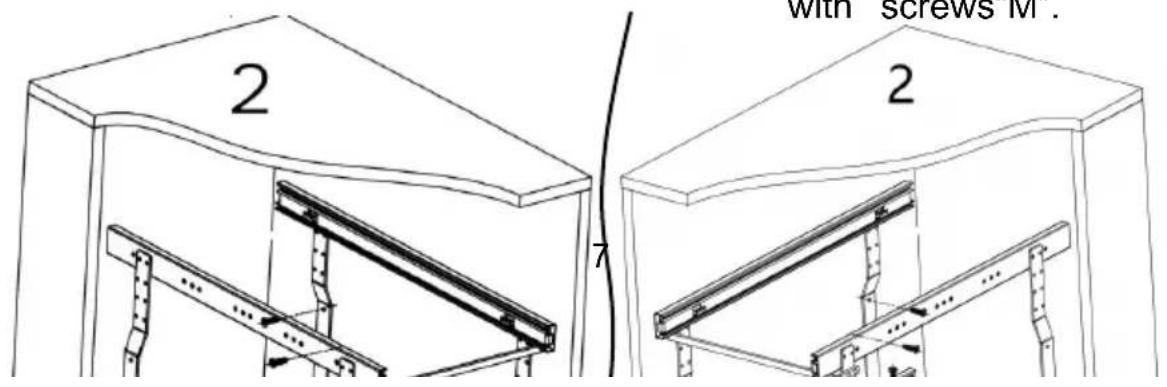
Two installation options: Place the basket in the cabinet as shown in Figure 1 or Figure 2.
Figure 1: After adjusting the support frame to the center position, fix the support frame with screws "J".
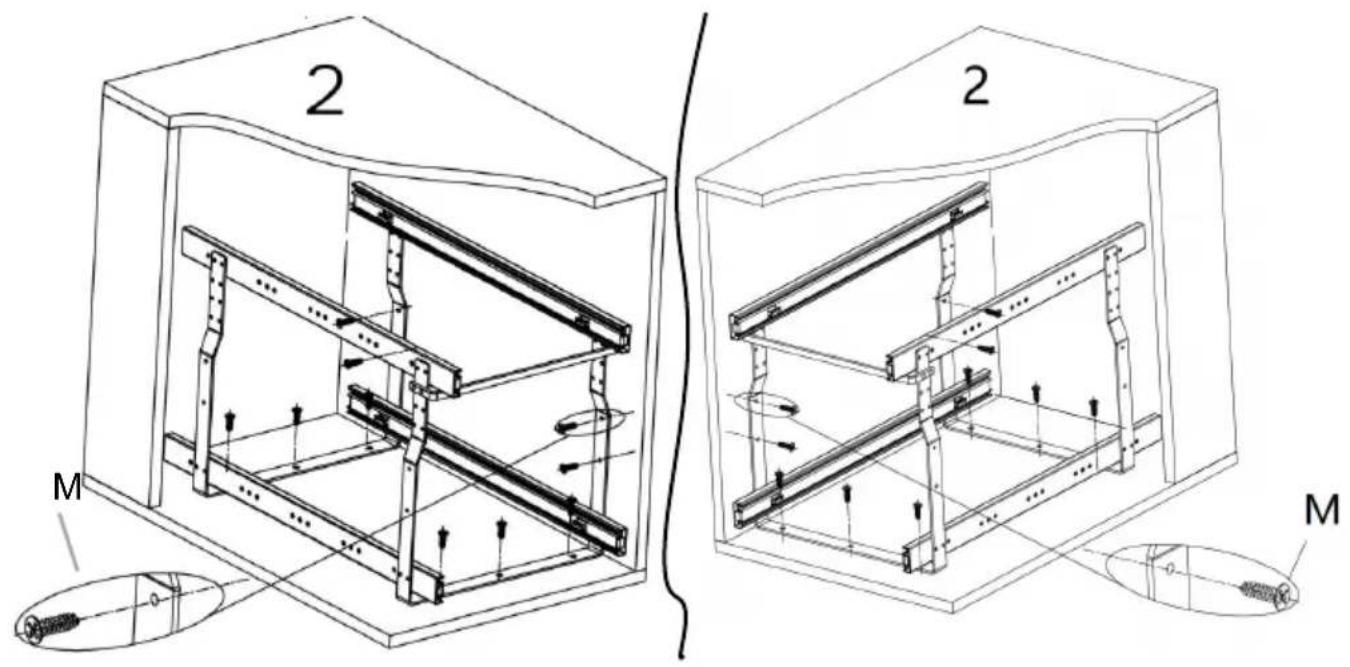
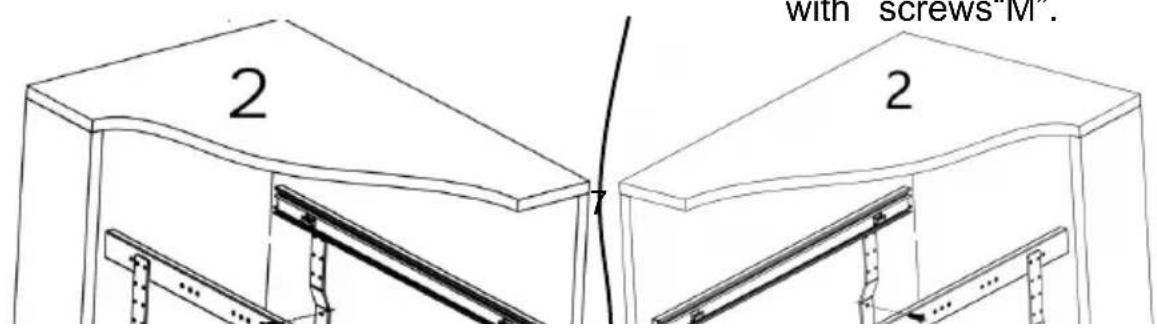
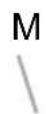
Figure 2: Adjust the support frame to the left or right and attach the support frame to the cabinet wall with screws "M".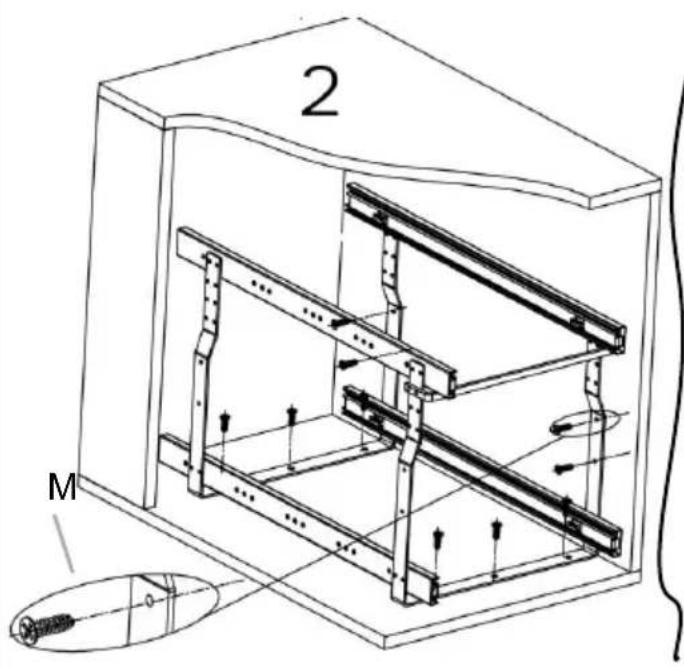

STEP 5
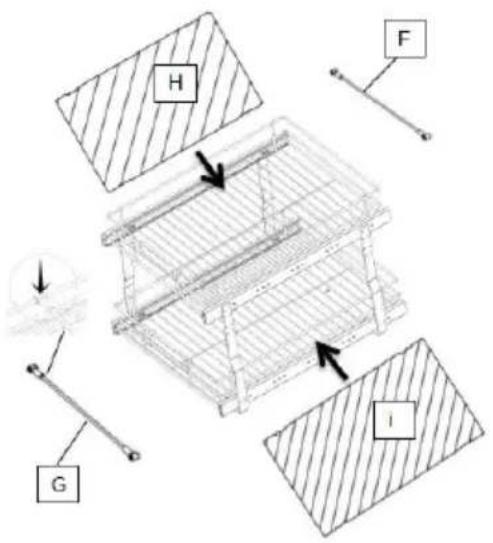
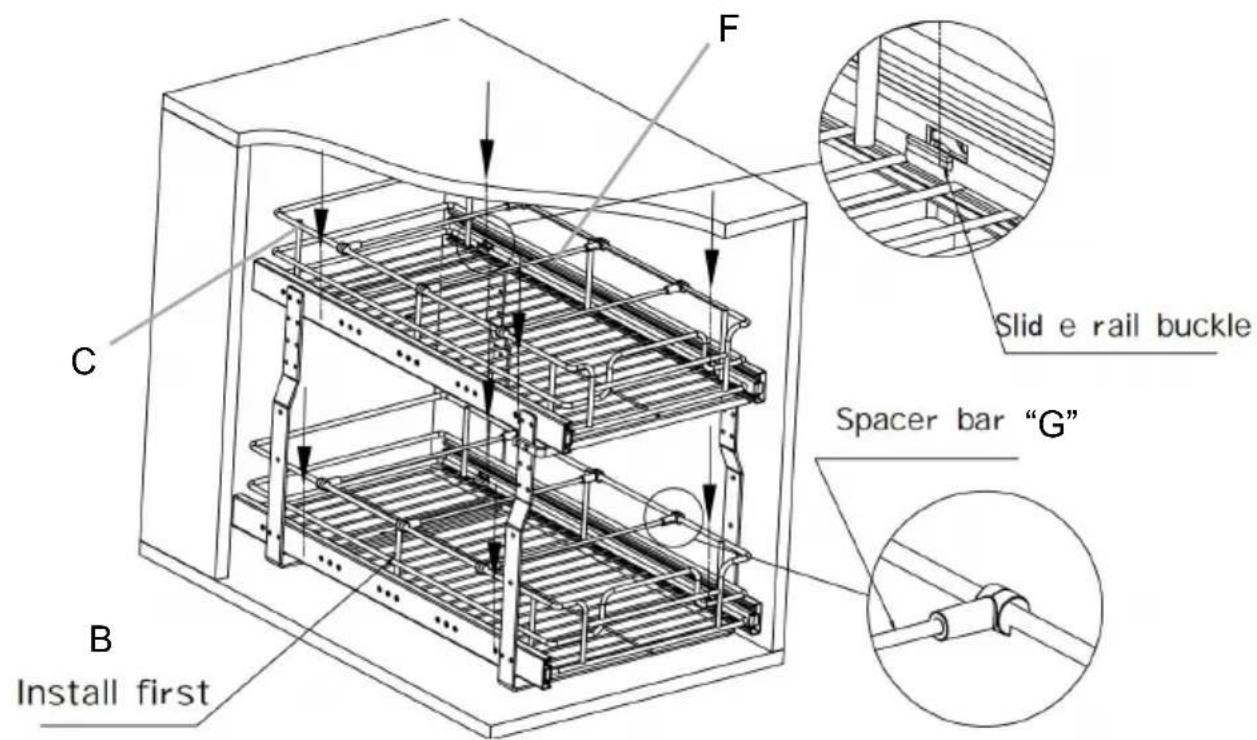
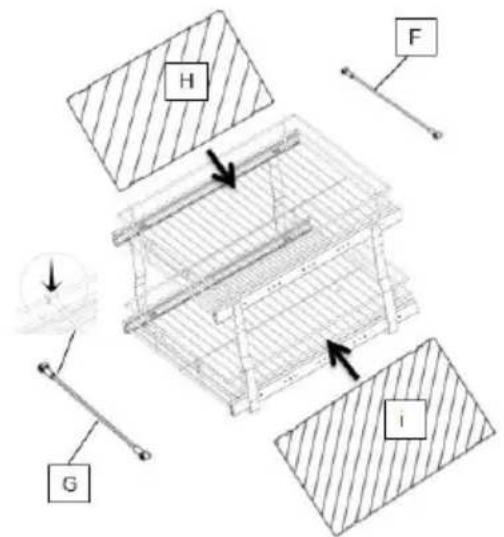
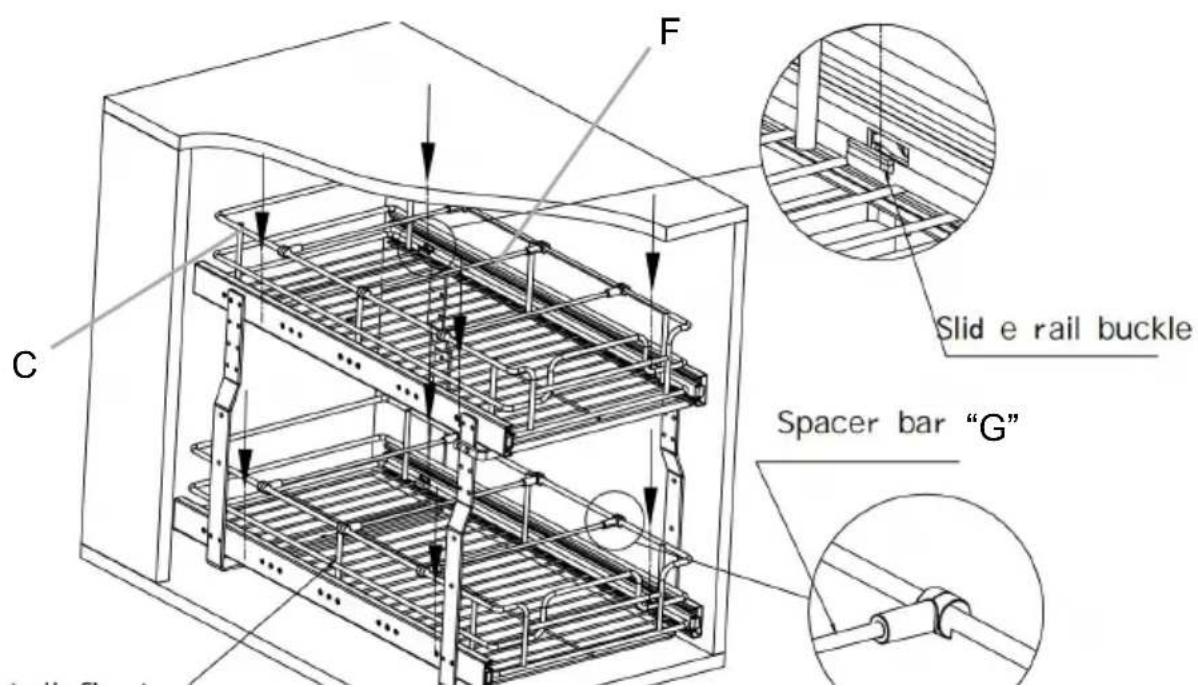
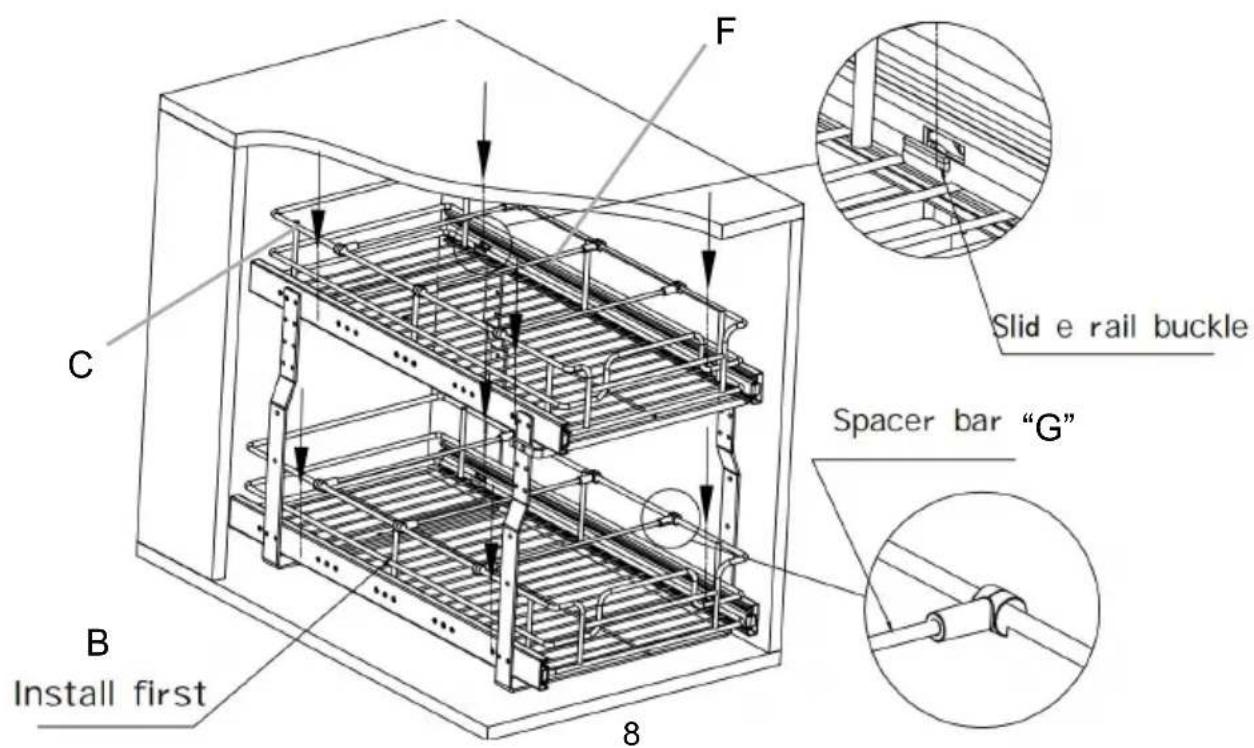
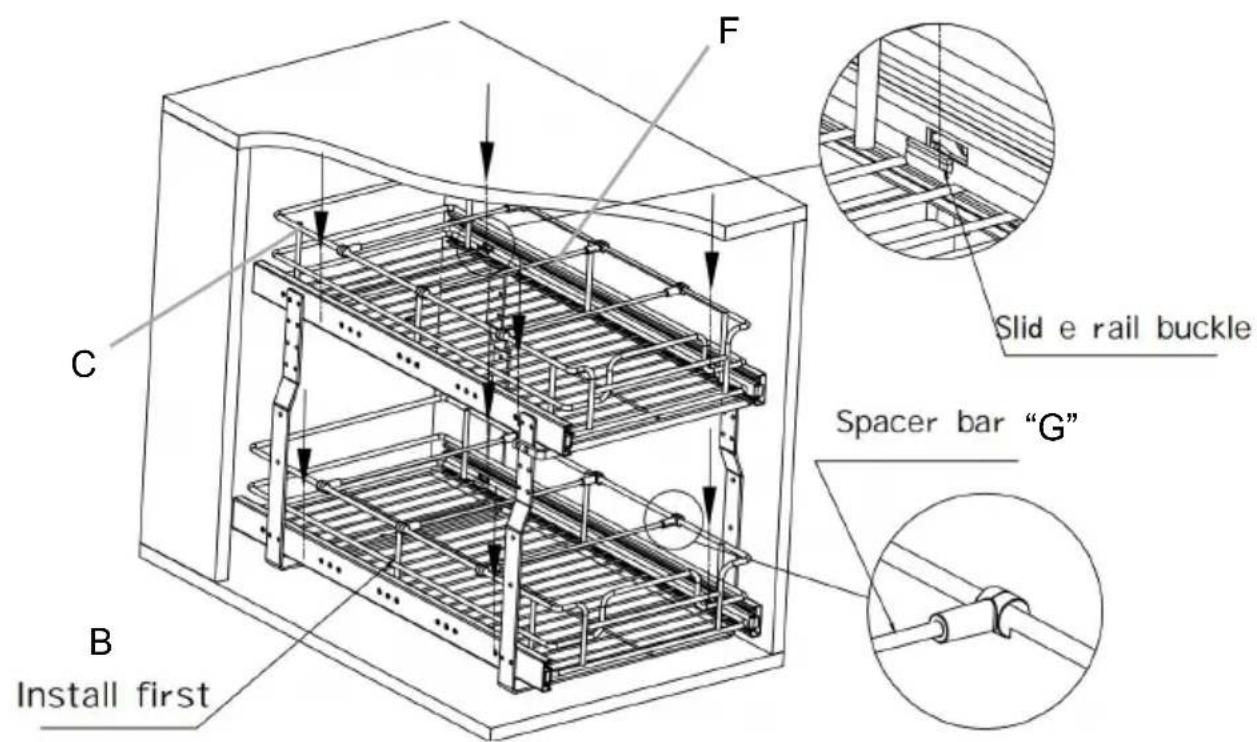
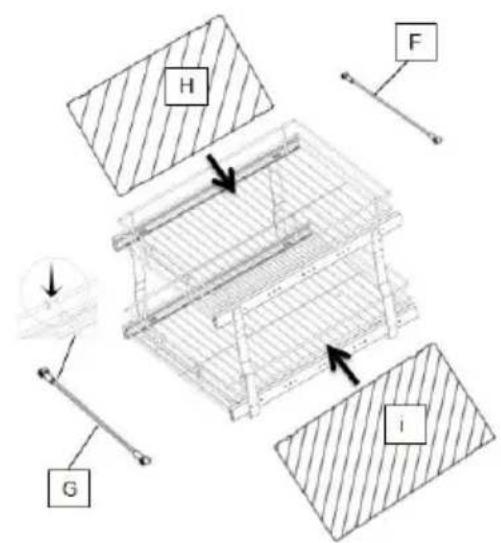
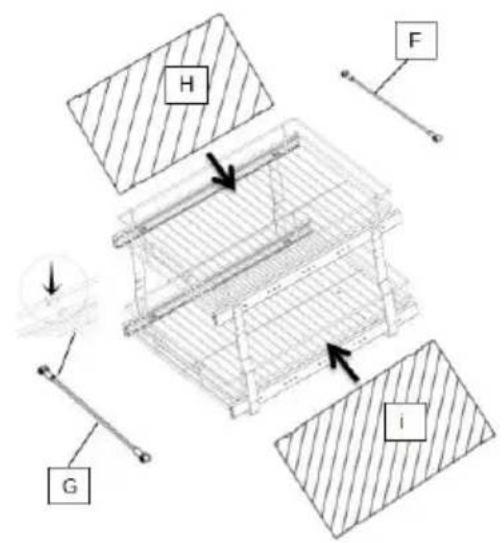
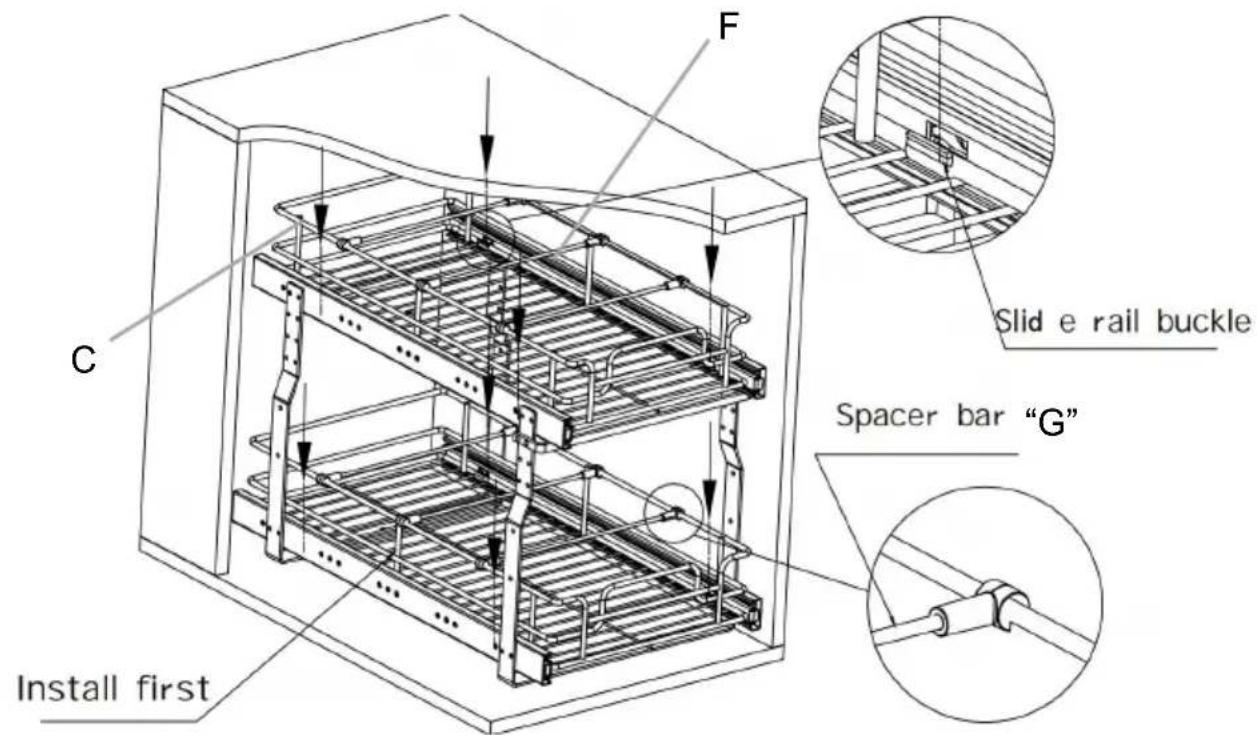
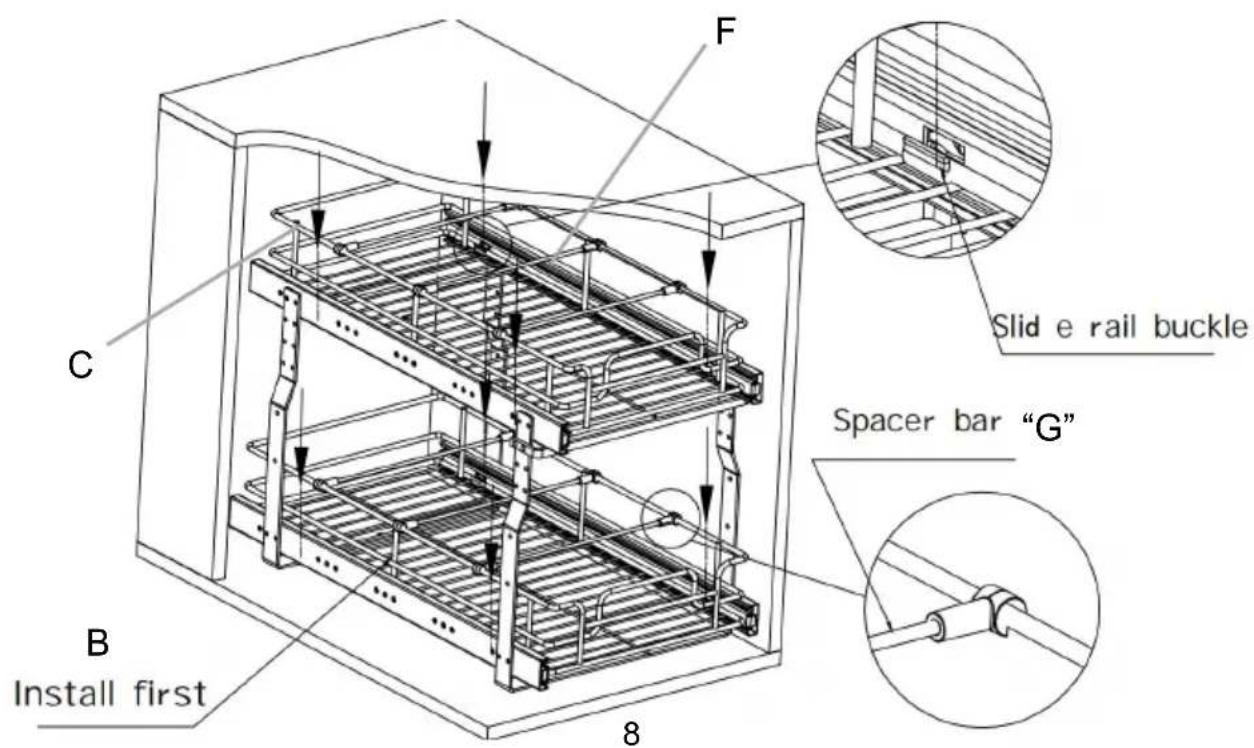
As shown in the figure, first install the bottom basket "B" on the buckle of the bottom slide rail;
- Then install the top basket "C" on the upper slide rail.
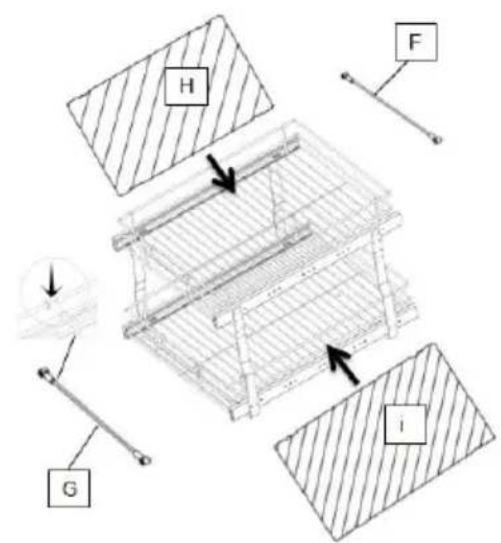
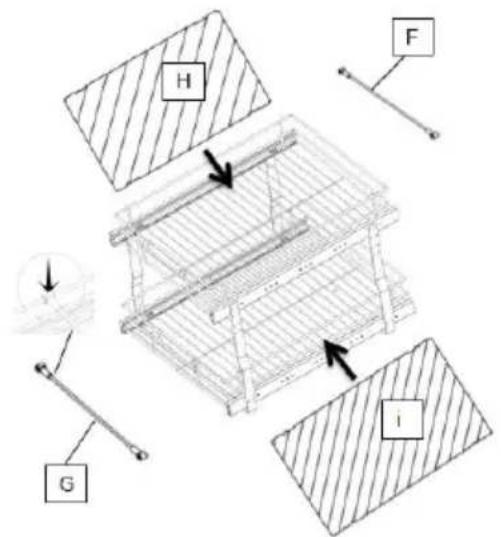
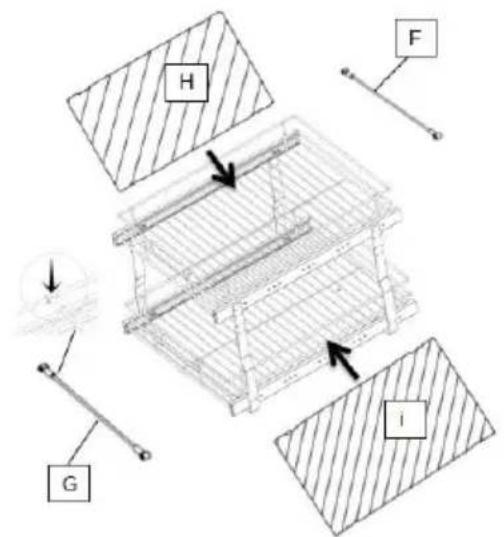
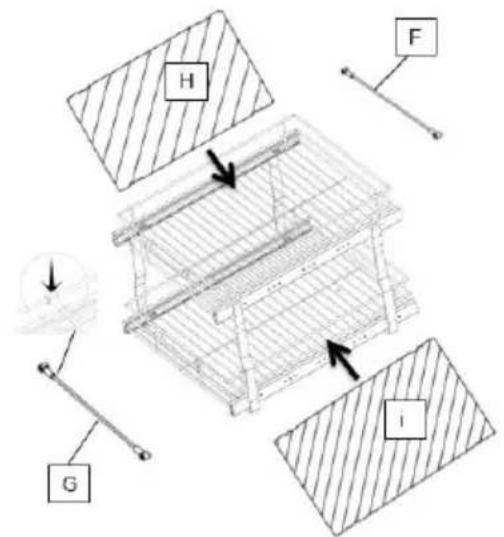
- Put in gasket "H" "I" and install spacer bar "F", "G"; Finished.
Load capacity
The single-floor kitchen pull basket has a maximum load of 33 lb.
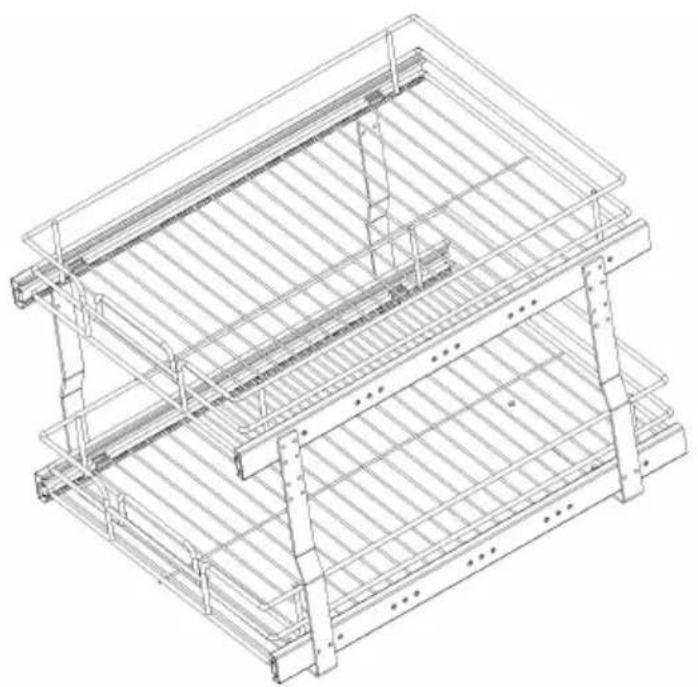
≤66 lb (Two layers)
Cleaning
-For cleaning, wipe the surface with a damp (not wet) cloth or wipe a clean lint free cotton cloth.
-Window cleaning liquid or a similar cleaning liquid can be used to do the surface.
Manufacturer: Shanghaimuxinmuyeyouxiangongsi
Address: Shuangchenglu 803nong11hao1602A-1609shi, baoshanqu, shanghai 200000 CN.
Imported to AUS: SIHAO PTY LTD. 1 ROKEVA STREETEASTWOOD NSW 2122 Australia
Imported to USA: Sanven Technology Ltd. Suite 250, 9166 Anaheim Place, Rancho Cucamonga, CA 91730
| UK | REP |
YH CONSULTING LIMITED. C/O YH Consulting
Limited Office 147, Centurion House, London
Road, Staines-upon-Thames, Surrey, TW18 4AX
| EC | REP |
E-CrossStu GmbH
Mainzer Landstr.69,
60329 Frankfurt am Main.
VEVOR®
TOUGH TOOLS, HALF PRICE
Technical Support and E-Warranty Certificate www.vevor.com/support
VEVOR®
TOUGH TOOLS, HALF PRICE
PRODUCT PARAMETERS
Pull the Slide rail
"A" apart first
STEP 2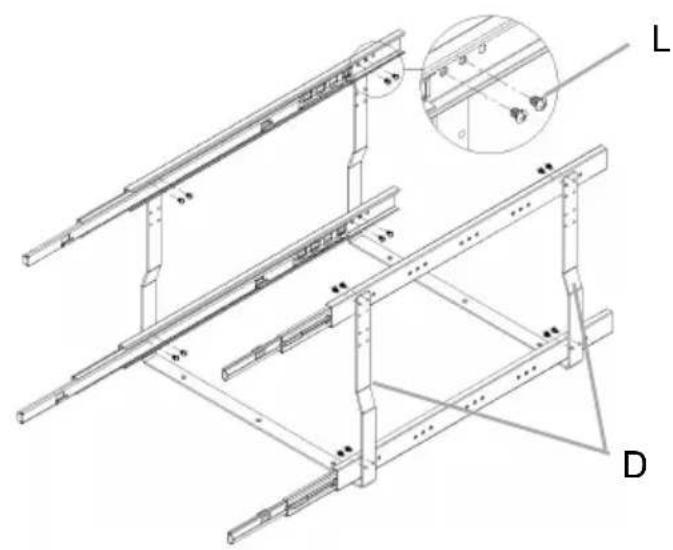
Install all the Slide rails "A" on the support frame "D"
STEP 3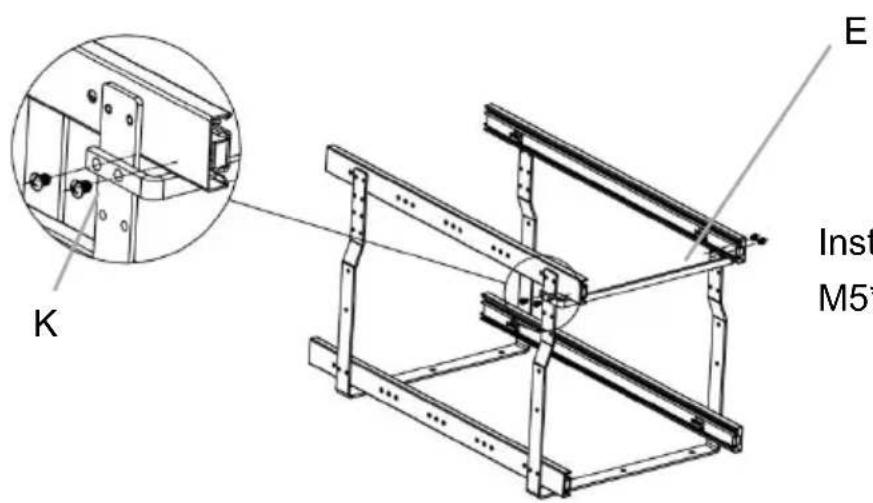
Install the crossbar "E" with M5*7 screws "K"
STEP 4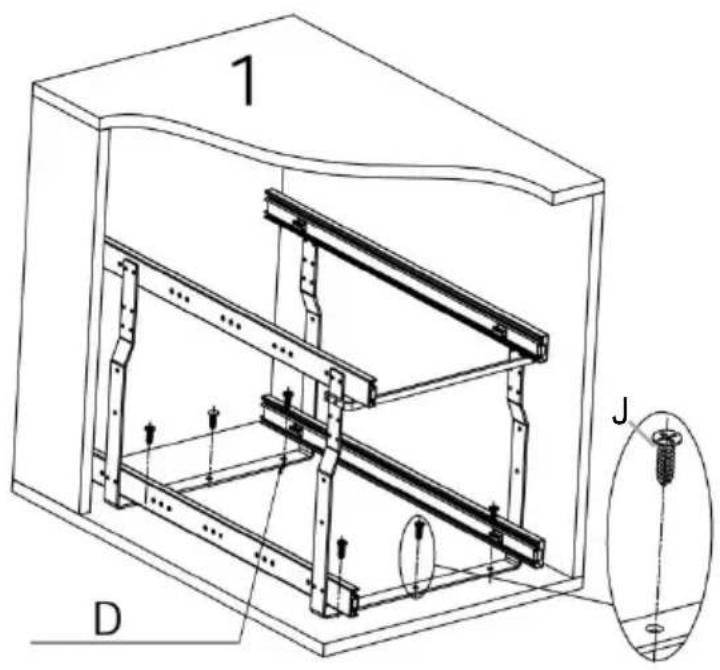

Two installation options: Place the basket in the cabinet as shown in Figure 1 or Figure 2.
Figure 1: After adjusting the support frame to the center position, fix the support frame with screws "J".
Figure 2: Adjust the support frame to the left or right and attach the support frame to the cabinet wall with screws "M".
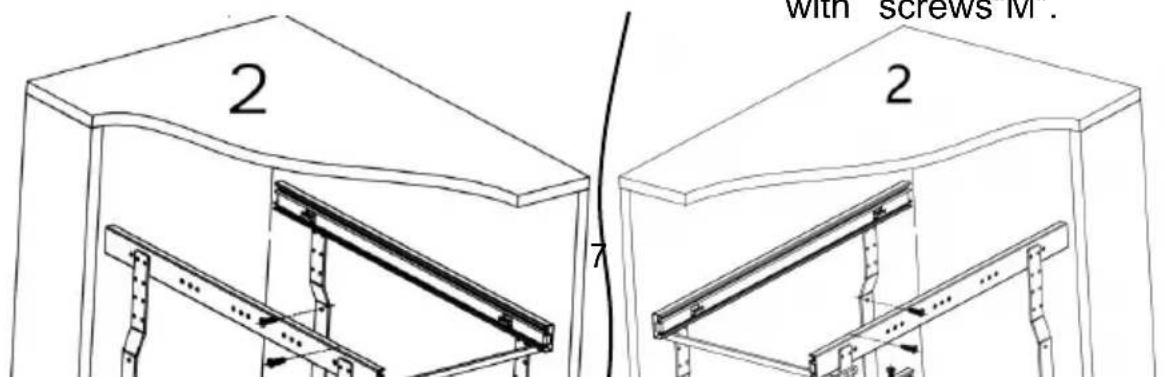
M
STEP 5
As shown in the figure, first install the bottom basket "B" on the buckle of the bottom slide rail;
- Then install the top basket "C" on the upper slide rail.
- Put in gasket "H" "I" and install spacer bar "F", "G"; Finished.
Load capacity
≤66lb (Two layers)
Cleaning
Place, Rancho Cucamonga, CA 91730
| UK | REP |
YH CONSULTING LIMITED. C/O YH Consulting
Limited Office 147, Centurion House, London
Road, Staines-upon-Thames, Surrey, TW18 4AX
| EC | REP |
E-CrossStu GmbH
Mainzer Landstr.69,
60329 Frankfurt am Main.
VEVOR®
TOUGH TOOLS, HALF PRICE
Model: LX-C9359; LX-C9358
www.vevor.com/support
Pull the Slide rail
"A" apart first
STEP 2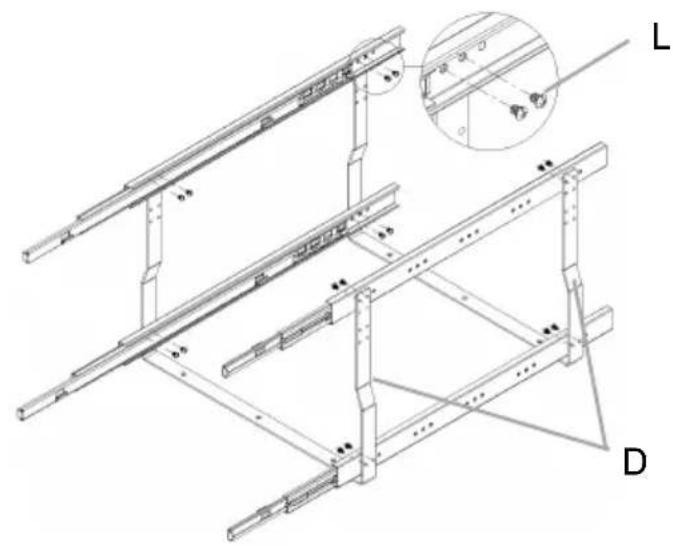
Install all the Slide rails "A" on the support frame "D"
STEP 3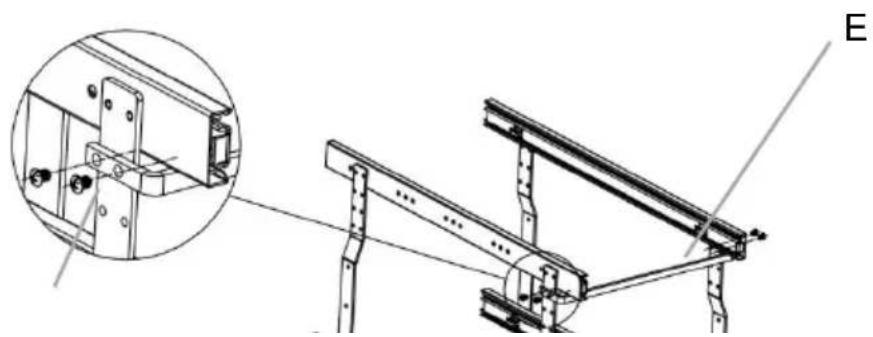
K
Install the crossbar "E" with
M5*7 screws "K"
STEP 4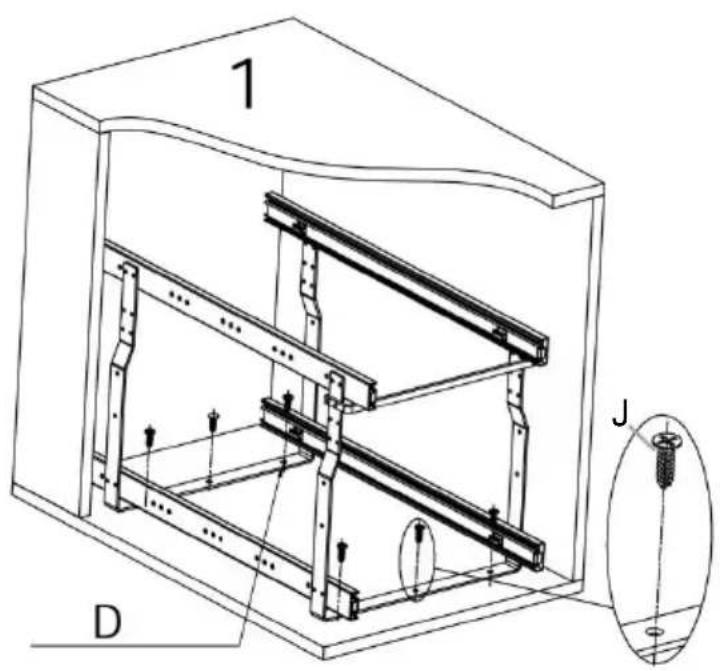

Two installation options:
Place the basket in the cabinet as shown in Figure 1 or Figure 2.
Figure 1: After adjusting the support frame to the center position, fix the support frame with screws "J".
Figure 2: Adjust the support frame to the left or right and attach the support frame to the cabinet wall with screws "M".
STEP 5
As shown in the figure, first install the bottom basket "B" on the buckle of the bottom slide rail;
- Then install the top basket "C" on the upper slide rail.
- Put in gasket "H" "i" and install spacer bar "F", "G"; Finished.
B
Load capacity
≤66lb (Two layers)
Cleaning
YH CONSULTING LIMITED. C/O YH Consulting
Limited Office 147, Centurion House, London
Road, Staines-upon-Thames, Surrey, TW18 4AX
| EC | REP |
E-CrossStu GmbH
Mainzer Landstr.69,
60329 Frankfurt am Main.
VEVOR®
TOUGH TOOLS, HALF PRICE
www.vevor.com/support
VEVOR®
TOUGH TOOLS, HALF PRICE
Model: LX-C9359; LX-C9358
Pull the Slide rail
"A" apart first
STEP 2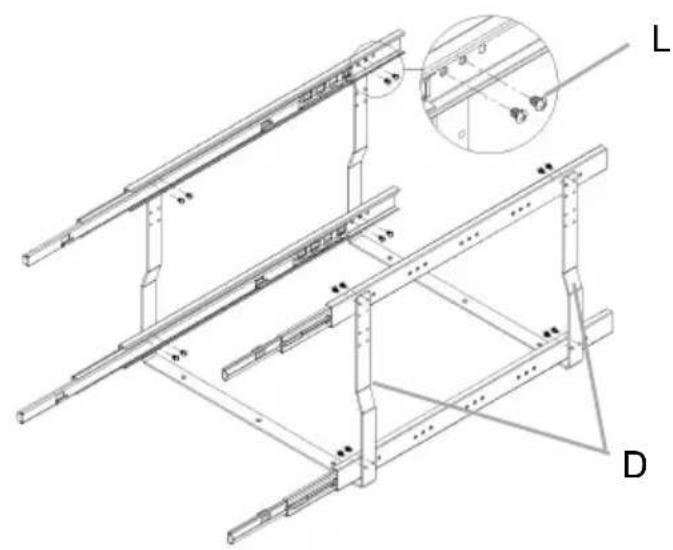
Install all the Slide rails "A" on the support frame "D"
STEP 3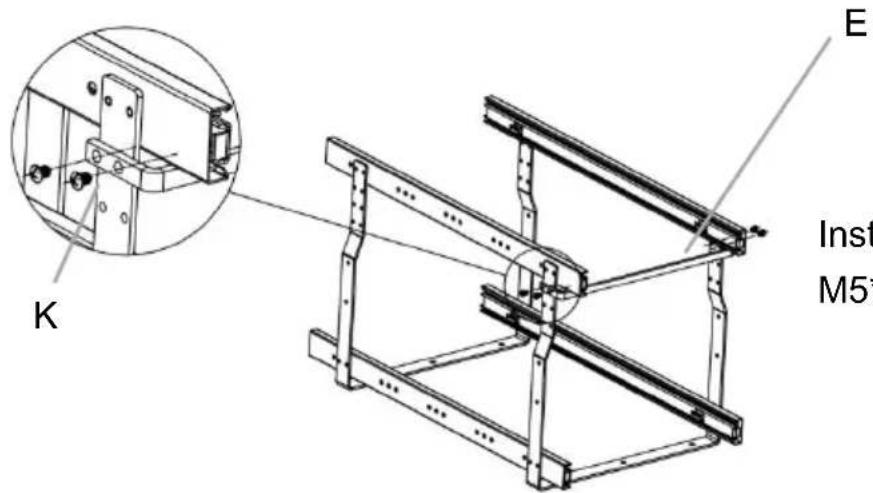
Install the crossbar "E" with M5*7 screws "K"
STEP 4

Two installation options: Place the basket in the cabinet as shown in Figure 1 or Figure 2.
Figure 1: After adjusting the support frame to the center position, fix the support frame with screws "J".
Figure 2: Adjust the support frame to the left or right and attach the support frame to the cabinet wall with screws "M".
M
STEP 5
As shown in the figure, first install the bottom basket "B" on the buckle of the bottom slide rail;
- Then install the top basket "C" on the upper slide rail.
- Put in gasket "H" "I" and install spacer bar "F", "G"; Finished.
Load capacity
≤66 lb (Two layers)
Cleaning
YH CONSULTING LIMITED. C/O YH Consulting
Limited Office 147, Centurion House, London
Road, Staines-upon-Thames, Surrey, TW18 4AX
| EC | REP |
E-CrossStu GmbH
Mainzer Landstr.69,
60329 Frankfurt am Main.
VEVOR®
TOUGH TOOLS, HALF PRICE
Model: LX-C9359; LX-C9358
Pull the Slide rail
"A" apart first
STEP 2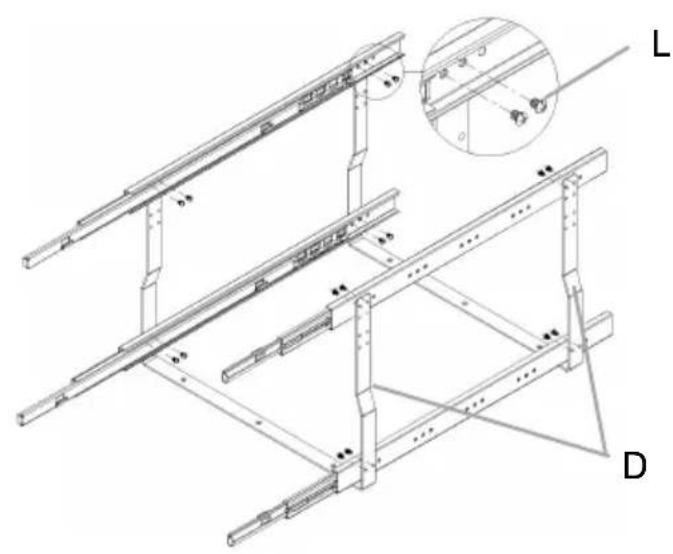
Install all the Slide rails "A" on the support frame "D"
STEP 3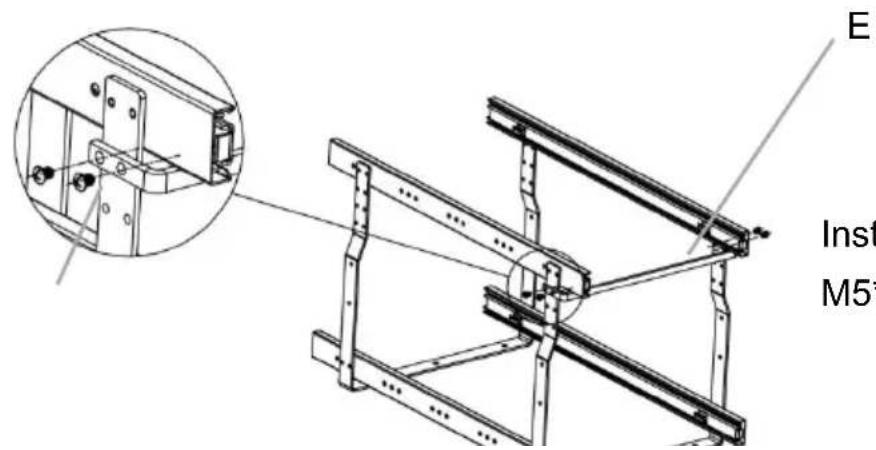
Install the crossbar "E" with M5*7 screws "K"
STEP 4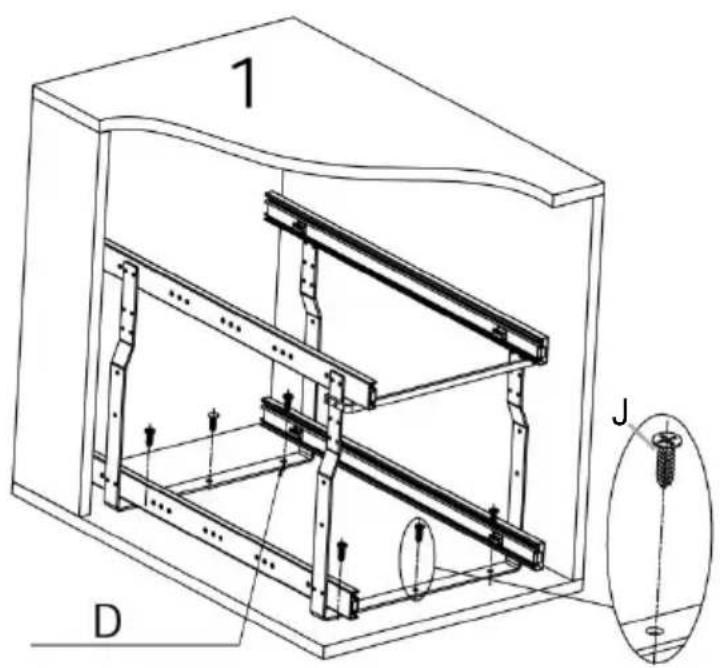

Two installation options: Place the basket in the cabinet as shown in Figure 1 or Figure 2.
Figure 1: After adjusting the support frame to the center position, fix the support frame with screws "I".
Figure 2: Adjust the support frame to the left or right and attach the support frame to the cabinet wall with screws "M".
M
STEP 5
As shown in the figure, first install the bottom basket "B" on the buckle of the bottom slide rail.
- Then install the top basket "C" on the upper slide rail.
- Put in gasket "H" "I" and install spacer bars "F", "G"; Finished.
Load capacity
≤66 lb (two layers)
Cleaning
YH CONSULTING LIMITED. C/O YH Consulting
Limited Office 147, Centurion House, London
Road, Staines-upon-Thames, Surrey, TW18 4AX
| EC | REP |
E-CrossStu GmbH
Mainzer Landstr.69,
60329 Frankfurt am Main.
VEVOR®
TOUGH TOOLS, HALF PRICE
Model: LX-C9359; LX-C9358
NEED HELP? CONTACT US!
www.vevor.com/support
Pull the Slide rail
"A" apart first
STEP 2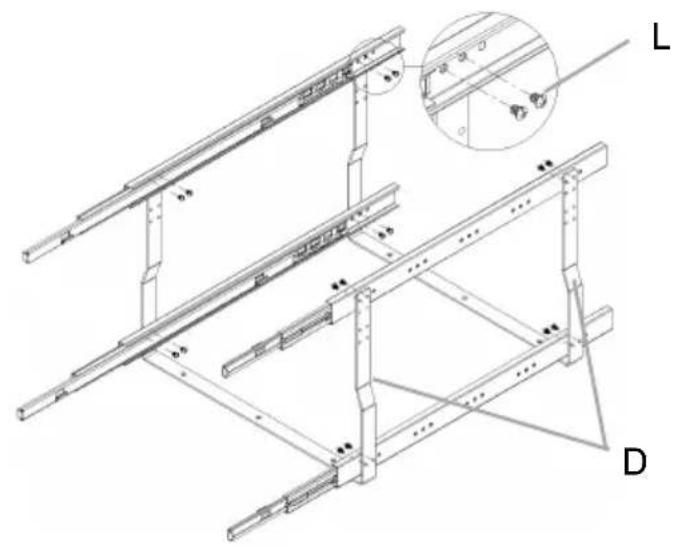
Install all the Slide rails "A" to the support frame "D"
STEP 3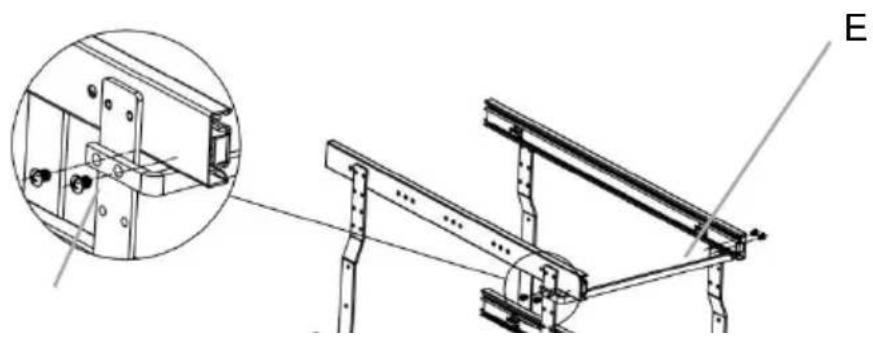
K
Install the crossbar "E" with
M5*7 screws "K"
STEP 4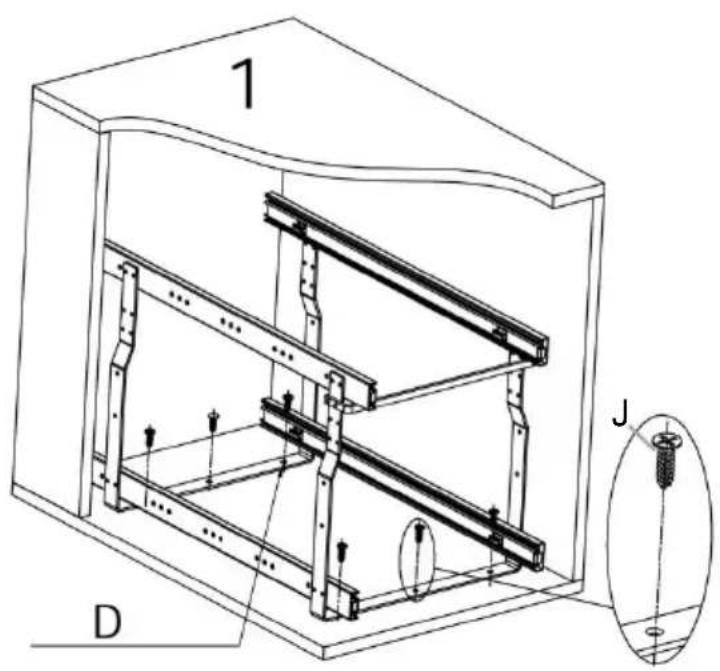

Two installation options:
Place the basket in the cabinet as shown in Figure 1 or Figure 2.
Figure 1: After adjusting the support frame to the center position, fix the support frame with screws "J".
Figure 2: Adjust the support frame to the left or right and attach the support frame to the cabinet wall with screws "M".
STEP 5
As shown in the figure, first install the bottom basket "B" on the buckle of the bottom slide rail;
- Then install the top basket "C" on the upper slide rail.
- Put in gasket "H" "I" and install spacer bars "F", "G"; Finished.
B
Load capacity
≤66 lb (Two layers)
Cleaning
YH CONSULTING LIMITED. C/O YH Consulting
Limited Office 147, Centurion House, London
Road, Staines-upon-Thames, Surrey, TW18 4AX
| EC | REP |
E-CrossStu GmbH
Mainzer Landstr.69,
60329 Frankfurt am Main.
VEVOR®
TOUGH TOOLS, HALF PRICE
Model: LX-C9359; LX-C9358
NEED HELP? CONTACT US!
www.vevor.com/support
WARNING: TO PREVENT SERIOUS INJURY AND DEATH FROM
MISTAKES:
Pull the Slide rail "A" apart first
STEP 2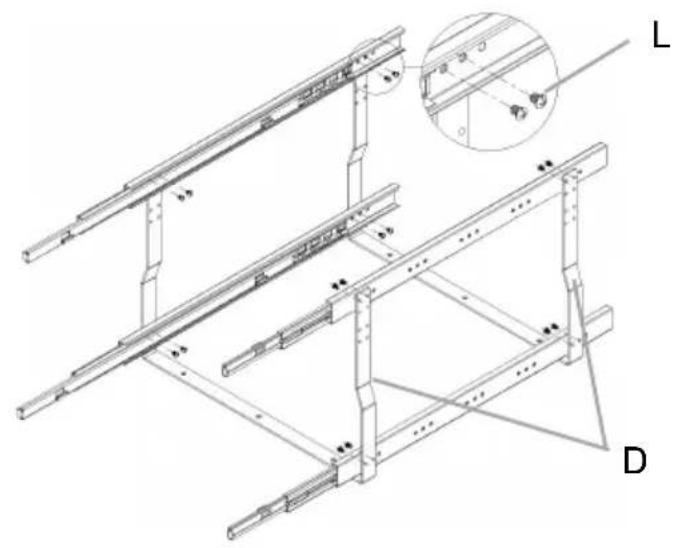
Install all the slide rails "A" on the support frame "D"
STEP 3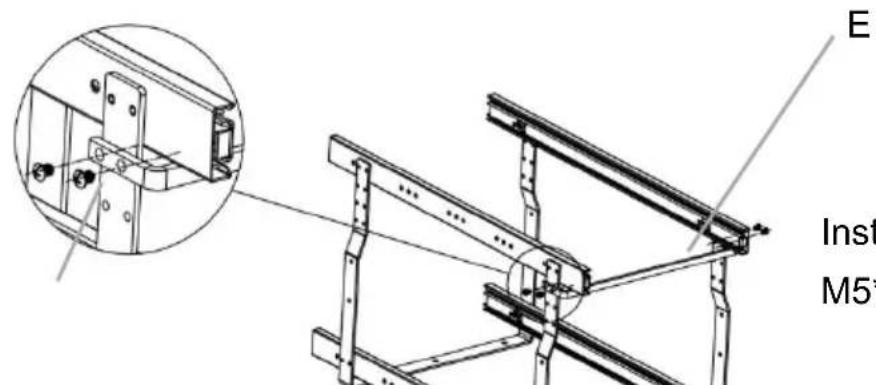
Install the crossbar "E" with M5*7 screws "K"
K
STEP 4

Two installation options: Place the basket in the cabinet as shown in Figure 1 or Figure 2.
Figure 1: After adjusting the support frame to the center position, fix the support frame with screws "J".
Figure 2: Adjust the support frame to the left or right and attach the support frame to the cabinet wall with screws "M".
STEP 5
As shown in the figure, first install the bottom basket "B" on the buckle of the bottom slide rail;
- Then install the top basket "C" on the upper slide rail.
- Put in gasket "H" "I" and install spacer bars "F", "G"; Finished.
B
Load capacity
≤66lb (Two layers)
Cleaning
YH CONSULTING LIMITED. C/O YH Consulting
Limited Office 147, Centurion House, London
Road, Staines-upon-Thames, Surrey, TW18 4AX
| EC | REP |
E-CrossStu GmbH
Mainzer Landstr.69,
60329 Frankfurt am Main.
VEVOR®
TOUGH TOOLS, HALF PRICE
Technical Support and E-warranty certificate www.vevor.com/support
VEVOR®
TOUGH TOOLS, HALF PRICE
Model: LX-C9359; LX-C9358
NEED HELP? CONTACT US!
www.vevor.com/support
WARNING: TO PREVENT SERIOUS INJURY AND
DEATH FROM TIPPING:
Pull the Slide rail
"A" apart first
STEP 2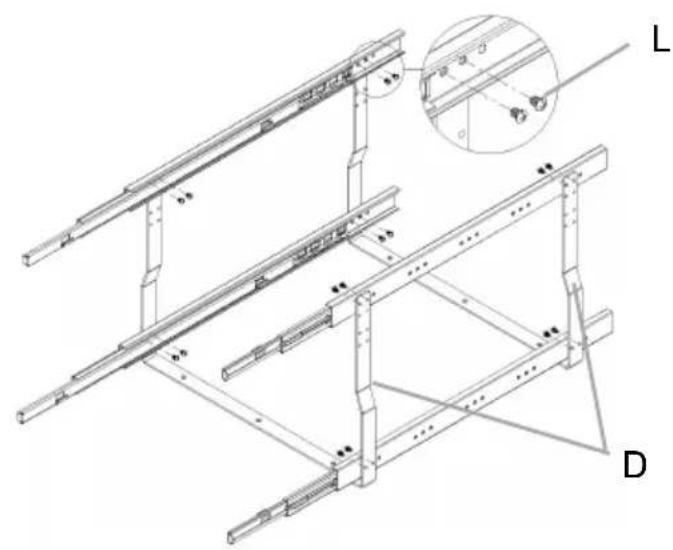
Install all the Slide rails "A" on the support frame "D"
STEP 3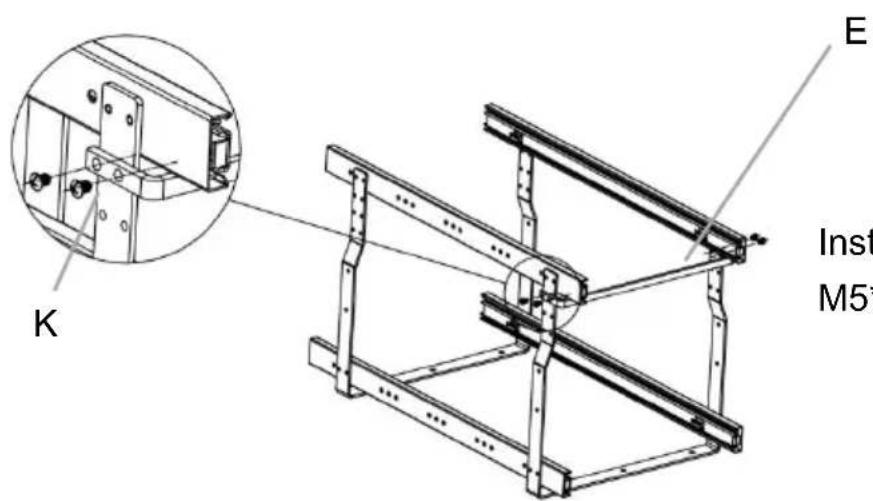
Install the crossbar "E" with M5*7 screws "K"
STEP 4
or
Two installation options: Place the basket in the cabinet as shown in Figure 1 or Figure 2.
Figure 1: After adjusting the support frame to the center position, fix the support frame with screws "J".
Figure 2: Adjust the support frame to the left or right and attach the support frame to the cabinet wall with screws "M".
M
STEP 5
As shown in the figure, first install the bottom basket "B" on the buckle of the bottom slide rail;
- Then install the top base "C" on the upper slide rail.
- Put in gasket "H" "i" and install spacer bar "F", "G"; Finished.
Load capacity
≤66lb (Two layers)
Cleaning
YH CONSULTING LIMITED. C/O YH Consulting
Limited Office 147, Centurion House, London
Road, Staines-upon-Thames, Surrey, TW18 4AX
| EC | REP |
E-CrossStu GmbH
Mainzer Landstr.69,
60329 Frankfurt am Main.
VEVOR®
TOUGH TOOLS, HALF PRICE
www.vevor.com/support
- PLACE TYPE PULL-OUT ORGANIZERS
- ( DOUBLE LAYER BASKET)
- VEVOR®
- NEED HELP? CONTACT US
- PRODUCT PARAMETERS
- ASSEMBLY PRECAUTIONS
- USE PRECAUTIONS
- WARNING: TO PREVENT SERIOUS INJURY AND DEATH FROM
- TIPPING
- PARTS LIST
- ASSEMBLY STEPS
- STEP
- LOAD CAPACITY
- CLEANING
- TOUGH TOOLS, HALF PRICE
- MISTAKES
- WARNING: TO PREVENT SERIOUS INJURY AND
- DEATH FROM TIPPING
Brand : Vevor
Model : LX-C9358
Category : Storage organizer