Vevor STC430 - Paper cutter

STC430 - Paper cutter Vevor - Free user manual and instructions

Find the device manual for free STC430 Vevor in PDF.
📄 64 pages English EN Download 💬 AI Question 10 questions ⚙️ Specs
Notice Vevor STC430 - page 1
Pick your language and provide your email: we'll send you a specifically translated version.
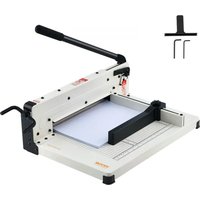
Product Type Guillotine Paper Cutter
Brand Vevor
Model STC430
Cutting Capacity 400 sheets
Maximum Cutting Width 17 inches (A3)
Color White
Dimensions (L × W × H) 640 × 505 × 380 mm
Net Weight Approximately 15.9 kg
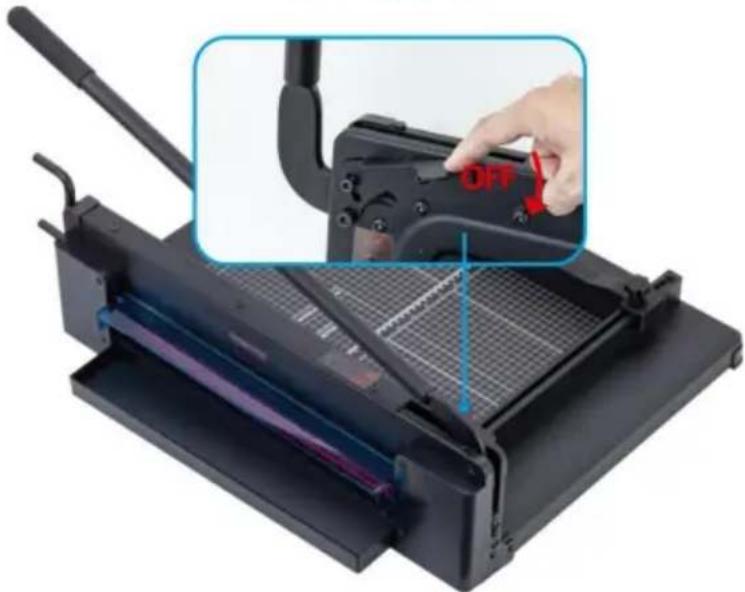
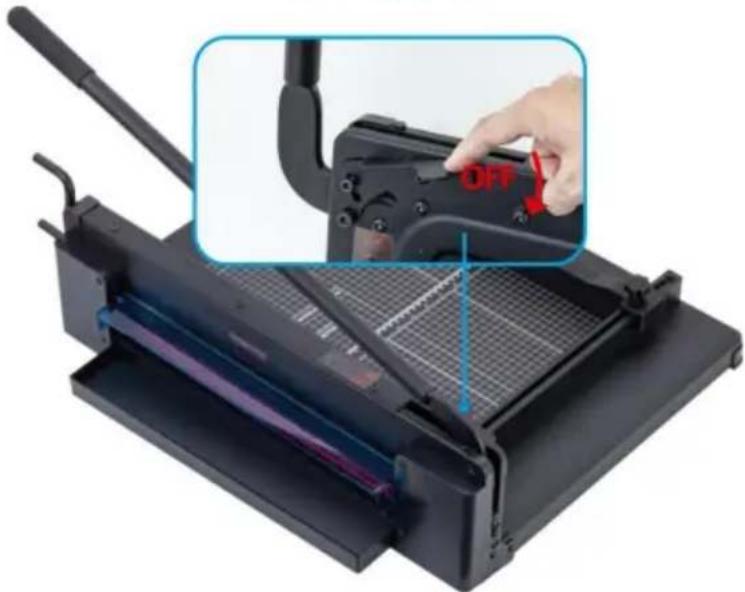
Safety Lock Holds the handle in raised position until pressed
Protection Rail Must be in place during use
Blade Maintenance Do not lubricate
Usage Precautions Remove staples, paper clips; do not cut metallic film or glass
Intended Use Paper cutting only
Spare Parts Blade, protection rail available
Warranty Electronic warranty certificate at www.vevor.com/support

Frequently Asked Questions - STC430 Vevor

How to use the safety lock?
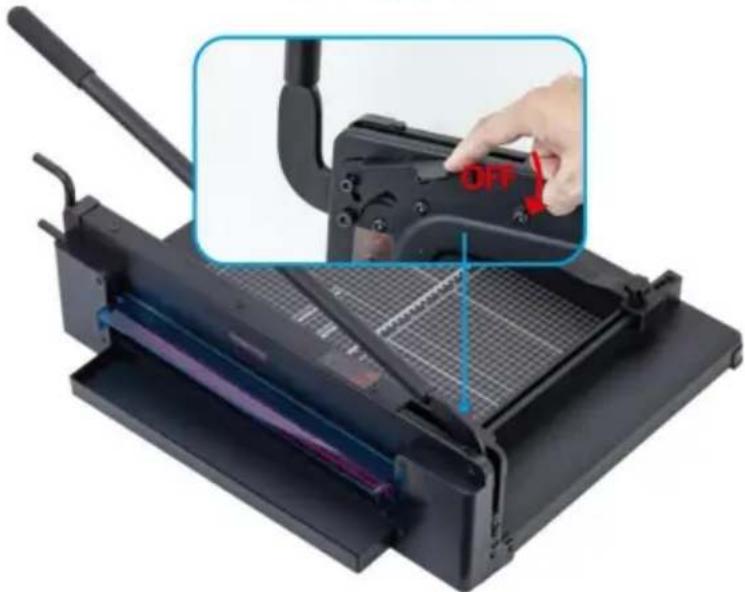
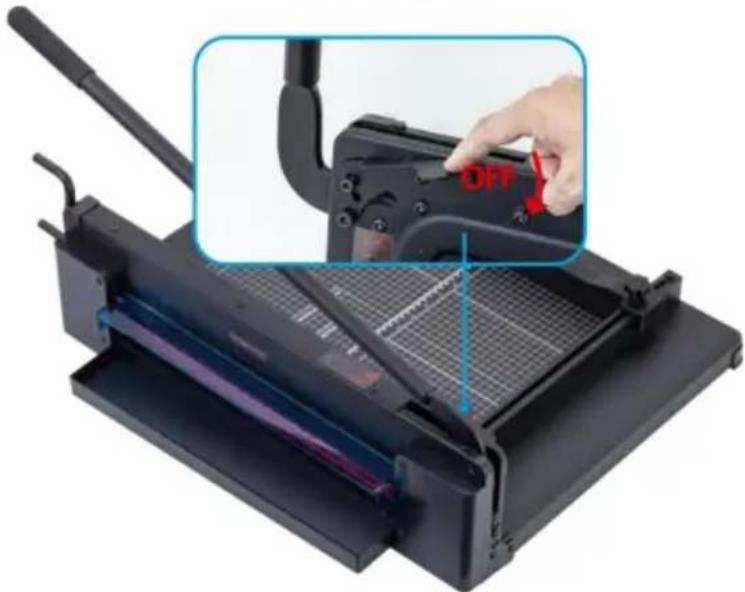
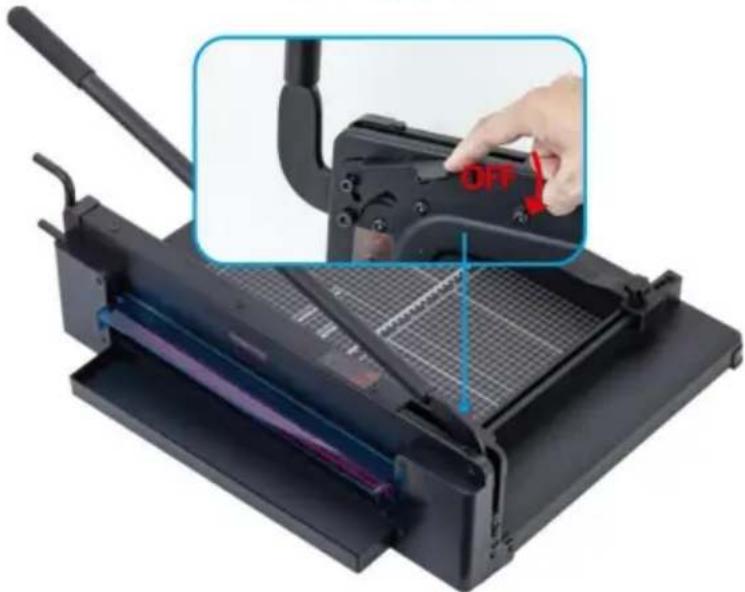
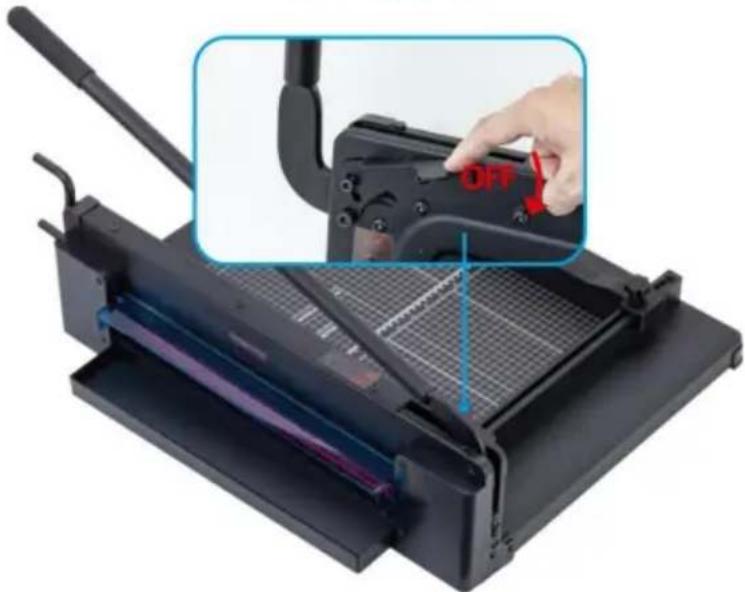
The safety lock holds the handle in the raised position. To lower the blade, press the lock while lowering the handle. This prevents accidental falls.
What is the maximum cutting capacity of the STC430?
The STC430 can cut up to 400 sheets of standard paper (80 g/m²).
Can I cut metallic film or glass?
No, use the cutter only for paper. Do not cut metallic film, film containing glass or any other similar material, as this could damage the device.
How to maintain the cutting blade?
Never lubricate the cutting blade. Keep it clean and dry. If performance decreases, contact technical support.
What to do in case of decreased cutting performance?
Check that you do not exceed the capacity of 400 sheets and that staples or paper clips have been removed. If the problem persists, contact technical support at www.vevor.com/support.
How to transport the paper cutter safely?
Do not transport the cutter by holding the blade or only by the handle. Always lock the blade/handle in the lowered and closed position when not in use.
What to do if the handle does not stay in the raised position?
Check that the safety lock is working properly. If the lock is defective, contact technical support for a replacement.
Can I cut paper thicker than the indicated capacity?
No, never exceed the maximum cutting capacity of 400 sheets. Cutting more could damage the blade or cause injury.
Where to find spare parts for the STC430?
Spare parts (blade, protection rail) are available on the official Vevor website or via technical support: www.vevor.com/support.
How to contact Vevor technical support?
You can contact technical support via www.vevor.com/support to get help or an electronic warranty certificate.

User questions about STC430 Vevor

0 question about this device. Answer the ones you know or ask your own.

Ask a new question about this device

The email remains private: it is only used to notify you if someone responds to your question.

No questions yet. Be the first to ask one.

Download the instructions for your Paper cutter in PDF format for free! Find your manual STC430 - Vevor and take your electronic device back in hand. On this page are published all the documents necessary for the use of your device. STC430 by Vevor.

USER MANUAL STC430 Vevor

Technical Support and E-Warranty Certificate www.vevor.com/support

GUILLOTINE TRIMMER

USER MANUAL

MODEL NO.: STC440, STC430

We continue to be committed to provide you tools with competitive price. "Save Half", "Half Price" or any other similar expressions used by us only represents an estimate of savings you might benefit from buying certain tools with us compared to the major top brands and does not necessarily mean to co all categories of tools offered by us. You are kindly reminded to verify carefully when you are placing an order with us if you are actually Saving Half in comparison with the top major brands.

VEVOR®

TOUGH TOOLS, HALF PRICE

Guillotine Trimmer

MODEL NO.: STC440, STC430
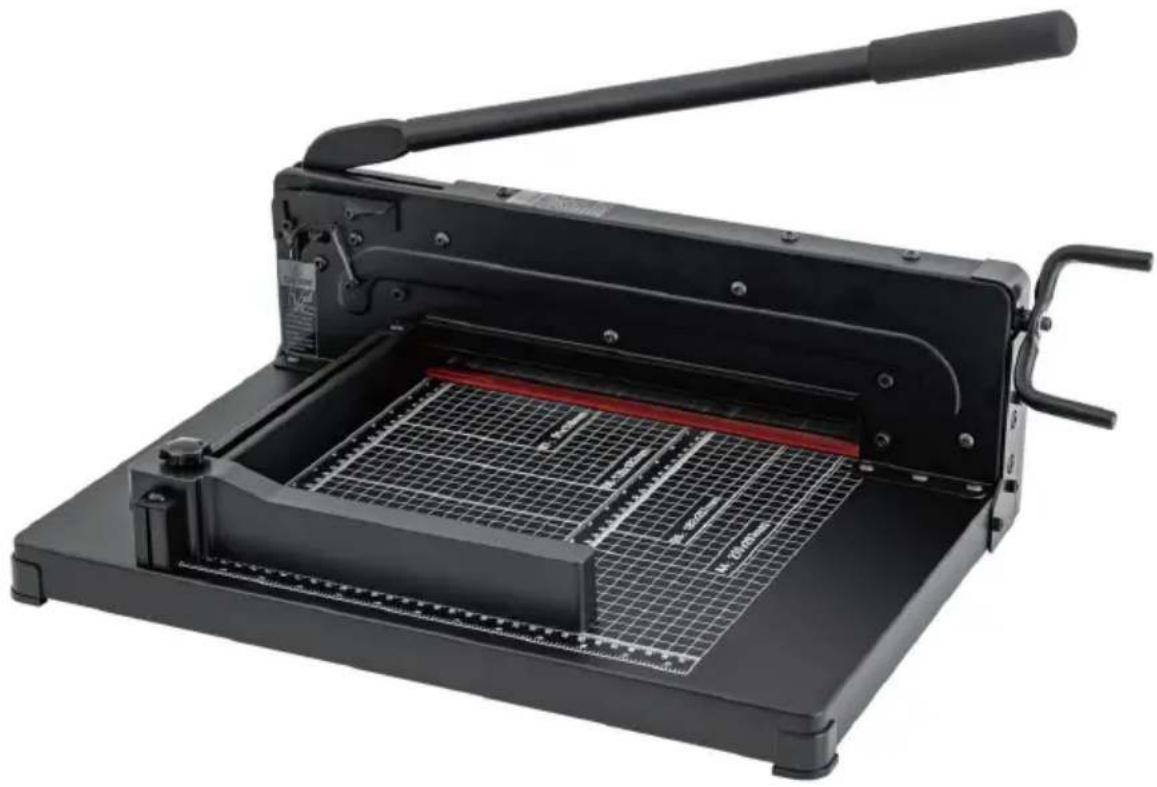
Vevor STC430 - Guillotine Trimmer - 1

natural_image Black manual cutlery presser with metal grating and handle, no visible text or symbols

NEED HELP? CONTACT US!

Have product questions? Need technical support? Please feel free to contact us:

Technical Support and E-Warranty Certificate www.vevor.com/support

This is the original instruction, please read all manual instructions carefully before operating. VEVOR reserves a clear interpretation of o user manual. The appearance of the product shall be subject to the product you received. Please forgive us that we won't inform you ag there are any technology or software updates on our product.

Vevor STC430 - NEED HELP? CONTACT US! - 1

WARNING:

Please read this manual carefully before using the product. Failure do so may result in serious injury.

CAUTION! BLADES ARE SHARP AND CAN CUT YOU. DO NOT ALLOW CHILDREN TO PLAY WITH BLADES OR OPERATE TRIMMER CAUTION!

Do not operate the trimmer without the protective guard rail in place.

Do not carry the trimmer by holding the cutting blade.

Do not carry the trimmer by the handle only.

Always latch the blade/handle in the down, closed position when not use.

Do not lubricate the cutting blade.

Keep loose fitting clothing away from trimmer.

TO AVOID DAMAGE TO THE TRIMMER

Remove staples, paper clips, etc.

Do not cut metal film, film containing glass, etc.

Use for intended purposes only.

Do not cut more than cutting capacity allows.

SAVE THESE INSTRUCTION

TECHNICAL SPECIFICATIONS

ModelSTC440STC430
Maximum cut paper400 sheets400 sheets
Maximum cutting width12 inch (A4)17 inch (A3)
ColorWhiteWhite
Product Dimensions(LxWxH)515*385*320mm640*505*380mm
Net Weight (kg)About 11.9kgAbout 15.9kg

*Products such as specifications, appearance, and design are subject to modification without prior notice.

SPARE PARTS LIST
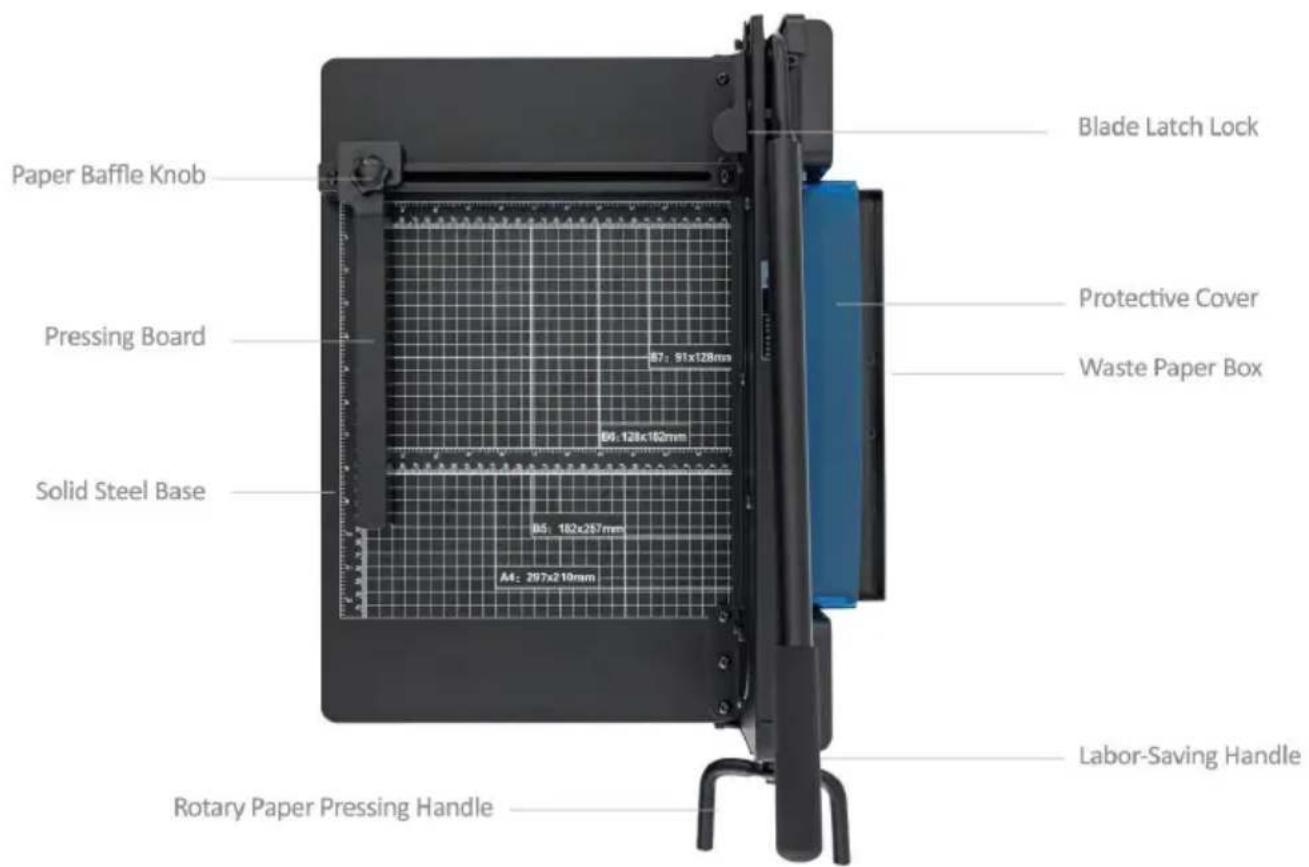
Paper Baffle Knob Pressing Board Solid Steel Base Rotary Paper Pressing Handle 87: 91x128mm 84: 128x160mm 85: 182x257mm A4: 297x210mm Blade Latch Lock Protective Cover Waste Paper Box Labor-Saving Handle

Vevor STC430 - SAVE THESE INSTRUCTION - 2

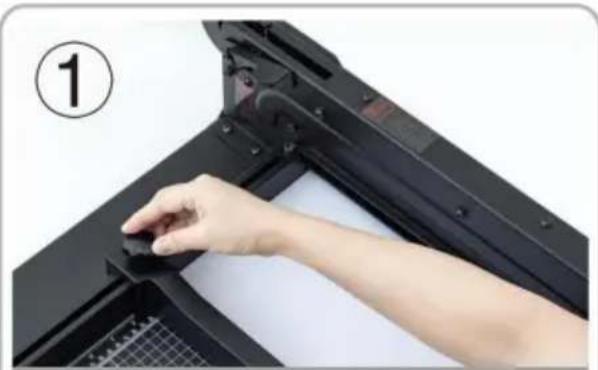
natural_image Close-up of a hand pressing down on a black mechanical component, no visible text or symbols

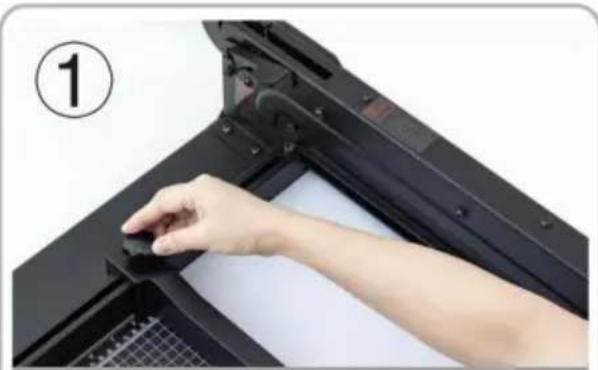
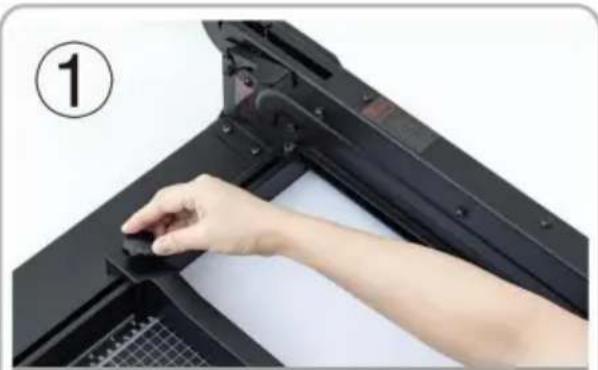
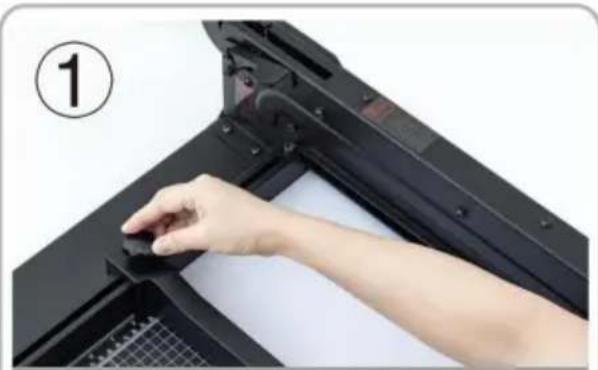
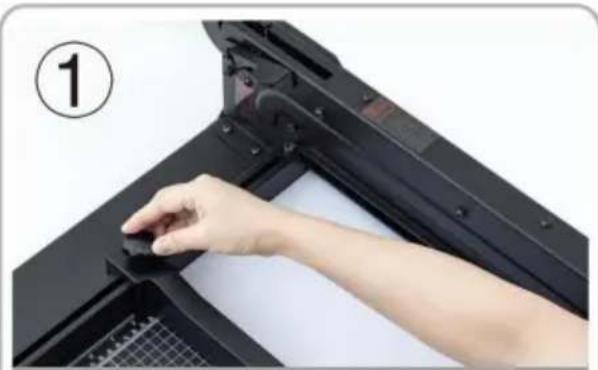
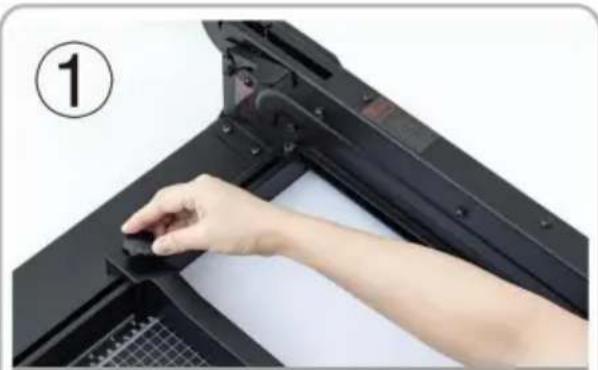
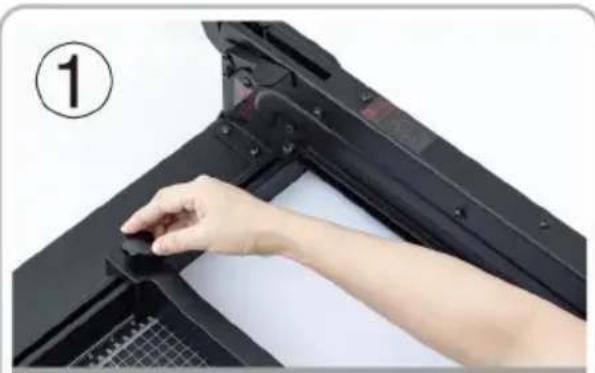
Put the cutting material into the workbench, adjust the removable file and tighten it.
Vevor STC430 - SAVE THESE INSTRUCTION - 3

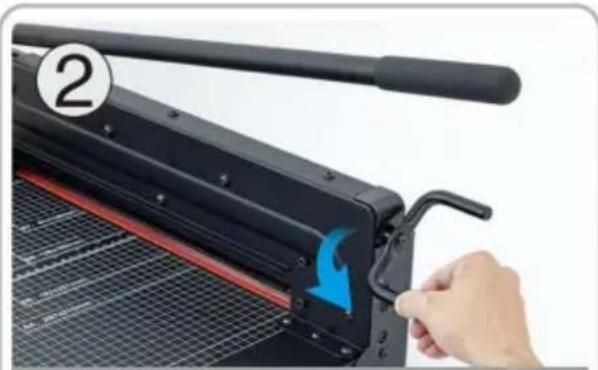
natural_image Close-up of a hand using a black paper cutlery to press or adjust a metal sheet, with a blue arrow indicating the cutting edge (no text or symbols visible)

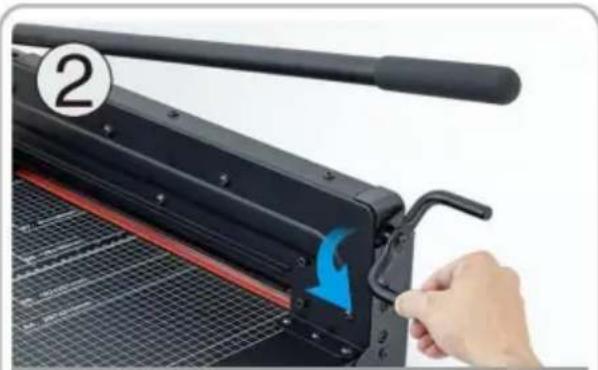
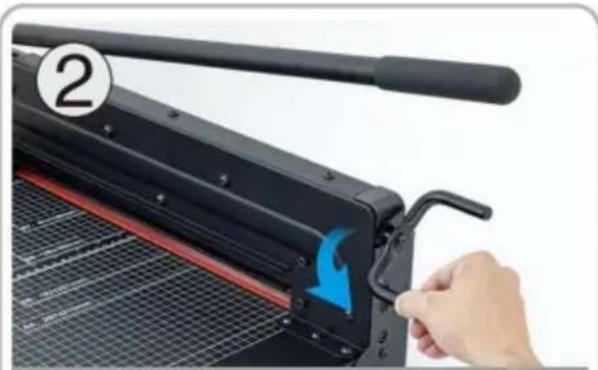
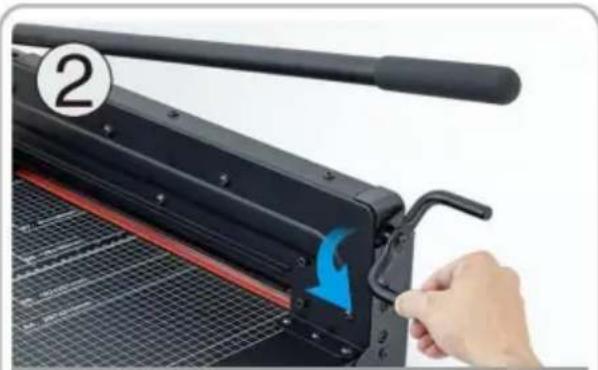
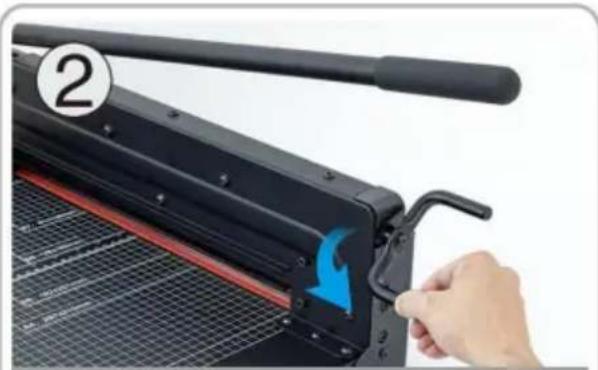
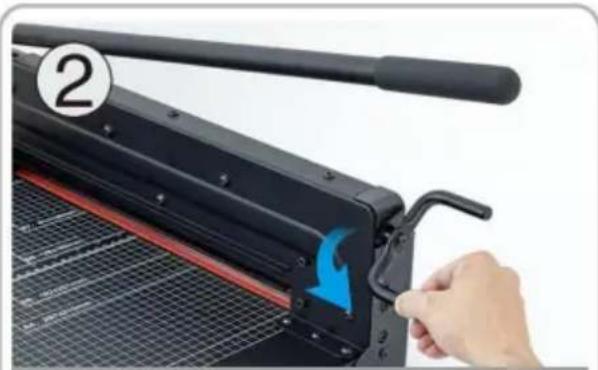
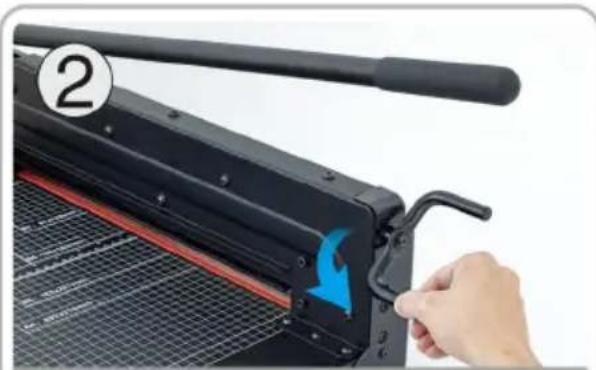
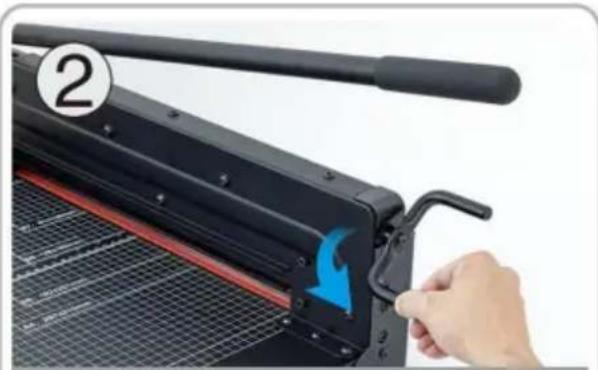
Rotate the paper pressing handle to compress the cutting material.
Vevor STC430 - SAVE THESE INSTRUCTION - 4

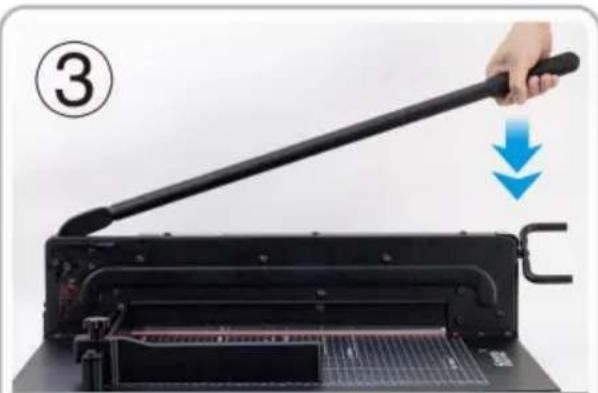
natural_image Hand using a long-handled paper filter to cut a printer into a slot, with a blue downward arrow indicating the process (no text or symbols visible)

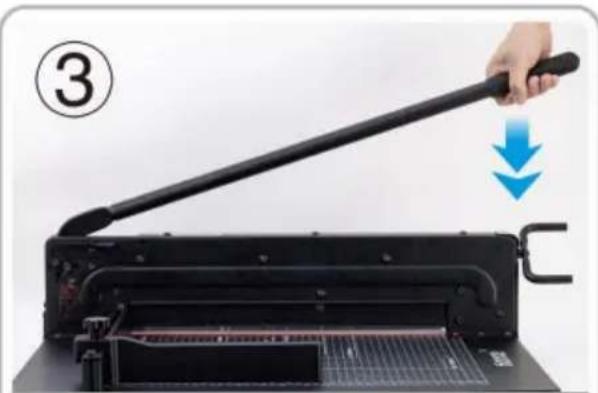
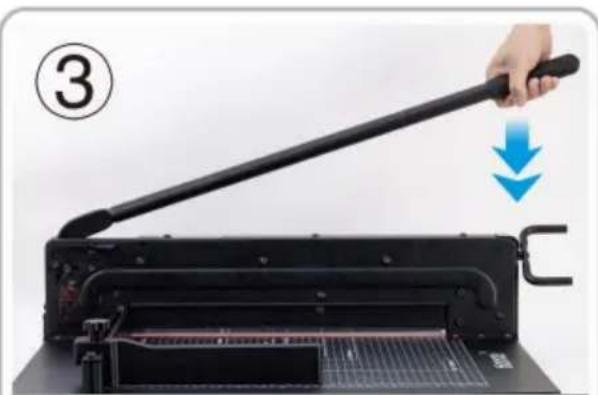
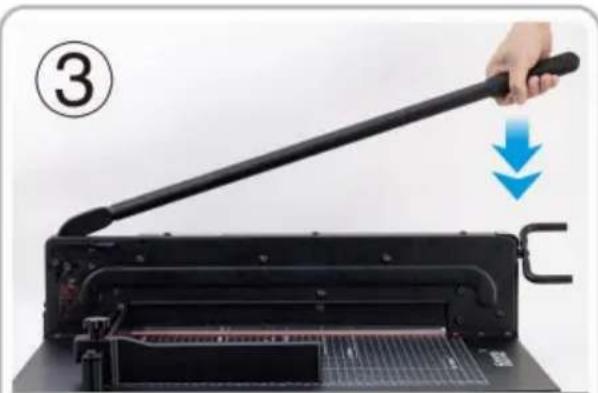
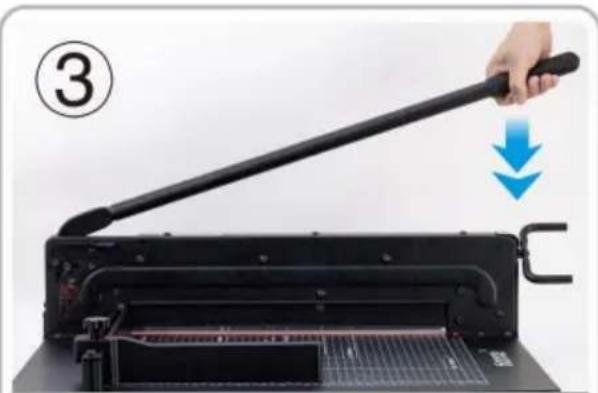
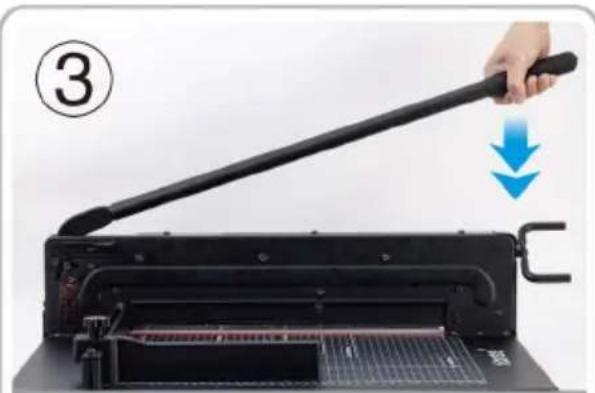
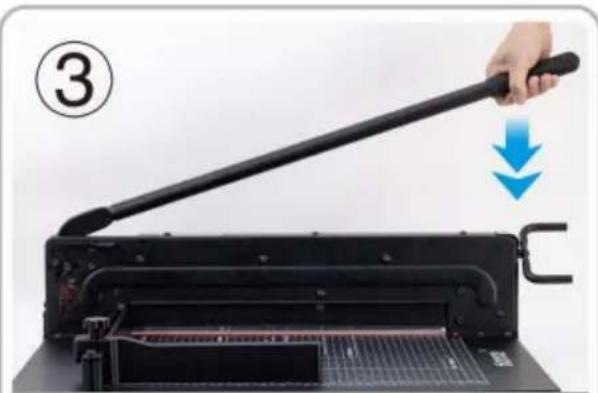
Press the cutter handle after pressing the safety lock.
Vevor STC430 - SAVE THESE INSTRUCTION - 5

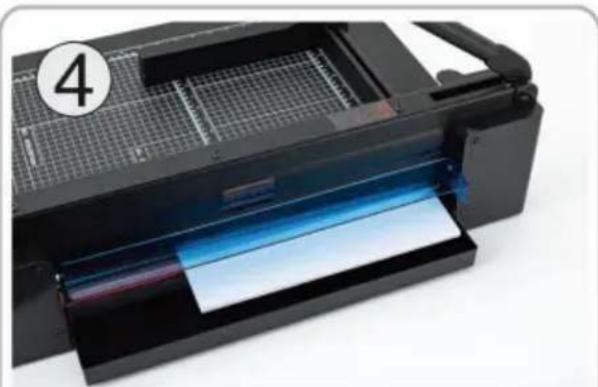
natural_image Close-up of a black printer with visible paper feed and grid pattern, no text or symbols present

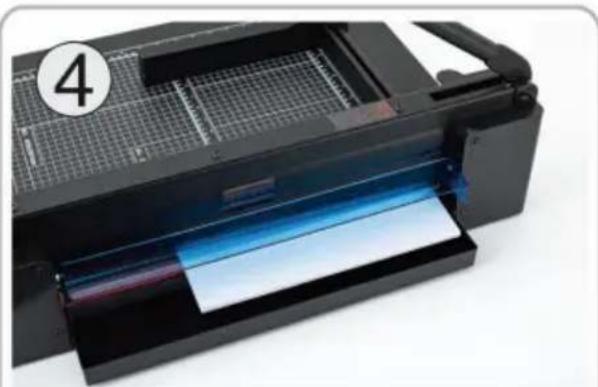
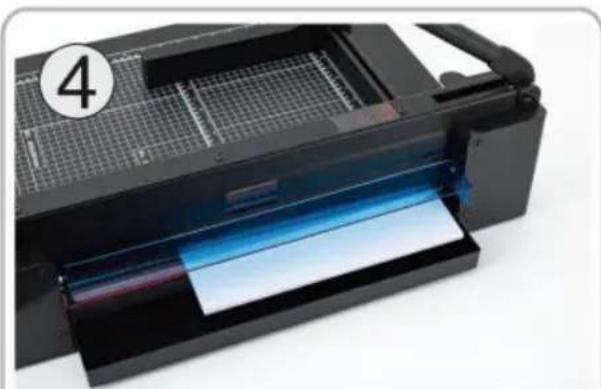
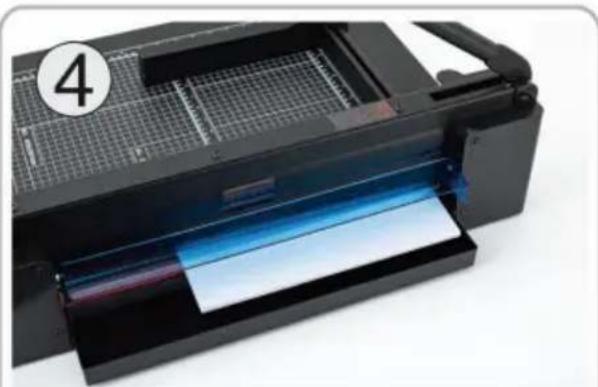
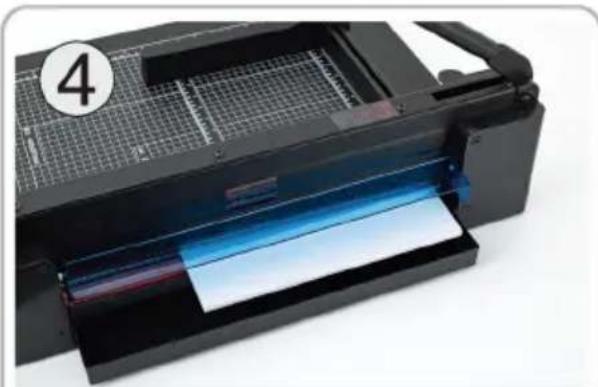
Cut the material neatly, perfect cut, no burr edges.

Vevor STC430 - SAVE THESE INSTRUCTION - 6

ATTENTION!

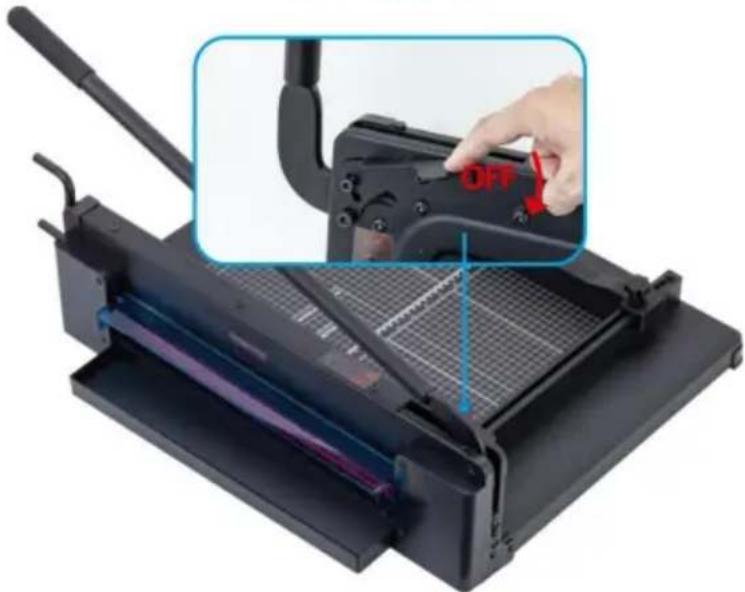
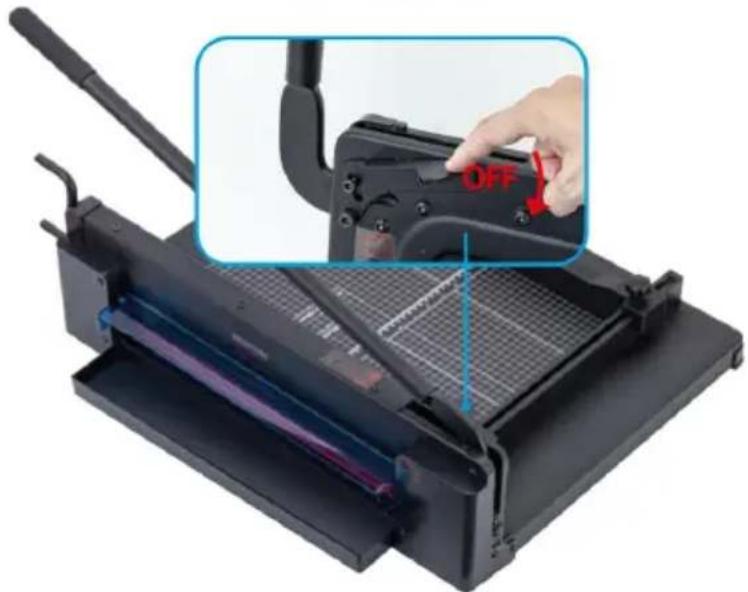
SECURITY BLADE LOCK

Security Lock
Vevor STC430 - SECURITY BLADE LOCK - 1

natural_image Close-up of a black paper cutlery machine with a hand adjusting the blade, showing internal components and a blue 'OFF' label (no text or symbols on the machine itself)

Safeguard Your Security

To prevent accidents caused by the natural fall of the handle, safety lock ke handle in the "up" position until you press.

TO AVOID DAMAGE TO THE TRIMMER

  1. Remove staples, paper clips, etc.
  2. Do not cut metal film, film containing glass, etc.
  3. Use for intended purposes only.
  4. Do not cut more than cutting capacity allows.

Manufacturer: Shanghaimuxinmuyeyouxiangongsi

Address: Shuangchenglu 803nong11hao1602A-1609shi, baoshanqu, shanghai 200000 CN.

Imported to AUS: SIHAO PTY LTD. 1 ROKEVA STREETEASTWOOD NSW 2122 Australia

Imported to USA: Sanven Technology Ltd. Suite 250, 9166 Anaheim Place, Rancho Cucamonga, CA 91730

UKREP

YH CONSULTING LIMITED. C/O YH Consulting

Limited Office 147, Centurion House, London

Road, Staines-upon-Thames, Surrey, TW18 4AX

ECREP

E-CrossStu GmbH

Mainzer Landstr.69,

60329 Frankfurt am Main.

VEVOR®

TOUGH TOOLS, HALF PRICE

Technical Support and E-Warranty Certificate

www.vevor.com/support

VEVOR®

TOUGH TOOLS, HALF PRICE

natural_image Black manual cutlery presser with metal grating and handle, no visible text or symbols

BESOIN D'AIDE? CONTACTEZ-NOUS!

GUIDE D'UTILISATION

Vevor STC430 - GUIDE D'UTILISATION - 1

natural_image Close-up of a hand pressing down on a black mechanical component, no visible text or symbols

Put the cutting material into the workbench, adjust the removeable file and tighten it.

Vevor STC430 - GUIDE D'UTILISATION - 2

natural_image Close-up of a hand using a black paper cutlery to press or install a metal sheet, with a blue arrow indicating the motion (no text or symbols visible)

Rotate the paper pressing handle to compress the cutting material.

Vevor STC430 - GUIDE D'UTILISATION - 3

natural_image Hand using a black paper cutlery to lift a machine, with a blue downward arrow indicating compression (no text or symbols visible)

Press the cutter handle after pressing the safety lock.

Vevor STC430 - GUIDE D'UTILISATION - 4

natural_image Black printer with blue paper inside, showing internal structure and grid pattern (no text or symbols visible)

Cut the material neatly,perfect cut, no burr edges.

Vevor STC430 - GUIDE D'UTILISATION - 5

ATTENTION!

SECURITY BLADE LOCK

Security Lock
Vevor STC430 - SECURITY BLADE LOCK - 1

natural_image Close-up of a black paper cutlery machine with a hand adjusting the blade, showing a highlighted cutting tool and a red 'OFF' button (no text or symbols on the machine itself)

YH CONSULTING LIMITED. C/O YH Consulting

Limited Bureau 147, Centurion House, London

Road, Staines-upon-Thames, Surrey, TW18 4AX

REPRÉSENTANT DE LA CE

E-CrossStu GmbH

Mainzer Landstr.69,

natural_image Black manual cutlery presser with metal grating and handle, no visible text or symbols

BEDIENUNGSANLEITUNG

Vevor STC430 - BEDIENUNGSANLEITUNG - 1

natural_image Close-up of a hand pressing down on a black mechanical component, no visible text or symbols

Put the cutting material into the workbench, adjust the removeable file and tighten it.

Vevor STC430 - BEDIENUNGSANLEITUNG - 2

natural_image Close-up of a hand using a black paper cutlery to press or install a metal sheet, with a blue arrow indicating the motion (no text or symbols visible)

Rotate the paper pressing handle to compress the cutting material.

Vevor STC430 - BEDIENUNGSANLEITUNG - 3

natural_image Hand using a black paper cutlery to lift a machine, with a blue downward arrow indicating compression (no text or symbols visible)

Press the cutter handle after pressing the safety lock.

Vevor STC430 - BEDIENUNGSANLEITUNG - 4

natural_image Black printer with blue paper inside, showing internal structure and grid pattern (no text or symbols visible)

Cut the material neatly, perfect cut, no burr edges.

Vevor STC430 - BEDIENUNGSANLEITUNG - 5

AUFMERKSAMKEIT!

SECURITY BLADE LOCK

Security Lock

Vevor STC430 - SECURITY BLADE LOCK - 1

natural_image Close-up of a black paper cutlery machine with a hand adjusting the blade, showing a highlighted cutting tool and a red 'OFF' button (no text or symbols on the machine itself)

YH CONSULTING LIMITED. C/O YH Consulting

Limited Office 147, Centurion House, London

Road, Staines-upon-Thames, Surrey, TW18 4AX

Vevor STC430 - SECURITY BLADE LOCK - 2

www.vevor.com/support

VEVOR®

TOUGH TOOLS, HALF PRICE

natural_image Black manual cutlery presser with metal grating and handle, no visible text or symbols

GUIDA OPERATIVA

Vevor STC430 - GUIDA OPERATIVA - 1

natural_image Close-up of a hand pressing down on a black mechanical component, no visible text or symbols

Put the cutting material into the workbench, adjust the removeable file and tighten it.

Vevor STC430 - GUIDA OPERATIVA - 2

natural_image Close-up of a hand using a black paper cutlery to press or install a metal sheet, with a blue arrow indicating the motion (no text or symbols visible)

Rotate the paper pressing handle to compress the cutting material.

Vevor STC430 - GUIDA OPERATIVA - 3

natural_image Hand using a black paper cutlery to lift a machine, with a blue downward arrow indicating compression (no text or symbols visible)

Press the cutter handle after pressing the safety lock.

Vevor STC430 - GUIDA OPERATIVA - 4

natural_image Black printer with blue paper inside, showing internal structure and grid pattern (no text or symbols visible)

Cut the material neatly, perfect cut, no burr edges.

Vevor STC430 - GUIDA OPERATIVA - 5

ATTENZIONE!

SECURITY BLADE LOCK

Security Lock

Vevor STC430 - SECURITY BLADE LOCK - 1

natural_image Close-up of a black paper cutlery machine with a hand adjusting the blade, showing a highlighted cutting tool and a red 'OFF' button (no text or symbols on the machine itself)

Importato in AUS: SIHAO PTY LTD. 1 ROKEVA STREETEASTWOOD NSW 2122 Australia

Importato negli USA: Sanven Technology Ltd. Suite 250, 9166 Anaheim Place, Rancho Cucamonga, CA 91730

RAPPRESENTANZA DEL REGNO UNITO

YH CONSULTING LIMITED. C/O YH Consulting

Limited Ufficio 147, Centurion House, London

Road, Staines-upon-Thames, Surrey, TW18 4AX

Vevor STC430 - SECURITY BLADE LOCK - 3

natural_image Black manual cutlery presser with metal grating and handle, no visible text or symbols

www.vevor.com/support

Retire grapas, clips, etc.

natural_image Close-up of a hand pressing down on a black mechanical component, no visible text or symbols

Put the cutting material into the workbench, adjust the removeable file and tighten it.

Vevor STC430 - SECURITY BLADE LOCK - 4

natural_image Close-up of a hand using a black paper cutlery to press or install a metal sheet, with a blue arrow indicating the motion (no text or symbols visible)

Rotate the paper pressing handle to compress the cutting material.

Vevor STC430 - SECURITY BLADE LOCK - 5

natural_image Hand using a black paper cutlery to lift a machine, with a blue downward arrow indicating compression (no text or symbols visible)

Press the cutter handle after pressing the safety lock.

Vevor STC430 - SECURITY BLADE LOCK - 6

natural_image Black printer with blue paper inside, showing internal structure and grid pattern (no text or symbols visible)

Cut the material neatly, perfect cut, no burr edges.

Vevor STC430 - SECURITY BLADE LOCK - 7

¡ATENCIÓN!

SECURITY BLADE LOCK

Security Lock

Vevor STC430 - SECURITY BLADE LOCK - 1

natural_image Close-up of a black paper cutlery machine with a hand adjusting the blade, showing a highlighted cutting tool and a red 'OFF' button (no text or symbols on the machine itself)

Road, Staines-upon-Thames, Surrey, TW18 4AX

REPRESENTANTE CE

E-CrossStu GmbH

natural_image Black manual cutlery presser with metal grating and handle, no visible text or symbols

POTRZEBUJESZ POMOCY? SKONTAKTUJ SIĘ Z NAMI!

INSTRUKCJA OBSŁUGI

Vevor STC430 - INSTRUKCJA OBSŁUGI - 1

natural_image Close-up of a hand pressing down on a black mechanical component, no visible text or symbols

Put the cutting material into the workbench, adjust the removable file and tighten it.
Vevor STC430 - INSTRUKCJA OBSŁUGI - 2

natural_image Close-up of a hand using a black paper cutlery to press or install a metal sheet, with a blue arrow indicating the motion (no text or symbols visible)

Rotate the paper pressing handle to compress the cutting material.
Vevor STC430 - INSTRUKCJA OBSŁUGI - 3

natural_image Hand operating a black paper cut into a machine, with a blue downward arrow indicating compression or disassembly (no text or symbols visible)

Press the cutter handle after pressing the safety lock.
Vevor STC430 - INSTRUKCJA OBSŁUGI - 4

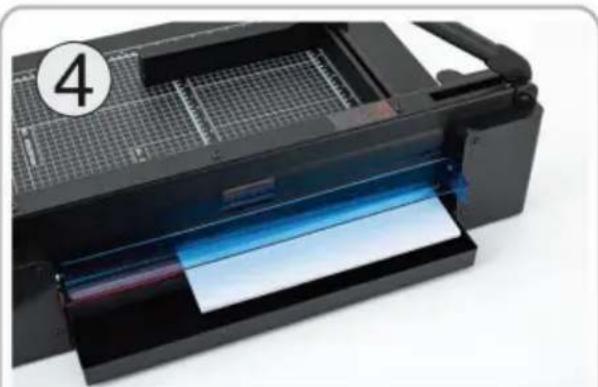
natural_image Close-up of a black printer with blue paper inside, showing internal structure and grid pattern (no text or symbols visible)

Cut the material neatly, perfect cut, no burr edges.

Vevor STC430 - INSTRUKCJA OBSŁUGI - 5

UWAGA!

SECURITY BLADE LOCK

Security Lock

Vevor STC430 - Security Lock - 1

natural_image Close-up of a black paper cutlery machine with a hand adjusting the blade, showing a highlighted cutting tool and a red 'OFF' button (no text or symbols on the machine itself)

YH CONSULTING LIMITED. C/O YH Consulting Limited

Biuro 147, Centurion House, London Road, Staines-upon-Thames, Surrey, TW18 4AX
Przedstawiciel UE

E-CrossStu GmbH

Mainzer Landstr.69,

60329 Frankfurt nad Menem.

VEVOR®

TOUGH TOOLS, HALF PRICE

natural_image Black manual cutlery presser with metal grating and handle, no visible text or symbols

HULP NODIG? NEEM CONTACT MET ONS OP!

GEBRUIKSAANWIJZING

Vevor STC430 - GEBRUIKSAANWIJZING - 1

natural_image Close-up of a hand pressing down on a black mechanical component, no visible text or symbols

Put the cutting material into the workbench, adjust the removeable file and tighten it.

Vevor STC430 - GEBRUIKSAANWIJZING - 2

natural_image Close-up of a hand using a black paper cutlery to press or install a metal sheet, with a blue arrow indicating the motion (no text or symbols visible)

Rotate the paper pressing handle to compress the cutting material.
Vevor STC430 - GEBRUIKSAANWIJZING - 3

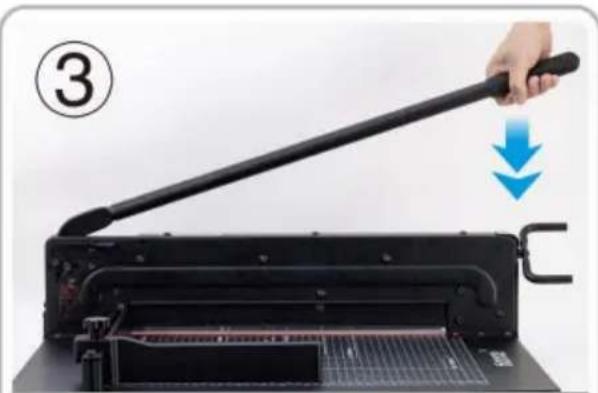
natural_image Hand using a black paper cutlery to lift a machine, with a blue downward arrow indicating compression (no text or symbols visible)

Press the cutter handle after pressing the safety lock.
Vevor STC430 - GEBRUIKSAANWIJZING - 4

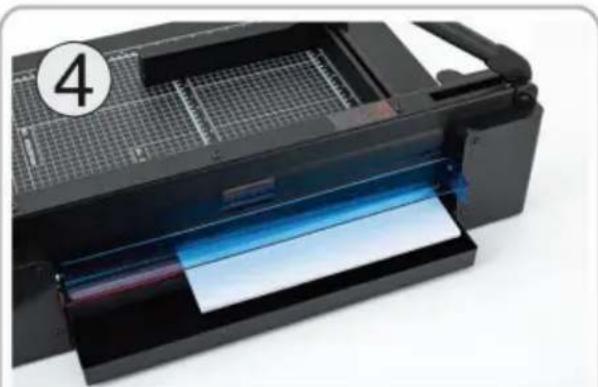
natural_image Black printer with blue paper inside, showing internal structure and grid pattern (no text or symbols visible)

Cut the material neatly, perfect cut, no burr edges.

Vevor STC430 - GEBRUIKSAANWIJZING - 5

AANDACHT!

SECURITY BLADE LOCK

Security Lock

Vevor STC430 - SECURITY BLADE LOCK - 1

natural_image Close-up of a black paper cutlery machine with a hand adjusting the blade, showing a highlighted cutting tool and a red 'OFF' button (no text or symbols on the machine itself)

Bescherm uw veiligheid

YH CONSULTING LIMITED. C/O YH Consulting

Limited Kantoor 147, Centurion House, London

Road, Staines-upon-Thames, Surrey, TW18 4AX

EC-REP

E-CrossStu GmbH

Mainzer Landstr.69,

garantiecertificaat www.vevor.com/support

VEVOR®

TOUGH TOOLS, HALF PRICE

natural_image Black manual cutlery presser with metal grating and handle, no visible text or symbols

BEHÖVER HJÄLP? KONTAKTA OSS!

ANVÄNDARGUIDE

Vevor STC430 - ANVÄNDARGUIDE - 1

natural_image Close-up of a hand pressing down on a black mechanical component, no visible text or symbols

Put the cutting material into the workbench, adjust the removeable file and tighten it.

Vevor STC430 - ANVÄNDARGUIDE - 2

natural_image Close-up of a hand using a black paper cutlery to press or install a metal sheet, with a blue arrow indicating the motion (no text or symbols visible)

Rotate the paper pressing handle to compress the cutting material.

Vevor STC430 - ANVÄNDARGUIDE - 3

natural_image Hand using a black paper cutlery to lift a machine, with a blue downward arrow indicating compression (no text or symbols visible)

Press the cutter handle after pressing the safety lock.

Vevor STC430 - ANVÄNDARGUIDE - 4

natural_image Black printer with blue paper inside, showing internal structure and grid pattern (no text or symbols visible)

Cut the material neatly, perfect cut, no burr edges.

Vevor STC430 - ANVÄNDARGUIDE - 5

UPPMÄRKSAMHET!

SECURITY BLADE LOCK

Security Lock

Vevor STC430 - SECURITY BLADE LOCK - 1

natural_image Close-up of a black paper cutlery machine with a hand adjusting the blade, showing a highlighted cutting tool and a red 'OFF' button (no text or symbols on the machine itself)

Skydda din säkerhet

YH CONSULTING LIMITED. C/O YH Consulting

Limited Office 147, Centurion House, London

Road, Staines-upon-Thames, Surrey, TW18 4AX
ECREP

E-CrossStu GmbH

Mainzer Landstr.69,

60329 Frankfurt am Main.

VEVOR®

TOUGH TOOLS, HALF PRICE

www.vevor.com/support
Manual assistant
Powered by Anthropic
Waiting for your message
Product information

Brand : Vevor

Model : STC430

Category : Paper cutter