
STC440 - Paper cutter Vevor - Free user manual and instructions
Find the device manual for free STC440 Vevor in PDF.
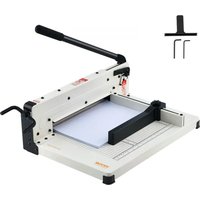


| Product Type | Guillotine Paper Cutter |
| Brand | Vevor |
| Model | STC440 |
| Maximum Cutting Capacity | 400 sheets (80 g/m²) |
| Maximum Cutting Width | 12 inches (A4) |
| Dimensions (L x W x H) | 515 x 385 x 320 mm |
| Net Weight | Approximately 11.9 kg |
| Color | White |
| Safety | Safety lock holding the handle in high position; protective rail |
| Maintenance | Do not lubricate the blade; remove staples and paper clips before cutting |
| Intended Use | Paper cutting only; do not cut metallic film or film containing glass |
| Power Source | Manual (no electrical power) |
| Cutting Guide | Integrated with cutting marks |
| Warranty | Electronic warranty via www.vevor.com/support |
| Technical Support | www.vevor.com/support |
| Blade Material | Hardened steel (not specified, reasonable estimate) |
Frequently Asked Questions - STC440 Vevor
User questions about STC440 Vevor
0 question about this device. Answer the ones you know or ask your own.
Ask a new question about this device
Download the instructions for your Paper cutter in PDF format for free! Find your manual STC440 - Vevor and take your electronic device back in hand. On this page are published all the documents necessary for the use of your device. STC440 by Vevor.
USER MANUAL STC440 Vevor
Technical Support and E-Warranty Certificate www.vevor.com/support
GUILLOTINE TRIMMER
USER MANUAL
MODEL NO.: STC440, STC430
We continue to be committed to provide you tools with competitive price. "Save Half", "Half Price" or any other similar expressions used by us only represents an estimate of savings you might benefit from buying certain tools with us compared to the major top brands and does not necessarily mean to cover all categories of tools offered by us. You are kindly reminded to verify carefully when you are placing an order with us if you are actually saving half in comparison with the top major brands.
VEVOR®
TOUGH TOOLS, HALF PRICE
Guillotine Trimmer
MODEL NO.: STC440, STC430
NEED HELP? CONTACT US!
Have product questions? Need technical support? Please feel free to contact us:
Technical Support and E-Warranty Certificate www.vevor.com/support
This is the original instruction, please read all manual instructions carefully before operating. VEVOR reserves a clear interpretation of the user manual. The appearance of the product shall be subject to the product you received. Please forgive us that we won't inform you again if there are any technology or software updates on our product.

WARNING:
Please read this manual carefully before using the product. Failure to do so may result in serious injury.
CAUTION! BLADES ARE SHARP AND CAN CUT YOU. DO NOT ALLOW CHILDREN TO PLAY WITH BLADES OR OPERATE TRIMMER.
Do not operate the trimmer without the protective guard rail in place.
Do not carry the trimmer by holding the cutting blade.
Do not carry the trimmer by the handle only.
Always latch the blade/handle in the down, closed position when not in use.
Do not lubricate the cutting blade.
Keep loose fitting clothing away from trimmer.
TO AVOID DAMAGE TO THE TRIMMER
Remove staples, paper clips, etc.
Do not cut metal film, film containing glass, etc.
Use for intended purposes only.
Do not cut more than cutting capacity allows.
SAVE THESE INSTRUCTIONS
TECHNICAL SPECIFICATIONS
| Model | STC440 | STC430 |
| Maximum cut paper | 400 sheets | 400 sheets |
| Maximum cutting width | 12 inch (A4) | 17 inch (A3) |
| Color | White | White |
| Product Dimensions(LxWxH) | 515*385*320mm | 640*505*380mm |
| Net Weight (kg) | About 11.9kg | About 15.9kg |
*Products such as specifications, appearance, and design are subject to modification without prior notice.
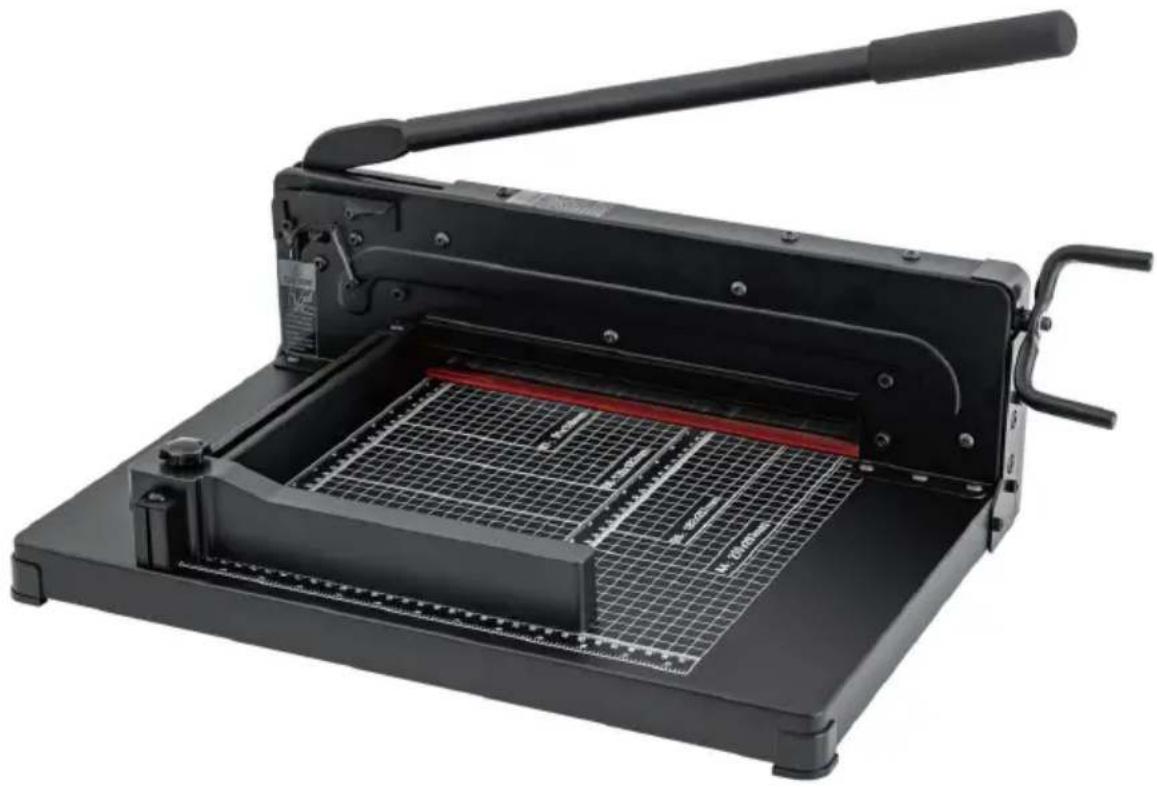
SPARE PARTS LIST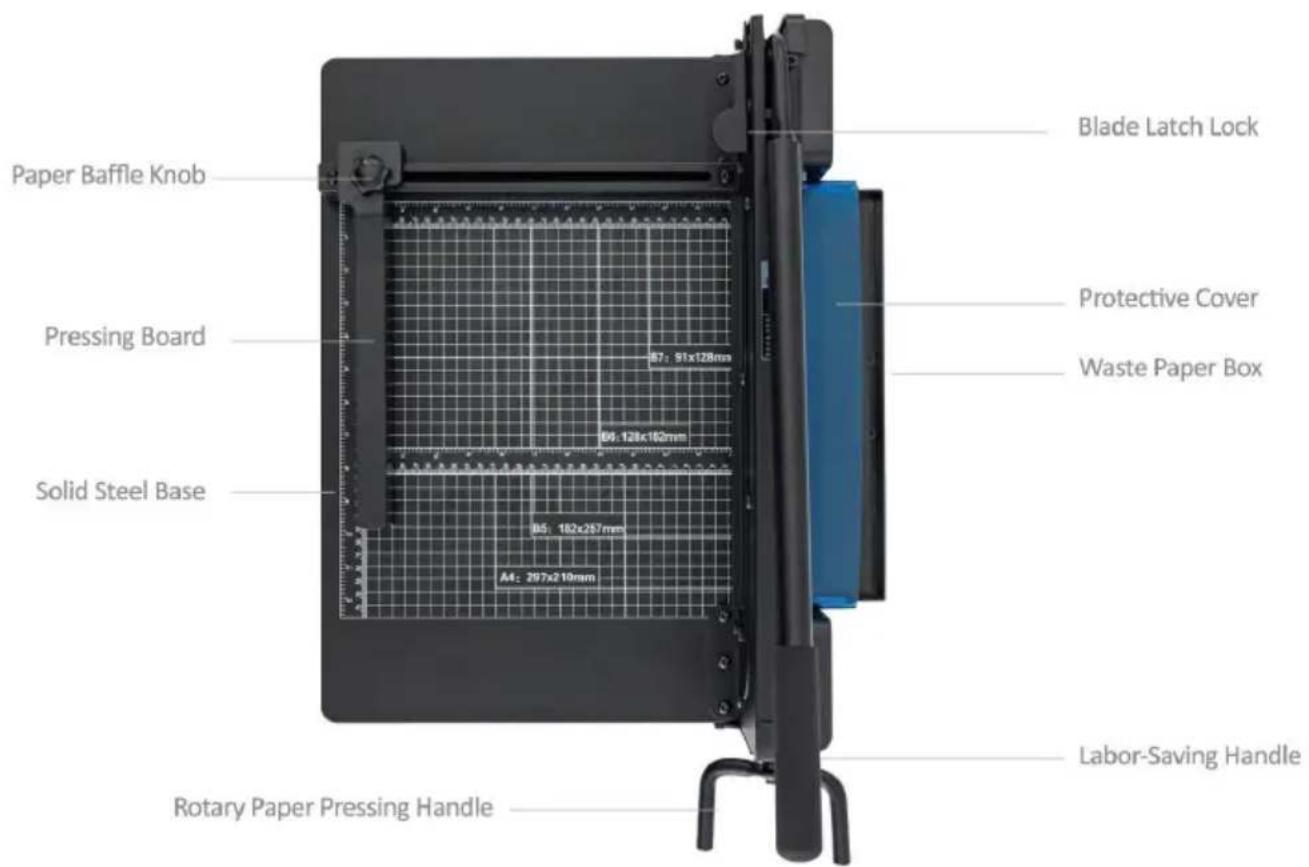
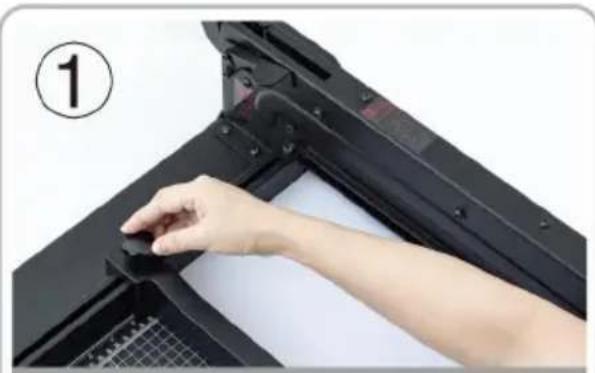
Put the cutting material into the workbench, adjust the removable file and tighten it.
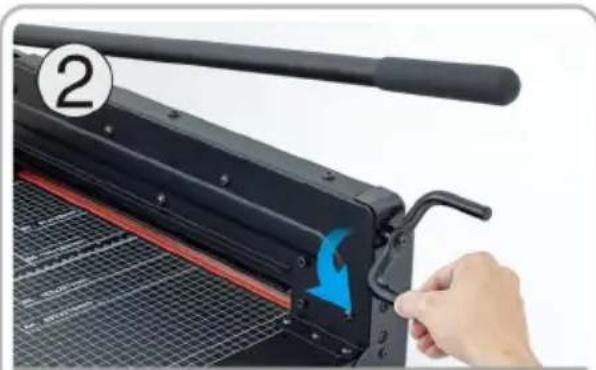
Rotate the paper pressing handle to compress the cutting material.
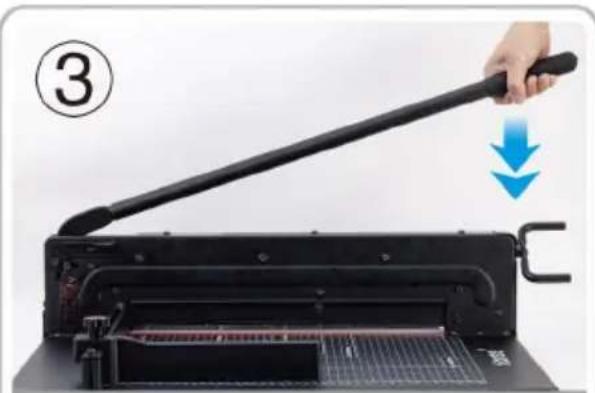
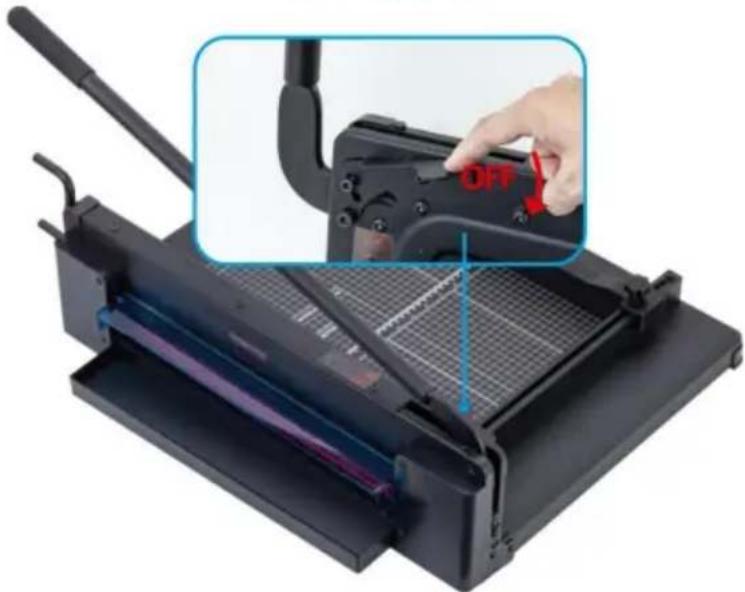
Press the cutter handle after pressing the safety lock.
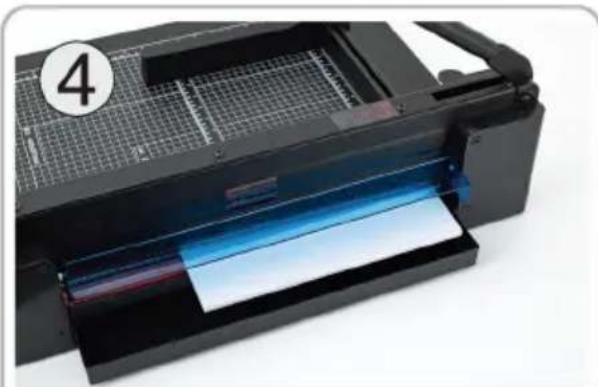
Cut the material neatly, perfect cut, no burr edges.

ATTENTION!
SECURITY BLADE LOCK
Security Lock
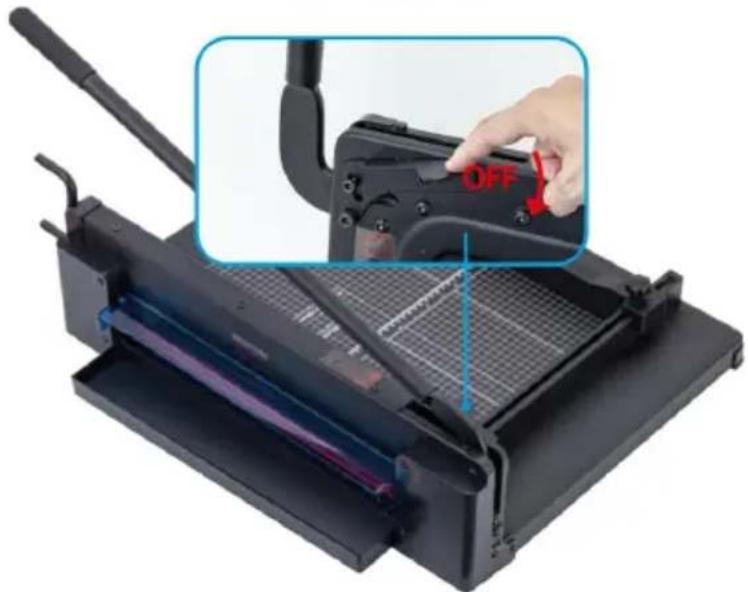
Safeguard Your Security
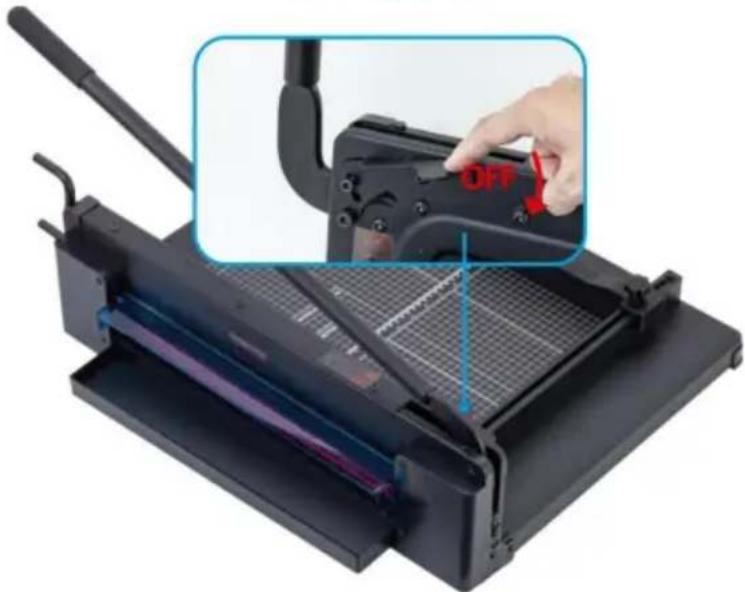
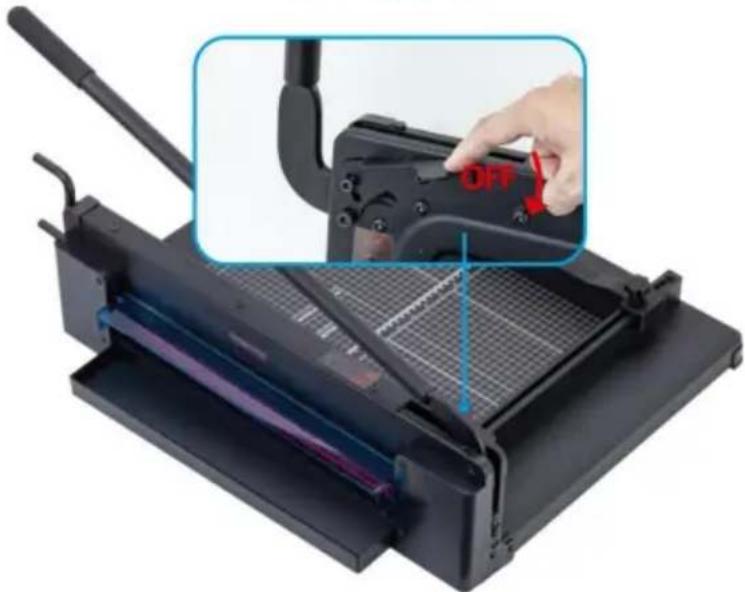
To prevent accidents caused by the natural fall of the handle, safety lock keeps the handle in the "up" position until you press.
TO AVOID DAMAGE TO THE TRIMMER
- Remove staples, paper clips, etc.
- Do not cut metal film, film containing glass, etc.
- Use for intended purposes only.
- Do not cut more than cutting capacity allows.
Manufacturer: Shanghai Muxin Muye Youxian Gongsi
Address: Room 1602A-1609, No. 11, Lane 803, Shuangcheng Road, Baoshan District, Shanghai 200000, CN.
Imported to AUS: Sihao Pty Ltd. 1 Rokeva Street, Eastwood NSW 2122, Australia
Imported to USA: Sanven Technology Ltd. Suite 250, 9166 Anaheim Place, Rancho Cucamonga, CA 91730
| UK | REP |
YH Consulting Limited. C/O YH Consulting
Limited Office 147, Centurion House, London
Road, Staines-upon-Thames, Surrey, TW18 4AX
| EC | REP |
E-CrossStu GmbH
Mainzer Landstr. 69,
60329 Frankfurt am Main.
VEVOR®
TOUGH TOOLS, HALF PRICE
Technical Support and E-Warranty Certificate
www.vevor.com/support
VEVOR®
TOUGH TOOLS, HALF PRICE
NEED HELP? CONTACT US!
USER MANUAL
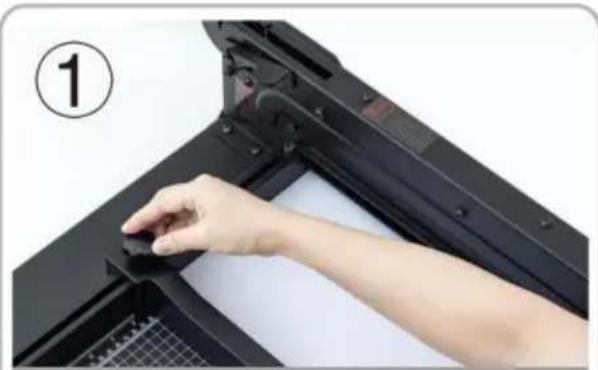
Put the cutting material into the workbench, adjust the removable file and tighten it.
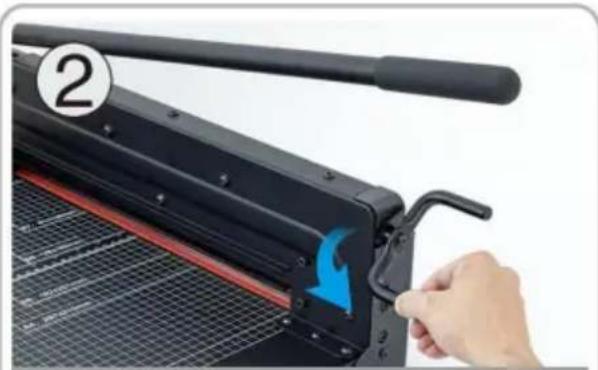
Rotate the paper pressing handle to compress the cutting material.
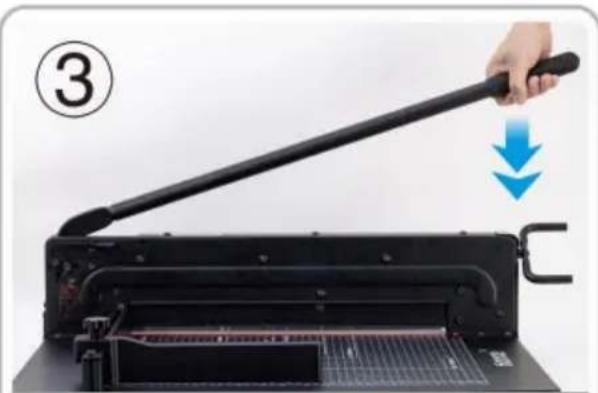
Press the cutter handle after pressing the safety lock.
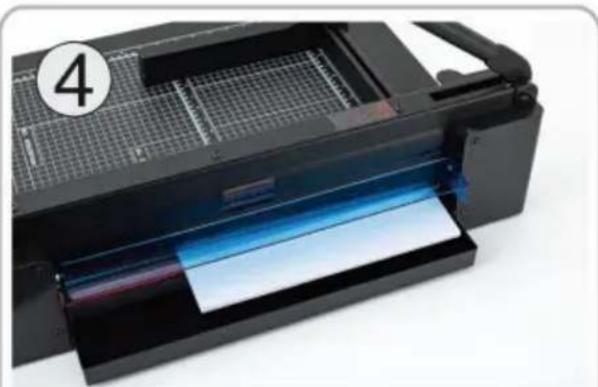
Cut the material neatly, perfect cut, no burr edges.

ATTENTION!
SECURITY BLADE LOCK
Security Lock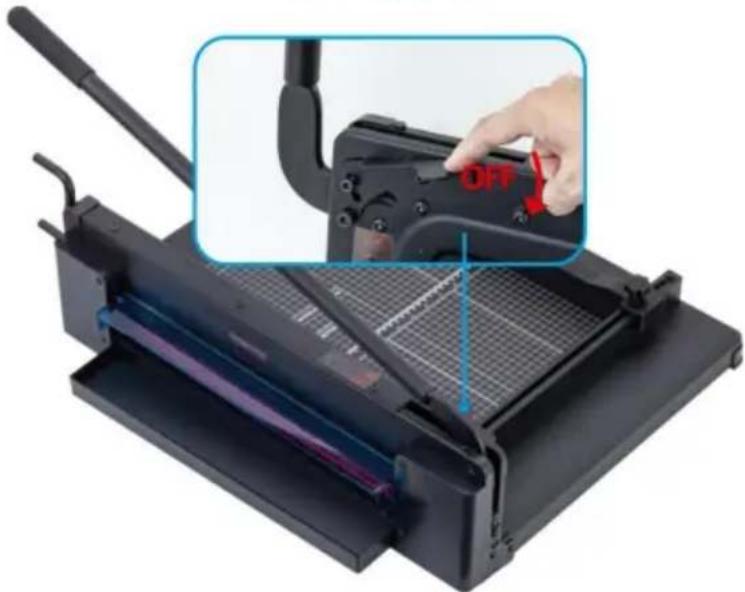
YH CONSULTING LIMITED. C/O YH Consulting
Limited Bureau 147, Centurion House, London
Road, Staines-upon-Thames, Surrey, TW18 4AX
E-CrossStu GmbH
Mainzer Landstr.69,
OPERATING INSTRUCTIONS
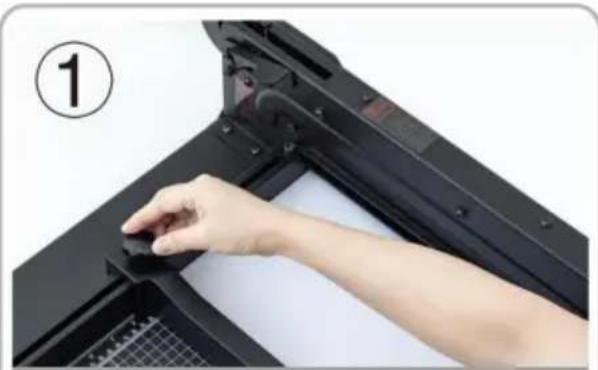
Put the cutting material into the workbench, adjust the removable file and tighten it.
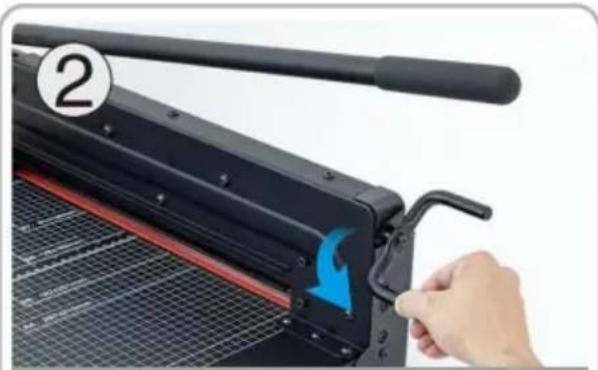
Rotate the paper pressing handle to compress the cutting material.
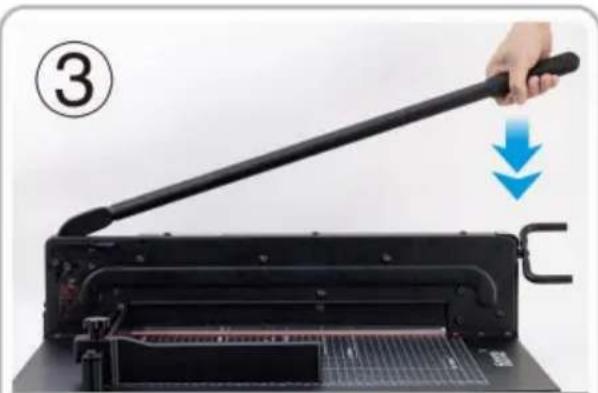
Press the cutter handle after pressing the safety lock.
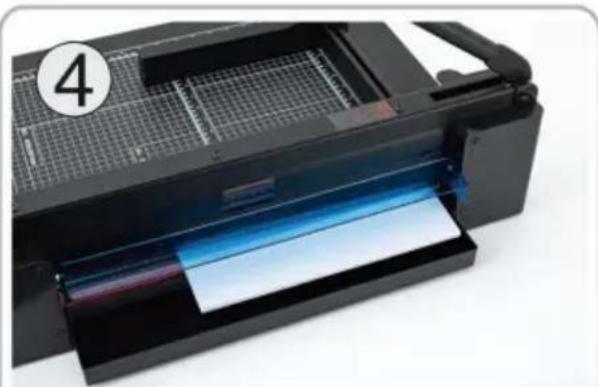
Cut the material neatly, perfect cut, no burr edges.

ATTENTION!
SECURITY BLADE LOCK
Security Lock
YH CONSULTING LIMITED. C/O YH Consulting
Limited Office 147, Centurion House, London
Road, Staines-upon-Thames, Surrey, TW18 4AX
OPERATING GUIDE
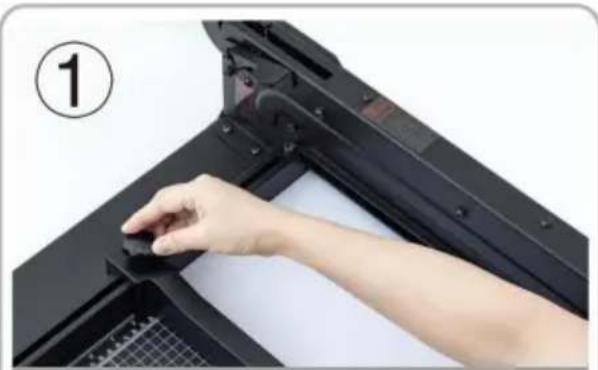
Put the cutting material into the workbench, adjust the removable file and tighten it.
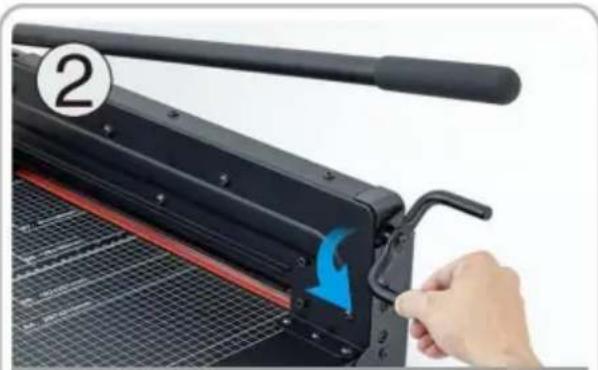
Rotate the paper pressing handle to compress the cutting material.
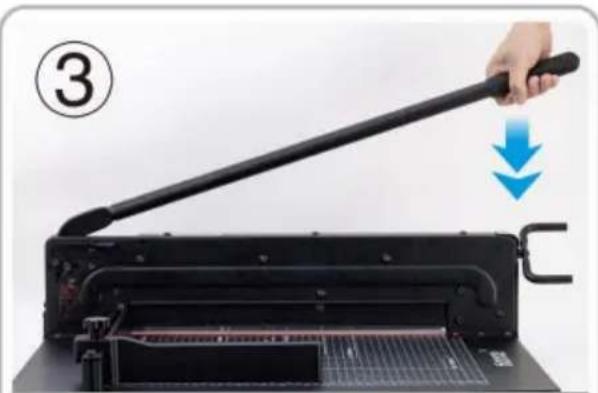
Press the cutter handle after pressing the safety lock.

Cut the material neatly, perfect cut, no burr edges.

ATTENTION!
SECURITY BLADE LOCK
Security Lock
Imported in AUS: SIHAO PTY LTD. 1 ROKEVA STREETEASTWOOD NSW 2122 Australia
Imported in USA: Sanven Technology Ltd. Suite 250, 9166 Anaheim Place, Rancho Cucamonga, CA 91730

YH CONSULTING LIMITED. C/O YH Consulting
Limited Office 147, Centurion House, London
Road, Staines-upon-Thames, Surrey, TW18 4AX
www.vevor.com/support
Remove staples, clips, etc.
Put the cutting material into the workbench, adjust the removable file and tighten it.
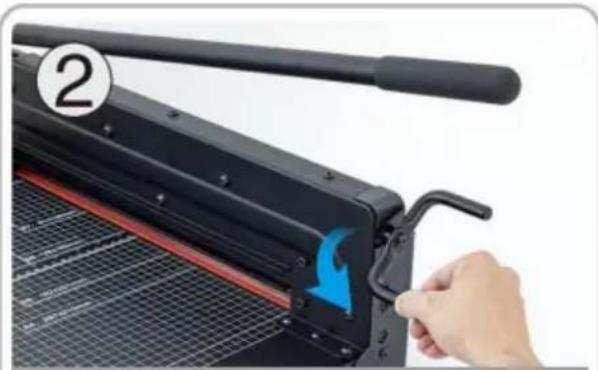
Rotate the paper pressing handle to compress the cutting material.
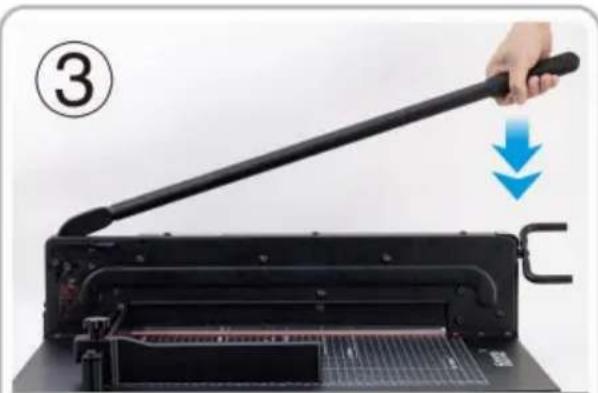
Press the cutter handle after pressing the safety lock.
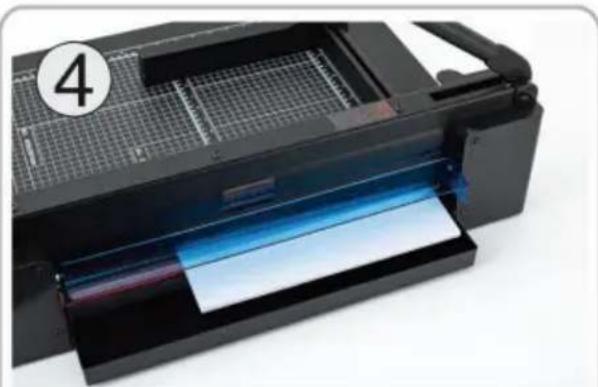
Cut the material neatly, perfect cut, no burr edges.

ATTENTION!
SECURITY BLADE LOCK
Security Lock
Road, Staines-upon-Thames, Surrey, TW18 4AX
E-CrossStu GmbH
NEED HELP? CONTACT US!
INSTRUCTION MANUAL
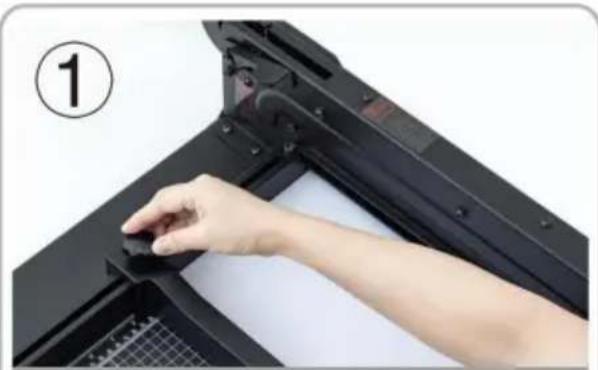
Put the cutting material into the workbench, adjust the removable file and tighten it.
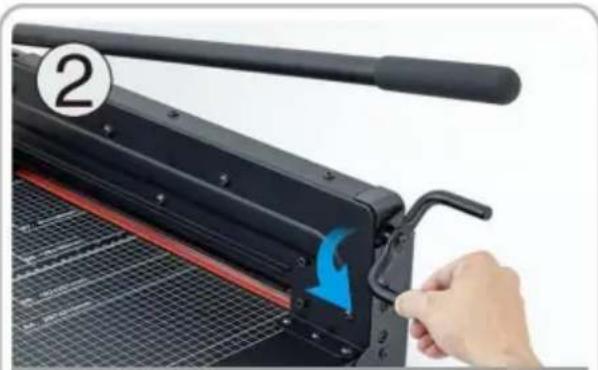
Rotate the paper pressing handle to compress the cutting material.
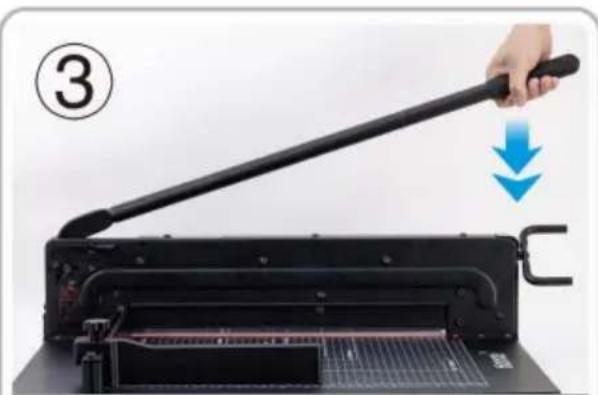
Press the cutter handle after pressing the safety lock.
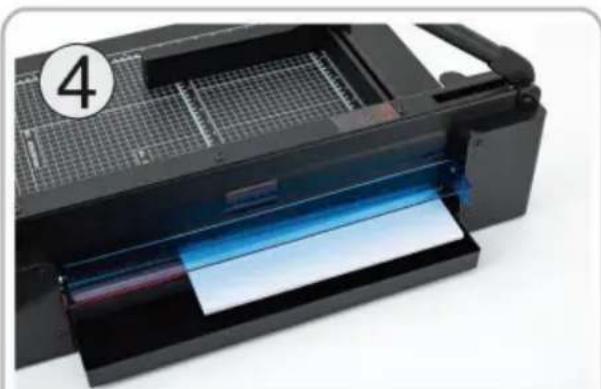
Cut the material neatly, perfect cut, no burr edges.

ATTENTION!
SECURITY BLADE LOCK
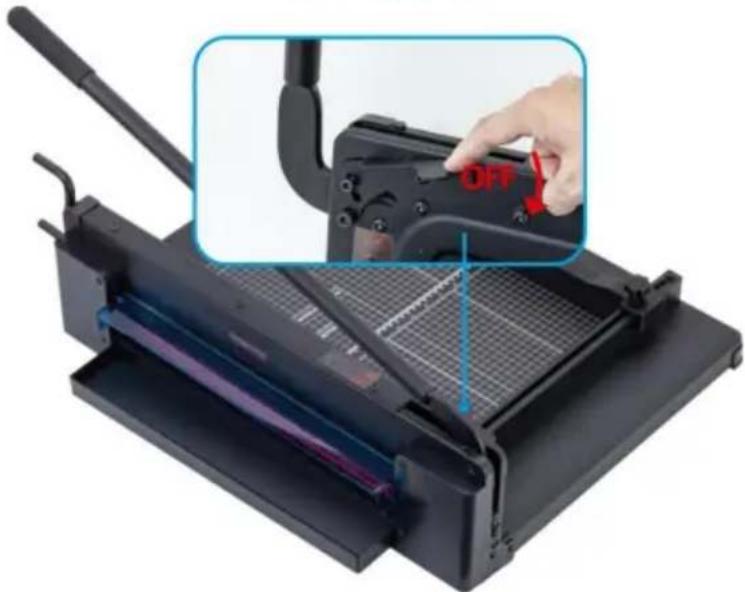
Security Lock
YH CONSULTING LIMITED. C/O YH Consulting Limited
Office 147, Centurion House, London Road, Staines-upon-Thames, Surrey, TW18 4AX
| Przedstawiciel UE |
E-CrossStu GmbH
Mainzer Landstr.69,
60329 Frankfurt am Main.
VEVOR®
TOUGH TOOLS, HALF PRICE
NEED HELP? CONTACT US!
USER MANUAL
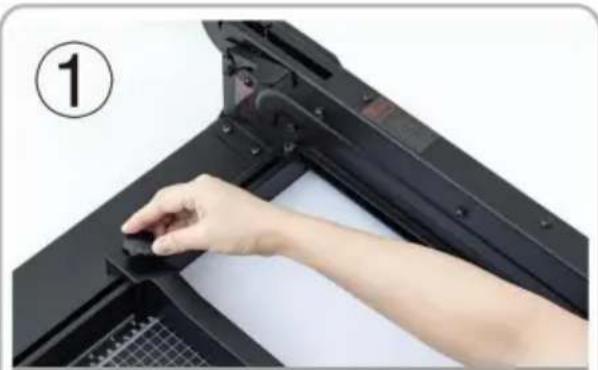
Place the cutting material on the workbench, adjust the removable file, and tighten it.
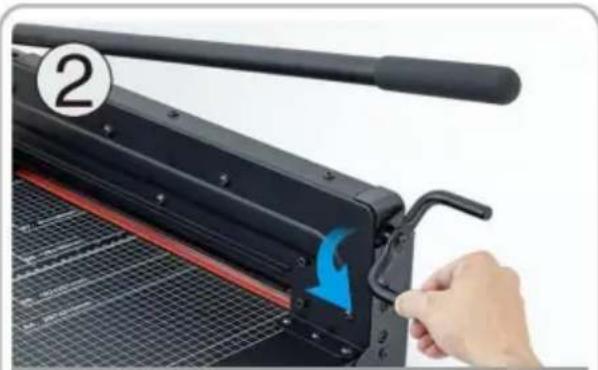
Rotate the paper pressing handle to compress the cutting material.
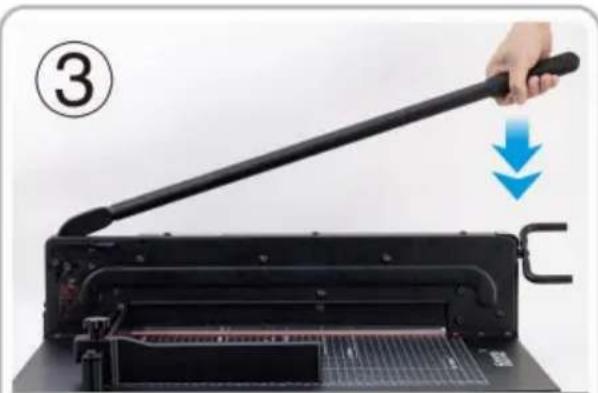
Press the cutter handle after pressing the safety lock.
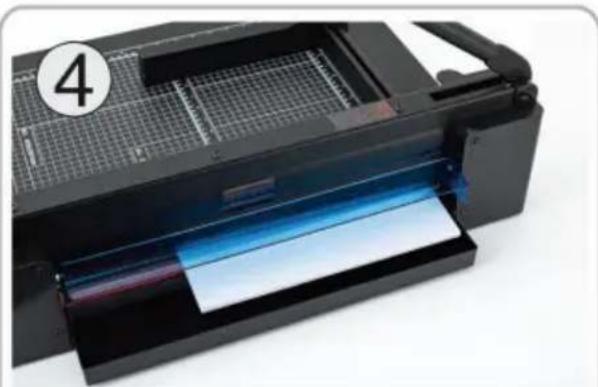
Cut the material neatly, perfect cut, no burr edges.

ATTENTION!
SECURITY BLADE LOCK
Security Lock
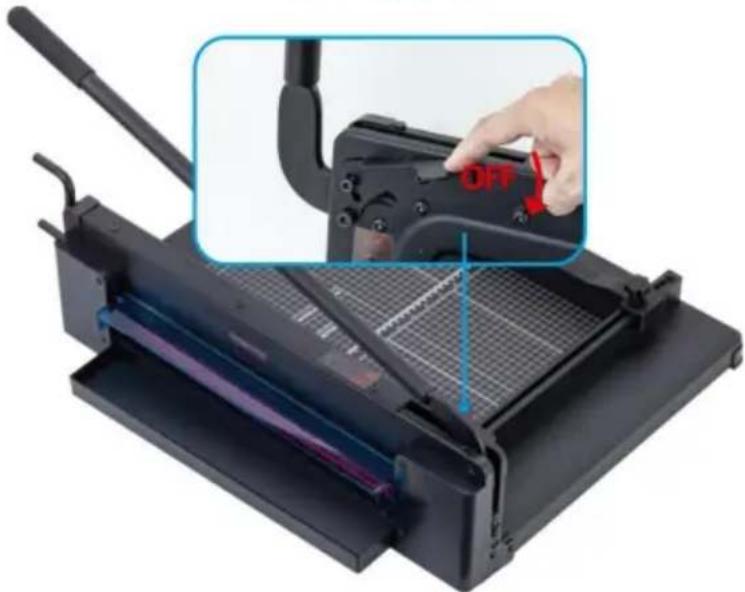
Protect your safety
YH CONSULTING LIMITED. C/O YH Consulting
Limited Office 147, Centurion House, London
Road, Staines-upon-Thames, Surrey, TW18 4AX
E-CrossStu GmbH
Mainzer Landstr.69,
warranty certificate www.vevor.com/support
VEVOR®
TOUGH TOOLS, HALF PRICE
NEED HELP? CONTACT US!
USER GUIDE
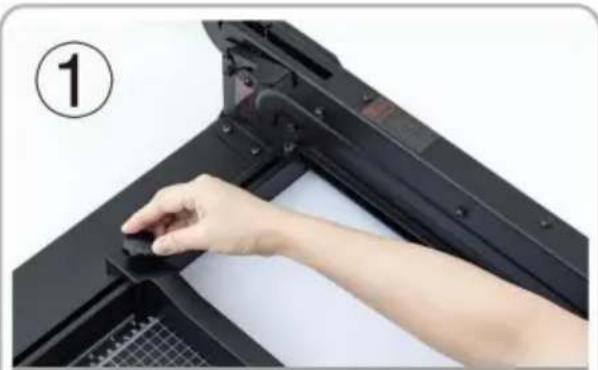
Put the cutting material into the workbench, adjust the removable file and tighten it.
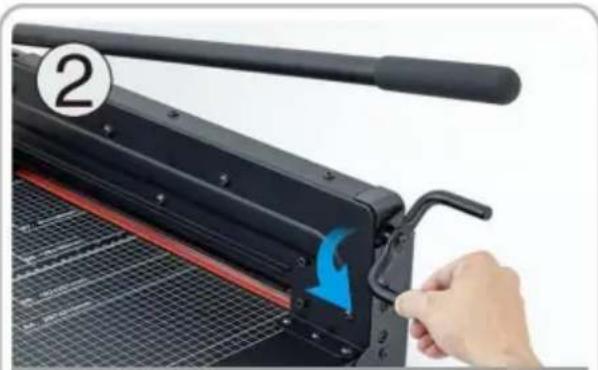
Rotate the paper pressing handle to compress the cutting material.
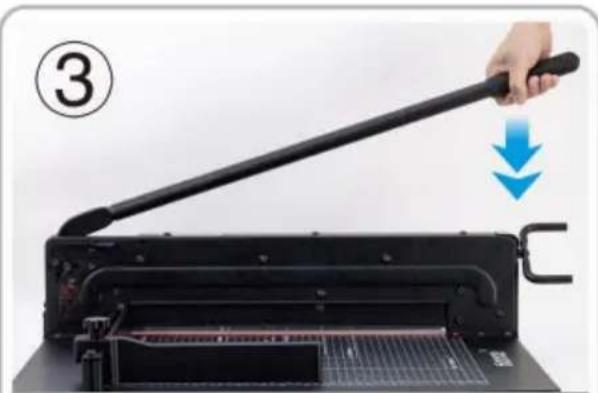
Press the cutter handle after pressing the safety lock.

Cut the material neatly, perfect cut, no burr edges.

ATTENTION!
SECURITY BLADE LOCK
Security Lock
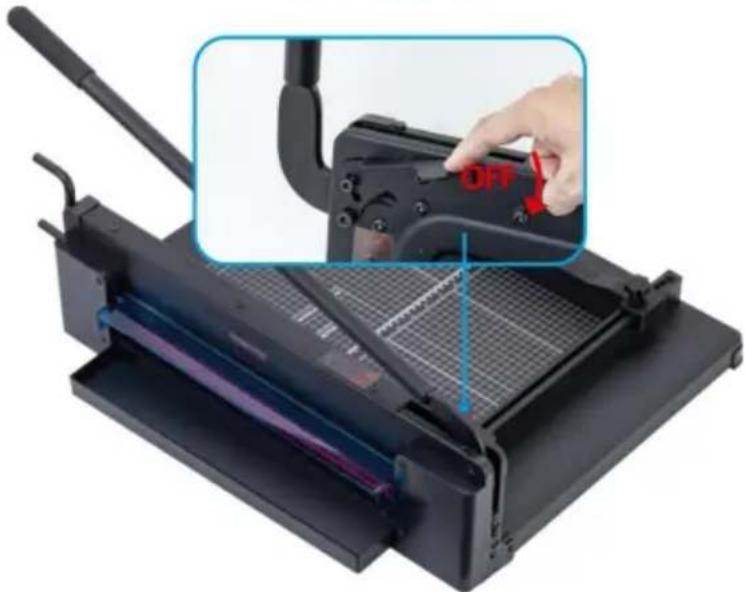
Protect your safety
YH CONSULTING LIMITED. C/O YH Consulting
Limited Office 147, Centurion House, London
Road, Staines-upon-Thames, Surrey, TW18 4AX
| EC | REP |
E-CrossStu GmbH
Mainzer Landstr.69,
60329 Frankfurt am Main.
VEVOR®
TOUGH TOOLS, HALF PRICE
www.vevor.com/support
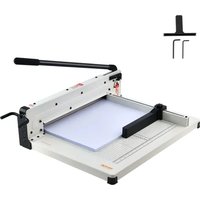

- GUILLOTINE TRIMMER
- USER MANUAL
- VEVOR®
- NEED HELP? CONTACT US
- WARNING
- SAVE THESE INSTRUCTIONS
- ATTENTION
- SECURITY BLADE LOCK
- SAFEGUARD YOUR SECURITY
- TO AVOID DAMAGE TO THE TRIMMER
- TOUGH TOOLS, HALF PRICE
- OPERATING INSTRUCTIONS
- OPERATING GUIDE
- INSTRUCTION MANUAL
- SECURITY LOCK
- PROTECT YOUR SAFETY
- USER GUIDE
Brand : Vevor
Model : STC440
Category : Paper cutter