
PJ004 - Baby products Vevor - Free user manual and instructions
Find the device manual for free PJ004 Vevor in PDF.
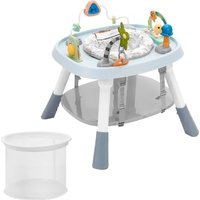


| Product Type | Baby Stationary Activity Center |
| Brand | Vevor |
| Model | PJ004 |
| Overall Dimensions | 650 × 570 × 580 mm |
| Weight | Approximately 4.5 kg |
| Main Materials | PP (polypropylene) and polyester |
| Toy Power Supply | 3 AA 1.5 V alkaline batteries (not included) |
| Seat Rotation | 360° |
| Maximum Capacity | 15 kg |
| Recommended Age | From 6 months until child walks independently |
| Main Functions | Activity center with toys, converts to study/play table, storage basket |
| Included Toys | Toy arch with removable toys |
| Cleaning | Plastic parts: damp cloth; seat: brush and Marseille soap; dry metal parts |
| Safety | Use on flat floor, supervise child, block stairs, do not leave unattended |
| Spare Parts | Not specified, contact manufacturer |
| Repairability | Technical support via www.vevor.com/support |
| Warranty | Electronic warranty certificate |
Frequently Asked Questions - PJ004 Vevor
User questions about PJ004 Vevor
0 question about this device. Answer the ones you know or ask your own.
Ask a new question about this device
Download the instructions for your Baby products in PDF format for free! Find your manual PJ004 - Vevor and take your electronic device back in hand. On this page are published all the documents necessary for the use of your device. PJ004 by Vevor.
USER MANUAL PJ004 Vevor
Technical Support and E-Warranty Certificate www.vevor.com/support
Baby Stationary Activity Centers
MODEL: PJ004
We continue to be committed to providing you with tools at competitive prices. "Save Half", "Half Price", or any other similar expressions used by us only represent an estimate of savings you might benefit from buying certain tools with us compared to top brands, and does not necessarily mean to cover all categories of tools offered. We kindly remind you to verify carefully when placing an order with us to ensure you are actually saving half in comparison with the top major brands.
MODEL: PJ004
NEED HELP? CONTACT US!
Have product questions? Need technical support? Please feel free to contact us:
Technical Support and E-Warranty Certificate www.vevor.com/support
This is the original instruction. Please read all manual instructions carefully before operating. VEVOR reserves a clear interpretation of the user manual. The appearance of the product shall be subject to the product you received. Please forgive us that we won't inform you if there are any technology or software updates on our product.
Please read all of the instructions before using it. The information will help you achieve the best possible results.
![graph TD A["Start"] --> B["Step 1: Robot on the table with a turtle"] B --> C["Step 2: Ball on the ball"] C --> D["Step 3: Turtle on the hand"]](/content/2026/04/736237/images/17785a775bd7439f6568f8d0ffef405b420d02e0bef02db71f8e35c111dced79.jpg)
WARNING
Read the instructions carefully before use and keep them for future reference. The child may be hurt if you do not follow these instructions.
Before using, remove and dispose of any plastic bags and other packaging (e.g., fasteners, fixing ties, etc.) and keep them out of reach of children.
- Before using, check that the product and all of its components have not been damaged during transportation. Check regularly that the product is not broken or damaged. If the product is broken or damaged, keep out of reach of children.
- The product must only be assembled by an adult. For the correct assembly of the product, please refer to the following instructions.
WARNING
STAIR HAZARD: Avoid serious injury or death. Block stairs/step
securely before using play center.
- Only use the play center frame on flat and stable surfaces. • Never leave child unattended. • Always keep child in view while in play center.

WARNING
Prevent access to stairs, steps and uneven surfaces, slopes or unstable floors, swimming
pools or other sources of water.
- Guard all fires, heating and cooking appliances.
- Remove hot liquids, electrical cables and other potential hazards from reach.
- Prevent collisions with glass in doors, windows and furniture.
- Do not use the product if any components are broken or missing.
- This play center frame should be used only for short periods of time (e.g., 20 min).
- This product is intended only for a child who can sit up by itself and until it is able to walk by itself or weighs more than 15 kg.
- Do not use accessories or replacement parts other than those approved by the manufacturer.
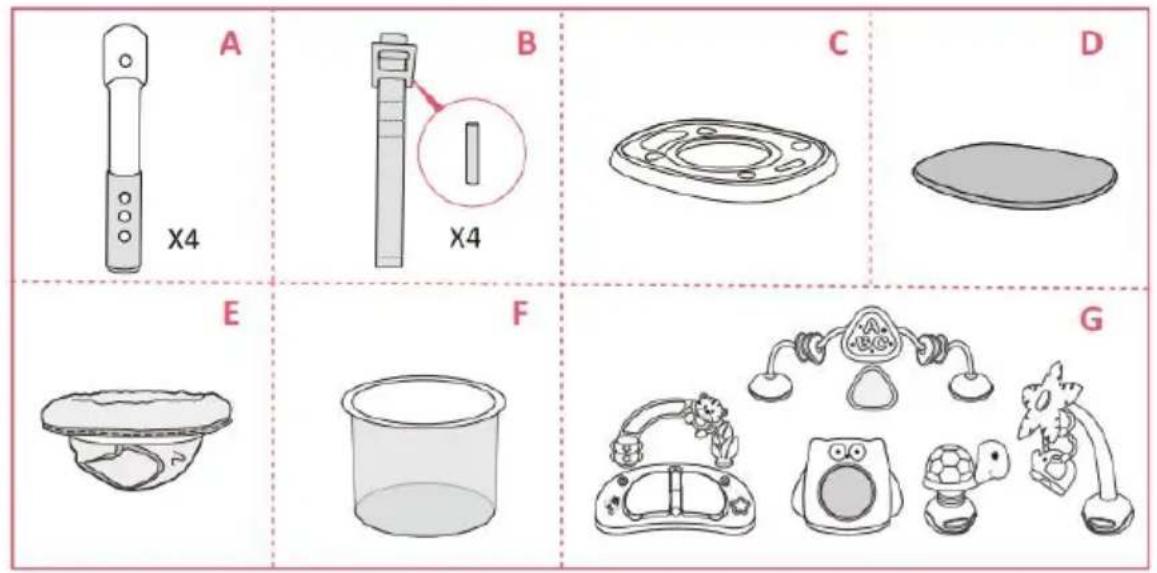
Parts List
Check that you have all the parts for this model BEFORE assembling your product. No tools required.
A. Legs
E. Padded seat
B. Foot pedal adjustment belts and iron bar
F. Storage basket
C. Table
G. Toy
D. Multi-purpose board
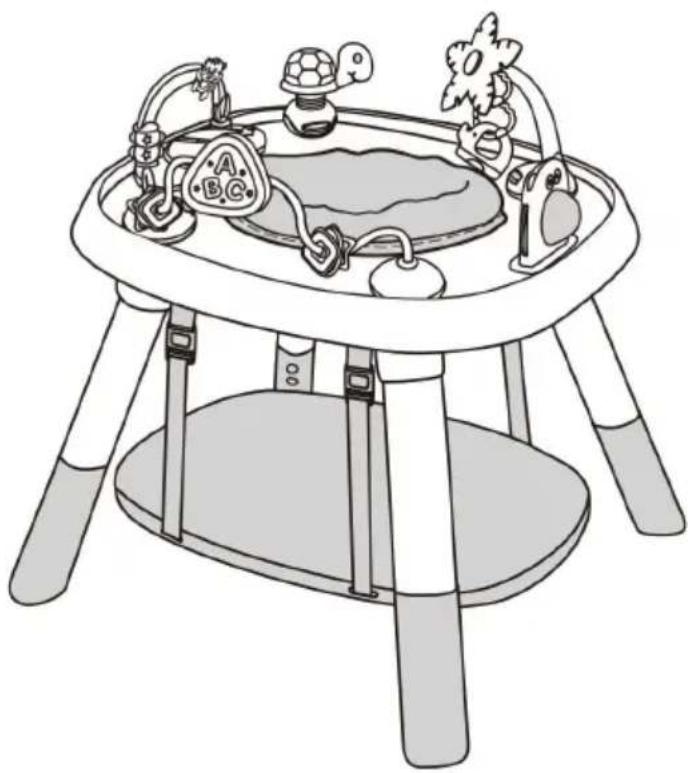
Overall dimensions: 650×570×580MM
Main materials constituting the product: PP+Polyester
Assembling Procedures
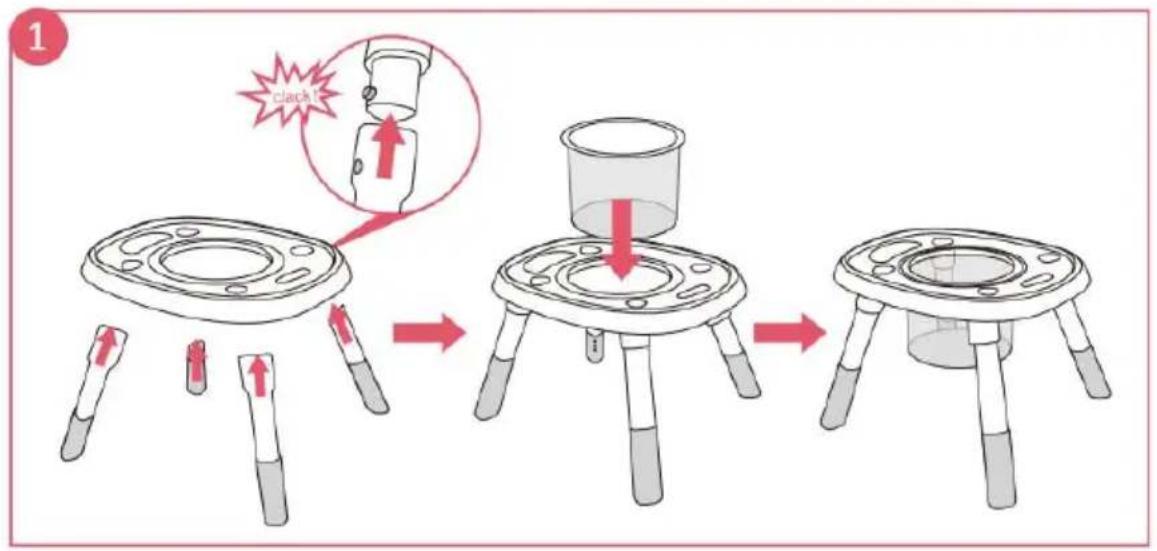
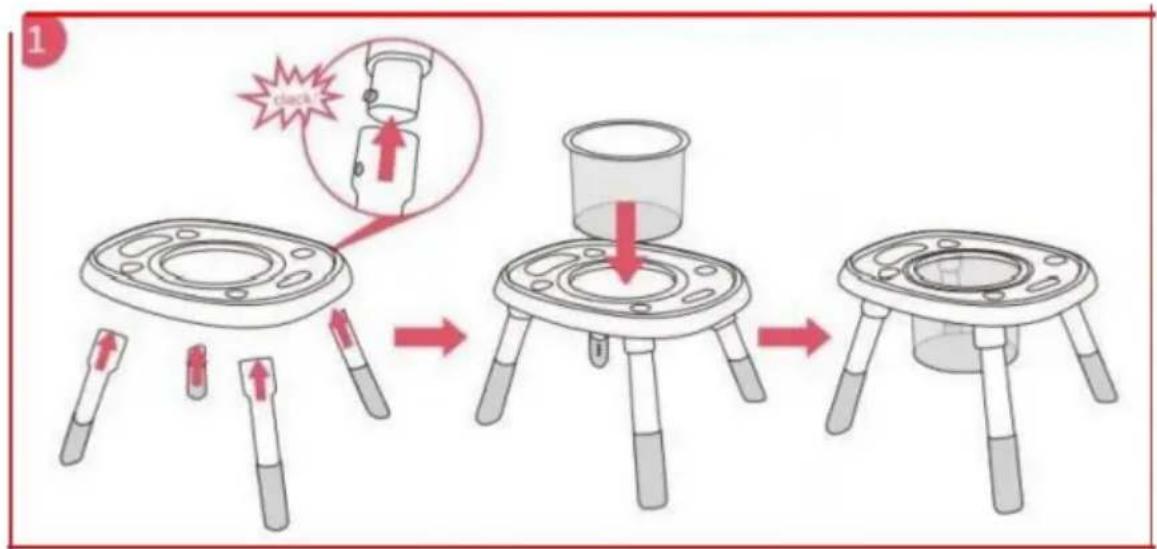
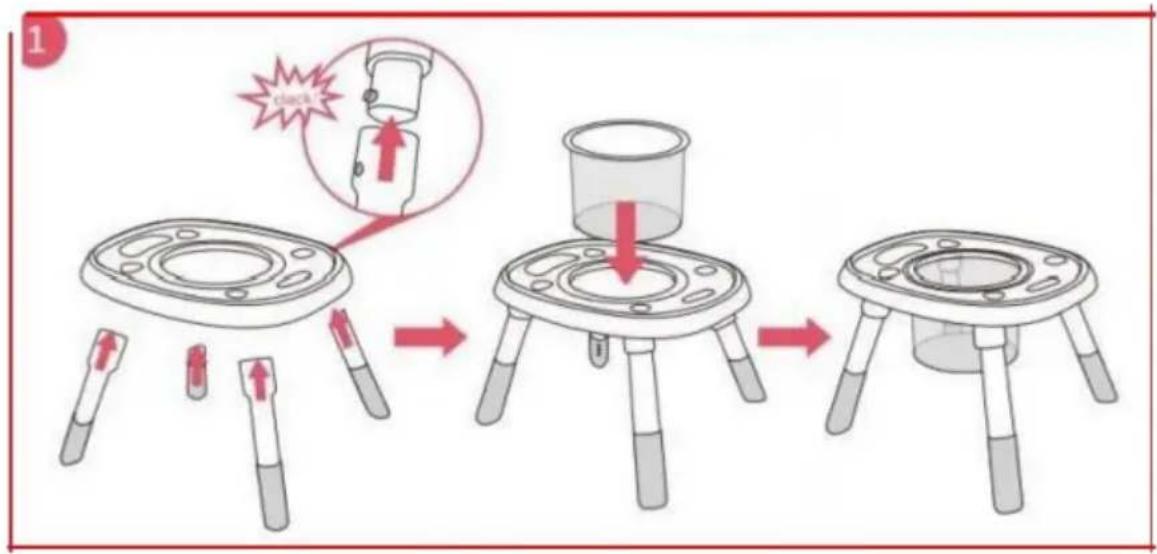
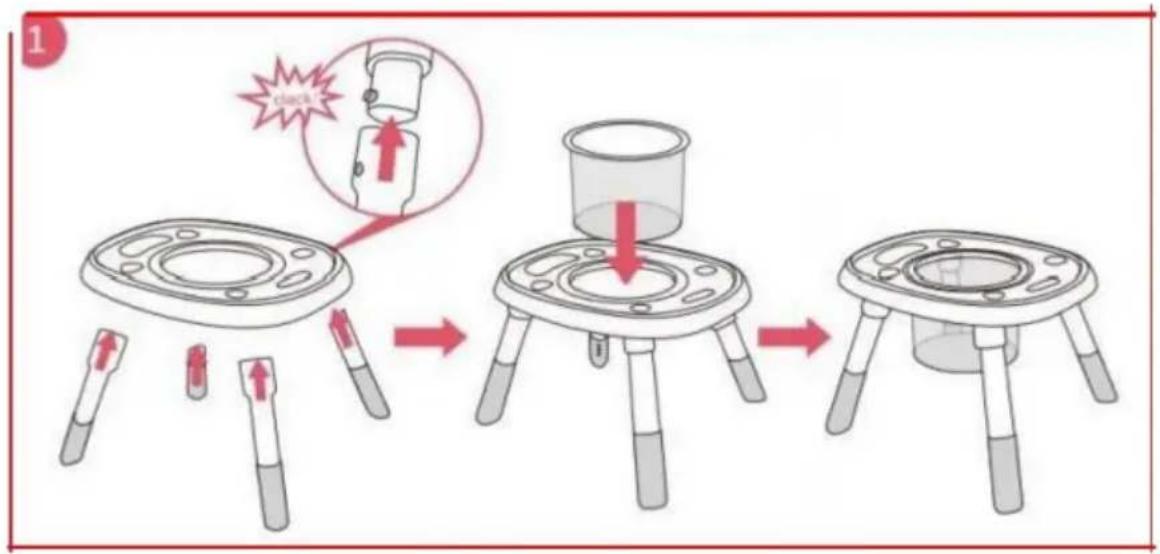
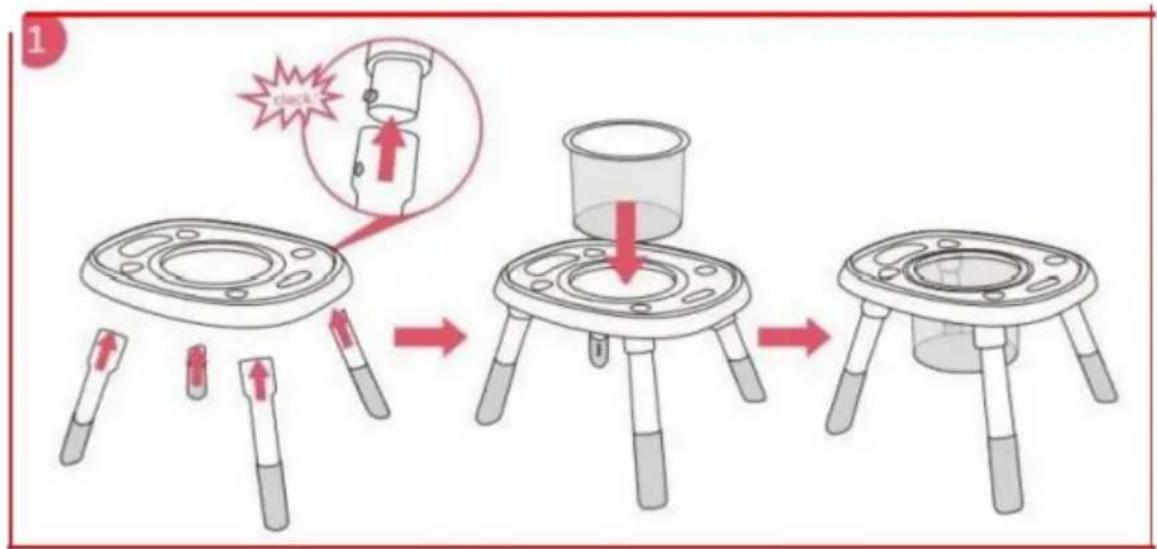
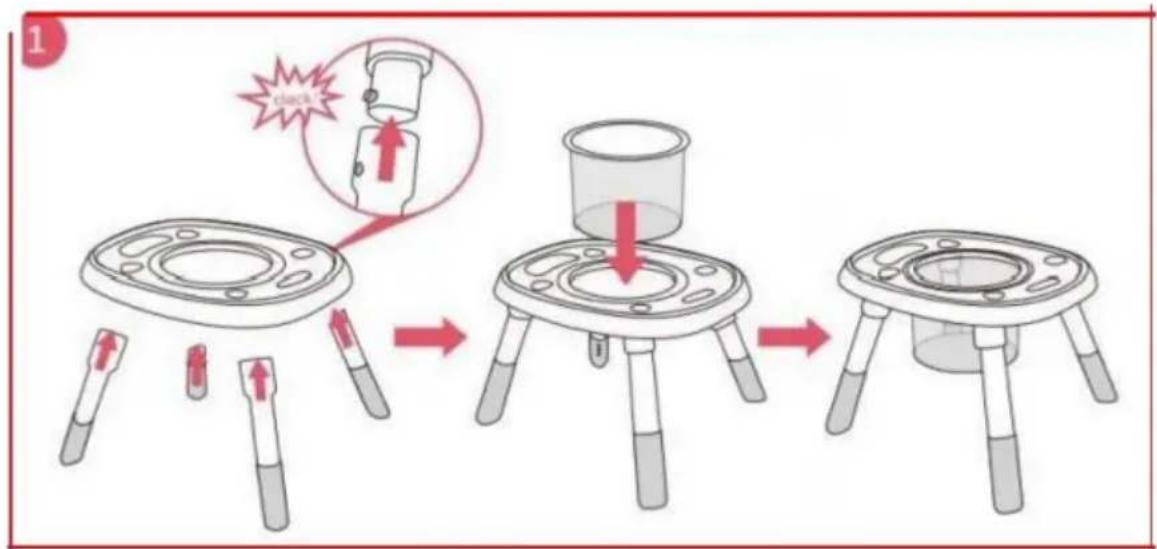
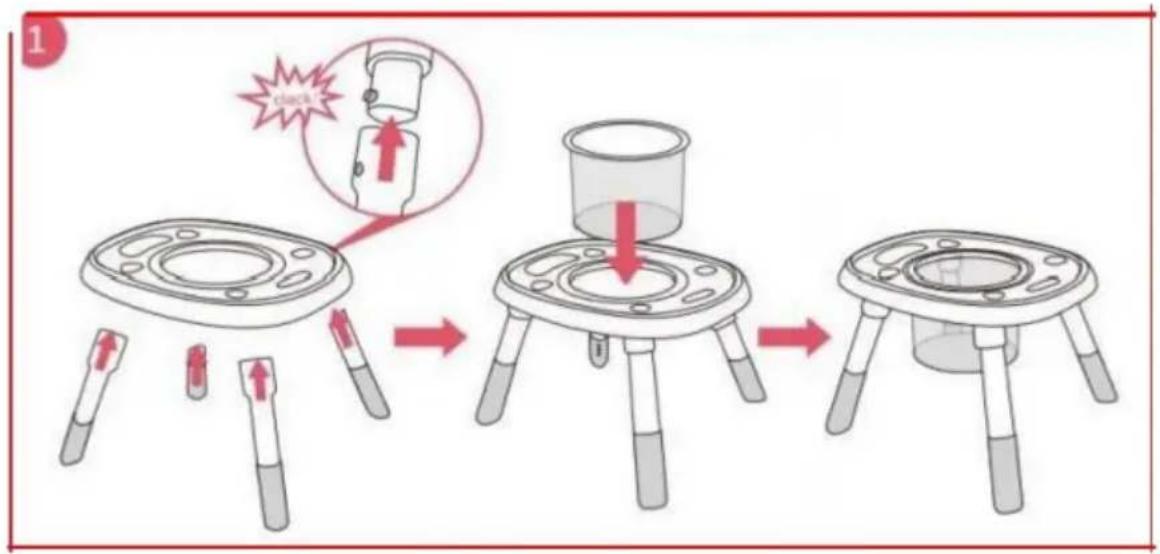
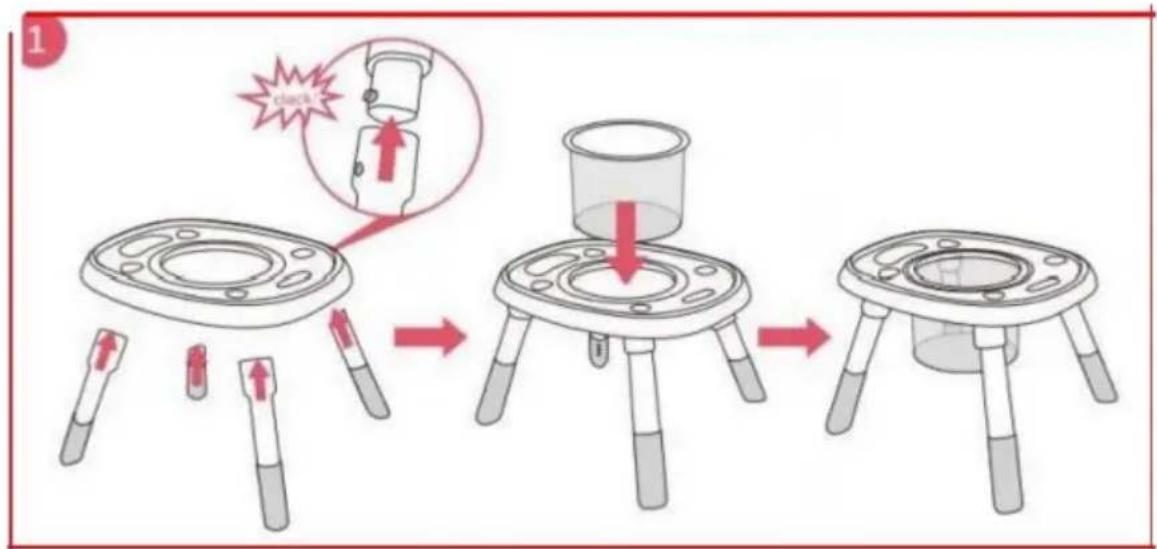
- Insert the legs into the table, and hear for a "clack" to make sure it is in place. Put the storage basket on the table.
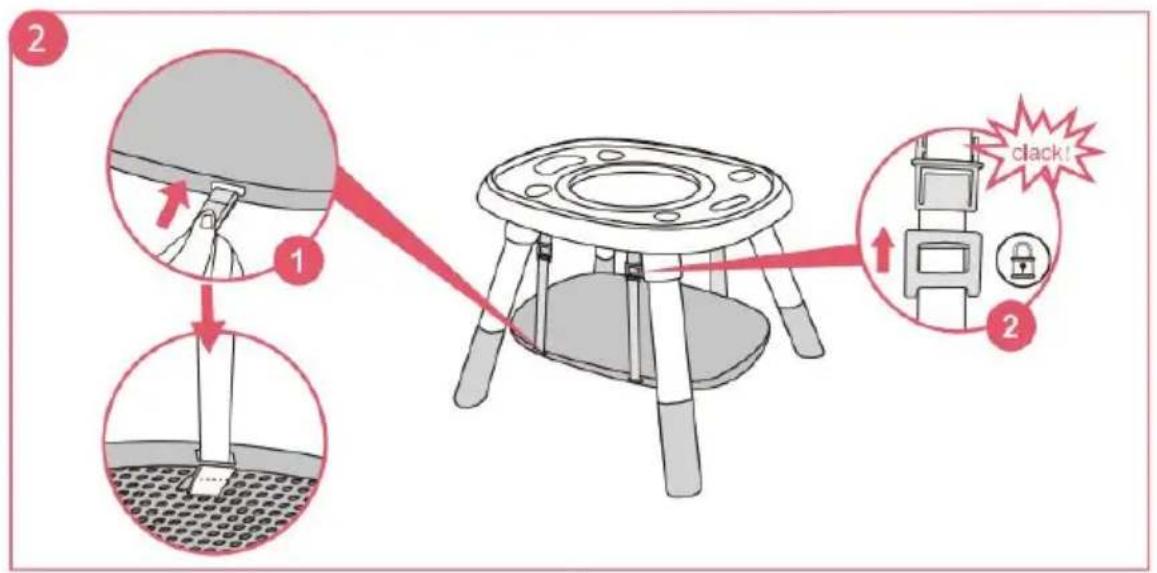
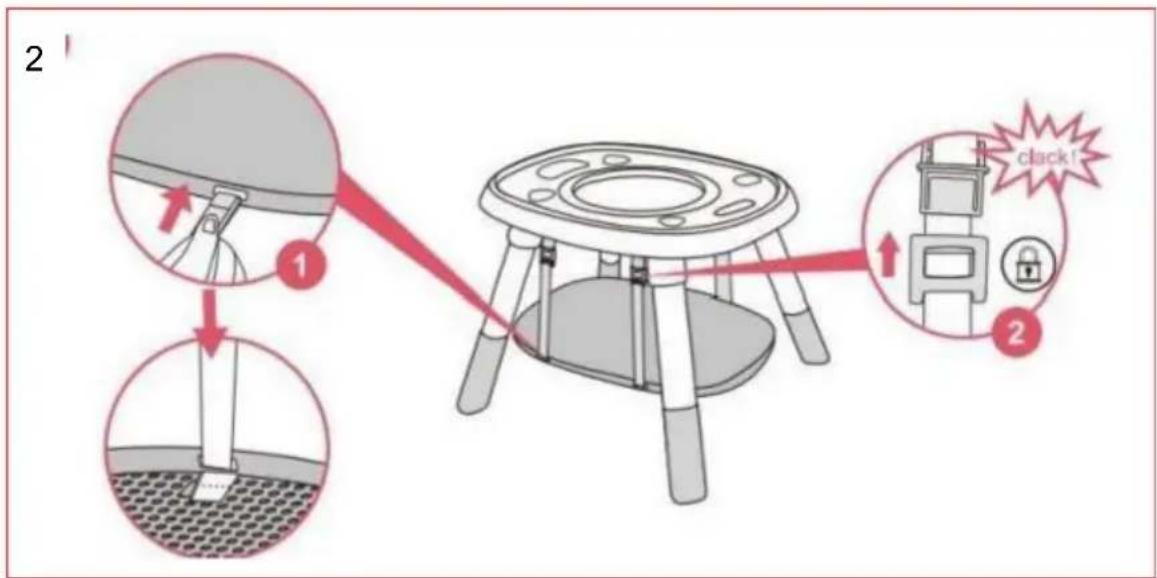
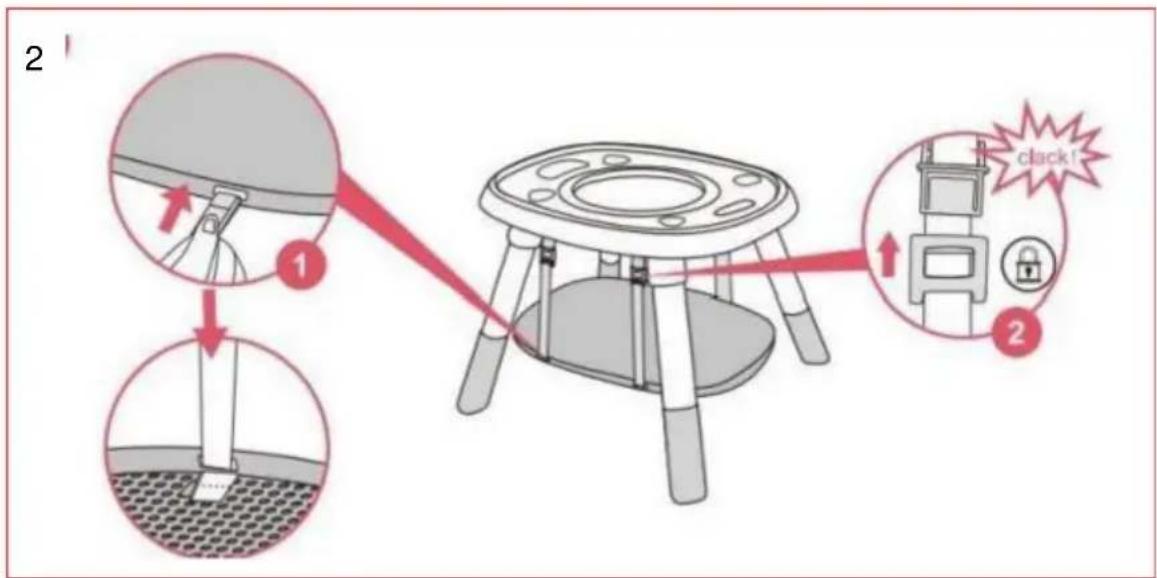
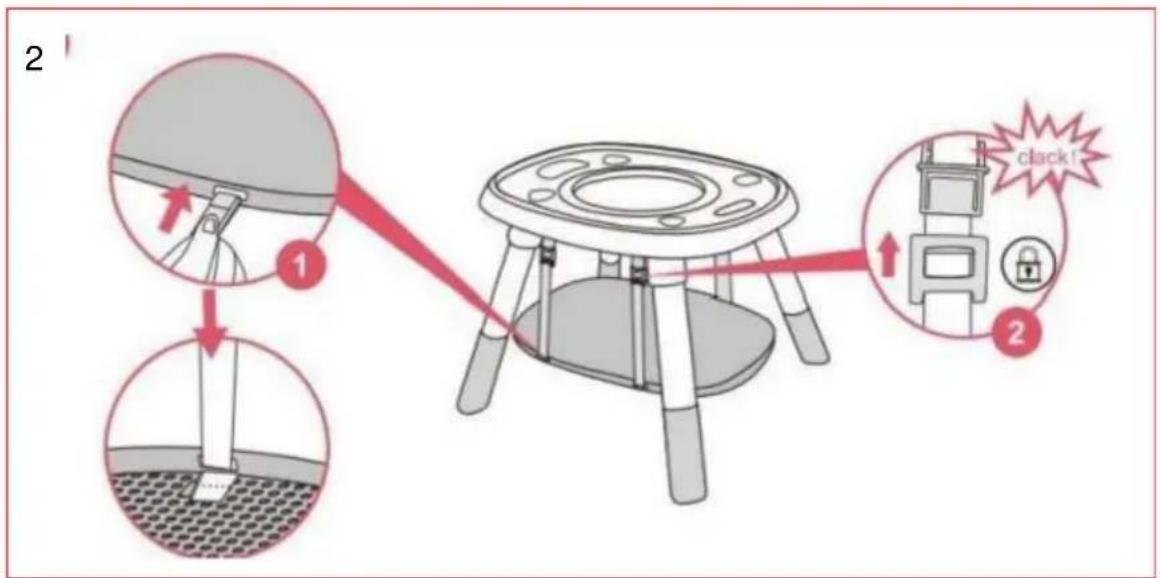
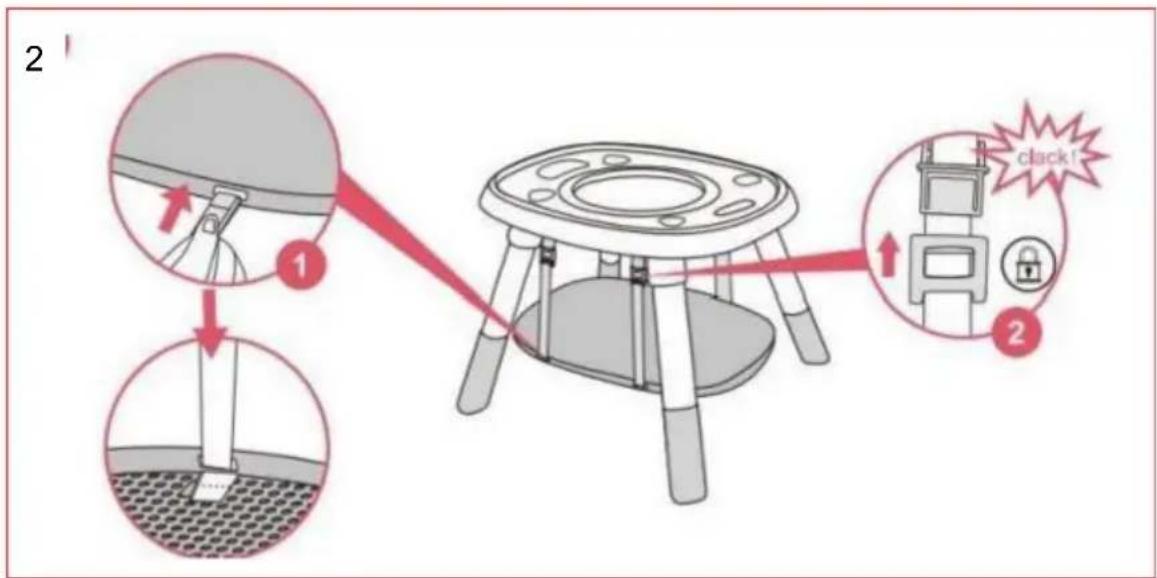
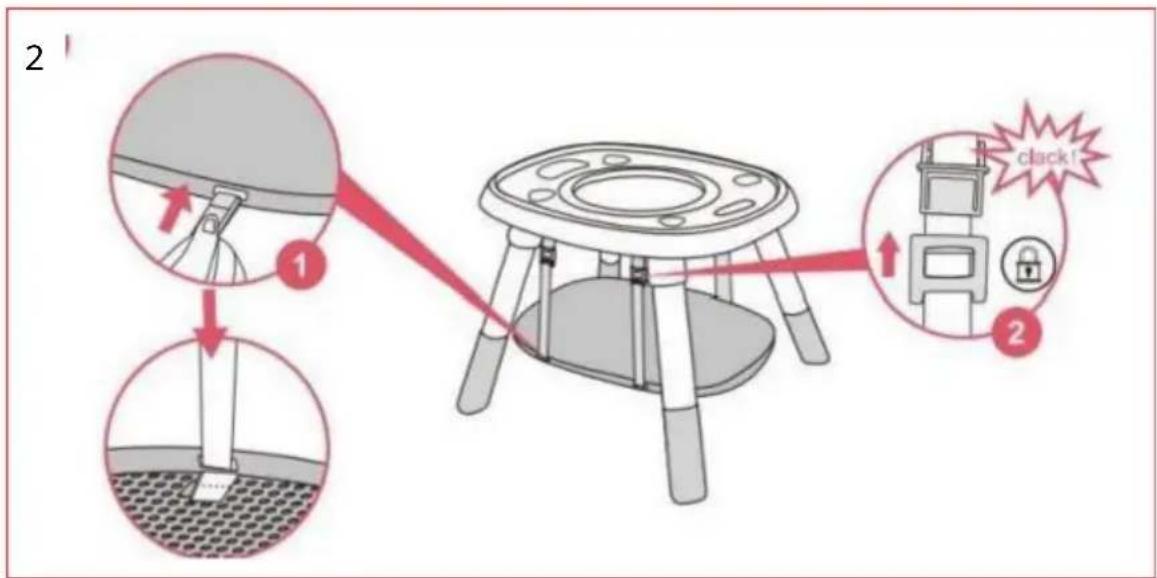
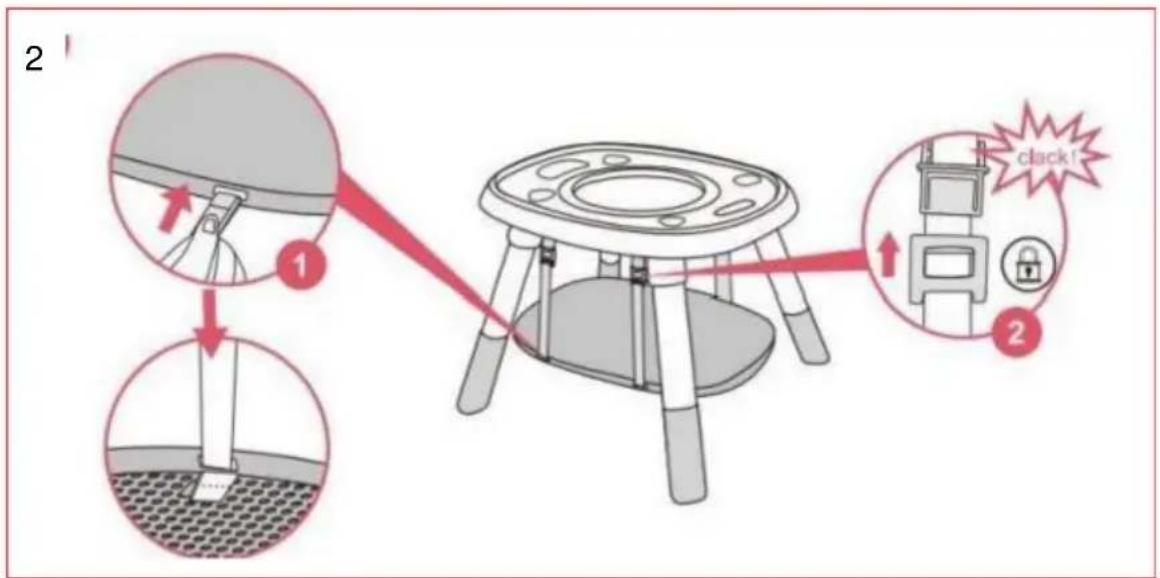
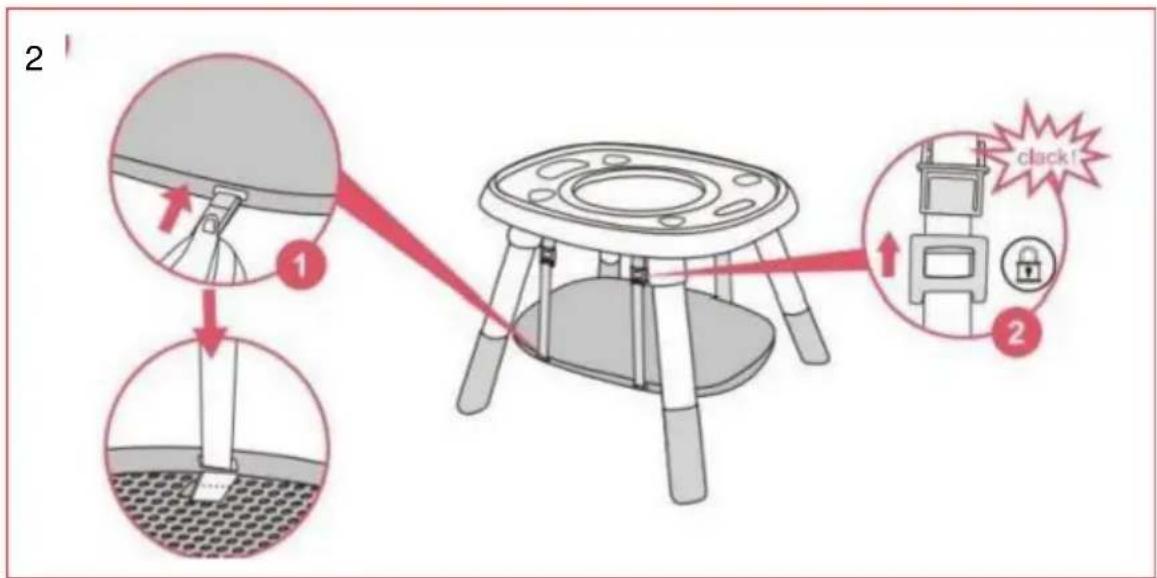
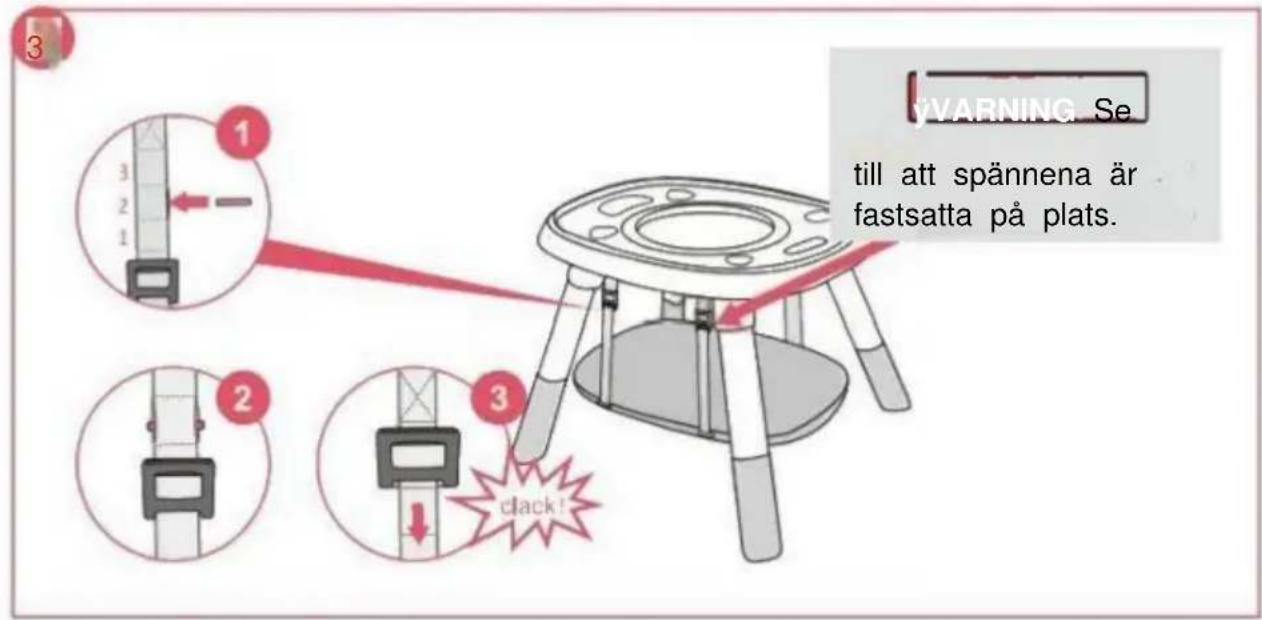
- Thread the adjustment belts into the holes of the board as the picture shown to ensure the belts could not release easily.
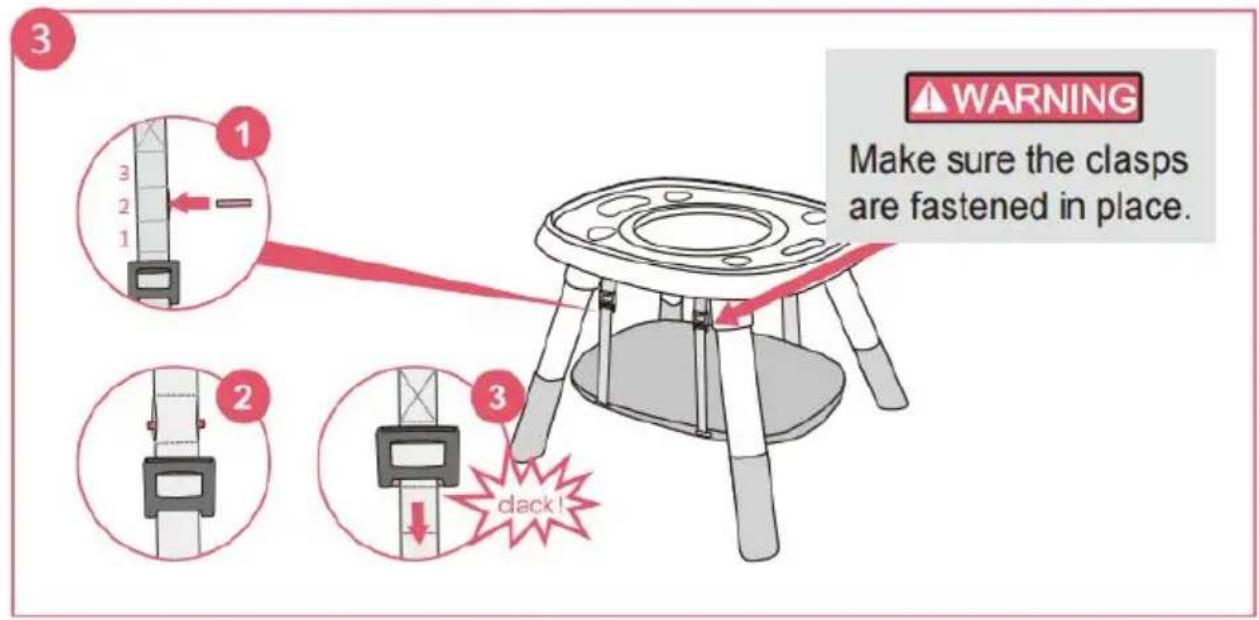
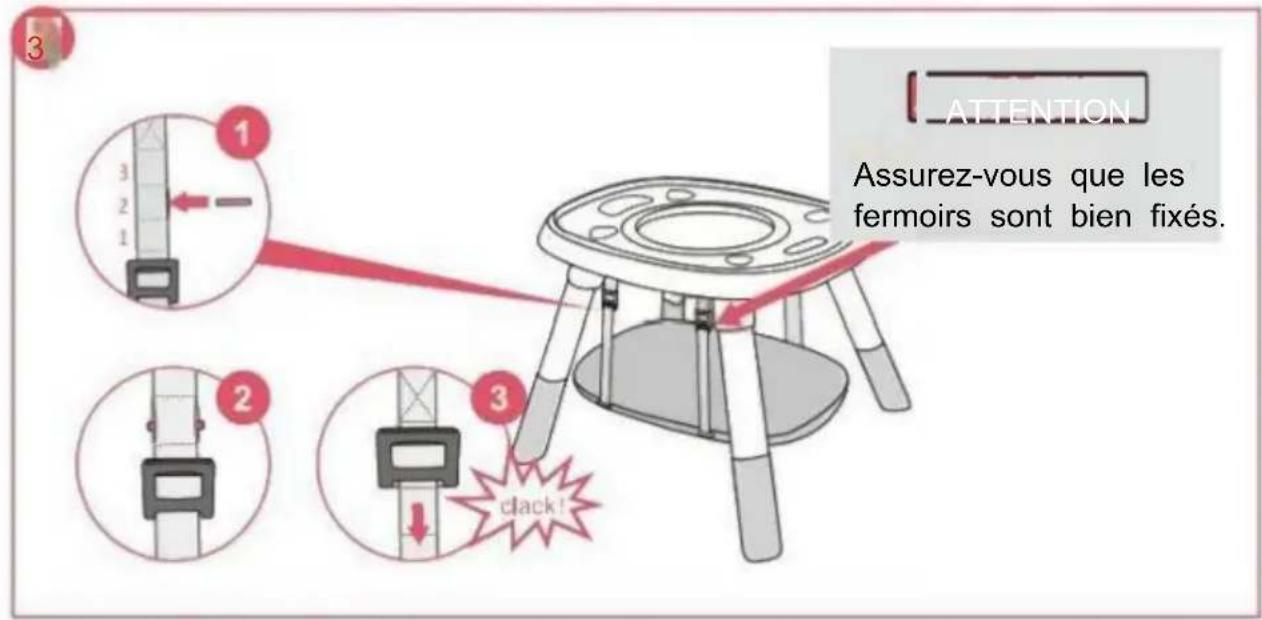
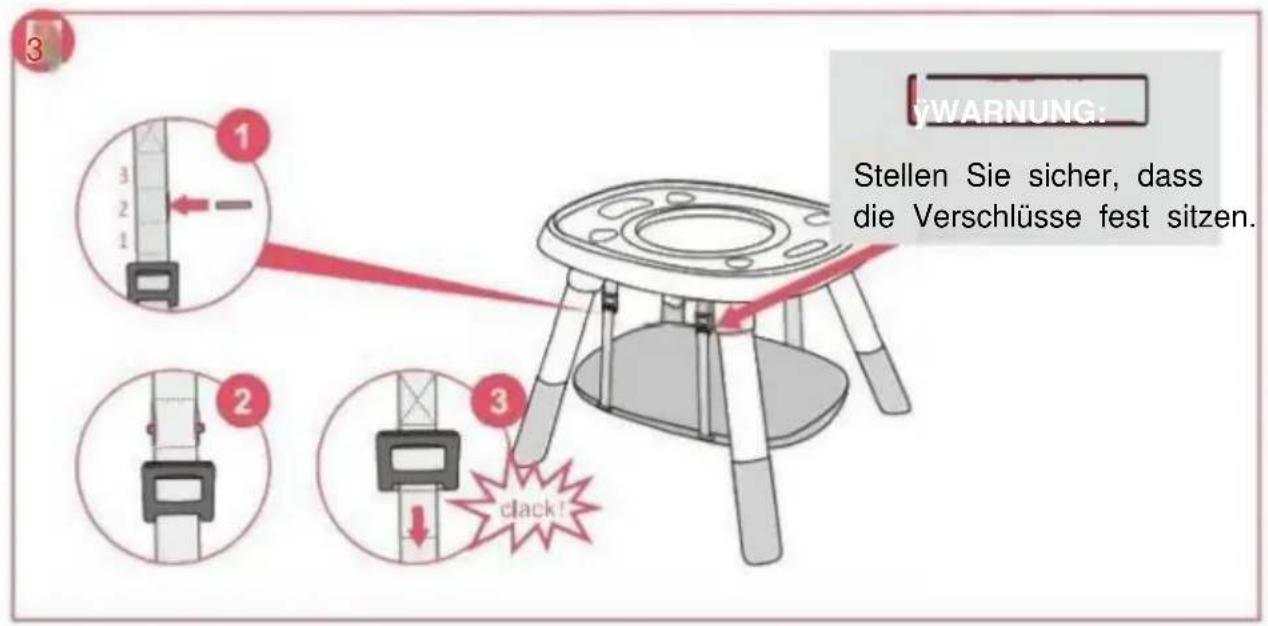
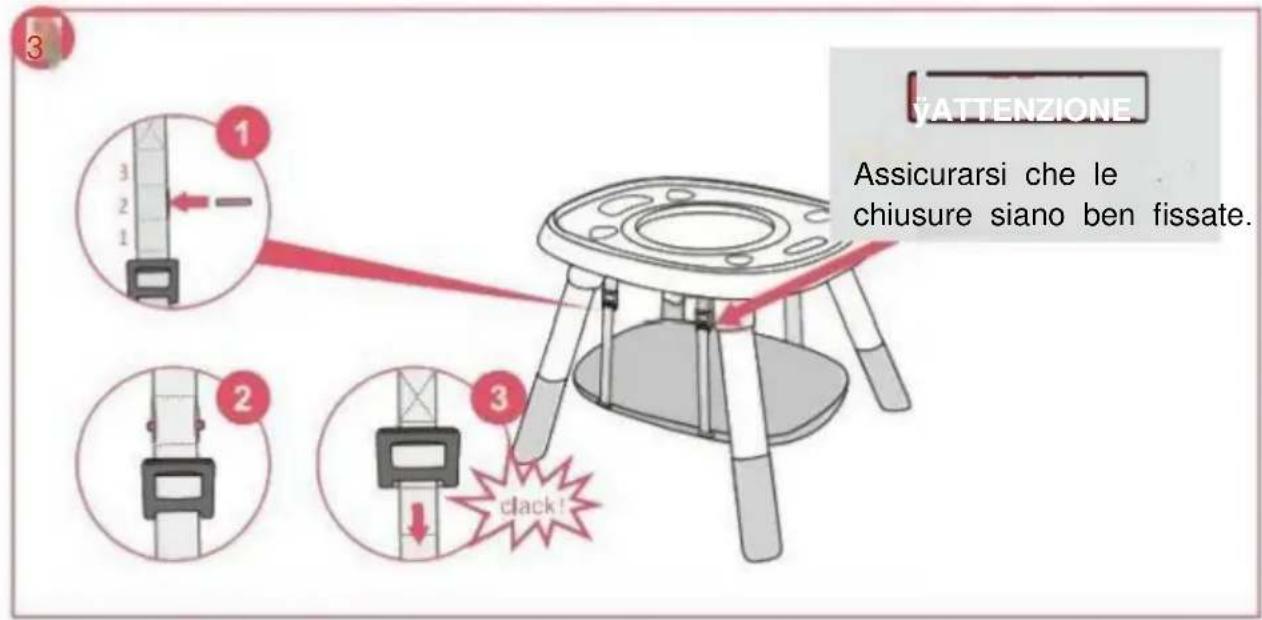
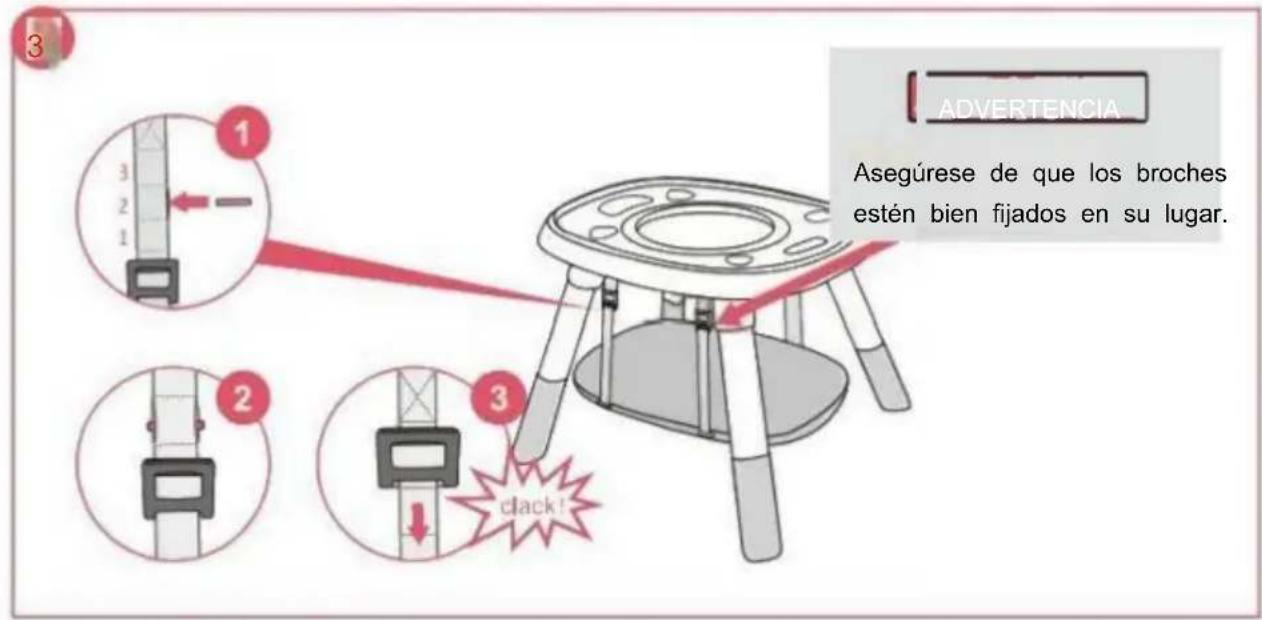
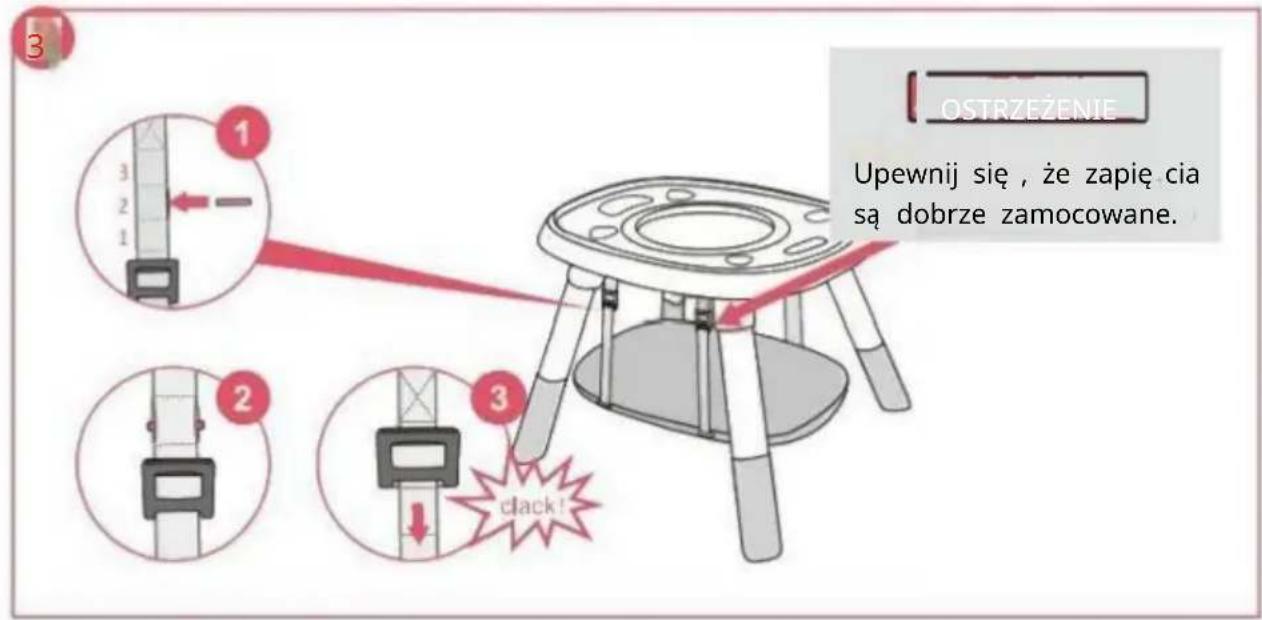
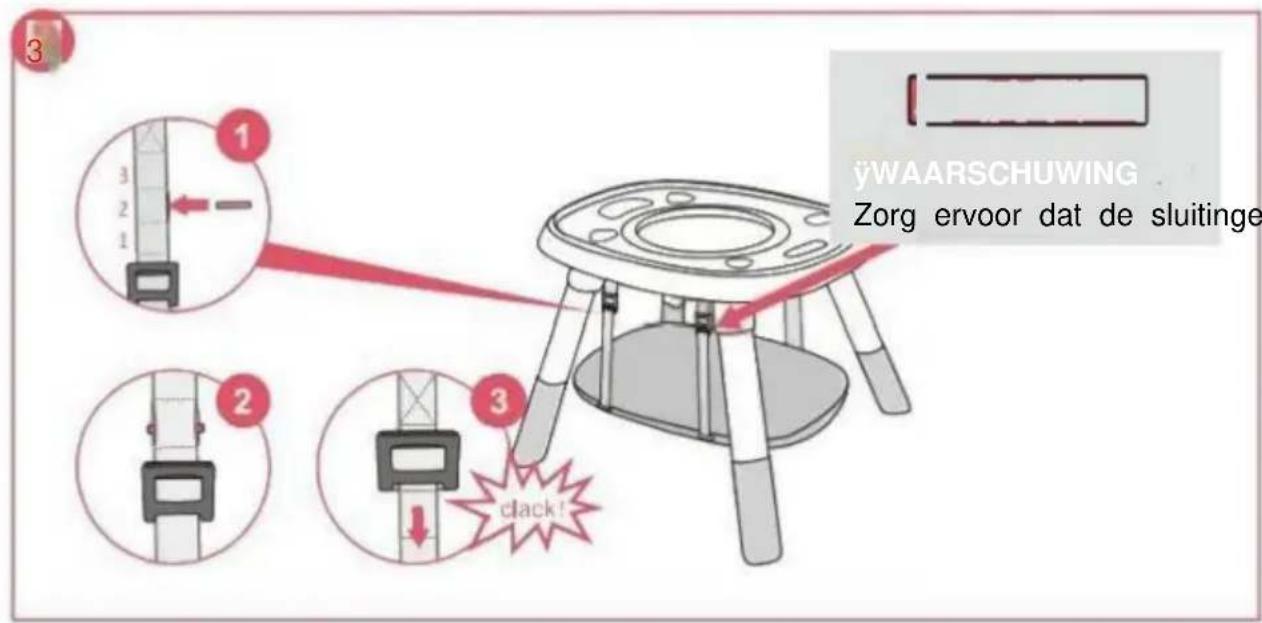
- The foot pedal adjustment belts can be adjusted in three height, insert the iron bars into suitable positions to fit baby's height, make sure iron bars are fastened in the clasps. WARNING: When the table board is not used, the four iron bars need to be properly kept by adults, and can not be used as toys for children to play with.
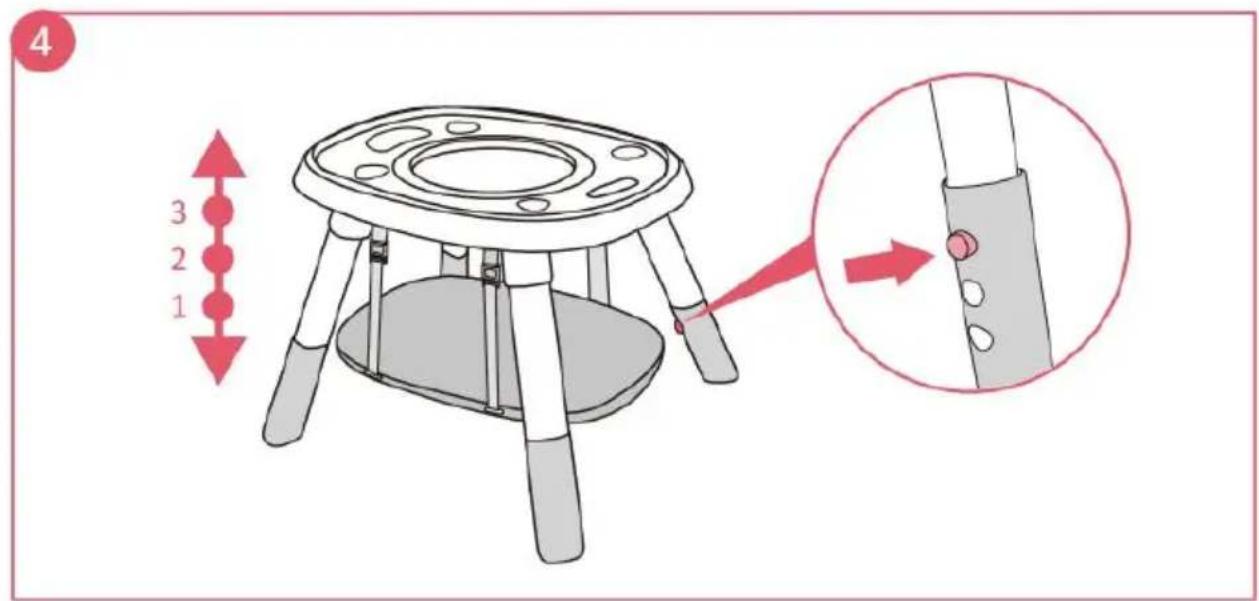
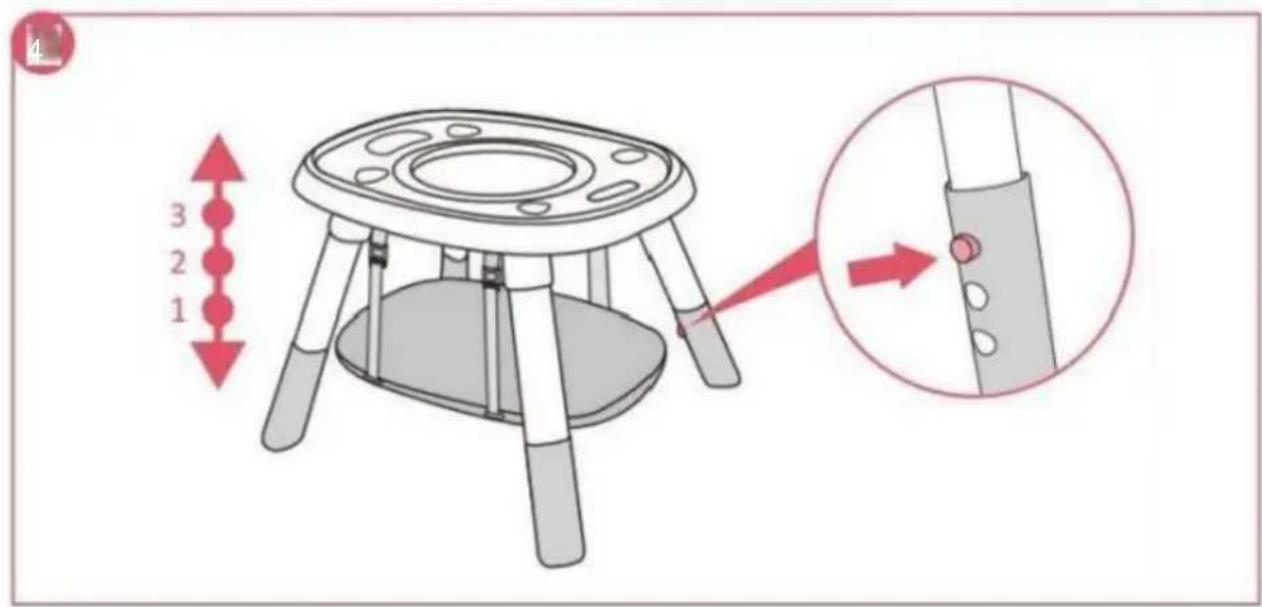
- Press the button to adjust the height of the table.
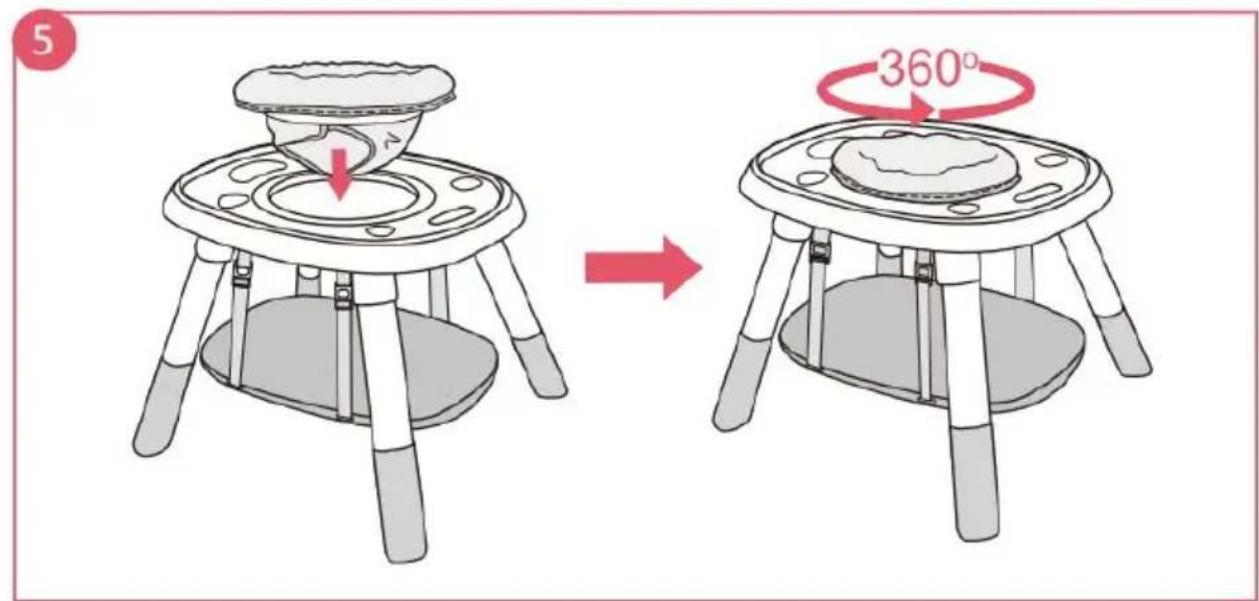
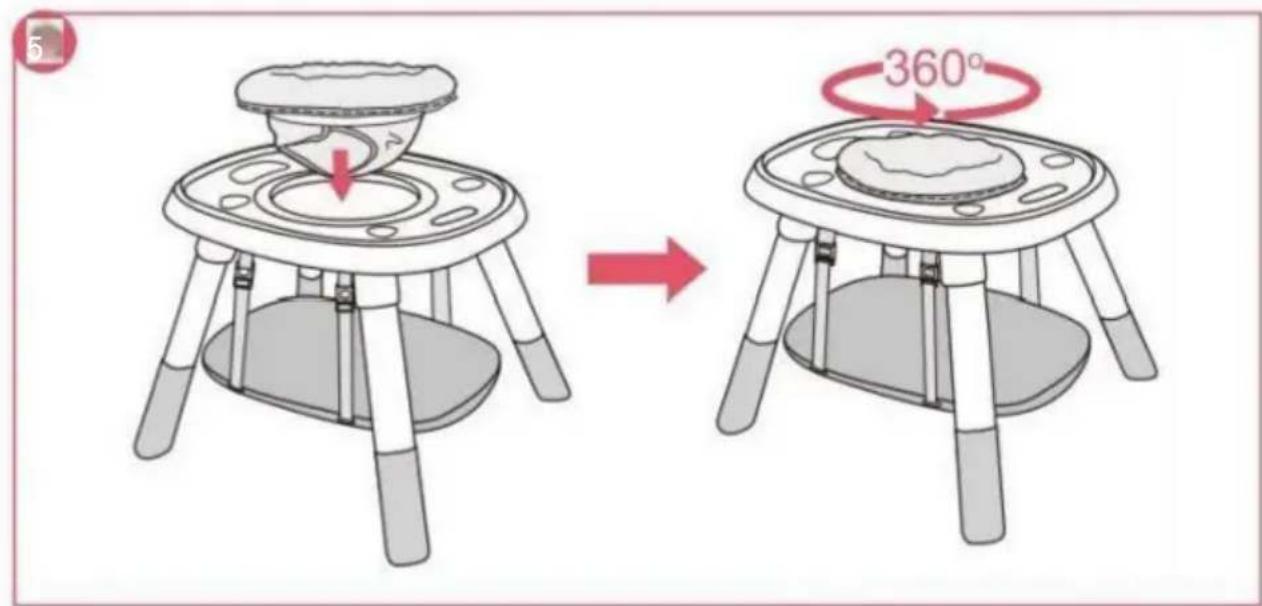
- Place the seat cushion on the table top and make sure the wheels under the seat are inserted into the slot. You should hear a "click" to ensure it is installed in place. The seat cushion can be rotated 360°.
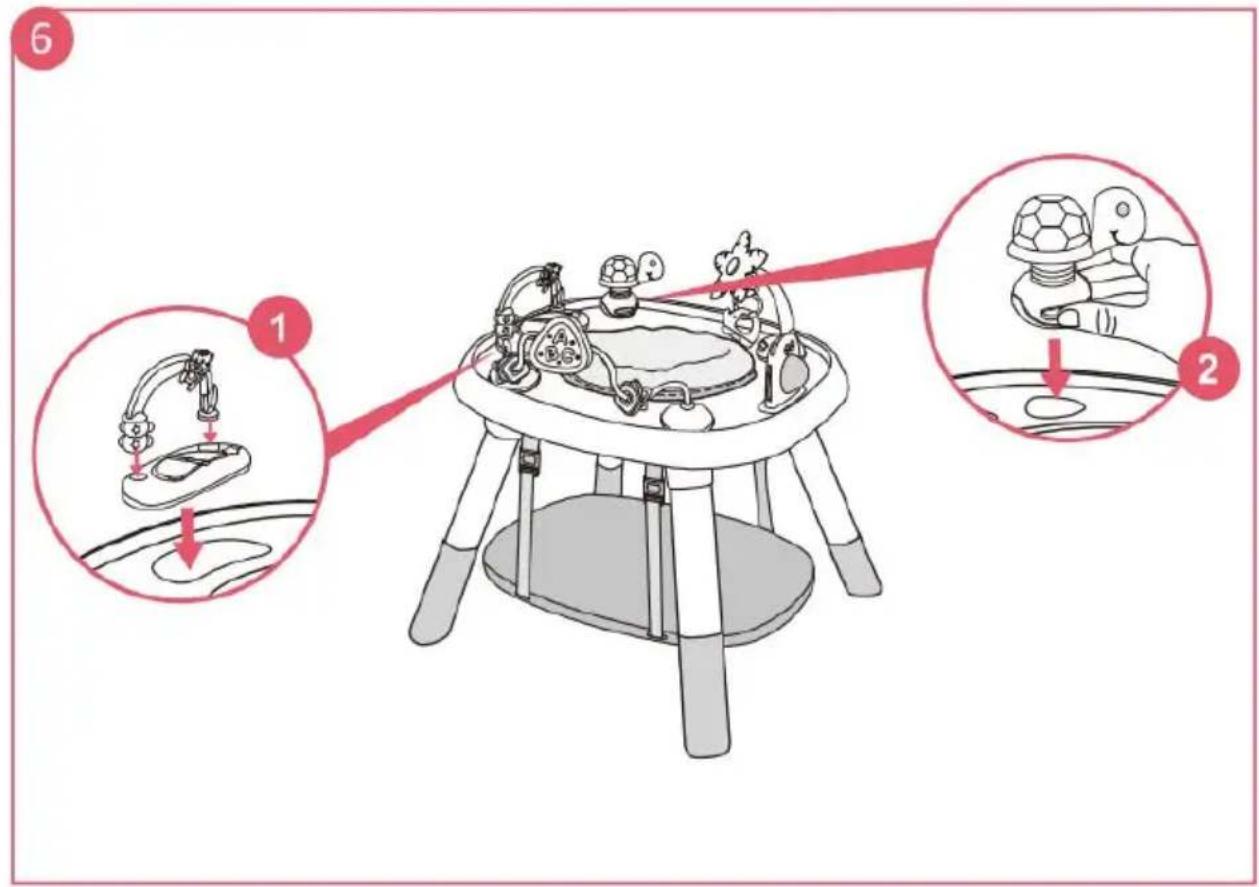
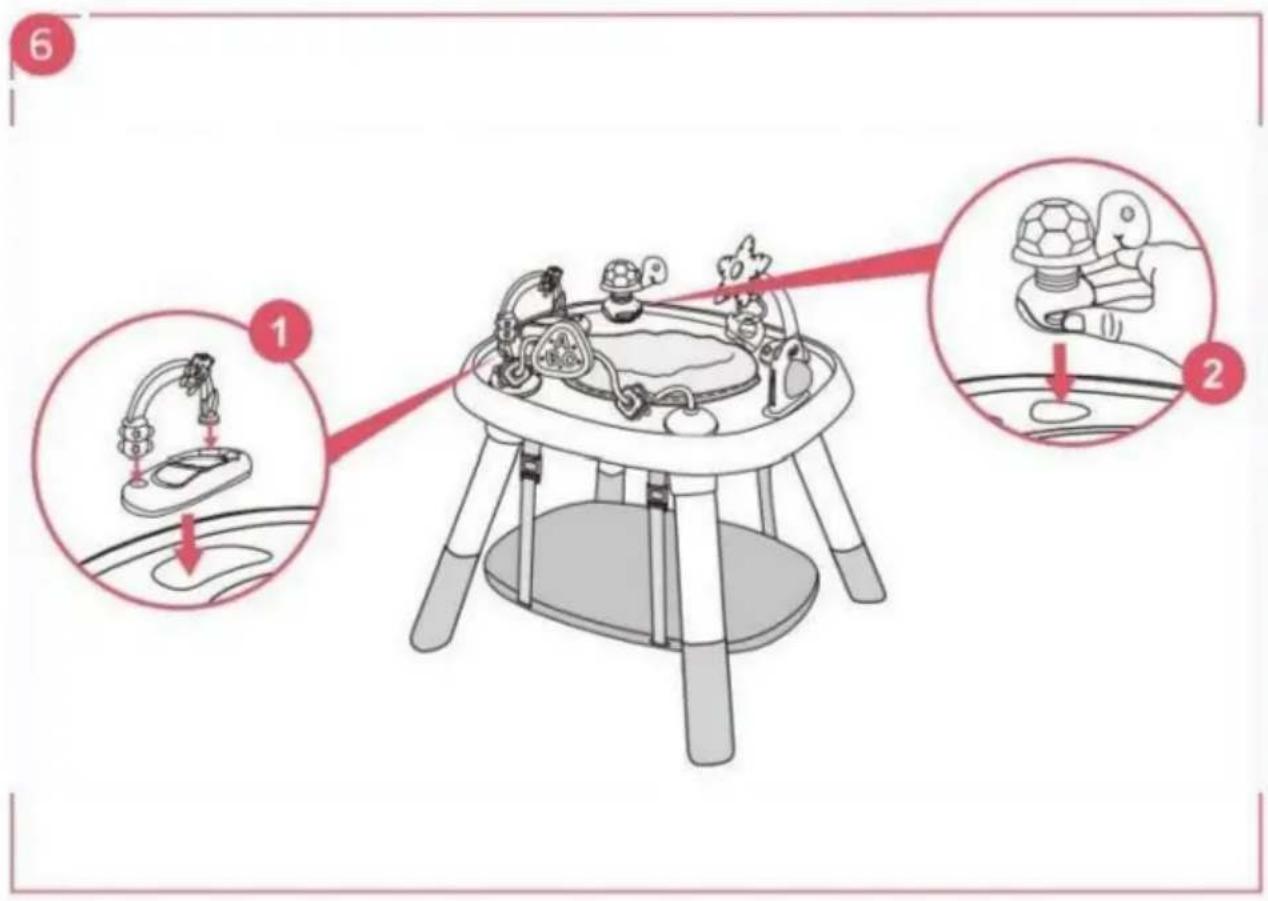
- Insert the arch toy into the toy tray, and place all the toys in the positions as shown in the picture. Press and hold the button on the base of the toy, then insert it into the holes, making sure the button snaps back to lock.
How to Disassemble Toys
- As shown in Figure 1, pull up the toy tray and the owl toys directly to disassemble. Press and hold the button on the base of the toy, lift the button position to create a gap between the table and the toy base, insert your finger into the gap, and pull up the toy base to release the entire toy. The other toys can be disassembled using the same steps, as shown in Figure 2.
How to Change to Study/Game Table
- Cover the board with the flat side up on the table to become a study table.
Cover the board with the block side up on the table to become a block table.
How to Remove the Cushion for Cleaning
- The seat cushion has 8 fastening positions. Press down on the stitching line, and then break it out to remove it.
Fitting and/or Replacing Batteries
WARNING
The toy of the play center frame requires 3 x "AA" 1.5 Volt alkaline batteries (not included).
- Batteries must only be fitted by an adult.
- To fit and/or replace batteries: loosen the screw on the battery compartment cover with a suitable screwdriver, press the tab, and remove the battery compartment cover. Then remove the spent batteries and fit new ones, ensuring they are fitted with the correct polarity, as shown inside the battery compartment. Replace the battery cover and tighten the screw. • Always keep batteries and tools out of reach of children. • Always remove the batteries if the toy will not be used for a long period.
- Only use alkaline batteries of the same type or equivalent to the type recommended for the correct function of this product.
- Never mix new and old batteries, or different types of batteries.
- Do not burn or dispose of spent batteries into the environment. Dispose of spent batteries at an appropriate differentiated collection point.
- The use of rechargeable batteries is not recommended and cannot be used. • Non-rechargeable batteries are not to be recharged.
- Rechargeable batteries are to be removed from the toy before being charged.
- Rechargeable batteries are only to be charged under adult supervision.
- Batteries are to be inserted with correct polarity. • Exhausted batteries are to be removed from the toy.
- Do not short-circuit the battery terminals.
Product Care and Maintenance
- Check regularly the play center frame for signs of damage or wear.
- Clean the plastic parts, with a damp cloth.
- Clean the seat with brush or family soap and neutral scour.
- Dry the metal parts to prevent the formation of rust.
- Prolonged exposure to direct sunlight may cause the fabric to fade.
VEVOR®
TOUGH TOOLS, HALF PRICE
Technical Support and E-Warranty Certificate
www.vevor.com/support
VEVOR®
TOUGH TOOLS, HALF PRICE
www.vevor.com/support
![graph TD A["1: Robot on a platform"] --> B["2: Turtle on a vehicle"] B --> C["3: Handheld turtle on a ball"] style A fill:#f9f,stroke:#333 style B fill:#ccf,stroke:#333 style C fill:#cfc,stroke:#333](/content/2026/04/736237/images/fe78231e034e28c0ccac3fc2633d0f89f954c88af0dc8c1700134564df210a4a.jpg)
WARNING
NEED HELP? CONTACT US!
www.vevor.com/support
![graph TD A["1: Robot on a platform"] --> B["2: Turtle on a vehicle"] B --> C["3: Handheld turtle on a ball"] style A fill:#f9f,stroke:#333 style B fill:#ccf,stroke:#333 style C fill:#cfc,stroke:#333](/content/2026/04/736237/images/61d6c61781612787c5e0d3fd08695549164a502ece7dda05fe6c731616d74f8d.jpg)
WARNING
WARNING
www.vevor.com/support
![graph TD A["Start: 1: Dog and turtle on a table"] --> B["Step 1: Dog jumps on a track"] B --> C["Step 2: Turtle moves on a vehicle"] C --> D["Step 3: Hand holds turtle on a ball"]](/content/2026/04/736237/images/d6b4e6e1921b2c0daf52dcc730f0f1d86fd199c26f0b5fef9534cb07cc63f320.jpg)
WARNING
Overall dimensions: 650×570×580MM
www.vevor.com/support
![graph TD A["1: Robot on a platform"] --> B["2: Turtle on a vehicle"] B --> C["3: Handheld turtle on a ball"]](/content/2026/04/736237/images/0345e73873a9eec2971ee3e6867616c92614b2a1f1017caa4ce0d1a494138f57.jpg)
WARNING
TOUGHTOOLS, HALF PRICE
NEED HELP? CONTACT US!
www.vevor.com/support
![graph TD A["1: Robot on a platform"] --> B["2: Turtle on a vehicle"] B --> C["3: Handheld turtle on a ball"]](/content/2026/04/736237/images/428e094c32c4e3793ab4a575fabe3874b6a154eee3f535fc2b9f5d283ec25d7d.jpg)
WARNING
NEED HELP? CONTACT US!
![graph TD A["1: Robot on a platform"] --> B["2: Turtle on a vehicle"] B --> C["3: Turtle on a turtle"]](/content/2026/04/736237/images/a44d70160fad9cb141508b778a17ab57de2926cfe333aa2285c86455c04f96a5.jpg)
WARNING
Baby Stationary Activity Centers
MODEL: PJ004
NEED HELP? CONTACT US!
![graph TD A["1: Robot on a platform"] --> B["2: Turtle on a vehicle"] B --> C["3: Turtle on a turtle"]](/content/2026/04/736237/images/fb0016dd610ef3693a129594d9d1661c53f986e25f83e6dd81456c20aac93012.jpg)
-S-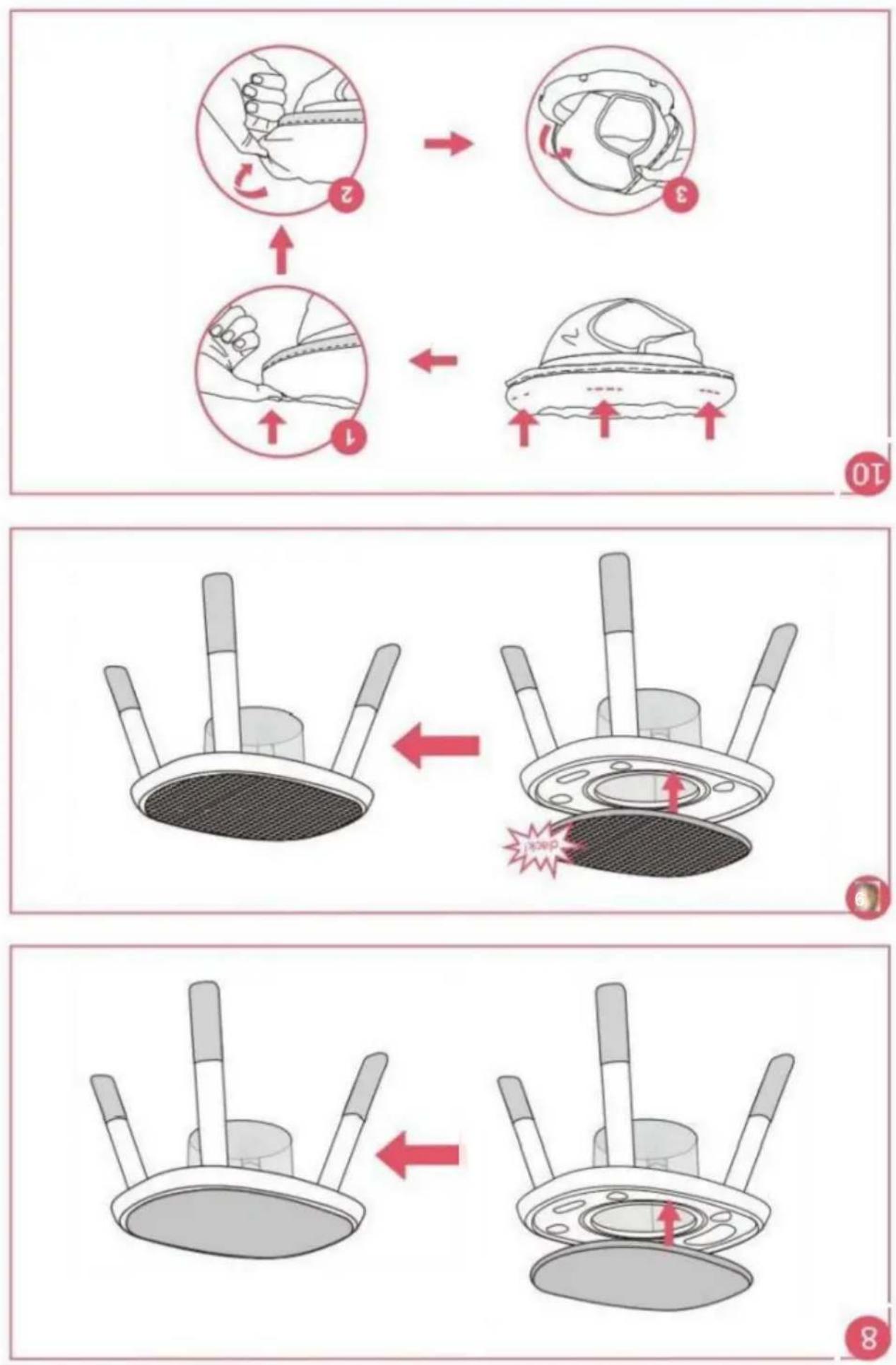
WARNING

Brand : Vevor
Model : PJ004
Category : Baby products