DM197 - Measuring equipment Vevor - Free user manual and instructions
Find the device manual for free DM197 Vevor in PDF.


User questions about DM197 Vevor
0 question about this device. Answer the ones you know or ask your own.
Ask a new question about this device
Download the instructions for your Measuring equipment in PDF format for free! Find your manual DM197 - Vevor and take your electronic device back in hand. On this page are published all the documents necessary for the use of your device. DM197 by Vevor.
USER MANUAL DM197 Vevor
Technical Support and E-Warranty Certificate
www.vevor.com/support
Multi-function Air quality detector
MODEL: DM197
We continue to be committed to provide you tools with competitive price. "Save Half", "Half Price" or any other similar expressions used by us only represents an estimate of savings you might benefit from buying certain tools with us compared to the major top brands and does not necessarily mean to cover all categories of tools offered by us. You are kindly reminded to verify carefully when you are placing an order with us if you are actually saving half in comparison with the top major brands.
VEVOR®
TOUGH TOOLS, HALF PRICE
MODEL:DM197
Multi-function Air quality detector
text_image
23:59 A0 1000 POOR 4% 959 µm PMES 5.1 µg/m³ TEMP 25.9 TEMP 0.093 TVC 0.053 PMES 33 FROM 85%NEED HELP? CONTACT US!
Have product questions? Need technical support? Please feel free to contact us:
Technical Support and E-Warranty Certificate www.vevor.com/support
This is the original instruction, please read all manual instructions carefully before operating. VEVOR reserves a clear interpretation of our user manual. The appearance of the product shall be subject to the product you received. Please forgive us that we won't inform you again if there are any technology or software updates on our product.
PROTECT YOUR AIR
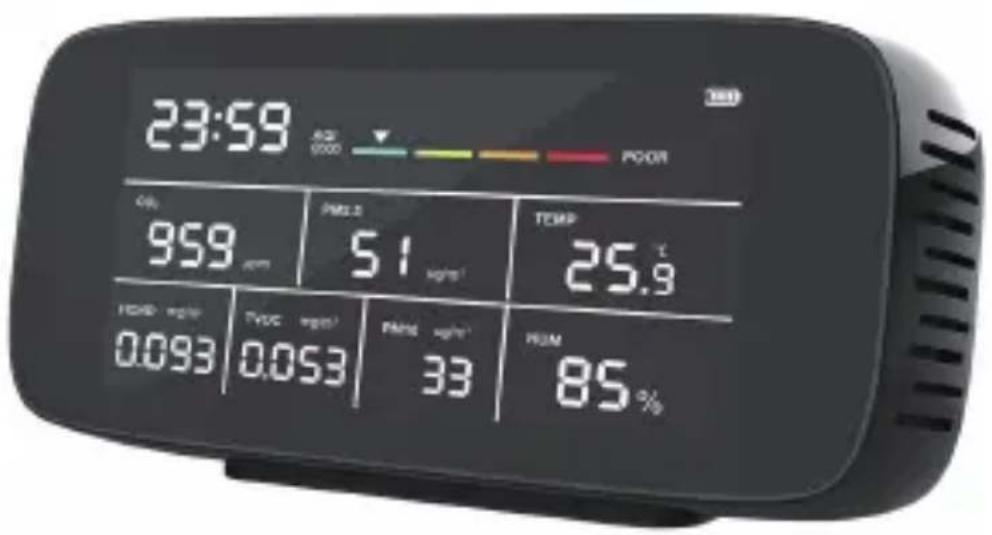
This product is a multifunctional 9 in one air quality monitor with big digital LCD screen display, rechargeable Lithium-Ion battery, coming with Type-C charge cable.
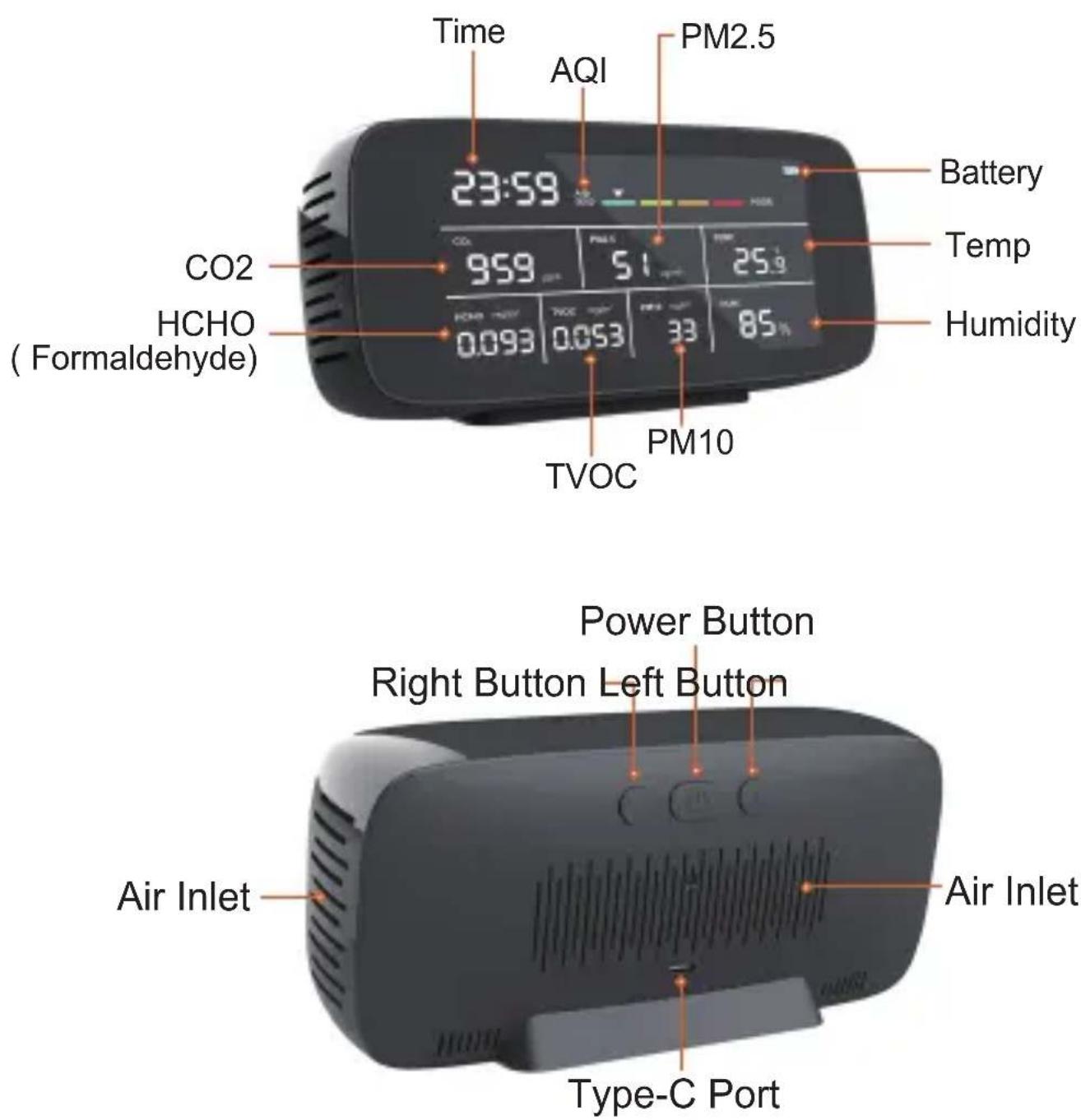
It combines numerous different types of high-quality air sensors, real-time monitoring of carbon dioxide, formaldehyde(HCHO), total volatile organic compounds(TVOC), particulate matter(PM2.5/10), air quality index(AQI) indication, temperature, and humidity with clock. It is easy to operate, quality assurance worth buying.
HOW TO USE
Step 1: Long press Power Button to turn on the monitor.
Note : If your monitor does not turn on, please plug in and charge it for a while first.
Step 2: When the air quality monitor is turned on, it will proceed through its warm-up sequence for about 3 minutes to allow sensors to preheat and fan to draw in fresh ambient air.
Note : This is necessary for accurate results. The HCHO has 200-second warm-up countdown time, which is shown in the HCHO value display area.
Step 3: The monitor with CO2(Carbon Dioxide) alarm function. See step-by-step details instructions on the next page.
Note : When you keep the CO2 alarm on, if the set alarm threshold is exceeded, the monitor will alarm with short beeps. And please be aware that the CO2 alarm will also automatically stop beeping when the CO2 value is decreasing while still above the specified threshold.
Step 4: Enjoy the added benefits of having a good air quality monitor in your home!
CO2 ALARM
The default CO2 alarm sound is OPEN. CO2 alarm value is 1000ppm. Double-press Left Button to turn on/off CO2 alarm sound.
CO2 CALIBRATION
In the power-on state, put the device in the outdoors or a place with good air.
Long-press Right Button for 8 seconds, and the CO2 value will flash when you hear a beep sound.
At this state, CO2 value flashes will stop automatically and finish calibration after flashing lasts for 5 minutes. Do not touch any buttons during calibration.
HCHO CALIBRATION
In the power-on state, put the device in the outdoors or a place with good air.
After 5-10 minutes, long press Left Button for 3 seconds will emit a beep sound and the HCHO/TVOC value will reset to zero.
TEMPERATURE UNIT
The default temperature unit is Fahrenheit(°F).
Double-press Right Button to switch between Celcius(°C) and Fahrenheit(°F).
TIME SETTING
In the power-on state, double-press Power Button to enter the time setting mode.
Single-press Left / Right Buttons to set the hour, then Single-press Power Button to enter the minute setting.
Single-press Left / Right Buttons to set the minute.
After setting well, single-press Power Button to confirm.
CHARGING
When low battery icon is displayed, the device needs to be charged. Insert the included or another compatible Type-C charging cable into the device. Attach the other end to a USB DC charger (such as a smartphone charger) that outputs DC 5V at >=1000mA. Fully charge for at least 2-3 hours before use. Avoid charging with a USB computer port which only outputs 500mA.
PARAMETERS
| Measurement Range | Measurement Method | Resolution | Measurement Accuracy | |
| CO2 | 400-5000ppm | Infrared(NDIR) | 1 PPM | ±50 PPM or 5% |
| PM2.5 | 0-999 ug/m3 | Laser Scattering | 1ug/m3 | ±10% |
| HCHO | 0.001-1.999mg/m3 | Semiconductor | 0.001mg/m3 | ±10% |
| TVOC | 0.001-9.999mg/m3 | Semiconductor | 0.001mg/m3 | ±10% |
| Temperature | -10°C - 50°C (14°F - 122°F) | Semiconductor | 1°C (1.8°F) ±1°C (±1.8°F) | ±1°C (±1.8°F) |
| Humidity | 20% - 85% | Semiconductor | 1% | ±4% |
AQI LEVEL INDICATOR
| Green | Yellow | Orange | Red | |
| AQILevel Indicator |  |  |  |  |
Tips
Tip 1: Strange Readings? Do This:
- Turn the device off for some time and then turn it on back on again (effectively allowing the monitor to reset).
After continuous use for extended periods, the device may simply need to be reset. - Open a window or bring the device outdoors to allow the sensor to exhaust any accumulated fumes and to allow the readings to adjust back down to more normal levels.
Tip 2: Not Using It? Turn It Off:
For the most consistently accurate readings and longest product life, it is recommended to turn the monitor off while it is not in use. This will preserve the battery, sensor, and fan.
Tip 3: Open a Window:
Often the quickest and most practical way to get readings back into the desired range is to simply open a window to ventilate more clean outdoor air into your home. This obviously does not apply if you are located in a Wildfire area or any other area with compromised outdoor air quality.
Tip 4: Cooking Impacts Air Quality:
Cooking often releases increased amounts of unhealthy pollutants into the air including but not limited to CO2, PM2.5 and 10, and VOCs. Furthermore, how and what you cook determines the types of pollutants which will be released into the air.
CONSIDERATIONS & PRECAUTIONS
- Sampling Frequency:
The sampling frequency of the monitor is 1.5 seconds.
This means that your monitor is providing you with updated readings every 1-2 seconds. Please note that, in order to provide constantly-updated, real-time readings, it contains a continuously running mini fan which gives off a very slight buzzing sound.
- Upon turning off the monitor, you will see a brief “Power Off” appear on the screen. This is normal. This is not an error message.
- This air monitor is meant to be used indoors and kept dry at all times. It is strongly recommended to store in a cool, dry place.
- DO NOT expose to sunlight or use in an extremely polluted, dusty, or smoky environment for prolonged periods as doing so may damage the sensors over time.
• DO NOT cover the air intake areas during use to avoid inaccurate measurements. - DO NOT use chemicals or solvents to clean the product as residual fumes will skew air quality readings.
- DO NOT put water or other liquids on or near the product to avoid electrical damage.
• DO NOT allow unauthorized modification or repair of this product.
• DO NOT take apart or disassemble this monitor. Doing so may damage the product and will invalidate the warranty.
PRODUCT SPECIFICATIONS
| Item | Air Quality Monitor |
| Product Size | 184 x 52 x 88mm |
| Product Weight | 331g (11.68 oz) |
| LCD ScreenDisplay Method | |
| Measure | PM2.5, PM10, AQI, HCHO (Formaldehyde), TVOC, Temperature, Humidity |
| Infrared (NDIR) Detection method fbr CO | |
| Laser Scattering Detection method for PM | |
| Semiconductor sensor Detection method f | |
| Concentration unit for CO2 | ppm |
| Concentration unit for PM | ug / m3 |
| Concentration unit for HCHO and TVOC | mg / m3 |
| 400-5000 ppmCO2 measuring range | |
| PM measuring range | 0-999 ug / m3 |
| HCHO measuring range | 0.001 - 1.999 mg / m3 |
| TVOC measuring range | 0.001 - 9.999 mg / m3 |
| Atmospheric Pressure | 12.5 PSI - 15.4 PSI |
| Sampling Time | 1.5 Seconds |
| Temperature Range | -10°C - 50°C (14°F - 122°F) |
| Storage Temperature | -10°C - 60°C (14°F - 140°F) |
| Relative Humidity | 20%-85% |
| Humidity Range | 20%-85% |
| Power Source | 3000 mAh Rechargeable Lithium battery. 5V DC Power Charging via Type-C Port |
WARNING:
While this product can reduce your risk of harm by increasing your awareness of air quality, it can in no way guarantee your health or safety. Please instead take a comprehensive approach to living healthy and do not depend on this monitor alone to improve your health or save your life.
LEGAL DISCLAIMER:
The use or misuse of this monitor is conditioned upon the user's agreement that in no event shall the manufacturer, importer, reseller, or distributor of this monitor be liable for any direct, indirect, punitive, incidental, special consequential damages, to property or life, whatsoever arising out of or connected with the use of this monitor.
Product List
Air Quality Monitor
x 1
Type-C Charging Cable
x 1
Product Manual
x 1
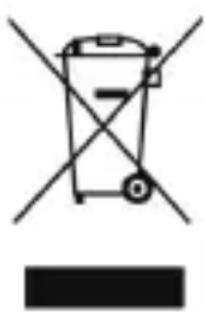
CORRECT DISPOSAL
natural_image
Symbol of a trash bin crossed with a diagonal line and a horizontal bar below (no text or labels)This product is subject to the provision of european Directive 2012/19/EU. The symbol showing a wheelie bin crossed through indicates that the product requires separate refuse collection in the European Union. This applies to the product and all accessories marked with this symbol. Products marked as such may not be discarded with normal domestic waste, but must be taken to a collection point for recycling electrical and electronic devices.
FCC Information:
CAUTION: Changes or modifications not expressly approved by the party responsible for compliance could void the user's authority to operate the equipment!
This device complies with Part 15 of the FCC Rules. Operation is subject to the following two conditions:
1) This product may cause harmful interference.
2) This product must accept any interference received, including interference that may cause undesired operation.
WARNING: Changes or modifications to this product not expressly approved by the party.responsible for compliance could void the user's authority to operate the product.
Note: This product has been tested and found to comply with the limits for a Class B digital device pursuant to Part 15 of the FCC Rules, These limits are designed to provide reasonable protection against harmful interference in a residential installation.
This product generates, uses and can radiate radio frequency energy, and if not installed and used in accordance with the instructions, may cause harmful interference to radio communications. However, there is no guarantee that interference will not occur in a particular installation. If this product does cause harmful interference to radio or television reception, which can be determined by turning the product off and on, the user is encouraged to try to correct the interference by one or more of the following measures.
- Reorient or relocate the receiving antenna.
- Increase the distance between the product and receiver.
- Connect the product to an outlet on a circuit different from that to which the receiver is connected.
- Consult the dealer or an experienced radio/TV technician for assistance.
Manufacturer: Shanghaimuxinmuyeyouxiangongsi
Address: Baoshanqu Shuangchenglu 803long 11hao 1602A-1609shi Shanghai
Imported to AUS: SIHAO PTY LTD.1 ROKEVA STREETEASTWOOD NSW 2122 Australia
Imported to USA: Sanven Technology Ltd. Suite 250, 9166 Anaheim Place, Rancho Cucamonga, CA 91730
EC REP: SHUNSHUN GmbH.
Römeräcker 9 Z2021,76351 Linkenheim-Hochstetten, Germany
Tel: +49 1727041930 euvertreter@gmail.com
UK REP: Pooledas Group Ltd
Unit 5 Albert Edward House, The Pavilions Preston, United Kingdom
Tel: 01772418127 pooledas123@gmail.com
Made in china
VEVOR®
TOUGH TOOLS, HALF PRICE
Technical Support and E-Warranty Certificate www.vevor.com/support
VEVOR®
TOUGH TOOLS, HALF PRICE
Machine Translated by Google