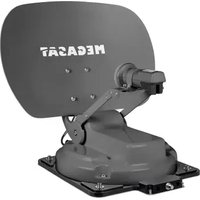
Caravanman Kompakt 4 - Satellite antenna MEGASAT - Free user manual and instructions
Find the device manual for free Caravanman Kompakt 4 MEGASAT in PDF.


| Product type | Satellite antenna for motorhome |
| Brand | MEGASAT |
| Model | Caravanman Kompakt 4 |
| Antenna dimensions | 460 x 170 x 460 mm |
| Antenna weight | 5.1 kg |
| Control unit dimensions | 60 x 24 x 60 mm |
| Control unit weight | 100 g |
| Power supply | 12 V DC, 5 A (7 A fuse protection) |
| Frequency band | Ku (10.7 – 12.75 GHz) |
| LNB gain | 33 dBi |
| Receiving power | 49 dBW |
| Polarization | Vertical / Horizontal |
| Inclination angle | 15° to 62° |
| Search angle | 360° |
| Preprogrammed satellites | Astra 1, Astra 2, Astra 3, Hotbird, Thor |
| Number of users | 1 (2nd output possible as option) |
| Operating temperature | -25°C to +70°C |
| Main functions | Automatic satellite search, Auto-Skew function, motorized retraction |
| Delivery contents | Antenna, control unit, 1 m and 10 m coaxial cables, roof feedthrough, manual |
| Maintenance and cleaning | Clean the housing with a non-woven cloth; avoid dirt |
| Safety | Do not expose the control unit to water; use a 7 A fuse; follow the bonding instructions |
| Spare parts and repairability | Optional accessory Mobil-Kit 3; repair by a specialist workshop |
| General information | Compliant with EU directives 2014/30, 2014/35, 2014/53; declaration of conformity at www.megasat.tv |
Frequently Asked Questions - Caravanman Kompakt 4 MEGASAT
User questions about Caravanman Kompakt 4 MEGASAT
0 question about this device. Answer the ones you know or ask your own.
Ask a new question about this device
Download the instructions for your Satellite antenna in PDF format for free! Find your manual Caravanman Kompakt 4 - MEGASAT and take your electronic device back in hand. On this page are published all the documents necessary for the use of your device. Caravanman Kompakt 4 by MEGASAT.
USER MANUAL Caravanman Kompakt 4 MEGASAT
natural_image
Two MEGASAT satellite communication equipment models, one gray and one white, displayed against a plain background (no text or symbols on the device itself)2. Installation....06
natural_image
3D rendering of a metallic electronic device with four legs and a flat top (no text or symbols visible)Art-Nr.: 1201000
1. Einführung
1.3 Systemkomponenten
natural_image
Illustration of an open cardboard box with a printer above it, featuring a red upward arrow and numbered buttons (no text or symbols on the main image)
ACHTUNG!
natural_image
Side profile of a white and gray RV car with roof-mounted screens, shown from front and side views (no text or symbols)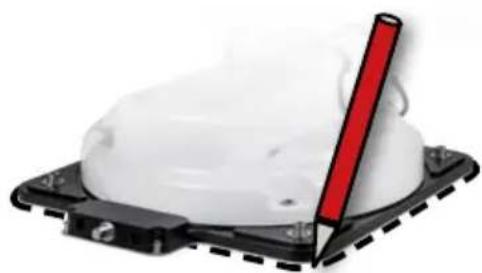
natural_image
Close-up of a white plastic object with a red vertical rod inserted, mounted on a black base (no text or symbols visible)2. Installation
natural_image
Topographic map of Europe highlighting a region outlined in yellow and red, with no visible text or labels.Hinweis:
Version 1.0 (August 2025)
natural_image
Two MEGASAT satellite dishes on a base, one gray and one white, with no visible text or symbols on the dish itself.1.1 Safety instructions....04
1.2 Delivery....04
1.3 System components....05
2. Installation....06
2.1 Installation on the roof....06
2.2 Adhesive instructions ....07
2.4 Indoor installation....08
2.5 Connecting the components....09
2.6 The control unit....10
2.7 Satellite transmission....11
3. Satellite search with the control unit....12
3.1 Designation of the respective LEDs and buttons 12
3.2 Satellite search ....13
3.3 Retracting the antenna....13
4. Troubleshooting ....14
5. Setting values for the skew....15
6. Footprint....16
7. Mounting dimensions ...... 17
8. Specifications....18
9. Conformity information....19
1. Introduction
1.1 Safety instructions

Read the user manual carefully before starting the installation. If you have already installed similar products, the procedure may not be the same as for this product.
- Improper handling can lead to serious damage to this appliance. Those responsible may also be held liable for any further damage to the appliance resulting from this.
■ Before commissioning, please check the correct operating voltage of your power supply. Please refer to the technical data in these operating instructions for the operating voltage of the appliance. - The control unit must not be exposed to dripping water, splashing water or other liquids.
- Do not allow children to play with foils or other packaging materials as there is a risk of suffocation.
1.2 Delivery
■ 1x Caravanman Kompakt 4
■ 1x Mini control unit
■ 1x Coaxial cable (1 m)
■ 1x Coaxial cable (10 m)
■ 1x Roof bushing
■ 1x User manual
Optional accessories:
Mobile kit 3 for mobile use
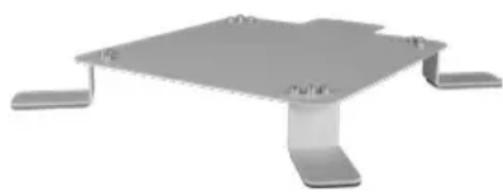
natural_image
3D rendering of a metallic electronic device with four legs and a flat top (no text or symbols visible)Art-No.: 1201000
1. Introduction
1.3 System components
natural_image
Illustration of an open cardboard box with a printer above it, featuring a red upward arrow and numbered buttons (no text or symbols on the main objects)
ATTENTION!
Never hold the antenna directly by the mirror when lifting it out of the box. Lift the antenna by the base plate.
Antenna unit
The high-performance antenna, the elevation angle of 15-62° and the auto-skew function enable the best possible reception in the most important holiday destinations in Europe.
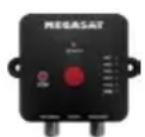
Control unit
The mini control unit is used for satellite selection and control. It is connected between the aerial and TV (receiver) and supplies the aerial with power. After successful alignment, the control unit can be disconnected from the power supply.
Note:
The Caravanman Kompakt 4 also has an additional connection for a second television or receiver. Please refer to the connection diagram in these operating instructions for the correct connection of the components.
2. Installation
2.1 Installation on the roof

We generally recommend having the installation carried out by your specialist dealer or a specialist workshop! Please also note that the antenna will change the vehicle height accordingly! Please be sure to adhere to the individual points in the installation instructions!
General information
Make sure you have a suitable workplace; a garage/hall is better than an outdoor location. The ambient temperature for installation must be between +5°C and max. +25°C. Do not work directly in the sun. Observe the work regulations when handling chemical products. Ensure the necessary work hygiene.
Preparation
-
Make sure that the roof of your vehicle is sufficiently stable. If the roof stability is insufficient or doubtful, attach an approx. 2 mm thick sheet of approx. 100 x 100 cm to the outer roof skin. Ask your vehicle manufacturer about this.
-
Check that all parts are present.
-
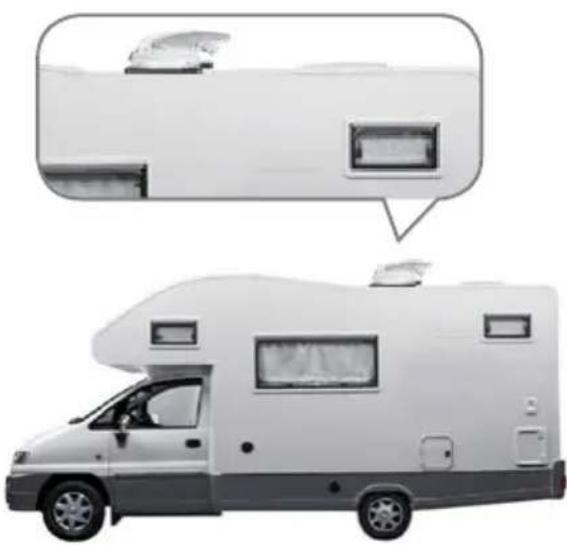
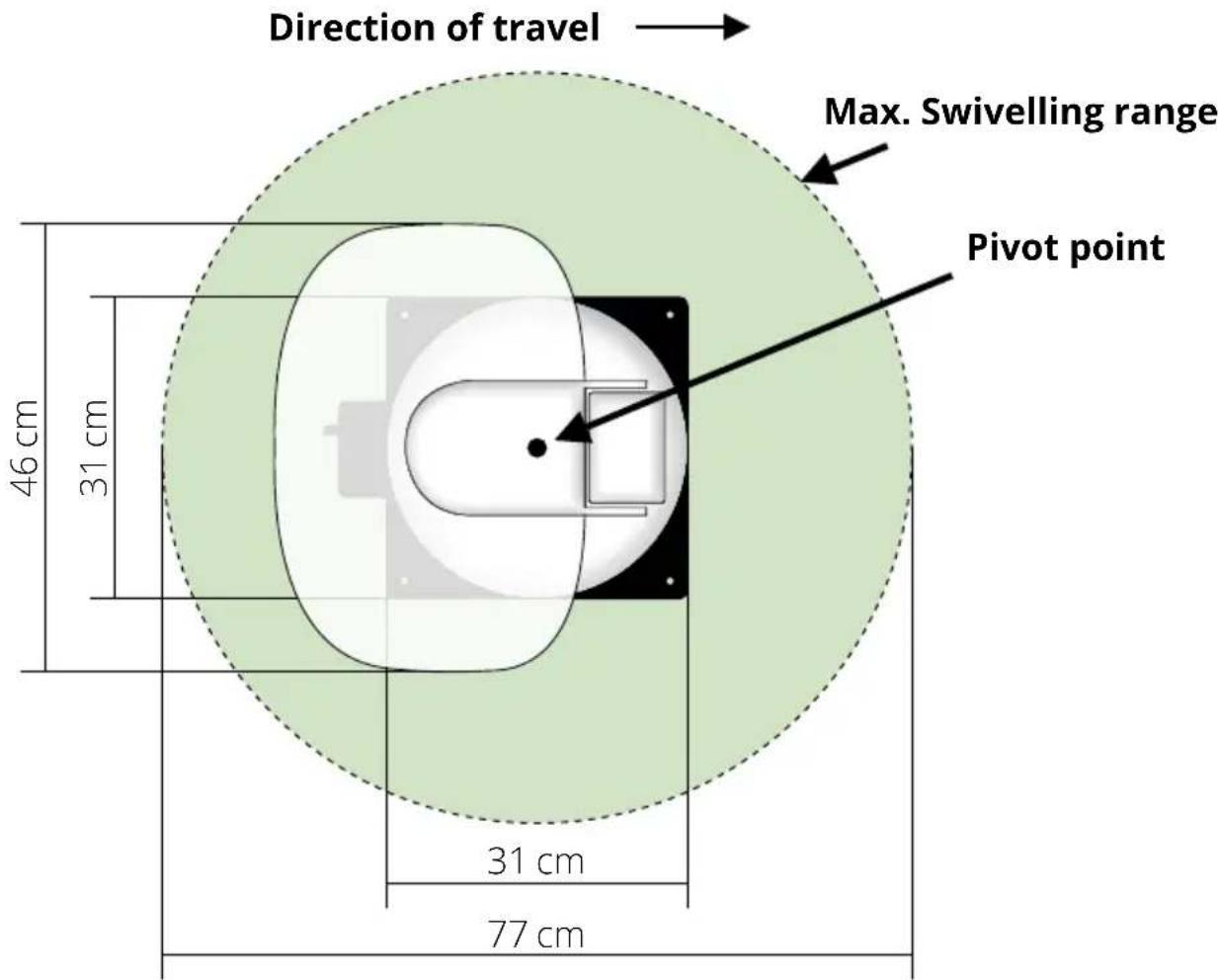
Place the antenna on the subsequent mounting location and align it so that the mirror and the LNB unit point towards the rear of the vehicle. Make sure that the mounting surface is level and that there are no roof structures in the way. Be sure to observe the installation dimensions in these instructions. The minimum distance to an air conditioning system should be 30 cm.
-
Clean the mounting surface with a suitable cleaner and a fleece cloth to remove dirt and impurities. Then mark the antenna base with a pencil.
natural_image
Side profile of a white RV with roof-mounted cabin and two inset images showing a small boat on water (no text or symbols)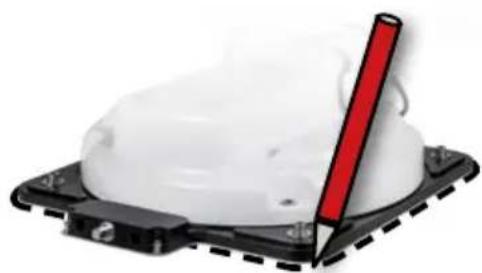
natural_image
Close-up of a white plastic object with a red vertical rod inserted, mounted on a black base (no text or symbols visible)2. Installation
- Lightly roughen the marked surfaces and feet with sandpaper (120 grit) and clean the surface again with the cleaner and allow the cleaner to evaporate for approx. 10 minutes. ATTENTION: Do not touch the surfaces afterwards.
- Mount the roof duct (preferably in the lee behind the aerial) on the vehicle roof. Ensure that water and moisture (e.g. rain or splash water) cannot penetrate the drill hole. Make sure that the cables are not bent too much to avoid signal loss and damage to the cable (smallest bending radius max. 5-7 cm).
2.2 Adhesive instructions
- Prepare the adhesive for mounting.
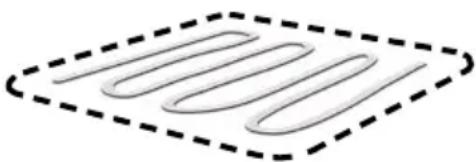
- Now apply the adhesive to the underside of the antenna base in serpentine lines so that the adhesive can harden well inside.
- Now place the antenna on the marked area immediately (within 5 minutes of applying the adhesive). Press the base lightly and evenly and secure the antenna so that it does not slip, e.g. using adhesive tape. After pressing down, there must be at least 2 mm of adhesive between the antenna base and the surface. The adhesive is cured after a maximum of 48 hours at +18°C and a relative humidity of 50%. If there is low humidity during the installation time, spray a little water into the air around the antenna after gluing.
- Remove any adhesive that may have escaped immediately with a spatula or similar and clean the contaminated surfaces with the cleaner and a fleece cloth.
- You can additionally secure the antenna base for safety reasons. To do this, drill through the existing holes in the antenna base in the roof of your vehicle and secure it with a screw and lock nut. To prevent the freshly glued base from slipping, wait until the adhesive has hardened before carrying out this work.
- Once the adhesive has been completely fitted and cured, a silicone joint can be drawn around the aerial base.
2. Installation
2.4 Indoor installation
- The coaxial cable is laid inside the vehicle.
- When choosing the location for the control unit and the satellite receiver, make sure that both devices are in a dry and protected place.
- Do not place the control unit and the satellite receiver near heat sources and ensure sufficient ventilation.
- The basic connection options for the antenna system are shown below:
Connect the power supply (red/black cable) for the control unit to your vehicle battery via a fuse (7 amps) to prevent a cable fire in the event of a short circuit. The yellow cable is connected to the vehicle's ignition positive and is also protected by a 7 amp fuse (this cable only needs to be connected if the antenna is to retract automatically when the engine is started). The remaining black cable is connected to the corresponding negative terminal of the ignition system (earth).
Connect the coaxial cable from the antenna to the control unit (10 m coaxial cable with F connector in „ANTENNA“)
Connect the control unit to the television or satellite receiver (1 m coaxial cable with F-connector from „RECEIVER“ to the satellite receiver)
2. Installation
2.5 Connecting the components
Do not install the control unit and the TV (satellite receiver) inside the vehicle in the area of an airbag. Ensure that the cables are laid carefully to avoid short circuits. Also pay attention to existing cables.
Connect the aerial as shown in the illustration:
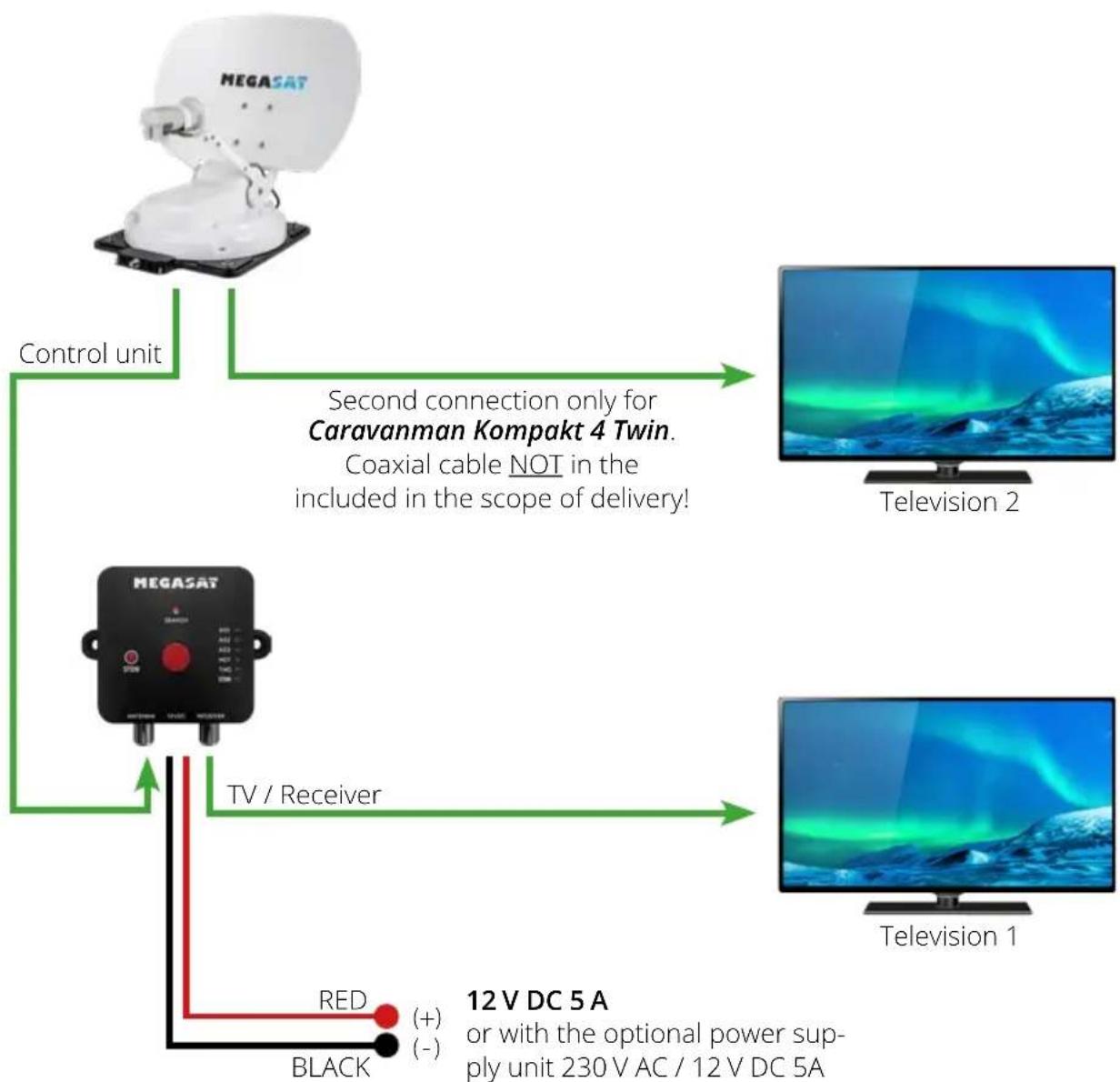
flowchart
graph TD
    A["MEGASAT"] --> B["Control unit"]
    B --> C["Second connection only for Caravanman Kompakt 4 Twin. Coaxial cable NOT in the included scope of delivery!"]
    D["MEGASAT"] --> E["TV / Receiver"]
    E --> F["12 V DC 5A or with optional power supply unit 230 V AC / 12 V DC 5A"]
    G["Television 1"] --> H["Television 2"]
    I["Black"] --> J["RED (+) (-)"]
2. Installation
2.6 The control unit
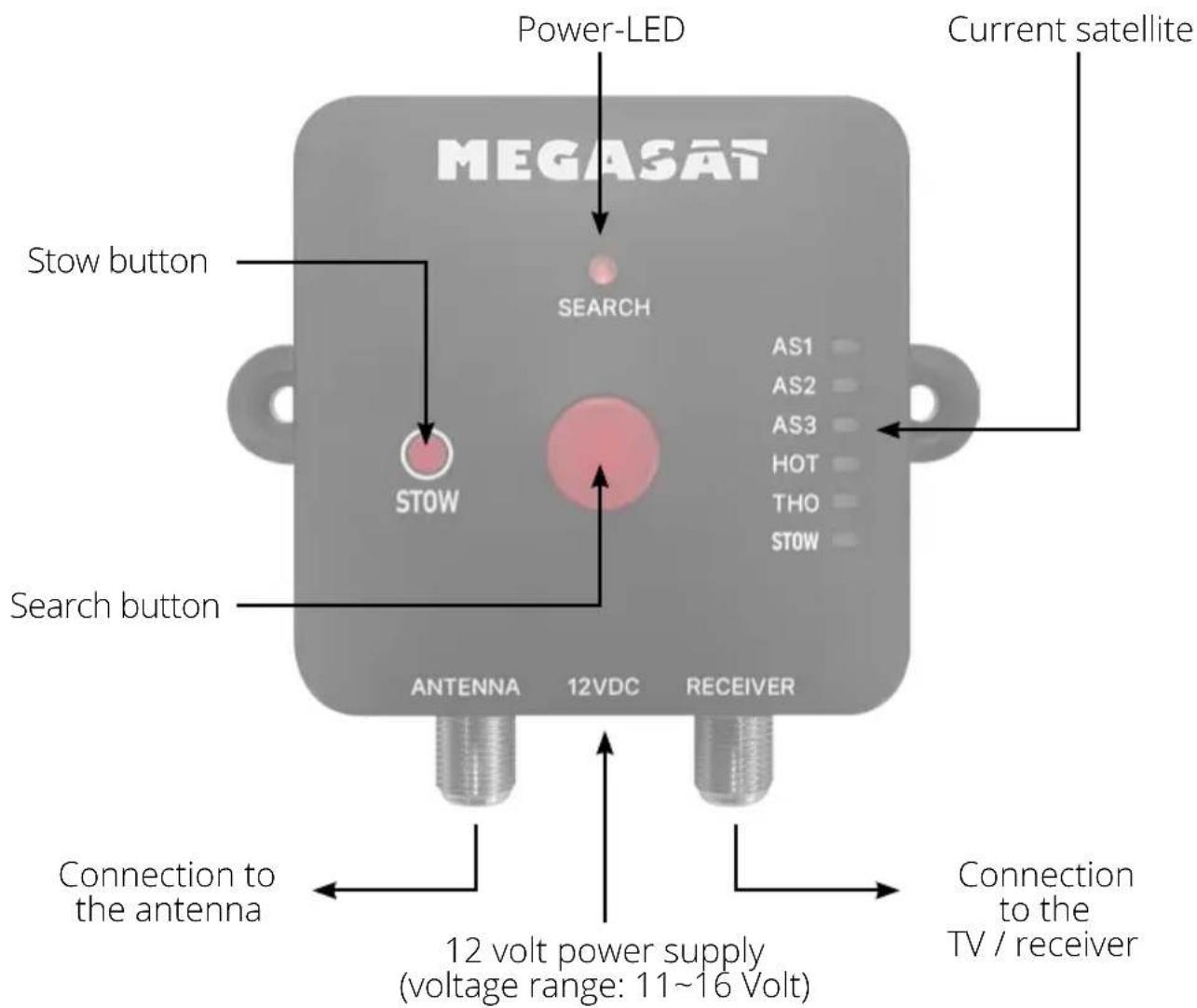

Attention: Always connect the control unit using a cable with a fuse rating of 7 amps and at least 2.5 mm ^4 . Never connect to the car battery without a fuse.
2. Installation
2.7 Satellite transmission
Direct Broadcast Service (DBS) broadcasts audio, video and data via the satellite, which is located 35,000 kilometres above the earth. The signals from the satellite are received and processed using a receiving station such as the antenna and a satellite receiver. The system requires a clear view of the satellite in order to maximise signal reception.
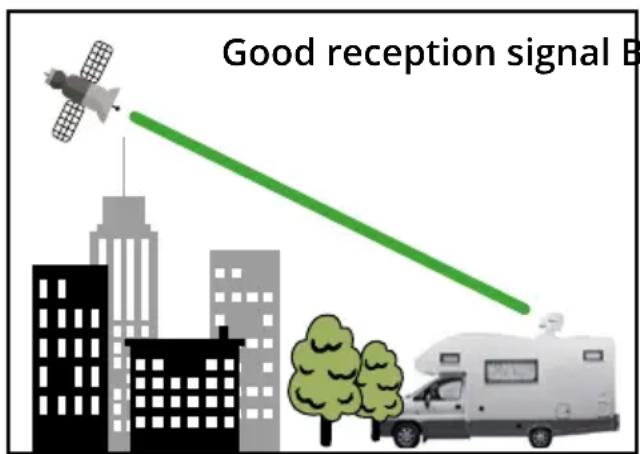
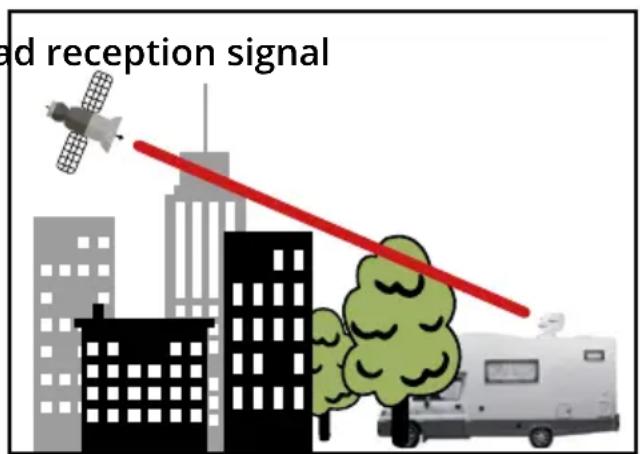
Objects such as trees, bridges and large houses that are located at the satellite's angle of incidence lead to a loss of signal. Heavy rain, clouds, snow or ice can impair the reception quality. If the satellite signal is lost due to severe weather conditions, the current programme of the receiver will be terminated (the picture will freeze or disappear). When the weather conditions allow good reception again, the TV picture will be restored.
3. Satellite search with the control unit
3.1 Designation of the respective LEDs and buttons
| Status Description | |
| Power supply | The power LED lights up red continuously when the control unit is ready for operation. |
| Search process | The satellite LED flashes green every second during the search process. |
| Satellite found | The satellite LED lights up green continuously when the desired satellite has been found. The LED goes out after approx. 5 minutes. |
| No connection to the antenna | All satellite LEDs on the control unit flash. |
| No satellite found The power LED flashes red (0.5 second interval). | |
| Restart | Press the search button for more than 3 seconds to restart the control unit and the search for the selected satellite. Only release the button when all LEDs stop flashing. |
3. Satellite search with the control unit
3.2 Satellite search
| 1. | Press the search button to start the search. |
| 2. | The satellite LED of the last satellite used flashes green. |
| 3. | To change the satellite, you must press the search button several times. Depending on which satellite you want to search for. It is only possible to change the satellite if the aerial has previously found a satellite or if the search process has been restarted. |
| 4. | Once the desired satellite has been selected, the search starts automatically. |
| 5. | Once the selected satellite has been found, the satellite LED lights up green continuously and goes out after approx. 5 minutes. |
| 6. | If the selected satellite is not found, the power LED flashes red. |
Note: If all LEDs on the control unit are flashing, the antenna has no connection to the control unit.
IMPORTANT NOTE: Once you have selected the desired satellite on the control unit, the aerial automatically starts searching. This process takes about 2-3 minutes. Please do not press any other buttons during this time - otherwise the search will be interrupted.
3.3 Retracting the antenna
To retract the antenna or bring it into the home position, press the STOW button on the control unit. The STOW LED on the control unit flashes during retraction. Once the process is complete, the STOW LED lights up continuously.
4. Troubleshooting
No satellite signal
Objects such as trees, bridges and large houses located at the satellite's angle of incidence cause the signal to be lost. If the satellite signal is lost due to severe weather conditions, the current program of the TV or receiver will be interrupted (the picture will pixelate, freeze or disappear). When the weather conditions allow good reception again, the TV picture will be restored.
Is there dirt on the antenna?
Heavy dirt on the housing can cause reception problems.
Is everything correctly connected and switched on?
Make sure that the TV and the receiver are connected correctly and that the receiver is correctly set for satellite reception. Are all cables connected correctly and the connections screwed tightly onto the coaxial cable? Also check the coaxial cable for kinks.
Footprint of the satellite
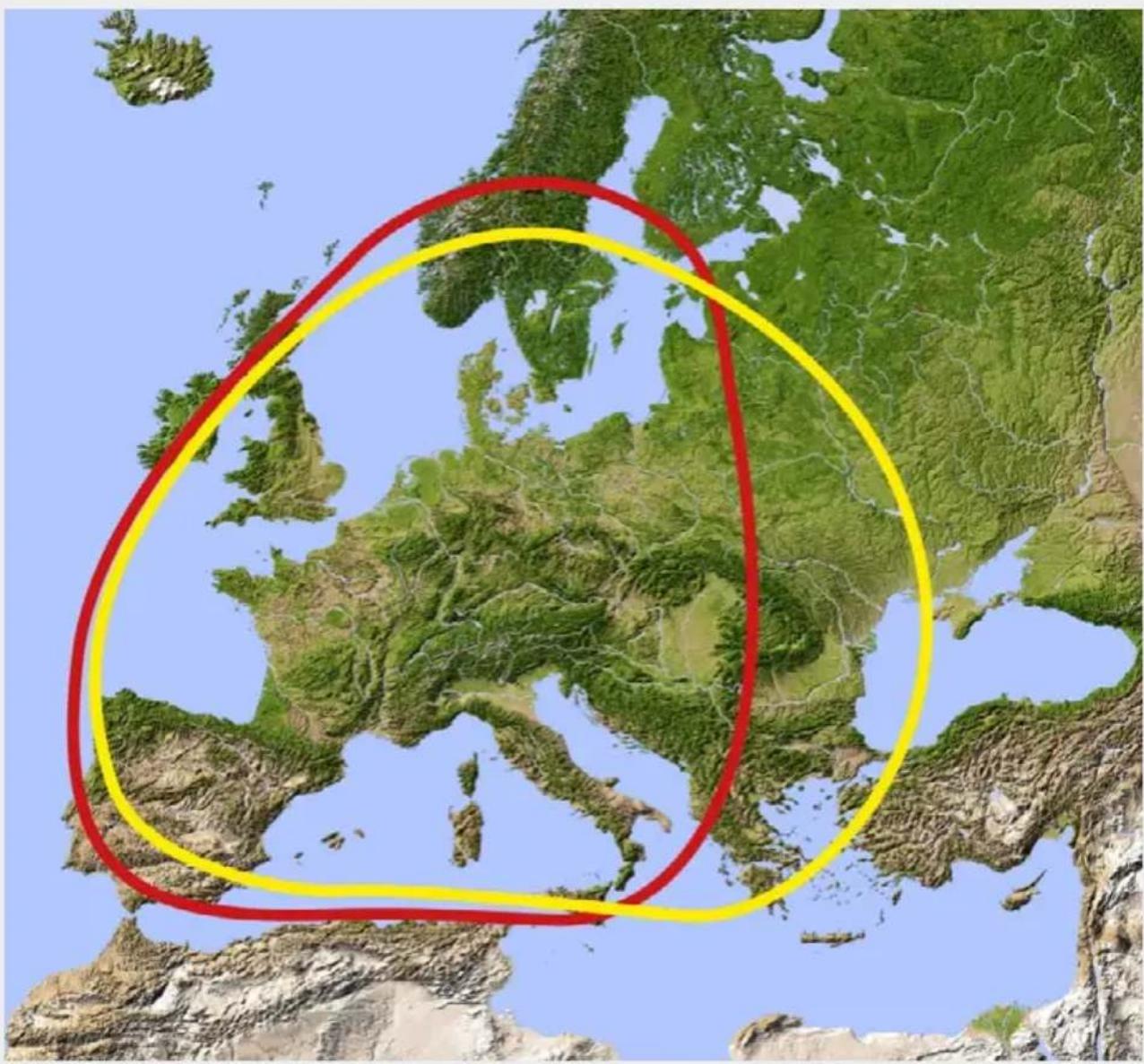
Satellites are in fixed positions above the equator in orbit. In order to receive the TV signals, the receiving location must be within the footprint. Use the diagram to check whether your location is within the satellite's footprint. In the peripheral areas of the footprint, reception interference may occur.
Satellite frequency of a TV channel was changed
TV stations change their frequency sporadically, which then no longer matches the frequency in the TV (satellie receiver). Ask for the current frequency of the channel.
5. Setting values for the skew
Skew setting values for European capitals
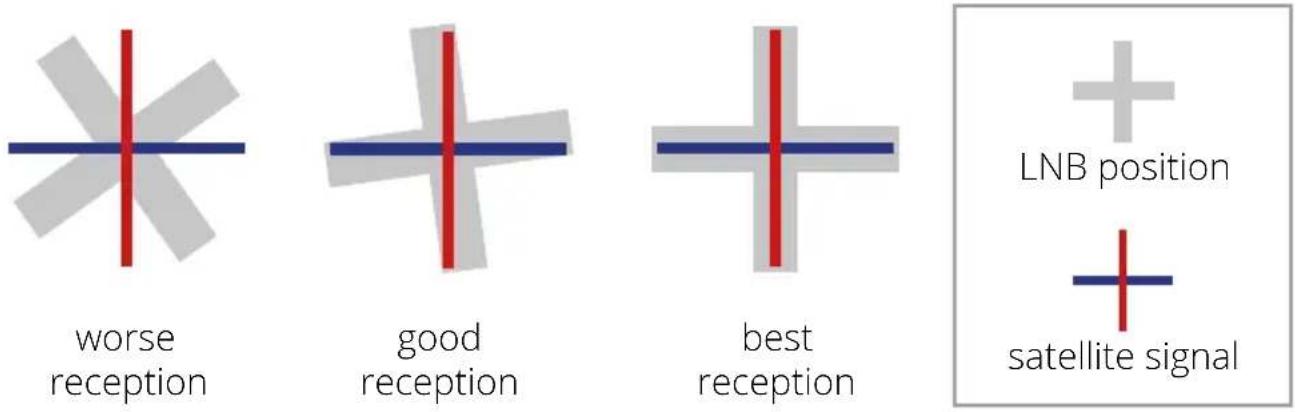
Signals in the vertical (red) and horizontal (blue) lines have an offset of exactly 90^ to each other. Due to the different position of the satellites, depending on your location, it is possible that the signals do not hit the LNB exactly vertically and horizontally. To adjust this, you must bring the LNB into the correct position in relation to the transmitted signal. This adjustment on the LNB is known as the „skew setting“. The following illustration shows you the optimum setting of the LNB. The closer the match, the better the reception.
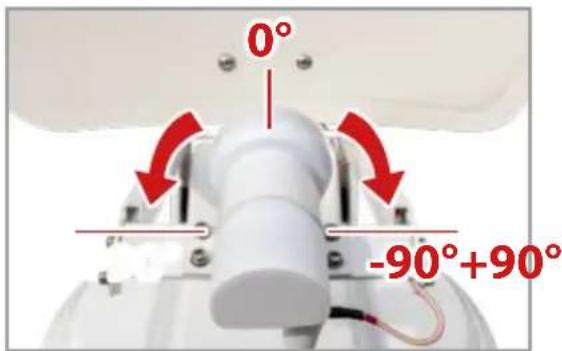
Note: Setting the skew angle only makes sense from a deviation of 5^ .
| Country City Astra 2 Astra 3 Astra 1 Hotbird | Astra 4 Thor | Hispasat Eutelsat 5 | ||||||||
| Bulgaria Sofia +1.7 +6.8 +11.4 +1 | 24.0 +41.0 +27.2 | |||||||||
| Denmark Copenhagen -3.4 | -0.4 +2.5 | -0.3 +5.3 +9.1 +24.8 +11.6 | ||||||||
| Finland | Helsinki | +5.2 +7.9 | +10.3 +6.8 | +11.2 +14.2 | +25.2 +16.0 | |||||
| France | Paris | -13.9 | -10.5 | -7.2 | -9.2 | -2.2 | +2.9 | +25.0 | +6.3 | |
| Germany Berlin | -4.1 | -0.7 | +2.6 +0.3 | +6.6 +10.8 | +27.8 +13.5 | |||||
| England London | -13.7 | -10.7 -7.8 | -10.3 -4.0 +0.6 | +21.6 +3.9 | ||||||
| Greece | Athens | +1.3 | +7.3 | +12.7 | +13.4 | +22.5 | +28.1 | +45.9 | +31.6 | |
| Hungary Budapest | -1.3 | +3.0 +6.9 | +5.6 +12.8 | +17.5 +34.7 | +20.5 | |||||
| Italy | Rome | -9.8 | -5.0 | -0.4 | -0.6 | +8.5 | +14.6 | +37.0 | +18.5 | |
| Poland | Warsaw | +1.5 +5.1 | +8.4 +6.1 | +12.2 +16.2 | +31.0 +18.8 | |||||
| Portugal | Lisbon | -30.2 | -27.0 | -23.7 | -25.3 | -16.8 | -10.1 | +23.9 | -5.1 | |
| Spain | Madrid | -24.8 | -21.2 | -17.6 | -18.7 | -9.9 | -3.2 | +27.5 | +1.5 | |
| Belgium | Brussels | -11.2 | -7.9 | -4.8 | -7.0 | -0.3 | +4.4 | +24.7 | +9.3 | |
| Sweden Stockholm | Holm | +1.1 +3.8 +6.4 | +3.0 +7.8 +11.0 | +23.8 +13.0 | ||||||
| Switzerland | Bern | -11.3 | -7.5 | -3.8 | -5.2 | +2.4 | +7.8 | +29.5 | +11.4 | |
| Austria | Vienna | -3.4 +0.7 | +4.5 +3.0 | +10.2 +15.0 | +32.9 +18.0 | |||||
6. Footprint
Astra 1 Hotbird
natural_image
Topographic map of Europe highlighting a region outlined in yellow and red, with no visible text or labels.Note:
Reception interference may occur in the peripheral areas of the footprint.
7. Mounting dimensions
8. Specifications
| Antenna type Off-set dish | |
| Number of subscribers 1 | |
| LNB type Universal LNB | |
| Frequency band Ku-band | |
| Frequency range 10.7 GHz to 12.75 GHz | |
| LNB gain 33 dBi | |
| Reception power 49 dBW | |
| Polarisation Vertical / Horizontal | |
| Motor control 2-axis DC motor | |
| Tilt angle 15° to 62 | |
| Search angle 360° | |
| Programmed satellites Astra 1 (19,2° East) | |
| Astra 2 (28,2° East) | |
| Astra 3 (23,5° East) | |
| Hotbird (13° East) | |
| Thor (0,8° West) | |
| Temperature range -25°C to +70°C | |
| Power supply 12 V DC @ 5 amps | |
| Receiver unit dimensions 460 x 320 mm (W/H) | |
| Antenna dimensions 460 x 170 x 460 mm (W/H/D) | |
| Antenna weight | 5.1kg |
| Control unit dimensions | 60 x 24 x 60 mm (W/H/D) |
| Weight of control unit | 100 g |
Note:
Weight and dimensions are not absolutely exact values. Technical data is subject to change at any time without prior notice.
9. Conformity information
Megasat Werke GmbH hereby declares that the following device is in compliance with the essential requirements and other relevant provisions of Directives 2014/30/EU (EMC), 2014/35/EU (LVD) and 2014/53/EU (RED):
Caravanman Kompakt 4 (Art-No. 1500217)
Caravanman Kompakt 4 Graphit (Art-No. 1500218)
The declaration of conformity for this product is available to the company: Megasat Werke GmbH, Brückenstraße 2a, D-97618 Niederlauer
You can download the declaration of conformity from our homepage: www.megasat.tv/support/downloads
Notes
Version 1.0 (August 2025)
Technical changes, misprints and errors excepted.
natural_image
Two MEGASAT satellite dishes on a base, one gray and one white, with no visible text or symbols on the dish itself.2. Installation....06
natural_image
3D rendering of a metallic electronic device with four legs and mounting feet (no text or symbols visible)N° d'art.: 1201000
1. Introduction
natural_image
Illustration of an open cardboard box with a printer above it, featuring a red upward arrow and numbered buttons (no text or symbols on the main image)
ATTENTION!
natural_image
Side profile of a white RV with roof-mounted units and a thought bubble showing a small object (no text or symbols visible)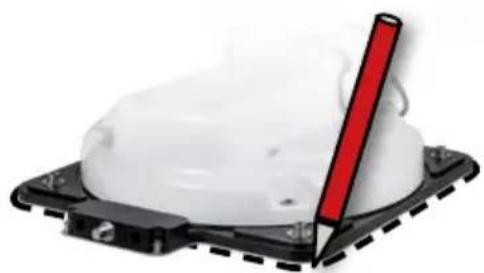
natural_image
Close-up of a white plastic object with a red pen inserted, mounted on a black base (no text or symbols visible)2. Installation
natural_image
Topographic map of Europe highlighting a region outlined in yellow and red, with no visible text or labels.Remarque:

- Installation....06
- Einführung
- Systemkomponenten
- ACHTUNG!
- Installation
- Hinweis:
- Satellite search with the control unit....12
- Troubleshooting ....14
- Setting values for the skew....15
- Footprint....16
- Mounting dimensions ...... 17
- Specifications....18
- Conformity information....19
- Introduction
- Safety instructions
- Delivery
- System components
- ATTENTION!
- Antenna unit
- Control unit
- Note:
- Installation on the roof
- General information
- Preparation
- Adhesive instructions
- Indoor installation
- Connecting the components
- The control unit
- Satellite transmission
- Satellite search with the control unit
- Designation of the respective LEDs and buttons
- Satellite search
- Retracting the antenna
- Troubleshooting
- No satellite signal
- Is there dirt on the antenna?
- Is everything correctly connected and switched on?
- Footprint of the satellite
- Satellite frequency of a TV channel was changed
- Setting values for the skew
- Skew setting values for European capitals
- Footprint
- Astra 1 Hotbird
- Mounting dimensions
- Specifications
- Conformity information
- Notes
- Remarque:
Brand : MEGASAT
Model : Caravanman Kompakt 4
Category : Satellite antenna