24U41YA - Monitor LG - Free user manual and instructions
Find the device manual for free 24U41YA LG in PDF.

 FR
FR
 BG
BG
 CA
CA
 CS
CS
 DA
DA
 DE
DE
 EL
EL
 EN
ES
EN
ES
 ET
ET
 FI
FI
 HU
HU
 ID
ID
 IT
IT
 JA
JA
 KK
KK
 KO
KO
 LT
LT
 LV
LV
 MK
MK
 NL
NL
 NO
NO
 PL
PL
 PT
PT
 RO
RO
 RU
RU
 SK
SK
 SL
SL
 SQ
SQ
 SV
SV
 TR
TR
 ZH
ZH
User questions about 24U41YA LG
0 question about this device. Answer the ones you know or ask your own.
Ask a new question about this device
Download the instructions for your Monitor in PDF format for free! Find your manual 24U41YA - LG and take your electronic device back in hand. On this page are published all the documents necessary for the use of your device. 24U41YA by LG.
USER MANUAL 24U41YA LG

ATENTIE
A: 100 mm

ATENTIE
natural_image
Illustration of a monitor with a lock icon and a speech bubble containing a vertical bar (no text or symbols)
natural_image
Diagram showing a monitor with a power button icon and a circular button labeled 'A' (no text or symbols on the device itself)A: Buton Joystick
24U411A-BN/24U411A-BG/24U41YA-BG
27U411A-BD/27U411A-BG/27U41YA-BG
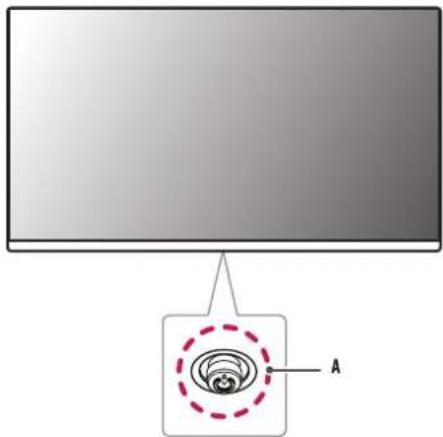
A: Buton Joystick
natural_image
Illustration of a hand holding a vertical object with a green circle highlighting a point, no text or symbols present
Software acceptat
Setările meniului
ADS-25FSF-19 19025EPK-1
ADS-25FSF-19 19025EPCU-1
ADS-25FSF-19 19025EPB-1
ADS-25FSF-19 19025EPI-1
ADS-25SFA-19-3 19025E
Se afisează mesajul [The screen is not currently set to the recommended resolution.]?
This unit has been engineered and manufactured to ensure your personal safety, however improper use may result in potential electrical shock or fire hazards. In order to allow the proper operation of all safeguards incorporated in this display, observe the following basic rules for its installation, use, and servicing. All precautions and safety information apply to LCD and OLED models.
On Safety
Use only the power cord supplied with the unit. In case you use another power cord, make sure that it is certified by the applicable national standards if not being provided by the supplier. If the power cable is faulty in any way, please contact the manufacturer or the nearest authorized repair service provider for a replacement.
The appliance coupler is used as the disconnect device.
Please make sure the device is installed near the wall outlet to which it is connected and that the outlet is easily accessible.
Operate the display only from a power source indicated in the specifications of this manual or listed on the display. If you are not sure what type of power supply you have in your home, consult with your dealer.
Overloaded AC outlets and extension cords are dangerous. So are frayed power cords and broken plugs. They may result in a shock or fire hazard. Call your service technician for replacement.
As long as this unit is connected to the AC wall outlet, it is not disconnected from the AC power source even if the unit is turned off.
Do not Open the Display:
- There are no user serviceable components inside.
- There are Dangerous High Voltages inside, even when the power is OFF.
- Contact your dealer if the display is not operating properly.
To Avoid Personal Injury :
- Do not place the display on a sloping shelf unless properly secured.
- Use only a stand recommended by the manufacturer.
- Do not drop an object on or apply impact to the product. Do not throw any toys or objects on the product screen.
It can cause injury to human, problem to product and damage the display.
To Prevent Fire or Hazards:
- Always turn the display OFF if you leave the room for more than a short period of time. Never leave the display ON when leaving the house.
- Keep children from dropping or pushing objects into the display's cabinet openings. Some internal parts carry hazardous voltages.
- Do not add accessories that have not been designed for this display.
- When the display is to be left unattended for an extended period of time, unplug it from the wall outlet.
- In the presence of thunder and lightning, never touch the power cord and signal cable because it can be very dangerous. It can cause electric shock.
On Installation
Do not allow anything to rest upon or roll over the power cord, and do not place the display where the power cord is subject to damage.
Do not use this display near water such as near a bathtub, washbowl, kitchen sink, laundry tub, in a wet basement, or near a swimming pool.
Displays are provided with ventilation openings in the cabinet to allow the release of heat generated during operation. If these openings are blocked, built-up heat can cause failures which may result in a fire hazard.
Therefore, NEVER:
- Block the bottom ventilation slots by placing the display on a bed, sofa, rug, etc.
- Place the display in a built-in enclosure unless proper ventilation is provided.
- Cover the openings with cloth or other material.
- Place the display near or over a radiator or heat source.
Do not rub or strike the Active Matrix LCD with anything hard as this may scratch, mar, or damage the Active Matrix LCD permanently.
Do not press the LCD screen with your finger for a long time as this may cause some afterimages.
Some dot defects may appear as Red, Green or Blue spots on the screen.
However, this will have no impact or effect on the display performance.
If possible, use the recommended resolution to obtain the best image quality for your LCD display. If used under any mode except the recommended resolution, some scaled or processed images may appear on the screen. However, this is characteristic of the fixed-resolution LCD panel.
Displaying a still image for long time on the monitor may leave persistent image or stain on the monitor screen. To avoid this problem, use a screen saver and power off when this product is not used. Persistent image or stain caused by long time usage are not covered by the warranty on this product.
Do not shock or scratch the front and sides of the screen with metallic objects.
Otherwise, it may cause damage to the screen.
Make sure the panel faces forward and hold it with both hands to move. If you drop the product, the damaged product can cause electric shock or fire. Contact an authorized the service center for repair.
Avoid high temperatures and humidity.
Do not install this product on a wall if it could be exposed to oil or oil mist.
• This may damage the product and cause it to fall.
For displays with glossy bezels the user should consider the placement of the display as the bezel may cause disturbing reflections from surrounding light and bright surfaces.
Do not use products using high voltage around the Monitor. (ex. Electrical Swatter)
• Monitor may have malfunction as its electrical shock.
Precautions to the AC Adapter and Power
If water or any foreign substance goes inside the product (TV, monitor, power cord, or AC adapter), disconnect the power cord immediately and contact the service center.
- Otherwise, this may cause a fire or electric shock due to damage to the product.
Do not touch the power plug or AC adapter with wet hands. If the pins of the plug are wet or dusty, wipe and dry them before use.
- Otherwise, this may cause a fire or electric shock.
Make sure to completely insert the power cord into the AC adapter.
- If loosely connected, the poor connection may cause a fire or electric shock.
Be sure to use power cords and AC adapters provided or approved by LG Electronics, Inc. - The use of non-approved products may cause a fire or electric shock.
When unplugging the power cord, always pull it by the plug. Do not bend the power cord with excessive force.
- The power line can be damaged, which may cause electric shock or fire.
Be careful not to step or place heavy objects (electronic appliances, clothing, etc.) on the power cord or AC adapter. Be careful not to damage the power cord or AC adapter with sharp objects.
- Damaged power cords may cause a fire or electric shock.
Never disassemble, repair or modify the power cord or AC adapter.
• This may cause a fire or electric shock.
Be sure to keep the outlet, AC adapter, and pins of the power plug clean from dust and etc.
• This may cause a fire.
On Cleaning
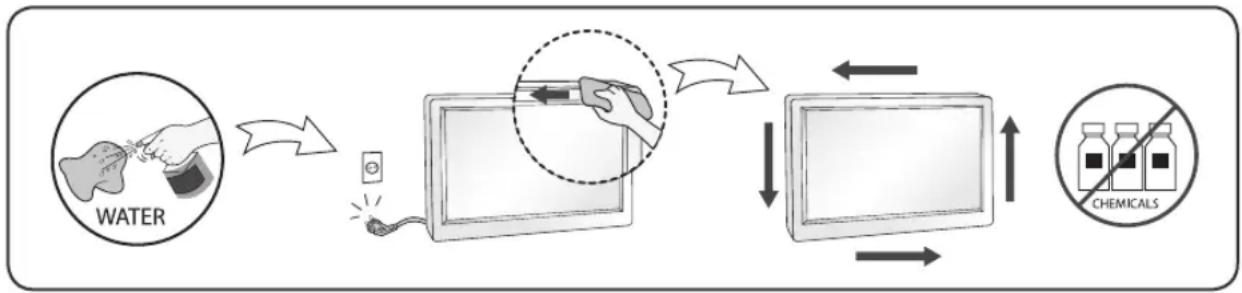
- Unplug the display before cleaning the face of the display screen.
- Use a slightly damp (not wet) cloth. Do not use an aerosol directly on the display screen because over-spraying may cause electrical shock.
- When cleaning the product, unplug the power cord and scrub gently with a soft cloth to prevent scratching. Do not clean with a wet cloth or spray water or other liquids directly onto the product. An electric shock may occur. (Do not use chemicals such as benzene, paint thinners or alcohol)
- Spray water onto a soft cloth 2 to 4 times, and use it to clean the front frame; wipe in one direction only. Too much moisture may cause staining.
flowchart
graph LR
    A["WATER"] --> B["Reinjection"]
    B --> C["Filter"]
    C --> D["Extraction"]
    D --> E["Chemical Detection"]
    E --> F["Output"]
On Repacking
- Do not throw away the carton and packing materials. They make an ideal container in which to transport the unit. When shipping the unit to another location, repack it in its original material.
MASA TË RËNDËSISHME PARAPRAKE
flowchart
graph LR
    A["VODA"] --> B["Tube with a brush"]
    B --> C["Tube with arrow pointing to the screen"]
    C --> D["Tube with arrow pointing to the screen"]
    D --> E["Chemikäle"]
Balení
flowchart
graph LR
    A["NEPO"] --> B["Close-up of device"]
    B --> C["Monitor with magnified view"]
    C --> D["Monitor with arrow indicating detection"]
    D --> E["XHMIKA"]
flowchart
graph LR
    A["WATER"] --> B["Gas washing"]
    B --> C["Digital device with magnified glass"]
    C --> D["Tube with liquid"]
    D --> E["Chemical Solution"]
    E --> F["Tube with liquid"]
    F --> G["Tube with liquid"]
    G --> H["Tube with liquid"]
    H --> I["Tube with liquid"]
    I --> J["Tube with liquid"]
    J --> K["Tube with liquid"]
    K --> L["Tube with liquid"]
    L --> M["Tube with liquid"]
    M --> N["Tube with liquid"]
    N --> O["Tube with liquid"]
    O --> P["Tube with liquid"]
    P --> Q["Tube with liquid"]
    Q --> R["Tube with liquid"]
    R --> S["Tube with liquid"]
    S --> T["Tube with liquid"]
    T --> U["Tube with liquid"]
    U --> V["Tube with liquid"]
    V --> W["Tube with liquid"]
    W --> X["Tube with liquid"]
    X --> Y["Tube with liquid"]
    Y --> Z["Tube with liquid"]
    Z --> AA["Tube with liquid"]
    AA --> AB["Tube with liquid"]
    AB --> AC["Tube with liquid"]
    AC --> AD["Tube with liquid"]
    AD --> AE["Tube with liquid"]
    AE --> AF["Tube with liquid"]
    AF --> AG["Tube with liquid"]
    AG --> AH["Tube with liquid"]
    AH --> AI["Tube with liquid"]
    AI --> AJ["Tube with liquid"]
    AJ --> AK["Tube with liquid"]
    AK --> AL["Tube with liquid"]
    AL --> AM["Tube with liquid"]
    AM --> AN["Tube with liquid"]
    AN --> AO["Tube with liquid"]
    AO --> AP["Tube with liquid"]
    AP --> AQ["Tube with liquid"]
    AQ --> AR["Tube with liquid"]
    AR --> AS["Tube with liquid"]
    AS --> AT["Tube with liquid"]
    AT --> AU["Tube with liquid"]
    AU --> AV["Tube with liquid"]
    AV --> AW["Tube with liquid"]
    AW --> AX["Tube with liquid"]
    AX --> AY["Tube with liquid"]
Opnieuw inpakken
flowchart
graph LR
    A["ÁGUA"] --> B["Water injection"]
    B --> C["Device with magnified inset"]
    C --> D["Monitor with liquid level"]
    D --> E["Químicos injection"]
    E --> F["Output"]
Empacotamento
flowchart
graph LR
    A["APA"] --> B["Tube with a brush and magnifying glass"]
    B --> C["Table with arrow pointing inward"]
    C --> D["Chemicals Detection"]
    D --> E["Tube with downward arrow"]
    E --> F["Tube with upward arrow"]
flowchart
graph LR
    A["VOYA"] --> B["Device with a bottle and plug"]
    B --> C["Device with a hand holding a pen and pencil"]
    C --> D["Device with a magnified inset showing a magnified view of the device"]
    D --> E["Device with a magnified inset showing a magnified view of the device"]
    E --> F["XEMIKALIJE"]
O raspakivanju
- Nemojte da bacite kartonsku kutiju i materijal za pakovanje. Oni su idealni za transportovanje proizvoda. Prilikom transporta proizvoda na drugu lokaciju, ponovo ga zapakujte pomoću originalnog materijala.
DÔLEŽITÉ BEZPEČNOSTNÉ OPATRENIA
flowchart
graph LR
    A["VATTEN"] --> B["Tube with Sensor"]
    B --> C["Table with Pen"]
    C --> D["Table with Inlet"]
    D --> E["KEMIKALIER"]
flowchart
graph LR
    A["SU"] --> B["Device placement"]
    B --> C["IV Care with KIMYASALLARI"]
    C --> D["Access to monitor"]
    D --> E["Access to monitor with device placement"]
    E --> F["Access to monitor with device placement"]
    F --> G["Access to monitor with device placement"]
    G --> H["Access to monitor with device placement"]
MUHIM EHTIYOT CHORALARI
Shaxsiy shikastlanishlarning oldini olish:
- To'g'ri mahkamlanmagan bo'lsa, displeyni qiya tokchalarga o'rnatmang.
- Faqat ishlab chiqaruvchi tomonidan tavsiya qilingan tayanchlardan foydalaning.
- Mahsulot ustiga buyumlarni tashlamang yoki uni hech qanday ta'sir ostiga qo'ymang. Mahsulot ekraniga o'yinchoqlar yoki boshqa buyumlarni otmang. Bu odamlarning jarohatlanishi, mahsulot bilan bog'liq muammolar va displayyning shikastlanishiga olib kelishi mumkin.
flowchart
graph LR
    A["SUV"] --> B["Input: UV exposure"]
    B --> C["Monitor with magnified view"]
    C --> D["Display screen with arrow pointing inward"]
    D --> E["Output: kimyoviy detection"]
flowchart
graph LR
    A["ÁGUA"] --> B["Water injection"]
    B --> C["Device with magnified inset"]
    C --> D["Monitor with liquid level"]
    D --> E["Químicos injection"]
    E --> F["Output"]
Empacotamento
flowchart
graph LR
    A["Aigua"] --> B["Monitor with 30% detection"]
    B --> C["Monitor with 10% detection"]
    C --> D["Substance Químiques"]
    D --> E["Monitor with 5% detection"]
    E --> F["Monitor with 2% detection"]
    F --> G["Substance Químiques"]
Tornar a embalar
natural_image
Cartoon illustration of a computer monitor with a sad face and a 'no' symbol, next to a battery (no text or symbols on the monitor itself)natural_image
Cartoon illustration of a computer monitor with a smiling face and a money bag, no text or symbols presentnatural_image
Cartoon illustration of a computer monitor with a sad face and raised arms, resting on a rectangular block (no text or symbols)natural_image
Cartoon illustration of a computer monitor with a sad face and tools, no text or symbols presentnatural_image
Cartoon illustration of a computer monitor with a sad face and steam lines (no text or symbols)natural_image
Cartoon illustration of a computer monitor with a sad face and a phone emitting sound waves (no text or symbols)natural_image
Cartoon illustration of a person holding a document with a computer monitor displaying a sad face (no text or symbols present)natural_image
Cartoon illustration of a computer monitor with a sad face and smoke, symbolizing stress or urgency (no text or symbols present)natural_image
Illustration of a child kicking a soccer ball while a distressed computer character is running away (no text or symbols)natural_image
Cartoon illustration of a smiling computer monitor character standing on a grater (no text or symbols)natural_image
Cartoon illustration of a distressed computer monitor character with arms raised (no text or symbols)natural_image
Cartoon illustration of a computer monitor with a sad face and waving hands, sitting at a desk (no text or symbols)natural_image
Illustration of a smiling computer monitor with wind turbines and clouds in the background (no text or symbols)natural_image
Cartoon illustration of a computer monitor holding a 'no sign' and a window with sun (no text or symbols on the monitor or window)natural_image
Illustration of a computer monitor displaying a cartoon character with motion lines (no text or symbols)natural_image
Illustration of a cartoon kettle and a computer monitor with a smiling face, emitting bubbles (no text or symbols)natural_image
Cartoon illustration of a smiling computer monitor with arms and legs, floating on a surface (no text or symbols)natural_image
Cartoon illustration of a toilet and computer monitor with a sad face (no text or symbols)natural_image
Cartoon illustration of a smiling smartphone with a gear and a hand holding a device (no text or symbols)정격 전압에서 사용하세요.
natural_image
Illustration of a cartoon electric plug emitting sound waves to a device with a surprised face (no text or symbols)natural_image
Cartoon illustration of a distressed computer monitor with a sad face and cloud above, no text or symbols presentnatural_image
Illustration of a hand holding a power outlet with a computer monitor showing a sad face, no text or symbols present.natural_image
Illustration of a hand holding a small electronic device with a smiling face and a red arrow indicating rotation (no text or symbols)natural_image
Illustration of a USB cable connector with a red arrow indicating compression or disassembly (no text or symbols)natural_image
Coiled cable and electronic device with LG logo (no text or symbols on main subject)natural_image
Cartoon illustration of a smiling computer monitor with a smiling face and connected to a power button (no text or symbols)natural_image
Cartoon illustration of a smiling computer monitor with a phone connected to its right (no text or symbols)natural_image
Illustration of a person watching a whale on a computer monitor (no text or symbols present)natural_image
Illustration of a cartoon mouse pulling a smiling computer screen (no text or symbols)natural_image
Cartoon illustration of a computer monitor with a surprised face and a falling object (no text or symbols)natural_image
Cartoon illustration of a smiling computer monitor with hands reaching toward it, no text or symbols present.natural_image
Cartoon illustration of a smiling computer inside an open box (no text or symbols)natural_image
Illustration of two people holding a smiling computer monitor (no text or symbols present)natural_image
Cartoon illustration of a smiling computer monitor with a surprised expression (no text or symbols)natural_image
Cartoon illustration of a smiling computer monitor character with a paper airplane and speech bubble (no text or symbols)natural_image
Cartoon illustration of a baby and a man on a computer screen (no text or symbols)natural_image
Cartoon illustration of a computer monitor with a sad face and a red prohibition symbol, next to a window with water droplets (no text or symbols on main elements)물이 들어가거나 젖게하지 마세 요.
natural_image
Cartoon illustration of a sad face emerging from a smartphone with a thermometer and lightning bolts (no text or symbols)natural_image
Cartoon illustration of a computer monitor with a sad face and a warning symbol (no text or labels)natural_image
Illustration of a woman holding a cup with a smiley face beside a computer monitor (no text or symbols)natural_image
Cartoon illustration of a computer monitor displaying a sad face with an angry expression (no text or symbols)natural_image
Cartoon illustration of a smiling computer monitor holding a document (no text or symbols on the monitor or background)natural_image
Cartoon illustration of a smiling computer monitor with eyes closed and a hand pointing at it (no text or symbols)natural_image
Four cartoon-style computer monitors with smiling faces and curved arrows, each holding a hand (no text or symbols)natural_image
Cartoon illustration of a hand holding a spray bottle next to a computer monitor with a sad face, no text or symbols present.natural_image
Cartoon illustration of a smiling computer monitor with a smile and a desk lamp (no text or symbols)natural_image
Cartoon illustration of a man holding a paint can next to a computer monitor displaying a sad face (no text or symbols present)flowchart
graph LR
    A["Input: Tissue"] --> B["Image: Sensor"]
    B --> C["Annotated Device"]
    C --> D["Monitor with Mask"]
    D --> E["Output: Alkymia (with no label)"]
DDC is a communication channel over which the monitor automatically informs the host system (PC) about its capabilities.
DDC protocol
① DDC1/DDC2B
An uni-directional communication channel.
② DDC 2AB/DDC2B+/DDC2Bi
A bi-directional communication channel.
Note
- PC must support DDC functions to do this.
E-DDC (Enhanced DDC)
A protocol based on I²C and used on a bidirectional data channel between the display and host. This protocol accesses devices at I²C address of A0/A1 as well as the address 60. The 60 address is used as a segment register to allow larger amounts of data to be retrieved than is possible using DDC2B protocols. The protocol is compatible with DDC2B protocols.
DEUTSCH
DDC (Display Data Channel)
② DDC 2AB/DDC2B+/DDC2Bi
② DDC 2AB/DDC2B+/DDC2Bi
② DDC 2AB/DDC2B+/DDC2Bi
② DDC 2AB/DDC2B+/DDC2Bi
② DDC 2AB/DDC2B+/DDC2Bi
양방향 통신 채널.
주
② DDC 2AB/DDC2B+/DDC2Bi
双方向通信チャンネル。
注
② DDC 2AB/DDC2B+/DDC2Bi
Energy Saving Design
This program is designed to have computer equipment manufacturers build circuitry into their products to reduce power consumption when it is not in operation.
When this monitor is used with a PC on which a screen blanking software complying with the VESA Display Power Management Signalling (DPMS) Protocol is installed, it can conserve significant energy by reducing power consumption when it is not in operation.
There are 2 signal lines, 3 modes of operation.
: On Mode, Sleep Mode, Off Mode.
| Mode Definition | |
| On mode | The normal operation.When the monitor is on mode, being connected to a power source, it displays an image. |
| Sleep Mode | The reduced power state returns to on mode when the user moves the mouse or presses a key on the keyboard. |
| Off Mode | The lowest power consumption state returns to on mode when the user pushes a power switch. |
Note
- The energy saving Design monitors only work while connected to the computers that have energy saving features.
Mode activé (On), mode de veille (Sleep), mode désactivé (Off).
Unplug the monitor from the wall outlet and refer servicing to qualified service personnel when :
- The power cord or plug is damaged or frayed.
• Liquid has been spilled into the monitor. - The monitor has been exposed to rain or water.
- The monitor does not operate normally following the operating instructions. Adjust only those controls that are covered in the operating instructions. An improper adjustment of other controls may result in damage and often requires extensive work by a qualified technician to restore the monitor to normal operation.
- The monitor has been dropped or the cabinet has been damaged.
- The monitor exhibits a distinct change in performance.
- Snapping or popping from the monitor is continuous or frequent while the monitor is operating. It is normal for some monitors to make occasional sounds when being turned on or off, or when changing video modes.
Do not attempt to service the monitor yourself, as opening or removing covers may expose you to dangerous voltage or other hazards. Refer all servicing to qualified service personnel.