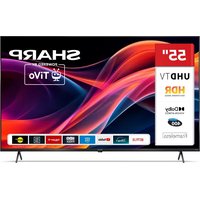
55HM5246E - TV SHARP - Free user manual and instructions
Find the device manual for free 55HM5246E SHARP in PDF.


User questions about 55HM5246E SHARP
0 question about this device. Answer the ones you know or ask your own.
Ask a new question about this device
Download the instructions for your TV in PDF format for free! Find your manual 55HM5246E - SHARP and take your electronic device back in hand. On this page are published all the documents necessary for the use of your device. 55HM5246E by SHARP.
USER MANUAL 55HM5246E SHARP
The terms HDMI, HDMI High-Definition Multimedia Interface, HDMI Trade dress and the HDMI Logos are trademarks or registered trademarks of HDMI Licensing Administrator, Inc.

VISION-ATMOS
Dolby, Dolby Vision, Dolby Atmos, and the double-D symbol are registered trademarks of Dolby Laboratories Licensing Corporation. Manufactured under license from Dolby Laboratories. Confidential unpublished works. Copyright © 2012-2024 Dolby Laboratories. All rights reserved.
© 2025 Xperi Inc. All Rights Reserved. TiVo and the TiVo logo are trademark(s) or registered trademark(s) of Xperi Inc. or its subsidiaries in the United States and other countries. All other trademarks and content are the property of their respective owners.

The Bluetooth® word mark and logos are registered trademarks owned by Bluetooth SIG, Inc.

CERTIFIED
The Wi-Fi CERTIFIED Logo is a certification mark of the Wi-Fi Alliance.
Important safety instructions

Please, read these safety instructions and respect the following warnings before the appliance is operated:
In order to prevent fire always keep candles and other open flames away from this product.

Alternating Current
This equipment is a Class II or double insulated electrical appliance. It has been designed in such a way that it does not require a safety connection to electrical earth.
- Television sets with 43'' size screens or more must be lifted and carried by at least two people.
- This TV does not contain any parts which could be repaired by the user. In case of a fault, contact the manufacturer or the authorised service agent. Contact with certain parts inside the TV might endanger your life. The guarantee does not extend to faults caused by repairs carried out by unauthorized third parties.
- Do not remove the rear part of the appliance.
- This appliance is designed for the receiving and reproduction of video and sound signals. Any other use is strictly forbidden.
- Do not expose the TV to dripping or splashing liquid.
- To disconnect the TV from mains please unplug the mains plug from the mains socket.
- If the supply cord is damaged, it must be replaced by the manufacturer, a service agent or similarly qualifi ed persons in order to avoid a hazard.
- The suggested distance to watch HD TV is approximately three times longer than the screen diagonal size. Reflections on the screen from other light sources can make the quality of the picture worse.
- Ensure the TV has sufficient ventilation and is not close to other appliances and other pieces of furniture.
- Install the product at least 5cm from the wall for ventilation.
- Ensure that the ventilation openings are clear of items such as newspapers, table-cloths, curtains, etc.
- The TV set is designed to be used in a moderate climate.
- The TV set is designed exclusively for operation in a dry place. When using the TV outside, please, make sure it is protected against moisture (rain, splashing water). Never expose to moisture.
- Do not place any objects, containers filled with liquids, such as vases, etc. on the TV. These containers might get pushed over, which would endanger electric safety. Place the TV exclusively on flat and stable surfaces. Do not place any objects such as newspaper or blankets, etc. on or under the TV.
- Make sure the appliance does not stand on any power cables as they might get damaged. Mobile phones and other devices such as WLAN adapters, monitoring cameras with wireless signal transmission, etc. might cause electromagnetic interference and they should not be placed near the appliance.
- Do not place the appliance near heating elements or in a place with direct sunlight as it has a negative effect on cooling of the appliance. Heat storage is dangerous and it can seriously reduce the lifetime of the
appliance. In order to ensure the safety, ask a qualified person to remove the dirt from the appliance.
- Try to prevent damage to the mains cable or mains adapter. The appliance can only be connected with the supplied mains cable/adapter.
- Storms are dangerous for all electric appliances. If the mains or aerial wiring is struck by lightening the appliance might get damaged, even if it is turned off. You should disconnect all the cables and connectors of the appliance before a storm.
- To clean the screen of the appliance use only a damp and soft cloth. Use only clean water, never detergents and in no case use solvents.
- Position the TV close to the wall to avoid the possibility of it falling when pushed.
- WARNING - Never place a television set in an unstable location. A television set may fall, causing serious personal injury or death. Many injuries, particularly to children, can be avoided by taking simple precautions such as:
- Use cabinets or stands recommended by the manufacturer of the television set.
- Only use furniture that can safely support the television set.
- Ensure the television set is not overhanging the edge of the supporting furniture.
- Not place the television set on tall furniture (for example, cupboards or bookcases) without anchoring both the furniture and the television set to a suitable support.
- Not place the television set on cloth or other materials that may be located between the television set and supporting furniture.
- Educate children about the dangers of climbing on furniture to reach the television set or its controls.
- Ensure that children do not climb or hang onto the TV.
- If your existing television set is being retained and relocated, the same considerations as above should be applied.
- The software on your TV and the OSD layout can be changed without notice.
- TV operating conditions:
-temperature from +10 to +35^
- humidity no more than 80% (at a temperature of 25^ )
- atmospheric pressure from 86 to 106kPa (from 650 to 800mmHg )
- Turn off the TV after use and unplug it if it is not going to be used for a long time.
Warning:
- When turning off the set, use the standby button on the remote control. By long pressing of this button, TV will turn off and enter the energy saving standby mode to meet the eco-design requirements. This mode is default one.
- For the electrostatic discharge (ESD) test of EN55035, it was found that manual operation by Standby button ON/OFF switch is needed to resume normal operation as intended after the test.
- Do not use TV set directly after unpacking. Wait until TV warms up to the room temperature before using it.
- Never connect any external devices to a live appliance. Switch off not only the TV but also the devices which are being connected! Plug the TV plug into the wall socket after connecting any external devices and the aerial!
Always make sure there is free access to the TV mains plug. - The appliance is not designed for a use in a workplace fitted with monitors.
- The systematic use of headphones at high volume might lead to irreversible hearing damage.
- Ensure environmental disposal of this appliance and any components including batteries. When in doubt, please, contact your local authority for details of recycling.
- While installing the appliance, do not forget that furniture surfaces are treated with various varnishes, plastics, etc. or they might be polished. The chemicals contained in these products might have a reaction with
the TV stand. This could result in bits of the material sticking to the furniture surface, which are difficult to remove, if not impossible.
- The screen of your TV has been produced under top quality conditions and was checked in detail for faulty pixels several times. Due to the technological properties of the manufacturing process, it is not possible to eliminate the existence of a small number of faulty points on the screen (even with maximum care while in production). These faulty pixels are not considered faults in terms of guarantee conditions, if their extent is not greater than the boundaries defned by DIN norm.
- The manufacturer cannot be held responsible, or be liable, for customer service-related issues related to the third party content or services. Any questions, comments or service-related inquiries relating to the third party content or service should be made directly to the applicable content or service provider.
- There are a variety of reasons you may be unable to access content or services from the device unrelated to the device itself, including, but not limited to, power failure, the Internet connection, or failure to confi gure your device correctly. Sharp Consumer Electronics Poland, its directors, offi cers, employees, agents, contractors and affi liates shall not be liable to you or any third party with respect to such failures or maintenance outages, regardless of cause or whether or not it could have been avoided.
- All third party content or services accessible via this device is provided to you on an "as-is" and "as available" basis and Sharp Consumer Electronics Poland and its affiliates make no warranty or representation of any kind to you, either express or implied, including, without limitation, any warranties of merchantability, non-infringement, fitness for a particular purpose or any warranties of suitability, availability, accuracy, completeness, security, title, usefulness, lack of negligence or error-free or uninterrupted operation or use of the content or services provided to you or that the content or services will meet your requirements or expectations.
- 'Sharp Consumer Electronics Poland' is not an agent of and assumes no responsibility for the acts or omissions of third party content or service providers, nor any aspect of the content or service related to such third party providers.
- In no event will 'Sharp Consumer Electronics Poland' and/or its affi liates be liable to you or any third party for any direct, indirect, special, incidental, punitive, consequential or other damages, whether the theory of liability is based on contract, tort, negligence, breach of warranty, strict liability or otherwise and whether or not Sharp Consumer Electronics Poland and/or its affi liates have been advised of the possibility of such damages.
- This product contains technology subject to certain intellectual property rights of Microsoft. Use or distribution of this technology outside of this product is prohibited without the appropriate license(s) from Microsoft.
- Content owners use Microsoft PlayReady™ content access technology to protect their intellectual property, including copyrighted content. This device uses PlayReady technology to access PlayReady-protected content and/or WMDRM-protected content. If the device fails to properly enforce restrictions on content usage, content owners may require Microsoft to revoke the device's ability to consume PlayReady-protected content. Revocation should not affect unprotected content or content protected by other content access technologies. Content owners may require you to upgrade PlayReady to access their content. If you decline an upgrade, you will not be able to access content that requires the upgrade.
Important information regarding use of video games, computers, captions and other fixed image displays.
- The extended use of fixed image program material can cause a permanent "shadow image" on the LCD screen (this is sometimes incorrectly referred to as "burnout to the screen"). This shadow image is then perma
nently visible on the screen in the background. It is irreversible damage. You can avoid such a damage by following instructions below:
- Reduce the brightness/contrast setting to a minimum viewing level.
- Do not display the fixed image for a long period of time. Avoid displaying of:
» Teletext time and charts,
TV/DVD menu, e.g. DVD contents,
In the "Pause" mode (hold): Do not use this mode for a long time, e.g. while watching a DVD or a video.
» Turn off the appliance if you are not using it.
Batteries
- CAUTION: Risk of explosion if the battery is replaced by an incorrect type.
- Observe the correct polarity when inserting the batteries.
- Do not expose batteries to high temperatures and do not place them on locations where the temperature might increase quickly, e.g. near the fire or on the direct sunshine.
- Do not expose batteries to excessive radiant heat, do not throw them into the fire, do not disassemble them and do not try to recharge un-rechargeable batteries. They could leak or explode. Never use different batteries together or mix new and old ones. Dispose of batteries in an environmentally friendly way. Most of the EU countries regulate the disposal of batteries by law.
Cd
Disposal
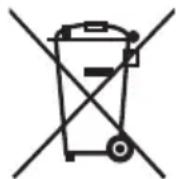
- Do not dispose of this TV as unsorted municipal waste. Return it to a designated collection point for the recycling of WEEE. By doing so, you will help to conserve resources and protect the environment. Contact your retailer or local authorities for more information.
CE Statement:
- Hereby, Sharp Consumer Electronics Poland sp. z o.o. declares that this equipment is in compliance with the essential requirements and other relevant provisions of RED Directive 2014/53/EU.
- The full text of the EU declaration of conformity is available by following the link www.sharpcomputer.com/documents-of-conformity/ This equipment may be operated in all EU countries. The 5 GHz WLAN(Wi-Fi) function of this equipment may only be operated indoors.
Wi-Fi max transmitter power:
100 mW at 2,400 GHz - 2,4835 GHz
100 mW at 5,150 GHz - 5,250 GHz
100 mW at 5,250 GHz - 5,350 GHz
100 mW at 5,470 GHz - 5,730 GHz
100 mW at 5,735 GHz - 5,835 GHz
BT max transmitter power: 10 mW at 2,402 GHz - 2,480 GHz.
What is included in the box
Supply of this TV includes following parts:
- 1xTV - 1x TV stand installation packet
- 1x Remote control - 1x Quick Start Guide
- 2x AAA batteries
Attaching the stand
Please follow the instructions in Technical leaflet, located in the accessories bag.
Wall mounting the TV
Install the wall mounting bracket to the television as advised by the bracket manufacturer.
Connections
Connecting external devices - see the last page of this manual.
Getting started - initial set up
- If rubber parts, foam parts or tape are attached to the TV frame, please remove them gently.
- Using the antenna cable (not supplied), connect the TV to the antenna wall socket.
- To use a wired Internet connection, connect a Cat 5/Ethernet cable (not included) from the TV to your broadband modem/rodter.
- Insert the supplied batteries in the remote control.
- Connect the power cable to the electrical outlet.
- Press the standby button to switch on the TV. After loading, the TV First Time Installation begins.
- Select a language for your TV menus and information.
- Continue to set the most suitable options for you until installation completion.
- During the setup, you'll have the option to pair the remote control with the TV. Pairing the remote will enable voice control for the TV and allow you to search for content using your voice. If you choose not to pair the remote at this time, you can do so later via the settings menu.
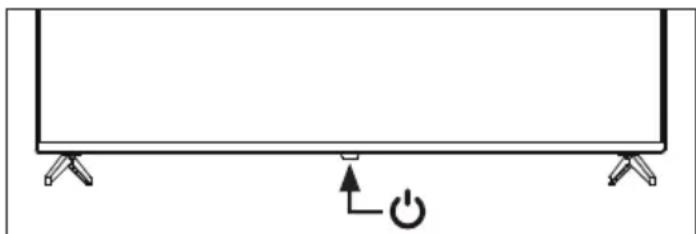
On/Off button
On/Off button is located on the bottom side of the LED light. Press this button to switch on/off the TV.
Choosing an Input/Source
Using the buttons on the remote control:
- Press the INPUT button. - The source menu will appear.
- Press [▲] or [▼] to select the input you require.
- Press [OK].
TV menu navigation
Use the ( / / /) buttons to focus on the desired item. Press the OK button to select the item currently in focus.
Press the BACK button to go back one step in the menu. Press and hold the BACK button to leave menu.
Press the (TiVo) button to display the TV's Home screen.
Electronic instruction manual
To access more useful information directly from your TV, you can launch the online manual by following these steps:
- Press the (TiVo) button on your remote.
- On the Home screen, navigate to the control carousel and select [Life Portal].
- In the portal, select the option [Instruction manual].
NOTE: Please ensure that your TV is connected to the internet in order to use this electronic manual.
Voice control
Pairing the remote control
To use voice control, the remote and the TV must be paired. This pairing is usually done during the initial setup of the TV. If you skipped this part of the setup, you can manually pair the remote by following these steps:
- Press the (settings) button to open the settings menu.
- Go to [System] > [Remote Control].
- A screen with pairing instructions will be displayed.
- Press and hold the left arrow button and the (TiVo) button simultaneously. When a message about successful pairing appears, you can release the buttons.
- Your remote is now paired with your TV.
Searching content with your voice
When your remote is paired, you can now use your voice to search for content. Follow these steps:
- Press and hold the (microphone) button.
- Speak naturally into the direction of the remote while continuing to hold down the microphone button.
- Release the button when you finish speaking.
Voice control search is extremely powerful and intelligent. The following are a few examples of voice control terms/phrases:
"Bourne Movies"
"Tom Hanks Comedies"
"I'll be back" or "Live from New York"
"Go to My Shows"
"Go to Settings"
"Turn on closed captions"
Accessibility
Accessibility settings are a set of features designed to make it easier for people with disabilities to use the TV. These settings assist users with visual or hearing impairments by adapting the TV interface and content.
Accessibility Shortcut: Press and hold the (mute) button to open the
Accessibility Shortcut from anywhere on the TV.
Alternatively, to access the Accessibility menu, press the (settings) button on the remote and select [Accessibility].
[Audio Guidance] - Hear the TV read each item you highlight aloud, including content descriptions.
[Audio Guidance] - Turn on/off the reading aloud of on-screen options.
[Volume] - Adjust the speech audio level to the TV volume: match TV volume, softer, louder.
[Speed] - Make the speech slower or faster from 0.25x to 2x.
[Pitch] - Adjust how low or high the speech sounds: low, normal, high.
[Live TV Closed Captions] - Screen text that provides a transcript of dialogue and sound effects, primarily for people who are deaf or hard of hearing.
[Audio Description] - Provides a narrated description of visual elements on the screen, such as actions, characters, and scenes, for visually impaired viewers.
[TV Power Sound] - Plays a sound effect when the TV turns on or off. High Contrast Information - Since the TiVo OS interface is set to high contrast by default, manual text contrast adjustment is not available.
How to download this document
You can download an electronic version of this document by scanning the QR code or following the link below. Once on the website, enter your model number in the search bar and select "Quick Start Guides" in the download section.
www.sharpcomer.com
Remote control
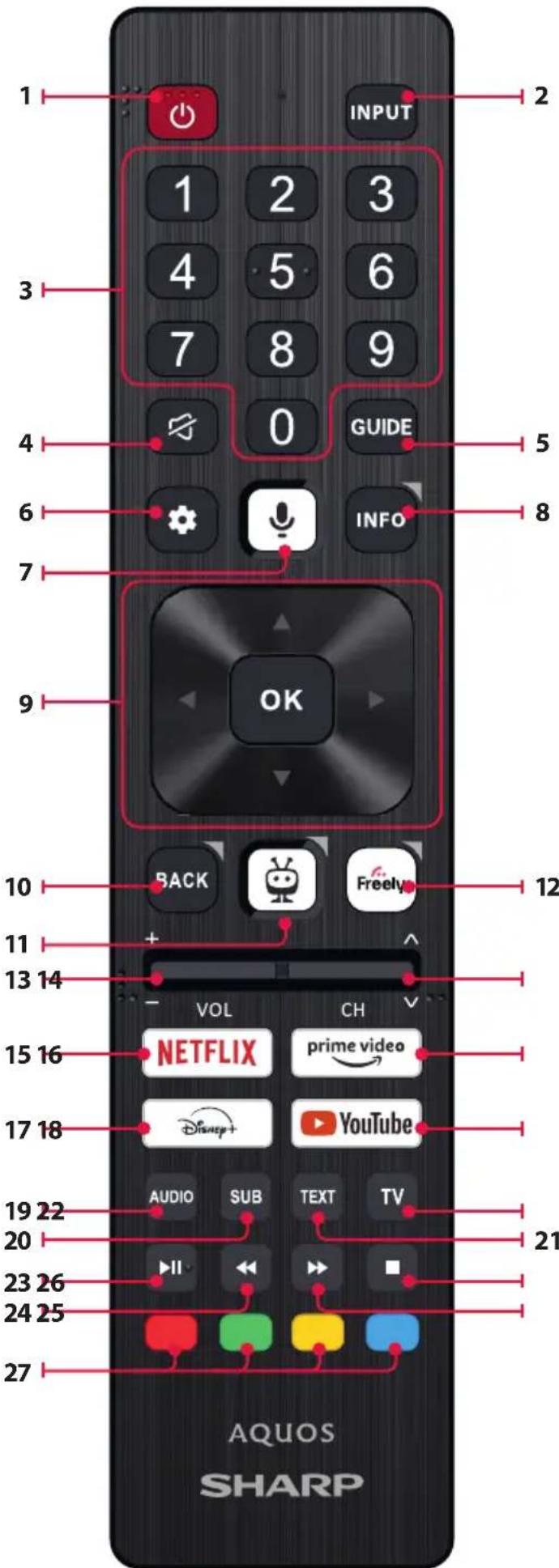
Remote Control Parts Description
- (standby) - Switch on the TV when in standby or vice versa.
- INPUT - Displays the input/source menu.
- NUMBER BUTTONS - 0-9 to select a TV channel directly.
- (mute) - Mutes the sound or vice versa.
- GUIDE-Opens the 7 day TV guide (digital TV mode).
- (settings) - Opens the Settings menu.
- (microphone) - Search for content and control the TV by voice. Press and hold the button, then speak into the microphone.
- INFO - Press once to view information about the program you are currently watching. Press again to display the TV channel list.
- ( / / /OK) - Allows you to navigate the on-screen menus and adjust the system settings to your preference.
- BACK - Short press: Step back in the menu. Long press: Exit the currently displayed menu or application.
- (TiVo) - Short press: Displays the TV's home screen. Long press: Opens the apps menu.
- FREELY - (UK models) Short press: Access the Freely service. Only available in the UK. (EU models) Long Press: A list of apps opens. Select the app you want to assign to this button for quick access. Short press: Launches the remembered app.
- VOL (+/-) - Tilt to increase/decrease the sound level.
- CH (+/-) - Tilt to switch to the next/previous channel in the sequence.
- NETFLIX - Access the Netflix App.
- Prime video - Access the Prime video App.
- DISNEY+ - Access to the Disney+ app.
- YOUTUBE - Access to the YouTube app.
- AUDIO - Opens audio track menu.
- SUB - Turns on/off subtitles at the bottom of the screen.
- TEXT - Turns teletext on/off.
- TV - Switches the TV to the last watched input.
- Play/pause media.
- Play in fast rewind mode.
- Play in fast forward mode.
-
- Stop playback.
- COLOUR BUTTONS - Execute corresponding function at that time.
100mWbij5,470GHz-5,730GHz
100mWbij5,735GHz-5,835GHz