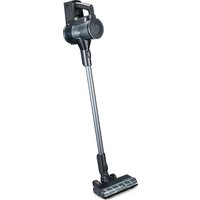
Innovac Xceed HS2-XSB - Vacuum Cleaner WILFA - Free user manual and instructions
Find the device manual for free Innovac Xceed HS2-XSB WILFA in PDF.


| Product Type | Cordless Stick Vacuum |
| Brand | Wilfa |
| Model | Innovac Xceed HS2-XSB |
| Power Supply | Rechargeable lithium-ion battery |
| Input Voltage | USB-C power adapter |
| Max Runtime | Up to 60 minutes (low mode) |
| Max mode runtime | 12 minutes |
| Auto mode runtime | 15-30 minutes depending on dust detection |
| Charging time | 1.5 to 3.5 hours |
| Dust bin capacity | Not specified (approx. 0.5 L estimated) |
| Filtration | Washable HEPA filter + filter sponge |
| Display | LED with charge and speed indicator |
| Speed modes | Auto, high, medium, low |
| Dust detection | Yes, with display color change |
| Included accessories | Electric floor brush, 2-in-1 brush, crevice tool, mini electric brush, extension tube, power adapter |
| Additional brushes | Carpet roller, floor brush |
| Wall mount | Yes (mount included) |
| Product warranty | 5 years |
| Battery warranty | 1 year |
| Auto standby | After 10 minutes of inactivity (consumption 0.2 W) |
| Charging temperature | Between 5°C and 40°C |
| Filter maintenance | Wash with water, dry completely before reinstalling |
| Brush roll cleaning | Remove hair and pet hair by hand (do not wash with water) |
| Country of origin | Norway (brand) |
Frequently Asked Questions - Innovac Xceed HS2-XSB WILFA
User questions about Innovac Xceed HS2-XSB WILFA
0 question about this device. Answer the ones you know or ask your own.
Ask a new question about this device
Download the instructions for your Vacuum Cleaner in PDF format for free! Find your manual Innovac Xceed HS2-XSB - WILFA and take your electronic device back in hand. On this page are published all the documents necessary for the use of your device. Innovac Xceed HS2-XSB by WILFA.
USER MANUAL Innovac Xceed HS2-XSB WILFA
natural_image
Black wireless hair dryer with digital display and 'wilfa' logo (no text on device body)INNOVAC XCEED
CORDLESS STICK VACUUM HS2-XSB
EN · Instruction manual
NO · Bruksanvisning
SE · Bruksanvisning
IMPORTANT SAFETY INSTRUCTIONS
- This appliance can be used by children aged from 8 years and above and persons with reduced physical, sensory or mental capabilities or lack of experience and knowledge if they have been given supervision or instruction concerning use of the appliance in a safe way and understand the hazards involved. Children shall not play with the appliance. Cleaning and user maintenance shall not be made by children without supervision.
- This product is intended for indoor, non-industrial, non-commercial, household use only.
- Do not use the item outdoors or for any other purpose
- Suitable for dry locations only. Do not use outdoors or on wet surfaces.
- Do not immerse in water.
- Do not use the hose if it is damaged.
- The plug must be removed from the socket-outlet before cleaning or maintaining the appliance.
ATTENTION - BATTERY
- Do not charge the vacuum cleaner at the ambient temperature of lower than 5^ C and higher than 40^ C.
- Let the vacuum cleaner cool down after use before charging.
- If the low power icon is shown on the display after
turning the vacuum cleaner on, you should charge the battery.
- When the battery is fully charged, disconnect the power supply.
- If your vacuum cleaner is not used for a long time (more than 2 months), please unplug it from the power supply. In order to ensure the battery life, it needs to be fully charged once every 2 months.
- Only use the maximum power when needed. Too much usage on max will shorten the expected battery life.
ATTENTION – CLEANING AND MAINTENANCE
- To ensure the suction force of your vacuum cleaner, please clean the floor brush, brush rollers, filters, and dustbin regularly.
- Make sure that all components are installed properly, otherwise it could cause product failure.
- Do not let water get into the electric elements of your vacuum cleaner, it could cause product failure.
EN
INSTRUCTION MANUAL · INNOVAC XCEED
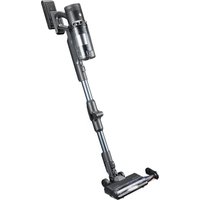
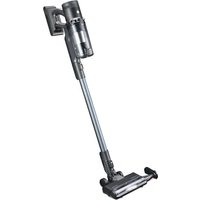
PRODUCT OVERVIEW
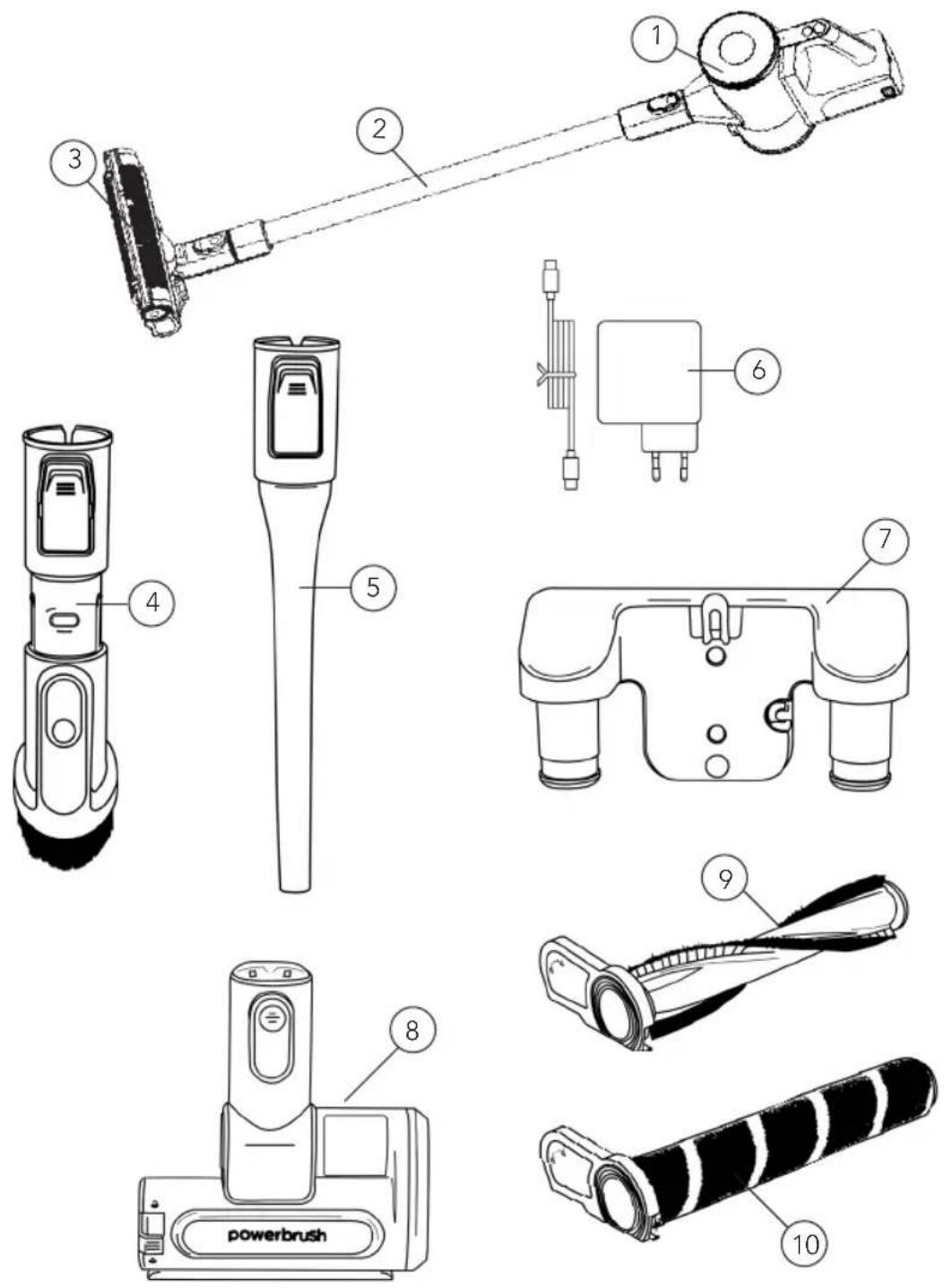
- Main unit
- Extension tube
- Electric floor brush
Components: - 2-in 1 brush
-
Crevice nozzle
-
Power adapter
- Wall mount
- Mini power brush
- Combo carpet brush
- Hard floor brush

DISPLAY
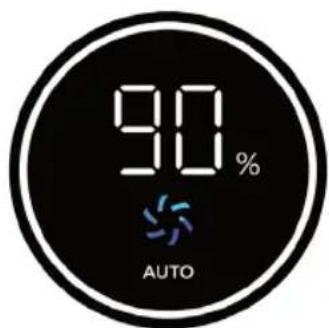
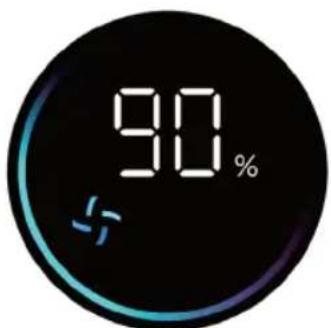
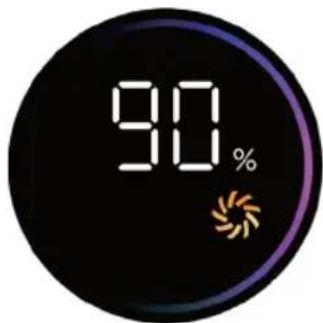
Auto; Average speed Low speed High speed
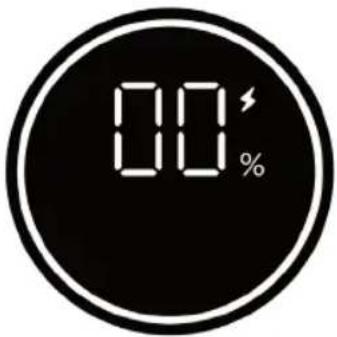
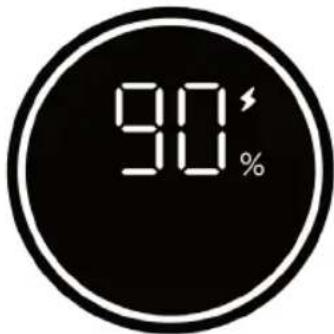
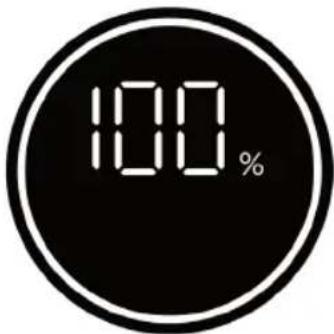
(Screen flashing)
Charging completed Charging Low battery
EN
USE
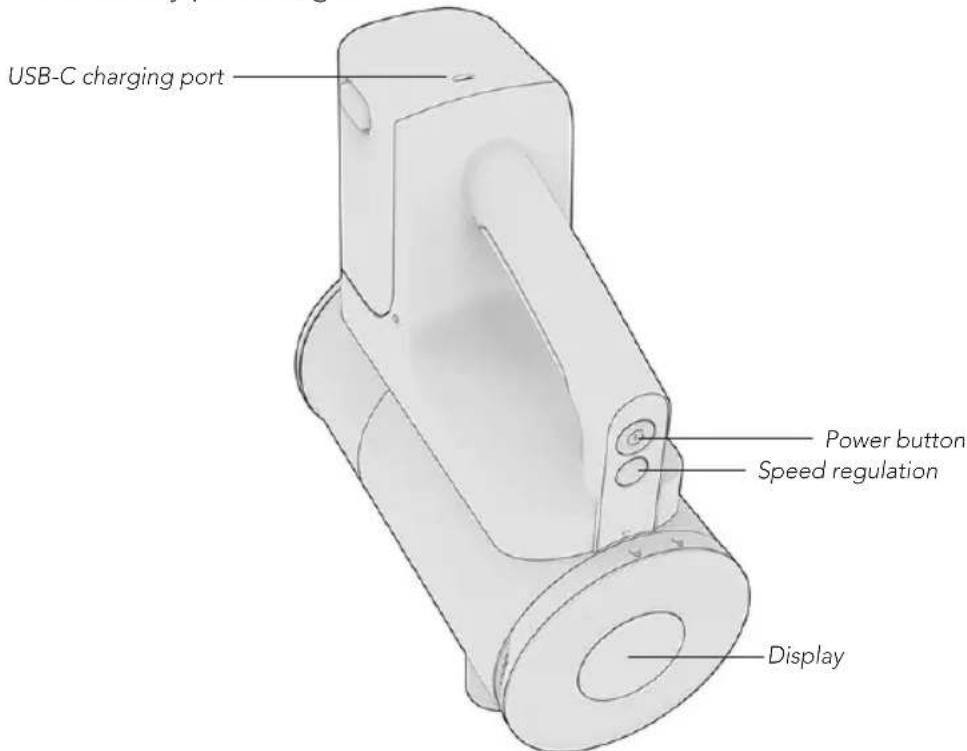
- Press the power button to start.
- After switching the vacuum cleaner on, press the speed regulation button to adjust the speed. The speed will go from Auto-High-Low.
- When using the Auto level, the dust sensing function is enabled. After sensing dust, the animation on the display will change from blue to purple. If no dust is detected, the animation remains blue, and power will run on low.
- When the vacuum cleaner is off, press the speed regulation button to display the battery percentage.
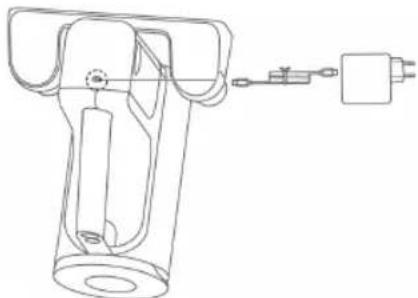
CHARGING
- Connect the power cord to the charging port
- Charge for 1.5-3.5 hours.
The battery can also be charged while detached from the vacuum cleaner.
natural_image
Technical line drawing of a mechanical device with no visible text or symbols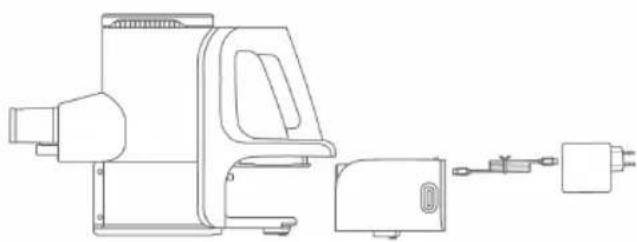
natural_image
Technical line drawing of a mechanical device with housing, enclosure, and power outlet (no text or symbols)CLEANING AND MAINTENANCE
DUST CUP
Disassembly
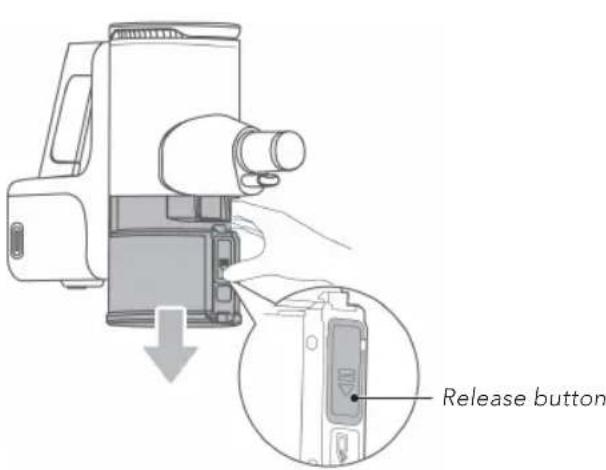
Hold the bottom of the dust cup.
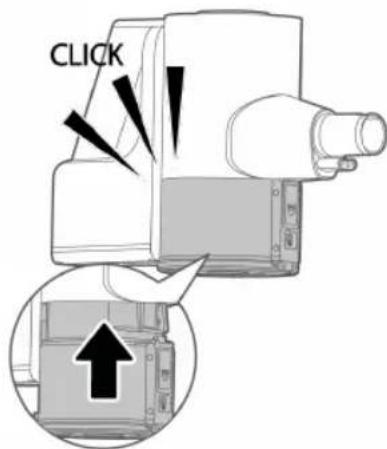
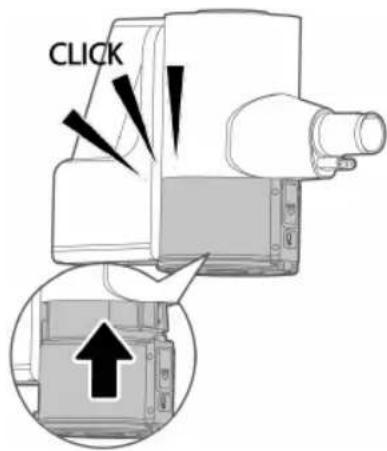
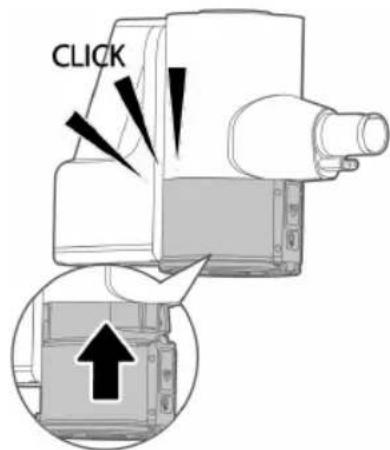
Press the release button and carefully pull the dust cup out downward.
Installation
Push the dust cup up with the suction inlet facing outward.
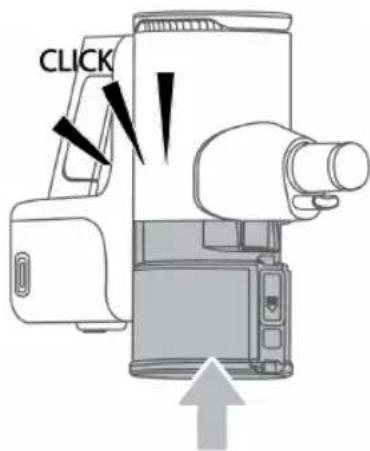
CLEANING
Press the Dust cup release button, and the bottom cover opens. Clean the dust bin with water. Make sure it is completely dry before re-assembling.
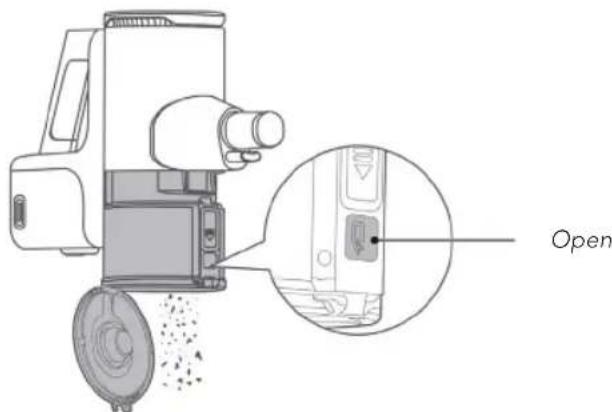
EN
FILTER COMPONENTS
- Hold the ribs on both sides and pull upwards to remove the filter components.
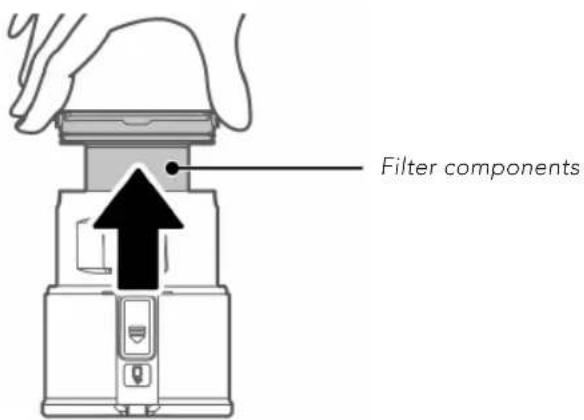
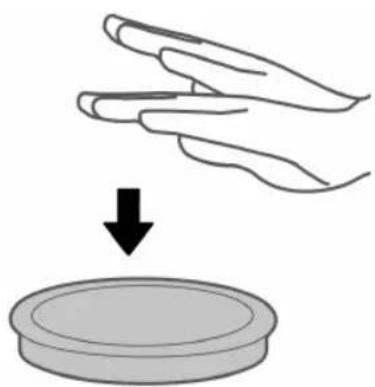
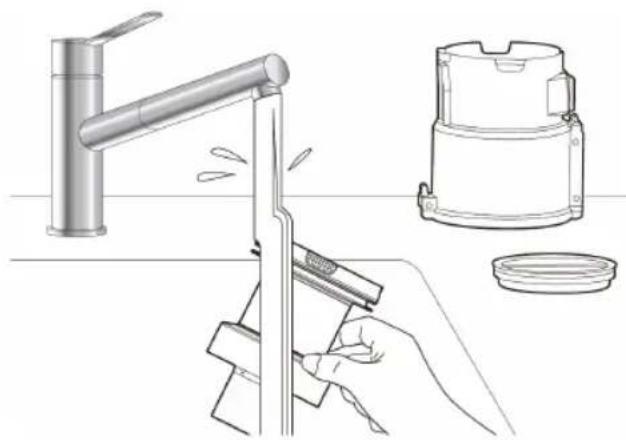
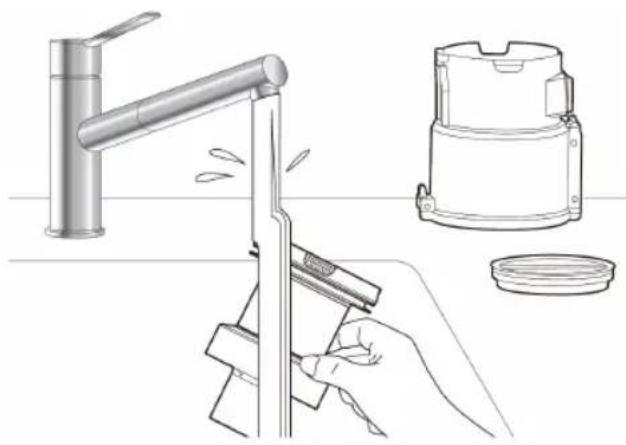
- Remove the filter sponge, lay it with the white side down and tap it to remove dust. The filter sponge is washable. The HEPA filter can be cleaned with a damp cloth or vacuumed.
natural_image
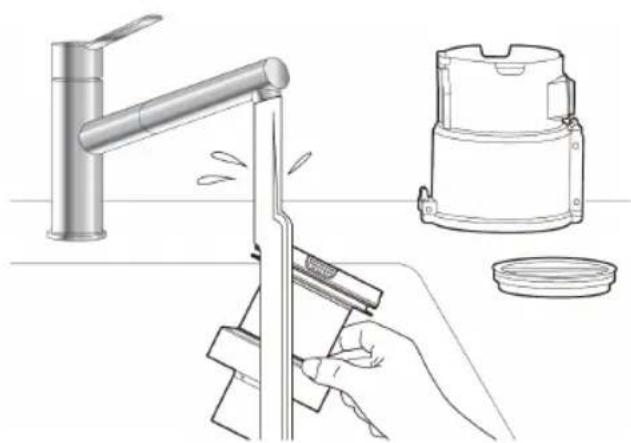
Illustration of a hand pressing down on a circular object with a downward arrow (no text or symbols)- Rinse the parts under water.
natural_image
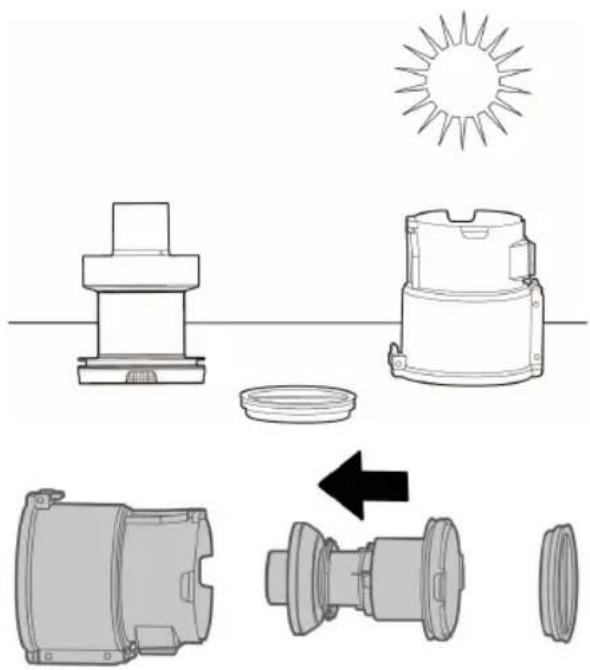
Line drawing of a kitchen cleaning setup with a faucet, a hand holding a tool, and a small container (no text or symbols)- The parts needs to be completely dry before installing the filter components into the dust bin.
natural_image
Technical line drawing of mechanical components including a sun, housing, and motor assembly (no text or symbols)DUST SENSOR
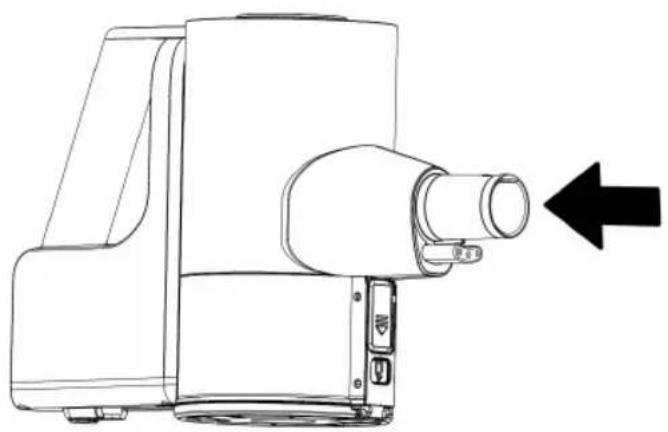
For the dust sensor to function optimally it needs to be cleaned regularly. To clean the dust sensor just use your finger and remove the dust collected on the sensor. The sensor is located inside the tube on two sides. Use your finger or a dry towel to wipe over the sensors.
natural_image
Line drawing of a portable projector with a black arrow pointing to the right side (no text or symbols present)EN
FLOOR BRUSH
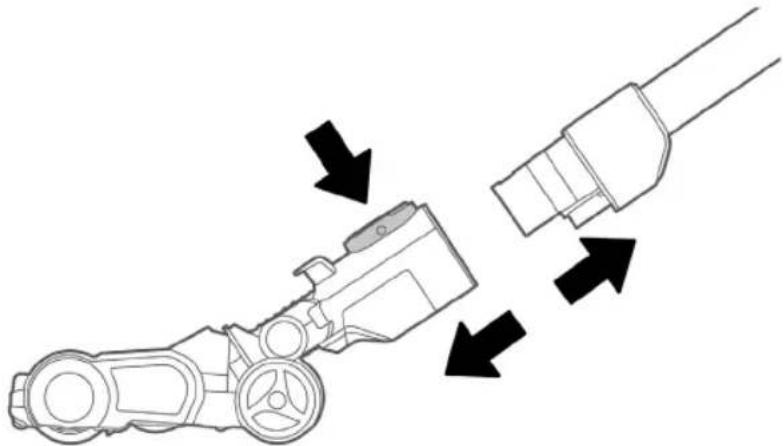
- Press the button and remove the electric floor brush from the extension tube.
natural_image
Diagram of a mechanical device with arrows indicating flow or movement, no text or symbols present- Press and hold the button and turn the end cover upwards.
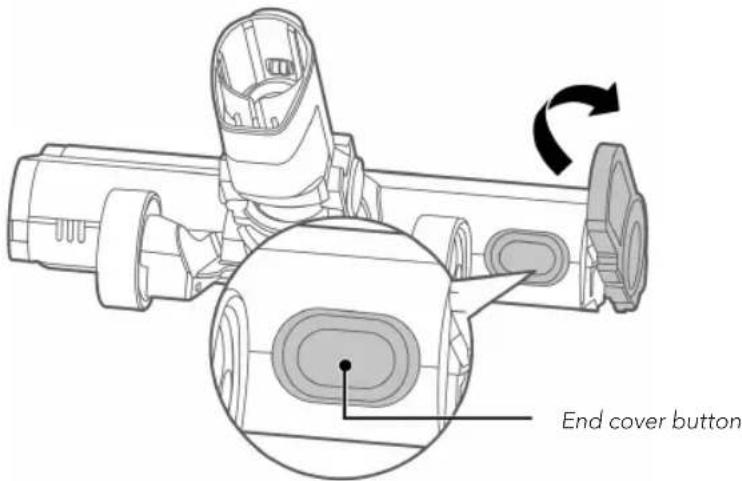
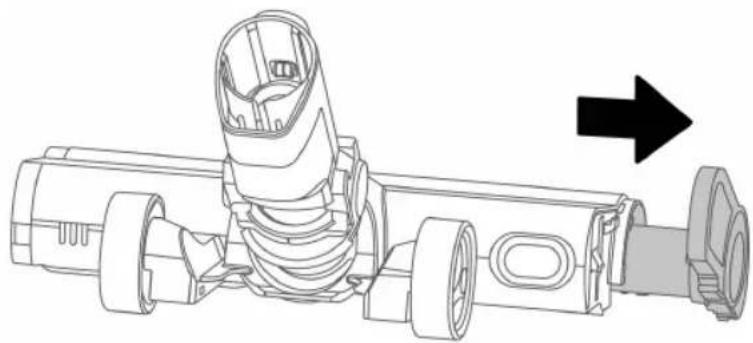
- Pull out the rolling brush and clean it. Do not use water!
natural_image
Technical line drawing of a mechanical assembly with no visible text or symbolsTROUBLESHOOTING
| Problem Possible reason Solution | ||
| Three indicators flash | Rolling brush is tangled by hair. | Remove hair or any foreign object stuck in the rolling brush. |
| The ambient temperature for operation is too high or too low. | Use the vacuum cleaner in the proper environment. | |
| Electric floor brush is not working | Large pieces of waste have been engaged. | Disassemble the electric floor brush and remove the waste. |
| The rolling brush has been tangled with hair. | Remove the rolling brush from the electric floor brush and remove the hair from the brush. | |
| Operation duration becomes shorter | Battery aging | Contact customer service |
| The ambient temperature for operation is too high or too low | Make sure the vacuum cleaner is not placed in the sunlight if it is too warm, and make sure doors and windows are closed if it is too cold. | |
| The battery is not fully charged | Charge the battery | |
| Suction force is weakened | The filter sponge of the dust cup is blocked | Clean the filter sponge |
| The suction inlet of the floor brush or accessories is blocked | Remove the objects blocking the suction inlet | |
| The filter components are not fully dried after washing with water | Make sure the filter components are fully dried, and assembled in the correct way | |
| Charging failure Ambient temperature during charging is too high or too low | Charge the appliance at the proper temperature. Make sure the vacuum cleaner is not placed in the sunlight if it is too warm, and make sure doors and windows are closed if it is too cold. | |
| Battery liquid leakage | The vacuum cleaner has not been used for a long time. | Change the battery. Contact the store to replace the battery. |
| E1 Airflow is blocked Remove obstacle and clean | filter. Contact the store if the problem still occurs. | |
| E2 Fan fault Clean the filter. Contact the | store if the problem still occurs. | |
| E3 Battery pack failure Change battery | ||
| E5 Circuit board hardware failure | Contact the store | |
| "Cleaning" Nozzle blocked Remove obstacle | ||


GUARANTEE
Wilfa issues a 5 year guarantee on this product from the day of purchase. The guarantee covers production failure or defects that arise during the guarantee period. Your purchase receipt works as proof towards retailer if claiming your guarantee.
The guarantee is valid only for products that are bought and used in private households. The guarantee is not valid if the product is used commercially. The guarantee is not valid if the product is misused, used by negligence, if not following instructions given by Wilfa, if modified or if unauthorized reparation is done. Wilfa is not responsible for damage to third party parts and other collateral damage.
The guarantee is also not valid for normal wear of the product, misuse, lack of maintenance, use of wrong electrical voltage or:
• Overloading of product
• Parts which are normally worn down
- Parts you can expect being replaced regularly (e.g. filter, battery etc.)
- Wear parts like motor heads, nozzles, battery, brushes, filters, wheels, light.
Wilfa is also not responsible for damages occurred because of excessive use, incorrect assembly, incorrect storage, incorrect charging, lack of cleaning etc.
The battery comes with a 1 year warranty. The warranty will not be valid if the appliance has not been charged according to the manual.
PRODUCT SPECIFICATIONS
500W, 2500mAh
If the appliance is idle for 10 minutes, it enters standby. The power consumption in standby is 0.2W.
BATTERY
- Charging time: 1.5-3.5 hours.
- Battery time: up to 60 minutes on low, 12 minutes max, 15-30 minutes auto. The battery time on auto depends on the amount of dust detected.
- Defected batteries can be replaced at our service partners.
- Battery efficiency will degrade with time and use. With normal household usage, and by following the usage, charging and maintenance guidelines you can expect around 80% of efficiency after 5 years or 390 hours of use.
SUPPORT AND SPARE PARTS
For support please visit us at wilfa.com, and see our customer service/support page. Here you will find frequently asked questions, spare parts, tips and tricks and all our contact information.
RECYCLABILITY
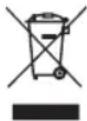
This marking indicates that this product should not be disposed with other household wastes throughout the EU. To prevent possible harm to the environment or human health from uncontrolled waste disposal, recycle it responsibly to promote the sustainable reuse of material resources. To return your used device, please use the return and collection systems or contact the retailer where the product was purchased. They can take this product for environmentally safe recycling free of charge.
NO
NO
INNHOLD
20 VIKTIGE SIKKERHETSANVISNINGER
20 OBS! - BATTERI
21 OBS! – RENGJ∅RING OG VEDLIKEHOLD
22 PRODUKTOVERSIKT
23 DISPLAY
24 BRUK
24 LADING
25 RENGJ∅RING OG VEDLIKEHOLD
29 FEILS∅KING
32 GARANTI
33 PRODUKTSPESIFIKASJONER
33 SUPPORT OG RESERVEDELER
33 GJENVINNING
VIKTIGE SIKKERHETSANVISNINGER
OBS! – RENGJ∅RING OG VEDLIKEHOLD
natural_image
Technical line drawing of a mechanical device with no visible text or symbols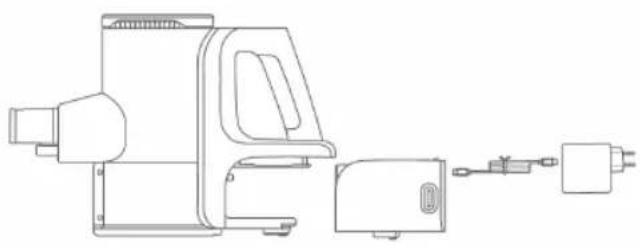
natural_image
Line drawing of a portable air conditioner unit with attached electrical outlet (no text or symbols)RENGJ∅RING OG VEDLIKEHOLD
ST∅VBEHOLDER
Demontering
natural_image
Illustration of a hand pressing down on a circular object with a downward arrow (no text or symbols)- Skyll delene under vann.
natural_image
Line drawing of a kitchen cleaning procedure: hand using a tool to clean or adjust the sink, next to a water dispenser and a bowl (no text or symbols)natural_image
Technical line drawing of mechanical components including a sun, housing, and internal parts (no text or symbols)
ST∅VSENSOR
natural_image
Line drawing of a projector device with an arrow pointing to the right side (no text or symbols present)GULVB∅RSTE
natural_image
Diagram of a mechanical device with arrows indicating flow or movement, no text or symbols presentnatural_image
Technical line drawing of a mechanical assembly with no visible text or symbolsFEILS∅KING
natural_image
Technical line drawings of two mechanical devices with ports and connectors (no text or symbols)RENGÖRING OCH UNDERHÅLL
DAMMBEHÅLLARE
Demontering
natural_image
Illustration of a hand pressing down on a circular object with a downward arrow (no text or symbols)natural_image
Line drawing of kitchen cleaning tools including a faucet, a hand using a tool, and a washing machine (no text or symbols)natural_image
Technical line drawing of mechanical components including a sun, housing, and internal parts (no text or symbols)SE
DAMMSENSOR
natural_image
Line drawing of a portable projector with a black arrow pointing to the right side (no text or symbols present)GOLVMUNSTYCKE
natural_image
Diagram of a mechanical device with arrows indicating motion or force direction (no text or symbols)natural_image
Technical line drawing of a mechanical assembly with no visible text or symbolsSE
FELSÖKNING
natural_image
Technical line drawing of a mechanical device with no visible text or symbols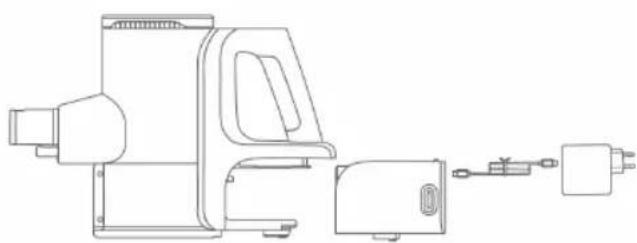
natural_image
Line drawing of a portable air conditioner unit with attached electrical outlet (no text or symbols)RENG∅RING OG VEDLIGEHOLDELSE
ST∅VBEHOLDER
Demontering
natural_image
Diagram of a device with a downward arrow and magnified inset showing internal components (no text or symbols)Udløserknap
DK
RENG∅RING
natural_image
Illustration of a hand pressing down on a circular object with a downward arrow (no text or symbols)- Skyl delene under vand.
natural_image
Line drawing of a kitchen cleaning setup with a faucet, a hand using a tool, and a small container (no text or symbols)natural_image
Technical line drawing of mechanical components including a sun, housing, and internal parts (no text or symbols)DK
ST∅VSENSOR
natural_image
Line drawing of a portable electronic device with a cylindrical port and an arrow pointing to it (no text or symbols present)GULVB∅RSTE
natural_image
Diagram of a mechanical device with arrows indicating flow or movement, no text or symbols presentnatural_image
Technical line drawing of a mechanical assembly with no visible text or symbolsDK
FEJLFINDING
PROBLEM MULIGE ÅRSAGER L∅SNING
natural_image
Illustration of a hand pressing down on a circular object with a downward arrow (no text or symbols)natural_image
Line drawing of a kitchen cleaning procedure: hand using tool to clean or adjust a sink, next to a portable oven (no text or symbols)natural_image
Diagram showing exploded view of mechanical components with sun symbol and directional arrow (no text or labels)Fl
PÖLYTUNNISTIN
natural_image
Line drawing of a portable electronic device with a cylindrical lens and control panel, showing no text or symbols.LATTIAHARJA
natural_image
Diagram of a mechanical device with arrows indicating flow or movement, no text or symbols presentnatural_image
Technical line drawing of a mechanical assembly with no visible text or symbolsVIANMÄÄRITYS
DE
natural_image
Technical line drawing of a mechanical device with no visible text or symbols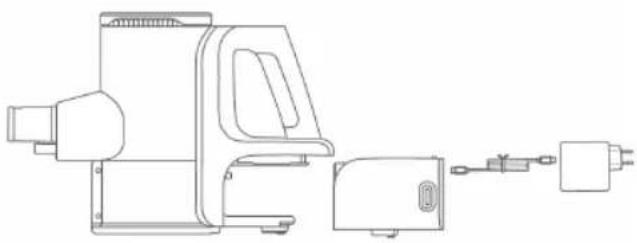
natural_image
Line drawing of a portable electric shaver with attached circuit breaker (no text or symbols)natural_image
Diagram of a handheld device with a hand holding a camera and a magnified inset showing the internal components (no text or symbols)Entriegelungsknopf
DE
REINIGUNG
natural_image
Diagram of a hand holding a device with an upward arrow indicating motion or force (no text or symbols present)natural_image
Line drawing of a kitchen cleaning procedure: hand using a tool to clean or adjust the sink, next to a portable oven and a small container (no text or symbols)natural_image
Diagram showing exploded view of mechanical components with sun symbol and directional arrow (no text or labels)STAUBSENSOR
natural_image
Line drawing of a portable projector with a black arrow pointing to the right side (no text or symbols present)BODENBÜRSTEN
natural_image
Diagram of a mechanical device with arrows indicating flow or movement, no text or symbols presentnatural_image
Technical line drawing of a mechanical assembly with no visible text or symbolsFEHLERBEHEBUNG
NL
natural_image
Diagram of a hand pressing down on a device with an upward arrow indicating motion (no text or symbols present)natural_image
Line drawing of kitchen tools including a faucet, a blender, and a lid (no text or symbols)natural_image
Technical line drawing of mechanical components including a sun, housing, and motor assembly (no text or symbols)STOFSENSOR
natural_image
Line drawing of a mechanical device with a cylindrical component and an arrow pointing to it (no text or symbols present)NL
VLOERBORSTEL
natural_image
Diagram of a robotic device with arrows indicating flow or movement, no text or symbols presentnatural_image
Technical line drawing of a mechanical assembly with no visible text or symbolsNL
PROBLEEMOPLOSSING
PL
natural_image
Illustration of a hand pressing down on a circular object with a downward arrow (no text or symbols)natural_image
Line drawing of a kitchen cleaning procedure: hand using tool to clean or adjust a sink, next to a portable oven (no text or symbols)PL
natural_image
Technical line drawing of mechanical components including a sun, housing, and internal parts (no text or symbols)CZUJNIK PYŁU
natural_image
Line drawing of a portable electronic device with a cylindrical port and directional arrow (no text or symbols)PL
SZCZOTKA DO PODŁÓG
natural_image
Diagram of a mechanical device with arrows indicating flow or movement, no text or symbols presentnatural_image
Technical line drawing of a mechanical assembly with no visible text or symbolsPL
ROZWIĄZYWANIE PROBLEMÓW
FR
natural_image
Illustration of a hand pressing down on a circular object with a downward arrow (no text or symbols)natural_image
Line drawing of kitchen cleaning tools including a hand using a tool to clean or adjust a sink, with no visible text or symbols.natural_image
Technical illustration of mechanical components with no visible text or symbolsnatural_image
Line drawing of a portable projector with a black arrow pointing to the right side (no text or symbols present)FR
BROSSE POUR SOL
natural_image
Diagram of a mechanical device with arrows indicating flow or movement, no text or symbols presentnatural_image
Technical line drawing of a mechanical assembly with no visible text or symbolsFR
DÉPANNAGE
CARACTÉRISTIQUES DU PRODUIT
500W, 2500mAh
IT
natural_image
Technical line drawing of a mechanical device with no visible text or symbols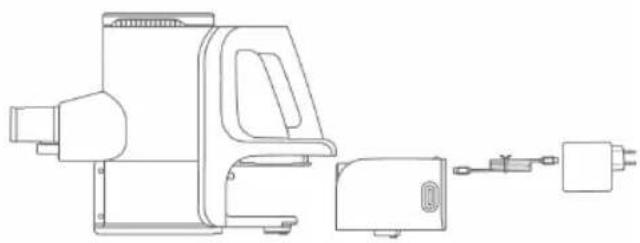
natural_image
Technical line drawing of a mechanical device with attached components (no text or symbols)natural_image
Illustration of a hand pressing down on a circular object with a downward arrow (no text or symbols)natural_image
Line drawing of kitchen cleaning tools including a faucet, a blender, and a lid (no text or symbols)natural_image
Technical line drawing of mechanical components including a sun, housing, and motor assembly (no text or symbols)SENSORE POLVERE
natural_image
Line drawing of a portable projector with a black arrow pointing to the right side (no text or symbols)IT
SPAZZOLA PER PAVIMENTI
natural_image
Diagram of a mechanical device with arrows indicating flow or movement, no text or symbols presentnatural_image
Technical line drawing of a mechanical assembly with no visible text or symbolsIT
ES
natural_image
Diagram of a device with a lock and internal components, showing a close-up view of the internal structure (no text or symbols present)Botón de liberación
LIMPIEZA
natural_image
Illustration of a hand pressing down on a circular object with a downward arrow (no text or symbols)natural_image
Line drawing of kitchen utensils including a faucet, a blender, and a lid (no text or symbols)natural_image
Technical line drawing showing exploded view of mechanical components with sun symbol and directional arrow (no text or labels)SENSOR DE POLVO
natural_image
Line drawing of a portable projector with a black arrow pointing to the right side (no text or symbols present)CEPILLO PARA SUELOS
natural_image
Diagram of a mechanical device with arrows indicating flow or movement, no text or symbols presentnatural_image
Technical line drawing of a mechanical assembly with no visible text or symbolsES
HS2-XSB_20_01

- INNOVAC XCEED
- IMPORTANT SAFETY INSTRUCTIONS
- ATTENTION - BATTERY
- ATTENTION – CLEANING AND MAINTENANCE
- EN
- USE
- CHARGING
- CLEANING AND MAINTENANCE
- DUST CUP
- CLEANING
- FILTER COMPONENTS
- DUST SENSOR
- FLOOR BRUSH
- TROUBLESHOOTING
- GUARANTEE
- PRODUCT SPECIFICATIONS
- BATTERY
- SUPPORT AND SPARE PARTS
- RECYCLABILITY
- INNHOLD
- VIKTIGE SIKKERHETSANVISNINGER
- OBS! – RENGJ∅RING OG VEDLIKEHOLD
- RENGJ∅RING OG VEDLIKEHOLD
- ST∅VBEHOLDER
- Demontering
- ST∅VSENSOR
- GULVB∅RSTE
- RENGÖRING OCH UNDERHÅLL
- DAMMBEHÅLLARE
- DAMMSENSOR
- GOLVMUNSTYCKE
- RENG∅RING OG VEDLIGEHOLDELSE
- RENG∅RING
- FEJLFINDING
- PÖLYTUNNISTIN
- LATTIAHARJA
- REINIGUNG
- STAUBSENSOR
- BODENBÜRSTEN
- STOFSENSOR
- VLOERBORSTEL
- CZUJNIK PYŁU
- SZCZOTKA DO PODŁÓG
- BROSSE POUR SOL
- DÉPANNAGE
- CARACTÉRISTIQUES DU PRODUIT
- SENSORE POLVERE
- SPAZZOLA PER PAVIMENTI
- LIMPIEZA
- SENSOR DE POLVO
- CEPILLO PARA SUELOS
Brand : WILFA
Model : Innovac Xceed HS2-XSB
Category : Vacuum Cleaner