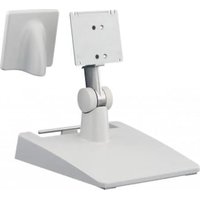
SU-560 - Screen accessory SONY - Free user manual and instructions
Find the device manual for free SU-560 SONY in PDF.


User questions about SU-560 SONY
0 question about this device. Answer the ones you know or ask your own.
Ask a new question about this device
Download the instructions for your Screen accessory in PDF format for free! Find your manual SU-560 - SONY and take your electronic device back in hand. On this page are published all the documents necessary for the use of your device. SU-560 by SONY.
USER MANUAL SU-560 SONY
Instructions for Use GB
© 2017 Sony Corporation

4729747020
安全のたてに
Before operating the unit, please read this manual thoroughly and retain it for future reference.
Caution
When you dispose of the unit or accessories, you must obey the laws in the relative area or country and the regulations in the relative hospital regarding environmental pollution.
Symbols on the product

This symbol indicates the manufacturer, and appears next to the manufacturer's name and address.

This symbol indicates the European Community representative, and appears next to the European Community representative's name and address.

This symbol indicates the medical device in the European Community.

This symbol indicates the date of manufacture.

This symbol indicates the serial number.

This symbol indicates the version of the accompanying document.

Storage and transport temperature
This symbol indicates the acceptable temperature range for storage and transport environments.

Storage and transport humidity
This symbol indicates the acceptable humidity range for storage and transport environments.

Storage and transport pressure
This symbol indicates the acceptable atmospheric pressure range for storage and transport environments.
Caution
For cautions and further information on using this product, refer to the instructions for use for the monitor.

Caution
Do not use the device in a MR (Magnetic Resonance) environment.
It may cause a malfunction, fire, and unwanted movement.
Precaution
On Safety
- This is the stand for the Sony LCD monitor. For confirming whether your monitor is compatible with this unit, refer to the operating instructions of the monitor.
- When you raise the monitor, raise the lower side of the monitor or the bottom of the stand.
- Stubborn stains may be removed with a soft cloth such as a cleaning cloth lightly dampened with mild detergent solution using a swab method, and then cleaning using the above chemical solution.
Never use solvents such as benzene or thinner, or acid, alkaline or abrasive detergent, or a chemical cleaning cloth for cleaning or disinfection, as they will damage the surface.
- Use the supplied screws for mounting. If you use screws other than the supplied ones, the screws may become loose and the device may fall causing injury.
Notes
- Always verify that the unit is operating properly before use. SONY WILL NOT BE LIABLE FOR DAMAGES OF ANY KIND INCLUDING, BUT NOT LIMITED TO, COMPENSATION OR REIMBURSEMENT ON ACCOUNT OF THE LOSS OF PRESENT OR PROSPECTIVE PROFITS DUE TO FAILURE OF THIS UNIT, Either DURING THE WARRANTY PERIOD OR AFTER EXPIRATION OF THE WARRANTY, OR FOR ANY OTHER REASON WHATSOEVER.
- SONY WILL NOT BE LIABLE FOR CLAIMS OF ANY KIND MADE BY USERS OF THIS UNIT OR MADE BY THIRD PARTIES.
- SONY WILL NOT BE LIABLE FOR THE TERMINATION OR DISCONTINUATION OF ANY SERVICES RELATED TO THIS UNIT THAT MAY RESULT DUE TO CIRCUMSTANCES OF ANY KIND.
Attaching to the monitor
Accessories supplied
· M4× 10 Screws (4)
- Instructions for Use (1)
Information for Customers in Europe (1)
Attaching method
Before installation
Disconnect the power cords and other cables from the monitor.
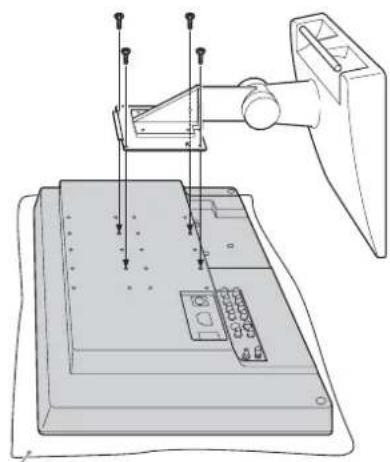
1 Remove the M4 screws attached to the monitor.
2 Attach the stand to the monitor by using the supplied screws.
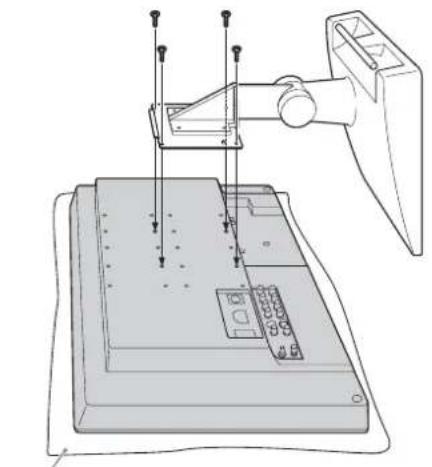
Soft cloth
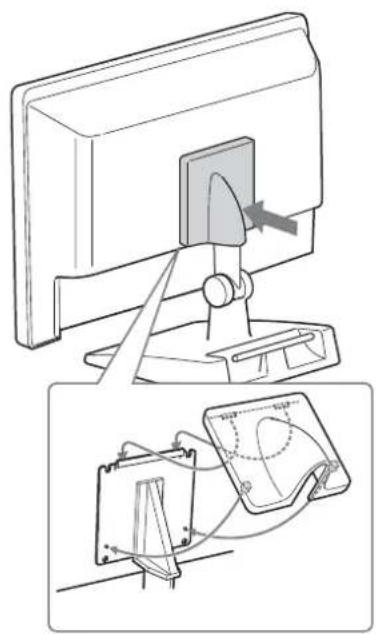
3 Attach the VESA cover to the stand.
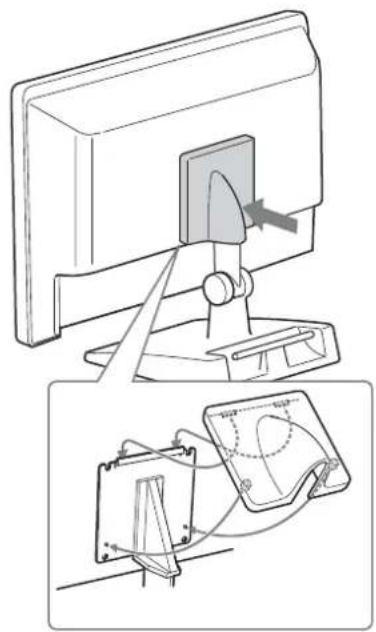
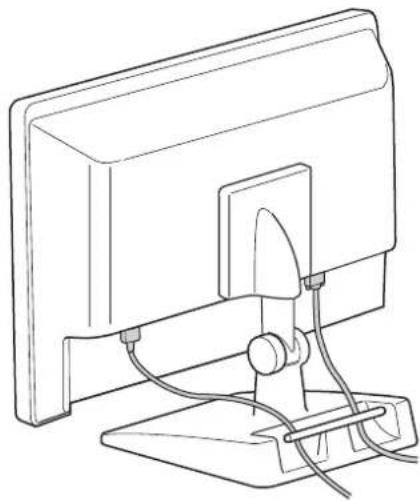
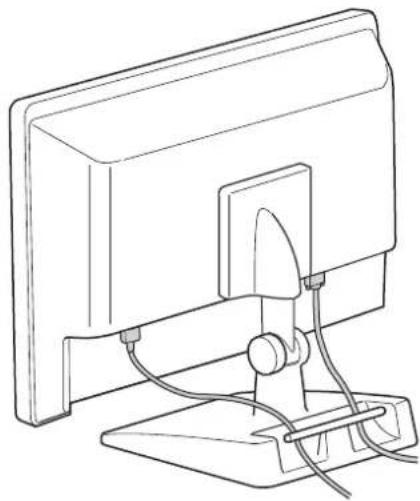
4 Connect the power cords and other cables to the monitor.
Specifications
Mass Approx. 7.5kg (16 lb 8.6 oz)
Design and specifications are subject to change without notice.
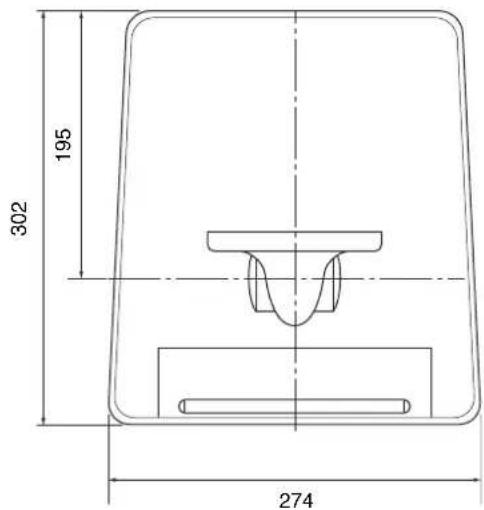
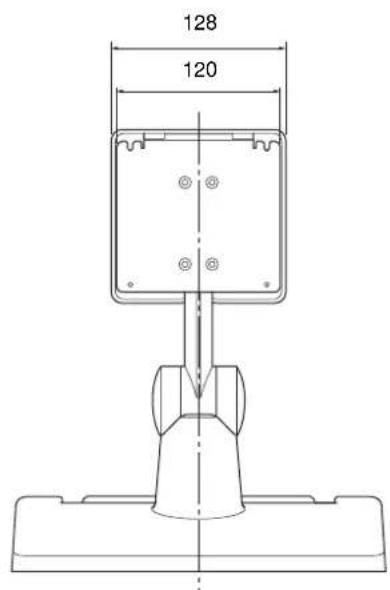
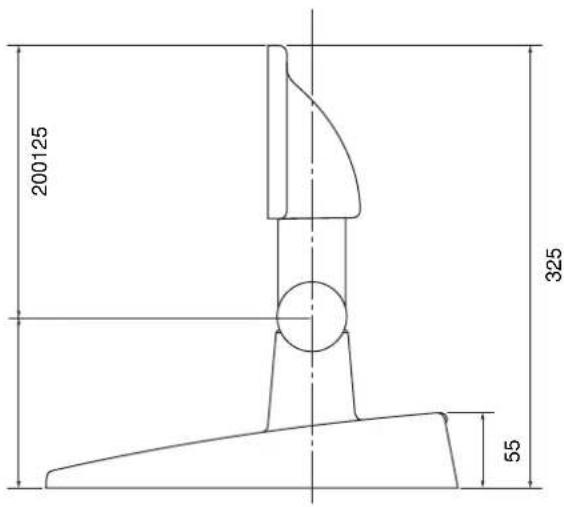
Unit: mm (inches)
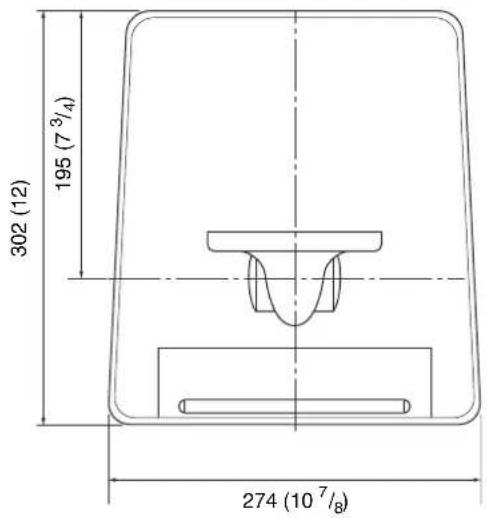
Dimensions
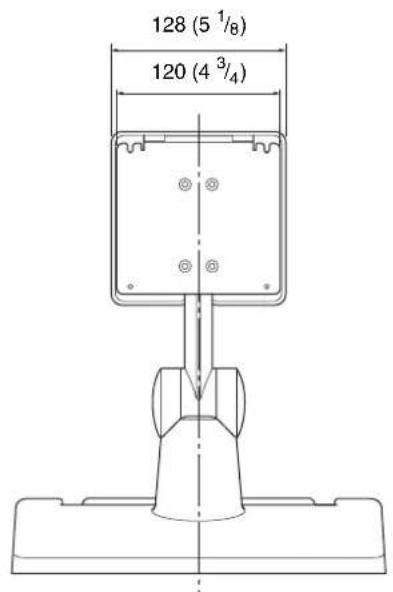
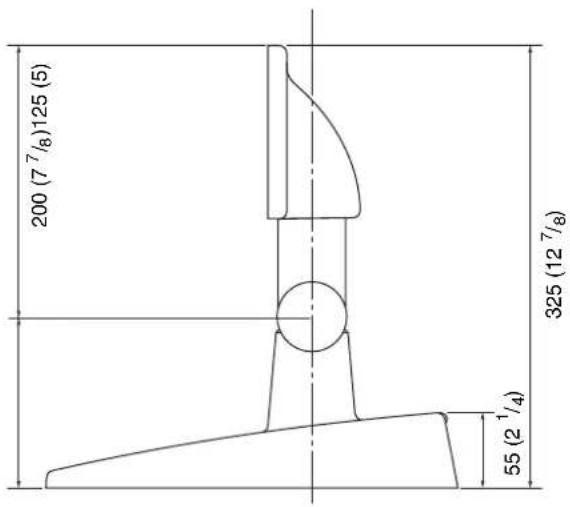
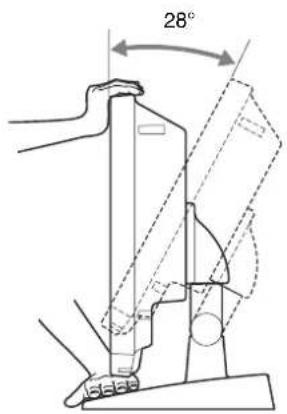
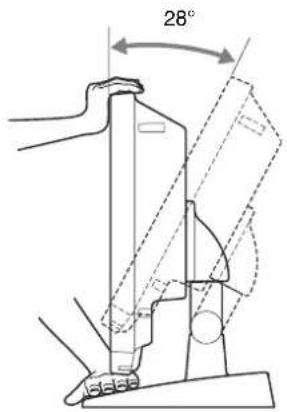
Operating angle adjustment
You can adjust the angle by holding the top and bottom of the monitor.
Français
Bey6eTI EypoIaIbIK KaybIMJaCTbIFbIHaFbMeHINHaTbIK KpybIbIHbKepeTeJI.

ByIbEiHnpm3imn KOpceTei JxHe OJ OHIMRe JxHe/Hemec opamfa 6acbl IbIrapbIaIb.I YYY-JKbIbI JxHe MM -aiMbI KOpceTei.

BJI 6eJIi crepHJIbIK Hemipii KepceTeIi.

By 6e3i 6ipre 6epinH KyKaTbH HckacBn Kcpctedi.

CaKtay XeHe TaCbImaNday TempepaTypacbl
ByIbeJIrcaKrayXHeTaCbMaJIay optaJapbHa apHaIHpYKcat 6epiJIreH TcMIePaTpya aykbmbHH KOpCtci.

CaKay XaHe TaCbImaNday bllfAldblbIfbl
ByI 6eTl caTay kHe TaCbMaJIay opTajapbHa pyKcat bepiHrBbHaJIbIbIK aykbIMbIH KOpCeTei.

CaTay XeHe TacbImaJday KbicbIMbl
Byi bei i caTay KHe TaCbMaJlay opTaIapbHa pyKcat 6epiTRe h ATMoccepaIbIK KbICbIMHbH ayKbMbH KepcTeJI.
A6aJnHaHbI3
OcbHIMIiPiJaIaHyFaKaTbIcTbCaKTBIIapJap MeH KocBIMIIa AkIapat YIINH MOHTOP IaJIaIHy HcyKayApbIH KapaHbI3.

A6aɪnaHbɪ3
KpybIJIbIHbMP (MaHTTI-pe3oHaHCTbIK) opTaJa
IIaJIAHyra 6OImaIbI.
ByIOhBn 6y3bIybiHa, optke HeMece KaJaycbI3
Ko3FaJIybiHa AKeJIyIMMKiH.
CaKTbIK
UapapanapbI
- Bx - Sony LCD MOHTOPbHH Tiperi. MoHTOpHH Ocb KypbIFMeH yIeCiIMIirPiH pactay YIIIN MOHTOPbIH NaJaIaHy HcckayIapbH KapaHb3.
- MoHHTOpIbI KTeTepReH Ke3Je MOHHTOpIbIH ToMeHRI KaFbIH HcMeCC TipCK actbIH KOTcpiH3.
KaHbIK 608yIapIbI optaIIa aFAPKbIII epiIHicHe IIIaMaJIb MaJIbIHFaTaaJIay MAtacBi cHKeTbIK YMCaK MaTaMeH cyPTII, OaAH KeHH KOFApFBx HmHaJIbIK epiIHIMcH Ta3aJIayMCH KIOOFA 6oJIaIbI. Ta3aJIayFa Hemece 3apapcbIaHbIpyFa 6eH3OI Hemece cyBbITkbIII cHKeTbEPi, Kblkblblc, ciTTI I HeMece abpa3HBtI aFapTKbITbI Hemece XHMHaIK TaFaJIaFBbITbI eIIKaIIaH IIaJaIaHaIbI3, ce6eI6BeIe 3aKbIM KeITTipeIi.
-BekiTyRe KaTAmacbI3 etiIrrer6ypaHJaIapIbI IaIIaIIaHbIbI3.EreKamTaMaCbI3 etiIrrerHHen 6aca Ka6ypaHaIap IaIIaIIaHbIbIca,6ypaHaIap 6ocatbIbII, KpybIbI KJIaI JkapaKaTTaybl MyMkiH.
EckepTynep
- Opkannan NaIaHaHyan 6ypbH KypbIbHbHn Iypbic JcMbic icTeiirHirin TeKecepH3. SONY KOPPiOPAIINrCbI OCbI KYPbIJFbIHbIH AKAYbI CAJIAPbIHAN KA3IP HEMECE BOJIAIIAKTA IaIJaAHbIH AJbIHbAVbIHBAIJIAHbICTbI KOMTIIEHCAlINr HEMECE TOJIEMKOCA, BIPAQJIAPMEH IIEKTEJIMEN, KEJIJIIMK MEP3IMI IIIIHHE HEMECE KEJIJIIKTIH MEP3IMIAJKTALFAHHAN KEIHHN HEMECE BACKACBEBENTEPRE BAJIAHbICTbI KE3 KEJIIEH IIIIFbIHAP YIIIIN KAVANI BEPMENII.
- SONY KOPPIOPIIICBI OCBI KYPBJIIFBIHII IAIJIAJAYIIBIJIAPJIH IHEMECE YIHHITI TAPIITAPDbIH JACAFAH KE3 KEJIIEH IIAFbIMJAPBI YIHH JAYAII BEPMEI.
SONYKOPIIOPAIINICBI KE3 KEJIIEH KAFDAIAPFA BAIIAHbICTbI BOJybl MYMKIH OcBi KYPbIJIFbIFA KATbICTbI KE3 KEJIIEH KbI3METTEPdIH TOKTATbljYbl HEMECE Y3IJICI YUHH JAYAII BEPMEJI.
Mонтopfa Tipkey
KamTamacbi3 etiJreH KocbIMwa KypaIdap
M4× 10 6ypaHiaacbI(4)
-Пайдалану hyckayлгь (1)
Information for Customers in Europe (Eypiaaafby TByhHnblapfa apHaJFaH aKnapat) (1)
Tipkey ādici
OpHaTy anDbHna
MOHITOPaH KyaT cbIMapbH KHe 6acka Ka6eJIbIepI aKbipaTBHb3.
1 MoHTopFa 6ekiriIreH M4 6ypaHaJaIapbH aJIbIIbI3.
2 Bipre 6epiIrrhen 6paHdaIap apKbIbTIipeKTI MOHTOPra 6eKiTiHi3.
Kymcak mbepek
3 VESA KaKaTaNfBn TipeKke bekiriHiz.
4 Kyat cbIMapbH JHe 6aCka Ka6cJIbIepi MOHTOPFaKaHaIbI3.
Cnnaattama nap
CaJMaFbI IIIaMaMeH 7,5 K
H3aH MeTexHkaIbIK CnIaTTaMaJIapbI eckepTyci3 e3reptiJIeIi.
KypbUIfbl:MM
OJnwemdepi
Painanany 6ypbibH peTtey
MoHTOp yCTi MeH actbH ycTayMeH 6ypbltbH petteyre 6oIaIbI.