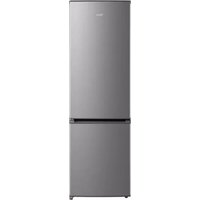
MDRB380FGE02A - Fridge MIDEA - Free user manual and instructions
Find the device manual for free MDRB380FGE02A MIDEA in PDF.


| Product Type | Combined fridge-freezer with fan cooling (No Frost) |
| Brand | Midea |
| Model | MDRB380FGE02A |
| Total Volume | 270 L (fresh 199 L + freezer 71 L) |
| Fresh Compartment Volume | 199 L |
| Freezer Compartment Volume | 71 L |
| Freezing Capacity | 3.5 kg/24h |
| Power Failure Autonomy | 7 h |
| Climate Class | SN, N, ST, T |
| Defrost Type | Automatic |
| Cooling System | Fan (forced air) |
| Power Supply | 220-240 V ~, 0.6 A, 50/60 Hz |
| Dimensions (H x W x D) | 1800 x 545 x 625 mm |
| Door Reversibility | Yes, with tools provided |
| Built-in Water Dispenser | Optional |
| Interior Lighting | LED (class F) |
| Adjustable Feet | Yes |
| Number of Vegetable Bins | 3 |
| Shelf Material | Glass |
| Control Type | Electronic (touch panel) |
| Super Refrigeration Function (Fast Cool) | Yes |
| Alarm Function | Yes |
| Spare Parts Available | Yes (at least 7 years) |
Frequently Asked Questions - MDRB380FGE02A MIDEA
User questions about MDRB380FGE02A MIDEA
0 question about this device. Answer the ones you know or ask your own.
Ask a new question about this device
Download the instructions for your Fridge in PDF format for free! Find your manual MDRB380FGE02A - MIDEA and take your electronic device back in hand. On this page are published all the documents necessary for the use of your device. MDRB380FGE02A by MIDEA.
USER MANUAL MDRB380FGE02A MIDEA
natural_image
Simple line drawing of a refrigerator with two doors and a side panel (no text or symbols)Refrigerator
BOTTOM MOUNTED FREEZER SERIES
USER MANUAL
MDRB380FGE
SERIES
LANGUAGES
| ENEnglish |
| ITItaliano |
| ESEspañol |
| PTPortuguês |
| GREλληνικά |
| FRFrench |
| DEDeutsch |
| PLPolski |
| CZČeština |
| SKSlovensky |
| HUMagyar |
| LVLatviešu |
| LTLietuvių |
| SRSrpski |
| HRHrvatski |
| SLSlovenščina |
| RORomână |
| BGБългарски |
| ALShqip |
THANK YOU LETTER
Thank you for choosing Midea! Before using your new Midea product, please read this manual thoroughly to ensure that you know how to operate the features and functions that your new appliance offers in a safe way.

CONTENTS
THANK YOU LETTER 01
SPECIFICATIONS 02
PRODUCT OVERVIEW 03
PRODUCT INSTALLATION 04
OPERATION INSTRUCTIONS 11
CLEANING AND MAINTENANCE 15
TROUBLESHOOTING 17
APPENDIX 19
SPECIFICATIONS
Product model MDRB380FGE
SERIES
Fresh Food Storage Compartment Volume 199L
Frozen Food Storage Volume 71L
Defrosting Type Auto defrost
Temperature Rise Time 7h
Freezing Capacity 3.5kg/24h
Rated Voltage 220-240V\~
Rated Current 0.6A
Overall Dimension (H x W x D) 1800x545x625mm
PRODUCT OVERVIEW
Names of components
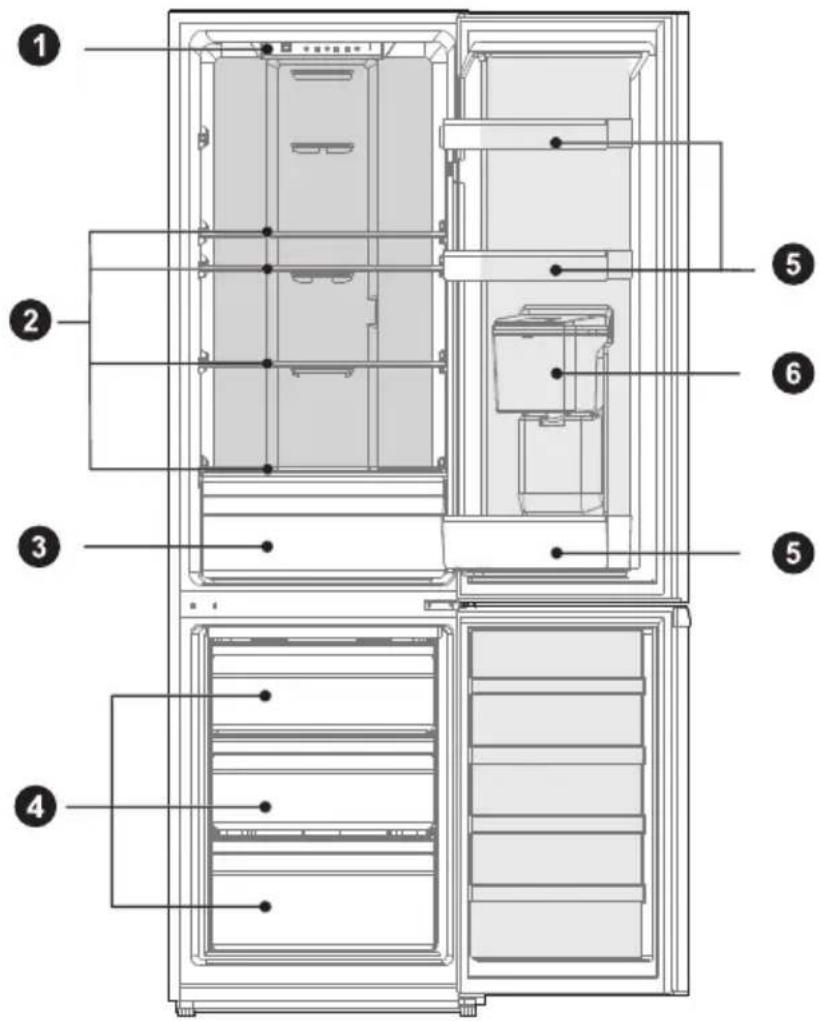
1 LED lighting
4 Drawer
2 Shelf
5 Door Tray
3 Fruits and vegetables box
6 Water dispenser (optional)

ATTENTION
The picture above is only for reference. The actual configuration will depend on the physical product or statement by the distributor.
PRODUCT INSTALLATION
Install Instruction
For refrigerating appliances with climate class
- Depending on the climate class, This refrigerating appliance is intended to be used at ambient temperatures range as specified following table.
- The climate class can be found on the rating plate. The product may not operate properly at temperatures outside of the specific range.
- You can find the climate class on the product label.
Effective temperature range
- The product is designed to operate normally in the temperature range specified by its class rating.
| Class Symbol | Ambient temperature range °C | ||
| IEC 62552 (ISO 15502) ISO 8561 | |||
| Extended temperate SN + 10 to + 32 + 10 to + 32 | |||
| Temperate N + 16 to + 32 + 16 to + 32 | |||
| Subtropical ST + 16 to + 38 + 18 to + 38 | |||
| Tropical T + 16 to + 43 + 18 to + 43 | |||
Dimensions and Clearances
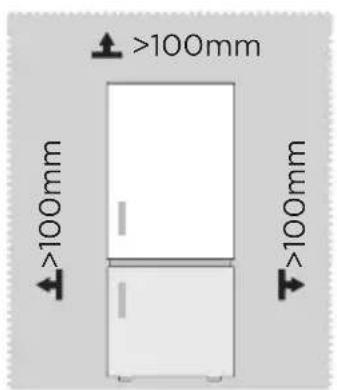
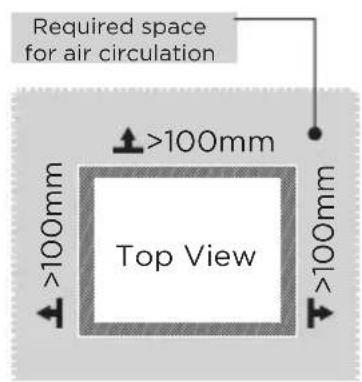
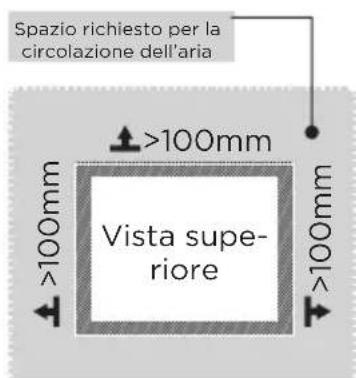
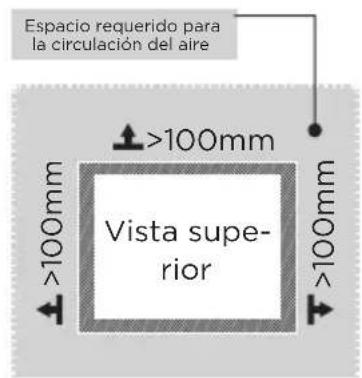
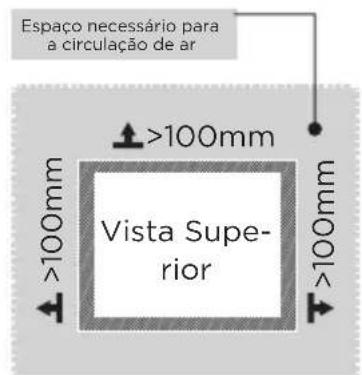
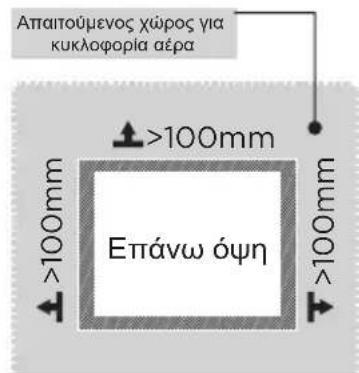
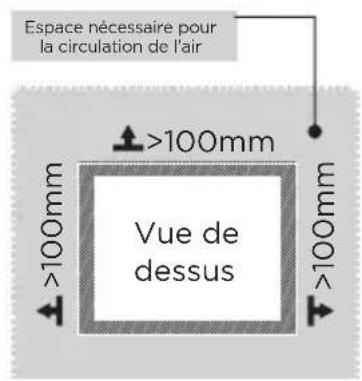
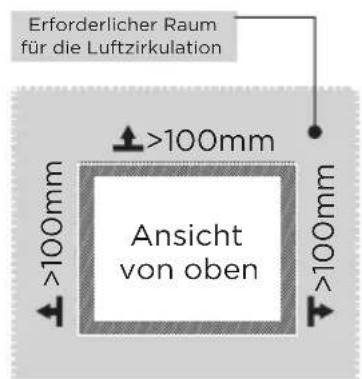
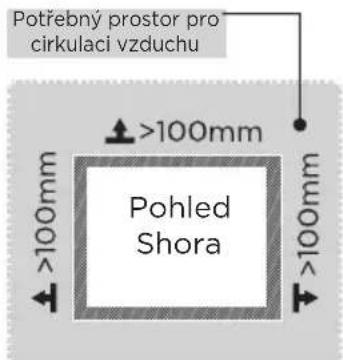
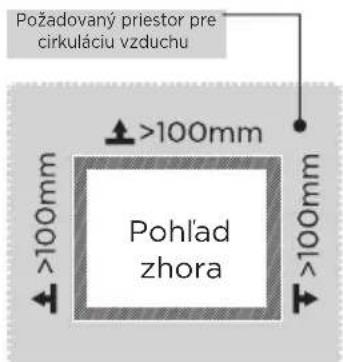
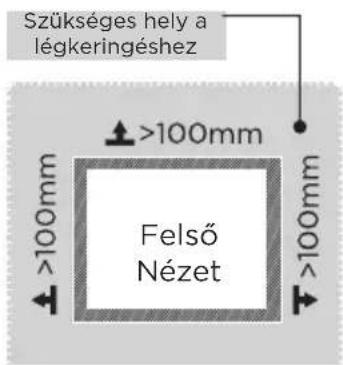
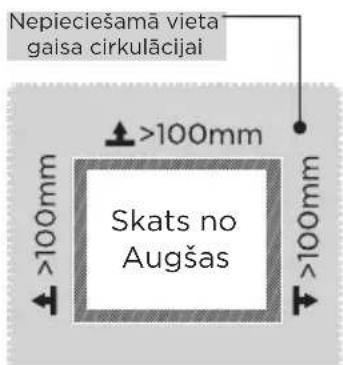
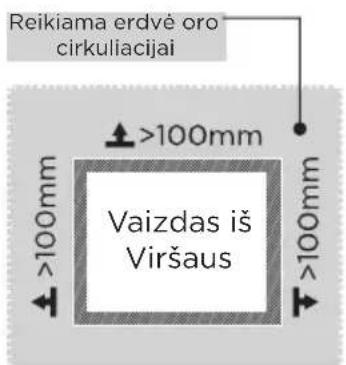
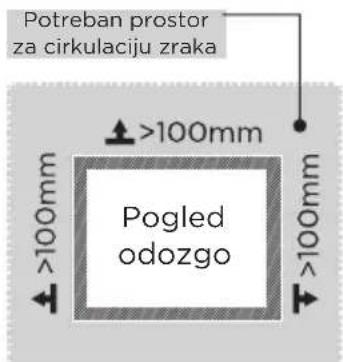
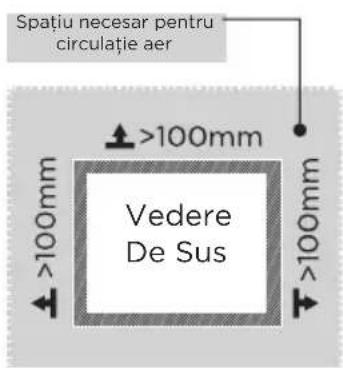
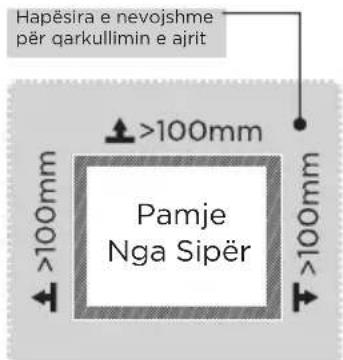
- Too small of a distance from adjacent items may result in the degradation of freezing capability and increased electricity costs. Allow over 100 mm of clearance from each adjacent wall when installing the appliance.

ATTENTION
The picture above is only for reference. The actual configuration will depend on the physical product or statement by the distributor.
Space requirement diagram (when the door is open and when the door is closed)


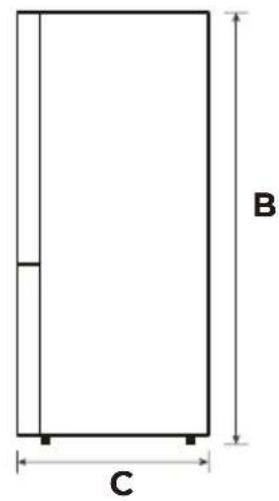
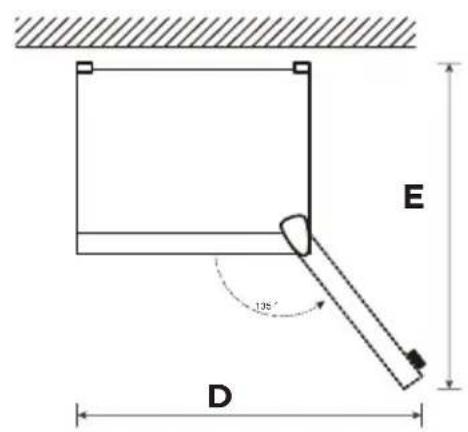
| Width Overall Height Depth | Width doors open 135° | Depth doors open 135° | ||
| A B C D E | ||||
| 545 1800 | 625 820 1070 | |||
Notice: All dimensions in mm
Leveling feet
To avoid vibration, the unit must be leveled.
If required, adjust the leveling screws to compensate for the uneven floor.
The front should be slightly higher than the rear to aid in door closing.
Leveling screws can be turned easily by tipping the cabinet slightly.
Turn the leveling screws counterclockwise 📋 to raise the unit, clockwise 📋 to lower it.
Moving the appliance
- Before the refrigerator is moved, take all objects inside out, pull the power plug out.
- Fix the glass partitions, vegetable holder, freezing chamber drawers and ect. with tape, and tighten the leveling feet; close the doors and seal them with tape.
- Move the appliance with more than two people carefully. During moving, the appliance shall not be excessively laid upside down or horizontally, or be vibrated; the inclination during movement shall be no more than 45^ .
- After installing the appliance, connect the power plug into a socket out to switch on the appliance.

ATTENTION
Precautions before operation:
Before making changes the refrigerator must be disconnected from power. precautions should be taken to prevent any personal injury.
Placement
- Before use, remove all packing materials, including bottom cushions, foam pads and tapes inside of the refrigerator; tear off the protective film on the doors and the refrigerator body.
- Keep away from heat and avoid direct sunlight. Do not place the freezer in moist or watery places to prevent rust or reduction of insulating effect.
- Do not spray or wash the refrigerator; do not put the refrigerator in moist places easy to be splashed with water so as not to affect the electrical insulation properties of the refrigerator.
- The refrigerator is placed in a well-ventilated indoor place; the ground shall be flat, and sturdy (rotate left or right to adjust the wheel for leveling if unstable).
Door right-left change (optional)
Based on the location where you plan to use your refrigerator, you may find it more convenient to reverse the position of the door.

CAUTION
CAUTION: To avoid injury to yourself or your property, we recommend that someone assist you during the door reversal process.
Preparing to reverse the door position
You will need: A standard screwdriver, a Phillips screwdriver, and the included Allen wrench.
• Make sure that your refrigerator is unplugged and empty.
• Have someone available to assist you in the process.
- Keep all of the parts you remove to reuse them later.
Tools needed for changing the door:
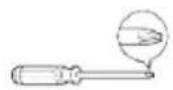
Cross screwdriver Putty knife
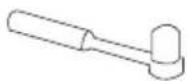
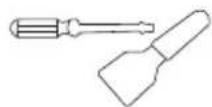
thin-blade screwdriver
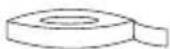
5/16" socket and ratchet Masking tape
Step
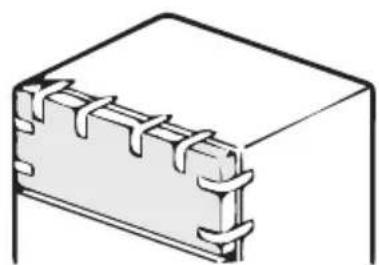
- Please power off this appliance, before conduct this operation. Remove all food from the inner door liner. Tape the door shut with tape.
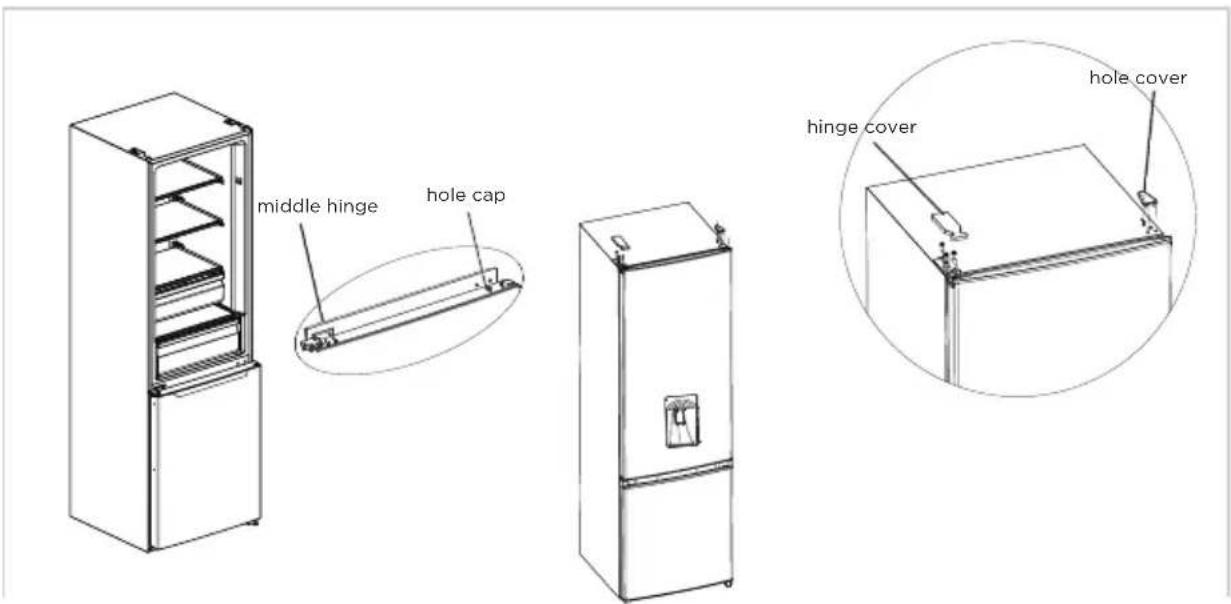
- Dismantle the hole cover, hinge cover and upper hinge.
natural_image
Pure technical line drawing of a rectangular electronic component with no text or symbols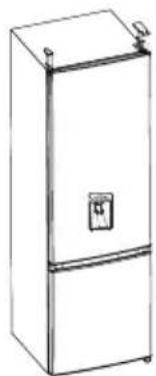
natural_image
Line drawing of a two-door refrigerator with a front panel and lid (no text or symbols)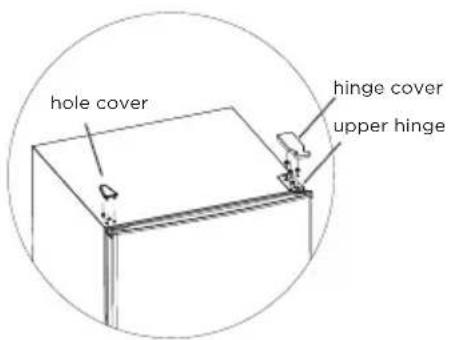
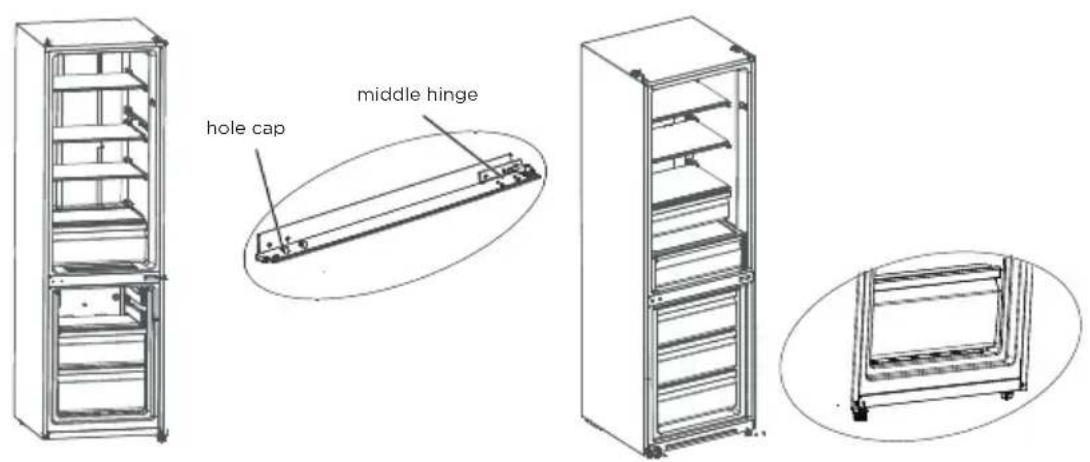
- Take off refrigerating chamber door, middle hinge (use a allen wrench to remove the middle hinge screw) and hole cap of other side.
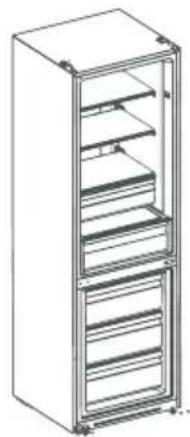
- Take off freezing chamber door, dismantle bottom hinge, hole caps, levelling foot, install the bottom hinge on the other side.
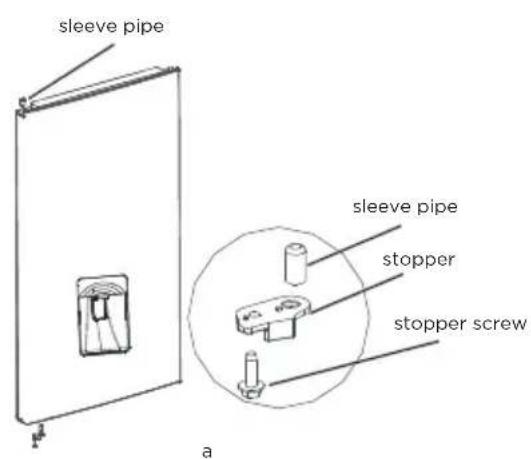
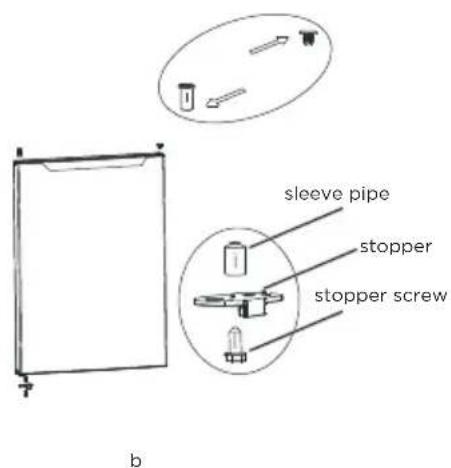
- a) Dismantle the stopper, sleeve pipe of refrigerating chamber door. assemble the sleeve pipe and stopper on bottom left of door with screw. b) Dismantle the stopper and sleeve pipe from right of freezing chamber door, assemble the sleeve pipe and stopper on bottom left of door by screw. Take off the sleeve pipe and hole caps on the freezing chamber door and mount it on the other side.
- Put freezing door on bottom hinge and install middle hinge, hole caps.
-
Put the refrigerating chamber door on middle hinge and install upper hinge, hinge cover.
-
Put the refrigerating chamber door on middle hinge and install upper hinge, hinge cover.
The following must be confirmed before installing the top hinge cover. The screws that hold th hinge should be tightly pressed against the hinge surface to ensure that the screw is not deflected, Afted the finger is installed, make sure there is no shaking.

ATTENTION
The picture above is only for reference. The actual configuration will depend on the physical product or statement by the distributor.
Usage of water dispenser (optional)
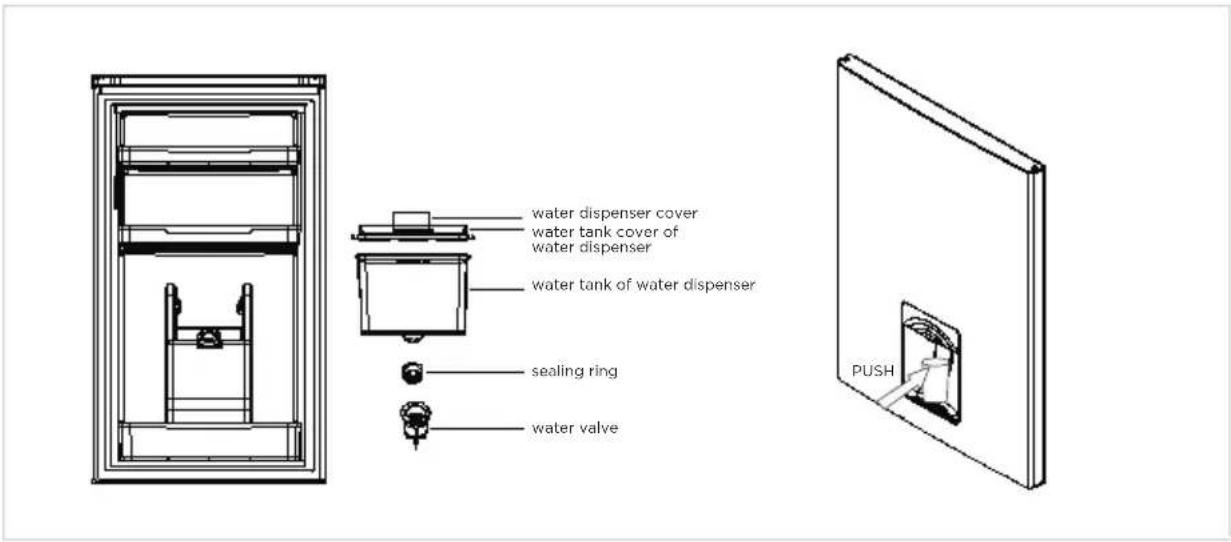
- First open Water inlet cover, fill with drinking water to "MAX" marked as the maximum amount of water.
- Use the cup to push the trigger to the inside, the water will flow out, when the trigger back to the original position, the water stops.
- Water dispenser can only be used for pure water, not suitable for beverages or fruit juice.
Changing the light
- Any replacement or maintenance of the LED lamps is intended to be made by the manufacturer, its service agent or similar qualified person. This product contains a light source of energy efficiency class
Step
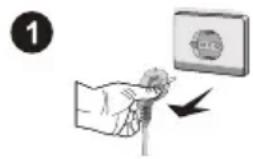
- Please take out the plug before removal.
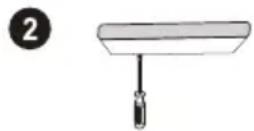
- Remove the lampshade with a screwdriver.
- Take down the lamp panel.
- Remove the connection terminal.
Connecting the appliance
Before initial start, keep the refrigerator still for two hour before connecting it to power supply.

ATTENTION
Before putting any fresh or frozen foods, the refrigerator shall have run for 2-3 hours, or for above 4 hours in summer when the ambient temperature is high.
Tips for energy saving
- The appliance should be located in the coolest area of the room, away from heat producing appliances or heating ducts, and out of the direct sunlight.
- Let hot foods cool to room temperature before placing in the appliance. Overloading the appliance forces the compressor to run longer. Foods that freeze too slowly may lose quality, or spoil.
- Be sure to wrap foods properly, and wipe containers dry before placing them in the appliance. This cuts down on frost build-up inside the appliance.
- Appliance storage bin should not be lined with aluminum foil, wax paper, or paper toweling. Liners interfere with cold air circulation, making the appliance less efficient.
- Organize and label food to reduce door openings and extended searches. Remove as many items as needed at one time, and close the door as soon as possible.
OPERATION INSTRUCTIONS
Control panel

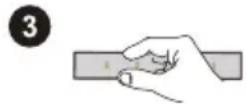
ATTENTION
The picture above is only for reference. The actual configuration will depend on the physical product or statement by the distributor.
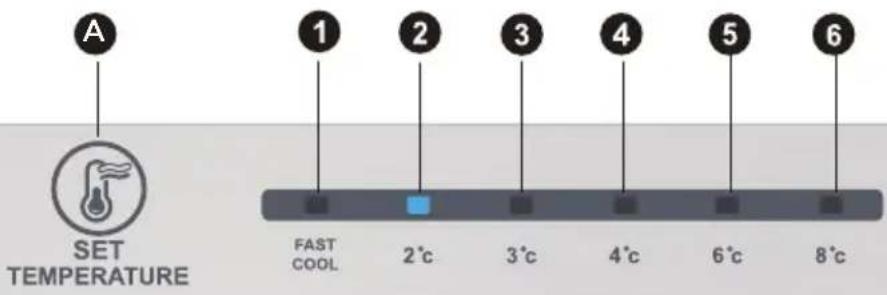
Key
A Alarm/power off/power on button
Display screen
| 1 | temperature setting 1 |
| 2 | temperature setting 2 |
| 3 | temperature setting 3 |
| 4 | temperature setting 4 |
| 5 | temperature setting 5 |
| 6 | temperature setting 6 |
Display
When power-on the refrigerator, the display screen (including the key light) will shine in full for 3s, then the refrigerator runs according to temperature setting 4.
Display of normal running
On the occurrence of a failure, the corresponding LED light will give a combined display of failure code (in recycling display);
Where there is no failure, the LED light will display the existing temperature setting.

ATTENTION
The actual control panel may differ from model to model.
Operating instructions
Gear setting
- The temperature setting will be changed once every time when you press the key SET. Then, the refrigerator will run under the new setting value after 15s. Setting1—Setting 2 Setting 3 Setting 4 Setting 5 Setting 6 → Setting 1→.....
Fast cool mode:
- Enter: Circulating modulation rapid cooling mode.
- Operate: Indicator of rapid cooling lights up, and the refrigerator operates at 2°C.
- Fast cool mode automatically disabled for 24H.
- Fast cool function can be used as Super freezing function.
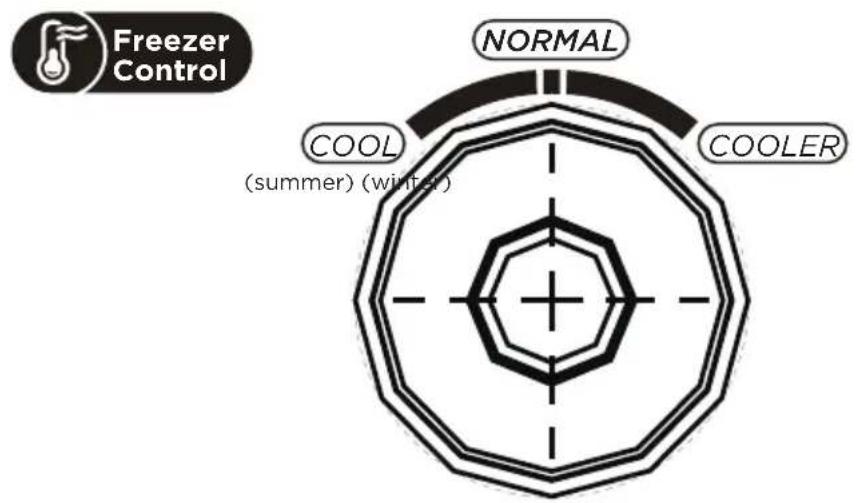
Temperature control of freezing chamber
- The freezing temperature is relatively low in "COOLER" position, while the freezing temperature is relatively high in "COOL" position, thus, "NORMAL" position is generally used.
- When ambient temperature is high in summer, the temperature shall be in the range from "NORMAL" to "COOL". If the ambient temperature is above 35°C, then "COOL" position shall prevail.
- When ambient temperature is low in winter, the temperature shall be in the range from "NORMAL" to "COOLER". If the ambient temperature is below 10^ , then "COOLER" position shall prevail.
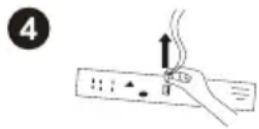
Error code
- The following warnings appearing on the display indicate corresponding faults of the refrigerator.
- Though the refrigerator may still have cooling and freezing function with the following faults, the user shall contact a maintenance specialist for maintenance, so as to ensure normal use of the refrigerator.
Fault Code Fault Description
The LED 1 and LED 2 lit Refrigerator temperature sensor circuit
The LED 1 and LED 3 lit Freezer defrost sensor
The LED 1 and LED 4 lit Ambient temperature sensor
Refrigerating chamber
- The Refrigerating Chamber is suitable for storage of a variety of fruits, vegetables, beverages and other food consumed in the short term, suggested storage time 3 days to 5 days.
- Cooking foods shall not be put in the refrigerating chamber until cooled to room temperature.
- Foods are recommended to be sealed up before putting into the refrigerator.
- The glass shelves can be adjusted up or down for a reasonable amount of storage space and easy use.
Freezing chamber
- The low temperature freezing chamber may keep food fresh for a long time and it is mainly used to store frozen foods and making ice.
- The freezing chamber is suitable for storage of meat, fish, rice balls and other foods not to be consumed in short term.
- Chunks of meat are preferably to be divided into small pieces for quick freezing and easy access. Please be noted food shall be consumed within the shelf time.
| Order | Compartments TYPE | Target storage temp. [°C] | Appropriate food |
| 1 Fridge +2 ~ +8 | Eggs, cooked food, packaged food, fruits and vegetables, dairy products, cakes, drinks and other foods are not suitable for freezing. | ||
| 2 (***)-Freezer | ≤-18 | Seafood (fish, shrimp, shellfish), freshwater aquatic products and meat products (recommended for 3 months, the longer the storage time, the worse the taste and nutrition), suitable for frozen fresh food. | |
| 3 ***-Freezer | ≤-18 | Seafood (fish, shrimp, shellfish), freshwater aquatic products and meat products (recommended for 3 months, the longer the storage time, the worse the taste and nutrition), suitable for frozen fresh food. | |
| 4 **-Freezer | ≤-12 | Seafood (fish, shrimp, shellfish), freshwater aquatic products and meat products (recommended for 3 months, the longer the storage time, the worse the taste and nutrition), suitable for frozen fresh food. | |
| 5 *-Freezer | ≤-6 | Seafood (fish, shrimp, shellfish), freshwater aquatic products and meat products (recommended for 3 months, the longer the storage time, the worse the taste and nutrition), suitable for frozen fresh food. | |
| 6 0-star -6 ~ 0 | Fresh pork, beef, fish, chicken, some packaged processed foods, etc. (Recommended to eat within the same day, preferably no more than 3 days).Partially encapsulated processed foods (non-freezable foods). | ||
| 7 Chill -2 ~ +3 | Fresh/ frozen pork, beef, chicken, freshwater aquatic products, etc. (7 days below 0°C and above 0°C is recommended for consumption within that day, preferably no more than 2 days).Seafood (less than 0 for 15 days, it is not recommended to store above 0°C. | ||
| 8 Fresh food 0 ~ | +4 | Fresh pork, beef, fish, chicken, cooked food, etc. (Recommended to eat within the same day, preferably no more than 3 days) | |
| 9 Wine +5 ~ +20 Red wine, white wine, sparkling wine, etc. | |||

ATTENTION
please store different foods according to the compartments or target storage temperature of your purchased.
CLEANING AND MAINTENANCE
Overall cleaning
- Dusts behind the refrigerator and on the ground shall be timely cleaned to improve the cooling effect and energy saving.
- Check the door gasket regularly to make sure there are no debris. Clean the door gasket with a soft cloth dampened with soapy water or diluted detergent.
- The interior of the refrigerator should be cleaned regularly to avoid odor.
- Please turn off the power before cleaning interior, remove all foods, drinks, shelves, drawers, etc.
- Use a soft cloth or sponge to clean the inside of the refrigerator, with two tablespoons of baking soda and a quart of warm water. Then rinse with water and wipe clean. After cleaning, open the door and let it dry naturally before turning on the power.
- For areas that are difficult to clean in the refrigerator (such as narrow sandwiches, gaps or corners), it is recommended to wipe them regularly with a soft rag, soft brush, etc. and when necessary, combined with some auxiliary tools (such as thin sticks) to ensure no contaminants or bacterial accumulation in these areas.
- Do not use soap, detergent, scrub powder, spray cleaner, etc., as these may cause odors in the interior of the refrigerator or contaminated food.
- Clean the bottle frame, shelves and drawers with a soft cloth dampened with soapy water or diluted detergent. Dry with a soft cloth or dry naturally.
- Wipe the outer surface of the refrigerator with a soft cloth dampened with soapy water, detergent, etc., and then wipe dry.
- Do not use hard brushes, clean steel balls, wire brushes, abrasives (such as toothpastes), organic solvents (such as alcohol, acetone, banana oil, etc.), boiling water, acid or alkaline items, which may damage the fridge surface and interior. Boiling water and organic solvents such as benzene may deform or damage plastic parts.
- Do not rinse directly with water or other liquids during cleaning to avoid short circuits or affect electrical insulation after immersion.

ATTENTION
Please unplug the refrigerator for defrost and cleaning.
Defrosting
- The refrigerator is made based on the air-cooling principle and thus has automatic defrosting function. Frost formed due to change of season or temperature may also be manually removed by disconnection of the appliance from power supply or by wiping with a dry towel.
Cleaning of door tray
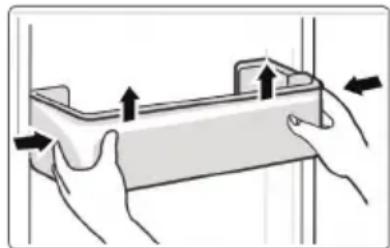
- According to the direction arrow in the figure below, use both hands to squeeze the tray, and push it upward, then you can take it out.
• After washing the tray having been taken out, you can adjust its installing height in accordance with your requirement.
natural_image
Illustration of hands holding a rectangular device with arrows indicating movement or force (no text or symbols)Cleaning of glass shelf
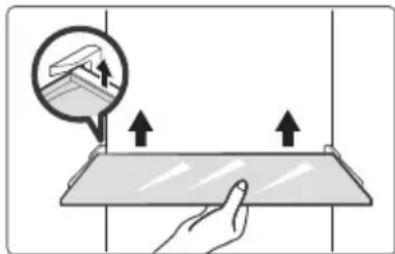
- As the innermost part of the refrigerator liner where contacting the shelves has a backstop, you shall raise the shelves upward, then you can be able to take it out.
- Adjust or clean the shelves according to your requirement.
natural_image
Illustration of a hand holding a flat surface with upward arrows, showing a magnified view of a small object (no text or symbols present)Cleaning the vegetable drawer
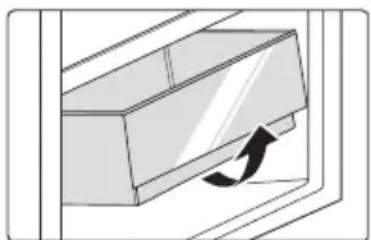
- Remove the contents of the drawer. Hold the handle of the vegetable drawer and pull it out completely until it stops.
- Lift the vegetable drawer up and remove it by pulling it out.
natural_image
Diagram of a door handle with an arrow indicating clockwise motion (no text or symbols)Out of operation
Power failure:
In case of power failure, even if it is in summer, foods inside the appliance can be kept for several hours; during the power failure, the times of door opening shall be reduced, and no more fresh food shall be put into the appliance.
Long-time nonuse:
The appliance shall be unplugged and then cleaned; then the doors are left open to prevent odor.
Moving:
Before the refrigerator is moved, take all objects inside out, fix the glass partitions, vegetable holder, freezing chamber drawers and etc. with tape, and tighten the leveling feet; close the doors and fix them with tape. During moving, the appliance shall not be laid upside down or horizontally, or be vibrated; the inclination during movement shall be no more than 45^ .

ATTENTION
The appliance shall run continuously once it is started. Generally, the operation of the appliance shall not be interrupted; otherwise the service life may be impaired.
TROUBLESHOOTING
The following simple issues can be handled by the user. Please call the after-sale service department if the issues are not solved.
| Problem Possible reason | |
| Failed operation | ·Check whether the appliance is connected to power or whether the plug is in well contact |
| ·Check whether the voltage is too low | |
| ·Check whether there is a power failure or partial circuits have tripped | |
| Odor | ·Odorous foods shall be tightly wrapped |
| ·Check whether there is any rotten food | |
| ·Clean the inside of the refrigerator | |
| Long-time operation of the compressor | ·Long operation of the refrigerator is normal in summer |
| ·when the ambient temperature is high It is not suggestible having too much food in the appliance at the same time | |
| ·Food shall get cool before being put into the appliance | |
| ·The doors are opened too frequently | |
| Light fails to get lit | ·Check whether the refrigerator is connected to power supply and whether the illuminating light is damaged |
| ·Have the light replaced by a specialist | |
| Door can not be properly closed | ·The door is stuck by food packages Too much food is placed |
| ·The refrigerator is tiltedr. | |
| Loud noises | ·Check whether the floor is level and whether the refrigerator is placed stably |
| ·Check whether accessories are placed at proper locations | |
| Door seal fails to be tight | Remove foreign matters on the door seal |
| Heat the door seal and then cool it for restoration (or blow it with an electrical drier or use a hot towel for heating) | |
| Water pan overflows | There is too much food in the chamber or food stored contains too much water, resulting in heavy defrosting |
| The doors are not closed properly, resulting in frosting due to entry of air and increased water due to defrosting | |
| Hot housing | Heat dissipation of the built-in condenser via the housing, which is normal When housing becomes hot due to high ambient temperature, storage of too much food or shutdown of the compressor is shut down, provide sound ventilation to facilitate heat dissipation |
| Surface condensation | Condensation on the exterior surface and door seals of the refrigerator is normal when the ambient humidity is too high. Just wipe the condensate with a clean towel. |
| Abnormal noise | Buzz: The compressor may produce buzzes during operation, and the buzzes are loud particularly upon start or stop. This is normal. |
| Creak: Refrigerant flowing inside of the appliance may produce creak, which is normal. | |
EN
APPENDIX
Special for new European standard
The ordered parts in the following table can be acquired from Service provider channel
| Ordered part Provided by | Minimum time required for Provision | |
| Thermostats Professional maintenance personnel | At least 7 years after the last model is launched on the market | |
| Temperature sensors | Professional maintenance personnel | At least 7 years after the last model is launched on the market |
| Printed circuit boards | Professional maintenance personnel | At least 7 years after the last model is launched on the market |
| Light sources Professional maintenance personnel | At least 7 years after the last model is launched on the market | |
| Door handles Professional repairers and final users | At least 7 years after the last model is launched on the market | |
| Door hinges Professional repairers and final users | At least 7 years after the last model is launched on the market | |
| Trays Professional repairers and final users | At least 7 years after the last model is launched on the market | |
| Baskets Professional repairers and final users | At least 7 years after the last model is launched on the market | |
| Door gaskets Professional repairers and final users | At least 10 years after the last model is launched on the market | |
Dear customer
- If you want to return or replace the product, please contact the store where you buy.
(Remember to bring the purchase invoice)
- If your product breaks down which needs to repair, please contact after-sales service provider.

ATTENTION
The model information in the product database, as well as the model identifier, can be obtained througha weblink scanned by a QR code, if any, on the energy efficiency label of the product.
For more information about the energy efficiency of the appliance, visit https://ec.europa.eu and search using the model name.
The model name can be found on the rating label of the appliance.
Coldest zone in the refrigerator
OPTIONAL: OK-temperature indicator
- The OK-temperature indicator can be used to determine temperatures below +4^ . Gradually reduce the temperature if the sign does not indicate "OK".
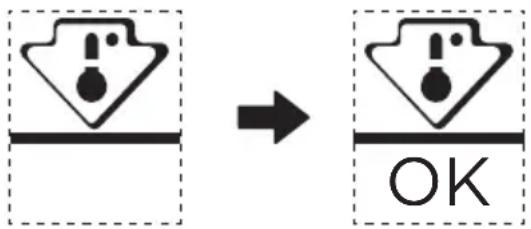
- To ensure the temperature in this area, do not change the positioning of the shelf. Inforced air refrigerators (equipped with a fan or No Frost models), the symbol of the coldest zone is not represented because the temperature inside is homogeneous.
Temperature indicator setting
- To help you set your refrigerator well, it is equipped with a temperature indicator that will monitor the average temperature in the coldest zone.
- WARNING: This indicator is intended to work only with your refrigerator, do not use it in another refrigerator (in fact, the coldest zone is not the same), or for any other use.
Checking the temperature in the coldest zone
- With the temperature indicator, you can check regularly that the temperature of the coldest zone is correct. Indeed, the internal temperature of the refrigerator depends on several factors such as the ambient temperature of the room, the amount of food stored and the frequency of door opening. Take these factors into consideration when setting the device.
- When the indicator shows "OK", this means that your thermostat is well adjusted and the internal temperature correct.
- If the indicator of temperature turns WHITE, this means that the temperature is too high; in this case, increase the refrigerator temperature control setting and wait for 12 hours before performing a new visual inspection of the indicator. When fresh food has been introduced or the door has been left open, it is possible for the indicator of temperature to turn WHITE after a while.
1 Luce LED
4 Cassetto
2 Ripiano
natural_image
Isometric line drawing of a rectangular electronic component with multiple leads (no text or symbols)
natural_image
Line drawing of a two-door refrigerator with a side door and top handle (no text or symbols)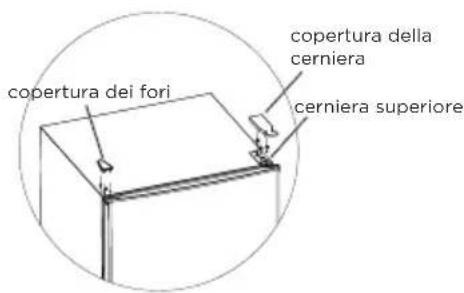
Codice errore
natural_image
Illustration of hands holding a rectangular device with arrows indicating movement or force (no text or symbols)natural_image
Illustration of a hand pressing down on a flat surface with arrows indicating direction (no text or symbols)natural_image
Diagram of a door handle with an arrow indicating clockwise motion (no text or symbols)1 Iluminación LED
4 Cajón
2 Repisa
natural_image
Technical line drawing of a rectangular electronic component with metal contacts (no text or symbols)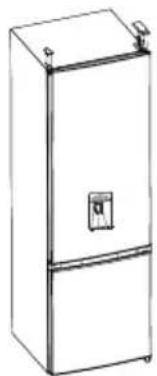
natural_image
Line drawing of a two-door refrigerator with a door and front-mounted top (no text or symbols)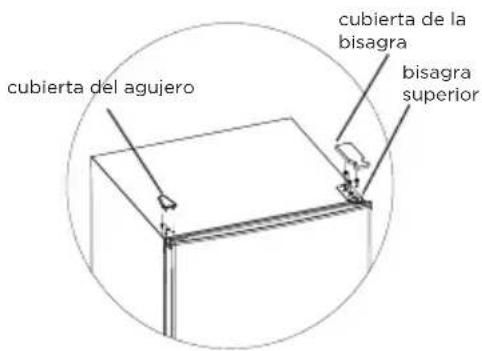
natural_image
Line drawing of a tall refrigerator with open doors and shelves (no text or symbols)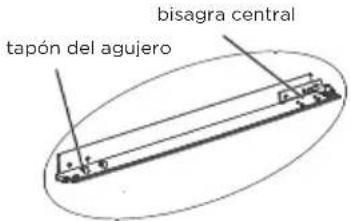
natural_image
Line drawing of a refrigerator with multiple doors and shelves (no text or symbols)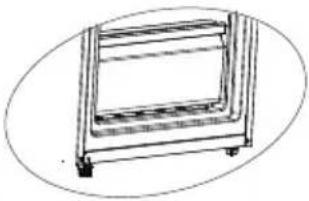
natural_image
Simple line drawing of a rectangular frame with wheels and a side panel (no text or symbols)Código de error
natural_image
Illustration of hands holding a rectangular device with arrows indicating movement or force (no text or symbols)natural_image
Illustration of a hand interacting with a flat surface, showing upward arrows and a magnified inset of a small object (no text or symbols)natural_image
Diagram of a door handle with an arrow indicating clockwise motion (no text or symbols)Sin funcionamiento
1 Luz LED
4 Gaveta
2 Prateleira
5 Bandejas da porta
3 Caixa de frutas e legumes
6 Dispensador de água (opcional)

ATENÇÃO
natural_image
Pure technical line drawing of a rectangular component with internal notches and connectors (no text or symbols)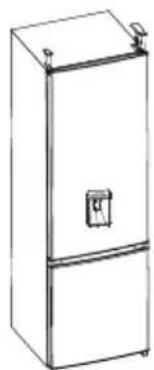
natural_image
Line drawing of a two-door refrigerator with a double door and top handle (no text or symbols)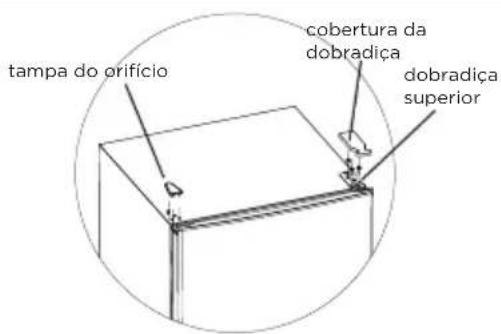
natural_image
Line drawing of a multi-tiered refrigerator cabinet with shelves and doors (no text or symbols)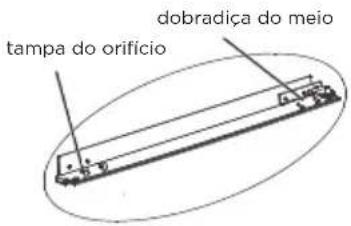
natural_image
Line drawing of a multi-tiered refrigerator cabinet with shelves and doors (no text or symbols)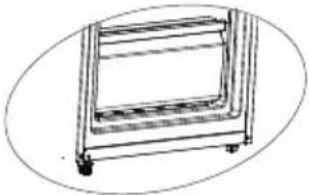
natural_image
Line drawing of a four-legged cart or shelf unit with wheels and a handle (no text or symbols)Código de erro
- Os seguintes avisos que aparecem no visor indicam avarias correspondentes do frigorífico.
natural_image
Illustration of hands holding a rectangular device with arrows indicating movement or force (no text or symbols)natural_image
Illustration of a hand interacting with a flat surface, showing upward arrows and a magnified view of the surface (no text or symbols)natural_image
Diagram of a door handle with an arrow indicating clockwise motion (no text or symbols)Fora de serviço
Falha de energia:
1 Φωτισμός LED
4 Συρτάρι
2 Páφι
5 Ράφι πόρτας
3 Φρουτοθήκη
natural_image
Pure technical line drawing of a rectangular component with internal spring-like notches (no text or symbols)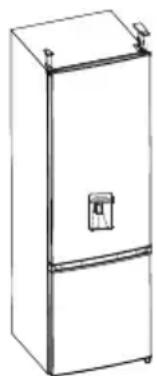
natural_image
Line drawing of a two-door refrigerator with a side door and top-mounted top (no text or symbols)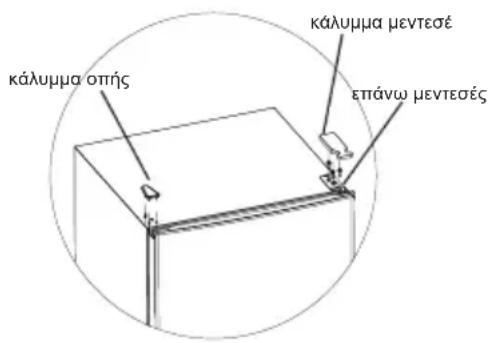
natural_image
Technical line drawing of a mechanical lifting device (no text or symbols)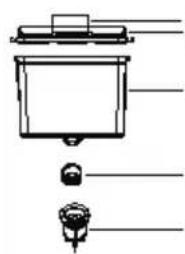
natural_image
Simple line drawing of a container with a lid and two small icons below (no text or symbols)Κωδικός σφάλματος
natural_image
Illustration of hands holding a tray with arrows indicating movement or force (no text or symbols)natural_image
Illustration of a hand holding a flat surface with upward arrows, showing a magnified view of a small object (no text or symbols present)natural_image
Diagram of a door handle with an arrow indicating clockwise motion (no text or symbols)Διακοπή λειτουργίας
Διακοπή ρεύματος:
INSTALLATION DU PRODUIT 04
MODE D'EMPLOI 11
NETTOYAGE ET ENTRETIEN 16
DÉPANNAGE 18
ANNEXE 20
CARACTÉRISTIQUES
1 Lumière LED
4 Tiroir
2 Étagère
5 Plateau de porte
natural_image
Pure technical line drawing of a rectangular component with internal notches and connectors (no text or symbols)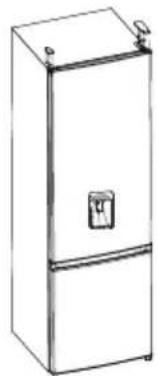
natural_image
Line drawing of a single refrigerator with front door and side door (no text or symbols)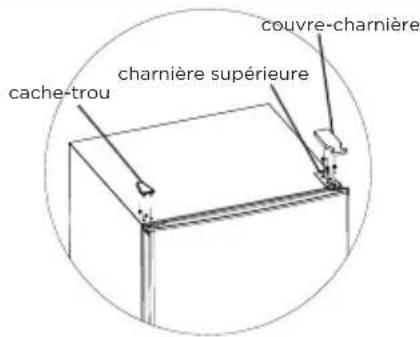
Code d'erreur
natural_image
Illustration of hands holding a rectangular device with arrows indicating movement or force (no text or symbols)natural_image
Illustration of a hand interacting with a flat surface, showing upward arrows and a magnified inset of a building (no text or symbols)natural_image
Diagram of a door handle with an arrow indicating clockwise motion (no text or symbols)Hors service
Panne de courant :
1 LED-Beleuchtung
4 Schubfach
2 Ablagefach
5 Türablage
natural_image
Isometric line drawing of a rectangular electronic component with multiple metal contacts (no text or symbols)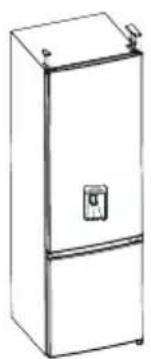
natural_image
Line drawing of a single refrigerator with lid and front panel (no text or symbols)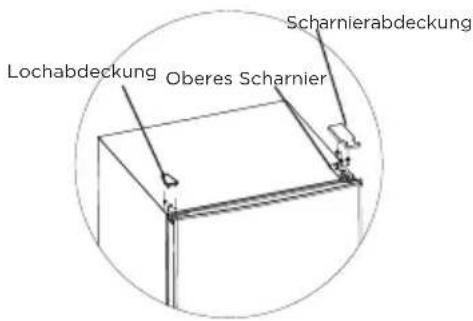
Fehlercode
natural_image
Illustration of hands holding a tray with arrows indicating movement or force (no text or symbols)natural_image
Illustration of a hand holding a flat surface with arrows indicating upward movement, and an inset showing a ceiling-mounted device (no text or symbols present)natural_image
Diagram of a door handle with an arrow indicating clockwise motion (no text or symbols)natural_image
Pure technical line drawing of a rectangular component with internal spring-like slots (no text or symbols)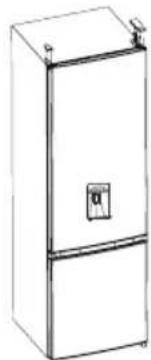
natural_image
Line drawing of a two-tier refrigerator with a door and label (no text or symbols)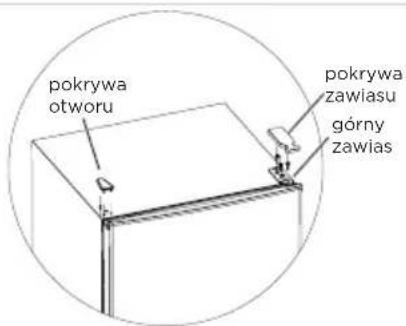
Kody błędów
natural_image
Illustration of hands holding a rectangular object with arrows indicating movement or force (no text or symbols)natural_image
Illustration of a hand pressing down on a flat surface with upward arrows indicating movement or force (no text or symbols)natural_image
Diagram of a door handle with an arrow indicating clockwise motion (no text or symbols)INSTALACE PRODUKTU 04
NÁVOD K OBSLUZE....11
ČIŠTĚNÍ A ÚDRŽBA....15
ŘEŠENÍ PROBLÉMŮ 17
PŘÍLOHA....19
SPECIFIKACE
natural_image
Pure technical line drawing of a rectangular component with internal spring-like slots (no text or symbols)
natural_image
Line drawing of a two-door refrigerator with a side door and top handle (no text or symbols)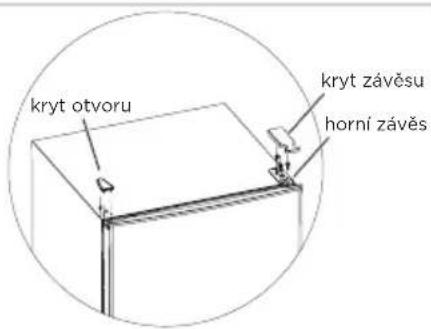
Chybový kód
natural_image
Illustration of hands holding a rectangular object with arrows indicating movement or force (no text or symbols)natural_image
Illustration of a hand pressing down on a flat surface with upward arrows indicating movement or force (no text or symbols)natural_image
Diagram of a door handle with an arrow indicating clockwise motion (no text or symbols)Mimo provoz
Výpadek napájení:
1 LED svetlo
2 Polička
3 Box na ovocie a zeleninu

UPOZORNENIE
natural_image
Pure technical line drawing of a mechanical component with no text or symbols
natural_image
Line drawing of a two-door refrigerator with a control panel (no text or symbols)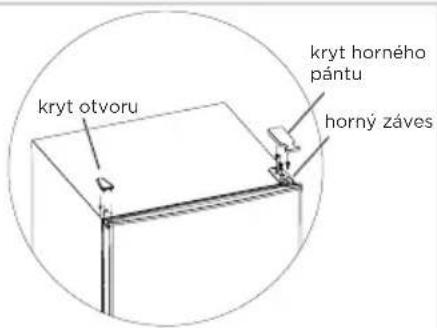
natural_image
Line drawing of a multi-tiered refrigerator with shelves and doors (no text or symbols)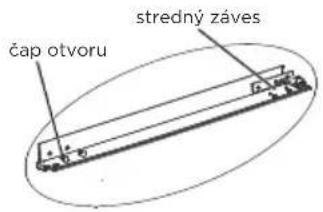
natural_image
Line drawing of a refrigerator with multiple shelves and top panel (no text or symbols)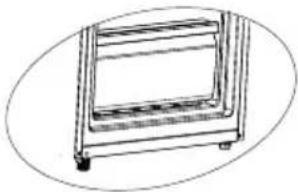
natural_image
Line drawing of a rectangular frame with wheels, no text or symbols presentnatural_image
Technical line drawing of a mechanical lifting frame with no text or symbols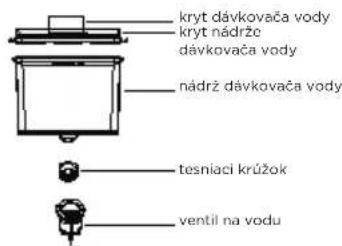
Kód poruchy
natural_image
Illustration of hands holding a rectangular object with arrows indicating movement or force (no text or symbols)natural_image
Illustration of a hand interacting with a flatbed surface, showing upward arrows and a magnified view of the surface (no text or symbols)natural_image
Diagram of a door handle with an arrow indicating clockwise motion (no text or symbols)Pri nepoužívaní
1 LED világítás
4 Fiók
2 Polc
5 Ajtó Tálca
natural_image
Pure technical line drawing of a rectangular component with internal slots and mounting brackets (no text or symbols)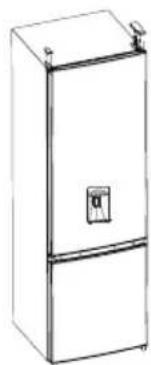
natural_image
Line drawing of a two-tier refrigerator with a door and top handle (no text or symbols)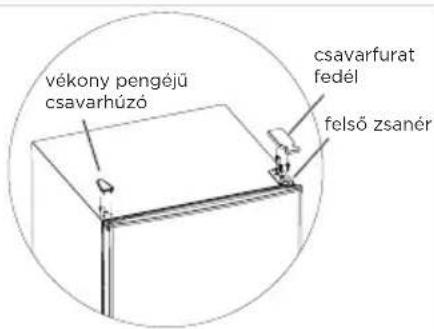
Hibakód
natural_image
Illustration of hands holding a rectangular object with arrows indicating movement or force (no text or symbols)natural_image
Illustration of a hand interacting with a flat surface, showing upward arrows and a magnified view of the surface (no text or symbols)natural_image
Diagram of a door handle with an arrow indicating clockwise motion (no text or symbols)Üzemen kívül
Áramkimaradás:
PRODUKTA PÄRSKATS 03
PRODUKTA UZSTĀDĪŠANA....04
EKSPLUATĀCIJAS INSTRUKCIJAS....11
TİRİŞANA UN APKOPE....15
PROBLÉMU NOVĚRŠANA....17
PIELIKUMS....19
SPECIFIKĀCIJAS
1 LED gaisma
2 Plaukts
3 Auglu un dârzenu kaste
natural_image
Pure technical line drawing of a rectangular component with internal connectors (no text or symbols)
natural_image
Line drawing of a two-door refrigerator with a control panel (no text or symbols)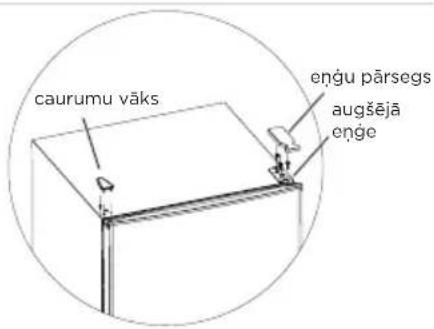
Klūdas kods
natural_image
Illustration of hands holding a rectangular object with arrows indicating movement or force (no text or symbols)natural_image
Illustration of a hand interacting with a flat surface, showing upward arrows and a magnified view of the top edge (no text or symbols)natural_image
Diagram of a door handle with an arrow indicating clockwise motion (no text or symbols)PRODUKTO PERŽIŪRA....03
PRODUKTO MONTAVIMAS....04
NAUDOJIMO INSTRUKCIJOS 11
VALYMAS IR PRIEŽIŪRA 15
TRIKČIŲ ŠALINIMAS....17
PRIEDAS....19
SPECIFIKACIJOS
Produkto modelis MDRB380FGE
SERIES
1 LED apšvietimas
2 Lentyna
natural_image
Pure technical line drawing of a rectangular component with internal spring-like slots (no text or symbols)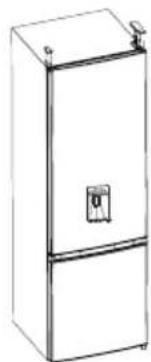
natural_image
Line drawing of a two-door refrigerator with a door and top handle (no text or symbols)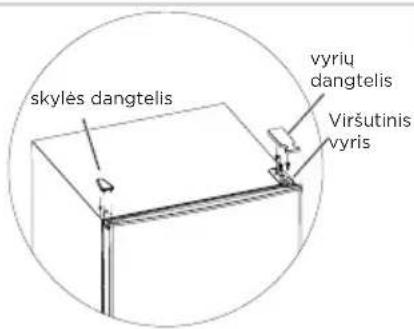
Klaidos kodas
natural_image
Illustration of hands holding a rectangular object with arrows indicating movement or force (no text or symbols)natural_image
Illustration of a hand holding a flatboard with arrows indicating upward movement, no text or symbols presentnatural_image
Diagram of a door handle with an arrow indicating clockwise motion (no text or symbols)Neveikia
Matinimo klaida:

natural_image
Pure technical line drawing of a rectangular component with internal slots and mounting brackets (no text or symbols)
natural_image
Line drawing of a single refrigerator with lid and front panel (no text or symbols)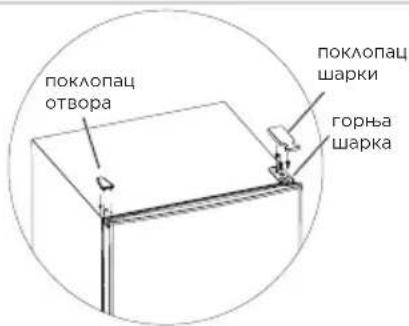
natural_image
Technical line drawing of a mechanical assembly or frame structure (no text or symbols)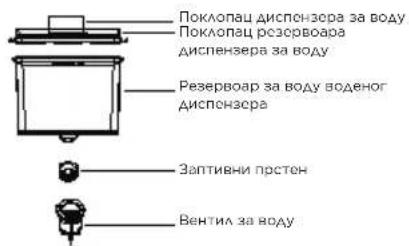
natural_image
Simple line drawing of a book with a pushpin and a small inset image (no text or symbols)Промена светла
Код грешке
natural_image
Illustration of hands holding a rectangular object with arrows indicating movement or force (no text or symbols)natural_image
Illustration of a hand interacting with a flat surface, showing upward arrows and a magnified view of the top edge (no text or symbols)natural_image
Diagram of a door handle with an arrow indicating clockwise motion (no text or symbols)Ван рада
Нестанка струје:
HR
1 LED svjetlost
4 Ladica
2 Polica
5 Ladica za Vrata

PAŽNJA
natural_image
Pure technical line drawing of a rectangular component with internal notches (no text or symbols)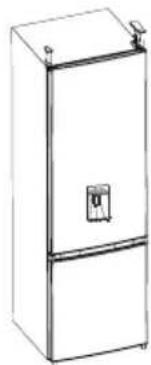
natural_image
Line drawing of a two-door refrigerator with a door and top handle (no text or symbols)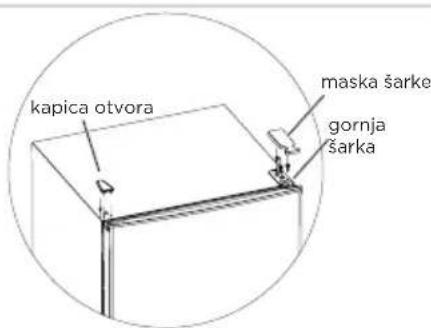
- Skinite vrata rashladne komore, srednju šarku (koristite imbus ključ da uklonite vijak srednje šarke) i poklopac rupe na drugoj strani.
- Skinite vrata komore za zamrzavanje, rastavite donju šarku, poklopce rupa, podnožje za izravnavanje, postavite donju šarku na drugu stranu.
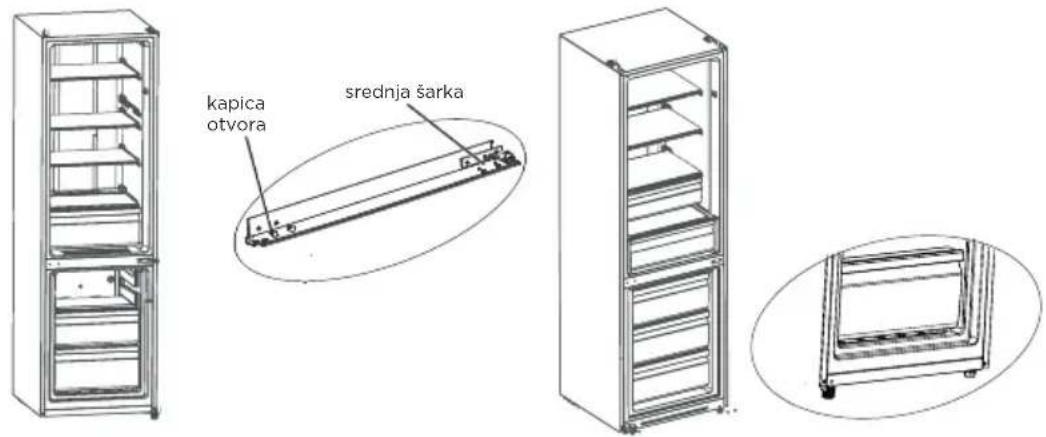
Šifre pogreške
natural_image
Illustration of hands holding a rectangular object with arrows indicating movement or force (no text or symbols)Čišćenje staklene police
natural_image
Illustration of a hand pressing down on a flat surface with upward arrows, showing a small magnified view of a terrain feature (no text or symbols)Čišćenje ladice za povrće
- Izvadite sadržaj ladice. Držite ručku ladice za povrće i potpuno je izvucite dok se ne zaustavi.
- Podignite ladicu za povrće i izvadite je izvlačenjem.
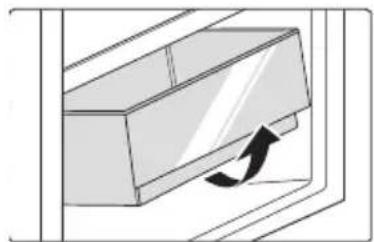
natural_image
Diagram of a door handle with an arrow indicating clockwise motion (no text or symbols)Van pogona
Prekid napajanja:
- Kako biste osigurali temperaturu u ovom području, nemojte mijenjati položaj police. Hladnjaci s pojačanim zrakom (opremljeni ventilatorom ili No Frost modeli), simbol najhladnije zone nije prikazan jer je unutrašnja temperatura homogena.
Podešavanje indikatora temperature
- Kako biste lakše namjestili svoj hladnjak, opremljen je indikatorom temperature koji će pratiti prosječnu temperaturu u najhladnijoj zoni.
- UPOZORENJE: Ovaj indikator je namijenjen samo za rad s vašim hladnjakom, nemojte ga koristiti u drugom hladnjaku (zapravo, najhladnija zona nije ista) ili za bilo koju drugu upotrebu.
1 LED osvetlitev
4 Predal
2 Polica
5 Pladenj Za Vrata
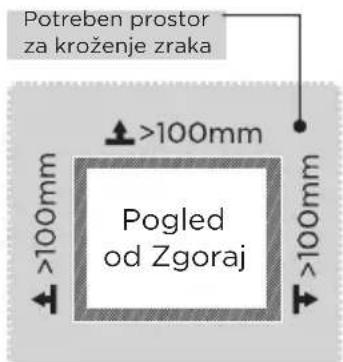

PREVIDNO
natural_image
Pure technical line drawing of a rectangular electronic component with no text or symbols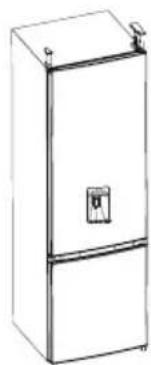
natural_image
Line drawing of a single refrigerator with lid and front panel (no text or symbols)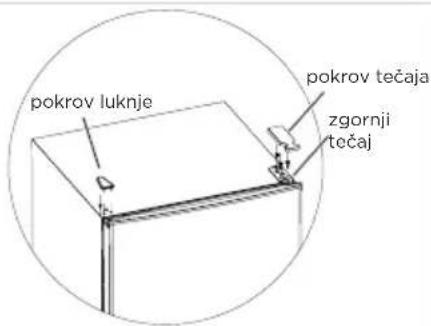
Napačna koda
natural_image
Illustration of hands holding a rectangular object with arrows indicating movement or force (no text or symbols)Čiščenje steklene police
natural_image
Illustration of a hand pressing down on a flat surface with upward arrows, showing a small magnified view of a terrain feature (no text or symbols)natural_image
Diagram of a door handle with an arrow indicating clockwise motion (no text or symbols)INSTALARE PRODUS....04
INSTRUCTIUNI DE UTILIZARE....11
1 Iluminare LED
4 Sertar
2 Raft
5 Raftul uşii
natural_image
Pure technical line drawing of a mechanical component with no text or symbols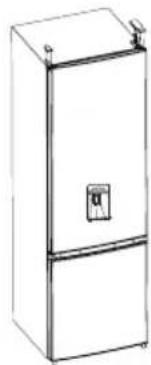
natural_image
Line drawing of a two-tier refrigerator with front panel and side door (no text or symbols)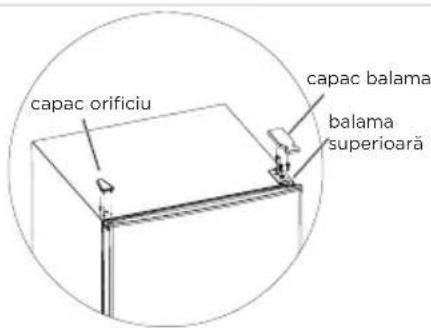
natural_image
Technical line drawing of a mechanical cabinet or enclosure with internal components (no text or symbols)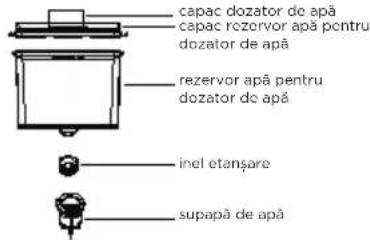
RO
Cod de defectiune
natural_image
Illustration of hands holding a rectangular object with arrows indicating movement or force (no text or symbols)natural_image
Illustration of a hand interacting with a flat surface, showing upward arrows and a magnified view of the surface (no text or symbols)natural_image
Diagram of a door handle with an arrow indicating clockwise motion (no text or symbols)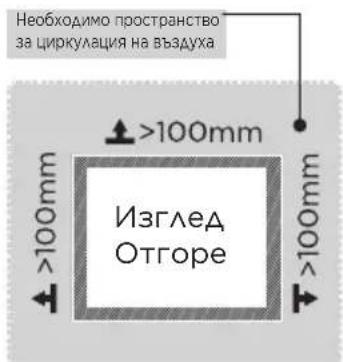
natural_image
Isometric line drawing of a rectangular electronic component with internal contacts (no text or symbols)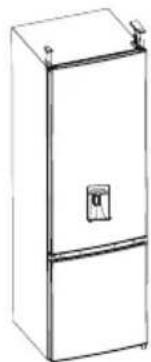
natural_image
Line drawing of a two-door refrigerator with a door and top handle (no text or symbols)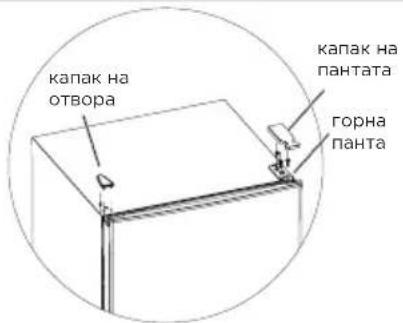
natural_image
Line drawing of a double refrigerator with shelves and doors (no text or symbols)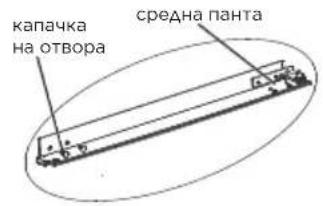
natural_image
Line drawing of a refrigerator with two doors and shelves (no text or symbols)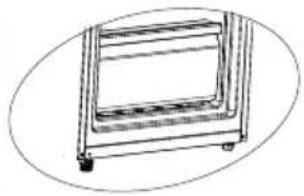
natural_image
Simple line drawing of a rectangular frame with wheels and a side panel (no text or symbols)natural_image
Technical line drawing of a mechanical assembly or enclosure with no visible text or symbols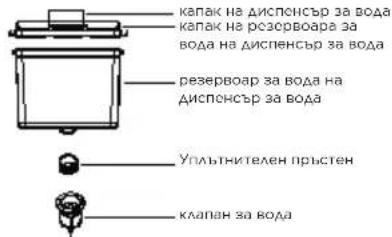
Код на грешка
natural_image
Illustration of hands holding a rectangular object with arrows indicating movement or force (no text or symbols)natural_image
Illustration of a hand interacting with a flat panel, showing upward arrows and a magnified inset of a roof structure (no text or symbols)natural_image
Diagram of a door handle with an arrow indicating clockwise motion (no text or symbols)Изключване
INSTALIMI I PRODUKTIT ....04
UDHËZIME PUNIMI 11
PASTRIMI DHE MIRËMBAJTJA....15
ZGJIDHJA E PROBLEMEVE....17
SHTOJCË....19
SPECIFIKIMET
Modeli i produktit MDRB380FGE
SERIES
INSTALIMI I PRODUKTIT
Instruksionet e Instalimit
Për pajisjet ftohëse me klasë klimatike
natural_image
Isometric line drawing of a rectangular electronic component with multiple leads (no text or symbols)
natural_image
Line drawing of a two-tier refrigerator with a door and top handle (no text or symbols)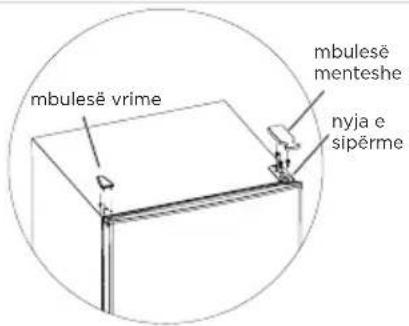
natural_image
Line drawing of a tall refrigerator with multiple shelves and doors (no text or symbols)
natural_image
Line drawing of a refrigerator with multiple doors and shelves (no text or symbols)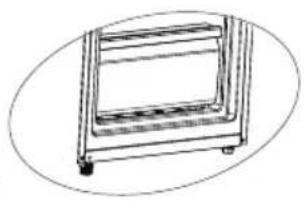
natural_image
Line drawing of a rectangular metal frame with wheels and a side panel (no text or symbols)
Kodi e gabimit
natural_image
Illustration of hands holding a rectangular object with arrows indicating movement or force (no text or symbols)Pastrimi i sirtarit prej xhami
natural_image
Illustration of a hand holding a flat surface with arrows indicating upward movement, no text or symbols presentnatural_image
Diagram of a door handle with an arrow indicating clockwise motion (no text or symbols)Jashtë funksioni
make yourself at home