USER MANUAL HW-B400F SAMSUNG
Refer to the table below for an explanation of symbols which may be on your Samsung product.
| 4 | CAUTION
RISK OF ELECTRIC SHOCK.
DO NOT OPEN. | ! |
| 5 | This symbol indicates that high voltage is present inside. It is dangerous to make any kind of contact with any internal part of this product. |
| 1 | This symbol indicates that this product has included important literature concerning operation and maintenance. |
| Class II product: This symbol indicates that it does not require a safety connection to electrical earth (ground). If this symbol is not present on a product with a power cord, the product MUST have a reliable connection to protective earth (ground). |
| ~ | AC voltage: This symbol indicates that the rated voltage marked with the symbol is AC voltage. |
| = | DC voltage: This symbol indicates that the rated voltage marked with the symbol is DC voltage. |
| Caution, Consult instructions for use: This symbol instructs the user to consult the user manual for further safety related information. |
WARNING
- To reduce the risk of fire or electric shock, do not expose this appliance to rain or moisture.
- Do not use liquid fumigators containing chemicals, such as mosquito repellent or air freshener, around the product. If steam comes in contact with the product surface or enters the product, it may cause stains or malfunction.
CAUTION
- TO PREVENT ELECTRIC SHOCK, MATCH WIDE BLADE OF PLUG TO WIDE SLOT, FULLY INSERT.
- This apparatus shall always be connected to a AC outlet with a protective grounding connection.
- To disconnect the apparatus from the mains, the plug must be pulled out from the mains socket, therefore the mains plug shall be readily operable.
- Do not expose this apparatus to dripping or splashing. Do not put objects filled with liquids, such as vases on the apparatus.
- To turn this apparatus off completely, you must pull the power plug out of the wall socket. Consequently, the power plug must be easily and readily accessible at all times.
PRECAUTIONS
- Ensure that the AC power supply in your house complies with the power requirements listed on the identification sticker located on the bottom of your product. Install your product horizontally, on a suitable base (furniture), with enough space around it for ventilation (7 10~cm) . Make sure the ventilation slots are not covered. Do not place the unit on amplifiers or other equipment which may become hot. This unit is designed for continuous use. To fully turn off the unit, disconnect the AC plug from the wall outlet. Unplug the unit if you intend to leave it unused for a long period of time.
- During thunderstorms, disconnect the AC plug from the wall outlet. Voltage peaks due to lightning could damage the unit.
- Do not expose the unit to direct sunlight or other heat sources. This could lead to overheating and cause the unit to malfunction.
-
Protect the product from moisture (i.e. vases), and excess heat (e.g. a fireplace) or equipment creating strong magnetic or electric fields. Unplug the power cable from the AC wall socket if the unit malfunctions. Your product is not intended for industrial use. It is for personal use only. Condensation may occur if your product has been stored in cold temperatures. If transporting the unit during the winter, wait approximately 2 hours until the unit has reached room temperature before using.
-
The battery used with this product contains chemicals that are harmful to the environment. Do not dispose of the battery in the general household trash. Do not expose the battery to excess heat, direct sunlight, or fire. Do not short circuit, disassemble, or overheat the battery.
CAUTION: Danger of explosion if the battery is replaced incorrectly. Replace only with the same or equivalent type.
CONTENTS
01 Checking the Components 6
02 Product Overview 7
Top Panel of the Soundbar 7
Bottom Panel of the Soundbar 8
03 Using the Remote Control 9
Inserting Batteries before using the Remote Control (AAA batteries X 2) 9
How to Use the Remote Control 9
Using the Hidden Buttons (Buttons with more than one function) 14
Output specifications for the different sound effect modes 14
Adjusting the Soundbar volume with a TV remote control 15
04 Connecting the Soundbar 16
Connecting Electrical Power 16
05 Using a wired connection to the TV 17
Method 1. Connecting a TV using an HDMI Cable 17
Method 2. Connecting using an Optical Cable 19
06 Using a wireless connection to the TV 20
Connecting via Bluetooth 20
07 Connecting an External Device 22
Connecting using an Optical Cable 22
08 Connecting a USB Storage Device 23
09 Connecting a Mobile Device 24
Connecting via Bluetooth 24
Connecting a Soundbar to a mobile device via NFC function 27
10 Installing the Wall Mount (Optional) 28
Installation Precautions 28
Wall mount Components 28
11 Software Update 31
Reset 32
12 Troubleshooting 33
13 Licences 34
14 Important Notes About Service 35
15 Specifications and Guide 36
Specifications 36
01 CHECKING THE COMPONENTS

Soundbar Main Unit Power Cord (Soundbar) Soundbar Remote Control
Batteries
- For more information about the power supply and power consumption, refer to the label attached to the product. (Label: Bottom of the Soundbar Main Unit)
- To purchase additional components or optional cables, contact a Samsung Service Centre or Samsung Customer Care.
- Design, specifications are subject to change without prior notice.
- The appearance of the accessories may differ slightly from the illustrations above.
02 PRODUCT OVERVIEW
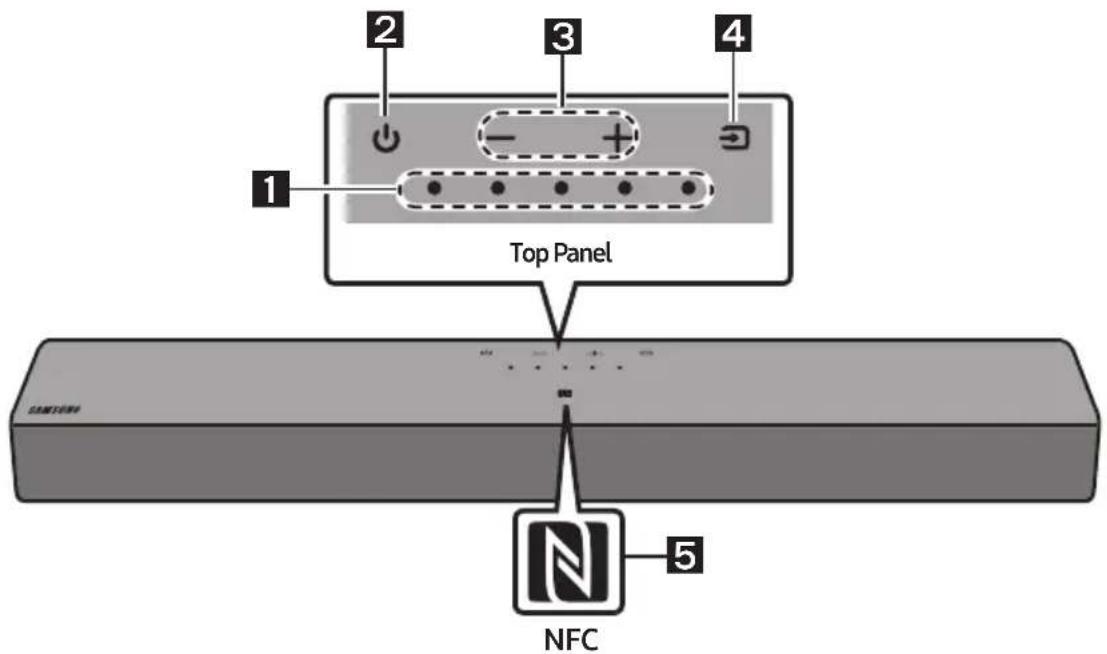
Top Panel of the Soundbar
| 1 | LED indicator | The LED Indicator flashes, glows, or changes colour depending on the Soundbar's current mode or status. The colour of the LED indicator and the number of lights indicate the active mode as described below. |
| W
White LED | W
White LED | M
Multicolour LED | W
White LED | W
White LED |
| ·The Multicolour LED changes to White, Cyan, Green, Red, Yellow, Orange, Purple and Blue depending on the mode or status. |
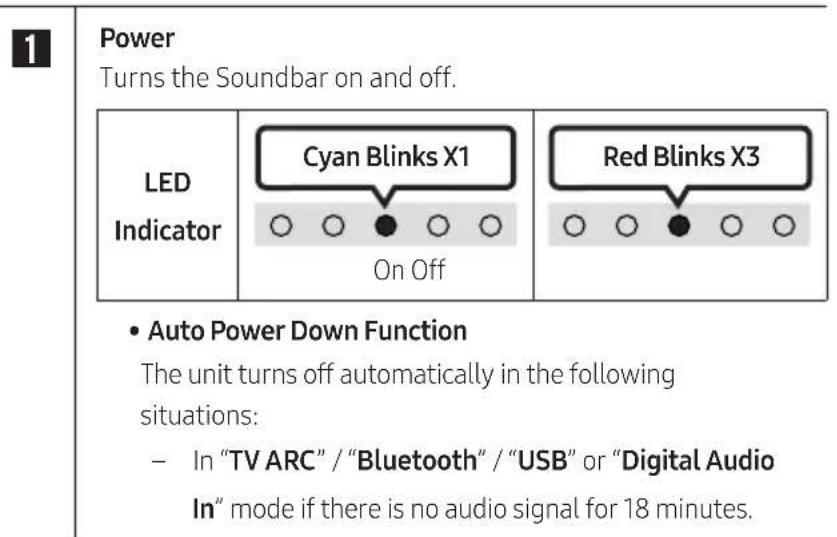
| 2 | Power | Turns the power on and off. |
| LED
Indicator | Cyan Blinks X1
On Off | Red Blinks X3
On Off | | |
| 3 | Volume | Adjusts the volume. |
| LED
Indicator | White moves to right X1
Volume Up | White moves to left X1
Volume Down | | |
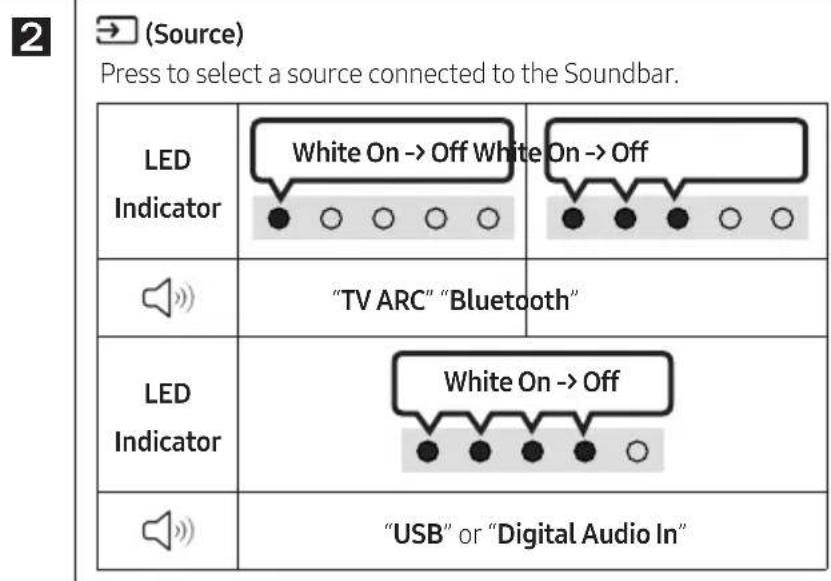
| 4 | Source | Press the (Source) button to change the mode. Each time you change the mode, the LED lights in white and then turns off. |
| LED Indicator | White On→Off White | On→Off White On→Off | "USB" or "Digital Audio In" |
| "TV ARC" "Bluetooth" | | |
| 5 | NFC Logo | You can activate your Bluetooth connection by placing your phone in the NFC detection area of the Soundbar. |
- When you plug in the Power cord, the power button will begin working in 4 to 6 seconds.
- When you turn on this unit, there will be a 4 to 5 second delay before it produces sound.
- If you hear sounds from both the TV and Soundbar, go to the Settings menu for the TV audio and change the TV speaker to External Speaker.
Bottom Panel of the Soundbar
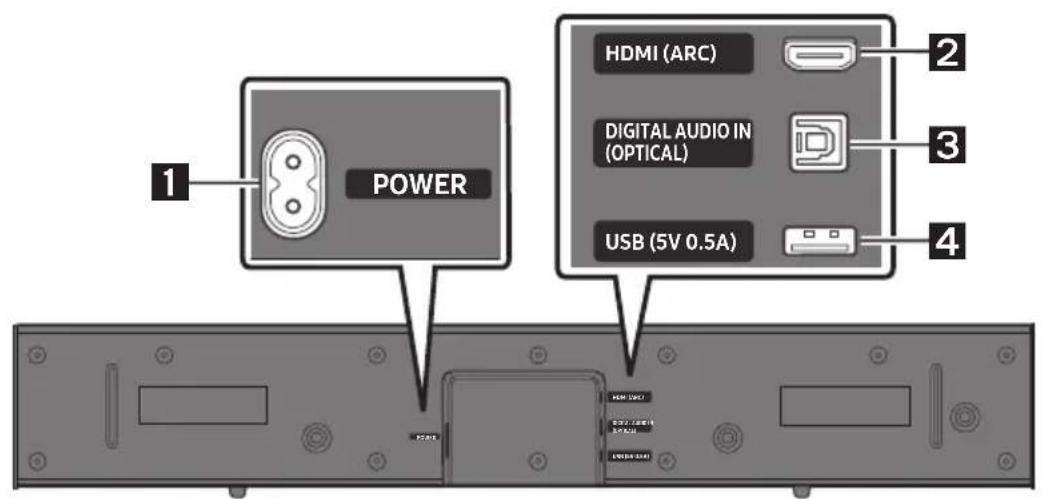
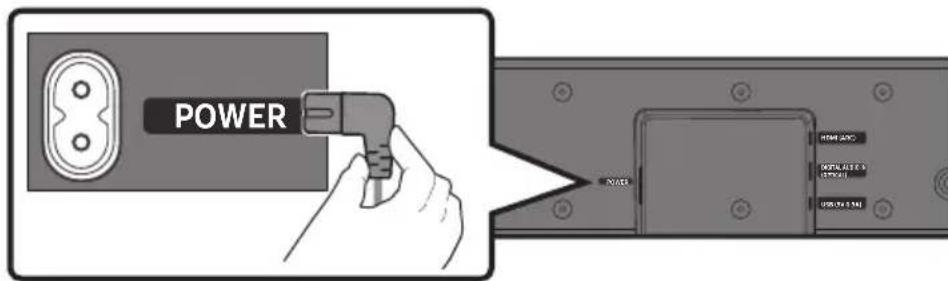
| 1 | POWER
Connect the Soundbar's AC power cable. |
| 2 | HDMI (ARC)
Connect to the HDMI (ARC) port on a TV. |
| 3 | DIGITAL AUDIO IN (OPTICAL)
Connect to the digital (optical) output of an external device. |
| 4 | USB (5V 0.5A)
Connect a USB device here to play music files stored on the USB device through the Soundbar. |
- Do not connect this unit or other components to an AC outlet until all connections between components are complete.
03 USING THE REMOTE CONTROL
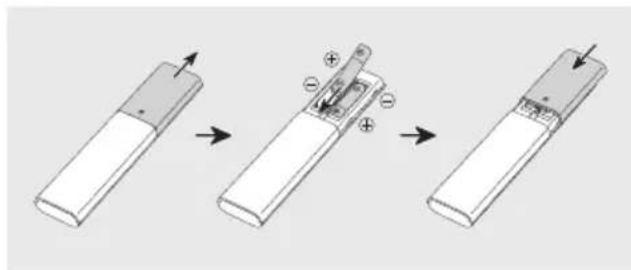
Inserting Batteries before using the Remote Control (AAA batteries X 2)
Slide the back cover in the direction of the arrow until it is completely removed.
Insert 2 AAA batteries (1.5V) so that their orientation is correct. Slide the back cover back into position.
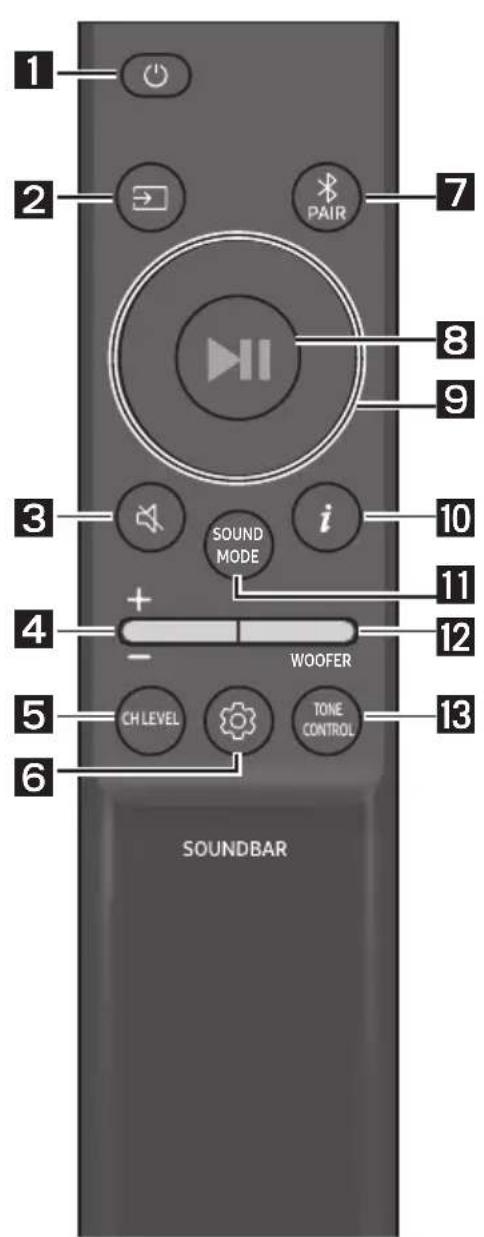
How to Use the Remote Control


(Mute)
Press the (Mute) button to mute the sound.
Press it again to unmute the sound.
| LED Indicator | Blinks X Repeatedly |

Volume
Push the button up or down to adjust the volume.
| LED Indicator | White moves to right X1
Volume Up | White moves to left X1
Volume Down |

CH LEVEL
By pressing the button, you can adjust the volume of the each speaker.
| LED Indicator | White Blinks X1 |
| "Centre Level" |


(Sound Control)
By pressing the button, you can set the audio function. The desired item can be adjusted using the Up/Down buttons. Each time the mode changes, the Multicolour LED blinks in white.
| LED Indicator | White Blinks X1
○○●○○ |
| "Sync"→"Night mode"→"Voice enhancement" |
- If the video on the TV and audio from the Soundbar are not synchronised, select "Sync" in Sound Control, and then set the audio delay between 0~300 milliseconds by using the Up/Down buttons. (Not available in "USB" or "Bluetooth" mode.)
"Sync" is only supported for some functions.
- "Night mode" is optimised for night time viewing with the settings adjusted to bring the volume down but keep the dialog clear.
"Voice enhancement" makes it easier to hear spoken dialog in movies and TV.
7 Band EQ
Press and hold the (Sound Control) button for about 5 seconds to adjust the sound for each frequency band. 150Hz , 300Hz , 600Hz , 1.2kHz , 2.5kHz , 5kHz , and 10kHz are selectable using the Left/Right buttons and each can be adjusted to a setting between -6 to +6 using the Up/Down buttons. (Make sure the Sound mode is set to "Standard".)
| 7 Band EQ |
| Press and hold the 5 Sec (Sound Control) button for about 5 seconds. | Using the Left/Right buttots and each can be adjusted to setting between -6 to+6. |
| "150Hz" | "150Hz" → "300Hz" → "600Hz" → "1.2kHz" → "2.5kHz" → "5kHz" → "10kHz" |

Bluetooth PAIR
Switch the Soundbar to Bluetooth pairing mode.
When you press the button, the LED display changes as shown below.
- Until pairing is complete, the Multicolour LED changes as Red Green Blue in turn.


II (Play/Pause)
You can also play or pause music by pressing the button in "USB" mode.

Up/Down/Left/Right
Press Up/Down/Left/Right on the button to select or set functions.
Repeat
To use the Repeat function in "USB" mode, press the Up button.
Music Skip
Press the Right button to select the next music file. Press the Left button to select the previous music file.

i(Info)
Press the button to display information about the current function. (See page 8.)

SOUND MODE
By pressing the button, you can select the desired audio mode. Each time the mode changes, the Multicolour LED blinks in white. (The sound mode may differ with the TV model.)
| LED Indicator | White Blinks X1
○○●○○ |
| "Standard"→"Surround" |
Outputs the original sound.
Provides a wider sound field than standard.
This feature automatically turns the Soundbar on when it receives a connection request from a previously connected TV or Bluetooth device. The setting is On by default.
Lets you apply dynamic range control to Dolby Digital and DTS Digital tracks.
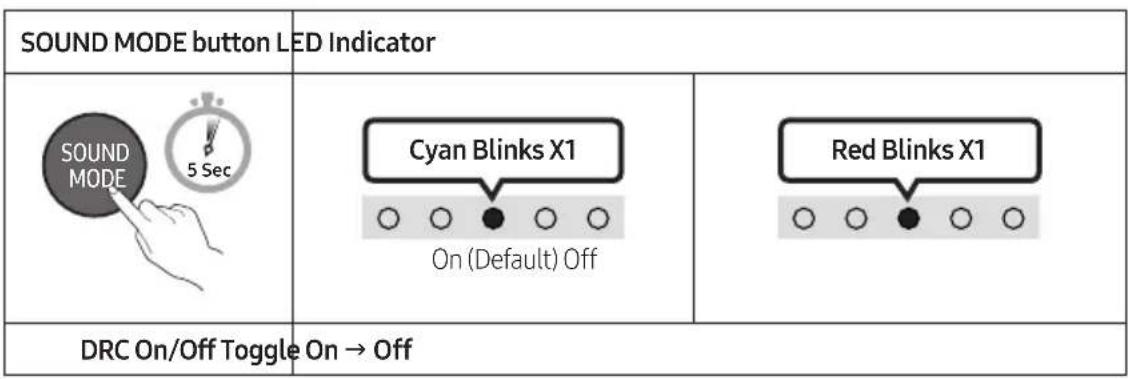
Press and hold the SOUND MODE button for more than 5 seconds while the Soundbar is powered off to turn DRC (Dynamic Range Control) on or off. With the DRC turned on, loud sound is reduced. (The sound may be distorted.)
12
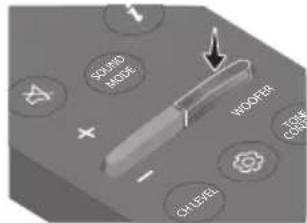
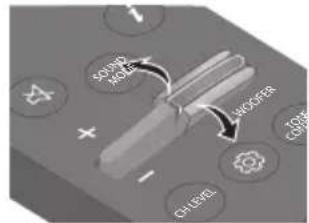
WOOFER (BASS) LEVEL
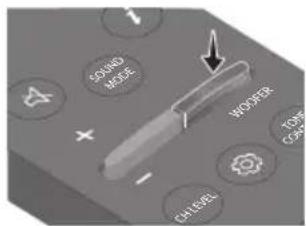
13
TONE CONTROL
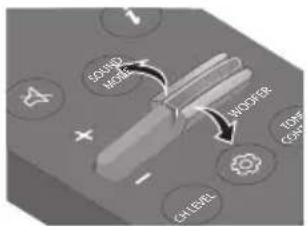
Push the button up or down to adjust the bass level between -6 to +6. To set the woofer (bass) volume level to 0 (Default), press the button. (Subwoofer is not included.)
By pressing the button, you can adjust the volume of the treble or bass sound. The desired item can be adjusted using the Up/Down buttons. (This feature is available in all sound modes except "Standard" mode.)
| LED Indicator | White Blinks X1
○○●○○ |
| “Treble” → “Bass” |
| Hidden Button | Reference page |
| Remote Control Button Function |
| WOOFER (Up) | TV remote control On/Off | page 15 |
| Left TV Auto connect | On/Off page 21 | |
| (Sound Control) | 7 Band EQ page 11 | |
| SOUND MODE | DRC On/Off page 12 | |
| Bluetooth Power On/Off page 12 | |
Output specifications for the different sound effect modes
| Effect Input Output | | |
| Standard | 2.0 ch 2.0 ch | |
| 5.1 ch 2.0 ch | |
| Surround | 2.0 ch 2.0 ch | |
| 5.1 ch 2.0 ch | |
Adjusting the Soundbar volume with a TV remote control
Adjust the Soundbar volume using the TV's remote control.
- This function can be used with IR remote controls only. Bluetooth remote controls (remote controls that require pairing) are not supported.
- Set the TV speaker to External Speaker to use this function.
- Manufacturers supporting this function: Samsung, VIZIO, LG, Sony, Sharp, PHILIPS, PANASONIC, TOSHIBA, Hisense, RCA
TV remote control On/Off
- Turn Off the Soundbar.
- Push up and hold the WOOFER button for 5 seconds.
Each time you push the WOOFER button up and hold it for 5 seconds, the mode switches in the following order: "Off-TV Remote" (Default mode), "Samsung-TV Remote", "All-TV Remote".
The LED indicator status changes each time the mode is changed, as shown below.
| Remote Control Button LED | Indicator Status | |
| 5 Sec | Red Blinks X1
"Off-TV Remote"
(Default mode) | Disable the TV remote control. |
| 5 Sec | Cyan Blinks X1
"Samsung-TV Remote" | Enable a Samsung TV's IR remote control. |
| 5 Sec | Blue Blinks X1
"All-TV Remote" | Enable a third-party TV's IR remote control. |
04 CONNECTING THE SOUNDBAR
Connecting Electrical Power
Use the power components to connect the Soundbar to an electrical outlet in the following order: Connect power cord End A to Soundbar and End B to wall socket.
- For more information about the required electrical power and power consumption, refer to the label attached to the product. (Label: Bottom of the Soundbar Main Unit)
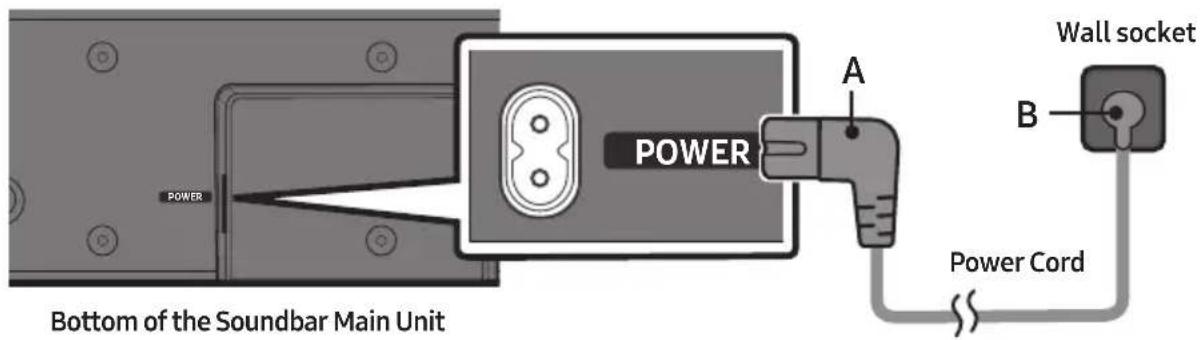
NOTE
- If you unplug and reconnect the power cord when the product is turned on, the Soundbar turns on automatically.
05 USING A WIRED CONNECTION TO THE TV
Method 1. Connecting a TV using an HDMI Cable

CAUTION
- When both the HDMI cable and optical cable are connected, the HDMI signal is received first.
- To connect the HDMI cable between the TV and Soundbar, be sure to connect the terminals marked ARC. Otherwise, the TV sound may not be output.
- The recommended cable is High Speed HDMI Cable with Ethernet.
Connecting the TV that supports HDMI ARC (Audio Return Channel)
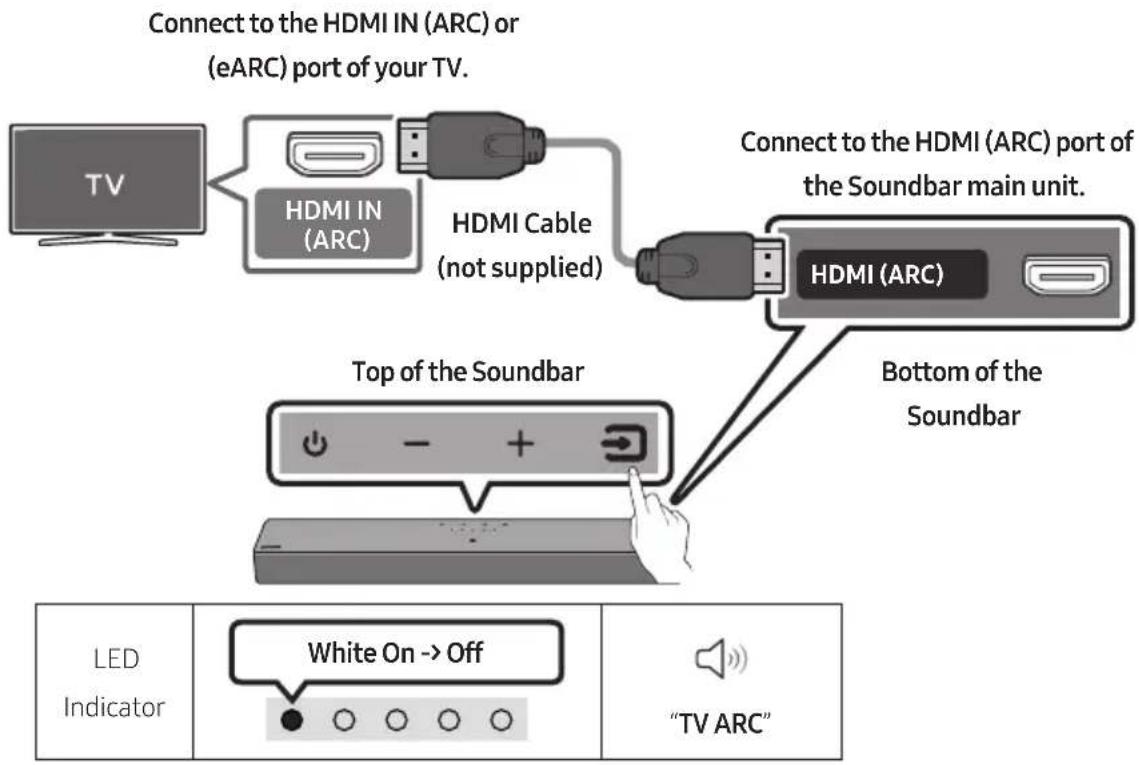
- With the Soundbar and TV turned off, connect the HDMI Cable (not supplied) as shown in the figure.
- Turn on the Soundbar and TV.
-
TV sound is output from the Soundbar.
-
When the sound is not output, check the HDMI Cable (not supplied) connection again.
- Use the volume buttons on the TV's remote control to change the volume on the Soundbar.
NOTES
-
When you connect the TV that supports the HDMI ARC (Audio Return Channel) to the Soundbar with an HDMI cable, you can transmit the digital video and audio data without connecting a separate optical cable.
-
We recommend you use a coreless HDMI cable if possible. If you use a cored HDMI cable, use one whose diameter is less than 14mm .
-
This function is not available if the HDMI cable does not support ARC.
-
When the audio in a broadcast is encoded in Dolby Digital and the "Digital Output Audio Format" on your TV is set to PCM, we recommend that you change the setting to Dolby Digital. When the setting on the TV is changed, you will experience better sound quality. (The TV menu may use different words for Dolby Digital and PCM depending on the TV manufacturer.)
Method 2. Connecting using an Optical Cable
Pre-connection Checklist
- When you use an optical cable and the terminals have covers, be sure to remove the covers.

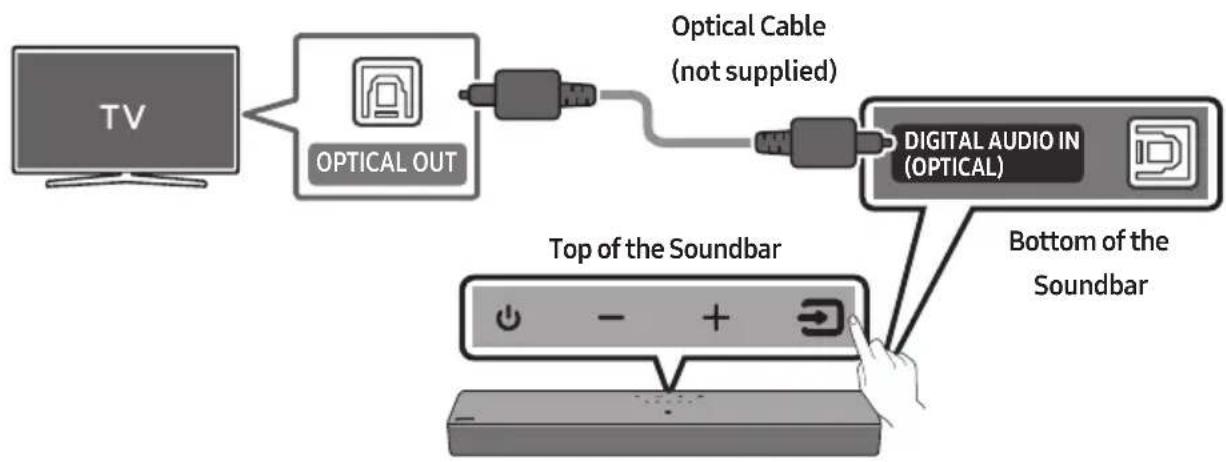
| LED Indicator | White On→Off | "Digital Audio In" |
- With the TV and Soundbar turned off, connect the DIGITAL AUDIO IN (OPTICAL) port on the Soundbar and the OPTICAL output port on the TV with the optical cable (not supplied), as shown in the figure.
- Turn on the Soundbar and TV.
- Press the (Source) button on the top panel or remote control, and then select the "Digital Audio In" mode.
- The TV sound is output from the Soundbar.
06 USING A WIRELESS CONNECTION TO THE TV
Connecting via Bluetooth
When a Samsung TV is connected using Bluetooth, you can hear stereo sound without the hassle of cables.
- Only one Samsung TV can be connected at a time.
Samsung TV that supports Bluetooth can be connected.
Check the specifications of your TV.
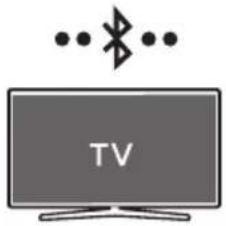
The initial connection
- Press the PAIR button on the Soundbar remote control or press (Source) button on the Soundbar top panel to enter the "Bluetooth" mode.
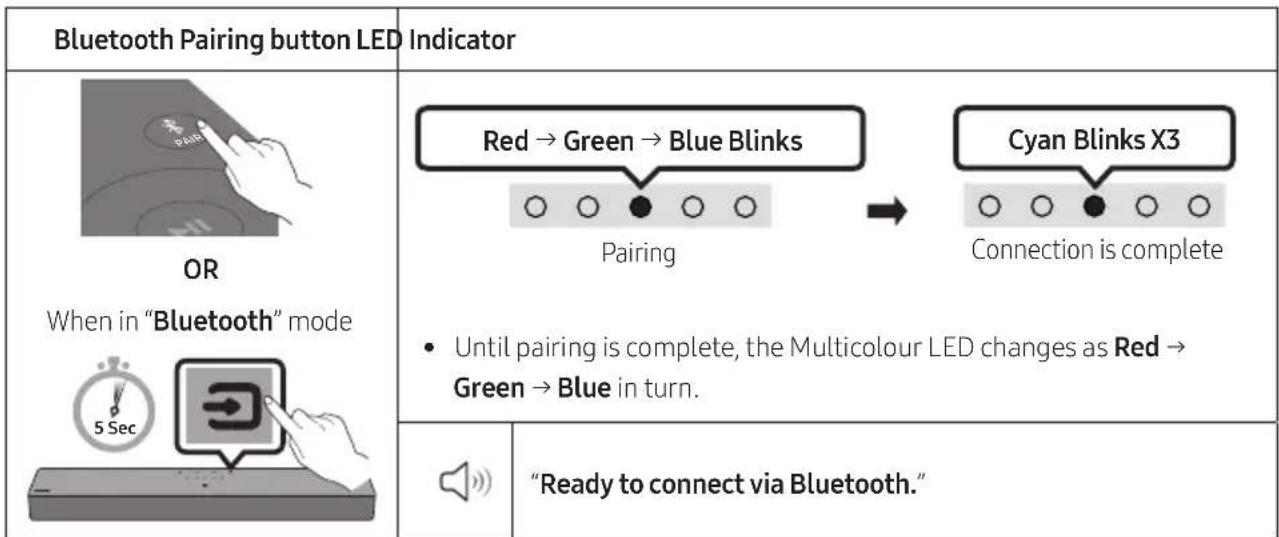
- Select Bluetooth mode on the Samsung TV.
(e.g. Home (m) Menu Settings (c) All Settings (c) Sound Sound Output Bluetooth Speaker List [AV] B-Series Soundbar (Bluetooth))
- Select "[AV] B-Series Soundbar" from the list on TV's screen.
An available Soundbar is indicated with "Needs Pairing" or "Paired" on the TV's Bluetooth device list. To connect the Samsung TV to the Soundbar, select the message, and then establish a connection.
-
You can now hear Samsung TV sound from the Soundbar.
-
If there is a connection log between the Soundbar and Samsung TV, the Soundbar is automatically connected by changing its mode to "Bluetooth".
If the device fails to connect
- If you have an existing Soundbar (e.g., "[AV] B-Series Soundbar") on the list of speakers on the Samsung TV, delete it.
- Then repeat steps 1 through 3.
Disconnecting the Soundbar from the Samsung TV
Press the (Source) button on the top panel or on the remote control to select the mode other than "Bluetooth".
- Disconnecting takes time because the Samsung TV must receive a response from the Soundbar. (The time required may differ, depending on the Samsung TV model.)
TV Auto connect On/Off
To cancel the automatic Bluetooth connection between the Soundbar and TV, press the Left button on the remote control for 5 seconds with the Soundbar in "Bluetooth Ready" status. (Toggle On Off)
| Left button LED Indicator |
| 5 Sec | Cyan Blinks X1
On (Default) Off | Red Blinks X1
○○●○○ |
| Bluetooth Ready Toggle | On → Off |
Notes on Bluetooth connection
- Locate a new device within 1m to connect via Bluetooth communication.
- If asked for a PIN code when connecting a Bluetooth device, enter <0000>.
- The Soundbar automatically turns off after 18 minutes in the Ready state.
-
The Soundbar may not perform Bluetooth search or connection correctly under the following circumstances:
-
If there is a strong electrical field around the Soundbar.
- If several Bluetooth devices are simultaneously paired with the Soundbar.
-
If the Bluetooth device is turned off, not in place, or malfunctions.
-
Electronic devices may cause radio interference. Devices that generate electromagnetic waves must be kept away from the Soundbar main unit - e.g., microwaves, wireless LAN devices, etc.
07 CONNECTING AN EXTERNAL DEVICE
Connecting using an Optical Cable
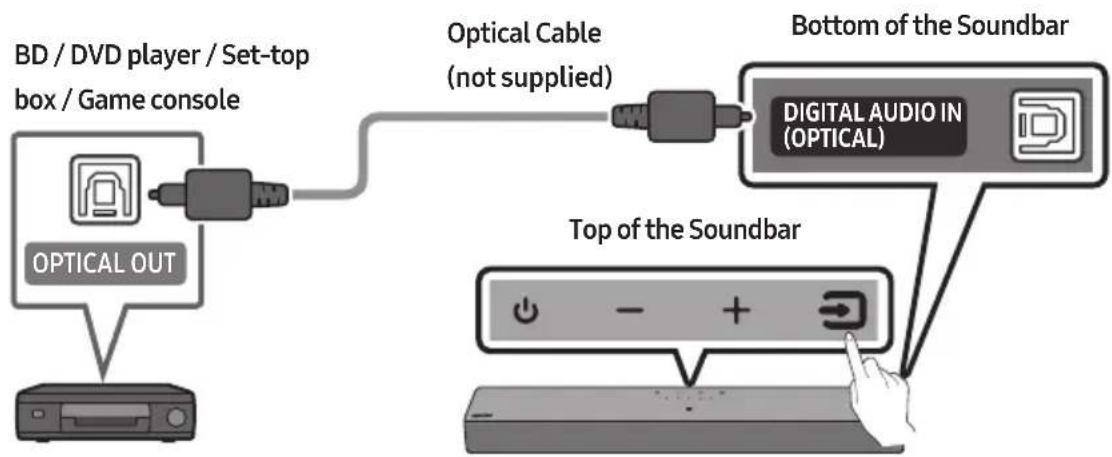
| LED Indicator | White On→Off | "Digital Audio In" |
- With the external device and Soundbar turned off, connect the DIGITAL AUDIO IN (OPTICAL) port on the Soundbar and the OPTICAL output port on the external device with the optical cable (not supplied), as shown in the figure.
- Turn on the Soundbar and external device.
- Press the (Source) button on the top panel or remote control, and then select the "Digital Audio In" mode.
- The external device sound is output from the Soundbar.
08 CONNECTING A USB STORAGE DEVICE
You can play music files located on USB storage devices through the Soundbar.
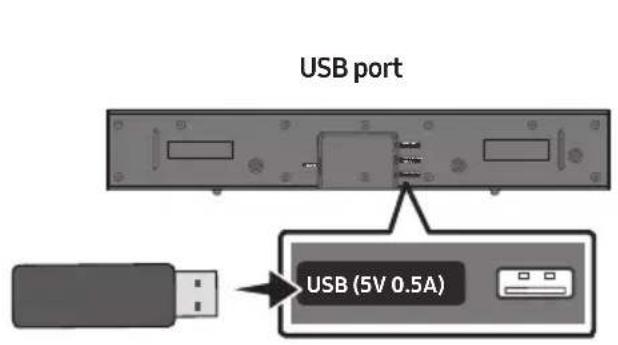
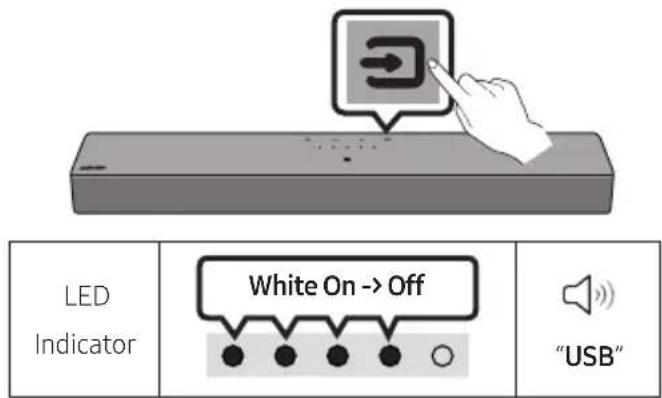
- Connect the USB device to the USB port on the bottom of the product.
- Press the (Source) button on the top panel or remote control, and then select the "USB" mode.
-
Play music files from the USB storage device through the Soundbar.
-
The Soundbar automatically turns off (Auto Power Down) if no USB device has been connected for more than 18 minutes.
File Format Type Compatibility list
| Extension | Codec | Sampling Rate | Bit Rate |
| *.mp3 MPEG1 Layer2 32kHz | kHz ~ 48kHz 32kbps ~ 320kbps | | |
| MPEG1 Layer3 32kHz ~ 48kHz 32kbps ~ 320kbps | | |
| MPEG2 Layer3 | 16kHz ~ 24kHz | 8kbps ~ 160kbps |
| MPEG2.5 Layer3 | 8kHz ~ 12kHz | 8kbps ~ 160kbps |
| *.aac | AAC-LC | 32kHz ~ 48kHz 32kbps ~ 320kbps | |
| *.m4a | (MPEG2/MPEG4 Audio Only) | |
| *.wav | LPCM | 32kHz ~ 192kHz | 1,024kbps ~ 9,216kbps |
| *.flac | FLAC | 32kHz ~ 192kHz | 162kbps ~ 8,100kbps |
- If there are too many folders (about 200) and files (about 2000) stored on the USB device, it may take the Soundbar some time to access and play files.
Supported USB file system : FAT16, FAT32, NTFS
09 CONNECTING A MOBILE DEVICE
Connecting via Bluetooth
When a mobile device is connected using Bluetooth, you can hear stereo sound without the hassle of cables.
- When you connect a paired Bluetooth device with the Soundbar off, the Soundbar automatically turns on.
The initial connection
-
When connecting to a new Bluetooth device, make sure the device is within 1m distance.
-
Press the PAIR button on the Soundbar remote control or press (Source) button on the Soundbar top panel to enter the "Bluetooth" mode.
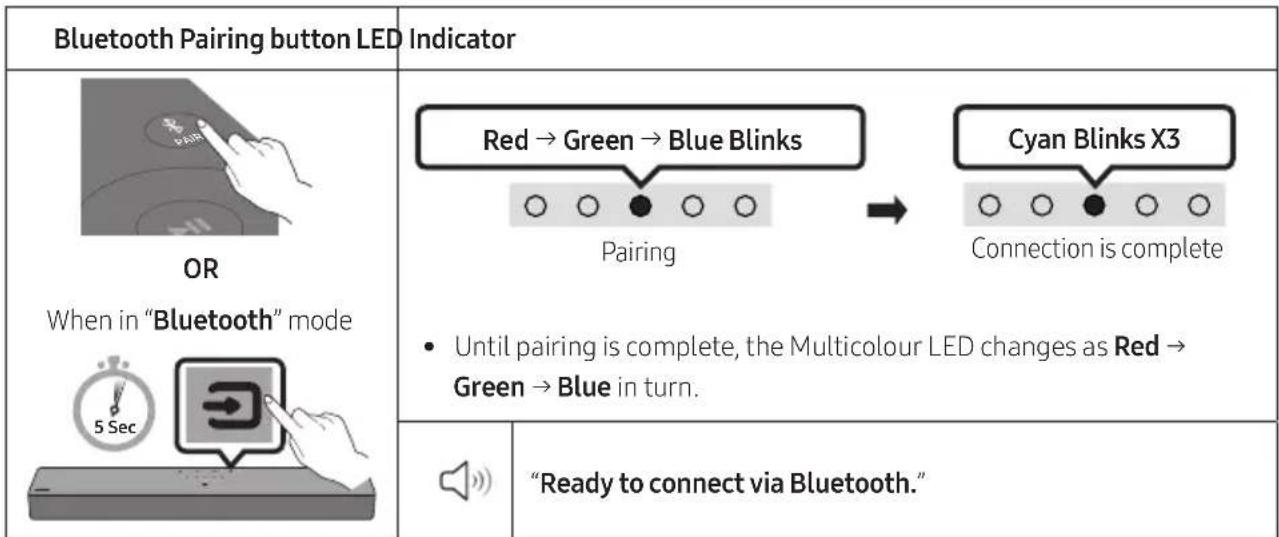
- On your device, select "[AV] B-Series Soundbar" from the list that appears.
- Play music files from the device connected via Bluetooth through the Soundbar.
If the device fails to connect
- If you have an existing Soundbar (e.g., "[AV] B-Series Soundbar") on the list of speakers on the Mobile device, delete it.
- Then repeat steps 1 and 2.
Notes on Bluetooth connection
- Locate a new device within 1m to connect via Bluetooth communication.
- If asked for a PIN code when connecting a Bluetooth device, enter <0000>.
- The Soundbar automatically turns off after 18 minutes in the Ready state.
-
The Soundbar may not perform Bluetooth search or connection correctly under the following circumstances:
-
If there is a strong electrical field around the Soundbar.
- If several Bluetooth devices are simultaneously paired with the Soundbar.
-
If the Bluetooth device is turned off, not in place, or malfunctions.
-
Electronic devices may cause radio interference. Devices that generate electromagnetic waves must be kept away from the Soundbar main unit - e.g., microwaves, wireless LAN devices, etc.
-
The Soundbar supports SBC data (44.1kHz, 48kHz).
-
Connect only to a Bluetooth device that supports the A2DP (AV) function.
-
When connecting the Soundbar to a Bluetooth device, place them as close to each other as possible.
- The farther the Soundbar and Bluetooth device are from each other, the lower the sound quality will become.
The Bluetooth connection may break when the devices are out of the effective range.
- The Bluetooth connection may not function as intended in areas with poor reception.
-
A Bluetooth device may experience noise or malfunction under in the following conditions:
-
When the body is in contact with the signal transceiver on the Bluetooth device or Soundbar
-
In corners or when there is an obstacle in proximity, such as a wall or partition, where electrical changes may occur.
-
When exposed to radio interferences by other products operating on the same frequency ranges, such as medical equipment, microwave ovens, and wireless LAN devices.
-
Obstacles such as doors and walls may still impact the sound quality even when the devices are within the effective range.
-
Note that your Soundbar cannot be paired with other Bluetooth devices while using the Bluetooth option.
-
This wireless device may cause electrical interference during operation.
Bluetooth Power On/Off
If a previously paired Bluetooth device tries to pair with the Soundbar when the Bluetooth Power On function is on and the Soundbar is turned off, the Soundbar turns on automatically.
- Press and hold the SOUND MODE button for more than 5 seconds on the remote while the Soundbar is turned on.
- Multicolour LED indicator on the Soundbar blinks "Cyan".
| SOUND MODE button LED Indicator |
| 5 Sec
Sound Mode | Cyan Blinks X1
On (Default) Off | Red Blinks X1
○○●○○ |
| Bluetooth Power
On/Off | Toggle On → Off |
Disconnecting the Bluetooth device from a Soundbar
You can disconnect a Bluetooth device from the Soundbar. For instructions, see the Bluetooth device's user manual.
- The Soundbar will be disconnected.
- If the Soundbar is disconnected from the Bluetooth device, the multicolour LED indicator on the Soundbar blinks "Red" three times.
Disconnecting the Soundbar from the Bluetooth device
Press the (Source) button on the top panel or on the remote control to select the mode other than "Bluetooth".
- Disconnecting takes time because the Bluetooth device must receive a response from the Soundbar. (Disconnection time may differ, depending on the Bluetooth device)
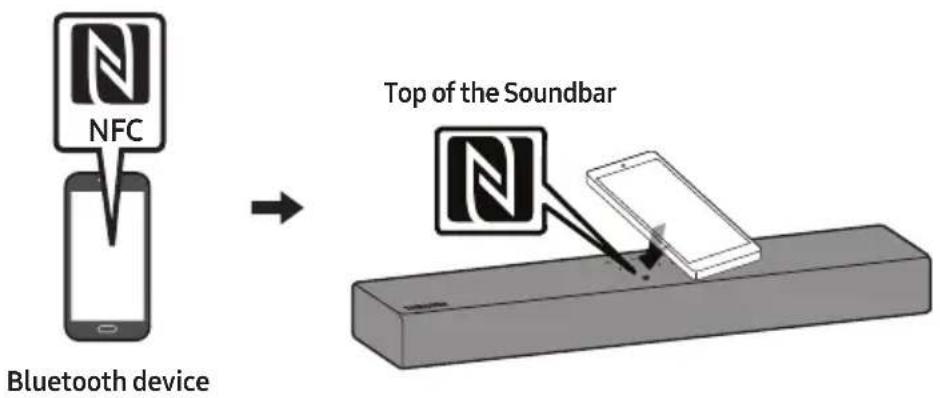
Connecting a Soundbar to a mobile device via NFC function
Place your mobile device in the NFC detection area on top of the Soundbar.
NOTES
-
Make sure that your mobile device has the NFC function turned on and that the screen is active.
-
Bluetooth connection is unavailable when NFC of the mobile device is in card emulation mode.
- If asked for a PIN code when connecting a Bluetooth device, enter <0000>.
- The Soundbar automatically turns off after 18 minutes in the Ready state.
-
The Soundbar may not perform Bluetooth search or connection correctly under the following circumstances:
-
If there is a strong electrical field around the Soundbar.
- If several Bluetooth devices are simultaneously paired with the Soundbar.
-
If the Bluetooth device is turned off, not in place, or malfunctions.
-
Electronic devices may cause radio interference. Devices that generate electromagnetic waves must be kept away from the Soundbar main unit - e.g., microwaves, wireless LAN devices, etc.
-
The Soundbar supports SBC data (44.1kHz, 48kHz).
-
Connect only to a Bluetooth device that supports the A2DP (AV) function.
-
Once you have paired the Soundbar to a Bluetooth device, selecting "[AV] B-Series Soundbar" from the device's scanned devices list will automatically change the Soundbar to "Bluetooth" mode.
-
Available only if the Soundbar is listed among the Bluetooth device's paired devices.
(The Bluetooth device and the Soundbar must have been previously paired at least once.)
- The Soundbar cannot be paired to another Bluetooth device if already in Bluetooth mode and paired to a Bluetooth device.
10 INSTALLING THE WALL MOUNT (OPTIONAL)
Installation Precautions
Install on a vertical wall only.
- Do not install in a place with high temperature or humidity.
- Verify whether the wall is strong enough to support the product's weight. If not, reinforce the wall or choose another installation point.
Purchase and use the fixing screws or anchors appropriate for the kind of wall you have (plaster board, iron board, wood, etc.). If possible, fix the support screws into wall studs.
Purchase wall mounting screws according to the type and thickness of the wall you want to mount the Soundbar on.
Diameter: M4
Length: 40mm or longer recommended.
-
Connect cables from the unit to external devices before you install the Soundbar on the wall.
-
Make sure the unit is turned off and unplugged from the power source before you install it. Otherwise, it may cause an electric shock.
Wall mount Components
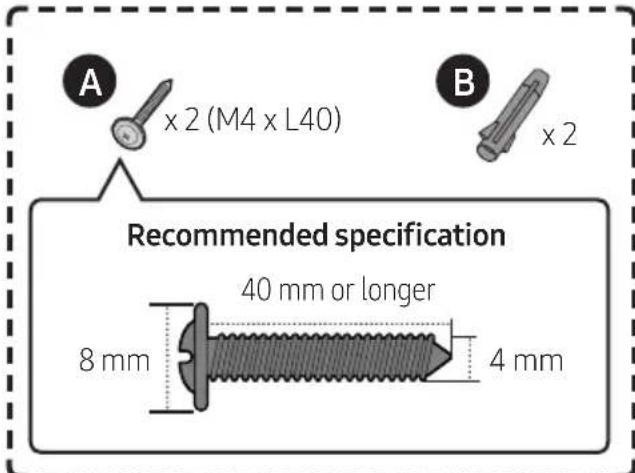
For Installation on Concrete Walls (not supplied)
NOTE
- Installations on other types of walls will require different kinds of screws.
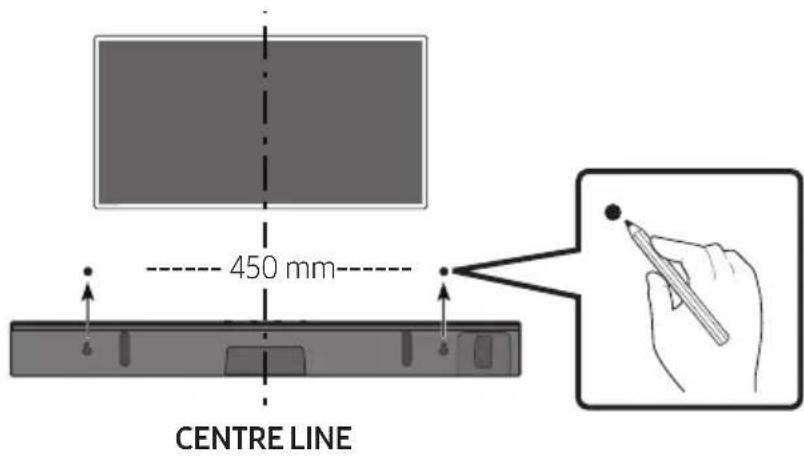
1.
NOTES
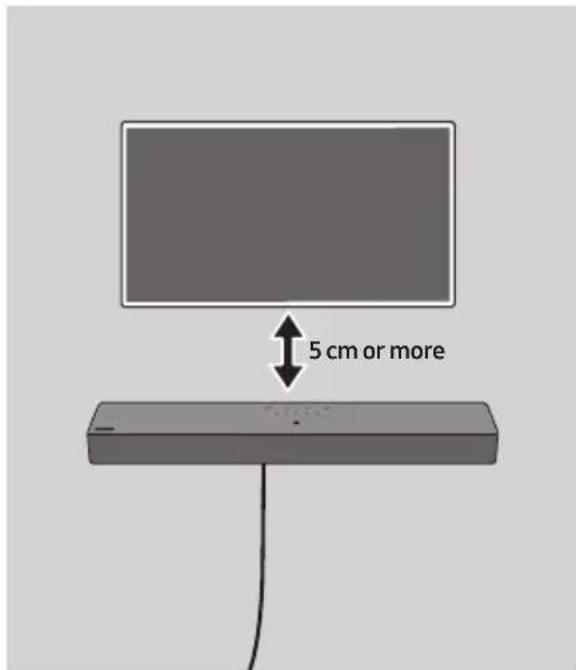
If your TV is installed on the wall, install the Soundbar 5cm or more below your TV.
- Use a pencil to mark the holes' positions.
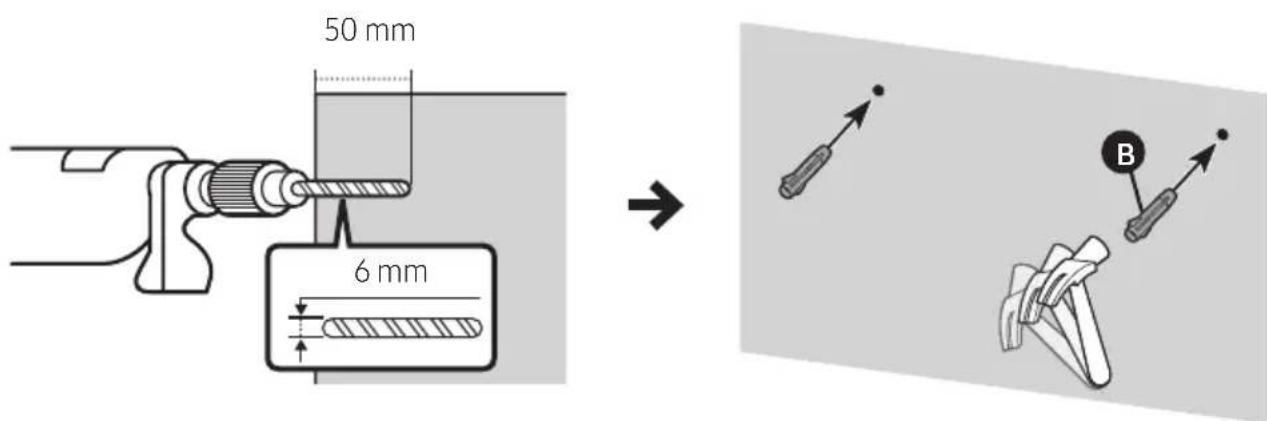
2.
IMPORTANT NOTE
- The installation method shown here is for CONCRETE walls. Installation methods will vary depending on the wall type. For installation on dry wall, we strongly recommend you drill screw support holes into the underlying wood studs.
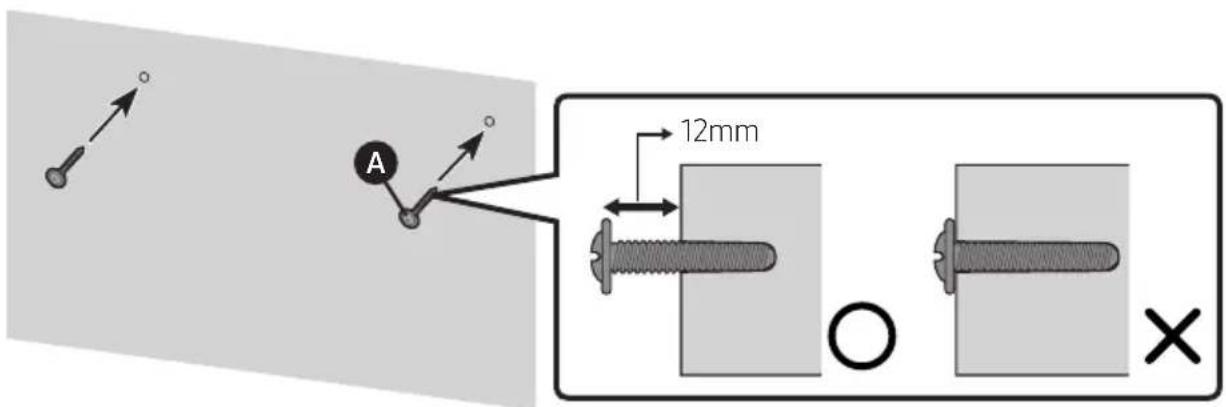
3.
4.
5.
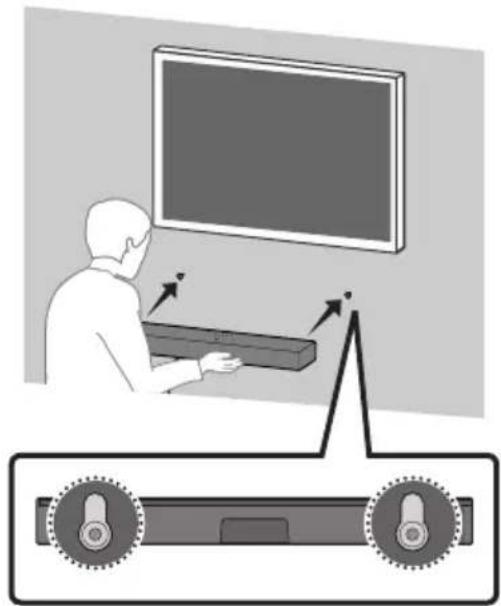

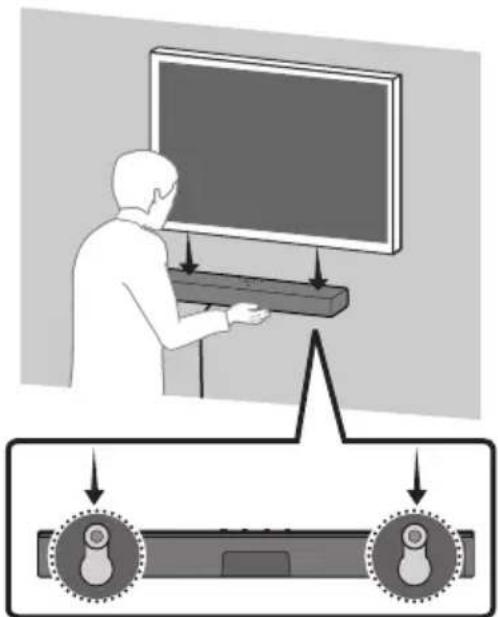
NOTE
Supports for wall installation are built into the back of the Soundbar.

CAUTION
- Press the Soundbar down with sufficient force to fix it to the wall. If the Soundbar is not firmly fixed to the wall, it could be accidentally detached, resulting in personal injury.
- Do not bump into or strike the Soundbar (especially from the bottom). The impact could detach the Soundbar from the wall, resulting in personal injury.
11 SOFTWARE UPDATE
Important: After upgrading, keep the original Settings.
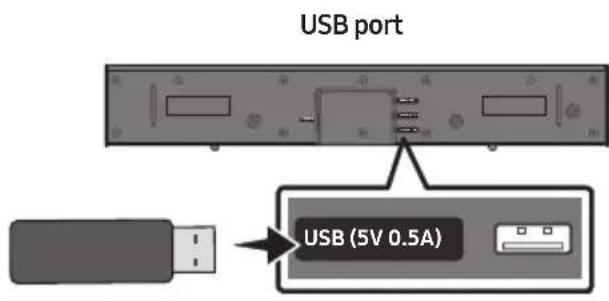
- Connect a USB memory stick to the USB port on your computer.
Important: Make sure there are no music files on the USB memory stick drive. This may cause the firmware update to fail.
- Go to (www.samsung.com) select Enter Model Number and enter the model of your Soundbar. Select manuals and downloads and download the latest software file.
- Save the downloaded software to a USB memory stick and select "Extract Here" to unzip the folder.
-
Turn off the Soundbar and connect the USB stick containing the software update to the USB port.
-
Plug USB into Soudbar and switch to USB source, the software will update automatically and will complete update within 2 minutes. During the update process, the 5 LEDs will start flashing in a loop, and then the 5 LEDs will all be bright white, and then the 5 LEDs will flash in a loop again. When the update is complete, the cyan indicator blinks 3 times, and the soundbar automatically restarts.
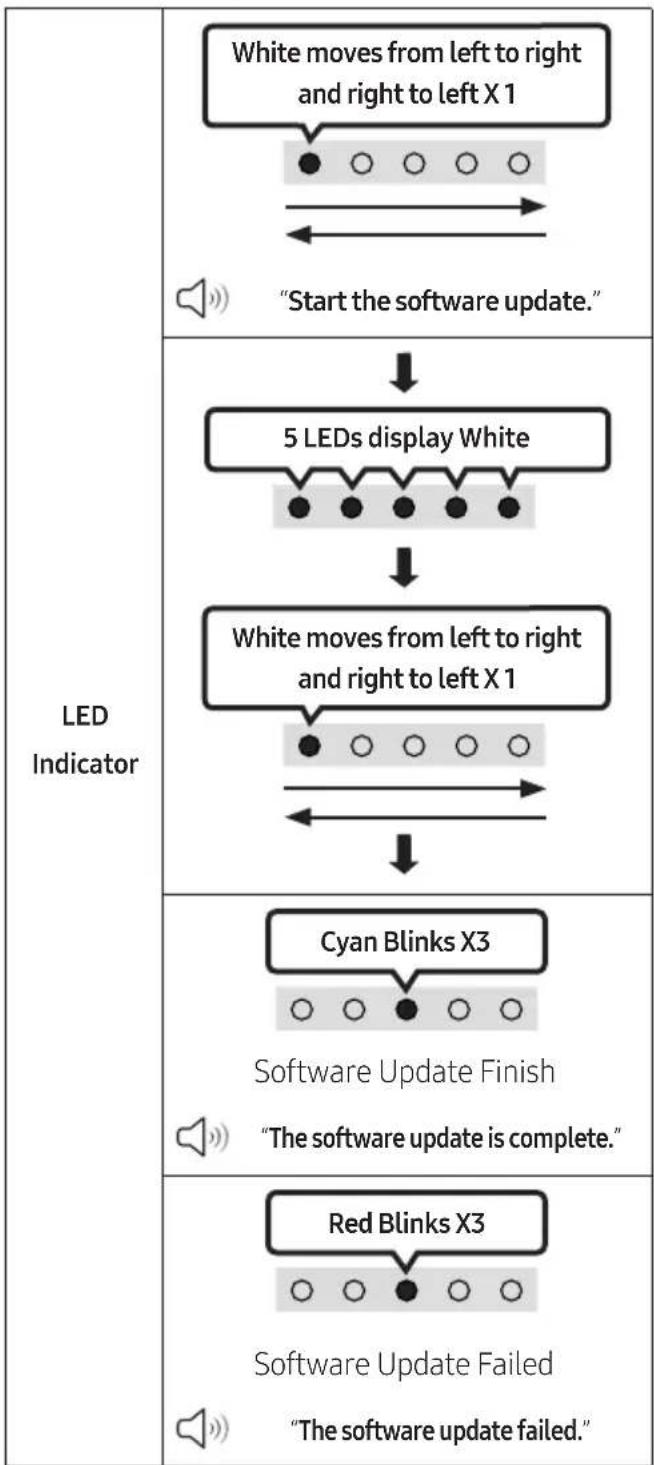
- This product has a DUAL BOOT function. If the firmware fails to update, you can update the firmware again.
If LED sequence flashing is not displayed
- Turn off the Soundbar, disconnect and then reconnect the USB storage device that contains the update files to the Soundbar's USB port.
- Disconnect the Soundbar's power cord, reconnect it, and then turn on the Soundbar.
NOTES
- The firmware update may not work properly if audio files supported by the Soundbar are stored in the USB storage device.
- Do not disconnect the power or remove the USB device while updates are being applied. The main unit will turn off automatically after completing the firmware update.
- After upgrading, keep the original Settings. (include Volume, sound field, etc.)
- When the firmware update is complete the soundbar automatically turns on, and the Voice UI comes out.
- If the software update fails, check if the USB stick is defective.
- Mac OS users should use MS-DOS (FAT) as the USB format.
- Updating via USB may not be available, depending on the USB storage device manufacturer.
Reset
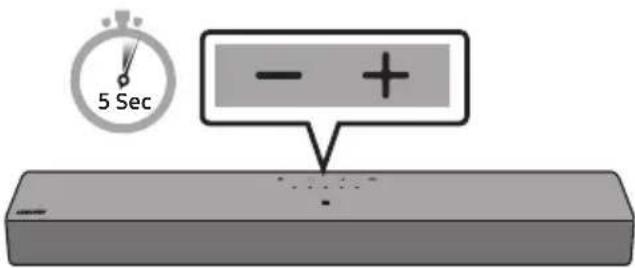
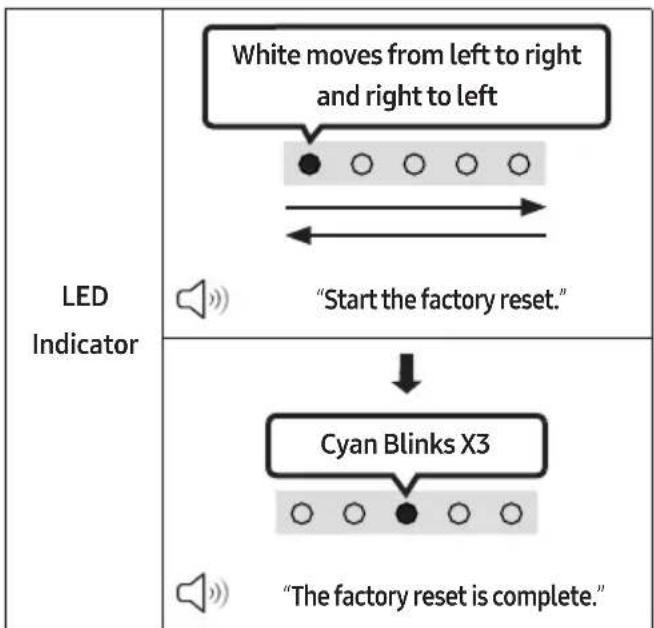
With the Soundbar on, press the - + (Volume) buttons on the body at the same time for at least 5 seconds. The LED display changes as shown below and then the Soundbar is reset.

CAUTION
- All the settings of the Soundbar are reset. Be sure to perform this only when a reset is required.
12 TROUBLESHOOTING
Before seeking assistance, check the following.
Soundbar does not turn on.
- Check whether the power cord of the Soundbar is correctly inserted into the outlet.
Soundbar works erratically.
After removing the power cord, insert it again.
Power cycle the external device and try again.
If there is no signal, the Soundbar automatically turns off after a certain period of time. Turn on the power. (See page 9.)
Remote control does not work.
Point the remote directly at the Soundbar.
Replace the batteries with new ones.
Soundbar does not output any sound.
The volume of the Soundbar is too low or muted. Adjust the volume.
- When any external device (STB, Bluetooth device, mobile device, etc.) is connected, adjust the volume of the external device.
For sound output of the TV, select Soundbar. (Samsung TV: Home (m)
Menu Settings ( All Settings (
Sound Sound Output Select Soundbar)
The cable connection to the Soundbar may be loose. Remove the cable and connect again.
Remove the power cord completely, reconnect, and turn the power on.
Reset the product and try again. (See page 32.)
If the TV is not connected via HDMI (ARC).
Check whether the HDMI cable is correctly connected to the ARC terminal. (See page 17)
Connection may not be possible due to the connected external device (set-top box, game machine, etc.). Directly connect the Soundbar.
HDMI-CEC may not be activated on the TV. Turn on the CEC on the TV menu. (Samsung
Soundbar does not connect via Bluetooth.
- When connecting a new device, switch to Bluetooth Pairing for connection. (Press the
PAIR button on the remote control or press the (Source) button on the body for at least 5 seconds.)
If the Soundbar is connected to another device, disconnect that device first to switch the device.
Reconnect it after removing the Bluetooth speaker list on the device to connect.
(Samsung TV: Home ( Menu
Settings ( All Settings ( )Sound Sound Output Bluetooth Speaker List)
Remove and reconnect the power plug, then try again.
Reset the product and try again. (See page 32.)
Sound drops out when connected via Bluetooth.
If your device that is connected via Bluetooth moves too far away from the Soundbar, it may cause the sound to drop out. Move the device closer to the Soundbar.
If a part of your body is in contact with the Bluetooth transceiver or the product is installed on metal furniture, sound may drop out. Check the installation environment and conditions for use.
Soundbar does not turn on automatically with the TV.
If you turn off the Soundbar while watching TV, the power synchronization with the TV will be disabled. Power off the TV and Soundbar using the TV remote.
13 LICENCES
Dolby AUDIO
Dolby, Dolby Audio, and the double-D symbol are trademarks of Dolby Laboratories Licensing Corporation. Manufactured under license from Dolby Laboratories. Confidential unpublished works. Copyright © 1992-2019 Dolby Laboratories. All rights reserved.
dt.
FOR DTS PATENTS, SEE HTTP://XPERI.COM/ DTS-PATENTS/. MANUFACTURED UNDER LICENSE FROM DTS, INC. AND ITS AFFILIATES. DTS, THE DTS LOGO, AND DIGITAL SURROUND ARE REGISTERED TRADEMARKS OR TRADEMARKS OF DTS, INC. AND ITS AFFILIATES IN THE UNITED STATES AND/OR OTHER COUNTRIES. © DTS, INC. AND ITS AFFILIATES. ALL RIGHTS RESERVED.

The terms HDMI, HDMI High-Definition Multimedia Interface, HDMI Trade dress and the HDMI Logos are trademarks or registered trademarks of HDMI Licensing Administrator, Inc.

Bluetooth
The Bluetooth® word mark and logos are registered trademarks owned by Bluetooth SIG, Inc. and any use of such marks by Samsung Electronics Co., Ltd. is under license. Other trademarks and trade names are those of their respective owners.
Open Source License Notice
Open Source used in this product can be found on the following webpage (http://opensource.samsung.com).
14 IMPORTANT NOTES ABOUT SERVICE
Figures and illustrations in this User Manual are provided for reference only and may differ from actual product appearance.
15 SPECIFICATIONS AND GUIDE
Specifications
| Model Name HW-B400F | |
| USB 5V/0.5A | |
| Weight 2.1 kg | |
| Dimensions (W x H x D) 641.0 x 66.5 x 107.0 mm | |
| Operating Temperature Range +10 °C to +40 °C | |
| Operating Humidity Range 10 % to 80 %, non-condensing | |
| Storage Temperature Range -20 °C to +45 °C | |
| Storage Humidity Range 5 % to 95 %, non-condensing | |
| AMPLIFIER
Max Output Power | 20W x 2 |
| Supported play formats | LPCM 2ch, Dolby AudioTM (supporting Dolby® Digital), DTS |
|
| Bluetooth
Port deactivation method | Press and hold the SOUND MODE button for more than 5 seconds to turn off Bluetooth Power function. |
NOTES
Samsung Electronics Co., Ltd reserves the right to change the specifications without notice.
- Weight and dimensions are approximate.
AVERTISSEMENTS
02 VUE D'ENSEMBLE DU PRODUIT
II (Lecture / Pause)
Haut/Bas/Gauche/Droite
Dolby, Dolby Audio, and the double-D symbol are trademarks of Dolby Laboratories Licensing Corporation. Manufactured under license from Dolby Laboratories. Confidential unpublished works. Copyright © 1992-2019 Dolby Laboratories. All rights reserved.
dt.
FOR DTS PATENTS, SEE HTTP://XPERI.COM/ DTS-PATENTS/. MANUFACTURED UNDER LICENSE FROM DTS, INC. AND ITS AFFILIATES. DTS, THE DTS LOGO, AND DIGITAL SURROUND ARE REGISTERED TRADEMARKS OR TRADEMARKS OF DTS, INC. AND ITS AFFILIATES IN THE UNITED STATES AND/OR OTHER COUNTRIES. © DTS, INC. AND ITS AFFILIATES. ALL RIGHTS RESERVED.

The terms HDMI, HDMI High-Definition Multimedia Interface, HDMI Trade dress and the HDMI Logos are trademarks or registered trademarks of HDMI Licensing Administrator, Inc.

Bluetooth
The Bluetooth® word mark and logos are registered trademarks owned by Bluetooth SIG, Inc. and any use of such marks by Samsung Electronics Co., Ltd. is under license. Other trademarks and trade names are those of their respective owners.
Avis de Licence Libre
Dolby, Dolby Audio, and the double-D symbol are trademarks of Dolby Laboratories Licensing Corporation. Manufactured under license from Dolby Laboratories. Confidential unpublished works. Copyright © 1992-2019 Dolby Laboratories. All rights reserved.
dts.
FOR DTS PATENTS, SEE HTTP://XPERI.COM/ DTS-PATENTS/. MANUFACTURED UNDER LICENSE FROM DTS, INC. AND ITS AFFILIATES. DTS, THE DTS LOGO, AND DIGITAL SURROUND ARE REGISTERED TRADEMARKS OR TRADEMARKS OF DTS, INC. AND ITS AFFILIATES IN THE UNITED STATES AND/OR OTHER COUNTRIES. © DTS, INC. AND ITS AFFILIATES. ALL RIGHTS RESERVED.

The terms HDMI, HDMI High-Definition Multimedia Interface, HDMI Trade dress and the HDMI Logos are trademarks or registered trademarks of HDMI Licensing Administrator, Inc.

Bluetooth
The Bluetooth® word mark and logos are registered trademarks owned by Bluetooth SIG, Inc. and any use of such marks by Samsung Electronics Co., Ltd. is under license. Other trademarks and trade names are those of their respective owners.
Aviso de Licença de Open Source
Pode encontrar orowningo abertoutilizado neste
produo na segunte网页 (https://opensource.samsung.com).
14 NOTA IMPORTANTE SOBRE O SERVICO
m = 311
J 1 J 1 J 1 J 1 J 1 J 1 J 1 J 1 J 1 J 1 J 1 J 1 J 1
| LED | | | |
| g"USB"
"Digital Audio In" | | "TV ARC""Bluetooth" | |
| JJNFCJJalalalalalalalalalalalalalalalalalalalalalalalalalalalalalalalalalalalalal | | | NFCJJJ |
| 1X### | |
| "Surround"← "Standard" | |
-Standard
1y
Surround -
100g>
J.àx J/1jǎl@jǎx jBluetoothPower
alg j BluetoothjJlgeo JlaSoundbar Jxax yall o g
Bluetootha 品 _ 品 5SOSOUNDMODEJgJy
JDC / DRC(DynamicRangeControl)
DTsDolby Digital aaiiaa olll lIwll Ie Sclilill gblllg xllgablaagbll Ou.
Soundbar jge Jx wgl 5nrsSOUND MODE JJLJaxwylgbolal.Digital
JALA,DRCAaBgJxwclil.1eLxwgl (soloillgblllg)DRCaBgJxwli
(1ogwo gall jgs)
| LEDddss | SOUND MODE jjJI |
| 1X JHJ BLOSS
○ ○ ● ○ ○
JLJFJLJLJ | 1XJHJ BLOSS
○ ○ ● ○ ○
JLJFJLJLJLJ |
| JLJFJLJLJ← JLJFJLJLJ← JLJFJLJLJ← JLJFJLJLJ← JLJFJLJLJ← JLJFJLJLJ← JLJFJLJLJ← JLJFJLJLJ← JLJFJLJLJ← JLJFJLJLJ← JLJFJLJLJ←JLJFJLJ←JLJFJLJ←JLJFJLJ←JLJFJLJ←JLJFJLJ←JLJFJLJ←JLJFJLJ←JLJFJLJ←JLJFJLJ←JLJFJLJ←JLJFJLJ←JLJFJLJ←JLJFJLJ→JLJFJLJ←JLJFJLJ←JLJFJLJ←JLJFJLJ←JLJFJLJ←JLJFJLJ←JLJFJLJ←JLJFJLJ←JLJFJLJ←JLJFJLJ←JLJFJLJ←JLJFJLJ←JLJ | |
0J(1jEJI)Ogallaoafoogosgwoob.+6J-6j++sgwobJawuJgJcUJJg
(.gallaaa0o jaoj axj al).jjllbcxol,(yoljxlslcyll)
TONE CONTROL
/1d1jllplxwuygjalljazilb+0jjgjjllgagllsgimobdxkajjjlcb
("Standard"gogclixwUgallglogfga>gdaIoojao)Jawl
"All-TV Remote", "Samsung-TV Remote", (_g) "Off-TV Remote"
oljgogalss,gsjllg0sOLEDcIa>
| all> | LEDδaLΔeL | |
| 1X
JH
JH
JH
JH
JH
JH
JH
JH
JH
JH
JH
JH
JH
JH
JH
JH
JH
JH
JH
JH
JH
JH
JH
JH
JH
JH
JH
JH
JH
JH
JH
JH
JH
JH | 5 Sec |
| 1X
JH
JH
JH
JH
JH
JH
JH
JH
JH
JH
JH
JH
JH
JH
JH
JH
JH
JH
JH
JH
JH
JH
JH
JH
JH
JH
JH
JH
JH
JH
JH | 5 Sec |
| aaa
aaa
aaa
aaa
aaa
aaa
aaa
aaa
aaa
aaa
aaa
aaa
aaa
aaa
aaa
aaa
aaa
aaa
aaa
aaa
aaa
aaa
aaa
aaa
aaa
aaa
aaa
aaa
aaa
aaa
aaa
aaa
aaa
aaa
aaa
aaa
aaa
aaa
aaa
aaa
aaa
aaa
aaa
aaa
aaa
aaa
aaa
aaa
aaa
aaa
aaa | 1X
JH
JH
JH
JH
JH
JH
JH
JH
JH
JH
JH
JH
JH
JH
JH
JH
JH
JH
JH
JH
JH
JH
JH
JH
JH
JH
JH
JH
JH
JH
JH
JH | 5 Sec
5 Sec |
aJbJg
Jlll jlljlljllsSoundbar jg>ogalaoaagjdaIbllligopds
.1J B JgSoundbar.AaIbI Iw Og
aiiaagajalgalaallj,aaiblaaleaogalbaaIajclogalooj
(aa)Soundbar 8>9 j0 wJl c:

l b > x0
Soundbar jge Jxj aJxJxJxJxJxJxJxJxJxJxJxJxJxJxJxJxJxJxJxJxJxJxJxJxJxJxJxJxJxJxJxJxJxJxJxJxJxJx
HDMIJ S1L2wUjJgJJJJg.1aBJI
4.
HDMJIJSSJLHDMJIJSSJL
g.ARCj>lljaaal jbJSoundbarjgjHDMIJJ
.0gjolll 0gogj
. High-Speed HDMI Cable with Ethernet
(gJg>j|dHDMIARCaSjJJnjjJ
HDMIN(ARC)
gjjJlge>g>gJIeARC)


J
3b > 3 或 3b = 0
JddHDMI JsSoundbar jg(j)HDMIARC aJgj
JgS JgJgJgJgJgJgJgJgJg
HDMJSSpssuHDMJSSpssuHDMJSSpssuHDMJISSpssuHDMJISSpssuHDMJISSpssuHDMJISSpssuHDMJISSpssuHDMJISSpssuHDMJISSpssuHDMJISSpssuHDMJISSpssuHDMJISSpssuHDMJISSpssuHDMJISSpssuHDMJISSpssuHDMJISSpssuHDMJISS
.0014 uc
.(gJJIgJl)ARCaHDMIJ≤JSLjlaBgJIOgjiy
jgeJc"agjzjgogosuaiBodby Digitalaiaeipxwollo gagssic
ggiiaaiw,ngjjalelllclscyljzicg.Dolby Digital llscy jgj,PCM lc gjjLJI
aJ>PCMg Dolby Digital aiaia Jaiixo cIaISS gj jilil aaif (paxw)
(.jzjzlil aaiaaill
sJ5 J.2 aJI
JgJg aas
JyS pssuolioa. a,bcl


jge jge jge jge jge jge jge jge jge jge jge jge jge jge jge jge jge jge jge jge jge jge jge jge jge jge jge jge jge jge jge jge jge jge jge jge jge jge jge jge jge jge jge jge jge jge jge jge jge jge jge
JSS
SoundbarJ.2
"Digital Audio In"gJgJgJgJgJgJgJgJgJgJgJgJgJgJgJgJgJgJgJgJgJgJgJgJgJgJgJgJgJgJgJgJgJgJgJgJgJgJgJgJgJgJgJgJgJgJgJgJgJgJg
Soundbarjg>nnnngjgJgGg|g.4

Bluetooth aiaj jc JlaJl
Jgjwigogclawelka,BluetoothaiajolSamsungngjjLJogic 1
Samsung
J.
.
JgJgJgJg
jjllcbsolgSoundbarjgeaasxilljgegcggaII PAIRjjllcbsol .1
"Bluetooth"gJJJJg>JJSoundbarjge>aaJlaa>Jllc(jdaJI)
| LEDödörleaksson | Bluetooth jrlazlal |
| 3X 3x 3x 3x 3x 3x 3x 3x 3x 3x 3x 3x 3x 3x 3x 3x 3x 3x 3x 3x 3x 3x 3x 3x 3x 3x 3x 3x 3x 3x 3x 3x 3x 3x 3x | | "Bluetooth"g
5 Sec
"Bluetooth"g
5 Sec |
| "Ready to connect via Bluetooth." | |
SamsungjJcBluetoothg2
←gαlljεo←ogal←()c|dscly|J5←()c|dscly|aaslae←()aauajllaaJsc)
([AV] B-Series Soundbar (Bluetooth)←clawll absl Bluetooth
[AV]B-SeriesSoundbar"2> .3
aJl jll Bluetooth oj> aJl g"nnnnao"g" nnnnna Jd>Jl".jL. JSoundbar jIe>JlJ
Jlalclj,aa,ajllwJl>Soundbar jL>Samsung,jj,jj,jj
Soundbar jL SamsungJgJgJgJgJgJgJgJgJgJgJgJgJgJgJgJgJgJgJgJgJgJgJgJgJgJgJgJgJgJgJgJgJgJgJgJgJgJgJgJgJgJgJgJgJgJgJgJgJgJgJ
Soundbar jL>JsS, Samsung, JgJgSoundbar jgeJgJgJgJgJgJgJg
"Bluetooth" 420g r
jgl jla jdd
[AV]B-SeriesSoundbar"JLJI JwJc)SoundbarJg>JJlS|
.1Samsung jjj
3.111001gbsss
SamsungSoundbarJ
g 20 g 20g 20g 20g 20g 20g 20g 20g 20g 20g 20g 20g 20g 20g 20g 20g 20g 20g 20g 20g 20g 20g 20g
"Bluetooth"
Jg>oA|Samsungjjjjjjj jjjjj jj j j j j j j j j j j j j j j j j
(Samsung jjjj j1j b wwewaaal cagll)Soundbar
jJ Jg/
aasll l jllcbadl, gSoundbar jgejbluethJlaJcljy 5dal (Jxj Jl Jxj j"Bluetooth Ready" aJl JSoundbar jgejLdoic
| LEDδeJdSdSdSdSdSdSdSdSdSdSdSdSdSdSdSdSdSdSdSdSdSdSdSdSdSdSdSdSdSdSdSdSdSdSdSdSdSdSdSdSdSdSdSdSdSdSdSdSdSdSd SdSdSdSdSdSdSdSdSdSdSdSdSdSdSdSdSdSdSdSdSdSdSdSdSdSdSdSdSdSdSdSdSdSdSdSdSdSdSdSdSdSdSdSdSdSdSdSdSdSd
1X JdSdSdSdSdSdSdSdSdSdSdSdSdSdSdSdSdSdSdSdSdSdSdSdSdSdSdSdSdSdSdSdSdSdSdSdSdSdSdSdSdSdSdSdSdSdSdSdSdSdTJdSdSdSdSdSdSdSdSdSdSdSdSdSdSdSdSdSdSdSdSdSdSdSdSdSdSdSdSdSdSdSdSdSdSdSdSdSdSdSdSdSdSdSdSdSdSdSdSdS
1X JdSdSdSdSdSdSdSdSdSdSdSdSdSdSdSdSdSdSdSdSdSdSdSdSdSdSdSdSdSdSdSdSdSdSdSdSdSdSdSdSdSdSdSdSdSdSdSd SdSd SdSd SdSd SdSd SdSd SdSd SdSd SdSd SdSd SdSd SdSd SdSd SdSd SdSd SdSd SdSd SdSd SdSd SdSd SdSd SdSd SdSd SdSd SdSd SdSd
1X JdSdSdSdSdSdSdSdSdSdSdSdSdSdSdSdSdSdSdSdSdSdSdSdSdSdSdSdSdSdSdSdSdSdSdSdSdSdSdSdSdSdSdSdSdSdS
1X JdSd SdSd SdSd SdSd SdSd SdSd SdSd SdSd SdSd SdSd SdSd SdSd SdSd SdSd SdSd SdSd SdSd SdSd SdSd SdSd SdSd SdSd SdSd SdSd SdSd T
1X JdSd SdSd SdSd SdSd SdSd SdSd SdSd SdSd SdSd SdSd SdSd SdSd SdSd SdSd SdSd SdSd SdSd SdSd SdSd SdSd SdSd SdSd SdSd SdSd
1X Jda Sda Sda Sda Sda Sda Sda Sda Sda Sda Sda Sda Sda Sda Sda Sda Sda Sda Sda Sda Sda Sda Sda Sda Sda Sda Sda Sda Sda Sda Sda Sda Sda Sda Sda Sda Sda Sda Sda Sda Sda Sda Sda Sda Sda Sda Sda Sda Sda Sda Sda
1X Jda Sda Sda Sda Sda Sda Sda Sda Sda Sda Sda Sda Sda Sda Sda Sda Sda Sda Sda Sda Sda Sda Sda Sda Sda Sda Sda Sda Sda Sda Sda Sda Sda Sda Sda Sda Sda Sda Sda Sda Sda Sda Sda Sda Sda Sda Sda Sda
1X JdSd SdSd SdSd SdSd SdSd SdSd SdSd SdSd SdSd SdSd SdSd SdSd SdSd SdSd SdSd SdSd SdSd SdSd SdSd SdSd SdSd SdSd SdSd SdSd |
Bluetooth Jus
.BluetoothJlajJLjssU1gIbJ>Jg>gs
<0000>BluetoothjgeJogicPINjoioaIbI
JxWyIJI> 18,Soundbar Jg> Jz
:dlllgbrblb g 2xSdblblt bhtlSoundbarjge
Soundbar JI_ > Jg > Sg__≤ JI_ > g_ > S
>19jSoundbarJg>Bluetoothd>ds>J>
Jlbsf g>ggf dJlsOg>gPsgf,Bluetooth jIg>JzA;cllaJdJ>
auiu bixogres lfo 111 0jge jg jgl 111 gjgl jg jgl jg jgl jg jgl jgi
.11110gddLwLLANoo>lg 2gRcLaIddjge>1,llo,aaWlSoundbar>9

Saa J5 P1aaiwJgjj

g>gJ DIGITAL AUDIOIN (OPTICAL) jio Soundbar jg>g JjgljgJl.1
()JL
JSS
JlJI JgSoundbarJ.2
"Digital Audio In"g0gJ> a,2aJcAxxjIg> g4gAglJg> gJg(jdaJI) 3
SoundbarjgeJgJgJgJgJgJgJgJgJgJgJgJgJgJgJgJgJgJgJgJgJgJgJgJgJgJgJgJgJgJgJgJgJgJgJgJgJgJgJgJgJgJgJgJg
USB_0.25 0.75 ~g^-
SoundbarUBJgJgJgJgJgJgJgJgJgJgJgJgJgJgJgJgJgJgJgJgJgJgJgJgJgJgJgJgJgJgJgJgJgJgJgJgJgJgJgJg


aJI JJUJUJUJUJUJUJUJUJUJUJUJUJUJUJUJUJUJUJUJUJUJUJUJUJUJUJU
"USB"gJJJ> a,2a> jge ggljaggljagll 1
Soundbar 品 _ 品 USBjjg>gagalllloJ.3
18J USB J (Auto Power Down)Soundbar J
gJlaas
| ملاويات | الإستعمال | الإستعمال | الإستعمال |
| الإستعمال £320~32 | 48kHz ~ 32kHz | MPEG1 Layer2 | mp3.* |
| ال,enGLISH £320~32 | 48kHz ~ 32kHz | MPEG1 Layer3 |
| ال,enGLISH £160~8 | 24kHz ~ 16kHz | MPEG2 Layer3 |
| ال,enGLISH £160~8 | 12kHz ~ 8kHz | MPEG2.5 Layer3 |
| ال,enGLISH £320~32 | 48kHz ~ 32kHz | AAC-LC(بعسفidget MPEG4/MPEG2) | aac.*m4a.* |
| ال,enGLISH £9216~1024 | 192kHz ~ 32kHz | LPCM | wav.* |
| ال,enGLISH £8100~162 | 192kHz ~ 32kHz | FLAC | flac.* |
Soundbar 品 _ 品 USBjgeJcAaj2000) 1dloq(j200) dJg>g aJ
.
NTFSgFAT32gFAT16:aaJUSBolp

Bluetooth aiae JlJyI
UcloooggjwggolawclkA,BluetoothaiaipxowJga>Jogdis .LJI L J.12iJlSoundbar jge>Jogdis
JgJgJg
101a glwglb jg>Jg>g>Bluetoothjg>Jla
jlllcbzolgSoundbarjge>gsxjcAsxjjlge>Jcsg>gAL PAIRJJIe b
"Bluetooth"gJJJJg>JJSoundbarjge>ooaJla>gUJLc(jaaJI)
| LEDöeclsslss | Bluetooth
jzssss |
| 3X
Jzss
Jzss
Jzss
Jzss
Jzss
Jzss
Jzss
Jzss
Jzss
Jzss
Jzss
Jzss
Jzss
Jzss
Jzss
Jzss
Jzss
Jzss
Jzss
Jzss
Jzss
Jzss
Jzss
Jzss
Jzss
JzSS
JzSS
JzSS
JzSS
JzSS
JzSS
JzSS
JzSS
JzSS
JzSS
JzSS
JzSS
JzSS
JzSS
JzSS
JzSS
JzSS
JzSS
JzSS
JzSS
JzSS
JzSS
JzSS
JzSS
JzSS
Jzss
Jzss
Jzss
Jzss
Jzss
Jzss
Jzss
Jzss
Jzss
Jzss
Jzss
Jzss
Jzss
Jzss
Jzss
Jzss
Jzss
Jzss
Jzss
Jzss
Jzss
Jzss
Jzss
Jzss
Jz ss
Jzss
Jzss
Jzss
Jzss
Jzss
Jzss
Jzss
Jzss
Jzss
Jzss
Jzss
Jzss
Jzss
Jzss
Jzss
Jzss
Jzss
Jzss
Jzss
Jzss
Jzss
Jzss
Jzss
Jzss
Jzass
Jzss
Jzss
Jzss
Jzss
Jzss
Jzss
Jzss
Jzss
Jzss
Jzss
Jzss
Jzss
Jzss
Jzss
Jzss
Jzss
Jzss
Jzss
Jzss
Jzss
Jzss
Jzss
Jzss
Jzss
Jziss
Jzss
Jzss
Jzss
Jzss
Jzss
Jzss
Jzss
Jzss
Jzss
Jzss
Jzss
Jzss
Jzss
Jzss
Jzss
Jzss
Jzss
Jzss
Jzss
Jzss
Jzss
Jzss
Jzss
Jzss
Jz SS
Jzss
Jzss
Jzss
Jzss
Jzss
Jzss
Jzss
Jzss
Jzss
Jzss
Jzss
Jzss
Jzss
Jzss
Jzss
Jzss
Jzss
Jzss
Jzss
Jzss
Jzss
Jzss
Jzss
Jzss
Jzess
Jzss
Jzss
Jzss
Jzss
Jzss
Jzss
Jzss
Jzss
Jzss
Jzss
Jzss
Jzss
Jzss
Jzss
Jzss
Jzss
Jzss
Jzss
Jzss
Jzss
Jzss
Jzss
Jzss
Jzss
Jzsss
Jzss
Jzss
Jzss
Jzss
Jzss
Jzss
Jzss
Jzss
Jzss
Jzss
Jzss
Jzss
Jzss
Jzss
Jzss
Jzss
Jzss
Jzss
Jzss
Jzss
Jzss
Jzss
Jzss
Jzss
Jzsson
Jzss
Jzss
Jzss
Jzss
Jzss
Jzss
Jzss
Jzss
Jzss
Jzss
Jzss
Jzss
Jzss
Jzss
Jzss
Jzss
Jzss
Jzss
Jzss
Jzss
Jzss
Jzss
Jzss
Jzss
Jzdd
Jzss
Jzss
Jzss
Jzss
Jzss
Jzss
Jzss
Jzss
Jzss
Jzss
Jzss
Jzss
Jzss
Jzss
Jzss
Jzss
Jzss
Jzss
Jzss
Jzss
Jzss
Jzss
Jzss
Jzss
Jzzz
Jzss
Jzss
Jzss
Jzss
Jzss
Jzss
Jzss
Jzss
Jzss
Jzss
Jzss
Jzss
Jzss
Jzss
Jzss
Jzss
Jzss
Jzss
Jzss
Jzss
Jzss
Jzss
Jzss
Jzss
Jzcc
Jzss
Jzss
Jzss
Jzss
Jzss
Jzss
Jzss
Jzss
Jzss
Jzss
Jzss
Jzss
Jzss
Jzss
Jzss
Jzss
Jzss
Jzss
Jzss
Jzss
Jzss
Jzss
Jzss
Jzss
Jzse
Jzss
Jzss
Jzss
Jzss
Jzss
Jzss
Jzss
Jzss
Jzss
Jzss
Jzss
Jzss
Jzss
Jzss
Jzss
Jzss
Jzss
Jzss
Jzss
Jzss
Jzss
Jzss
Jzss
Jzss
Jzee
Jzss
Jzss
Jzss
Jzss
Jzss
Jzss
Jzss
Jzss
Jzss
Jzss
Jzss
Jzss
Jzss
Jzss
Jzss
Jzss
Jzss
Jzss
Jzss
Jzss
Jzss
Jzss
Jzss
Jzss
Jzce
Jzss
Jzss
Jzss
Jzss
Jzss
Jzss
Jzss
Jzss
Jzss
Jzss
Jzss
Jzss
Jzss
Jzss
Jzss
Jzss
Jzss
Jzss
Jzss
Jzss
Jzss
Jzss
Jzss
Jzss
Jzcess
Jzss
Jzss
Jzss
Jzss
Jzss
Jzss
Jzss
Jzss
Jzss
Jzss
Jzss
Jzss
Jzss
Jzss
Jzss
Jzss
Jzss
Jzss
Jzss
Jzss
Jzss
Jzss
Jzss
Jzss
Jzcss
Jzss
Jzss
Jzss
Jzss
Jzss
Jzss
Jzss
Jzss
Jzss
Jzss
Jzss
Jzss
Jzss
Jzss
Jzss
Jzss
Jzss
Jzss
Jzss
Jzss
Jzss
Jzss
Jzss
Jzss
Jzoss
Jzss
Jzss
Jzss
Jzss
Jzss
Jzss
Jzss
Jzss
Jzss
Jzss
Jzss
Jzss
Jzss
Jzss
Jzss
Jzss
Jzss
Jzss
Jzss
Jzss
Jzss
Jzss
Jzss
Jzss
Jzress
Jzss
Jzss
Jzss
Jzss
Jzss
Jzss
Jzss
Jzss
Jzss
Jzss
Jzss
Jzss
Jzss
Jzss
Jzss
Jzss
Jzss
Jzss
Jzss
Jzss
Jzss
Jzss
Jzss
Jzss
Jzrss
Jzss
Jzss
Jzss
Jzss
Jzss
Jzss
Jzss
Jzss
Jzss
Jzss
Jzss
Jzss
Jzss
Jzss
Jzss
Jzss
Jzss
Jzss
Jzss
Jzss
Jzss
Jzss
Jzss
Jzss
Jzssa
Jzss
Jzss
Jzss
Jzss
Jzss
Jzss
Jzss
Jzss
Jzss
Jzss
Jzss
Jzss
Jzss
Jzss
Jzss
Jzss
Jzss
Jzss
Jzss
Jzss
Jzss
Jzss
Jzss
Jzss
Jzssi
Jzss
Jzss
Jzss
Jzss
Jzss
Jzss
Jzss
Jzss
Jzss
Jzss
Jzss
Jzss
Jzss
Jzss
Jzss
Jzss
Jzss
Jzss
Jzss
Jzss
Jzss
Jzss
Jzss
Jzss
Jzsw
Jzss
Jzss
Jzss
Jzss
Jzss
Jzss
Jzss
Jzss
Jzss
Jzss
Jzss
Jzss
Jzss
Jzss
Jzss
Jzss
Jzss
Jzss
Jzss
Jzss
Jzss
Jzss
Jzss
Jzss
Jzww
Jzss
Jzss
Jzss
Jzss
Jzss
Jzss
Jzss
Jzss
Jzss
Jzss
Jzss
Jzss
Jzss
Jzss
Jzss
Jzss
Jzss
Jzss
Jzss
Jzss
Jzss
Jzss
Jzss
Jzss
Jz SSC | Bluetooth
g
"Bluetooth" gGgGgGgGgGgGgGgGgGgGgGgGgGgGgGgGgGgGgGgGgGgGgGgGgGgGgGgGgGgGgGgGgGgGgGgGgGgGgGgGgGgGgGgGgGgGgGgGgGgGgGcGcGcGcGcGcGcGcGcGcGcGcGcGcGcGcGcGcGcGcGcGcGcGcGcGcGcGcGcGcGcGcGcGcGcGcGcGcGcGcGcGcGcGcGcGcGcGcGcGcGgGgGgGgGgGgGgGgGgGgGgGgGgGgGgGgGgGgGgGgGgGgGgGgGgGgGgGgGgGgGgGgGgGgGgGgGgGgGgGgGgGgGgGgGgGgGgGgGgGtGtGtGtGtGtGtGtGtGtGtGtGtGtGtGtGtGtGtGtGtGtGtGtGtGtGtGtGtGtGtGtGtGtGtGtGtGtGtGtGtGtGtGtGtGtGtGtGtGtG tGtGtGtGtGtGtGtGtGtGtGtGtGtGtGtGtGtGtGtGtGtGtGtGtGtGtGtGtGtGtGtGtGtGtGtGtGtGtGtGtGtGtGtGtGtGtGtGtGtGttGtGtGtGtGtGtGtGtGtGtGtGtGtGtGtGtGtGtGtGtGtGtGtGtGtGtGtGtGtGtGtGtGtGtGtGtGtGtGtGtGtGtGtGtGtGtGtGtGtGtgGtGtGtGtGtGtGtGtGtGtGtGtGtGtGtGtGtGtGtGtGtGtGtGtGtGtGtGtGtGtGtGtGtGtGtGtGtGtGtGtGtGtGtGtGtGtGtGtGtGgGtGtGtGtGtGtGtGtGtGtGtGtGtGtGtGtGtGtGtGtGtGtGtGtGtGtGtGtGtGtGtGtGtGtGtGtGtGtGtGtGtGtGtGtGtGtGtGtGttGttGtGtGtGtGtGtGtGtGtGtGtGtGtGtGtGtGtGtGtGtGtGtGtGtGtGtGtGtGtGtGtGtGtGtGtGtGtGtGtGtGtGtGtGtGtGtGtGtGttGTTGttGttGttGttGttGttGttGttGttGttGttGttGttGttGttGttGttGttGttGttGttGttGttGttGttGttGttGttGttGttGttGttGttGttGttGttGttGttGttGttGttGttGttGttGttGttGttGttGttGttGTTGttGttGttGttGttGttGttGttGttGttGttGttGttGttGttGttGttGttGttGttGttGttGttGttGttGttGttGttGttGttGttGttGttGttGttGttGttGttGttGttGttGttGttGttGttGttGttGTTGttGTTGttGttGttGttGttGttGttGttGttGttGttGttGttGttGttGttGttGttGttGttGttGttGttGttGttGttGttGttGttGttGttGttGttGttGttGttGttGttGttGttGttGttGttGttGttGttGttG ttGttGttGttGttGttGttGttGttGttGttGttGttGttGttGttGttGttGttGttGttGttGttGttGttGttGttGttGttGttGttGttGttGttGttGttGttGttGttGttGttGttGttGttGttGttGttGttGttGttG ttGttGTTGttGttGttGttGttGttGttGttGttGttGttGttGttGttGttGttGttGttGttGttGttGttGttGttGttGttGttGttGttGttGttGttGttGttGttGttGttGttGttGttGttGttGttGttGttGttGttG.
5 Sec |
[AV]B-SeriesSoundbar"J>Jc.2
Soundbar jIgJxjxjxjxjxjxjxjxjxjxjxjxjxjxjxjxjxjxjxjxjxjxjxjxjxjxjxjxjxjxjxjxjxjxjxjxjxjxjxjxjx
Jlajj jgJlJ
lclawllaaol ([AV]B-SeriesSoundbar"JlaaJUwJc)J>Soundbar
a_9 = 2
2g1 gb_2 11.35
$$
. B l u t e o t h \int_ {J L} J _ {1} \int_ {J L} J _ {2} \int_ {J L} J _ {3} \int_ {J L} J _ {4} \int_ {J L} J _ {5} \dots
$$
$$
\langle 0 0 0 0 \rangle J _ {j} = j, B l u e t ooth j l _ {g} > J _ {i} \omega g j s i c P I N _ {j} o j d i o w b | j |
$$
$$
. \left| \right| _ {2} = \omega_ {1} | \left| \right| _ {2} = \frac {1}{2} \left| \right| _ {2} = 1 8 \frac {1}{2} \left| \right| _ {2} = 1 8 \frac {1}{2} \left| \right| _ {2} = 1 8 \frac {1}{2}
$$
$$
\bar {y} \left. \Delta \right| g \int \text {B l u e t o o t h} \dot {\Delta} > \text {S o u n d b a r} j _ {g} > s _ {r} > \text {J .} \ddot {a}.
$$
$$
. S o u n d b a r j l _ {g} > j g > s g \bar {g} _ {j} j _ {r} j e s j l _ {j} > 0 \quad s g > g \bar {a} j l > _ {j} \dot {g}
$$
$$
\text {S o u n d b a r} \mathrm {j l} _ {\text {A}} > \text {B l u e t o o t h} \delta_ {\mathrm {j}, \text {A}} > \text {f} \delta_ {\mathrm {A}, \text {C}} \text {j} _ {\text {A}, \text {A}} \text {a j l} _ {\text {C}} -
$$
$$
. J l b c \dot {s} s g > g g \dot {s} a j l < s o _ {o} \dot {g} o s g > g p d s g \dot {i}, B l u e t ooth j l _ {e} > J _ {a} \dot {x} \dot {w} \dot {z} \dot {l} \ddot {s} _ {r} \dot {a} J l > _ {o} \dot {g}
$$
$$
a _ {i j k l} = a _ {i j k l} \cdot \left[ \begin{array}{l l l l l l l l l l l l l l l l l l} a _ {i j k l} & b _ {i j k l} & c _ {i j k l} & d _ {i j k l} & e _ {i j k l} & f _ {i j k l} & g _ {i j k l} & h _ {i j k l} & i _ {i j k l} & j _ {i j k l} & k _ {i j k l} & l _ {i j k l} & m _ {i j k l} & n _ {i j k l} & o _ {i j k l} & p _ {i j k l} & q _ {i j k l} & r _ {i j k l} & s _ {i j k l} & t _ {i j k l} & u _ {i j k l} & v _ {i j k l} & w _ {i j k l} & x _ {i j k l} & y _ {i j k l} & z _ {i j k l} & \end{array} \right]
$$
$$
. d u s _ {i} \log a _ {i} \leq L \omega \leq L I L A N \delta_ {j, g} > l g \omega_ {2} g _ {r} \leq L a J l \delta_ {j, g} > l _ {1} J L \dot {a} _ {o}, a _ {i} \omega L \omega \text {S o u n d b a r} \delta_ {2} > g _ {i} S
$$
$$
. (j j _ {1} \omega g l _ {1} \leq 4 8 g j j _ {1} \omega g l _ {1} \leq 4 4. 1) C B S \cup l l _ {1} \text {S o u n d b a r} _ {A C D}
$$
$$
. A 2 D P (A V) \ddot {a} \dot {a} _ {\text {b g}} \dot {a} _ {\text {c d}} \text {B l u t t o o t} j l _ {\text {g x y}} b \dot {a} \dot {a} j l _ {\text {d y}} j l _ {\text {p a}} \cdot
$$
$$
\therefore \text {L} _ {\text {S O I}} \text {J} _ {\text {D}} \text {A} _ {\text {E}} \text {A} _ {\text {F}} \text {B} _ {\text {G}} \text {B l u t e o o t} \text {j} _ {\text {E}} \text {J} _ {\text {F}} \text {S o u n d b a r} \text {J} _ {\text {D}} \text {a g g i s c}
$$
$$
\therefore \text {g} \cdot \text {d} \text {s} \text {g} > \text {c} \text {d} \text {e} \text {f} \text {j} _ {1} \text {c} \text {d} \text {e} \text {f} \text {j} _ {2} \text {d} \text {e} \text {f} \text {j} _ {3} \text {d} \text {e} \text {f} \text {j} _ {4} \text {d} \text {e} \text {f} \text {j} _ {5} \text {d} \text {e} \text {f} \text {j} _ {6} \text {d} \text {e} \text {f} \text {j} _ {7} \text {d} \text {e} \text {f} \text {j} _ {8} \text {d} \text {e} \text {f} \text {j} _ {9} \text {d} \text {e} \text {f} \text {j} _ {\dots}
$$
$$
. J l \alpha \alpha J _ {1} S \alpha J _ {2} J > \delta_ {j, q} > \delta_ {j} \cup S; j o s i c B l u e t ooth J l \alpha J _ {2} g b a i j
$$
$$
. \dot {a} _ {\text {品}} \dot {a} _ {\text {品}} J l _ {j} \ddot {a} _ {\text {品}} \omega_ {j} \dot {a} _ {\text {品}} \dot {a} _ {\text {品}} b l i a _ {j} \dot {a} _ {\text {品}} \dot {a} _ {\text {品}} \dot {a} _ {\text {品}} \dot {a} _ {\text {品}} J s k \dot {a} _ {\text {品}} J b l e t h o o t h j l a j l J a s y j d
$$
$$
: \ddot {a} _ {i j k l} \dot {l} \dot {l} \dot {l} \dot {l} \dot {l} \dot {l} \dot {l} \dot {l} \dot {l} \dot {l} \dot {l} \dot {l} \dot {l} \dot {l} \dot {l} \dot {l} \dot {l} \dot {l} \dot {l} \dot {l} \dot {1} \dot {2} g i s l. \dot {\omega} g \dot {\omega} B l u t e o o t h j l g > j 2 a ^ {2} d g
$$
$$
. S u n d b a r g f l B l u t e o o t h j l _ {g} > \downarrow c s g > g a J I J \delta j L \omega_ {j} \downarrow J _ {l} \ddot {a} \ddot {a} \omega_ {j} g _ {j} J L \omega_ {j} j l _ {g} > \downarrow \omega_ {i} \omega_ {j} \omega_ {j} \downarrow J _ {g} k _ {i} l o s i c
$$
$$
. \ddot {a} _ {i j k l} \dot {s} \dot {s} \dot {s} \dot {s} \dot {s} \dot {s} \dot {s} \dot {s} \dot {s} \dot {s} \dot {s} \dot {s} \dot {s} \dot {s} \dot {s} \dot {s} \dot {s} \dot {s} \dot {s} \dot {s} \dot {S} > \dot {S} g f b s f > J i o, i j r g g g g g g g g g g g g g g g g g g g g g g g g g g g g g g g g g g g g g g g g g
$$
$$
j _ {i} \omega_ {i} \omega_ {i} j _ {i} \omega_ {i} \omega_ {i} j _ {i} \omega_ {i} \omega_ {i} j _ {i} \omega_ {i} \omega_ {i} j _ {i} \omega_ {i} \omega_ {i} j _ {i} \omega_ {i} \omega_ {i} j _ {i} \omega_ {i} \omega_ {1} \omega_ {i} \omega_ {i} j _ {i} \omega_ {i} \omega_ {i} j _ {i} \omega_ {i} \omega_ {i} j _ {i} \omega_ {i} \omega_ {i} j _ {i} \omega_ {i} \omega_ {i} j _ {i} \omega_ {i} \omega_ {i} j
$$
$$
. \ddot {a} _ {\pm} \leq L, \omega , U I L A N \cup L, \dot {L}, \dot {L}, \dot {L}, \dot {L}, \dot {L}, \dot {L}, \dot {L}, \dot {L}, \dot {L}, \dot {L}, \dot {L}, \dot {L}, \dot {L}, \dot {L}, \dot {L}, \dot {L}, \dot {L}, \dot {L}, \dot {L}, \dot {L}, \dot {L}
$$
$$
. J l \text {又} \text {a l l} \text {s a l l} \text {j o j e} \geqslant \text {i} \text {i} g \leqslant \text {l o s i c} \text {i} \text {i} > \text {i} g \text {a l l} \text {o s} g \geqslant \text {i} c b \text {s i g} \geqslant \text {l i g} \text {u l l} \text {j i o} \text {c l} \text {a l l} \text {j i g} \geqslant
$$
$$
. B l u t t o o t \left| j _ {i} \right\rangle \left| j _ {i} \right\rangle \left| j _ {i} \right\rangle \left| j _ {i} \right\rangle \left| j _ {i} \right\rangle \left| j _ {i} \right\rangle \left| j _ {i} \right\rangle \left| j _ {i} \right\rangle \left| j _ {i} \right\rangle \left| i _ {j} \right\rangle \left| j _ {i} \right\rangle \left| j _ {i} \right\rangle \left| j _ {i} \right\rangle
$$
$$
. d l _ {2} \text {文} \dot {a} \dot {a} \dot {c} \dot {l} \dot {l} _ {1} \dot {l} _ {2} \dot {l} _ {3} \dot {l} _ {4} \dot {l} _ {5} \dot {l} _ {6} \dot {l} _ {7} \dot {l} _ {8} \dot {l} _ {9} \dot {l} _ {1 0} \dot {l} _ {1 1} \dot {l} _ {1 2} \dot {l} _ {1 3} \dot {l} _ {1 4} \dot {l} _ {1 5} \dot {l} _ {1 6} \dot {l} _ {1 7} \dot {l} _ {1 8} \dot {l} _ {1 9} \dot {l} _ {2 0} \dot {l} _ {2 1} \dot {l} _ {2 2} \dot {l} _ {2 3}
$$
Jg Bluetooth Power a g Soundbar yll aee Bluetooth jg> Jg>
SoundbarSoundbar
5 5 5
soundbar
"glJJJ jll" 1011111111111111111111111111111.2
| LEDddssssssssssssssssssssssssssssssssssssssssssssssssssssssssssssssssssssssssssssssssssssssssssssssssssssssssssssssssssssssssssssssssssssssssssssssssssssssssssssssssssssssssssssssssssssssssssssssssssssssssSS | SOUND MODE jjll |
| 1X yoyy | glalalalalalalalalalalalalalalalalalalalalalalalalalalalalalalalalalalalalalalalalalalalalalalalalalalalalalalalalalalalalalalalalalalalalalalalalalalalalalalalalalalalalalalalalalalalalalalalalalalalalALJY | SOUND MODE 5 Sec |
| Jydsasssssssssssssssssssssssssssssssssssssssssssssssssssssssssssssssssssssssssssssssssssssssssssssssssssssssssssssssssssssssssssssssssssssssssssssssssssssssssssssssssssssssssssssssssssssssssssssssssssssssassssssssssssssssssssssssssssssssssssssssssssssssssssssssssssssssssssssssssssssssssssssssssssssssssssssssssssssssssssssssssssssssssssssssssssssssssssssssssssssssssssssssssssssssssssssssssssssssssssssss sssssssssssssssssssssssssssssssssssssssssssssssssssssssssssssssssssssssssssssssssssssssssssssssssssssssssssssssssssssssssssssssssssssssssssssssssssssssssssssssssssssssssssssssssssssssssssssssssssssssssss | JydsasssssssssssssssssssssssssssssssssssssssssssssssssssssssssssssssssssssssssssssssssssssssssssssssssssssssssssssssssssssssssssssssssssssssssssssssssssssssssssssssssssssssssssssssssssssssssssssSS | |
Soundbar jc Bluetooth jg> J
Jlge JolalipssmaaJIg>JcLaaIaJIcElaSoundbarpIbJoooggljgeJoo
.
Soundbar _比 Ja
jge jgagall jglldlLED,Bluetooth jge JSoundbar jgeJsl
Soundbar
Bluetooth JL_≥slant Soundbar JL_≥slant J__
g 20 g 20g 20g 20g 20g 20g 20g 20g 20g 20g 20g 20g 20g 20g 20g 20g 20g 20g 20g 20g 20g
"Bluetooth"
SoundbarJlJiJUjBleothJg>JLg
(Bluetooth JL_B > Egj 1> JlaJl gba
NFCaaBgJgaxoJlg>SoundbarJ.
Soundbar jge>ooaogJllaggeNFCglwslabio Jgaxaljge>

| 1 + 2| = 1 + 2
aBaaJgJgaxaJIjgeNFCaBgJSL
aJbJbJbS10gogjJgagJLgJNFCJgKLoBcBluetoothJLg
<0000>JJ>BluetoothaJjJg>JogssaasllagjooJl>
JaaJ18j02LSoundbar J
:JlllU>Jg2>JxJyBjBnBtOeBtOeBtOeBtOeBtOeBtOeBtOeBtOeBtOeBtOeBtOeBtOeBtOeBtOeBtOeBtOeBtOeBtOeBtOeBtOeBtOeBtOeBtOeBtOeBtOeBtO
Soundbar g > g
Soundbar 品 ≥slant 品 BluetoothaiaeajgljraaJlal
Jbclg>9y9iBluetootha;aajLxssgl>
auiuuiuuiuuiuuiuuiuuiuuiuuiuuiuuiuuiuuiuuiuuiuuiuuiuuiuuiuuiuuiuuiuuiuuiuuiuuiuuiuuiuuiuuiuuiuuiuuiuuiuuiuuiuuiuuiuuiuuiuuiuuiuuiuuiuuiuuiuuiuuiuuiuuiuui
Uis log a<1wLJ LAN o>Ig 0g r1, Jioa a wLwllSoundbar>9
(1) 48.25 < 44.1 SBC Soundbar
(gJg)A2DPaBgaAsggljgebag
"[AV] B-Series Soundbar"Bluetooth j_g Soundbar j_g
"Bluetooth"gogJlSsSoundbarjgeJgxxJllg△x9pJgJg
pIb;Jlraljgej) .ggllljgejaiiaalooSoundbarPb;Jlslsb89g
(..g|JJJgJgJgJgJgJgJgSoundbar
j8 jn nn n 8 oog Bluetooth gog jJdJI Jl jI iBluetooth j8 jn nn nn nn nn nn nn nn nn nn nn nn nn nn nn nn nn nn nn nn nn nn nn nn nn nn nn nn nn nn nn nn nn nn nn nn nn nn nn nn nn nn nn nn nn nn nn nn nn nn nn nn nn nn nn nn nn nn nn nn nn nn nn nn nn nn nn nn nn nn nn nn nn nn nn nn nn nn nn nn nn nn nn
Bluetooth
中
.
.aaJc a
j1gblxlljjjaxpaoaJusSsAALLg.2iaall jgJaxjglkawbilaI JlaI Lao
.
1gJg,ggJgJ) 1gJgJgJgJgJgJgJgJgJgJgJgJgJgJgJgJgJgJgJgJgJgJgJgJgJgJgJgJgJgJgJgJgJgJgJgJgJgJgJgJgJgJgJgJgJgJgJgJgJgJg
.b5|a5|g a5|g a5|g b5|g .(UJ
aSoundbar jge 2j gbll Jgbl
4:Jb0JI
.0g>Jbfo40:Jb
.1JlSoundbarjge> 1gddge>gl>0gll
aodaloljgcllglssyaglggeaa jdaallldnoolgog>glj
a + b = 5
aJw> bslg> Jc uS
(2gj0j)
2x

L40 × M4)2x


ab = 12
bIg>lljosjJc gJzjjI Lg<0

1j5gpa.5

1.


2.
a_a + 0 ab > a_0
.11gicssj 23a j a1wjllbgljlaaolaaagall sjjl a -
3.


4.


5.
4w
aJlSogJoJawySoundbarJcbzol
aai aai aiis .biall.
Soundbar
.4JU> 1uoluluo 20g
gSoundbarjgs
S2g.(Jaw)a()ad
b5lal oSoundbar 8
a + b = 2
ab > 10
-2jJgBlaJl
Soundbar
JJaJagSoundbar jg USBJagaa .5
JaikgdljoljUABUSB
Jalaccl.1nGdG
Jagogll Jwagall
Jawal Jwgal G
Jawal Jwgal Jwgal
JaiSic g Ss
Sglawll qjll ngjy
Soundbar jge Jgosl a a Jg

aJrJ12y aL0yI 1slyp|jylc oJ>1:

UCSBiaaUBBjSlaIb.1
dt_1 dt_2
Jc gomegao laloo g>g psc 00 gxxj:ag0
J.1 J s dgs .USB o51s aIb j>0
. c|olj
Jls"dd (www.samsung.com) JI JzJ .2
Soundbar jge jrb Jdsf g "jbrbJ
.oljbrd 3
Slaalbcaljssjgoljllbgs 3
Jzall bdoel "llo cJxw1" ss USB
JogSoundbar jge JzJyJLbJ .4
iajblcjj JcagjzAll USB aJg
.USB
b. JSSCL
.DUAL BOOTaBgJcaiialisSg
dlaa,g aai|aiolrjll 1
.

jwgo Jwulw jao g re b aJ LED
USBjgeJSoundbarJ.1
USBiaioo aasxill laloo sgsxss
Soundbar
Soundbar.2
Soundbar Jzai aaj alogj 5g
Jc b2eol, Jzai jSoundbar je> o5y loia
jglgeJLg(gallsgx)-+jj
gLoLED 5d.5dJ>1g
Soundbar jL> b#ddla aai oolj g20

A
SoundbarjLg>lslaa>baoslaa
8sla 1u b; a> g swo dJcJrJ Pd c
b.
| 1,2| = 10
| j| = 2x
a j 2o Soundbar lac y g aI I cI o cs
USB jIe>
USBjgeAajgafslJ
aωlω|δ>g|Jzωjglaiw.
aolj 100
(a)aL0y1sLcylbax>la
()
aaii joljui JaaSlaic
a>1g laljSoundbar jge
J. aJ> .aJgall pssaaJI
USB aIb jS lJ Iao gaoj,oljJI
d 水平
MacOsJzuiIipuosoo
.USBU,0uS(FAT)MS-DOSp
a> USB 2019
.USB jIe> 8i
10g>1,dslaJ 1s xJ1
| .HDMI(ARC) |
| JL | Soundbar jle> |
| JL | Soundbar jle> |
| JL | Soundbar jle> |
| JL | Soundbar jle> |
| JL | Soundbar jle> |
| JL | Soundbar jle> |
| JL | Soundbar jle> |
| JL | Soundbar jle> |
| JL | Soundbar jle> |
| JL | Soundbar jle>1 |
| JL | Soundbar jle> |
| JL | Soundbar jle> |
| JL | Soundbar jle> |
| JL | Soundbar jle> |
| JL | Soundbar jle> |
| JL | Soundbar jle> |
| JL | Soundbar jle> |
| JL | Soundbar jle> |
| JL | Soundbar jle>2 |
| JL | Soundbar jle> |
| JL | Soundbar jle> |
| JL | Soundbar jle> |
| JL | Soundbar jle> |
| JL | Soundbar jle> |
| JL | Soundbar jle> |
| JL | Soundbar jle> |
| JL | Soundbar jle> |
| JL | Soundbar jle>3 |
| JL | Soundbar jle> |
| JL | Soundbar jle> |
| JL | Soundbar jle> |
| JL | Soundbar jle> |
| JL | Soundbar jle> |
| JL | Soundbar jle> |
| JL | Soundbar jle> |
| JL | Soundbar jle> |
| JL | Soundbar jle>4 |
| JL | Soundbar jle> |
| JL | Soundbar jle> |
| JL | Soundbar jle> |
| JL | Soundbar jle> |
| JL | Soundbar jle> |
| JL | Soundbar jle> |
| JL | Soundbar jle> |
| JL | Soundbar jle> |
| JL | Soundbar jle>5 |
| JL | Soundbar jle> |
| JL | Soundbar jle> |
| JL | Soundbar jle> |
| JL | Soundbar jle> |
| JL | Soundbar jle> |
| JL | Soundbar jle> |
| JL | Soundbar jle> |
| JL | Soundbar jle> |
| JL | Soundbar jle>6 |
| JL | Soundbar jle> |
| JL | Soundbar jle> |
| JL | Soundbar jle> |
| JL | Soundbar jle> |
| JL | Soundbar jle> |
| JL | Soundbar jle> |
| JL | Soundbar jle> |
| JL | Soundbar jle> |
| JL | Soundbar jle>7 |
| JL | Soundbar jle> |
| JL | Soundbar jle>8 |
| JL | Soundbar jle>9 |
| JL | Soundbar jle>10 |
| JL | Soundbar jle>11 |
| JL | Soundbar jle>12 |
| JL | Soundbar jle>13 |
| JL | Soundbar jle>14 |
| JL | Soundbar jle>15 |
| JL | Soundbar jle>16 |
| JL | Soundbar jle>17 |
| JL | Soundbar jle>18 |
| JL | Soundbar jle>19 |
| JL | Soundbar jle>20 |
| JL | Soundbar jle>21 |
| JL | Soundbar jle>22 |
| JL | Soundbar jle>23 |
| JL | Soundbar jle>24 |
| JL | Soundbar jle>25 |
| JL | Soundbar jle>26 |
| JL | Soundbar jle>27 |
| JL | Soundbar jle>28 |
| JL | Soundbar jle>29 |
| JL | Soundbar jle>30 |
| JL | Soundbar jle>31 |
| JL | Soundbar jle>32 |
Dolby
AUDIO
Dolby, Dolby Audio, and the double-D symbol are trademarks of Dolby Laboratories Licensing Corporation. Manufactured under license from Dolby Laboratories. Confidential unpublished works. Copyright © 1992-2019 Dolby Laboratories. All rights reserved.
dt.
FOR DTS PATENTS, SEE HTTP://XPERI.COM/ DTS-PATENTS/. MANUFACTURED UNDER LICENSE FROM DTS, INC. AND ITS AFFILIATES. DTS, THE DTS LOGO, AND DIGITAL SURROUND ARE REGISTERED TRADEMARKS OR TRADEMARKS OF DTS, INC. AND ITS AFFILIATES IN THE UNITED STATES AND/OR OTHER COUNTRIES. © DTS, INC. AND ITS AFFILIATES. ALL RIGHTS RESERVED.
HOMI
The terms HDMI, HDMI High-Definition Multimedia Interface, HDMI Trade dress and the HDMI Logos are trademarks or registered trademarks of HDMI Licensing Administrator, Inc.
Bluetooth JiaaJI jge Jj.
Soundbar jej.
Soundbar
← aioxio
sill Jlaxwylg JlwjJlgJdauno cJz
ziaI Iaui jai gbluetooth aiau Jao
bgwgcuiiHaonoo ax .jdo o lil Jc
.1x
Soundbar jge Jzss psc aJ> 9jxl
Soundbar _L≥ J_L
The Bluetooth® word mark and logos are
. 日 _ 日 registered trademarks owned by Bluetooth SIG, Inc.
Co., Ltd. is under license. Other trademarks and
trade names are those of their respective owners.
2gai|jiaai jai
jaaal a>gao 201 Jc gai jka
auiuui iiaaii 1
(.http://opensource.samsung.com)
aolgai
| jالبُلُمُIHW-B4 |
| USB5V/0,5A |
| الجْعَن 2,1 |
| الوَل 107,0×66,5×641,0 | (الصْعْل × الحرفَس × الحرفَس)السُّلِي |
| إ—"تَزَهُ وَدَعَنْ +40 مَعَل >+10 مَعَل | الجْعَنْ لَبِيرَةِ بِيرَةِ بِيرَةِ بِيرَةِ بِيرَةِ |
| الحَسَلَسَلَسَلَسَلَسَلَسَلَسَلَسَلَسَلَسَلَسَلَسَلَسَلَسَلَسَلَسَلَسَلَسَلَسَلَسَلَسَلَسَلَسَلَسَلَسَلَسَ�َبَلَسَلَسَلَسَلَسَلَسَلَسَلَسَلَسَلَسَلَسَلَسَلَسَلَسَلَسَلَسَلَسَلَسَلَسَلَسَلَسَلَسَلَسَلَسَلَسَلَمُ بَعَدْسَلَسَلَسَلَسَلَسَلَسَلَسَلَسَلَسَلَسَلَسَلَسَلَسَلَسَلَسَلَسَلَسَلَسَلَسَلَسَلَسَلَسَلَسَلَسَلَسَلِسَلَسَلَسَلَسَلَسَلَسَلَسَلَسَلَسَلَسَلَسَلَسَلَسَلَسَلَسَلَسَلَسَلَسَلَسَلَسَلَسَلَسَلَسَلَسَلَسَلْسَلَسَلَسَلَسَلَسَلَسَلَسَلَسَلَسَلَسَلَسَلَسَلَسَلَسَلَسَلَسَلَسَلَسَلَسَلَسَلَسَلَسَلَسَلَسَلَسَlc | |
| الحَسَلِسَلَسَلَسَلَسَلَسَلَسَلَسَلَسَلَسَلَسَلَسَلَسَلَسَلَسَلَسَلَسَلَسَلَسَلَسَلَسَلَسَلَسَلَسَلَسَlc | الجْعَنْ لَبِيرَةِ بِيرَةِ بِيرَةِ |
| Dolby Audio™ ,LPCM 2ch
DTS ,(Dolby® Digital ملاط〉 | الجْعَنْ لَبِيرَةِ بِيرَةِ |
| DOLBY SOUND MODE جالزرالعَل مُعَلْسُّعَرُّان عَلُزرالعَل مُعَلْسُّعَرُّان عَلُزرالعَل مُعَلْسُّعَرُّان عَلُزرالعَل مُعَلْسُّعَرُّان عَلُزرالعَل mُعَلْسُّعَرُّان عَلُزرالعَل mُعَلْسُّعَرُّان mُعَلْسُّعَرُّان mُعَلْسُّعَرُّان mُعَلْسُّعَرُّان mُعَلْسُّعَرُّان mُعَلْسُّعَرُّان mُعَلْسُّعَرُّان mُعَلْسُّ辱 | |
| Bluetooth
Bluetooth Power àegé àegé àegé àegé àegé àegé àegé àegé àegé àegé àegé àegé àegé àegé àegé àegé àegé àegé àegé àegé àegé àegé àegé àegé àegé àegé àegé àegé àegé àegé àegé àegé àegé àegé – | Bluetooth
Bluetooth
Bluetooth
Bluetooth
Bluetooth
Bluetooth
Bluetooth
Bluetooth
Bluetooth
Bluetooth
Bluetooth
Bluetooth
Bluetooth
Bluetooth
Bluetooth
Bluetooth
Bluetooth
Bluetooth
Bluetooth
Bluetooth
Bluetooth
Bluetooth
Bluetooth
Bluetooth
Bluetooth
Bluetooth
Bluetooth
Bluetooth
Bluetooth
Bluetooth
Bluetooth
Bluetooth
Bluetooth
Bluetooth
Bluetooth
Bluetooth
Bluetooth
Bluetooth
Bluetooth
Bluetooth
Bluetooth
Bluetooth
Bluetooth
Bluetooth
Bluetooth
Bluetooth
Bluetooth
Bluetooth
Bluetooth
Bluetooth
Bluetooth |
| 1,2| = 1
jIb>JgdsolgaillJzggxJgxxaJusgssgxxaJgssgssgss
.
© 2025 Samsung Electronics Co., Ltd. All rights reserved.
If you have any questions or comments relating to Samsung products, please contact the Samsung customer care Centre.
| Country/Region | Samsung Service Centre | Web Site |
| EGYPT | 08000-726786416580WHATSAPP 010 000 16580 | www.samsung.com/eg/support |
| IRAN 021-8255 [CE] | www.samsung.com/iran/support |
| ISRAEL *6963 | www.samsung.com/ij/support/ |
| PALESTINE 1800-792447 | www.samsung.com/ps/support/ |
| SAUDIARABIA | 8002474357 (08:00 ~ 20:00 HELP)From Inside Saudi Arabia+966112614718 From outside SaudiArabia (Call charges may be applied )Digital services (24/7 HELP) | www.samsung.com/sa_en/support(English)www.samsung.com/sa/support(Arabic) |
| PAKISTAN 0800-SAMSUNG (7267864) | www.samsung.com/pk/support |
| U.A.E | 800-SAMSUNG(800 - 726 7864) | www.samsung.com/ae/support(English)www.samsung.com/ae_ar/support(Arabic) |
| OMAN 800-SAM CS (800-72627) |
| KUWAIT 183-CALL (183-2255) |
| BAHRAIN 800-GSAM (8000-4726) |
| QATAR 800-CALL (800-2255) |
| TÜRKİYE 44477 11 | www.samsung.com/tr/support |
| JORDAN | 0800-2227306-577-7444WHATSAPP +962-79-777-7421 | www.samsung.com/levant/support |
| LEBANON | 1598WHATSAPP +962-79-777-7421 |
| IRAQ | 80010080WHATSAPP +962-79-777-7421 |
| Country/Region | Samsung Service Centre | Web Site |
| ALGERIA 0800 100 001 | www.samsung.com/n_africa/support |
| TUNISIA 80 100 012 |
| MOROCCO 080 100 22 55 |
| SOUTH AFRICA | 0860 SAMSUNG (726 7864) | www.samsung.com/za/support |
| MAURITIUS 800 5050 | www.samsung.com/africa_en/support |
| REUNION 0262 50 88 80 | www.samsung.com/africa_fr/support |
| MOZAMBIQUE | 847267864 | www.samsung.com/africa_ct/support |
| NIGERIA 0800-726-7864 | www.samsung.com/africa_en/support |
| GHANA | 0800-100-077 |
| COTE D’IVOIRE | 8000-00-77 | www.samsung.com/africa_fr/support |
| SENEGAL | 200 077 |
| CAMEROON 67095-0077 |
| KENYA | 0800 545 545 | www.samsung.com/africa_en/support |
| UGANDA | 0800 300 300 |
| TANZANIA | 0800 780 089 |
| SUDAN | 1969 | www.samsung.com/eg/support |


