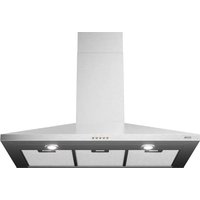
AP490RVS - Basket ETNA - Free user manual and instructions
Find the device manual for free AP490RVS ETNA in PDF.


| Product type | Chimney hood |
| Brand | Etna |
| Model | AP490RVS |
| Dimensions (W x D x H) | Approx. 90 x 50 x 60 cm |
| Weight | Approx. 12 kg |
| Power supply | 230 V ~ 50 Hz |
| Protection class | Class II |
| Motor power | 150 W |
| Number of speeds | 3 |
| Lighting | Integrated LED |
| Extraction duct diameter | 150 mm |
| Grease filter type | Washable metal filters |
| Activated carbon filter | Optional, replace every 4 months |
| Minimum distance from hob | 65 cm (electric/ceramic/induction: 55 cm) |
| Extraction mode | External extraction or recirculation |
| Grease filter cleaning | Manual or dishwasher (short cycle) |
| Spare parts available | Grease filters, carbon filters, LED bulbs |
| Warranty | 2 years (standard) |
Frequently Asked Questions - AP490RVS ETNA
User questions about AP490RVS ETNA
0 question about this device. Answer the ones you know or ask your own.
Ask a new question about this device
Download the instructions for your Basket in PDF format for free! Find your manual AP490RVS - ETNA and take your electronic device back in hand. On this page are published all the documents necessary for the use of your device. AP490RVS by ETNA.
USER MANUAL AP490RVS ETNA
Mounting the cooker hood
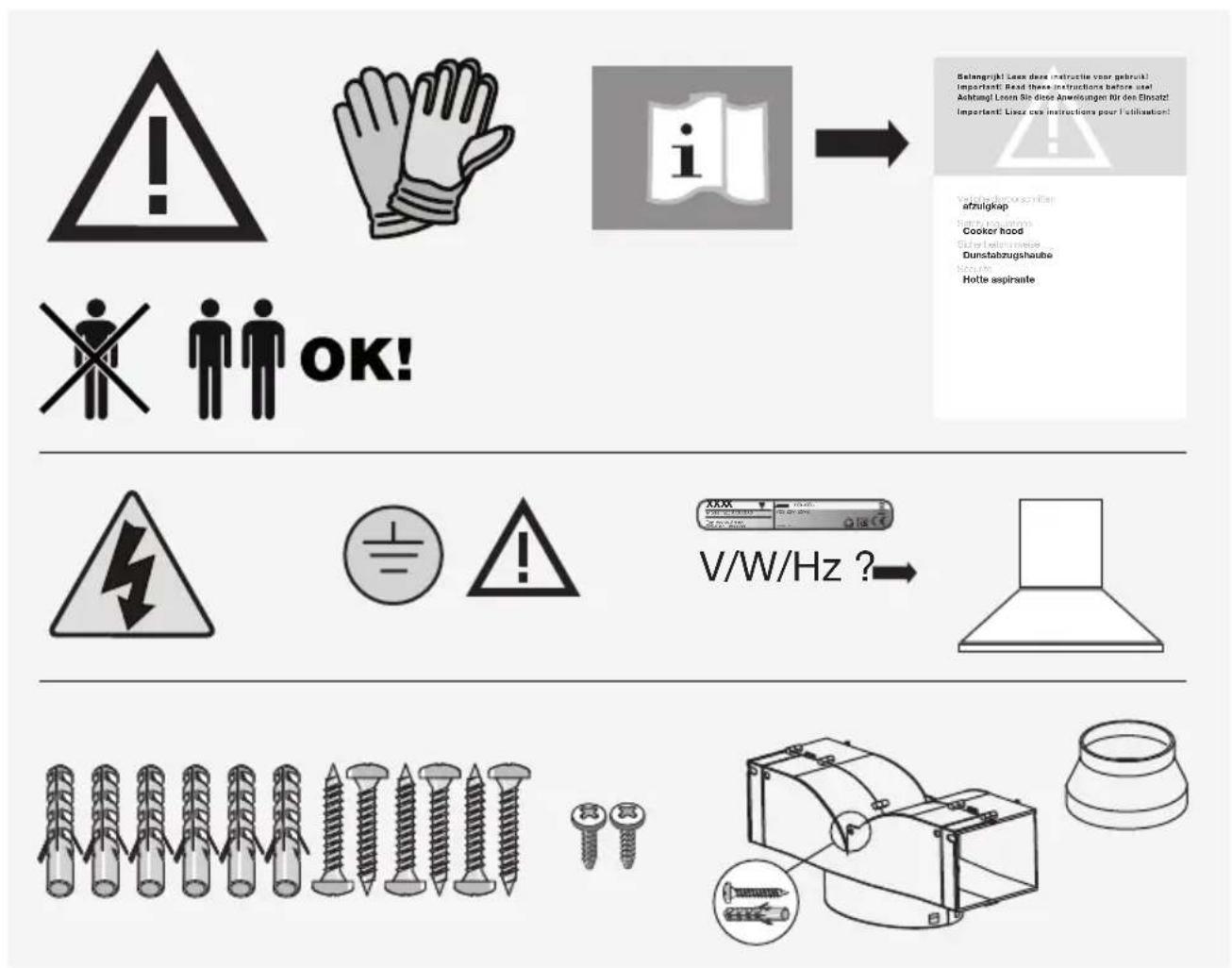
Gebruikte pictogrammen - Pictogrammes utilisés Benutzte Piktogramme - Pictograms used

flowchart
graph TD
    A["0"] --> B["Circle"]
    C["1"] --> D["Circle"]
    E["2"] --> F["Circle"]
    G["3"] --> H["Circle"]
    I["Sun Icon"] --> J["Circle"]
A Uitschakelen
B Ventilatorstand 1
C Ventilatorstand 2
D Ventilatorstand 3
E Verlichting
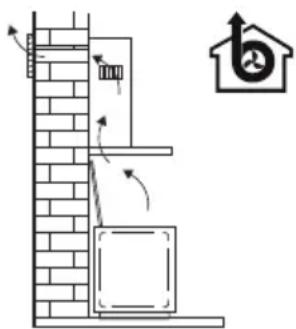
Afvoersystemen
natural_image
Illustration of a hand holding a clipboard with a curved arrow indicating motion (no text or symbols)Koolstofffilter
natural_image
Mechanical assembly diagram showing a 90-degree angle with no visible text or symbolsflowchart
graph TD
    A["Circle 0"] --> BCDE["Circle 1"]
    BCDE --> D["Circle 2"]
    D --> E["Circle 3"]
    E --> F["Circle sun"]
natural_image
Illustration of a hand holding a small object over a flat surface, with no visible text or symbolsFiltres à charbon
natural_image
Mechanical component diagram showing a 90-degree angle with no visible text or symbolsnatural_image
Illustration of a hand holding a small object over a folded paper or plastic sheet (no text or symbols visible)Kohlefilter
natural_image
Mechanical component diagram showing a 90-degree angle with no visible text or symbols| Introduction | 4 | |
| Description | 4 | |
| Extraction systems | 5 |
Use
| Controls | 6 |
Maintenance
| Cleaning | 7 |
| Removing the grease filters | 8 |
| Replacing the carbon filter | 8 |
| Lighting | 8 |
Installation
| General | 9 | |
| Electrical connection | 1 | |
| Mounting the cooker hood 10 |
Environmental aspects
| Disposal of appliance and packaging | 11 |
Installation
| Mounting the cooker hood | 12 |
Introduction
These operating instructions offer you a clear overview of all the possibilities that the appliance offers. You will find here information about the safety and servicing of the appliance.

Read this user manual thoroughly before you first use the appliance, and store the manual safely for future use.

First read the separate safety instruction before you are going to use the appliance!
You can find the most recent version of the instructions for use on our website.
Description
flowchart
graph TD
    A["A"] --> 0["0"]
    BCDE["BCDE"] --> 1["1"]
    BCDE --> 2["2"]
    BCDE --> 3["3"]
    BCDE --> 4["4"]
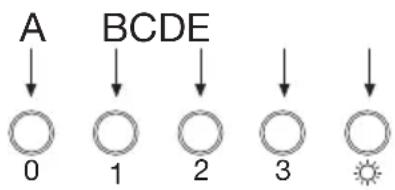
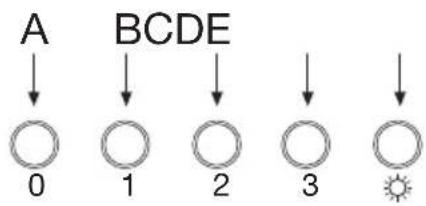
A Switch off
B Fan position 1
C Fan position 2
D Fan position 3
E Lighting
Extraction systems
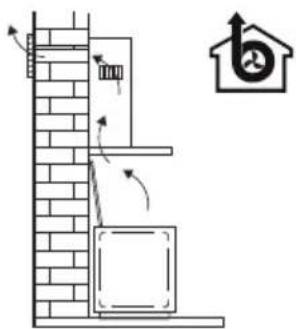
Depending on the type, the cooker hoods can be connected in one of two ways:
- To a duct. To a duct, the cooking vapours extracted by suction are carried outside, once the grease particles have been filtered. This is the best method.
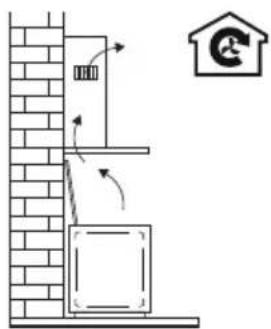
- Recirculation hood. As a recirculation hood, the grease particles and the smell
in the extracted vapours are filtered.
The air that has been sucked in is not carried outside but recirculates in the kitchen. In this case you must have a carbon filter fitted.

Attention!
The carbon filter for recirculation must be ordered separately and replaced regularly.
Controls
flowchart
graph TD
    A["A"] --> B["0"]
    BCDE["BCDE"] --> D["1"]
    BCDE --> E["2"]
    BCDE --> F["3"]
    BCDE --> G["Sun"]
Switching the fan on and off
-
Press the speed button B, C or D. The extractor hood switches on in the corresponding position.
-
Press the off button A. ▶The fan will switch off.
Switching the lighting on and off
- Press the lighting button E. ▶The lighting comes on.
- Press the lighting button E again. ▶The lighting goes off.
Cleaning

Attention! Before performing any maintenance operation, isolate the hood from the electrical supply by switching off at the connector and removing the connector fuse. Or if the appliance has been connected through a plug and socket, then the plug must be removed from the socket.
The cooker hood should be cleaned regularly (at least with the same frequency with which you carry out maintenance of the fat filters) internally and externally. Do not use abrasive products. Do not use alcohol!
Attention! Failure to carry out the basic cleaning recommendations of the cooker hood and replacement of the filters may cause fire risks. Therefore, we recommend oserving these instructions.
The manufacturer declines all responsibility for any damage to the motor or any fire damage linked to inappropriate maintenance or failure to observe the above safety recommendations.
Cooker hood
Clean the cooker hood with soapy water and a soft cloth. Then wipe with clean water to rinse. Do not use aggressive cleaning agents such as soda. The cooker hood paintwork will stay looking nice if you wax it occasionally.

Stainless steel canopy hoods
Do not use any sort of scourer. Treat with a stainless steel care product and polish with the structure of the stainless steel.
Metal grease filters
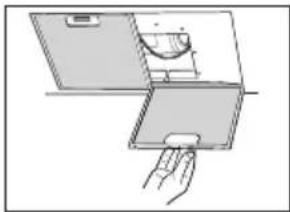
Metal grease filters should be cleaned once a month (or when indicated by the filter saturation indication system, if present on your model), using a neutral cleaning agent, preferably by hand or in the dishwasher on a short, low-temperature program. Place the grease filters with the openings facing downwards in the dishwasher so the water can drain out of the filter. Aluminum-colored and black grease filters become dull as a result of dishwasher cleaning agents. This is normal and does not effect the working.
Grease filters
natural_image
Illustration of a hand holding a small object over a rectangular panel, with no visible text or symbols.Carbon filter
natural_image
Mechanical component diagram showing a 90-degree angle with no visible text or symbolsRemoving the grease filter
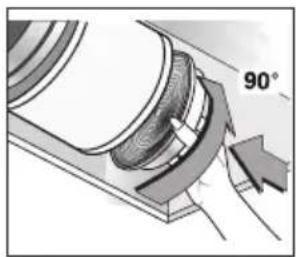
Switch off the electricity! Remove the plug from the socket or switch the electricity off at the mains. Pull the grease filter towards you and tilt it downwards at the front.
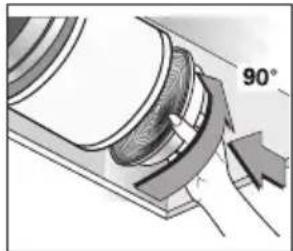
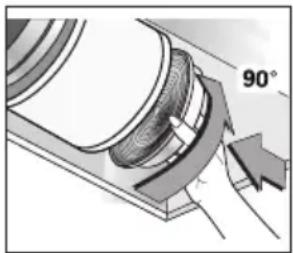
Replacing the carbon filter
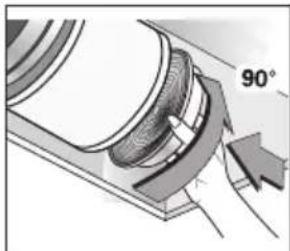
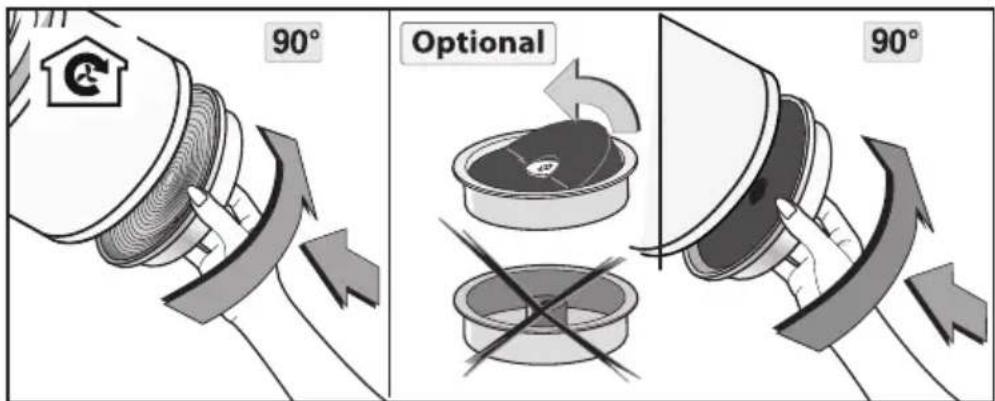
The carbon filter must always be used if the cooker hood is not ducted.
- Remove the grease filter.
- Attach the carbon filters to the motor.
- Replace the grease filter.
Note!
- Saturation of the activated charcoal will eventually occur after prolonged use, depending on the type of cooking and how frequently the grease filter is cleaned.
- Preferably cook with a lid on the pan; this extends the life of your filter, reduces cooking odors and saves energy. An carbon filter that is too moist due to water vapors reduces the effectiveness of the filter.
- For optimal odor reduction, the carbon filter must be replaced at least every four months.
- The carbon filter cannot be washed for reuse. Saturated carbon is not environmentally friendly. Change the filter regularly.
Lighting

This hood is fitted with a light system. This light system has to be replaced by an authorized technician. Do not attempt to replace it by yourself.

The lamp in this household appliance is only suitable for illumination of this appliance. The lamp is not suitable for household room illumination.
General
This appliance should be connected to the power supply by a recognized fitter who is familiar with, and works according to the correct safety regulations. This appliance meets the European requirements.
Important that you know:
- The minimum distance between the supporting surface for the cooking vessels on the gashob and the lowest part of the range hood must be not less than 65 cm. For use with an electric, ceramic or induction hob, this distance must be at least 55 cm.
- If the cooker hood is to be fitted to an existing duct no other appliances, such as a geyser or heater, may be connected to that same duct.
- Consider local regulations with respect to the ventilation of gas appliances.
- The shorter the duct, and the fewer the bends in it, the better the cooker hood will work.
- Before you start drilling check that there are no installation cables present.
- The connecting pipe for the cooker hood has a diameter of 150 mm. It is best also to use a flue pipe of the same diameter.
- The installation material supplied with this range hood is designed for fixing to reinforced concrete or masonry walls. For some types of walls you may need special plugs and screws.
Electrical connection

The appliance has been manufactured as a class II, therefore no earth cable is necessary.
Make sure the supply voltage ratings correspond with those stated on the appliance data plate. The connection to the mains is carried out as follows:
BROWN = phase L
BLUE = phase N
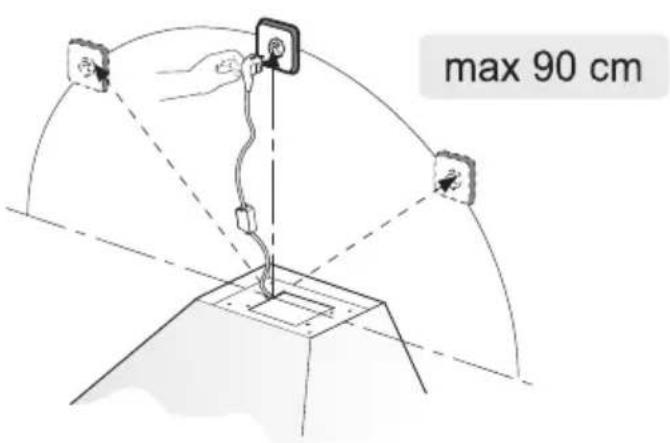
This canopy hood has been provided with a power plug. When installing the hood, make sure that this plug remains accessible. We recommend installing the wall socket out of view, behind the chimney cover.

Attention!
If you want to make a fixed connection, ensure that a multi-pole switch with a distance between contacts of 3 mm is installed in the supply cable.
Mounting the cooker hood
The last pages of this manual show the steps for mounting the cooker hood.
Disposal
Disposal of appliance and packaging
By ensuring this product is disposed of correctly, you will help prevent potential negative consequences for the environment and human health, which could otherwise be caused by inappropriate waste handling of this product. The local authorities can provide you with the relevant information.
The packaging of this appliance is recyclable. It could have been made from:
- cardboard;
- polythene foil (PE);
- CFK-free polystyrene (PS-hard foam).
You need to dispose of these materials responsibly in accordance with official regulations.
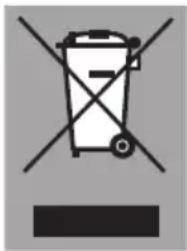
To draw attention to the fact that the segregated processing of electric household appliances is compulsory, this appliance carries the symbol of a crossed-out dustbin. This means that at the end of its working life, you may not dispose of the appliance as household refuse. Instead, you should hand it in at a special refuse collection centre run by the local authority or at a dealer's providing this service.
Segregated processing of household appliances avoids any negative effects on the environment and public health that might otherwise occur.
It enables the recovery of the materials used in the production of this appliance, thus realising considerable savings in terms of raw materials and energy.
CE
Declaration of conformity
We declare that our products meet the applicable European Directives, Decisions and Regulations and the requirements listed in the standards referenced.

NL
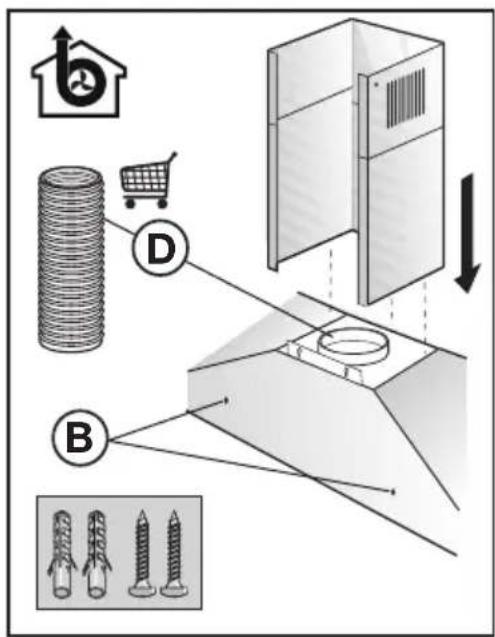
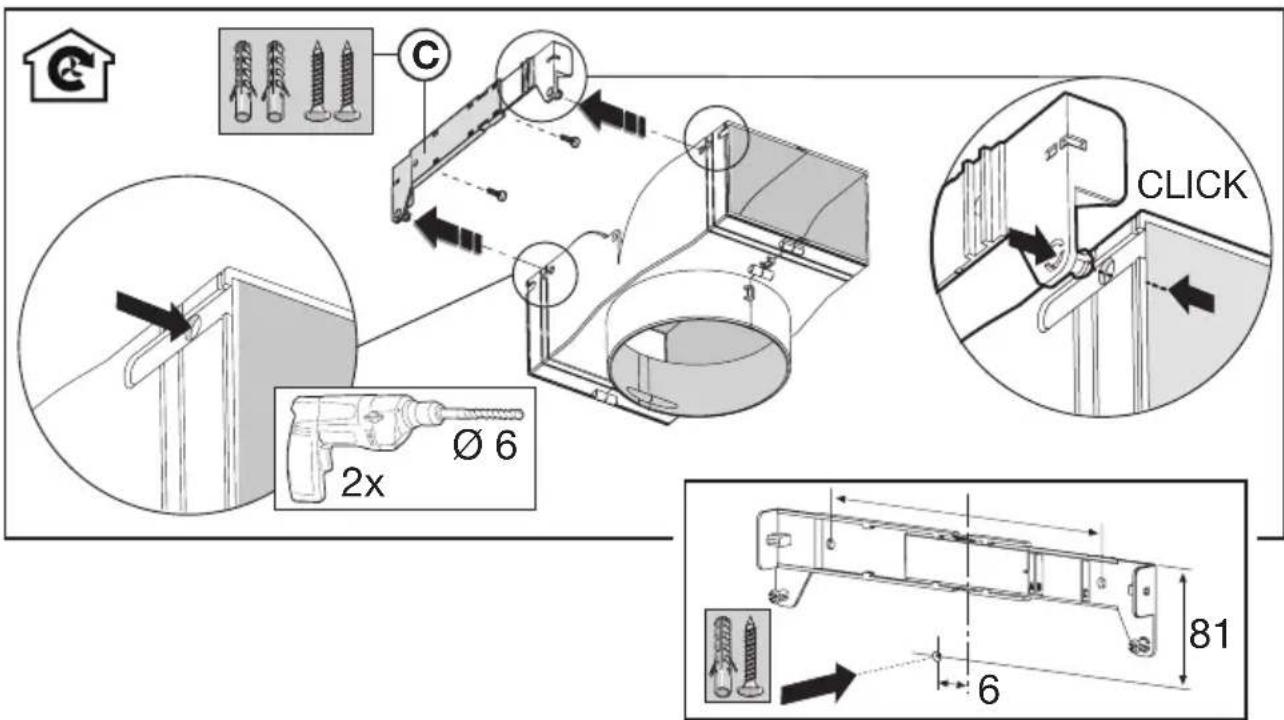
- Screw the cooker hood to the wall with the plugs and screws (A).
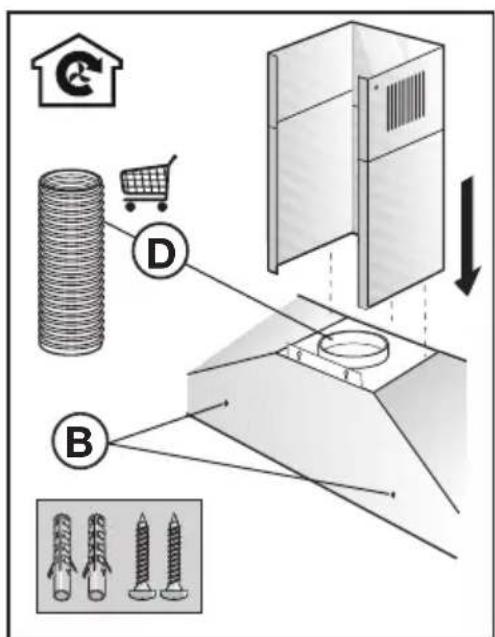
- Then fix the cooker hood in place by fitting the screws (B).
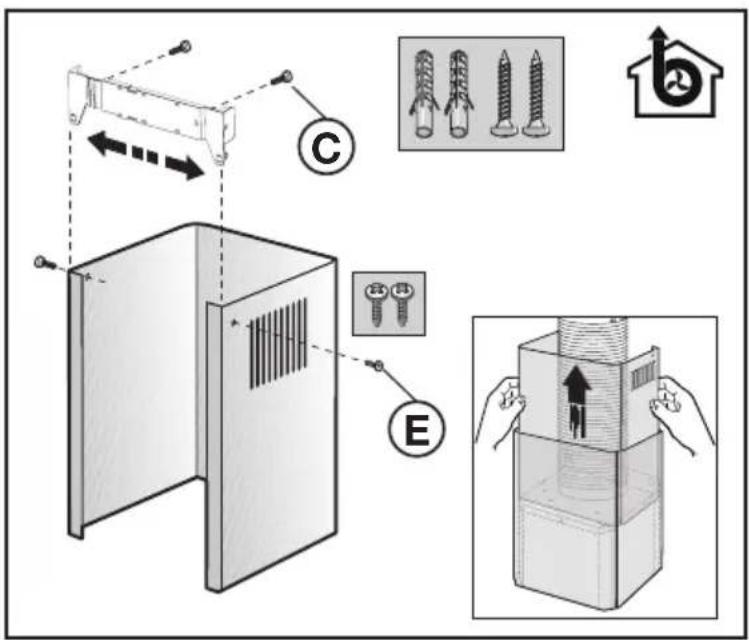
- Attach the fixing bracket (C) of the upper duct to the wall.
- Connect the discharge pipe (D).
- Put the plug in the wall socket. Ensure that there is no tension on the wall socket!
-
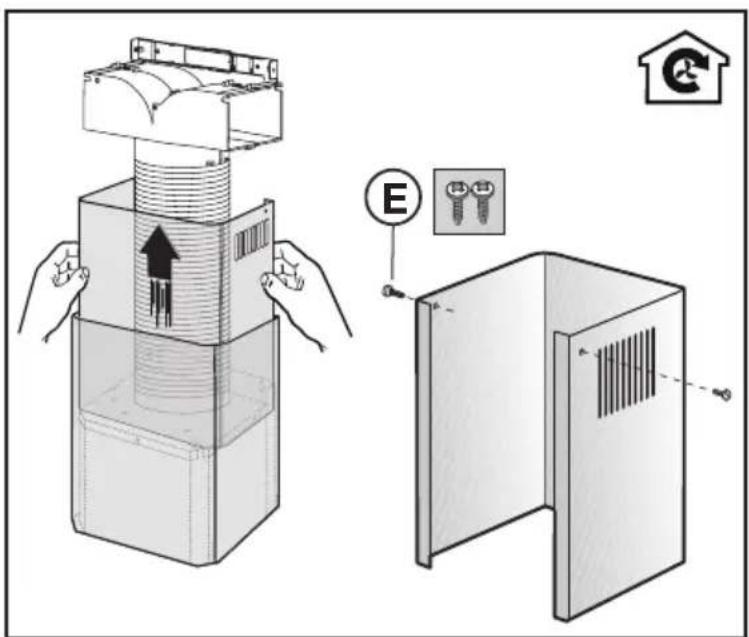
Slide the upper duct into the lower duct.
-
Let the ducts drop into the hood. Extend the upper decorative duct as far as bracket C and fix it in place using screws (E) supplied.
NL
- Follow steps 1 and 2 as described before.
- Drill two holes in the splitter and push the splitter onto the mounting bracket (C).
- Attach the mounting bracket and the splitter to the wall using a dowel and a screw.
- Connect the exhaust pipe (D) to the splitter and the extractor.
- Finally, follow steps 5 to 7 as described before.
INSTALLATIE - INSTALLATION
INSTALLATIE - INSTALLATION
www.etna.nl
www.etna.be

930904

- Afvoersystemen
- Koolstofffilter
- Filtres à charbon
- Kohlefilter
- Introduction
- First read the separate safety instruction before you are going to use the appliance!
- Description
- Extraction systems
- Depending on the type, the cooker hoods can be connected in one of two ways:
- Attention!
- Controls
- Switching the fan on and off
- Switching the lighting on and off
- Cleaning
- Cooker hood
- Stainless steel canopy hoods
- Metal grease filters
- Grease filters
- Carbon filter
- Removing the grease filter
- Replacing the carbon filter
- Note!
- Lighting
- General
- Important that you know:
- Electrical connection
- Mounting the cooker hood
- Disposal
- Disposal of appliance and packaging
- CE
- Declaration of conformity
- NL
Brand : ETNA
Model : AP490RVS
Category : Basket