W11519080 - Fridge WHIRLPOOL - Free user manual and instructions
Find the device manual for free W11519080 WHIRLPOOL in PDF.


User questions about W11519080 WHIRLPOOL
0 question about this device. Answer the ones you know or ask your own.
Ask a new question about this device
Download the instructions for your Fridge in PDF format for free! Find your manual W11519080 - WHIRLPOOL and take your electronic device back in hand. On this page are published all the documents necessary for the use of your device. W11519080 by WHIRLPOOL.
USER MANUAL W11519080 WHIRLPOOL
Requesting Assistance or Service......2
Important Information....3
Before you Begin....4
Tools....4
Installation notes....4
Components......4
Installing the Ice Maker....5
Making preparations....5
Mounting the Water Valve....6
Mounting the Ice Maker....7
Connect the Water Supply 9
Connecting the power/ leveling the unit .....10
Starting the Ice Maker....11
Troubleshooting....12
Operational notes....12
Troubleshooting chart....12
Table des matières
Page Page
Requesting Assistance or Service
If you need assistance contact your dealer, or call the Whirlpool Experience centre toll-free, 1-800-253-1301, 24 hours a day.
The following information is used throughout this installation Guide. Read it carefully so you are familiar with it.
Your safety and the safety of others are very important.
We have provided many important safety messages in this manual and on your appliance. Always read and obey all safety messages.

This is the safety alert symbol.
This symbol alerts you to potential hazards that can kill or hurt you and others.
All safety messages will follow the safety alert symbol and either the word "DANGER" or "WARNING."
These words mean:
DANGER
You can be killed or seriously injured if you don't immediately follow instructions.
WARNING
You can be killed or seriously injured if you don't follow instructions.
All safety messages will tell you what the potential hazard is, tell you how to reduce the chance of injury, and tell you what can happen if the instructions are not followed.
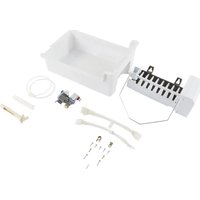
- This Installation Guide gives you complete instructions on how to install the Ice Maker Kit in your refrigerator-freezer and connect a water line to it. Please read the guide thoroughly and follow the instructions exactly as described. Also, make sure that you observe all of the "safety" instructions.
- IMPORTANT: A qualified service technician must install the water line and ice maker.
- Before you start to install your Ice Maker Kit, you will have to purchase a copper tubing kit that contains a "Regular Valve and Clamp Assembly" (for refrigerators with an automatic ice maker, or self-filling trays). The kit contains all of the hardware necessary to connect your ice maker to the water supply. You can purchase one at most hardware or plumbing supply stores.
NOTE: Do not use piercing-type, or 3/16" shut-off valves. They reduce the flow of water to the ice maker, and are easily clogged. Do not use polyethylene tubing to connect the ice maker to the water line. Use only 1/4" (O.D.) copper tubing.
CUSTOMER INSTALLATION IS NOT WARRANTED BY THE REFRIGERATOR OR ICE MAKER MANUFACTURER.
Before You Begin
Tools
Gather required tools and parts before starting installation. Read and follow the instructions provided with any tools listed here.
- Regular screwdriver
- Phillips screwdriver
- 7/16" and 1/2" open-end wrenches (or an adjustable wrench)
- Pliers
- 1/4" nut driver
- Level
- Ruler
- Electric screwdriver
- Scissors or cutting utensil
Components
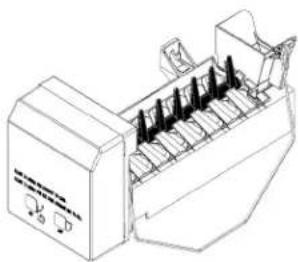
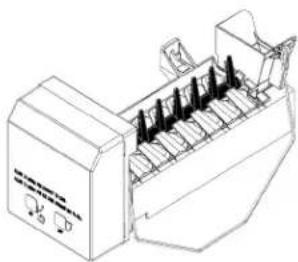
Remove the contents from the shipping carton and set them on a table where they can be easily identified and located.
Do not discard any of the packing material until all required parts are identified.
| QTY DESCRIPTION | |
| 1 | Ice Maker Assembly |
| 2 | Jumper Harness |
| 1 | Ice Pan |
| 1 | Water Valve |
| 1 | Water Valve Tubing |
| 1 | Fill Tube |
| 1 | Fill Tube Extension |
| 1 | Metal Water Tube Insert |
| 1 | Water Valve Tubing Clamp |
| 2 | 13/16" Screws |
| 2 | 1/2" Machine Screws |
| 5 | 1/2" Sheet Metal Screws |
| 1 | Water Line P-clamp |
| 1 | Installation Instructions |
Installation notes
For each set of steps shown, refer to the diagram immediately beside or below the text for clarification. Some illustrations may contain labels A, B, or C, which are referenced in associated steps. Some illustrations also contain "DETAILS." DETAILS are contained in bubbles alongside the larger illustration.
Install the parts as instructed in each step and corresponding illustration.
Installing the Ice Maker
Making preparations
- Pull the refrigerator away from the wall so that you can easily access the rear panel.
WARNING
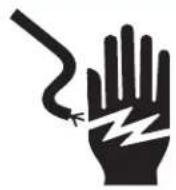
Electrical Shock Hazard Disconnect power before installing ice maker. Failure to do so can result in death or electrical shock.
- Unplug Refrigerator or disconnect power.
- Open the freezer door and remove all of the food items from inside the freezer compartment.
- Remove all baskets, shelves, ice cube trays, and the ice cube tray holder (if necessary, refer to your User Guide for the procedure). Set these items aside.
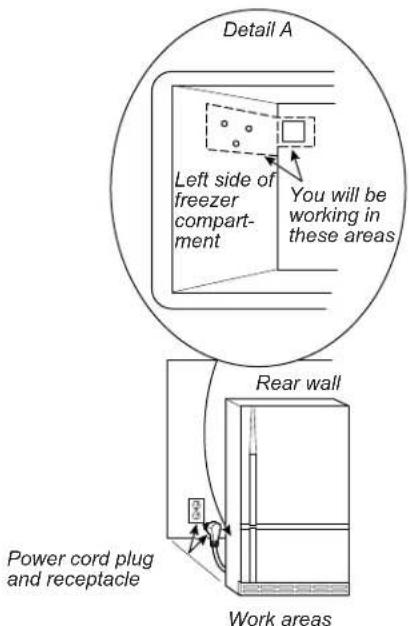
NOTE: The work areas are shown below.
text_image
Detail A Left side of freezer compartment You will be working in these areas Rear wall Power cord plug and receptacle Work areas- Remove the screw from the ice maker connector & tube cover. Remove cover and detach harness connector that is clipped to its rear side. Retain screw for ice maker installation..
text_image
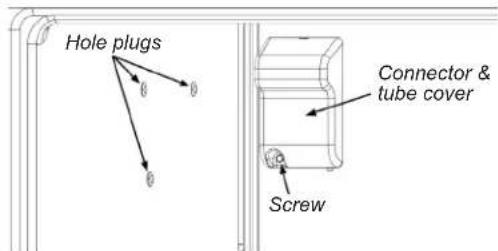
Hole plugs Connector & tube cover ScrewConnector & tube cover and hole plugs
- Locate the three hole plugs in the side of the freezer liner. For each plug, insert the end of a small-bladed screwdriver under the edge and pry it out of its hole.
- If present, locate tube inlet sticker on the back of the unit and remove. Cut through any tape under the sticker.
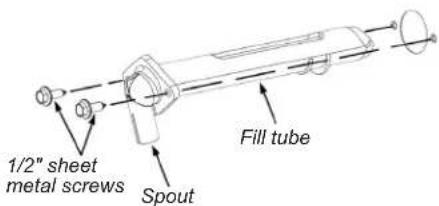
- Insert the fill tube through the hole in the back of the unit with the spout facing down. Secure with two 1/2" sheet metal screws supplied in kit. An electric screwdriver may be used.
text_image
1/2" sheet metal screws Spout Fill tubeConnector & tube cover and hole plugs
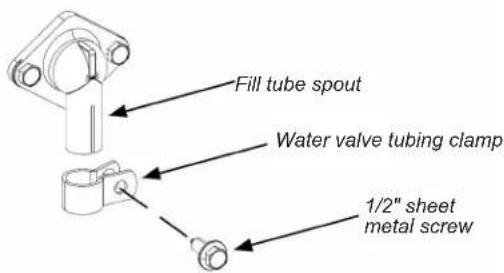
- Locate the water valve tubing clamp in the ice maker kit and note that one of the flanges is made for a threaded screw and the other side has a round hole. Position this clamp with the round hole side facing out, and slide it over the end of the spout. Thread a 1/2" sheet metal screw into the clamp with your fingers as far as possible. You will tighten the screw later.
text_image
Fill tube spout Water valve tubing clamp 1/2" sheet metal screwTube clamp installation
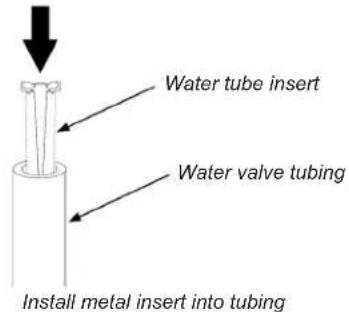
- Position the metal water tube insert as shown in illustration, then press it all the way into the water valve tubing.
text_image
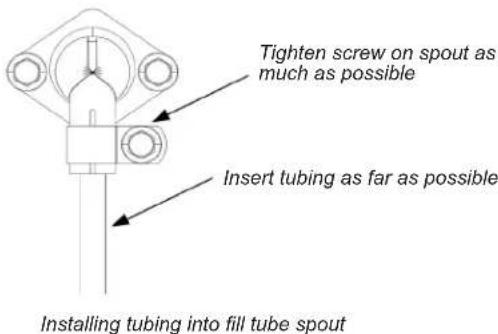
Water tube insert Water valve tubing Install metal insert into tubing- Slide the end of the tubing into the end of the fill tube spout as far as it will go, then tighten the tubing clamp screw as much as possible. Pull on the tubing to make sure that it is secure. If it slides out of the spout, push it back in, and tighten the clamp screw further until the tubing is secure.
text_image
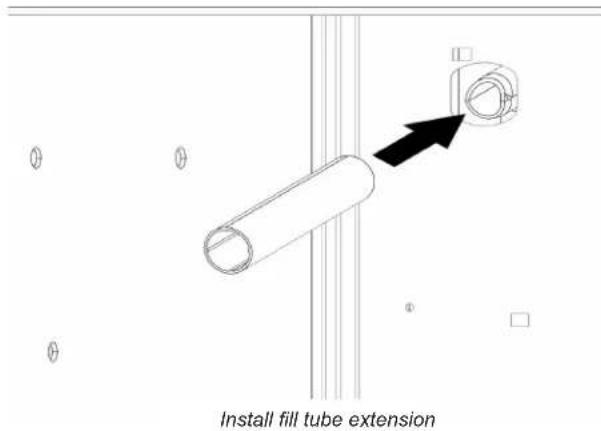
Tighten screw on spout as much as possible Insert tubing as far as possible Installing tubing into fill tube spout- Inside the back of the freezer compartment, slide the plastic fill tube extension over the end of the fill tube as far as it will go.
text_image
Install fill tube extensionMounting the Water Valve
NOTE: When using this kit to replace an existing ice maker or valve, the new valve and the new ice maker from this kit must both be used.
- Remove all screws securing the rear panel to the unit using a 1/4" nut driver. Retain power cord strain relief and screws. Remove panel.
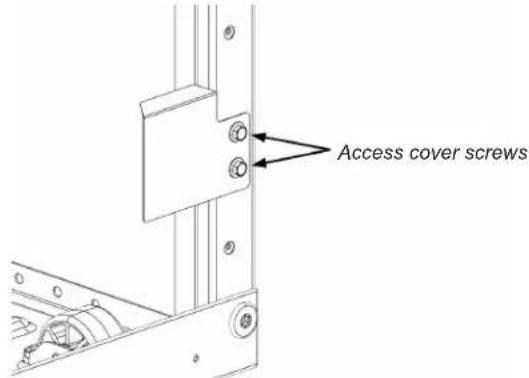
- If your unit has a metal rear panel, remove 2 screws securing the smaller valve access cover. Discard this cover.
text_image
Access cover screwsRemove valve access cover
-
Locate the 2-pin water valve connector inside the machine compartment. Insert this connector as far as possible over the terminals on the water valve included in the kit.
-
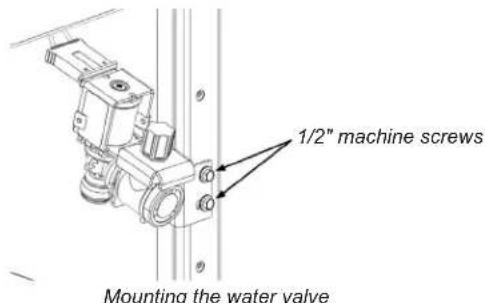
Secure the water valve to the cabinet frame using two 1/2" machine screws.
text_image
1/2" machine screws Mounting the water valve- Insert free end of water tubing into water valve nozzle. Make sure the tubing is inserted fully, past the first marking on the tube.
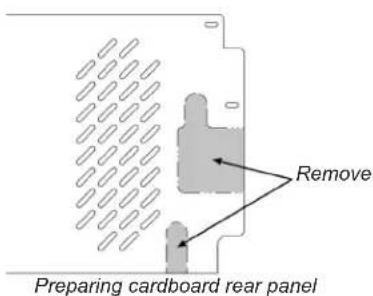
- If your unit has a cardboard rear panel, tear or cut away at the perforations to form openings for the valve and water tubing.
text_image
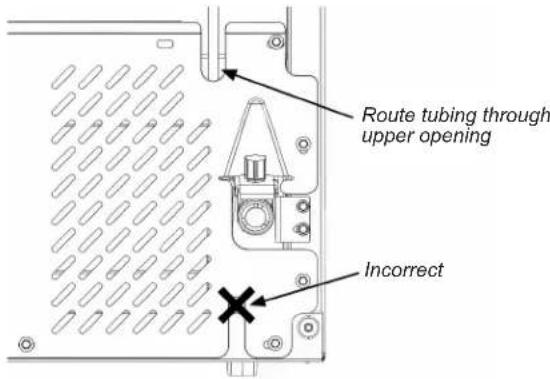
Remove Preparing cardboard rear panel- Reinstall rear panel using the screws removed in step 2, routing water tubing through the tube opening in the rear panel. If your unit has a metal panel, you must use the opening in the upper right. On models with a cardboard panel, this opening is in the lower right.
text_image
Route tubing through upper opening IncorrectRoute water line (metal rear panel)
- Reinstall power cord strain relief in the original location and use it to secure power cord.
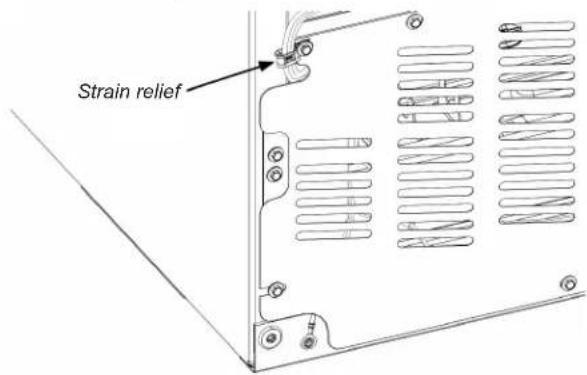
text_image
Strain reliefReinstall strain relief on power cord
Mounting the Ice Maker
NOTE: When using this kit to replace an existing ice maker or valve, the new valve and the new ice maker from this kit must both be used.
- Screw two 13/16" ice maker mounting screws into upper holes present in left wall of freezer section. Leave head out approximately 3/8" for the slot in the icemaker hanger to slip over the screws. Remove phillips screw (A) if present and discard.
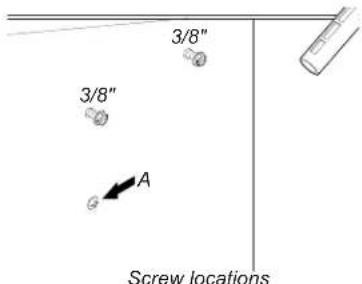
text_image
3/8" 3/8" A Screw locations-
Determine which of the two provided jumper harnesses mates with the connector housing in the back of your freezer. A 5-pin housing requires the jumper with the matching 5-pin plug. A 4-pin housing requires the jumper with the matching 4-pin plug.
-
Connect the jumper chosen in step 2 to the harness on the ice maker. Confirm the locking fingers snap into place. Route jumper over the guide (A) and through the wire clip (B) on the side of the ice maker.
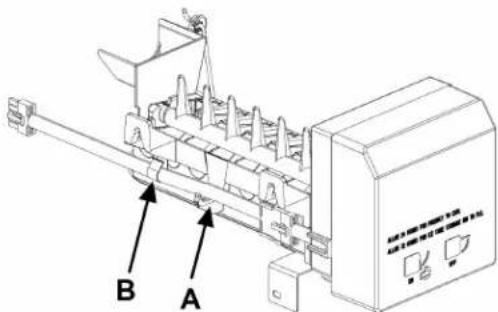
text_image
Technical diagram of a mechanical device with labeled components A and BA Guide B Clip
-
Connect the other end of the jumper to the housing in the back of your freezer, making sure the locking fingers snap in place.
-
Slide ice maker hangers over screws.
IMPORTANT: Make sure the top of each screw touches the bottom of the hanger on the ice maker (see illustration). This ensures the ice maker is oriented correctly.
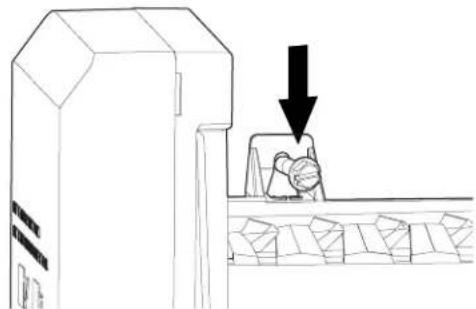
natural_image
Line drawing of a conveyor belt system with a person pressing down and a downward arrow indicating motion (no text or symbols)Mounting ice maker on top screws
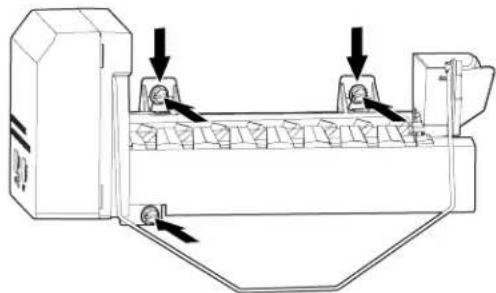
- Tighten down top mounting screws, making sure the hangers remain flush against the screws as the screws are tightened. Insert remaining mounting screw into bottom of ice maker and tighten.
Note: The top front screw is slightly lower than the rear screw, so the ice maker should tilt slightly so that water flows from the fill cup.
natural_image
Technical line drawing of a mechanical device with arrows indicating motion or force (no text or symbols)Keep hangers against screws while tightening
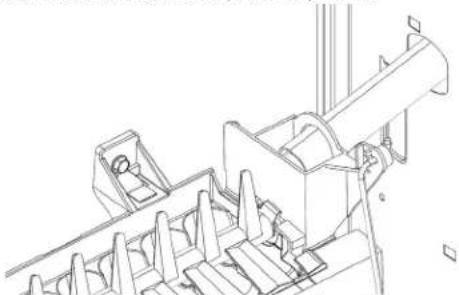
- Confirm fill tube extension is fully seated on the fill tube and aligned with the fill cup on the ice maker. If needed, loosen mounting screws to correct alignment of ice maker with fill tube extension, then repeat steps 5-6.
natural_image
Technical line drawing of a mechanical assembly or machine component (no text or symbols visible)Align fill tube extension with cup
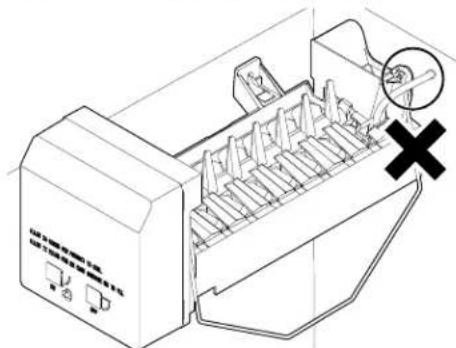
- Route ice maker wire harness and jumper away from moving parts and fill tube. Confirm the bail arm can move freely between the lowered and horizontal positions.
natural_image
Technical line drawing of a mechanical device with internal components and a magnified view of a hand holding a tool (no text or symbols present)Incorrect harness position (restricting bail arm)
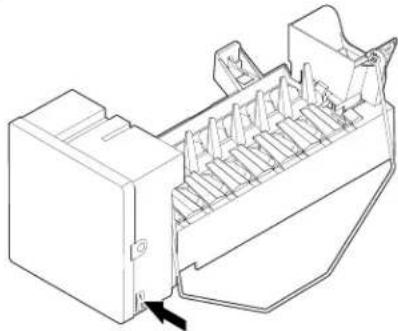
- If your ice maker has an ON / OFF rocker switch, flip the switch to the OFF (O) position until water connection is complete.
natural_image
Technical line drawing of a mechanical component with internal channels and a black arrow indicating a specific part (no text or symbols present)Turning the ice maker off (rocker switch)
- If your ice maker does not have a rocker switch, raise wire shut off arm to the OFF (up) position until water connection is complete.
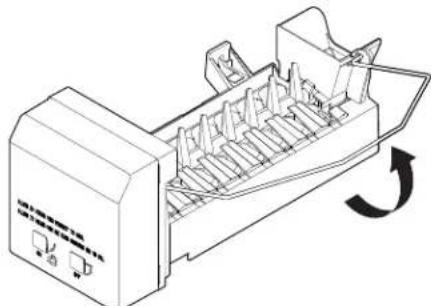
natural_image
Technical line drawing of a mechanical device with internal components and a rotation arrow (no text or symbols)Turning the ice maker off (shut-off arm)
Connect the Water Supply
Read all directions before you begin.
IMPORTANT:
- Connect to potable water supply only.
Do not use with water that is microbiologically unsafe or of unknown quality without adequate disinfection before or after the system. Systems certified for cyst reduction may be used on disinfected waters that may contain filterable cysts.
- Plumbing must be installed in accordance with the International Plumbing Code and any local codes and ordinances.
- Copper and PEX tubing connections from the household water line to the refrigerator are acceptable and will help avoid off-taste or odor in your ice or water. Check for leaks.
- If PEX tubing is used instead of copper, we recommend the following part numbers: W10505928RP (7 ft [2.14 m] jacketed. Sleeve PEX), 8212547RP (5 ft [1.52 m] PEX), or W10267701RP (25 B. Nut ft [7.62 m] PEX).
• Install tubing only in areas where temperatures will remain above freezing.
Tools Needed:
Gather the required tools and parts before starting installation.
- Flat-blade screwdriver
- 7/16" and 1/2" open-end wrenches or 2 adjustable wrenches
- 1/4" nut driver
NOTE: Do not use a piercing-type or 3/16" (4.76 mm) saddle valve, which reduces water flow and clogs easier.
Connect to Water Line
IMPORTANT: If you have turned the refrigerator on before the water was connected, turn off the ice maker.
- Unplug refrigerator or disconnect power.
- Turn off main water supply. Turn on nearest faucet long enough to reduce water pressure in the water line.
- Use a quarter-turn shut-off valve or the equivalent, served by a 1/2" household supply line.
NOTE: To allow sufficient water flow to the refrigerator, a minimum 1/2" (12.7 mm) size household supply line is recommended.
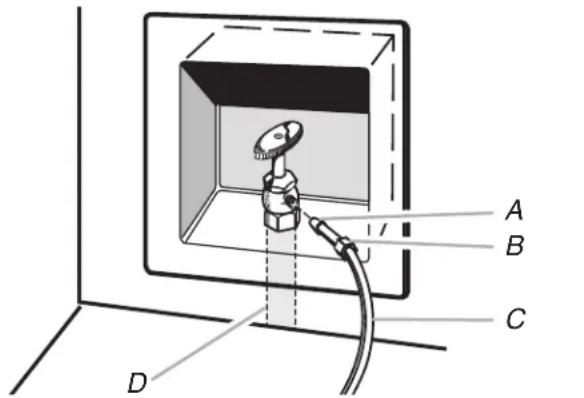
text_image
A B C DC. Copper tubing (to refrigerator)
D. Household supply line (1/2" minimum)
- Now you are ready to connect the copper tubing to the shut-off valve. Use 1/4" (6.35 mm) O.D. (outside diameter) soft copper tubing to connect the shut-off valve and the refrigerator.
- Ensure that you have the proper length needed for the job. Be sure both ends of the copper tubing are cut square.
- Slip compression sleeve and compression nut onto copper tubing as shown. Insert end of tubing into outlet end squarely as far as it will go. Screw compression nut onto outlet end with adjustable wrench. Do not overtighten.
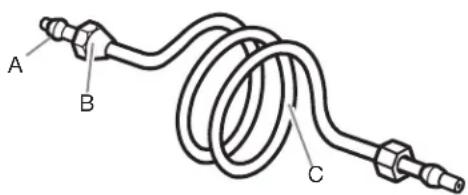
text_image
A B CA. Compression sleeve
C. Copper tubing
B. Compression nut
- Place the free end of the tubing into a container or sink and turn on main water supply to flush out tubing until water is clear. Turn off shut-off valve on the water pipe.
Note: Always drain the water line before making the final connection to the inlet of the water valve to avoid possible water valve malfunction. - Bend the copper tubing to meet the water line inlet, located on the back of the refrigerator cabinet as shown. Leave a coil of copper tubing to allow the refrigerator to be pulled out of the cabinet or away from the wall for service.
Connect to Refrigerator
Follow the connection instructions specific to your model.
- Remove plastic cap from water valve inlet port. Attach the copper tubing to the valve inlet using a compression nut and sleeve as shown. Tighten the compression nut. Do not overtighten. Confirm copper tubing is secure by pulling on copper tubing.
- Create a service loop with the copper tubing. Avoid kinks when coiling the copper tubing. Secure copper tubing to the rear panel with a "P" clamp, using the original screw in the panel slot above the valve.
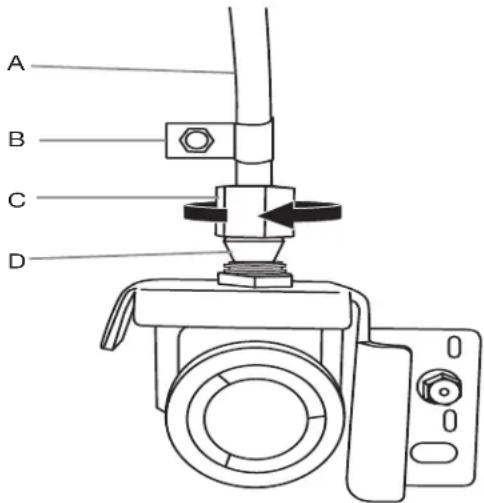
text_image
A B C DA. Copper tubing
B. "P" clamp
C. Compression nut
D. Compression sleeve
- Turn on water supply to refrigerator and check for leaks. Correct any leaks.
Connecting the power/Leveling the unit
WARNING

Electrical Shock Hazard
Plug into a grounded 3 prong outlet.
Do not remove ground prong.
Do not use an adapter.
Do not use an extension cord.
Failure to follow these instructions can result in death, fire, or electrical shock.
- Plug the power cord into its AC outlet, and push the refrigerator back against the wall.
- Place a level on top of the refrigerator cabinet. If you need to relevel, follow the procedure outlined in your refrigerator's User Guide.
Starting the Ice Maker
- Reinstall the freezer baskets into the freezer compartment (if necessary, refer to your User Guide for the procedure).
- Wash out the ice pan, then place in the upper basket, directly under the ice maker. Slide the pan as far back as it will go.
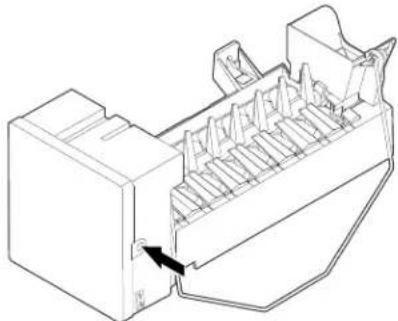
NOTE: If your ice maker does not have a rocker switch, skip to step 5. - Move the ON/OFF rocker switch to the ON (I) position. Press & hold the freezer light switch. Depress the service diagnostic button for 3 seconds. You should observe the heater turning on, the motor completing one cycle, and water filling near the end of the cycle. Once a successful cycle completes and the motor stops in the resting position, let go of the freezer light switch.
natural_image
Technical line drawing of a mechanical component with internal fins and a black arrow indicating a specific part (no text or symbols present)Service Diagnostic Button
- Cycle the rocker switch OFF (O) then ON (I) again. Close the freezer door. The ice maker will begin to make ice within 24 hours.
NOTE: The remaining steps only apply to ice makers without a rocker switch.
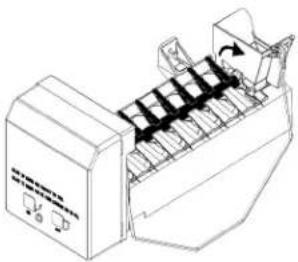
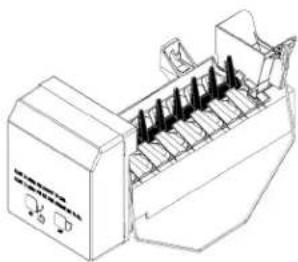
- IMPORTANT: Make sure freezer lights are on and freezer door switch remains open when performing this step. Manually rotate ejector fingers 60 degrees towards a vertical orientation. To avoid damaging ice maker, ejector fingers should only be rotated in a clockwise direction (see illustration).
natural_image
Line drawing of a mechanical device with multiple ports and a scroll wheel (no text or symbols)Before
natural_image
Line drawing of a mechanical device with multiple ports and a control panel (no text or symbols)After
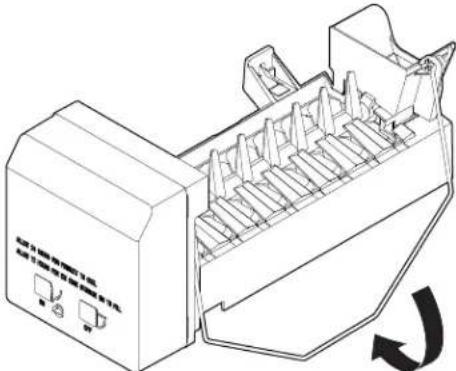
- Lower wire shut off arm to the ON (down) position and close the freezer door. The ice maker will begin to make ice within 24 hours.
natural_image
Technical line drawing of a mechanical device with internal components and a circular arrow indicating rotation (no text or symbols)Turning the ice maker on
- Confirm installation by holding down the freezer door switch. You should observe the following:
■Ejector fingers rotating as cycle begins
■Water filling near end of cycle
■Ejector fingers stopping in the horizontal position (2-10 seconds after water fill completes)
NOTE: Usually it takes approximately 24 hours for the ice maker to begin producing ice. Once ice is available, you may notice that it has an "off-taste". If this happens, make two or three batches of ice and discard them. After that the "off-taste" should be gone. If you have any problem, refer to "Troubleshooting" section.
Troubleshooting
Operational notes
-
The Ice Maker valve contains a flow washer that acts like a pressure regulator to control the water flow. For the Ice Maker to work properly, the water pressure in your home must be between 20 and 120 pounds per-square-inch (psi). If you encounter problems with your Ice Maker's ability to produce ice, call your water utility company and have the water pressure checked.
-
The Ice Maker's water valve is equipped with two strainers: a plastic basket type and a wire-mesh screen. Both of these can be cleaned by turning off the water and disassembling the water valve (your service center should be able to provide this service). If local water conditions require periodic cleaning, or if you use a well as a water source, you should consider installing a second water strainer in the water line. You can obtain a water strainer from your local appliance dealer.
Troubleshooting chart
The following chart lists several common problems that could occur with your Ice Maker.
| PROBLEM CAUSE | |
| One or more of the following sounds is heard: ■Buzzing ■Trickling water ■Thud (clatter of ice) | The water valve is operating. Ice is being dumped into the ice bin. |
| Ice tastes stale. The ice is old. Make a new batch. | |
| Water in Ice Maker overflows. Refrigerator or Ice Maker is not | level. If the Ice Maker still overflows after leveling, turn off the Ice Maker's water supply at the shut-off valve and turn the switch “off”; then contact your local service center. |
| Not enough ice. It will take 72 hours to fill the ice bucket. The | ice maker will make ice every 2 to 3 hours. For more ice, adjust the freezer control for a colder setting. |
| Ice making has stopped. Make sure that the water valve is Open. | The water valve screen is clogged (contact your local service) |
Informations importantes :
natural_image
Technical line drawing of a pipe fitting with a magnified inset showing a circular component (no text or symbols)natural_image
Line drawing of a machine with a hand pressing down on a conveyor belt, showing a downward arrow (no text or symbols)natural_image
Technical line drawing of a mechanical device with arrows indicating motion or force (no text or symbols)natural_image
Technical line drawing of a mechanical assembly or conveyor system (no text or symbols visible)natural_image
Technical line drawing of a mechanical device with internal components and a cross symbol (no text or labels)natural_image
Technical line drawing of a mechanical component with internal fins and a black arrow indicating a specific part (no text or symbols present)natural_image
Line drawing of a computer monitor with a rack and scroll, showing internal components and an arrow indicating rotation (no text or symbols)natural_image
Technical line drawing of a mechanical component with internal channels and a directional arrow (no text or symbols)natural_image
Line drawing of a mechanical device with multiple ports and a scroll wheel (no text or symbols)Avant
natural_image
Line drawing of a mechanical device with multiple ports and a control panel (no text or symbols)Après
natural_image
Line drawing of a printer with internal components and a circular arrow indicating rotation (no text or symbols)text_image
3/8" 3/8" Anatural_image
Line drawing of a conveyor belt system with a hand pressing down and a downward arrow indicating motion (no text or symbols)natural_image
Technical line drawing of a mechanical device with arrows indicating motion or force direction (no text or symbols)natural_image
Technical line drawing of a mechanical assembly or machine component (no text or symbols visible)natural_image
Technical line drawing of a mechanical device with internal components and a cross symbol (no text or labels)natural_image
Technical line drawing of a mechanical component with internal channels and a black arrow indicating a specific part (no text or symbols present)natural_image
Line drawing of a mechanical device with internal components and a rotation arrow (no text or symbols)natural_image
Technical line drawing of a mechanical component with internal channels and a directional arrow (no text or symbols)natural_image
Line drawing of a mechanical device with rollers and a fan (no text or symbols)Antes
natural_image
Line drawing of a mechanical device with multiple ports and a control panel (no text or symbols)Después