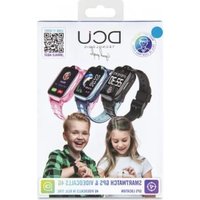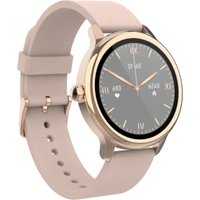
Sophie - Smartwatch DCU - Free user manual and instructions
Find the device manual for free Sophie DCU in PDF.


User questions about Sophie DCU
0 question about this device. Answer the ones you know or ask your own.
Ask a new question about this device
Download the instructions for your Smartwatch in PDF format for free! Find your manual Sophie - DCU and take your electronic device back in hand. On this page are published all the documents necessary for the use of your device. Sophie by DCU.
USER MANUAL Sophie DCU
text_image
QR code image containing encoded data, no visible human-readable textSmartwatch
SOPHIE
iOS - Android
34157090 / 34157095
Manual de usuario 3
User manual 16
Manual d'usuari 29
Mode d'emploi 42
Manual de usuário 55
ESP
ENG
CAT
FRA
PORT
ESP
text_image
Smartwatch with two labeled parts showing a circular screen displaying cartoon characters and Chinese annotations.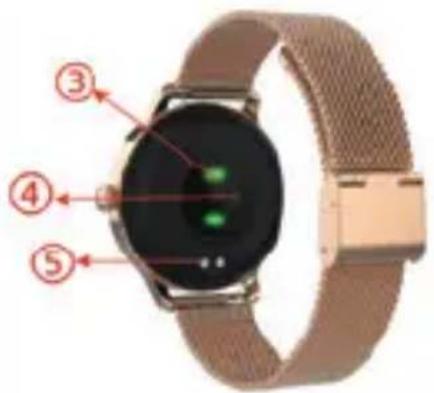
text_image
Labeled diagram of a smartwatch with numbered parts showing key components3. CARGAR SU RELOJ INTELIGENTE:
natural_image
Close-up of a smartwatch with green display screen and beige wrist strap (no visible text or symbols)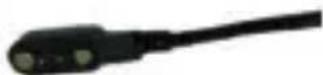
text_image
9:42 Miércoles 7 June 2018 Dormir 0 H 0 Min Peso 57.0 kg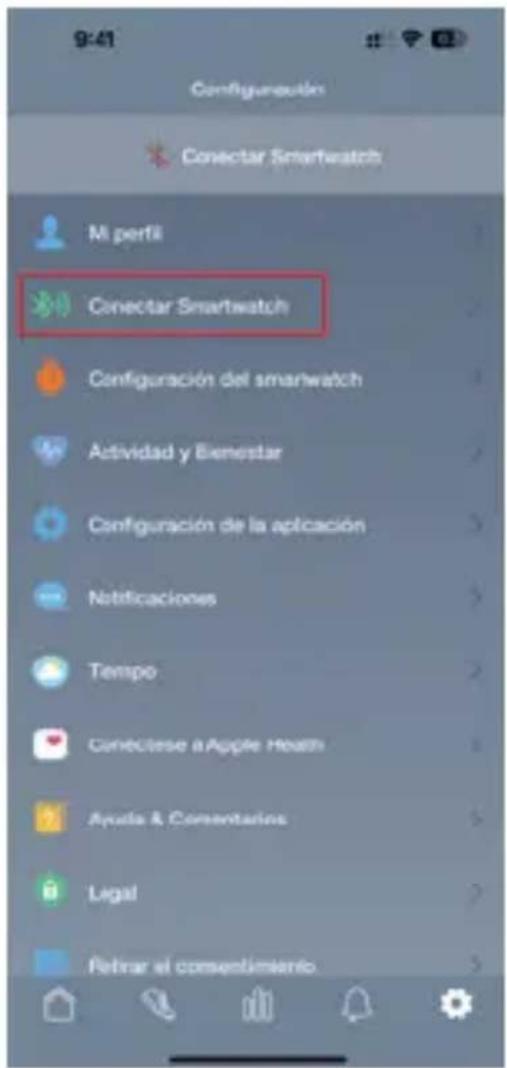
text_image
QR code image containing encoded data, no visible human-readable textESP
text_image
PARTICERS You can make and receive calls on your smartwatch. Do you add to some Contacts to your smartwatch? Cancel Start Bluetooth pairing request To pair with: DCU_Smartwatch Allow access to your contacts and call history CANCEL PAIRESP
5. USO DEL SMARTWATCH:
text_image
principal: 09:30 Call currently Contacts No message 24:38 Thank you a good time Thank you a good time Thank you a good time Thank you a good time Thank you a good time Thank you a good time Thank you a good time Thank you a good time Thank you a good time Thank you a good time Thank you a good time Thank you a good time Thank you a good time Thank you a good time Thank you a good time Thank you a good time Thank you a good time Thank you an easy to keep your own phone Thank you an easy to keep your own phone Thank you an easy to keep your own phone Thank you an easy to keep your own phone Thank you an easy to keep your own phone Thank you an easy to keep your own phone Thank you an easy to keep your own phone Thank you an easy to keep your own phone Thank you an easy to keep your own phone Thank you an easy to keep your own phone Thank you an easy to keep your own Phone Thank you an easy to keep your own Phone Thank you an easy to keep your own Phone Thank you an easy to keep your own Phone Thank you an easy to keep your own Phone Thank you an easy to keep your own Phone Thank you an easy to keep your own Phone Thank you an easy to keep your own Phone Thank you an easy to keep your own Phone Thank you an easy to keep your own Phone Thank you an easy to keep your own iPhone Thank you an easy to keep your own iPhone Thank you an easy to keep your own iPhone Thank you an easy to keep your own iPhone Thank you an easy to keep your own iPhone Thank you an easy to keep your own iPhone Thank you an easy to keep your own iPhone Thank you an easy to keep your own iPhone Thank you an easy to keep your own iPhone Thank you an easy to keep your own iPhone Thank you an easy to keep your owniPhone Thank you an easy to keep your own iPhone Thank you an easy to keep your own iPhone Thank you an easy to keep your own iPhone Thank you an easy to keep your own iPhone Thank you an easy to keep your own iPhone Thank you an easy to keep your own iPhone Thank you an easy to keep your own iPhone Thank you an easy to keep your own iPhone Thank you an easy to keep your own iPhone Thank you an easy to keep your own PCIe Thank you an easy to keep your own PCIe Thank you an easy to keep your own PCIe Thank you an easy to keep your own PCIe Thank you an easy to keep your own PCIe Thank you an easy to keep your own PCIe Thank you an easy to keep your own PCIe Thank you an easy to keep your own PCIe Thank you an easy to keep your own PCIe Thank you an easy to keep your own PCIe Thank you an easy to keep your own iPhone Thank you an easy to keep your own iPhone Thank you an easy to keep your own iPhone Thank you an easy to keep your own iPhone Thank you an easy to keep your own iPhone Thank you an easy to keep your own iPhone Thank you an easy to keep your own iPhone Thank you an easy to keep your own iPhone Thank you an easy to keep your own iPhone Thank you an easy to keep your own PC165710000000000000000000000000000000000000000000000000000000000000000000000000000000000000000000000000000text_image
MON 27 AM ✦ 100% 09:30ESP

text_image
Hiking None Cycling No.1 Swimming None Distance Time Calories NoneESP
text_image
Activity Heart rate 3p.02 Massuring... 1 watch 125 14:06 98:30 089 on 4 outside of 125 14:06 08:30 Keep all with the watch facing uptext_image
Activity Heart rate SoG2 Moasuring 98% 98% 98%flowchart
graph LR
    A["Camera"] --> B["Memprulsion"]
    B --> C["Stopwatch"]
    D["Instagram Icon"] --> E["Image Icon"]
    F["Two overlapping Images Icon"] --> G["Wireless Bluetooth Icon"]
5.19 Control de música:
text_image
QR code image containing encoded data, no visible human-readable textENG
Thank you very much for purchasing this watch, the DCU team has been working hard to offer you a comfortable, beautiful and functional watch.
If you have any questions that this manual cannot solve, we will be happy to assist you, you can write to info@dcutec.com and in less than 24 hours we will answer you.
We wish you enjoy it!
If you want to know a little more, go to www.dcutec.com or visit our Instagram profile @dcutecnologic. Sometimes we do raffles.
Device maintenance
Remember the following tips to keep your Smartwatch in good condition:
- This device uses 5V 1A for charging. It is strictly prohibited to use charging power supply higher than 5V, maximum allowable 5V/2.4A.
- If you are not going to use the watch for a period of time longer than 1 month, make sure that the battery is not completely discharged, please charge it periodically.
- Clean the watch regularly, especially the inner side and the metal charging contacts, and keep it dry.
- Adjust the watch strap to ensure air circulation.
- Do not overuse skin care products or perfumes on the wrist where the watch is worn.
- Please stop using the watch in case of skin allergy or any discomfort.

REMARK: The product is waterproof with IP67 level, which means it is resistant to sweat and splashes of water and if it accidentally falls into water, it only has resistance up to 1 meter for a maximum of 30 minutes (do not immerse in salt water or chemical liquids).

Do not use in a hot shower/bath or in a sauna, the vapours may enter the sphere and damage the peripheral components. Water damage is out of the scope of the warranty.
ENG
1. IN THE BOX:
- 1 x Smart Watch
- 1 x Charging Cable
• 1 x User Manual/Quick Guide
2. FRONT & BACK VIEW:
- Touch screen: shows watch data, swipe or touch the screen to select the functions.
- Side button: press and hold the side button to power on and power off, and short press the side button to return to watch interface or let display off/on
- Heart rate sensor
- Blood Oxygen sensor
- Charging Pins
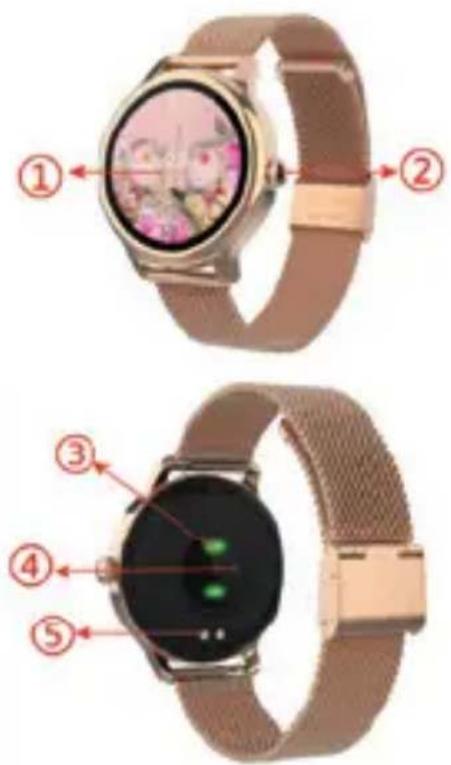
text_image
Diagram of a smartwatch with labeled parts showing front, top, side, and interior views3. CHARGING YOUR SMART WATCH:
- Before using your Smartwatch for the first time, make sure it is fully charged.
- The Smartwatch will take approximately 2 hours to fully charge. Once a power charger is plugged in, the Smartwatch will charge automatically.
- Make sure the charging cable fit correctly onto the charging pins on the back of your Smartwatch, then plug the other end to the user cable to a power source.
Charging point
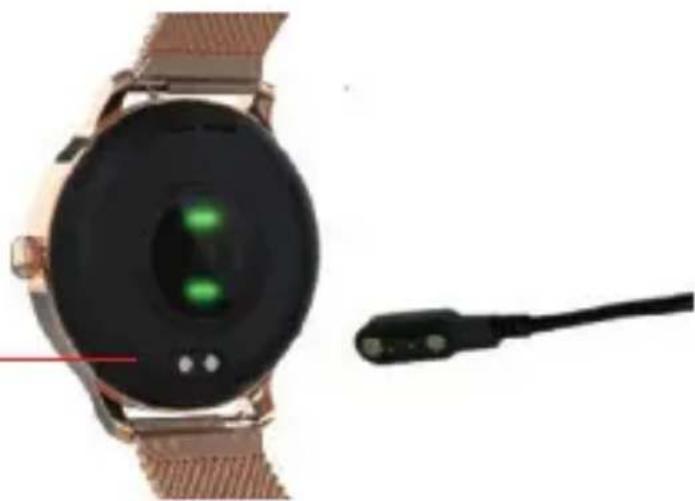
natural_image
Close-up of a smartwatch with a green display screen and connected cable (no visible text or symbols)ENG
4. INSTALL APP AND CONNECT OR DISCONNECT:
4.1. Before downloading the "Smart DCU" app, please make sure that it is compatible with your smartphone. The app works with iOS 12.0 or above and Android 6.0 or above.e that it is compatible with your smartphone. The App works with iOS 12.0 or above and Android 6.0 or above

text_image
QR code image containing encoded data, no visible human-readable text4.2 Search for the "Smart DCU" app in the App Store or Google Play or scan the following QR code to install.
4.3 Turn on Bluetooth on your smartphone, open the "Smart DCU" app and set your profile. Then tap "Connect Smartwatch" in settings and choose your smartwatch to connect.

text_image
9:42 Miércoles 7 June 2018 0 Peso Dormir 0 H 0 Min Peso 57.0 kg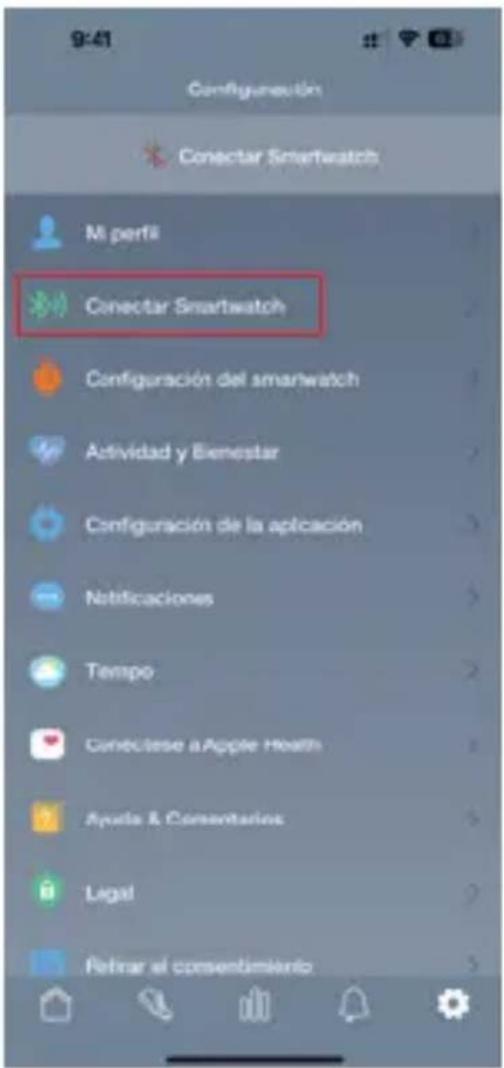
4.4 To disconnect your smartwatch, please go to the app settings and tap "Forget This Smartwatch". For iPhone, you also need to go to "Bluetooth" in your iPhone Settings to "Forget This Device".
4.5 Bluetooth call function and sounds:
ATTENTION: THE CONNECTION MUST BE MADE THROUGH THE SMART DCU APP. IF YOU ALSO WANT TO RECEIVE CALLS AND LISTEN TO SOUNDS THROUGH YOUR SMARTWATCH, FOLLOW THE BELOW INSTRUCTIONS:
For iOS13.0 or above:
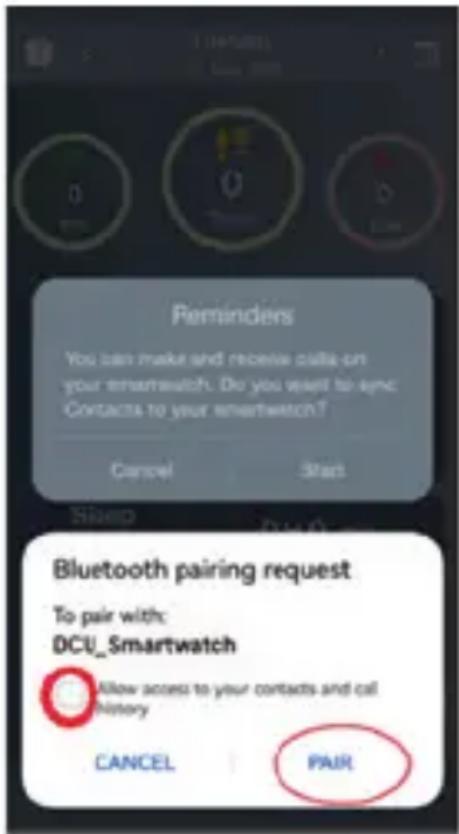
It is only necessary to connect your smartwatch with the Smart DCU APP and accept all the messages that appear in the APP during the connection between the APP and the smartwatch.
The pairing of call connection will automatically pop up. Click the pairing to use the call function.
If you do not click the pairing, you will need to manually connect with the Bluetooth options of your iPhone.
For prior iOS 13.0 versions and all Android versions:
1st. Connect your smartwatch with the Smart DCU APP and accept all the messages that appear in the APP during the connection.
2nd. Access to the Bluetooth options of your mobile phone, find your DCU smartwatch in the list of unconnected Bluetooth devices and click connect, accept the permissions.
text_image
Reminders You can make and receive data on your smartwatch. Do you want to eye: Contacts to your smartwatch? Cancel Start Bluetooth pairing request To pair with: DCU_Smartwatch Allow access to your contacts and call history CANCEL PAIRENG
5. HOW TO USE:
5.1 Hold the side button for 3 seconds to turn on the Smartwatch. Swipe up/down or left/right to see more options.
5.2 Main menu:
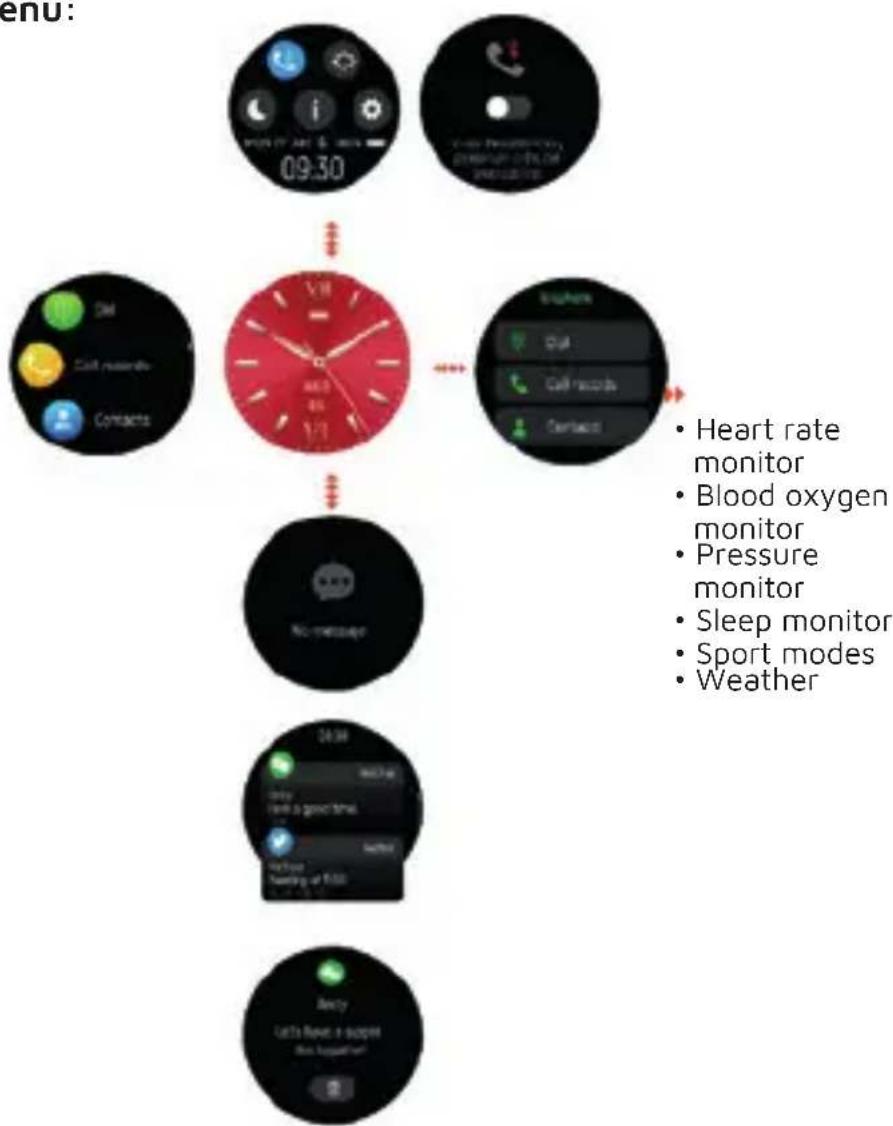
flowchart
graph TD
    A["Heart rate monitor"] --> B["Blood oxygen monitor"]
    B --> C["Pressure monitor"]
    C --> D["Sleep monitor"]
    D --> E["Sport modes"]
    E --> F["Weather"]
5.3 After turning on the smart watch, the watch face is displayed. Long press and hold 5 seconds to choose different clockface you like.
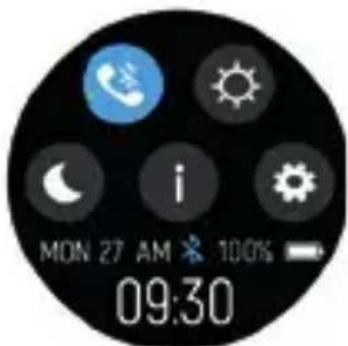
5.4 Shortcuts
text_image
MON 27 AM ✦ 100% 09:30ENG
This icon is the call 3.0 Bluetooth connection switch, click this icon to connect the watch 3.0 Bluetooth on your phone system Bluetooth. Then, the watch can answer calls and play music.
Screen brightness, you can tap the brightness icon to adjust (+/-) the screen brightness.
Sleep mode
About, to find the MAC address and software version of your Smartwatch.
Settings.
5.5 Notifications:
Swipe up on the dial interface to view notifications such as incoming calls, text messages, QQ, WeChat, WhatsApp, Facebook, Twitter, etc., and delete them automatically after reading.
text_image
No message5.6 When the watch face is displayed, swipe right on the watch face to enter and view all menus.
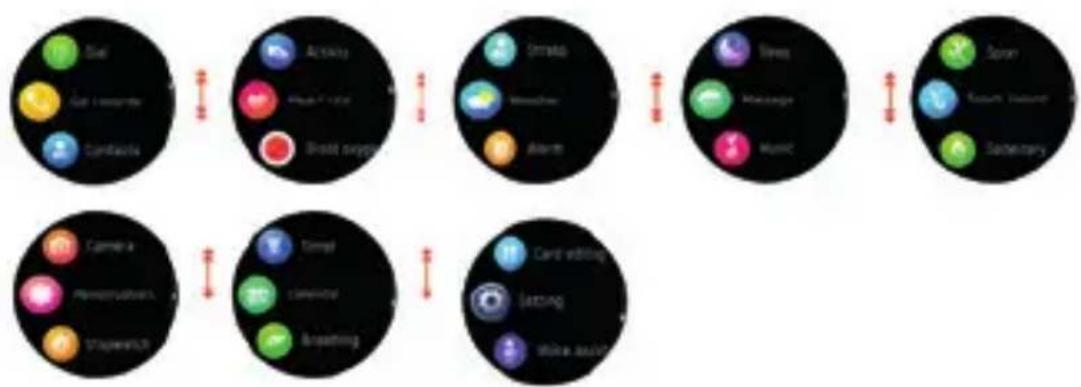
flowchart
| System | Component |
| --- | --- |
| Dial | Ear (Ear) |
| Dial | Ear (Ear) |
| Dial | Ear (Ear) |
| Dial | Ear (Ear) |
| Dial | Ear (Ear) |
| Dial | Ear (Ear) |
| Dial | Ear (Ear) |
| Dial | Ear (Ear) |
| Dial | Ear (Ear) |
| Dial | Ear (Ear) |
| Dial | Ear (Ear) |
| Dial | Ear (Ear) |
| Dial | Ear (Ear) |
| Dial (Airway) | Airway | Airway |
| Dial (Airway) | Airway (Blood supply) | Airway |
| Dial (Airway) | Airway (Blood supply) | Airway |
| Dial (Airway) | Airway (Blood supply) | Airway |
| Dial (Airway) | Airway (Blood supply) | Airway |
| Dial (Airway) | Airway (Blood supply) | Airway |
| Dial (Airway) | Airway (Blood supply) | Airway |
| Dial (Airway) | Airway (Body surgery) | Airway |
| Dial (Airway) | Airway (Body surgery) | Airway |
| Dial (Airway) | Airway (Body surgery) | Airway |
| Dial (Airway) | Airway (Body surgery) | Airway |
| Dial (Airway) | Airway (Body surgery) | Airway |
| Dial (Airway) | Airway (Body surgery) | Airway |
| Dial (Airway) | Airway(Headline) | Airway |
| Dial (Airway) | Airway(Headline) | Airway |
| Dial (Airway) | Airway(Headline) | Airway |
| Dial (Airway) | Airway(Headline) | Airway |
| Dial (Airway) | Airway(Headline) | Airway |
| Dial (Airway) | Airway(Headline) | Airway |
| Dial (Airway) | Airway(Airway Car) | Airway |
| Dial (Airway) | Airway(Airway Car) | Airway |
| Dial (Airway) | Airway(Airway Car) | Airway |
| Dial (Airway) | Airway(Airway Car) | Airway |
| Dial (Airway) | Airway(Airway Car) | Airway |
| Dial (Airway) | Airway(Airway Car) | Airway |
| Dial (Airways) | Airways(Headline) | Airways(Headline) |
| Dial (Airways) | Airways(Headline) | Airways(Headline) |
| Dial (Airways) | Airways(Headline) | Airways(Headline) |
| Dial (Airways) | Airways(Headline) | Airways(Headline) |
| Dial (Airways) | Airways(Headline) | Airways(Headline) |
| Dial (Airways) | Airways(Headline) | Ear(sense Car) |
| Dial (Airways) | Airways(Headline) | Ear(sense Car) |
| Dial (Airways) | Airways(Headline) | Ear(sense Car) |
| Dial (Airways) | Airways(Headline) | Ear(sense Car) |
| Dial (Airways) | Airways(Headline) | Ear(sense Car) |
| Dial (Airways) | Ear(sense Car)| Ear(sense Car)
| Dial (Airways)| Ear(sense Car)| Ear(sense Car)
| Dial (Airways)| Ear(sense Car)| Ear(sense Car)
| Dial (Airways)| Ear(sense Car)| Ear(sense Car)
| Dial (Airways)| Ear(sense Car)| Ear(sense Car)
| Dial (Airways)| Ear(sense Car)| Ear(sense Car)
| Dial (Airways)| Ear(sense Car)| Ear(sense Car)
| Dial (Airways)| Ear(sense Cervical Car)| Ear(sense Car)
| Dial (Airways)| Ear(sense Car)| Ear(sense Car)
| Dial (Airways)| Ear(sense Car)| Ear(sense Car)
| Dial (Airways)| Ear(sense Car)| Ear(sense Car)
| Dial (Airways)| Ear(sense Car)| Ear(sense Car)
| Dial (Airways)| Ear(sense Car)| Ear(sense Car)
| Dial (Airways)| Ear(sense Car)| Ear(Satney Car)| Ear(sense Car)| Ear(sense Car)| Ear(sense Car)| Ear(sense Car)| Ear(sense Car)| Ear(sense Car)| Ear(sense Car)| Ear(sense Car)| Ear(sense Car)| Ear(sense Car)| Ear(sense Car)| Ear(sense Car)| Ear(sense Car)| Ear(sense Car)| Ear(sense Car)| Ear(sense Car)| Ear(sense Car)| Ear(sense Car)| Ear(sense Car)| Ear(sense Car)| Ear(senai Car)| Ear(senai Car)| Ear(senai Car)| Ear(senai Car)| Ear(senai Car)| Ear(senai Car)| Ear(senai Car)| Ear(senai Car)| Ear(senai Car)| Ear(senai Car)| Ear(senai Car)| Ear(senai Car)| Ear(senai Car)| Ear(senai Car)| Ear(senai Car)| Ear(senai Car)| Ear(senai Car)| Ear(Satney Car)| Ear(Satney Car)| Ear(Satney Car)| Ear(Satney Car)| Ear(Satney Car)| Ear(Satney Car)| Ear(Satney Car)| Ear(Satney Car)| Ear(Satney Car)| Ear(Satney Car)| Ear(Satney Car)| Ear(Satney Car)| Ear(Satney Car)| Ear(Satney Car)| Ear(Satney Car)| Ear(Satney Car)| Ear(Satney Car)| Ear(Tear Cellar Car)| Ear(Tear Cellar Car)| Ear(Tear Cellar Car)| Ear(Tear Cellar Car)| Ear(Tear Cellar Car)| Ear(Tear Cellar Car)| Ear(Tear Cellar Car)| Ear(Tear Cellar Car)| Ear(Tear Cellar Car)| Ear(Tear Cellar Car)| Ear(Tear Cellar Car)| Ear(Tear Cellar Car)| Ear(Tear Cellar Car)| Ear(Tear Cellar Car)| Ear(Tear Cellar Car)(Tear Cellar/Car)(Tear Cellar/Car)(Tear Cellar/Car)(Tear Cellar/Car)(Tear Cellar/Car)(Tear Cellar/Car)(Tear Cellar/Car)(Tear Cellar/Car)(Tear Cellar/Car)(Tear Cellar/Car)(Tear Cellar/Car)(Tear Cellar/Car)(Tear Cellar/Car)(Tear Cellar/Car)(Tear Cellar/Car)(End Point/Car)(End Point/Car)(End Point/Car)(End Point/Car)(End Point/Car)(End Point/Car)(End Point/Car)(End Point/Car)(End Point/Car)(End Point/Car)(End Point/Car)(End Point/Car)(End Point/Car)(End Point/Car)(End Point/Car)(End Point/Car)(End Point/Car)(End Point/Car)(End Point/Car)(End Point/Car)(End point/Car)(End point/Car)(End point/Car)(End point/Car)(End point/Car)(End point/Car)(End point/Car)(End point/Car)(End point/Car)(End point/Car)(End point/Car)(End point/Car)(End point/Car)(End point/Car)(End point/Car)(End point/Car)(End point/Car)(End point/Car)(End point/Car)(End point/Car)(End points/Car)(End points/Car)(End points/Car)(End points/Car)(End points/Car)(End points/Car)(End points/Car)(End points/Car)(End points/Car)(End points/Car)(End points/Car)(End points/Car)(End points/Car)(End points/Car)(End points/Car)(End points/Car)(End points/Car)(End points/Car)(End points/Car)(End points/Car)(End point/Car)(End point/Car)(End point/Car)(End point/Car)(End point/Car)(End point/Car)(End point/Car)(End point/Car)(End point/Car)(End point/Car)(End point/Car)(End point/Car)(End point/Car)(End point/Car)(End point/Car)(End point/Car)(End point/Car)(End point/Car)(End point/Car)(End penceal /Cervical /Cervical /Cervical /Cervical /Cervical /Cervical /Cervical /Cervical /Cervical /Cervical /Cervical /Cervical /Cervical /Cervical /Cervical /Cervical /Cervical /Cervical /Cervical /Cervical /Cervical /Cervical /Cervical /Cervical /Cervical /Cervic /Cervical /Cervical /Cervical /Cervical /Cervical /Cervical /Cervical /Cervical /Cervical /Cervical /Cervical /Cervical /Cervical /Cervical /Cervical /Cervical /Cervical /Cervical /Cervical /Cervical /Cervical /Cervical /Cervical /Cervical /Cervial /Cervical /Cervical /Cervical /Cervical /Cervical /Cervical /Cervical /Cervical /Cervical /Cervical /Cervical /Cervical /Cervical /Cervical /Cervical /Cervical /Cervical /Cervical /Cervical /Cervical /Cervical /Cervical /Cervical /Cervical /Cervica /Cervica /Cervica /Cervica /Cervica /Cervica /Cervica /Cervica /Cervica /Cervica /Cervica /Cervica /Cervica /Cervica /Cervica /Cervica /Cervica /Cervica /Cervica /Cervica /Cervica /Cervica /Cervica /Cervica /Cervica /Cervico /Cervico /Cervico /Cervico /Cervico /Cervico /Cervico /Cervico /Cervico /Cervico /Cervico /Cervico /Cervico /Cervico /Cervico /Cervico /Cervico /Cervico /Cervico /Cervico /Cervico /Cervico /Cervico /Covice /Covice /Covice /Covice /Covice /Covice /Covice /Covice /Covice /Covice /Covice /Covice /Covice /Covice /Covice /Covice /Covice /Covice /Covice /Covice /Covice /Covice /Covice /Covice /Covice / Covice /
| End Point/Car
| End Point/Car
| End Point/Car
| End Point/Car
| End Point/Car
| End Point/Car
| End Point/Car
| End Point/Car
| End Point/Car
| End Point/Car
| End Point/Car
| End Point/Car
| End Point/Car
| End Point/Car
| End Point/Car
| End Point/Car
| End Point/Car
| End Point/Coverage
| End Point/Coverage
| End Point/Coverage
| End Point/Coverage
| End Point/Coverage
| End Point/Coverage
| End Point/Coverage
| End Point/Coverage
| End Point/Coverage
| End Point/Coverage
| End Point/Coverage
| End Point/Coverage
| End Point/Coverage
| End Point/Coverage
| End Point/Coverage
|
| End Point/Coverage
| End Point/Coverage
| End Point/Coverage
| End Point/Coverage
| End Point/Coverage
|
| End Point/Coverage
| End Point/Coverage
| End Point/Coverage
| End Point/Coverage
|
| End Point/Coverage
| End Point/Coverage
|
| End Point/Coverage
|
| End Point/Coverage
|
| End Point/Coverage
|
| End Point/Coverage
|
| End Point/Coverage
|
| End Point/Coverage
|
| End Point/Coverage
|
| End Point/Coverage
|
| End Point/Coverage
|
| End Point/Coverage
|
| End Point/Coverage
|
| End Point/Coverage
|
| End Point(Coverage)
|
| End Point(Coverage)
|
| End Point(Coverage)
|
| End Point(Coverage)
|
| End Point(Coverage)
|
| End Point(Coverage)
|
| End Point(Coverage)
|
| End Point(Coverage)
|
| End Point(Coverage)
|
| End Point(Coverage)
|
| End Point(Coverage)
|
| End Point(Coverage)
|
| End Point(Coverage)
|
| End point/coverage
|
| End point/coverage
|
| End point/coverage
|
| End point/coverage
|
| End point/coverage
|
| End point/coverage
|
| End point/coverage
|
| End point/coverage
|
| End point/coverage
|
| End point/coverage
|
| End point/coverage
|
| End point/coverage
|
| End point/coverage
|
| End points/coverage
|
| End point/coverage
|
| End point/coverage
|
| End point/coverage
|
| End point/coverage
|
| End point/coverage
|
| End point/coverage
|
| End point/coverage
|
| End point/coverage
|
| End point/coverage
|
| End point/coverage
|
| End point/coverage
|
| End point/coverage
ENG
5.7 Dial:
After pairing the phone with the watch's call Bluetooth, tap this icon to make a call.
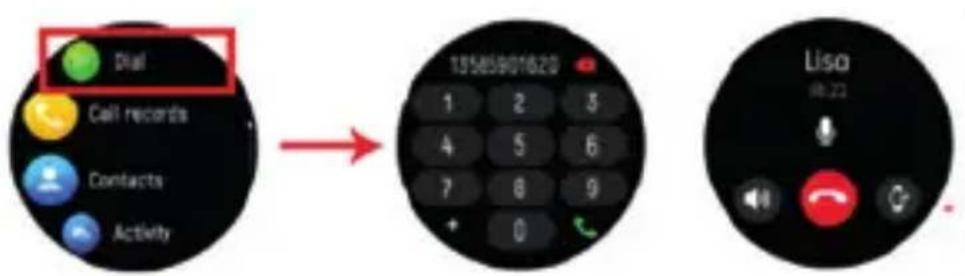
text_image
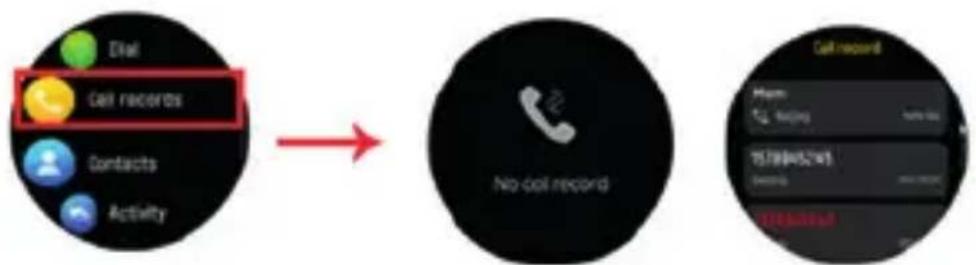
Dial Call records Contacts Activity 13565901823 1 2 3 4 5 6 7 8 9 + 0 Lisa @:235.8 Call history:
Records of calls made and answers received.
flowchart
graph LR
    A["Call records"] --> B["No call record"]
    C["Phone: 757845241"] --> D["Call record"]
5.9 Contacts:
Connected the "Smart DCU" and open the App, then go to "Sync Contacts" in Settings. and add contact information in your contacts, which will be displayed on the watch after saving.
5.10 Multi-sport modes:
Tap sport icon to enter the multi-sport modes. If you want to end the sports, slide from left to right on screen and tap the "☐" icon to finish your sports and save the sports data.

flowchart
graph LR
    A["Walking"] --> B["Running"]
    B --> C["Cycling"]
    C --> D["Swimming"]
    D --> E["Badminton"]
    E --> F[" Skiing"]
    F --> G["Talking"]
    G --> H[" Yoga"]
5.11 Click this icon to set the sport goal.
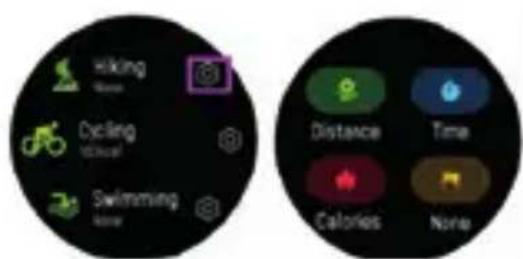
text_image
Hiking Swiss Dycling Swiss Swimming Distance Time Calories NoneENG
5.12 A reminder will pop up if your sport data is achieved your goal set.
5.13 Heart rate monitor:
Tap this icon to monitor your current heart rate. To exit the heart rate monitor, slide from left to right on the screen.
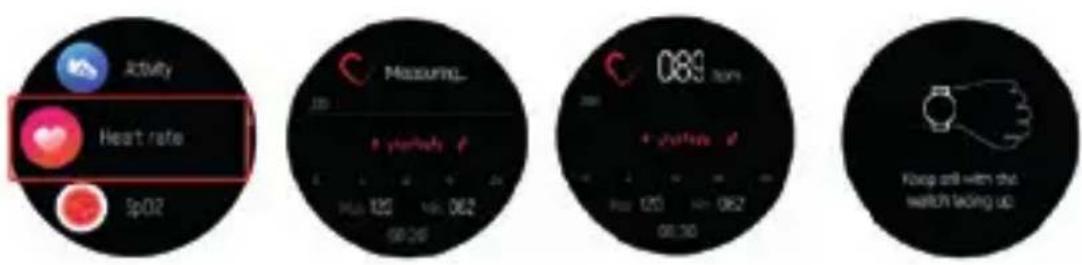
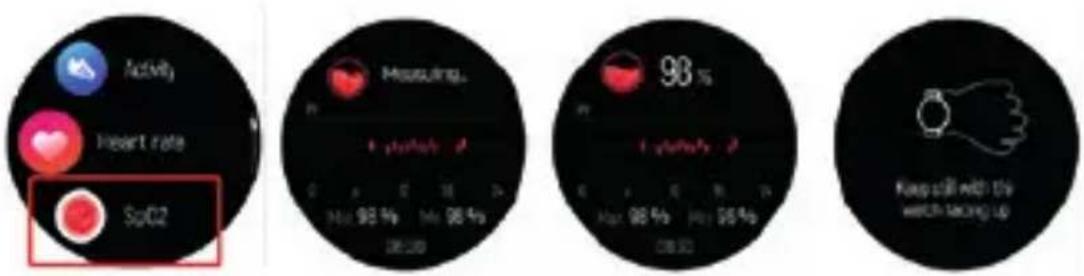
5.14 Blood Oxygen monitor:
Tap this icon to monitor your current Blood Oxygen monitor. To exit the Blood Oxygen monitor, slide from left to right on the screen.
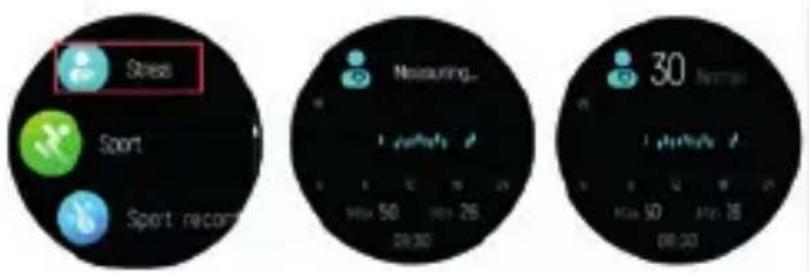
5.15 Pressure monitor:
Click this icon to monitor your current pressure monitor. To exit the pressure monitor, swipe from left to right on the screen.
text_image
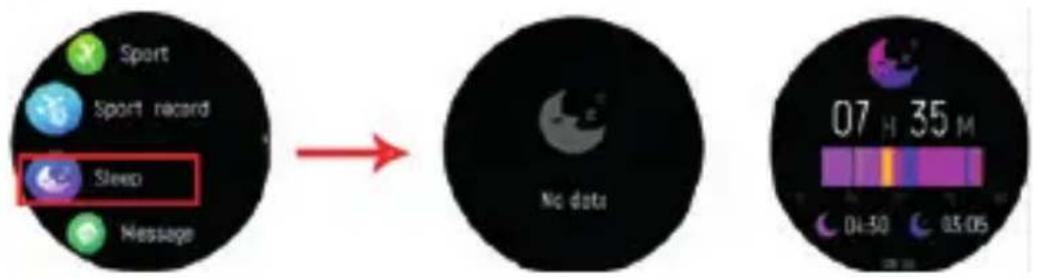
Stress Sport Sport record Measuring... 30 Minutes Max 50 Min 26 28:30 00:305.16 Sleep monitor:
Monitor your sleep between 9:00 p.m. and 9:00 a.m. automatically.
text_image
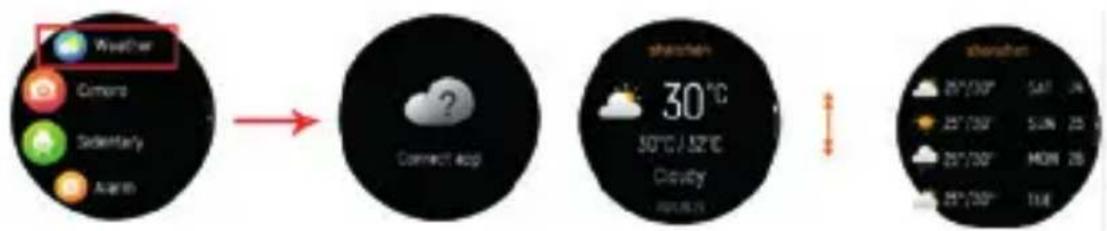
Sport Sport record Sleep Message No data 07 H 35 M 04:30 05:055.17 Weather:
Display the weather when the smartwatch connected to Smart DCU APP.
flowchart
graph LR
    A["Weather"] --> B["Connect Back"]
    B --> C["Cloud Display"]
    C --> D["Weather Data"]
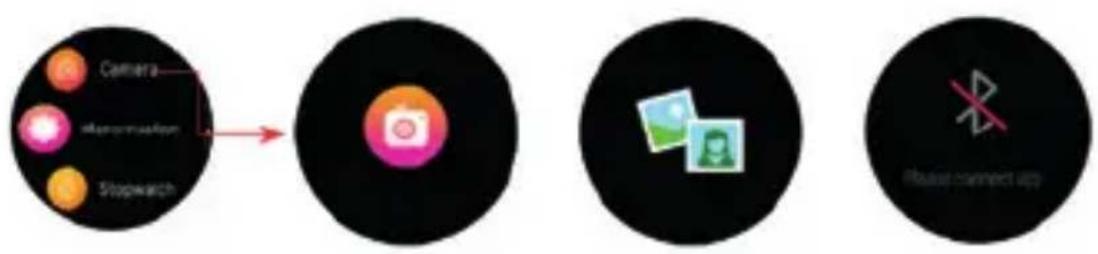
5.18 Camera:
Take pictures remotely from your smart watch.
flowchart
graph LR
    A["Camera"] --> B["Stopwatch"]
    B --> C["Instagram Icon"]
    C --> D["Image Photo"]
    D --> E["Connect App"]
ENG
5.19 Music control:
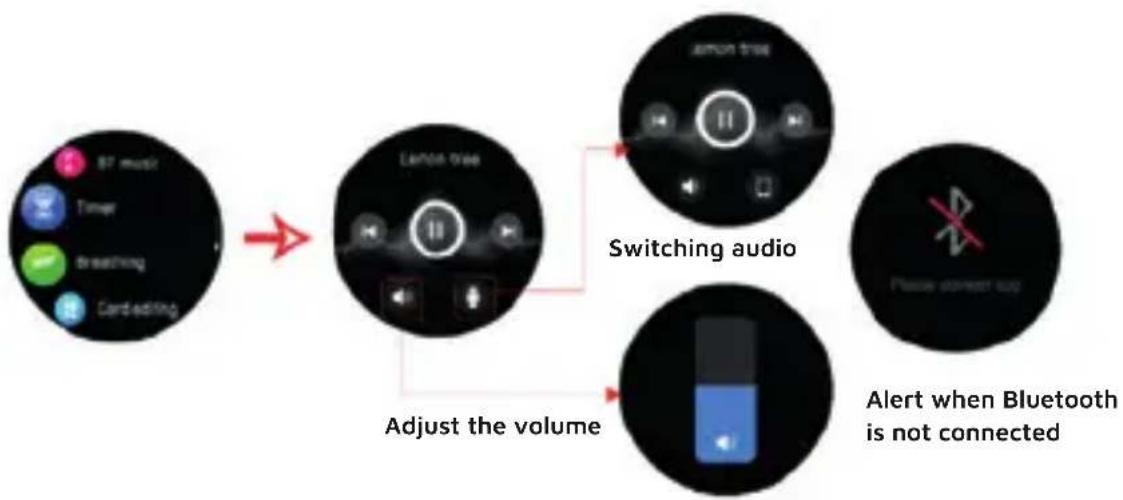
Click the music icon to enter the music playback control interface. You can select previous/next song, and play/pause music. You can control to increase and decrease the volume, and you can tap the icon to switch the output sound on the watch or on the phone. To exit the music playback controls, swipe left to right on the screen.
flowchart
graph LR
    A["87 music"] --> B["LARDA voice"]
    C["Tower"] --> B
    D["Breathing"] --> B
    E["Card editing"] --> B
    B --> F["Switching audio"]
    F --> G["Adjust the volume"]
    G --> H["Alert when Bluetooth is not connected"]
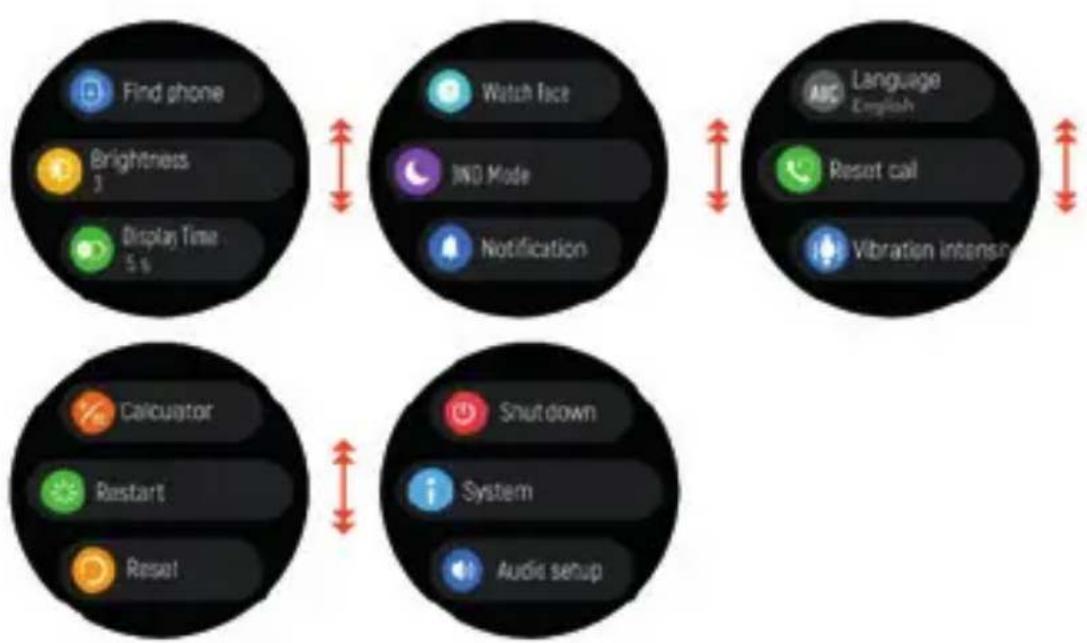
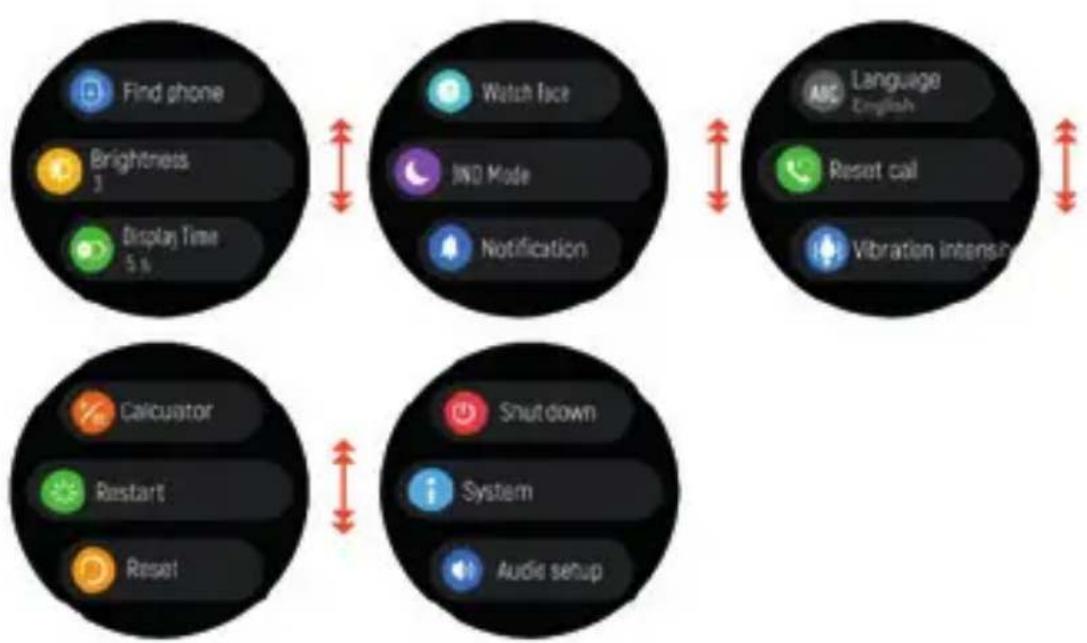
5.20 Settings:
flowchart
graph TD
    A["Find phone"] --> B["Watch face"]
    B --> C["Reset call"]
    C --> D["Calculator"]
    D --> E["Shutdown"]
    E --> F["Display Time 5.6"]
    F --> G["Brightness 3"]
    G --> H["Notification"]
    H --> I["Restart"]
    I --> J["Audio setup"]
ENG

Find phone, find your smartphone.
Screen brightness, you can tap the brightness icon to adjust the screen brightness.

Display duration, you can choose the display duration of different time, the longest is 200s.

To switch the watch face, swipe from right to left to select the corresponding watch face.

Do not disturb mode (the watch will disconnect the Bluetooth connection when it is turned on, and can only record steps and heart rate, body temperature, blood oxygen)

Language switching, you can select the corresponding regional language switching, and the corresponding language of the watch can also be switched on the app.

Call reset, click OK to clear contacts and call history.
Vibration adjustment (you can adjust the vibration size of the watch, yes: no vibration, weak, strong)
Watch calculator function.

Reboot the device. After clicking restart, the watch will automatically switch on and off once
Reset the device. After clicking Reset, all data on the watch will be cleared.
Switch off your Smartwatch。
About, to find the MAC address and software version of your Smartwatch.
ENG
PRECAUTIONS:
- Avoid subjecting the smartwatch to strong impacts, extreme heat/cold and/or sun exposure.
- Please do not disassemble, repair or modify the smartwatch by yourself.
- This device uses 5V 1A for charging. It is strictly prohibited to use charging power supply higher than 5V, maximum allowable 5V/2.4A.
- The operating environment of this device is 0^ 45^ . Do not bring it close to extreme sources of heat.
- When the smartwatch is wet, dry it with a soft cloth before charging, otherwise it will corrode the charging contacts and cause charging failure.
- Do not bring the smartwatch near chemicals such as gasoline, cleaning solvents, propanol, alcohol, insect repellent, or perfume.
- Please do not use this device in high voltage and high magnetism environment
- If you have sensitive skin or wear the smartwatch too tight, you may feel uncomfortable.
- Wipe beads of sweat from your wrist from time to time, as the strap may be exposed to soap, sweat, allergens or pollutants for a long time, which can cause itchy skin.
- If you use it frequently, it is recommended to clean the smartwatch every week. Clean with a damp cloth and remove oil or dust with a mild soap. It is not recommended to use the smartwatch with hot water. Water vapour could enter to the sphere and damage the components.
WARNING:
This product is not a medical device. The Smartwatches and their applications should not be used for the diagnosis, treatment or prevention of disease or illness. To change your exercise and sleep habits, be sure to consult a qualified medical professional to avoid serious injury.
Our company reserves the right to modify and improve any of the functions described in this manual without prior notice. At the same time, the company reserves the right to continuously update the contents of the product. All contents are subject to the actual product.
WARRANTY:
- The warranty covers quality problems caused by manufacturing, materials or design within the first 3 years of purchase and battery and charger problems within the first 6 months.
REGISTER YOUR SMARTWATCH ON OUR WEBSITE TO ACCESS THE WARRANTY (scan the QR code below).
- The guarantee does not cover damage caused by misuse of the product or by the following cases:
1). Disassemble or reassemble the product.
2). Damage caused by falls
3). Any man-made damage or misuse (such as: getting water into the dial, external force causing it to break, scratch damage to peripheral components, etc.)
4) Damages caused by water are outside the scope of the guarantee because we cannot verify if the tightness of the product has been tampered with or affected by small blows that have reduced its resistance.
-
When requesting the warranty, you must provide the purchase receipt with the place and date of purchase.
-
If you have problems using the product, please don't hesitate to contact our customer service:
DCU Tecnologic customer service
Live web chat: www.dcutec.com
Email: info@dcutec.com
Telephone: +34 972244105
REGISTER YOUR WATCH ON OUR WEBSITE TO ACCESS THE WARRANTY (scan the QR code below).

text_image
QR code image containing encoded data, no visible human-readable textCAT
text_image
Smartwatch with two labeled parts showing a digital display screen and cartoon character image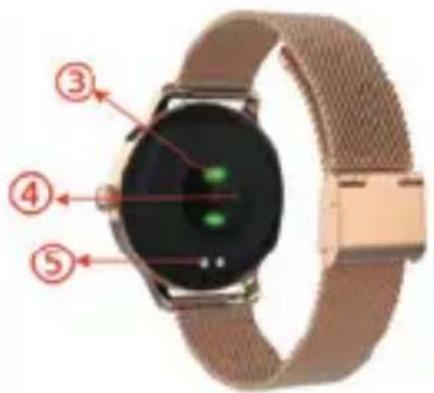
text_image
Labeled diagram of a smartwatch showing four numbered parts with red annotations pointing to the screen.3. CARREGAR EL RELLOTGE INTEL·LIGENT:
natural_image
Close-up of a smartwatch with green display screen and gold wrist strap (no visible text or symbols)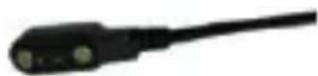
text_image
9:42 Miércoles P. June 2013 5 0 Peso 0 0 Min Dormer 0 H 0 Min Peso 57.0 kg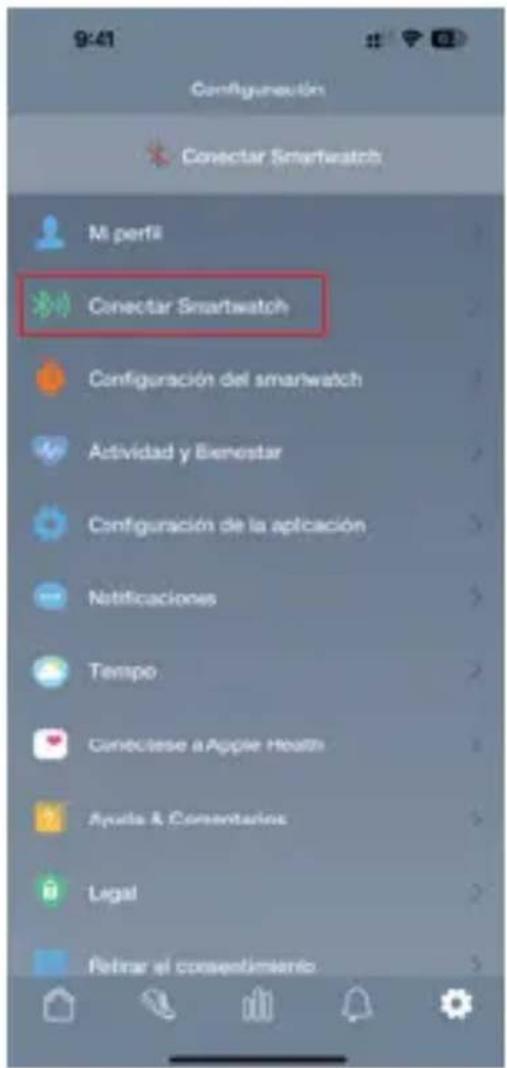
text_image
QR code image containing encoded data, no visible human-readable textCAT
text_image
Feminders You can make and receive calls on your smartwatch. Do you want to sync: Contact to your smartwatch? Cancel Start Sleep Bluetooth pairing request To pair with: DCU_Smartwatch Allow access to your contacts and call history CANCEL PAIRCAT
5. ÚS DEL RELLOTGE:
text_image
MON 27 AM ✗ 100% 09:30CAT

text_image
Making Normal Cycling Normal Swimming Normal Distance Time Calorified NoneCAT
text_image
Stress Sport Sport record Measuring... 30 hours Max 50 Min 26 28:30 00:30flowchart
graph LR
    A["Weather Camera"] --> B["Cloud App"]
    B --> C["Weather Display"]
    C --> D["Weather Time: 30°C, 50°C/52°C, Cloudy, Day"]
5.18 Càmera:
text_image
QR code image containing encoded data, no visible human-readable textFRA
natural_image
Smartwatch with a circular display showing a flower image, labeled with two numbered annotations (① and ②) pointing to the watch face.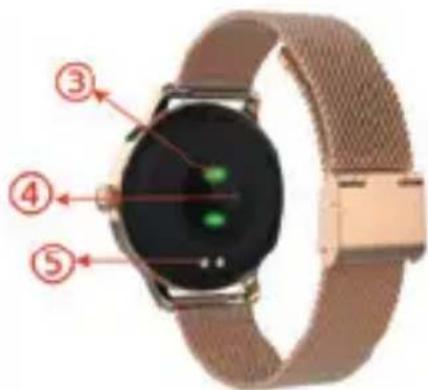
text_image
Labeled diagram of a smartwatch with numbered parts showing key components3. CHARGEZ VOTRE MONTRE CONNECTÉE:
natural_image
Close-up of a smartwatch with a green illuminated screen and a black cable attached (no visible text or symbols)FRA
4. INSTALLATION DE L'APPLICATION SMART DCU:
text_image
QR code image containing encoded data, no visible human-readable text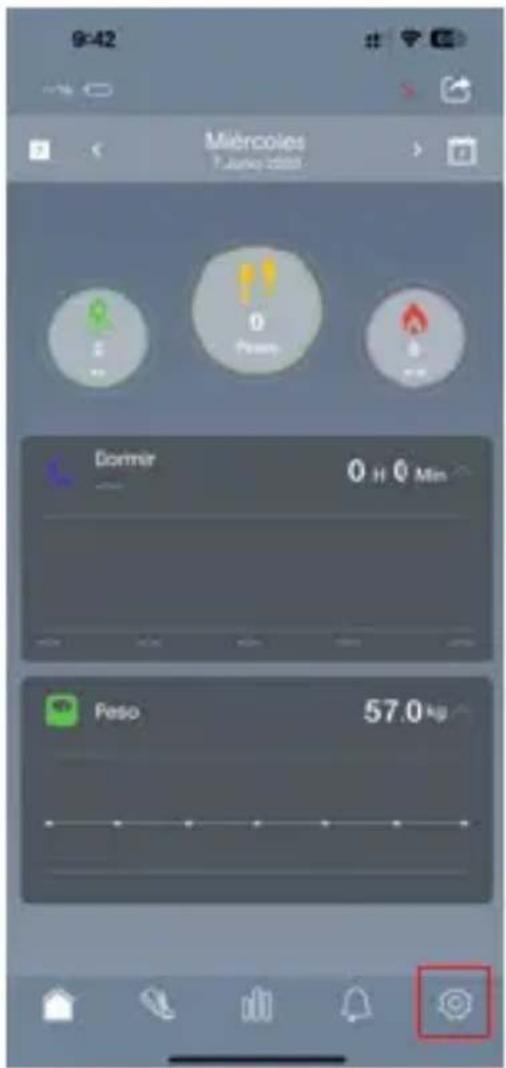
text_image
9:42 Miércoles T-Junio diesel Dormir 0 H 0 Min Peso 57.0 kg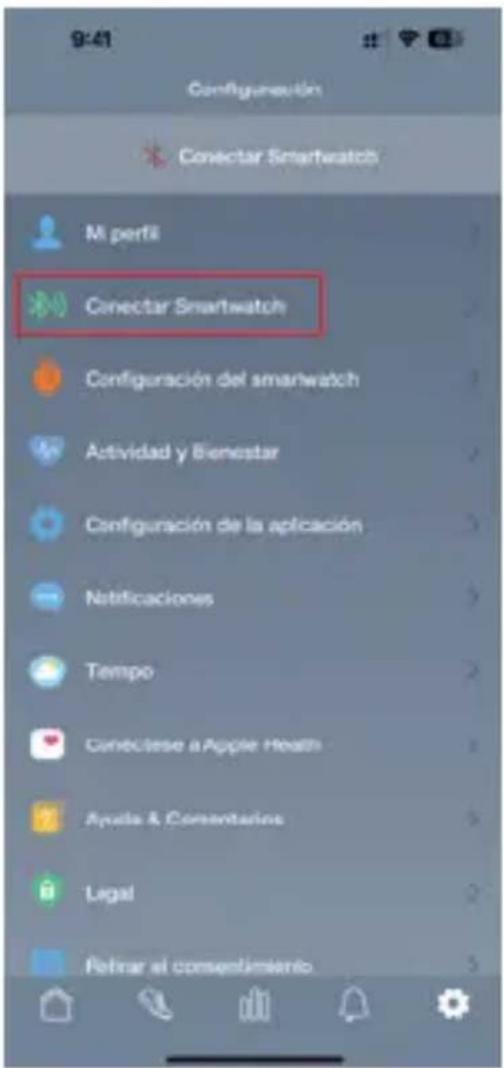
text_image
Feminders You can make and receive code on your smartwatch. Do you want to sync: Contacts to your smartwatch? Cancel Start Bluetooth pairing request To pair with: DCU_Smartwatch Allow access to your contacts and call history CANCEL PAIRFRA
5. UTILISATION DE LA MONTRE INTELLIGENTE:
text_image
MON 27 AM 100% 09:30FRA

flowchart
graph LR
    A["Running Activity"] --> B["Cycling Activity"]
    B --> C["Swimming Activity"]
    C --> D["Badmersion Activity"]
    D --> E["Snail Climbing Activity"]
    E --> F["Eliptical Activity"]
    F --> G["Snoring Activity"]
    G --> H["Outdoor Fitness"]
text_image
Hiking None Cycling None Switching None Distance Time Calories NoneFRA
Service client DCU Tecnologic
Chat Web en direct: www.dcutec.com
Email: info@dcutec.com
Téléphone: +34 972244105
ENREGISTREZ VOTRE MONTRE SUR NOTRE SITE INTERNET POUR ACCÉDER À LA GARANTIE (scannez le QR code ci-dessous).

text_image
QR code image containing encoded data, no visible human-readable textPORT
natural_image
Smartwatch with a circular display showing floral content, labeled with two numbered arrows (① and ②) pointing to the watch face.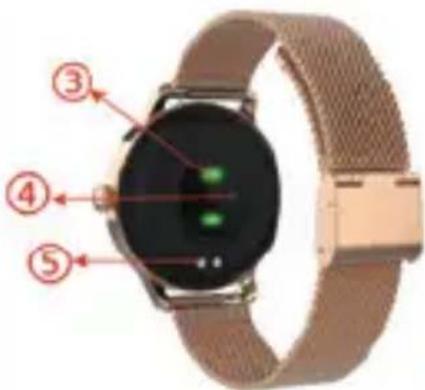
text_image
Labeled diagram of a smartwatch showing four numbered parts with green indicator lights on the screen.3. CARREGUE SEU SMARTWATCH:
text_image
QR code image with no visible text or symbols beyond the matrix patterntext_image
9:42 Miércoles 7 June 2018 Dormir 0 H 0 Min Peso 57.0 kg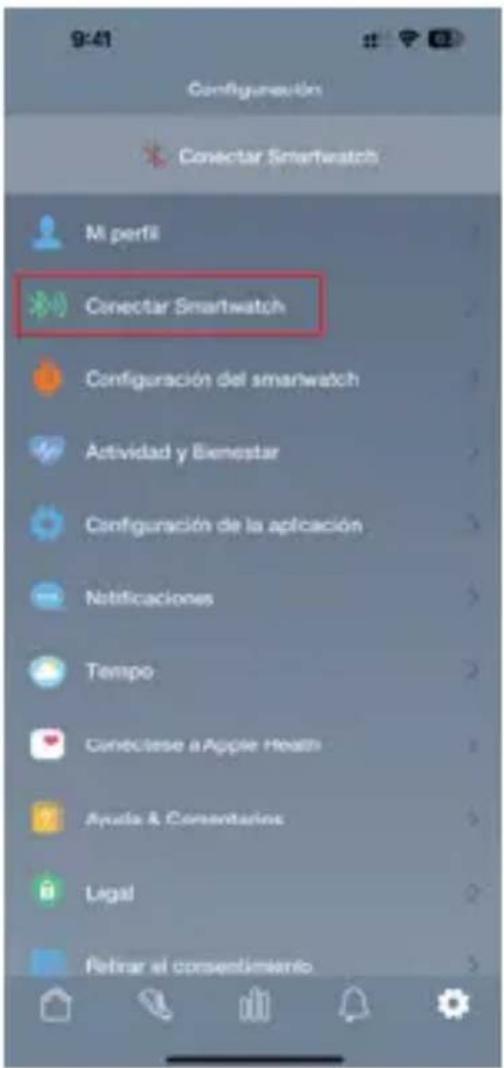
text_image
Reminders You can make and receive calls on your smartwatch. Do you want to sync. Contacts to your smartwatch? Cancel Start Sleep Bluetooth pairing request To pair with: DCU_Smartwatch Allow access to your contacts and call history CANCEL PAIRPORT
5. USANDO O SMARTWATCH:
text_image
MON 27 AM 100% 09:30PORT

flowchart
graph LR
    A["Call records"] --> B["No call record"]
5.9 Contatos:
text_image
Hiking Swiss Dycling Swissar Swimming Time Distance Time Calories NonePORT
text_image
Stress Sport Sport record Measure... 30 Time: 50 Min: 26 28:30 Max: 50 Min: 16 00:305.16 Monitor de sono:
flowchart
graph LR
    A["Device Input"] --> B["Switching audio"]
    B --> C["Adjust the volume"]
    C --> D["Alert when Bluetooth is not connected"]
5.20 Configurações:
flowchart
graph TD
    A["Find phone"] --> B["Watch face"]
    B --> C["Reset call"]
    C --> D["Calculator"]
    D --> E["Shutdown"]
    E --> F["Display Time 5 %"]
    F --> G["Brightness 3"]
    G --> H["Notification"]
    H --> I["Restart"]
    I --> J["Audio setup"]
PORT

text_image
QR code image containing encoded data, no visible human-readable textDCU
TECNOLOGIC
Good People
Any questions about our products:
www.dcutec.com
C/ Industria, 34
Designed in BCN / Made in PRC / B55166847