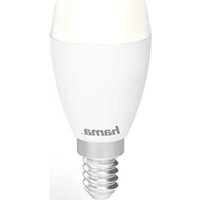
176586 - Lamp HAMA - Free user manual and instructions
Find the device manual for free 176586 HAMA in PDF.


| Product type | Smart WiFi LED lamp |
| Brand | Hama |
| Model | 176586 |
| Power supply | 230 V ~ 50 Hz |
| Connectivity | WiFi 2.4 GHz |
| Max RF power | < 100 mW |
| App | Hama Smart Solution (iOS/Android) |
| Main functions | Remote control, dimming, scheduling, presence simulation |
| Bulb type | Non-replaceable LED |
| Usage | Dry indoor use only |
| Not compatible with | Traditional dimmer, twilight switch, timer |
| Package contents | 1 lamp, 1 quick start guide |
| Protection rating | IP20 |
| Operating temperature | 0 °C to 40 °C |
| Maintenance | Clean with a dry cloth, disconnect before |
| Recycling | Do not dispose of with household waste, follow local regulations |
| Warranty | Statutory warranty, void if modified |
Frequently Asked Questions - 176586 HAMA
User questions about 176586 HAMA
0 question about this device. Answer the ones you know or ask your own.
Ask a new question about this device
Download the instructions for your Lamp in PDF format for free! Find your manual 176586 - HAMA and take your electronic device back in hand. On this page are published all the documents necessary for the use of your device. 176586 by HAMA.
USER MANUAL 176586 HAMA
OperatingInstructions
Bedienungsanleitung
Moded'emploi
Instruccionesdeuso
de.hama.com/smarthome#smart-solution
Importantinformation- Q quick-referenceguide:
- This quick-reference guide contains the most important basic information, such as safety instructions and the steps necessary to operate the product.
- Thefulltext ofthe manualisavailableatthe followinginternetaddress: www.hama.com->00176581, 00176582,00176583,00176584, 00176585,00176586,00176587-> Downloads
- S avethemanualonyourcomputerfor referenceandprintthemoutifpossible.
1. Explanationofwarningsymbolsand notes
Riskofelectricshock
Thissymbolindicates a riskofelectric shock from touching product partscarrying hazardous voltage.


Warning
This symbol is used to indicate safety instructions to draw your attention to specific hazards and risks.

Note
This symbol is used to indicate additional information or important notes.

2. Explanation of symbols used on the product label

Cannotbedimmed
Thelampisnotsuitableforusewith conventionaldimmers.

Useonlyindryconditions.
3.Packagecontents
- 1 x incandescentbulb
- 1 x q quick-startguide
4. Safetyinstructions
- T heproductisintendedforprivate,non-commercialuseonly.
- P rotectheproductfromdirt,moisture a nd overheatinganduseitindryenvironmentsonly.
- U setheproductonlyfortheintended purpose.
- Donotusetheproductintheimmediate vicinityofheaters,otherheatsourcesorindirectsunlight.
- D o n otdroptheproductanddonotexposeit toanymajorshocks.
- O nlyusethearticleundermoderateclimatic conditions.
- D o n otoperatetheproductoutsidethepower limitsspecifiedinthetechnicaldata.
- Do not modify the product in any way. Doing sovoid sthewarranty.
- Childrenmustnotplaywiththedevice.
Childrenmaynotcleantheproductor performusermaintenancewithout supervision.
- D'isposeofpackagingmaterialimmediately inaccordancewiththelocallyapplicable regulations.
- D o n otusetheproductinareasinwhich electronicproductsare n otpermitted.
- D o n otusetheproductina d a m p environmentandavoidsplashingwater.
- Do not attempt to service or repair the product yourself. Leave any and all service work to qualified experts.
- T heproductmustonlybeoperatedona supplynetworkasdescribedonthetype plate.
- Do notopenthedeviceorcontinueto operateitifitbecomesdamaged.
- If the productist be operated outdoors, it may be operated only in protected outdoor areas.
-
U sethisproductonlywithlightsandfittings thatare a provedfortheapplicationand appropriatefortheproduct.Pleasecheckthat theproductisinperfectworkingorderbefore makinguseofit.
• U singdamagedorinappropriatelightsor fittingscarriestheriskofelectricshocks. -
Whenever changing a light, always ensure that the lightorfittinginquestionisvoltage-free. Switchitoffand/orpullthemainsplug.
- N otsuitableforoperationwithdimmers, electricalswitches,photocells,timeswitchesor twilightswitches.
- A s w ithallelectricalproducts,thisdevice shouldbekeptoutofthereachofchildren.
- S witchthelightoffviathelightswitchifitis notgoingtobeusedfora prolongedperiod oftime(e.g.holiday).Pleasebeaware t h a t thepresencesimulationfunctioncannotthen beactivated.
Warning


- P leasenotethatlights(evenLEDs)can generateheatandmaybecomehot.Always letthelightcoolofffora fewminutes before touchingitorchangingit.
- T hedevicecanonlybeoperatedona 2 3 0 V / 5 0 Hz A C v oltagenetwork.Workonthe 230V n etworkmustonlybecarriedoutby anelectriciancertifiedinyourcountry. T he applicableaccidentpreventionregulations mustbeadheredto.
- To a voidanelectricshockfromthedevice, pleasedisconnectthemainsvoltage(switch offtheautomaticcircuitbreaker).Failureto complywiththeinstallationinstructionscan cause fires or other hazards.
Riskofelectricshock

- Do notopentheproductanddonot operateitifitisdamaged, ifsmoke, a strangesmellorloudnoisesare coming from it. Immediatelycontactyourdealeror ourservicedepartment(seeitem"Service andSupport").
5. Here'showeasyitis:
-
D ownloadtheHamaSmartSolutionAPP fromtheAppleAppStore or G ooglePlayStore
• O pentheHamaSmartSolution APP -
T hefirsttimeyousetheapp,youneedto registerandcreatea n ewaccount.If you alreadyhaveanaccount,loginwithyour accessdetails
• S crewtheLEDlightintotheappropriatefitting - T heLEDlightstartstoflashquickly(ifitdoes not,switchtheLEDlightONandOFFagain quickly3 timesatyourswitch)
- N owclickthe+atthetopright-handcorner andselectLighting.
• C onfirmthatthelightisflashingquickly. - N owenterthenameofyourWiFinetwork andthepassword a ndconfirm.
- T helightisnowconnected.Oncetheconnectionissuccessful,thelightwillstopflashing
- Youcannowsetup,controlandconfigure the WiFiSmartLEDlightwiththeAPP
6.WarrantyDisclaimer
HamaGmbH& C o K G a ssumesnoliability and providesnowarrantyfordamageresultingfrom improperinstallation/mounting, improperuse oftheproductorfromfailure t o o bservethe operatinginstructionsand/orsafetynotes.
7. Recycling Information
Noteonenvironmentalprotection:
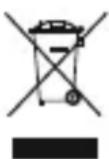
Aftertheimplementationofthe EuropeanDirectives2012/19/EUand 2006/66/EUinthenationallegal system, the following applies: electricalandelectronicdevicesas
wellasbatteriesmustnotbedisposedofwith householdwaste. Consumers are o bligedbylaw toreturnelectricalandelectronicdevicesaswell asbatteriestothedesignatedpubliccollection pointsortothepointofsaleattheendoftheir servicelives. Detailedinformationonthistopicis definedinthenationallawsoftherespective country. This presenceoftheabovesymbolon theproduct,operatinginstructionsorpackage indicate that the product is subject to these regulations. By recycling,reusing thematerials or other forms ofutilisingolddevices/batteries, you are m akinganimportantcontribution to protecting our environment.
8.RFexposureinformation
This device complies with the EU requirements for limiting the exposure of the general public to electromagnetic fields by means of health protection.
The device complies with RF specifications provided it is used 20cm away from the body.
9. Declaration of Conformity
CE HamaGmbH& Co K G h e r e b y declaresthattheradioequipment type[00176581,00176582, 00176583,00176584,00176585,00178586, 00176587]isincompliancewithDirective 2014/53/EU. ThefulltextoftheEUdeclaration ofconformityisavailableatthefollowing internetaddress: www.hama.com->00176581,00176582, 00176583,00176584,00176585,00176586, 00176587->Downloads
| Frequencyband(s)2.4GHz | |
| Maximumradio-frequency powertransmitted | < 100mW |