DWX Wireless Studio - Wireless headphones SONY - Free user manual and instructions
Find the device manual for free DWX Wireless Studio SONY in PDF.


User questions about DWX Wireless Studio SONY
0 question about this device. Answer the ones you know or ask your own.
Ask a new question about this device
Download the instructions for your Wireless headphones in PDF format for free! Find your manual DWX Wireless Studio - SONY and take your electronic device back in hand. On this page are published all the documents necessary for the use of your device. DWX Wireless Studio by SONY.
USER MANUAL DWX Wireless Studio SONY
DWR-R01D/R02D/R02DN/R03D
DWX
DIGITAL WIRELESS
NOTE POUR LES UTILISATEURS
Onglet [RF Chart Grapher]...... 43
Onglet [RF Chart Analyzer] 51
Onglet [Spectrum Analyzer]...... 51
Onglet [Simple Status Viewer]...... 54
Onglet [BC-DWX Viewer]...... 57
Fenêtre [Receiver CH Label Settings]...... 71
https://pro.sony/product-resources/product-resources-search/ *
text_image
Settings POWER & SLEEP Screen When plugged in, turn off after 10 minutes Sleep When plugged in, PC goes to sleep after Never Related settings Additional power settingsPour Windows 11
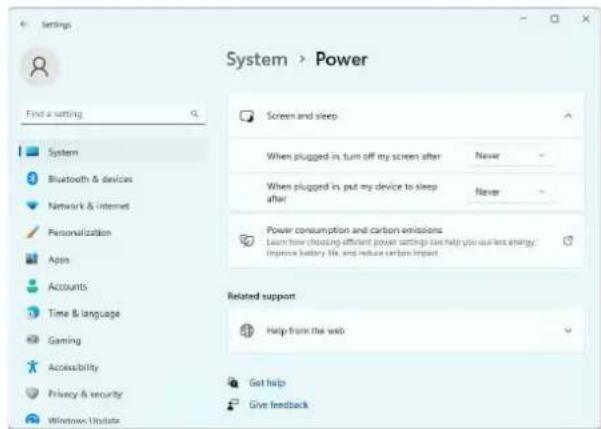
Réglez [When plugged in, put my device to sleep after] sur [Never].
text_image
Settings System > Power Find a setting Screen and sleep System When plugged in turn off my screen after Never Bluetooth & devices When plugged in put my device to sleep after Never Network & internet Personalization Power consumption and carbon emissions Learn how choosing efficient power settings can help you use less energy/ Improve battery life, and reduce carbon impact Apps Accounts Related support Time & language Help from the web Gaming Accessibility Get help Privacy & security Give feedback Windows Updatetext_image
Customize your display 1 Identify Delect Change the size of text, apps, and other items: 100% (Recommended) Orientation Landscape Apply Cancel Advanced display settingstext_image
Personalization Control Panel Home Change the visuals and sounds on your computer Click a theme to change the desktop background, color, and sounds all at once. My Theme (I) Get more themes online Windows Default Themes (S) Windows Windows X Flowers High Contrast Themes (H) High Contrast #1 High Contrast #2 High Contrast BlackPour Windows 11
text_image
Settings System > Display Brightness & color First a setting System Bluetooth & devices Network & Internet Personalization Apps Accounts Time & language Gaming Accessibility Night light Show weather solution to help block other light HDR More about HDR Scale & layout Crew Change the size of text, types, and other types 100% (Recommended) 125% Display resolution Adjust the resolution for fit your connected display 150% Display orientation Landscapetext_image
Settings Personalization Find a setting System Bluetooth & devices Network & internet Personalization Apps Accounts Time & language Gaming Accessibility Privacy & security Windows Update Select a theme to apply Background Background image color, slideshowhttps://pro.sony/product-resources/product-resources-search/
https://pro.sony/product-resources/product-resources-search/
text_image
Control Panel Search Control Panel Adjust your computer's settings. View by: Category - System and Security Rename your computer's status Save backup copies of your files with File History Backup and Restore (Windows 7) Find and its problems Network and Internet Connect to the Internet View network status and tools Choose homegroup and sharing options Hardware and Sound View devices and printers Add a device Programs Uninstall a program User Accounts Change account type Appearance and Personalization Change the theme Adjust screen resolution Clock, Language, and Region Add a language Change input methods Change date, time, or number formats Ease of Access Let Windows suggest settings Optimize visual displaytext_image
Network and Sharing Center Control Panel Home Change adapter settings Change advanced sharing settings View your basic network information and set up connections View your ac... You are cure... Change your... Set up a new com or new Set up a broad dial-s or VPN conn or See also HomeGroup Internet Options Windows Firewalltext_image
Network Connections Control Panel > Network and Internet > Network Connections Organize Enable this network device Diagnose this connection Internet Disable Diagnose Bridge Connections Create Shortcut Delete Rename Propertiestext_image
Ethernet Properties Networking Connect using: Broadcom NatLink (TM) Gigabit Ethernet Configure This connection uses the following items: OnS Packet Scheduler Link Layer Topology Discovery Mapper I/O Driver Microsoft Network Adapter Multiplier Protocol Internet Protocol Version 4 (TCP/FV6) Microsoft LLDP Protocol Driver Internet Protocol Version 5 (TCP/FV6) Link-Layer Topology Discovery Processor Install Remove Properties Description Transmission Control Protocol/Internet Protocol. The default wide area network protocol that provides communication across diverse interconnected networks. OK Canceltext_image
Internet Protocol Version 4 (TCP/IPs) Properties General You can get IP settings assigned automatically if your network supports this capability. Otherwise, you need to ask your network administrator for the approximate IP settings. Obtain an IP address automatically Use the following IP address: IP address: 192 . 308 . 0 . 309 Submit mask: 255 . 255 . 255 . 0 Default gateway: Clean DNS server address automatically Use the following DNS server addresses: Preferred DNS servers: Alternate DNS server: Validate settings upon exit Advanced... OK CancelOnglet [RF Chart Grapher]
Onglet [RF Chart Analyzer]
Onglet [BC-DWX Viewer]
text_image
Wireless Studio File(E) View(V) Device(D) Option(O) Main display Detail Simple Display setting Device List + - Search Receiver DWR-R01D_01 DWT-B01N_01 DWT-B01N_02 DWR-R01D_02 DWR-R01D_03 DWR-R01D_04 DWT-B01N_07 DWT-B01N_08 DWR-R01D_05 Group All tu 7 8 9 10 RF Chtext_image
Device List + - 0 Group control settings Clear AF Peak hold All turns Page-1 Page-2 Page-3 Page-4 Page-5 Recover A1/WR-R01D_01 DWT-R01N_01 DWT-R01N_02 DWR-R01D_02 DWT-R01N_01 DWT-R01N_02 1 Search TX ALL/BFL 866.125N/02 2 Search TX ALL/BFL 866.125N/02 3 Search TX ALL/BFL 866.125N/02 4 Search TX ALL/BFL 866.125N/02text_image
Receiver DWR-R01D_01 DWT-B01N_01 DWT-B01N_02 DWR-R01D_02 DWT-B01N_03text_image
Receiver DWR-R01D_01 DWT-B01N_01 DWT-B01N_02 DWR-R01D_02 DWT-B01N_01Remarque
text_image
Channel Plan Options ✓ Introduction ✓ Power target factor ✓ Select targeted features ✓ Active TV channels ✓ Use wireless system ✓ Default selected features Allow connections ✓ Select possible features except channels in references Compatible Clear Save as Load [0x10x] F20 F24 F27 F30 F34 F38 F42 F46 F50 F54 F60 Frequency scale Introduction Channel Plan output audio selecting channel plan based on the 19" environment, and assign the selected channel plan to continue. Please select one of following five modes: ■ Basic mode ■ Detemines channel plan with channel icon. ■ Advanced mode Detemines channel plan with channel icon, active TV channels and active other wireless devices Check "Read" to proceed Browse Import Help Assisttext_image
Channel Plan Options ✓ Introduction ✓ Select target channels ✓ Select target channels ✓ Select accepted channels ✓ Select accepted channels ✓ Select accepted channels ✓ Select accepted channels to ensure Complete ✓ Select accepted channels ✓ Select accepted channels to ensure ✓ Select accepted channels to ensure ✓ Select accepted channels to ensure ✓ Select accepted channels to ensure ✓ Select accepted channels to ensure ✓ Select accepted channels to ensure ✓ Select accepted channels to ensure ✓ Select accepted channels to ensure ✓ Select accepted channels to ensure ✓ Select accepted channels to ensure ✓ Select accepted channels to ensure ✓ Select accepted channels to ensure ✓ Select accepted channels to ensure ✓ Select accepted channels to ensure ✓ Select accepted channels to ensure #1.00 4.00 4.50 4.80 4.90 4.95 5.00 5.05 5.10 5.15 5.20 5.25 5.30 5.35 5.40 5.45 5.50 5.55 5.60 5.65 5.70 5.75 5.80 5.85 5.90 5.95 6.00 6.05 6.10 6.15 6.20 6.25 6.30 6.35 6.40 6.45 6.50 6.55 6.60 6.65 6.70 6.75 6.80 6.85 6.90 6.95 7.00 7.05 7.10 7.15 7.20 7.25 7.30 7.35 7.40 7.45 7.50 7.55 7.60 7.65 7.70 7.75 7.80 7.85 7.90 7.95 8.00 8.05 8.10 8.15 8.20 8.25 8.30 8.35 8.40 8.45 8.50 8.55 8.60 8.65 8.70 8.75 8.80 8.85 8.90 8.95 9.00 9.05 9.10 9.15 9.20 9.25 9.30 9.35 9.40 9.45 9.50 9.55 9.60 9.65 9.70 9.75 9.80 9.85 9.90 9.95 10.00 ✓ Select duration: >12h ✓ Select duration: >12h (12h) ✓ Select duration: >12h (12h) ✓ Select duration: >12h (12h) ✓ Select duration: >12h (12h) ✓ Select duration: >12h (12h) ✓ Select duration: >12h (12h) ✓ Select duration: >12h (12h) ✓ Select duration: >12h (12h) ✓ Select duration: >12h(12h) ✓ Select duration: >12h(12h) ✓ Select duration: >12h(12h) ✓ Select duration: >12h(12h) ✓ Select duration: >12h(12h) ✓ Select duration: >12h(12h) ✓ Select duration: >12h(12h) ✓ Select duration: >12h(12h) ✓ Select duration: <12h(12h) ✓ Select duration: <12h(12h) ✓ Select duration: <12h(12h) ✓ Select duration: <12h(12h) ✓ Select duration: <12h(12h) ✓ Select duration: <12h(12h) ✓ Select duration: <12h(12h) ✓ Select duration: <12h(12h) #1. #2. #3. #4. #5. #6. #7. #8. #9. #10. #11. #12. #13. #14. #15. #16. #17. #18. #19. #20. #21. #22. #23. #24. #25. #26. #27. #28. #29. #30. #31. #32. #33. #34. #35. #36. #37. #38. #39. #40. #41. #42. #43. #44. #45. #46. #47. #48. #49. #50. #51. #52. #53. #54. #55. #56. #57. #58. #59. #60. #61. #62. #63. #64. #65. #66. #67. #68. #69. #70. #71. #72. #73. #74. #75. #76. #77. #78. #79. #80. #81. #82. #83. #84. #85. #86. #87. #88. #89. #90. #91. #92. #93. #94. #95. #96. #97. #98. #99. #100.text_image
Channel Plan Advisor Introduction Select target bands Input drivers channels Active FV channels Other network options Select acquired channels Stability conditions Select available channels Assign channels to receive Computer Select available channels please select group types. If you select "Sony present CF" further, you should select a group from "OS Available" hit in each band. Group type Show status: Show at Clear Send at Load Click "Read" to present. Summary of Current < Previous Next > Nexttext_image
Channel Performance ✓ Introduction ✓ Start large batch Input stream controls • Active TV channels • Clear remote system ✓ Default acquired data ✓ Select conditions ✓ Find available data ✓ Open changes to wealthes Complete Clear Save as Load [Gray/Red] 100% 100% 100% 100% 100% 100% 100% 100% 100% Frequency scale Complete The procedure of Channel Performance is complete. ✓ Parameterized SPCF is reflected in Spectrum Analyzer Additionally, it can also be reflected to different Studio. On this, you can display only Parameterized SPCF. ✓ Fix extra objects within, check Thales recommended SPCF, Chat Touch! Yes can assign changes the setting from Spectrum-Other Hiking-SPCF display within, what you will change. ✓ Default recommended SPCF. Chat Touch is close to the procedure.text_image
Pairing Wizard Do this procedure to allow the receiver to control the transmitter by using the RF remote control function. Click "Next" to proceed.text_image
Pairing Wizard Select the receiver channel to be paired with a transmitter Receiver Channel Transmitter Name DWR-R01D_001 [CH1] DWR-R01D_001 [CH2] DWR-R01D_002 [CH1] DWR-R01D_002 [CH2] < Previous Next > Aborttext_image
Pairing Wizard Perform either one of the following operations on the transmitter to be paired with a receiver channel. • Turn on the transmitter while holding down the '-' button • Select "PAIRING" in the RF REMOTE menu of the transmitter. When the operation is done, click "Next" to proceed. < Previous Next > Aborttext_image
Pairing Wizard The following transmitters are detected. Select the transmitter to be paired with the receiver channel DWT-B61-001103 < Previous Next > Aborttext_image
Pairing Wizard The following pairs are established. Pairing List Receiver Channel Transmitter Name DWR-R01D_001 [CH1] DWT-B01-001001 DWR-R01D_001 [CH2] DWT-B01-001001 DWR-R01D_002 [CH1] DWT-B01-001104 DWR-R01D_002 [CH2] DWT-B01-001105 Finish Continue > Aborttext_image
Device List + - Search Receiver DWR-R01D_01 DWT-B01N_01 DWT-B01N_02 DWR-R01D_02 DWT-B01N_03 DWT-B01N_04text_image
Receiver Property Device Information Add to Status Viewer Connect Save Single Settings Load Single Settingstext_image
All tuners Page-1 Property Deletetext_image
Device List + - Search Receiver DWR-R03D-812104 DWT-801-001104 NO DATAtext_image
DWR-R03D-B12104 Lock Settings 1 B-D/BDI 806.256MHz DWT-B01-001104 [OUT1] Frequency 806.250MHz Active Channel Scan Clear Channel Scan Encryption OFF Codec mode MODE1 BAL Out Level NO FUNCTION Main Out Level MIC (58dBv) UNBAL Out ATT NO FUNCTION Ground Lift GROUND AF Output UNMUTING Search TX Search Channel Label DWT-B01-001104 2 B-C/BC1 806.625MHz NO DATA [OUT2] RF - OL 90 - 20 - 20 - 0 Utility 1 2 Receiver BAND B SAND GP/CH B-D/BDI - Frequency Transmitter Type DWT-201 Transmitter Name DWT-B01-001104 Power Save ACTIVE RF Power Low 1mW Input Level MIC ATT 12dB LCF OFF +4BV NO FUNCTION Battery Remain WD DATA Time 12:41 Reset Internal SG OFF Lock UNLOCK Power SW State ON RF Remote ON OFF RF Remote Pairingtext_image
All Users Page 1 Page 2 Page 3 Page 4 Page 5 Page 6 00:00:00 700.128 MB 00:00:00 700.269 MB 00:00:00 700.269 MB 00:00:00 700.269 MB 00:00:00 700.269 MB 00:00:00 700.269 MB 00:00:00 700.269 MB 00:00:01 700.269 MB 00:00:01 700.269 MB 00:00:01 700.269 MB 00:00:01 700.269 MB 00:00:01 700.269 MB 00:00:01 700.269 MBtext_image
W-Chat Graph Main watch: Barney channel 12 1 100% max (0.0000) 100% max (0.0000) 100% max (0.0000) 100% max (0.0000) 100% max (0.0000) 100% max (0.0000) 100% max (0.0000) 100% max (0.0000) 100% max (0.15) 100% max (0.15) 100% max (0.15) 100% max (0.15) 100% max (0.15) 100% max (0.15) 100% max (0.15) 100% max (0.15) 100% max (0.15) 100% max (0.15) Barney Barney max (max) 12 Barney max (max) 12 Barney max (max) 12 Barney max (max) 12 Barney max (max) 12 Barney max (max) 12 Barney max (max) 12 Barney max (max) 12 Barney max (max) 12 Barney max (max) 12 Barney max (max) 13 Barney max (max) 13 Barney max (max) 13 Barney max (max) 13 Barney max (max) 13 Barney max (max) 13 Barney max (max) 13 Barney max (max) 13 Barney max (max) 13 Barney max (max) 14 Barney max (max) 14 Barney max (max) 14 Barney max (max) 14 Barney max (max) 14 Barney max (max) 14 Barney max (max) 14 Barney max (max) 14 Barney max (max) 14 Barney max (max) 14 Barney max (max) 15 Barney max (max) 15 Barney max (max) 15 Barney max (max) 15 Barney max (max) 15 Barney max (max) 15 Barney max (max) 15 Barney max (max) 16 Barney max (max) 16 Barney max (max) 16 Barney max (max) 16 Barney max (max) 16 Barney max (max) 16 Barney max (max) 17 Barney max (max) 17 Barney max (max) 17 Barney max (max) 17 Barney max (max) 17 Barney max (max) 18 Barney max (max) 18 Barney max (max) 18 Barney max (max) 18 Barney max (max) 18 Barney max (max) 19 Barney max (max) 19 Barney max (max) 19 Barney max (max) 20 Barney max (max) 20 Barney max (max) 20 Barney max (max) 20 Barney max (max) 21 Barney max (max) 21 Barney max (max) 21 Barney max (max) 22 Barney max (max) 22 Barney max (max) 22 Barney max (max) 23 Barney max (max) 23 Barney max (max) 23 Barney max (max) 24 Barney max (max) 24 Barney max (max) 24 Barney max (max) 25 Barney max (max) 25 Barney max (max) 26 Barney max (max) 26 Barney max (max) 27 Barney max (max) 27 Barney max (max) 28 Barney max (max) 28 Barney max (max) 29 Barney max (max) 30 Barney max (max) 30 Barney max (max) 31 Barney max (max) 32 Barney max (max) 33 Barney max (max) 34 Barney max (max) 35 Barney max (max) 36 Barney max (max) 37 Barney max (max) 38 Barney max (max) 39 Barney max (max) 40 Barney max (max) 41 Barney max (max) 42 Barney max (max) 43 Barney max (max) 44 Barney max (max) 45 Barney max (max) 46 Barney max (max) 47 Barney max (max) 48 Barney max (max) 49 Barney max (max) 50 Barney max (max) 51 Barney max (max) 52 Barney max (max) 53 Barney max (max) 54 Barney max (max) 55 Barney max (max) 56 Barney max (max) 57 Barney max (max) 58 Barney max (max) 59 Barney max (max) 60 Barney max (max) 61 Barney max (max) 62 Barney max (max) 63 Barney max (max) 64 Barney max (max) 65 Barney max (max) 66 Barney max (max) 67 Barney max (max) 68 Barney max (max) 69 Barney max (max) 70 Barney max (max) 71 Barney max (max) 72 Barney max (max) 73 Barney max (max) 74 Barney max (max) 75 Barney max (max) 76 Barney max (max) 77 Barney max (max) 78 Barney max (max) 79 Barney max (max) 80 Add watch: Auto Track: Time:text_image
Browse For Folder Please select the location where you want to save the capture files. The capture files are saved in the location where you select by clicking OK button. Desktop My Documents My Music My Pictures Wireless Studio M3G_LOG 20120224 20120310 20120310_2 20120310_3 102543 My Computer My Network Places Make New Folder OK Cancel4 Sélectionnez [All Receiver's settings], [All Receiver's and All Transmitter's settings] ou [Select Receiver's and Transmitter's settings] dans le menu [Device] > [Load settings].
text_image
Load settings Please check Receivers and Transmitters you want to load settings. ✓ DWR-R02DN-G1 ✓ DWT-B01N_WH2 ✓ DWM-03N_WH2 ✓ DWR-R03D_W1 ✓ DWT-B03R_WL2 ✓ DWM-03N_WL2 OK Canceltext_image
Wireless Studio File(F) View(V) Devices(O) Option(O) And Main display Detail Simple Display settings Device List + - Receiver Search Group co All tuned Add Device Information Add to Status Viewer Close: Save Single Settings Load Single Settingstext_image
Wireless Studio File(F) View(V) Device(D) Option(O) About(A) Main display Detail Simple Display settings Load Device List + - Receiver DWM-01 DWT-01 DWM-02 DWM-03 DWT-04 DWM-05 DWM-06 DWT-07 DWM-08 DWT-09 DWM-10 DWT-11 DWT-12 DWT-13 DWT-14 DWT-15 DWT-16 DWT-17 DWT-18 DWT-19 DWT-20 DWT-21 DWT-22 DWT-23 DWT-24 DWT-25 DWT-26 DWT-27 DWT-28 DWT-29 DWT-30 DWT-31 DWT-32 DWT-33 DWT-34 DWT-35 DWT-36 DWT-37 DWT-38 DWT-39 DWT-40 DWT-41 DWT-42 DWT-43 DWT-44 DWT-45 DWT-46 DWT-47 DWT-48 DWT-49 DWT-50 DWT-51 DWT-52 DWT-53 DWT-54 DWT-55 DWT-56 DWT-57 DWT-58 DWT-59 DWT-60 DWT-61 DWT-62 DWT-63 DWT-64 DWT-65 DWT-66 DWT-67 DWT-68 DWT-69 DWT-70 DWT-71 DWT-72 DWT-73 DWT-74 DWT-75 DWT-76 DWT-77 DWT-78 DWT-79 DWT-80 DWT-81 DWT-82 DWT-83 DWT-84 DWT-85 DWT-86 DWT-87 DWT-88 DWT-89 DWT-90 DWT-91 DWT-92 DWT-93 DWT-94 DWT-95 DWT-96 DWT-97 DWT-98 DWT-99 DWT-100 Group control set All tumors Page Search Property Device Information Add to status viewer Command Save Single Settings Load Single Settingstext_image
Load settings Are you sure you want to send all settings to your select devices? Yes Notext_image
Screenshot of video editing software interface showing timeline, audio tracks, and a highlighted timeline with a gray arrow indicating direction.text_image
Screenshot of a video editing software interface showing timeline, track controls, and file properties panels with Chinese text labels.text_image
Screenshot of a video editing software interface showing timeline, layers, and audio track controls with Chinese labels.- Second moniteur
text_image
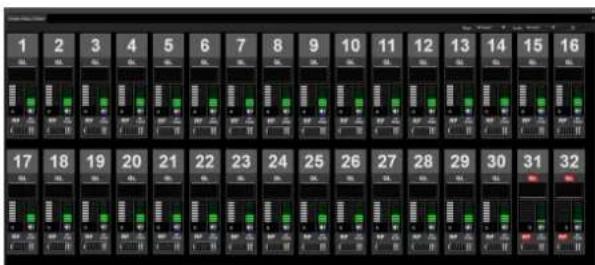
1 2 3 4 5 6 7 8 9 10 11 12 13 14 15 16 17 18 19 20 21 22 23 24 25 26 27 28 29 30 31 32text_image
Screenshot of a software interface showing a data processing panel with multiple columns and a highlighted section labeled '数据采集' (Data Collection).
text_image
Screenshot of a video editing software interface showing timeline, track controls, and playback controls with Chinese text labels.text_image
Screenshot of a video editing software interface showing audio track and channel settings panelstext_image
ALL / BPT 800135MHz RF 2.000 DL DWT-BP1348578 00:30:30:30 00:30:30:30 TM ALL / BPT 800135MHz RF 2.000 DL DWT-BP1348578 00:30:30:30 00:30:30:30 TMtext_image
1 Search TX DWT-820.0 [OUT1] QL RF MOSI Monitor 1 Search TX DWT-820.0 [OUT1] QL RF MOSI Monitortext_image
Device List + - Search Receiver DWR_R02DN_003002 NO_DATA NO_DATA BC-DWX BC-DWX1_00000 RMU RMU-01_SAITOU ① ② ③ ④ ⑤ ⑥ ⑦ ⑧ ⑨①Bouton [+] (ajouter)
text_image
Device Information Type: Receiver Device type: Over-objects IP Address 192 . 168 . 0 . 10 OK Canceltext_image
Add a new device Type Receiver Device type DVR-R02DN IP Address 192 168 0 2 OK Canceltext_image
Device List + - Search Receiver L-01/1.2L-025 1240.625MHz RF 3 00 DL TX1 L-01/1.2L-045 1241.125MHz RF 3 00 DL TX2 L-01/1.2L-065 1241.625MHz RF 3 00 DL TX3 L-01/1.2L-085 1242.125MHz RF 3 00 DL TX4 L-01/1.2L-105 1242.625MHz RF 3 00 DL TX5 L-01/1.2L-125 1243.125MHz RF 3 00 DL TX6 L-01/1.2L-145 1243.625MHz RF 3 00 DL TX7 L-01/1.2L-165 1244.125MHz RF 3 00 DL TX8text_image
3.011.25_000 1242.6298M P/C 3.011.25_002 1243.1298M P/C 3.011.25_004 1242.6298M P/C 3.011.25_006 1244.1298M P/Ctext_image
Name: L2 File Edit View Insert Tools Help Tools Help Tools Help Tools Help Tools Help Tools Help Tools Help Tools Help Tools Help Tools Help Tools Help Tools Help Tools Help Tools Help Tools Help Tools Help Tools Help Tools Help Tools Help Tools Help Tools Help Tools Help Tools Help Tools Help Tools Help Tools Help Tools Help Tools Help Tools Help Tools Help Tools Help Tools Help Tools Help Tools Help Tools Help Tools Help Tools Help Tools Help Tools Help Tools Help Tools Help Tools Help Tools Help Tools Help Tools Help Tools Help Tools Help Tools Help Tools Help Tools Help Tools help tools help tools help tools help tools help tools help tools help tools help tools help tools help tools help tools help tools help tools help tools help tools help tools help tools help tools help tools help tools help tools help tools help tools help tools help tools help tools help tools help tools help tools help tools help tools help tools help tools help tools help tools help tools help tools help tools help tools help tools help tools help tools help tools help tools help tools help tools help tools help tools help tools help tools help buttons help buttons help buttons help buttons help buttons help buttons help buttons help buttons help buttons help buttons help buttons help buttons help buttons help buttons help buttons help buttons help buttons help buttons help buttons help buttons help buttons help buttons help buttons help buttons help buttons help buttons help buttons help buttons help buttons help buttons help buttons help buttons help buttons help buttons help buttons help buttons help buttons help buttons help buttons help buttons help buttons help buttons help buttons help buttons help buttons help buttons help buttons help buttons help buttons help buttons help button![SONY DWX Wireless Studio - ①Bouton [+] (ajouter) - 1](/content/2026/04/728309/images/05f9c6aa0203d3a79c593868ac44691d0a0974751303b199889bcb289c3db5c8.jpg)
text_image
5 LTS QL 6 LTS QL 7 LTS QL 8 RP RP RP RP Page Page-1 Scaletext_image
Frequency Setting The frequency setting of receiver and the transmitter is unmatch. All tuners number 1 OKFenêtre secondaire
text_image
1 2 3 4 Display mode: Post log Display All records DWR-0000_001000.0 DWR-0000_001000.0 DWR-0000_001000.0 DWR-0000_001000.0 DWR-0000_001000.0 DWR-0000_001000.0 DWR-0000_00100.0 DWR-0000_00100.0 DWR-0000_00100.0 DWR-0000_00100.0 DWR-0000_00100.0 DWR-0000_00100.0 DWR-0000_001.0 DWR-0000_2.1 DWR-0000_2.1 DWR-0000_2.1 DWR-0000_2.1 DWR-0000_2.1 DWR-0.1 DWR-1.1 DWR-2.1 DWR-3.1 DWR-4.1 DWR-5.1 DWR-6.1 DWR-7.1 DWR-8.1 DWR-9.1 DWR-1.1 DWR-1.1 DWR-2.1 DWR-3.1 DWR-4.1 DWR-5.1 DWR-6.1 DWR-7.1 DWR-8.1 DWR-9.1 DWR-1.1①[Display mode]
text_image
Message Log Message Log Property List RF Chart Snapshot RF Chart Analysis Display mode Event log Date Time Device 2013/09/08 20:45:00 PatentraStudio 2013/09/08 20:45:00 (DWR-RSUS_SARV05-2) 2013/09/08 20:45:00 (DWR-RSUS_SARV05-2) 2013/09/08 20:45:00 (DWR-RSUS_SARV05-2) 2013/09/08 20:45:00 (DWR-RSUS_SARV05-2) DWR-RSUS_SARV05-2 DWR-RSUS_SARV05-2 DWR-RSUS_SARV05-2 DWR-RSUS_SARV05-2 DWR-RSUS_SARV05-2 DWR-RSUS_SARV05-2 Clear Event log Event The process of changing to Online Book Write Trained The number of new Book 2 The number of new Book 1 Details from this If found in box If found in box If found in box If found in box If found in box①[Clear Event log]
Mode [Unsolved problems]
![SONY DWX Wireless Studio - ①[Clear Event log] - 1](/content/2026/04/728309/images/05110e95e50af04e89af948caf6794b13382737a1cb3358790b7a17e010ae034.jpg)
text_image
Message Log Message list Property List RF Chief Sketchers RF Chief Analysis Description mode Unsecured problems Current state Analog Case Type Device Entry 20120309: 20-04-16 00/08/2025_SAT0[24-2] 20120309: 20-04-16 00/08/2025_SAT0[24-2] Quality Binding Low 20120309: 20-04-16 00/08/2025_SAT0[24-2] PI range & low 20120309: 20-04-16 00/08/2025_SAT0[24-2] Quality Binding Low 20120309: 20-04-16 00/08/2025_SAT0[24-2] PI range & low①[Current state]
⑤ Bouton [Clear Indication]
text_image
OPCH Service Rainer Start OPCH (Fquishing) Channel DWR-RBID_001 CH1 TVO-33 DWR-RBID_001 CH2 TVO-33 DWR-RBID_002 CH1 TVO-33 DWR-RBID_002 CH3 TVO-33 DWR-RBID_003 CH1 TVO-33 DWR-RBID_003 CH2 TVO-33 DWR-RBID_004 CH1 TVO-33 DWR-RBID_004 CH2 TVO-33 DWR-RBID_005 CH1 TVO-33 DWR-RBID_006 CH2 TVO-33 DWR-RBID_006 CH1 TVO-33 OP 00 OK Canceltext_image
OP Control 30-67 (567.758Hz) 30-68 (568.758Hz) 30-70 (597.258Hz) 30-74 (597.758Hz) 30-76 (598.758Hz) 30-78 (598.758Hz) 30-81 (598.758Hz) 30-83 (598.758Hz) 30-85 (598.758Hz) 30-87 (598.758Hz) 30-89 (598.758Hz) 30-91 (598.758Hz) 30-93 (598.758Hz) 30-95 (598.758Hz) 30-97 (598.758Hz) 30-99 (598.758Hz) 30-101 (598.758Hz) 30-103 (598.758Hz) 30-105 (598.758Hz) 30-107 (598.758Hz) 30-109 (598.758Hz) 30-111 (598.758Hz) 30-113 (598.758Hz) 30-115 (598.758Hz) 30-117 (598.758Hz) 30-119 (598.758Hz) 30-121 (598.758Hz) 30-123 (598.758Hz) 30-125 (598.758Hz) 30-127 (598.758Hz) 30-129 (598.758Hz) 30-131 (598.758Hz) 30-133 (598.758Hz) 30-135 (598.758Hz) 30-137 (598.758Hz) 30-139 (598.758Hz) 30-141 (598.758Hz) 30-143 (598.758Hz) 30-145 (598.758Hz) OK Canceltext_image
DP/CH Selection Driver Name Rate SPCH (Frequency) DWR-RID_001 CH1 TV0-33 0100-02 598.25W/43 DWR-RID_001 CH2 TV0-33 DWR-RID_002 CH1 TV0-33 DWR-RID_002 CH2 TV0-33 DWR-RID_003 CH1 TV0-33 DWR-RID_003 CH2 TV0-33 DWR-RID_004 CH1 TV0-33 DWR-RID_004 CH2 TV0-33 DWR-RID_005 CH1 TV0-33 DWR-RID_006 CH1 TV0-33 GP Dt Channel 39-42 598.25W/43 39-46 598.75W/43 39-49 598.25W/43 39-54 597.75W/43 39-58 598.25W/43 39-62 598.25W/43 39-66 598.75W/43 39-70 598.75W/43 39-74 597.75W/43 39-78 597.75W/43 39-82 597.25W/43 39-86 597.75W/43 OK CancelOnglet [RF Chart Grapher]
text_image
Screenshot of a software interface with labeled panels and toolbars, showing audio waveform graphs and control panels.text_image
dBuWord Diversity min holes dBuWord Diversity min AI Battery RF Remote Short list 2021/06/22 9:16:04 Quality level is low Mark List Data Time Event 2021/06/22 8:16:26 Mark all 2021/06/22 8:16:48 Mark 2021/06/22 9:11:02 Mark all 2021/06/22 9:11:42 Marktext_image
2021/05/22 8:56:34 Quality level is low. 2021/05/22 8:56:54 Quality level is low. 2021/05/22 8:02:43 Quality level is low. 2021/05/22 9:06:07 Quality level is low. Mark list Date Time Event 2021/05/22 8:56:32 Mark all 2021/05/22 8:56:48 Mark 2021/05/22 9:11:22 Mark all 2021/05/22 9:11:42 Marktext_image
Screenshot of a software interface showing multiple panels with charts and annotations, likely from an older software development environment.text_image
Video Timeline Channel 01 01:00:00 01:00:00 01:00:00 01:00:00 01:00:00 01:00:00 01:00:00 01:00:00 01:00:00 01:00:00 01:00:00 01:00:00text_image
Main mode Main mode Sub mode Sub mode Main mode Sub mode Main mode Sub mode Main mode Sub modeÉcran [Display Settings] ([RF Chart Grapher], [RF Chart Analyzer])
text_image
RF Chart Grapher Display Settings Graph data RF Level Overview Diversity ✓ ave level ✓ max level ✓ min level Detail Individual max ✓ a-branch ✓ b-branch ✓ c-branch* ✓ d-branch* ✓ diversity Individual min ✓ a-branch ✓ b-branch ✓ c-branch* ✓ d-branch* ✓ diversity *for 4-diversity use QL ON AF ON Battery ON RF Remote ON Time Absolute Alert,Alert list ON Mark list ON Others ✓ Mark, Diversity max hold, Diversity min hold ✓ Graph legends Close[RF Level]
text_image
RF Chart Grapher Save settings Auto save OFF ON Save timing Interval 01:00 Absolute time (0x00) (0x00) (0x00) (0x00) (0x00) Save folder Default CIRness# #Wireless Studio#MSG_LOG#20211221 Custom Other Clear the graph after saving files Output set files Close[Auto save]
text_image
Auto Sens - OFF Show settings Time: Accelerator Display settings 2f type control Mark Opacity max hold: 0 dB Efficient Opacity max hold: 0 dB Efficient Chromatic max: 0 dB Efficiency min: 0 dB Battery: 0 dB Auto Select Zoom Next bit Data Time Speed: 200-156/13 9:00:44 Quality level in line: 200-156/27 9:56:54 Quality level in line: Mark Set Data Time Speed: Auto Select Zoom Next bit Data Time Speed: 200-156/13 9:00:44 Efficient Opacity max hold: 0 dB Efficient Chromatic max hold: 0 dB Efficient Chromatic max hold: 0 dB Battery: 0 dB Auto Select Zoomtext_image
Save all Mute Diversity line hold Diffused Diversity line hold Diffused OK Diversity line Diversity line Diversity line Alt Battery 10 Seconds Zoom Auto Shift Zoom Next Int Auto Shift Diversity line hold Diffused Diversity line hold Diffused OK Diversity line Diversity line Diversity line Alt Battery 200/10/02/20 10:04:38 Quality level in low 200/10/02/20 10:04:38 Quality level in low 200/10/02/20 10:04:38 Next Int Auto Shift Zoom Next Int Auto Shift Diversity line hold Diffused Diversity line hold Diffused OK Diversity line Diversity line Diversity line Alt Battery 200/10/02/20 10:04:38 Quality level in low 200/10/02/20 10:04:38 Quality level in lowtext_image
Mark Diversity mix rate Diversity mix rate Diversity mix rate Diversity mix rate Diversity mix rate Diversity mix rate Diversity mix rate Diversity mix rate Diversity mix rate Diversity mix rate Diversity mix rate Diversity mix rate Diversity mix rate Diversity mix rate Diversity mix rate Diversity mix rate Diversity mix rate Diversity mix rate Diversity mix rate Diversity mix rate Diversity mix rates Diversity mix rates Diversity mix rates Diversity mix rates Diversity mix rates Diversity mix rates Diversity mix rates Diversity mix rates Diversity mix rates Diversity mix rates Diversity mix rates Diversity mix rates Diversity mix rates Diversity mix rates Diversity mix rates Diversity mix rates Diversity mix rates Diversity mix rates Diversity mix rates Diversity mix rates Diversity mix rate Diversity mix rate Diversity mix rate Diversity mix rate Diversity mix rate Diversity mix rate Diversity mix rate Diversity mix rate Diversity mix rate Diversity mix rate Diversity mix rate Diversity mix rate Diversity mix rate Diversity mix rate Diversity mix rate Diversity mix rate Diversity mix rate Diversity mix rate Diversity mix rate Diversity mix time Diversity time Data Time Data Time Data Time Data Timetext_image
Mark Diversity mix hold diklunf Diversity mix hold diklunf Diversity mix diklunf diklunf Auto Sketch Audio Alert In Data Time Speed 2021/06/22 18:55:34 Quality level is low. 2021/06/22 18:55:34 Quality level is low. Mark 2021/06/22 18:55:39 Marktext_image
Edit Deletetext_image
Mark Please enter characters to set on a graph. Mark Mark OK CancelRemarque
text_image
Edit DeleteRemarque
text_image
Main channels Reversed channel list High Density run toll: 50 different Density run toll: different Q1 Density and Density max Density max All Battery IF Power Add Start Auto Level Add Start Auto Level Add Start Reversed channel list High Density run toll: 50 different Density run toll: different Q1 Density and Density max Density max All Battery IF Power Add Start Auto Level Add Start Auto Leveltext_image
Main monitor Receive channel list Auto Track 00 Density max Density max Density max All Battery Off Remake DIF 4.025-0.0007/14.0 DIF 4.025-0.0007/14.0 Auto Track Auto Slot DownRemarque
text_image
Screenshot of a software interface with menu bar, toolbar, and a highlighted button labeled 'OK'.text_image
Screenshot of video editing software interface showing timeline, channel controls, and playback settingstext_image
Screenshot of a video editing software interface showing audio and sound waveforms with track controls and playback controls.Onglet [RF Chart Analyzer]
text_image
Open Close Close at Save at Main mode Main Mode Main Mode Sub-mode Sub-mode Track Track name: 0.0000 Track name: 0.0000 Track name: 0.0000 Track name: 0.0000 Track name: 0.0000 Track name: 0.0000 Track name: 0.0000 Track name: 0.0000 Track name: 0.0000 Track name: 0.0000①Bouton [Start scan] / [Stop scan]
text_image
Spectrum Analyzer Do you want to start scanning? Yes No③Channel Plan Adviser
Ouvre [Channel Plan Adviser].
④ Case [Sleep transmitters while scanning]
text_image
[dBuVemf] 50 TV51 TV52 TV53 Receiver 71 DWR-R02D_CE51[CH1] 710.125[MHz]6[Scan list]
text_image
Scan parameter Detect occupied channels Please select recovers that run to detect active frequency. An enabled phone adjust "Scan conditions". Then click "Start scan" button to run off channel scan. Load (Frequency Range) 1451-48 (638-652MHz) 1452-48 (662-680MHz) 1459-52 (686-710MHz) 151 (710-744MHz) 8 BAND (880-910MHz) 125 (1290-1394MHz) 1294 (1348-1359MHz) 1341 (1393-1409MHz) Scan all frequency Minimum recovers Multiple recovers (reference scan time) Auto analog Clear Scan Conditions Continuous scan Specified count scan Repeat count Frequency Interval: 100 MHz Load level: 0Hz Close 4 5text_image
Simple Status Viewer 1 Search TX DWT-B30-0 QL 2 Search TX DWT-B30-0 QL 3 Search TX NO DATA QL 4 Search TX NO DATA QL a RF RPM a RF RPM b RF RPM b RF RPM RF 4①[Page]
| Tiny Small | Medium Large | ||
| 82 51 34 8 |
Onglet [BC-DWX Viewer]
text_image
uerry 1 2 Receiver Type DWR-R030 Network setting Receiver Name DWR-R030_0001 Dante ID Mode FREE ID Dante ID SONY_0001 View Advanced settings... RF setting BandBlock WH(TV41-53) Band NO FUNCTION ANT ATT 5dB 5dB 6 6 ANT DC Output RV Diversity 2-ANTENNA Audio setting Monitor Mode IP MIX Sync source AUTO Delay Adjust ON OFF System Delay 1 D: -ms A: -ms 2 D: -ms A: -ms Subout Select AES/EBU Receiver Model WIRE/MAYWAH Alert function settings RF low RF over QL low AF Peak Transmitter Battery low Encryption unmatch External word sync unlock Codec mode unmatch QL Alert SENS: MID Lock: UNLOCKtext_image
Receiver BAND 9 BAND GP/CH 8-D/BD1 Frequency 806.256MHz Active Channel Scan Clear Channel Scan Encryption OFF Codes mode MODE1 BAL Out Level NO FUNCTION Main Out Level MIC(58dBx) UNBAL Out ATT NO FUNCTION Ground Lift GROUND AF Output UNMITING Search TX Search Channel Label DWT-B01-001104 Transmitter Transmitter Type DWT-B01 Transmitter Name DWT-B01-001104 Power Save ACTIVE RF Power Low 1msW Input Level MIC ATT 12dB LCF OFF +48V NO FUNCTION Battery Remain NOT DATA Time 12:41 Reset Internal SG OFF Lock UNLOCK Power SW State ON RF Remote ON OFF RF Remote Pairing① Menu [Receiver]
![SONY DWX Wireless Studio - Onglet [BC-DWX Viewer] - 1](/content/2026/04/728309/images/90610c5314eae93e4e1613e8c99809d6eedf5e069f9a33bd78e60813c99d5c0c.jpg)
text_image
Receiver BAND GP/CH Frequency 806.250MHz Active Channel Scan Clear Channel Scan Encryption OFF Codec mode MODE1 BAL Out Level NO FUNCTION Main Out Level MIC(-58dBu) UNBAL Out ATT NO FUNCTION Ground Lift GROUND AF Output UNMUTING Search TX Search Channel Label DWT-B01-001104text_image
Group/Channel Setting RF Remote is not connected. Change GP/CH? Yes No② Menu [Transmitter]
![SONY DWX Wireless Studio - Onglet [BC-DWX Viewer] - 2](/content/2026/04/728309/images/724201a7c7377c1876eddc671c108b0d99880b5f1953bd98ad54c116c4932b1e.jpg)
text_image
Transmitter Transmitter Type DWT-B03R Transmitter Name B03R_L Power Save ACTIVE RF Power Low 2mW Input Level MIC ATT 0dB LCF OFF +48V NO FUNCTION Battery Remain ICON Time 05:00 Reset Internal SG OFF Lock UNLOCK Power SW State ONtext_image
RF Remote RF Remote ON OFF Pairingtext_image
1 2 3 Channel 1 Address Introduction Select target frames Select image channels Select TV frames Select video frames Select unselected channels Settle frames Select available frames Select frames to members Components Select target frames Please select target frequency based Total (Frequency Range) Total (Type: single) Total (Type: single) Total (Type: double) Total (Type: double) Total (Type: triple) Total (Type: triple) Total (Type: double) Total (Type: triple) Total (Type: double) Total (Type: triple) Total (Type: double) Total (Type: triple) Total (Type: triple) Total (Type: double) Total (Type: triple) Total (Type: triple) Total (Type: double) Total (Type: triple) Total (Type: triple) Total (Type: double) Total (Type: triple) Total (Type: triple) Total (Type: double) Total (Type: triple) Total (Type: triple) Total (Type: double) Total (Type: triple) Total (Type: triple) Total (Typical) to members Options Next > Cancel①Zone de contenu
text_image
Introduction Select target bands Input known channels - Active TV channels - Other wireless system Detect occupied channels Stability conditions Select available channels Assign channels to receivers Complete Clear Save as Loadtext_image
Introduction Channel Plan Adviser assists selecting channel plan based on the RF environment, and assigns the selected channel plan to receivers. Please select one of following two modes. ● Basic mode Determine channel plan with channel scan ● Advanced mode Determine channel plan with channel scan, active TV channels and active other wireless devices Click "Next" to proceed ① ②text_image
Introduction Channel Plan Adapter assists selecting channel plan based on the RF environment, and assigns the selected channel plan to receivers. Please select one of following two modes: ● Basic mode ● Determines channel plan with channel scan ● Advanced mode ● Determines channel plan with channel scan, active TV channels, and active other wireless devices Click "Next" to proceed.text_image
Select target bands Please select target frequency bands Band (Frequency Range) TV14-17 [475-60MHz] TV18-21 [694-80MHz] TV22-25 [518-542MHz] PC30-33 [506-516MHz] TV34-36 [300-600MHz] TV38-41 [514-634MHz] TV42-45 [638-82MHz] TV48-49 [602-826MHz] TV50-51 [pass-82MHz] Click "Test" to proceed + Previous Next > Finish Aborttext_image
Other wireless system Please input active other wireless devices' frequency to avoid Frequency 677.00MHz 478.00MHz 482.00MHz Add Single Frequency 680.000 MHz Multi-Frequency at equal intervals Time 07:05:09 MHz To 07:30:00 MHz Interval 1.000 MHz Remove Remove All Click "Next" to proceed * Previous Next * Reset Abouttext_image
Detect occupied channels Please select receivers that scan to detect active frequency. As needed, please adjust "Scan conditions", then click "Start scan" button to run channel scan. Band (Frequency Range) FV1: 44 [838-652MHz] FV2: 48 [662-680MHz] FV3: 52 [686-710MHz] 53 [719-714MHz] 8 BAND [806-810MHz] 1.2L [1240-1246MHz] 1.2M [124-125MHz] 1.2H [1253-1260MHz] Receiver name: DWR-R03D-812104 DWR-R03D-812104 DWR-R03D-812104 DWR-R03D-812104 DWR-R03D-812104 DWR-R03D-812104 DWR-R03D-812104 Scan Conditions Repeat count Frequency Interval 125 kHz Detect threshold level 30 dBuWnt Sleep transmissions while scanning Start scan Clear Click "Next" to proceed < Previous Next > Finish Abouttext_image
Detect occurred channels Please select receivers that scan to detect active frequency. As needed, please adjust "Scan conditions". Then click "Start scan" button to run channel scan. Band (Frequency Range) 74V-44 838-62MHz 74V-48 662-696MHz 74V-52 686-710MHz 53.174-714MHz 8 BAND (306-810MHz) 1.2L (1240-1246MHz) 1.2M (1246-1252MHz) 1.2H (1252-1260MHz) Receiver name DWR-R03D-81104 DWR-R03D-81104 DWR-R03D-81104 DWR-R03D-81104 DWR-R03D-81104 DWR-R03D-81104 DWR-R03D-81104 Scan Conditions Repeat count Frequency Interval 125 kHz Detect threshold level 30 dB/Event Sleep transmittents while scanning Start scan Clear Click "Next" to proceed < Previous Next > Finish Abouttext_image
Detected occupied channels Please select receivers that scan to detect active frequency. As needed, please adjust "Scan conditions". Then click "Start scan" button to run channel scans. Band (Frequency Range) TV41-44 (630-662MHz) TV45-48 (662-686MHz) TV49-52 (686-710MHz) A3 (710-714MHz) B BAND (806-810MHz) L2L (1240-1248MHz) L2M (1246-1252MHz) L2H (1252-1260MHz) Receiver name: DWR-R03D-812104 DWR-R03D-812104 DWR-R03D-812104 DWR-R03D-812104 DWR-R03D-812104 DWR-R03D-812104 Scan scan data from Spectrum Analyzer scan_1518@ scan_1518@.xodot Scan scan Clear Click "Next" to proceed. < Previous Next > Finish Abouttext_image
Stability conditions Please select "Stability conditions" to adjust conditions avoiding transference Stability conditions System Condition parameter ✓ Active TV devices Guard band 269 ✓kC ✓ Other wireless devices Guard band 508 ✓kC ✓ Detected spectrum Guard band 125 ✓kC Click Tself to proceed <[Stable], [Standard] et [More Frequency].
text_image
Select available channels Please select group type. If you select "Sony preset CP" further, you should select a group from "CP/Available" list in each band. Group type ● Sony preset: standard (Digital system only) ● Sony preset: high density (Digital system only) ● Sony preset: (With Sony analog system) ● Loaded from cpu file User define Select the Receiver Model WL,W(WL/WN(WH) WL,W(WL/WN(WH) WL,W(WL/WN(WH) WL,W(WL/WN(WH) WL,W(WL/WN(WH) WL,W(WL/WN(WH) Total available : 537 channels Summary of channels < Previous Next > Finish Aborttext_image
Summary of channels Available channels No. Band GP/CH [Frequency] 1 TV42-45 06/44-05 [650.625MHz] 2 TV42-45 06/44-14 [651.750MHz] 3 TV42-45 06/44-25 [653.125MHz] 4 TV42-45 06/44-41 [655.125MHz] 5 TV42-45 06/44-47 [655.875MHz] 6 TV42-45 06/45-12 [657.500MHz] 7 TV42-45 06/45-16 [658.000MHz] 8 TV42-45 06/45-30 [659.750MHz] 9 TV42-45 06/45-37 [660.625MHz] 10 TV46-49 08/47-13 [669.625MHz] 11 TV46-49 08/47-20 [670.500MHz] 12 TV46-49 08/47-34 [672.250MHz] 13 TV46-49 08/47-38 [672.750MHz] OKtext_image
Assign channels to receivers Please decide assigning channels to receivers. Receiver Name Band CFCH [Frequency] RGB-812101 CH-1 RGB-812101 CH-2 RGB_W_EEP CH-1 RGB_W_EEP CH-2 Selected channel plan Band CFCH [Frequency] TV37-40 D9/40-000 [634.750MHz] TV37-40 D9/40-139 [634.750MHz] TV37-40 D9/40-130 [635.750MHz] TV37-40 D9/40-150 [635.750MHz] TV37-40 D9/40-170 [636.750MHz] TV37-40 D9/40-190 [636.750MHz] TV37-40 D9/40-210 [637.750MHz] TV37-40 D9/40-230 [637.750MHz] TV37-40 D9/41-835 [638.125MHz] Channel Filtering: New Click "next" to proceed. < Previous Next > Next Aborttext_image
Complete The procedure of Channel Plan Adapter is complete. "Recommended GFCH" is reflected in spectrum analyzer. Additionally, it is also reflected to Wireless Studio. By designing, you can display only "Recommended GFCH." If you want to reflect the setting, click "Reflected recommended GFCH" click "Finish" You can always change the setting from Options/Miscs->Other setting->GFCH disaster setting, when you want to change. ✓ Reflected recommended GFCH Click "Finish" to close this procedure. < Product > Next > Finish > Back# User define Channel Plan
# TV42-45 / D1 Group
638.250 # 42-02
638.750#42-06
639.250 # 42-10
639.750#42-14
640.250 # 42-18
640.750 # 42-22
641.250 # 42-26
641.750 # 42-30
642.250 # 42-34
642.750#42-38
643.250 # 42-42
643.750#42-46
Remarque
text_image
Omit IP address list 192.168.1.10 192.168.1.12 Add Edit Delete Closetext_image
Setting Lock Lock Settings Enabled Checked OK Canceltext_image
Setting lock Lock settings Enabled Enabled Lock at Lock at General Pairing Wizard Channel Plan Address Group control settings Spectrum Analyzer Load settings Denter audio monitoring Utility Receiver Type Receiver Model Receiver Name Carrier ID Band Block BandUWt Re ANT ATT-a Re ANT ATT-b Re ANT ATT-c Re ANT ATT-d Re ANT DC Output Density Source Mode Re Sync Source Delay Adjust Submit Select Re Alert Services Re DL Alert SEND Re Lock Receiver Base(Receiver) GROV4 Active Channel Scan Clear Channel Scan Encryption Color mode BAS Out Level Main Out Level UNBAc Out ATT Ground LUT RF Outputs Search TX Translation Transmission Type Transmission Name Power Save RF Power Input Level ATT LCT + RNV Battery Resistor Time Internet GC Lock Remote RF Remote Pairing OK Cancel- Menu [Device] > [Channel Plan Adviser]
- Onglet Spectrum Analyzer > bouton [Channel Plan Adviser]
text_image
Setting lock Administrator Password Confirm Password OK Canceltext_image
Setting lock Setting lock is completed. OKRemarque
text_image
Setting lock Please enter the administrator Password. OK CancelFenêtre [Receiver CH Label Settings]
text_image
Receiver CH Label Settings If you want to name Transmitter Name as Receiver Channel Label or Wireless Studio Label, please click "Copy all Transmitter Name to Receiver Channel Label" or "Copy all Transmitter Name to Wireless Studio Label". Note Receiver Channel Label is enabled only for 2008-2009 with version 1.31 or later. You want to add Receiver Channel Label or Wireless Studio Label individually, please click their edit errors. Copy all Transmitter Name to Receiver Channel Label Copy all Transmitter Name to Wireless Studio Label Receiver Name Ctrl Transmitter Name Receiver Channel Label Wireless Studio Label 1 Rs03_01 Cn1 TX_01 RX_LABEL_71 WIS Label_21 2 Rs03_04 Cn2 TX_02 RX_LABEL_82 WIS Label_02 3 Rs02_06 Cn3 TX_03 RX_LABEL_83 WIS Label_03 4 Rs02_02 Cn4 TX_04 RX_LABEL_74 WIS Label_04 Close①[Copy all Transmitter Name to Receiver Channel Label]
②[Copy all Transmitter Name to Wireless Studio Label]
text_image
GP/CH display setting You can change a display setting for GP/CH by using "recommended GP/CH" that Channel Plan Advisor calculates GP/CH display setting All GP/CH Only recommended GP/CH recommended GP/CH OK Cancel[GP/CH display setting]
Bouton [recommended GP/CH...]
text_image
Recommended GP/CH Recommended GP/CH No Band GP/CH (Frequency) 1 TV51-53 D6/51-01 [710.125MHz] 2 TV51-53 D6/51-05 [710.625MHz] 3 TV51-53 D6/51-09 [711.125MHz] 4 TV51-53 D6/51-13 [711.625MHz] 5 TV51-53 D6/51-17 [712.125MHz] 6 TV51-53 D6/51-21 [712.625MHz] 7 TV51-53 D6/51-25 [713.125MHz] 8 TV51-53 D6/51-29 [713.625MHz] 9 TV51-53 D6/51-33 [714.125MHz] 10 TV51-53 D6/51-37 [714.625MHz] 11 TV51-53 D6/51-41 [715.125MHz] 12 TV51-53 D6/51-45 [715.625MHz] 13 TV51-53 D6/51-49 [716.125MHz] OKtext_image
Display settings You can configure display settings in Wireless Studio. Display Group Control Other Please select terms you want to display on Wireless Studio. Device list Label To Name Property list Number Label Property window Label AF Cloud Grapher Label To Name Status Viewer Number Search To button Label GRAPH Frequency RF alert RF meter CS alert CS meter To Name Output channel Individual muting/commuting AF meter AF reset alert Battery status RF power status RF remote status Word sync status Auto freq change status Dattle audio monitoring Single Status Viewer Number Search To button Label To Name Output channel CL alert CL meter RF meter RF alert RF leak alert Individual muting/commuting AF meter Battery status Auto freq change status Dattle audio monitoring OK Canceltext_image
Receiver RX1 1 TX1 2 TX2text_image
2 D1/13-110 472.750MHz CLIENT B03R_WL_SUB [OUT2] RF b QL Y L → -60 -38 -20 -10 0 AF/PEAK INTAffiche un exemple de l'onglet [RF Chart Grapher]
text_image
Receiver channel list RX1[CH-1] TX1text_image
Receiver channel list RX1[CH-1] LABEL1text_image
Search TX Label1 DWT-B30-0 [OUT1] QL a RF AFI PEAK CLIENT Monitortext_image
Search TX [OUT1] QL a D RF AF/ PEAK CLIENT Monitortext_image
1 Search TX [OUT1] QL a RF CLIENT MonitorOnglet [Group control]
text_image
Display settings You can configure any display settings on Windows Forms. □ Display Group User Digital Name select the network you need to control on logmap or network server. □ Normal (Ctrl) □ IP Server □ Total User □ Auto □ Auto □ Auto □ Data Services □ Time Point □ Timestamp (10) □ Link □ Time Islanding/Winning □ Clear of Web Host OK Canceltext_image
Display settings You can configure display settings in Wireless Studio Display Group control Other Please select the function you want to control on Status Viewer Individual muting/unmuting OK Cancel©
• Dante Sub Subnetmask
text_image
Network interface settings for DWX for Dante Layer 3 switching Not available OK Canceltext_image
Network interface settings for DWX for Dante Layer 3 switching Available Network interface ASIX AX88772B USB2.0 to Fast Ethernet Adapter IP address range settings Add Delete In order to add IP range, please input IP addresses, e.g. 192.168.0.11-192.168.0.20. Type IP range Receiver 192.168.0.2 -192.168.0.10 Receiver 192.168.1.2 -192.168.1.10 Receiver 192.168.2.2 -192.168.2.10 BC-DWX 192.168.0.11-192.168.0.20 BC-DWX 192.168.1.11-192.168.1.20 BC-DWX 192.168.2.11-192.168.2.20 OK Cancel[Network interface]
[IP address range settings]
text_image
Type IP range Receiver 192.168.0.4-192.168.0.4 BC-DWX 192.168.0.5-192.168.0.8text_image
Type IP range Receiver 192.168.0.4-192.168.0.4text_image
Network interface settings for DWX for Dante Select the network interface that Wireless Studio will use to communicate with other Dante devices. ✓ Use shared Dante interface Primary interface ASIX AX88772B USB2.0 to Fast Ethernet Adapter ▼ Secondary interface None OK Cancel[Use shared Dante interface]
[Primary interface]/[Secondary interface]
text_image
Startup settings Select the startup option. Startup from EXE file ✓ Always work by below setting ● Offline mode ● Online mode Startup from dwI file ✓ Always work by below setting ● Offline mode ● Load all receiver's settings then startup Online mode ● Load all receiver's and transmitter's settings then startup Online mode OK Cancel①Réglage [Startup from EXE file]
②Réglage [Startup from dwl file]
text_image
Region setting Region Japan OK Cancel[Region]
Onglet [RF Chart Grapher]
text_image
RF Chart Grapher Capture Quit Clear all Main monitor Receiver channel list 1 DWR-R02DN_G1[CH-1] DWT-B03N_WH2 2 DWR-R02DN_G1[CH-2] DWM-D3N_WH2 3 DWR-R03D_W1[CH-1] DWT-B03R_WL2 4 DWR-R03D_W1[CH-2] DWM-D3N_WL2 Add chart Passer sur 4-ANTENNA Passer sur 2-ANTENNA RF Chart Grapher Capture Quit Clear all Main monitor Receiver channel list 1 DWR-R02DN_G1[CH-1] DWT-B03N_WH2 2 DWR-R02DN_G1[CH-2] DWM-D3N_WH2 3 DWR-R03D_W1[CH-1] DWT-B03R_WL2 Add chartFenêtre [Receiver CH Label Settings]
text_image
Receiver Ctl Label Settings If you want to name Transmitter Name as Receiver Channel label or Wireless Studio Label, please click "Copy all Transmitter Name to Recover Channel Label" or "Copy all Transmitter Name to Wireless Studio Label". Note Receiver Channel Label is enabled only for DNB-R32D with version 1.2.1 or later. If you want to test Receiver Channel Label or Wireless Studio Label individually, please click their write areas. Copy all Transmitter Name to Receiver Channel Label Copy all Transmitter Name to Wireless Studio Label Receiver Name Ctl Transmitter Name Recycle Channel Label Wirey Studio Label 1 R320_64 CN1 TX_64 RCL_LABEL_01 WL Label_01 2 R320_64 CN2 TX_64 RCL_LABEL_02 WL Label_02 3 R320_64 CN3 TX_64 RCL_LABEL_03 WL Label_03 4 R320_64 CN4 TX_64 RCL_LABEL_04 WL Label_04text_image
Receiver Clio Label Settings If you want to name Transmitter Name as Receiver Channel Label or Wireless Studio Label, please click "Copy all Transmitter Name to Receiver Channel Label" or "Copy all Transmitter Name to Wireless Studio Label". Note Receiver Channel Label is enabled only for DNS-830 with version 1.27 or less. If you want to test Receiver Channel Label in Windows Studio Label button with, please click their exit access. Copy all Transmitter Name to Receiver Channel Label Copy all Transmitter Name to Wireless Studio Label Description Name File Address Name Receiver Channel Label Windows Studio Label 1 830_61 Ctrl TX_61 RG_LABEL_01 WG Label_01 2 830_62 Ctrl TX_59 RG_LABEL_02 WG Label_02 3 830_63 Ctrl TX_54 RG_LABEL_04 WG Label_04Fenêtre [Pairing wizard]
text_image
Pairing Wizard Select the receiver channel to be joined with a transmitter. Receiver Channel Transmitter Name DWR-R02DN_G1(CH1)[G(VW/B/1.2G)] DWT-B02N_WL2 DWR-R02DN_G1(CH2)[G(VW/B/1.3G)] DWM-03N_WL2 DWR-R03D_W1(CH1)[W(VW/VW/WH)] DWT-B03R_WL2 DWR-R03D_W1(CH2)[W(VL/VW/WH)] DWM-03N_WL2 < Previous Next > Aborttext_image
Pairing Wizard Select the receiver channel to be paired with a transmitter. Receiver Channel DWR-R02DR_G1[CH1][G(VW/B/1.2G)] DWT-B02L_WH2 DWR-R02DA-G1[CH2][G(VW/B/1.2G)] DWM-07R_WH2 DWR-R03D_W1[CH1][W(VW/WM/VW)] DWT-B03R_WL2 < Previous Next > Aborttext_image
System version Receivers, Transmitters and Base units Type IP Address CI Transmitter Type Name Version DWR-802DN 192.168.0.10 DWR-802DN_G3 1.19 DWR-803D 192.168.0.51 CI1 DWT-801N DWT-801N_WH2 1.13 DWR-803D 192.168.0.51 CI2 DWM-80N DWN-80N_WH2 1.13 DWR-803D WI 1.10 CH3 DWT-803R DWT-803R_WL2 1.02 CH2 DWM-80N DWN-80N_WL2 1.17text_image
System version Receivers, Transmitters and Base units Type IP Address Ctrl Transmitter Type None Version DWR-R02DN 192.168.0.18 Ctrl DWT-R01N DWT-R01N_WH2 1.13 Ctrl2 DWT-03N DWT-02N_WH2 1.13 DWR-R03D 192.168.0.51 Ctrl DWT-R03D_WI 1.10 Ctrl DWT-R03R DWT-R03R_WI2 1.07text_image
Control Panel Control Panel Search Control Panel Adjust your computer's settings System and Security Review your computer's status New backup types of your files with File History Backup and Features (Windows 7) Network and Internet View network status and tasks Hardware and Sound View devices and printers Add a device Programs Uninstall a program User Accounts Change account type Appearance and Personalization Clock and Region Change data, time, or duration formats Ease of Access Let Windows support settings Optimize visual display Hardware and Sound Control Panel Home System and Security Network and Internet Hardware and Sound Programs User Accounts Appearance and Personalization Clock and Region Ease of Access Devices and Printers Add a device Advanced printer setup Mouse Device Manager Change Windows To Go startup options AutoPlay Change default settings for media or devices Play CDs or other media automatically Sound Adjust system volume Change system sounds Manage audio devices Power Options Change power saving settings Change what the power buttons do Change when the computer sheep Choose a power plan Edit power plan Realtek HD Audio Managertext_image
Sound Playback: Recording Sounds Communications Select a recording device below to modify its settings: DVS Receive 1-2 Dante Virtual Soundcard DVS Receive 3-4 Dante Virtual Soundcard DVS Receive 5-6 Dante Virtual Soundcard DVS Receive 7-8 Dante Virtual Soundcard DVS Receive 9-10 Dante Virtual Soundcard Configure Set Default Properties OK Cancel Applytext_image
DVS Receive 1-2 Properties General Listen Levels Advanced You can listen to a portable music player or other device through this DVS Receive 1-2 jack Listen to this device Playback through this device: USB PnP Sound Device Default Playback Device HP P224 DVS Transmit 3-4 (Dante Virtual Soundcard) USB PnP Sound Device DVS Transmit 13-14 (Dante Virtual Soundcard) DVS Transmit 15-16 (Dante Virtual Soundcard) DVS Transmit 5-6 (Dante Virtual Soundcard) DVS Transmit 1-2 (Dante Virtual Soundcard) DVS Transmit 11-12 (Dante Virtual Soundcard) DVS Transmit 9-10 (Dante Virtual Soundcard) DVS Transmit 7-8 (Dante Virtual Soundcard) OK Cancel ApplyNETWORK MODE = SWITCHED
NETWORK MODE = SEPARATE
LIST OF OPEN SOURCE SOFTWARE AND APPLICABLE LICENSE
AvalonDock
Copyright (c) 2007-2013, Xceed Software Inc. All rights reserved.
Redistribution and use in source and binary forms, with or without modification, are permitted provided that the following conditions are met:
* Redistributions of source code must retain the above copyright notice, this list of conditions and the following disclaimer.
* Redistributions in binary form must reproduce the above copyright notice, this list of conditions and the following disclaimer in the documentation and/or other materials provided with the distribution.
THIS SOFTWARE IS PROVIDED BY THE COPYRIGHT HOLDERS AND CONTRIBUTORS "AS IS" AND ANY EXPRESS OR IMPLIED WARRANTIES, INCLUDING, BUT NOT LIMITED TO, THE IMPLIED WARRANTIES OF MERCHANTABILITY AND FITNESS FOR A PARTICULAR PURPOSE ARE DISCLAIMED. IN NO EVENT SHALL THE COPYRIGHT HOLDER OR CONTRIBUTORS BE LIABLE FOR ANY DIRECT, INDIRECT, INCIDENTAL, SPECIAL, EXEMPLARY, OR CONSEQUENTIAL DAMAGES (INCLUDING, BUT NOT LIMITED TO, PROCUREMENT OF SUBSTITUTE GOODS OR SERVICES; LOSS OF USE, DATA, OR PROFITS; OR BUSINESS INTERRUPTION) HOWEVER CAUSED AND ON ANY THEORY OF LIABILITY, WHETHER IN CONTRACT, STRICT LIABILITY, OR TORT (INCLUDING NEGLIGENCE OR OTHERWISE) ARISING IN ANY WAY OUT OF THE USE OF THIS SOFTWARE, EVEN IF ADVISED OF THE POSSIBILITY OF SUCH DAMAGE.
MVVM Light
Copyright (c) 2009-2016 Laurent Bugnion (GalaSoft), laurent@galasoft.ch
Permission is hereby granted, free of charge, to any person obtaining a copy of this software and associated documentation files (the "Software"), to deal in the Software without restriction, including without limitation
the rights to use, copy, modify, merge, publish, distribute, sublicense, and/or sell copies of the Software, and to permit persons to whom the Software is furnished to do so, subject to the following conditions:
The above copyright notice and this permission notice shall be included in all copies or substantial portions of the Software.
THE SOFTWARE IS PROVIDED "AS IS", WITHOUT WARRANTY OF ANY KIND, EXPRESS OR IMPLIED, INCLUDING BUT NOT LIMITED TO THE WARRANTIES OF MERCHANTABILITY, FITNESS FOR A PARTICULAR PURPOSE AND NONINFRINGEMENT. IN NO EVENT SHALL THE AUTHORS OR COPYRIGHT HOLDERS BE LIABLE FOR ANY CLAIM, DAMAGES OR OTHER LIABILITY, WHETHER IN AN ACTION OF CONTRACT, TORT OR OTHERWISE, ARISING FROM, OUT OF OR IN CONNECTION WITH THE SOFTWARE OR THE USE OR OTHER DEALINGS IN THE SOFTWARE.
Apache log4net
Apache log4net Copyright 2004-2017 The Apache Software Foundation
This product includes software developed at The Apache Software Foundation (http://www.apache.org/).
Apache License Version 2.0, January 2004 http://www.apache.org/licenses/
TERMS AND CONDITIONS FOR USE, REPRODUCTION, AND DISTRIBUTION
1. Definitions.
"License" shall mean the terms and conditions for use, reproduction, and distribution as defined by Sections 1 through 9 of this document.
"Licensor" shall mean the copyright owner or entity authorized by the copyright owner that is granting the License.
"Legal Entity" shall mean the union of the acting entity and all other entities that control, are controlled by, or are under common control with that entity. For the purposes of this definition, "control" means (i) the power, direct or indirect, to cause the direction or management of such entity, whether by contract or otherwise, or (ii) ownership of fifty percent (50%) or more of the outstanding shares, or (iii) beneficial ownership of such entity.
"You" (or "Your") shall mean an individual or Legal Entity exercising permissions granted by this License.
"Source" form shall mean the preferred form for making modifications, including but not limited to software source code, documentation source, and configuration files.
"Object" form shall mean any form resulting from mechanical transformation or translation of a Source form, including but not limited to compiled object code, generated documentation, and conversions to other media types.
"Work" shall mean the work of authorship, whether in Source or Object form, made available under the License, as indicated by a copyright notice that is included in or attached to the work (an example is provided in the Appendix below).
"Derivative Works" shall mean any work, whether in Source or Object form, that is based on (or derived from) the Work and for which the editorial revisions, annotations, elaborations, or other modifications represent, as a whole, an original work of authorship. For the purposes of this License, Derivative Works shall not include works that remain separable from, or merely link (or bind by name) to the interfaces of, the Work and Derivative Works thereof.
"Contribution" shall mean any work of authorship, including the original version of the Work and any modifications or additions to that Work or Derivative Works thereof, that is intentionally submitted to Licensor for inclusion in the Work by the copyright owner or by an individual or Legal Entity authorized to submit on behalf of the copyright owner. For the purposes of this definition, "submitted" means any form of electronic, verbal, or written communication sent to the Licensor or its representatives, including but not limited to communication on electronic mailing lists, source code control systems, and issue tracking systems that are managed by, or on behalf of, the Licensor for the purpose of discussing and improving the Work, but excluding communication that is conspicuously marked or otherwise designated in writing by the copyright owner as "Not a Contribution."
"Contributor" shall mean Licensor and any individual or Legal Entity on behalf of whom a Contribution has been received by Licensor and subsequently incorporated within the Work.
-
Grant of Copyright License. Subject to the terms and conditions of this License, each Contributor hereby grants to You a perpetual, worldwide, non-exclusive, no-charge, royalty-free, irrevocable copyright license to reproduce, prepare Derivative Works of, publicly display, publicly perform, sublicense, and distribute the Work and such Derivative Works in Source or Object form.
-
Grant of Patent License. Subject to the terms and conditions of this License, each Contributor hereby grants to You a perpetual, worldwide, non-exclusive, no-charge, royalty-free, irrevocable (except as stated in this section) patent license to make, have made, use, offer to sell, sell, import, and otherwise transfer the Work, where such license applies only to those patent claims licensable by such Contributor that are necessarily infringed by their Contribution(s) alone or by combination of their Contribution(s) with the Work to which such Contribution(s) was submitted. If You institute patent litigation against any entity (including a cross-claim or counterclaim in a lawsuit) alleging that the Work or a Contribution incorporated within the Work constitutes direct or contributory patent infringement, then any patent licenses granted to You under this License for that Work shall terminate as of the date such litigation is filed.
-
Redistribution. You may reproduce and distribute copies of the Work or Derivative Works thereof in any medium, with or without modifications, and in Source or Object form, provided that You meet the following conditions:
(a) You must give any other recipients of the Work or Derivative Works a copy of this License; and
(b) You must cause any modified files to carry prominent notices stating that You changed the files; and
(c) You must retain, in the Source form of any Derivative Works that You distribute, all copyright, patent, trademark, and attribution notices from the Source form of the Work, excluding those notices that do not pertain to any part of the Derivative Works; and
(d) If the Work includes a "NOTICE" text file as part of its distribution, then any Derivative Works that You distribute must include a readable copy of the attribution notices contained within such NOTICE file, excluding those notices that do not pertain to any part of the Derivative Works, in at least one of the following places: within a NOTICE text file distributed as part of the Derivative Works; within the Source form or documentation, if provided along with the Derivative Works; or, within a display generated by the Derivative Works, if and wherever such third-party notices normally appear. The contents of the NOTICE file are for informational purposes only and do not modify the
License. You may add Your own attribution notices within Derivative Works that You distribute, alongside or as an addendum to the NOTICE text from the Work, provided that such additional attribution notices cannot be construed as modifying the License.
You may add Your own copyright statement to Your modifications and may provide additional or different license terms and conditions for use, reproduction, or distribution of Your modifications, or for any such Derivative Works as a whole, provided Your use, reproduction, and distribution of the Work otherwise complies with the conditions stated in this License.
-
Submission of Contributions. Unless You explicitly state otherwise, any Contribution intentionally submitted for inclusion in the Work by You to the Licensor shall be under the terms and conditions of this License, without any additional terms or conditions. Notwithstanding the above, nothing herein shall supersede or modify the terms of any separate license agreement you may have executed with Licensor regarding such Contributions.
-
Trademarks. This License does not grant permission to use the trade names, trademarks, service marks, or product names of the Licensor, except as required for reasonable and customary use in describing the origin of the Work and reproducing the content of the NOTICE file.
-
Disclaimer of Warranty. Unless required by applicable law or agreed to in writing, Licensor provides the Work (and each Contributor provides its Contributions) on an "AS IS" BASIS, WITHOUT WARRANTIES OR CONDITIONS OF ANY KIND, either express or implied, including, without limitation, any warranties or conditions of TITLE, NON-INFRINGEMENT, MERCHANTABILITY, or FITNESS FOR A PARTICULAR PURPOSE. You are solely responsible for determining the appropriateness of using or redistributing the Work and assume any risks associated with Your exercise of permissions under this License.
-
Limitation of Liability. In no event and under no legal theory, whether in tort (including negligence), contract, or otherwise, unless required by applicable law (such as deliberate and grossly negligent acts) or agreed to in writing, shall any Contributor be liable to You for damages, including any direct, indirect, special, incidental, or consequential damages of any character arising as a result of this License or out of the use or inability to use the Work (including but not limited to damages for loss of goodwill, work stoppage, computer failure or malfunction, or any and all other commercial damages or losses), even if such Contributor has been advised of the possibility of such damages.
-
Accepting Warranty or Additional Liability. While redistributing the Work or Derivative Works thereof, You may choose to offer, and charge a fee for, acceptance of support, warranty, indemnity, or other liability obligations and/or rights consistent with this License. However, in accepting such obligations, You may act only on Your own behalf and on Your sole responsibility, not on behalf of any other Contributor, and only if You agree to indemnify, defend, and hold each Contributor harmless for any liability incurred by, or claims asserted against, such Contributor by reason of your accepting any such warranty or additional liability.
END OF TERMS AND CONDITIONS
APPENDIX: How to apply the Apache License to your work.
To apply the Apache License to your work, attach the following boilerplate notice, with the fields enclosed by brackets "[]" replaced with your own identifying information. (Don't include the brackets!) The text should be enclosed in the appropriate comment syntax for the file format. We also recommend that a file or class name and description of purpose be included on the same "printed page" as the copyright notice for easier identification within third-party archives.
Copyright [yyyy] [name of copyright owner]
Licensed under the Apache License, Version 2.0 (the "License"); you may not use this file except in compliance with the License.
You may obtain a copy of the License at
http://www.apache.org/licenses/LICENSE-2.0
Unless required by applicable law or agreed to in writing, software distributed under the License is distributed on an "AS IS" BASIS, WITHOUT WARRANTIES OR CONDITIONS OF ANY KIND, either express or implied. See the License for the specific language governing permissions and limitations under the License.
Libcurl
https://github.com/curl/curl/blob/curl-7_74_0/COPYING
COPYRIGHT AND PERMISSION NOTICE
Copyright (c) 1996 - 2020, Daniel Stenberg, daniel@haxx.se, and many contributors, see the THANKS file.
All rights reserved.
Permission to use, copy, modify, and distribute this software for any purpose with or without fee is hereby granted, provided that the above copyright notice and this permission notice appear in all copies.
THE SOFTWARE IS PROVIDED "AS IS", WITHOUT WARRANTY OF ANY KIND, EXPRESS OR IMPLIED, INCLUDING BUT NOT LIMITED TO THE WARRANTIES OF MERCHANTABILITY, FITNESS FOR A PARTICULAR PURPOSE AND NONINFRINGEMENT OF THIRD PARTY RIGHTS. IN NO EVENT SHALL THE AUTHORS OR COPYRIGHT HOLDERS BE LIABLE FOR ANY CLAIM, DAMAGES OR OTHER LIABILITY, WHETHER IN AN ACTION OF CONTRACT, TORT OR OTHERWISE, ARISING FROM, OUT OF OR IN CONNECTION WITH THE SOFTWARE OR THE USE OR OTHER DEALINGS IN THE SOFTWARE.
Except as contained in this notice, the name of a copyright holder shall not be used in advertising or otherwise to promote the sale, use or other dealings in this Software without prior written authorization of the copyright holder.
Libsodium
https://github.com/jedisct1/libsodium/blob/1.0.18/LICENSE
ISC License
Copyright (c) 2013-2019
Frank Denis
Permission to use, copy, modify, and/or distribute this software for any purpose with or without fee is hereby granted, provided that the above copyright notice and this permission notice appear in all copies.
THE SOFTWARE IS PROVIDED "AS IS" AND THE AUTHOR DISCLAIMS ALL WARRANTIES WITH REGARD TO THIS SOFTWARE INCLUDING ALL IMPLIED WARRANTIES OF MERCHANTABILITY AND FITNESS. IN NO EVENT SHALL THE AUTHOR BE LIABLE FOR ANY SPECIAL, DIRECT, INDIRECT, OR CONSEQUENTIAL DAMAGES OR ANY DAMAGES WHATSOEVER RESULTING FROM LOSS OF USE, DATA OR PROFITS, WHETHER IN AN ACTION OF CONTRACT, NEGLIGENCE OR OTHER TORTIOUS ACTION, ARISING OUT OF OR IN CONNECTION WITH THE USE OR PERFORMANCE OF THIS SOFTWARE.
Jansson
https://github.com/akheron/jansson/blob/v2.13.1/LICENSE
Copyright (c) 2009-2020 Petri Lehtinen petri@digip.org
Permission is hereby granted, free of charge, to any person obtaining a copy of this software and associated documentation files (the "Software"), to deal in the Software without restriction, including without limitation the rights to use, copy, modify, merge, publish, distribute, sublicense, and/or sell copies of the Software, and to permit persons to whom the Software is furnished to do so, subject to the following conditions:
The above copyright notice and this permission notice shall be included in all copies or substantial portions of the Software.
THE SOFTWARE IS PROVIDED "AS IS", WITHOUT WARRANTY OF ANY KIND, EXPRESS OR IMPLIED, INCLUDING BUT NOT LIMITED TO THE WARRANTIES OF MERCHANTABILITY, FITNESS FOR A PARTICULAR PURPOSE AND NONINFRINGEMENT. IN NO EVENT SHALL THE AUTHORS OR COPYRIGHT HOLDERS BE LIABLE FOR ANY CLAIM, DAMAGES OR OTHER LIABILITY, WHETHER IN AN ACTION OF CONTRACT, TORT OR OTHERWISE, ARISING FROM, OUT OF OR IN CONNECTION WITH THE SOFTWARE OR THE USE OR OTHER DEALINGS IN THE SOFTWARE.
OpenSSL
https://github.com/openssl/openssl/blob/OpenSSL_1_1_1i/LICENSE
LICENSE ISSUES
The OpenSSL toolkit stays under a double license, i.e. both the conditions of the OpenSSL License and the original SSLeay license apply to the toolkit. See below for the actual license texts.
OpenSSL License
/*
* Copyright (c) 1998-2019 The OpenSSL Project. All rights reserved.
*
* Redistribution and use in source and binary forms, with or without
* modification, are permitted provided that the following conditions
* are met:
*
* 1. Redistributions of source code must retain the above copyright
* notice, this list of conditions and the following disclaimer.
*
* 2. Redistributions in binary form must reproduce the above copyright
* notice, this list of conditions and the following disclaimer in
* the documentation and/or other materials provided with the
* distribution.
*
* 3. All advertising materials mentioning features or use of this
* software must display the following acknowledgment:
* "This product includes software developed by the OpenSSL Project
* for use in the OpenSSL Toolkit. (http://www.openssl.org/)
*
* 4. The names "OpenSSL Toolkit" and "OpenSSL Project" must not be used to
* endorse or promote products derived from this software without
* prior written permission. For written permission, please contact
*
* 5. Products derived from this software may not be called "OpenSSL"
* nor may "OpenSSL" appear in their names without prior written
* permission of the OpenSSL Project.
*
* 6. Redistributions of any form whatsoever must retain the following
* acknowledgment:
* "This product includes software developed by the OpenSSL Project
* for use in the OpenSSL Toolkit (http://www.openssl.org/)"
*
* THIS SOFTWARE IS PROVIDED BY THE OpenSSL PROJECT ``AS IS'' AND ANY
* EXPRESSED OR IMPLIED WARRANTIES, INCLUDING, BUT NOT LIMITED TO, THE
* IMPLIED WARRANTIES OF MERCHANTABILITY AND FITNESS FOR A PARTICULAR
* PURPOSE ARE DISCLAIMED. IN NO EVENT SHALL THE OpenSSL PROJECT OR
* ITS CONTRIBUTORS BE LIABLE FOR ANY DIRECT, INDIRECT, INCIDENTAL,
* SPECIAL, EXEMPLARY, OR CONSEQUENTIAL DAMAGES (INCLUDING, BUT
* NOT LIMITED TO, PROCUREMENT OF SUBSTITUTE GOODS OR SERVICES;
* LOSS OF USE, DATA, OR PROFITS; OR BUSINESS INTERRUPTION)
* HOWEVER CAUSED AND ON ANY THEORY OF LIABILITY, WHETHER IN CONTRACT,
* STRICT LIABILITY, OR TORT (INCLUDING NEGLIGENCE OR OTHERWISE)
* ARISING IN ANY WAY OUT OF THE USE OF THIS SOFTWARE, EVEN IF ADVISED
* OF THE POSSIBILITY OF SUCH DAMAGE.
*
*
* This product includes cryptographic software written by Eric Young(eay@cryptsoft.com). This product includes software written by Tim Hudson(tjh@cryptsoft.com).
*
Original SSLeay License
/* Copyright (C) 1995-1998 Eric Young
* All rights reserved.
*
* This package is an SSL implementation written
* by Eric Young.
* The implementation was written so as to conform with Netscapes SSL.
4
* This library is free for commercial and non-commercial use as long as
* the following conditions are aheared to. The following conditions
* apply to all code found in this distribution, be it the RC4, RSA,
* lhash, DES, etc., code; not just the SSL code. The SSL documentation
* included with this distribution is covered by the same copyright terms
* except that the holder is Tim Hudson.
가
* Copyright remains Eric Young's, and as such any Copyright notices in
* the code are not to be removed.
* If this package is used in a product, Eric Young should be given attribution
* as the author of the parts of the library used.
* This can be in the form of a textual message at program startup or
* in documentation (online or textual) provided with the package.
** Redistribution and use in source and binary forms, with or without
* modification, are permitted provided that the following conditions
* are met:
* 1. Redistributions of source code must retain the copyright
* notice, this list of conditions and the following disclaimer.
* 2. Redistributions in binary form must reproduce the above copyright
* notice, this list of conditions and the following disclaimer in the
* documentation and/or other materials provided with the distribution.
* 3. All advertising materials mentioning features or use of this software
* must display the following acknowledgement:
* "This product includes cryptographic software written by
* Eric Young"
* The word 'cryptographic' can be left out if the rouines from the library
* being used are not cryptographic related :-).
* 4. If you include any Windows specific code (or a derivative thereof) from
* the apps directory (application code) you must include an acknowledgement:
* "This product includes software written by Tim Hudson *
* THIS SOFTWARE IS PROVIDED BY ERIC YOUNG "AS IS" AND
* ANY EXPRESS OR IMPLIED WARRANTIES, INCLUDING, BUT NOT LIMITED TO, THE
* IMPLIED WARRANTIES OF MERCHANTABILITY AND FITNESS FOR A PARTICULAR PURPOSE
* ARE DISCLAIMED. IN NO EVENT SHALL THE AUTHOR OR CONTRIBUTORS BE LIABLE
* FOR ANY DIRECT, INDIRECT, INCIDENTAL, SPECIAL, EXEMPLARY, OR CONSEQUENTIAL
* DAMAGES (INCLUDING, BUT NOT LIMITED TO, PROCUREMENT OF SUBSTITUTE GOODS
* OR SERVICES; LOSS OF USE, DATA, OR PROFITS; OR BUSINESS INTERRUPTION)
* HOWEVER CAUSED AND ON ANY THEORY OF LIABILITY, WHETHER IN CONTRACT, STRICT
* LIABILITY, OR TORT (INCLUDING NEGLIGENCE OR OTHERWISE) ARISING IN ANY WAY
* OUT OF THE USE OF THIS SOFTWARE, EVEN IF ADVISED OF THE POSSIBILITY OF
* SUCH DAMAGE.
*
* The licence and distribution terms for any publicly available version or
* derivative of this code cannot be changed. i.e. this code cannot simply be
* copied and put under another distribution licence
* [including the GNU Public Licence.]
*/
zlib
https://github.com/madler/zlib/blob/v1.2.11/zlib.h
/* zlib.h -- interface of the 'zlib' general purpose compression library version 1.2.11, January 15th, 2017
Copyright (C) 1995-2017 Jean-loup Gailly and Mark Adler
This software is provided 'as-is', without any express or implied warranty. In no event will the authors be held liable for any damages arising from the use of this software.
Permission is granted to anyone to use this software for any purpose, including commercial applications, and to alter it and redistribute it freely, subject to the following restrictions:
- The origin of this software must not be misrepresented; you must not claim that you wrote the original software. If you use this software in a product, an acknowledgment in the product documentation would be appreciated but is not required.
- Altered source versions must be plainly marked as such, and must not be misrepresented as being the original software.
- This notice may not be removed or altered from any source distribution.
Jean-loup Gailly Mark Adler
jloup@gzip.org madler@alumni.caltech.edu The data format used by the zlib library is described by RFCs (Request for Comments) 1950 to 1952 in the files http://tools.ietf.org/html/rfc1950 (zlib format), rfc1951 (deflate format) and rfc1952 (gzip format). */
Asio
https://www.boost.org/LICENSE_1_0.txt
Boost Software License - Version 1.0 - August 17th, 2003
Permission is hereby granted, free of charge, to any person or organization obtaining a copy of the software and accompanying documentation covered by this license (the "Software") to use, reproduce, display, distribute, execute, and transmit the Software, and to prepare derivative works of the Software, and to permit third-parties to whom the Software is furnished to do so, all subject to the following:
The copyright notices in the Software and this entire statement, including the above license grant, this restriction and the following disclaimer, must be included in all copies of the Software, in whole or in part, and all derivative works of the Software, unless such copies or derivative works are solely in the form of machine-executable object code generated by a source language processor.
THE SOFTWARE IS PROVIDED "AS IS", WITHOUT WARRANTY OF ANY KIND, EXPRESS OR IMPLIED, INCLUDING BUT NOT LIMITED TO THE WARRANTIES OF MERCHANTABILITY, FITNESS FOR A PARTICULAR PURPOSE, TITLE AND NON-INFRINGEMENT. IN NO EVENT SHALL THE COPYRIGHT HOLDERS OR ANYONE DISTRIBUTING THE SOFTWARE BE LIABLE FOR ANY DAMAGES OR OTHER LIABILITY, WHETHER IN CONTRACT, TORT OR OTHERWISE, ARISING FROM, OUT OF OR IN CONNECTION WITH THE SOFTWARE OR THE USE OR OTHER DEALINGS IN THE SOFTWARE.


