
VIGI SP6030 - Solar panel TP-LINK - Free user manual and instructions
Find the device manual for free VIGI SP6030 TP-LINK in PDF.
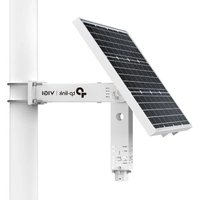


| Product Type | Solar Panel |
| Brand | TP-Link |
| Model | VIGI SP6030 |
| Power Supply | Solar Energy |
| Network Connectivity | RJ45 Interface |
| Management Application | TP-Link VIGI (iOS/Android) |
| Main Functions | Powering network devices (cameras, access points, bridges) via solar energy |
| Installation | Outdoor, on a stable surface |
| Maintenance and Cleaning | Clean the panel surface regularly to avoid dust and obstructions |
| Safety | Do not disassemble or immerse in water; use only recommended chargers; avoid extreme temperatures |
| Spare Parts and Repairability | Contact TP-Link support for any repairs; do not attempt to repair yourself |
| General Information | Compliant with EU directives 2014/30, 2014/35, 2011/65; TP-Link limited warranty |
Frequently Asked Questions - VIGI SP6030 TP-LINK
User questions about VIGI SP6030 TP-LINK
0 question about this device. Answer the ones you know or ask your own.
Ask a new question about this device
Download the instructions for your Solar panel in PDF format for free! Find your manual VIGI SP6030 - TP-LINK and take your electronic device back in hand. On this page are published all the documents necessary for the use of your device. VIGI SP6030 by TP-LINK.
USER MANUAL VIGI SP6030 TP-LINK
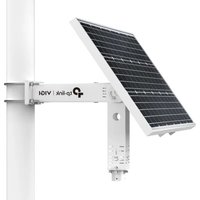
For detailed instructions on installing the product, load devices, and waterproof cable attachments, refer to the Installation Guide included in the package.
*It is recommended to use VIGI solar panels with VIGI solar system controllers.
- Install the product.
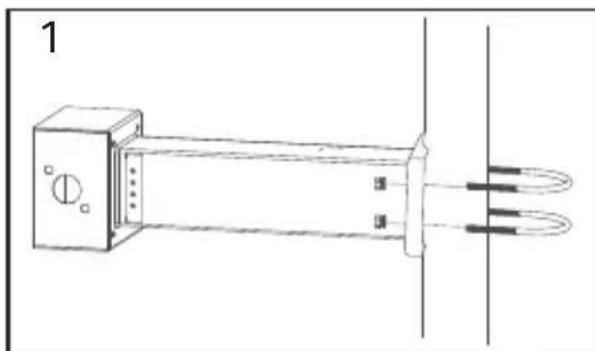
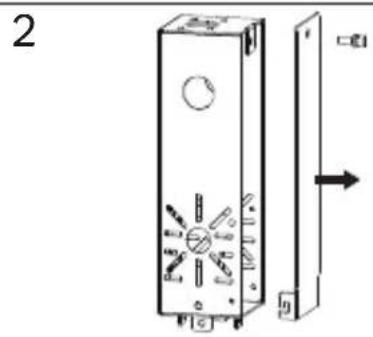
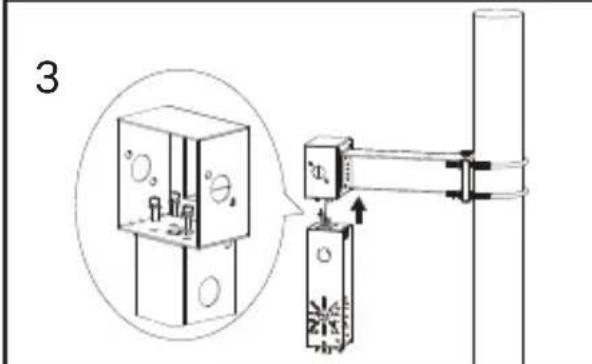
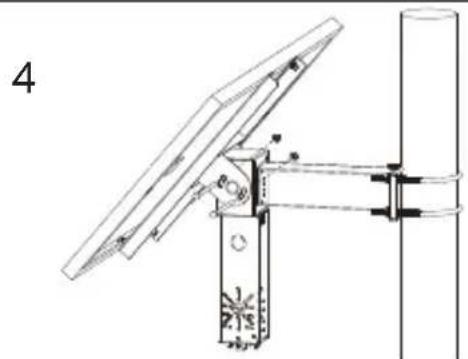
- Install load devices.
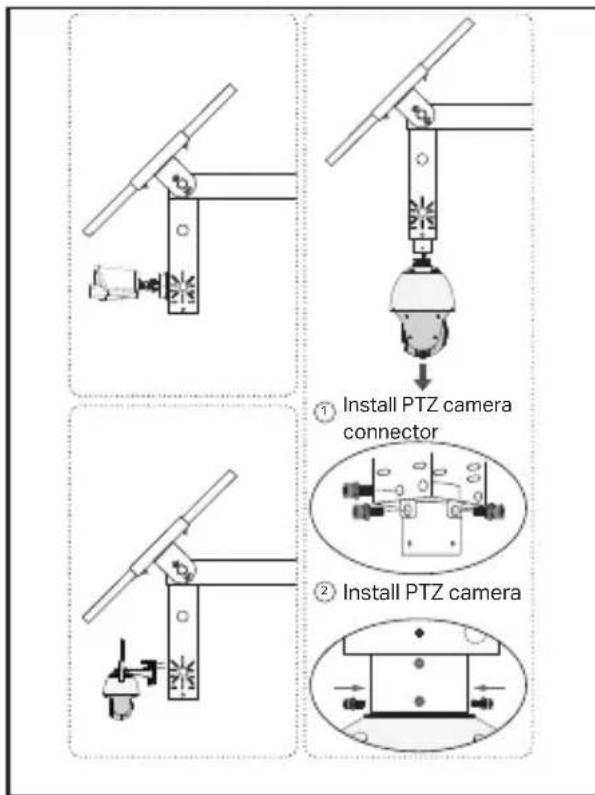
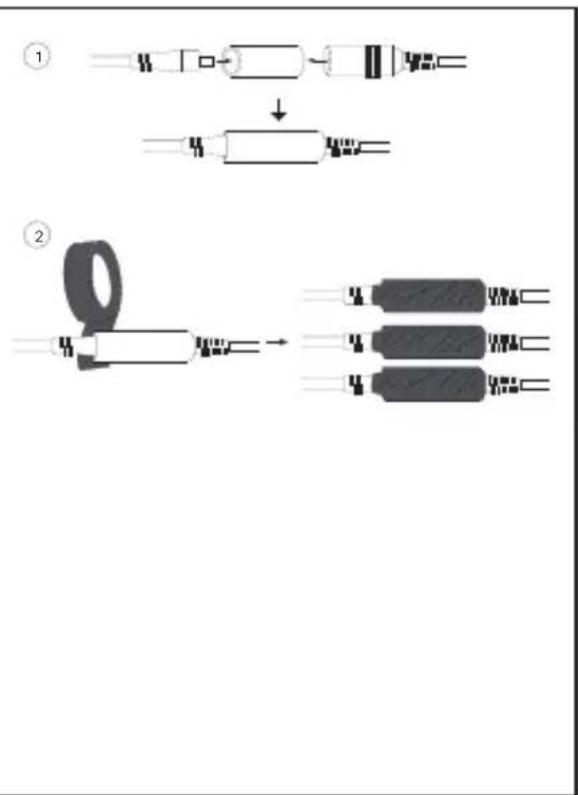
- Install waterproof cable attachments.

Configuration
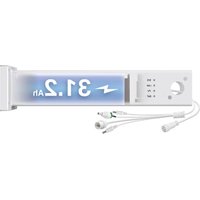
Here is a typical network topology for the solar system controller.
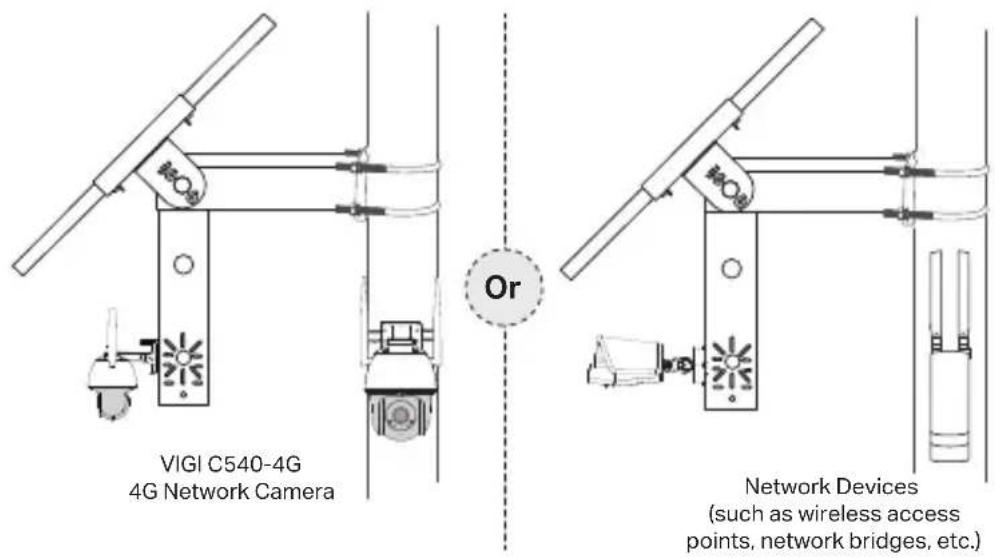
Step 1. Connect the four-pin female connector to the solar panel.
Step 2. Connect the RJ45 network interface of the solar panel to the network devices (such as access points, bridges, and 4G cameras).
Step 3. Follow the instructions to finish Quick Setup.
- Download and install the latest TP-Link VIGI app.
Or

- Open the app and log in with your TP-Link ID. If you don't have an account, sign up first.
- Tap the + button on the top right and follow the app instructions to add the solar system controller.
Step 4. Done.
The solar system controller is added to your network and can provide power to your devices. You can control and manage the controller via the VIGI app remotely.
FAQ (Frequently Asked Questions)
Q1. The controller LED status is abnormal.
- SYS LED is off: It may be out of power or the system board is damaged.
- LAN LED is off: There is no connection. Check whether the RJ45 interface is firmly connected to the network device.
- PV LED is off: The PV panel is not connected or works abnormally and cannot generate electricity. BAT LED is off: The battery is working abnormally.
Q2. Short system runtime and short monitoring time
- The battery board is disconnected: Check whether the solar panel interface is connected well, and ensure that the solar panel is in working condition.
- The solar panel is blocked: Check whether the solar panel is blocked by foreign objects or the front of the solar panel is dirty, which will affect its power generation efficiency.
- Inefficient equipment system: Confirm the power consumption of the equipment. If the power consumption is large, it is recommended to replace it with a solar-powered product with a higher specification.
Installation
Therefore, c' = x ≤ 1
a 2
Installation
- Do not attempt to disassemble, repair, or modify the device. If you need service, please contact us.
- Do not use a damaged charger or USB cable to charge the device.
- Do not use any other chargers than those recommended.
- The adapter shall be installed near the equipment and shall be easily accessible.
- Use only power supplies provided by the manufacturer and in the original packaging of this product. If you have any questions, please don't hesitate to contact us.
- Avoid disposing of a battery into fire or a hot oven, or mechanically crushing or cutting a battery, which can result in an explosion.
- Place the device with its bottom surface downward. Install it in stable locations and prevent it from falling.
- Keep the device away from fire or hot environments. DO NOT immerse it in water or any other liquid. This equipment is not suitable for use in locations where children are likely to be present.
Please read and follow the above safety information when operating the device. We cannot guarantee that no accidents or damage will occur due to improper use of the device. Please use this product with care and operate at your own risk.
CAUTION! Risk of fire or explosion if the battery is replaced by an incorrect type.
CAUTION!
Avoid replacing a battery with an incorrect type that can defeat a safeguard.
Avoid disposing of a battery into fire or a hot oven, or mechanically crushing or cutting a battery, which can result in an explosion.
Do not leave a battery in an extremely high temperature surrounding environment that can result in an explosion or the leakage of flammable liquid or gas.
Do not leave a battery subjected to extremely low air pressure that may result in an explosion or the leakage of flammable liquid or gas.
TP-Link Limited Product Warranty
For TP-Link Branded Products Only. For information about warranty period, policy, and procedures, please visit http://www.tp-link.com/en/support.
THIS WARRANTY GIVES YOU SPECIFIC LEGAL RIGHTS, AND YOU MAY HAVE OTHER RIGHTS THAT VARY FROM STATE TO STATE (OR BY COUNTRY OR PROVINCE).
TO THE EXTENT ALLOWED BY LOCAL LAW, THIS WARRANTY AND THE REMEDIES SET FORTH ARE EXCLUSIVE AND IN LIEU OF ALL OTHER WARRANTIES, REMEDIES, AND CONDITIONS.
TP-Link warrants the TP-Link branded hardware product contained in the original packaging against defects in materials and workmanship when used normally in accordance with TP-Link's guidelines for a period that depends on local service from the date of original retail purchase by the end-user purchaser.
German
Safety Information
TP-Link hereby declares that the Solar Power Supply System is in compliance with the essential requirements and other relevant provisions of directives 2014/30/EU, 2014/35/EU, 2011/65/EU and (EU)2015/863.
The original EU declaration of conformity may be found at https://www.tp-link.com/en/support/ce/.
TP-Link hereby declares that the device is in compliance with the essential requirements and other relevant provisions of the Electromagnetic Compatibility Regulations 2016 and Electrical Equipment (Safety) Regulations 2016.
The original UK declaration of conformity may be found at https://www.tp-link.com/support/ukca/
Solar Panel
TP-Link hereby declares that the device is in compliance with the essential requirements and other relevant provisions of directive 2012/19/EU.
Spanish
- CONFIGURATION
- STEP 4. DONE
- FAQ (FREQUENTLY ASKED QUESTIONS)
- Q1. THE CONTROLLER LED STATUS IS ABNORMAL
- Q2. SHORT SYSTEM RUNTIME AND SHORT MONITORING TIME
- INSTALLATION
- CAUTION! RISK OF FIRE OR EXPLOSION IF THE BATTERY IS REPLACED BY AN INCORRECT TYPE
- CAUTION
- TP-LINK LIMITED PRODUCT WARRANTY
- GERMAN
- SAFETY INFORMATION
- SOLAR PANEL
- SPANISH
Brand : TP-LINK
Model : VIGI SP6030
Category : Solar panel