
KW-Z800AW - Receiver JVC - Free user manual and instructions
Find the device manual for free KW-Z800AW JVC in PDF.
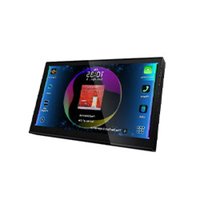


| Product type | Car multimedia receiver |
| Brand | JVC |
| Model | KW-Z800AW |
| Screen size | 6.8 inches (diagonal) |
| Screen resolution | 1280 × 720 pixels |
| Screen type | Active matrix TFT |
| Backlight | LED |
| Wireless connectivity | Bluetooth 5.2, Wi-Fi 802.11 a/b/g/n/ac (2.4 GHz / 5 GHz) |
| Ports | USB Type-C (3 A), HDMI Type D, AV video/audio input, front/rear/subwoofer pre-outs |
| Smartphone compatibility | Apple CarPlay (wired/wireless), Android Auto (wired/wireless), wireless mirroring |
| Supported audio formats | MP3, WMA, AAC, WAV, FLAC, Vorbis, high-resolution audio (24 bit/192 kHz) |
| Supported video formats | MPEG-1/2/4, H.264, WMV, MKV up to 1920 × 1080 |
| Radio | FM/AM, HD Radio, SiriusXM (with optional SXV300 tuner) |
| Amplifier power | 50 W × 4 (max), 29 W × 4 (RMS, 4 Ω, 1 kHz, 10% THD) |
| Equalizer | 13-band graphic, parametric, DTA (Time Alignment), high-pass/low-pass filter |
| Additional features | Voice control, iDatalink Maestro, rearview camera (up to 3), HD Radio emergency alerts, SiriusXM notifications |
| Power supply | 12 V DC (car battery) |
| Power consumption | Approximately 15 A (max) |
| Weight | Approximately 2.5 kg |
| Care and cleaning | Wipe with a soft, dry cloth. Avoid solvents and abrasive products. |
| Safety | Use exclusively a 12 V DC battery. Do not expose to water or shocks. Disconnect the battery before installation. |
| Repairability | Consult an authorized JVC dealer for repairs. Spare parts available through after-sales service. |
Frequently Asked Questions - KW-Z800AW JVC
User questions about KW-Z800AW JVC
0 question about this device. Answer the ones you know or ask your own.
Ask a new question about this device
Download the instructions for your Receiver in PDF format for free! Find your manual KW-Z800AW - JVC and take your electronic device back in hand. On this page are published all the documents necessary for the use of your device. KW-Z800AW by JVC.
USER MANUAL KW-Z800AW JVC
The product with the Hi-Res Audio logo is conformed to the Hi-Res Audio standard defined by the Japan Audio Society. The logo is used under license from the Japan Audio Society.
KZ TECHNOLOGY
Bluetooth®
WiFi
CERTIFIED
Radio
The HD Radio receiver enables
HD2/HD3
Bookmark
Digital Sound
Program Info
Artist Experience
Emergency Alerts
SOFTWARE LICENSE AGREEMENT
Important Notice on Software
■ Software License on This Product
The software embedded in this product comprises a number of independent software components, each of which is copyrighted by JVCKENWOOD Corporation or by a third party. This product uses software components that are based on an End-User License Agreement (hereinafter called "EULA") stipulated by JVCKENWOOD Corporation and by third parties. The EULA dictates the availability of the source codes of free-software components as a prerequisite to distributing them in executable form under the terms of the GNU General Public License or the Lesser General Public License (hereinafter called "GPL/LGPL"). To get information about the software components that are subject to the terms of the GPL/LGPL, please visit the following Website:
Website URL: https://www3.jvckenwood.com/english/download/gpl/
Queries concerning the contents of the source code or the like will not be accepted.
Please note that software components based on a EULA that is not subject to the terms of the GPL/LGPL or those that have been developed or created by JVCKENWOOD Corporation will be excluded from the scope of source code disclosure.
Because licenses to use software components distributed under the GPL/LGPL are offered to the customers for free of charge, no warranty is granted to the customers, whether explicitly or implicitly, to the extent of the applicable laws. Unless otherwise stipulated by the applicable laws or agreed upon in writing, the copyright holders or those who are entitled to modify and redistribute the software components are not held responsible for any and all damages resulting from their use or from inability to use them. For more information about the terms of use of the software components, required items of compliance and so on, please refer to the GPL/LGPL.
Customers wishing themselves to use a software component that is subject to the GPL/LGPL embedded in this product are encouraged to read the terms of the corresponding license before use. Because each individual license is prescribed by a third party other than JVCKENWOOD Corporation, the original (English) of the license is presented.
EULA
■ Software License Agreement
JVCKENWOOD Corporation (hereinafter called "Licensor") holds either the copyright to the embedded software or the right to sublicense it. This agreement establishes the conditions under which the customer uses this "Licensed Software."
The customer shall agree to the terms of this license agreement before proceeding to use Licensed Software.
This agreement is deemed to have taken effect when the customer (hereinafter called "User") has used a product implementation of Licensed Software.
The Licensed Software may contain software that Licensor has been licensed to use by third parties, either directly or indirectly. Some third parties may have terms of use prescribed for their customers, apart from this Software License Agreement. This agreement does not apply to such software. Be sure to consult the "Important Notice on Software" as presented separately.
Article 1 (General)
Licensor grants to User a non-exclusive, non-assignable right to use the Licensed Software within the country where the User purchases the Product (hereinafter the "Country") (except for the exception provided for in Paragraph 1, Article 3).
Article 2 (Right of Use)
- The right of use granted under this agreement is the right to use the Licensed Software in this product.
- User may not duplicate, copy, modify, add to, translate, or otherwise alter, or loan the Licensed Software and the associated literature in whole or in part.
- Use of the Licensed Software is limited to a private extent, and the Licensed Software may not be distributed, licensed, or sublicensed for any purposes whatsoever, including commercial use.
- User shall use the Licensed Software as per the instruction manual or instructions given in the help file and may not use or duplicate data in violation of the regulations of the Copyright Law or other governing laws by using the Licensed Software in whole or in part.
Article 3 (Terms of License)
- In assigning this product, User may not retain the original copy of the embedded Licensed Software (including associated literature, updates, and upgrades) and any duplicates and associated literature with regard to the license to use the Licensed Software. User may transfer the Licensed Software only on the condition of binding the assignee to abide by the terms of this Software License Agreement.
- User may not reverse-engineer, disassemble, decompile, or otherwise analyze the source code of the Licensed Software.
Article 4 (Rights to Licensed Software)
All rights to the Licensed Software and the associated literature, including copyrights, shall reside with Licensor or the original right holder who has granted the Right of Use and right to sublicense to Licensor (hereinafter referred to as "Original Right Holder"), and User does not have any rights other than the Right of Use granted hereunder with regard to the Licensed Software and the associated literature.
Article 5 (Exemption Granted to Licensor)
- Licensor and Original Right Holder do not assume any responsibility for damages caused to User or third parties resulting from the exercise by User of the license granted hereunder, unless otherwise provided by any law to the contrary.
- Licensor does not warrant Licensed Software to be merchantable, compatible and fit for specific purposes.
Article 6 (Responsibility for Third Parties)
If disputes over the infringement of third parties' intellectual property rights, such as copyrights and patent rights, arise out of the use of Licensed Software by User, User shall resolve these disputes at User's own expenses while keep Licensor and Original Right Holder harmless.
SOFTWARE LICENSE AGREEMENT
Article 7 (Secrecy Obligation)
User shall keep confidential Licensed Software provided hereunder, information contained in the associated literature or the like and those provisions of this agreement not yet in public knowledge and may not disclose or leak these to third parties without prior written consent from Licensor.
Article 8 (Cancellation of the Agreement)
Licensor reserves the right to cancel this agreement forthwith and claim compensation from User for the damages caused by such cancellation when User:
(1) Breaches any of the provisions of this agreement, or (2) Has received a petition for seizure, provisional seizure, provisional disposition or any other kind of compulsory execution.
Article 9 (Destruction of Licensed Software)
If this agreement is terminated under the provision of the foregoing paragraph, User shall destroy Licensed Software, along with all associated literature and its duplicates, within two (2) weeks from the date of termination.
Article 10 (Copyright Protection)
- Copyrights and all other intellectual property rights relating to Licensed Software shall reside with Licensor and Original Right Holder and in no circumstances with User.
- User shall abide by the laws relating to copyrights and intellectual property rights in using Licensed Software.
Article 11 (Export Control)
- Licensed Software and the associated literature or the like may not be exported to places outside the Country (including transmission outside the Country over the Internet or the like).
- User agrees that Licensed Software is subject to export controls imposed by the Country and the United States of America.
- User agrees to comply with all the international and domestic laws that apply to this software (U.S. Export Administration Regulations and regulations established by the U.S., the Country and their governmental agencies regarding usage by end users and export destinations).
Article 12 (Miscellaneous)
- Even if this agreement is invalidated in part by law, all other provisions shall remain in effect.
- Licensor and User shall consult each other in good faith to resolve any matters not provided for in this agreement or questions arising from the interpretation of this agreement.
- Licensor and User agree that this agreement is governed by the law of Japan and that all disputes involving claims and obligations that may arise out of this agreement will be settled by arbitration at the Tokyo District Court as the court of first instance.
Table of Contents
Audio Setup....101

KW-Z800AW
NOTE
[Language]
[System Configuration]
NOTE
[Built-In Amplifier]
[Installation Orientation]
[Time Format]

1
1
Apple CarPlay is connected
NOTE


KW-Z800AW
1 Touch
NOTE
1 Navigation bar*1
1 Navigation bar*1
2 Start speaking.
KW-Z800AW
KW-Z800AW
2 KW-Z1001W/KW-Z1000AW
NOTE
NOTE
Open the drawer
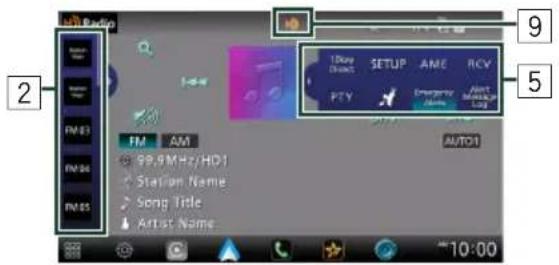
HD2/HD3

Direct search
NOTE
[√ All]
Activating subscription
This completes the approval.
NOTE
NOTE
NOTE
● Sports Play-by-Play (sports channels)
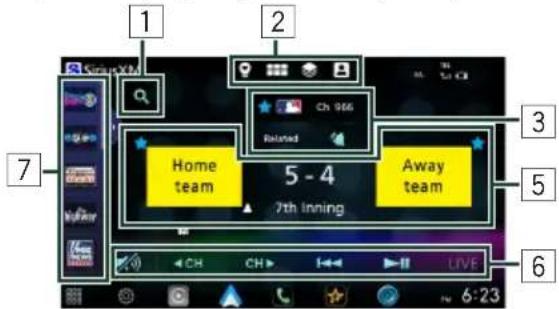
Open the drawer

1 Search
- Pandora Station
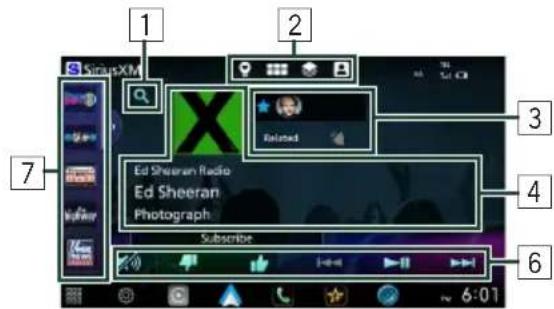
- Xtra Channel
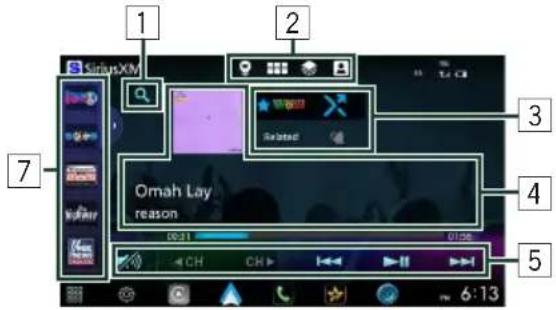
Open the drawer
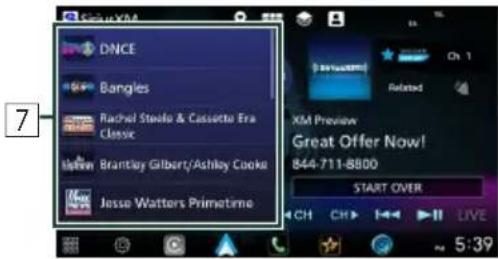
1 Search
● Sports Play-by-Play

Linear tuner

Direct search
NOTE
Recommendation Spotlight
NOTE
CHANNEL/PODCASTS tab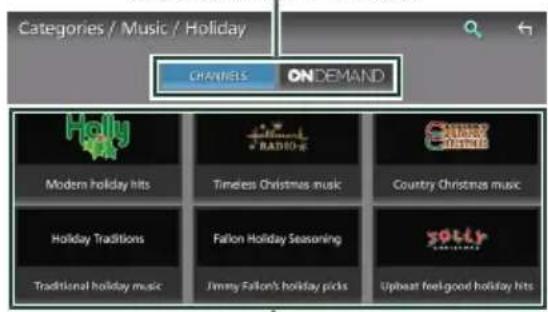
Channel list
NOTE
2
1
2
3
ASSOCIATED CONTENT
NOTE
NOTE
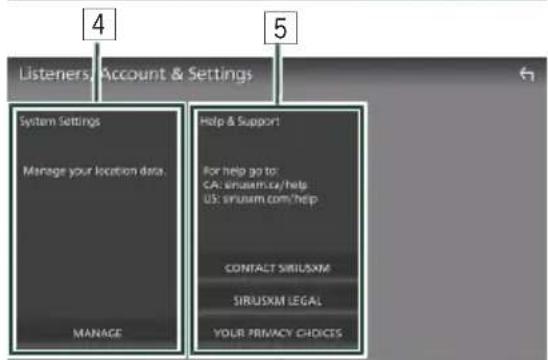
1 Subscription
NOTE
NOTE

Change listener

CHANGE AVATAR
ARTISTS & MUSIC THEMES
TEAMS
1 Contact SiriusXM
2 SiriusXM Legal Information
5 Touch [Device List].
6 Touch +
NOTE
[TEL (HFP) 1], [TEL (HFP) 2]
NOTE
[Microphone Level]
[Noise Reduction Level]
[Delete all]
[Add number from phonebook]
[Bluetooth HF/Audio]
[Camera Assignment Settings]
[Rear Camera Interruption]
[Parking Guidelines]
[Front Camera Interruption] *
4 Touch [Enter].
1 Display of step
[Bluetooth]
[360L IP Connection *1 ]
[Wireless Mirroring SSID]
[Android Auto Auto Launch]
[Incoming Call Volume (Ring)]
[In Call Volume (Talking)]
[Speech Quality Adjust]
[Reset Android Auto Wireless Connection]
[Built-In Amplifier]
[Dimmer]
[Wallpaper Customize]
[Screen transition effect]
[Source Setup - Remote Control]
[Parking Assist Position 2 ]
[DEMO]
[System Information]
[Favorite Customize]
3 Touch [Close].
NOTE
4 Touch [Close].
NOTE
[Speaker]
[Speaker]
4 Touch [Position/DTA].
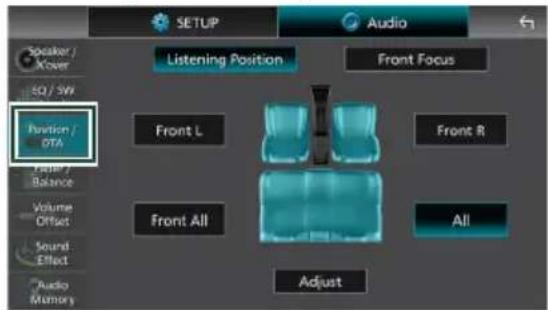
4 Touch [Level].
NOTE
[Sound Image LR (Front)]
[Sound Image LR (Rear)]
[Initialize]
[Bass Boost]
- Peak filter
[SETUP Memory]
[Audio SETUP Memory]
[Audio SETUP Recall]
Bluetooth/Wi-Fi antenna unit KW-Z1000AW/KW-Z800AW
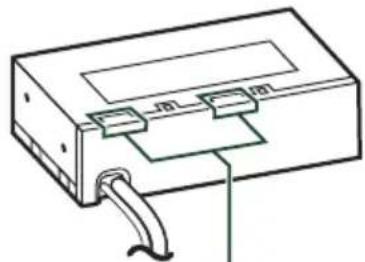
Bluetooth/Wi-Fi antenna unit
NOTE
Installed vertically![[F] ±5° ±20° ±5°](/content/2026/04/727782/images/c8354f65d062b1189d6cb36ab29c747d5e8349b7bcae4ed52e906a38bbe87753.jpg)
Left position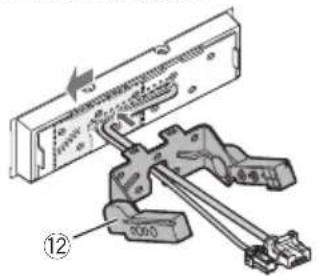
Right position
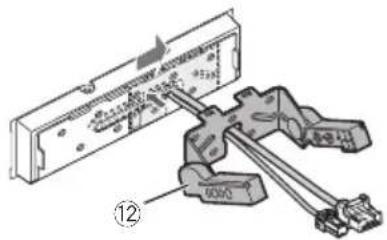
Connection/Installation
NOTE
: 8.0 inches wide (diagonal)
: 176.64 mm (W) × 99.36 mm (H)
6-15/16 x 3-15/16 (inches)
Display system
: LCD panel
Reading system
USB interface section
Connector type
: Type C
USB standard
Dimensions (W × H × D)
• Chassis
KW-Z1001W
: 178 × 50 × 158 mm
7 × 2 × 6-1/4 inches
KW-Z1000AW/KW-Z800AW
: 178 × 50 × 105 mm
7 × 2 × 4-1/8 inches
• Monitor
KW-Z1001W/KW-Z1000AW
: 262 × 181 × 52 mm
10-5/16 × 7-1/8 × 2-1/16 inches
KW-Z800AW
: 190 × 120 × 28 mm
7-1/2 × 4-3/4 × 1-1/8 inches
Weight
KW-Z1001W
: 2.5 kg (5.6 lbs)
KW-Z1000AW
: 2.1 kg (4.5 lbs)
KW-Z800AW
: 1.4 kg (3.1 lbs)
- Chassis
KW-Z1001W
: 1.3 kg (2.9 lbs)
KW-Z1000AW/KW-Z800AW
: 0.8 kg (1.8 lbs)
• Monitor
KW-Z1001W/KW-Z1000AW
: 1.1 kg (2.4 lbs)
KW-Z800AW
: 0.6 kg (1.3 lbs)
NOTE
- Windows Media is a registered trademark or trademark of Microsoft Corporation in the United States and/or other countries. This product is protected by certain intellectual property rights of Microsoft. Use or distribution of such technology outside of this product is prohibited without a license from Microsoft.
- This software is based in part on the work of the independent JPEG Group.
- Use of the Made for Apple badge means that an accessory has been designed to connect specifically to the Apple product(s) identified in the badge, and has been certified by the developer to meet Apple performance standards. Apple is not responsible for the operation of this device or its compliance with safety and regulatory standards. Please note that the use of this accessory with an Apple product may affect wireless performance. • Apple, Apple CarPlay, Apple Music, iPhone, Lightning, and Siri are trademarks of Apple Inc., registered in the U.S. and other countries and regions.
- Use of the Apple CarPlay logo means that a vehicle user interface meets Apple performance standards. Apple is not responsible for the operation of this vehicle or its compliance with safety and regulatory standards. Please note that the use of this product with iPhone, iPod, or iPad may affect wireless performance.
- App Store is a service mark of Apple Inc., registered in the U.S. and other countries.
- IOS is a trademark or registered trademark of Cisco in the U.S. and other countries and is used under license.
- SiriusXM and all related marks and logos are trademarks of Sirius XM Radio, Inc. All rights reserved.
- HD Radio™ Technology manufactured under license from iBiquity Digital Corporation, a subsidiary of Xperi Inc., U.S. and Foreign Patents. For patents see https://xperi.com/hd-radio-patents/. Xperi, HD Radio, HD, and 'ARC' logos and their respective logos are trademarks or registered trademarks of Xperi Inc. and its subsidiaries in the United States and other countries.
- Google, Android, Android Auto, Google Play and other marks are trademarks of Google LLC. Wireless use of Android Auto requires a compatible Android 11.0+ phone and compatible active data plan. Check g.co/androidauto/requirements for compatibility.
- Wi-Fi® is a registered trademark of Wi-Fi Alliance®.
- The Wi-Fi CERTIFIED™ Logo is a certification mark of Wi-Fi Alliance®.
- USB Type-C® and USB-C® are registered trademarks of USB Implementers Forum.
- The terms HDMI and HDMI High-Definition Multimedia Interface, and the HDMI Logo are trademarks or registered trademarks of HDMI Licensing Administrator, Inc. in the United States and other countries.
- This product includes FontAvenue® fonts licenced by NEC Corporation. FontAvenue is a registered trademark of NEC Corporation.
- This product includes "Ubiquitous QuickBoot™" technology developed by Ubiquitous AI Corporation. Ubiquitous QuickBoot™ is a trademark of Ubiquitous AI Corporation.

FontAvenue
Copyright© 2025 Ubiquitous AI Corporation All rights reserved.

- THIS PRODUCT IS LICENSED UNDER THE AVC PATENT PORTFOLIO LICENSE FOR THE PERSONAL USE OF A CONSUMER OR OTHER USES IN WHICH IT DOES NOT RECEIVE REMUNERATION TO (i) ENCODE VIDEO IN COMPLIANCE WITH THE AVC STANDARD ("AVC VIDEO") AND/OR (ii) DECODE AVC VIDEO THAT WAS ENCODED BY A CONSUMER ENGAGED IN A PERSONAL ACTIVITY AND/OR WAS OBTAINED FROM A VIDEO PROVIDER LICENSED TO PROVIDE AVC VIDEO. NO LICENSE IS GRANTED OR SHALL BE IMPLIED FOR ANY OTHER USE. ADDITIONAL INFORMATION MAY BE OBTAINED FROM MPEG LA, L.L.C. SEE HTTP://WWW.MPEGLA.COM
- THIS PRODUCT IS LICENSED UNDER THE VC-1 PATENT PORTFOLIO LICENSE FOR THE PERSONAL AND NON-COMMERCIAL USE OF A CONSUMER TO (i) ENCODE VIDEO IN COMPLIANCE WITH THE VC-1 STANDARD ("VC-1 VIDEO") AND/OR (ii) DECODE VC-1 VIDEO THAT WAS ENCODED BY A CONSUMER ENGAGED IN A PERSONAL AND NON-COMMERCIAL ACTIVITY AND/OR WAS OBTAINED FROM A VIDEO PROVIDER LICENSED TO PROVIDE VC-1 VIDEO. NO LICENSE IS GRANTED OR SHALL BE IMPLIED FOR ANY OTHER USE. ADDITIONAL INFORMATION MAY BE OBTAINED FROM MPEG LA, L.L.C. SEE HTTP://WWW.MPEGLA.COM
- libFLAC
Copyright (C) 2000-2009 Josh Coalson Copyright (C) 2011-2013 Xiph.Org Foundation
Redistribution and use in source and binary forms, with or without modification, are permitted provided that the following conditions are met:
- Redistributions of source code must retain the above copyright notice, this list of conditions and the following disclaimer.
- Redistributions in binary form must reproduce the above copyright notice, this list of conditions and the following disclaimer in the documentation and/or other materials provided with the distribution.
- Neither the name of the Xiph.org Foundation nor the names of its contributors may be used to endorse or promote products derived from this software without specific prior written permission.
THIS SOFTWARE IS PROVIDED BY THE COPYRIGHT HOLDERS AND CONTRIBUTORS ``AS IS'' AND ANY EXPRESS OR IMPLIED WARRANTIES, INCLUDING, BUT NOT LIMITED TO, THE IMPLIED WARRANTIES OF MERCHANTABILITY AND FITNESS FOR A PARTICULAR PURPOSE ARE DISCLAIMED. IN NO EVENT SHALL THE FOUNDATION OR CONTRIBUTORS BE LIABLE FOR ANY DIRECT, INDIRECT, INCIDENTAL, SPECIAL, EXEMPLARY, OR CONSEQUENTIAL DAMAGES (INCLUDING, BUT NOT LIMITED TO, PROCUREMENT OF SUBSTITUTE GOODS OR SERVICES; LOSS OF USE, DATA, OR PROFITS; OR BUSINESS INTERRUPTION) HOWEVER CAUSED AND ON ANY THEORY OF LIABILITY, WHETHER IN CONTRACT, STRICT LIABILITY, OR TORT (INCLUDING NEGLIGENCE OR OTHERWISE) ARISING IN ANY WAY OUT OF THE USE OF THIS SOFTWARE, EVEN IF ADVISED OF THE POSSIBILITY OF SUCH DAMAGE.
- libvorbis
Copyright (c) 2002-2008 Xiph.org Foundation Redistribution and use in source and binary forms, with or without modification, are permitted provided that the following conditions are met:
- Redistributions of source code must retain the above copyright notice, this list of conditions and the following disclaimer.
- Redistributions in binary form must reproduce the above copyright notice, this list of conditions and the following disclaimer in the documentation and/or other materials provided with the distribution.
Annexes
- Neither the name of the Xiph.org Foundation nor the names of its contributors may be used to endorse or promote products derived from this software without specific prior written permission.
THIS SOFTWARE IS PROVIDED BY THE COPYRIGHT HOLDERS AND CONTRIBUTORS ``AS IS'' AND ANY EXPRESS OR IMPLIED WARRANTIES, INCLUDING, BUT NOT LIMITED TO, THE IMPLIED WARRANTIES OF MERCHANTABILITY AND FITNESS FOR A PARTICULAR PURPOSE ARE DISCLAIMED. IN NO EVENT SHALL THE FOUNDATION OR CONTRIBUTORS BE LIABLE FOR ANY DIRECT, INDIRECT, INCIDENTAL, SPECIAL, EXEMPLARY, OR CONSEQUENTIAL DAMAGES (INCLUDING, BUT NOT LIMITED TO, PROCUREMENT OF SUBSTITUTE GOODS OR SERVICES; LOSS OF USE, DATA, OR PROFITS; OR BUSINESS INTERRUPTION) HOWEVER CAUSED AND ON ANY THEORY OF LIABILITY, WHETHER IN CONTRACT, STRICT LIABILITY, OR TORT (INCLUDING NEGLIGENCE OR OTHERWISE) ARISING IN ANY WAY OUT OF THE USE OF THIS SOFTWARE, EVEN IF ADVISED OF THE POSSIBILITY OF SUCH DAMAGE.
• libogg
Copyright (c) 2002, Xiph.org Foundation Redistribution and use in source and binary forms, with or without modification, are permitted provided that the following conditions are met:
– Redistributions of source code must retain the above copyright notice, this list of conditions and the following disclaimer. - Redistributions in binary form must reproduce the above copyright notice, this list of conditions and the following disclaimer in the documentation and/or other materials provided with the distribution. - Neither the name of the Xiph.org Foundation nor the names of its contributors may be used to endorse or promote products derived from this software without specific prior written permission.
THIS SOFTWARE IS PROVIDED BY THE COPYRIGHT HOLDERS AND CONTRIBUTORS ``AS IS'' AND ANY EXPRESS OR IMPLIED WARRANTIES, INCLUDING, BUT NOT LIMITED TO, THE IMPLIED WARRANTIES OF MERCHANTABILITY AND FITNESS FOR A PARTICULAR PURPOSE ARE DISCLAIMED. IN NO EVENT SHALL THE FOUNDATION OR CONTRIBUTORS BE LIABLE FOR ANY DIRECT, INDIRECT, INCIDENTAL, SPECIAL, EXEMPLARY, OR CONSEQUENTIAL DAMAGES (INCLUDING, BUT NOT LIMITED TO, PROCUREMENT OF SUBSTITUTE GOODS OR SERVICES; LOSS OF USE, DATA, OR PROFITS; OR BUSINESS INTERRUPTION) HOWEVER CAUSED AND ON ANY THEORY OF LIABILITY, WHETHER IN CONTRACT, STRICT LIABILITY, OR TORT (INCLUDING NEGLIGENCE OR OTHERWISE) ARISING IN ANY WAY OUT OF THE USE OF THIS SOFTWARE, EVEN IF ADVISED OF THE POSSIBILITY OF SUCH DAMAGE.


- SOFTWARE LICENSE AGREEMENT
- IMPORTANT NOTICE ON SOFTWARE
- SOFTWARE LICENSE ON THIS PRODUCT
- EULA
- ARTICLE 1 (GENERAL)
- ARTICLE 2 (RIGHT OF USE)
- ARTICLE 3 (TERMS OF LICENSE)
- ARTICLE 4 (RIGHTS TO LICENSED SOFTWARE)
- ARTICLE 5 (EXEMPTION GRANTED TO LICENSOR)
- ARTICLE 6 (RESPONSIBILITY FOR THIRD PARTIES)
- ARTICLE 7 (SECRECY OBLIGATION)
- ARTICLE 8 (CANCELLATION OF THE AGREEMENT)
- ARTICLE 9 (DESTRUCTION OF LICENSED SOFTWARE)
- ARTICLE 10 (COPYRIGHT PROTECTION)
- ARTICLE 11 (EXPORT CONTROL)
- ARTICLE 12 (MISCELLANEOUS)
- TABLE OF CONTENTS
- KW-Z800AW
- NOTE
- [LANGUAGE]
- [SYSTEM CONFIGURATION]
- [BUILT-IN AMPLIFIER]
- [INSTALLATION ORIENTATION]
- [TIME FORMAT]
- NAVIGATION BAR
- HD2/HD
- DIRECT SEARCH
- ACTIVATING SUBSCRIPTION
- OPEN THE DRAWER
- SEARCH
- ● SPORTS PLAY-BY-PLAY
- LINEAR TUNER
- ASSOCIATED CONTENT
- SUBSCRIPTION
- CHANGE LISTENER
- CHANGE AVATAR
- ARTISTS & MUSIC THEMES
- TEAMS
- CONTACT SIRIUSXM
- SIRIUSXM LEGAL INFORMATION
- TOUCH [DEVICE LIST]
- TOUCH
- [TEL (HFP) 1], [TEL (HFP) 2]
- [MICROPHONE LEVEL]
- [NOISE REDUCTION LEVEL]
- [DELETE ALL]
- [ADD NUMBER FROM PHONEBOOK]
- [REAR CAMERA INTERRUPTION]
- [PARKING GUIDELINES]
- [FRONT CAMERA INTERRUPTION]
- TOUCH [ENTER]
- DISPLAY OF STEP
- [BLUETOOTH]
- [360L IP CONNECTION *1 ]
- [WIRELESS MIRRORING SSID]
- [ANDROID AUTO AUTO LAUNCH]
- [INCOMING CALL VOLUME (RING)]
- [IN CALL VOLUME (TALKING)]
- [SPEECH QUALITY ADJUST]
- [DIMMER]
- [WALLPAPER CUSTOMIZE]
- [SCREEN TRANSITION EFFECT]
- [SOURCE SETUP - REMOTE CONTROL]
- [PARKING ASSIST POSITION 2 ]
- [DEMO]
- [SYSTEM INFORMATION]
- [FAVORITE CUSTOMIZE]
- TOUCH [CLOSE]
- [SPEAKER]
- TOUCH [POSITION/DTA]
- [SOUND IMAGE LR (FRONT)]
- [SOUND IMAGE LR (REAR)]
- [INITIALIZE]
- PEAK FILTER
- [SETUP MEMORY]
- [AUDIO SETUP MEMORY]
- [AUDIO SETUP RECALL]
- CONNECTION/INSTALLATION
- DISPLAY SYSTEM
- READING SYSTEM
- USB INTERFACE SECTION
- CONNECTOR TYPE
- USB STANDARD
- DIMENSIONS (W × H × D)
- WEIGHT
- FONTAVENUE
- LIBFLAC
- LIBVORBIS
- ANNEXES
Brand : JVC
Model : KW-Z800AW
Category : Receiver