ViewBoard IFP8634 - Monitor VIEWSONIC - Free user manual and instructions
Find the device manual for free ViewBoard IFP8634 VIEWSONIC in PDF.


User questions about ViewBoard IFP8634 VIEWSONIC
0 question about this device. Answer the ones you know or ask your own.
Ask a new question about this device
Download the instructions for your Monitor in PDF format for free! Find your manual ViewBoard IFP8634 - VIEWSONIC and take your electronic device back in hand. On this page are published all the documents necessary for the use of your device. ViewBoard IFP8634 by VIEWSONIC.
USER MANUAL ViewBoard IFP8634 VIEWSONIC
Connected Devices (已連線裝置) 56
Apps (應用程式) 57
Notifications (通知) 58
Storage (儲存空間) 60
Sound (声音) 61
Display (顯示) 62
Wallpaper & Style (桌布和樣式) 63
進階 64
Accessibility (辅助工具) 65
安全性與隐私權 67
Location (位置) 68
Passwords & Accounts (密碼和帳戶) 69
Digital Wellbeing (數位健康) 70
Google 71
System (系統) 72
About Device (關於裝置) 73
Tips & Support (提示与支援) 74
ViewBoard設定選單樹狀結構. 75
預先安裝的應用程式和設定 104
AirSync. 104
myBoardManager 105
myBoard Whiteboard 106
RS-232 通訊協定 109
說明 109
RS-232硬體規格 109
LAN硬體規格 110
RS232 通訊設定 110
LAN 通訊設定 110
指令訊息參考 110
通訊協定 111
Set 函式清單 111
Get 函式清單 119
遥控傅遙模式 127
附錄 130
顯示模式 130
DisplayPort 130
HDMI 131
USB Type C 131
VGA 132
HDMI輸出 132
疑難排解 133
維護 135
一般注意事項 135
清潔螢幕 135
清潔外殼 135
法規和服務資訊 136
法規符合性資訊 136
FCC符合性聲明. 136
加拿大工業部聲明 136
CE歐洲國家聲明 136
限用物質含有情況標示 137
警告使用者: 137
ENERGY STAR 聲明 138
印度危害物質限制 139
產品壽命結束時的產品棄置 139
版權聲明 140
客户服務 141
有限保固 142
介紹
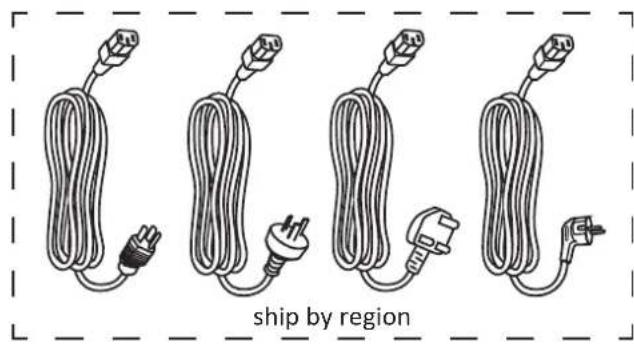
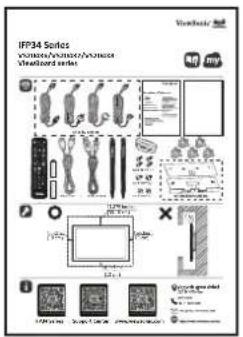
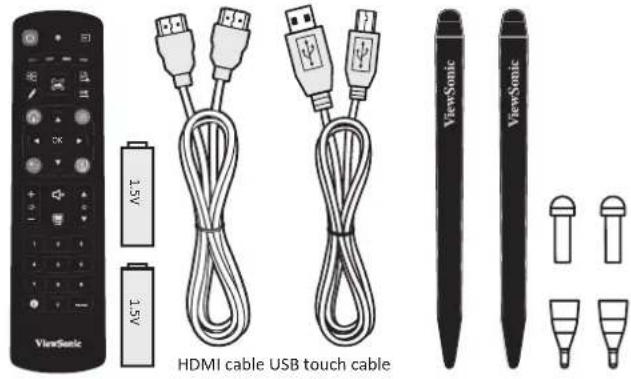
包装内容物

English (United States)

Vision settings

1.選擇慣用語言。
Hi there
Choose your language
Suggested
English (United States)
Startup, Input Source, Advanced Settings

Accessibility
Display, interaction, audio

Security & privacy
App security, device lock, permissions

Location
On - 3 apps have access to location

Passwords & accounts
Saved passwords, autofill,ynced accounts

Digital Wellbeing
Screen time, app timers, night shift schedules
。
以訪客身分使用
Connected Devices (已連線裝置)
Startup, Input Source, Advanced Settings

Accessibility
Display.interaction,audio

Security & privacy
App security, device lock, permissions

Location
On-3 apps have access to location

Passwords & accounts
Saved passwords, autofill,ynced accounts

Digital Wellbeing
Screen time, app timers, night shift schedules
Advanced

Launcher Scheme
Startup & shutdown
Input Source
Security Settings
| 功能表 子功能表 選單選項 | ||||||
| Connected Devices | Pair new device | Device name | ||||
| Available devices | ||||||
| Saved devices See all | ||||||
| Connection preferences | Bluetooth | Use Bluetooth | ||||
| Pair new device Available devices | ||||||
| Cast | ||||||
| Printing | Default Print Service | Use print service | ||||
| Add service | ||||||
| Nearby Share | Account & device | |||||
| Device visibility | ||||||
| Data | Wi-Fi only | |||||
| Without internet | ||||||
| Show notification | ||||||
| Apps | Recently opened apps | |||||
| Default apps | ||||||
| Screen time | ||||||
| Unused apps | ||||||
| Special app access | All files access | |||||
| Device admin apps | ||||||
| Display over other apps | ||||||
| Do No Disturb access | ||||||
| Media management apps | ||||||
| Modify system settings | ||||||
| Device & app notifications | ||||||
| Picture-in-picture | ||||||
| Premium SMS access | ||||||
| Unrestricted data | ||||||
| Install unknown apps | ||||||
| Alarms & reminders | ||||||
| Usage access | ||||||
| VR helper services | ||||||
| Wi-Fi control | ||||||
| Turn screen on | ||||||
| 功能表 子功能表 選單選項 | ||||||
| Notifications | App settings | |||||
| Notification history | Use notification history | |||||
| Conversations | ||||||
| Bubbles | Allow apps to show bubbles | |||||
| Device & app notifications | Allowed | |||||
| Not allowed | ||||||
| Notifications on lock screen | Show conversations, default, and silent | |||||
| Hide silent conversations and notifications | ||||||
| Don’t show any notifications | ||||||
| Do Not Disturb People | Message | Favorite contacts | ||||
| Contacts | ||||||
| Priority conversations | ||||||
| Anyone | ||||||
| None | ||||||
| Calls | Favorite contacts | |||||
| Contacts | ||||||
| Anyone | ||||||
| None | ||||||
| Allow repeat callers | ||||||
| Notifications | Do Not Disturb | Apps Add apps | ||||
| Alarms & other interruptions | Alarms | |||||
| Media sounds | ||||||
| Touch sounds | ||||||
| Reminders | ||||||
| Calendar events | ||||||
| Schedules | Sleeping | |||||
| Event | ||||||
| Add more | ||||||
| Duration for Quick Settings | Until you turn off | |||||
| For 1 hour | ||||||
| Ask every time | ||||||
| Display options for hidden notifications | No sound from notifications | |||||
| No visuals or sound from notifications | ||||||
| Custom | ||||||
| Wireless emergency alerts | ||||||
| Hide silent notifications in status bar | ||||||
| Hide silent notifications in Always-on Panel | ||||||
| Allow notification snoozing | ||||||
| Notification dot on app icon | ||||||
| Enhanced notifications | ||||||
| 功能表 子功能表 選單選項 | ||||||
| Storage | Storage manager | |||||
| System | ||||||
| Apps | ||||||
| Documents & other | ||||||
| Images | ||||||
| Trash | ||||||
| Games | ||||||
| Audio | ||||||
| Videos | ||||||
| Sound | Volume | |||||
| Do Not Disturb | ||||||
| Live Caption | ||||||
| Media | Pin media player | |||||
| Show media on lock screen | ||||||
| Show media recommendations | ||||||
| Default notification sound | None | |||||
| Alya | ||||||
| Argon | ||||||
| Canopus | ||||||
| Deneb | ||||||
| Highwire | ||||||
| Iridium | ||||||
| Pixie Dust | ||||||
| Talitha | ||||||
| Add notification | ||||||
| 功能表 子功能表 選單選項 | ||||||
| Sound | Default alarm sound | None | ||||
| Argon | ||||||
| Beep-Beep-Beep | ||||||
| Cesium | ||||||
| Helium | ||||||
| Oxygen | ||||||
| Piezo | ||||||
| Platinum | ||||||
| Add alarm | ||||||
| Screen locking sound | ||||||
| Touch sounds | ||||||
| Display | Brightness level | |||||
| Adaptive brightness | ||||||
| Lock screen | Privacy | Show all notifications content | ||||
| Don’t show notifications at all | ||||||
| Add users from lock screen | ||||||
| Add text on lock screen | ||||||
| Show wallet | ||||||
| Show device controls | ||||||
| Control from locked device | ||||||
| Double-line clock | ||||||
| Display | Screen timeout | 15 seconds | ||||
| 30 seconds | ||||||
| 1 minute | ||||||
| 2 minutes | ||||||
| 5 minutes | ||||||
| 10 minutes | ||||||
| 30 minutes | ||||||
| Dark theme | ||||||
| Display size and text | Font size | |||||
| Display size | ||||||
| Bold text | ||||||
| High contrast text | ||||||
| Reset Settings | ||||||
| Screen saver | ||||||
| HDMI CEC | ||||||
| Wake up by active HDIM input | ||||||
| Wallpaper | Change Wallpaper | |||||
| Wallpaper colors | ||||||
| Basic colors | ||||||
| Dark theme | ||||||
| 功能表 子功能表 選單選項 | ||||||
| Accessibility | Select to Speak | Select to Speak shortcut | ||||
| Settings | Text to speech settings | Preferred engine | ||||
| Language | ||||||
| Speech rate | ||||||
| Pitch | ||||||
| Read in background | ||||||
| Read text on images | ||||||
| Help & feedback | ||||||
| TalkBack | Use TalkBack | |||||
| TalkBack shortcut | ||||||
| Settings | New features in TalkBack | |||||
| Text-to-speech settings | Preferred engine | |||||
| Language | ||||||
| Speech rate | ||||||
| Pitch | ||||||
| Verbosity | Choose a preset | |||||
| Speak usage hints | ||||||
| Speak list and grid info | ||||||
| Always speak number of list items | ||||||
| Speak element type | ||||||
| Speak window names | ||||||
| Speak notifications when screen is off | ||||||
| Use pitch changes | ||||||
| Accessibility | TalkBack Settings | Verbosity | Speak letters with examples | |||
| Keyboard echo: On-screen keyboard | ||||||
| Keyboard echo: Physical keyboard | ||||||
| Capital letters | ||||||
| Speak all progress updates | ||||||
| Speak element IDs | ||||||
| Speak punctuation and symbols | ||||||
| Sound | Audio ducking | |||||
| Sound feedback | ||||||
| Sound feedback volume | ||||||
| Customize Focus Indicator | Default | |||||
| Red | ||||||
| Orange | ||||||
| Yellow | ||||||
| Green | ||||||
| Blue | ||||||
| Grey | ||||||
| Customize Gestures | Customize TalkBack menu | |||||
| Customize reading controls | ||||||
| Automatically describe icons | ||||||
| Accessibility | TalkBack Settings | Braille keyboard | Set up braille keyboard | |||
| Typing languages | ||||||
| Preferred language | ||||||
| Review all gestures | ||||||
| Include all pressed dots | ||||||
| Reverse dots | ||||||
| Braille display | Languages | |||||
| Preferred reading language | ||||||
| Preferred typing language | ||||||
| Braille commands | ||||||
| Auto-connect | ||||||
| Show braille output on screen | ||||||
| Tutorial and help | Tutorial | |||||
| Practice gestures | ||||||
| Help & feedback | ||||||
| Accessibility | TalkBack Settings | Advanced settings | Speak passwords | |||
| Custom labels | ||||||
| Single-tap to activate | ||||||
| Element description order | ||||||
| Reduce window announcement delay | ||||||
| Typing preference | ||||||
| Touch and hold delay when typing | ||||||
| Keyboard shortcuts | ||||||
| Developer settings | ||||||
| Privacy Policy | ||||||
| Terms of service | ||||||
| Open TalkBack at the Play Store | ||||||
| Display size and text | Font size | |||||
| Display size | ||||||
| Bold text | ||||||
| High contrast text | ||||||
| Reset Settings | ||||||
| Accessibility | Color and motion | Color inversion | ||||
| Dark theme | ||||||
| Color correction | Red-green (deuteronomaly) | |||||
| Red-green (protonomaly) | ||||||
| Blue-yellow | ||||||
| Grayscale | ||||||
| Color correction shortcut | ||||||
| Remove animations | ||||||
| Large mouse pointer | ||||||
| Magnification | Magnification shortcut | |||||
| Magnification type | Magnify full screen | |||||
| Magnify part of screen | ||||||
| Switch between full and partial screen | ||||||
| Magnify typing | ||||||
| Accessibility Menu | Accessibility Menu | |||||
| Settings | Large buttons | |||||
| Help & feedback | ||||||
| Accessibility | Switch Access | Use Switch Access | ||||
| Switch Access shortcut | ||||||
| Settings | Help & feedback | |||||
| Open setup guide | USB switch | |||||
| Bluetooth switch | ||||||
| Camera switch | ||||||
| Camera Switch settings | Use Camera Switches | |||||
| Open Mouth | ||||||
| Smile | ||||||
| Raise Eyebrows | ||||||
| Look Left | ||||||
| Look Right | ||||||
| Look Up | ||||||
| Enhanced visual feedback | ||||||
| Enhanced audio feedback | ||||||
| Keep screen on | ||||||
| Ignore repeated Camera Switch triggers | ||||||
| Accessibility | Switch Access Settings | Assign switches for scanning | Pause | Camera Switch | ||
| Auto-scan | Reverse auto-scan | |||||
| Select | Next | |||||
| Previous | Touch & hold | |||||
| Scroll forward | Scroll backward | |||||
| Assign switches to global actions | Pause Camera Switch | Back | ||||
| Home | Notifications | |||||
| Quick Settings | Overview | |||||
| Assign switches to shortcuts | ||||||
| Enable Menu Customization | ||||||
| Revert to Default Menu | ||||||
| Auto-scan | Auto-scan time | Delay on first item | ||||
| Number of scans | ||||||
| Scanning method | Linear scanning | Row-column scanning | ||||
| Group selection | ||||||
| Accessibility | Switch Access Settings | Point scan | Line speed | |||
| Delay on first item | ||||||
| Number of scans | ||||||
| Vertical scans | ||||||
| Horizontal scans | ||||||
| Automatically start scanning | ||||||
| Auto-select | ||||||
| Scanning highlight style | Highlight color | |||||
| Highlight line style | ||||||
| Speech, sound & vibration | Speak descriptive text | |||||
| Verbosity | ||||||
| TTS settings | ||||||
| Finish speech before moving | ||||||
| Maximum spoken time per item | ||||||
| Vibration feedback | ||||||
| Sound feedback | ||||||
| Sound volume | ||||||
| Audio ducking | ||||||
| Ignore repeated presses | ||||||
| Release to perform action | ||||||
| Privacy policy | ||||||
| Developer settings | Version | |||||
| Display speech output | ||||||
| Delete all shortcuts | ||||||
| Log output level | ||||||
| Accessibility | Timing controls | Touch & hold delay | Short | |||
| Medium | ||||||
| Long | ||||||
| Time to talk action | Default | |||||
| 10 seconds | ||||||
| 30 seconds | ||||||
| 1 minute | ||||||
| 2 minutes | ||||||
| Auto click | Off | |||||
| Short | ||||||
| Medium | ||||||
| Long | ||||||
| Custom | ||||||
| System controls | System navigation | Gesture navigation | ||||
| 3-button navigation | ||||||
| Live Caption | Languages | |||||
| Hide profanity | ||||||
| Show sound labels | ||||||
| Live Caption in volume control | ||||||
| Help | ||||||
| Accessibility | Caption preferences | Show captions | ||||
| Caption size and style | Text size | Very Small | ||||
| Small | ||||||
| Medium | ||||||
| Large | ||||||
| Very Large | ||||||
| Caption style | Set by app | |||||
| White on black | ||||||
| Black on white | ||||||
| Yellow on black | ||||||
| Yellow on blue | ||||||
| Custom | ||||||
| More options Language | ||||||
| Audio description | ||||||
| Hearing aids | ||||||
| Audio adjustment | Mono audio | |||||
| Audio balance | ||||||
| Accessibility shortcuts | Accessibility button | Location | Floating over other apps | |||
| Navigation bar | ||||||
| Size | Small | |||||
| Large | ||||||
| Fade when not in use | ||||||
| Transparency when not in use | ||||||
| Shortcut from lock screen | ||||||
| 功能表 子功能表 選單選項 | ||||||||
| Accessibility | Text-to-speech output | Preferred engine | Speech Services by Google | |||||
| Language | ||||||||
| Speech rate | ||||||||
| Pitch | ||||||||
| Security | Google Play Protect | |||||||
| Find My Device | Find My Device | |||||||
| Find My Device app | ||||||||
| Find My Device web | ||||||||
| Security update | ||||||||
| Google Play system update | ||||||||
| Screen lock | None | |||||||
| Swipe Pattern | ||||||||
| PIN | ||||||||
| Password | ||||||||
| More security settings | Smart Lock | |||||||
| Device admin apps | ||||||||
| Encryption & credentials | Encrypt tablet | |||||||
| Trusted credentials | ||||||||
| User credentials | ||||||||
| Install a certificate | ||||||||
| Clear credentials | ||||||||
| Certificate management app | ||||||||
| Trust agents | ||||||||
| App pinning | ||||||||
| 功能表 子功能表 選單選項 | ||||||||
| Privacy | Privacy dashboard | Location | ||||||
| Camera | ||||||||
| Microphone | ||||||||
| Body sensors | ||||||||
| Calendar | ||||||||
| Call logs | ||||||||
| Contacts | ||||||||
| Files | ||||||||
| Music and audio | ||||||||
| Nearby devices | ||||||||
| Phone | ||||||||
| Photos and videos | ||||||||
| Physical activity | ||||||||
| SMS | ||||||||
| Permission manager | Body sensors | |||||||
| Calendar | ||||||||
| Call logs | ||||||||
| Camera | ||||||||
| Contacts | ||||||||
| Files | ||||||||
| Location | ||||||||
| Microphone | ||||||||
| Music and audio | ||||||||
| Nearby devices | ||||||||
| Notifications | ||||||||
| Phone | ||||||||
| Photos and videos | ||||||||
| Physical activity | ||||||||
| SMS | ||||||||
| Additional permissions | ||||||||
| 功能表 子功能表 選單選項 | ||||||||
| Privacy | Camera access | |||||||
| Microphone access | ||||||||
| Show passwords | ||||||||
| Notifications on lock screen | Show all notification content | |||||||
| Don’t show notifications at all | ||||||||
| Show media on lock screen | ||||||||
| Android System Intelligence | Device learning | |||||||
| Keyboard | Show smart text suggestions in the keyboard suggestion strip including smart reply and paste | |||||||
| Clear data | Last hour | |||||||
| Last 24 hours | ||||||||
| All time | ||||||||
| App content | ||||||||
| Show clipboard access | ||||||||
| Autofill service from Google | ||||||||
| Activity controls | ||||||||
| Ads | ||||||||
| Usage & diagnostics | ||||||||
| Location | Use location | |||||||
| Recent access | ||||||||
| App location permissions | ||||||||
| Location services | Earthquake alerts | |||||||
| Emergency Location Service | ||||||||
| Google Location Accuracy | ||||||||
| Google Location History | ||||||||
| Google Location Sharing | ||||||||
| Wi-Fi scanning | ||||||||
| Bluetooth scanning | ||||||||
| Passwords & Accounts | Passwords | |||||||
| Autofill service | ||||||||
| Accounts for Owner | ||||||||
| Automatically sync app data | ||||||||
| 功能表 子功能表 選單選項 | ||||||||
| Digital Wellbeing | Your Digital Wellbeing tools | |||||||
| Dashboard | ||||||||
| Night Shift | Do Not Disturb for Night Shift mode | |||||||
| Focus Mode | ||||||||
| Manage notifications | ||||||||
| Do Not Disturb | People | Messages | Favorite contacts | |||||
| Contacts | ||||||||
| Priority conversations | ||||||||
| Anyone | ||||||||
| None | ||||||||
| Calls | Favorite contacts | |||||||
| Contacts | ||||||||
| Anyone | ||||||||
| None | ||||||||
| Allow repeat callers | ||||||||
| Apps | ||||||||
| Alarms & other interruptions | Alarms | |||||||
| Media sound | ||||||||
| Touch sounds | ||||||||
| Reminders | ||||||||
| Calendar events | ||||||||
| Schedule | Sleeping | |||||||
| Event | ||||||||
| Digital Wellbeing | Do Not Disturb | Duration for Quick Settings | Until you turn off | |||||
| For 1 hour | ||||||||
| Ask every time | ||||||||
| Display options for hidden notifications | No sound from notifications | |||||||
| No visuals or sound from notifications | ||||||||
| Custom | ||||||||
| COVID-19 Exposure Notifications | ||||||||
| Ads | ||||||||
| Autofill | ||||||||
| Backup | ||||||||
| Devices & sharing | ||||||||
| Find My Device | ||||||||
| Parental controls | ||||||||
| Personalize using shared data | ||||||||
| Set up & restore | ||||||||
| Settings for Google apps | ||||||||
| System | Languages & input | Languages | ||||||
| App Languages | ||||||||
| On-screen keyboard | ||||||||
| Physical keyboard | Use on-screen keyboard | |||||||
| Keyboard shortcuts | ||||||||
| Voice input | ||||||||
| Text-to-speech output | Preferred engine | |||||||
| Language | ||||||||
| Speech rate | ||||||||
| Pitch | ||||||||
| Spell checker | Languages | |||||||
| Default spell checker | ||||||||
| Personal dictionary | ||||||||
| Pointer speed | ||||||||
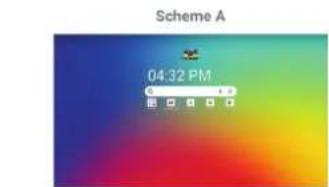
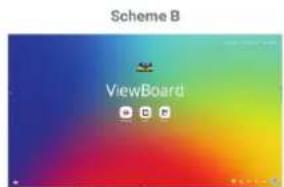
| Loader Scheme | Scheme A | |||||||
| Scheme B | ||||||||
| Sidebar | ||||||||
| 功能表 子功能表 選單選項 | |||
| System | Date & time | Set time automatically | |
| Date | |||
| Time | |||
| Set time zone automatically | |||
| Use location to set time zone | |||
| Time zone | |||
| Use locale default | |||
| Use 24-hour format | |||
| Windows Ink | |||
| Display ID | |||
| Backup | |||
| ViewSonic System Update | |||
| Multiple Users | User | ||
| Guest | |||
| Delete guest activity | |||
| Add users from lock screen | |||
| Reset options | Reset Wi-Fi, mobile & Bluetooth | ||
| Reset all settings | |||
| Erase all data (factory rest) | |||
| 功能表 子功能表 選單選項 | |||
| About Device | Device name | ||
| Legal information | |||
| Model | |||
| Android version | |||
| IP address | |||
| Ethernet address | |||
| Wi-Fi MAC address | |||
| Device Wi-Fi MAC address | |||
| Bluetooth address | |||
| Up time | |||
| Build number | |||
| Custom build version | |||
| Tips & Support | myViewBoard Whiteboard | ||
| myViewBoard Display | |||
| myViewBoard Manager | |||
| vCast | |||
| New Features | |||
預先安裝的應用程式和設定
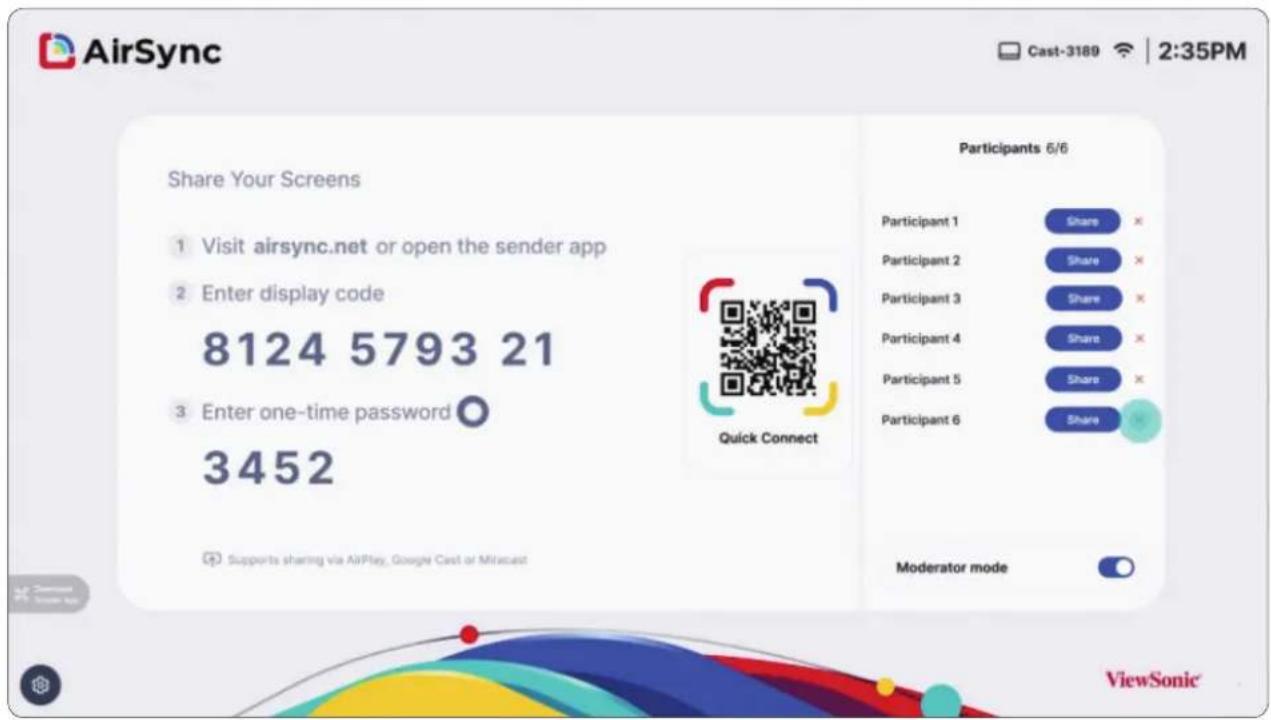
AirSync
將螢幕內容無線鏡射到更大的顯示器。
https://wiki.myviewboard.com/Whiteboard_for_Android
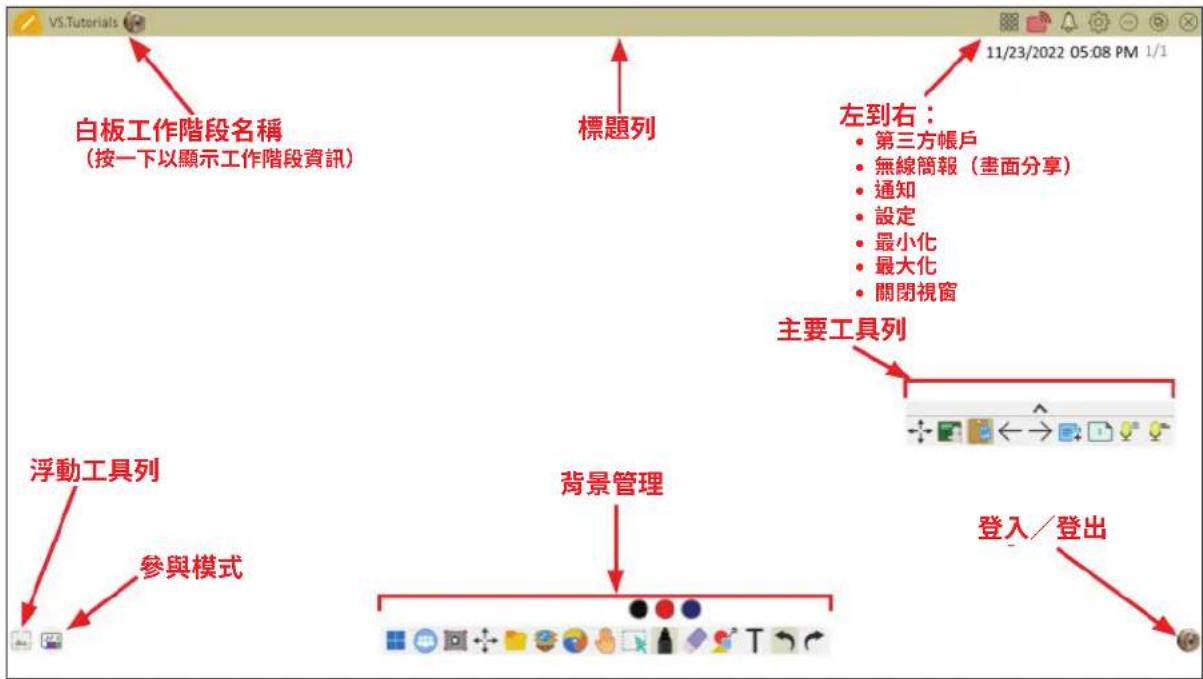
浮動工具列
https://www.viewsonic.com/us/go-green-with-viewsonic
歐洲:
https://www.viewsonic.com/eu/environmental-social-governance/recycle
台灣:
https://recycle.moenv.gov.tw/
https://www.viewsonic.com/eu/
版權聲明
Copyright© ViewSonic® Corporation, 2025。保留所有權利。