
ULX-BETA-R800 - Electric broom Ulsonix - Free user manual and instructions
Find the device manual for free ULX-BETA-R800 Ulsonix in PDF.
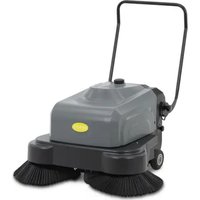


| Product type | Cordless sweeper |
| Model | ULX-BETA-R800 |
| Brand | Ulsonix |
| Input voltage / Frequency | 200 - 240 V / 50 Hz |
| Output voltage / Current | 12 V / 8 A |
| Battery capacity | 75 Ah |
| Cleaning efficiency | 4000 m²/h |
| Water tank | 30 L |
| Rotating brush (diameter) | 500 mm |
| Suction motor | 100 W |
| Roller brush motor | 300 W |
| Side brush motor | 120 W |
| Dimensions (W x D x H) | 1100 x 1435 x 970 mm |
| Weight | 73,65 kg |
| Protection class | II |
| Intended use | Cleaning of large commercial or industrial surfaces |
| Battery life (estimated) | Approximately 2-3 hours depending on use |
| Regular maintenance | Inspection of belt, brushes, filter, battery level (every 8-1500 hours) |
| Safety | Use by qualified personnel, do not use in explosive environments |
| Spare parts | Brushes, belt, filter, battery available |
Frequently Asked Questions - ULX-BETA-R800 Ulsonix
User questions about ULX-BETA-R800 Ulsonix
0 question about this device. Answer the ones you know or ask your own.
Ask a new question about this device
Download the instructions for your Electric broom in PDF format for free! Find your manual ULX-BETA-R800 - Ulsonix and take your electronic device back in hand. On this page are published all the documents necessary for the use of your device. ULX-BETA-R800 by Ulsonix.
USER MANUAL ULX-BETA-R800 Ulsonix
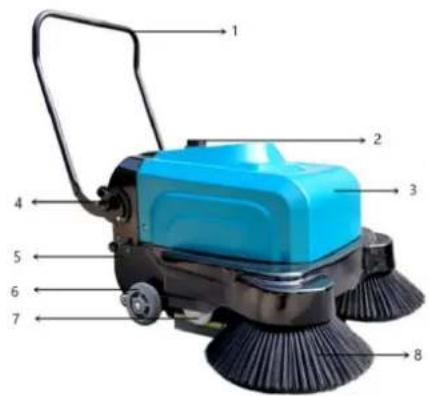
1- Handle
2- Water inlet
3- Water tank
4- Nut
5- Dustbin
6- Main wheel
7- Disc
8- Side brush

This User Manual has been translated using machine translation. We have made every effort to ensure the translation is accurate, but please note that automated translations are not perfect and are not meant to replace human translators. The official version of the User Manual is in English. Any differences between the translated version and the original English are not legally binding. If you have any questions about the accuracy of the translation, please refer to the English version, which is the official reference. More language versions are available upon request via info@expondo.com.
Technical data
| Parameter description | Parameter value |
| Product name | Cordless sweeper |
| Model | ULX-BETA-R800 |
| Voltage [V] / Frequency [Hz]Voltage [V] / Current [A] | Input: 200 - 240 / 50; Output: 12 / 8 |
| Battery capacity [Ah] | 75 |
| Cleaning efficiency [m2/h] | 4000 |
| Water tank [L] | 30 |
| Roller brush [mm] | 500 |
| Sucker motor [W] | 100 |
| Roller brush motor [W] | 300 |
| Side brush motor [W] | 120 |
| Dimensions (Width x Length x Height) [mm] | 1100x1435x970 |
| Weight [kg] | 73.65 |
| Protection class | II |
Product Overview
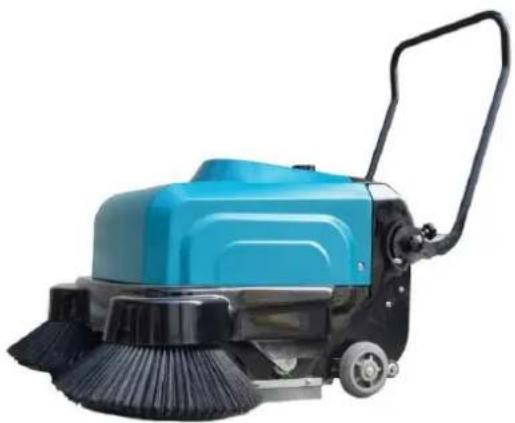
This product is used for efficient cleaning of large floor areas in commercial or industrial settings. Its size supports a wide cleaning path, making it ideal for covering more surface area quickly. The cordless design allows unrestricted movement, making it versatile and convenient for spaces without readily available power outlets.
The user is liable for any damage resulting from unintended use of the product.
Operating Instructions
Preventive Measures
- The product should be operated by trained personnel only to prevent damage from improper use.
- Maintain adequate space between the product and any protruding objects to protect its housing.
- Operate the equipment according to correct technical specifications to ensure it functions as designed.
- Do not operate the equipment if the housing is incomplete or defective.
- Perform routine maintenance and schedule regular servicing of the equipment.
- Do not operate the product in flammable or explosive environments.
- Never touch moving parts while the product is operating. Turn off the power before performing maintenance.
Control Mechanism
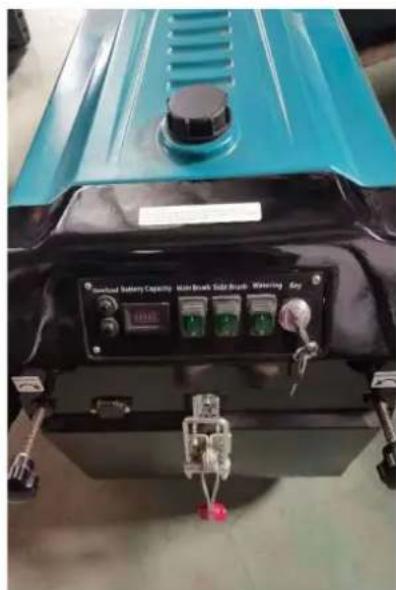
Panel Logo and Function
| Icon | Function | Description | |
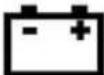
 | Battery symbol | Power indicator meter, indicating the remaining battery power | |
 | Main brush logo | Turn on the main brush and fan | |
 | Side brush logo Open side brush | brush | |
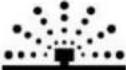
 | Sprinkler sign | Toggle the dust shaker to clean the dust on the filter | |
 | Dust-shaking sign | Toggle the dust shaker to clean the dust on the filter | |
 | Garbage can sign | Toggle up the bin locking latch to draw the bin | |
Operating Procedures
- Inspect the overall condition of the product before each day's work.
- Install the battery and check the battery connection cable.
- Insert the switch key and turn it clockwise to start the product.
- To begin cleaning, press the sweeping key and wait until the side and main brushes contact the ground. Then, move forward to start sweeping.
- After cleaning, press the cleaning key to the middle position, wait for the side and main brushes to lift, turn the key switch counterclockwise, and remove the key.
Operating Precautions
- Do not use the product to pick up items that can easily get tangled, such as cords and cables. Every 30 minutes, toggle the dust-shaking lever to vibrate dust for 1 minute.
- Avoid sweeping burning cigarette butts or other hot objects. Only trained personnel should operate the equipment.
- Operators should not use the equipment under the influence of alcohol or other mental impairments.
- Operators must read and adhere to the procedures in this manual.
- Ensure no foreign objects, such as rags or tools, are on the equipment before starting. If abnormal noise is detected, stop the machine immediately for inspection and take protective measures.
- If abnormal noise occurs during operation, stop immediately for inspection and apply necessary protective measures.
Maintenance
- Before cleaning, repairing, or replacing parts, ensure the equipment is turned off, remove the switch key, and disconnect the battery connection line.
- All maintenance, overhaul, or repair work must be performed by specialized personnel or at an authorized service center.
- Machine maintenance must be performed by professionals, with regular maintenance intervals. During maintenance, the equipment must be stopped, the power switch turned off, and the battery connection line disconnected.
- To maintain the machine in good condition, it is recommended to conduct a thorough overhaul every six months. For safety, a professional and technical personnel must perform a complete overhaul every three years.
- Personnel responsible for operating the machine must receive timely training and maintain accurate maintenance records.
Regular Maintenance Checks
| Maintenance Task | Interval (Hours) | |||||
| 8 | 40 | 150 | 500 | 1500 | ||
| 1 | Inspect the belt | √ | ||||
| 2 | Check for tangles in the main brush (e.g., ropes) | √ | ||||
| 3 | Clean the filter dust | √ | ||||
| 4 | Replace the filter | √ | ||||
| 5 | Inspect the width of main and side brushes | √ | ||||
| 6 | Check battery fluid levels | √ | ||||
| 7 | Inspect motor brushes | √ | ||||
Troubleshooting
| Failure | Cause | Solution |
| The product cannot sweep large garbage or leaves garbage behind | Low brush pressure; worn brushes; brushes tangled with rope | Adjust brush pressure; replace or lower brushes; remove debris |
| Dust coming out of the product flanks | Clogged filter; worn rubber strip | Clean filter; replace rubber strip |
| Dust leaks at fan | Damaged filter | Replace filter |
| Trash not concentrated in the middle | Damaged front brush Replace front brush | brush |
| Brushes wear too fast | Brush pressure too high | Reduce brush pressure on the ground |
| Main brush makes noise | Main brush entangled with debris | Clean debris |
| Main brush does not turn | Drive belt damaged | Replace drive belt |
| Battery not working properly | Motor burned; motor overloaded; brush tangled; faulty bearing; high brush pressure | Replace battery; overhaul motor; remove debris; replace bearing; adjust brush pressure |
| Battery working time is short | Insufficient charging time; battery connector oxidized or loose | Extend charging time; clean or tighten connector |
Disposing of Used Devices
Do not dispose of this device in municipal waste systems. Hand it over to an electric and electrical device recycling and collection point. Check the symbol on the product, instruction manual and packaging. The plastics used to construct the device can be recycled in accordance with their markings. By choosing to recycle you are making a significant contribution to the protection of our environment.
Contact local authorities for information on your local recycling facility.
Parts
1- Handle
2- Water inlet
3- Water tank
4- Nut
5- Trash can
6- Main wheel
7- Pulley
8- Side brush

1- Handle
2- Water inlet
3- Water tank
4- Nut
5- Trash bin
6- Main wheel
7- Disc
8- Side brush

1- Holder
2- Water inlet
3- Water tank
4- Nut
5- Trash bin
6- Main wheel
7- Disc
8- Side brush

1- Handle
2- Water inlet
3- Water tank
4- Nut
5- Dustbin
6- Main wheel
7- Roller
8- Side brush

1- Handle
1- Handle
2- Water inlet
3- Water tank
4- Nut
5- Trash bin
6- Main wheel
7- Roller
8- Side brush

1- Handle
1- Handle
2- Water inlet
3- Water reservoir
4- Nut
5- Trash bin
6- Main wheel
7- Roller
8- Side brush

1- Handle
2- Water inlet
3- Water tank
4- Nut
5- Garbage bin
6- Main wheel
7- Pulley
8- Side brush

1- Handle
2- Water inlet
3- Water tank
4- Nut
5- Garbage bin
1- Handle
2- Water inlet
3- Water tank
4- Nut
5- Trash bin
6- Main wheel
7- Pulley
8- Side brush

Control panel functions
1- Handle
2- Water inlet
3- Water tank
4- Nut
5- Trash bin
6- Main wheel
7- Pulley
8- Side brush

1- Handle
2- Water inlet
1- Handle
2- Water inlet
3- Water tank
4- Nut
5- Dustbin
6- Main wheel
7- Pulley
8- Side brush

This product is used for efficient cleaning of large floor areas in commercial or industrial environments. Its size supports a wide cleaning path, making it ideal for quickly covering a larger area. The cordless design allows unrestricted movement, making it versatile and suitable for spaces without easily accessible power outlets.
Logo and board function
| Ikona | Funkcija | Opis | ||
 | Simbol baterije | Indikator snage, koji pokazuje preostalu snagu baterije | ||
 | Logo glavne četke | Uključite glavnu četku i ventilator | ||
 | Logo bočne četke Otvorena | bočna četka | ||
 | Znak prskalice | Uključite tresilicu za prašinu kako biste očistili prašinu na filtru | ||
 | Znak za otresanje prašine | Uključite tresilicu za prašinu kako biste očistili prašinu na filtru | ||
 | Kanta za smeće potpis | Podignite zasun za zaključavanje spremnika za smeće kako biste izvukli spremnik |
Operating procedures
1- Handle
2- Water inlet
1- Handle
2- Water inlet
3- Water tank
4- Nut
5- Dustbin
6- Main wheel
7- Pulley
8- Side brush

1- Handle
2- Water supply
For the disposal of the device, please consider and act according to the national and local rules and regulations.
CONTACT
expondo Polska sp. z o.o. sp. k.

Brand : Ulsonix
Model : ULX-BETA-R800
Category : Electric broom