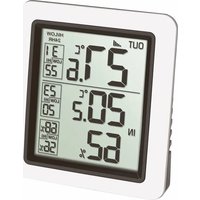
INFO 30.3065.02 - Thermometer TFA - Free user manual and instructions
Find the device manual for free INFO 30.3065.02 TFA in PDF.


| Product type | Radio-controlled thermometer |
| Brand | TFA |
| Model | INFO 30.3065.02 |
| Base station dimensions | 77 x 22 x 86 mm |
| Base station weight | 70 g (device only) |
| Outdoor transmitter dimensions | 64 x 20 x 41 mm |
| Outdoor transmitter weight | 34 g (device only) |
| Power supply | 2 x 1.5 V AA batteries (one per device), alkaline batteries recommended |
| Indoor temperature measurement range | -10 °C to +60 °C |
| Outdoor temperature measurement range | -40 °C to +60 °C |
| Indoor humidity measurement range | 10 to 99% RH |
| Temperature accuracy | ±1 °C |
| Humidity accuracy | ±3% (35 to 75% RH) |
| Transmission frequency | 433 MHz |
| Maximum range | Approximately 80 meters in open field |
| Main functions | Display indoor/outdoor temperature, indoor humidity, max/min values with manual or automatic update over 24 h, °C/°F selection |
| Maintenance and cleaning | Soft damp cloth, no solvents or abrasives |
| Safety instructions | Keep out of reach of children, do not expose to extreme temperatures, vibrations or shocks; transmitter is splash-resistant but not waterproof |
| Repairability | Do not repair, disassemble or modify the device yourself |
| Warranty | Legal rights in case of defects, no liability for improper use |
| Package contents | Base station, outdoor transmitter (ref. 30.3234.02), instruction manual |
Frequently Asked Questions - INFO 30.3065.02 TFA
User questions about INFO 30.3065.02 TFA
0 question about this device. Answer the ones you know or ask your own.
Ask a new question about this device
Download the instructions for your Thermometer in PDF format for free! Find your manual INFO 30.3065.02 - TFA and take your electronic device back in hand. On this page are published all the documents necessary for the use of your device. INFO 30.3065.02 by TFA.
USER MANUAL INFO 30.3065.02 TFA
2
3
Wireless thermometer

Thank you for choosing this instrument from TFA.
1. Before you use this product
- Please make sure you read the instruction manual carefully.
- Following and respecting the instructions in your manual will prevent damage to your instrument and loss of your statutory rights arising from defects due to incorrect use.
- We shall not be liable for any damage occurring as a result of non-following of these instructions. Likewise, we take no responsibility for any incorrect readings or for any consequences resulting from them.
- Please take particular note of the safety advice!
- Please keep this instruction manual safe for future reference.
2. Delivery contents
- Wireless thermometer (base station)
• Outdoor transmitter Cat.-No. 30.3234.02 - Instruction manual
Wireless thermometer

3. Range of application and all the benefits of your new instrument at a glance
- Outdoor temperature over wireless outdoor transmitter (max. 80 m)
- Indication of indoor temperature and humidity
- Indication of maximum and minimum values with manual or auto-reset
• Wall mounting or table stand
4. For your safety
- This product is exclusively intended for the range of application described above. It should only be used as described within these instructions.
- Unauthorized repairs, alterations or changes to the product are prohibited.

Caution! Risk of injury:
- Keep these devices and the batteries out of reach of children.
Wireless thermometer

- Batteries contain harmful acids and may be hazardous if swallowed. If a battery is swallowed, this can lead to serious internal burns and death within two hours. If you suspect a battery could have been swallowed or otherwise caught in the body, seek medical help immediately.
- Batteries must not be thrown into a fire, short-circuited, taken apart or recharged. Risk of explosion!
- Low batteries should be changed as soon as possible to prevent damage caused by leaking.
- Wear chemical-resistant protective gloves and safety glasses when handling leaking batteries.

Important information on product safety!
- Do not expose the devices to extreme temperatures, vibrations or shocks.
- Protect the base station from moisture.
- The outdoor transmitter is splash proof, but not watertight. When placed outdoors, choose a shady and dry place for the transmitter.
Wireless thermometer

5. Elements
5.1 Base station (Receiver)
A: Display (Fig. 1):
A 1: Reception symbol
A 2: Outdoor temperature
A 3: Max/min values
A 4: Indoor temperature
A 5: Indoor humidity
A 6: Auto-reset of the maximum-minimum values
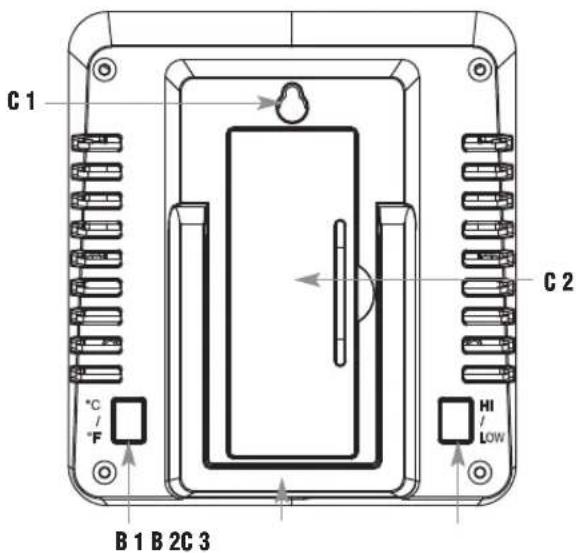
B: Buttons (Fig. 2):
B 1: °C / °F button
B 2: HI / LOW button
C: Housing (Fig. 2):
C 1: Mounting hole
C 2: Battery compartment
C 3: Stand
Wireless thermometer

5.2 Transmitter (Fig. 3+4):
D 1: LED signal lamp
D 2: Battery compartment
D 3: Mounting hole
6. Getting started
6.1 Insert the batteries
- Place the instruments on a table at a distance of about 1.5 meters from each other. Avoid being close to possible sources of interference such as electronic devices and radio equipment.
- Open the battery compartment of the transmitter and insert a new battery (1.5 V AA), ensure that battery polarities are correct. The LED signal lamp flashes.
- Close the battery compartment again.
- Remove the protective film from the base station display.
- Open the battery compartment of the base station.
- Insert a new battery (1.5 V AA), polarity as indicated. All segments will be displayed briefly. The indoor temperature and humidity appear on the display.
- Close the battery compartment again.
Wireless thermometer

6.2 Reception of outdoor transmitter
- After inserting the batteries the transmitter will automatically transmit the temperature. The reception symbol will be flashing on the display.
- If the reception of outdoor temperature fails, “- -” appears on the display. Check the battery and try it again. Check if there is any source of interference.
- You can also start the initialization manually. Hold the °C / °F and HI / LOW button on the base station for five seconds at the same time.
- “- -” appears on the outdoor temperature display and the reception symbol flashes. The base station will scan again the outdoor temperature.
7. Operation
7.1 Indication of the temperature
- Press the °C / °F button to change between °C (Celsius) or °F (Fahrenheit) as temperature unit.
7.2 Maximum and minimum values
- There are two memory modes for highest and lowest values.
Wireless thermometer

7.2.1 Maximum and minimum values with manual reset
- As soon as the base station and the outdoor transmitter are active the maximum and minimum values for indoor and outdoor will be stored and displayed in the right row.
- Press and hold the HI / LOW button for three seconds, the values are deleted (display “-”) and reset to the actual values.
7.2.2 Maximum and minimum values with auto reset
- Press the HI / LOW button to enter the automatic reset mode of the maximum-minimum values.
• HI / LOW 24 HR appears on the display. - This mode displays the maximum and minimum values measured in the last 24 hours. When a reading is older than 24 hours, it is replaced with the next higher or lower reading that is still within the current 24-hour time window.
- Note: The highest and lowest values are not simultaneously reset to the current measurement at a specific time.
- Manual reset is also possible.
Wireless thermometer

8. Positioning and mounting of the base station and the transmitter
- The base station can be placed onto any flat surface (fold-out stand) or wall mounted (mounting hole) at your chosen location. Make sure you avoid the vicinity of any source of interference such as computer screens, TV sets or solid metal objects.
- The transmitter can be wall mounted (mounting hole at the back). When placed outdoors, choose a shady and dry place for the transmitter. Direct sunlight may trigger incorrect measurement and continuous humidity damages the electronic components needlessly.
- Once the desired location is chosen, check whether the transmission from the transmitter to the base station is possible (transmission range of up to 80 m in open areas). Within solid walls, especially ones with metal parts, the transmission range can be reduced considerably.
- If necessary choose another position for the transmitter and/or base station.
Wireless thermometer

9. Care and maintenance
- Clean the devices with a soft damp cloth. Do not use solvents or scouring agents.
- Remove the batteries if you do not use the devices for a long period of time.
- Store the devices in a dry place.
10. Troubleshooting
Problem Solution
No indication → Ensure that the battery polarity on the base station is correct
→ Change the battery
No transmitter reception → No outdoor transmitter is in-Display “---” stalled
→ Start manual search for the outdoor transmitter
→ Check the outdoor transmitter's battery (do not use rechargeable battery!)
Wireless thermometer

→ Restart the outdoor transmitter and the base station according to the manual
→ Choose another place for the outdoor transmitter and/or the base station
→ Reduce the distance between the outdoor transmitter and the base station
→ Check if there is any source of interference
Incorrect indication → Change the battery
Please note: When the batteries are changed, the contact between the transmitter and the base station must be restored – so always insert new batteries into both devices or start the manual search for the transmitter.
Wireless thermometer

11. Waste disposal
This product has been manufactured using high-grade materials and components which can be recycled and reused.

Never dispose of empty batteries and rechargeable batteries with ordinary household waste.
As a consumer, you are required by law to take them to your retail store or to an appropriate collection site depending on national or local regulations in order to protect the environment.
The symbols for the contained heavy metals are: Cd=cadmium, Hg=mercury, Pb=lead
This product is labelled in accordance with the EU Waste Electrical and Electronic Equipment Directive (WEEE).
Please do not dispose of this product in ordinary household waste. As a consumer, you are required to take end-of-life devices to a designated collection point for the disposal of electrical and electronic equipment, in order to ensure environmentally-compatible disposal.
Wireless thermometer

12. Specifications
Measuring range
Indoor temperature -10 °C ... +60 °C
Humidity 10%RH ... 99%RH
Outdoor temperature -40 °C ... +60 °C
Temperature accuracy ± 1 °C
Humidity accuracy ± 3% (35 ... 75%)
Range max. 80 m (open field)
Transmission frequency 433 MHz
Maximum
radio-frequency power < 10mW
Power consumption
Base station 1 x 1.5 V AA
Outdoor transmitter 1 x 1,5 V AA
batteries (not included)
Use alkaline batteries
Wireless thermometer

Base station
Dimensions 77 x 22 x 86 mm
Weight 70 g (device only)
Outdoor transmitter
Dimensions: 64 x 20 x 41 mm
Weight 34 g (device only)
No part of this manual may be reproduced without written consent of TFA Dostmann. The technical data are correct at the time of going to print and may change without prior notice. The latest technical data and information about this product can be found in our homepage by simply entering the product number in the search box.
EU Declaration of conformity
Hereby, TFA Dostmann declares that the radio equipment type 30.3065 is in compliance with Directive 2014/53/EU. The full text of the EU declaration of conformity is available at the following Internet address:
www.tfa-dostmann.de/service/downloads/ce
www.lfa-dostmann.de
Station base 1 x 1,5 V AA
Émetteur 1 x 1,5 V AA (piles non incluses)


- Wireless thermometer
- Before you use this product
- Delivery contents
- Range of application and all the benefits of your new instrument at a glance
- For your safety
- Caution! Risk of injury:
- Important information on product safety!
- Elements
- Base station (Receiver)
- A: Display (Fig. 1):
- B: Buttons (Fig. 2):
- C: Housing (Fig. 2):
- Transmitter (Fig. 3+4):
- Getting started
- Insert the batteries
- Reception of outdoor transmitter
- Operation
- Indication of the temperature
- Maximum and minimum values
- Maximum and minimum values with manual reset
- Maximum and minimum values with auto reset
- Positioning and mounting of the base station and the transmitter
- Care and maintenance
- Troubleshooting
- Problem Solution
- Waste disposal
- Specifications
- Base station
- Outdoor transmitter
- EU Declaration of conformity
- www.lfa-dostmann.de
Brand : TFA
Model : INFO 30.3065.02
Category : Thermometer