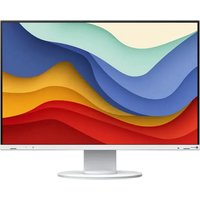
FlexScan EV2410R - Monitor EIZO - Free user manual and instructions
Find the device manual for free FlexScan EV2410R EIZO in PDF.


| Product Type | LCD Color Monitor |
| Brand | Eizo |
| Model | FlexScan EV2410R |
| Screen Size | 24 inches (61 cm) |
| Native Resolution | 1920 x 1200 (WUXGA) |
| Connectivity | DisplayPort, USB (USB-A to USB-B) |
| Power Supply | 100-240 V AC, 50/60 Hz |
| Power Consumption | Energy efficient (ENERGY STAR) |
| Monitor Weight (with stand) | Approximately 7 kg |
| Monitor Weight (without stand) | Approximately 5 kg |
| Dimensions (with stand, W x H x D) | Approximately 552 x 385 x 245 mm |
| Dimensions (screen only) | Approximately 552 x 362 x 62 mm |
| Stand Adjustments | Height, tilt, swivel, rotation |
| VESA Mounting | 100 x 100 mm, compatible with arm or bracket |
| Tilt Angle | Approximately -5° to +35° |
| Landscape/Portrait Rotation | Yes, 90° swivel |
| Maintenance | Clean with a soft, dry cloth. Do not use abrasive products. |
| Safety | Do not press on the screen, avoid shocks. Use the stand lock. |
| Warranty | 5 years or 30,000 hours (whichever comes first) |
| Environmental Standards | ENERGY STAR, TCO Certified |
| Country of Manufacture | Japan (Eizo Corporation) |
Frequently Asked Questions - FlexScan EV2410R EIZO
User questions about FlexScan EV2410R EIZO
0 question about this device. Answer the ones you know or ask your own.
Ask a new question about this device
Download the instructions for your Monitor in PDF format for free! Find your manual FlexScan EV2410R - EIZO and take your electronic device back in hand. On this page are published all the documents necessary for the use of your device. FlexScan EV2410R by EIZO.
USER MANUAL FlexScan EV2410R EIZO
User's Manual - Setup Guide
FlexScan® EV2410R
Color LCD Monitor
Setup Procedure 2
Attaching a Monitor Arm. 6
LIMITED WARRANTY 10
Regulatory Compliance Notice..
Hinweise zur Auswahl des richtigen Schwenkarms für ihren Monitor
Hinweis zur Ergonomie.
Information for Radio Interference . 3
ENERGY STAR
TCO Certified iv
Product Information.
Recycling Information.. vi
Contact Addresses.. ix
Important
Please read PRECAUTIONS, this Setup Guide and the User's Manual carefully to familiarize yourself with safe and effective usage. Please retain this guide for future reference.
Setup Procedure
1
^12*2
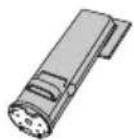
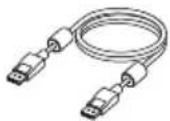
PP200
(DisplayPort™ - DisplayPort)
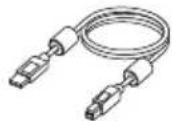
UU200SS (USB-A-USB-B)
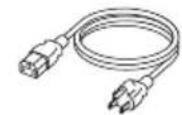

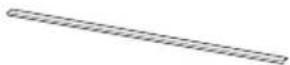
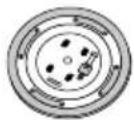
Edge Support*3
1 Instructions for attaching the stand are provided in the separate "Assembly Instructions."
2 Not included if you purchased the free mount type monitor.
*3 Included only with the free mount type monitor.

CAUTION
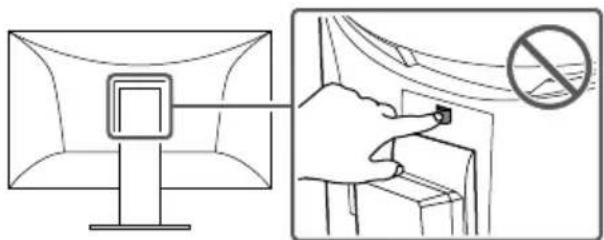
The lock button is only used to remove the stand from the monitor. In other cases, using the lock button may result in product damage or personal injury due to the monitor becoming detached from the stand.
2
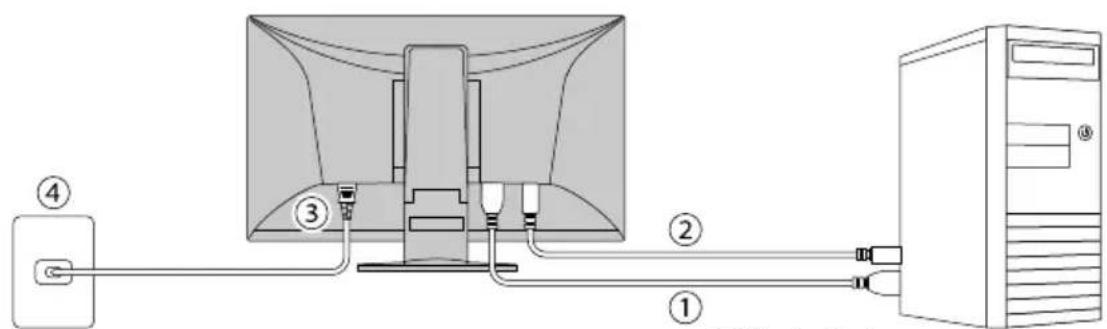
① DisplayPort
② USB-A - USB-B
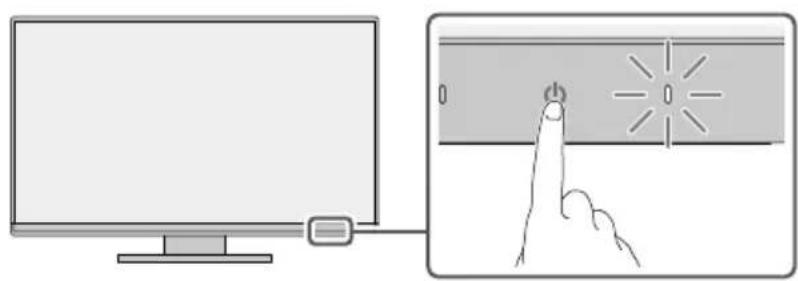
3
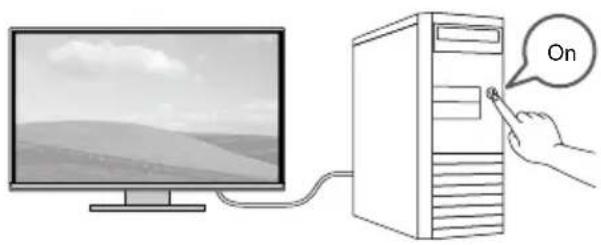
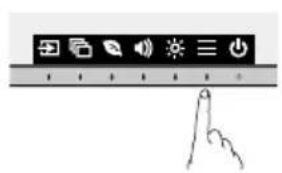
4

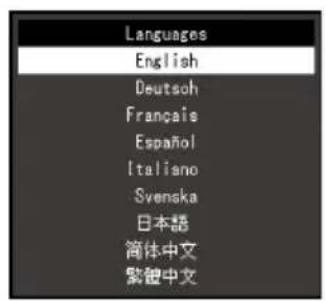
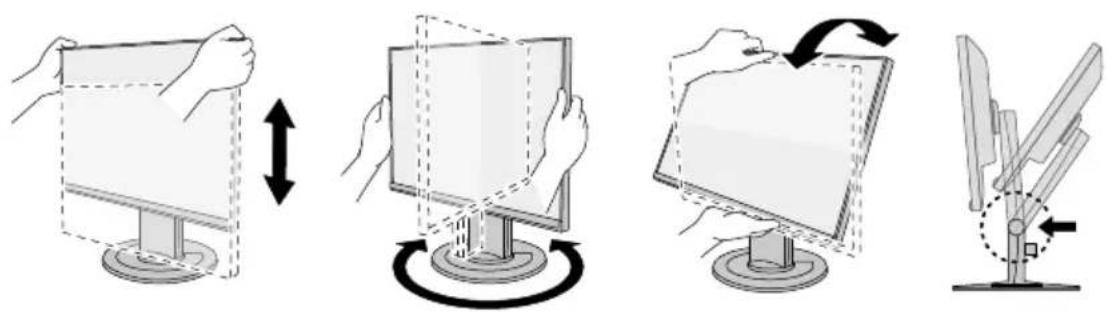
5
6
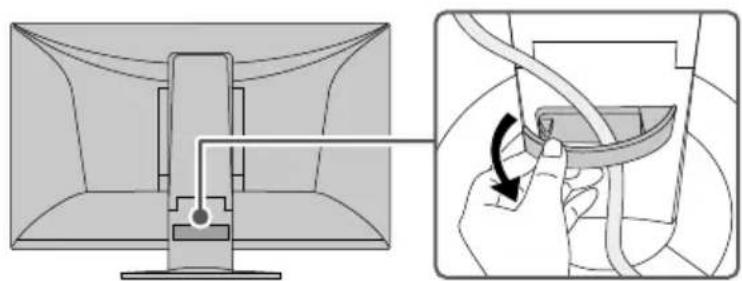
7 For the latest product information including the "User's Manual", refer to our web site: www.eizoglobal.com
Attaching a Monitor Arm
This product can be replaced with another arm or stand by removing the stand part ^1 .
Attachable Arms and Stands
The attachable arms and stands are as follows.
| EIZO products Refer to | the EIZO Web site (www.eizoglobal.com). |
| Other manufacturer's products | VESA standard compliant arms or stands that meet the following conditions - Clearance between mounting part screw holes: 100 mm × 100 mm - Mounting part external dimensions: 122 mm × 122 mm or smaller - Plate thickness: 2.6 mm - Weight tolerance: Strong enough to support the weight of the monitor unit and attachments such as cables. |
Installation Conditions
The possible installation directions and tilt angle ranges are as follows.
| Orientation Tilt angle | |
| Between 45° upward to 45° downward |

When used between 5^ to 45^ downward
When installing the monitor on a wall or suspended from the ceiling facing downward from 5^ to 45^ , be sure to install the "edge support" to the monitor unit. If you use the monitor without installing the edge support, the front panel surface of the monitor may come off. Also, it will not be covered by the product warranty. For how to install the edge support, refer to page 8. Some models don't come with an edge support. When you need it, please contact the EIZO group company or distributor in your country or territory.
www.eizoglobal.com/contact/
| Installation method Tilt angle | |||
| Wall-mounted | Ceiling-mounted | Arm-mounted | Between 5° to 45° downward |
*1 If you purchased the free mount type monitor, the stand is not included.
Installing an Arm or Stand
If you purchased the free mount type monitor, skip steps 1 through 3.
- Raise the height of the monitor to the maximum height.
Attention
-
If the monitor is not raised to the maximum height, there may be cases when the height of the monitor accidentally changes while removing the stand. This may be the cause of injury or damage.
-
Lay a soft cloth on a stable surface, and place the monitor on top with the screen face down.
Attention
-
Be careful not to press down on the screen with your hands or pinch your fingers.
-
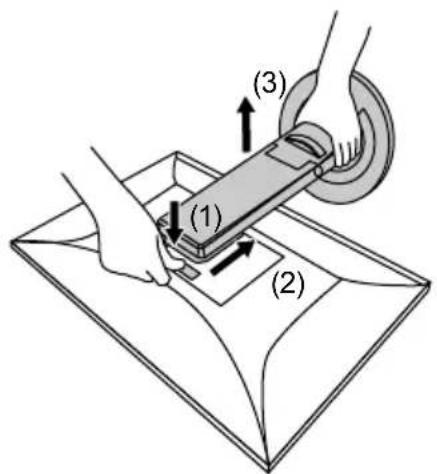
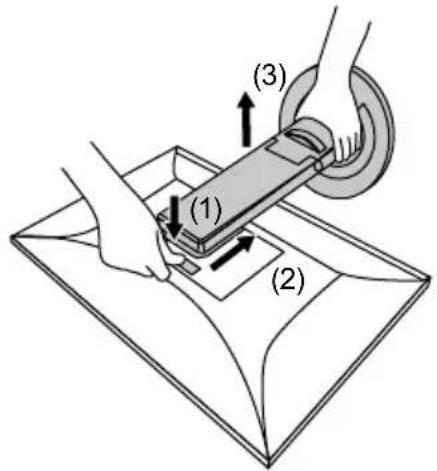
While pressing the lock button (1), firmly hold the stand brace, and slide the stand in the direction of the pedestal on the bottom (2). Then, lift up the stand (3).
Attention
- There is a protrusion on the fitting part of the removed stand. Be careful not to touch the fitting part.
-
Do not move the removed stand up and down. Doing so may result in injury or device damage.
-
Install the arm or stand on the monitor.
For the installation method, refer to the User's Manual for the arm or stand.
For installation, use commercially available screws that meet the following conditions:
- Nominal diameter: M4
- Length: between 7.3mm and 10.1mm (when using a washer, add the thickness of the washer)
Attention
- Regularly check the tightness of the screws. If they are insufficiently tightened, the monitor may come off, which may cause injury or device damage.
Edge Support Installation Method
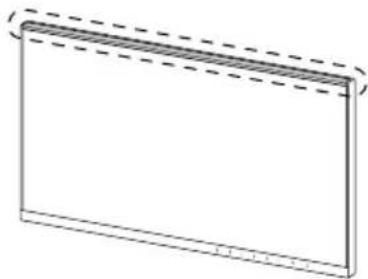
When installing the monitor facing downward between 5^ to 45^ , install the "edge support" on the monitor unit.
Location of installation
Installation procedure
Attention
- When installing an edge support, be careful not to press down on the screen with your hands. Pressing down on the LCD screen may cause it to become scratched or otherwise damaged.
-
Do not reuse an edge support that has previously been removed from a monitor. Also, do not use an edge support if its adhesive side is dirty or otherwise contaminated. Contamination causes decreases in adhesive ability.
-
Firmly wipe down the top portion of the monitor using a cleaning cloth or other such item.
- Remove the release liner of the edge support's double-sided tape.
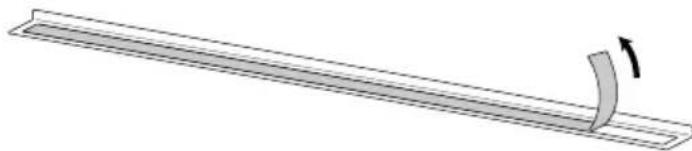
- Have one corner of the edge support aligned with the inside of the frame. Do this while taking care to ensure that the double-sided tape of the edge support does not stick to the monitor.
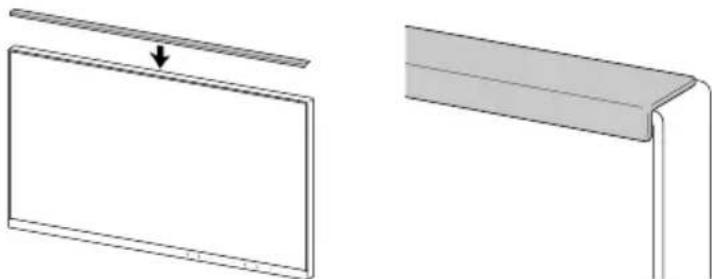
-
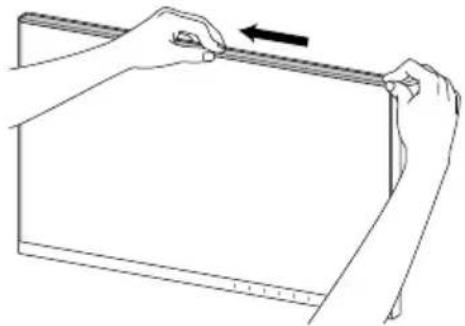
Install the edge support at the aligned position while ensuring that there are no gaps between the LCD panel surface and the edge support.
-
Using your finger, firmly rub down on the top surface of the edge support to ensure adhesion.
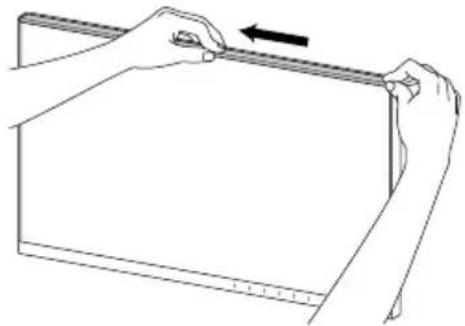
Confirm that the edge support is firmly adhered.
LIMITED WARRANTY
EIZO Corporation (hereinafter referred to as "EIZO") and distributors authorized by EIZO (hereinafter referred to as the "Distributors") warrant, subject to and in accordance with the terms of this limited warranty (hereinafter referred to as the "Warranty"), to the original purchaser (hereinafter referred to as the "Original Purchaser") who purchased the product specified in this document (hereinafter referred to as the "Product") from EIZO or Distributors, that EIZO and Distributors shall, at their sole discretion, either repair or replace the Product at no charge if the Original Purchaser becomes aware within the Warranty Period (defined below) that the Product malfunctions or is damaged in the course of normal use of the Product in accordance with the description in the instruction manual of the Product (hereinafter referred to as the "User's Manual").
The period of this Warranty is five (5) years from the date of purchase of the Product or 30,000 hours of usage time, whichever comes earlier (hereinafter referred to as the "Warranty Period"). EIZO and Distributors shall bear no liability or obligation with regard to the Product in relation to the Original Purchaser or any third parties other than as provided under this Warranty.
EIZO and Distributors will cease to hold or store any parts (excluding design parts) of the Product upon expiration of five (5) years after the production of the Product is discontinued. In repairing the Product, EIZO and Distributors will use renewal parts which comply with our QC standards. If the unit cannot be repaired due to its condition or the stockout of a relevant part, EIZO and Distributors may offer the replacement by a product with equivalent performance instead of repairing it.
The Warranty is valid only in the countries or territories where the Distributors are located. The Warranty does not restrict any legal rights of the Original Purchaser.
Notwithstanding any other provision of this Warranty, EIZO and Distributors shall have no obligation under this Warranty whatsoever in any of the cases as set forth below:
(a) Any defect of the Product caused by freight damage, modification, alteration, abuse, misuse, accident, incorrect installation, disaster, adherent dust, faulty maintenance and/or improper repair by third party other than EIZO and Distributors;
(b) Any incompatibility of the Product due to possible technical innovations and/or regulations;
(c) Any deterioration of the sensor, including measurement value of the sensor;
(d) Any defect of the Product caused by external equipments;
(e) Any defect of the Product caused by the use under environmental conditions not anticipated by EIZO;
(f) Any deterioration of the attachments of the Product (e.g. cables, User's Manual, CD-ROM, etc.);
(g) Any deterioration of the consumables, and/or accessories of the Product (e.g. batteries, remote controller, touch pen, etc.);
(h) Any exterior deterioration or discoloration of the Product, including that of the surface of the LCD panel, the touch panel and the protect panel;
(i) Any defect of the Product caused by placement in a location where it may be affected by strong vibrations or shocks;
(j) Any defect of the Product caused by leaking battery liquid;
(k) Any deterioration of display performance caused by the deterioration of expendable parts such as the LCD panel and/or backlight, etc. (e.g. changes in brightness, changes in brightness uniformity, changes in color, changes in color uniformity, defects in pixels including burnt pixels, etc.);
(I) Any deterioration or malfunction of the cooling fan caused by adherent dust.
To obtain service under the Warranty, the Original Purchaser must deliver the Product, freight prepaid, in its original package or other adequate package affording an equal degree of protection, assuming the risk of damage and/or loss in transit, to the local Distributor. The Original Purchaser must present proof of purchase of the Product and the date of such purchase when requesting services under the Warranty.
The Warranty Period for any replaced and/or repaired product under this Warranty shall expire at the end of the original Warranty Period.
EIZO OR DISTRIBUTORS ARE NOT RESPONSIBLE FOR ANY DAMAGE TO, OR LOSS OF, DATA OR OTHER INFORMATION STORED IN ANY MEDIA OR ANY PART OF ANY PRODUCT RETURNED TO EIZO OR DISTRIBUTORS FOR REPAIR.
EIZO AND DISTRIBUTORS MAKE NO FURTHER WARRANTY, EXPRESSED OR IMPLIED, WITH RESPECT TO, INCLUDING, WITHOUT LIMITATION, THE PRODUCT AND ITS QUALITY, PERFORMANCE, MERCHANTABILITY OR FITNESS FOR ANY PARTICULAR USE.
IN NO EVENT SHALL EIZO OR DISTRIBUTORS BE LIABLE FOR ANY INCIDENTAL, INDIRECT, SPECIAL, CONSEQUENTIAL OR OTHER DAMAGE WHATSOEVER (INCLUDING, WITHOUT LIMITATION, DAMAGES FOR LOSS OF PROFIT, BUSINESS INTERRUPTION, LOSS OF BUSINESS INFORMATION, OR ANY OTHER PECUNIARY LOSS) ASING OUT OF THE USE OR INABILITY TO USE THE PRODUCT OR IN ANY CONNECTION WITH THE PRODUCT, WHETHER BASED ON CONTRACT, TORT, NEGLIGENCE, STRICT LIABILITY OR OTHERWISE, EVEN IF EIZO OR DISTRIBUTORS HAVE BEEN ADVISED OF THE POSSIBILITY OF SUCH DAMAGES.
THIS EXCLUSION ALSO INCLUDES ANY LIABILITY WHICH MAY ARISE OUT OF THIRD PARTY CLAIMS AGAINST THE ORIGINAL PURCHASER. THE ESSENCE OF THIS PROVISION IS TO LIMIT THE POTENTIAL LIABILITY OF EIZO AND DISTRIBUTORS ARISING OUT OF THIS LIMITED WARRANTY AND/OR SALES.
UcTaHOBka KPOHHTeHa Hn CToiKn
B cnyuae npno6peTeHnMa MOHTopa co CBO6oHbIM TINOM MOHTaKa nponyctnte WaIc 1 no 3.
1.ПОДHIMMITE MOHITOPHa MAKCIMaJIbHyIO BBICOTy.
BHMaHne
-
Ecni MOHITOP He 6ydet NODHAT Ha MAKCImaJIbHyIO BbICOTy, B HeKOTOpBIX CnyaJx npi nepemeueHHI CTOnIKI BO3MOXHO BHe3aIIHOE HEnpeIDHaMEpeHHOe I3MeHeHne BbICOTBI MOHITopa. 3To MoKet npuBeCTN K TpaBMnPOBaHIO NOJIb3OBAteJIY INI NOBpeXdeHIO O6OpUoBaHnI.
-
IIOJXHTe Ha yCTOyHByIO NOBepxHOCTb MRAKyo TKaHB N IOMeCTNTe MOHITOP CBepxHa HHe IOBepxHOCTbIO 3KpaHa BHN3.
BHHMaHne
CneiTe 3a TeM, YTo6bI He HaxKaTb Ha 3KpaH pykAmn He 3aUeMTb NaIbUcbl.
- Haximma Ha KhoKy 6nokropBkn (1), Kpenko BO3bMntecb 3a fKcTOp cToKn n CdBnHbTe cToKy no HanpaBneHIO K OCHOBAHIO B HIXHe YactN (2). 3aTe mIoHNMTe cToKy (3).
BHHMaHne
Ha coeHHTeBHOJ cHrToI CTOIKn IMeETcBbICTyN.CJeINTe 3a TEM, YTO6bI He KacaTbc8 coeHHTeBHOJ cHrT.
He nepemeaTe CHTyU CTOnKy BBepx HIN BHN3. 3TO MOKeT npNBecTu K TpaBMnPOBaHIO IIN IOBpeKJdeHIO VCTPOECTBA.
- YcTaHOBInTe Ha MOHInTop KPOHInTeH ININ CTOnKy.
Cnoc6 yctaHOBKn CM. B pyKOBOCTBe NOJb3OBATEJI KPOHHTeH INI CTOnKn.
IycaHOBn IcnoJb3yIte DoCTynHbIe B npOdaKe BNHTbl, COOTBeTCTByIOUne CneDyIOUM KpntepnM:
-HomHaJIbHbI dIaMeTp:M4
-Динha:OT7,3do10,1MM (приисноьзованшабыдобавte eeToIuHy)
BHHMaHne
Heo6xOIMa peryIpaHna npOBepka 3aTAAKN BnHTOB. B cnyae nx HeIOCTaTOOH 3aTAAKN MOHITOP MOKET OTCOEHNHTCB, YTO MOKET npBecNT K TpABMPOBAHNO HIN NOBpeJKeHNO yCTPOICTBA.
Cnocob yctaHOBKn kpaeBOI onopbl
- BbipOBHnTe OOnH yroN kpaEBoONOpbI c BHytpEnHe qacTbO paMKn. Ppi BBINOHN He TOrO DeNCTBnA CJeDInTe 3a TeM, YTO6bl DBycSTOPOHnKNeKaJ NENTa KpaEBoONOpbI He npuINnAa K MOHTopy.
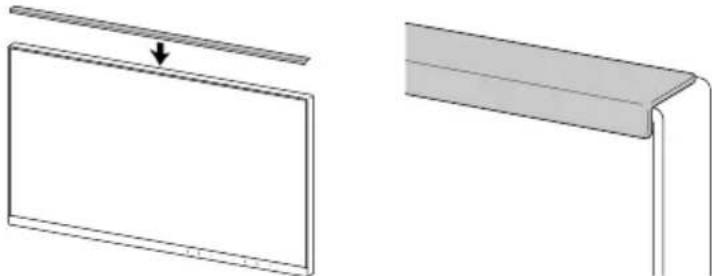
-
YcTaHOBnTe KpaEBYIO ONOpY B BbIPOBHeHHOM NIOXKeHN, CNeJa 3a Tem, YTO6bl MeKdy NOBepxHocTbIO naHeJN XXK-MOHHTopApN KpaEBOONOpOHe 6bIINO 3a3OpOB.
-
TuaTeNbHO noTpne NaIbIe M BepXHIO NOBepXHOCTb KpaEBO ONOpbl, YTO6bl pNkneHTbe ee.
Y6eIntecb, YTO KpaEBa onopa nIoTHo npNKTeHa.
OrpaHnueHHaTAPaHTn
EIZO Corporation (Ha3bIaemar B daJIbHeMwEM «EIZO») n ABTOpHnIOBaHnHbIe EIZO nCtPn6yTopbI (Ha3bIaEBMeB D aJIbHeMwEM «DcTpyIOT, B COOTBeTCTBm C yCNIOBMA N nyHKTaM N 3ToN orpaHnHeHHO rapaHTMN (Ha3bIAeMOB D aJIbHeMwEM «Fapantna»), nepBnuHOMy nOKyntenIO (Ha3bIAeMOy B daJIbHeMwEM «NepBOHaayhbln noKynatEnb»),
KOTOpBn npno6pey EIZO nn NInCTpn6byTopOB npOdyKT, yka3aHbB B 3TOM DOkyMeHTe (Ha3bIaEBmB B daJIbHeJWeEM «PpOdyKT»),чTo EIZO nnn DInCTpn6byTopbHa CBOE YCMOTpeHne IIN6 BOecNnAHO OTPeMOHTpyIOT, IN6o BeCnPaTHO 3aMeHrT PpOdyKT, ecn NpEboNaHbHn NOKyNaTeJI pN3HaET B ppeJax TapaHTnHoro cpoKa (ONpeDeJeHHoro HnKe),TO PpOdyKT HeNCnPaBeH nIN OH NOBpeXdE H pOLeCE C HopMaJIbHO rICNoJIb3OBAHn IPODyKTa B COOTBEcTBn C ONcaHHem B IHCTpyKUIN NO AKnIyatauNN PpOdyKTa (Ha3blBaEMOB BAJIbHeJWeEM «PykoBoDCBo nOnb3ObaTeTnR»).
IpaANTnHbI npnoOrpaHueh cpoKOM pTb (5) Iet ot DaTb npno6peTeHn IpoDyKa nHn cpoKOM 30 000 yacob NcNoB3OBaHnI PpOyKA (Ha3bIbAembB dAnbHeuWeM «IpaANTnHbI npnoD»).EIZO nNCTpnbyTopb He Hecyt HnKaok OBTeCTBeHHoCTn Hne6epTy o6ra3ateJIbCTB OTHocHTeJIbHO IpoDyKa nO OTHoSeHnIO K IepBOHaayAbHOMy NOKyNaTeHIO nIN NO OTHoWEnHO K NIObIM TpeTbIM CTOpOHAM, KpOME o6ra3ateJIbCTB, OROBopeHHbIX B 3ToI PaAPHTn.
KOMnHnE IZO nIncTpmbIoTbpI npekpaiaot noCTabky u xpaHHeNne IIObix 3aunacte npodykta (3a NckHoueHnem o6pa3oB dnn pa3p6oTkn) no nctuehen nn Tn (5) neT noCne npekpaee HbInycka npdykta. B cnUyae peMOHTa ycToiCTBa, EIZO n DnctpbIoTbpI bdyt nCOnb30BaTb 3anactn, KOTpbie COOTBeTcByOt HaINM cTaHapTAM KOHTPON KaueCTBa. Ecnn yCTpoiCTBO HeBO3MOXHO OTpeMOHTnpOBaTb n3-3a eRO CoCTOHN HIN OTCYCTBnH HyxHoi DeTAn, TO BMEcTO peMOHTA KOMnHnE EIZO n ee nCtPmbIoTbpI moryt npednaTb 3ameHy HenCnpaBHorO ycToiCTBa Ha ycToiCTBO c aHaIIOHnHBMn XapakTepcntkamn.
IapaHTnJa DeIcTBnTeJIbHa TOnIbKO B CTpaHax IIN PermoHax, rpe paCIOJoxKeHbI NcTpN6TyOpbl. IpaHTnJa He orpaHnUBAe HNKakne 3aKOHHbIe npBa IepBOHaayBHorO nokynateJI.
Hecmptra Ha npyhe ycnoBna 3tof TapaHTn EIZO n Dnctpn6yTopbI He Hecyt HnKaKx 06a3aTeJbCTB corlacho 3tof TapaHTn B IIObom n3 nepeucneHHbIX Hnke cnyaeb:
(a) IIO6bIe DepeKtI PpOyKTA, Bb3BaHHbIe NOBpeXDeHnMn npn nepeBo3Ke, MoDnΦkaCneu, m3MeHeHEm, HnpaBnIbHbIM o6paueHnEM, HnPaBnIbHbIM nCNoIb3OBAHnEM, aBapnMn, HnPaBnIbHOYCTAHOBKO, CTxNHBIM 6edCTBnMn, npnIinIe NblIO, HnpaBnIbHbIM yXoDMn U/nn HnPaBnIbHbIM pemOHToTpeTbe CTOPOHO, OTmHOrOT EIZO nn DInctpn6byTopOB;
(6) IIO6bIe HecOBMeCtHMocTn IpoDyKta 13-3a TexHnuecknx ycObepeHCTBOBaHn N/IMn IMmeHeHn TExHnuecknx HopM;
(B)Пибoeповржденидатчнka,ВКЛIOЧАУxуДшениеpe3yЛьТаTOBИЗМЕРЕНДаTCHKOM;
(r)Iio6bIe DepeKtI Ppo4yKa, Bb3BaHHbe BHeUHHMn ycTPOiCtBaMn;
(Ⅱ)ЛIO6bIe DeΦeKtI PtOdyKTA, Bbl3BaHbIe NcNoJIb3ObaHnEm BycnoBnX OkpyKaIoSei CpeDJI, He npEaONaraEmbIX EIZO;
(e) IIO60I 3HOC KOMPNEKTYOUIX INpoDyKTA (HaNPIMeR, Ka6enei, PykoBOcTBO noJIb3oBaTeJRA, dUscKa CD-ROM n T.D.);
(Ж) Любов ИЗнoc pacxoДьхЧастги n/NnnpHаДпexKhoCTe Пpoукт(aHanpIMep,6aTapeek,nylbTaДиctaHIOHOyynpaBNeHЯ, CTInLyca n T.D.);
(3) IIO6oB BHeuHn uHoc nIIN u3MeHHe nCBeTa IpoDyKTA, BKJIouaJ noBepxHocTb KK- naHeJN, ceHCOPHOI naHeJN 3aunTHOHN aHeJN;
(Ⅳ) Πύθυδε έπρόμγκτή Προύγκτα, Βυβιδανηλίνεραλεμεηνεμενενενενενενενενενενενενενενενενενενενενενενενενενενενενενενενενενενενενενενενενενενενενενενενενενενε
(κ) Μιοῦν ΕάφεκTBγ ΠρούκγΤα, BBI3BaHhbε ΠροτΕΚaHημε δαταρεκηκ;
(π) Μιοῦ yxyuδηνηρ a6oβtbi dncnIe, Bb3BaHhIe I3haunBaHneM HeBocctaHOBMbIX qacte, TAKx KaK naHebKKD n/ INI NOCBETKa I.T.D. (HaPIMep, I3MeHeHne B JRPKCTN, I3MeHeHne B paBHOMepHOCTN JRPKCTN, I3MeHeHne B CBETHOCTN, I3MeHeHne B paBHOMepHOCTN ZBeTHOCTN, I3MeHeHne B NIKCEJAX, BKIOJyAR BBIOPEBJIe NIKCEJIb I T.D.);
(M) IIO60I3HOCIINHECNpabBHOCTN OXIAKDAIOJIeBOHTNJIaTOpA, Bb3BaHHbIe pnpJINIIeIbJIbIO.
YTO6bI NOJyHbT EcxHueckoe 06cJyKbAHnB B pAMkax TapaHTn, IepBOHaJIbHbI NOKyNaTeB DoJxKe H DoCTaBtB PPOdyKT MeCTHO My DCSTpB6TyOp, ONIIaTHB NpePBO3Ky, B ERO OPIINHAJIbHO YNAKOBe INN B DpyrO COOTBEcTBYIOSe yNAKOBKe, o6ecneuBAIoUe paBHOeHHyIO CTeNEHb 3aUITbI, PnIHMa8 BO BHMaHHe PnCK NOBpeXeHnI N/INy UTeIO npI TpaHCNoPTnpOBKe. PnI 3aPpOce TexHueckoro 06cJyKbAHnB B pAMkax TapaHTn IepBOHaJIbHbI NOKyNaTeB DoJxKe H PpeOCTaBtB CBNDeTbCTBO NOKyKN IIPOdyKTA N DaTb NOKyKN.
FapaHTnHbI nepnoD nIpyoRo 3aMeHeHHoro u/IIu OTePoMHPOBaHHoro npOyKta B paMKax FapaHTmN IcTeKaET B KOHcE 3aBepseHnCpoka DeiCTBnOpRHaHbHoro FapaHTmHOro nepnoDa.
EIZO INI INCTPNBUTOPbI HE HECYT OTBETCTBEHHOCHTN 3A IIOBbIE NOBPEKdEHn IIN YTEPIO DAHHbIX INI INI DPYTOHINΦOPMAUIN, XPAHARXCHRA HA KAKNXJINBO HOCNTELX INHΦOPMAUIN INI HA IIOBbIX DpyrIX YACTRX INPOyTKA, KOTOPbI BO3BPAuEHE EIZO INI INCTPNBUTOPAM DJIPEMOHTA.
EIZO INCTPNBIOPTOpHE IPEIOCTABJHOT DONOHINTEJBHbIE TAPAHNTN B RBOH NIN HERBHO FOPME, B TOM YNCNE OTHOCHTIELBO YCTPOICTBA IN EGO KAUCHETBA PABOTBI, INPOIN3BOIDNTELBOHOCTN, TOBAPHbIX XAPAKTEPNCTK INI INPIROHOCTIN DIA OTDEHBIX INPIMHEHEN.
HINPIKAKNXUCIOBHXEIZONININDCCTPNBTOPBHEHECYTOTBETCTBEHHOCTN3AJIIOBOI CNYAHHBIKOCBEHNBI, CNEUANBHyI, NIOOCHHyI ININHOUYCEPB (BKJIOUAY, BE3 OPGAHUeyH, UYCEPB13-3AHENOJUYEHNOIPNBILINPEPBIBAHNA Bn3HECA,NOTEPNI KOMMEPUECKO INHOPMALININJIOBbIE DpyTNEFHNAHCOBBIE NOTEPN), BO3NHUKWIMN3-3A INCNOBJ3OBAHN INJINHEBO3MOXHOCTNUCNOJB3OBATB PPOyKTINB JIOBOI DpyTOCBRA3N C PPOyKTOM, JINGO OCHOBAHHI HA KOHTPAKTHbIX OTHOWEHIX, IPAKDAHCKNXPPABOHAPUYEHNX, HEBPEKHOCTN, PPIUNHEHNA YUCEPB5A TPTBeI CTPOHE INIYEMJINBO EUE, DAXE ECNJENIZEO ININ DCCTPNBTOPBblIN YBEIDOMLHeI O BO3MOXHOCTN TAKOTO UyEPBA.
3TO NCKIHOUEHNE TAKKE BKJIIOUCAET IIOBbIE O8R3ATEJIbCTBA, KOTOPbIE MOYT BO3HnKHyTB PE3yJIbTATE TPE5OBAHIN TPETbE IN CTPOHbI B OTHOUEHIN INPBOHauJIbHOrO NOKyNATEJIA. CYUECTBOM 3TOTO NOLOXHEHNA RBLIETcRg ORPAHUYEHNE NOTEHuaJIbHOI OTBETCTBEHHOCTH EIZO IN DICTPNBvTOPOB, BO3HnKAIOUeN 3-3A 3TOI ORPAHUYEHON IAPAHTNI N/IIIN PPODAJK.
Regulatory Compliance Notice
Information for Radio Interference
| For U.S.A., Canada Only |
| FCC Supplier's Declaration of Conformity |
| We, the Responsible Party EIZO Inc. |
| 5710 Warland Drive, Cypress, CA 90630 |
| Phone: (562) 431-5011 |
| declare that the product Trade name: EIZO |
| Model: FlexScan EV2410R |
| is in conformity with Part 15 of the FCC Rules. Operation of this product is subject to the following two conditions:(1) this device may not cause harmful interference, and (2) this device must accept any interference received,including interference that may cause undesired operation.This equipment has been tested and found to comply with the limits for a Class B digital device, pursuant to Part 15 of the FCC Rules. These limits are designed to provide reasonable protection against harmful interference ina residential installation. This equipment generates, uses, and can radiate radio frequency energy and, if not installed and used in accordance with the instructions, may cause harmful interference to radio communications.However, there is no guarantee that interference will not occur in a particular installation. If this equipment doescause harmful interference to radio or television reception, which can be determined by turning the equipment offand on, the user is encouraged to try to correct the interference by one or more of the following measures.* Reorient or relocate the receiving antenna.* Increase the separation between the equipment and receiver.* Connect the equipment into an outlet on a circuit different from that to which the receiver is connected.* Consult the dealer or an experienced radio/TV technician for help.Changes or modifications not expressly approved by the party responsible for compliance could void the user'sauthority to operate the equipment.NoteUse the attached specified cable below or EIZO signal cable with this monitor so as to keep interference withinthe limits of a Class B digital device.- AC Cord- Shielded Signal Cable (enclosed) |
| Canadian NoticeThis Class B information technology equipment complies with Canadian ICES-003.Cet équipement informatique de classe B est conforme à la norme NMB-003 du Canada. |
Compliance labeling on the product itself can be found in the "Information" menu of the product. For details, refer to the User's Manual.
ENERGY STAR®
As an ENERGY STAR Partner, EIZO Corporation has determined that this product meets the ENERGY STAR guidelines for energy efficiency.
Power consumption may increase depending on product settings and connection conditions.
This product carries the TCO Certified designation (EcoView Optimizer 2: Off). TCO Certified is the leading independent sustainability certification for IT products.
A third-party certification according to ISO 14024


Toward sustainable IT products
Say hello to a more sustainable product
IT products are associated with a wide range of sustainability risks throughout their life cycle. Human rights violations are common in the factories. Harmful substances are used both in products and their manufacture. Products can often have a short lifespan because of poor ergonomics, low quality and when they are not able to be repaired or upgraded.
This product is a better choice. It meets all the criteria in TCO Certified, the world's most comprehensive sustainability certification for IT products. Thank you for making a responsible product choice, that help drive progress towards a more sustainable future!
Criteria in TCO Certified have a life-cycle perspective and balance environmental and social responsibility. Conformity is verified by independent and approved verifiers that specialize in IT products, social responsibility or other sustainability issues. Verification is done both before and after the certificate is issued, covering the entire validity period. The process also includes ensuring that corrective actions are implemented in all cases of factory non-conformities. And last but not least, to make sure that the certification and independent verification is accurate, both TCO Certified and the verifiers are reviewed regularly.
Want to know more?
Read information about TCO Certified, full criteria documents, news and updates at tcocertified.com. On the website you'll also find our Product Finder, which presents a complete, searchable listing of certified products.
Product Information
COMMISSION DELEGATED REGULATION (EU) 2019/2013 with regard to energy labelling of electronic displays
| Parameter | Parameter or value and precision Unit | |||
| 1. ES201 plier's name or trademark | ||||
| Supplier's address | EIZO Europe GmbH, Belgrader Straße 2, 41069 Mönchengladbach, Germany | |||
| 2. Hx201 mode power demand in SDR | ||||
| 3. Energy efficiency class for Standard Dynamic Range (SDR) | B | |||
| 4. On mode power demand in SDR | ||||
| 5. Energy efficiency class for High Dynamic Range (HDR) | ||||
| 6. On mode power demand in HDR, if implemented | ||||
| 7. Off mode, power demand, if applicable | ||||
| 8. On standby mode power demand, if applicable | ||||
| 9. Networked standby mode power demand, if applicable | ||||
| 10. Beritoneomic display category | ||||
| 11. Bsize ratio | ||||
| 12. B201en1200ptbts | ||||
| 13. Screen diagonal cm | ||||
| 14. Screen diagonal inches | ||||
| 15. Missible screen area | dm2 | |||
| 16. Ranel technology used | ||||
| 17. Automatic Brightness Control (ABC) available | No | |||
| 18. Voice recognition sensor available | No | |||
| 19. Room presence sensor available | No | |||
| 20. Battery refresh frequency rate (default) | ||||
| 21. Minimum guaranteed availability of software and firmware updates (from the date of end of the placement on the market) | 5 | Years | ||
| 22. Minimum guaranteed availability of spare parts (from the date of end of the placement on the market) | 5 | Years | ||
| 23. Minimum guaranteed product support | 5 | Years | ||
| Minimum duration of the general guarantee offered by the supplier | 5 | Years | ||
| 24. Fitmealsupply type | ||||
| 25. External power supply (non standardized and included in the product box) | ||||
| i | - | |||
| ii | Input voltage | - | V | |
| iii | Output voltage | - | V | |
| 26. External standardised suitable power supply (if not included in the product box) | ||||
| i | - | |||
| ii | Required output voltage | - | V | |
| iii | Required delivered current (minimum) | - | A | |
| iv | Required current frequency | - | Hz | |
Recycling Information
English
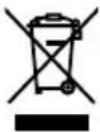
The symbol of the crossed-out wheeled bin indicates that the product should not be disposed of as unsorted waste but must be sent to separate collection facilities for recovery and recycling. Please contact a distributor or an affiliate in your country for appropriate disposal and available collection systems of the product including cables.
The contact addressees are listed on the EIZO website below. www.eizoglobal.com
For recycling information for customers in Switzerland, please refer to the following website. www.swico.ch
For customers in the United States, a free take-back program for the product and packaging materials is available. Please refer to the following website for details. www.eizo.com/warranty/recycling/
Deutsch
a a a a a a a a a a a a a a a a a a a a a a a a a a a a a a a a a a a a a a a a a a a a a a a a a a a a a a a a a a
Contact Addresses
For Europe Only.
Please contact the EIZO group company or distributor in your country with any inquiries about purchasing or technical support. Visit the EIZO website for further contact information: www.eizoglobal.com
Manufacturer's Contact Addresses in Europe
| Company Address | |
| EIZO AG Moosacherstrasse 6, Au CH - 8820 Wädenswil, Switzerland | 87 1230, Vienna, Austria |
| EIZO Austria GmbH Pfarrgasse | 87 1230, Vienna, Austria |
| EIZO Europe GmbH Belgraderstraße 2, 41069 Mönchengladbach, Germany | Straße 2, 41069 Mönchengladbach, Germany |
| EIZO Europe GmbH Belgian Branch | Antwerpseleenweg 22, 2860 Mechelen (Sint-Katelijne-Waver), Belgium |
| EIZO Europe GmbH Czech Branch | Meteor Centre Office Park "B", Sokolovska 100/94, CZ-186 00 Praha-8, Karlin, Czech Republic |
| EIZO Europe GmbH Netherlands Branch | Dr. Holtroplaan 38, 5652 XR Eindhoven, The Netherlands |
| EIZO Europe GmbH Succursale per l'Italia | Via Torino 3/5 20814 Varedo (MB), Italy |
| EIZO Limited | 1 Queens Square, Ascot Business Park, Lyndhurst Road, Ascot, Berkshire SL5 9FE, UK |
| EIZO Nordic AB Lövgsvägen | 14 SE-194 45 Upplands Väsby, Sweden |
| ALSTOR ZOO ul. Wenecka 12, 03-244 Warszawa, Poland | 03-244 Warszawa, Poland |
| Aryan Comunicaciones, s.a. Avda. De La Industria 4 Natea Bussines Park 2B (Planta 3) ES-28108 Alcobendas, Spain | a. De La Industria 4 Natea Bussines Park 2B (Planta 3) ES-28108 Alcobendas, Spain |
| Feeder S.A.S 564 Avenue des Rosiers, Le Parc des restanques II, Bat 3A, 13600 La Ciotat, France | Rosiers, Le Parc des restanques II, Bat 3A, 13600 La Ciotat, France |
| K&D Computer Systems Ltd 82 | Ayias, Phylaxeos Street, P.O. Box 55024 3820 Limassol, Cyprus |
| Odak Kimya Endüstri Ürünleri San.Tic.Ltd Şti. | Esentepe Mah. Cevizli D-100 Güney Yanyol Cad. Kartal Vizyon Sitesi D Blok No:13 lç Kapi No: 26 KARTAL -İSTANBUL |
| i-Micro Corporation Ltd 6, Militu street, 146 71, Nea Erythrea, Athens, Greece | |
Importer Addresses in Europe
| Company Address | |
| EIZO AG Moosacherstrasse 6, Au CH - 8820 Wädenswil, Switzerland | |
| EIZO Europe GmbH Belgraderstraße 2, 41069 Mönchengladbach, Germany | |
| EIZO Limited | 1 Queens Square, Ascot Business Park, Lyndhurst Road, Ascot, Berkshire SL5 9FE, UK |
| EIZO Nordic AB Lövängsvägen | 14 SE-194 45 Upplands Väsby, Sweden |
| ALSTOR ZOO ul. Wenecka 12, 03-244 Warszawa, Poland | |
| Aryan Comunicaciones, s.a. Avda. De La Industria 4 Natea Bussines Park 2B (Planta 3) ES-28108 Alcobendas, Spain | |
| Feeder S.A.S 564 Avenue des Rosiers, Le Parc des restanques II, Bat 3A, 13600 La Ciotat, France | |
| K&D Computer Systems Ltd 82 | Ayias, Phylaxeos Str., P.O. Box 55024 3820 Limassol, Cyprus |
| Odak Kimya Endüstri Ürünleri San.Tic.Ltd Şti. | Cevizli Mah. Zuhal Cad. Dumankaya Ritim İstanbul 60 Parsel Kat:13 Daire: 131-132 Maltepe-Istanbul Turkey |
| i-Micro Corporation Ltd 6, Militcu street, 146 71, Nea Erythrea, Athens, Greece |