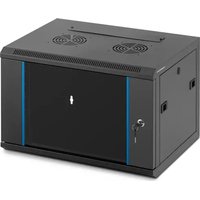
STAR_DC.19.6.S_04 - Computer Server Fromm & Starck - Free user manual and instructions
Find the device manual for free STAR_DC.19.6.S_04 Fromm & Starck in PDF.


| Product Type | Server rack |
| Brand | Fromm & Starck |
| Model | STAR_DC.19.6.S_04 |
| Mounting Format | 19 inches |
| Height | 6U (26.67 cm) |
| Width | 48.26 cm |
| Depth (estimated) | 60 cm |
| Weight (empty, estimated) | 15 kg |
| Maximum load capacity (estimated) | 80 kg |
| Main material | Steel |
| Power supply | Not applicable (passive) |
| Ventilation | Ensure adequate air circulation |
| Grounding | Required |
| Usage | Indoor, temperature-controlled environment |
| Main functions | Housing and organizing electronic equipment |
| Safety | Avoid electrical overload, overheating, instability |
| Maintenance | Clean with a soft damp cloth; regular inspection |
| Spare parts | Use recommended original parts |
| Repairability | Repairs by qualified personnel only |
| Compliance | Regulation (EU) 2023/988 on general product safety |
| Storage | Cool, dry place away from dust and humidity |
Frequently Asked Questions - STAR_DC.19.6.S_04 Fromm & Starck
User questions about STAR_DC.19.6.S_04 Fromm & Starck
0 question about this device. Answer the ones you know or ask your own.
Ask a new question about this device
Download the instructions for your Computer Server in PDF format for free! Find your manual STAR_DC.19.6.S_04 - Fromm & Starck and take your electronic device back in hand. On this page are published all the documents necessary for the use of your device. STAR_DC.19.6.S_04 by Fromm & Starck.
USER MANUAL STAR_DC.19.6.S_04 Fromm & Starck
This User Manual has been translated using machine translation. We have made every effort to ensure the translation is accurate, but please note that automated translations are not perfect and are not meant to replace human translators. The official version of the User Manual is in English. Any differences between the translated version and the original English are not legally binding. If you have any questions about the accuracy of the translation, please refer to the English version, which is the official reference. More language versions are available upon request via info@expondo.com.
Safety and operation instructions
Product name: Server rack
Model name: STAR_DC.19.6.S_04 | STAR_DC.19.12.S_02
DO NOT USE THE DEVICE UNLESS YOU HAVE THOROUGHLY READ AND UNDERSTOOD THIS USER MANUAL.
Safety Instructions
Warning: Read all safety warnings and instructions. Failure to follow the warnings and instructions may result in serious injury.
1. General Safety
This product is intended for its intended use: it is designed to house and organize multiple electronic devices such as servers, networking equipment, and other data center hardware. It provides a secure and efficient way to manage and maintain these devices, ensuring optimal performance and accessibility.
- Do not use the product for purposes other than those described in this manual.
- Keep this manual for future reference.
2. Operational Safety
- Use the product only on a stable, level surface.
- Do not operate the product if it is damaged or malfunctioning.
- Keep away from children and pets.
3. Maintenance Safety
- Only qualified personnel should perform repairs.
- Use only original spare parts.
4. Warning Symbols
- Caution: Indicates a potentially hazardous situation which, if not avoided, could result in minor or moderate injury.
o Warning: Indicates a potentially hazardous situation which, if not avoided, could result in death or serious injury.
EN
o Potential risks and hazards: Lists all risks and hazards directly or indirectly connected with the use or misuse of the product:
- Electrical Hazards: Risk of electric shock when installing or maintaining equipment. Ensure all devices are properly grounded and power sources are turned off before handling.
- Overheating: Inadequate ventilation can lead to overheating of equipment. Ensure proper airflow and cooling systems are in place.
■ Physical Injury: Risk of injury from lifting heavy equipment. Use appropriate lifting techniques and equipment to avoid strain or injury.
■ Fire Hazards: Overloaded power strips or faulty wiring can cause fires. Regularly inspect and maintain electrical connections and avoid overloading circuits.
■ Stability Risks: Improperly secured equipment can fall and cause injury or damage. Ensure all devices are securely mounted and the rack is stable. - Environmental Hazards: Exposure to dust, moisture, or extreme temperatures can damage equipment. Maintain a clean, dry, and temperature-controlled environment.
- Unauthorized Access: Risk of data breaches or tampering with equipment. Implement security measures such as locks and access controls.
Maintenance and Cleaning
1. Regular Maintenance
- Inspect the product regularly for signs of wear or damage.
○ Replace any damaged parts immediately.
2. Cleaning
- Use a soft, damp cloth to clean the exterior.
- Do not use abrasive cleaners or solvents.
3. Storage
○ Store in a cool, dry place.
- Protect from dust and moisture.
Disposal
Environmental Protection
- Do not dispose of this product as unsorted municipal waste.
- By ensuring proper disposal, you help prevent potential negative consequences for the environment and human health.
EN
Declaration of Compliance
We, expondo Polska sp. z o.o. sp. k., declare under our sole responsibility that the Server rack, Model STAR_DC.19.6.S_04 | STAR_DC.19.12.S_02, to which this declaration relates, is in conformity with the relevant Union harmonization legislation:
• Regulation (EU) 2023/988 (General Product Safety Regulation)
Manufacturer contact
expondo Polska sp. z o.o. sp. k.
For the disposal of the device please consider and act according to the national and local rules and regulations.
CONTACT
expondo Polska sp. z o.o. sp. k.
- Safety and operation instructions
- DO NOT USE THE DEVICE UNLESS YOU HAVE THOROUGHLY READ AND UNDERSTOOD THIS USER MANUAL.
- Safety Instructions
- General Safety
- Operational Safety
- Maintenance Safety
- Warning Symbols
- EN
- Maintenance and Cleaning
- Regular Maintenance
- Cleaning
- Storage
- Disposal
- Environmental Protection
- Declaration of Compliance
- Manufacturer contact
- CONTACT
Brand : Fromm & Starck
Model : STAR_DC.19.6.S_04
Category : Computer Server