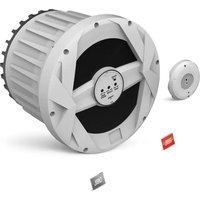
Marine MBP10 - Subwoofer JBL - Free user manual and instructions
Find the device manual for free Marine MBP10 JBL in PDF.


| Product type | Powered subwoofer |
| Brand | JBL |
| Model | Marine MBP10 |
| Speaker | 250 mm (10 inches) |
| RMS Power | 250 W |
| Frequency response | 40 Hz - 120 Hz |
| Signal-to-noise ratio | ≥75 dB @ 1 W |
| Fuse | 30 A |
| Maximum current draw | 27 A |
| Idle current draw | < 1.2 A |
| Power supply | 12 Vdc (boat battery) |
| Line input sensitivity | 100 mV to 6 V |
| Speaker input sensitivity | 250 mV to 12.5 V |
| Crossover frequency | 50 Hz to 120 Hz (variable) |
| Filter slope | 12 dB/octave |
| Bass boost | 0 dB to +7 dB @ 60 Hz |
| Phase | 0° or 180° (switch) |
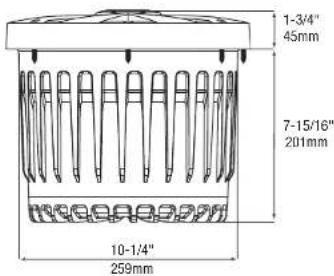
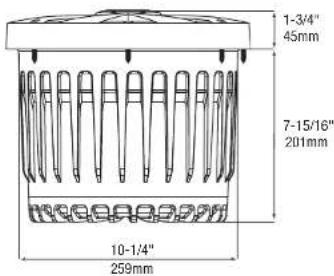
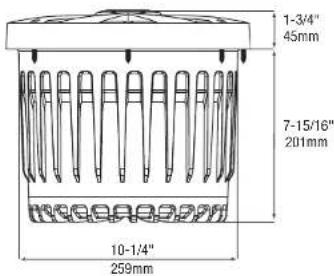
| Mounting depth | 201 mm (7-15/16 inches) |
| Cutout diameter | 259 mm (10-1/4 inches) |
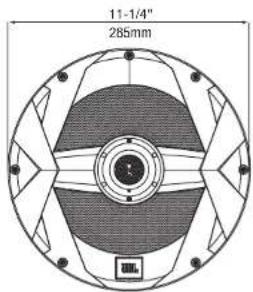
| Outer diameter | 285 mm (11-1/4 inches) |
| Recommended wire gauge | 12 AWG (power/ground), 20 AWG (remote) |
| Low voltage protection | Auto shut-off below 10 V |
| Usage | Marine (not automotive) |
| Warranty | Requires serial number and receipt |
| Maintenance | Clean with a dry cloth; reseal the rubber plug after adjustments |
Frequently Asked Questions - Marine MBP10 JBL
User questions about Marine MBP10 JBL
0 question about this device. Answer the ones you know or ask your own.
Ask a new question about this device
Download the instructions for your Subwoofer in PDF format for free! Find your manual Marine MBP10 - JBL and take your electronic device back in hand. On this page are published all the documents necessary for the use of your device. Marine MBP10 by JBL.
USER MANUAL Marine MBP10 JBL
natural_image
Close-up of a metallic industrial fan or turbine component with visible mounting flanges and control dial (no text or symbols)MARINE POWERED SUBWOOFER OWNER'S MANUAL
SUBWOOFER ACTIF MARINE MODE D'EMPLOI
SUBWOOFER ALIMENTADO PARA ENTORNOS MARINOS MANUAL DEL PROPIETARIO
www.jbl.com
INSTALLATION
THANK YOU
for choosing the JBL ^® MBP10. In order that we may better serve you should you require warranty service for your new subwoofer, please retain your original purchase receipt and register your new JBL marine subwoofer online at www.jbl.com.
WARNING
Playing loud music in a boat can hinder your ability to hear other boats, passengers and nearby swimmers and can permanently damage your hearing. We recommend listening at low or moderate levels while operating your boat. JBL accepts no liability for hearing loss, bodily injury or property damage resulting from the use or misuse of this product.
IMPORTANT
The MBP10 has been designed to provide the kind of high-performance low-frequency reproduction that used to require big, clumsy enclosures, large amplifiers and complex installation. To ensure maximum performance, we strongly recommend that installation be entrusted to a qualified professional. Although these instructions explain how to install the MBP10 in a general sense, they do not show the specific installation methods for your particular boat. If you feel you do not have the necessary tools or experience, do not attempt the installation yourself; rather, ask your authorized JBL car audio or marine audio dealer about professional installation options. Remember to keep this manual and your sales receipt in a safe place for future reference.
NOTE: This marine product is not intended for automotive applications.
INSTALLATION WARNINGS AND TIPS
• Always wear protective eyewear when using tools.
- Turn off the audio system and other electrical devices before you start. Disconnect the (−) negative lead from your boat's battery.
- At the installation sites, locate and make a note of all fuel lines, hydraulic lines, vacuum lines and electrical wiring. Use extreme caution when cutting or drilling in and around these areas.
- Check clearances on both sides of a planned mounting surface before drilling any holes or installing any screws. Remember that the screws can extend behind the surface.
Do not use screws long enough to penetrate the boat's hull.
- Before drilling or cutting holes, use a utility knife to remove unwanted fabric or vinyl to keep material from snagging in a drill bit.
- When routing cables, keep input-signal cables away from power cables and speaker wires.
- When making connections, make certain they are secure and properly insulated.
- If the amplifier's fuse must be replaced, use only the same type and rating as that of the original. Do not substitute another kind.
CHOOSING A MOUNTING LOCATION
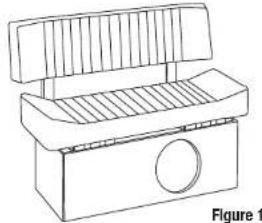
Choose a mounting location that doesn't interfere with walkways, seats or the operation of steering, control or safety mechanisms. The MBP10 must not interfere with the safe operation of the boat. The best location is usually a vertical wall that separates an under-seat storage compartment from the boat's interior space, as shown in Figure 1.
natural_image
Line drawing of a mechanical component with a circular hole and ribbed top (no text or symbols)MOUNTING THE MBP10
CAUTION: Make sure mounting screws will not puncture wiring harnesses, control cables, hydraulic or fuel lines, the fuel tank or the hull. Some or all of these may be located behind or under the mounting surface.
Cutting the Hole and Mounting the MBP10
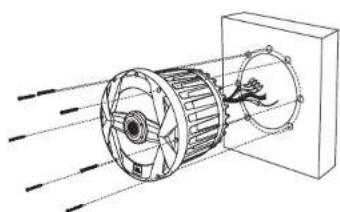
- Check that there is enough clearance behind the mounting surface to accommodate the MBP10.
- Using the included mounting template, check for clearance of the mounting flange and overall shape of the MBP10 in front of the mounting surface.
- Mark the hole in the baffle for the MBP10 and the holes for the mounting bolts.
- Using a jigsaw or a rotary tool with a blade appropriate for the material you'll cut, cut along the line that marks the mounting hole.
- Using a drill and bit, drill the holes for the mounting screws.
- Insert the MBP10 in the mounting hole, align the screw holes, insert the screws and then tighten them to hold the MBP10 in place.
natural_image
Technical line drawing of a mechanical component with internal blades and flow arrows (no text or symbols)Figure 2 Figure 3
CONNECTIONS
About Power and Ground Connections:
The red B+ wire and the black ground wire should be connected directly to the battery terminals in your boat. If your boat has a two-battery system, connect the red and black wires to the battery that provides power for your boat's accessories rather than the battery that provides power to start your boat's motor. JBL's MBP10 is designed to shut off if it senses that your battery's voltage has fallen below 10 volts, in order to prevent your battery from becoming fully discharged while you're on the water.
Power Connection
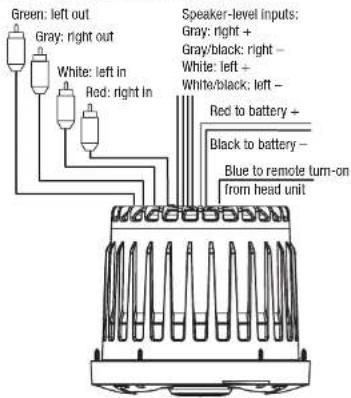
Connect power, ground and remote lum-on signal to the MBP10, as shown in Figure 3. Also observe these installation tips:
- Use at least #12 AWG wire for the +BATT (+12 Vdc) and GND (ground) connections. Use at least a #20 AWG wire for the REM (remote) connection.
- When routing power, ground, remote and signal cables, ensure that wires are not able to become entangled with cargo, control cables, the boat's motor, passengers' feet or any other object that could become a safety hazard.
- Install a fuse holder with a 30A fuse within 18" of the battery + terminal (see Figure 5).
- The REM connection requires +5 to +12 Vdc signal for the MBP10 to turn on. Most head units provide this remote voltage signal.
Connecting the Signal
The MBP10 Includes a 2-channel speaker-level Input and a 2-channel line-level Input. Either input connection type may be used. Follow the diagram below to connect signal to your MBP10.
CONTROLS AND FUNCTIONS
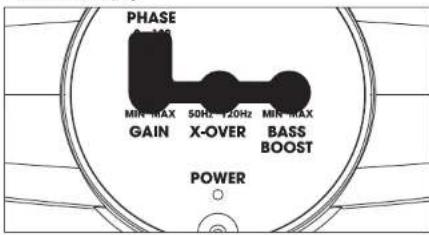
The MBP10 has several controls and indicators that simplify sonic integration with the rest of the speakers on your boat. To gain access to the controls, you must remove the water-tight rubber plug underneath. To install the cover, follow the arrows in Figure 6 and insert the two screws.
Figure 4. Rubber plug
NOTE: Be sure to replace the rubber plug after making adjustments.
Figure 5. Installing cover
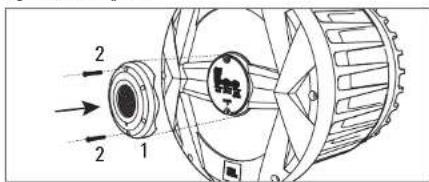
Figure 6. MBP10 controls on the front panel
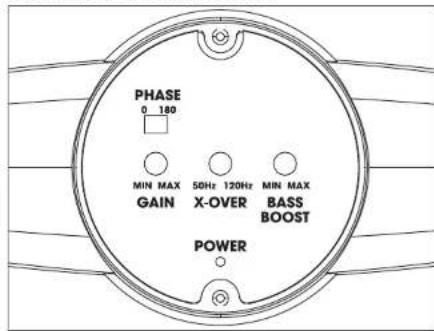
Power LED: This indicator will glow white when the MBP10 is operational.
Gain Control: Use this control to adjust the volume (loudness) of the MBP10, compared to the loudness of the other speakers in your boat.
Crossover: Use this control to adjust the amount of high-frequency information in the MBP10's output. A lower value means less high-frequency signal will be present in the MBP10's output.
Bass Boost: Use this control to correct any perceived peak or dip in the bass response. This control provides boost or cut at 60Hz. Set the control to any value between 0dB and +7dB, according to your preference.
Phase Control: Use this switch to reverse the phase of the MBP10's output, with respect to its input. Choose the position (0° or 180°) that sounds best. See "Tuning the MBP10."
TUNING THE MBP10
- Make sure the head unit is off and its volume control is set to minimum.
- On the MBP10's front panel, set the Gain control to the midpoint position.
- Set the Crossover control to its maximum position (clockwise).
- Set the Bass Boost control to the minimum position (counterclockwise).
- Set Phase to 0°.
- Turn on the head unit and play a favorite music track that has substantial bass. Set the head unit's volume control to 75% of the total output (approximately 3 o'clock on rotary controls).
- Listen to your system, making a mental note of the amount of upper bass being reproduced.
- Switch the Phase control to 180^ and listen again for upper bass content. There may be more upper bass, less upper bass, or no change at all. The position that provides the most upper bass is correct.
- Adjust the Crossover control clockwise or counterclockwise until you hear only low-frequency information in the output of the MBP10. For example, you should NOT hear any vocals coming from the MBP10 when seated in the normal listening position.
- Adjust the Bass Boost control clockwise to suit your preference.
NOTE: In most cases, the steps above will provide satisfactory tuning. However, the actual process may require several readjustments of each control, since the settings will interact with each other. If necessary, consult your authorized JBL car or marine audio dealer for help in tuning your system.
NOTE: Depending on the MBP10's orientation and location in your boat, reversing the phase may (or may not) increase or decrease the amount of upper bass being reproduced.
TROUBLESHOOTING SPECIFICATIONS
SYMPTOM LIKELY CAUSE SOLUTION
| Power LED is not lit. Fuse is blown. | Head unit is not functioning properly. | Fuse should be replaced.Check remote voltage, and power, ground or remote connections. The MBP10 is designed to shut off if the battery voltage falls below 10V. This is to ensure that your battery isn't completely drained. Charge the boat's battery. |
| Power LED is lit but there is no bass. | Inputs are not connected.Head-unit fader control is not set properly. | Check connections.Adjust head-unit fader control to feed audio signals to the MBP10. |
| MBP10 sounds muddy or distorted. | Gain control is set too high.Bass Boost is set too high.Head-unit output is distorted or blown. | Readjust Gain control (see "Tuning the MBP10" on the previous page).Readjust Bass Boost control (see "Tuning the MBP10" on the previous page). |
A valid serial number is required for warranty coverage.
Features, specifications and appearance are subject to change without notice.
MBP10
• 10" (250mm) Marine Powered Subwoofer
• Amplifier Power: 250W RMS
• Frequency Response: 40Hz – 120Hz
■ Signal-to-Noise Ratio: ≥75dB @1W
- Fuse: 30A
- Max. Current Draw: 27A
- Idle Current Draw: <1.2A
- Input Sensitivity:
Line-Level Input: 100mV to 6V Speaker-Level Input: 250mV to 12.5V
• Crossover Frequency: 50Hz to 120Hz
• Crossover Slope: 12dB per octave
• Bass Boost: 0dB to +7dB @ 60Hz
- Mounting Depth: 7-15/16" (201mm)
• Cutout Diameter: 10-1/4" (259mm)
• Overall Diameter: 11-1/4" (285mm)

HARMAN International Industries, Inc.
8500 Balboa Boulevard, Northridge, CA 91329 USA
www.jbl.com
© 2018 HARMAN International Industries, Incorporated. All rights reserved. JBI is a trademark of HARMAN International Industries, Incorporated, registered in the United States and/or other countries. Features, specifications and appearance are subject to change without notice.
CE

INSTALLATION

MERCI
natural_image
Line drawing of a mechanical device with a handle and circular opening (no text or symbols)MONTAGE DU MBP10
natural_image
Technical line drawing of a mechanical component with motion lines indicating airflow or movement (no text or symbols)Figure 2
BRANCHEMENTS
SYMPTÔME CAUSE POSSIBLE SOLUTION

HARMAN International Industries, Inc. 8500 Balboa Boulevard, Northridge, CA 91329 USA www.jbl.com
natural_image
Line drawing of a mechanical component with a circular hole and ribbed top (no text or symbols)MONTAJE DEL MBP10
natural_image
Technical line drawing of a mechanical component with fan and housing, showing motion lines without any text or symbolsFigura 2
CONEXIONES

HARMAN International Industries, Inc.
8500 Balboa Boulevard, Northridge, CA 91329 USA
www.jbl.com
