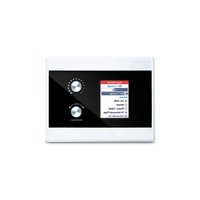
RAD26 - Audio Amplifier Rane - Free user manual and instructions
Find the device manual for free RAD26 Rane in PDF.


| Product type | Digital audio amplifier for HAL system |
| Brand | Rane |
| Model | RAD26 |
| Dimensions (W x H x D) | 14.9 cm x 5.5 cm x 10 cm (approx.) |
| Weight | Approximately 0.8 kg |
| Power | 24 V DC via RPI (remote power injector) |
| Output power | 2 x 4 W stereo or 1 x 8 W mono (8 Ω) |
| Audio inputs | 2 balanced microphone/line/line-plus inputs (Euroblock), 1 auxiliary input 3.5 mm |
| Audio outputs | 2 speaker outputs 8 Ω, 2 balanced line outputs, 1 headphone output 3.5 mm |
| Logic inputs/outputs | 3 contact closure inputs, 3 active low outputs |
| Main features | Audio amplification, source selection, volume control, automatic auxiliary/headphone input detection, 24 V phantom power for microphones, logic control for projector/screen |
| Connectivity | RAD RJ-45 port (shielded CAT5e) for connection to a HAL system |
| Display | LCD screen with ambient light sensor |
| Maintenance and cleaning | Clean with a soft, dry cloth. Do not use abrasive products. |
| Safety instructions | Do not expose to moisture. Disconnect before cleaning. Use only with the supplied power supply. |
| Spare parts and repairability | Contact Rane technical support (rane.com/support) for any repairs or parts. |
| Box contents | RAD26, mounting bracket, installation tool, user guide, safety instructions |
| General information | Amplifier designed for meeting room, spa, hotel, sound reinforcement. Works with Halogen software. |
Frequently Asked Questions - RAD26 Rane
User questions about RAD26 Rane
0 question about this device. Answer the ones you know or ask your own.
Ask a new question about this device
Download the instructions for your Audio Amplifier in PDF format for free! Find your manual RAD26 - Rane and take your electronic device back in hand. On this page are published all the documents necessary for the use of your device. RAD26 by Rane.
USER MANUAL RAD26 Rane
User Guide (English)
Introduction
Using one shielded category cable drop, the RAD26 provides any room with a dual 4-watt amp, end user control via a color custom LCD & encoders, a dual universal audio I/O interface, plus headphone output and line-level input jacks for local needs. Three logic closure inputs and three active-low outputs add to the control capabilities. The amplifier permits a single channel option at 8 watts into 8 Ω. Applications include:
- Presentation source and volume, projector and screen control.
- Meeting room with A/V teleconferencing and speakers.
- Spa with BGM, local music input and stereo ceiling speakers.
- Hotel or cruise ship room TV and local input sound system.
A RAD26 provides enough I/O and control to support one room in a HAL audio system which may require these features:
- Local audio line input (smartphone, laptop, MP3, DVD)
• One or two microphone or line-level inputs - Amplifier outputs for ceiling speakers
- Level control
- Source selection
Each RAD26 may be installed onto a standard U.S. 2-gang electrical box, 1-gang electrical box, or flush-mounted to a wall surface. The exterior finish is matte white.
Source and level behave like a Rane DR3 remote, but with any combination of Levels, Toggles, Selections or Commands.
On the back, there are 2 balanced Euroblock Mic / Line / Line-Plus audio inputs with the mode set in Halogen software. The Line-Plus inputs accept unbalanced left and right signals and sums them to mono. 24 V phantom power is available for condenser mics. For end users, there is a 3.5 mm (1/8") Aux input on the underside of the front, accepting the output of a smartphone, laptop or other consumer device.
A built-in 4-watt stereo amplifier powers a small stereo pair of room speakers, or this amp can be switched in software to power a single 8-watt speaker. Balanced line outputs can drive an external amplifier or powered subwoofer for more output.
Software logic senses an inserted connector at the Aux In or Headphone jacks to optionally override the rear connections.
Box Contents
RAD26
Mounting Bracket
Installation Tool
User Guide
Safety & Warranty Manual
Support
For the latest information about this product (documentation, technical specifications, system requirements, compatibility information, etc.) and product registration, visit rane.com.
For system applications, design examples and related HAL information, please see the HAL Notes library at rane.com/library. If you need additional assistance, please contact our HAL technical agents at halogen@rane.com.
For additional product support, visit rane.com/support.
Setup
Items not listed under Introduction > Box Contents are sold separately.

The Ambient Light Sensor dims the display and LEDs in darkened rooms.
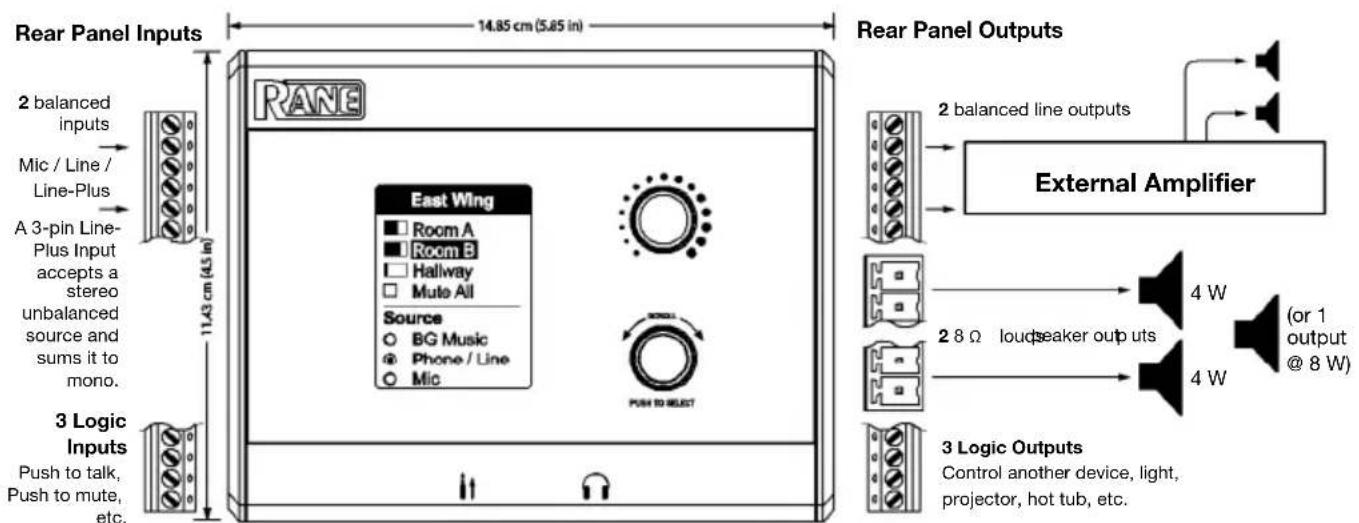
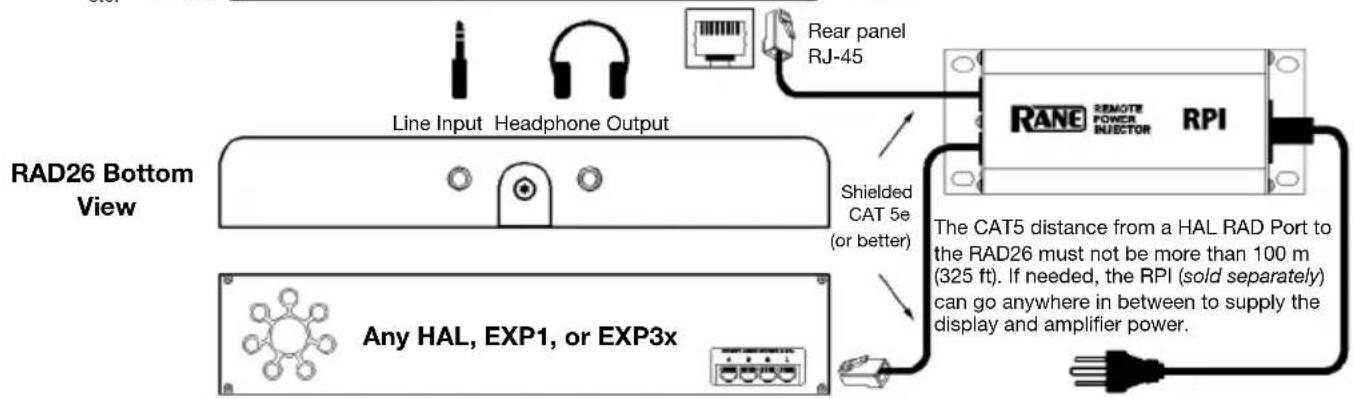
For a full block diagram, visit the RAD26 product page at rane.com.
Example
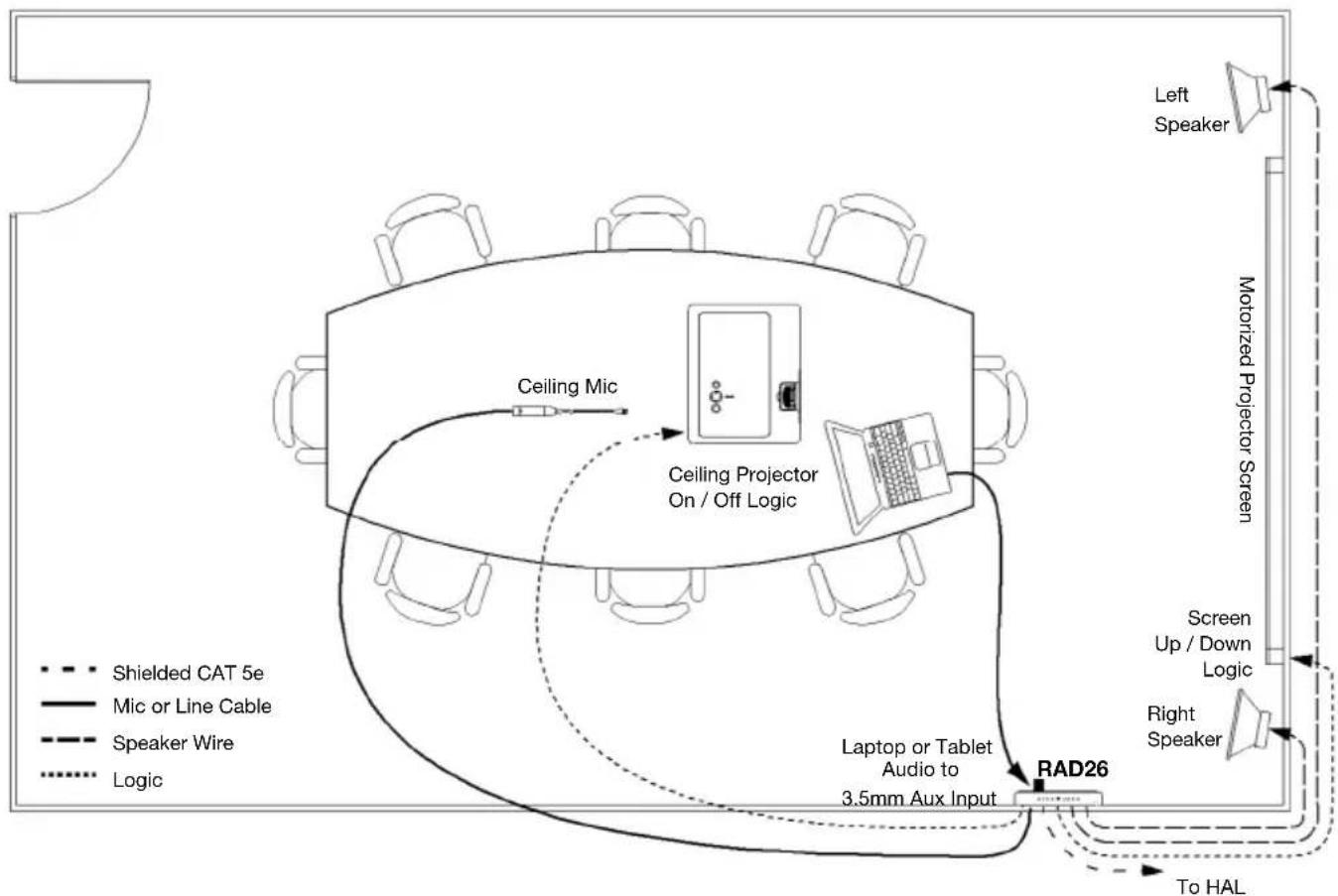
This configuration works for presentations in both boardrooms and classrooms.
The mic connects to the rear of the RAD26. It can be from a ceiling mic, or from a handheld or lavalier wireless mic, with 24 V phantom power available for condenser mics.
A presenter can easily plug a laptop, tablet or smartphone into the sound system. A regular consumer cable with stereo 3.5 mm (1/8") line plugs will work.
When no plug is present, background music or noise masking is available, sent from a HAL multiprocessor elsewhere in the building. A RAD26 selection decides which source, and how loud.
The amplifier is set to dual 4-watt mode to drive the left and right speakers.
The logic outputs can be configured as toggle controls to move the motorized screen up and down, and turn the projector on and off.
HAL lets you page into this room, ducking the local audio, or overriding it—automatically.
flowchart
graph TD
    A["Left Speaker"] --> B["Motorized Projector Screen"]
    B --> C["Laptop or Tablet Audio to 3.5mm Aux Input"]
    C --> D["Laptop or Tablet Audio to 3.5mm Aux Input"]
    D --> E["Laptop or Tablet Audio to 3.5mm Aux Input"]
    E --> F["Laptop or Tablet Audio to 3.5mm Aux Input"]
    F --> G["Laptop or Tablet Audio to 3.5mm Aux Input"]
    G --> H["Laptop or Tablet Audio to 3.5mm Aux Input"]
    H --> I["Laptop or Tablet Audio to 3.5mm Aux Input"]
    I --> J["Laptop or Tablet Audio to 3.5mm Aux Input"]
    J --> K["Laptop or Tablet Audio to 3.5mm Aux Input"]
    K --> L["Laptop or Tablet Audio to 3.5mm Aux Input"]
    L --> M["Laptop or Tablet Audio to 3.5mm Aux Input"]
    M --> N["Laptop or Tablet Audio to 3.5mm Aux Input"]
    N --> O["Laptop or Tablet Audio to 3.5mm Aux Input"]
    O --> P["Laptop or Tablet Audio to 3.5mm Aux Input"]
    P --> Q["Laptop or Tablet Audio to 3.5mm Aux Input"]
    Q --> R["Laptop or Tablet Audio to 3.5mm Aux Input"]
    R --> S["Laptop or Tablet Audio to 3.5mm Aux Input"]
    S --> T["Laptop or Tablet Audio to 3.5mm Aux Input"]
    T --> U["Laptop or Tablet Audio to 3.5mm Aux Input"]
    U --> V["Laptop or Tablet Audio to 3.5mm Aux Input"]
    V --> W["Laptop or Tablet Audio to 3.5mm Aux Input"]
    W --> X["Laptop or Tablet Audio to 3.5mm Aux Input"]
    X --> Y["Laptop or Tablet Audio to 3.5mm Aux Input"]
    Y --> Z["Laptop or Tablet Audio to 3.5mm Aux Input"]
    Z --> AA["Laptop or Tablet Audio to 3.5mm Aux Input"]
    AA --> AB["Laptop or Tablet Audio to 3.5mm Aux Input"]
    AB --> AC["Laptop or Tablet Audio to 3.5mm Aux Input"]
    AC --> AD["Laptop or Tablet Audio to 3.5mm Aux Input"]
    AD --> AE["Laptop or Tablet Audio to 3.5mm Aux Input"]
    AE --> AF["Laptop or Tablet Audio to 3.5mm Aux Input"]
    AF --> AG["Laptop or Tablet Audio to 3.5mm Aux Input"]
    AG --> AH["Laptop or Tablet Audio to 3.5mm Aux Input"]
    AH --> AI["Laptop or Tablet Audio to 3.5mm Aux Input"]
    AI --> AJ["Laptop or Tablet Audio to 3.5mm Aux Input"]
    AJ --> AK["Laptop or Tablet Audio to 3.5mm Aux Input"]
    AK --> AL["Laptop or Tablet Audio to 3.5mm Aux Input"]
    AL --> AM["Laptop or Tablet Audio to 3.5mm Aux Input"]
    AM --> AN["Laptop or Tablet Audio to 3.5mm Aux Input"]
    AN --> AO["Laptop or Tablet Audio to 3.5mm Aux Input"]
    AO --> AP["Laptop or Tablet Audio to 3.5mm Aux Input"]
    AP --> AQ["Laptop or Tablet Audio to 3.5mm Aux Input"]
    AQ --> AR["Laptop or Tablet Audio to 3.5mm Aux Input"]
    AR --> AS["Laptop or Tablet Audio to 3.5mm Aux Input"]
    AS --> AT["Laptop or Tablet Audio to 3.5mm Aux Input"]
    AT --> AU["Laptop or Tablet Audio to 3.5mm Aux Input"]
    AU --> AV["Laptop or Tablet Audio to 3.5mm Aux Input"]
    AV --> AW["Laptop or Tablet Audio to 3.5mm Aux Input"]
    AW --> AX["Laptop or Tablet Audio to 3.5mm Aux Input"]
Features
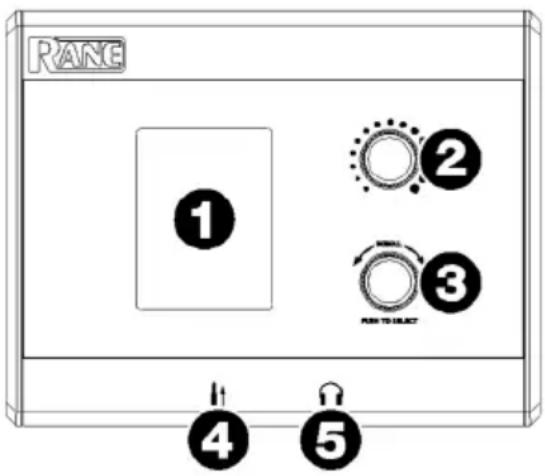
Front Panel
- Display: This color LCD shows the unit's current features, adjustments, and operating choices.
- Level: Turn this knob to adjust the audio level.
- Scroll / Select: Turn this knob to browse options in the display, and press it to select.
- Aux In (3.5 mm / 1/8") (bottom): This local audio line input allows for connection of a smartphone, laptop, or other device with a standard stereo audio cable. Software logic senses an inserted connector to optionally override rear input connections.
- Headphone Output (3.5 mm / 1/8") (bottom): Connect headphones to this output. Software logic senses an inserted connector to optionally override rear output connections and/or toggle linked functions.
Top Panel
- Audio I/O Signal Indicators: These LEDs indicate that audio is present. If the red Overload (OL) LED is always on, reduce the audio level.
- Ambient Light Sensor: This sensor detects light and can be programmed to dim the display and LEDs in darkened rooms.

- RAD Status Indicators: These LEDs show the state of operation for the RAD Port:
• TX LED: Lights green when audio is successfully transmitted.
- RX LED: Lights green when audio is successfully received.
- Comm LED: Lights green when communication is established with another device.
- Power LED: Lights green when the RAD Port is receiving 24-volt power. This also indicates that the twisted pair for power within the cable is wired and crimped properly.
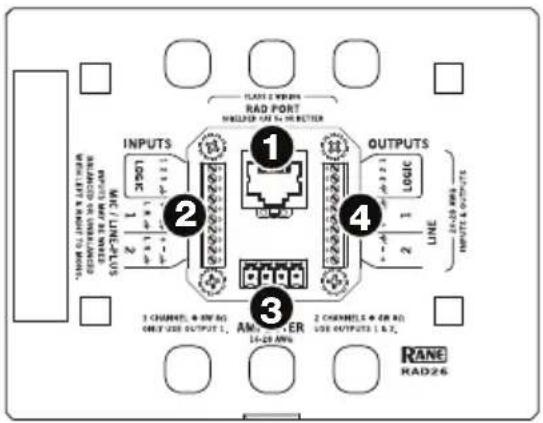
Rear Panel
- RAD Port (RJ-45): This port uses a Shielded CAT 5e cable to connect to any HAL RAD Port. The CAT 5 distance from a HAL RAD Port to the RAD26 must not be more than 100 m (325 ft). RPI (sold separately) can go anywhere in between to supply display and amplifier power. RPI is required when using HAL models.
- Inputs: Two balanced, switchable Mic / Line / Line-Plus audio inputs are available. The Line-Plus inputs accept unbalanced left and right signals and sums them to mono. 24 V phantom power is available for condenser mics. Three Logic inputs allow for additional controls such as push to talk, push to mute, etc.
- Amplifier Outputs: Two 8Ω loudspeaker outputs can power stereo 4-watt speakers, or a single 8-watt speaker.
- Outputs: Two balanced line outputs are available for driving an external amplifier or powered subwoofer for more output. Three Logic outputs allow for control of another device, light, projector, hot tub, etc.
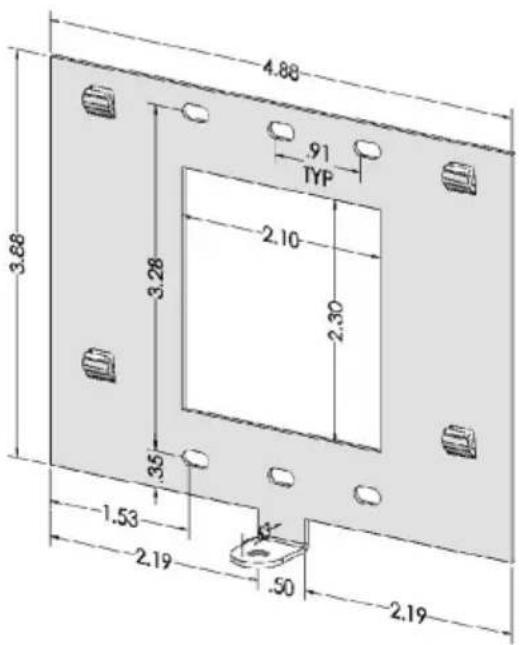
RAD26 Rear Wall Mount Bracket (included)
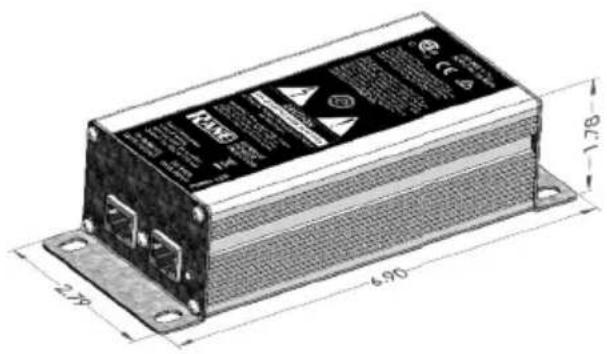
RPI (Remote Power Injector) (sold separately)
The midspan power injector (not PoE) connects shielded CAT 5e (or better) cables between any HAL and the RAD26 to deliver communications and the extra power needed for the display and amplifiers. The RPI is inserted anywhere between the HAL and the RAD26, which can be up to 100 meters (325 feet) apart.
Technical Specifications
Specifications are subject to change without notice.
| Parameter | Specification | Limit | Units | Conditions/Comments |
| Signal Indicators -50 typ. | dBFS Unbalanced / balanced output, green LED, peak-reading | |||
| Overload Indicators -0.5 | typ. dBFS Unbalanced / balanced output, red LED, peak-reading | |||
| Microphone Input Specs (level set in software) (2.54 mm Euroblock Terminal) | ||||
| Input Impedance | 2.16 k | typ. | Ω | Balanced, 1.08 k + 1.08 k |
| Gain Range (dynamic mic mode) | 30 to 50 typ. dB | In | 1 dB Steps | |
| Gain Range (condenser mic mode) | 18 to 38 typ. dB | In | 1 dB Steps | |
| Max. Input (dynamic mic mode) | -16 typ. dBu | -18 dBV, Balanced, Gain = 30 dB | ||
| Max. Input (condenser mic mode) | -4 | typ. dBu -6 dBV, Balanced, Gain = 18 dB | ||
| Equivalent Input Noise | -126 | typ. | dBu | 20 kHz BW, Rs = 150 Ω, Gain = 30 dB |
| CMRR | -70 | max. | dB | Rs = 150 Ω, 1 kHz, Gain = 30 dB |
| Frequency Response | 20 to 20k | typ. | Hz | +0, -0.5 dB, at all Gain settings |
| THD + Noise | 0.008% typ. | @ 1 kHz, 20 kHz BW, Rs = 150 Ω, Output = -6 dBFS, Gain = 30 dB | ||
| Phantom Power | 24 | 2% | V | 10 mA Max, always on in Condenser Mic Mode |
| Balanced Line-Level Input Specs (2.54 mm Euroblock Terminal) | ||||
| Input Impedance | 10 k | 1% | Ω | Balanced |
| Gain Range | 0 to 20 | typ. | dB | In 1 dB Steps |
| Max. Input level | 14 | typ | Ω | 1 kHz |
| Frequency Response | 20 to 20k | typ. | dB | +0, -0.5 dB |
| Dynamic Range (input) | 103 | typ. | dB | re: 0 dBFS, 20 kHz BW, A-weighted |
| THD + Noise | 0.008% typ. | @ 1 kHz, 20 kHz BW, Rs = 150 Ω, Output = -6 dBFS, Gain = 0 dB | ||
| Line+ Mode | Active Summer | Left (+") and Right (-") signals summed to mono | ||
| Max. Input Level L+R | 14 | max | dBu | 12 dBV |
| Auxiliary Input (3.5 mm Stereo TRS Switching Connector) | ||||
| Gain 0 to 20 typ. dB In 1 dB StepsMax. Input Level 12 max. dBu 10 dBVDynamic Range (input) 101 typ. dB re: 0 dBFS, 20 kHz BW, A-weightedFrequency Response 20 to 20k typ. dB +0, -0.5 dB, at all Gain settingsTHD + Noise | 1 dB StepsdBu 10 dBV | |||
| 0.008% typ. | @ 1 kHz, 20 kHz BW, Rs = 150 Ω, Output = -6 dBFS, Gain = 0 dB | |||
| Balanced Line-level Output Specs (Active Balanced) (2.54 mm Euroblock Terminal) | ||||
| Output ImpedanceMax. Output Level Dynamic Range Frequency Response 20 to 20k typ. dB +0, -0.5 dB, at all Gain settingsTHD + Noise | 20014104 typ. dB re: 0 dBFS, 20 kHz BW, A-weighted | ΩdBu | Each Leg< 1% THD, Load = 10 kΩBW, A-weighted | |
| 0.01% typ. @ 1 kHz, 20 kHz BW, Rs = 150 Ω, Output = +4 dBu, RAD26 Input to Output | Ω | |||
| Headphone Output (3.5 mm Stereo TRS Switching Connector) | ||||
| Maximum OutputMinimum Load | 13032 | typ. | mWΩ | per channel, Rload = 32 Ω |
| Amplifier Outputs (Full Bridge Class D Power Amplifier) | ||||
| Max. Output Power (Dual Mode)Max. Output Power (Single Mode)Dynamic Range Frequency Response 20 to 20k typ. HzTHD + Noise | 4899 typ. dB re: 0 dBFS, 20 kHz BW, A-weighted, Dual 4W Mode+0, -0.5 dB, at all Gain settings.02% typ. | max.max.max. | WW | 8 Ω load, <0.1% THD, both channels8 Ω load, <0.1% THD, Ch.1 only, Ch. 2 disabled |
| Logic Specs | ||||
| Logic Inputs | 3 Contact closure to ground (2.54 mm Euroblock Terminal) | |||
| ...Internal Pull-up 51.1 k | 1% Ω 5.0 | V | ||
| ...Logic High Input Level | >2.0 min. V Normal State | |||
| ...Logic Low Input Level | <0.9 max. V External circuit must sink >80 uA to assert | |||
| Logic Outputs | 2 Relay drive, LED or logic level output (2.54 mm Euroblock Terminal) | |||
| ...Internal Pull-up | 1.0 kΩ | 1% | Ω | 5.0 V, Protected to 30 V, reverse polarity protected |
| ...Sink Current | 200 | max. | mA | Output FET on |
| ...LED Drive Current | 2 | mA | Output FET off, driving an LED with Vf = 2.0 V | |
| ...Logic High Input Level | 4.7 | min. V | Output F | ET off, Output Current = 0 mA |
| ...Logic Low Input Level | 0.1 | max. | Output FET on, Sink Current < 200 mA | |
| Color Display | ||||
| Size | 49.8 mm x 37.5 mm | 1.96" x 1.48" | ||
| Resolution | 320 x 240 | Pixels | ||
| Color Depth | 16-bit | 131,071 colors | ||
| Backlight Brightness | 320 cd/m2 | typ. | Adjustable in software from maximum to off in 10 steps | |
| Ambient Light Sensitivity | Software configurable to adjust how sensitive the RAD26 screen is to changes in ambient light | |||
| Included Mounting Hardware with each RAD26 | ||||
| Wall Bracket Size | 124 mm x 76.2 mm | 4.875" x 3.875" | ||
| RAD26 Unit | ||||
| Wiring | Class 2 | |||
| Conformity | CE, FCC | |||
| Ambient Room Temperature | 40 °C / 104 °F | Maximum external loading | ||
| Size | 149 mm x 115 mm x 22.5 mm | 5.87" x 4.53" x 0.87" | ||
| ...Depth Including Knobs | 40 mm | 1.58" | ||
| Weight | 617 g | 1.36 lbs | ||
Trademarks & Licenses
Rane is a trademark of inMusic Brands, Inc., registered in the U.S. and other countries.
All other product names, company names, trademarks, or trade names are those of their respective owners.
rane.com
Manual Version v1.1
Brand : Rane
Model : RAD26
Category : Audio Amplifier