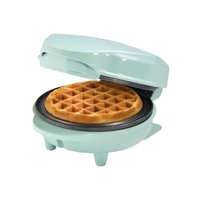
Sweet Dreams AMW500M - Waffle Maker BESTRON - Free user manual and instructions
Find the device manual for free Sweet Dreams AMW500M BESTRON in PDF.


| Product type | Waffle maker |
| Brand | Bestron |
| Model | Sweet Dreams AMW500M |
| Dimensions (L x H x D) | 9 x 13 x 17 cm |
| Weight | Approximately 0.7 kg |
| Power supply | 220-240 V ~, 50/60 Hz, 550 W |
| Protection class | I (grounded) |
| Cord length | 67 cm |
| Plate material | Non-stick coating |
| Main functions | Waffle baking, power indicator (red), temperature reached indicator (green) |
| Preheating | Approximately 2 minutes |
| Cooking time | 3 to 5 minutes depending on batter and preferences |
| Capacity | 1 standard waffle |
| Use | Household use only |
| Care and cleaning | Clean with a damp cloth after cooling, do not use abrasive products |
| Safety | Do not immerse, do not use near birds, do not leave unattended |
| Spare parts and repairability | Repairs by qualified technician only, contact Bestron customer service |
Frequently Asked Questions - Sweet Dreams AMW500M BESTRON
User questions about Sweet Dreams AMW500M BESTRON
0 question about this device. Answer the ones you know or ask your own.
Ask a new question about this device
Download the instructions for your Waffle Maker in PDF format for free! Find your manual Sweet Dreams AMW500M - BESTRON and take your electronic device back in hand. On this page are published all the documents necessary for the use of your device. Sweet Dreams AMW500M by BESTRON.
USER MANUAL Sweet Dreams AMW500M BESTRON
natural_image
White portable flat-screen appliance with a black textured base and four feet legs (no visible text or symbols)INSTRUCTION MANUALWAFFL
DE
NLE
ES P
R C7
BG
TRSE
m = 311
The image is too blurry to recognize any text content.
m = 311
The image is too blurry to recognize any text content.
The image is too blurry to recognize any text content.
The image is too blurry to recognize any text content.
The image is too blurry to recognize any text content.
The image is too blurry to recognize any text content.
SICHERHEITSHINWEISE
- This appliance is not intended for professional use, but is intended for domestic and similar use, such as in staff kitchens, in shops, offices and other working environments, by guests in hotels, motels and other residential environments, in Bed & Breakfast type environments and farms.
- Make sure that the mains voltage matches with the voltage shown on the rating plate.
• Always install the appliance on a stable and level surface where it cannot fall over.
- Parts of this appliance may become warm or hot. Avoid burning yourself. Do not touch.
- Your hands must be dry when you touch this appliance, it's cord and plug.
- This appliance must lose it's heat so give it sufficient clearance around it. Also do not cover it.
- This appliance, the cord and the plug must not come into contact with water, heat sources or open flames.
- Do not touch this device if it has come into contact with water. Immediately remove the plug from the socket.
- Never let the cord hang over the edge of the sink, worktop or table.
• Always remove the plug from the socket when you are not using the electrical appliance.
- Remove the plug from the socket by pulling on the plug itself and not on the cord.
- Do not use the electrical appliance if the cord is damaged.
- Do not operate this appliance with an external timer or separate remote control system.
- If the appliance or cord is defective, do not attempt to repair it yourself. Always have repairs carried out by a qualified technician. It must be replaced by the manufacturer, a technical service provider or a person with equivalent qualifications, to avoid any danger.
- Do not move this device when it is turned on or still hot.
- Do not place heavy objects on the lid to keep the device closed.
- Never use this device near birds. The fumes released from the non-stick coating can cause stress or worse in birds.
- This appliance can be used by children aged from 8 years and above and persons with reduced physical, sensory or mental capabilities or lack of experience and knowledge if they have been given supervision or instruction concerning use of the appliance in a safe way and understand the dangers.
• Children are not allowed to clean or maintain the appliance unless they are over 8 years old and supervised.
- Keep the appliance and the cord out of the reach of children under the age of 8.
• Children shall not play with the appliance.
ENVIRONMENT
Dispose of packaging material such as plastic and cardboard boxes in the designated containers.
Do not dispose of this product as normal domestic waste at the end of its life, but hand it in at a collection point for the reuse of electric and electronic equipment. Look for the symbol on the product, the user instructions or the packaging showing the type of waste.
- The materials can be used as indicated. By helping us reuse and process the materials or otherwise recycle the old equipment, you will be making an important contribution towards the protection of the environment.
- Your municipality can tell you where to find the designated waste collection point in your neighbourhood.
SERVICE
In the unlikely event of a malfunction, please contact Bestron customer service: www.bestron.com/service
| Technical Specifications | |
| Model AMW500 | |
| Mains 220-240V~ | |
| Frequency (Hz) 50/60 | |
| Safety Class 1 | |
| Power (Watt) 550 | |
| Noise (dB(A)) - | |
| Max. Capacity - | |
| Maximum continuous operating time (KB) - | |
| Dimensions (L x W x H) (cm) | 9x13x17 |
| Cable length (cm) | 67 |
OPERATION - General information
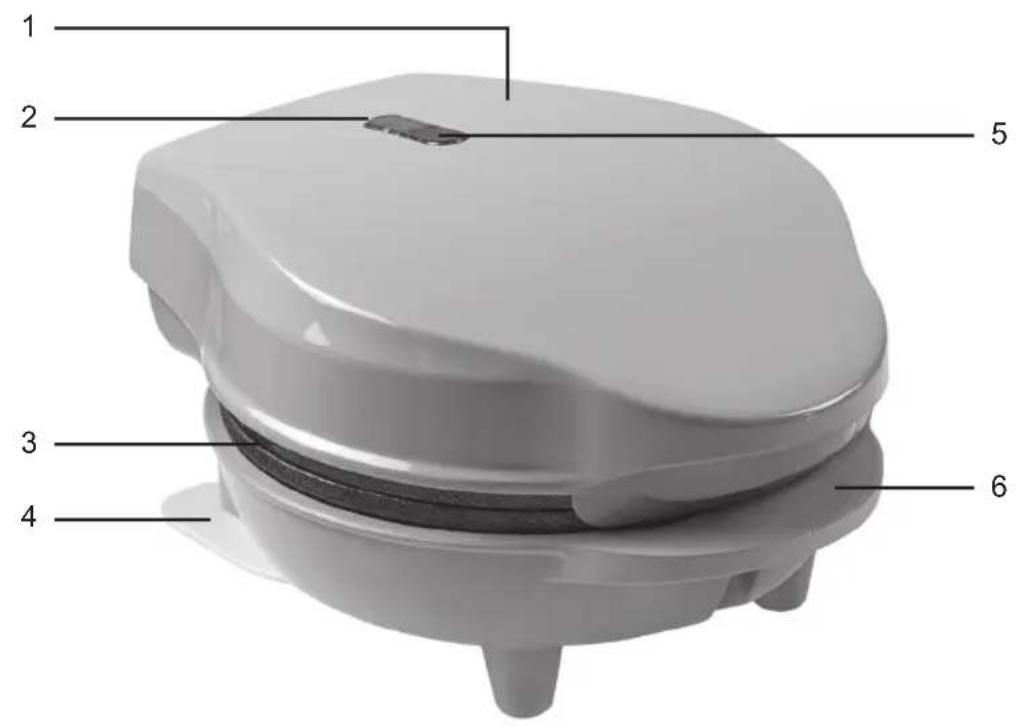
The below description goes with the image on page 2.
- Housing
- Green pilot light 'Temperature reached'
- 2 baking plates
- Strong bottom plate
- Red pilot light 'Power'
-
Handle
-
Unpack the device and remove all packaging parts.
- Clean the baking plates before using for the first time (see 'Cleaning and maintenance').
- Put the plug in the wall socket and let the waffle maker heat for 10 minutes. This will remove any packaging odor from the device.
PLEASE NOTE:
- The first time you use the appliance, it may produce slight smoke and a specific odour. This is normal and will disappear on its own. Ensure sufficient ventilation.
- Keep birds away from the appliance when the appliance is in operation. When heating the non-stick coating on the baking plates, a substance can be released that is a nuisance to birds.
Preheating
- Place the appliance on a flat, level surface.
- This appliance must be connected to an earthed socket.
- Plug the power cord into the wall outlet. The indicator lights turn on and the appliance starts heating up.
- Wait for the green indicator light to turn off after app. 2 min. The baking plates are then at the right temperature and the waffle maker is ready for use.
Baking
- Prepare the waffle dough according to the recipe on the dough packaging.
- Preheat the appliance as described in 'Preheating'
- Grease both baking plates. Use a brush to spread the oil or butter over the surface.
- Pour the required amount of batter onto the bottom baking plate. Make sure no batter is spilt over the edge of the baking plate. Close the lid.
- Bake the waffles until they are the desired colour.
- Open the appliance once the waffles are ready.
- Carefully remove the waffles with a heat-resistant wooden or plastic spatula; take care not to damage the non-stick coating.
- Once you have finished baking waffles, remove the plug from the plug socket and open the appliance to allow the baking plates to cool down.
PLEASE NOTE:
- Normal cooking time is approximately 3 - 5 minutes. This depends on the dough used and your personal taste. Leave the appliance closed while baking because opening it during use can adversely affect the appearance of the waffles.
- Do not use sharp forks or knives as these can damage the non-stick coating!
CLEANING AND MAINTENANCE
Clean after each use.
- Disconnect from mains power supply and let the appliance cool down.
- Clean the appliance and baking plates with a damp cloth. If necessary, you can clean with soapy water. Do not allow liquid to enter the device.
- Dry the device thoroughly after cleaning.
PLEASE NOTE:
- Do not use aggressive or abrasive cleaning agents or sharp objects (such as knives or hard brushes) when cleaning.
ALL YOU WANT TO KNOW ABOUT YOUR UNIQUE 5 YEAR WARRANTY
ALLES, WAS SIE ÜBER IHRE EINZIGARTIGE 5-JAHRES-GARANTIE WISSEN MÖCHTEN TOUT CE QUE VOUS VOULEZ SAVOIR SUR VOTRE GARANTIE UNIQUE DE 5 ANS ALLES WAT U WILT WETEN OVER UW UNIEKE GARANTIE VAN 5 JAAR TUTTO QUE LLO CHE VUOI SAPERE SULLA TUA GARANZIA UNICA DI 5 ANNI TODO LO QUE QUIERES SABER SOBRE TU ÚNICA GARANTÍA DE 5 AÑOS
BESTRON.COM/GUARANTEE

NEED HELP?
CHECK OUT OUR SERVICE PAGE
BRAUCHEN SIE HILFE? SCHAUEN SIE SICH UNSERE SERVICESEITE AN BESOIN D'AIDE? DISCUTE AVEC NOUS! CONSULTEZ NOTRE PAGE DE SERVICE HULP NODIG? CHAT MET ONS! BEKIIK ONZE SERVICEPAGINA HO BISOGNO DI AIUTO? CHATTA CON NOI! GUARDA LA NOSTRA PAGINA SERVIZI ¿NECESITAS AYUDA? CONSULTE NUESTRA PÁGINA DE SERVICIO
BESTRON.COM/SERVICE

natural_image
Generic user profile icon with headset and uniform (no text or symbols)EASTERN EUROPE CUSTOMER SERVICE
POLSKA bestron.service.pl@sertronics.de
HRVATSKA bestron.service.hr@sertronics.de
CZECHIA bestron.service.cz@sertronics.de
SLOVENSKO bestron.service.sk@sertronics.de
ROMÂNIA bestron.service.ro@sertronics.de
BULGARIA bestron.service.bg@sertronics.de
SERVICE HOTLINE: 00800 954 39 543

250409-01
| Hersteller / Fournisseur/ Výrobce / Proizvođač / Producător / Výrobca / ПроизводителBestron Nederland BV, Moeskampweg 20, 5222 AW, 's-HertogenboschNiederlande, Pays-Bas, Nizozemí, Hollandia, Holandia, Olandia, Holandsko, Холандия | |||||||
| DCZHRPLRO/MDSKBG | |||||||
| Ursprungs-landChina | Pays d'origineChine Čína | Země původuKina Chiny | Zemlja podrijetlaChina Čína Kijtaj | Wyprodu kowano w | Tara de origine | Krajina pôvodu | Страна на производ |

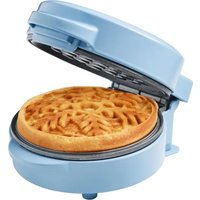
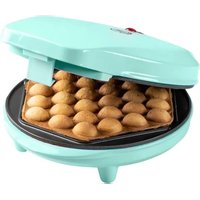
Brand : BESTRON
Model : Sweet Dreams AMW500M
Category : Waffle Maker