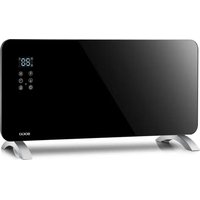
SS-18445 - Heating Sogo - Free user manual and instructions
Find the device manual for free SS-18445 Sogo in PDF.


| Brand | Sogo |
| Model | SS-18445 |
| Product type | Glass panel heater |
| Category | Heating |
| Power supply | 220-240V~, 50/60Hz |
| Power output | 750 / 1500 W (low/high) |
| Ingress protection rating | IP24 (suitable for bathroom) |
| Panel material | Tempered black glass |
| Heating element | High quality aluminum |
| Installation mode | Wall-mounted or freestanding (tripod included) |
| Control | Touch screen + remote control |
| Connectivity | Wi-Fi (Tuya Smart app) |
| Timer | 1 to 24 hours (on/off) |
| Temperature range | 5°C to 40°C |
| Functions | Low/high heating, timer, child lock, digital display |
| Child lock | Touch lock (3 seconds) |
| Protection | Thermal cut-off, do not cover |
| Safety distance | Front 1 m, rear 50 cm, other materials 100 cm |
| Minimum room area | 4 m² |
| Usage | Indoor, domestic use only |
| Cleaning | Unplug, clean grilles with soft cloth, no abrasives |
| Operating noise | Audio beep with each adjustment |
| Included accessories | Remote control, feet, screws, tripod |
| After-sales service | www.sogosat.com / 0034 902 222 161 |
Frequently Asked Questions - SS-18445 Sogo
User questions about SS-18445 Sogo
0 question about this device. Answer the ones you know or ask your own.
Ask a new question about this device
Download the instructions for your Heating in PDF format for free! Find your manual SS-18445 - Sogo and take your electronic device back in hand. On this page are published all the documents necessary for the use of your device. SS-18445 by Sogo.
USER MANUAL SS-18445 Sogo
natural_image
Exterior view of a black SOGO solar heating device with digital display and control buttons (no text or symbols on main body)
RADIADOR DE CONVECCION CON PANEL DE VIDRIO PANEL GLASS CONVECTION HEATER CHAUFFAGE À CONVECTION AVEC PANNEAU DE VERRE AQUECEDOR DE CONVECÇÃO COM PAINEL DE VIDRO KONVEKTIONSHEIZUNG MIT GLASSCHEIBE RISCALDATORE A CONVEZIONE CON PANNELLO IN VETRO
natural_image
Pure electrical circuit lines without any symbolsOperación
Fig 2
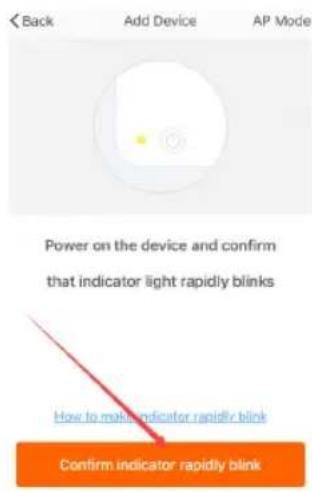
Fig 3
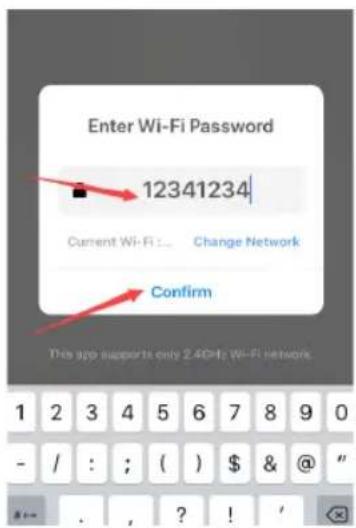
Fig 4
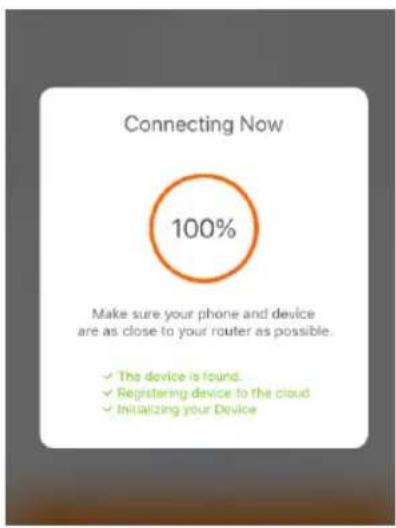
Fig 5
Operación por WIFI
This instruction manual can also be downloaded from our web page www.sogo.es
Introduction

To get the most out of your new heater, please read through these instructions and the attached safety regulations before use. Please also save the instruction manual in case you need to remind yourself of the heater's functions at a later date.
Important

Before plugging the unit into the mains, ensure by visual inspection that the unit is intact and has not suffered any damage during transit.
Caution

The appliance must be always placed on a flat and stable surface. In order to avoid a hazard due to inadvertent resetting of the thermal cutout, this appliance must not be supplied through an external switching device, such as a timer, or connected to a circuit that is regularly switched on and off by the utility.
For your own safety
- Read all instruction before using the heater.
-
Only connect the heater to a single-phase socket with a mains voltage as specified on the rating plate.
-
Do not leave your home while the appliance is in function: ensure that the switch is in OFF (0) position and the thermostat is in minimum position. Always unplug the appliance.
- Keep combustible material such as furniture, cushions, bedding, paper, clothes, curtains etc. at least 100cm away from the heater.
- Do not hand anything on or in front of the heater.
- Always use the heater in an upright position.
- Do not place the heater against walls, furniture, curtains, etc.
- Do not use the appliance in rooms less than 4m^2 area.
- Always unplug the heater when not in use. Do not pull the cord to unplug the heater.
- Keep the air inlet and outlet free from objects at least 1m in front and 50cm behind the heater.
- Do not install the heater immediately below a socket- outlet.
- Do not let animals or children touch or play with the heater. Pay attention the air outlet gets hot during operation.
- Do not cover. If covered, there is the risk of overheating.
- Do not use this heater in the vicinity of showers, bath tubs, wash basins or a swimming pool etc.
- Do not use the heater in the rooms containing explosive gas inflammable solvents, varnish or glue.
- Keep the heater clean. Do not allow any
objects to enter any ventilation or exhaust opening as this may cause electric shock, or fire or damage to the heater.
-
If the heater has been dropped or damaged it should not be used until it has been inspected by a qualified service center.
-
Close supervision is necessary when the heater is being used by or near children, persons suffering from any physical impairment or pets.
-
Do not use to dry clothes or any fabric.
-
Do not use the heater to dry your laundry. Never obstruct the intake and outlet grilles (danger of overheating).
-
Do not move the appliance while it is functioning in order to avoid overheating with the additional risk of fire.
-
If any part of the heater or supply cord becomes damaged, it must be replaced by a qualified electrician. In order to avoid a hazard.
-
The heater must not be located immediately below a socket- outlet.
-
Do not use this heater with a programmer, timer or any other device that switches the heater on automatically, since a fire risk exists if the heater is covered or positioned incorrectly.
-
Do not leave the heater switched on when leaving your home or going to sleep.
-
Children should be supervised to ensure that they do not play with the appliance.
-
This appliance can be used by children aged from 8 years and above and
persons with reduced physical, sensory or mental capabilities or lack of experience or knowledge if they have been given supervision or instruction concerning use of the appliance in a safe way and understand the hazards involved.
- Children shall not play with the appliance. Cleaning and user maintenance shall not be made by children without supervision.
- Children of less than 3 years should be kept away unless continuously supervised.
- Children aged from 3 years and less than 8 years shall only switch on/off the appliance provided that it has been placed or installed in its intended normal operating position and they have been given supervision or instruction concerning use of the appliance in a safe way and understand the hazards involved.
- Children aged from 3 years and less than 8 years shall not plug in, regulate and clean the appliance or perform user maintenance.
- Do not leave unattended when plug in to the mains supply.
Caution

Some parts of the heater can become very hot and cause burns. Do not touch hot surfaces. Particular attention has to be given where children and vulnerable people are present.
Note

These heaters are intended for domestic use only. They can be used as both portable appliance and wall mounting appliance.
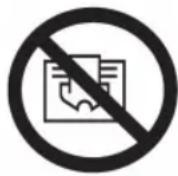
WARNING: In order to avoid overheating, do not cover the heater
Technical Specification
| Voltage 220-240V~ | |
| Frequency 50/60Hz | |
| Power 750/1500W | |
| IP Waterproof IP24 |
Product features
- Elegant black glass panel.
- High quality aluminum heating element: quick heating with higher energy savings.
- Touch screen control and remote control.
- Timer from 1 to 24 hours to turn the convector heater on or off at the desired time.
- Digital display with automatic room temperature display.
- For wall mounting or free standing with tripod.
Installation (While use on the floor as portable appliance)
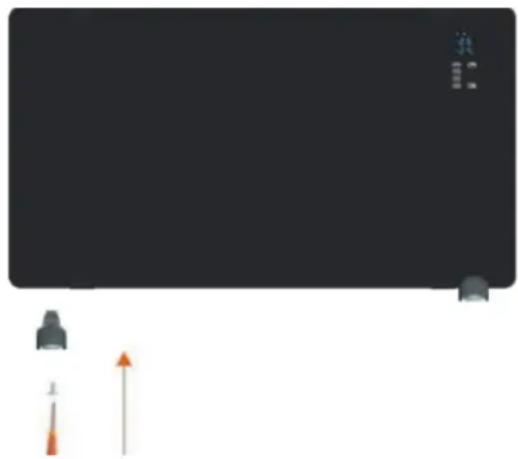
Please attach the feet on the heater's housing, and fixing them with supplied ST4x12mm(8pcs) screws.
natural_image
Pure diagram of a device with no text, numbers, or symbols visibleOperation
Insert the plug into a suitable socket outlet on an A.C. power supply having the same voltage as that shown on its rating label.
The touch screen buttons located on the product correspond to the remote control functions:

- Display
- Increase Temperature "+"
- Lower temperature “-”
- Power button
- Mode button
- Timer button
- Receiver
- Child clock button
Power ⏻
When the product is on, press “” the upper part of the display shows temperature.
The heater is working at low power heating conditions. Before you working the heater, your should turn on the switch in side.
Press "to set functions. The upper part of the display shows the room temperature
The heater is working at low power heating conditions.
Mode 11
Press "mode" to regulate low { or high temperature power }
Temperature
Press temperature button ⚡, the temperature can be set from 5°C to 40°C. Press “+” or “-” button to select the desired temperature. The temperature indicator will remain lit for a long time.
Internal temperature is displayed every time the appliance is started up. The temperature can be set when the appliance is in stand-by or heating. When the room temperature reaches the set level, the high temperature power stops and the low temperature power remains active. When room temperature is 2 degrees over the set temperature, both the high and lower temperature powers will stop operating. The machine will begin operating again only when temperature decreases 2 degrees with respect to the set temperature.
Timer
The timer button can be set to start or stop the appliance at the desired time, with a time interval between 1 hour and 24 hours. Press the timer button "P" to select the desired range between 1 hour to 24 hours. the remaining time will appear.
Child Lock
Press the child lock button 3 seconds, this symbol "will be display on the screen, so that kids cannot make any changes and to remove the child lock press the same button again for 3 seconds.
Connection by WIFI
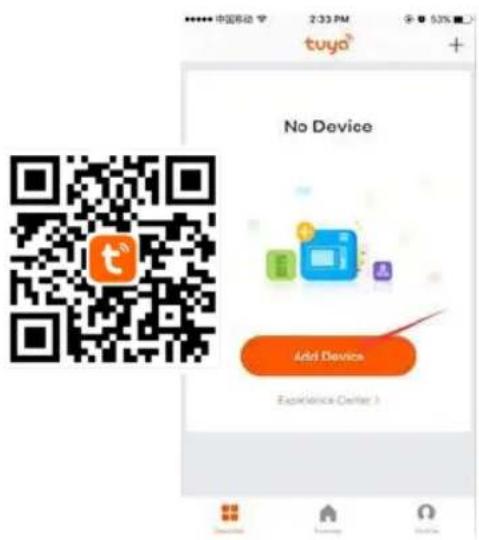
- Use your phone to scan the QR code below or search "Tuya Smart" in
Application on market to download and install the App. - Select your country code, enter the cellphone number and tap "Get" to get a message containing
verification on code.
3.Enter the verification on code in the message and tap"Login" to login the App.
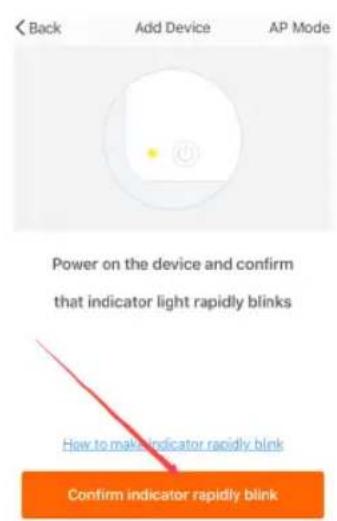
- Switch on the product and make sure the product is in WIFI covered environment. The indicator light will rapidly blinks. If the indicator light do no rapidly blinks, please press " " button for 5 seconds and the product will have "bi" sound, then go to the App, tap "add device" at the bottom, as shown in the picture 1
Pic 1
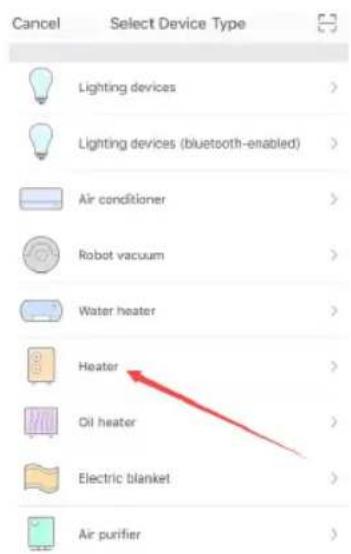
A) Choose "Heater", as shown in pic 2
B) Press the "confirm indicator rapidly blinks" when the indicating light on device rapidly blinks, as shown in pic 3
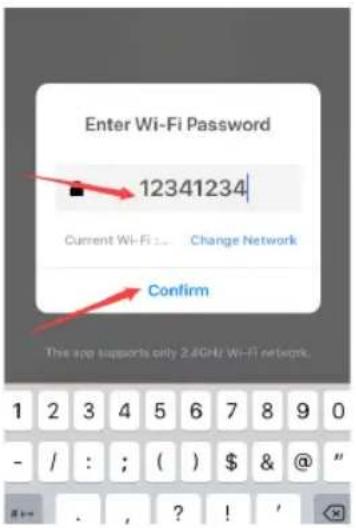
C) Input password of WIFI and then confirm, as shown in pic 4
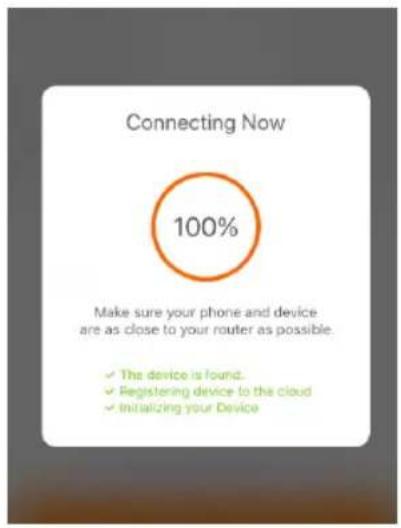
D) Wait for the APP to connect with the device until it is connected successfully as shown in pic 5
Pic 2 Pic 3
Pic 4 Pic 5
Operation by WIFI
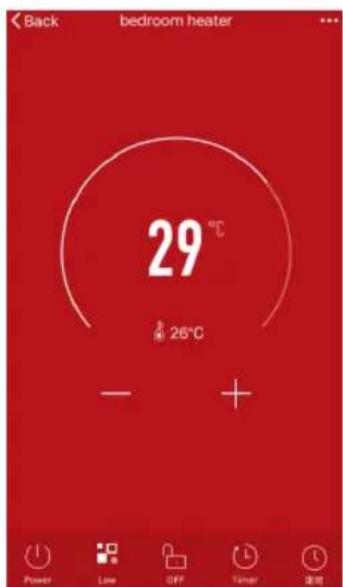
- U can operate the device by mobile under WIFI or 4G LTE environment, as shown in the picture 6
- Select "Weekly timer" button to operation:
A) Press the "Add timer", as shown in pic 7
B) U can choose the weekly and timer what u want, pls note that u must keep the set temperature higher the currently temperate when ON the power, as shown in pic 8
C) Press the "Save" button in top right corner, to save this during "stop or start" weekly timer operation, as shown in pic 9.
D) Once again operation to set the next during "stop or start" weekly timer.
E) Press the "back" button in top left corner, to check the record what u set.
F) Long time touch the record, u can make choice to cancel.
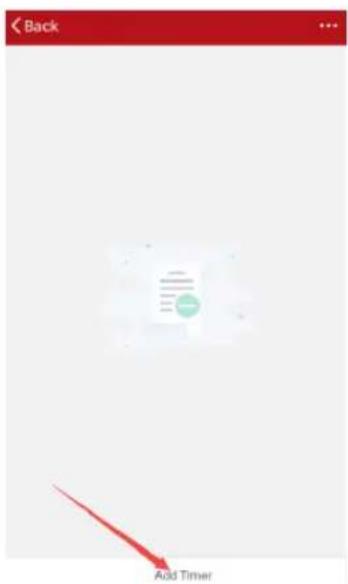
Pic 6 Pic 7
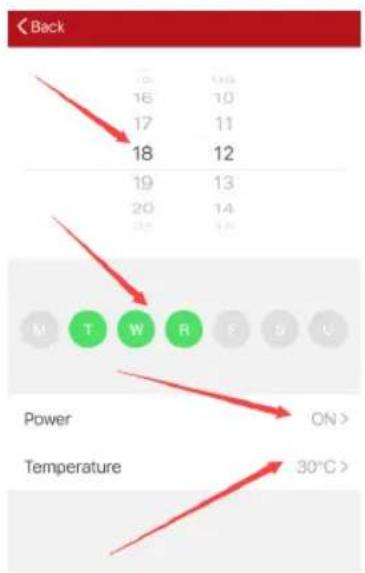
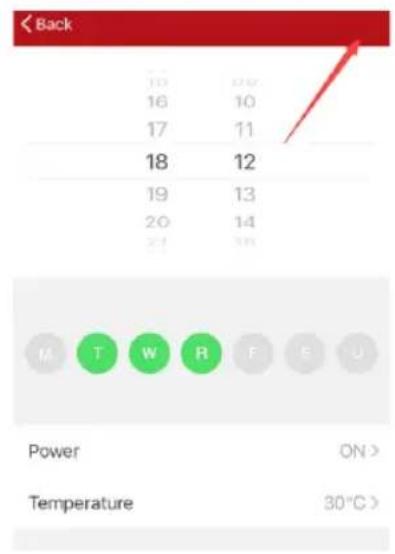
Pic 8 Pic 9
Operating sound
The appliance emits a beep upon each operation setting.
Cleaning and maintenance
Before cleaning always remove the plug from the electrical socket outlet.
Clean the air inlet and outlet grilles frequently.
Never use abrasive powders or solvents.
natural_image
Pure graphical representation of a device with no text, numbers, or symbolsOpération
Fig 2
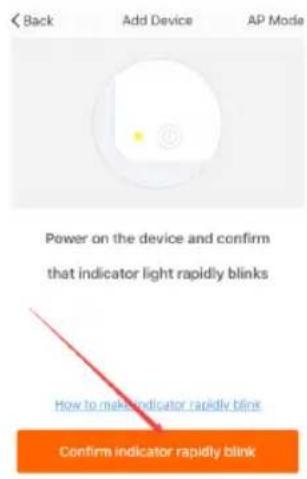
Fig 3
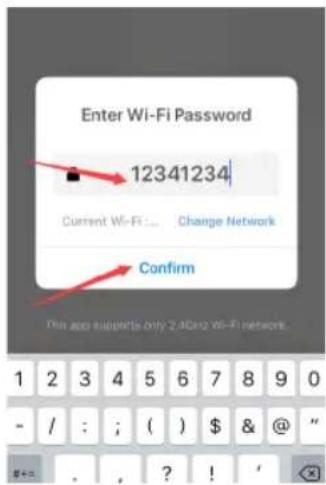
Fig 4
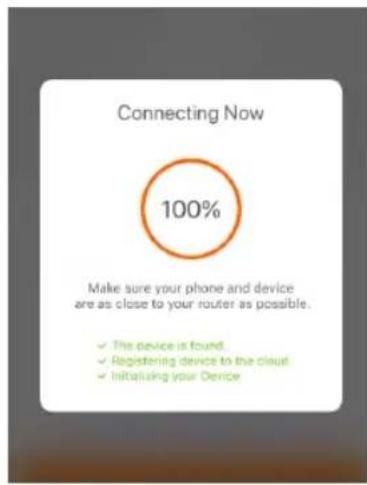
Fig 5
natural_image
Pure diagram of a device with no text, numbers, or symbols visibleOperação
Fig 1
Fig 2
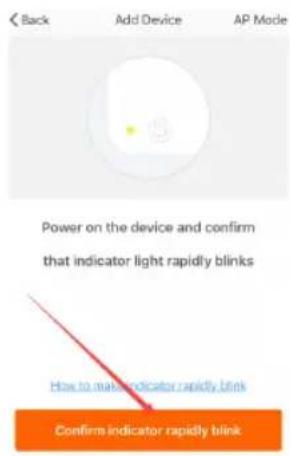
Fig 3
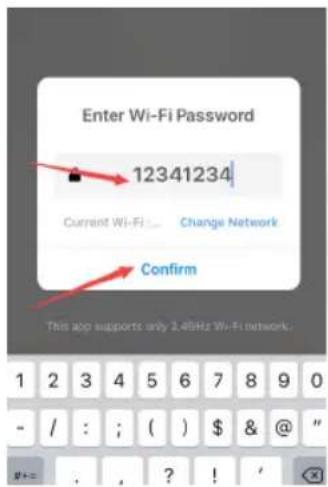
Fig 4
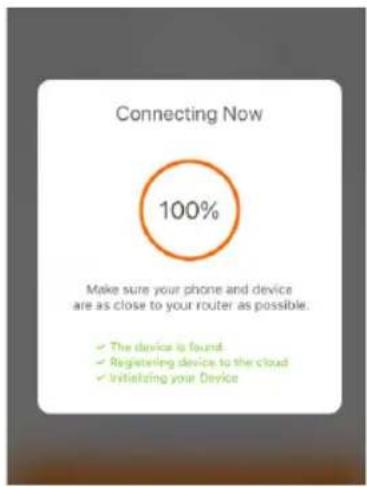
Fig 5
Operação por WIFI
Fig 8
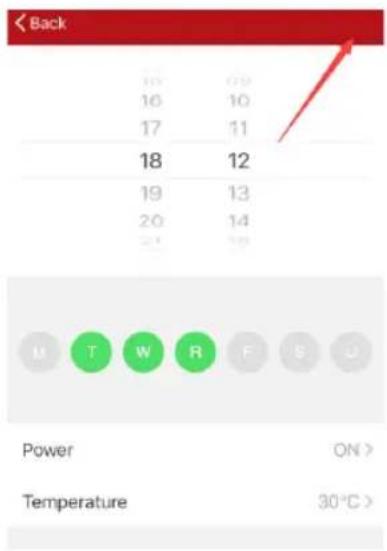
Fig 9
Som de operação
natural_image
Pure electrical circuit lines without any symbolsOperation
Abb 2
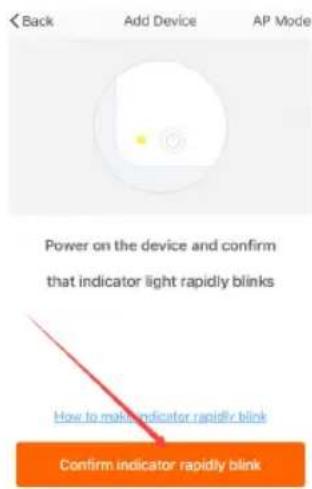
Abb 3
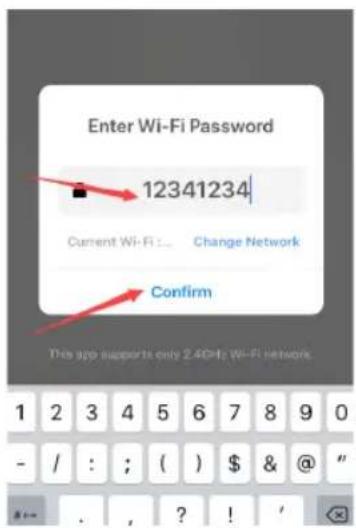
Abb 4
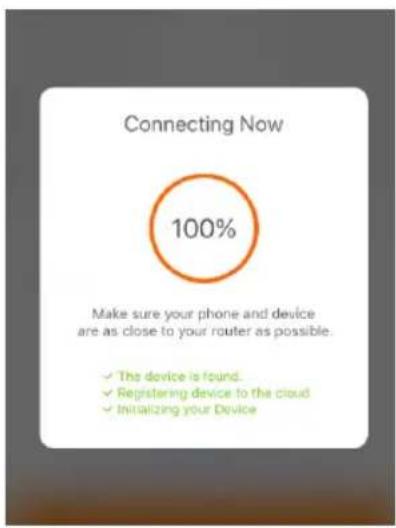
Abb 5
Betrieb über WIFI
natural_image
Pure diagram of a device with no text, numbers, or symbols visibleOperazione
Fig 2
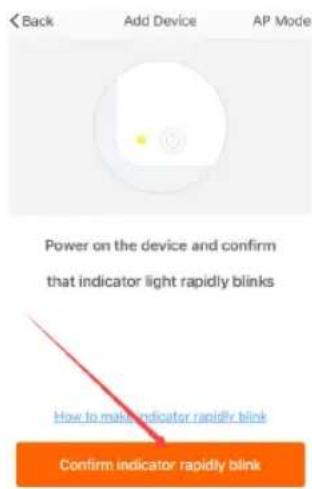
Fig 3
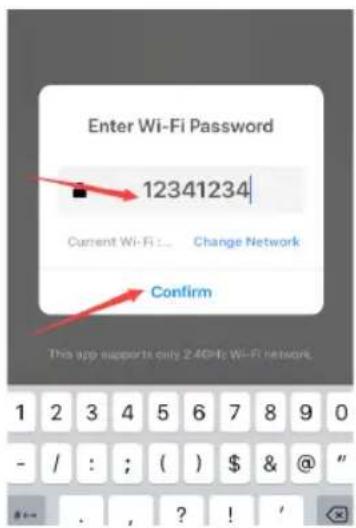
Fig 4
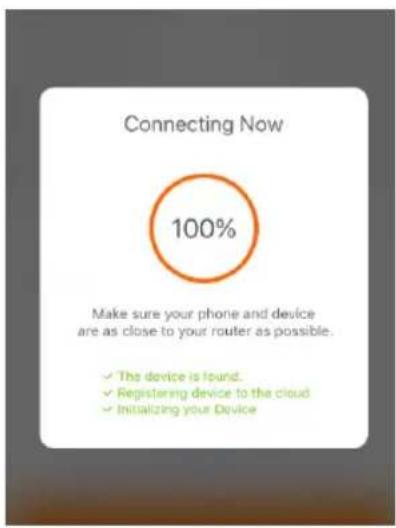
Fig 5
| Model identifier(s): SS-18445 | ||||||
| Heat output Item unit | heat output | Type of heat input, for electric storage local space heaters only (select one) | ||||
| Nominal heat output | Pnom | 1,5 | kW | |||
| Minimum heat output (indicative) | Pmin 0, | 001 kW | manual heat control | charge control, with integrated thermostat | [no] | |
| Maximum continuous heat output | Pmax,c | 1,5 kW | manual heat control | charge control with room and/or outdoor temperature feedback | [no] | |
| Auxiliary electricity consumption | electronic heat charge control with room and/or outdoor temperature feedback | [no] | ||||
| At nominal heat output elmax 0 kW | fan assisted heat output [no] | |||||
| At minimum heat output | elmin | 0 | kW | Type of heat output/room temperature control (select one) | ||
| In standby mode | elsb 0, | 001 kW | single stage output and no room temperature control | [no] | ||
| two or more manual stages, no room temperature control | [no] | |||||
| with mechanic thermostat room temperature control | [no] | |||||
| with electronic room temperature control | [yes] | |||||
| electronic room temperature control plus day timer | [no] | |||||
| electronic room temperature control plus week timer | [yes] | |||||
| Other control options (multiple selections possible) | ||||||
| room temperature control, with presence detection | [no] | |||||
| room temperature control, with open window detection | [no] | |||||
| with distance control option | [yes] | |||||
| with adaptive start control | [no] | |||||
| with working time limitation | [no] | |||||
| with black bulb sensor | [no] | |||||
| Contact details: | Sanysan Appliances S.L. C/Barcas 2,2 46002, Valencia, Spain. | |||||
DECLARATION OF CONFORMITY
This device complies with Low Voltage Directive 2014/35/EC, Electromagnetic Compatibility Directive 2014/30/EU, Directive 2015/863/EU on the restriction of the use of certain hazardous substances in electrical and electronic equipment and Directive 2009/125/EC on the eco-design requirements applicable to energy-related products.
DÉCLARATION DE CONFORMITÉ
This symbol means that in case you wish to dispose of the product once its working life has ended, take it to an authorised waste agent for the selective collection of waste electrical and electronic equipment (WEEE).

Imported by:
Sanysan Appliances S.L, NIF: B98753056, C/ Barcas 2, 2 46002 Valencia, Spain Product made in P.R.C. – Designed by SOGO based on the European Quality Standards Customer Service: www.sogosat.com / sogosat@sogosat.com / 0034 902 222 161


- Operación
- Operación por WIFI
- Introduction
- Important
- Caution
- For your own safety
- Note
- WARNING: In order to avoid overheating, do not cover the heater
- Product features
- Installation (While use on the floor as portable appliance)
- Operation
- Power ⏻
- Mode 11
- Temperature
- Timer
- Child Lock
- Connection by WIFI
- Operation by WIFI
- Operating sound
- Cleaning and maintenance
- Opération
- Operação
- Operação por WIFI
- Som de operação
- Betrieb über WIFI
- Operazione
- DECLARATION OF CONFORMITY
- DÉCLARATION DE CONFORMITÉ
- Imported by:
Brand : Sogo
Model : SS-18445
Category : Heating