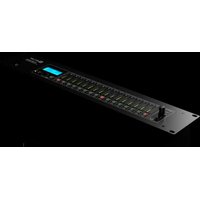
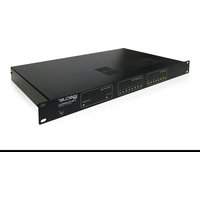
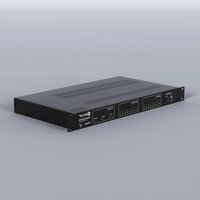
HUB1616 - Professional audio equipment Ecler - Free user manual and instructions
Find the device manual for free HUB1616 Ecler in PDF.


| Product Type | Audio zone management matrix with DSP |
| Brand | Ecler |
| Model | HUB1616 |
| Number of local audio inputs | 8 (4 stereo line, 4 mono mic/line) |
| Number of remote audio inputs | 8 (balanced mono, via RJ45) |
| PAGER ports | 2 (A and B, for eMPAGE paging consoles) |
| Number of zone outputs | 16 (mono or stereo in pairs) |
| Headphone output | 3.5 mm stereo mini-jack with volume |
| REMOTE ports | 8 (for eMCONTROL1 panels) |
| Network interface | Ethernet RJ45 (built-in HANGAR web server) |
| Serial port | RS-232 (DB9) for third-party control |
| MUTE port | External contact closure (terminal block) |
| Display | Backlit LCD screen |
| Front panel control | SELECT/MUTE keys per zone, CONTROL key, rotary encoder |
| DSP processing | 3-band equalizer, 8-band graphic EQ, compressor/limiter, high-pass filter, delay, crossover, noise gate, frequency shifter |
| Priority functions | 4 levels (DUCKER or PAGER with eMPAGE consoles) |
| Power supply | 90-264 VAC, 47-63 Hz (universal) |
| Power consumption | 50 W max (estimate) |
| Rack mounting | 19 inches, 2U |
| Dimensions (W x H x D) | 483 x 88 x 280 mm (estimate) |
| Weight | 7 kg (estimate) |
| Remote control | HANGAR web application, Ecler Pilot mobile app, eMCONTROL1 wall panels, TP-NET protocol |
Frequently Asked Questions - HUB1616 Ecler
User questions about HUB1616 Ecler
0 question about this device. Answer the ones you know or ask your own.
Ask a new question about this device
Download the instructions for your Professional audio equipment in PDF format for free! Find your manual HUB1616 - Ecler and take your electronic device back in hand. On this page are published all the documents necessary for the use of your device. HUB1616 by Ecler.
USER MANUAL HUB1616 Ecler
12.2 CONNEXION MANUELLE....45
-
ACCÈS À L'APPLICATION WEB HANGAR......46
-
CONFIGURATION....48
14.1 NETWORK CONFIGURATION (Configuration réseau)....51
- OUTPUTS (Sorties)....75
* TP-NET PROTOCOL (Third-Party NET)....125-137
- INTRODUCTION : TP-NET PROTOCOL 126
- HUB SERIES DIGITAL ZONER 129
- HUB SERIES ERROR CODES....137
1. REMARQUE IMPORTANTE

WARNING: SHOCK HAZARD - DO NOT OPEN
AVIS: RISQUE DE CHOC ÉLECTRIQUE - NE PAS OUVRIR
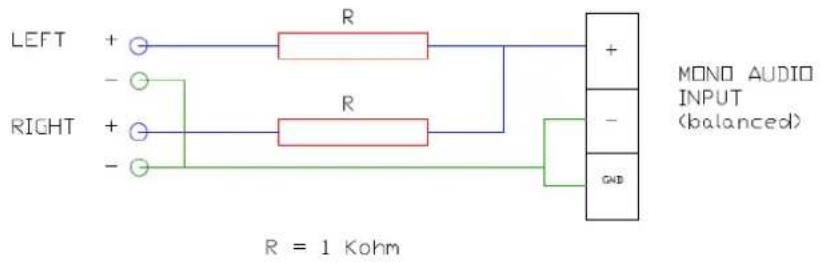
ST AUDIO SOURCE (unbalanced)
| DIGITAL | |
| DSP | |
| CPU | Floating point 32/64bit |
| Sampling rate | 48 kHz |
| Latency | <1.5 ms. |
| Converters | |
| Resolution | 24 bit, AKM |
| Dynamic range | AD:111dB, DA: 115dB |
| ANALOGUE | |
| Input 1, 2 (Line) | |
| Sensitivity | +5 / -15dBV External potentiometer adjustment |
| Impedance | >13k |
| Input headroom | 12dBV |
| Connector | RCA female with Euroblock stack |
| Type | Unbalanced |
| Input 3, 4, 5, 6 (Mic/Line) | |
| Sensitivity | +0 / -50dBV External potentiometer adjustment |
| Impedance | >24k electronically balanced |
| Input headroom | 12dBV |
| Connector | Euroblock (Symmetrical) |
| Type | Balanced |
| Pagers | Input 5 and 6 (by RJ45 connector) |
| Phantom | +48VDC (rear panel switch) |
| CMRR | >60dB (20Hz - 20kHz) |
| Input 7 to 14 (Remote Input) | |
| Sensitivity | 0dBV without adjustment |
| Impedance | >24k electronically balanced |
| Input headroom | 12dBV |
| Connector | RJ45 Connector |
| Type | Balanced |
| CMRR | >60dB (20Hz - 20kHz) |
| Outputs 1 to 8 (Line) | |
| Max output level | 12dBV |
| Connector | Euroblock 3-pin |
| Type | Balanced |
| Headphones output | |
| Selectable output | From Out1 to Out8 |
| Power | >200mW - 200Ω |
| Connector | Mini-Jack 3,5mm |
| General | |
| External mute | Normally open. Assignable to any output zone |
| Frequency response | <10Hz ~ 20kHz (+0dB / -0.5dB) |
| Output noise floor (FFT) | >110dB (from 20Hz to 20kHz) |
| THD + Noise) | < 0.005% (1kHz, 1Vrms) |
| Crosstalk | >90dB, 20Hz - 20kHz |
| CMRR | >60 dB Typical |
| Flatness | Better than ±0.1dB |
| PROCESSING | |
| Input level (x14) | |
| Volume | From Off to 0 dB |
| Mute | On-Off |
| Metering | Vumeter post fader |
| Stereo | On-Off (Inputs 3 to 6) |
| Polarity | On-Off |
| High pass filter | 50Hz to 150Hz (Inputs 3 to 6) |
| Frequency shifter | On-Off; 5Hz (Inputs 3 to 6) |
| Noise gate (x4) | |
| Inputs | Input 3 to 6, Bypass ON - OFF |
| Threshold | From -80dBV to +12dBV |
| Depth | From 0 dB to 80 dB |
| Attack | From 0.1ms to 500ms |
| Hold | From 10ms to 3000ms |
| Release | From 10ms to 1000ms |
| Input EQ (x14) | |
| Type | Baxandall 3-way EQ |
| Gain | -10dB ~ +10dB in 0.1dB steps |
| Frequency | Low 200Hz Mid 1kHz High 6.3kHz |
| Output level (x8) | |
| Volume | From Off to 0 dB |
| Mute | On-Off |
| Metering | Vumeter post fader |
| Stereo | On-Off |
| Polarity | On-Off |
| Output EQ (x8) | |
| Type | Baxandall 3-way EQ |
| Gain | -10dB ~ +10dB in 0.1dB steps |
| Frequency | Low 200Hz Mid 1kHz High 6.3kHz |
| Output graphic EQ (x8) | |
| Type | 8-Band Graphic EQ |
| Gain | -10dB ~ +10dB in 0.1dB steps |
| Frequency | 63Hz, 125Hz, 250Hz, 500Hz, 1kHz, 2kHz, 4kHz, 8kHz |
| Output compressor (x8) | |
| Bypass | On-Off |
| Mode | Compressor / Limiter |
| Threshold | -36 dB to +12 dB |
| Ratio | 1 to 100 |
| Knee | Soft / Hard |
| Attack | 0.1ms to 500ms |
| Release | 10ms to 1000ms |
| Make-up gain | 0 dB to 10 dB |
| Output delay (x8) | |
| Outputs | 1 to 8 |
| Bypass | On-Off |
| Delay | 0 to 300ms |
| Unit | ms, meters, feet |
| Output crossover (x8) | |
| Outputs | 1 to 8 |
| Bypass | On-Off |
| Mode | High Pass Filter / Low Pass Filter |
| Frequency | 20Hz to 20kHz |
| General volume | |
| Volume | From Off to 0dB |
| Selectable outputs | Out 1 - Out 8 |
| Ducker | |
| Input | IN3 to IN6. In 5 and 6 selectable: DUCKER or PAGER |
| Outputs | Selectable: 1-8 zones |
| Priority | Four levels (1max-4min) |
| Priority volume | -40 dB to +6 dB |
| Threshold | -80dB to +12dB |
| Depth | 0dB to 80 dB |
| Attack | 5ms to 2000ms |
| Release | 50ms to 3000ms |
| Hold | 10ms to 3000ms |
| Pager | |
| Input | IN5 and IN6 selectable: DUCKER or PAGER |
| Outputs | Selectable: 1-16 zones |
| Functions | Two function buttons (F1, F2) |
| Priority | Four levels (1max-4min) |
| Priority volume | -40 dB to +6 dB |
| Chime volume | -12dB to +0dB |
| Chime melody | None, Melody 1, Melody 2 |
| Depth | 0dB to 80 dB |
| Attack | 5ms to 2000ms |
| Release | 50ms to 3000ms |
| Pilot panels | |
| General | On-Off, Public, Label, Users and Zone |
| Volume control | On-Off, Label and Style |
| Source selection | On-Off, Label and Allowed sources |
| Equalizer | On-Off, Label, and Style |
| Color | Controls, Text and Background |
| OTHERS | |
| Mechanical | |
| Dimensions (WxHxD) | 482.6 x 88.0 x 200.0 mm / 19.0 x 3.5 x 7.9 in. |
| Weight | 3,60kg / 7.93 lb. |
| Power supply | |
| Mains | 90-240 VAC, 50-60Hz |
| Power consumption | 20W |
| Connectivity | |
| Management Connectivity | Ethernet Base-Tx 10/100Mb Auto X-Over CAT5 up to 100m |
| Remote bus | RS485 |
| Aux. Power Supply for Remotes | +12VDC, 0,6A max. (short circuit protected) |
| Programming and control | Hangar (embedded web application), Ecler pilot (Android/iOS application), TPNET (UDP/RS232) |
10.2 HUB1616
| DIGITAL DSP | |
| CPU | Floating point 32/64bit |
| Sampling rate | 48 kHz |
| Latency | <1.5 ms. |
| Converters | |
| Resolution | 24 bit, AKM |
| Dynamic range | AD:111dB, DA: 115dB |
| ANALOGUE Input 1, 2, 3, 4 (Line) | |
| Sensitivity | +5 / -15dBV External potentiometer adjust |
| Impedance | >13k |
| Input headroom | 12dBV |
| Connector | RCA female. Input 1 and 2 with Euroblock stack |
| Type | Unbalanced |
| Input 5, 6, 7, 8 (Mic/Line) | |
| Sensitivity | +0 / -50dBV External potentiometer adjustment |
| Impedance | >24k electronically balanced |
| Input headroom | 12dBV |
| Connector | Euroblock (Symmetrical) |
| Type | Balanced |
| Pagers | Input 7 and 8 (by RJ45 connector) |
| Phantom | +48VDC (rear panel switch) |
| CMRR | >60dB (20Hz - 20kHz) |
| Input 9 to 16 (Remote Input) | |
| Sensitivity | 0 dBV without adjustment |
| Impedance | >24k electronically balanced |
| Input headroom | 12dBV |
| Connector | RJ45 Connector |
| Type | Balanced |
| CMRR | >60dB (20Hz - 20kHz) |
| Outputs 1 to 16 (Line) | |
| Max output level | 12dBV |
| Connector | Euroblock 3-pin |
| Type | Balanced |
| Headphones output | |
| Selectable output | From Out1 to Out16 |
| Power | >200mW - 200Ω |
| Connector | Mini-Jack 3,5mm |
| General | |
| External mute | Normally open. Assignable to any output zone |
| Frequency response | <10Hz ~ 20kHz (+0dB / -0.5dB) |
| Output noise floor (FFT) | >110dB (from 20Hz to 20kHz) |
| THD + Noise) | < 0.005% (1kHz, 1Vrms) |
| Crosstalk | >90dB, 20Hz - 20kHz |
| CMRR | >60 dB Typical |
| Flatness | Better than ±0.1dB |
| PROCESSING | |
| Input level (x16) | |
| Volume | From Off to 0 dB |
| Mute | On-Off |
| Metering | Vumeter post fader |
| Stereo | On-Off (Inputs 5 to 8) |
| Polarity | On-Off |
| High pass filter | 50Hz to 150Hz (Inputs 5 to 8) |
| Frequency shifter | On-Off; 5Hz (Inputs 5 to 8) |
| Noise gate (x4) | |
| Inputs | Input 5 to 8, Bypass ON - OFF |
| Threshold | From -80dBV to +12dBV |
| Depth | From 0 dB to 80 dB |
| Attack | From 0.1ms to 500ms |
| Hold | From 10ms to 3000ms |
| Release | From 10ms to 1000ms |
| Input EQ (x16) | |
| Type | Baxandall 3-way EQ |
| Gain | -10dB ~ +10dB in 0.1dB steps |
| Frequency | Low 200Hz Mid 1kHz High 6.3kHz |
| Output level (x16) | |
| Volume | From Off to 0 dB |
| Mute | On-Off |
| Metering | Vumeter post fader |
| Stereo | On-Off |
| Polarity | On-Off |
| Output EQ (x16) | |
| Type | Baxandall 3-way EQ |
| Gain | -10dB ~ +10dB in 0.1dB steps |
| Frequency | Low 200Hz Mid 1kHz High 6.3kHz |
| Output graphic EQ (x16) | |
| Type | 8-Band Graphic EQ |
| Gain | -10dB ~ +10dB in 0.1dB steps |
| Frequency | 63Hz, 125Hz, 250Hz, 500Hz, 1kHz, 2kHz, 4kHz, 8kHz |
| Output compressor (x16) | |
| Bypass | On-Off |
| Mode | Compressor / Limiter |
| Threshold | -36 dB to +12 dB |
| Ratio | 1 to 100 |
| Knee | Soft / Hard |
| Attack | 0.1ms to 500ms |
| Release | 10ms to 1000ms |
| Make-up gain | 0 dB to 10 dB |
| Output delay (x8) | |
| Outputs | 1 to 8 |
| Bypass | On-Off |
| Delay | 0 to 300ms |
| Unit | ms, meters, feet |
| Output crossover (x8) | |
| Outputs | 1 to 8 |
| Bypass | On-Off |
| Mode | High Pass Filter / Low Pass Filter |
| Frequency | 20Hz to 20kHz |
| General volume | |
| Volume | From Off to 0dB |
| Selectable outputs | Out 1 – Out 16 |
| Ducker | |
| Input | IN5 to IN8. In 7 and 8 selectable: DUCKER or PAGER |
| Outputs | Selectable: 1-16 zones |
| Priority | Four levels (1max-4min) |
| Priority volume | -40 dB to +6 dB |
| Threshold | -80dB to +12dB |
| Depth | 0dB to 80 dB |
| Attack | 5ms to 2000ms |
| Release | 50ms to 3000ms |
| Hold | 10ms to 3000ms |
| Pager | |
| Input | IN7 and IN8 selectable: DUCKER or PAGER |
| Outputs | Selectable: 1-16 zones |
| Functions | Two function buttons (F1, F2) |
| Priority | Four levels (1max-4min) |
| Priority volume | -40 dB to +6 dB |
| Chime volume | -12dB to +0dB |
| Chime melody | None, Melody 1, Melody 2 |
| Depth | 0dB to 80 dB |
| Attack | 5ms to 2000ms |
| Release | 50ms to 3000ms |
| Pilot panels | |
| General | On-Off, Public, Label, Users and Zone |
| Volume control | On-Off, Label and Style |
| Source selection | On-Off, Label and Allowed sources |
| Equalizer | On-Off, Label, and Style |
| Colour | Controls, Text and Background |
| OTHERS | |
| Mechanical | |
| Dimensions (WxHxD) | 482.6 x 88.0 x 200.0 mm / 19.0 x 3.5 x 7.9 in. |
| Weight | 3,66kg / 8.07 lb. |
| Power supply | |
| Mains | 90-240 VAC, 50-60Hz |
| Power consumption | 20W |
| Connectivity | |
| Management Connectivity | Ethernet Base-Tx 10/100Mb Auto X-Over CAT5 up to 100m |
| Remote bus | RS485 |
| Aux. Power Supply for Remotes | +12VDC, 0,6A max. (short circuit protected) |
| Programming and control | Hangar (embedded web application), Ecler pilot (Android/iOS application), TPNET (UDP/RS232) |
HANGAR et PILOT
LOGICIELS
natural_image
Illustration of a helmet with green visor and black straps, no text or symbols presentPILOT
HUB SERIES CONTROL APP
MODE D'EMPLOI
11. INTRODUCTION : HANGAR et PILOT
Figure 30: modification du profil public
Figure 35 : page INPUTS de la HUB1616
gauge
| Category | Value | | ---------- | ------ | | Noise Gate | -40.0 | | Threshold | 20.0 | | Depth | 10.0 | | Attack | 300.0 | | Hold | 300.0 | | Release | 300.0 |gauge
| Metric | Value | |------------|-------| | TREBLE | 2.0 | | MID | -3.0 | | BASS | 4.0 | | Source Select | 1 | | MAX | 2 | | VOL | 3 | | MIN | 4 | | DELAY | 5 | | X-OVER | 6 | | GEQ | 7 | | COMP | 8 |gauge
| Metric | Value | |--------|-------| | ON | 9.5 | | 1 | 9.5 | | 2 | 9.5 | | 3 | 9.5 |gauge
| Metric | Value | | ------------ | ----- | | Activity | 0.0 | | Compressor | 1.0 | | Limiter | 10.0 | | Threshold | 0.0 | | Ratio | 1.0 | | Attack | 300.0 | | Release | 0.0 | | Make-up | 0.0 |Figure 65 : page de configuration de panneau pilot
pie
| Category | Value | | ---------------- | ----- | | VOLUME CONTROL | 90 | | SOURCE SELECTION | LOCAL IN1 | | SOURCE SELECTION | LOCAL IN2 | | SOURCE SELECTION | REMOTE IN1 | | SOURCE SELECTION | NO SOURCE | | BASS-MID-TREBLE | 4 | | BASS-MID-TREBLE | -3 | | BASS-MID-TREBLE | TREB | | Source Selection | BASS MID TREB | | Source Selection | BASS MID TREB | | Source Selection | BASS MID TREB | | Source Selection | BASS MID TREB | | Source Selection | BASS MID TREB | | Source Selection | BASS MID TREB | | Source Selection | BASS MID TREB | | Source Selection | BASS MID TREB | | Source Selection | BASS MID TREB | | Source Selection | BASS MID TREB | | Source Selection | BASS MID TREBE | | Source Selection | BASS MID TREBE | | Source Selection | BASS MID TREBE | | Source Selection | BASS MID TREBE | | Source Selection | BASS MID TREBE | | Source Selection | BASS MID TREBE | | Source Selection | BASS MID TREBE | | Source Selection | BASS MID TREBE | | Source Selection | BASS MID TREBE | | Source Selection | BASS MID TREBE | | Source Selection | BASS MID TREB | | Source Selection | BASS MID TREBE | | Source Selection | BASS MID TREBE | | Source Selection | BASS MID TREBE | | Source Selection | BASS MID TREBE | | Source Selection | BASS MID TREBE | | Source Selection | BASS MID TREBE | | Source Selection | BASS MID TREBE | | Source Selection | BASS MID TREBE | | Source Selection | BASS MID TREB | | Source Selection | BASS MID TREB | | Source Selection | BASS MID TREB | | Source Selection | BASS MID TREB | | Source Selection | BASS MID TREB | | Source Selection | BASS MID TREB | | Source Selection | BASS MID TREB | | Source Selection | BASS MID TREB | | Source Selection | BASS MID TREB | | Source Selection | BASS MID TREBB | | Source Selection | BASS MID TREBB | | Source Selection | BASS MID TREBB | | Source Selection | BASS MID TREBB | | Source Selection | BASS MID TREBB | | Source Selection | BASS MID TREBB | | Source Selection | BASS MID TREBB | | Source Selection | BASS MID TREBB | | Source Selection | BASS MID TREBB | | Source Selection | BASS MID TREBB | | Source Selection | BASS MID TREB | | Source Selection | BASS MID TREB | | Source Selection | BASS MID TREB | | Source Selection | BASS MID TREB | | Source Selection | BASS MID TREB | | Source Selection | BASS MID TREB | | Source Selection | BASS MID TREB | | Source Selection | BASS MID TREB | | Source Selection | BASS MID TREB | | Source Selection | BASS MID TREBC | | Source Selection | BASS MID TREBC | | Source Selection | BASS MID TREBC | | Source Selection | BASS MID TREBC | | Source Selection | BASS MID TREBC | | Source Selection | BASS MID TREBC | | Source Selection | BASS MID TREBC | | Source Selection | BASS MID TREBC | | Source Selection | BASS MID TREBC | | Source Selection | BASS MID TREBC | | Source Selection | BASS MID TREB | | Source Selection | BASS MID TREB | | Source Selection | BASS MID TREB | | Source Selection | BASS MID TREB | | Source Selection | BASS MID TREB | | Source Selection | BASS MID TREB | | Source Selection | BASS MID TREB | | Source Selection | BASS MID TREB | | Source Selection | BASS MID TREB | | Source Selection | BASS MID TREB | | | Source Selection | BASS MID TREB | | | Source Selection | BASS MID TREB | | | Source Selection | BASS MID TREB | | | Source Selection | BASS MID TREB | | | Source Selection | BASS MID TREB | | | Source Selection | BASS MID TREB | | | Source Selection | BASS MID TREB | | | Source Selection | BASS MID TREB | | | Source Selection 1 | 4 | | Source Selection 2 | -3 | | Source Selection 3 | 2 | The chart displays a single data point for 'Volume Control' with values ranging from 4 to 90. The chart also includes a legend at the bottom indicating 'No es seguro' and 'Incognito'. The label 'ZONE 1' appears in the top-left corner.
natural_image
Illustration of a stylized helmet with glasses and tailoring elements, set against a teal background (no text or symbols)The TP-NET protocol lets a client device (control device) get and/or set the values of several parameters of the EclerNet compatible devices (MIMO and MIMO SG series digital matrices, DUO-NET PLAYER, NXA digital audio manager series, NZA amplifier series, NPA amplifier series, etc.), like volumes, mutes, alarms, etc. It's as well available for eMIMO1616 digital matrix, HUB series digital zoner, MIMO7272DN and MIMO4040CDN digital matrix.
The communication with these digital audio devices can be established using Ethernet and the UDP/IP transport protocol, always by means of the 5800 UDP port.
A second option for this communication is using the RS-232 interface that some of these compatible devices do also have (MIMO series, DUO-NET PLAYER, NXA series, etc.). In this case, the serial connection must fulfil the following specifications:
- Baud rate: 57600 (fixed, no autonegotiation) for all the devices, except for DUO-NET PLAYER, eMIMO1616, HUB series and MIMO4040CDN, which use 115200 baud rate)
- Data bits: 8
- Parity: None
- Stop bits: 1
- Flow control: None
In case the Ecler device has an Euroblock connector for the RS-232 interface, the serial cable wiring, from the device's connector to a standard DB9 serial interface connector, must be the following:
| WIRING RS232 – DB9 | |
| RS232 | DB9 |
| Tx | Pin 2 (RxD) |
| Rx | Pin 3 (TxD) |
| Gnd | Pin 5 (Signal Gnd) |
The protocol is simple and direct, making it easy to read, write and modify the generated code. It is based on messages with no begin and end delimiter: each message is self-delimited by the UDP packet size, which is defined with a maximum of 80 characters. All the messages must be written in capital letters.
To let some control systems (like CRESTRON®, EXTRON®, AMX®, RTI®, VITY®, MEDIALON®, etc.) process the messages more easily, the EclerNet device adds the character LF (0x0A) to the end of each message. This way the client can buffer the messages to process them, if it's required. The EclerNet device can also handle several messages received in a single message packet by using the LF delimiter.
The available messages are built with one or more fields separated with blank spaces ( = blank space):
<TYPE> [PARAM1] [PARAM2] [PARAM3] [PARAM4][LF]
The first field (TYPE) defines the message type and then, the required parameters for it (each kind of message requires a given number of parameters). The field TYPE can have these values:
- SYSTEM
• GET - SET
• INC
• DEC - SUBSCRIBE
- UNSUBSCRIBE
• DATA - ERROR
At the end of this document, you'll find all the available messages and their parameters for each model of the EclerNet compatible devices.
The SYSTEM, GET, SET, INC, DEC, SUBSCRIBE & UNSUBSCRIBE messages can be sent from the client to the EclerNet device. The DATA & ERROR messages can be sent from the device to the client. The only exception is the SYSTEM PING message, that is a SYSTEM type message that is sent from the EclerNet device when the initial message from the client to the device was SYSTEM CONNECT PINGPONG.
The communication (using UDP or RS-232) starts when a client sends the message SYSTEM CONNECT to the EclerNet device. As far as the UDP communication requires no connection (unlike the TCP), the EclerNet device stores this client's IP address, and then uses it as the destination IP address for the messages that it generates (DATA & ERROR). After receiving the SYSTEM CONNECT message, the device dumps its entire configuration using several consecutive DATA messages.
Note: if the configuration data dump process (usually a huge list of parameters & values) wants to be avoided after a SYSTEM CONNECT message, a SYSTEM CONNECT ONCE message can be used instead.
The communication can be terminated by two methods:
- Manually: when the client sends the SYSTEM DISCONNECT message, cancelling all the subscriptions and stopping the DATA & ERROR messages
- Automatically: in case the initial message was SYSTEM CONNECT PINGPONG and the client didn't get any SYSTEM PONG message in a period longer than 10 seconds (presuming a communication breakdown)
The SET messages don't have an automatic acknowledgement with a DATA message sent from the EclerNet device after it has processed the SET command. The client must update the values itself and must send the needed GET message if it requires confirmation from the device.
NOTES:
- The numerical values are always integer numbers without +, -, comma or dot symbols.
- [PINGPONG] is an optional parameter used to configure the device-client communication with a periodical check, to see whether the client or the device have terminated it. When configured this way, the device sends a SYSTEM PING once per second, and the client must answer with a SYSTEM PONG message. If anyone doesn't get these messages along a 10 seconds period, the communication will be considered terminated.
- [ONCE] is an optional parameter used to start the device-client communication without a full data dump process (usually a huge list of parameters & values).
- &
is a numerical value that identifies one available Preset stored in the EclerNet device's memory. , y
are numerical values in the [0..100] range that define values in a scale equivalent to [-inf..0] dB & are numerical values. is a numerical value within the [0..100] range that indicates the value of an analogue GPI input. For a digital input only 0 or 100 are the possible values is a numerical value within the [0..1] range: it can only be 0 or 1 (opened or closed GPO) is a numerical value within the [1..10] range that sets the VU-meter refresh rate, or the number of times the vumeters' values are sent per second (by default = 3) - "
" is the device name inside double quotation marks, to allow for names with blank spaces. is a numerical value for an error code. - "
" is a text chain inside double quotation marks, containing an error description. is a numerical value that identifies a Virtual Control
29. HUB SERIES DIGITAL ZONER
IMPORTANT NOTE: The communication must be started with the client sending the first message SYSTEM CONNECT or SYSTEM CONNECT ONCE to the device. Otherwise, the commands from the client to the EclerNet device will be ignored. See chapter TP-NET Protocol for additional information.
| TYPE | PARAM1 | PARAM2 | PARAM3 | PARAM4 | DESCRIPTION |
| SYSTEM | CONNECT | [PINGPONG] | [ONCE] | Saves the client IP address for responses and then dumps current device status (with DATA messages) | |
| DISCONNECT | Cancel subscriptions and terminates communication | ||||
| SUBSCRIPTION_RATE | Alive message from device | ||||
| PING_INTERVAL | <1-1000> | Ping Interval, in seconds | |||
| PING | Alive message from device | ||||
| PONG | Alive ACK message from client | ||||
| GET | ALL | Dumps current device status (with DATA messages) | |||
| INFO_NAME | Gets the Device Name | ||||
| INFO_MODEL | Gets the Device Model | ||||
| INFO_VERSION | Gets the Firmware Version | ||||
| INFO_MAC | Gets the Device MAC address | ||||
| IP_CONFIG | Gets the Device network configuration | ||||
| INFO_IPLIST | Gets the list of clients connected to the Device | ||||
| INAME | Gets the NAME (label) of an Input Channel | ||||
| ILEVEL | Gets the current LEVEL of an Input Channel | ||||
| IMUTE | Gets the current MUTE status of an Input Channel |

ecler
| IBASSGAIN | Gets the current BASS EQ filter GAIN of an Input Channel | ||||
| IMIDGAIN | Gets the current MID EQ filter GAIN of an Input Channel | ||||
| ITREBLEGAIN | Gets the current TREBLE EQ filter GAIN of an Input Channel | ||||
| IVU | Gets the VU-meter value of an Input Channel | ||||
| ONAME | Gets the NAME (label) of an Output Channel | ||||
| OLEVEL | Gets the current LEVEL of an Output Channel | ||||
| OMUTE | Gets the current MUTE status of an Output Channel | ||||
| OGENVOL | Gets the current LEVEL of the General Volume | ||||
| OMUTEGENVOL | Gets the current MUTE status of the General Volume | ||||
| OBASSGAIN | Gets the current BASS EQ filter GAIN of an Output Channel | ||||
| OMIDGAIN | Gets the current MID EQ filter GAIN of an Output Channel | ||||
| OTREBLEGAIN | Gets the current TREBLE EQ filter GAIN of an Output Channel | ||||
| OVU | Gets the VU-meter value of an Output Channel | ||||
| OSOURCESEL | Gets the current selected source (input) of an Output Channel |

ecler
| TYPE | PARAM1 | PARAM2 | PARAM3 | PARAM4 | DESCRIPTION |
| SET | IMUTE | YES/NO | Sets the current MUTE status of an Input Channel | ||
| ILEVEL | Sets the current LEVEL of an Input Channel (Level can range from 1 to 100) | ||||
| IBASSGAIN | Sets the current BASS EQ filter GAIN of an Input Channel (Gain can range from ±1 to ±100) | ||||
| IMIDGAIN | Sets the current MID EQ filter GAIN of an Input Channel (Gain can range from ±1 to ±100) | ||||
| ITREBLEGAIN | Sets the current TREBLE EQ filter GAIN of an Input Channel (Gain can range from ±1 to ±100) | ||||
| OMUTE | YES/NO | Sets the current MUTE status of an Output Channel | |||
| OLEVEL | Sets the current LEVEL of an Output Channel (Level can range from 1 to 100) | ||||
| OGENVOL | Sets the current LEVEL of the General Volume (Level can range from 1 to 100) | ||||
| OMUTEGENVOL | YES/NO | Sets the current MUTE status of the General Volume | |||
| OBASSGAIN | Sets the current BASS EQ filter GAIN of an Output Channel (Gain can range from ±1 to ±100) | ||||
| OMIDGAIN | Sets the current MID EQ filter GAIN of an Output Channel (Gain can range from ±1 to ±100) | ||||
| OTREBLEGAIN | Sets the current TREBLE EQ filter GAIN of an Output Channel (Gain can range from ±1 to ±100) | ||||
| OSOURCESEL | Sets the selected source (input) for an Output Channel (Input (source) can range from 0 to 16, meaning 0 = no source (silence)) |

ecler
| INC | ILEVEL | Increases the current LEVEL of an Input Channel by Value (Value can range from ±1 to ±100) | |||
| IBASSGAIN | Increases the current BASS EQ filter GAIN of an Input Channel by Value (Value can range from ±1 to ±200, where 200 means 20.0 -> values are steps like nn.n, with decimal fraction) | ||||
| IMIDGAIN | Increases the current MID EQ filter GAIN of an Input Channel by Value (Value can range from ±1 to ±200, where 200 means 20.0 -> values are steps like nn.n, with decimal fraction) | ||||
| ITREBLEGAIN | Increases the current TREBLE EQ filter GAIN of an Input Channel by Value (Value can range from ±1 to ±200, where 200 means 20.0 -> values are steps like nn.n, with decimal fraction) | ||||
| OLEVEL | Increases the current LEVEL of an Output Channel by Value (Value can range from ±1 to ±100) | ||||
| OGENVOL | Increases the current LEVEL of the General Volume by Value (Value can range from ±1 to ±100) | ||||
| OBASSGAIN | Increases the current BASS EQ filter GAIN of an Output Channel by Value (Value can range from ±1 to ±200, where 200 means 20.0 -> values are steps like nn.n, with decimal fraction) | ||||
| OMIDGAIN | Increases the current MID EQ filter GAIN of an Output Channel by Value (Value can range from ±1 to ±200, where 200 means 20.0 -> values are steps like nn.n, with decimal fraction) | ||||
| OTREBLEGAIN | Increases the current TREBLE EQ filter GAIN of an Output Channel by Value (Value can range from ±1 to ±200, where 200 means 20.0 -> values are steps like nn.n, with decimal fraction) |

| DEC | ILEVEL | Decreases the current LEVEL of an Input Channel by Value (Value can range from ±1 to ±100) | |||
| IBASSGAIN | Decreases the current BASS EQ filter GAIN of an Input Channel by Value (Value can range from ±1 to ±200, where 200 means 20.0 -> values are steps like nn.n, with decimal fraction) | ||||
| IMIDGAIN | Decreases the current MID EQ filter GAIN of an Input Channel by Value (Value can range from ±1 to ±200, where 200 means 20.0 -> values are steps like nn.n, with decimal fraction) | ||||
| ITREBLEGAIN | Decreases the current TREBLE EQ filter GAIN of an Input Channel by Value (Value can range from ±1 to ±200, where 200 means 20.0 -> values are steps like nn.n, with decimal fraction) | ||||
| OLEVEL | Decreases the current LEVEL of an Output Channel by Value (Value can range from ±1 to ±100) | ||||
| OGENVOL | Decreases the current LEVEL of the General Volume by Value (Value can range from ±1 to ±100) | ||||
| OBASSGAIN | Decreases the current BASS EQ filter GAIN of an Output Channel by Value (Value can range from ±1 to ±200, where 200 means 20.0 -> values are steps like nn.n, with decimal fraction) | ||||
| OMIDGAIN | Decreases the current MID EQ filter GAIN of an Output Channel by Value (Value can range from ±1 to ±200, where 200 means 20.0 -> values are steps like nn.n, with decimal fraction) | ||||
| OTREBLEGAIN | Decreases the current TREBLE EQ filter GAIN of an Output Channel by Value (Value can range from ±1 to ±200, where 200 means 20.0 -> values are steps like nn.n, with decimal fraction) | ||||
| SUBSCRIBE | ALL | Subscribes to all VU-meters |

ecler
| IVU | Subscribes to an Input Channel VU-meter | ||||
| OVU | Subscribes to an Output Channel VU-meter | ||||
| UNSUBSCRIBE | ALL | Unsubscribe to all VU-meters | |||
| IVU | Unsubscribe to an Input Channel VU-meter | ||||
| OVU | Unsubscribe to an Output Channel VU-meter |
Note: INC and DEC commands are replied with a DATA command from the device with the resulting LEVEL value, after it has been increased or decreased. When the INC or DEC command tries to adjust a LEVEL value beyond its minimum or maximum limits, no reply (DATA command) will be produced.

ecler
| TYPE | PARAM1 | PARAM2 | PARAM3 | PARAM4 | DESCRIPTION |
| DATA | INFO_NAME | “ | Shows the Device Name | ||
| INFO_MODEL | Shows the Device Model | ||||
| INFO_VERSION | Shows the Firmware Version | ||||
| INFO_MAC | Shows the Device MAC address | ||||
| IP_CONFIG | Shows the Device network configuration. The message will containDeviceIP DeviceMaskDeviceGateway(separated by blank characters) | ||||
| INFO_IPLIST | Shows the list of clients connected to the Device. The message will contain a list includingClientNumber ClientIP Client Port(separated by blank characters) | ||||
| INAME | Shows the NAME (label) of an Input Channel | ||||
| ILEVEL | Shows the current LEVEL of an Input Channel | ||||
| IMUTE | YES/NO | Shows the current MUTE status of an Input Channel | |||
| IBASSGAIN | Shows the current BASS EQ filter GAIN of an Input Channel | ||||
| IMIDGAIN | Shows the current MID EQ filter GAIN of an Input Channel | ||||
| ITREBLEGAIN | Shows the current TREBLE EQ filter GAIN of an Input Channel | ||||
| IVU | Shows the VU-meter value of an Input Channel | ||||
| ONAME | Shows the NAME (label) of an Output Channel | ||||
| OLEVEL | Shows the current LEVEL of an Output Channel |

ecler
| OMUTE | YES/NO | Shows the current MUTE status of an Output Channel | |||
| OGENVOL | Shows the current LEVEL of the General Volume | ||||
| OMUTEGENVOL | YES/NO | Shows the current MUTE status of the General Volume | |||
| OBASSGAIN | Shows the current BASS EQ filter GAIN of an Output Channel | ||||
| OMIDGAIN | Shows the current MID EQ filter GAIN of an Output Channel | ||||
| OTREBLEGAIN | Shows the current TREBLE EQ filter GAIN of an Output Channel | ||||
| OVU | Shows the VU-meter value of an Output Channel | ||||
| OSOURCESEL | Shows the current selected source (input) of an Output Channel. (Input (source) can range from 0 to 16, meaning 0 = no source (silence)) | ||||
| ERROR | “” | Informs about an error |
30. HUB SERIES ERROR CODES
| ERROR ID | DESCRIPTION |
| 0 | No error. Depending on scenario, can report any of the following:Device is in TEST MODEDevice is in FACTORY MODELast loaded project was incompleteNow Disconnected |
| 1 | Invalid Field MSG |
| 2 | Depending on scenario, can report any of the following:Invalid Field DATAInvalid Field VALUEInvalid Field PARAM1 |
| 3 | Invalid Field CHANNEL |
| 4 | Invalid Field VALUE |
| 7 | Timeout Waiting PONG |
| 8 | CONNECT received while connected |
| 9 | DISCONNECT received while unconnected |
| 10 | Invalid client (client not connected) |
| 11 | Message too long (more than 80 characters) |
| 12 | Message with invalid format |
| 13 | Depending on scenario, can report any of the following:Invalid Ping Interval valueInvalid Subscription Interval value |
| 14 | Maximum number of clients reached |
| 15 | Master Mode active |

ecler
Brand : Ecler
Model : HUB1616
Category : Professional audio equipment