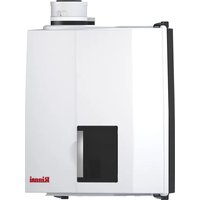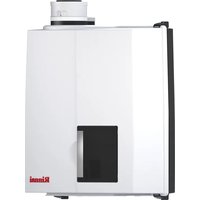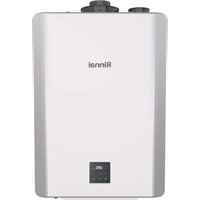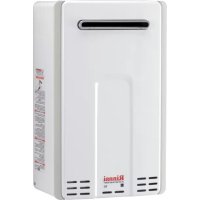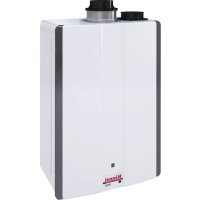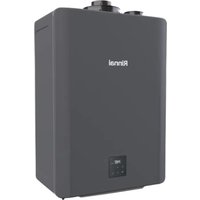
CX199iN - Boiler Rinnai - Free user manual and instructions
Find the device manual for free CX199iN Rinnai in PDF.


| Product type | Instantaneous gas boiler (tankless water heater) |
| Brand | Rinnai |
| Model | CX199iN (REU-NB3237FFC-US) |
| Gas supply | Natural gas (NG) or Liquefied petroleum gas (LPG), depending on configuration |
| Gas consumption (max) | 199 000 Btu/h |
| Gas consumption (min) | 15 000 Btu/h |
| NG supply pressure | Min: 3.5 in W.C. (0.87 kPa) / Max: 10.5 in W.C. (2.61 kPa) |
| LPG supply pressure | Min: 8.0 in W.C. (1.99 kPa) / Max: 13.5 in W.C. (3.36 kPa) |
| Water temperature range | Adjustable up to 49 °C (120 °F) or higher (via controller) |
| Ignition type | Automatic electronic ignition (without pilot light) |
| Control and connectivity | Integrated controller + Rinnai Central™ app via Bluetooth (BLE 4.0+) |
| Main functions | Instantaneous hot water production, gas conversion possible, diagnosis via analyzer |
| Safety | Flame detection, overheat safety, automatic shutdown in case of malfunction |
| Maintenance and cleaning | Periodic flame inspection, exhaust gas analysis, external cleaning |
| Spare parts and repairability | Gas conversion kit (part #104000330), conversion labels, manual provided |
| Certifications | ANSI Z21.10.3, CSA B149.1 (Canada), mobile home installation (residential models) |
| General information | Commercial model (not certified for mobile home). Weight and dimensions: see installation manual |
Frequently Asked Questions - CX199iN Rinnai
User questions about CX199iN Rinnai
0 question about this device. Answer the ones you know or ask your own.
Ask a new question about this device
Download the instructions for your Boiler in PDF format for free! Find your manual CX199iN - Rinnai and take your electronic device back in hand. On this page are published all the documents necessary for the use of your device. CX199iN by Rinnai.
USER MANUAL CX199iN Rinnai
See Next Page for Model Numbers
natural_image
Line drawing of a rectangular electronic device with a control panel and top handle (no text or symbols)

ANSI Z21.10.3 CSA 4.3
For the Conversion from Natural Gas (NG) to Liquid Propane Gas (LPG)
For the Conversion from Liquid Propane Gas (LPG) to Natural Gas (NG)
Tankless Water Heater / Chauffe-eau instantané
Gas Conversion Manual / Manuel de conversion de gaz
Rinnai®

WARNING
This conversion kit shall be installed by a qualified service agency in accordance with the manufacturer's instructions and all applicable codes and requirements of the authority having jurisdiction. The information in these instructions must be followed to minimize the risk of fire or explosion or to prevent property damage, personal injury or death. The qualified service agency is responsible for the proper installation of this kit. The installation is not proper and complete until the operation of the converted appliance is checked as specified in the manufacturer's instructions supplied with the kit.

AVERTISSEMENT
This manual applies to the following tankless water heater models:
Residential models are certified for installation in mobile homes.
Commercial models are not certified for installation in mobile homes.
1.1 Safety Symbols....3
-
Technical Data ....4
-
Parts List ....4
-
Gas Conversion Steps ....5
4.1 Adjust Parameter Settings......5
4.2 Gas Operating Instructions......7
4.3 Check Operation....8
Table des matières
- Sécurité....3
4.2 Instructions relatives au gaz .....14
For installations in Canada, the conversion shall be carried out in accordance with the requirements of the provincial authorities having jurisdiction and in accordance with the requirements of the CSA-B149.1, Natural Gas and Propane Installation Code.
The appliance must be installed in accordance with:
- Local codes or, in the absence of local codes, the National Fuel Gas Code, ANSI Z223.1/NFPA 54 and/or CSA B149.1, Natural Gas and Propane Installation Code.
- The Manufactured Home Construction and Safety Standard, Title 24 CFR, Part 3280 or CSA Z240 MH Series, Manufactured Homes.
Safety alert symbol. Alerts you to potential hazards that can kill or hurt you and others.
Indicates an imminently hazardous situation which, if not avoided, will result in personal injury or death.
Indicates a potentially hazardous situation which, if not avoided, could result in personal injury or death.
Indicates a potentially hazardous situation which, if not avoided, could result in minor or moderate injury. It may also be used to alert against unsafe practices.
The input rate can be verified by following the procedure in the National Fuel Gas Code (NFPA54 / ANSI Z223.1, 2021 or latest edition).
3. Parts List
Table 2
| Model | Gas Type | Kit Number ^1 | Gas Conversion Label | Conversion Manual | |
| LPG to NG | NG to LPG | ||||
| RX199iRXP199iCX199iCXP199iRX180iRX160iRXP160iCX160iCXP160iRX130i | NG/LPG | 104000330 | 100000831 | 10000832 | 100000841 |
^1 Kit includes NG and LPG gas conversion labels and Gas Conversion Manual (this manual).
You Will Need (Field-Supplied):
- Gas analyzer
- Metal tape
4. Gas Conversion Steps
4.1 Adjust Parameter Settings
Adjust the tankless water heater parameter settings by choosing one of the two options below:
- Option 1 (Recommended): Adjust parameter settings using a Bluetooth®-capable Smart Device.
- Option 2: Adjust parameter settings from the tankless water heater integrated controller.
Option 1: Adjust Parameter Settings Using a Bluetooth-Capable Smart Device
Note: To utilize BLE, your connecting device (smartphone, tablet, computer, etc.) must have Bluetooth 4.0 or a newer version. Contact your connecting device manufacturer if you are not sure if your connecting device has Bluetooth 4.0 or a newer version.
- Download the Rinnai Central™ app by scanning the following QR code:

- Open the Rinnai Central™ app from your smart device. Create an account and log in.
-
Power cycle the water heater (turn off electrical power to the water heater, then turn on power again). Power can be turned off by unplugging the power cord or turning off electricity at the circuit breaker. The controller does not control the electrical power to the water heater.
-
Push the Bluetooth button on the controller. The Bluetooth LED light turns solid (Figure 1).
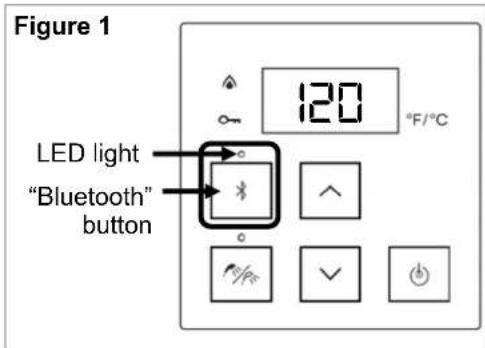
text_image
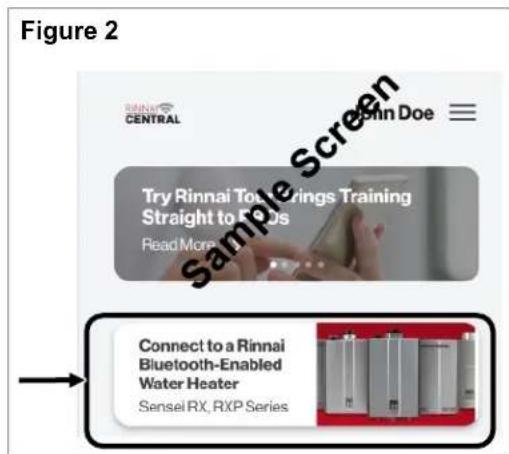
Figure 1 LED light "Bluetooth" button 120 °F/°C- Tap "Connect to a Rinnai Tankless Water Heater" on the Rinnai Central™ app (Figure 2). You will hear a beeping sound when pairing between the app and water heater is established.
text_image
Figure 2 Sensel RX, RXP Series Connect to a Rinnai Bluetooth-Enabled Water Heater Sensei RX, RXP Series Try Rinnai Tool Rings Training Straight to Reds Read More Sensel Doe Sample Screen- Follow the steps in the Rinnai Central™ app to change the gas type of your tankless water heater.
- Adjust any other parameters if needed.
- Proceed to section "4.2 Gas Operating Instructions" to continue the gas conversion steps.
Option 2: Adjust Parameter Settings from Integrated Controller

CAUTION


- Do not touch any areas on the PC board other than the described buttons while power is supplied to the water heater. Parts of the PC board are supplied with 120 VAC.
- Do not touch the areas at or near the heat exchanger or hot water lines; these areas become hot and could cause burns.
-
Remove the water heater front panel by removing the two screws and releasing the two latches. Refer to the "Tankless Water Heater Installation and Operation Manual" for complete instructions on removing the front panel.
-
Power cycle the water heater (turn off electrical power to the water heater, then turn on power again). Power can be turned off by unplugging the power cord or turning off electricity at the circuit breaker. The controller does not control the electrical power to the water heater.
-
Locate the PC board (lower front of unit) (Figure 3).
-
Locate the two push buttons ("A" and "B") on the PC board (Figure 3).
-
Press the "A" button for one second to enter into parameter settings mode (Figure 3).
Figure 3
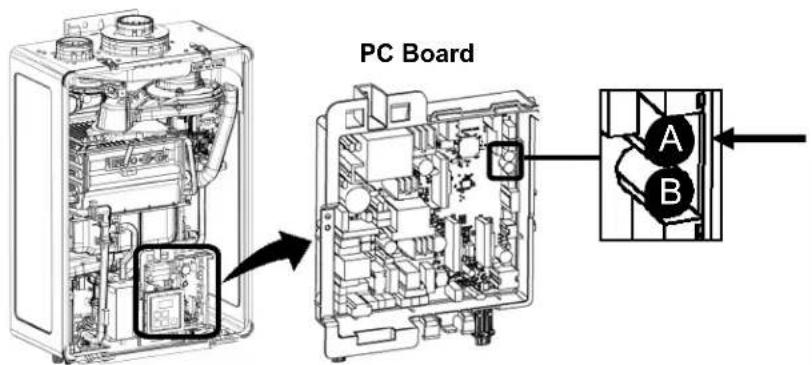
text_image
PC Board A B-
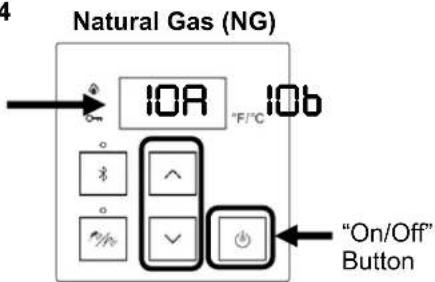
Press the up and down arrow buttons on the controller until parameter setting IOR or IOb appears in the display (Figure 4).
-
Press the "On/Off" button to change the selection (Figure 4):
-
Select IQR for Natural Gas (NG)
- Select IOb for Propane Gas (LPG)
Figure 4
text_image
Natural Gas (NG) IOA IOb "F/°C" "On/Off" ButtonPropane Gas (LPG)
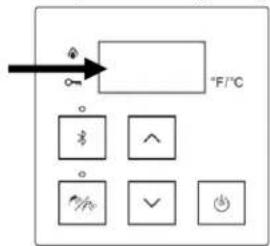
text_image
°F/°C × ^ × ✓ +- When the parameter is set accordingly, press and hold the "A" button on the PC Board (Figure 3) for one second to save your settings and exit parameter settings mode.
- Proceed to the next section to continue the gas conversion steps.
Notice: You may see error code 21 at this point. If so, contact Rinnai at 1-800-621-9419.
4.2 Gas Operating Instructions
The following operating information is required by ANSI Z21.10.3.
In you do not follow the WARNING
se instructions exactly, a fire or explosion may result causing property damage, personal injury or loss of life.
A. This appliance does not have a pilot. It is equipped with an ignition device which automatically lights the burner. Do not try to light the burner by hand.
B. BEFORE OPERATING, smell all around the appliance area for gas. Be sure to smell next to the floor because some gas is heavier than air and will settle on the floor.
WHAT TO DO IF YOU SMELL GAS
- Do not try to light any appliance.
- Do not touch any electric switch; do not use any phone in your building.
- Immediately call your gas supplier from a neighbor's phone. Follow the gas supplier's instructions.
- If you cannot reach your gas supplier, call the fire department.
C. Use only your hand to push in or turn the gas control valve. Never use tools. If the gas control valve will not turn by hand, do not try to repair it, call a qualified service technician. Force or attempted repair may result in a fire or explosion.
D. Do not use this appliance if any part has been under water. Immediately call a qualified service technician to inspect the appliance and to replace any part of the control system and any gas control which has been under water.
OPERATING INSTRUCTIONS
- STOP! Read the safety information above.
- Set the temperature controller to lowest setting.
- Turn off all electric power to the appliance.
- This appliance does not have a pilot. It is equipped with an ignition device which automatically lights the burner. Do not try to light the burner by hand.
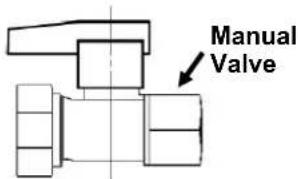
- Turn the manual gas control valve located at gas inlet of appliance clockwise to the OFF position.
- Wait five (5) minutes to clear out any gas. Then smell for gas, including near
the floor. If you smell gas, STOP! Follow "B" in the safety information above. If you don't smell gas, go to the next step.
- Turn the manual gas valve located at gas inlet of appliance counterclockwise to the full ON position.
- Turn on all electric power to the appliance.
- Set the temperature controller to desired setting.
- If the appliance will not operate, follow the instructions "To Turn Off Gas To Appliance" and call your service technician or gas supplier.
text_image
Manual ValveCLOSE
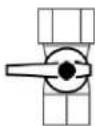
OPEN

TO TURN OFF GAS TO APPLIANCE
- Set the temperature controller to lowest setting.
-
Turn off all electric power to the appliance if service is to be performed.
-
Turn the manual gas control valve located at gas inlet of appliance clockwise to the OFF position.
4.3 Check Operation
WARNING
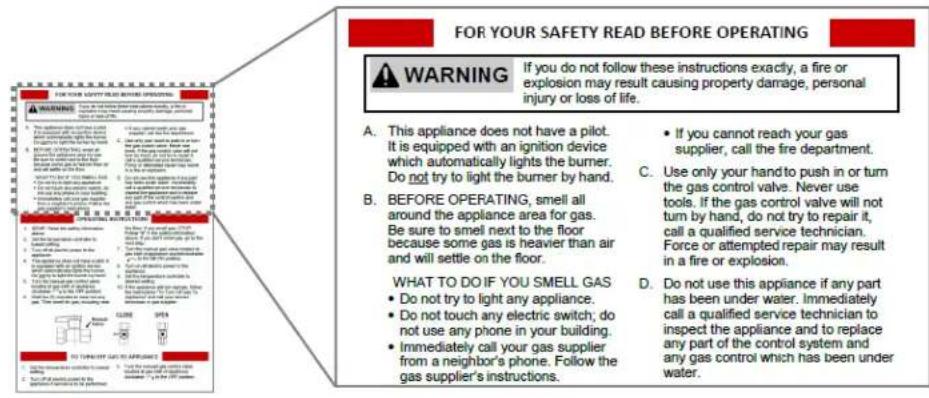
Follow the section "For Your Safety Read Before Operating" in section "4.2 Gas Operating Instructions" before starting the steps below.
text_image
FOR YOUR SAFETY READ BEFORE OPERATING WARNING If you do not follow these instructions exactly, a fire or explosion may result causing property damage, personal injury or loss of life. A. This appliance does not have a pilot. It is equipped with an ignition device which automatically lights the burner. Do not try to light the burner by hand. B. BEFORE OPERATING, smell all around the appliance area for gas. Be sure to smell next to the floor because some gas is heavier than air and will settle on the floor. WHAT TO DO IF YOU SMELL GAS Do not try to light any appliance. Do not touch any electric switch; do not use any phone in your building. Immediately call your gas supplier from a neighbor's phone. Follow the gas supplier's instructions. C. Use only your hand to push in or turn the gas control valve. Never use tools. If the gas control valve will not turn by hand, do not try to repair it, call a qualified service technician. Force or attempted repair may result in a fire or explosion. D. Do not use this appliance if any part has been under water. Immediately call a qualified service technician to inspect the appliance and to replace any part of the control system and any gas control which has been under water.
IMPORTANT
- Confirm that the inlet gas pressure is between the minimum and maximum pressures allowed for this water heater.
- If the tankless water heater has recirculation capabilities, you do not have to disable the pump when performing these steps.
Check operation of the tankless water heater by choosing one of the following options:
- Option 1: Check operation by using a gas analyzer (recommended)
- Option 2: Check operation by observing the burner flames
Option 1: Check Operation by Using a Gas Analyzer (Recommended)
- Remove the water heater front panel (if not done so already) by removing the two screws and releasing the two latches. Refer to the "Tankless Water Heater Installation and Operation Manual" for complete instructions on removing the front panel.
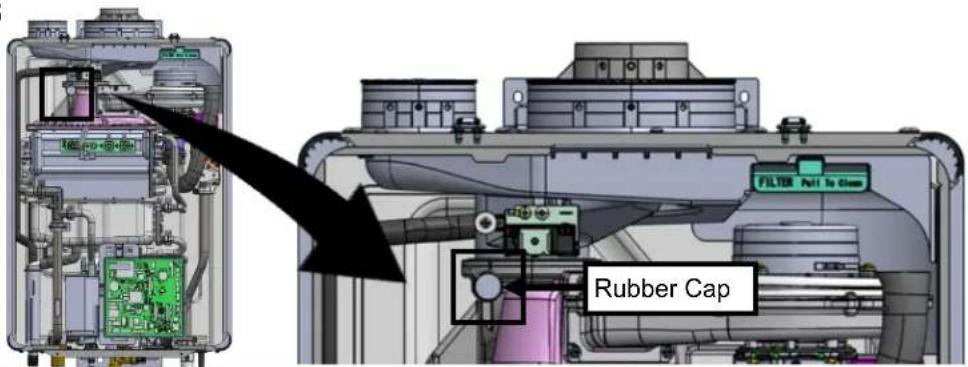
- Remove the rubber cap as shown in Figure 5 and insert a gas analyzer probe (field-supplied) into the opening.
WARNING
Exhaust gas may leak from the opening while the burner is on. Exhaust gas contains carbon monoxide and other harmful gases,
which can cause personal injury or death. Seal the opening with metal tape or other appropriate methods while the gas analyzer measures the exhaust gas. Also, sufficient ventilation is required to avoid a potential hazardous situation.
Figure 5
text_image
FILTER Pull to Clean Rubber Cap- Press the "On/Off" button on the controller to start the unit (Figure 6).
Set the water temperature to 120°F (49°C) or higher, and turn on two or three faucets or showers. Refer to the "Tankless Water Heater Installation and Operation Manual" for steps on adjusting water temperature.
-
The combustion fan will begin to run if water is flowing, and the spark will ignite the main burner.
-
This water heater has an automatic ignition system. When the main burner is lit, the "In Use" light (Figure 7) will glow red and the spark will stop.
-
Let the water heater run for at least five minutes, and then measure the concentration of CO2 or O2 by the gas analyzer, as applicable, in the exhaust system. Compared measured CO2 or O2 with the following table:
Table 3
| CO2 | O2 | |
| NG | 7.0% - 11.0% | 1.7% - 8.7% |
| LPG | 7.9% - 11.9% | 2.8% - 8.9% |
Figure 6
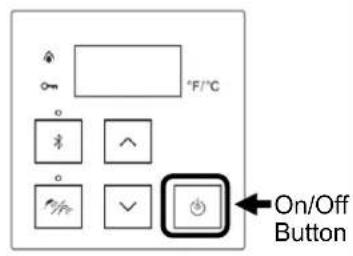
text_image
°F/°C On/Off ButtonFigure 7
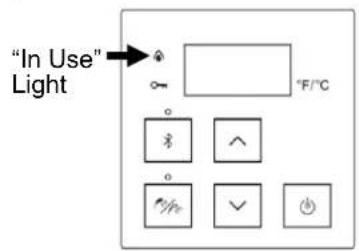
text_image
"In Use" Light °F/°C- If the measured CO2 or O2 is within the appropriate range, turn off the water faucets or showers.
- Turn off the unit by pressing the "On/Off" button on the controller (Figure 6).
- Reinstall the rubber cap.
- Reinstall the front panel using the two screws and two latches to secure it.

CAUTION

Do not touch the areas at or near the heat exchanger or hot water lines; these areas become hot and could cause burns.
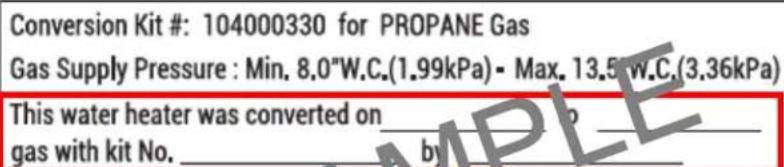
- Enter the required information on the gas conversion label (Figure 8).
Figure 8
Conversion Kit #: 104000330 for PROPANE Gas Gas Supply Pressure : Min. 8.0"W.C.(1.99kPa) - Max. 13.5 W.C (3.36kPa)
This water heater was converted on gas with kit No. ____ by ____
(Name and address of organization making this conversion, who accepts the responsibility for the correctness of this conversion).
This appliance has been converted for use with PROPANE gas.
- Apply the gas conversation label at an open space above the existing label on the left side of the water heater (Figure 9).
- The gas conversion steps are complete.
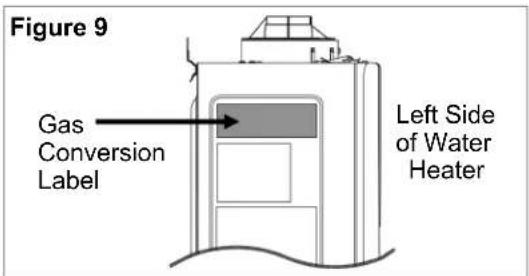
text_image
Figure 9 Gas Conversion Label Left Side of Water HeaterOption 2: Check Operation by Observing the Burner Flames
- Remove the water heater front panel (if not done so already) by removing the two screws and releasing the two latches. Refer to the "Tankless Water Heater Installation and Operation Manual" for complete instructions on removing the front panel.
- Press the "On/Off" button on the controller to start the unit (Figure 10). Set the water temperature to 120^ (49^) or higher, and turn on two or three faucets or showers. Refer to the "Tankless Water Heater Installation and Operation Manual" for steps on adjusting water temperature.
- The combustion fan will begin to run if water is flowing, and the spark will ignite the main burner.
- This water heater has an automatic ignition system. When the main burner is lit, the "In Use" light (Figure 10) will glow red and the spark will stop.
- Let the water heater run for at least five minutes.
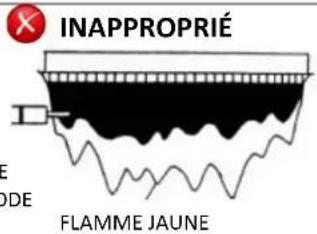
- Check that the burner flames are operating normally. The flame can be seen through the circular window below the burner. When operating normally, the burner flame should burn evenly over the entire surface. The flame should be clear, blue and stable. A yellow flame is abnormal and maintenance is required (Figure 11).
Figure 11

SATISFACTORY
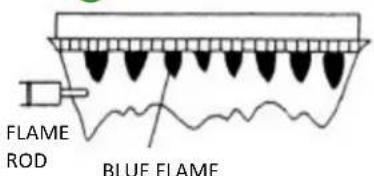
text_image
FLAME ROD BLUE FLAMEFRONT VIEW OF FLAME

UNSATISFACTORY

text_image
FLAME ROD YELLOW FLAME- If the flame looks satisfactory, turn off the water faucets or showers.
- Turn off the unit by pressing the "On/Off" button on the controller.
- Reinstall the front panel using the two screws and two latches to secure it.

CAUTION

Do not touch the areas at or near the heat exchanger or hot water lines; these areas become hot and could cause burns.
- Enter the required information on the gas conversion label (Figure 12).
Figure 12
text_image
Conversion Kit #: 104000330 for PROPANE Gas Gas Supply Pressure : Min. 8.0"W.C.(1.99kPa) - Max. 13.5 W.C.(3.36kPa) This water heater was converted on _ gas with kit No. _ by _(Name and address of organization making this conversion, who accepts the responsibility for the correctness of this conversion). This appliance has been converted for use with PROPANE gas.
- Apply the gas conversation label at an open space above the existing label on the left side of the water heater (Figure 13).
- The gas conversion steps are complete.
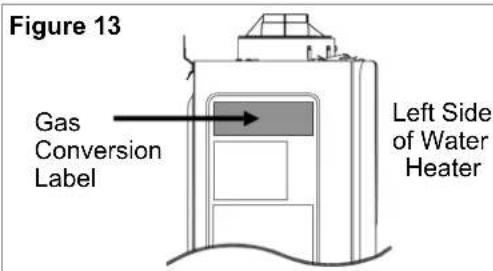
text_image
Figure 13 Gas Conversion Label Left Side of Water Heater2. Informations techniques
Tableau 1
| Modèle | RX199iRXP199iCX199iCXP199i | RX180i | RX160iRXP160iCX160iCXP160i | RX130i | |
| Consommation de gaz (BTU/h) | Minimum | 15 000 | |||
| Maximum | 199 000 | 180 000 | 160 000 | 130 000 | |
| Pression d'alimentation en gaz | Gaz naturel | Minimum: 3,5 po de c.e. / 0,87 kPaMaximum: 10,5 po de c.e. / 2,61 kPa | |||
| Gaz propane | Minimum: 8,0 po de c.e. / 1,99 kPaMaximum: 13,5 po de c.e. / 3,36 kPa | ||||
text_image
Figure 2 RINNAI CENTRAL John Doe Try Rinnai Tor Earnings Training Straight to Cars Read More Connect to a Rinnai Bluetooth-Enabled Water Heater Sensei RX, RXP Seriestext_image
FOR YOUR ADVERTY HEADS AND STRONG WARNING 1. What is you can't know what's something that you can't know what's something?? 2. What is you can't know what's something that you can't know what's something?? 3. What is you can't know what's something that you can't know what's something?? 4. What is you can't know what's something that you can't know what's something?? 5. What is you can't know what's something that you can't know what's something?? 6. What is you can't know what's something that you can't know what's something?? 7. What is you can't know what's something that you can't know what's something?? 8. What is you can't know what's something that you can't know what's something?? 9. What is you can't know what's something that you can't know what's something?? 10. What is you can't know what's something that you can't know what's something?? 11. What is you can't know what's something that you can't know what's something?? 12. What is you can't know what's something that you can't know what's something?? 13. What is you can't know what's something that you can't know what's something?? 14. What is you can't know what's something that you can't know what's something?? 15. What is you can't know what's something that you can't know what's something?? 16. What is you can't know what's something that you can't know what's something?? 17. What is you can't know what's something that you can't know what's something?? 18. What is you can't know what's something that you can't know what's something?? 19. What is you can't know what's something that you can't know what's something?? 20. What is you can't know what's something that you can't know what's something?? 21. What is you can't know what's something that you can't know what's something?? 22. What is you can't know what's something that you can't know what's something?? 23. What is you can't know what's something that you can't know what's something?? 24. What is you can't know what's something that you can't know what's something?? 25. What is you can't know what's something that you can't know what's something?? 26. What is you can't know what's something that you can't know what's something?? 27. What is you can't know what's something that you can't know what's something?? 28. What is you can't know what's something that you can't know what's something?? 29. What is you can't know what's something that you can't know what's something?? 30. What is you can't know what's something that you can't know what's something?? 31. What is you can't know what's something that you can't know what's something?? 32. What is you can't know what's something that you can't know what's something?? 33. What is you can't know what's something that you can't know what's something?? 34. What is you can't know what's something that you can't know what's something?? 35. What is you can't know what's something that you can't know what's something?? 36. What is you can't know what's something that you can't know what's something?? 37. What is you can't know what's something that you can't know what's something?? 38. What is you can't know what's something that you can't know what's something?? 39. What is you can't know what's something that you can't know what's something?? 40. What is you can't know what's something that you can't know what's something?? 41. What is you can't know what's something that you can't know what's something?? 42. What is you can't know what's something that you can't know what's something?? 43. What is you can't know what's something that you can't know what's something?? 44. What is you can't know what's something that you can't know what's something?? 45. What is you can't know what's something that you can't know what's something?? 46. What is you can't know what's something that you can't know what's something?? 47. What is you can't know what's something that you can't know what's something?? 48. What is you can't know what's something that you can't know what's something?? 49. What is you can't know what's something that you can't know what's something?? 50. What is you can't know what's something that you can't know what's something?? 51. What is you can't know what's something that you can't know what's something?? 52. What is you can't know what's something that you can't know what's something?? 53. What is you can't know what's something that you can't know what's something?? 54. What is you can't know what's something that you can't know what's something?? 55. What is you can't know what's something that you can't know what's something?? 56. What is you can't know what's something that you can't know what's something?? 57. What is you can't know what's something that you can't know what's something?? 58. What is you can't know what's something that you can't know what's something?? 59. What is you can't know what's something that you can't know what's something?? 60. What is you can't know what's something that you can't know what's something?? 61. What is you can't know what's something that you can't know what's something?? 62. What is you can't know what's something that you can't know what's something?? 63. What is you can't know what's something that you can't know what's something?? 64. What is you can't know what's something that you can't know what's something?? 65. What is you can't know what's something that you can't know what's something?? 66. What is you can't know what's something that you can't know what's something?? 67. What is you can't know what's something that you can't know what's something?? 68. What is you can't know what's something that you can't know what's something?? 69. What is you can't know what's something that you can't know what's something?? 70. What is you can't know what's something that you can't know what's something?? 71. What is you can't know what's something that you can't know what's something?? 72. What is you can't know what's something that you can't know what's something?? 73. What is you can't know what's something that you can't know what's something?? 74. What is you can't know what's something that you can't know what's something?? 75. What is you can't know what's something that you can't know what's something?? 76. What is you can't know what's something that you can't know what's something?? 77. What is you can't know what's something that you can't know what's something?? 78. What is you can't know what's something that you can't know what's something?? 79. What is you can't know what's something that you can't know what's something?? 80. What is you can't know what's something that you can't know what's something?? 81. What is you can't know what's something that you can't know what's something?? 82. What is you can't know what's something that you can't know what's something?? 83. What is you can't know what's something that you can't know what's something?? 84. What is you can't know what's something that you can't know what's something?? 85. What is you can't know what's something that you can't know what's something?? 86. What is you can't know what's something that you can't know what's something?? 87. What is you can't know what's something that you can't know what's something?? 88. What is you can't know what's something that you can't know what's something?? 89. What is you can't know what's something that you can't know what's something?? 90. What is your care to see how much the people are looking out. To turn out when I'm going to me. To turn out when I'm going to me. To turn out when I'm going to me. To turn out when I'm going to me. To turn out when I'm going to me. To turn out when I'm going to me. To turn out when I'm going to me. To turn out when I'm going to me. To turn out when I'm going to me. To turn out when I'm going to me. To turn out when I'm going to Me To turn out when I'm going to Me To turn out when I'm going to Me To turn out when I'm going to Me To turn out when I'm going to Me To turn out when I'm going to Me To turn out when I'm going to Me To turn out when I'm going to Me To turn out when I'm going to Me To turn out when I'm going to Me To turn out when I'm going to MePOUR VOTRE SÉCURITÉ, À LIRE AVANT UTILISATION

AVERTISSEMENT
text_image
Figure 11 APPROPRIÉ FLAMME ÉLECTRODE FLAMME BLEUEVUE DE FACE
DE LA
FLAMME
FLAMME
ÉLECTRODE