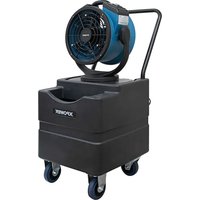
FM-68WK - Fan XPower - Free user manual and instructions
Find the device manual for free FM-68WK XPower in PDF.


| Product Type | Misting Fan (fan with misting function) |
| Brand | XPower |
| Model | FM-68WK (equivalent to FM-68W) |
| Power Supply | 115 V ~ 60 Hz, 0.65 A |
| Nominal Airflow | 1000 CFM (163 m³/h) |
| Fan Speeds | 3 speeds (1, 2, 3) |
| Dimensions (L x W x H) | 37.5 x 21.7 x 51.1 cm |
| Weight | 6.15 kg |
| Cord Length | 7.6 m (25 ft) |
| Max Mist Output | 7.5 L/h |
| Max Mist Throw Distance | 11.0 m |
| Misting Nozzle | 0.3 mm (marked 3010) |
| Water Source | Tank or external container (built-in pump) |
| Pump Control | 3 pump speeds + timer (0.5 h / 1 h / 2 h) |
| Oscillation | On/Off |
| Safety | Tip-over safety switch, built-in GFCI, 5A/125V fuse protection |
| Maintenance | Regular cleaning of tank and nozzles; soaking in soapy water |
| Included Parts | Spare mister, timer plug, nozzle cleaner |
| Warranty | 1 year limited (USA) |
| Usage | Outdoor use only; do not use indoors |
Frequently Asked Questions - FM-68WK XPower
User questions about FM-68WK XPower
0 question about this device. Answer the ones you know or ask your own.
Ask a new question about this device
Download the instructions for your Fan in PDF format for free! Find your manual FM-68WK - XPower and take your electronic device back in hand. On this page are published all the documents necessary for the use of your device. FM-68WK by XPower.
USER MANUAL FM-68WK XPower
natural_image
Technical line drawing of a mechanical fan or motor with visible blades and mounting base (no text or symbols)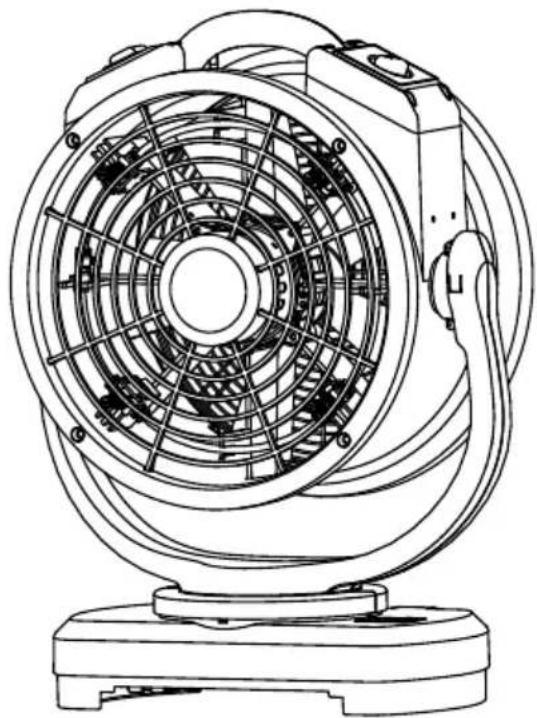
natural_image
Line drawing of a multi-stage fan with visible blades and mounting base (no text or symbols)Misting Fan Owner's Manual
Read and save these instructions before use
WARNING - READ AND SAVE THIS INSTRUCTIONS BEFORE USING THIS PRODUCT.
The user of electrical products may create hazards that include, but are not limited to injury, fire, electrical shock. Failure to follow these instructions may damage and/or impair its operation and void the warranty.
- Before operating, remove all packaging material and check for any damage that may have occurred during shipping or any missing items.
- Check power supply to ensure it matches the appliance's specification.
- Do not operate any fan with a damaged cord or plug. Discard fan or return it to an authorized service facility for examination and/or repair.
- Use only on GFCI protected receptacles. Please contact a qualified electrician for verification and / or installation of a GFCI receptacle if necessary.
- Do not run cord under carpeting. Do not cover cord with throw rugs, runners, or similar coverings. Do not route cord under furniture or appliances. Arrange cord away from traffic area and where it will not be tripped over.
- To reduce the risk of fire or electric shock, DO NOT use this fan with any solid-state speed control device.
- This fan is an outdoor product and is Not intended for indoor use. Do not leave the fan unattended when it is plugged in.
- Do not touch this appliance or the plug with wet hands or while standing in water.
- Do not operate the appliance in any pooled water.
- Do not use the product in areas where gasoline, paint or other flammable goods and objects are used or stored.
- Do not insert or allow objects to enter any ventilation or exhaust opening as this may damage the appliance and void the warranty.
- Do not cover the air inlet or outlet on the appliance.
- Do not direct the air flow at human faces or bodies.
- Do not allow children to play or with this appliance.
- Do not move or carry this appliance while the unit is operating.
• Always place this appliance on a smooth and level surface for safe operation. - Automatically Operated Device – To reduce the risk of injury, disconnect from power supply before servicing.
- Remove the power cord from the electrical receptacle by grasping and pulling on the power cord plug-end only, do not pull the cord directly.
- Do not attempt to repair or adjust any electrical or mechanical functions of this appliance, as this may cause danger and void the warranty.
- This product employs overload protection (fuse). A blown fuse indicates an overload or short-circuit situation. If the fuse blows, unplug the product from the outlet. Replace the fuse as per the user servicing instructions (follow product marking for proper fuse rating) and check the product. If the replacement fuse blows, a short-circuit may be present and the product should be discarded or returned to an authorized service facility for examination and /or repair.
- If the appliance is damaged or it malfunctions, DO NOT continue to use it. Unplug the product from the electrical outlet. Refer to troubleshooting guide or contactXPOWER.
- Store in a dry area, away from exposure to sunlight, extreme temperature and humidity, or other extreme environments, when not in use.
- An electronic instruction manual can be obtained through website www.xpower.com.
Grounding Instructions
This appliance must be grounded. In the event of malfunction or breakdown, grounding provides a path of least resistance for electric current to reduce the risk of electric shock. This appliance is equipped with a cord having an equipment-grounding conductor and a grounding plug. The plug must be plugged into an appropriate outlet that is properly installed and grounded in accordance with all local codes and ordinances.
A qualified electrician should be consulted if there is any doubt as to whether an outlet box is properly grounded.
DANGER: Improper connection of the equipment-grounding conductor can result in a risk of electric shock. The conductor with insulation having an outer surface that is green with or without yellow stripes is the equipment-grounding conductor. When repair or replacement of the cord or plug is required, do not connect the grounding wire to either flat blade pin. Check with a qualified electrician or serviceman if the grounding instructions are not completely understood, or if in doubt as to whether the appliance is properly grounded. Do not modify the plug provided with the appliance – if it will not fit the outlet, have a proper outlet installed by a qualified electrician.
This appliance is for use on a nominal 115V circuit (NEMA 5-15R), and has a grounding plug (NEMA 5-15P) as illustrated below. Make sure that the appliance is connected to an outlet having the same configuration as the plug. No adapter should be used with this appliance.
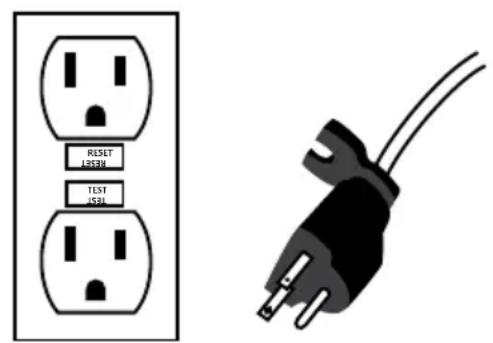
NEMA 5-15R NEMA 5-15P
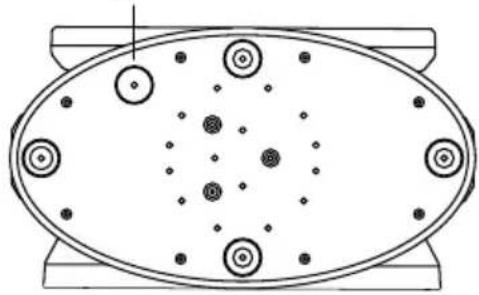
Special Instructions of Anti-Toppling Safety Switch (For Model FM-68 only)
Anti-toppling Safety Switch
natural_image
Top-down schematic of an oval-shaped electronic component with multiple circular components and dot patterns (no text or symbols)Bottom Base Cover
- The Anti-toppling Safety Switch is designed to protect the machine from functioning when the machine topples from a level surface.
• Machine continuously working at a toppled position may lead to safety concern or damage to the machine. - WARNING: DO NOT keep the Anti-Toppling Safety Switch on manually, for example, by tape. Always keep the switch free of function.
Parts Description
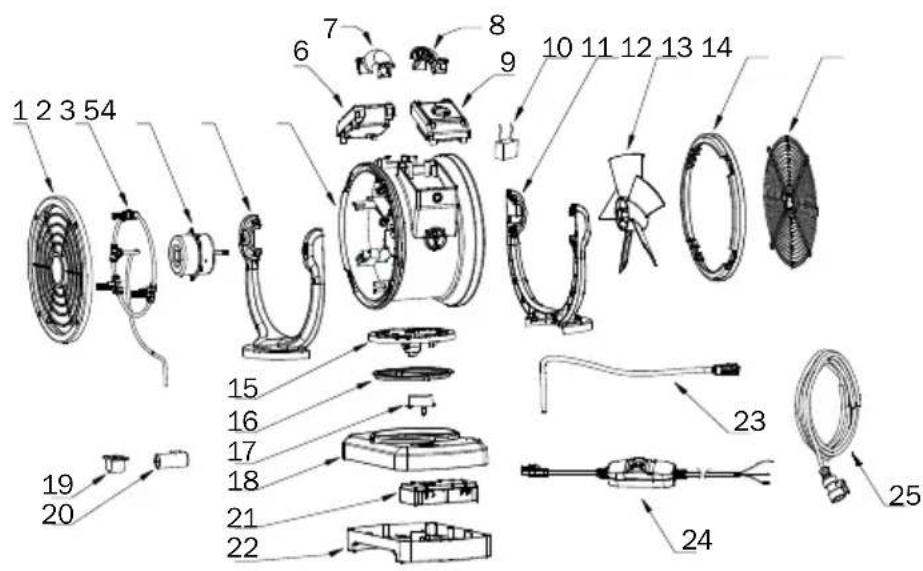
(1) Front Grille Cover
(2) Atomization Assembly
(3) Motor
(4) Front Rack
(5) Housing
(6) Oscillation Switch Panel Assembly
(7) Housing Handle Front
(8) Housing Handle Rear
(9) Speed Switch Panel
Assembly
(10) Capacitor
(11) Rear Rack
(12) Fan
(13) Rear End Cover
(14) Rear Grille Cover
(15) Rack Base
(16) Plastic Washer
(17) Oscillation Motor
(18) Top Base Cover
(19) Water Pump Shockproof Pad*
(20) Water Pump*
(21) Water Pump Circuit Board Assembly*
(22) Bottom Base Cover
(23) Pumping Hose*
(24) Power Cord
(25) Water Hose**
Items Included
natural_image
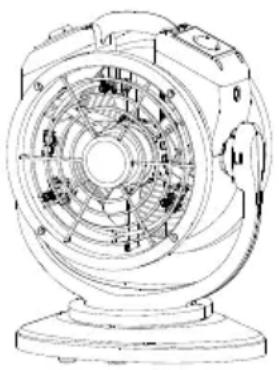
Technical line drawing of a mechanical fan or motor assembly (no text or symbols visible)- Misting Fan x 1

- Spare Misting
Nozzle x 1
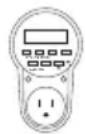
- Timer Outlet x 1*

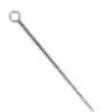
- Owner's Manual x 1 • Nozzle Cl
* For model FT-68W and FT-88W only.
Installation and Operation Guide
Water Source Connection
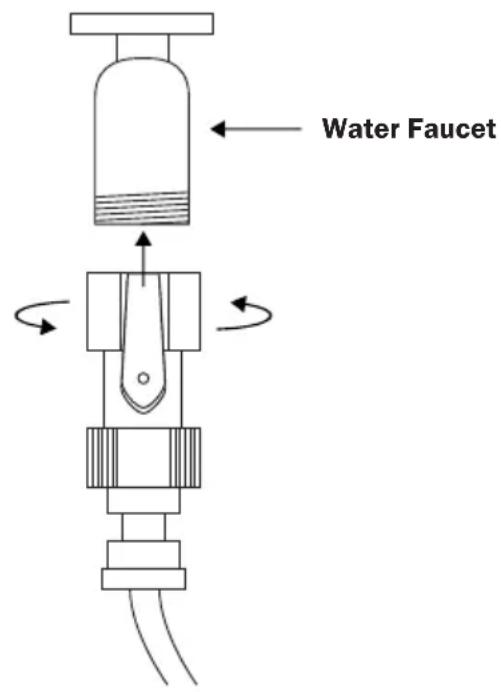
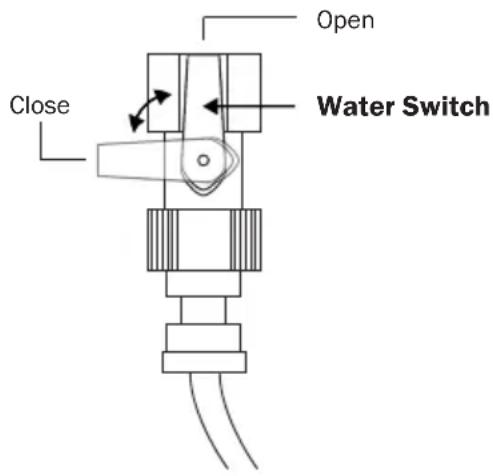
For Model FM-68:
- Screw the water faucet adapter onto the water faucet.
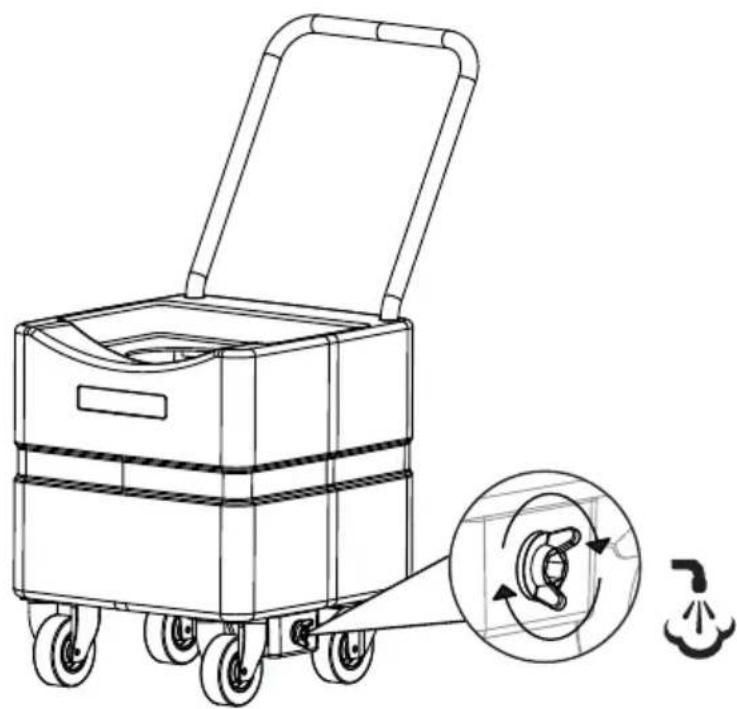
- Turn the switch to desired position to open or close the valve.
- Turn on the water faucet.
For Model FM-68W, FM-88W, FT-68W and FT-88W:
- The misting fan must connect to a container with water as a source of water.
- You can choose your own container or use XPOWER Water Tank for fast and convenient connection.
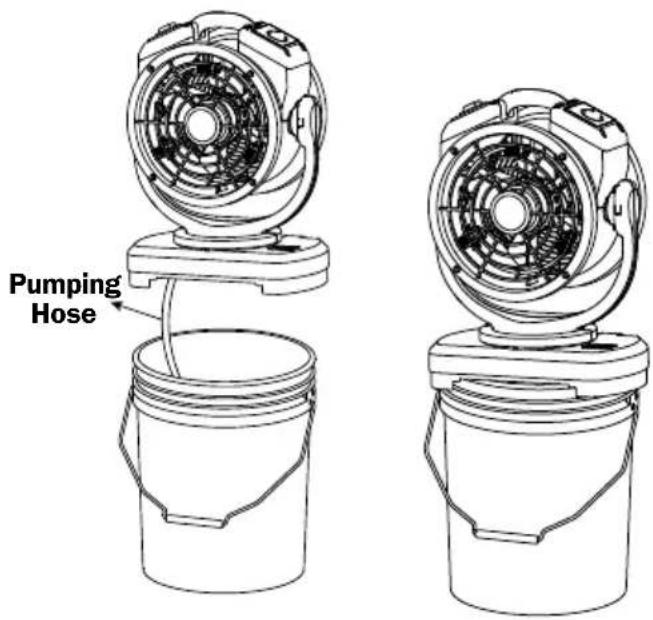
Connect to a Bucket
- Put the end of the pumping hose into a bucket.
- Put the unit onto the bucket.
- The bucket must be in an upper diameter less than 11.8 inches.
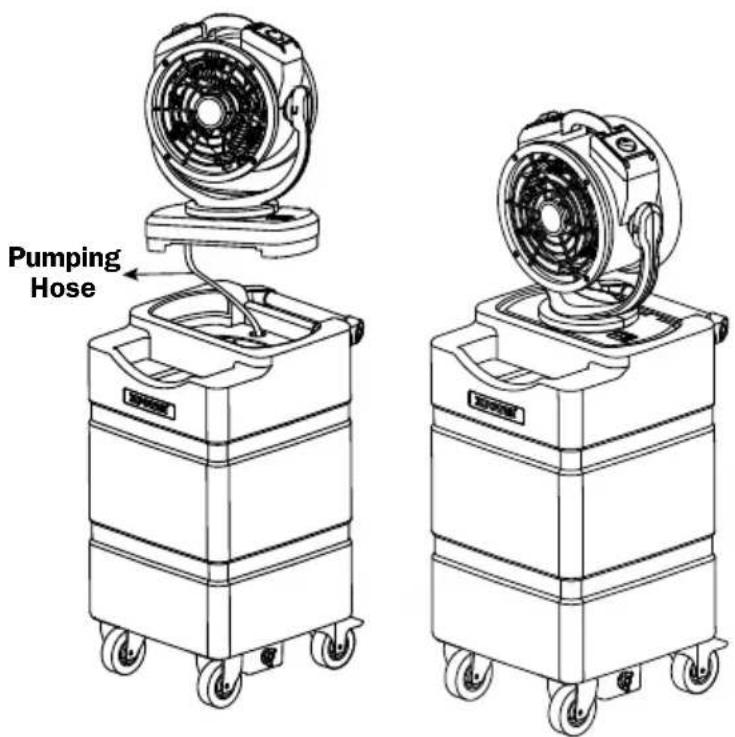
Connect to WT Series
- Put the end of the pumping hose through a small hole into the WT Series.
- Put the into the slot of the WT Series.
If you want to fill the container with a solution / liquid other than water:
- IMPORTANT: Always disconnect the machine from the power source before filling the solution.
- Do not exceed the maximum capacity of the container. For WT Series, it's suggested to fill 80% of the maximum capacity.
- WARNING: Filling these types of solution / liquid into the solution tank may cause safety hazards, corrosive damages to the machine or blockage of the atomization assembly:
(1) Strong acids, strong bases or other corrosive liquids
(2) Alcohol, or flammable or explosive liquids
(3) Oil, or other organic oils
(4) Liquids containing particles or sediments
(5) Detergents
- IMPORTANT: If you intend to fill the solution of the types mentioned above, please contact the manufacturer of the solution for usage reference and proper methods of cleaning.
Use with Timer Outlet (For Model FT-68W and FT-88W)
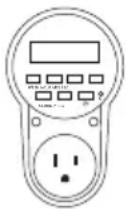
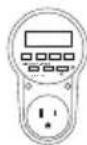
- Plug the unit into the timer outlet to control the operation of the misting fan.
• Refer to the instructions of the timer outlet.
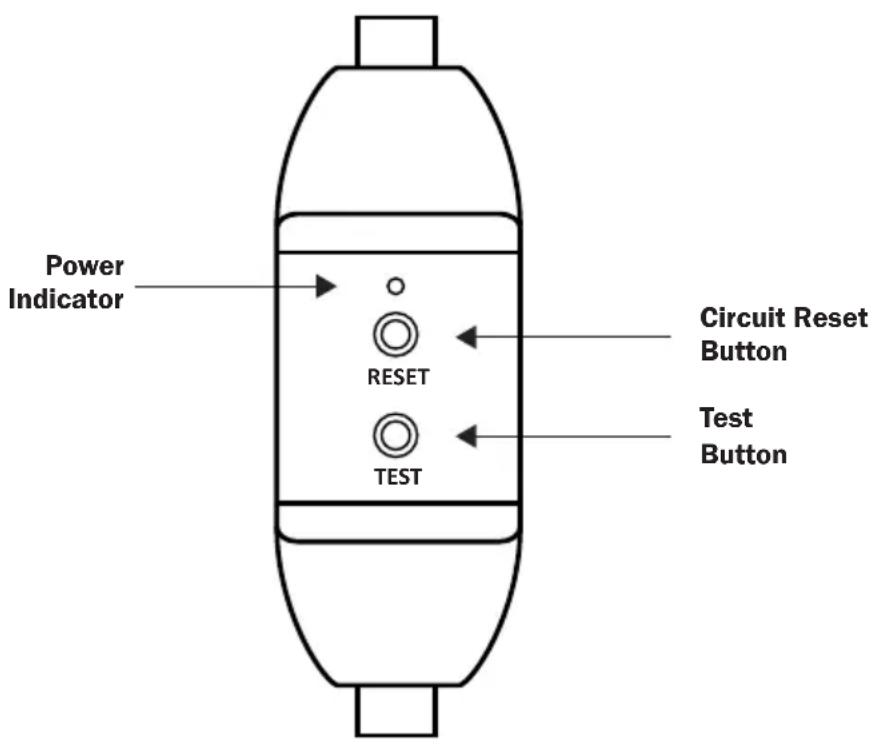
- The power cord of the misting fan is protected by GFCI.
- If the misting fan stops working, press the RESET BUTTON to reset the circuit.
For GFCI (Ground Fault Circuit Interrupter) protected power cord receptacle:
- Once a ground fault occurs, the GFCI will immediately interrupt the power connection to this appliance.
- A ground fault is an inadvertent contact between an energized conductor (for example, a human being) and ground or equipment frame.
WARNING: Risk of electric shock. You should test the GFCI before each use.
- Press the Test Button, the Power Indicator should go off. Then press GFCI Reset Button, the Power Indicator should illuminate and Test Button should be reset to unpressed position.
- Do not use if the test fails.
Fan Speed Switch
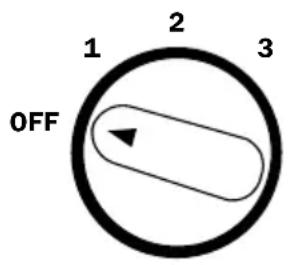
- Turn to "OFF" position to switch the misting fan OFF. Turn to any speed position to switch the misting fan ON.
- Turn clockwise to set the desired fan speed. There are 3 fan speeds from: 1, 2, 3. “1” is the lowest speed and “3” is the highest speed.
Oscillation Switch
Oscillate
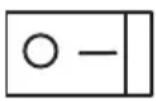
- Switch to "I" setting to let the machine oscillate.
- Switch to "0" setting to let the machine stay still.
Water Pump Control Panel (For Model FM-68W / FM-88W Only)
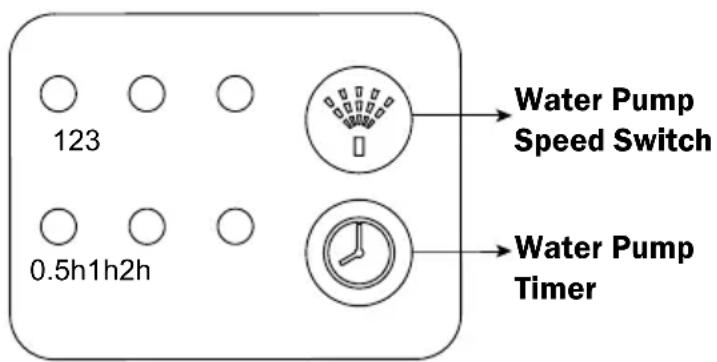
Water Pump Speed Switch
- Press to switch the speed of the water pump.
- There are 3 water pump speeds from: 1, 2, 3. “1” is the lowest speed and “3” is the highest speed.
Water Pump Timer
- Press to set the timer for an automatic stop of the water pump. The timer controls the water pump only.
- There are three timers from: 0.5 h, 1 h, 2 h for model FM-68W / 1 h, 2 h, 4 h for model FM-88W.
- However, if the timer is not set, the water pump will stop working after 4 hour for model FM-68W / 6 hour for model FM-88W.
- When the water pump stops working, press the button to turn on the water pump or set the timer again.
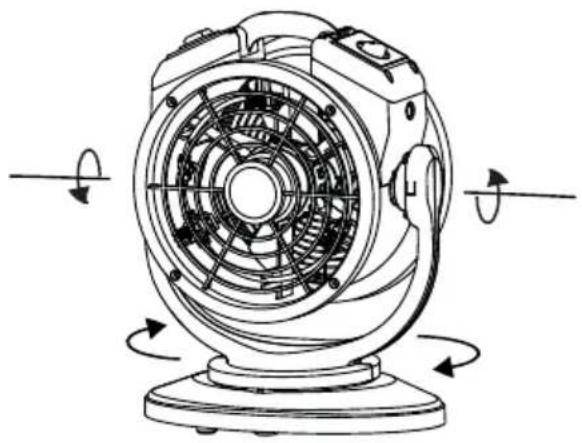
natural_image
Technical line drawing of a fan with visible blades and rotating arms (no text or symbols)- The misting fan can operate in different positions, directing the airflow and mist to desired areas.
User Maintenance Instructions
Frequent maintenance is recommended on this appliance. Failure to follow the maintenance instructions may cause failure of the appliance and void the warranty.
- When not in use, unplug and store the appliance in a dry and cool indoor place. Make sure it's out of reach of children.
- Before performing any maintenance or cleaning, always disconnect the misting fan from its power source.
- Use a damp cloth to wipe the surface of the housing. Do not clean the unit with water directly.
- Check if the grille covers are clean. Remove dirt or any other objects that could block the air inlet and air outlet.
natural_image
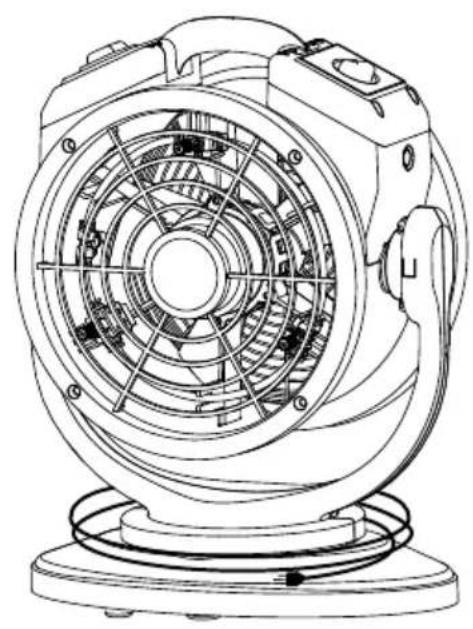
Technical line drawing of a mechanical fan or motor assembly (no text or symbols visible)For Model FM-68:
- Wrap the water hose first and then the power cord around the rack base after use.
natural_image
Technical line drawing of a mechanical fan or motor assembly (no text or symbols)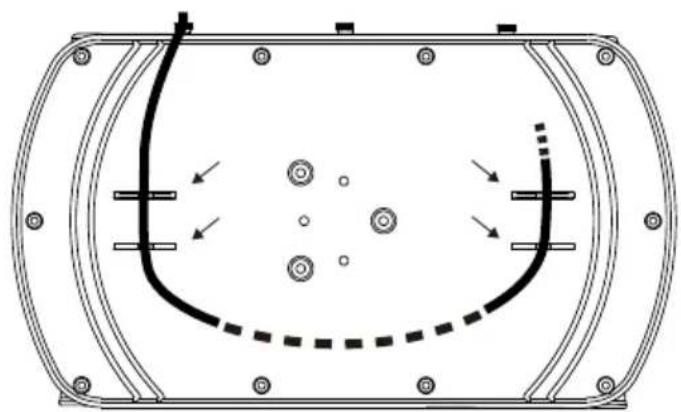
natural_image
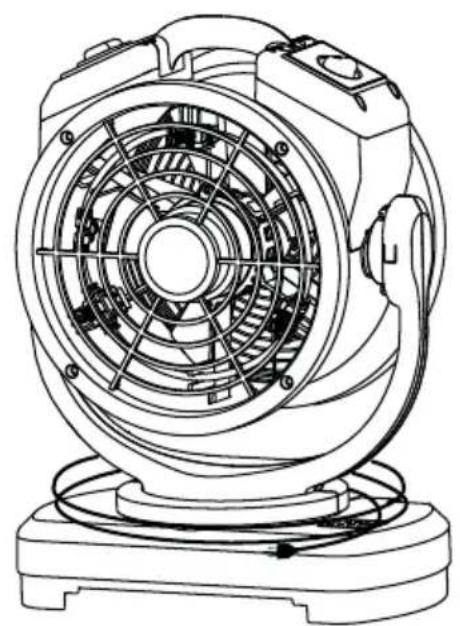
Technical line drawing of a mechanical component with internal features and directional arrows (no text or symbols)For Model FM-68W/FM-88W/FT-68W/FT-88W:
- Wrap the power cord around the rack base after use.
- Organize the pumping hose onto the bottom of the rack base. Use convenient clip on the housing to secure in place.
Atomization Assembly Maintenance
Cleaning the Container
- It's recommend to clean the container after each usage.
- Remove all the liquid within the container and wash with cold water.
Cleaning the Atomization Assembly
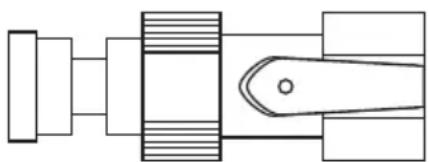
When not in use, unscrew the misting nozzles, store the nozzles in a dry indoor place out of reach of children. The nozzles must be dried completely before stored.
natural_image
Technical line drawings of mechanical components including threaded fastener, spring, and lever (no text or labels)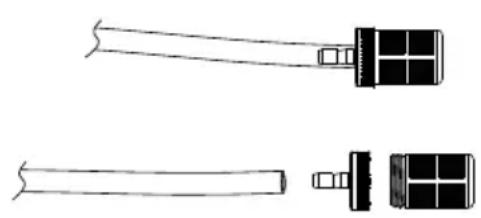
natural_image
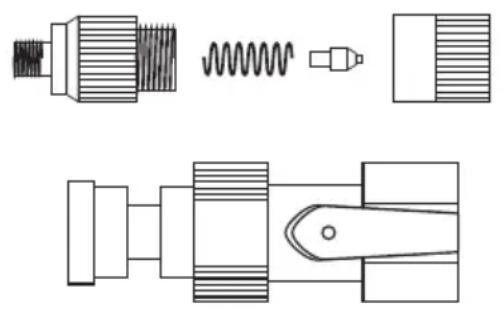
Technical line drawing of a mechanical tool with two views (top and side), no text or symbols present.- Disassemble the nozzles (See illustration above) and unscrew the water faucet adapter.
- For model FM-68W, FM-68W, FT-68W or FT-88W, disassemble the pumping hose.
- Soak the parts with soapy water or mild (or alkaline) detergent for several hours. DO NOT use vinegar or other acidic detergent.
natural_image
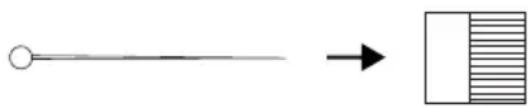
Simple diagram showing a circle connected to a rectangle with horizontal lines, indicating a transformation or mapping (no text or symbols)- Optionally, use the nozzle cleaner to clean the nozzle hole from the inner surface.
- When finished, dry the surfaces completely and reassemble the parts.
Replacing the Fuse
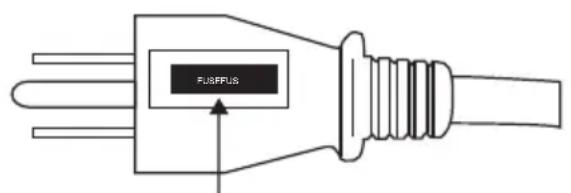
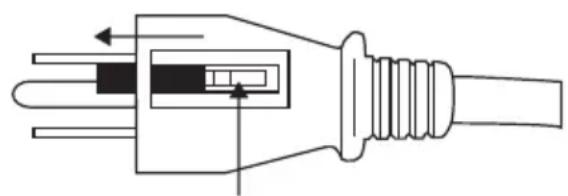
Fuse Cover Fuse
natural_image
Pure electrical plug diagram without any text, numbers, or symbols- Grasp plug and remove from the receptacle or other outlet device. Do not unplug by pulling on cord.
- Slide open the fuse cover on top of attachment plug. Remove the fuse carefully.
- To reduce risk of fire, replace fuse only with 5A/125V fuse.
Slide close the fuse cover on top of the attachment plug.
To reduce risk of fire. DO NOT replace the attached plug, which contains a safety device (fuse), with any other plug. Discard product if the attachment plug is damaged.
Troubleshooting Guide
PROBLEM POSSIBLE CAUSE SOLUTION
| Misting Fan does not start | No electricity. Check for power supply. | |
| The power cord is not properly plugged in. | Remove and reconnect the power cord. | |
| The machine is working under an extreme temperature. | Turn off the machine and unplug it. Let the machine cool down to normal temperature. | |
| The ground fault protection on the GFCI is triggered. | Check and reset the GFCI on the plug. | |
| The anti-toppling safety switch is triggered. | Check and reset the anti-toppling safety switch. | |
| Unit runs but the speed is abnormal | Air inlet or air outlet is blocked. | Remove blockage. |
| Misting function is abnormal | The pumping / water hose is blocked. | Remove blockage. |
| The atomization assembly is blocked. | Remove blockage. (See Page 11: Atomization Assembly Maintenance) | |
| The water switch is off or no water supply. | Check for water supply. | |
If troubleshooting does not resolve your problem, please contact XPOWER or other parties authorized by XPOWER for further instructions.
Technical Specification
Machine Specification
| MODEL NUMBER FM-68 FM-68W FT-68W FM-88W FT-88W | |||||
| Voltage / Frequency 115 V~60 Hz | |||||
| Amperage 0.55 A 0.65 A | 1.0 A | ||||
| Rated Airflow | 1000 CFM | 1700 CFM | |||
| Speed Control | 3 Speeds | ||||
| Cord Length | 10 ft. / 3.0 m | 25 ft. / 7.6 m | 10 ft. / 3.0 m | 25 ft. / 7.6 m | |
| Unit Dimension (L) x (W) x (H) | 14.8 x 8.3 x 19.0 in. / 37.5 x 21.0 x 48.3 cm | 14.8 x 8.5 x 20.1 in. / 37.5 x 21.7 x 51.1 cm | 17.1 x 9.6 x 23.5 in. / 43.5 x 24.5 x 59.8 cm | ||
| Unit Weight | 12.8 lbs. / 5.8 kg | 13.6 lbs. / 6.15 kg | 14.2 lbs. / 6.45 kg | 17.0 lbs. / 7.73 kg | 17.8 lbs. / 8.07 kg |
| Safety Certification | ETL/C-ETL | N/A | ETL/ C-ETL | N/A | |
If your product(s) is not listed above, please visit www.xpower.com for more information.
Atomization Specification
| Misting Nozzle Max Mist Volume Max Throw Distance | |||
| FM-68 0.3 mm (Marked 3010) 5.9 L / h 32.8 ft. / 10.0 m | |||
| FM-68W / FT-68W | 0.3 mm (Marked 3010) 7.5 L / h 36.1 ft. / 11.0 m | ||
| FM-88W / FT-88W | 0.3 mm (Marked 3010) 9.5 L / h 42.7 ft. / 13.0 m | ||
XPOWER Limited Warranty (USA)
1 YEAR LIMITED WARRANTY
XPOWER-branded products purchased in the U.S. from authorized distributors include a 1-year limited warranty. Contact XPOWER to confirm warranty information about your product(s).
This limited warranty covers defects in materials and workmanship in your XPOWER-branded products, purchased in the U.S. ONLY. Local warranty policy (if any) in your country will cover products purchased outside the U.S.
IMPORTANT:
(1) Please finish the online warranty registration before usage. Visit https://xpower.com/warranty-registration/.
(2) This Limited Warranty applies with its own timeliness. Contact XPOWER or visit www.xpower.com for more information.
Items mentioned but not limited to below are not covered by warranty:
(1) Power cord, filters or any other components considered as a “consumable parts” by XPOWER.
(2) Normal wear and tear.
(3) Problems that result, directly or indirectly, at XPOWER's sole discretion, from:
(3.1) External causes such as accident, abuse, misuse or problems with electrical power supply.
(3.2) Disassembling, servicing or modification not authorized by XPOWER.
(3.3) Usage that is not accordant with product instructions stated in Owner's Manual.
(3.4) Failure to follow the product instructions or lack of necessary maintenance stated in Owner's Manual.
Before contacting XPOWER, please try one or more of the following:
(1) Consult this Owner's Manual and follow the instructions of troubleshooting guide.
(2) Access www.xpower.com for more advice and information that could be helpful to address your problems.
If you need additional assistance from XPOWER, please:
(1) Email info@xpower.com.
(2) Call XPOWER U.S. Customer Service Department at 855-855-8868 or other numbers provided on www.xpower.com.
(3) Visit XPOWER U.S. Head Office at 668 S. 6th Ave., City of Industry, CA 91746 or the most current address provided on www.xpower.com.
Please also have your original proof of purchase and the serial number(s) of your product(s) ready when you contact XPOWER.
If you are instructed to return the unit for service or replacement, please:
(1) Request a RMA (Return-Merchandise-Authorization) number.
(2) Use the original or an equivalent packaging, prepay shipping charges at your own expense to the address provided by XPOWER, with the RMA number on the shipping label or the packaging.
(3) Include all the original parts and components.
XPOWER will inspect, assess and advise the repairs needed and applicable cost, if any. For products under warranty, we will pay to ship the repaired or replaced product(s) to you if you use an address within the Contiguous United States. Otherwise, we will ship the product(s) to you at your own expense.
ADVERTENCIA: LEA Y GUARDE ESTE MANUAL ANTES DE USAR ESTE PRODUCTO.
NEMA 5-15R NEMA 5-15P
natural_image
Top-down schematic of an oval-shaped device with multiple circular components and dots, no text or symbols present.natural_image
Technical line drawing of a mechanical fan or motor assembly (no text or symbols visible)natural_image
Technical line drawing of a mechanical fan or motor with visible blades and stator (no text or symbols)natural_image
Technical line drawing of a mechanical fan or motor assembly (no text or symbols visible)Para Modelo FM-68:
natural_image
Technical line drawing of a mechanical fan or motor assembly (no text or symbols visible)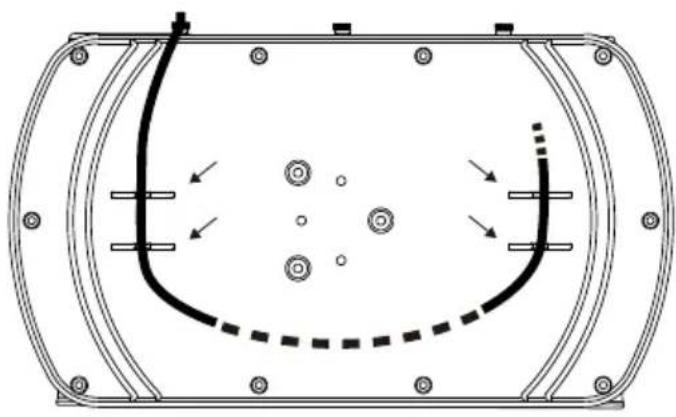
natural_image
Technical line drawing of a mechanical component with internal features and directional arrows (no text or symbols)Para Modelo FM-68W/FM-88W/FT-68W/FT-88W:
natural_image
Pure mechanical assembly diagram without any text, numbers, or symbols
flowchart
graph LR
    A[" "] --> B[" "]
    style A fill:#fff,stroke:#000
    style B fill:#fff,stroke:#000
natural_image
Diagram of an oval-shaped object with surrounding circular elements and dots, no text or symbols presentnatural_image
Technical line drawing of a mechanical fan or motor assembly with no visible text or symbols
(15) Base de support
natural_image
Technical line drawing of a mechanical fan or pump assembly mounted on a bucket (no text or symbols visible)natural_image
Line drawing of a mechanical device with a circular top component and wheels (no text or symbols)natural_image
Technical line drawing of a mechanical fan or motor with visible blades and stator (no text or symbols)natural_image
Technical line drawing of a mechanical fan or motor assembly (no text or symbols visible)natural_image
Technical line drawing of a mechanical fan or motor assembly (no text or symbols)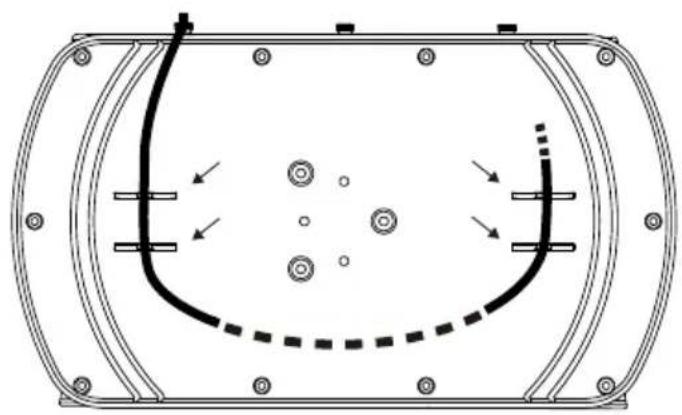
natural_image
Technical line drawing of a mechanical component with internal features and directional arrows (no text or symbols)natural_image
Pure mechanical component diagrams without any text, numbers, or symbols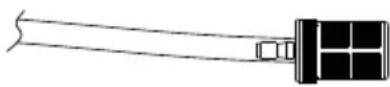
natural_image
Pure mechanical assembly diagram without any text, numbers, or symbols
natural_image
Simple diagram showing a straight line with a circle at the top-left end and a right-pointing arrow pointing to a grid of vertical lines (no text or symbols)PROBLÈME CAUSE POSSIBLE SOLUTION
PROBLÈME CAUSE POSSIBLE SOLUTION
Installation and Operation Guide
natural_image
Line drawing of a wheeled cart with a coiled cable, showing no text or symbols(4)
natural_image
Line drawing of a four-wheeled cart with an open lid, showing a close-up of the wheel and a circular component (no text or symbols)
XPOWER®
XPOWER Manufacture, INC.
668 S. 6th Ave.,
City of Industry, CA 91746 USA
www.xpower.com | 1-(855)-855-8868 | info@xpower.com
Read and save these instructions before use
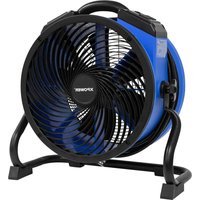
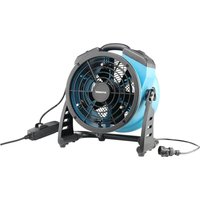
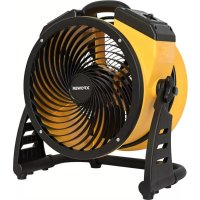
- Misting Fan Owner's Manual
- WARNING - READ AND SAVE THIS INSTRUCTIONS BEFORE USING THIS PRODUCT.
- Grounding Instructions
- Special Instructions of Anti-Toppling Safety Switch (For Model FM-68 only)
- Parts Description
- Items Included
- Installation and Operation Guide
- Water Source Connection
- For Model FM-68:
- For Model FM-68W, FM-88W, FT-68W and FT-88W:
- Connect to a Bucket
- Connect to WT Series
- If you want to fill the container with a solution / liquid other than water:
- Use with Timer Outlet (For Model FT-68W and FT-88W)
- For GFCI (Ground Fault Circuit Interrupter) protected power cord receptacle:
- WARNING: Risk of electric shock. You should test the GFCI before each use.
- Fan Speed Switch
- Oscillation Switch
- Water Pump Control Panel (For Model FM-68W / FM-88W Only)
- Water Pump Speed Switch
- Water Pump Timer
- User Maintenance Instructions
- For Model FM-68W/FM-88W/FT-68W/FT-88W:
- Atomization Assembly Maintenance
- Cleaning the Container
- Cleaning the Atomization Assembly
- Replacing the Fuse
- Troubleshooting Guide
- Technical Specification
- Machine Specification
- Atomization Specification
- XPOWER Limited Warranty (USA)
- YEAR LIMITED WARRANTY
- IMPORTANT:
- Items mentioned but not limited to below are not covered by warranty:
- Before contacting XPOWER, please try one or more of the following:
- If you need additional assistance from XPOWER, please:
- If you are instructed to return the unit for service or replacement, please:
- ADVERTENCIA: LEA Y GUARDE ESTE MANUAL ANTES DE USAR ESTE PRODUCTO.
- Para Modelo FM-68:
- Para Modelo FM-68W/FM-88W/FT-68W/FT-88W:
- XPOWER®
Brand : XPower
Model : FM-68WK
Category : Fan