
Beosound A1 3rd Generation - Loudspeaker BANG & OLUFSEN - Free user manual and instructions
Find the device manual for free Beosound A1 3rd Generation BANG & OLUFSEN in PDF.


| Brand | Bang & Olufsen |
| Model | Beosound A1 3rd Generation |
| Product type | Portable Bluetooth speaker |
| Main functions | Play/pause, volume control, track change, hands-free calling, mute, stereo pairing |
| Connectivity | Bluetooth, USB-C (for charging and PC audio) |
| Power | Rechargeable battery via USB-C, battery indicator (orange blinking when charging, green when fully charged) |
| Battery indicator | Solid orange at 49% charge, solid red at 19% charge |
| Required app | Bang & Olufsen (for setup, audio customization, and stereo) |
| Stereo pairing | Compatible with Beosound A1 2nd and 3rd Gen, via app or manually |
| Light indicators | Blinking white (pairing), solid white (connected), green (active call), red (microphone muted) |
| Initial setup | Download the Bang & Olufsen app, create an account, add the product |
| Call usage | Accept/reject/end call, mute microphone, volume control |
| Online support | Bang & Olufsen support page and app |
Frequently Asked Questions - Beosound A1 3rd Generation BANG & OLUFSEN
User questions about Beosound A1 3rd Generation BANG & OLUFSEN
0 question about this device. Answer the ones you know or ask your own.
Ask a new question about this device
Download the instructions for your Loudspeaker in PDF format for free! Find your manual Beosound A1 3rd Generation - BANG & OLUFSEN and take your electronic device back in hand. On this page are published all the documents necessary for the use of your device. Beosound A1 3rd Generation by BANG & OLUFSEN.
USER MANUAL Beosound A1 3rd Generation BANG & OLUFSEN
Beosound A1 3rd Generation

Est. 1925
User Guide
2505
CONTENT
Download Bang & Olufsen app, 2
Charging, 6
First-time set up, 9
Controls - Music, 12
Controls - Calls, 16
Stereo pairing, 21
Bluetooth pairing, 27
Battery indicator, 30
More information, 33
DOWNLOAD BANG & OLUFSEN APP
To set up your product, start by download the Bang & Olufsen App here:




The app gives you the full Bang & Olufsen experience from setup to audio personalisation, product support and new features right at your fingertips.
When you first start the Bang & Olufsen App, you are asked to create a user account. Then tap the Add Product icon to add your product to the app.
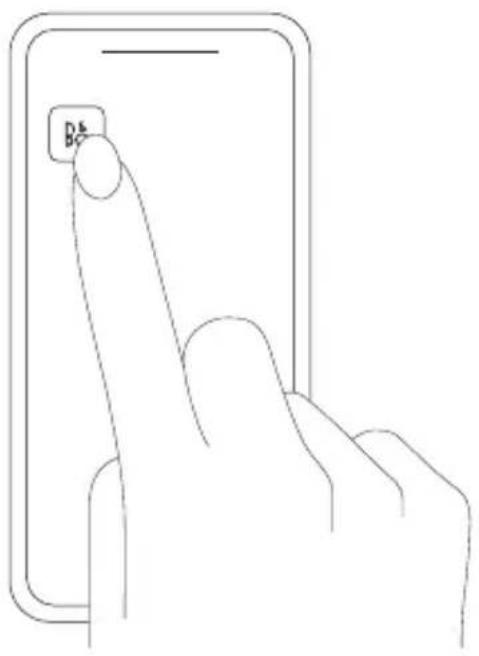
DANSK DANISH - For at konfigurere dit produkt skal du starte med at downloade Bang & Olufsen-appen.
ENGLISH - We recommend that you charge your Beosound Al 3rd Gen before using it for the first time.
The battery indicator flashes orange when charging and turns green when the battery is fully charged.
ENGLISH - Switch on your Beosound AI 3rd Gen for automatic Bluetooth pairing, the light indicator on the top will double pulse white. Switch on Bluetooth on your device, and select Beosound AI 3rd Gen. When successfully paired, the light indicator will be solid white and a sound prompt is heard, indicating it is ready to play. When using the Bang & Olufsen App, it will guide you through this process.
ENGLISH - Press the play/pause button once to start the music, and press it again to pause.
Use the plus button to increase the volume or the minus button to decrease it.
Double-press the play/pause button to skip to the next track. Triple-press the play/pause button to go back to the previous track.
DANSK DANISH - Tryk én gang på afspil/pause-knappen for at starte musikken, og tryk igen for at pause.
Brug plus-knappen til at skrue op for lyden eller minus-knappen til at skrue ned.
| ▷II Accept call | • Single press |
| ▷II Decline/End call | — Press and hold |
| + Volume | • Single press |
| — Next | • Single press |
| ♀ Mute/Unmute | • Single press |
ENGLISH - You can either use your Beosound A1 3rd Gen as a speakerphone via Bluetooth or via a USB-C cable connected to a computer.
Press the play/pause button once to accept a call. The light will turn solid green when accepted.
Press and hold the play/pause button to decline or end the call. The light will return to solid white.
Use the plus button to increase the volume or the minus button to decrease it.
During a call, press the microphone button once to mute yourself. The light will turn solid red. Press the microphone button again to unmute, and the light will turn solid green.
2nd speaker
ENGLISH - You can stereo pair any combination of Beosound AI 3rd Generation and 2nd Generation speakers to play together. This is done either manually or in the app.
First, make sure both speakers are Bluetooth connected and paired to your device.
To stereo pair in the Bang & Olufsen app, simply select one of the Beosound AI speakers, select stereo pairing and select the Beosound AI speaker you wish to pair. The two speakers are now connected.
To manually stereo pair, long press the Bluetooth button on one speaker until you hear a prompt sound. Then do the same for the second speaker until you hear a prompt sound. The speakers are now stereo paired.
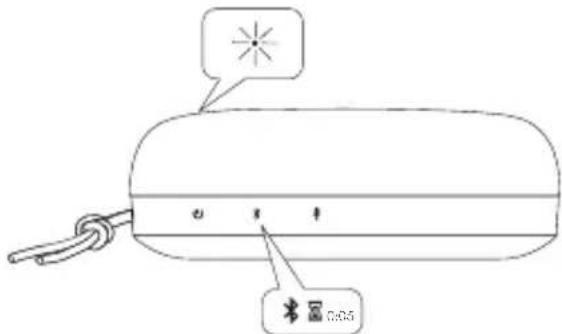
ENGLISH - Press and hold the Bluetooth button for 2 sec. The light indicator on the top will double pulse white. Switch on Bluetooth on your device, and select Beosound A1 3rd Gen. When successfully paired, the light indicator will be solid white and a sound prompt is heard, indicating it is ready to play.
natural_image
Line drawing of a device with a starburst symbol and cable, no text or symbols presentLED Behaviour Meaning
Solid White Battery high (50-100%)
Solid Orange Battery medium (20-49%) for 5 min
Solid Red Battery low (0-19%)
Pulsing Orange Charging
Solid Green Fully charged
ENGLISH - The battery indicator will turn orange for 5 minutes at 49% battery level to give an early warning. At 19% battery level, the battery indicator will turn red. Use the Bang & Olufsen app to check the battery status.
DANSK DANISH - Batteriindikatoren vil blive orange i 5 minutter ved 49% batteriniveau for at give en tidlig adversel. Ved 19% batteriniveau vil batteriindikatoren blive rød. Brug Bang & Olufsen-appen til at tjekke batteristatus.
ENGLISH - For more information please visit our support page or Bang & Olufsen App.
DANSK DANISH - For mere information, besøg venligst vores supportside eller Bang & Olufsen App.

Brand : BANG & OLUFSEN
Model : Beosound A1 3rd Generation
Category : Loudspeaker