
BeoLab 6002 - Loudspeaker BANG & OLUFSEN - Free user manual and instructions
Find the device manual for free BeoLab 6002 BANG & OLUFSEN in PDF.


| Product Type | Speaker (active loudspeaker) |
| Brand | Bang & Olufsen |
| Model | BeoLab 6002 |
| Connectivity | Power Link (for Bang & Olufsen systems); Line input via adaptor (phono/RCA to DIN) for non-B&O systems |
| Setup Switch | LEFT, RIGHT (B&O system); LINE (non-B&O system) |
| Position Switch | CORNER, WALL, FREE (adjusts bass response according to placement) |
| Standby Indicator | Red (standby), Green (on), Orange (error/thermal protection) |
| Thermal Protection | Automatic standby when overheating; reset by disconnecting mains for 3–5 minutes |
| Power Cord | Mains cord with specific plug; replace only with genuine Bang & Olufsen part |
| Placement | Floor-standing with base (included) or wall-mounted using approved brackets |
| Cleaning | Dry soft cloth; mild detergent for stubborn stains; avoid alcohol or solvents |
| Operating Temperature | 10–40°C (50–105°F) |
| Intended Use | Indoor, dry domestic environments |
| Cable Management | Cable guides at bottom for safe routing |
| Environmental Compliance | CE, FCC Class B, Canadian ICES |
| Disposal | Do not dispose with household waste; follow WEEE directive |
| Safety | Do not open; service by qualified personnel only |
| Auto On/Off (non-B&O) | Switches on when signal received; off after a few minutes without signal |
Frequently Asked Questions - BeoLab 6002 BANG & OLUFSEN
User questions about BeoLab 6002 BANG & OLUFSEN
0 question about this device. Answer the ones you know or ask your own.
Ask a new question about this device
Download the instructions for your Loudspeaker in PDF format for free! Find your manual BeoLab 6002 - BANG & OLUFSEN and take your electronic device back in hand. On this page are published all the documents necessary for the use of your device. BeoLab 6002 by BANG & OLUFSEN.
USER MANUAL BeoLab 6002 BANG & OLUFSEN
WARNING: To reduce the risk of re or electric shock, do not expose this appliance to rain or moisture. Do not expose this equipment to dripping or splashing and ensure that no objects lled with liquids, such as vases, are placed on the equipment.
To completely disconnect this equipment from the AC Mains, disconnect the mains plug from the wall socket. The disconnect device shall remain readily operable.
The lightning ash with arrowhead symbol within an equilateral triangle, is intended to alert the user to the presence of un insulated "dangerous voltage" within the product's enclosure that may be of sufficient magnitude to constitute a risk of electric shock to persons.

The exclamation point within an equilateral triangle is intended to alert the user to the presence of important operating and main tenance (servicing) instructions in the literature accompanying the product.
When you have nished setting up the loudspeakers as described on the following pages, connect the entire system to the mains supply. The indicator lights up in red, indicating that the loudspeakers are in standby, ready to be used. The loudspeakers are designed to be left in this standby mode when not in use.
Switching on and off – indicator
When you switch on your Bang & Olufsen system, the loudspeakers switch on simultaneously. The red standby indicator light turns green, indicating that the loudspeakers are switched on.
When you switch off your system, or mute the sound, the red indicator light appears immediately, indicating that the loudspeakers are not in use.
If the loudspeakers are connected to a non-Bang & Olufsen system, they switch on when they receive a signal from the system (refer to p. 6). They switch off a few minutes after the signal has disappeared.
Loudspeaker protection
The loudspeakers are equipped with a thermal protection system which prevents overheating. If an error occurs – or the speaker units become overheated – the system automatically switches the loudspeakers to standby, and the indicator light turns orange.
To restore the situation:
Disconnect the loudspeakers from the mains.
Allow the system time to reset (approximately 3–5 minutes).
Reconnect the loudspeakers to the mains.
Should the problem persist, contact your Bang & Olufsen retailer.

Cleaning the loudspeaker
Wipe dust off the surfaces using a dry, soft cloth. If necessary, remove stains or dirt with a soft, damp cloth and a solution of water and mild detergent such as washing-up liquid.
Never use alcohol or other solvents to clean any part of the loud-speakers!
NOTE! Prolonged listening at high volume levels may cause hearing damages.
We recommend that you follow this procedure:
- Disconnect your system from the mains supply.
- Place the loudspeakers in your setup.
- Set the switches to the correct setting. This is explained in 'Adapt the loudspeakers to your setup' (pages 6–7).
- Connect your speaker system.
- Connect the entire system to the mains again.
If you mount the loudspeaker on a wall bracket, you cannot assemble the base to the loudspeaker.
Cautions
- Make sure that the loud speakers are placed and connected in accordance with the instructions in this Guide. To prevent injury, use Bang & Olufsen approved stands and wall brackets only!
- The loud speakers can only be switched off completely by disconnecting them from the wall socket.
- The loudspeakers are designed for indoor use in dry, domestic environments only, and for use within a temperature range of 10–40°C (50–105°F).
– Remember that all speakers in a setup must be connected to a mains outlet, and that they are designed to be connected to the mains at all times, as this allows them to switch on automatically. - Do not attempt to open the loudspeaker. Leave such operations to qualified service personnel!

Column and base
It is easiest to assemble the base and the speaker column if the loud-speaker is lying on a table.
In order to protect the table and the column from being scratched, we recommend that you place the wrapping foam on the table rst.
Hook the base plate onto the two guiding pins at the bottom of the speaker column (be care ful not to drop the base plate!). Insert the three screws and tighten them securely.
The loudspeakers can be used with Bang & Olufsen audio, video and link systems. They may also be used with non-Bang & Olufsen systems. For specific information about the sockets on your system, refer to the Guide enclosed with the system.
The socket panel is located at the bottom of the loud speakers.
Power Link connections: These connections carry both the right and left sound signals. Therefore, you can:
1 run a Power Link cable from your Bang & Olufsen system directly to each loud speaker, or...
2 run a Power Link cable from your Bang & Olufsen system to the rst loud speaker, and then run another Power Link cable to the next loud speaker. This will often help to minimise cable clutter.


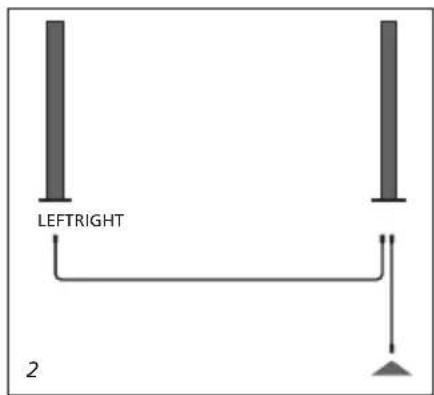

For safety reasons you must run the cables to and from the loud-speaker through the cable guides.
Mains cord: The supplied mains cord and plug are specially designed for the product. If you change the plug or damage the mains cord, you must buy another from your Bang & Olufsen retailer!
The loudspeakers may be placed almost anywhere in your room. However, the most natural sound is obtained if they are set up as explained on these pages.
SETUP switch
This switch has three settings: LEFT, RIGHT and LINE.
Set the switch to LEFT or RIGHT when connecting the loud speakers in a Bang & Olufsen system. Set the switch to LINE when connecting the loud speakers in a non-Bang & Olufsen system.
...To a Bang & Olufsen system: Use the enclosed Power Link cables to connect the loud speakers to your system. Set the SETUP switch to LEFT and RIGHT (the left and right sound channel) respectively.
...To a non-Bang & Olufsen system:
Use a special adaptor with an ordinary phono/RCA plug in one end, and a DIN-plug in the other. Depending on your setup, you may also need to connect an adaptor with phono/RCA and mini jack plugs (optional accessories, available from your Bang & Olufsen retailer). Set the SETUP switch to LINE.
The POSITION switch
When a loud speaker is placed in a corner or close to a wall, the bass level is boosted compared to the bass level from a loud speaker placed in a more free-standing position.
To remove this excessive bass boost, set the POSITION switch to ensure that the bass level suits the placement of the loud speaker. The appropriate switch setting depends on the distance from the loud-speaker to the walls and corners of the room. Use the guidelines mentioned here, when deciding which of the three POSITION switch settings to select – on each loudspeaker.
The position zones, shown on the next page, are meant as guide lines – you may, of course, set the switch to any of the three settings you prefer.
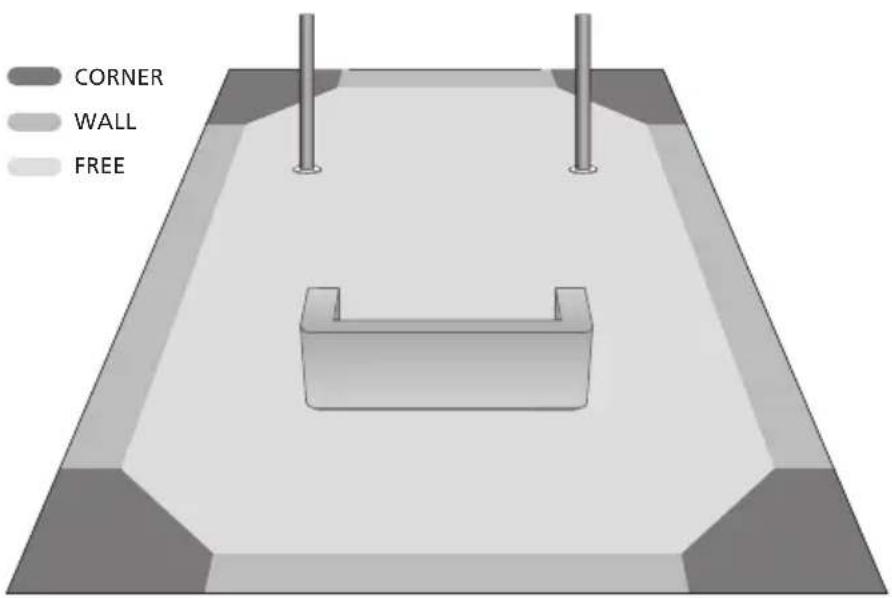
Position zones: The three settings (CORNER-WALL-FREE) correspond to the position zones marked in different shades of grey.
CORNER
Use this setting if the loudspeaker is placed in a corner – shown by the dark grey areas in the illustration.
WALL
Use this setting if the loud speaker is placed less than 15 cm (6") from the wall, and no closer to a corner than 50 cm (20") – shown by the grey areas along the walls in the illustration.
If the loudspeaker is mounted on a wall bracket, use this setting.
FREE
Use this setting if the loud speaker is placed more than 15 cm (6") from the wall, and no closer to a corner than 50 cm (20") – shown by the large light grey area in the illustration.
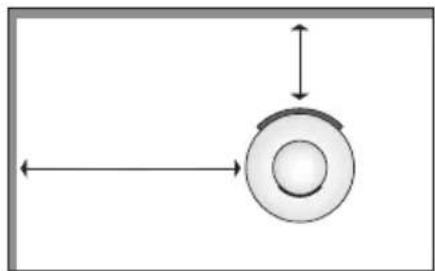
How to measure? The distances referred to are measured as shown here (the loud speaker seen from above).
Waste Electrical and Electronic Equipment (WEEE) – Environmental protection

Electrical and electronic equipment, parts and batteries marked with this symbol must not be disposed of with normal household wastage; all electrical and electronic equipment, parts and batteries must be collected and disposed of separately. When disposing of electrical and electronic equipment and batteries by use of the collection systems available in your country, you protect the environment, human health and contribute to the prudent and rational use of natural resources. Collecting electrical and electronic equipment, batteries
and waste prevents the potential contamination of nature with the hazardous substances which may be present in electrical and electronic products and equipment. Your Bang & Olufsen retailer will advise you of the correct way of disposal in your country. If a product is too small to be marked with the symbol, it will appear in the User Guide, on the Guarantee certificate, or on the packaging.
CE
This product is in conformity with the provisions of the Directives 2004/108/EC and 2006/95/EC.
Technical specifications, features and the use thereof are subject to change without notice!
All Bang & Olufsen products comply with applicable environ mental legislation throughout the world.
For the Canadian market only!
This class B digital apparatus meets all require ments of the Canadian Interference-Causing Equipment Regulations.
For the US-market only!
NOTE: This equipment has been tested and found to comply with the limits for a class B digital device, pursuant to part 15 of the FCC Rules. These limits are designed to provide reasonable protection against harmful interference in a residential installation.
This equipment generates, uses and can radiate radio frequency energy and, if not installed and used in accordance with the instructions, may cause harmful interference to radio communications. However, there is no guarantee that interference will not occur in a particular installation. If this equipment does cause harmful interference to radio or television reception, which can be determined by turning the equipment off and on, the user is encouraged to try to correct the interference by one or more of the following measures:
- Reorient or relocate the receiving antenna.
- Increase the separation between the equipment and receiver.
- Connect the equipment into an outlet on a circuit different from that to which the receiver is connected.
- Consult the retailer or an experienced radio/TV technician for help.

- SWITCHING ON AND OFF – INDICATOR
- LOUDSPEAKER PROTECTION
- TO RESTORE THE SITUATION
- CLEANING THE LOUDSPEAKER
- WE RECOMMEND THAT YOU FOLLOW THIS PROCEDURE
- CAUTIONS
- COLUMN AND BASE
- SETUP SWITCH
- TO A NON-BANG & OLUFSEN SYSTEM
- THE POSITION SWITCH
- CORNER
- WALL
- FREE
- FOR THE CANADIAN MARKET ONLY
- FOR THE US-MARKET ONLY
Brand : BANG & OLUFSEN
Model : BeoLab 6002
Category : Loudspeaker