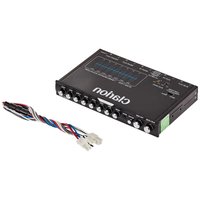
EQS755 - Audio Equalizer CLARION - Free user manual and instructions
Find the device manual for free EQS755 CLARION in PDF.


| Product Type | 7-band graphic audio equalizer |
| Brand | Clarion |
| Model | EQS755 |
| Equalization bands | 7 bands: 50 Hz, 125 Hz, 315 Hz, 750 Hz, 2.2 kHz, 6 kHz, 16 kHz |
| Adjustment range | ±12 dB (subwoofer ±15 dB) |
| Number of outputs | 3 RCA pairs (front, rear, subwoofer) |
| Auxiliary inputs | 1 RCA input + 1 front 3.5 mm input |
| Frequency response | 8 Hz - 140 kHz (±1 dB) |
| Signal-to-noise ratio | 100 dB |
| Operating voltage | 11 V - 15 V, negative ground |
| Maximum output voltage | 8 V |
| Harmonic distortion | 0.01% |
| Input impedance | 20 kOhms |
| Output impedance | 1 kOhms |
| Input sensitivity (RCA) | <3.6 V |
| Input sensitivity (high level) | <10.8 V |
| Subwoofer filter | Built-in, 18 dB/octave slope, selectable 60 Hz or 90 Hz |
| Controls | Main volume, subwoofer volume, front/rear fader, input selector, 7-band equalization |
| Connectors | Gold-plated RCA |
| Mounting | Mounting brackets included, ISO compatibility |
| High-level input | Compatible with factory radios |
| Cleaning | Soft dry cloth, no chemicals |
| Safety | Disconnect battery before installation, do not open the unit |
| Warranty | Unauthorized modifications void the warranty |
| Power supply | 12 V DC (11-15 V) |
Frequently Asked Questions - EQS755 CLARION
User questions about EQS755 CLARION
0 question about this device. Answer the ones you know or ask your own.
Ask a new question about this device
Download the instructions for your Audio Equalizer in PDF format for free! Find your manual EQS755 - CLARION and take your electronic device back in hand. On this page are published all the documents necessary for the use of your device. EQS755 by CLARION.
USER MANUAL EQS755 CLARION
Owner's manual & Installation manual
All Rights Reserved. Copyright 2012: Clarion Co., Ltd.
Printed in China /Imprime en China /Impreso en China
PN:XXXXXXXXXXXX
CLARION PRODUCT REGISTRATION INFORMATION
For USA and Canada only www.clarion.com
Dear Customer:
Congratulations on your purchase of a Clarion mobile electronic product. We are confident that you'll enjoy your Clarion experience.
There are many benefits to registering your product. We invite you to visit our website at www.clarion.com to register your Clarion product.
We have made product registration simple with our easy to use website. The registration form is short and easy to complete. Once you're registered, we can keep you informed of important product information.
Register at www.clarion.com - it's easy to keep your Clarion product up to date.
INFORMATIONS DE L'ENREGISTREMENT DE PRODUITS CLARION
1 FEATURES 4
2. PRECAUTIONS 4
Installation 4
3.CONTROLS. 5
4. OPERATIONS 6
Setting system volume 6
Adjusting the controls 6
Setting the low-pass frequency 6
Connecting an MP3 player or video unit 6
Using the front panel 3.5mm input
Care and maintenance 7
5. INSTALLATION AND WIRING 7
What is included in the box 7
Before starting. 8
Tools and additional components 8
Mounting diagram 9
Wiring diagram 10
Hi-Level wiring diagram 10
6.TROUBLESHOOTING 11
The unit does not work; no lights 11
Sound is distorted 11
No sound coming from the unit 11
7. GLOSSARY 11
8. SPECIFICATIONS 12
Thank you for purchasing this Clarion product.
- Please read this owner's manual in its entirety before operating this equipment.
After reading this manual, keep it handy, such as in your glove compartment - Save your sales receipt. The warranty and your sales receipt are essential for warranty service.
FCC Approval
This equipment has been tested and found to comply with the limits for a Class B digital device, pursuant to Part 15 of the FCC Rules. These limits are designed to provide reasonable protection against harmful interference in a residential installation. This equipment generates, uses, and can radiate radio frequency energy and, if not installed and used in accordance with the instructions, may cause harmful interference to radio communications. However, there is no guarantee that interference will not occur in a particular installation. If this equipment does cause harmful interference to radio or television reception, which can be determined by turning the equipment off and on, the user is encouraged to consult the dealer or an experienced radio/TV technician for help.
1 FEATURES
The Clarion EQS755 is a 7-band stereo equalizer/crossover specifically created for the mobile environment. The EQS755 provides powerful features in a compact size:
- Seven equalization bands (50Hz, 125Hz, 315Hz, 750 Hz, 2.2KHz, 6kHz, and 16 kHz), each frequency adjustable from -12 to +12dB (-15 to +15dB for subwoofer frequencies).
- Subwoofer output uses a built-in 18dB per octave electronic crossover fixed at 60Hz or 90Hz .
- Three stereo RCA outputs to drive front, rear, and subwoofer audio amplifiers.
- An auxiliary stereo RCA input for use with portable devices, such as an MP3 player or DVD player.
- Front panel auxiliary stereo 3.5mm input for the convenient use of your phone or favorite media player.
- Separate controls for master volume, subwoofer volume (sub level), front/rear fader, and selection of main or auxiliary inputs.
- Extended frequency response from 20Hz to 30kHz with exceptional 100 dB signal-to-noise performance.
Gold-plated RCA connectors to ensure the best audio signal output. - ISO mounting holes and removable trim ring for custom installation.
High Level speaker input for integration with factory radios.
2. PRECAUTIONS
- Do not operate this product in ways other than those described in this manual.
- Do not disassemble or modify this unit.
- Do not pour liquid or poke foreign objects into the unit. Water and humidity may damage internal circuitry.
- If the unit becomes wet, turn off all power and ask your authorized Clarion dealer to clean or service the unit.
Failure to observe these precautions may damage your car, the monitor, or the video source, and may void the warranty.
Installation
Installation of mobile audio and video components requires experience with a variety of mechanical and electrical procedures. Although this manual provides general installation and operation instructions, it does not show the exact installation methods for your particular vehicle.
If you do not have the required knowledge and experience to successfully complete the installation, consult an authorized Clarion dealer about professional installation options.
3.CONTROLS
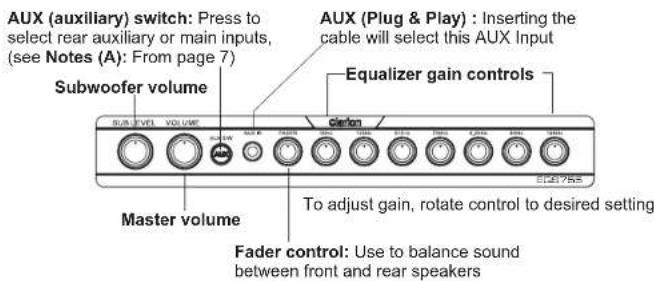
Front panel controls

Rear panel connections
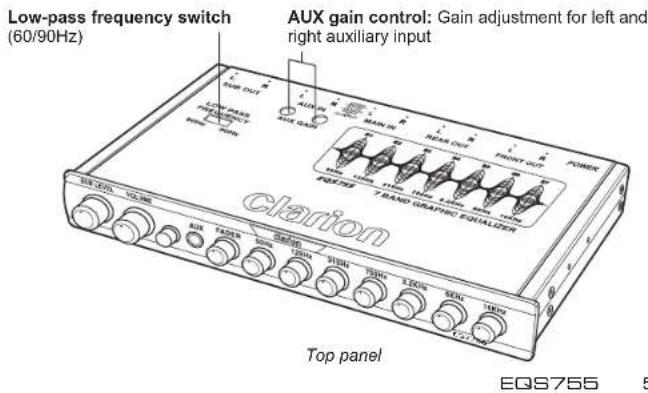
4. OPERATIONS
Setting system volume
- Turn the master volume and subwoofer level controls to their minimum settings.
- Turn the source unit on and increase the volume until you hear distortion.
- Reduce the volume to just below the distortion point (approximately 80% of full volume).
This is the maximum usable musical signal for the source unit. Turning the volume beyond this point increases noise and distortion without increasing the musical signal.
Note
Once you set the source unit volume, do not change it. Always use the volume control on the EQS755 as the master (main) volume control. The EQS755 has better electronics, a higher sound to noise ratio, and is more linear than the volume settings on any source unit available.
Adjusting the controls
The EQS755 provides a graphic adjustment band for each of seven frequency ranges: sub, low, mid, mid-high and high frequency. You can adjust the center of each frequency band to fine tune the acoustical response to your vehicle's interior.
- Set all frequencies to the center position. The small dot on the control knob should be set at 12 o'clock.
- Play your favorite music track and adjust the individual controls to suit your taste. Avoid extreme settings, which can distort musical peaks.
- Increase or decrease the equalizer gain controls to suit your taste.
- If your system includes a subwoofer, slowly increase the subwoofer level until you hear a solid bass.
- If your system includes rear speakers, adjust the fader control to add rear sound. Set it so most of the music comes from the front and only fills the rear.
Setting the low-pass frequency
Set the low pass frequency switch on the top of the EQS755 to either 60Hz or 90Hz depending on the subwoofer and subwoofer amplifier requirements.
Connecting an MP3 player or video unit
- Plug the MP3 player or video unit into the auxiliary RCA input on the back of the EQS755 unit.
- Make sure the auxiliary button on the front of the unit is out, ready to receive input from the main RCA input (not the auxiliary RCA input).
- Turn the EQS755 master volume to a normal listening level.
- Press the play button on the auxiliary source.
- Push in the AUX button to change to the auxiliary source.
- Using a small flathead screwdriver, adjust the AUX gain controls located on the top of the unit so that the volume of the auxiliary source matches the volume of the main source.
Notes (A):
- With AUX S / W button in out position you can select either Hi Input or Main in. 1.1 Do not use Hi Input and Main at same time; doing that it will cause mixing sounds, causing too much distortion in the audio.
- With AUX S/W button in position you can select the AUX IN function.
Using the front panel 3.5mm input
- Reduce the EQS755's volume to minimum before plugging the 3.5mm cable to avoid any sudden, unwanted changes in output.
- Plug the 3.5mm cable into the EQS755 AUX input. The EQS755 will automatically select this input when the cable is inserted.
- Turn the EQS755 master volume to a normal listening level.
- To go back to the main input, simply reduce the master volume and gently unplug the 3.5mm cable from the EQS755.
Note: Unplugging the source device will not change inputs. You must remove the cable from the EQS755
Care and maintenance
Cleaning the cabinet
Use a soft, dry cloth to gently wipe dust and dirt from the unit.
Do not use benzene, thinner, car cleaner, or other cleaners. These substances may damage the unit or cause the paint to peel.
Servicing the equalizer/crossover unit
In the event that trouble arises, never open the case or disassemble the unit. The internal parts are not serviceable by the user. Opening any components will void the warranty.
CAUTION
Changes or modifications to this product that are not approved by the manufacturer will void the warranty and will violate FCC approval.
5. INSTALLATION AND WIRING
Read these instructions and the following precautions carefully.
What is included in the box
In addition to this manual, the box contains:
EQS755 7-band graphic equalizer
- 2 mounting brackets
8 Phillips-head screws
Before starting
Mounting precautions
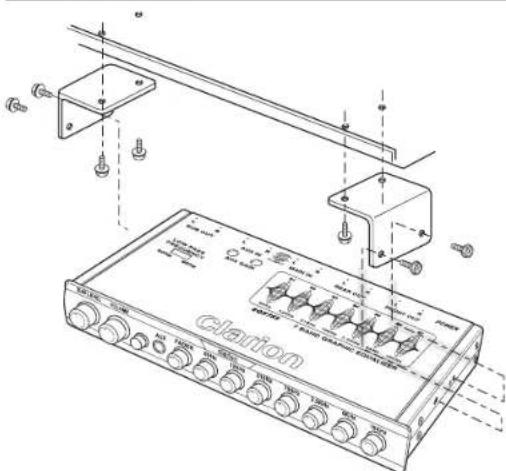
The EQS755 can be mounted next to the source unit or under the dash using the mounting brackets. The front panel controls should be easily accessible from the driver's seat. In addition:
This unit requires additional mobile audio components for proper operation.
- Always use great care when attaching anything to a vehicle! Check clearances in front of, behind, and on both sides of the planned installation before drilling any holes or installing any screws.
Wiring precautions
Disconnect the ground (-) terminal on the vehicle's battery.
WARNING
To prevent short circuits during installation, always disconnect the vehicle's negative (-) battery lead before making any connections.
This unit is exclusively for vehicles with a negative ground, 12V battery system.
- A good chassis ground connection is critical to minimize resistance and avoid noise problems. Use the shortest wire possible and securely connect it to the car chassis and the source unit ground.
- When routing RCA cables, keep the cables away from the power cables and output speaker wires.
- If you are using a source unit without a remote turn-on lead, the EQS755 can be turned on with a switched accessory lead. This accessory power source is located in the factory harness at the back of the radio. This lead turns on and off with the ignition key
- Do not open the case. There are no user-serviceable parts inside. If you require assistance, consult your Clarion dealer or an authorized Clarion service center.
Tools and additional components
You will need:
- A Phillips-head screwdriver when mounting the unit in the vehicle.
- A small flat-head screwdriver to adjust the AUX gain controls if you connect an MP3 player or video source.
High-quality RCA input and output cables.
Extra cable can cause signal loss and act as an antenna for noise. Use only highquality RCA cables that are no longer than necessary to make a direct connection with the source unit and amplifiers.
Mounting diagram
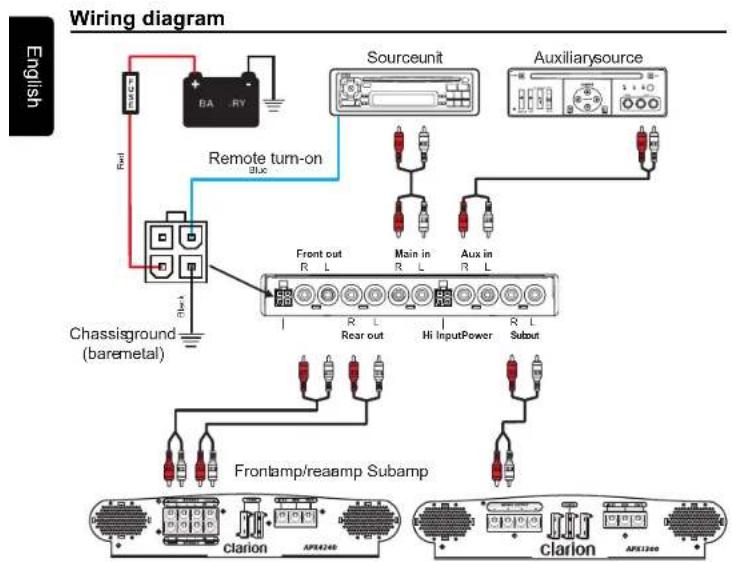
Hi-level wiring diagram
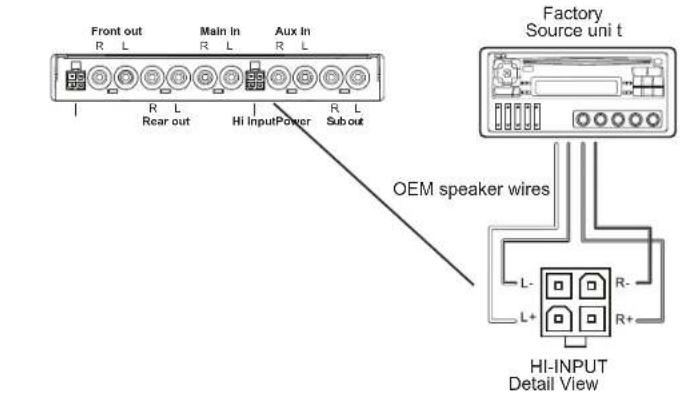
10EQ8755 11EQ8755
6. TROUBLESHOOTING
The unit does not work; no lights
The power wires may not be connected. Check the power and ground wiring, then retest
Sound is distorted
The source unit volume may be set too high. Reduce the source unit volume.
Equalizer gain controls are set too high. Turn the equalizer controls to the center position and listen for distortion again. If the problem still occurs, see your authorized Clarion dealer.
- Speakers may be damaged. Consult your authorized Clarion dealer.
No sound coming from the unit
The wrong input is selected. Press the AUX switch to turn the main inputs on.
- No remote-on. Using a voltmeter, check for +12V from the remote-on source.
7.GLOSSARY
Crossover: A device that limits the range of frequencies sent to a speaker or amplifier. Equalization: the process of boosting or cutting sound signal frequencies to improve the quality of the sound. The term comes from the filters used to add back high frequencies at the receiving end of analog transmissions over wires.
Equalization band: the frequency range impacted by a specific filter.
dB: decibel, a measurement of the relative difference in power or intensity between two acoustic signals
Gain control: gain is the amount of amplification (voltage, current or power) of an audio signal expressed in dB
Graphic equalizer: a multi-band variable equalizer that uses mechanical controls to adjust amplitude.
Hz: Abbreviation for Hertz, a unit of frequency equal to one cycle per second.
Octave: the musical principle of dividing sound frequencies into the eight notes of the musical scale.
OEM: Original Equipment Manufacturer
RCA input/output: port through which sound travels in and out of the system; "RCA" refers to the type of connector, which was originally manufactured by Radio Corporation
of America.
Slope: how fast the sound changes rated in dBs. The higher the dB number, the faster the frequency drops off.
8. SPECIFICATIONS
Note
The technical data and the design of the equipment may change without prior notice for the sake of technical improvements.
Graphic center frequencies: 50Hz, 125Hz, 315Hz, 750Hz, 2.2Hz, 6kHz, 16kHz
Boost/cut: 12dB
S/N ratio: 83dB
Frequency response: 8Hz-140kHz +/-1dB
Maximum output voltage: 8V
THD: 0.01%
Input sensitivity (RCA) <3.6V
Input sensitivity (High) <10.8V
Input impedance: 20K Ohms
Output impedance: 1K Ohms
Stereo separation: 73dB/1kHz
Operating voltage: 11V-15V negative ground
Size: 7" wide by 4 1/4" deep by 1" high
Table des matieres
Amplification/coupure:12 dB
Rapport signal/bruit:83dB
Dimensions (I x H x P) (mm): 178 x 108 x 25
Contidente
- CLARION PRODUCT REGISTRATION INFORMATION
- INFORMATIONS DE L'ENREGISTREMENT DE PRODUITS CLARION
- FCC Approval
- FEATURES
- PRECAUTIONS
- Installation
- 3.CONTROLS
- OPERATIONS
- Setting system volume
- Note
- Adjusting the controls
- Setting the low-pass frequency
- Connecting an MP3 player or video unit
- Notes (A):
- Using the front panel 3.5mm input
- Care and maintenance
- Cleaning the cabinet
- Servicing the equalizer/crossover unit
- CAUTION
- INSTALLATION AND WIRING
- What is included in the box
- Before starting
- Mounting precautions
- Wiring precautions
- WARNING
- Tools and additional components
- Mounting diagram
- TROUBLESHOOTING
- Sound is distorted
- No sound coming from the unit
- 7.GLOSSARY
- SPECIFICATIONS
- Table des matieres
- Contidente
Brand : CLARION
Model : EQS755
Category : Audio Equalizer