DXZ955MC - Hi-Fi System CLARION - Free user manual and instructions
Find the device manual for free DXZ955MC CLARION in PDF.


Pick your language and provide your email: we'll send you a specifically translated version.
| Product Type | Car Hi-Fi System (CD/AM/FM Receiver) |
| Brand | Clarion |
| Model | DXZ955MC |
| Dimensions (W x H x D) | 7 x 2 x 6 inches (178 x 50 x 152 mm) |
| Weight | 1.5 lbs (0.68 kg) |
| Power Supply | 12V DC (negative ground) |
| Maximum Power Output | 4 x 50 Watts (RMS: 4 x 22 Watts) |
| Audio Formats Supported | CD, CD-R/RW, MP3, WMA |
| Tuner Bands | AM (530-1710 kHz), FM (87.5-108 MHz) |
| Preset Stations | 30 (18 FM, 12 AM) |
| Equalizer | 3-Band Parametric Equalizer (Bass, Mid, Treble) |
| Audio Enhancements | Magnex Bass Extension, Loudness Control |
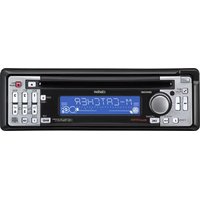
| Display | Multi-Color Dot Matrix LCD (Blue/Red/Green) |
| Inputs | Front AUX (3.5mm), CD changer control |
| Outputs | Preamp outputs (Front, Rear, Subwoofer) |
| Remote Control | Wireless remote included |
| Steering Wheel Control Compatible | Yes (requires adapter) |
| Detachable Faceplate | Detachable, theft-deterrent design |
| Cleaning | Use soft dry cloth; no solvents; clean faceplate contacts with isopropyl alcohol |
| Safety Features | Fuse protection (10A), reverse voltage protection |
| Spare Parts Availability | Remote, faceplate, wiring harness, installation kit |
| Repairability | Service manual available; authorized Clarion service centers |
| General Information | Designed for single-DIN dash openings; installation requires compatible vehicle |
Frequently Asked Questions - DXZ955MC CLARION
How do I reset the DXZ955MC to factory settings?
Press and hold the Reset button (located behind the faceplate) for 2 seconds using a pointed object, such as a pen.
Can I play MP3 CDs on this unit?
Yes, the DXZ955MC supports playback of MP3 and WMA files burned on CD-R/RW discs.
How do I connect an external amplifier?
Use the RCA preamp outputs (Front, Rear, Subwoofer) on the back of the unit. Ensure correct gain settings to avoid distortion.
The display shows 'PROTECT' – what does it mean?
The protection circuit has activated due to a short circuit or overheating. Check speaker wiring for shorts and ensure proper ventilation.
How do I set the clock on the DXZ955MC?
Press the DISP button until the clock flashes. Use the volume knob or seek buttons to adjust hours and minutes, then press DISP again to save.
Can I use the unit without a faceplate?
No, the faceplate is required for operation. Always detach it when leaving the vehicle to deter theft.
What is the maximum USB storage size supported?
The DXZ955MC does not have a USB port. It only supports CD, AUX, and optional CD changer.
How do I pair a Bluetooth device?
This model does not include Bluetooth. Use the AUX input for external devices.
Why is there no sound from the speakers?
Check the volume, mute setting, speaker connections, and fuse. Ensure the unit is not in Protect mode.
Can I install the DXZ955MC in a DIN+1/2 slot?
The unit is single-DIN (2 inches tall). It fits standard single-DIN openings; a mounting sleeve and trim ring are included.
User questions about DXZ955MC CLARION
0 question about this device. Answer the ones you know or ask your own.
Ask a new question about this device
No questions yet. Be the first to ask one.
Download the instructions for your Hi-Fi System in PDF format for free! Find your manual DXZ955MC - CLARION and take your electronic device back in hand. On this page are published all the documents necessary for the use of your device. DXZ955MC by CLARION.
USER MANUAL DXZ955MC CLARION
Manual assistant
Powered by Anthropic
Waiting for your message
Product information
Brand : CLARION
Model : DXZ955MC
Category : Hi-Fi System