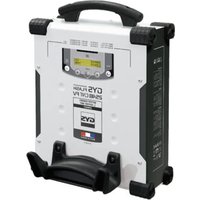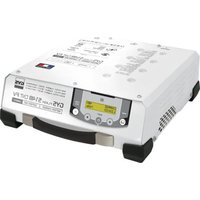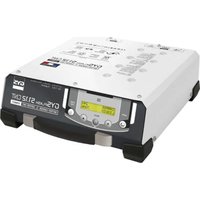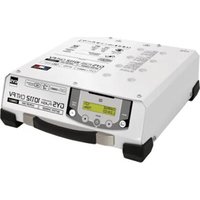
Gysflash 101.12 CNT FV - Welding machine GYS - Free user manual and instructions
Find the device manual for free Gysflash 101.12 CNT FV GYS in PDF.


| Brand | GYS |
| Model | Gysflash 101.12 CNT FV |
| Product type | Multifunction professional battery charger |
| Technology | Inverter |
| Rated voltage | 12 V |
| Max charging current | 100 A (estimated from model) |
| Power supply | Mains 230 V with earth plug |
| Available modes | Charge, Showroom, Diag+, Tester |
| Battery types | Lead (Gel, AGM, Liquid, etc.) and Lithium (LiFePO4, Li-ion) |
| Protections | Short-circuit, reverse polarity, anti-spark, overheating, overvoltage |
| Special functions | Auto-Detect, Auto-Restart, Lock, Cable calibration |
| Connectivity | USB (configuration and data export), DB9 module port |
| Display | Digital screen with backlight |
| Maintenance | Clean with a dry cloth, no solvents |
| Warranty | 2 years (parts and labor) |
| Operating environment | Indoor, do not expose to rain |
Frequently Asked Questions - Gysflash 101.12 CNT FV GYS
User questions about Gysflash 101.12 CNT FV GYS
0 question about this device. Answer the ones you know or ask your own.
Ask a new question about this device
Download the instructions for your Welding machine in PDF format for free! Find your manual Gysflash 101.12 CNT FV - GYS and take your electronic device back in hand. On this page are published all the documents necessary for the use of your device. Gysflash 101.12 CNT FV by GYS.
USER MANUAL Gysflash 101.12 CNT FV GYS
natural_image
Technical line drawings of three different electronic devices with control panels and mounting brackets (no text or symbols)FR 2-13 / 86-88
EN 14-25 / 86-88
DE 26-37 / 86-88
ES 38-49 / 86-88
RU 50-61 / 86-88
NL 62-73 / 86-88
IT 74-85 / 86-88
GYSFLASH
51.12 CNT FV
101.12 CNT FV
103.12 CNT FV
121.12 CNT FV
123.12 CNT FV
125.12 CNT FV
53.24 CNT FV
101.24 CNT FV
103.24 CNT FV
25.48 CNT FV
51.48 CNT FV
53.48 CNT FV
INSTRUCTIONS DE SÉCURITÉ


line
| Stage | U | I | | ----------------- | ---- | ---- | | Analyse | 0% | 0% | | Récupération | 0% | 0% | | Test | 10% | 0% | | Désulfatation | 10% | 0% | | Charge | 20% | 0% | | Absorption | 20% | 0% | | Refresh (is option active) | 95% | 0% | | Maintien de charge | 100% | 0% |Étape 1 : Analyse
natural_image
Diagram of a mechanical clamp or spring with a checkmark indicating selection (no text or symbols present)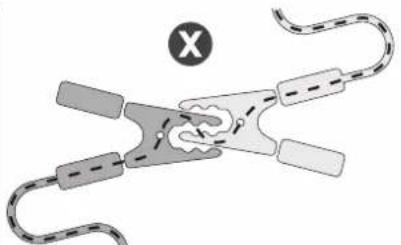
natural_image
Diagram of a biological structure with curved elements and a labeled point 'X' (no text or symbols present)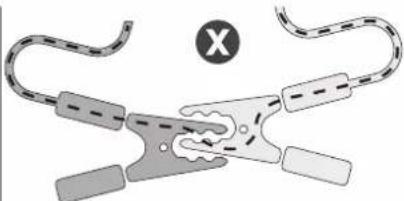
natural_image
Diagram of a mechanical clamp or clamp device with no visible text or symbolsOK NOK NOK
This manual contains safety and operating instructions. Please read it carefully before using the device for the first time and keep it for future reference. This machine should only be used for charging or power supply operations specified within the limits indicated on the machine and in the instruction manual. The operator must observe the safety precautions. In case of improper or unsafe use, the manufacturer cannot be held liable.

The device is destined to be used indoors. Must not be exposed to the rain.
This unit can be used by children aged 8 or over and by people with reduced physical, sensory or mental capabilities or lack of experience or knowledge, if they are properly monitored or if instructions for using the equipment have safely been read and potential risks understood. Children must not play with the product. Cleaning and maintenance should not be performed by an unsupervised child.
Do not use to charge domestic batteries or non rechargeable batteries.
Do not use the charger if the mains cable or plug is damaged.
Do not use the device if the charging cable appears to be damaged or assembled incorrectly in order to avoid any risk of short circuiting the battery.
Never use on a frozen or damaged battery.
Do not cover the device.
Do not place the unit near a heat source or expose to prolonged high temperatures (above 60^ C).
Do not obstruct the cooling vents.
The operating mode of the automatic charger and the restrictions applicable to its use are explained later in this manual.
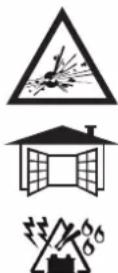
Fire and explosion risks!
- A battery can emit explosive gases when on charge.
- During the charge, the battery must be placed in a well ventilated area.
- Avoid flames and sparks.
- Protect the electrical contact surfaces of the battery against short circuits.
Do not leave a charging battery unattended for a long time.

Risk of acid dispersion!


- Wear protective goggles and gloves.

- In case of contact with the eyes or the skin, rinse immediately with water and see a medical doctor as soon as possible.
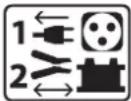
Connection / disconnection :
- Disconnect the power supply before plugging or unplugging the connections to/from the battery.
- Always ensure the Red clamp is connected to the «+» battery terminal first. If it is necessary to connect the black clamp to the vehicle chassis, make sure it is a safe distance from the battery and the fuel line. The charger must be connected to the mains.
- After charging, disconnect the charger from the mains, then disconnect the negative clamp from the car body and then disconnect the positive clamp from the battery, in this order.

Connection :
- The charger must be connected to an earthed power supply.
- The connection to the power supply must be carried out in compliance with national standards.

Maintenance :
- If the power supply cable is damaged, the replacement cable must be obtained from the manufacturer or its service team.
- Maintenance should only be carried out by a qualified person.
- Warning! Always disconnect from the mains before performing maintenance on the device.
- The device does not require any specific maintenance.
- If the internal fuse is melted, it must be replaced by the manufacturer (GYS dedicated sales service) or by an equally qualified person to prevent any accidents.
- Do not use solvents or any agressive cleaning products.


Regulations :
• The Machine is compliant with European directives.
- The declaration of conformity is available on our website.
• EAEC Conformity marking (Eurasian Economic Community).
- Equipment in compliance with British requirements. The British Declaration of Conformity is available on our website (see home page).
• Equipment in conformity with Moroccan standards.
- The declaration C_ (CMIM) of conformity is available on our website (see cover page).



Waste management:
- This product should be disposed of at an appropriate recycling facility. Do not throw away in a household bin.
GENERAL DESCRIPTION
Your GYSFLASH is a professional multifunctional charger with Inverter technology. Designed to support the batteries of demonstration vehicles or during the diagnostic work, it also guarantees an ideal quality of charge for the maintenance of the most advanced models. This charger can be fitted with cables up to 8 m long. Changing the charging cables requires recalibration (see page 21). It is considered a fixed device not a mobile product.
Your GYSFLASH is supplied with a software that includes 4 different modes to choose from:
- Charging mode: dedicated to the charging of lead-acid (sealed, liquid, AGM...) or lithium (LiFePO4) starter batteries.
- Power mode | Diag+ : Supplies the energy required during diagnostic work on the vehicle.
- Power mode | Showroom : Maintains the charge of the battery and supplies the energy required when using the consumers of a demonstration vehicle.
- Tester Mode: Used to check the state of the battery and test the vehicle starting system and alternator.
Your GYSFLASH is SMART!
The original features of your GYSFLASH can be extended by adding specific charging modes and profiles using the USB port and custom settings (see page 23).
Your GYSFLASH also offers the possibility to recover data from several hundred charging operations on your USB stick for analysis on a spreadsheet.
Additional modules (such as printer, Ethernet port, etc.) can also be connected to the charger via its dedicated module socket.
Auto-Detect» function:
The GYSFLASH is equipped with the «Auto-Detect» function which automatically starts a charge when a battery is connected to the charger. (To enable/disable this function see page 21)
AUTO-DETECT 12V
U=12.3V
Auto-Restart» function:
The «Auto-Restart» function offers the possibility of automatically restarting the charger in the event of a power failure. (To enable/disable this function see page 21)
«Lock» function:
It is possible to lock the buttons on your GYSFLASH when it is used in a place open to the public or unattended. To activate/deactivate the lock, press and hold and for 8 seconds.
START UP
- Connect the charger to the mains.
- Set the switch, located at the back of the charger, to «ON».
- Select the desired mode (Charge -> Showroom -> Diag+ -> Tester).
To access the «configuration» menu press the Mkey for 3s :
CHARGE MODE
- Setting the mode:
| 1 | Press the SELECT button for 3 seconds to activate the modification of the mode settings. |  |
| 2 | Use the arrows to change the value of the parameter. |  |
| 3 | Press the SELECT button to accept the value and move to the next parameter. |  |
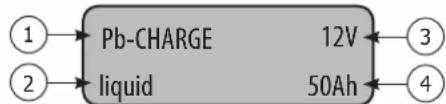
flowchart
graph LR
    A["①"] --> B["Pb-CHARGE"]
    C["②"] --> D["liquid"]
    B --> E["12V"]
    D --> F["50Ah"]
    E --> G["③"]
    F --> H["④"]
1- Type of charge
2- Charge profile
3- Rated battery voltage
4- Rated battery capacity
| Charge type: Profil Charging voltage | |||
| Pb-CHARGE | normal | 2.40 V/cell Lead batteries of the types Gel, MF, EFB, SLA... | |
| AGM | 2.45 V/cell | Most AGM lead-acid batteries including START and STOP.However, some AGM batteries require a lower voltage charge (Normal profile). Check the battery manual if in doubt. | |
| water | 2.45 V/cell Open liquid-type lead-acid batteries with cap. | ||
| Easy | 2.40 V/cell | Profile dedicated to lead batteries that automatically adapts the charging current according to the size of the battery.However, for maximum charge optimization, it is recommended, when possible, to use normal, AGM or liquid charge curves. | |
| Li-CHARGE LFP/Li | FePO4 | 3.60 V/cell Lithium batteries type LFP (Lithium Ferro Phosphate) | |
- Start of the charge:
| 1 | To start the charge, press the START/STOP button. | START STOP |
| If the AUTO-DETECT function is active, charging will start automatically after 5 seconds if a battery is present. | AUTO-DETECT 12VU=12.3V | |
| 2 | During charge, your GYSFLASH indicates the percentage of progress of the charging cycle and alternately the voltage, current, amps hour supplied and the duration. | |
| 3 | Press the START/STOP button to stop the charge. | START STOP |
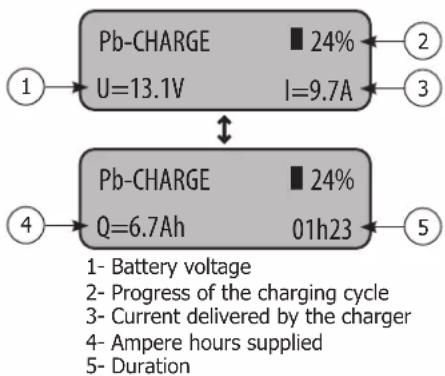
flowchart
graph TD
    A["1: Pb-CHARGE U=13.1V"] --> B["2: 24% I=9.7A"]
    C["2: 2"] --> D["3"]
    E["4: Pb-CHARGE Q=6.7Ah"] --> F["5: 24% 01h23"]
    G["5: 4"] --> H["End"]
Precautions :
When charging a vehicle, it is recommended to reduce the vehicle power consumption to a minimum (switch off the lights, switch off the ignition, close the doors, etc.) in order not to disturb the charging process.
Precaution: Check the electrolyte level of any open battery. Fill it up if necessary, before starting the charge.
- Lead-acid charging curve:
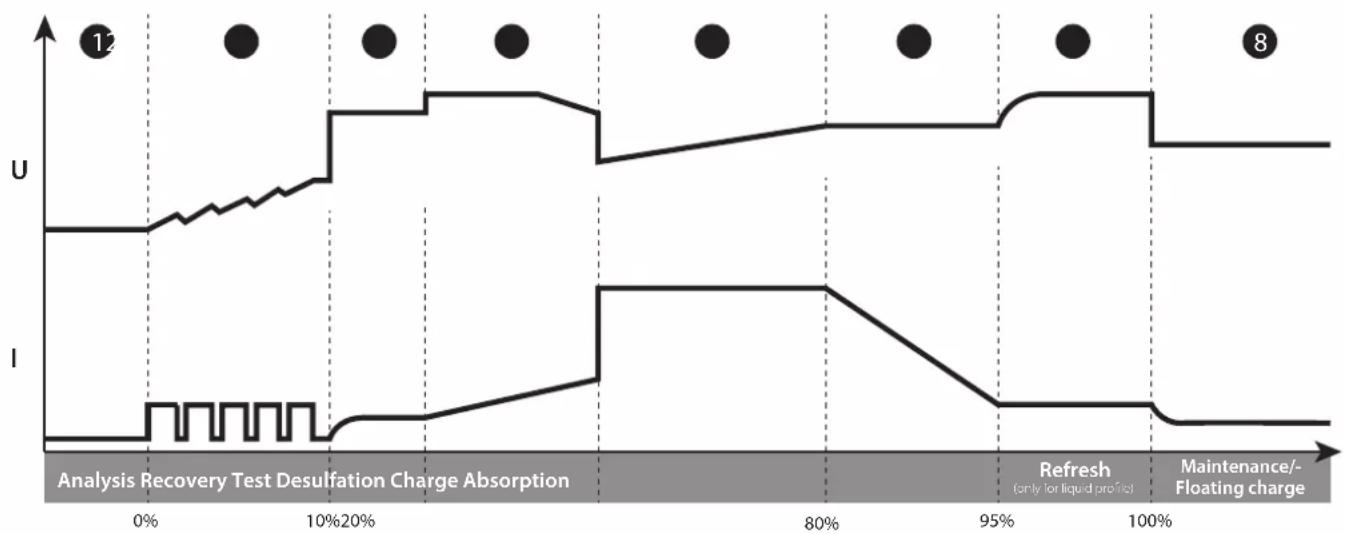
line
| Time | U | I | |------|------|------| | 0% | Low | Low | | 10% | High | Low | | 20% | High | Low | | 80% | High | High | | 95% | High | Low | | 100% | High | Low |Step 1 : Analysis
Analyses the state of the battery (charge level, polarity inversion, wrong battery...)
Step 2 : Recovery
Recovering damaged elements after deep and prolonged discharge.
Step 3 : Test
Sulfated battery test
Fast charge at maximum current to reach 80% charge level.
Step 6: Absorption
Constant voltage charge to reach 100% charge level.
Step 7: Refresh (only for liquid profile)
The charger supplies an additional current to create gas that will allow the electrolyte to be mixed and thus reconditioning the battery cells. During this phase, the battery may produce some water.
Step 8 : Maintenance/Floating charge
Maintains battery charge level at its maximum.
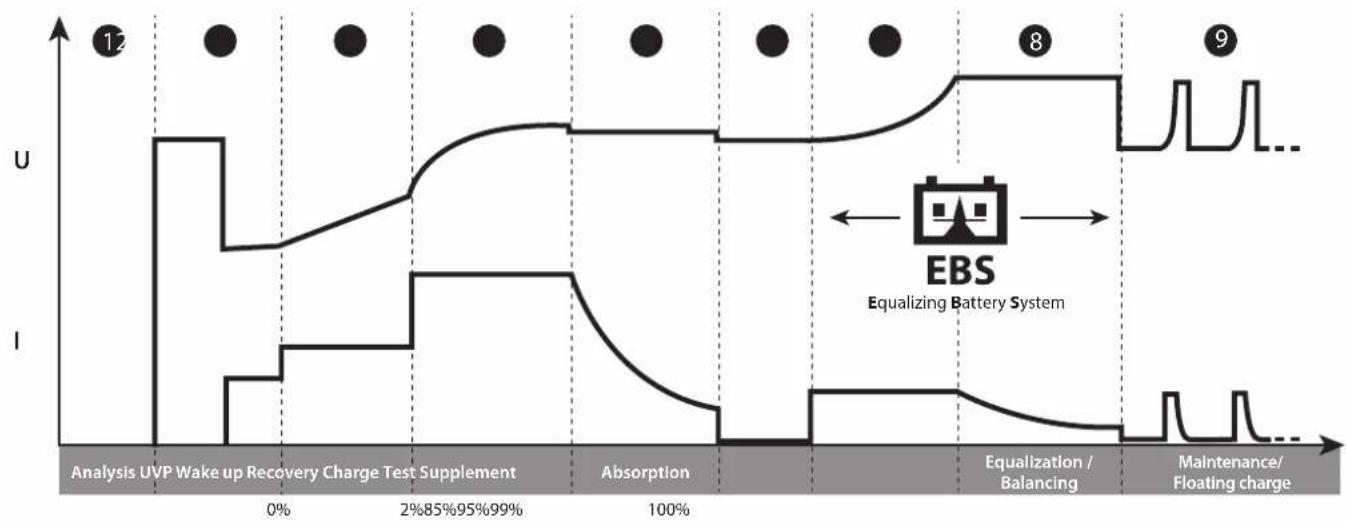
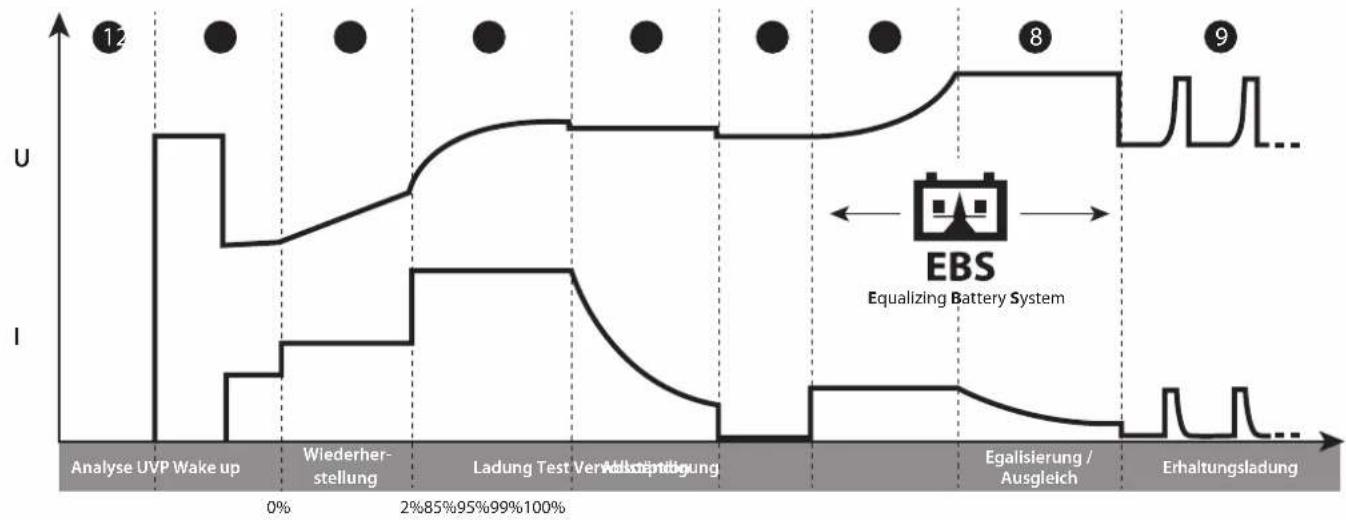
LFP Lithium charging curve:
line
| Phase | U | I | |-------|----|----| | Analysis | 0 | 0 | | Wake up Recovery Charge Test Supplement | 12 | 0 | | Absorption | 0 | 0 | | Equalization / Balancing | 8 | 0 | | Maintenance / Floating charge | 9 | 0 |Step 1 : Analysis
Analyses the state of the battery (charge level, polarity inversion, wrong battery...)
Step 2: UVP Wake up
Reactivates batteries in UVP protection (Under Voltage Protection)
Step 3: Recovery
Recovery algorithm following a deep discharge.
Step 4 : Charge
Maximum current fast charge to reach an 90% charge level.
Step 5: Absorption
Constant voltage charge to reach a 95% charge level.
Step 6 : Test
Charge conservation test.
Step 7 : Supplement
Reduce current charge to reach 100% charge level.
Step 8: Equalization / Balancing
Balancing the battery cells
Step 9: Maintenance/Floating charge
Maintain the battery charge level at its maximum.
POWER SUPPLY MODES: SHOWROOM / DIAG+
- Setting the mode:
| 1 | Press the SELECT button for 3 seconds to activate the modification of the mode settings. | SELECT3sec |
| 2 | Use the arrows to change the value of the parameter. | |
| 3 | Press the SELECT button to accept the value and move to the next parameter. | SELECT |
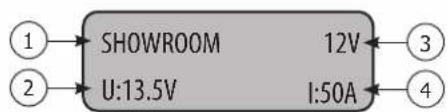
1- Mode name
2- Voltage to be regulated
3- Rated voltage
4- Maximum current
Power limitation: If the symbol «*» appears next to the current setting (eg «I: 50A *»), this indicates that the charger cannot deliver this current at the voltage set on the display. At this voltage level, the charger will be running at maximum power. However, this current could be delivered at lower voltage depending on the power output of the charger.
- Start of the charge:
| 1 | To start the mode, press the START/STOP button. | START STOP |
| If the AUTO-DETECT function is active, charging will start automatically after 5 seconds if a battery is present. | AUTO-DETECT 12V U=12.3V | |
| 2 | During the mode, your GYSFLASH indicates the battery voltage and the current delivered by the charger. | |
| 3 | Press the START/STOP button to stop the mode. | START STOP |
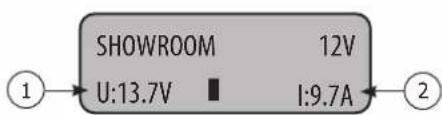
1- Battery voltage
2- Current delivered by the charger
Precautions :
When starting the mode, a current displayed above 10 A means that your battery is discharged. The device will start charging automatically Check that there is no electrical consumer on the vehicle. Wait until the current supplied drops below 10 A before starting any action on the vehicle (use of the vehicle's electrical accessories, diagnostic operation, etc.).
Features of the power modes:
| Mode | «No Battery» function | «Integrated charging» function | Abnormal undervoltage protection | Voltage adjustment |
| SHOWROOM | √ | √ | √ | 12 V models [12.7 V - 124.4 V24 V models6V 6.3 V - 7.2 V24V 25.4 V - 28.8 V36V 38.1 V - 43.2 V48V 50.8 V - 57.6 V |
| DIAG+ | √ | 12 V models [12.7 V - 124.8 V24 V models16V 14.4 V - 17.2 V24V 25.4 V - 29.6 V36V 38.1 V - 44.4 V48V 50.8 V - 59.2 V |
- «No battery» function (not recommended):
This function allows you to use the SHOWROOM power mode when there is no battery. To do this, press the START/STOP button for 3 seconds. The «No battery mode» indication is displayed for 3 seconds before forcing the power supply.

SHOWROOM 12V no battery mode

It is strongly recommended not to use the «no battery» function if a battery is present.
This function disables the «Integrated charging» function, as well as some of the protections such as abnormal undervoltage protection or disconnection detection.
In this configuration, reverse polarity can damage the vehicle electronics.
- «Integrated charging» function:
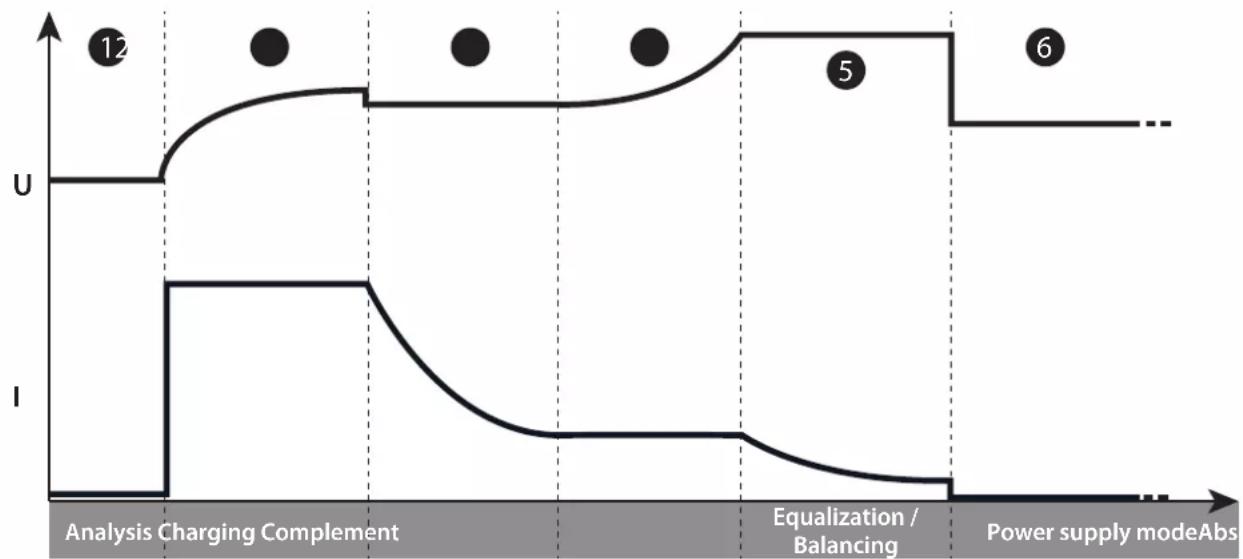
The SHOWROOM mode (outside of the «no battery» function) incorporates an automatic charging algorithm adapted to all types of batteries (lead and lithium), in order to guarantee an optimal charge level for demonstration vehicles. This function is perfectly compatible with the presence of consumers on the battery.
line
| Stage | Value | |-------|-------| | 1 | U | | 2 | U | | 3 | U | | 4 | U | | 5 | U | | 6 | U |Step 1: Analysis
Analysis of the battery condition (charge level, inversion, etc.) polarity, wrong battery connected, etc).
Step 2: Charging
Fast charging at maximum current until U1 is reached (ex: 13.8 V to 12V)
Step 3: Absorption
Charge under constant voltage U1 (ex: 13.8 V in 12V) Maximum duration 1 hour.
Step 4: Complement
Gradual increase of the voltage up to U2
(ex: 14.4 V to 12V Maximum duration 2 hours.
Step 5: Equalization / Balancing
Maintaining the voltage U2 (ex: 14.4V at 12V) Maximum duration 2 hours.
Step 6: Power supply mode
Application of the selected voltage.
- Abnormal undervoltage protection:
This protection prevents the risk linked to possible short circuits or battery being too damaged. The charger will automatically stop if the voltage is abnormally low for more than 10 minutes.
TESTER MODE
General navigation :
1 Use the arrows to select the test to be performed
2 Press the START/STOP button to start the test


TESTER MODE
Voltage test
- Voltage test:
This mode allows you to view the voltage at the terminals of the charging clamps and thus use your GYSFLASH as a voltmeter, in order to measure the battery voltage.
Voltage test
U=12.1V
- Start-up test:
The purpose of this mode is to evaluate the state of a vehicle starting system (starter + battery) when the engine is turned on. This test must be done with the battery connected to the vehicle.
| 1 Use the arrows to select the nominal voltage of the vehicle battery |  |
| 2 Press the SELECT button to confirm |  |
| 3 Connect the clamps to the vehicle battery | 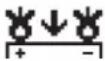 |
| 4 Start the engine by turning the ignition key |  |
| 5 The charger automatically detects the engine start attempt and runs a calculation algorithm to determine the state of the start system. | |
Engine start test 12V
Test result: The charger indicates the minimum value of the battery voltage perceived during the engine start phase, as well as the status of the start system in the form of a gauge.
Engine Umin=8.6V

- Alternator test :
This mode is used to determine the condition of the alternator in the vehicle. This test is performed on a vehicle with the engine running.
| 1 Use the arrows to select the nominal voltage of the vehicle battery |  |
| 2 Press the SELECT button to confirm |  |
Alternator test 12V
Test result: The charger indicates the voltage provided by the vehicle alternator, as well the alternator status in the form of a gauge.
Alte U=14.1V

PROTECTIONS
This device is protected against short circuits and polarity reversals. It has an anti-spark system that prevents sparks when connecting the charger to the battery. The device will not deliver current if there is no battery detected (no voltage in the clamps). This charger is protected against handling errors by an internal fuse.
CONFIGURATION MENU
Navigation :
1 Press the MODE button for 3 seconds to access the Configuration Menu
2 Use the arrows to scroll through the different parameters
3 Press the SELECT button to select the parameter or enter the submenu.
4 When a parameter is flashing, use the arrows to change its value
5 Confirm the parameter value by pressing SELECT again




Languages :
Selecting the display language.
Sound:
Turning the unit's sound on (ON) or off (OFF).
Auto-Restart:
Enable (ON) or disable (OFF) the AUTO-RESTART function. This function automatically restarts the charger in the event of a power failure.
Auto-Detect :
Enable (ON) or disable (OFF) the AUTO-DETECT function. This function automatically starts a charge when a battery is connected to the charger.
Date:
Setting the date and time.
Cable calibration :
Procedure for calibrating the charging cables of the device, so that the charger optimally compensates for the voltage drop due to the cables. It is strongly recommended to perform this procedure at least once a year and each time the charging cables are replaced.
Calibration procedure :
1 Press SELECT to enter the CABLE CALIBRATION submenu
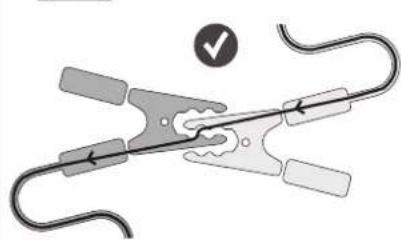
2 Short-circuit the clamps



Ensure that the metal parts of the jaws to which the cables are attached are in good contact with each other.
natural_image
Diagram of a mechanical clamp or spring with a checkmark indicating selection (no text or symbols present)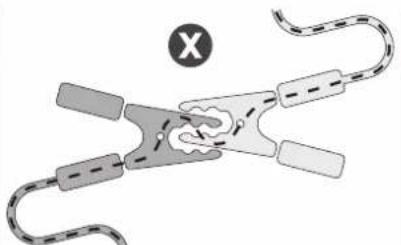
natural_image
Diagram of a biological structure with curved and rectangular elements, no visible text or symbols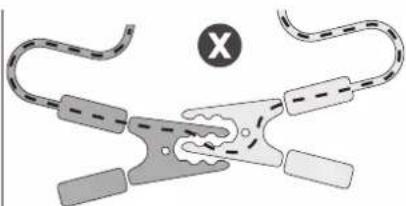
natural_image
Diagram of a mechanical clamp or clamp device with no visible text or symbolsOK NOK NOK
3 Press START/STOP to start the calibration

☑: The calibration was successful.
4 Err19: Cable_NOK : A problem occurred during cable calibration.
Check that the cables are in good condition and correctly short-circuited and repeat the operation.
USB USB connectivity :
Sub-menu to access USB features.
Multi-Chargers Mode:
A function that allows multiple chargers to be parallelized to increase power.
→ Refer to the SHM - Smart Hub Module (025981) manual for more details.
To operate normally with a single charger, this feature must be set to OFF.
USB USB CONNECTIVITY
Your GYSFLASH is equipped with USB connectivity that extends its functionality by creating custom configurations on your computer that can then be downloaded to the device via a simple USB stick. The custom configuration allows you to add, delete or modify charging modes and profiles, so that your charger can be adapted to your needs.
USB connectivity also gives you the ability to retrieve the history and data of more than 100 recharge on a USB stick and run them on a spreadsheet.
Navigation :
| 1 Use the arrows to scroll through the different submenus or files available | |
| 2 Press the SELECT button to enter the submenu or select a file. | SELECT |
| 3 Use the MODE button to return to the previous submenu | MODE |
Import a new configuration:
This function allows you to download a new configuration («.gfc» file) into the charger via the USB key.
1 First, make sure that the"".gfc"" file corresponding to the new configuration is present on the USB key. This file must not be located in a folder or subfolder of the USB stick.
| 2 Connect the USB stick to the charger. | |
| 3 Enter the "Import CONFIG" submenu | Import CONFIGUSB → |
| 4 Select the file to download | Select fileconfig.gfc |
| 5 Confirm the download of the file | Continue?Oui |
| 6 The charger will then download the new configuration. | Loading |
Export a configuration on a USB key:
This function allows you to save the current charger configuration («.gfc» file) to the USB stick.
| 1 Connect the USB stick to the charger. | |
| 2 Enter the "Export CONFIG" submenu | Export CONFIG→USB |
| 3 Confirm that the configuration has been saved. | Continue?YES |
| 4 The charger will then save its current configuration on the USB stick.( file ""Config_file.gfc""). | Loading |
Restore the previous configuration:
This function allows you to restore the second to last charger configuration in case of a problem or error with the last downloaded configuration.
1 Enter the "Restore CONFIG" submenu
Restore CONFIG
2 Confirm the restoration of the configuration.
Continue?
YES
3 The charger will then restore the penultimate configuration of the charger.
Loading
Export charging data on USB stick:
This function allows you to retrieve the charge history and data on a USB key, in order to be able to use them on a spreadsheet or other.
1 Enter the "Export DATA" submenu
Export DATA
2 Confirm the recording of the charging data.
Continue?
Yes
3 The charger will then copy the charging data to the USB stick as files, « .CSV »
Loading
Custom configuration
List of modes and profiles available for customization:
| CHARGE MODE | |||
| Charge type: | Charge profiles | Charging voltage | |
| Pb-CHARGE | normal | 2.40 V/cell Charging | profile for lead batteries of the types Gel, MF, EFB, SLA... |
| AGM | 2.45 V/cell | Charging profile for most AGM lead-acid batteries including START and STOP.However, some AGM batteries require a lower voltage charge (Normal profile). Check the battery manual if in doubt. | |
| water | 2.45 V/cell Charging | profile for open liquid-type lead-acid batteries with plug. | |
| Easy | 2.40 V/cell | Charging profile dedicated to lead batteries that automatically adapts the charging current according to the size of the battery.However, for maximum charge optimization, it is recommended, when possible, to use normal, AGM or liquid charge curves. | |
| boost | 2.42 V/cell | Maximum current charge for lead-acid battery. This type of charge is ultra-fast.Warning : this type of charge must remain occasional in order to preserve battery life. | |
| recovery+ | 2.40 - 2.50 V/cell | Charging profile for the recovery of severely damaged lead batteries. It is essential to recover the battery outside the vehicle to avoid damaging the vehicle electronics and in a well ventilated area.Caution: Recovery voltage up to 4.0 V/cell. | |
| Ca/Ca recov | 2.45 - 2.66 V/cell | Charging profile for calcium battery recovery. The battery must be recovered outside the vehicle to avoid damaging the vehicle's electronics and in a well-ventilated area.Caution: Recovery voltage can reach up to 2.75 V/cell. | |
| Li-CHARGE | LFP/LiFePO4 | 3.60 V/cell Charging | profile for Lithium batteries type LFP (Lithium Ferro Phosphate) |
| Li-ion std | 4.20 V/cell | Charging profile for standard lithium-ion batteries based on Manganese or Cobalt (NMC, LCO, LMO, MCO...) | |
| LFP cell+ | 3.60 V/cell | Charging profile dedicated to LFP (Lithium Ferro Phosphate) type lithium-ion cells with selection of the number of cells in series to be charged. | |
| Li-ion cell+ | 4.20 V/cell | Charging profile dedicated to standard lithium-ion cells based on Manganese or Cobalt (NMC, LCO, LMO, MCO...) with selection of the number of cells in series to be charged. | |
| TRACTION | water | 2.42 V/cell Charging | profile dedicated to open lead traction batteries for forklift trucks. |
| gel | 2.35 V/cell Charging | profile dedicated to gel-type traction batteries for forklift trucks. | |
| POWER MODES | |
| Showroom | Maintains the battery's state of charge and supplies power when using the electrical consumers of a demonstration vehicle. |
| DIAG+ | Supplies energy requirements during the vehicle diagnostic work. |
| CHANGE BAT. | Allows to keep the vehicle power supply during battery replacement, in order to preserve the memory of the vehicle's ECUs.Caution: Reverse polarity during use can be harmful to the charger and vehicle electronics. |
| STARTER MODE | Starting aid for combustion vehicles. Allows the battery to be precharged and the charger to send the maximum current during the engine starting phase (the charger stops automatically after 30 minutes). |
| POWER SUPPLY | Allows the charger to be used as an adjustable stabilized power supply with high power. The voltage to be regulated and the current limitation are fully adjustable.Caution: Reverse polarity during use can be harmful to the charger and vehicle electronics. |
| Li-SUPPLY/LFP | Mode intended to supply lithium-ion cells of the LFP type (Lithium Ferro Phosphate) with selection of the number of cells in series, adjustment of the voltage and current to be applied. |
| Li-SUPPLY/Li-ion | Mode intended to supply standard lithium-ion batteries based on Manganese or Cobalt (NMC, LCO, LMO, MCO...) with selection of the number of cells in series, adjustment of the voltage and current to be applied. |
| MISCELLANEOUS | |
| TESTER MODE | Allows to check the state of the battery, to evaluate the starting of the vehicle as well as the operation of the alternator |
GYS offers you predefined configurations adapted to each application.
These settings are available on the product page of the GYS website:
Gysflash V01.00 ▼
| Configuration file (gys.fr) | Applications | CHARGE MODE POWER MODES | MIS-CELLA-NEOUS | |||||||||||||||||||
| Pb-CHARGE Li-CHARGE TRACTION | SHOWROOM | DIAG+ | CHANGE BAT. | STARTER MODE | POWER SUPPLY | Li-SUPPLY/LFP | Li-SUPPLY/Li-ion | TESTER MODE | ||||||||||||||
| normal | AGM | water | Easy | Boost | Recovery+ | Ca / Ca recov | LFP/LiFePO4 | Li-ion std | LFP cell+ | Li-ion cell+ | water | gel | ||||||||||
| 1_gys_original.gfc Initial configuration of the charger | √ | √ | √ | √ | √ | √ | √ | √ | ||||||||||||||
| 2_car_extended.gfc Extensive features for garages | √ | √ | √ | √ | √ | √ | √ | √ | √ | √ | √ | √ | √ | √ | √ | |||||||
| 3_showroom_only.gfc | Simplified version for dealerships and demonstration vehicles | √ | ||||||||||||||||||||
| 4_pro_lithium.gfc Professional of lithium battery | √ | √ | √ | √ | √ | √ | √ | |||||||||||||||
| 5 traction.gfc Forklift truck, electric pallet truck, stacker... | √ | √ | ||||||||||||||||||||
| 6_full_version.gfc Full version | √ | √ | √ | √ | √ | √ | √ | √ | √ | √ | √ | √ | √ | √ | √ | √ | √ | √ | √ | √ | √ | |
√ Only on 24 V and 48 V models.
^* DIAG+ (Pro) - 16 V selection possible.
CONNECTIVITY MODULES
Your GYSFLASH is equipped with a DB9 type socket allowing you to connect various additional modules offered by GYS such as a printer, Ethernet or other module in order to further extend the possibilities of your charger.
LIST OF ERROR CODES
| Error code Meaning | Solutions | |
| Err01: Int_1 - Err02: Int_2Err23: Int_3 - Err24: Int_4 | Electronic problemDefective charger | Contact the reseller |
| Err03: Fuse_NOK Output fuse out | of order Have the fuse replaced by a qualified person | |
| Err04: T>Tmax | Abnormal overheating | Contact the reseller |
| Err05: (+)(-) | The polarity has been reversed on the clamps | Connect the red clamp to the (+) and the black clamp to the (-) of the battery. |
| Err06: U>_V | Overvoltage detected at the clamp terminals | Disconnect the clamps |
| Err07: No_bat | Battery not connected | Check that the battery is correctly connected to the charger |
| Err08: U<__V Abnormally low battery voltage | Check that the selected mode is compatible with the battery voltage (e. g. : 6 V battery in 24 V mode) | |
| Charge the battery via CHARGE mode | ||
| Battery to be replaced | ||
| Err09: U>__V Abnormally high battery voltage | Check that the selected mode is compatible with the battery voltage (e. g. : 24 V battery in 12 V mode) | |
| Err10: U<2.0V | Short-circuit detected during the charge process | Check the assembly |
| Err11: Time_Out | Triggering the time limit Presence of a consumer on the battery disrupting the charge | |
| Abnormally long charge Battery to be replaced | ||
| Err12: Q>__Ah Tripping the overcharge protection | Presence of a consumer on the battery disrupting the charge | |
| Battery to be replaced | ||
| Err13: U<__V | Abnormally low battery voltage when checking the charge | Battery to be replaced |
| Err14: Bat_UVP | Abnormally low battery voltage during UVP Wake up | Presence of a short circuit, check the assembly |
| Battery to be replaced | ||
| Err15: U<__V Battery too low | Check that the selected mode is compatible with the battery voltage (e. g. : 24 V battery in 12 V mode) | |
| Battery to be replaced | ||
| Err16: Bat_NOK Battery out of order Battery to be replaced | ||
| Err17: Recov_NOK Battery recovery failure Battery to be replaced | ||
| Err18: U>0V | Presence of a voltage at the clamp terminals when calibrating the cables | Check the assembly |
| Err19: Cable_NOK Cable calibration failure | Charging cables to be replaced | |
| Incorrect connection, check the assembly | ||
| Err20: U<__V | Triggering of the abnormal undervoltage protection | Presence of a short circuit, check the assembly |
| Err21: U<__V or Err22: U<__V | Abnormally low battery voltage during charging | Battery to be replaced |
| Presence of a consumer on the battery | ||
 | Key not detected Check that the USB key is correctly connected to the charger. | |
| [34wz] | No configuration file (.gfc) is present on the key | Check that your files are present at the root of the USB key. Do not put them in a folder or sub-folder. |
| [yyv] | Corrupted file | The file you wish to download is corrupted. Delete and reinstall the file on the key. |
| Err27: Cable_NOK | Multi-charger mode : Parallel charging cables fail | Load cables to be replaced. |
| Poor connection, check assembly (PHM). | ||
| To switch back to single charger operation, select OFF for the Multi-Charger function. | ||
| Err28: COM_NOK | Multi-charger mode : Communication failure between chargers | No communication, check SHM mounting and SLAVE X charger configuration. |
| To switch back to single charger operation, select OFF for the Multi-Charger function. | ||
WARRANTY
The warranty covers faulty workmanship for 2 years from the date of purchase (parts and labour).
The warranty does not cover:
- Transit damage.
- Normal wear of parts (eg. : cables, clamps, etc..).
- Damages due to misuse (power supply error, dropping of equipment, disassembling).
- Environment related failures (pollution, rust, dust).
In case of failure, return the unit to your distributor together with:
- The proof of purchase (receipt etc ...)
- A description of the fault reported
Lithium-Ladekurve (LFP):
natural_image
Diagram of a coiled cable or clamp device with a checkmark indicating selection (no text or symbols present)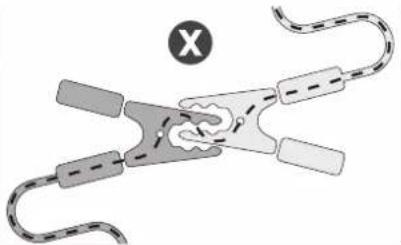
natural_image
Diagram of a mechanical or biological structure with curved elements and a central irregular shape, no visible text or symbols.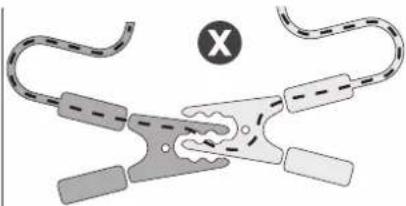
natural_image
Diagram of a mechanical clamp or connector with curved and straight ends, no text or symbols presentOK NOK NOK
line
| Event | U | I | |-------|----|----| | Análisis Carga Complemento | 0 | 0 | | Second event | 1 | 0 | | Igualización / equilibrado | 0 | 0 | | Second event | 1 | 0 | | Second event | 2 | 0 | | Second event | 3 | 0 | | Second event | 4 | 0 | | Second event | 5 | 0 | | Second event | 6 | 0 | | Modo suministroAbso | - | - |Etapa 1 : Análisis
natural_image
Diagram of a mechanical clamp or spring with a checkmark indicating selection (no text or symbols present)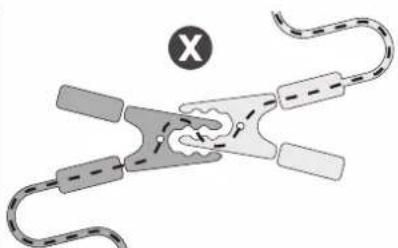
natural_image
Diagram of a mechanical or biological structure with curved elements and a central circular symbol (no text or labels)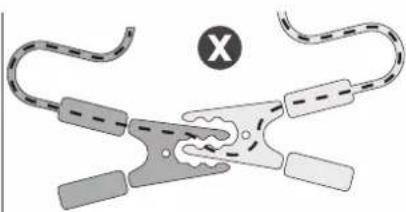
natural_image
Diagram of a coiled cable or clamp device with labeled components and a circular symbol (X) in the corner, no readable text or symbols present.OK NOK NOK
line
| Point | Value | |-------|-------| | 12 | U | | | I | | | U | | | I | | | I | | | I | | | I | | | I | | | I | | | I | | | I | | | I | | | I | | | I | | | I | | | I | | | I | | | I | | | I | | | I | | 8 | | | 8 | |Этап 1 : Анализ
natural_image
Diagram of a hairpin with attached clips and a checkmark indicating selection (no text or symbols present)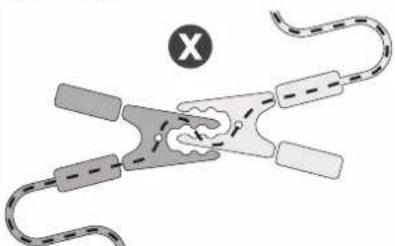
natural_image
Diagram of a biological or mechanical structure with curved and dashed elements, no visible text or symbols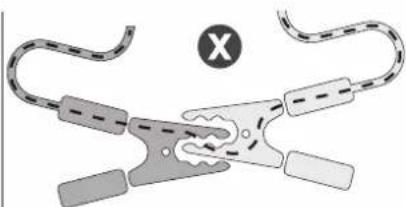
natural_image
Diagram of a mechanical or electrical component with curved and straight ends, no visible text or symbolsOK NOK NOK
line
| Stage | U | I | | ------------- | ---- | ---- | | Analyse | 0% | 0% | | Herstel | 10% | 0% | | Test | 10% | 0% | | Desulfatie | 20% | 0% | | Laden | 80% | 0% | | Opname | 95% | 0% | | Refresh (indien opile active) | 100% | 0% | | Druppel-laden | 100% | 0% |Stap 1 : Analyse
line
| Event | U | I | | --- | --- | --- | | Analyse UVP Wake up Herstel Laden Test | High | Low | | 0% | Low | Low | | 2% | Low | Low | | 85% | Low | Low | | 95% | Low | Low | | 99% | Low | Low | | 100% | Low | Low | | Opname | Low | Low | | Aanvullende lading | Low | Low | | Egalisatie / equilibreren | Low | Low | | Druppel-laden | Low | Low |Stap 1 : Analyse
Reactiveert de UVP (Under Voltage Protection) accu's
Stap 3 : Herstel
natural_image
Diagram of a coiled cable clamp with a checkmark indicating selection (no text or symbols present)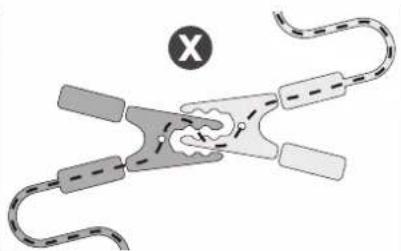
natural_image
Diagram of a biological or mechanical structure with curved and straight elements, no visible text or symbols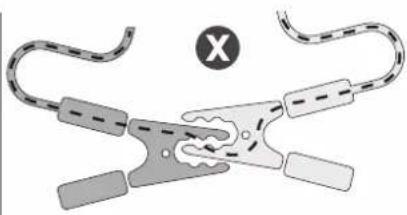
natural_image
Diagram of a mechanical clamp or connector with curved and straight ends, no text or symbols presentOK NOK NOK
line
| Event | U | I | | --- | --- | --- | | 12 | High | Low | | 8 | Medium | Low | | 9 | Low | High |Tappa 1 : Analisi
natural_image
Diagram of a mechanical clamp or wire with a checkmark indicating selection (no text or symbols present)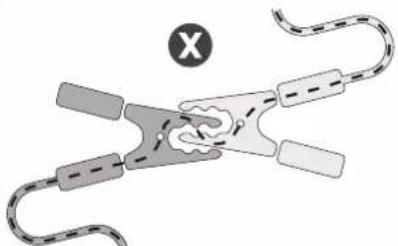
natural_image
Diagram of a biological or mechanical structure with curved and rectangular elements, no visible text or symbols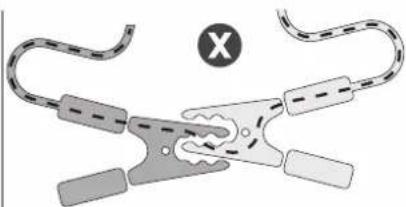
natural_image
Diagram of a mechanical clamp or clamp device with no visible text or symbolsOK NOK NOK
*In order to comply with IP 4X, 2 spacers (supplied with the GYSFLASH) must be screwed to the SMC connector.
GYSFLASH 51.48 CNT
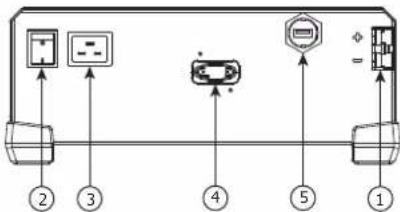
GYSFLASH 123.12 / 103.24 CNT
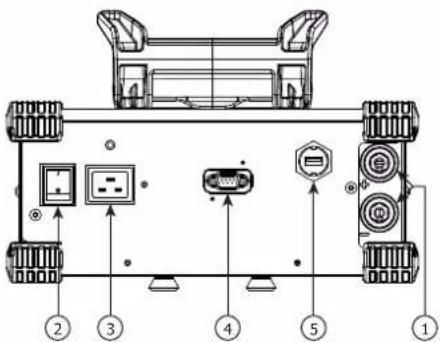
GYSFLASH 53.48 CNT
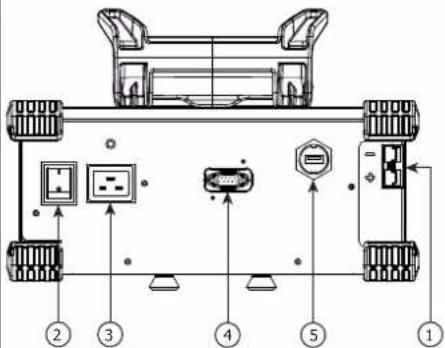
GYSFLASH 53.24 / 103.12 / 25.48 CNT
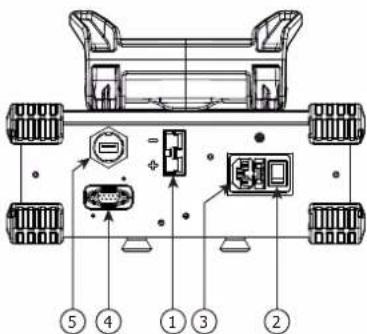
EN: Charging connector
DE : Ladeanschluss
ES : Conector de carga
EN: Connector for GYS additional module (type Sub-D 9)