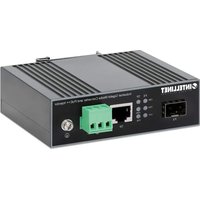
509107 - Power inverter Intellinet - Free user manual and instructions
Find the device manual for free 509107 Intellinet in PDF.


| Product Type | Gigabit Industrial Media Converter and PoE++ Injector |
| Brand | Intellinet |
| Model | 509107 |
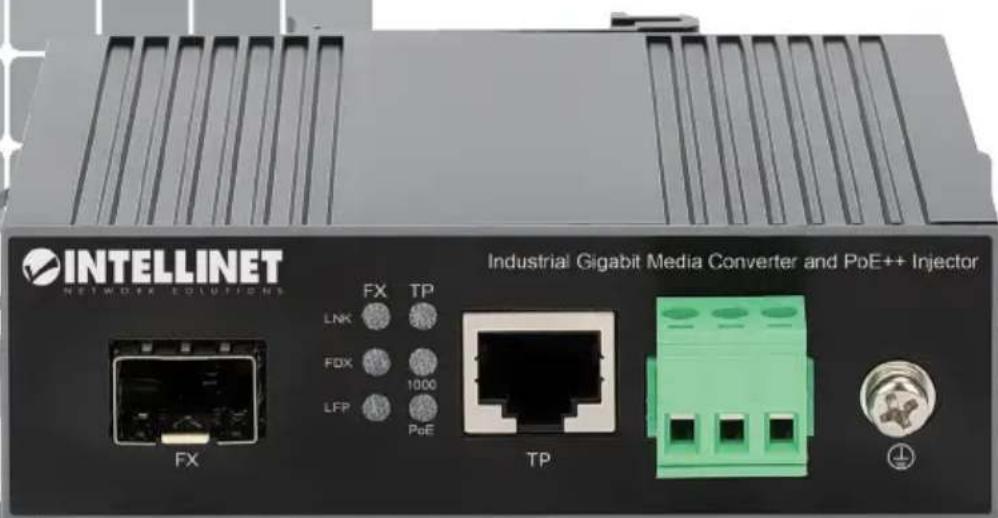
| Network Ports | 1 RJ45 port 10/100/1000 Mbps; 1 SFP slot for 1000Base-X module |
| PoE (Power over Ethernet) | Compliant with IEEE 802.3bt/at/af, up to 90 W output on RJ45 port |
| Power Supply | 44-57 V DC via screw terminal, wire gauge 12-24 AWG, recommended current >6 A |
| Enclosure | Metal, IP30 rating, slim profile |
| Mounting | On DIN rail (optional) or on a flat surface with at least 25 mm ventilation |
| LED Indicators | FX LNK (fiber link), TP LNK (copper link), FDX (duplex), TP 1000 (speed), LFP (fiber link fault), TP PoE (PoE power) |
| Grounding | Ground connector on the side of the power terminal block, chassis screw |
| Maximum Distance (Fiber) | Up to 120 km depending on SFP module; RJ45: 100 m |
| Standards and Certifications | CE (2014/30/EU and 2014/35/EU), WEEE (2012/19/EU) |
| Maintenance and Cleaning | Disconnect the device before cleaning. Use a soft, dry cloth. Do not use abrasive products or solvents. |
| Safety | Use only a 44-57 V DC power supply. Ensure proper grounding. Do not expose to moisture or impacts. |
| Spare Parts and Repairability | No user-serviceable parts. In case of failure, contact a qualified professional or customer service. |
| General Information | Standard manufacturer warranty (registration possible at register.intellinet-network.com/r/509107). Full specifications at intellinetnetwork.com. |
Frequently Asked Questions - 509107 Intellinet
User questions about 509107 Intellinet
0 question about this device. Answer the ones you know or ask your own.
Ask a new question about this device
Download the instructions for your Power inverter in PDF format for free! Find your manual 509107 - Intellinet and take your electronic device back in hand. On this page are published all the documents necessary for the use of your device. 509107 by Intellinet.
USER MANUAL 509107 Intellinet
Industrial Gigabit Media Converter and PoE++ Injector Instruc
Model 509107 (IMCI-SFPG-90W)
Important: Read before use. • Importante: Leer antes de usar.
For additional benefits:
Scan to register your product warranty

or go to: register.intellinet-network.com/r/509107
Features
• One 10/100/1000 RJ45 port supporting a maximum distance of 100 m (300 ft.)
• One SFP port for 1000Base-X optical transceiver modules and distances up to 120 km (75 mi.)
- Power over Ethernet injector function with output up to 90 watts
• IP30 slim-type metal housing to withstand harsh industrial conditions
- Option for DIN-rail installation
• One DC input (44 - 57 V) with terminal block
For specifications, visit intellinetnetwork.com. Register your product at
register.intellinet-network.com/r/509107 or scan the QR code on the cover.

Placement
Desktop Installation
Prior to use, place/position the device:
- on a level surface that can support the device, with at least 25 mm (approx. 1") of clearance for ventilation;
- away from sources of electrical noise: radios, transmitters, broadband amplifiers;
- within 100 m (approx. 328') of RJ45 network devices it's to be connected to.
DIN-Rail Installation
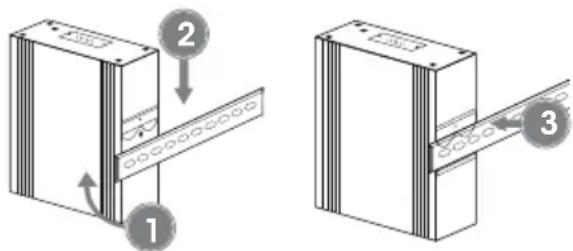
1 Angle spring of mounting clip over top lip of DIN rail.
2 Push device down till clip clicks onto rail.
3 Ensure installation is stable.

Power
Chassis Ground Column
Located on the side of the power supply connector, a grounding terminal connector is used to provide proper grounding for your switch. It should be wired to an object that provides earth ground.

Terminal Block Installation (DC Input 44 - 57 V)
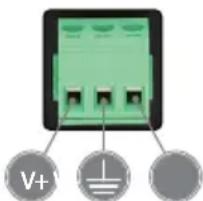
NOTE: Ensure all power is off/disconnected before beginning! The wire gauge for the terminal block should be in the range between 12 – 24 AWG. It is recommended to use a cable with a current capacity of more than 6 A.
1 Loosen appropriate screws. Insert bare power-supply wires into appropriate terminals (positive wire into positive [V+] terminal, negative wire into negative [V-] terminal, ground wire to ground [±] terminal).
2 Tighten appropriate screws to secure wires.
3 Install block into the device.

Setup
This product requires an SFP transceiver module that provides fiber optic connections.
1 Insert the transceiver into the media converter and route the fiber optic cable into the transceiver.
2 Route the other end of the fiber optic cable into a suitable port in your fiber optic network.
Maximum length and fiber cable specification depend on the model.
RJ45 & PoE
Connect the UTP port of the media converter to powered RJ45 device; e.g., to a network camera. Cat5e or better cabling is recommended. The Intellinet Industrial Gigabit Media Converter and PoE++ Injector complies with IEEE 802.3bt/at/af standards. The device can supply up to 90 watts of power to a PoE-compliant powered device.
Example

flowchart
graph LR
    A["Fiber Network TXRX"] -->|Gb Fiber (120 km/74.5 mi.) Gb RJ45/PoE (100 m/300 ft.)| B["FXTP"]
    B --> C["44 V - 57 V"]
    C --> D["Output"]

LED Status
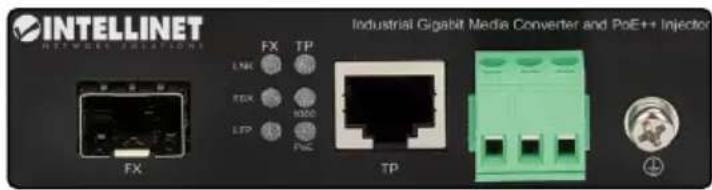
| LED Function Status Description | |||
| FX - LNK Fiber link LED | On Fiber port is connected. | ||
| Off Fiber port is not connected. | |||
| Flashing Sending or receiving data. | |||
| TP - LNK Copper link LED | On Valid port connection. | ||
| Off Connection not established. | |||
| Flashing Sending or receiving data. | |||
| FDX | Copper link Full/ Half Duplex LED | On Full-duplex mode | |
| Off Half-duplex mode | |||
| TP - 1000 Network speed LED | On Network speeds at 1000 Mbps | ||
| Off Network speeds at 100 Mbps | |||
| LFP | Fiber link - Link Fault Pass-through | On | Two communication devices connected and functioning normally |
| Off | Two communication devices connected, one with a link failure near the end | ||
| TP - PoE PoE LED | On PoE is being supplied to a connected PD. | ||
| Off No power is being supplied to a connected PD. | |||
Merkmale

Strom

Energía

Alimentation

Moc

Potenza
(Applicable In The European Union And Other European Countries With Separate Collection Systems)
ENGLISH: This symbol on the product or its packaging means that this product must not be treated as unsorted household waste. In accordance with EU Directive 2012/19/EU on Waste Electrical and Electronic Equipment (WEEE), this electrical product must be disposed of in accordance with the user's local regulations for electrical or electronic waste. Please dispose of this product by returning it to your local point of sale or recycling pickup point in your municipality. DEUTSCH: Dieses auf dem Produkt oder der Verpackung angebrachte Symbol zeigt an, dass dieses Produkt nicht mit dem Hausmüll entsorgtwerden darf. In Übereinstimmung mit der Richtlinie 2012/19/EU des Europäischen Parlaments und des Rates über Elektro- und Elektronik-Altgeräte (WEEE) darf dieses Elektrogerät nicht im normalen Hausmüll oder dem Gelben Sack entsorgt werden. Wenn Sie dieses Produkt entsorgen möchten, bringen Sie es bitte zur Verkaufsstelle zurück oder zum Recycling-Sammelpunkt Ihrer Gemeinde. ESPAÑOL: Este símbolo en el producto o su embalaje indica que el producto no debe tratarse como residuo doméstico. De conformidad con la Directiva 2012/19/EU de la UE sobre residuos de aparatos eléctricos y electrónicos (RAEE), este producto eléctrico no puede desecharse se con el resto de residuos no clasificados. Deshágase de este producto devolviéndolo a su punto de venta o a un punto de recolección municipal para su reciclaje.
This equipment has been tested and found to comply with the limits for a Class A digital device, pursuant to Part 15 of the Federal Communications Commission (FCC) Rules. These limits are designed to provide reasonable protection against harmful interference when the equipment is operated in a commercial environment. This equipment generates, uses and can radiate radio frequency energy, and if not installed and used in accordance with the instruction manual may cause harmful interference to radio communications.
Operation of this equipment in a residential area is likely to cause harmful interference, in which case the user will be required to correct the interference at his own expense. Any changes or modifications made to this equipment without the approval of the manufacturer could result in the product not meeting the Class A limits, in which case the FCC could void the user's authority to operate the equipment.
CE
ENGLISH : This device complies with the requirements of CE 2014/30/EU (UKCA Electromagnetic Compatibility Regulations 2016) and / or 2014/35/EU (UKCA Electrical Equipment [Safety] Regulations 2016). The Declaration of Conformity for is available at:
support.intellinet-network.com/barcode/509107




North America
IC Intracom America
550 Commerce Blvd.
Oldsmar, FL 34677, USA
Asia & Africa
IC Intracom Asia
4-F, No. 77, Sec. 1, Xintai 5th Rd.
Xizhi Dist., New Taipei City 221, Taiwan
Europe
IC Intracom Europe
Löhbacher Str. 7, D-56553
Halver, Germany

intellinet-network.com
All trademarks and trade names are the property of their respective owners. © IC Intracom. All rights reserved. Intellinet Network Solutions is a trademark of IC Intracom, registered in the U.S. and other countries.
- Industrial Gigabit Media Converter and PoE++ Injector Instruc
- For additional benefits:
- Features
- Placement
- Desktop Installation
- DIN-Rail Installation
- Power
- Chassis Ground Column
- Terminal Block Installation (DC Input 44 - 57 V)
- Setup
- RJ45 & PoE
- LED Status
- Merkmale
- Strom
- Energía
- Alimentation
- Moc
- Potenza
- CE
Brand : Intellinet
Model : 509107
Category : Power inverter