
SS-8560 - Speakers Sogo - Free user manual and instructions
Find the device manual for free SS-8560 Sogo in PDF.
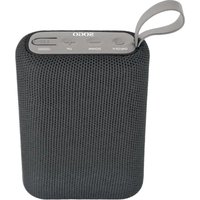


| Product Type | Portable Bluetooth Speaker |
| Brand | Sogo |
| Model | SS-8560 |
| Dimensions (L x W x H) | 9,5 x 7,5 x 4,1 cm |
| Weight | Approximately 200 g (estimation) |
| Power Source | Built-in Li-ion battery 500 mAh 3.7 V |
| Output Power | 5 W |
| Bluetooth Version | V5.0 |
| Bluetooth Range | 10 meters |
| Bluetooth Pairing Name | SOGO SS-8560, SOGO SS-8565, SOGO SS-8570 |
| Frequency Response | 80 Hz - 180 Hz |
| Sound Sensitivity | 60 - 75 dB |
| Distortion | ≤ 10% |
| Charging Time | 1.5 to 2 hours |
| Operating Time | 2 to 3 hours |
| Charging Port | Type-C (USB-C) |
| Charging Indicator | Yes |
| Main Functions | Play/Pause, Volume +/-, Track Change, Power On/Off |
| Care and Cleaning | Wipe with a soft, dry cloth. Do not use abrasive products. |
| Safety | Do not expose to water, open flames, or heat sources. Turn off before charging. |
| Spare Parts and Repairability | Battery non-removable. Repairs must be carried out by a qualified technician. |
| General Information | Compliant with European directives. Imported by Sanysan Appliances S.L. |
Frequently Asked Questions - SS-8560 Sogo
User questions about SS-8560 Sogo
0 question about this device. Answer the ones you know or ask your own.
Ask a new question about this device
Download the instructions for your Speakers in PDF format for free! Find your manual SS-8560 - Sogo and take your electronic device back in hand. On this page are published all the documents necessary for the use of your device. SS-8560 by Sogo.
USER MANUAL SS-8560 Sogo
PORTABLE BLUETOOTH SPEAKER
• Always read the instruction book carefully before using. - This manual can be downloaded from our web page www.sogo.es - Keep these instructions for future reference.
SAFETY INSTRUCTIONS FOR THE USER
- Do not place or operate the Bluetooth speaker near water sources.
- Never immerse the speaker or the charging cable in water or any other liquid. In the event of the speaker falling in water, take it to an authorized service agent for repair before reusing.
- Do not place or operate the speaker on or near hot surfaces (e.g., stove plates) or open flames.
- In case of speaker malfunction, or if it has been damaged in any manner, return it to the nearest authorized service facility for examination, repair or adjustment.
- In case of hardware problems, do not attempt to repair the product yourself. Repairs should only be carried out by qualified technicians.
- Never use accessories that are not recommended by the manufacturer.
- The use of accessories not recommended or sold by the appliance manufacturer may result in fire, electric shock or irreparable damage to the product.
- Do not use the speaker for any purpose other than described in this manual.
- Do not leave the speaker charging longer than recommended by the manufacturer, as this may damage the battery or the speaker itself.
- Do not use the speaker while it is charging, as this may also damage the speaker.
- Keep the speaker away from direct sunlight, fire, or other high-voltage equipment.

WARNING: The device may get warm during charging. Always ensure the speaker is turned off when you plug and unplug the device. If the device is not turned off, you might damage the speaker or injure yourself.
Technical Specifications:
| Output power 5W | |
| Driver unit size 9.5 x 7.5 x 4.1 cm | |
| S/N ratio 60-75db | |
| Distortion ≤10% | |
| Frequency response 80Hz-180Hz | |
| Bluetooth version V5.0 | |
| Bluetooth range 10 meters | |
| Bluetooth pairing name SOGO SS-8560; SOGO SS-8565; SOGO SS-8570 | |
| Battery capacity Built-in 500mAh 3.7V | |
| Battery type Li-ion | |
| Charging indicator Yes | |
| Input power DC 5V | |
| Working time 2 – 3hrs | |
| Charging time 1.5 – 2 hrs | |
| Charging port | Type C |
PACKAGE INCLUDES:
Bluetooth Speaker
1 x Type-C cable
1 x User Manual
INSTRUCTIONS:
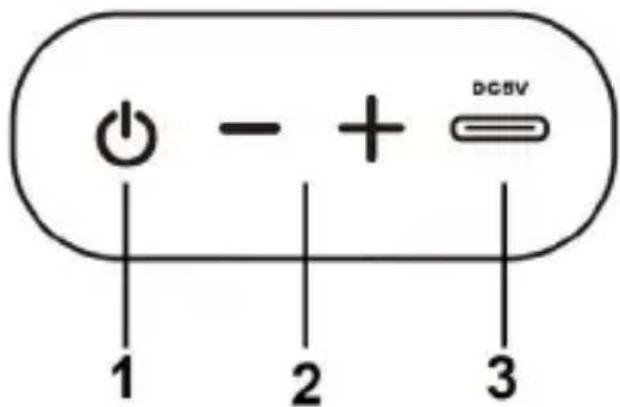
- On/Off Button: This speaker has an On/Off button, which works to turn the speaker on and off, as well as for play/pause functions. To switch on and switch off the speaker, just press and hold the button longer than normal, and it will switch on; to switch off, press the same button (long press).
To play or pause, press the same button for a shorter period of time (short press).
- There are also "+" and "-" buttons, which help you to increase and reduce the volume, as well as to move to the next song or previous song.
Volume up / Volume down: Use the "+" button to increase the volume and the "-" button to decrease it. Just press and hold (long press) to use as volume buttons.
To move to the next or previous song, press the same button for a shorter period of time (short press).
- This speaker has a Type-C charging port.
PAIRING:
Hold the power button to turn the speaker on. When the device is turned on, it automatically turns on in Bluetooth mode and a voice prompt will indicate that the speaker is ready for use.
Activate the Bluetooth mode of your mobile phone, laptop, or smart TV and search for nearby Bluetooth devices. Connect to it using the Bluetooth pairing code: SOGO SS-8560, SOGO SS-8565, or SOGO-SS-8570, which appears on your device.
Once connected, you will hear another voice prompt indicating that your device has been connected successfully to the speaker and it is ready to use.
If your device asks for a password, use "0000" or "1234" to complete the pairing process.
Note: Once your device is connected to the speaker, every time you turn on the Bluetooth of your device, it will connect automatically to the speaker.
CHARGING:
This speaker is provided with a USB charging cable to charge the speaker via an integrated rechargeable battery. Before first use, make sure the unit is charged completely.
The battery cannot be removed or replaced, so to ensure optimal performance and battery life, always charge the battery prior to use. To charge the Bluetooth speaker, connect the Type-C end of the charging cable to the USB port of the speaker, which is located on the top part of the speaker. Connect the other end of the cable to your computer's USB port or an AC adapter (not included, but you can use your mobile charging adapter as well, or you can buy an adapter with 5V output).
Charging time is approximately 1.5 to 2 hours when connected to a standard USB port.
Note: Make sure to switch off the speaker and not to use it while charging, as it leads to the speaker taking more time to charge. Also avoid using the speaker while charging, as it can reduce battery life.
SLEEP MODE:
This device will enter 'sleep mode' if it is not used or connected within 15 minutes after switching on. To reactivate the speaker once it enters sleep mode, press the power button again.
DISPOSAL OF BATTERY OPERATED UNITS
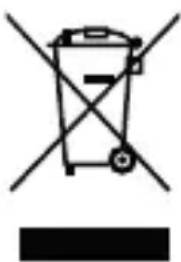
Do not dispose of battery-operated units as normal rubbish; they should always be recycled in a proper manner and according to local municipal laws. You can recycle them by taking them to government-authorized disposal centers or specialized bins, which you can find in any nearby large supermarkets, electronics or electro-domestic products stores, or malls that have these types of facilities available.
IMPORTANT
DECLARATION OF CONFORMITY
This device complies with Electromagnetic Compatibility Directive 2014/35/CE, and Directive 2015/863 UE on the restriction of the use of certain hazardous substances in electrical and electronic equipment.
DECLARATION OF CONFORMITY
This symbol means that in case you wish to dispose of the product once its working life has ended, take it to an authorized waste agent for the selective collection of waste electrical and electronic equipment (WEEE).

Imported by:
Sanysan Appliances S.L, NIF: B98753056, C/ Barcas 2, 2
46002 Valencia, Spain Product made in P.R.C. – Designed by SOGO based on the European Quality Standards
Customer Service: www.sogosat.com / sogosat@sogosat.com / 0034 902 222 161
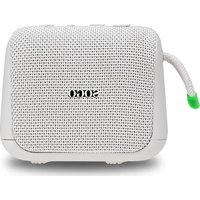
Brand : Sogo
Model : SS-8560
Category : Speakers