
SS-2915 - Kitchen scales Sogo - Free user manual and instructions
Find the device manual for free SS-2915 Sogo in PDF.
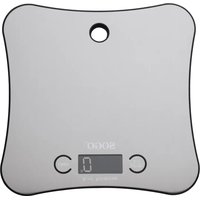


| Product type | Bluetooth connected kitchen scale |
| Brand | Sogo |
| Model | SS-2915 |
| Maximum capacity | 5 kg (5000 g) |
| Accuracy | 1 g |
| Measurement units | g, oz, kg, lb, ml (water and milk) |
| Power supply | 2 AAA batteries (1.5 V) / LR03 not included |
| Platform material | Stainless steel |
| Display | Backlit LCD |
| Connectivity | Bluetooth with OK OK Nutrition app |
| Main functions | Weighing, tare, unit conversion, nutritional values calculation via app |
| Operating temperature | 5°C to 60°C |
| Dimensions (estimated) | 20 x 15 x 2 cm |
| Weight (estimated) | 300 g |
| Care and cleaning | Clean with a soft cloth, avoid chemical detergents and water infiltration |
| Safety | Overload protection (Err display), low battery indicator |
| Spare parts and repairability | Contact Sogo after-sales service for approved repair |
| General information | Complies with European directives 2014/35/EU and 2015/863/EU |
Frequently Asked Questions - SS-2915 Sogo
User questions about SS-2915 Sogo
0 question about this device. Answer the ones you know or ask your own.
Ask a new question about this device
Download the instructions for your Kitchen scales in PDF format for free! Find your manual SS-2915 - Sogo and take your electronic device back in hand. On this page are published all the documents necessary for the use of your device. SS-2915 by Sogo.
USER MANUAL SS-2915 Sogo
DIGITAL KITCHEN SCALE
![graph TD A["OKOK Nutrition"] --> B["Add Weigh 0.0g"] B --> C["FOOD NUTRITION"] C --> D["Setting"] D --> E["My device"] E --> F["DRIs"] F --> G["About us"] G --> H["Setting"] H --> I["Weight"] H --> J["History"] H --> K["Setting"] L["My device"] --> M["To know OKOK Nutrition scale"] M --> N["Bound OK…](/content/2026/04/721866/images/5c5fcd8aa59aadd23d7fd96b7e72f492618ec21905faa768dd53275098fbbdf3.jpg)
Dear user, thank you for choosing this electronic Bluetooth kitchen scale. This product is designed not only to give you the weight of food but also to give you precise nutritional information about the food. To make full use of this product and ensure its accuracy and service life, please read this manual carefully before using it.
IMPORTANT
• Always read the instruction book carefully before using. • This manual can be downloaded from our web page www.sogo.com - Keep these instructions for future reference.
SPECIFICATIONS
- Equipped with a high precision "strain-gauge" sensor and high capability CPU to ensure not only to provide you the weighing accuracy, but also to help you to get correct nutrition value of food that you consume. • With the capacity of weighing up to 5kg (5000 gm)
- With stainless steel base to give more elegant and classy look. • With luminated LCD screen display
- The product is provided with a hole at the top to enable you to hang it on a hook or on a nail fixed to the kitchen wall, to give you a quick access and save you storage space
TECHNICAL PARAMETERS
• Capacity: 1g-5000g • Show numerical value: 1g - Battery: 2 X AAA (1.5 V) / LR03 (Not included) • Work temperature: 5°C - 60°C • Display usage: LCD Show, 4 units
KEY FUNCTION
- Switch on and TARE key:
- ON / OFF button: Long press ON/OFF button to turn off the scale
- Weighing Units: Solid ingredients: g / lb / oz / kg Water and Milk: ml
OPERATION
- Take out the scale, and open up the battery cover, install the batteries to the battery case and now the scale is ready to use.
WEIGHING PROCEDURE
- Press the key of "ON/OFF and TARE" to power on the scale. Zero "0" will be on the display.
- Under weight state, Press the key of "UNIT", you can change "g", "oz", "kg", "lb".
- Under the weight state, you can put the food on the metal directly., the weight of food will be appeared on the display.
- Or you can weigh with the help of any container. For this put the container on the steel base, LCD will show the weight of container. Press the key of "TARE", LCD shows zero. Clear the weight of the container, then put the food ingredients into container and the weight of the food ingredients only will appear on the display.
NUTRITION VALUE INFORMATION
To find out the nutrition value of food Bind (connect) the Weight Scale with OK OK Nutrition App. Once the scale is connected through App, put the food on to the top of the scale and choose the food category from the list given in the App, and then this way the app shows the nutrition values of that particular food with its given weight in calories.
PROCEDURE TO CONNECT BLUETOOTH KITCHEN SCALE WITH THE APP
Download the bluetooth App - OK OK Nutrition from Play store for Android and from Apple market for I-phone.
- Open the App and turn on the mobile bluetooth
- Turn on the scale
- To match the device enter into "Setting" in the App, click "My Device"
![graph TD A["OkOK Nutrition"] --> B["Plate"] B --> C["Add Weigh"] D["0.0g Food Nutrition"] --> E["Setting"] E --> F["My device"] F --> G["DRs"] G --> H["About us"] I["Weight"] --> J["History"] J --> K["Setting"] L["Weight"] --> M["History"] M --> N["Setting"] O["My Device"] --> P["To know OKOK Nutrit…](/content/2026/04/721866/images/cf77a6f038a9deb8c2f99034ef0e3884e914a247e7613aa3ee43cc3dfc77de3e.jpg)
- Then select the "Bound OK OK Nutrition Scale" Option
- Once the App is connected with the Weigh Scale, start weighing. Put food on the top of the scale. If the scale reads "12g", the App will also display "12g".
- Now, if you want to find the nutritional value of foods that you consume.
- Then click "FOOD NUTRITION" and find the type of your food.
- Click the category of your food, for example, "bread", and put it on the top of the scale. The mobile screen shows the correct nutritional value.
- So, to find the nutritional value of any food, just click the food category from the list, and this way you will have the correct nutritional value.
The chart given below is an example of the type of food with its nutritional value mentioned in the OK OK Nutrition App:
| Type of food | Weight Calories | Carb. Cholestrol | Protein Fiber Fat | |||
| Whole wheat | 20.8gm 295 | 55 0 12.9 8.1 | 4.3 | |||
| White Bread | 120.8gm 321 | 57 0 | 9.6 | 2.9 4.8 | ||
| Canned Mushroom | 120.8gm | 28 | 6 | 0 | 2.3 | 2.8 |
| Egg Omelette | 120.8gm | 182 | 1 | 420 | 12.4 | 0 |
| Corn Canned | 120.8gm | 94 | 23 | 0 | 2.9 | 2.4 |
| Banana | 120.8gm | 110 | 28 | 0 | 1.2 | 2.8 |
| Cookies (chocolate chip) | 120.8gm | 576 84 0 | 12 | 3.6 24 |
The benefits of having nutritional value:
This scale is specially designed for every single person who wants to have a good and healthy life.
This device not only gives you the nutritional value of the food but also helps you to make your own diet chart.
This device is one more revolutionary step to make your life more healthy.
Further below is an example of a calorie intake divided as a diet chart:
| Meals Total | calories | Carb. Protein Fats | |
| Breakfast | 500 300 | 125 75 | |
| Snack | 200 120 | 80 0 | |
| Lunch | 700 400 | 175 125 | |
| Supper | 200 120 | 80 0 | |
| Dinner 600 360 150 90 | |||
| Total 2200 1300 610 290 | |||
So this way, with the help of nutritional values available in the app and the calorie intake chart, one can make their own diet chart.
ERROR DISPLAY INFORMATION
- When the scale is overloaded, "Err" will appear on the display.
- When the screen shows a prompt sign of battery, it means that the power isn't enough. Please change the batteries as soon as possible.
USING AND INSTALLING THE BATTERIES
• Use 2 pcs x AAA/LR03 (1.5 V) batteries. When changing the batteries, please open the battery cover on the back, put the batteries in the battery case. Make sure the positive and negative poles are correctly aligned for each battery. Then close the battery cover tight. Change both batteries at the same time. Please do not dispose of batteries as normal rubbish. Always recycle them by taking them to government authorized disposal centers or find dry battery disposal bins in any nearby big supermarket, electronics or electrodomestics products store or malls who have these types of facilities available.
ADVICE FOR USE AND CARE
- The maximum weight of the scale is 5000g (5kg), which includes the weight before tare. So do not ever place food ingredients in excess of this capacity. To ensure the life of the scale, do not put the scale under wet, hot & cold conditions.
- The product belongs to high precision electronic weighing apparatus. Please do not press or drop the scale, otherwise the scale is easy to damage.
- If the scale surface is dirty, please clean the scale with a soft cloth. Neither use any chemical detergent nor allow water to get inside the scale. The product is for small goods weighing only, do not use for legal trade.
- If the display result appears improperly, please check the batteries and their touching point contact well. Make sure they are well connected. If the result is still not correct, replace with new batteries and then try again.
- If the product is not working even after batteries are changed to new ones, or if the display is damaged and the display results are unworkable, then kindly get it repaired at authorized after-sales service centers.
- If this product gets defective and it needs to be disposed of, do not dispose of in the general waste.
Always recycle them by taking them to government authorized disposal centers or find electronic products disposal bins in any nearby big supermarket, electronics or electrodomestics products store or malls who have these types of facilities available.
![graph TD A["OKOK Nutrition Plate"] --> B["Add Weigh 0.0g"] B --> C["FOOD NUTRITION"] C --> D["Setting: My device"] D --> E["DRs"] E --> F["About us"] F --> G["Setting: My device"] G --> H["Weigh"] G --> I["History"] G --> J["setting"] H --> K["Setting: My device"] I --> L["Setting: My device"] J -->…](/content/2026/04/721866/images/8a6f3fe121c3ea41fe77fd846d516c9dc9e63b37957a6fbeccf638b96b4469be.jpg)
![graph TD A["OkOK Nutrition Plate"] --> B["Add Weigh 0.0g"] B --> C["Setting: My device"] C --> D["Setting: DRIs"] D --> E["Setting: About us"] E --> F["Setting: Setting"] F --> G["My Device"] G --> H["To know OKOK Nutrition scale"] H --> I["Bound OKOK Nutrition scale"] I --> J["Active the scale to b…](/content/2026/04/721866/images/db55951625be438ae858890a78b6cff78769494500dec547866649af82f0c85a.jpg)
![graph TD A["OKOK Nutrition"] --> B["Plate + Add Weigh"] B --> C["0.0g Food Nutrition"] C --> D["Setting"] D --> E["My device"] E --> F["DRs"] E --> G["About us"] D --> H["Setting"] H --> I["weigh"] H --> J["history"] H --> K["setting"] L["My device"] --> M["To know OKOK Nutrition scale"] M --> N["Bo…](/content/2026/04/721866/images/9929501bbbf56057ef8cda966a616634b7a997a081692c176e13c28b62fbc0d0.jpg)
![graph TD A["OkOK Nutrition"] --> B["Add Weigh"] B --> C["0.0g Food Nutrition"] C --> D["Setting"] D --> E["My device"] E --> F["DRs"] E --> G["About us"] D --> H["Setting"] H --> I["weigh"] H --> J["History"] H --> K["setting"] L["My device"] --> M["To know OKOK Nutrition scale"] M --> N["Bound OKOK…](/content/2026/04/721866/images/c33a05c3a806641647e8e7d87c59327d0ec29b759960795d38ec5b2d390043cd.jpg)
DECLARATION OF CONFORMITY
This device complies with Electromagnetic Compatibility Directive 2014/35/CE, and Directive 2015/863 UE on the restriction of the use of certain hazardous substances in electrical and electronic equipment.


DECLARATION OF CONFORMITY
This symbol means that in case you wish to dispose of the product once its working life has ended, take it to an authorised waste agent for the selective collection of waste electrical and electronic equipment (WEEE).

Imported by:
Sanysan Appliances S.L, NIF: B98753056, C/ Barcas 2, 2
46002 Valencia, Spain
Product made in P.R.C. – Designed by SOGO based on the European Quality Standards
Customer Service: www.sogosat.com / sogosat@sogosat.com / 0034 902 222 161
- IMPORTANT
- SPECIFICATIONS
- TECHNICAL PARAMETERS
- KEY FUNCTION
- OPERATION
- WEIGHING PROCEDURE
- NUTRITION VALUE INFORMATION
- PROCEDURE TO CONNECT BLUETOOTH KITCHEN SCALE WITH THE APP
- THE BENEFITS OF HAVING NUTRITIONAL VALUE
- ERROR DISPLAY INFORMATION
- USING AND INSTALLING THE BATTERIES
- ADVICE FOR USE AND CARE
- DECLARATION OF CONFORMITY
- IMPORTED BY
Brand : Sogo
Model : SS-2915
Category : Kitchen scales