IR-BETA PRO - Earphones Irradio - Free user manual and instructions
Find the device manual for free IR-BETA PRO Irradio in PDF.


User questions about IR-BETA PRO Irradio
0 question about this device. Answer the ones you know or ask your own.
Ask a new question about this device
Download the instructions for your Earphones in PDF format for free! Find your manual IR-BETA PRO - Irradio and take your electronic device back in hand. On this page are published all the documents necessary for the use of your device. IR-BETA PRO by Irradio.
USER MANUAL IR-BETA PRO Irradio
natural_image
Black rectangular electronic device with two buttons and a small screen, no visible text or symbols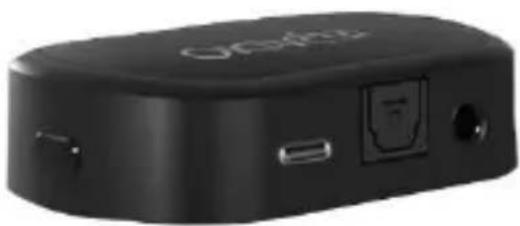
natural_image
Black electronic device with USB port and ports (no visible text or symbols)
Manuale d'uso | User manual | Manual de instrucciones
text_image
Technical schematic diagram with numbered components and labeled parts, likely from an engineering or mechanical drawing.text_image
Diagram showing connections of headphones, audio jack, and TV with labeled componentsMelchioni S.p.a., owner of the Irradio brand, thanks you for purchasing this appliance. It is the result of a careful selection of features and the meticulous refinement of details, with the aim of offering a complete, versatile, reliable and high-performance solution for both the occasional and the most demanding users.
This manual contains important information both for the correct use of the appliance and for its safe operation. It is essential to read and understand its contents before performing any operations in order to obtain the best performance from the appliance. Keep this manual even after reading it, as you may need to refer to it in the future.
The Irradio team is at your disposal for any advice, instructions or suggestions.
2. IMPORTANT INFORMATION FOR CORRECT, SAFE USE OF THE APPLIANCE
The following instructions must be read, understood and complied with before commissioning the appliance. They are especially useful for the protection of the safety, physical conditions and security of the operator and persons nearby, as well as for providing valuable information for preventing faults and malfunctions, for prolonging the service life, for reducing energy consumption and for environmental protection.
- The appliance is designed for household and non-intensive use. Any professional use compromises the safety requirement and is a condition for inapplicability of the warranty.
- The appliance is intended for indoor use and protected from inclement weather: use in an outdoor environment compromises the safety requirement and constitutes a potential hazard for the safety of the operator and persons nearby.
- The appliance must not be used if it shows deformations, bulges, cracks in the casing, missing parts or other structural anomalies. If these conditions occur, turn the appliance off and contact qualified technical personnel.
- The appliance must not be used if it emits unusual noises, foul odours, smoke, vapours or any other type of exhalation. If these conditions occur, turn the appliance off and contact qualified technical personnel.
- The appliance must not be stored or used in excessively humid or dusty environments, in the presence of atmospheres saturated with gas, fumes, in excessive or low temperatures or under direct solar radiation.
- The appliance must not be used in explosive atmospheres, near explosive, combustible, detonating or flammable material (e.g. petrol pumps, gas cylinders, etc.). Such use constitutes a serious risk to the safety of the operator and persons nearby and may cause fires or deflagrations.
- Make sure that each part of the appliance, especially the cord, is placed at a safe distance from heat sources (e.g. electric or gas cookers, heaters, stoves and fireplaces), both during use and when not in use.
- During use, the appliance must be constantly supervised: do not use it in the absence of operators or persons who are able to constantly check its correct operation.
- Use only the original accessories supplied. The use of non-original accessories could constitute a danger of damage to the appliance as well as a potential health hazard.
- Do not use the appliance if it is particularly wet, even partially.
- Do not use the appliance if one or more of the parts listed in the following chapter are missing or damaged: contact your dealer for repair.
- Periodically check the conditions of the parts making up the appliance, in particular the power cord: if any anomalies are found, refrain from using the appliance and contact qualified technical personnel.
- Do not use abrasive sponges or aggressive detergents for cleaning operations: refer to the following chapter for complete requirements.
- Cleaning operations must be carried out taking care to disconnect the appliance from the power supply: see the following chapter for the relevant requirements.
- Do not connect the appliance to extension cords, power strips, multi-socket strips, timers, controlled sockets or other devices that can start it up independently.
- If the appliance is not expected to be used for a prolonged period of time, it is advisable to unplug the power cord: this will extend the life of the appliance and help reduce power consumption.
- Do not disconnect the power by pulling on the cord: grasp the power supply firmly with one hand and grab the plug with the other, then disconnect with a quick, sharp movement.
- Before disconnecting the appliance, make sure that it is switched off, unless you need to disconnect it in an emergency situation due to abnormal behaviour as described in this chapter.
- Fully charge the battery before the first use.
- Do not proceed with excessive use after the low battery warning. Once a warning has been given, charge as soon as possible.
- If the appliance is not used for a long time, charge the battery at least once a month. This prolongs its life and ensures good performance when it is restarted.
• Use a moderate volume considering the health of your auditory system.
- The appliance must be kept out of the reach of children under 8 years of age; in any case make sure that it is not used for play.
- If the appliance is used by children, even if they are over 8 years old, or by persons with reduced cognitive, sensory or motor skills, they must be instructed about the dangers of incorrect use of the appliance and it must be guaranteed that the information has been correctly and fully understood. Adequate supervision must however be ensured.
- Do not use the appliance in the vicinity of liquid accumulations or sources, such as tanks, tubs, showers, sinks, other sanitary fixtures, faucets, pipes, sprinklers, bottles, storage vessels, expansion vessels, watercourses, flowerpots and similar. Do not place containers holding liquids on top of the appliance; make sure that the power cord or power supply is never submerged.
- There is no reason to disassemble the appliance, not even after it has been decommissioned. It is composed of parts that could be swallowed by children or persons with reduced cognitive ability.
- Do not carry out any repairs yourself; in the event of a fault, have the appliance inspected by a qualified technician.
- None of the parts of the appliance must be modified under any circumstances: doing so normally constitutes a serious impairment of the safety requirement, a condition for immediate forfeiture of the warranty and does not lead to any increase in performance.
- Do not subject the charging cord to excessive bending or kinking: any internal damage to the cord which cannot be detected constitute a serious safety hazard.
- Place the appliance at an adequate distance from moving parts such as curtains, door and window sashes, hatches or similar in order to avoid accidental contact.
- Place the appliance on a flat, stable surface and ensure that the appliance cannot move independently due to gravity or external forces.
- Keep this manual for future reference.
3. IDENTIFICATION OF PARTS
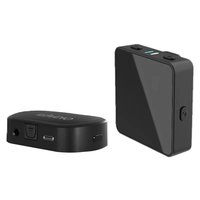
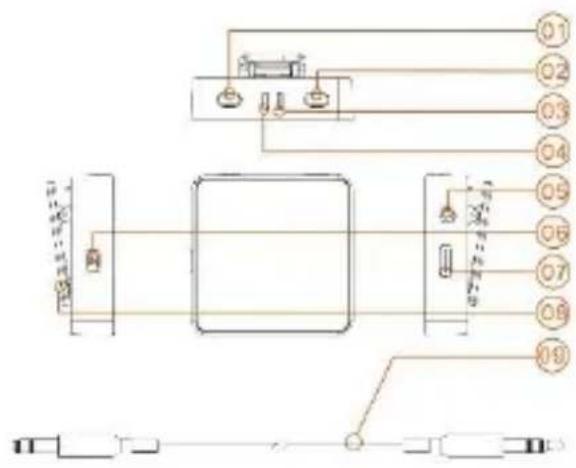
The receiver module:
text_image
Technical schematic diagram with numbered components and labeled parts, likely from an industrial or mechanical system.- Volume increase button
- Volume decrease button
- Charging indicator LED
- Connection indicator LED
- Headset/earphone socket
- On/off button
- USB-C charging port
- Belt clip
- Jack connection cable
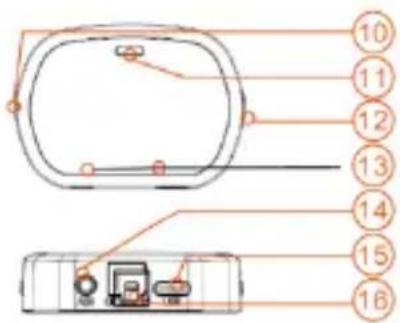
Transmitter module:
text_image
10 11 12 13 14 15 16- On/off button
- Audio input indicator LED
- Input type selector
- Input type indicator LEDs
- Analogue input connector
- USB-C power connector
- Digital input connector
4. COMMISSIONING AND FIRST START-UP
Some preliminary operations are necessary before first use. Proceed as follows:
1) Unpack the appliance and check the conditions and completeness of the equipment, as indicated in the previous chapter.
2) Keep the packaging for 15 days in case it needs to be returned to the retailer; after this period, dispose of it in accordance with the instructions on the separation of materials indicated on it.
3) Read this manual in its entirety, paying particular attention to the instructions for safe use.
4) Carefully remove all possible fastening materials from parts, including internal parts.
5) Fully remove any stickers from the surface of the appliance.
6) Refer to chapter 2 for further details and instructions on appliance positioning and installation
text_image
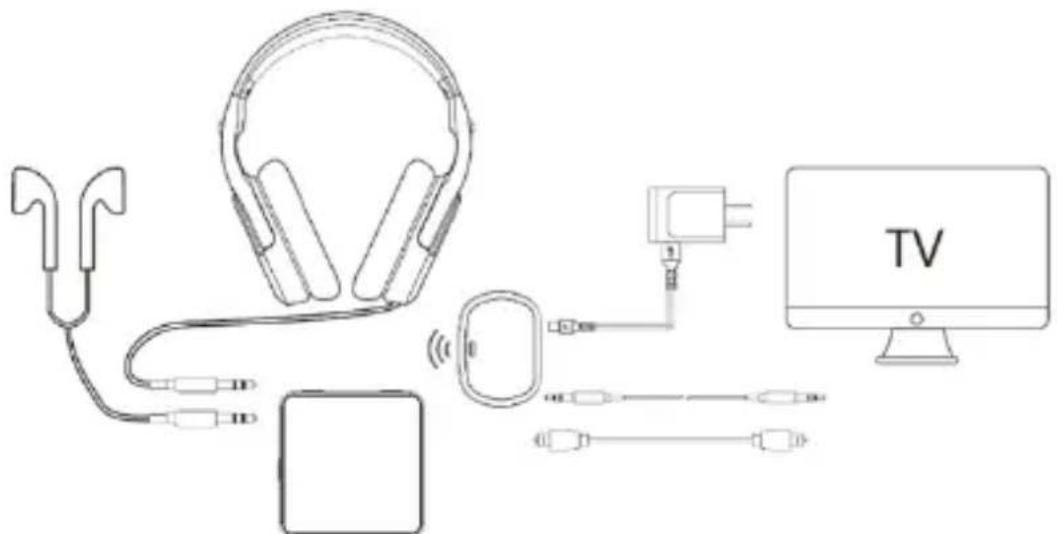
Diagram showing connections between headphones, a device, TV, and cable via wireless signal transmission7) Connect the included power supply to the USB-C port (15), then connect it to a household power socket.
8) Connect the source to the transmitter in at least one of the following two ways:
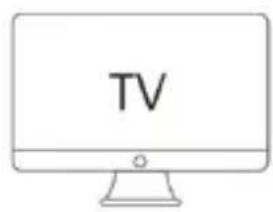
- Using a Toslink-Toslink fibre optic cable from the digital audio output of the source to the digital input connector of the transmitter (16).
- Using the supplied analogue Jack cable from the headset output of the source to the analogue input connector of the transmitter (14).
9) Check that the cables do not come into contact with hot parts and that they are not subjected to excessive bending or kinking.
10) Connect a headset or earphone to the output of the receiver (05).
11) Press button (06) for a few moments to switch on the receiver.
12) Press button (10) for a few moments to switch on the transmitter.
13) Check that the LED (13) is lit at the input connector used on the transmitter: if not, press button (12) briefly.
14) Start playback on the source and check that the connected headsets or earphones emit the desired sound.
The appliance can now be used normally.
5. USING THE APPLIANCE
The appliance is not designed to be operated during use except to adjust the volume or select the input (see next chapter); the receiver and transmitter operate on a specific frequency, via a unique digital protocol; therefore, no pairing procedure is required. Once the connections have been made, the transmitter and receiver switched on and the correct input selected, it guarantees the playback in the headset/earphone of the signal generated by the source within a range of 15/20 metres. At the end of use, switch off the receiver by pressing button (06) for a few moments, and the transmitter by pressing button (10) for a few moments.
Adjusting the volume:
The headset volume can be set at 16 different levels by pressing buttons (01) to increase it and (02) to reduce it. An acoustic signal in the headset after one or more presses of button (01) indicates that the maximum available volume has been reached. The buttons can also be held pressed for faster adjustment. Bear in mind that the maximum possible volume depends on the level setting of the source volume. The appliance cannot play back at a louder volume than that of the source, which must be adjusted if a louder volume is desired.
Input selection:
Both the inputs can be connected, each to a different source, even simultaneously. This makes it possible to select, using button (12), which of the two signals in input must be sent to the headset/headphone. At the connector of the selected input, one of the two LEDs (13) lights up steady blue: it is not possible to send both mixed signals to the receiver. The appliance is fully functional even with only one input connected, but will not be able to play back any sounds if the non-connected input is selected.
LED indications:
| LED | Colour | Meaning |
| (03) | Off | Receiver charging not required or complete |
| (03) | Red flashing | Receiver charging required |
| (03) | Red steady | Charging in progress |
| (04) | Off | Receiver off |
| (04) | Blue flashing | Receiver on and not connected to the transmitter |
| (04) | Blue steady | Receiver on and connected to the transmitter |
| (10) | Off | Transmitter off and no signal in input |
| (10) | Blue steady | Input signal present and transmitter in use |
| (13) | Blue steady on left | Analogue input selected |
| (13) | Blue steady on right | Digital input selected |
| (13) | Off | Transmitter off |
Receiver battery charging:
The receiver LED (03) flashes red and the headset emits a specific announcement when the built-in battery needs to be recharged. To prevent the battery autonomy from being compromised in the long term, the appliance should not be excessively used once the warning has been displayed and should be charged as soon as possible. Recharging should occur with
the headset disconnected and without interruption. For charging operations, connect the transmitter's power supply or any 5V power source with a current of least 1 amp to the charging connector (07): a common smartphone battery charger is perfect for this scope. The charging status is indicated by the steady red colour of LED (03). Once charging is complete, the LED turns off. Normal operation of the appliance can now be resumed.
6. CLEANING AND MAINTENANCE
The appliance does not require maintenance, understood as the replacement of consumables or scheduled servicing; periodic removal of dust with a dry cloth suitable for the function is sufficient. Every cleaning operation must absolutely be carried out with the appliance switched off: the use of an overly damp cloth or any atomised detergent must be avoided given the presence of a non-separable battery and given the possibility that certain voltage points may be reached by liquids. Even if stains or accumulations of dirt must be removed, proceed without wetting or soaking the appliance: in any case, avoid aggressive detergents, abrasive sponges, iron wool or other chemical cleaners.
7. TROUBLESHOOTING
Problem: No audio is played through the headset
Possible cause 1: The receiver battery is low
Probable solution 1: Charge the receiver battery (see chap. 5)
PC2: If connected to a TV, the audio output setting is wrong
PS2: Check that the TV's audio output is set to "headset output" if in analogue connection mode, or "audio system" if in digital connection mode
PC3: The analogue source connection is an input, not an output
PS3: Connect the audio cable to output connections, normally indicated by the wording "output" or "out"
Problem: When connected to a TV in digital connection mode, the headset makes a continuous sound
PC: The audio protocol is incorrect
PS: Set the digital audio output mode to "PCM": the "Dolby Digital" mode is not supported
Should any malfunctions other than those listed above occur, a self-sufficient solution is not feasible and the product must be inspected by a qualified technician.
8. THECNICAL DATA
Operating frequency : 2.4 GHz
Frequency response : 20 Hz-20 KHz
Charging voltage : DC 5V / 1A
Analogue input : Jack 3.5 mm
Digital input: S/PDIF PCM over Toslink connection
Built-in battery : Lithium-ion 3.7 V
Charging duration : 8 hours with moderate volume
Weight : 75 g total
9. COMPLIANCE
The producer Melchioni Spa declares that the product Audio stereo wireless set Mod. IR-BETA PRO (cod. 141901052) is in compliance with Directive 2014/35/EU of the European Parliament and of the Council, of 26 february 2014, on the harmonisation of the laws of the Member States relating to the making available on the market of electrical equipment designed for use within certain voltage limits.
SIMPLIFIED EU DECLARATION OF CONFORMITY
Hereby, manufacturer Melchioni Spa declares that the radio equipment Audio stereo wireless set Mod. IR-BETA PRO (cod. 141901052) is in compliance with Directive 2014/53/EU. The full text of the EU declaration of conformity is available at the following internet address: http://www.melchioni.com
The producer Melchioni Spa declares that the product Audio stereo wireless set Mod. IR-BETA PRO (cod. 141901052) is in compliance with Directive 2011/65/EU of the European Parliament and of the Council, of 8 June 2011 and subsequent Commission Delegated Directive 2015/863, on the restriction of the use of certain hazardous substances in electrical and electronic equipment.
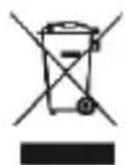
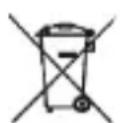
According to Directive 2012/19/EU of the European Parliament and of the Council, of 4 July 2012, on waste electrical and electronic equipment (WEEE), the presence of the crossed-out bin symbol indicates that this appliance is not to be considered as urban waste: its disposal must therefore be carried out by separate collection. Disposal in a non-separate manner may constitute a potential harm to the environment and health. This product can be returned to the distributor when purchasing a new device. Improper disposal of the appliance constitutes misconduct and is subject to sanctions by the Public Security Authority. For further information, contact the local administration responsible for environmental matters.
Product supplied with battery(ies) model LD502535, 3.7 V, 400mAh, 1.48 Wh, imported by Melchioni S.p.A. and compliant with Regulation (EU) 2023/1542 OF THE EUROPEAN PARLIAMENT AND OF THE COUNCIL of 12 July 2023 on batteries and waste batteries, amending Directive 2008/98/EC and Regulation (EU)
2019/1020 and repealing Directive 2006/66/EC.
10. WARRANTY
Melchioni Spa, based in Milan (Italy), via Colletta 37, recognizes a conventional guarantee on the product for a period of two years from the date of the first purchase by the consumer. This guarantee does not affect the validity of the legislation in force concerning consumer
goods (Legislative Decree 6 September 2005 n. 206 art. 128 and following), of which the consumer remains the owner. This guarantee applies to the entire territory of the European Union.
The components or parts that are found to be defective for ascertained manufacturing causes will be repaired or replaced free of charge through the dealer, during the above warranty period. Melchioni Spa reserves the right to make a complete replacement of the device, if repairability is impossible or excessively expensive, with another device of similar characteristics (Legislative Decree 6 September 2005 no. 206 art. 130) during the warranty period. In this case, the validity of the warranty remains that of the original purchase: the service provided under warranty does not extend the warranty period. In any case, this appliance will not be considered defective in terms of materials or manufacture should it be adapted, changed or adjusted, in order to comply with national or local safety and / or technical standards, in force in a country other than that for which it is was originally designed and manufactured. This appliance has been designed and built for domestic use only: any other use will invalidate the benefits of the guarantee.
The warranty does not cover:
- parts subject to wear or tear, nor those parts that require periodic replacement and / or maintenance
• professional use of the product - malfunctions or any defects due to incorrect installation, configuration, software / BIOS / firmware update not performed by authorized Melchioni Spa
• repairs or interventions carried out by persons not authorized by Melchioni Spa - manipulation of assembly components or, where applicable, of the software
• defects caused by fall or transport, lightning, voltage fluctuations, liquid infiltration, opening of the appliance, bad weather, fire, public disturbances, inadequate ventilation or incorrect power supply - any accessories, for example: boxes, bags, batteries, etc. used with this product
• home interventions for convenience checks or presumed defects
The recognition of the guarantee by Melchioni Spa is subject to the presentation of a tax document that proves the actual date of purchase. The same must not show any tampering or deletions, in the presence of which Melchioni Spa reserves the right to refuse the provision of treatment under warranty.
The warranty will not be recognized if the serial number or model of the appliance is non-existent, abraded or modified.
This warranty does not include any right to compensation for direct or indirect damage, of any nature, to people or things, caused by any inefficiency of the appliance. Any extensions, promises or services in this regard, insured by the retailer, will be borne by the latter.
1. NOTA INTRODUCTORIA
text_image
Technical schematic diagram with numbered components and labeled parts, likely from an engineering or mechanical drawing.natural_image
Line drawing of a pair of headphones connected to a small electronic device (no text or symbols)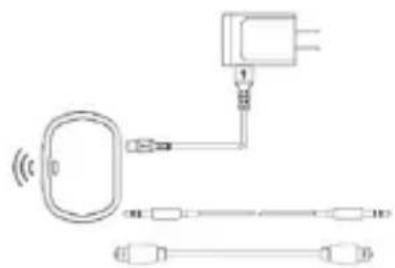
natural_image
Pure electrical circuit lines without any symbols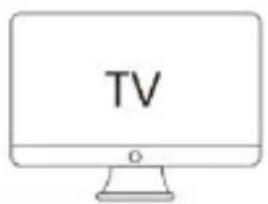
text_image
TVtext_image
Technical schematic diagram with numbered components and labeled parts, likely from an industrial or mechanical system.natural_image
Line drawing of a pair of headphones connected to a device (no text or symbols)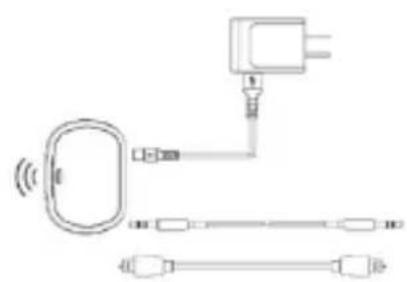
natural_image
Pure electrical circuit lines without any symbols