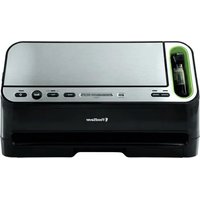
V4440 - Vacuum packaging machines FOODSAVER - Free user manual and instructions
Find the device manual for free V4440 FOODSAVER in PDF.


| Product Type | Vacuum Sealer Machine |
| Brand | FoodSaver |
| Model | V4440 |
| Power Supply | 120 V, 60 Hz (polarized plug) |
| Power Consumption | 120 W (estimated) |
| Dimensions (L × W × H) | Not provided |
| Weight | Not provided |
| Main Functions | Automatic vacuum sealing, sealing, marinate mode (12 min), accessory mode, dry/moist food setting, automatic bag detection, auto shut-off after 12 min of inactivity |
| Control Panel | Power, Seal, Cancel, Accessory, Marinate buttons; dry/moist food setting; LED progress and sealing indicators |
| Seal Type | Extra-wide sealing strip with non-stick coating (double width) |
| Compatible Accessories | Bags, rolls, containers, Mason jars (Ball and Kerr), bottle stoppers, retractable hand sealer |
| Roll Compartment | Built-in, with bag cutter bar and bag cutter |
| Drip Tray | Removable, dishwasher safe (top rack), full level indicator, food sensors |
| Maintenance | Empty drip tray after each use; clean with warm soapy water; do not immerse the appliance |
| Safety | Automatic shut-off in case of overheating or lack of suction; suction slot with detection; 20-second delay between seals |
| Available Spare Parts | Hand sealer reservoir, bag cutter bar, bag cutter, lower foam gasket, drip tray |
| Warranty | Limited 5-year warranty (USA and Canada) |
| Customer Service | US: 1-877-777-8042; CA: 1-877-804-5383; MX: +52 55 5366 0800 |
| Country of Manufacture | Not specified |
Frequently Asked Questions - V4440 FOODSAVER
User questions about V4440 FOODSAVER
0 question about this device. Answer the ones you know or ask your own.
Ask a new question about this device
Download the instructions for your Vacuum packaging machines in PDF format for free! Find your manual V4440 - FOODSAVER and take your electronic device back in hand. On this page are published all the documents necessary for the use of your device. V4440 by FOODSAVER.
USER MANUAL V4440 FOODSAVER
natural_image
Black FoodSaver printer with control buttons and a QR code (no visible text or symbols on the device body)
Scan for Quick Start Guide
Important Safety Instructions 2
Product Features .... 5
"How To" 9
Make a FoodSave® Bag
Vacuum Seal a FoodSaverBag
Vacuum Seal with FoodSaverAccessories
Use FoodSaver® Preserve & Marinate Containers
Care & Cleaning 13
Guidelines ....14
Vacuum Sealing and Food Safety
Food Preparation and Reheating Tips
Sealing Non-Food Items
Troubleshooting 20
Replacement Parts 22
Warranty 23
Register today at www.foodsaver.com/register, to receive exclusive access to FoodSaver deals and discounts!*
*Applicable to US residents only
IMPORTANT SAFETY INSTRUCTIONS
For your own safety, always follow these basic precautions when using a FoodSaver® appliance:
- Read the Owner's Manual carefully for operating instructions. Read all instructions in this manual before use.
- When using an electrical appliance, basic precautions are required to always be followed, including the following:
Read all instructions before using this appliance.
DANGER – To reduce the risk of electric shock:
- Do not reach for an appliance that has fallen into water. Unplug immediately from receptacle.
- Do not use while bathing or in a shower.
- Do not place or store appliance where it is able to fall or be pulled into a tub or sink. Do not place in or drop into water or other liquid.
- Always unplug this appliance from the electrical outlet immediately after using.
- Unplug this appliance before cleaning.
WARNING – To reduce the risk of burns, fire, electric shock:
- Do not use appliance on wet surfaces or outdoors.
- To protect against electric shock, do not immerse any part of appliance, power cord or plug in water or other liquid. Unplug from outlet when not in use and before cleaning.
- To disconnect, unplug power cord from electrical outlet. Do not disconnect by pulling on cord.
- Do not operate appliance with a damaged power cord or plug. Do not operate appliance if it malfunctions or is in any way, damaged.
For details, contact Consumer Services at number listed below.
- Use appliance only for its intended use.
- Closely supervise children when using any electrical appliance. Do not allow appliance to be used as a toy.
- Caution: A short power cord is provided to reduce risks from entanglement or tripping over a longer cord. An extension cord may be used when marked electrical rating is no less than electrical rating of this appliance.
- No cords should drape over counter or tabletop, where cords can be tripped over or pulled on unintentionally, especially by children.
Consumer Service: US: 1-877-777-8042 CA: 1-877-804-5383 MX: +52 55 5366 0800
- Do not place on or near a hot gas or electric burner, or heated oven. Extreme caution must be used when moving products containing hot liquids.
Important Tips
- Vacuum sealing is NOT a substitute for the heat process of canning. Perishables still need to be refrigerated or frozen.
- For best results, use only with FoodSave® Bags, Rolls, Containers and Accessories.
- During the vacuum sealing process, small amounts of liquids, crumbs or food particles can be inadvertently pulled into the Vacuum Channel. Empty the Drip Tray after each use.
- Avoid overfilling; always leave at least 3 inches (7.62 cm) of bag material between bag contents and top of bag. This allows room for the bag material to cinch tightly against the food and prevents the bag from pulling out of the Vacuum Channel during the sealing process. Then leave at least one additional inch (2.54 cm) of bag material for each time you plan to reuse bag.
- Do not create your own side seams for a FoodSave® Bag. These bags are manufactured with a special side seam, which is sealed all the way to the outer edge.
- To prevent wrinkles in the seal when vacuum sealing bulky items, gently stretch bag flat while inserting bag into Vacuum Channel and continue to hold bag until Vacuum Pump starts.
- When you are vacuum sealing items with sharp edges (dry spaghetti, silverware, etc.), protect bag from punctures by wrapping item in soft cushioning material, such as a paper towel. You may want to use a FoodSaver® Container or Mason jar instead of a FoodSave® Bag.
- When using accessories, remember to leave one inch (2.54 cm) of space at top.
- Pre-freeze fruits and blanch vegetables before vacuum sealing for best results. (See "Guidelines" for food storage safety, pg 14-19.)
- Wait 20 seconds between seals to allow appliance to cool.
- Never store lid in Operate position as gaskets may become compressed.
SAVE THESE INSTRUCTIONS HOUSEHOLD USE ONLY
3 US: www.FoodSaver.com | CA: www.FoodSaver.ca | MX: www.oster.com.mx/foodsaver
natural_image
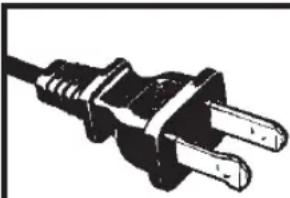
Close-up of a black electrical outlet plug with two leads (no text or symbols visible)This appliance has a polarized plug (one blade is wider than the other). As a safety feature to reduce the risk of electrical shock, this plug is intended to fit in a polarized outlet only one way. If the plug does not fit fully into the outlet, reverse the plug. If it still does not fit, contact a qualified electrician. Do not attempt to modify the plug in any way. If the plug fits loosely into the AC outlet or if the AC outlet feels warm do not use that outlet.
POWER CORD INSTRUCTIONS:
A short power-supply cord (or detachable power-supply cord) is provided to reduce risks resulting from becoming entangled in or tripping over a longer cord. Longer detachable power-supply cords or extension cords are available and may be used if care is exercised in their use. If a long detachable power-supply cord or extension cord is used:
a. The marked electrical rating of the detachable power-supply cord or extension cord should be at least as great as the electrical rating of the appliance;
b. If the appliance is of the grounded type, the extension cord should be a grounding type 3-wire cord; and
c. The longer cord should be arranged so that it will not drape over the counter top or table top where it can be pulled on by children or tripped over unintentionally.
Product Features
FEATURES
5 US: www.FoodSaver.com | CA: www.FoodSaver.ca | MX: www.oster.com.mx/foodsaver
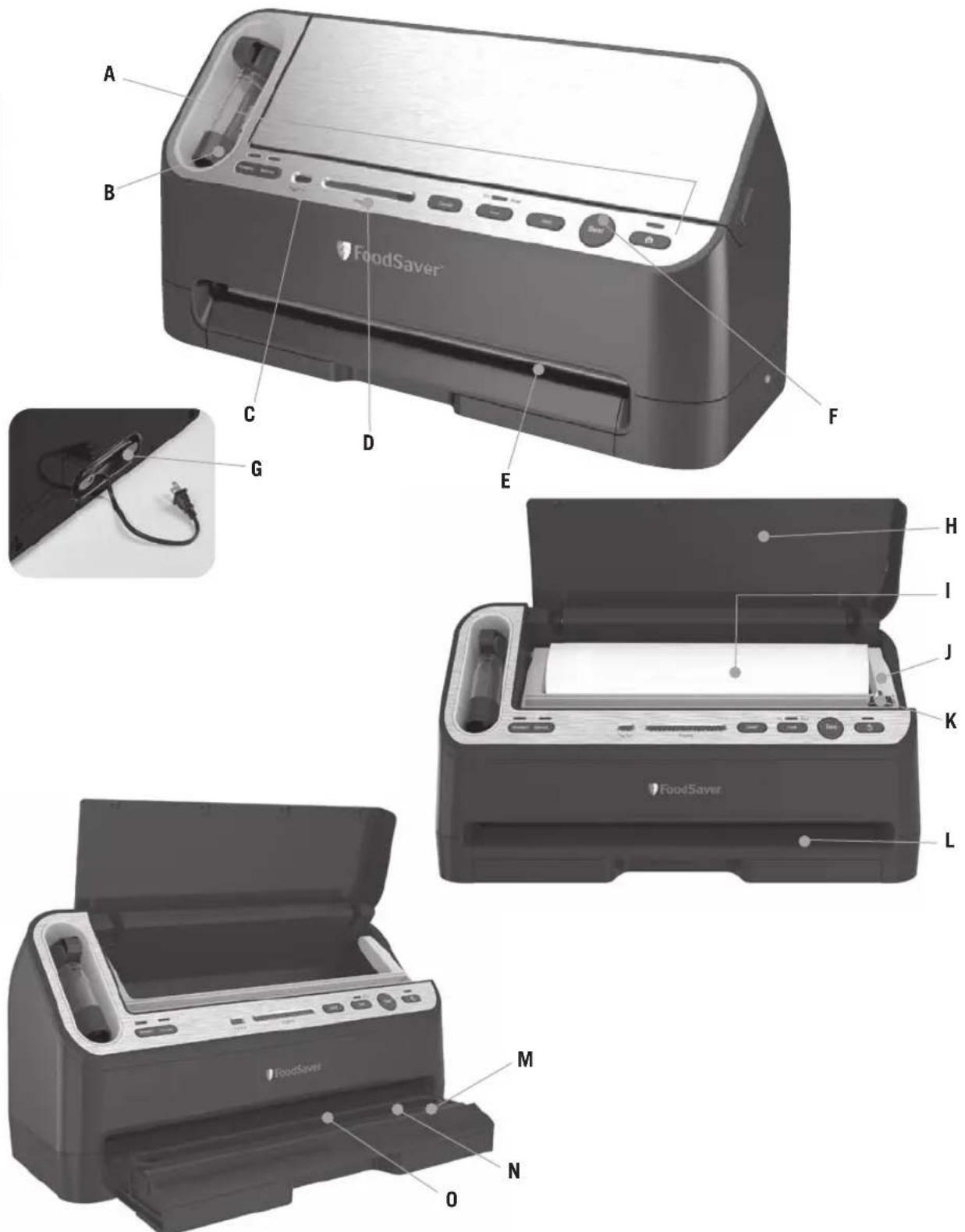
A. Controls and Indicator Lights
Indicate current setting and vacuum progress for added control.
B. Retractable Handheld Sealer
Can be used with all FoodSaver ^® Accessories including FoodSaver ^® Zipper Bags.
C. Tray Full Indicator
Indicates when drip tray is full. Empty to resume usage of appliance.
D. Vacuum Progress Display
Green lights signal progression of vacuuming and sealing process. All lights extinguish when the full process is finished.
E. Vacuum Channel
Simply insert bag and the FoodSave appliance does the rest.
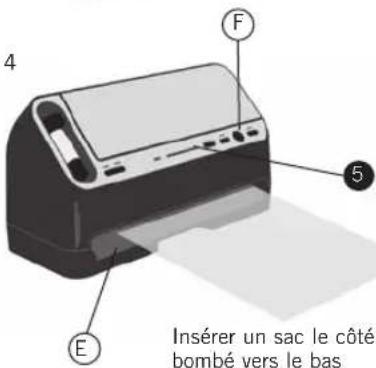
F. Seal Button
Instant Seal feature. Stops vacuum cycle and seals to prevent crushing delicate items.
G. Power Cord Storage
At bottom of unit.
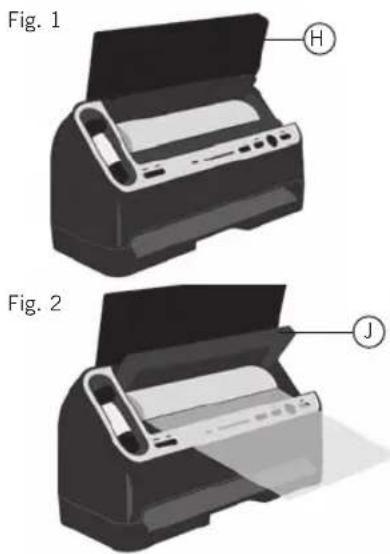
H. Appliance Door
Opens to access Built-in Roll Storage and Cutter.
I. Built-in Roll Storage
For storage of FoodSaver ^® Vacuum Sealing Rolls.
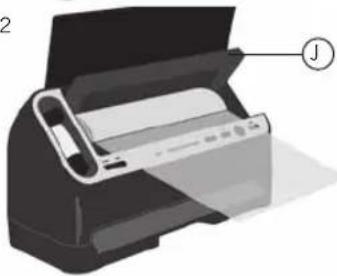
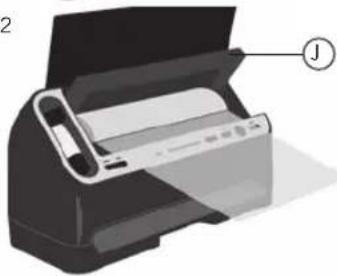
J. Roll Cutter Bar
Simplifies making custom-sized bags.
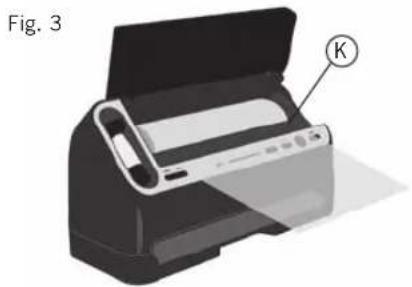
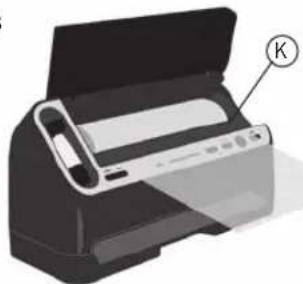
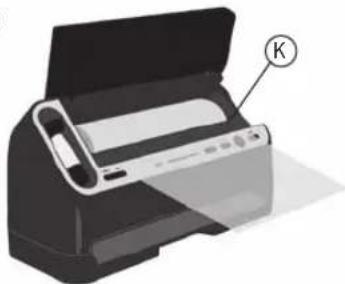
K. Bag Cutter
L. Auto Bag Sensing
Simply insert open end of bag into the vacuum channel and the machine will sense and grasp the bag, vacuum, seal and shut-off automatically.
M. Extra-wide Sealing Strip with Non-stick Coating
Provides extra secure, air-tight seal that's two times wider.
N. Lower Gasket (non-removable)
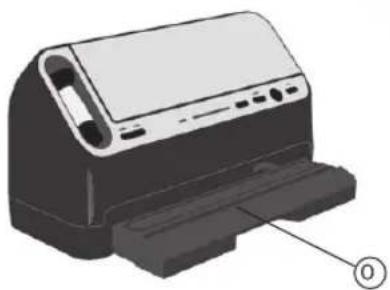
O. Removable Drip Tray
Catches overflow liquids and contains Food Sensors to detect liquid.
Control Panel of Your FoodSaver® Appliance
FEATURES
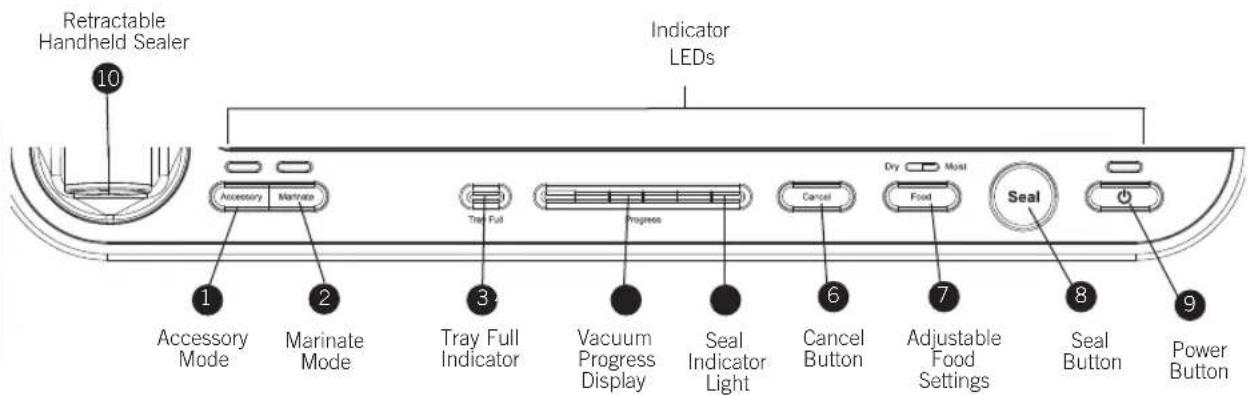
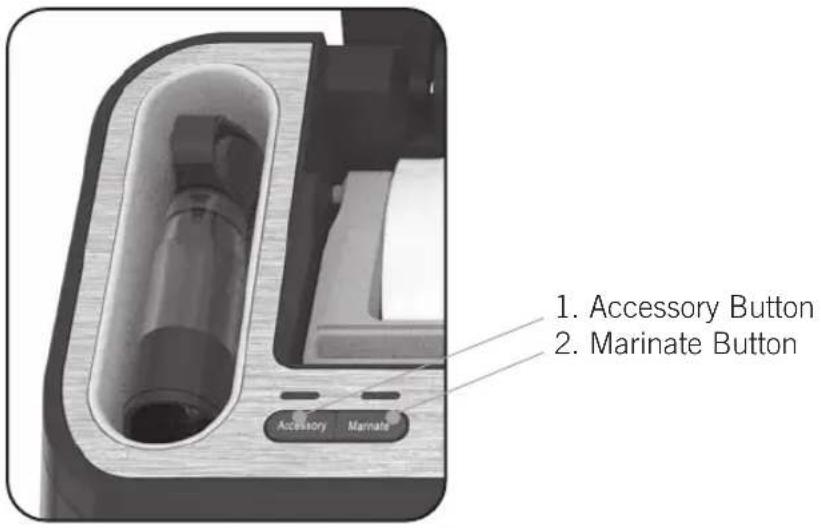
1 ACCESSORY MODE BUTTON
Press to achieve best vacuum for containers and accessories. Push Accessory Mode But into begin vacuum process. Motor will run until Vacuum Sealing Process is complete.
2 MARINATE MODE BUTTON
A twelve minute predetermined sequence of vacuum pulse to rest ratio allowing foods to get optimum flavor infusion in the least amount of time.
3 TRAY FULL INDICATOR LIGHT
During the vacuum sealing process, small amounts of liquids, crumbs or food particles can be inadvertently pulled into the Drip Tray. When excess liquid fills the Drip Tray, the unit will turn off and the Tray Full Indicator ③ will activate. To resume normal operation, remove the Drip Tray, empty liquid, wash in warm soapy water or place in top rack of dishwasher. Dry completely and place Drip Tray back into appliance. (See “Care and Cleaning” on page 13.)
4 VACUUM PROGRESS DISPLAY
Displays vacuum levels as the bag or container is evacuated.
5 SEAL INDICATOR LIGHT
Constant Red light indicates sealing process is engaged. (Flashing light indicates error. See "Trouble-Shooting" Section on page 20 for more information.)
6 CANCEL BUTTON
Immediately halts the current function and opens the Vacuum Channel.
7 US: www.FoodSaver.com | CA: www.FoodSaver.ca | MX: www.oster.com.mx/foodsaver
7 ADJUSTABLE FOOD SETTINGS BUTTON
For optimal vacuuming and sealing of moist or juicy foods, press the Adjustable Food Settings Button until the Moist Indicator Light is illuminated. Choose the Dry Food setting for foods without liquid. The Moist Food Indicator Light will flash when Food Sealing Sensors automatically detect any moisture or liquid in the Drip Tray.
Note: Appliance will default to Dry setting upon pressing the Power Button or when power has been interrupted, unless liquid is detected in the Drip Tray. (See "Care and Cleaning" section on page 13.)
8 SEAL BUTTON
This button has three uses:
- Instant Seal feature - Press to immediately stop the vacuum process and begin sealing the bag. This prevents crushing delicate items such as bread, cookies and pastries.
- Press to create a seal when making bags from a Fo#oSaver
- Press to create a seal on mylar type bags (such as a potato chip bag) to keep food sealed air-tight.
9 POWER BUTTON
Press the Power button to begin. The Power Indicator and Food Indicator lights will become illuminated. After Vacuum Sealing, press Power Button to turn appliance Off.
Note: After 12 minutes of non-use, the appliance will turn Off automatically.
10 RETRACTABLE HANDHELD SEALER
How to...
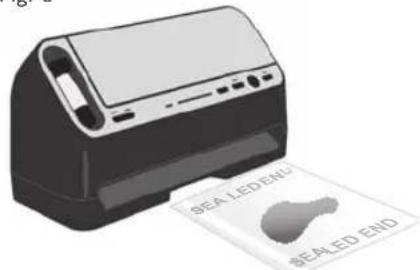
1. Make a FoodSaver® Bag
- Open appliance door® and place roll into Roll Holder (Fig. 1). For best results, insert roll with material flap down.
- Lift up Roll Cutter Bar ^① and place bag material beneath the cutter bar (Fig. 2).
- Pull out enough bag material to hold item being vacuum sealed, plus 3 inches (7.62 cm). Lower the Roll Cutter Bar and slide Bag Cutter Ⓚ across the Cutter Bar (Fig. 3).
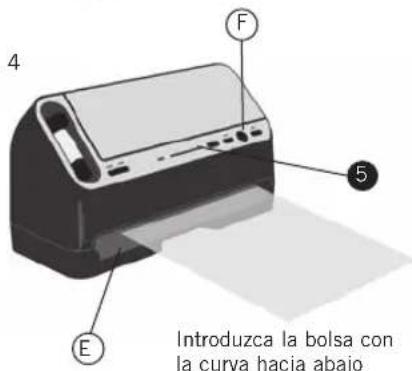
- Press Seal Button ^① . Red Seal Indicator Light ⑤ will illuminate (Fig. 4).
- Using two hands, slowly insert open end of bag, curled down, into Vacuum Channel Ⓔ until clamp motor starts.
- When Red Seal Indicator Light⑤ turns off, sealing is complete. You may remove bag from the Vacuum Channel E.
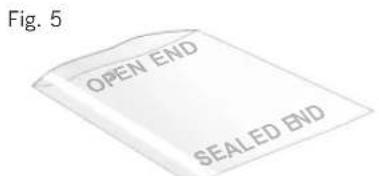
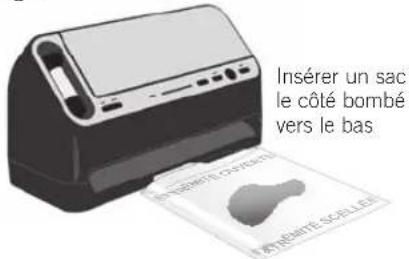
- You now have one sealed end (Fig. 5).
- Now you are ready to vacuum seal with your new bag (see next page).
natural_image
Illustration of a printer with a paper airplane and labeled component (K), shown in 3D style without any text or symbols on the device itself.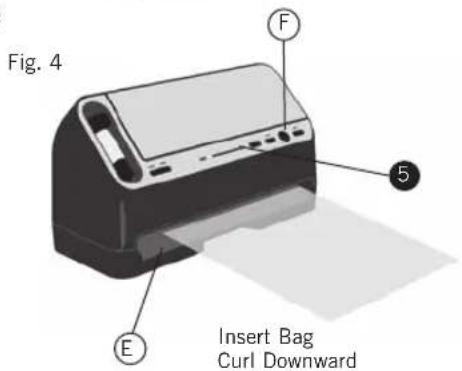
9 US: www.FoodSaver.com | CA: www.FoodSaver.ca | MX: www.oster.com.mx/foodsaver
2. Vacuum Seal a FoodSaver® Bag
- Begin with a FoodSaver® Bag (or create a bag as described in the "How to Make a FoodSaver® Bag" section on page 9).
- Place item(s) in bag, allowing at least 3 inches (7.62 cm) of space between bag contents and top of bag (Fig. 1). The extra space is required to allow the bag to seal tightly around contents.
- OPTIONAL: If you wish to customize the vacuum sealing process you may select Food Setting ⑦ (Fig. 2). Default setting is Dry Food.
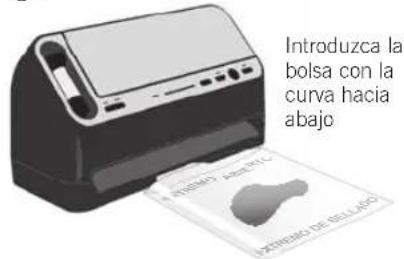
- Your new FoodSaver® System automatically vacuums and seals. To Vacuum: DO NOT PRESS THE SEAL BUTTON. Using two hands, slowly insert open end of bag, curled down, into Vacuum Channel (Fig. 3/4).
- Continue to hold bag until Vacuum Pump starts. You may now release bag. The Vacuum Progress Lights 4 will illuminate.
NOTE: To prevent crushing delicate items, you may press Seal Button Ⓕ at any time to begin automatic sealing process.
- When Red Seal Indicator Light ^5 turns off, remove bag (Fig. 5). Refrigerate, freeze or store as needed. (See "Guidelines" for food storage safety tips on page 14.)
NOTE: Wait at least 20 seconds between seals to allow appliance to properly cool.
NOTE: Appliance should be used in a vertical orientation and not laid on its back.
NOTE: Appliance will time out after a couple of minutes if vacuum cannot be reached.
Fig. 1

Fig. 2
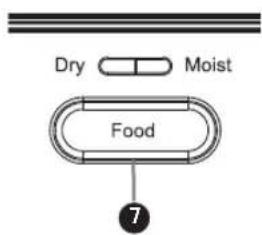
Fig. 3
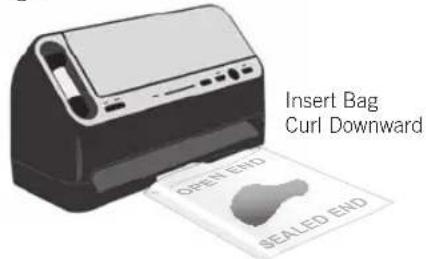
Fig. 4
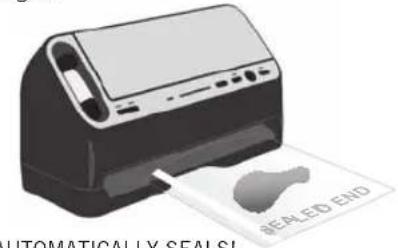
AUTOMATICALLY SEALS! Do Not Press Button!
Fig. 5
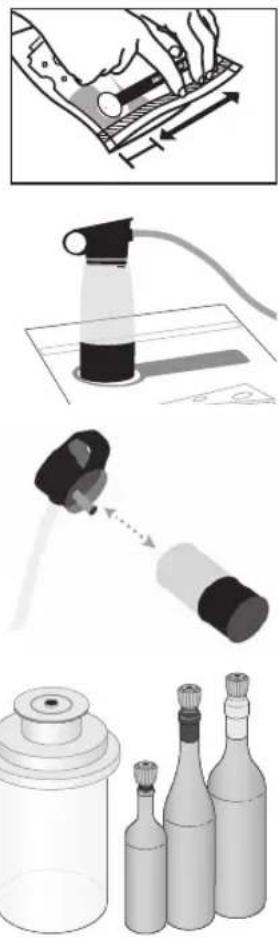
3. Vacuum Seal with FoodSaver® Accessories
For Zipper Bags:
-
Prepare zipper bags according to FoodSaver® Accessory Guidelines, which are included with accessory purchases. For zipper bags, make sure not to put any food under the valve and press zipper closed with finger while bag is lying down on a flat surface.
-
Place end of Retractable Handheld Sealer over zipper bag valve.
-
Press Accessory button to vacuum.
Zipper Bags are safe for pantry and fridge use only.
For Jar Sealers & Bottle Stoppers:
-
Prepare accessory according to FoodSaver® Accessory Guidelines, which are included with accessory purchases.
-
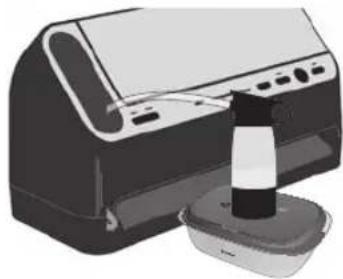
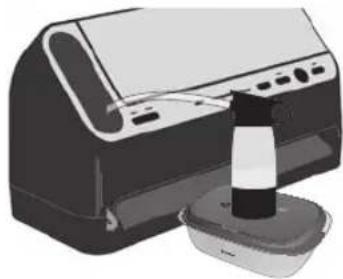
Remove clear bottom portion of Retractable Handheld Sealer from top handle. Insert the tip into the port on the Jar Sealer or Bottle Stopper.
-
Press Accessory button to vacuum.
NOTE: FoodSaver ^® Jar Sealers are for use with Ball ^® and Kerr ^® brand Mason jars only.
IMPORTANT: Do NOT use screw bands when vacuum sealing jars. To open, wedge spoon between Mason jar lid and highest part of threaded rim. Twist spoon gently to release vacuum.
FoodSaver® Bottle Stoppers: To release vacuum and open, twist and pull up on Bottle Stopper.
IMPORTANT: When pulling hose DO NOT extend beyond red line marked on hose.
natural_image
Illustration showing a hand using a tool to clean a spray bottle, with close-up and exploded views of the process (no text or symbols)11 US: www.FoodSaver.com | CA: www.FoodSaver.ca | MX: www.oster.com.mx/foodsaver
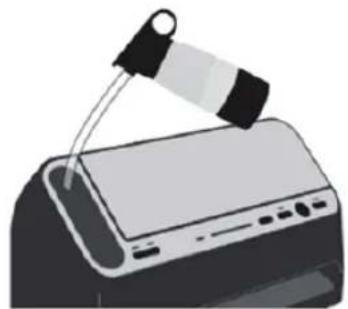
4. Use FoodSaver® Preserve & Marinate Containers
To vacuum seal:
- Prepare FoodSaver® Preserve & Marinate Container according to Guidelines, which are included with container purchase.
- Place end of Retractable Handheld Sealer over container valve.
- Press Accessory button to vacuum.
To release vacuum and open, turn knob on lid to Open.
To marinate:
- Prepare FoodSaver® Preserve & Marinate Container according to Guidelines, which are included with container purchase.
- Remove clear bottom portion of Retractable Handheld Sealer from top handle. Insert tip into port on FoodSaver® Preserve & Marinate Container.
- Press Marinate button.
Appliance will run for about 12 minutes.
natural_image
Illustration of a computer monitor with a cable being inserted (no text or symbols)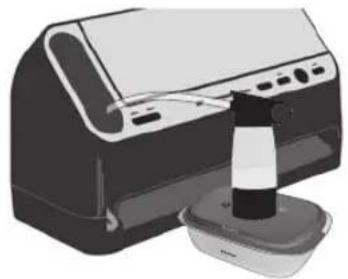
natural_image
Illustration of a printer with a paperclip and paper holder (no text or symbols)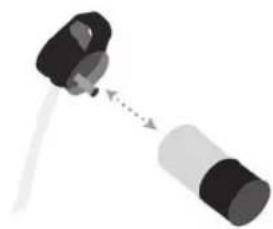
natural_image
Simple diagram of a mechanical component with two parts connected by a rod (no text or symbols)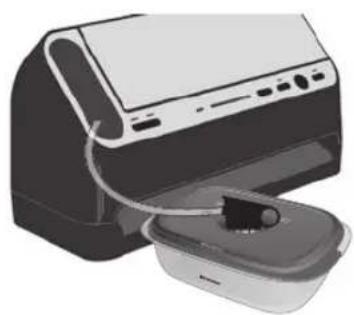
natural_image
Illustration of a printer with a cable inserted into a container (no text or symbols visible)Care & Cleaning
of your Vacuum Sealer
To Clean Appliance:
Press Power Button ⑨ and remove Power Cord from electrical outlet. Do not immerse in liquid.
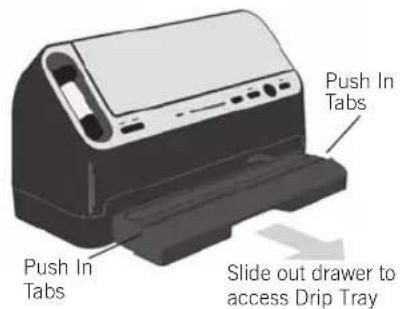
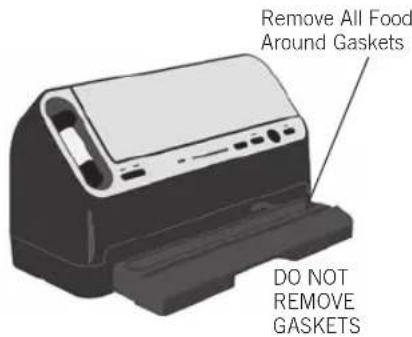
Slide out Drip Tray Drawer Ⓞ. Remove Drip Tray for cleaning by pulling up on the two side tabs. Check Lower Gasket around Drip Tray Ⓞ to make sure it is free from food materials. Do not attempt to remove gaskets.
Removable Drip Tray:
Empty Drip Tray after each use. Wash in warm soapy water or place in top rack of dishwasher. The Adjustable Food Sensors in the Drip Tray Ⓞ will not function correctly if liquid is allowed to remain in Drip Tray.
This appliance has a Tray Full Indicator ③. When excess liquid fills the Drip Tray, the unit will turn off and the Tray Full Indicator light will activate. To resume normal operation, slide out Drip Tray Drawer. Remove Drip Tray for cleaning by pulling up on the two side tabs. When replacing Drip Tray, set the right end of the Drip Tray into place, then firmly snap both sides down. Appliance can be used without Drip Tray, however the Adjustable Food Sensor setting ⑦ will not function without the Drip Tray.
Retractable Handheld Sealer Reservoir:
Empty Reservoir after each use. Wash in warm soapy water. Air dry before replacing.
IMPORTANT: To remove Reservoir from Retractable Handheld Sealer: While holding top portion by hose pull clear Reservoir down and off.
Emptying Drip Tray
This FoodSaver ^® model comes with a convenient, pull-out drawer to access the Drip Tray ①.
- Simply slide it out, then pull up on side handles of Drip Tray to remove.
- Drip Tray can be emptied and washed with warm, soapy water or in the dishwasher on the top rack.
natural_image
Illustration of a printer with a paper roll and base, showing no text or symbols on the device itself.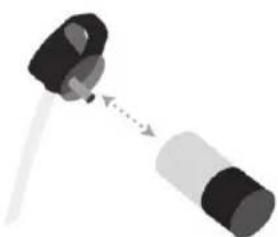
natural_image
Diagram of a mechanical component with two parts connected by a dotted arrow (no text or symbols)13 US: www.FoodSaver.com | CA: www.FoodSaver.ca | MX: www.oster.com.mx/foodsaver
Guidelines
Vacuum Sealing and Food Safety
The vacuum sealing process extends the life of foods by removing most of the air from the sealed container, thereby reducing oxidation, which affects nutritional value, flavor and overall quality. Removing air can also inhibit growth of microorganisms, which can cause problems under certain conditions:
Mold - Easily identified by its fuzzy characteristic. Mold cannot grow in a low oxygen environment; therefore vacuum sealing can slow the growth of mold.
Yeast – Results in fermentation, which can be identified by smell and taste. Yeast needs water, sugar and a moderate temperature to grow. It can also survive with or without air. Slowing the growth of yeast requires refrigeration, while freezing stops it completely.
Bacteria – Results in an unpleasant odor, discoloration and/or soft or slimy texture. Under the right conditions, anaerobic bacteria such as Clostridium Botulinum (the organism that causes Botulism) can grow without air and sometimes cannot be detected by smell or taste. Although it is extremely rare, it can be very dangerous.
To preserve foods safely, it is critical that you maintain low temperatures. You can significantly reduce the growth of microorganisms at temperatures of 40^ F ( 4^ C) or below. Freezing at 0^ F (-17°C) does not kill microorganisms, but stops them from growing. For long-term storage, always freeze perishable foods that have been vacuum sealed, and keep refrigerated after thawing.
It is important to note that vacuum sealing is NOT a substitute for canning and it cannot reverse the deterioration of foods. It can only slow down the changes in quality. It is difficult to predict how long foods will retain their top-quality flavor, appearance or texture because it depends on age and condition of the food on the day it was vacuum sealed.
IMPORTANT:
Vacuum sealing is NOT a substitute for refrigeration or freezing.
Any perishable foods that require refrigeration must still be refrigerated or frozen after vacuum sealing.
Food Preparation & Reheating Tips

Thawing and Reheating Vacuum-Sealed Foods
Always thaw foods in either refrigerator or microwave — do not thaw perishable foods at room temperature.
To reheat foods in a microwave in a FoodSaver ^® Bag, always cut corner of the bag before placing it on a microwave-safe dish. However, to avoid hot spots, do not reheat bone-in meat or greasy foods in microwave within a FoodSaver ^® Bag. You can also reheat foods in FoodSaver ^® Bags by placing them in water at a low simmer below 170°F (75°C).

Preparation Guidelines for Meat and Fish:
For best results, pre-freeze meat and fish for 1-2 hours before vacuum sealing in a FoodSaver® Bag. This helps retain the juice and shape, and guarantees a better seal.
If it's not possible to pre-freeze, place a folded paper towel between meat or fish and top of bag, but below seal area. Leave paper towel in bag to absorb excess moisture and juices during vacuum sealing process.
NOTE: Beef may appear darker after vacuum sealing due to the removal of oxygen. This is not an indication of spoilage.
Preparation Guidelines for Hard Cheeses:
To keep cheese fresh, vacuum seal it after each use. Make your FoodSaver® Bag extra long, allowing one inch (2.54 cm) of bag material for each time you plan to open and reseal in addition to the three inches (7.62 cm) of extra space you normally leave between contents and seal edge. Simply cut sealed edge and remove cheese. When you're ready to reseal the cheese, just drop it in bag and reseal.
IMPORTANT:
Due to the risk of anaerobic bacteria, soft cheeses should never be vacuum sealed.
15 US: www.FoodSaver.com | CA: www.FoodSaver.ca | MX: www.oster.com.mx/foodsaver

Preparation Guidelines
for Vegetables:
Vegetables need to be blanched before vacuum sealing. This process stops the enzyme action that could lead to loss of flavor, color and texture.
To blanch vegetables, place them in boiling water or in the microwave until they are cooked, but still crisp. Blanching times range from 1 to 2 minutes for leafy greens and peas; 3 to 4 minutes for snap peas, sliced zucchini or broccoli; 5 minutes for carrots; and 7 to 11 minutes for corn on the cob. After blanching, immerse vegetables in cold water to stop the cooking process. Finally, dry vegetables on a towel before vacuum sealing.
NOTE: All vegetables (including broccoli, brussels sprouts, cabbage, cauliflower, kale, turnips) naturally emit gases during storage. Therefore, after blanching, they must be stored in freezer only.
When freezing vegetables, it is best to pre-freeze them for 1-2 hours or until solidly frozen. To freeze vegetables in individual servings, first place on a baking sheet and spread them out so they are not touching. This prevents them from freezing together in a block. Once they are frozen, remove from baking sheet and vacuum seal vegetables in a FoodSaver® Bag. After they have been vacuum sealed, return them to the freezer.
IMPORTANT:
Due to the risk of anaerobic bacteria, fresh mushrooms, onions and garlic should never be vacuum sealed.

Preparation Guidelines
for Leafy Vegetables:
For best results, use a FoodSaver® Container to store leafy vegetables. First wash the vegetables, and then dry with a towel or salad spinner. After they are dried, put them in a container and vacuum seal as normal. Store in refrigerator.
Food Preparation & Reheating Tips

Preparation Guidelines for Fruits:
When freezing soft fruits or berries, it is best to pre-freeze them for 1-2 hours or until solidly frozen. To freeze fruit in individual servings, first place on a baking sheet and spread them out so they are not touching. This prevents them from freezing together in a block. Once they are frozen, remove from baking sheet and vacuum seal fruit in a FoodSaver® Bag. After they have been vacuum sealed, return them to the freezer.
You can vacuum seal portions for baking or in your favorite combinations for easy fruit salad all year round. If storing in the refrigerator, we recommend using a FoodSaver® Container.
IMPORTANT:
When vacuum sealing apples, they must be sliced, and put a small bit of lemon juice on the slices to prevent them from browning.
Because of their natural ripening, bananas may actually decay faster under a vacuum seal.

Preparation Guidelines for Baked Goods:
To vacuum seal soft or airy baked goods, we recommend using a FoodSaver® Container so they will hold their shape. If using a bag, pre-freeze for 1-2 hours or until solidly frozen. To save time, make cookie dough, pie shells, whole pies, or mix dry ingredients in advance and vacuum seal for later use.

Preparation Guidelines for Coffee and Powdery Foods:
To prevent food particles from being drawn into Vacuum Pump, place a coffee filter or paper towel at top of bag or container before vacuum sealing. You can also place the food in its original bag inside a FoodSaver® Bag to vacuum seal.
17 US: www.FoodSaver.com | CA: www.FoodSaver.ca | MX: www.oster.com.mx/foodsaver
Food Preparation & Reheating Tips

Preparation Guidelines for Liquids:
Before you vacuum seal liquids such as soup stock, pre-freeze in a casserole dish, loaf pan or ice cube tray until solid. Remove frozen liquid from pan and vacuum seal in a FoodSaver® Bag. You can stack these “frozen bricks” in your freezer. When you’re ready to use, just cut corner of bag and place in a dish in microwave or drop into water at a low simmer, below 170°F (75°C).
To vacuum seal non-carbonated bottled liquids, you can use a FoodSaver® Bottle Stopper with the original container. Remember to leave at least one inch (2.54 cm) of room between contents and bottom of Bottle Stopper. You can reseal bottles after each use.

Preparation Guidelines for Make-ahead Meals and Leftovers:
Efficiently store your make-ahead meals and leftovers in the stackable, lightweight FoodSaver® Containers. These convenient FoodSaver® Containers are nestable, crack and shatter resistant, dishwasher safe, and bases are microwave safe for reheating only.

Preparation Guidelines for Snack Foods:
Your snack foods will maintain their freshness longer when you vacuum seal them. For best results, use a FoodSaver ^® Container for crushable items like crackers.
Vacuum Sealing Non-Food Items
The FoodSaver ^® Vacuum Sealing System also protects non-food items from oxidation, corrosion and moisture. Simply follow directions to vacuum seal items using FoodSaver ^® Bags, Containers and Accessories.

Silverware
To vacuum seal silver, wrap fork tines in soft cushioning material, such as a paper towel, to avoid puncturing bag, and seal as normal. Your silver will be clean, fresh and untarnished right when you need it for your next dinner gathering.

Camping
Your FoodSaver® Bags are ideal for outdoor excursions. For camping and hiking, keep your matches, maps and food dry and compact.

Water
To have fresh water for drinking, simply fill a FoodSaver® Bag with ice, seal it, and when needed, let the ice pack melt. You can trim the corner off the bag to make a spout for drinking or pouring.

Boating
If you're going sailing or boating, you can vacuum seal your food, extra batteries, memory cards, cash, identification cards, boating license and a dry change of clothes. Just remember to bring scissors or a knife to open the bags when you need them!

Emergency
To keep emergency kits safe and dry, vacuum seal flares, batteries, flashlights, matches, candles, first aid kits, extra food and other necessities. Your emergency items will stay dry and organized in your home, car, boat or RV.
19 US: www.FoodSaver.com | CA: www.FoodSaver.ca | MX: www.oster.com.mx/foodsaver
Troubleshooting
Problem Solution
| Red Seal LED Flashing | Bag not inserted properly. Remove bag, wait for red light to stop flashing and re-insert bag.Always wait 20 seconds between seals.Vacuum pump running more than 120 seconds. Under heavy usage, appliance will shut off automatically and Red Light will flash. See next section 'Vacuum Pump is running, but bag is not evacuating air'.Unit overheated. Always allow 20 seconds between seals. Under heavy usage, appliance will shut off automatically and Red Light will flash. Wait for 20 minutes for unit to cool off. |
| Vacuum Pump is running, but bag is not evacuating air | If making a bag from a Roll, make sure one end of the bag is sealed.(See "How to Make a FoodSaver® Bag" on page 9.)Adjust the bag and try again. Make sure the open end of the bag is down inside the Drip Tray.Check for wrinkles in bag along Sealing Strip. To prevent wrinkles in the seal, gently stretch bag flat while inserting bag into Drip Tray.Slide out drip tray drawer and make sure there are no foreign objects, dirt or debris on the bottom gasket. (See "Care & Cleaning" on page 13.) |
| Bag is not sealing properly | Too much liquid in bag; freeze before vacuuming.Bag has wrinkles: To prevent wrinkles in the seal, gently stretch bag flat while inserting bag into Vacuum Channel.Unit overheated. Wait several minutes for unit to cool down. |
| No lights on the control panel | Make sure unit is plugged in.Make sure wall outlet is functional.Press On/Off button. |
| Nothing happens when bag is inserted | Make sure unit has power (see above tip).Tray Full; empty Drip Tray. Clean Drip Tray and place back into appliance. (See "Care & Cleaning" page 13.)Too much food in bag. Avoid overfilling. Allow 3 inches (7.62 cm) of space between contents and top of bag.Bag not inserted correctly. Insert bag curled down. Gently stretch bag flat while inserting. Hold bag until Vacuum Pump starts. |
| Tray Full LED Flashing | Drip Tray has liquid or Drip Tray may be dirty. Empty liquid, clean Drip Tray and place back into appliance. (See "Care & Cleaning" on page 13.) |
Troubleshooting
Problem Solution
| Retractable Handheld Sealer not sealing | ·Ensure zipper is firmly closed. Slide fingers across entire zipper.·Air valve is not on flat surface. Reposition bag so the air valve lies flat on counter with no food under air valve. Press evenly and gently to ensure Vacuum Nozzle and Bag touch to create optimal seal.·Try pressing the Handheld Sealer firmly onto the gray valve.·Assure Handheld Sealer is in the center of the gray valve. (See “How to Vacuum Seal with FoodSaver® Accessories” on page 11.) |
| Vacuum Nozzle and Air Valve are not making secure contact | ·Ensure Vacuum Nozzle is centered over the gray circle and placed flat on air valve. Apply moderate pressure. |
| Air was removed from the bag but now air has re-entered. | ·Examine the seal. A wrinkle along the seal may cause air to re-enter the bag. To prevent wrinkles in the seal, gently stretch bag flat while inserting bag into the Drip Tray.·Sometimes moisture or food material (such as juices, grease, crumbs, powders, etc.) along seal prevents bag from sealing properly. Cut bag open, wipe top inside of bag and re-seal.·Sharp food items may have punctured bag. Use a new bag if there is a hole. Cover sharp food items with a soft cushioning material, such as a paper towel, and re-seal.·Fermentation or the release of natural gases from inside the foods may have occurred. When this happens, food may have begun to spoil and should be discarded.·Faulty bag. Bag could be punctured. Try another bag. |
| Bag melts | ·Sealing Strip may have become too hot. Always wait at least 20 seconds for appliance to cool down before you vacuum seal another item.·Use FoodSave®brand bags. Our FoodSaver® Bags and Rolls are specifically designed for FoodSaver® units. |
| The FoodSaver® Container will not vacuum | ·The FoodSave®Container Lid must be correctly aligned with the Container opening. (See “Owner’s Manual” provided with accessory.)·Make sure you press the Accessory button.·Make sure Container Lid is closed securely on all 4 sides of the Container.·Make sure rubber Gasket on inside of Lid is free from food residues.·Examine Container rim for cracks or scratches and make sure Container valve is clean. |
| If you need further assistance: | ·Contact consumer services at the number below or visit the website and click the ‘Support’ tab. |
21 US: www.FoodSaver.com | CA: www.FoodSaver.ca | MX: www.oster.com.mx/foodsaver
Replacement Parts
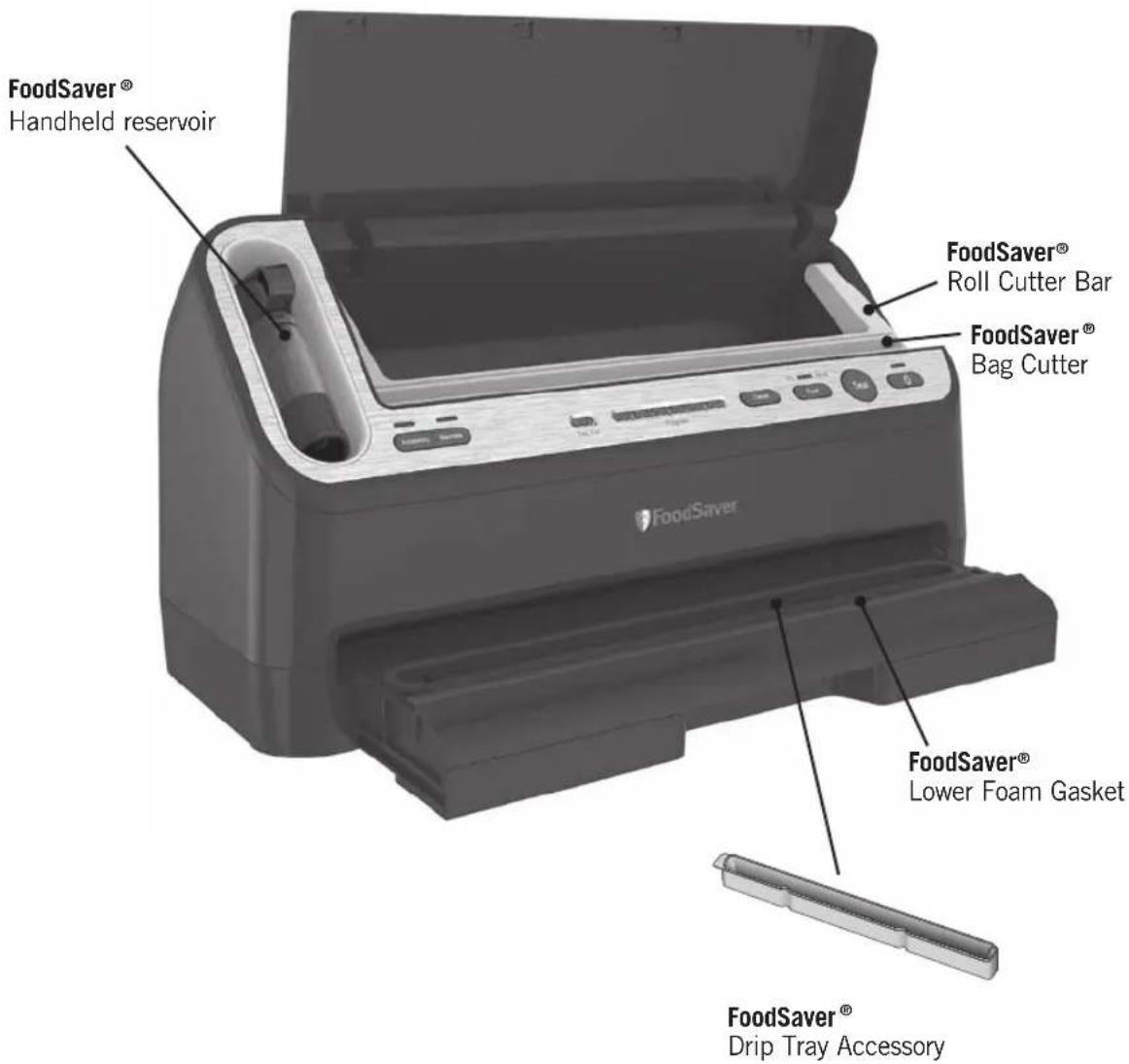
For replacement parts, please visit the website or call consumer services.
Consumer Service: US: 1-877-777-8042 CA: 1-877-804-5383 MX: +52 55 5366 0800 22
5-Year Limited Warranty
Sunbeam Products, Inc. or if in Canada, Newell Brands Canada ULC (collectively “Sunbeam”) warrants that for a period of five (5) years from the date of initial retail purchase, this product will be free from defects in material and workmanship, when used in accordance with the instructions provided.
Sunbeam, at its option, will repair or replace this product or any component of the product found to be defective during the warranty period.
Replacement will be made with a new or remanufactured product or component. If the product is no longer available, replacement may be made with a similar product of equal or greater value. This is your exclusive warranty. Do NOT attempt to repair or adjust any electrical or mechanical functions on this product. Doing so will void this warranty.
This warranty is valid for the original retail purchaser from the date of initial retail purchase and is not transferable. Keep the original sales receipt. Proof of purchase is required to obtain warranty performance. Sunbeam dealers, service centers, or retail stores selling Sunbeam products do not have the right to alter, modify or any way change the terms and conditions of this warranty.
This warranty does not cover normal wear of parts or damage resulting from any of the following: negligent use or misuse of the product, use on improper voltage or current, use contrary to the operating instructions, disassembly, repair or alteration by anyone other than Sunbeam or an authorized Sunbeam service center. Further, the warranty does not cover: Acts of God, such as fire, flood, hurricanes and tornadoes.
What are the limits on Sunbeam's Liability?
Sunbeam shall not be liable for any incidental or consequential damages caused by the breach of any express, implied or statutory warranty or condition. Except to the extent prohibited by applicable law, any implied warranty or condition of merchantability or fitness for a particular purpose is limited in duration to the duration of the above warranty. Sunbeam disclaims all other warranties, conditions or representations, express, implied, statutory or otherwise. Sunbeam shall not be liable for any damages of any kind resulting from the purchase, use or misuse of, or inability to use the product including incidental, special, consequential or similar damages or loss of profits, or for any breach of contract, fundamental or otherwise, or for any claim brought against purchaser by any other party. Some provinces, states or jurisdictions do not allow the exclusion or limitation of incidental or consequential damages or limitations on how long an implied warranty lasts, so the above limitations or exclusion may not apply to you. This warranty gives you specific legal rights, and you may also have other rights that vary from province to province, state to state or jurisdiction to jurisdiction.
How to Obtain Warranty Service
In the U.S.A.
If you have any question regarding this warranty or would like to obtain warranty service, please call 1.877.777.8042 and a convenient service center address will be provided to you.
In Canada
If you have any question regarding this warranty or would like to obtain warranty service, please call 1.877.804.5383 and a convenient service center address will be provided to you.
In the U.S.A., this warranty is offered by Sunbeam Products, Inc. located in Boca Raton, Florida 33431. In Canada, this warranty is offered by Newell Brands Canada ULC, located at 20 B Hereford Street, Brampton, Ontario L6Y OM1. If you have any other problem or claim in connection with this product, please write our Consumer Service Department.
PLEASE DO NOT RETURN THIS PRODUCT TO ANY OF THESE ADDRESSES OR TO THE PLACE OF PURCHASE.
For inquiries regarding recycling and proper disposal of this product, please contact your local waste management facility.
23 US: www.FoodSaver.com | CA: www.FoodSaver.ca | MX: www.oster.com.mx/foodsaver
Table des matières
Mesures de protection importantes .... 25
25 US: www.FoodSaver.com | CA: www.FoodSaver.ca | MX: www.oster.com.mx/foodsaver
natural_image
Close-up of a black and white electrical outlet plug with two leads (no text or symbols visible)CONSIGNES RELATIVES AU CÂBLE D'ALIMENTATION :
29 US: www.FoodSaver.com | CA: www.FoodSaver.ca | MX: www.oster.com.mx/foodsaver
31 US: www.FoodSaver.com | CA: www.FoodSaver.ca | MX: www.oster.com.mx/foodsaver
7 BOUTON DE RÉGLAGE
natural_image
Illustration of a printer with a paper airplane and a labeled section (H), no text or symbols present.Fig. 2
natural_image
Diagram of a printer with a paper roll and label 'J' pointing to the page (no text or symbols on the diagram itself)Fig. 3
natural_image
Illustration of a printer with a paper roll and label 'K' pointing to the page (no text or symbols on the device itself)Fig. 4
33 US: www.FoodSaver.com | CA: www.FoodSaver.ca | MX: www.oster.com.mx/foodsaver
Fig. 3
natural_image
Illustration showing a hand using a tool to clean a spray bottle, with no text or symbols present.35 US: www.FoodSaver.com | CA: www.FoodSaver.ca | MX: www.oster.com.mx/foodsaver
natural_image
Illustration of a printer with a paper clip attached (no text or symbols)COMMENT...
natural_image
Illustration of a printer with a paper holder (no text or symbols visible)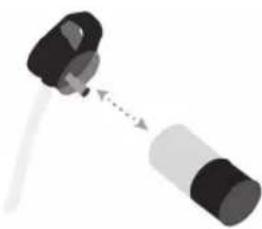
natural_image
Simple diagram of a mechanical component with a shaft and housing, no text or symbols present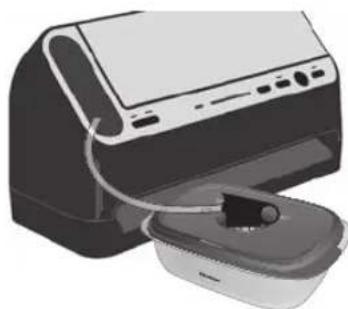
natural_image
Illustration of a printer with a paper feeding into a container (no text or symbols visible)Nettoyage
natural_image
Illustration of a printer with a paper roll and base, showing no text or symbols on the device itself.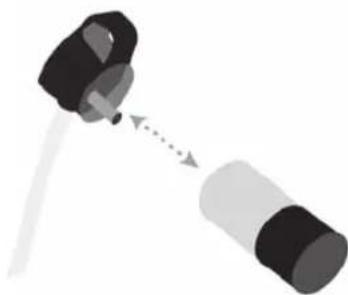
natural_image
Diagram showing a mechanical component with two parts connected by a dotted arrow, no text or symbols present37 US: www.FoodSaver.com | CA: www.FoodSaver.ca | MX: www.oster.com.mx/foodsaver
39 US: www.FoodSaver.com | CA: www.FoodSaver.ca | MX: www.oster.com.mx/foodsaver
41 US: www.FoodSaver.com | CA: www.FoodSaver.ca | MX: www.oster.com.mx/foodsaver
43 US: www.FoodSaver.com | CA: www.FoodSaver.ca | MX: www.oster.com.mx/foodsaver
Guide de dépannage
Problème Solution
45 US: www.FoodSaver.com | CA: www.FoodSaver.ca | MX: www.oster.com.mx/foodsaver
Pièces de rechange
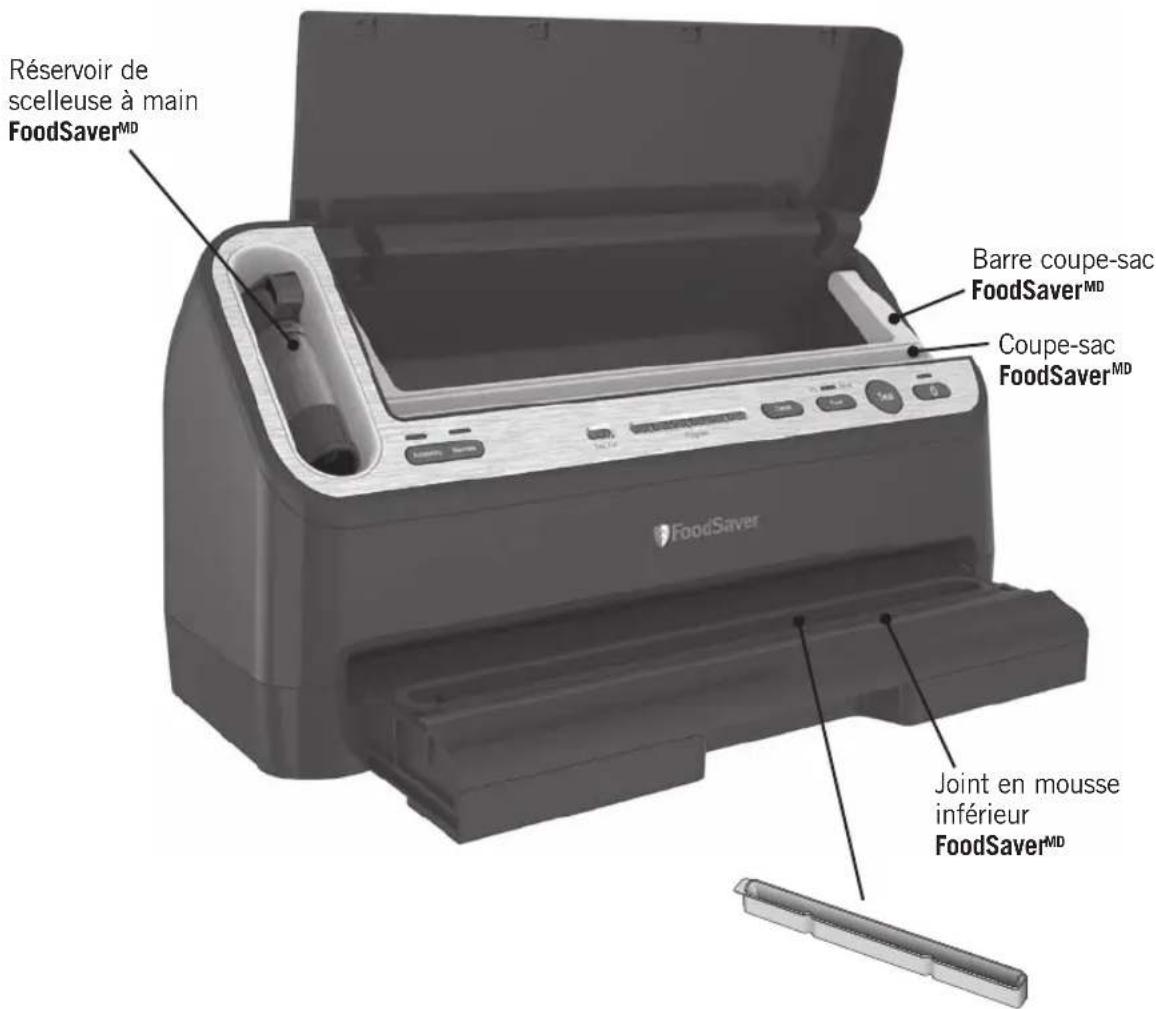
Accessoire ramasse- gouttes FoodSaver MD
51 US: www.FoodSaver.com | CA: www.FoodSaver.ca | MX: www.oster.com.mx/foodsaver
natural_image
Close-up of a black and white electrical outlet plug with two leads (no text or symbols visible)53 US: www.FoodSaver.com | CA: www.FoodSaver.ca | MX: www.oster.com.mx/foodsaver
55 US: www.FoodSaver.com | CA: www.FoodSaver.ca | MX: www.oster.com.mx/foodsaver
7 BOTÓN AJUSTE DE ALIMENTOS
natural_image
Illustration of a printer with a labeled component (H), no text or symbols presentFig. 2
natural_image
Illustration of a printer with a paper roll and label 'J' pointing to the page (no text or symbols on the diagram itself)Fig. 3
natural_image
Illustration of a printer with a paperclip and label 'K' pointing to the cover (no text or symbols on the device itself)Fig. 4
57 US: www.FoodSaver.com | CA: www.FoodSaver.ca | MX: www.oster.com.mx/foodsaver
2. Sellar al vacío una bolsa FoodSaver®
Fig. 3
natural_image
Illustration showing a hand using a tool to clean a spray bottle, with close-up and exploded views of the process (no text or symbols)59 US: www.FoodSaver.com | CA: www.FoodSaver.ca | MX: www.oster.com.mx/foodsaver
natural_image
Illustration of a printer with a paper clip attached (no text or symbols)COMO
natural_image
Illustration of a printer with a paper holder (no text or symbols visible)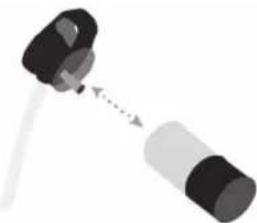
natural_image
Diagram of a mechanical component with two cylindrical parts connected by a dotted line, no text or symbols present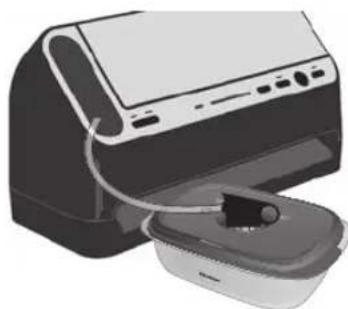
natural_image
Illustration of a printer with a paper feeding into a container (no text or symbols visible)Cuidado
61 US: www.FoodSaver.com | CA: www.FoodSaver.ca | MX: www.oster.com.mx/foodsaver
Indicaciones
63 US: www.FoodSaver.com | CA: www.FoodSaver.ca | MX: www.oster.com.mx/foodsaver
65 US: www.FoodSaver.com | CA: www.FoodSaver.ca | MX: www.oster.com.mx/foodsaver
67 US: www.FoodSaver.com | CA: www.FoodSaver.ca | MX: www.oster.com.mx/foodsaver
69 US: www.FoodSaver.com | CA: www.FoodSaver.ca | MX: www.oster.com.mx/foodsaver
Repuestos
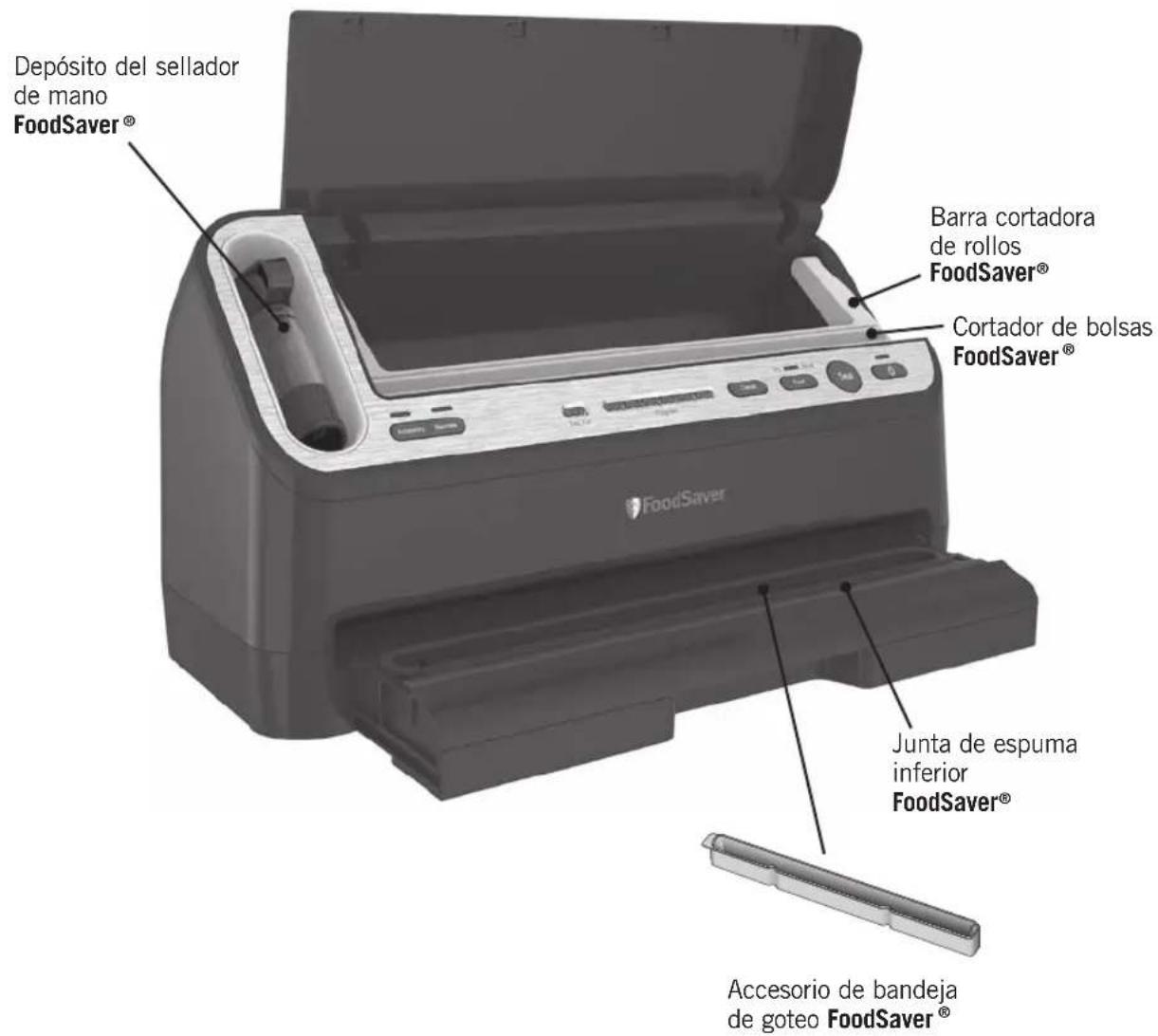
71 US: www.FoodSaver.com | CA: www.FoodSaver.ca | MX: www.oster.com.mx/foodsaver
NOTES/REMARQUES/NOTAS
NOTES/REMARQUES/NOTAS

FoodSaver
THE #1 VACUUM SEALING SYSTEM
Registering your appliance is quick and easy at foodsaver.com/register.
Applicable to US residents only.
For important safety information, helpful tips on vacuum sealing, and to order FoodSaver® bags, rolls, and accessories, call consumer services or visit the website below.
US: www.FoodSaver.com CA: www.FoodSaver.ca MX: www.oster.com.mx/foodsaver
©2022 Sunbeam Products, Inc. Distributed by Sunbeam Products, Inc. 2381 NW Executive Center Dr. Boca Raton, FL 33431, U.S.A Imported into Canada by: Newell Brands, Canada ULC., 20-B Hereford Street, Brampton, Ontario L6Y OM1. Printed in China.
©2022 Sunbeam Products, Inc. Distribué par Sunbeam Products, Ings. 2381 NW Executive Cender Dr. Boca Raton, FL 33431, U.S.A Importé au Canada par : Newell Brands, Canada ULC. 20-B Hereford Street, Brampton (Ontario) L6Y OM1. Imprimé en Chine
©2022 Sunbeam Products, Inc. Distribuido por Sunbeam Products, Inc. 2381 NW Executive Center Dr. Boca Raton, FL 33431, EE. UU. Importado en Canadá por: Newell Brands, Canada ULC., 20-B Hereford Street, Brampton, Ontario L6Y OM1. Impreso en China.
V4400_22EFSM1_GCDS-JC
PKG0001365091