CRL-342 - Alarm clock radio DENVER - Free user manual and instructions
Find the device manual for free CRL-342 DENVER in PDF.


| Product type | Clock radio |
| Brand | Denver |
| Model | CRL-342 |
| Power supply | AC adapter 100-240V, 50/60Hz, output 5V/2A (USB-C) |
| USB output | USB-C 5V/1A (max) |
| Clock display | Digital, 12/24h, 4 brightness levels |
| FM radio | 87.5 - 108 MHz, auto search, 5 alarm sounds + FM |
| Alarms | 2 independent alarms, 16 volumes, 10 wake-up brightness levels, 5 light anticipation durations |
| Snooze function | Yes, repeat after 5 minutes |
| White noise | Yes, with sleep timer (5, 10, 15, 30, 60 min) |
| Night light | Multicolor (warm white, rainbow, red, blue, green, purple, pink, yellow, cyan), adjustable brightness |
| Volume adjustment | 16 levels |
| Cleaning | Soft dry cloth, do not use liquid or abrasive products |
| Safety | Do not open, do not expose to water, heat or humidity, hearing protection recommended |
| Operating temperature | 0 °C to 40 °C |
| Regulatory information | Compliant with directive 2014/53/EU, WEEE marking |
Frequently Asked Questions - CRL-342 DENVER
User questions about CRL-342 DENVER
0 question about this device. Answer the ones you know or ask your own.
Ask a new question about this device
Download the instructions for your Alarm clock radio in PDF format for free! Find your manual CRL-342 - DENVER and take your electronic device back in hand. On this page are published all the documents necessary for the use of your device. CRL-342 by DENVER.
USER MANUAL CRL-342 DENVER
Please read the safety instructions carefully before using the product for the first time and keep the instructions for future reference.
- This product is not a toy. Keep it out of reach of children.
- Keep product out of the reach of children and pets to avoid chewing and swallowing.
3.Product operating and storage temperature is from 0 degree Celsius to 40 degree Celsius. Under and over this temperature might affect the function. - Never open the product. Touching the inside electrics can cause electric shock. Repairs or service should only be performed by qualified personnel.
5.Do not expose to heat, water, moisture, direct sunlight! - Please protect your ears against loud volume. Loud volume can damage your ears and risk in hearing loss.
- The unit is not waterproof. If water or foreign objects enter the unit, it may result in fire or electric shock. If water or a foreign object enters the unit, stop use immediately.
- The direct power cable is used as disconnect device, the disconnect device shall remain readily operable. So, make sure there is space around the power outlet for easy access.
9.Do not use non original accessories together with the product as this can make the product functionality abnormal.
Warning: Button cell battery inside
Function Buttons
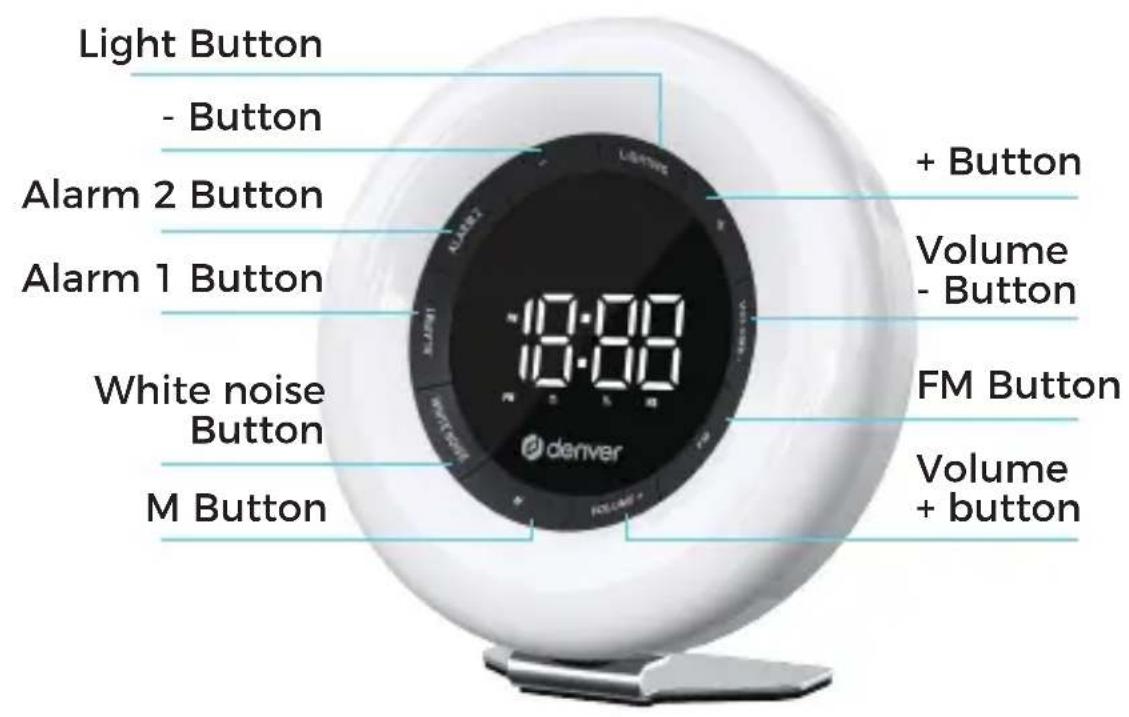
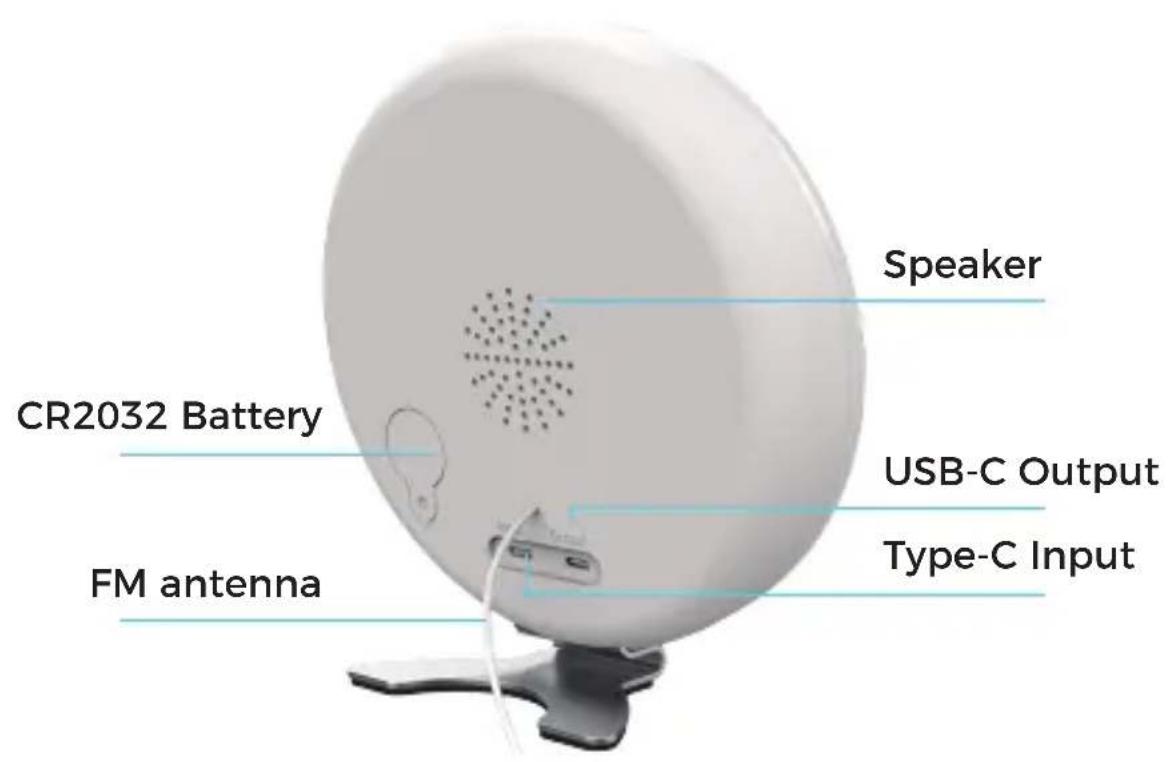
Power connection
Plug the USB-A end of cable into the power adapter and the other end Type-C into the product.
USB-C Output: 5V/1A(MAX)
Clock setting
The default clock is 12-hour, PM will be displayed after 12:00.
-
Press the "M button" twice to switch between 12 hours and 24 hours display.
-
Press "M button" once to adjust the clock brightness of the digital display in 4 levels (Max, Medium, minimum and Off).
Time setting
-
Press and hold "M button" to enter hour setting, adjust the value with +/- button.
-
After finishing the hour setting, press "M button" once to enter minute setting, adjust the value with +/- button.
-
Press "M Button" once to exit after the minute setting complete.
(If there is no operation for 10 seconds, it will return to clock display)
Alarm Clock Setting
The product has two alarm functions (Alarm 1 and Alarm 2), which can be turned on or off by pressing the corresponding alarm button.
Press and hold "Alarm button" for 3 seconds to enter the alarm setting mode, the alarm clock icon and hour will start to flash.
-
Press the "Alarm button" once to switch settings in turn: Hour - minutes - sound - volume - Wake-up light advance time - save and exit.
-
Press +/- button to adjust.
This clock has:
- 5 Alarm sounds + FM-radio (Station saved when exiting FM mode).
- 16 adjustable volume
- 10 adjustable brightness
- 5 adjustable wake-up light advance time settings (5,10 ,15,30 and 60 minutes)
(If there is no operation for 10 seconds, the last setting will be saved and it will return to the clock display.)
When the alarm clock reaches the wake-up light advance time, the alarm clock symbol should start flashing, and the wake-up warm white light should gradually turn on to the set brightness. Snooze function
-
Press any button to enter snooze mode when alarm rings. The wake-up light and alarm will turn off temporarily. The alarm will ring again after 5 minutes, the wake-up light gradually turn on in the third minute of the snooze.
-
Press the "Alarm button" once to turn off the alarm for the current day, and the alarm clock setting for next day is still valid. If not set to snooze mode or turned off, the alarm will ring for 5 minutes, hereafter it will turn
off automatically for the day, and the alarm clock setting for next day is still valid.
Setting the FM Radio
The first time you enter FM mode, it will search the stations automatically. Users can also press and hold the “FM button” to
automatically search the stations and then enter FM mode.
- Press the "FM button" to enter FM radio mode, the FM icon stays on, and screen displays P01 (01 represents the first radio station). Press again to exit FM mode. Press the + button to switch to between preset stations.
-Press Volume + to increase the volume and press the Volume - to decrease the volume
Function button can be used normally and FM will still be working in the background.
-To scan for new FM channels press and hold "FM button" (If there is no operation in 3 seconds, the clock display will return, and the FM mode will still work in the background with the FM icon constantly on.)
White noise setting
To turn on or off the white noise, press the "white noise button".
-Press and hold "white noise button" for 3 seconds to enter the setting mode, the white noise icon will start to flash.
- Press the "white noise button" once to switch settings in turn: Sound-volume- automatically turn off (5,10 ,15,30 and 60 minutes) and exit.
-Press + / - button to adjust.
Night light setting
-Press the "Light button" to switch to the night light mode (including warm white light, rainbow slow running, rainbow gradient, red, blue, green, purple, pink, yellow, cyan, OFF),
- Press and hold the "Light button" to turn off the night light and press the light button again to display the memory of the last exit light mode.
-Press and hold the + button to increase the brightness, press
and hold - button to decrease the brightness.
Adaptor information
| Manufacturer's name or trade mark, commercial registration number and address | Shenzhen Rambow Electronic Technology Co., LTD 91440300MA5GHLR615 Plant 7401, North Yongfa Industrial Park, No. 15, Chaoyang Road, Yanchuan Community, Yanluo Street, Baoan District, Shenzhen |
| Model identifier | HBA20 |
| Input voltage | 100-240V |
| Input AC frequency | 50/60HZ |
| Output voltage | 5V2A |
| Output current | 0.3A |
| Output power | 10W |
| Average active efficiency | 80% |
| Efficiency at low load (10%) | 7% |
| No-load power consumption | 0.1W |
Please notice - All products are subject to change without any notice. We take reservations for errors and omissions in the manual.
ALL RIGHTS RESERVED, COPYRIGHT DENVER A/S

denver
denver.eu

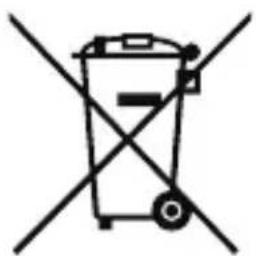

Electric and electronic equipment and included batteries contains materials, components and substances that can be hazardous to your health and the environment, if the waste material (discarded electric and electronic equipment and batteries) is not handled correctly.
Electric and electronic equipment and batteries is marked with the crossed out trash can symbol, seen above. This symbol
signifies that electric and electronic equipment and batteries should not be disposed of with other household waste, but should be disposed of separately.
As the end user it is important that you submit your used batteries to the appropriate and designated facility. In this manner you make sure that the batteries are recycled in accordance with legislature and will not harm the environment.
All cities have established collection points, where electric and electronic equipment and batteries can either be submitted free of charge at recycling stations and other collection sites, or be collected from the households. Additional information is available at the technical department of your city.
Hereby, Denver A/S declares that the radio equipment type CRL-342 is in compliance with Directive 2014/53/EU. The full text of the EU declaration of conformity is available at the following internet address: denver.eu and then click the search ICON on topline of website. Write model number: CRL-342. Now enter product page, and RED directive is found under downloads/other downloads.
Operating Frequency Range: FM 87,5 - 108 Mhz
DENVER A/S
Omega 5A, Soeften
DK-8382 Hinnerup
Denmark
www.facebook.com/denver.eu
Downloads/Sonstige Downloads.
Innstilling for nattlys
-Trykk på "Light-knappen" for Å bytte til nattlysmodus (inkludert varmt hvitt lys, regnbue-langsomt lys, regnbuegradient, rɒdt, blätt, grønt, lilla, rosa, gult, cyan, AV),
(Push "1" for support)
For technical questions, please write to:
support.hq@denver.eu
For all other questions please write to:
contact.hq@denver.eu
Benelux
DENVER BENELUX B.V.
Barwoutswaarder 13C+D
3449 HE Woerden
The Netherlands
Phone: 0900-3437623
E-Mail: support.nl@denver.eu
Spain/Portugal
DENVER SPAIN S.A
Ronda Augustes y Louis Lumiere, n° 23 - nave
16
Parque Tecnológico
46980 PATERNA
Valencia (Spain)
Spain
Phone: +34 960 046 883
Mail: support.es@denver.eu
Portugal:
Phone: +35 1255 240 294
E-Mail: denver.service@satfle1.com
Germany
Denver Germany GmbH Service
Service Center
Max-Emanuel-Str. 4
94036 Passau
Phone: +49 851 379 369 40
support.de@denver.eu
Monday - Thursday 09:00 - 16:30
Friday 09:00 - 14:00
Austria
Lurf Premium Service GmbH
Deutschstrasse 1
1230 Wien
Phone: +43 1904 3085
LetMeRepair Poland sp. z o.o.
If your country is not listed above,
please write an email to
contact.hq@denver.eu

denver
Denver A/S
Omega 5A, Soeften
DK-8382 Hinnerup
Denmark
denver.eu
facebook.com/denver.eu

Brand : DENVER
Model : CRL-342
Category : Alarm clock radio