MDRE411FGE01 - Fridge MIDEA - Free user manual and instructions
Find the device manual for free MDRE411FGE01 MIDEA in PDF.


User questions about MDRE411FGE01 MIDEA
0 question about this device. Answer the ones you know or ask your own.
Ask a new question about this device
Download the instructions for your Fridge in PDF format for free! Find your manual MDRE411FGE01 - MIDEA and take your electronic device back in hand. On this page are published all the documents necessary for the use of your device. MDRE411FGE01 by MIDEA.
USER MANUAL MDRE411FGE01 MIDEA
natural_image
Simple diagram of a rectangular container with two side supports at the bottom (no text or symbols)Refrigerator
BOTTOM MOUNTED FREEZER SERIES
USER MANUAL
MDRE411FGE01
MOT DE REMERCIEMENT
INSTALLATION DU PRODUIT 04
INSTRUCTIONS D'UTILISATION 12
NETTOYAGE ET ENTRETIEN 16
DÉPANNAGE 18
ANNEXE 20
SPÉCIFICATIONS
text_image
Technical diagram of a refrigerator with numbered parts for identification and assembly reference.INSTALLATION DU PRODUIT
natural_image
Technical line drawing of a two-tiered rectangular enclosure with labeled dimensions A and B (no text or symbols beyond labels)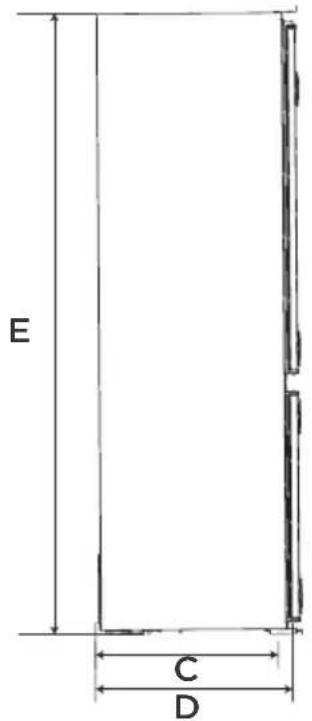
text_image
E C D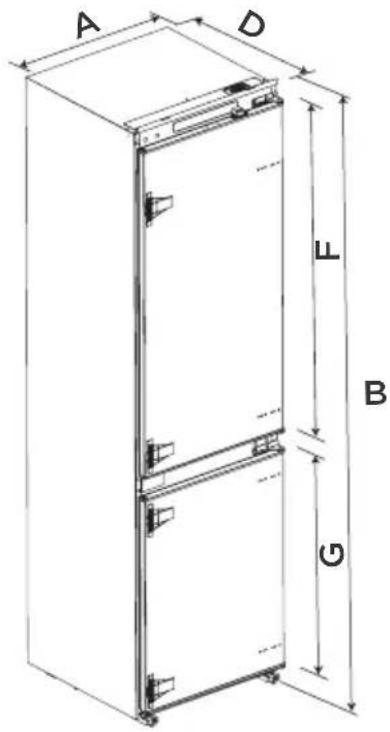
text_image
A D L B Gnatural_image
Technical line drawing of an open refrigerator with internal compartments and a close-up inset showing internal structure (no text or labels)natural_image
Line drawing of a double refrigerator with front and back panels (no text or symbols)Mode Super congélation
natural_image
Illustration of hands holding a rectangular object with arrows indicating force or movement (no text or symbols)natural_image
Illustration of a hand interacting with a flat surface, showing upward arrows and a magnified inset of a building (no text or symbols)natural_image
Diagram of a door handle with an arrow indicating clockwise motion (no text or symbols)Panne de courant :
text_image
Diagram showing a process step with warning symbols and an 'OK' label, indicating completion or completion.Thank you for choosing Midea! Before using your new Midea product, please read this manual thoroughly to ensure that you know how to operate the features and functions that your new appliance offers in a safe way.
EN
CONTENTS
THANK YOU LETTER 01
SPECIFICATIONS 02
PRODUCT OVERVIEW 03
PRODUCT INSTALLATION 04
OPERATION INSTRUCTIONS 12
CLEANING AND MAINTENANCE 16
TROUBLESHOOTING 18
APPENDIX 20
SPECIFICATIONS
| Product model MDRE411FGE01 | |
| Fresh Food Storage Compartment Volume | 213 L |
| Frozen Food Storage Volume | 87 L |
| Defrosting Type | Auto-defrost |
| Temperature Rise Time | 9 h |
| Freezing Capacity 6 kg/24h | |
| Rated Voltage 220-240V~ | |
| Rated Current 1.2 A | |
| Overall Dimension (H x W x D) 1955 x 540 x 550 mm | |
PRODUCT OVERVIEW
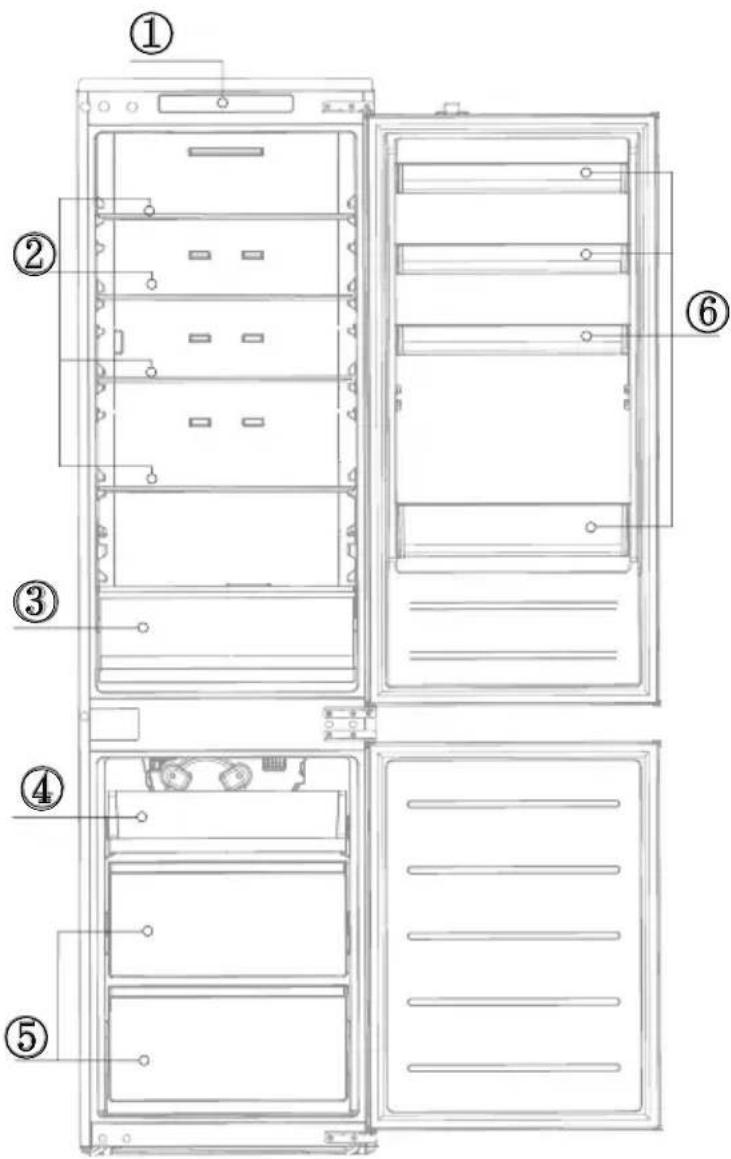
Names of components
EN
text_image
Technical diagram of a refrigerator with numbered parts for identification and assembly reference.1 Temperatre control
2 Glass shelf
3 Fruits and vegetables box
4 Small Drawer
5 Big Drawer
6 Door tray

ATTENTION
The picture above is only for reference. The actual configuration will depend on the physical product or statement by the distributor.
PRODUCT INSTALLATION
Install Instruction
For refrigerating appliances with climate class
- Depending on the climate class, This refrigerating appliance is intended to be used at ambient temperatures range as specified following table.
• The climate class can be found on the rating plate. The product may not operate properly at temperatures outside of the specific range. - You can find the climate class on the product label.
Effective temperature range
- The product is designed to operate normally in the temperature range specified by its class rating.
| Class Symbol | Ambient temperature range °C | ||
| IEC 62552 (ISO 15502) ISO 8561 | |||
| Extended temperate SN + 10 to + 32 + 10 to + 32 | |||
| Temperate N + 16 to + 32 + 16 to + 32 | |||
| Subtropical ST + 16 to + 38 + 18 to + 38 | |||
| Tropical T + 16 to + 43 + 18 to + 43 | |||

WARNING
When positioning the appliance, ensure the supply cord is not trapped or damaged.
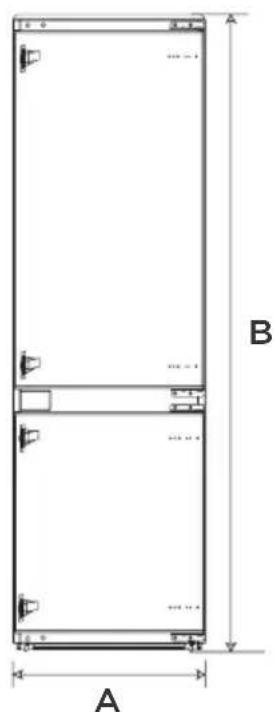
Space requirement diagram (when the door is open and when the door is closed)
natural_image
Technical line drawing of a two-tiered rectangular enclosure with dimension labels A and B (no text or symbols beyond labels)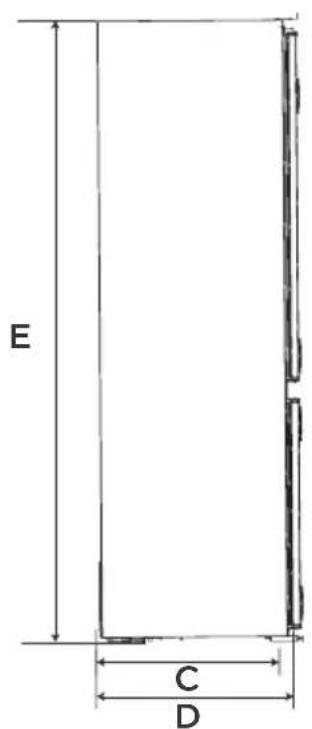
text_image
E C D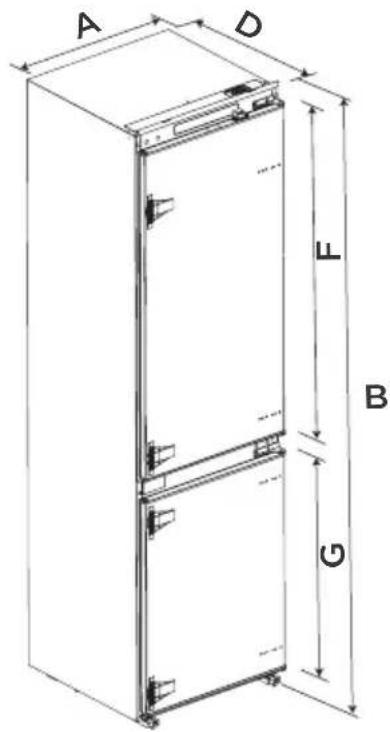
text_image
A D L B G| Width | Overall Height | Depth to match the cabinet | Overall Depth | Height to match the cabinet |
| A B C D E | ||||
| 540 1955 515 550 1940 |
| Refrigeration door height | Freezer door height |
| F | G |
| 1076 706 |
Notice: All dimensions in mm
Installation in cabinet
Steps:
- Cabinet size requirement.
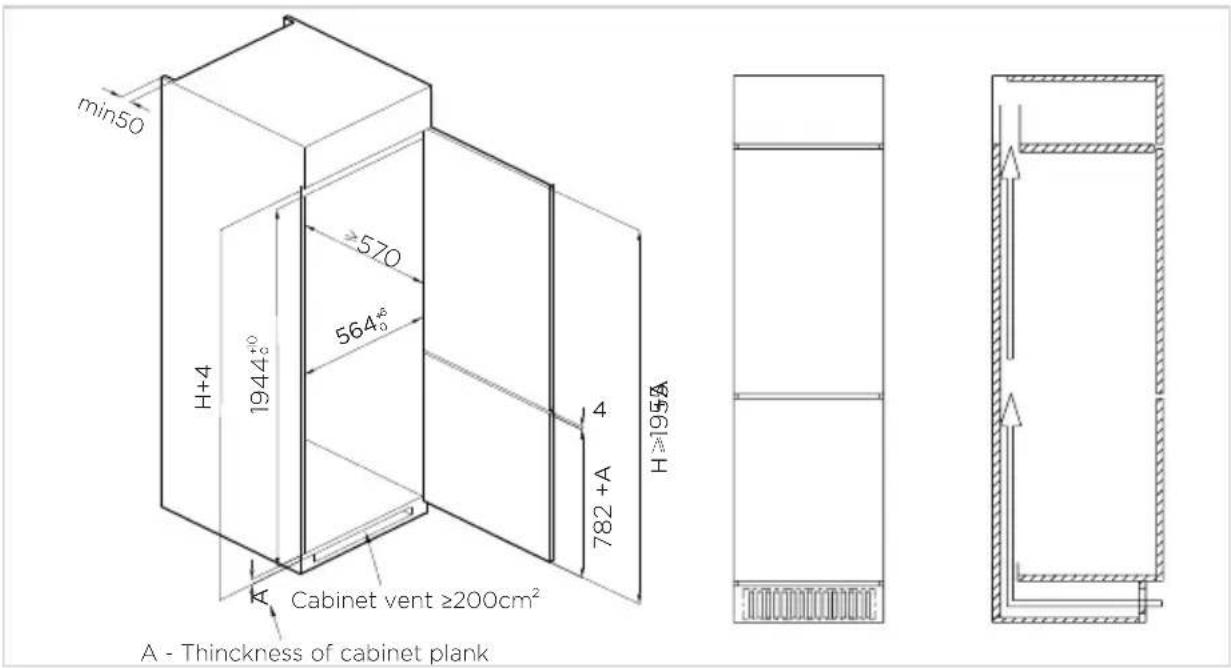
text_image
min50 H+4 1944⁺⁰° ≥570 564° 4 782+A H≥195A Cabinet vent ≥200cm² A - Thickness of cabinet plank- Push the refrigerator into the cabinet and adjust it to make sure the edgefold of top baffle completely touch the top edge of the cabinet, and the limit hook of supporting leg completely touch the bottom edge of the cabinet.
- Fix the supporting leg with screws, then install the screw caps.
- Fix the top baffle to the top of the cabinet inner with screws, then install the screw caps.
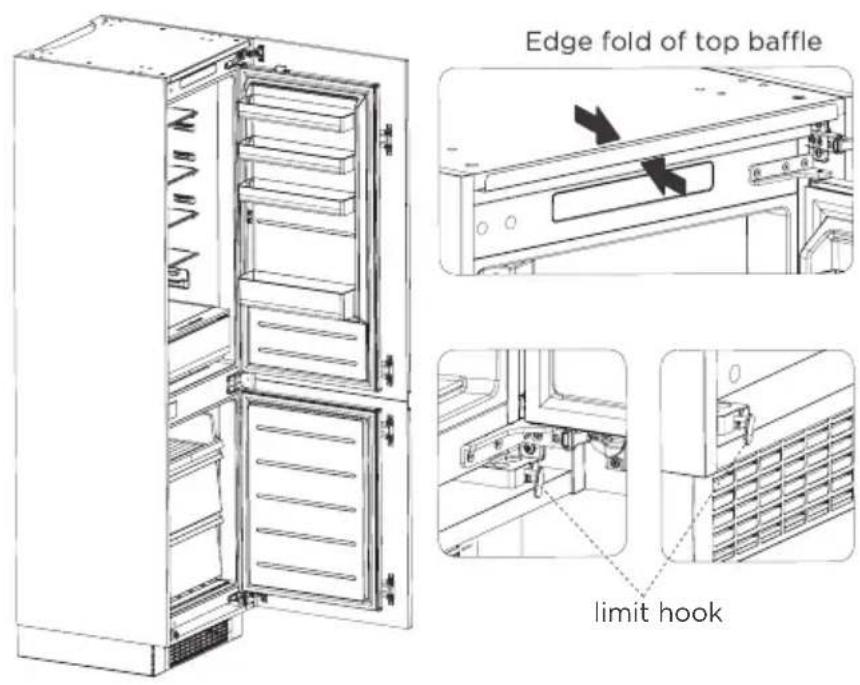
text_image
Edge fold of top baffle limit hook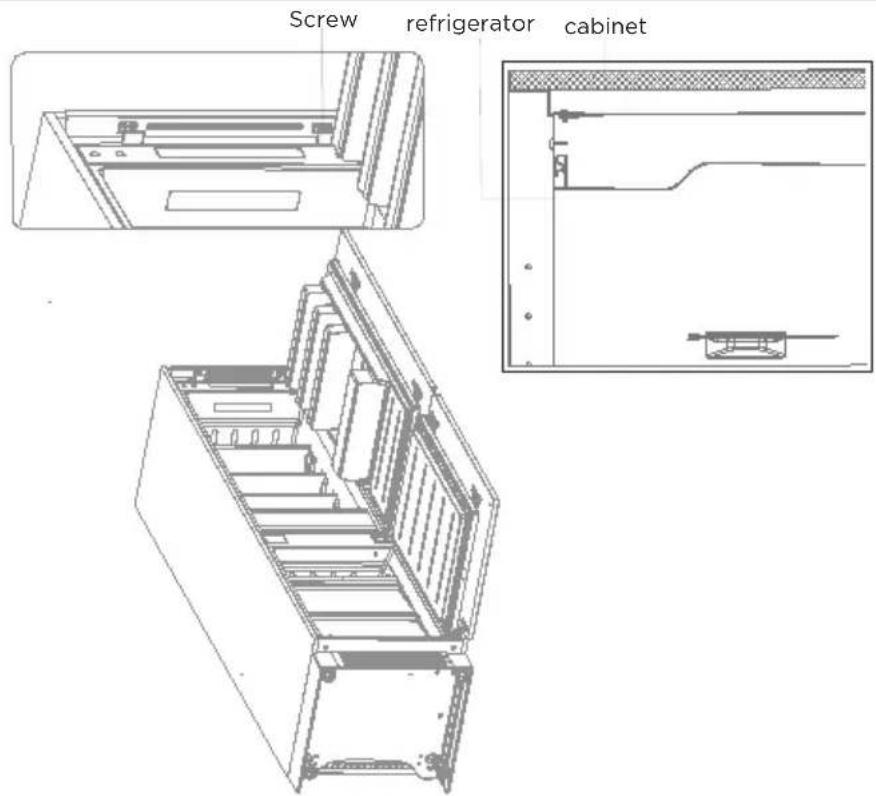
text_image
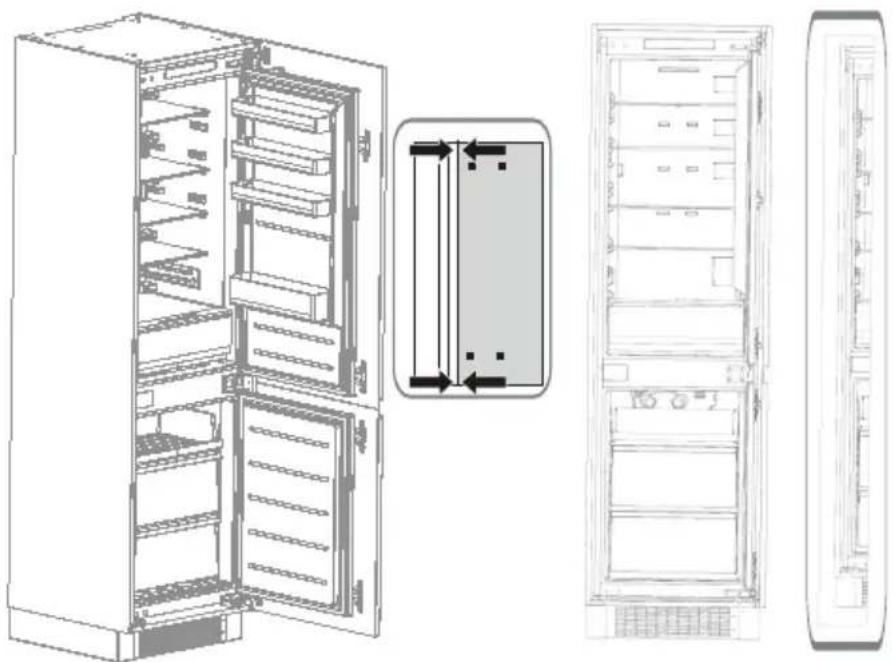
Screw refrigerator cabinet- Open the lower door of cabinet the maximum angle, and open the lower door of the refrigerator to the corresponding position. Sliding the block to make sure inner edge align with the lower door edge of refrigerator, then fix the block to the door of cabinet with screw and install screw caps. Fix the upper refrigerator door to the cabinet door in the same way. Exchange the fixed position of the adjustable foot and the bottom hinge, then fix them again.
- Take out the sealing strip from accessory bag, and press it in the gap between the cabinet and the refrigerator. Installation is completed.
natural_image
Technical line drawing of a server rack cabinet showing internal components and front view (no text or labels)Door reversal
Parts already mounted on the refrigerator (as shipped):
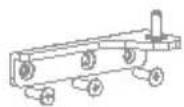
R: Bottom hinge
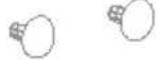
Hole cap
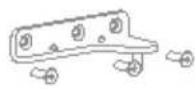
R: Upper hinge Fixed block
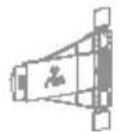
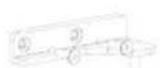
F: Upper hinge
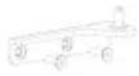
F: Bottom hinge Hole cap

Steps:
- Power off the refrigerator, and remove all objects from the door trays.
- Remove the upper hinge and hole caps of refrigerator door.
- Remove the refrigerator door, the bottom hinge and the hole cover.
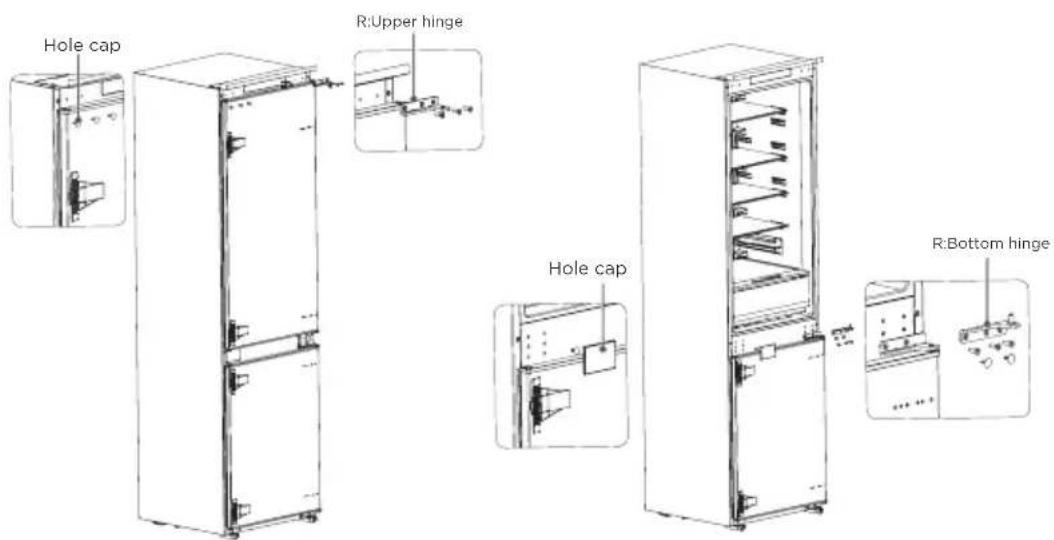
text_image
Hole cap R:Upper hinge Hole cap R:Bottom hinge- Exchange the R:bottom hinge and R:upper hinge, then install them according to below steps, and install the top hole caps.
- Remove the two fixed blocks of refrigerator door and rotate them for 180^ and install them on other side of refrigerator door.
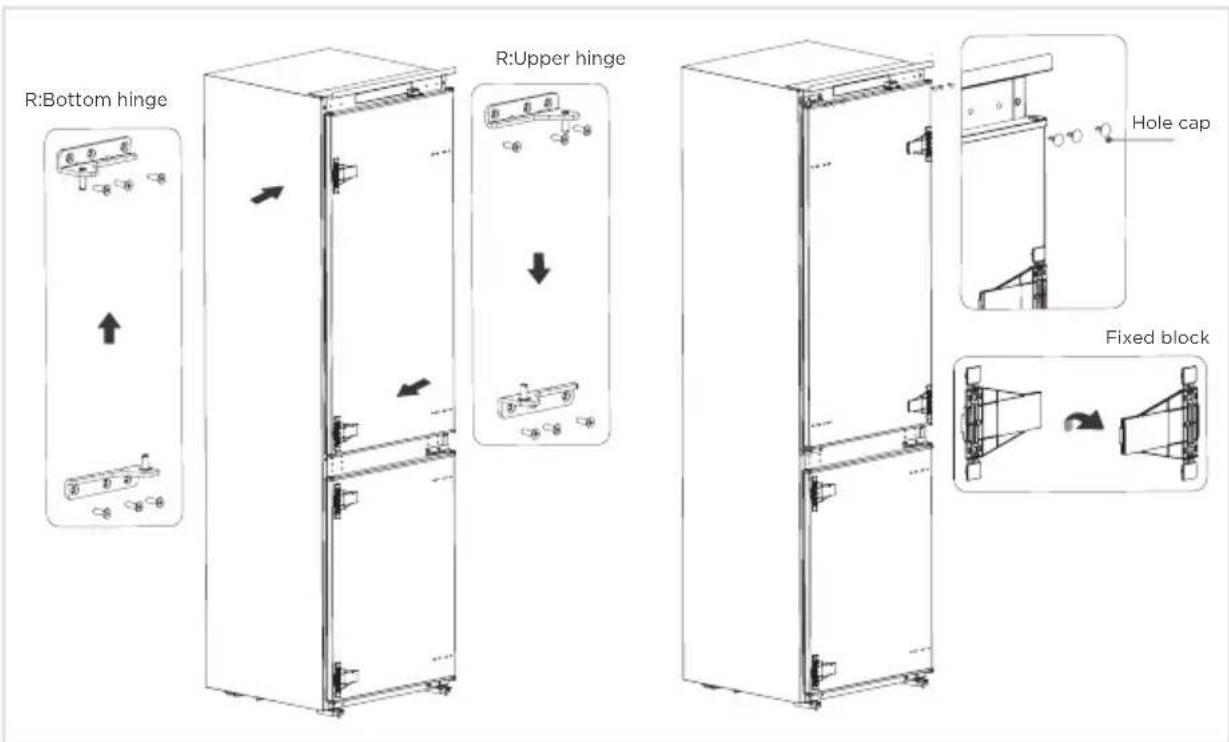
text_image
R:Bottom hinge R:Upper hinge Hole cap Fixed block- Remove the the upper hinge of freezer door and plug pin.
- Remove the freezer door, the bottom hinge and the hole caps.
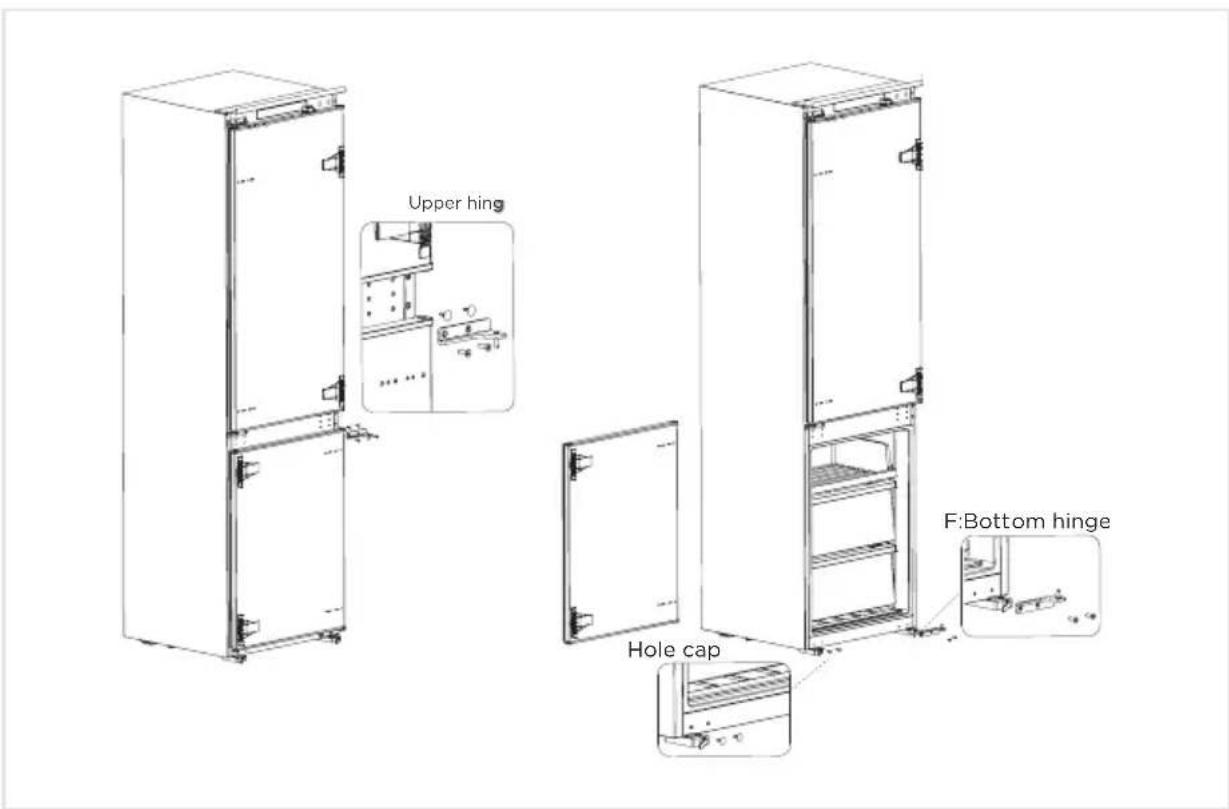
text_image
Upper hinge F:Bottom hinge Hole cap- Exchange the F:bottom hinge and F:upper hinge, then install them according to below steps, and install the top hole cover and lower hole caps
- Remove the two fixed blocks of freezer door and rotate them for 180^ and install them on other side of freezer door.
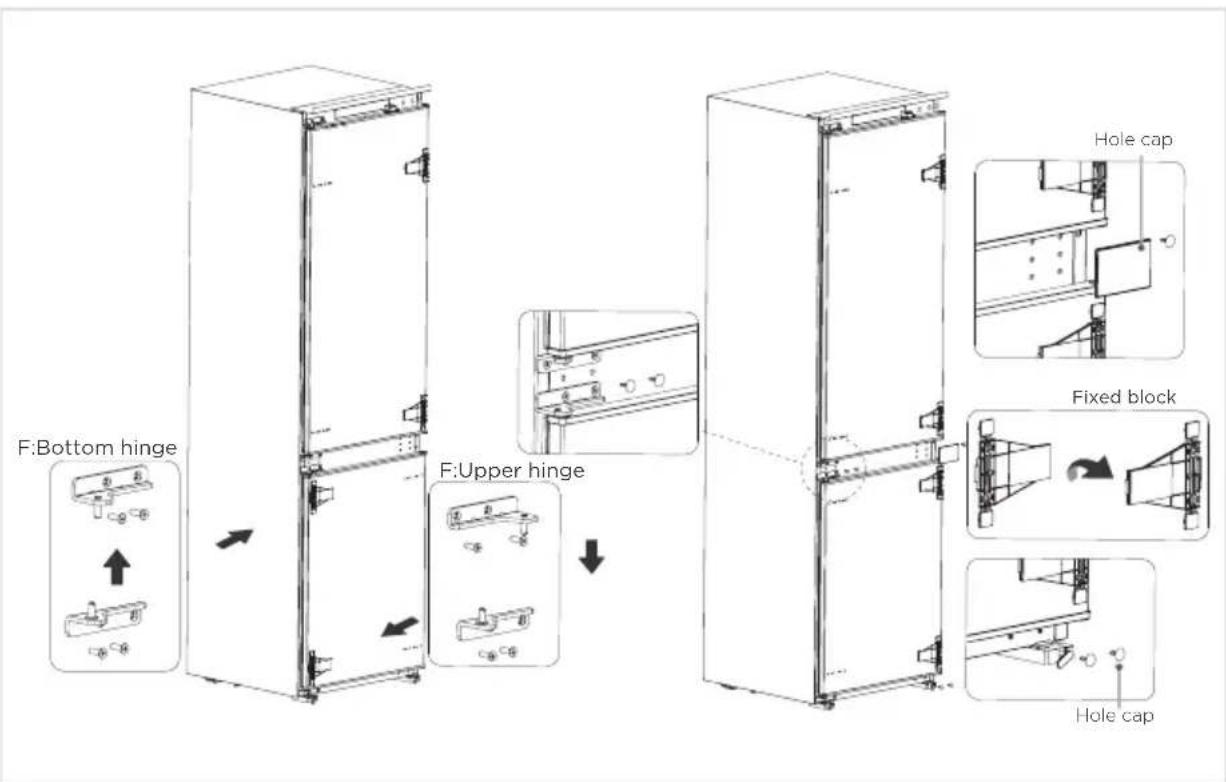
text_image
F:Bottom hinge F:Upper hinge Hole cap Fixed block Hole cap- The picture after completion is shown as below.
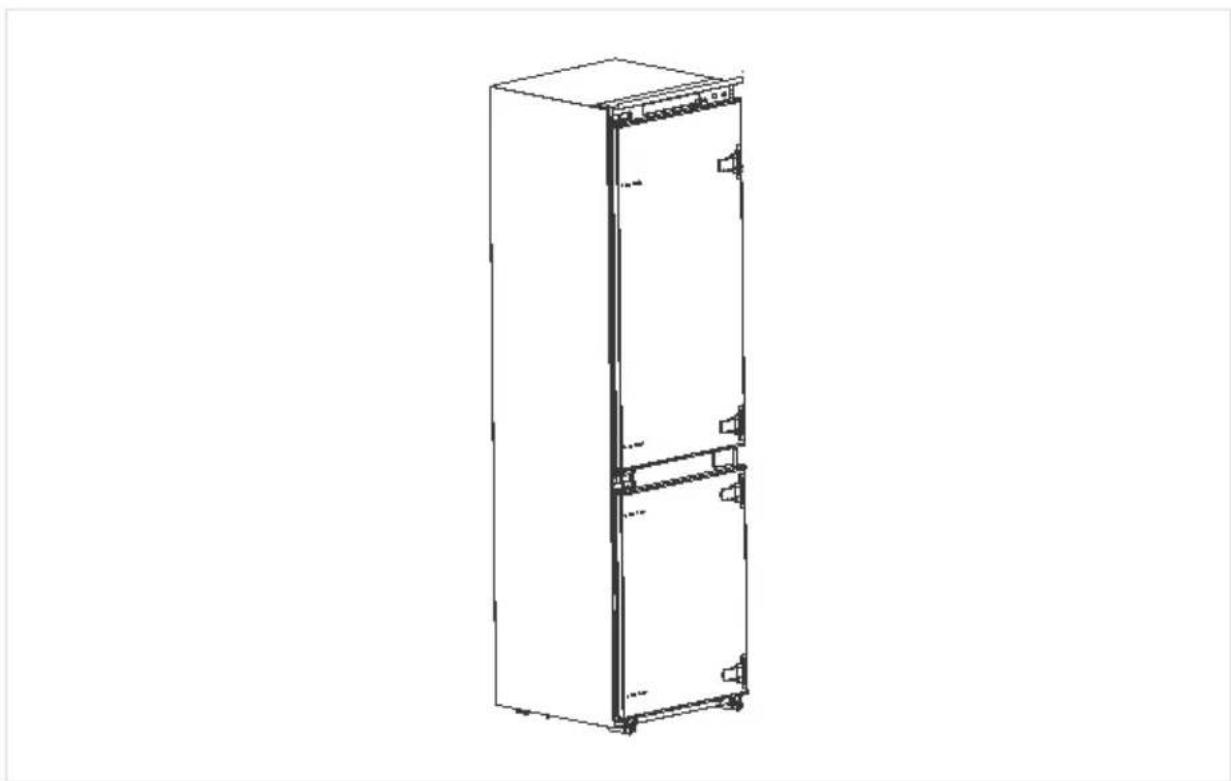
natural_image
Line drawing of a tall rectangular refrigerator with front panels and side door (no text or symbols)Moving the appliance
- Remove all food from the appliance.
- Take the power plug off, insert and fix it into the power plug hook at the rear or on top of the appliance.
- Fix parts with tape to prevent sheves and the door handle from falling off while moving the appliance.
- Move the appliance carefully with more than two person. If move the appliance over a long distance, keep the appliance upright.
- After installing the appliance, put the power plug on a socket again.

ATTENTION
Precautions before operation:
Before making changes the refrigerator must be disconnected from power. precautions should be taken to prevent any personal injury.
Changing the light
- Any replacement or maintenance of the LED lamps is intended to be made by the manufacturer, its service agent or similar qualified person.
- This product contains a light source of energy efficiency class (F).

ATTENTION
After connecting the power supply cord (or plug) to the outlet, wait 2 or 3 hours before you put food into the appliance. If you add food before the appliance has cooled completely, your food may spoil.
OPERATION INSTRUCTIONS
Control panel

text_image
FRIDGE Standby Hold 10 sec A FREEZER Vacation Hold 3 sec B Light On FND temp Light On Vacation LED6LEDLED1 COLDEST COLDER COLD SUPER COOL/FRZ LED4LED3LED2 Midea
ATTENTION
Do not use sharp objects to operate the control panel. They can scratch or damage the control panel.
The picture above is only for reference. The actual configuration will depend on the physical product or statement by the distributor.
| Display Button | |||
| 1 | LED 1: COLODEST | A | Fridge compartment setting /Standby mode button |
| 2 | LED 2: COLOR | B | Freezer compartment setting/Vacation mode button |
| 3 | LED 3: COLD | ||
| 4 | LED 4: SUPERCOOL/FRZ | ||
| 5 | LED 5: Light OnFRZ Temp | ||
| 6 | LED 6: Light OnVacation | ||
Display:
- When powering on for the first time, the display will be complete for 3 seconds, while the start up bell will ring, and then the display will enter normal operation; (The initial power-on, the gear of freezer compartment and fridge compartment set at COLDER).
Fault indication
- The following warnings appearing on the display indicate corresponding faults of the refrigerator. Though the refrigerator may still have a freezing function with the following faults, the user shall contact maintenance specialist for maintenance, so as to ensure normal use of the refrigerator.
| Fault Code Fault Description | |
| LED5/LED6 flashing Freezer temperature sensor fault | |
| LED1/LED6 flashing Refrigerating temperature sensor fault | |
| LED1/LED2 flashing Freezer frost sensor fault | |
| LED6/LED3 flashing Ambient temperature sensor faults | |
| LED1/LED3 flashing Communication faults |
Temperature setting
- Click the setting button A to set the fridge compartment.
- Click the setting button B, the indicators light up to set the freezer compartment.
- The refrigerator will operate according to the new set gear in 15 seconds.

flowchart
graph LR
    A["COLDEST"] --> B["COLDER"]
    B --> C["COLD"]
    C --> D["SUPER COOL/FRZ"]
Tips:
- The lower the set temperature, the longer you can safely store your food and the more electricity the refrigerator consumes.
- The higher the set temperature, the quicker your stored food decays and the less electricity the refrigerator consumes.
Super cool mode
- Click the setting button A until the icon lighten, and the fridge compartment enters super cool mode in 15 seconds.
- The fridge compartment will automatically exit super cool mode after 6 hours or press the temperature setting button A to exit Super cool mode earlier.
Super freeze mode
- Click the setting button B, the indicators light up, and click the setting button B again until the icon lighten, and the freezer compartment enters Super freeze mode in 15 seconds.
- The freezer compartment will automatically exit super freeze mode after 40 hours or press the setting button B to exit super freeze mode earlier.
- It is suggested to turn on super freeze mode for 12 hours before placing large amount of frozen food in freezer compartment at one time.
Standby mode
- Click the setting button A for 10 seconds to enter the standby mode. All loads and the display go off.
- Under standby mode, click the setting button A for 10 seconds to restore normal control.
Vacation mode
- Click the setting button B for 3 seconds to enter the vacation mode, the icon lights up, the vacation mode will start after 15 seconds.
- Under vacation mode, the fridge compartment is turned off, the freezer compartment set at COLDER.
- Under vacation mode, click the setting button A or setting button B until the icon turn off, which could exit the vacation mode.
Tips on storing food
Freezer compartment
- The freezer is designated for the storage of food frozen at very low temperature, long-term storage of frozen food, and for the production of ice.
- Only use the shelves in the door of the freezer to store frozen food, not for storing hot food designated for freezing.
- Do not put fresh and frozen food next to each other. The frozen food may thaw.
- When freezing fresh food (such as meat, fish or chopped meat), cut them into parts that can be used at the same time.
- Storing frozen food: instructions are usually stated on the packages, which must be followed. If there is no information on the packaging, food should not be stored for longer than three months from the date of purchase.
- When purchasing frozen food, make sure that it was frozen at a suitable temperature and that the packaging is not damaged.
- Frozen food should be kept in suitable packages to retain the quality and should be returned to the freezer compartment as soon as possible.
- If a package of frozen food shows moisture or abnormal bulging, it is probable that it was stored at the wrong temperature and the content is spoiled.
- The storage period for frozen food depends on the room temperature, the thermostat setting, the frequency of opening the door of the freezer, the type of food and the time of transporting the product from the shop to the household. Always follow the instructions printed on the packaging and never exceed the maximum storage time stated on the package.
Cooling compartment
- To reduce moisture and subsequent ice build-up, never put liquid into the refrigerator in unsealed containers. Frost tends to concentrate in the coolest parts of the evaporator. Storing uncovered liquids results in a more frequent need for defrosting.
- Never put warm foods in the refrigerator. These should first cool down at room temperature and then be placed so as to ensure adequate air circulation in the refrigerator.
- Foods or food containers should not touch the back wall of the refrigerator because they could freeze to the wall. Do not keep regularly opening the door of the refrigerator.
- Meat and clean fi sh (packed in a package or plastic foil) can be placed in the refrigerator, which can be used in 1-2 days.
- Fruit and vegetables without packaging can be placed in the part designated for fresh fruit and vegetables.

ATTENTION
The optimal temperature setting of each compartment depends on the ambient temperature. Above optimal temperature is based on the ambient temperature of 25 °C .

| Order | Compartments TYPE | Target storage temp. [°C] | Appropriate food |
| 1 Fridge +2 | ≤x≤+8 | Eggs, cooked food, packaged food, fruits and vegetables, dairy products, cakes, drinks and other foods not suitable for freezing. | |
| 2 | 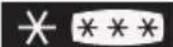 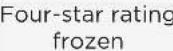 | x≤-18 | With freezing capacity, fast freezing speed, can quickly freeze and store food. Suitable for frozen fresh food such as seafood (fish, shrimp, shellfish), freshwater aquatic products and meat products. Recommended for 3 - 6 months, the longer the storage time, the worse the taste and nutrition. |
| 3 | 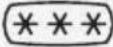 Three-star rating frozen Three-star rating frozen | x≤-18 | With freezing capacity. Suitable for frozen fresh food such as seafood (fish, shrimp, shellfish), freshwater aquatic products and meat products. Recommended no more than 3 months. |
| 4 |  Two-star rating frozen Two-star rating frozen | x≤-12 | Only suitable for medium-term storage of already frozen food, e.g. ice cream. Recommended no more than 1 month. |
| 5 | [###]One-star rating frozen | x≤-6 | Only suitable for refrigeration, and short-term storage of small quantities of already frozen food. Recommended no more than 1 week. |
| 6 0-star -6 | ≤x≤0 | Fresh pork, beef, fish, chicken, some packaged processed foods, etc. (Recommended to eat within the same day, preferably no more than 3 days).Partially encapsulated processed foods (non-freezable foods). | |
| 7 Chill -2 | ≤x≤+3 | Fresh/frozen pork, beef, chicken, freshwater aquatic products, etc. (7 days below 0°C and above 0°C is recommended for consumption within that day, preferably no more than 2 days). Seafood less than 0 for 15 days, it is not recommended to store above 0°C. | |
| 8 Fresh food 0 | ≤x≤+4 | Fresh pork, beef, fish, chicken, cooked food, etc. (Recommended to eat within the same day, preferably no more than 3 days) | |
| 9 Wine +5 | ≤x≤+20 | Red wine, white wine, sparkling wine, etc. | |

ATTENTION
Please store different foods according to the compartments or target storage temperature of your purchased.
CLEANING AND MAINTENANCE
Defrosting
- The refrigerator is made based on the air-cooling principle and thus has automatic defrosting function. Frost formed due to change of season or temperature may also be manually removed by disconnection of the appliance from power supply or by wiping with a dry towel.
Cleaning of the door tray
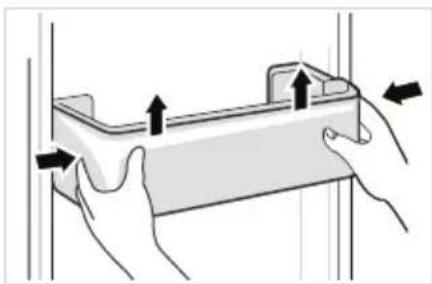
- According to the direction arrow in the figure below, use both hands to squeeze the tray, and push it upward, then you can take it out.
• After washing the tray having been taken out, you can adjust its installing height in accordance with your requirement.
natural_image
Illustration of hands holding a rectangular object with arrows indicating movement or force (no text or symbols)Cleaning of the glass shelf
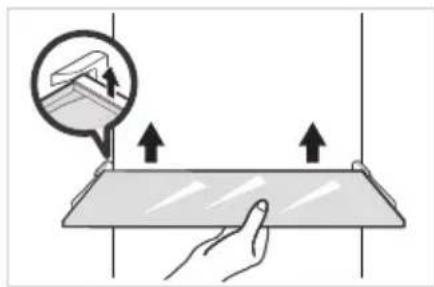
- As the innermost part of the refrigerator liner where contacting the shelves has a backstop, you shall raise the shelves upward, then you can be able to take it out.
- Adjust or clean the shelves according to your requirement.
natural_image
Illustration of a hand interacting with a flat surface, showing upward arrows and a magnified inset of a device (no text or symbols)Cleaning of the Fruits and vegetables box
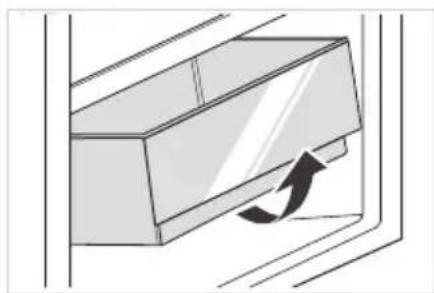
- Remove the contents of the box. Hold the handle of the box and pull it out completely until it stops.
- Lift the box up and remove it by pulling it out.
natural_image
Diagram of a door handle with an arrow indicating clockwise motion (no text or symbols)
Power failure:
In case of power failure, even if it is in summer, foods inside the appliance can be kept for several hours; during the power failure, the times of door opening shall be reduced, and no more fresh food shall be put into the appliance.
Long-time nonuse:
The appliance shall be unplugged and then cleaned; then the doors are left open to prevent odor.
Moving:
Before the refrigerator is moved, take all objects inside out, fix the glass partitions, vegetable holder, freezing chamber drawers and etc. with tape, and tighten the leveling feet; close the doors and seal them with tape. During moving, the appliance shall not be laid upside down or horizontally, or be vibrated; the inclination during movement shall be no more than 45^ .

CAUTION
The appliance shall run continuously once it is started. Generally, the operation of the appliance shall not be interrupted; otherwise the service life may be impaired. Foods can be preserved for a couple of hours even in summer in case of power failure; it is recommended to reduce the frequency of opening door.
TROUBLESHOOTING
The following simple issues can be handled by the user. Please call the after-sale service department if the issues are not solved.
| Problem Possible reason | |
| Failed operation | ·Check whether the appliance is connected to power or whether the plug is in well contact |
| ·Check whether the voltage is too low | |
| ·Check whether there is a power failure or partial circuits have tripped | |
| Odor | ·Odorous foods shall be tightly wrapped |
| ·Check whether there is any rotten food | |
| ·Clean the inside of the refrigerator | |
| Long-time operation of the compressor | ·Long operation of the refrigerator is normal in summer |
| ·when the ambient temperature is high It is not suggestible having too much food in the appliance at the same time | |
| ·Food shall get cool before being put into the appliance | |
| ·The doors are opened too frequently | |
| Light fails to get lit | ·Check whether the refrigerator is connected to power supply and whether the illuminating light is damaged |
| ·Have the light replaced by a specialist | |
| Door can not be properly closed | ·The door is stuck by food packages Too much food is placed |
| ·The refrigerator is tiltedr. | |
| Loud noises | ·Check whether the floor is level and whether the refrigerator is placed stably |
| ·Check whether accessories are placed at proper locations | |


| Problem Possible reason | |
| Door seal fails to be tight | Remove foreign matters on the door seal. |
| Heat the door seal and then cool it for restoration (or blow it with an electrical drier or use a hot towel for heating). | |
| Water pan overflows | There is too much food in the chamber or food stored contains too much water, resulting in heavy defrosting. |
| The doors are not closed properly, resulting in frosting due to entry of air and increased water due to defrosting. | |
| Hot housing | Heat dissipation of the built-in condenser via the housing, which is normal. When housing becomes hot due to high ambient temperature, storage of too much food or shutdown of the compressor is shut down, provide sound ventilation to facilitate heat dissipation |
| Surface condensation | Condensation on the exterior surface and door seals of the refrigerator is normal when the ambient humidity is too high. Just wipe the condensate with a clean towel. |
| Abnormal noise | Buzz: The compressor may produce buzzes during operation, and the buzzes are loud particularly upon start or stop. This is normal. |
| Creak: Refrigerant flowing inside of the appliance may produce creak, which is normal. | |
Defrosting interval claim
| Environmental temperature | Interval between two defrosting cycles | Time | Specific conditions |
| 32°C | Minimum two defrosting intervals (△ td-min) | 12h | Heavy use, frequent opening of doors |
| Maximum two defrosting intervals (△ td-max) | 96h | Under low humidity conditions, there is no door opening action and no special mode is set |
APPENDIX
Special for new European standard
The ordered parts in the following table can be acquired from Service provider channel
| Ordered part Provided by Minimum time required for Provision | ||
| Thermostats | Professional maintenance personnel | At least 7 years after the last model is launched on the market |
| Temperature sensors | Professional maintenance personnel | At least 7 years after the last model is launched on the market |
| Printed circuit boards | Professional maintenance personnel | At least 7 years after the last model is launched on the market |
| Light sources | Professional maintenance personnel | At least 7 years after the last model is launched on the market |
| Door handles | Professional repairers and final users | At least 7 years after the last model is launched on the market |
| Door hinges | Professional repairers and final users | At least 7 years after the last model is launched on the market |
| Trays | Professional repairers and final users | At least 7 years after the last model is launched on the market |
| Baskets | Professional repairers and final users | At least 7 years after the last model is launched on the market |
| Door gaskets | Professional repairers and final users | At least 10 years after the last model is launched on the market |
Dear customer
- If you want to return or replace the product, please contact the store where you buy.
(Remember to bring the purchase invoice)
- If your product breaks down which needs to repair, please contact after-sales service provider.

ATTENTION
The model information in the product database, as well as the model identifier, can be obtained througha weblink scanned by a QR code, if any, on the energy efficiency label of the product.
For more information about the energy efficiency of the appliance, visit https://ec.europa.eu and search using the model name.
The model name can be found on the rating label of the appliance.
Coldest zone in the refrigerator
OPTIONAL: OK-temperature indicator
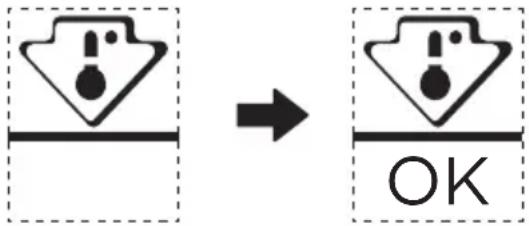
- The OK-temperature indicator can be used to determine temperatures below +4°C. Gradually reduce the temperature if the sign does not indicate "OK".
text_image
Diagram showing a process step with warning symbols and an 'OK' label, indicating completion or completion.- To ensure the temperature in this area, do not change the positioning of the shelf. Inforced air refrigerators (equipped with a fan or No Frost models), the symbol of the coldest zone is not represented because the temperature inside is homogeneous.
Temperature indicator setting
- To help you set your refrigerator well, it is equipped with a temperature indicator that will monitor the average temperature in the coldest zone.
- WARNING: This indicator is intended to work only with your refrigerator, do not use it in another refrigerator (in fact, the coldest zone is not the same), or for any other use.
Checking the temperature in the coldest zone
- With the temperature indicator, you can check regularly that the temperature of the coldest zone is correct. Indeed, the internal temperature of the refrigerator depends on several factors such as the ambient temperature of the room, the amount of food stored and the frequency of door opening. Take these factors into consideration when setting the device.
- When the indicator shows "OK", this means that your thermostat is well adjusted and the internal temperature correct.
- If the indicator of temperature turns WHITE, this means that the temperature is too high; in this case, increase the refrigerator temperature control setting and wait for 12 hours before performing a new visual inspection of the indicator. When fresh food has been introduced or the door has been left open, it is possible for the indicator of temperature to turn WHITE after a while.

text_image
Mideamake yourself at home