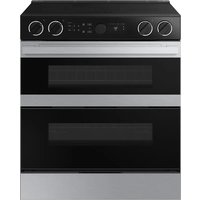
NSG6DG8100SR - Cooker SAMSUNG - Free user manual and instructions
Find the device manual for free NSG6DG8100SR SAMSUNG in PDF.


User questions about NSG6DG8100SR SAMSUNG
0 question about this device. Answer the ones you know or ask your own.
Ask a new question about this device
Download the instructions for your Cooker in PDF format for free! Find your manual NSG6DG8100SR - SAMSUNG and take your electronic device back in hand. On this page are published all the documents necessary for the use of your device. NSG6DG8100SR by SAMSUNG.
USER MANUAL NSG6DG8100SR SAMSUNG
Never Operate the Top Surface Cooking Section of this Appliance Unattended.
- Failure to follow this warning statement could result in fire, explosion, or burn hazard that could cause property damage, personal injury, or death.
- If a fire should occur, keep away from the appliance and immediately call your fire department.
DO NOT ATTEMPT TO EXTINGUISH AN OIL/GREASE FIRE WITH WATER.
WARNING: If the information in this manual is not followed exactly, a fire or explosion may result causing property damage, personal injury, or death.
- DO NOT store or use gasoline or other flammable vapors and liquids in the vicinity of this or any other appliance.
• WHAT TO DO IF YOU SMELL GAS: - DO NOT try to light any appliance.
- DO NOT touch any electrical switch.
- DO NOT use any phone in your building.
- Immediately call your gas supplier from a neighbor's phone. Follow the gas supplier's instructions.
- If you cannot reach your gas supplier, call the fire department.
- Installation and service must be performed by a qualified installer, service agency, or the gas supplier.
ANTI-TIP DEVICE
WARNING: To reduce the risk of tipping the range, the range must be secured by a properly installed Anti-Tip device. AFTER THE RANGE HAS BEEN INSTALLED, CONFIRM THAT THE ANTI-TIP DEVICE HAS BEEN PROPERLY INSTALLED AND VERIFY THAT THE ANTI-TIP DEVICE IS PROPERLY ENGAGED. Refer to the installation manual for instructions.
a) If the Anti-Tip device is not installed, a child or adult can tip the range and be killed.
b) Verify the Anti-Tip device has been properly installed and engaged at right rear (or left rear) of the range bottom.
c) If you move the range and then move it back into place, ensure the Anti-Tip device is re-engaged at the right or left rear of the range bottom.
d) Do not operate the range without the Anti-Tip device in place and engaged.
e) Failure to do so can result in death or serious burns to children or adults.
Regulatory Notice


WARNING
Do not step, lean, or sit on the oven door of the range. You can cause the range to tip, resulting in burns or serious injuries.
Confirm that the Anti-Tip device is installed properly. Then, to verify that the Anti-Tip device is engaged, grasp the top rear edge of the range and carefully attempt to tilt it forward. The Anti-Tip device should prevent the range from tilting forward more than a few inches.
If you pull the range out from the wall for any reason, make sure the Anti-Tip device is properly engaged when you push the range back against the wall. If it is not, there is a risk of the range tipping over and causing injury if you or a child stand, sit, or lean on an open door.
Never completely remove the leveling legs. If you remove the leveling legs, the range will not be secured by the Anti-Tip device properly.
Radio Apparatus Notice
CAUTION
Any changes or modifications not expressly approved by the party responsible for compliance could void the user's authority to operate the equipment.
The remote enable equipment installed on this product complies with Part 15 of FCC Rules and Innovation, Science and Economic Development Canada's license-exempt RSS(s). Operation is Subject to following two conditions:
1) This equipment may not cause harmful interference, and
2) This equipment must accept any interference received including interference that cause undesired operation.
For products available in the US/Canadian markets, only channels 1\~11 are available. You cannot select any other channels.
Regulatory Notice
Radio Apparatus STATEMENT:
This equipment has been tested and found to comply within the limits for a Class B digital device, pursuant to part 15 of the FCC Rules and Canadian ICES-003. These limits are designed to provide reasonable protection against harmful interference in a residential installation.
This equipment generates, uses, and can radiate radio frequency energy and, if not installed and used in accordance with the instructions, may cause harmful interference to radio communications. However, there is no guarantee that interference will not occur in a particular installation. If this equipment does cause harmful interference to radio or television reception, which can be determined by turning the equipment off and on, the user is encouraged to try to correct the interference by one or more of the following measures:
- Reorienting or relocating the receiving antenna
- Increasing the separation between the equipment and receiver
- Connecting the equipment to an outlet that is on a different circuit than the radio or TV
- Consulting the dealer or an experienced radio/TV technician for help.
Key features
RADIATION EXPOSURE STATEMENT:
This equipment complies with FCC and IC RSS-102 radiation exposure limits set forth for an uncontrolled environment. This equipment should be installed and operated so there is at least 8 inches (20 cm) between the radiator and your body. This device and its antenna(s) must not be co-located or operated in conjunction with any other antenna or transmitter.
Bigger is better
With a capacity of 6.0 cubic feet, this Samsung gas oven range offers more space than many other leading brands in the United States and Canadian markets. The enhanced capacity means a better cooking experience.
A cooktop with 5 burners
Power burners, simmer burners, as well as a center oval burner provide flexible cooktop heat for a variety of cookware. The center oval burner delivers heat evenly over a large area, and provides the optimum temperatures for griddle cooking.
Enhanced convenience with easy maintenance
The Samsung gas oven range combines all the benefits of 3 separate home appliances - a gas range, a gas oven, and a storage drawer - to maximize customer convenience with its careful, stylish design.
Contents
Important safety information 7
Read all instructions before using this appliance 7
Symbols used in this manual 7
California Proposition 65 Warning 7
Commonwealth of Massachusetts 7
General safety 7
Fire safety 8
Gas safety 9
Electrical and grounding safety 9
Installation safety 10
Location safety 10
Cooktop safety 11
Oven safety 12
Storage drawer safety 13
Self-cleaning oven safety 13
Overview 14
Layout 14
What's included 14
Control panel 15
Before you start 15
Clock 15
Oven vent/cooling vent 16
Cooktop 16
Ignition 17
Cookware 18
Gas oven 19
Using the oven racks 20
Cooking mode 21
Recipe guide 23
Cooking options 23
Timer 23
Special features 25
Changing settings 27
Smart control 30
Voice control 31
Maintenance 32
Cleaning 32
Self-cleaning 37
Replacing the oven light 39
Removing and reinstalling the oven door 39
Troubleshooting 41
Checkpoints 41
Information codes 46
Warranty (U.S.A) 47
Warranty (CANADA) 49
Appendix 51
Open Source Announcement 51
Important safety information
Read all instructions before using this appliance
- All electrical and gas equipment with moving parts can be dangerous. Please read the important safety instructions for this appliance in this manual. The instructions must be followed to minimize the risk of injury, death, or property damage.
- Save this manual. Please Do Not Discard.
Symbols used in this manual
WARNING
Hazards or unsafe practices that may result in severe personal injury or death.
CAUTION
Hazards or unsafe practices that may result in electric shock, personal injury, or property damage.
NOTE
Useful tips and instructions.
These warning icons and symbols are here to prevent injury to you and others. Please follow them explicitly. After reading this section, keep it in a safe place for future reference.
California Proposition 65 Warning
WARNING
Cancer and Reproductive Harm - www.P65Warnings.ca.gov
Commonwealth of Massachusetts
This product must be installed by a licensed plumber or gas fitter qualified or licensed by the State of Massachusetts. When using ball-type gas shut-off valves, you must use the T-handle type. Multiple flexible gas lines must not be connected in series.
General safety
WARNING
To reduce the risk of fire, electric shock, personal injuries, and/or death, observe the following precautions.
natural_image
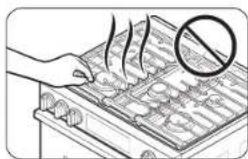
Illustration of a hand holding a tray with food items, no text or symbols present- Do not touch any part of the range, including but not limited to, oven burners, surface burners, or interior surfaces during or immediately after cooking.
-
Know the location of the gas shut-off valve and how to shut it off.
-
Make sure the Anti-Tip device is properly installed on the range. See the installation instructions for more information.
- Do not let children near the range. Do not let children go into the range or onto the range. Do not let children play with the range or any part(s) of the range. Do not leave children unattended in an area where the range is in use. For children's safety, we recommend utilizing the control/door lockout feature.
- Remove all packaging materials from the range before operating to prevent ignition of these materials. Keep all packaging materials out of children's reach. Properly dispose the packaging materials after the range is unpacked.
- Do not store any object of interest to children on the cooktop or backguard of the range. Children climbing on the range to reach items could be killed or seriously injured.
- Do not operate the range if the range or any part of the range is damaged, malfunctioning, or missing parts.
- Do not use the range as a space heater. Use the range for cooking only.
- Do not use oven cleaners or oven liners in or around any part of the oven.
- Use only dry pot holders. Pot holders with moisture in them can release steam and cause burns if they come in contact with hot surfaces. Keep pot holders away from open flames when lifting cookware. Never use a towel or bulky cloth in place of a pot holder.
- Do not use the range to heat unopened food containers.
- Do not strike the oven glass.
Important safety information
- When disposing of the range, cut off the power cord and remove the door to prevent children and animals from getting trapped.
- Unplug or disconnect power before servicing.
- Make sure all meat and poultry is cooked thoroughly. Meat should always be cooked to an internal temperature of 160 °F (71 °C). Poultry should always be cooked to an internal temperature of 180 °F (82 °C).
- Do not make any attempt to operate the electric ignition oven during an electrical power failure.
- Keep the appliance area clear and free of combustible materials, gasoline, and other flammable vapors and liquids.
- Teach children not to touch or play with the controls or any part of the range. We recommend you utilize the control / door lockout feature to reduce the risk of misuse by children.
- Do not lean on the range as you may turn the control knobs inattentively.
- Do not stand on top of the appliance or place objects (such as laundry, an oven cover, lighted candles, lighted cigarettes, dishes, chemicals, metal objects, etc.) on the appliance.
- Items, such as a cloth, may get caught in the door.
- This may result in electric shock, fire, problems with the product, or injury.
• Take care not to hurt yourself when cleaning the appliance (externally or internally). You may hurt yourself on the sharp edges of the appliance. - The range can get hot while in use, so for safety reasons, children or people who are not good at handling should not use it alone.
- If a pet touches the operator, the product may operate unintentionally, so be careful not to allow the pet to access the product.
Fire safety
WARNING
To reduce the risk of fire, electric shock, personal injuries, and/or death, observe the following precautions.
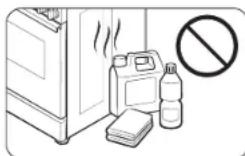
- Do not store, place or use flammable or combustible materials such as charcoal, paper, plastic, pot holders, linens, curtains, gasoline or other flammable vapors or liquids near or inside the range.
- Do not wear loose fitting or hanging garments while using the range.
• To avoid grease buildup, regularly clean the vents.
- Do not let pot holders or other flammable materials touch a heating element. Do not use a towel or other bulky cloths in place of a pot holder.
- Do not use water on a grease fire. To put out a grease fire, turn off the heat source and smother the fire with a tight-fitting lid or use a multipurpose dry chemical or foam-type fire extinguisher.
- If a grease fire should occur in the oven, turn off the oven by pressing the Stop/Clear pad. Keep the oven door closed until the fire goes out. If necessary, use a multipurpose dry chemical or foam-type fire extinguisher.
- Do not heat unopened food containers. The buildup of pressure may cause the containers to burst and result in injury.
- NEVER use this appliance as a space heater to heat or warm the room. Doing so may result in carbon monoxide poisoning and overheating of the oven. Do not use the oven for storage. Paper and other flammable items stored in the oven can ignite.
- Do not leave items such as paper, cooking utensils or food in the oven when not in use. Items stored in an oven can ignite.
- Do not put any combustible material or items around the range.
Gas safety
WARNING
To reduce the risk of fire, electric shock, personal injuries, and/or death, observe the following precautions.
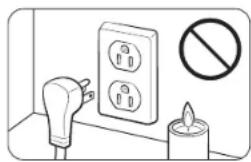
If you smell gas:
- Close the valve and do not use the range.
- Do not light a match, candle, or cigarette.
- Do not turn on any gas or electric appliances.
natural_image
Illustration of a lighting fixture next to an electrical outlet with a no-smoking symbol (no text or labels)- Do not touch any electrical switches or plug a power cord into an outlet.
- Do not use any phone in your building.
- Evacuate the room, building, or area of all occupants.
- Immediately call your gas supplier from a neighbor's phone. Follow the gas supplier's instructions.
- If you cannot reach your gas supplier, call the fire department.
Checking for gas leaks
Leak testing of the appliance must be conducted according to the manufacturer's instructions. Do not use a flame to check for gas leaks. Use a brush to spread a soapy water mixture around the area you are checking. If there is a gas leak, you will see small bubbles in the soapy water mixture at the leak point.
Electrical and grounding safety
WARNING
To reduce the risk of fire, electric shock, personal injuries, and/or death, observe the following precautions.
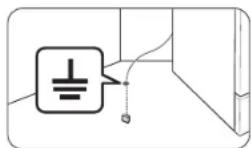
- Plug the range into a grounded 3-prong outlet.
- Do not remove the ground prong.
- Do not use an adapter or an extension cord.
- Do not use a damaged power plug, power cord, or loose power outlet.
-
Do not modify the power plug, power cord, or power outlet in any way.
-
Do not put a fuse in a neutral or ground circuit.
- Use a dedicated 120-volt, 60-Hz, 20-amp, AC electrical circuit with a time-delay fuse or circuit breaker for this range. Do not plug more than one appliance into this circuit.
- Do not connect the ground wire to plastic plumbing lines, gas lines, or hot water pipes.
- This range must be Earth grounded. In the event of a malfunction or breakdown, grounding will reduce the risk of electrical shock by providing a path for the electric current. This range is equipped with a cord having a grounding plug. The plug must be firmly plugged into an outlet that is properly installed and grounded in accordance with the local codes and ordinances. If you are unsure whether your electrical outlet is properly grounded, have it checked by a licensed electrician.
- The range is supplied with a 3-pronged grounded plug. This cord must be plugged into a mating, grounded 3-prong outlet that meets all local codes and ordinances. If codes permit the use of a separate ground wire, we recommend that a qualified electrician determine the proper path for this ground wire.
- Electrical service to the range must conform to local codes. Barring local codes, it should meet the latest ANSI/NFPA No. 70 – Latest Revision (for the U.S.) or the Canadian Electrical Code CSA C22.1 – Latest Revisions.
- It is the personal responsibility of the range owner to provide the correct electrical service for this range.
Important safety information
Installation safety
WARNING
To reduce the risk of fire, electric shock, personal injuries, and/or death, observe the following precautions.
natural_image
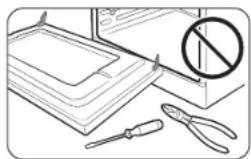
Illustration of office supplies including a computer, documents, and tools (no text or symbols)- Have your range installed and properly grounded by a qualified installer, in accordance with the installation instructions. Any adjustment and service should be performed only by qualified gas range installers or service technicians.
- Do not attempt to service, modify, or replace your range or any part of your range unless it is specifically recommended in this manual. All other service should be referred to a qualified technician.
- Always use new flexible connectors when installing a gas appliance. Do not use old flexible connectors.
- Make sure the Anti-Tip device is properly installed on the range. See the installation instructions for more information.
- Due to the size and weight of the range, have two or more people move the range.
- Remove all tape and packaging materials.
- Remove all accessories from the cooktop, oven, and/or lower drawer. Grates and griddles are heavy. Use caution when handling them.
- Make sure no parts came loose during shipping. Do not install in an area exposed to dripping water or outside weather conditions.
- Make sure your range is correctly installed and adjusted by a qualified service technician or installer for the type of gas (natural or LP) you will use. For your range to utilize LP gas, the installer must replace the 5 surface burner orifices and 2 oven orifices with the provided LP orifice set, and reverse the GPR adapter. These adjustments must be made by a qualified service technician in accordance with the manufacturer's instructions and all codes and requirements of the authority having jurisdiction. The qualified agency performing this work assumes the gas conversion responsibility.
- Installation of this range must conform with local codes or, in the absence of local codes, with the National Fuel Gas Code, ANSI Z223.1/NFPA.54, latest edition. In Canada, installation must conform with the current Natural Gas Installation Code, CAN/CGA-B149.1, or the current Propane Installation Code, CAN/CGA-B149.2, and with local codes where applicable. This range has been design-certified by ETL according to ANSI Z21.1, latest edition, and Canadian Gas Association according to CAN/CGA-1.1, latest edition.
Location safety
WARNING
To reduce the risk of fire, electric shock, personal injuries, and/or death, observe the following precautions.
natural_image
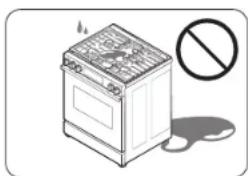
Illustration of a kitchen stove with a smokestack and a prohibition symbol (no text or labels)- This range is for indoor, household use only. Do not install the range in areas exposed to the weather and/or water. - Do not install the range in a place which is exposed to a strong draft. - Select a level, well-constructed floor that can support the range's weight. Synthetic flooring, such as linoleum, must withstand 180 °F (82 °C) temperatures without shrinking, warping, or discoloring. Do not install the range directly over interior kitchen carpeting unless a sheet of 14 inch plywood or a similar insulator is placed between the range and carpeting.
- Select a location where a grounded, 3-prong outlet is easily accessible.
- If the range is located near a window, do not hang long curtains or paper blinds on that window.
-
Do not block or cover the vents (air openings) located at the rear of the range and at the top and bottom of the door. The vents allow for air circulation that is necessary for the range to operate properly with correct combustion. Blocking or covering the vents may cause incorrect combustion which could result in gas leaks and fire.
-
Make sure the wall coverings around the range can withstand heat up to 200 °F (93 °C) generated by the range.
- Cabinet storage above the surface of the range should be avoided. If cabinet storage above the range is necessary, allow a minimum clearance of 40 inches (102 cm) between the cooking surface and the bottom of the cabinets or install a range hood that projects horizontally a minimum of 5 inches (12.7 cm) beyond the bottom of the cabinets.
- Locate the range out of kitchen traffic paths and drafty locations to prevent poor air circulation.
- If the range is located near a window, NEVER hang long curtains or paper blinds on that window. They could blow over the surface burners and ignite, causing a fire hazard.
Cooktop safety
WARNING
To reduce the risk of fire, electric shock, personal injuries, and/or death, observe the following precautions.
natural_image
Diagram of a battery pack with no visible text or symbols, featuring a prohibition symbol (no text or labels)- Make sure all burners are off when you are not using the range.
-
Do not use aluminium foil to line the grates or any part of the cooktop. This can cause carbon monoxide poisoning. Aluminum foil linings may also trap heat, causing a fire hazard. Do not leave burners unattended on medium or high heat settings.
-
Before igniting the burners, make sure all burner caps are properly in place and all burners are level.
- If you set and use the knob button of safety knob, the original safety function does not work normally.
-
Always use the Lite position when igniting the burners and make sure the burners have ignited. If ignition fails, turn the knob to Off and wait until the gas has dissipated.
-
When you set a burner to simmer, do not turn the knob quickly. Make sure the flame stays on.
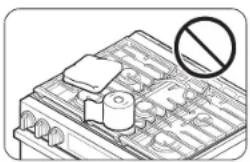
- Do not place any objects other than cookware on the cooktop.
- This cooktop is designed for use with a wok or wok ring attachment.
- To flame food, you must have a ventilation hood. When you flame food, the hood must be on.
- Before removing or changing cookware, turn off the burners.
- Remove food and cookware immediately after cooking.
- Before removing any parts of the burner for cleaning, make sure the range is off and completely cool.
• After cleaning the burner head, make sure it is completely dry before reassembling. - Make sure the spark mark on the dual burner head is placed beside the electrode when it is assembled.
- To avoid carbon monoxide poisoning, do not pour water into the cooktop well while cleaning.
- Select cookware that is designed for range top cooking. Use cookware that is large enough to cover the burner grates. Adjust the burner flames so that the flames do not extend beyond the bottom of the cookware.
- To avoid cookware discoloration, deformity, and/or carbon monoxide poisoning, do not use cookware that is substantially larger than the grate.
- Make sure cookware handles are turned to the side or rear of the cooktop, but not over other surface burners.
- Stand away from the range while frying.
- Always heat frying oils slowly, and watch as they heat. If you are frying foods at high heat, carefully watch during the cooking process. If you are going to use a combination of fats or oils when frying, mix them together before heating.
- Use a deep-fryer thermometer whenever possible. This prevents overheating the fryer beyond the smoking point.
- Use a minimum amount of oil when shallow pan-frying or deep-frying. Avoid cooking unthawed food or food with excessive amounts of ice.
- Before moving cookware full of fats or oils, make sure it has completely cooled.
Important safety information
• To prevent delayed eruptive boiling, always allow heated liquids to stand at least 20 seconds after you have turned off the burner so that the temperature in the liquid can stabilize. In the event of scalding, follow these first aid instructions:
- Immerse the scalded area in cool or lukewarm water for at least 10 minutes.
- Do not apply any creams, oils, or lotions.
- Cover with a clean, dry cloth.
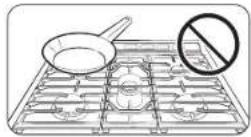
- Place pots in the center of the grate. Do not place a pot larger than 9^ in diameter on the rear burners. If you place an oversized pot in the wrong position, it might disrupt necessary air circulation and make the flame on the burner sputter and burn inefficiently.
- Do not wear loose or hanging garments when using the range. They could ignite and burn you if they touch a surface burner.
- Do not leave plastic items on top of the range. Hot air from the vents on top of the range can melt the plastic and may cause pressure build-up in closed plastic containers. The melted plastic may clog the vents at the rear of the range. Clogged vents may cause incorrect combustion which could result in gas leaks and fire. And you may get severe burns if you touch the surfaces near the vent while the oven is operating.
- Do not place portable appliances, or any other object other than cookware on the cooktop. Damage or fire could occur if the cooktop is hot.
• Always make sure foods being fried are thawed and dry. Moisture of any kind can cause hot fat to bubble up and over the sides of the pan.
• Always make sure the controls are off and the grates are cool before you remove them to prevent any possibility of being burned. - Do not put any combustible material or items around the range.
• Take care that your hands do not touch the burners when they are on. Turn off the burners when you change a pan or pot.
• To warm liquid, such as sauces, stir it while warming. - Opening a window or turning on a ventilation fan or hood is recommended when using the cooktop.
Oven safety
WARNING
To reduce the risk of fire, electric shock, personal injuries, and/or death, observe the following precautions.

- Do not use the oven for non-cooking purposes such as drying clothes or storage. Use the oven for cooking only.
- Make sure the inner portion of the split oven-rack is in the proper position within the outer rack.
- Make sure the oven racks are placed on the same level on each side.
-
Do not damage, move, or clean the door gasket.
-
Do not spray water on the oven glass while the oven is on or just after you have turned it off.
- Do not use aluminium foil or foil liners anywhere in the oven. Do not use aluminium foil or similar material to cover any holes or passages in the oven bottom or to cover an oven rack. This can cause carbon monoxide poisoning. Aluminum foil linings may also trap heat, causing a fire hazard.
- Stand away from the oven when opening the oven door.
- Keep the oven free from grease buildup.
- When repositioning the oven racks, make sure the oven is completely cool.
- Only use cookware that is recommended for use in gas ovens.
- To avoid damaging the burner control knobs, always bake and/or broil with the oven door closed.
- Do not broil meat too close to the burner flame. Trim excess fat from meat before cooking.
- When using cooking or roasting bags in the oven, follow the manufacturer's directions.
- NEVER cover any slots, holes, or passages in the oven bottom or cover an entire rack with material, such as aluminum foil. Doing so blocks air flow through the oven and may cause carbon monoxide poisoning. Aluminum foil linings may also trap heat, causing a fire hazard.
- Opening a window or turning on a ventilation fan or hood is recommended when using the oven.
Storage drawer safety
WARNING
To reduce the risk of fire, electric shock, personal injuries, and/or death, observe the following precautions.
natural_image
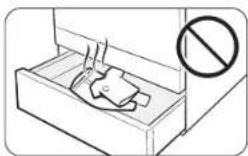
Diagram of a device with a prohibition symbol (no text or labels present)- Do not use the drawer for non-cooking purposes such as drying clothes or storage. Use the drawer for cooking purposes only.
- Do not touch the interior drawer surface or heating element. These surfaces may be hot and could burn you.
• To avoid steam burns, use caution when opening the drawer.
- Do not use aluminium foil to line the drawer.
- Do not put the drawer in the oven. Do not put the drawer in the oven during a self-cleaning cycle.
- Do not leave containers of fat drippings in or near the drawer.
Self-cleaning oven safety
WARNING
To reduce the risk of fire, electric shock, personal injuries, and/or death, observe the following precautions.
natural_image
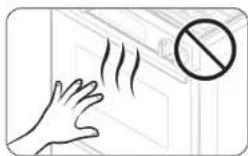
Illustration of a hand reaching toward a window with a prohibition symbol (no text or labels)- The self-cleaning feature operates the oven at temperatures high enough to burn away food soils in the oven. The range is extremely hot during a self-cleaning cycle. Do not touch any surfaces of the range during a self-cleaning cycle.
-
Keep children away from the oven during a self-cleaning cycle.
-
Before starting a self-cleaning cycle, remove all racks, cookware, and utensils from the oven. Only porcelain-coated oven racks may be left in the oven.
- Before starting a self-cleaning cycle, wipe grease and food soils from the oven.
- Do not put the lower drawer into the oven cavity when you run a self-cleaning cycle.
- When opening the door after a self-cleaning cycle, stand away from the oven.
- If the self-cleaning cycle malfunctions, turn off the oven, disconnect the power supply, and contact a qualified service technician.
- Turn off the surface burner while the oven is performing a self cleaning cycle. Self-Clean will not operate if a surface burner is on.
- Opening a window or turning on a ventilation fan or hood is recommended during and after self-cleaning.
Overview
Layout
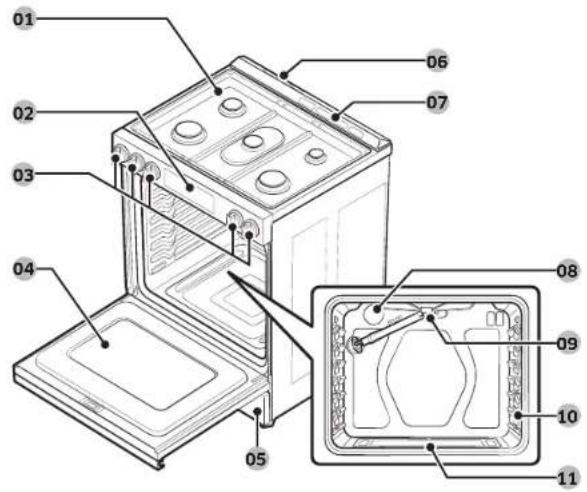
text_image
Labeled diagram of a microwave oven with numbered parts for identification01 Surface burners
02 Control panel
03 Surface burner knobs (5 pcs)
04 Removable oven door
05 Storage drawer
06 Cooling vent
07 Oven vents
08 Oven light
09 Broil oven burner
10 Oven rack system
What's included
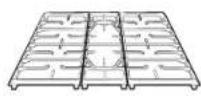
Surface burner
grates (3) *

Surface burners and caps (5)
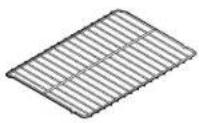
Flat rack (1) *
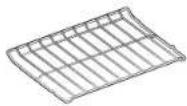
Broil rack (1) *

NOTE
If you need an accessory marked with an asterisk (*), you can buy it from the Samsung Contact Center (1-800-SAMSUNG (726-7864)).
Before you start
Control panel
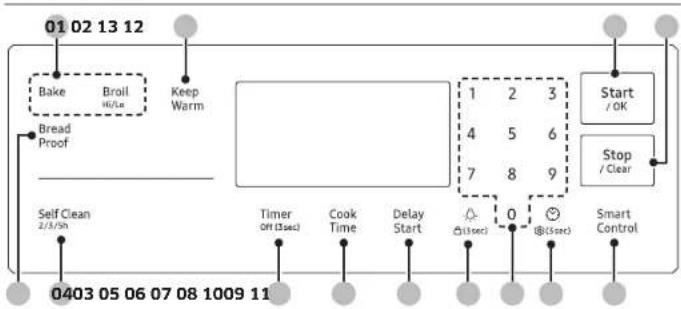
flowchart
graph TD
    A["01 02 13 12"] --> B["Bake"]
    B --> C["Broil Hi/Lo"]
    C --> D["Keep Warm"]
    D --> E["Bread Proof"]
    E --> F["Self Clean 2/3/Sh"]
    F --> G["Timer Off (3sec)"]
    G --> H["Cook Time"]
    H --> I["Delay Start"]
    I --> J["Stop / Clear"]
    J --> K["Start / OK"]
    K --> L["0403 05 06 07 08 1009 11"]
    L --> M["0"]
    M --> N["0"]
    N --> O["0"]
    O --> P["Stop / Clear"]
    P --> Q["Smart Control"]
01 Oven modes: Activates each oven mode (Bake or Broil).
02 Keep Warm: Keep Cooked food warm at lower temperature at 175 °F (80 °C).
03 Bread Proof: Activates the Bread Proof function.
04 Self Clean: Burn off food residues in the oven at very high temperatures.
05 Timer: Activates or deactivates the timer.
06 Cook Time: Set the cooking time.
07 Delay Start: Set the oven to start at a certain time.
08 Oven Light: Turn on/Turn off the oven light.
09 Numbers: Use to set the times, temperatures, or presets.
10 Clock: Set the clock time.
11 Smart Control: Activates the Easy connection.
12 Stop/Clear: Cancel the current operation but not the timer.
13 Start/OK: Start a function or set the time. (Long press to start or set.)
You should know about the following features and components before you use your range for the first time.
Clock
You must set the clock correctly to ensure the automatic features work properly. This product supports two time formats: 12-hour (default) and 24-hour. To change time format, see page 29.
To set the clock time
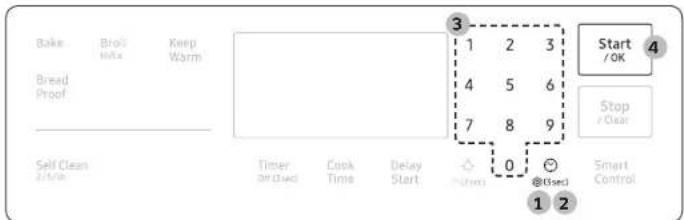
text_image
Bake Bro's Mits Keep Warm Bread Proof Self Clean 2/1/10h Timer On Closed Cook Time Delay Start 3 1 2 3 4 5 6 7 8 9 0 @ Used Start /OK Stop // Clear Smart Control 1 2-
Press
-
To select AM/PM, press @(3sec) again.
-
Enter the current time using the number pad.
-
Press Start/OK to confirm the settings.
NOTE
You can set/change the clock or the kitchen timer before you start a cooking mode or while most cooking modes are operating. However, you cannot set or change the time if a time based function is operating (Time Bake, for example) or the Sabbath option is enabled.
Before you start
Oven vent/cooling vent
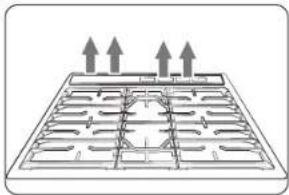
natural_image
Diagram of a grid-like structure with three upward arrows indicating direction (no text or symbols)The Oven/Cooling vents are located at the back of the oven range. Proper air circulation prevents combustion problems and ensures good performance.
- Do not block the vent or its surroundings.
- Use caution when placing items near the vent. Hot steam can cause them to overheat or melt.
Cooktop
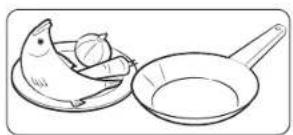
natural_image
Line drawing of a chicken and a pan with food items (no text or symbols)STEP 1
Put all ingredients into a cooking container (pan, pot, etc).
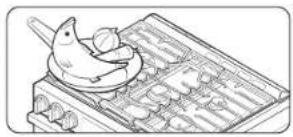
natural_image
Line drawing of a traditional abacus with a dragonfly and wooden tray (no text or symbols)STEP 2
Place the container on a surface burner.
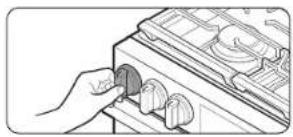
natural_image
Line drawing of a hand inserting a component into a device (no text or symbols)STEP 3
Ignite the surface burner.
Gas burners
text_image
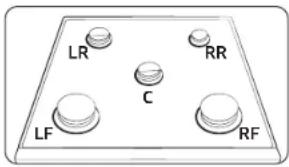
LR RR C LF RFEach burner has a corresponding knob that lets you to set the flame level from Lo to Hi. In addition, each burner knob has a Lite setting. Turning a knob to Lite ignites the corresponding burner. The burner indicators are located above each knob and show which burner the knob controls. Each burner is designed for specific cooking purposes. See the table below.
| Position Purpose Food type Characteristics | |||
| Right Front (RF)17,000 BTU | Power heating Boiling food Maximum output | ||
| Right Rear (RR)5,000 BTU | Low simmering | Chocolate,casseroles, sauces | Delicate food that requires low heat for a long time |
| Center (C)9,500 BTU | General heating/Griddling | General food/Pancakes, fried eggs | General-purpose cooking |
| Left Front (LF)16,000 BTU | Quick heating General | General-purpose cooking | |
| Left Rear (LR)9,500 BTU | General heating/Low simmering | General food,casseroles | General-purpose cooking |
Ignition
CAUTION
text_image
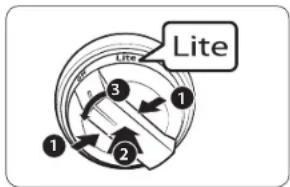
Lite 1 2 3Make sure all surface burners are properly installed. To light a burner:
- Press the button integrated into the knob.
- While pressing the button, push in the control knob and then turn it to the Lite position. You will hear a "Clicking" sound indicating the electronic ignition system is working properly.
- After the surface burner lights, turn the control knob to shift it out of the Lite position and turn off the electronic ignition system.
- Turn the control knob to adjust the flame level.
Manual ignition
If there is a power failure, you can ignite the burner manually. Use caution when doing this.
- Hold a long gas grill lighter to the surface burner you want to light.
- Push in the control knob for that burner, and then turn it to the Lite position. Turn on the grill lighter to ignite the burner.
- After the burner is lit, turn the control knob to adjust the flame level.
Cooktop
Flame level
The flames on the burners should always stay under the cookware, and should not extend beyond the cookware bottom at any time.
WARNING
- Flames larger than the cookware bottom may result in a fire or physical injury.
- When you set a burner to simmer, do not turn the burner knob quickly. Watch the flame to make sure it stays on.
- After turning on a surface burner, make sure that the burner has ignited. Adjust the level of the flame by turning the burner knob.
- Always turn off the surface burner controls before removing cookware. All surface burner controls should be turned off when you are not cooking.
• Always turn the burners off before you go to sleep or go out. - If you smell gas, turn off the gas to the range and call a qualified service technician. NEVER use an open flame to locate a leak.
If you set and use the knob button of safety knob, the original safety function does not work normally.
Cookware
Requirements
- Flat bottom and straight sides.
- Tight-fitting lid.
- Well-balanced with the handle weighing less than the main portion of the pot or pan.
Material characteristics
- Aluminum: An excellent heat conductor. Some types of food may cause the aluminum to darken. However, anodized aluminum cookware resists staining and pitting.
• Copper: An excellent heat conductor but discolors easily. - Stainless steel: A slow heat conductor with uneven cooking performance, but is durable, easy to clean, and resists staining.
- Cast-Iron: A poor conductor but retains heat very well.
- Enamelware: Heating characteristics depend on the base material.
- Glass: A slow heat conductor. Use only glass cookware that is specified for range top cooking or oven use.
Gas oven
text_image
Diagram showing a container with a cross symbol and a prohibition sign, likely illustrating a safety or hazard scenario.Size limitations
CAUTION
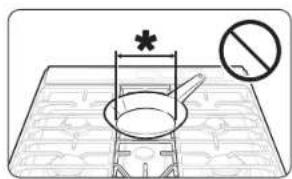
- Do not place a small pan or pot with a bottom diameter of about 6 inches or less on the center grate. This cookware may tip over. Use the rear burners for this small-sized cookware.
-
Do not use an oversized pan. The burner flames may spread out, causing damage nearby.
*: 6 inches or less -
Always make sure cookware handles are turned to the side or rear of the cooktop and not over other surface burners. This will minimize the chance of burns, spillovers, and the ignition of flammable materials that can be caused if pots or pans are bumped accidentally.
- When using glass cookware, make sure it is designed for range top cooking.
- Never leave plastic items on the cooktop. Hot air from the vent can melt or ignite plastic items or cause build up of dangerous pressure in closed plastic containers. You may get severe burns if you touch the surfaces near the vent while the oven is operating.
- Make sure you hold the handle of a wok or a small one-handled pot while cooking.
natural_image
Simple line drawing of a roasted chicken on a plate with a carrot beside it (no text or symbols)STEP 1
Put all ingredients in a heat-safe container.
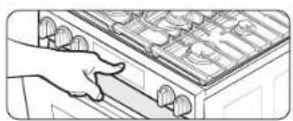
STEP 2
Select a cooking mode, and then start preheating.
natural_image
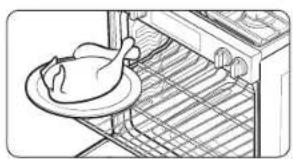
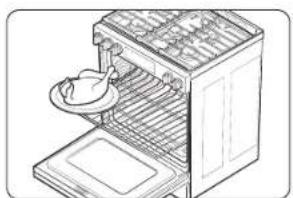
Line drawing of a chicken on an oven with a plate, no text or symbols presentSTEP 3
Place the container on a rack.
natural_image
Line drawing of an open refrigerator with a plate and side door (no text or symbols)STEP 4
Close the door and start cooking.
NOTE
- The cooling fan automatically runs for a certain amount of time after cooking is complete.
- There can be a slight popping sound during oven cooking. This sound may occur during normal oven burner cycling, when the oven burner flame is extinguished.
Gas oven
Using the oven racks
The rack positions
Your oven range comes with 2 racks and 7 rack positions. The rack positions are delineated by rack guides which support the racks. Each rack guide has a stop that prevents the rack from loosening during the oven's operation. Each rack has stoppers that need to be placed correctly on the rack guides. The stoppers prevent the racks from accidentally coming out of the oven completely when you pull the racks out.

text_image
Technical diagram of a device casing with numbered components and a tool interacting with the lid| Type of food Rack position | |
| Broiling hamburgers 6 | |
| Broiling meats or small cuts of poultry, fish | 4 - 5 |
| Bundt cakes, Pound cakes, Frozen pies, casseroles | 3 - 4 |
| Fresh Pizza, Angel food cakes, Small roasts | 2 |
| Turkey, Large roasts, Hams | 1 |
CAUTION
- Do not cover an oven rack with aluminum foil. This will hamper heat circulation, resulting in poor baking.
- Do not place aluminum foil on the oven bottom. The aluminum can melt and damage the oven.
- Arrange the oven racks only when the oven is cool.
- When placing an oven rack in the top-most rack position (position 7), make sure the rack is situated stably on the embossed stop.
NOTE
• The Oven Rack Settings table is for reference only.
- We recommend cooking pizza and pies using the 2nd rack position for crispy bottoms.
Inserting and removing an oven rack
natural_image
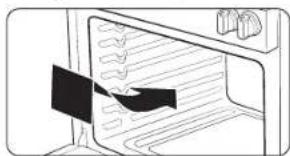
Line drawing of an oven with a black arrow pointing to the interior (no text or symbols)To insert an oven rack
- Place the rear end of the rack on a rack guide.
- Slide the rack into the rack guide while holding the front end of the rack.
natural_image
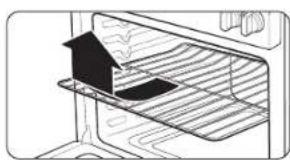
Diagram of a door with a birdhouse and mesh insulation (no text or symbols)To remove an oven rack
- Pull out the rack until it stops.
- Pull up the front end of the rack and remove it from the rack guide.
Rack and Pan placement
text_image
3 or 4Single Oven Rack

natural_image
Two identical grid-like trays with circular cavities, labeled 3 and 5 (no text or symbols on the trays themselves)Multiple Oven Rack
natural_image
Two stacked rectangular trays with circular indentations, labeled 3 and 5 (no text or symbols on the trays themselves)Multiple Oven Rack
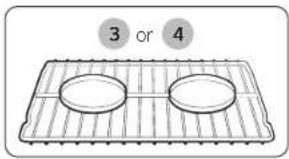
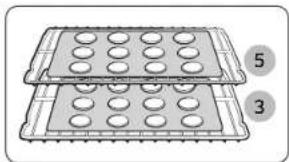
Centering the baking pans in the oven as much as possible will produce better results. If baking with more than 1 pan, place the pans so each has at least 1" to 1½" of air space around it.
When baking on a single oven rack, place the oven rack in position 3 or 4. See the figure on the left.
When baking cakes and cookies on multiple racks, place the oven racks in positions 3 and 5. See the figure on the left.
Using Multiple Oven Racks
| Type of Baking Rack | Positions |
| Cakes 3 and 5 | |
| Cookies 3 and 5 |
Cooking mode
natural_image
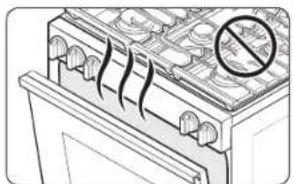
Illustration of a battery cover with no visible text or symbols, featuring a prohibition symbol (no text or labels present)- Make sure to close the door before you start cooking.
- If you leave the door open for 20 - 30 seconds while the oven is in convection baking/roasting, baking, or broiling modes, the oven burner shuts off. To restart the burner, close the door.
Minimum and maximum settings
All the features listed in the table below have minimum and maximum time or temperature settings. A beep will sound each time a pad on the control panel is pressed and the entry is accepted. An error tone will sound in the form of a long beep if the entered temperature or time is below the minimum or above the maximum setting for the feature.
| Feature | Temperature (°F) | |
| Min Max | ||
| Bake 175 550 | ||
| Broil Lo Hi | ||
Gas oven
Baking and roasting
text_image
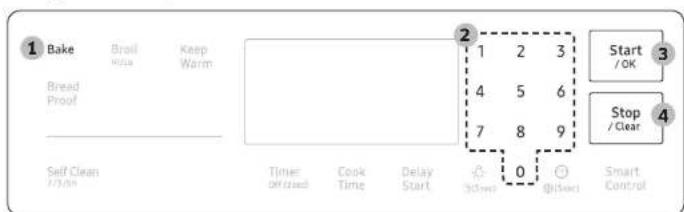
1 Bake Bread Proof Self Clean 2 1 2 3 4 5 6 7 8 9 0 @/box Start /OK Stop /Clear Smart Control1. Press Bake
- If necessary, use the number pad to change the temperature. You can set the oven to any temperature from 175 °F to 550 °F.
3. Press Start/OK.
• The oven preheats until it reaches the temperature you set.
- It will beep when it reaches the set temperature.
- When preheating is complete, place the food in the oven, and then close the door.
- When cooking is complete, press Stop/Clear, and then take out the food.
NOTE
- To change the temperature during cooking, repeat steps 1 through 3 above. - When you have finished cooking, the cooling fan will continue to run until the oven has cooled down.
Broiling
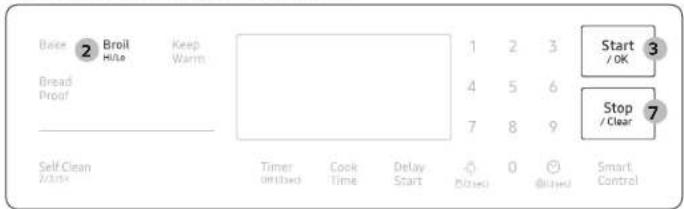
Broiling uses the oven broil burner at the top of the oven to cook and brown food. Meat or fish must be put on a broiling grid in a broiling pan. Preheating for 5 minutes before broiling is recommended.
text_image
Boise 2 Broil Keep Hilo Warm Bread Proof 1 2 3 Start 3 4 5 6 Stop / Clear 7 8 9 Self Clean 7/05x Timer On/Used Cook Time Delay Start Based 0 @/Based Smart Control- Put food on a broiling grid in a broiling pan.
- Press Broil once for Hi temperature broiling or twice for Lo.
- Press Start/OK to start the broiler.
- Let the oven pre-heat for 5 minutes.
- Place the pan on the desired rack, and then close the oven door.
- When one side of the food is browned, turn it over, close the oven door, and start cooking the other side.
- When cooking is complete, press Stop/Clear.
NOTE
• Make sure to close the door before you start cooking.
- Use the low temperature setting for poultry or thick cuts of meat to prevent overbroiling.
- In general, to prevent overbroiling, press Broil to switch from Hi to Lo.
- Use caution when you open the oven door to turn over the food. The air escaping from the oven will be very hot.
- For information about broiler temperatures, rack settings, and cooking times for different foods, see "Broiling guide" on page 23.
- Use the Broil Rack for the best results.
Recipe guide
Broiling guide
NOTE
• This is for reference only.
- Preheating for 5 minutes before broiling is recommended.
- The size, weight, thickness, starting temperature, and your doneness preference will affect broiling times.
• This guide is based on meats at refrigerator temperature.
- If you have covered the meat with aluminum foil and you let it stand covered for 10 minutes after cooking is complete, the internal temperature increases by 5 - 10 °F degrees.
• Use the Broil Rack for the best results.
| Food Doneness Size Thickness | Broil setting | Rack position | Cooking time | ||||
| 1st side 2nd | side | ||||||
| Hamburgers | Medium | 9 patties | 1" | Hi | 6 | 4'30" - 5'30" | 3'30" - 4'30" |
| Beef steak | Medium | 1 pc. | 1" | Hi | 5 | 8'00" - 10'00" | 6'00" - 8'00" |
| Chicken pieces | Well done | 2 - 3 lbs. | 34'' - 1'' | Lo | 4 | 18'00" - 20'00" | 11'00" - 13'00" |
| Salmon Fillets | Well done | 3 - 4 pcs. | 12'' - 34'' | Hi | 5 | 6'00" - 7'00" | 5'00" - 6'00" |
| Pork chops | Well done | 1 - 2 pcs. | 12'' - 34'' | Lo | 4 | 12'00" - 14'00" | 12'00" - 15'00" |
| Lamb chops | Medium | 4 - 6 pcs. | 1" | Hi | 5 | 5'00" - 6'00" | 4'00" - 5'00" |
CAUTION
Make sure to close the door after turning over the food.
Cooking options
CAUTION
Food that can easily spoil, such as milk, eggs, fish, poultry, and meat, should be chilled in a refrigerator before they are placed in the oven. Even when chilled, they should not stand for more than 1 hour before cooking begins and should be removed promptly when cooking is completed.
Timer
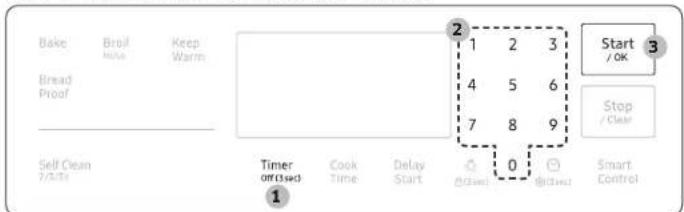
The timer gives you an extra timer you can use to time cooking tasks such as boiling eggs. It does not, however, start or stop any cooking operation. You can set the timer from 1 minute to 9 hours and 59 minutes.
text_image
Bake Bread Proof Keep Warm 1 2 3 4 5 6 7 8 9 Start / OK Stop / Clear Self Clean 7/3/10 Timer OFF closed Cook Time Delay Start 0 @Close @Close Smart Control- Press Timer Off (3sec).
- Enter a desired time using the number pad.
- When done, press Start/OK.
- To cancel the Timer settings, press and hold Timer Off (3sec) for 3 seconds.
- When the set time elapses, the oven beeps and displays the "End" message. Press Timer Off (3sec) to delete the message.
NOTE
To change the set time, press Timer Off (3sec), enter a different time, and then press Start/OK.
Gas oven
Cook Time
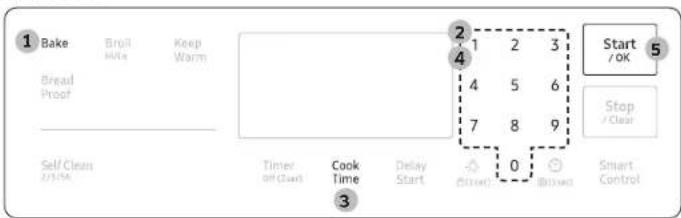
Cook Time sets the oven to cook foods at a set temperature for a set length of time. The oven automatically turns off when it finishes.
Mode: Bake
text_image
1 Bake Bread Proof Self Clean 2 Save 3 Build Keep Warm 4 5 6 7 8 9 Start /OK Stop / Clear Cook Time Delay Start 0 3 (Batch) (Batch) Smart Control- Press Bake
- If necessary, change the temperature using the number pad.
- Press Cook Time.
- Set the cooking time between 1 minute and 9 hours and 59 minutes (9:59) using the number pad.
- Press Start/OK. The oven will automatically turn on and start preheating. The temperature will increase until it reaches the temperature you set. The oven starts cooking for the amount of time you set.
- When preheating is complete, put the container with the food on a rack, and then close the door.
- When the cooking time has elapsed, the oven will automatically shut off and then beep.
NOTE
• To change the programmed cooking time, press Cook Time, enter a different time, and then press Start/OK.
- If necessary, press Keep Warm after setting the cooking time. Then, Keep Warm will start when the cooking time has elapsed.
Delay Start
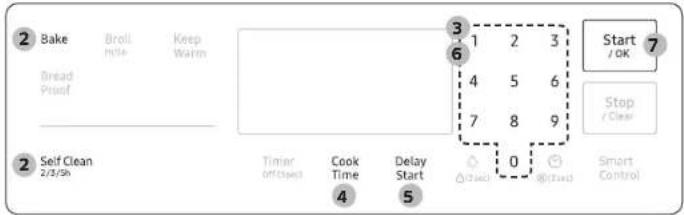
The Delay Start function lets you use the kitchen timer to automatically start and stop another cooking program. You can set Delay Start so that it delays the automatic start of a cooking operation you select by up to 12 hours.
Mode: Bake / Self Clean
text_image
2 Bake Broll Hillie Keep Warm Bread Proof 3 1 2 3 6 4 5 6 7 8 9 Start /OK 7 Stop / Clear 2 Self Clean 2/3/Sh Timer on/Close! Cook Time Delay Start 0 aj/cash Smart Control- Place the container with the food on a rack, and then close the door.
- Press the pad corresponding to a desired cooking mode such as Bake.
- If necessary, change the temperature using the number pad.
- If necessary, press Cook Time and set the cooking time (see "Cook Time" on previous page).
- Press Delay Start to change the time elements (AM/PM).
- Set the starting time using the number pad.
- Press Start/OK
- The oven starts cooking at the set time, and turns off automatically when it completes cooking.
NOTE
To change the starting time, press Delay Start. and enter a new starting time, and then press Start/OK.
Special features
Keep Warm
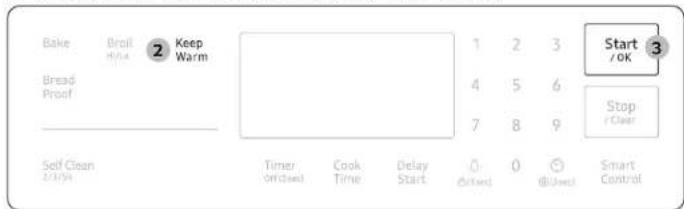
Keep cooked food warm at a low temperature up to 3 hours.
text_image
Bake Broil Style ② Keep Warm Bread Proof 1 2 3 Start 4 5 6 Stop 7 8 9 Clear Self Clean 2/3/04 Timer Off/closed Cook Time Delay Start (Based) 0 (Used) Smart Control- Place the container with the food on a rack, and then close the door.
- Press Keep Warm.
- Press Start/OK. The oven heats up to 175 °F (80 °C).
NOTE
- You can cancel warming at any time by pressing Stop/Clear.
- To set the warming function during a timed cooking, press Keep Warm in timed cooking mode. When the timed cooking is complete, the oven will lower the temperature to the warming default, and keep that temperature until the warming finishes or is canceled.
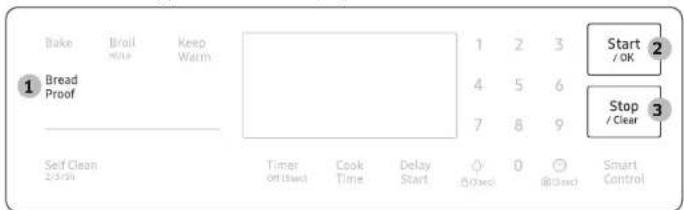
Bread Proof
The Bread Proof function automatically provides the optimum temperature for the bread proof process, and therefore does not have a temperature adjustment. If you press Bread Proof when the oven temperature is above 100 °F. Hot will appear in the display. Because this function produces the best results when started while the oven is cool, we recommend that you wait until the oven has cooled down and Hot disappears from the display.
text_image
Bake Bread Proof Keep Warm 1 2 3 4 5 6 7 8 9 Start /OK Stop /Clear 3 Self Clean 2/shr Timer off (hard) Cook Time Delay Start 0 @(3x3) 0 @(3x3) Smart Control- Press Bread Proof.
- Press Start/OK
- Press Stop/Clear at any time to turn off the Bread Proof function.
NOTE
Use rack position 2 or 3 for bread proofing.
CAUTION
- Do not use Bread Proof when the oven temperature is above 125^ . If the temperature is above 125^ , this mode will not heat the oven to the optimal temperature. Wait until the oven cools down.
- Do not use Bread Proof for warming food. The proofing temperature is not hot enough to keep food warm.
- Place the dough in a heat-safe container on rack position 2 or 3 and cover it with a cloth or with plastic wrap. You may need to anchor the plastic wrap underneath the container so that the oven does not blow it off the dough.
- To avoid lowering the temperature and extending proofing time, do not open the oven door.
Gas oven
The Sabbath Option

(For use on the Jewish Sabbath and Holidays)
Use this option only for baking on the Jewish Sabbath and Holidays. For more information, visit the website at http://www.star-k.org
With the Sabbath option
- The oven temperature can be set higher or lower after you have set this option.
- The display doesn't change and the oven will not beep when you change the temperature.
- Once the oven is properly set for baking with the Sabbath option active, the oven will remain continuously on until the Sabbath feature is cancelled. This will override the factory preset 12 hour energy saving feature.
- If the oven light is needed during the Sabbath, press ☑ before activating the Sabbath feature. Once the oven light is turned on and the Sabbath option is active, the oven light will remain on until the Sabbath option is turned off.
- If you want the oven light off, be sure to turn it off before activating the Sabbath feature.
- Do not use the surface cooktop when the Sabbath option is on.
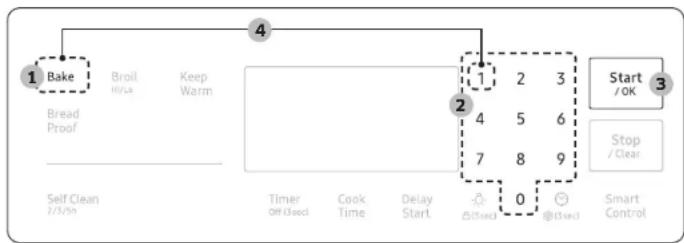
To enable the Sabbath option
flowchart
graph TD
    A["1 Bake"] --> B["Bread Proof"]
    B --> C["Self Clean 2/3/Sh"]
    D["Broil H/La"] --> E["4 Keep Warm"]
    F["Timer Off (sec)"] --> G["2"]
    H["Cook Time"] --> I["4"]
    J["Delay Start"] --> K["7"]
    L["Start /OK"] --> M["3 Stop / Clear"]
    N["@(sec)"] --> O["0 @(sec)"]
    P["@(sec)"] --> Q["9"]
    R["Smart Control"] --> S["0"]
- Press Bake.
-
Enter a desired temperature using the number pad. The default temperature is 350^ F.
-
Press Start/OK. The display temperature changes after the oven temperature reaches 175 °F.
- Press the Bake and Number 1 simultaneously for 3 seconds to display "SAb". Once "SAb" appears, the oven control no longer beeps or displays any further changes.
NOTE
- You can change the oven temperature once baking starts, but the display will not change or beep. After changing the temperature, it takes 15 seconds before the oven recognizes the change.
- You can turn off the oven at any time by pressing Stop/Clear. However, this doesn't deactivate the Sabbath option.
- To deactivate the Sabbath option, hold down Bake and the Number 1 simultaneously for 3 seconds.
- You can set the cooking time before activating the Sabbath option.
- After a power failure, the oven will not resume operation automatically. "SAb" will appear in the control panel, but the oven will not turn back on. Food can be safely removed from the oven, but you should not turn off the Sabbath option and turn the oven back on until after the Sabbath/Holidays.
• After the Sabbath observance, turn off the Sabbath option by pressing and holding Bake and the Number 1 simultaneously for at least 3 seconds.
CAUTION
- Do not attempt to activate any other functions except for Bake when the Sabbath option is on. Only the following pads will function properly: Number pads, Bake, Oven Start/OK, and Oven Stop/Clear.
- Do not open the oven door or change the oven temperature for about 30 minutes after you have started the Sabbath option. Let the oven reach the set temperature. The oven fan operates only when the oven temperature increases.
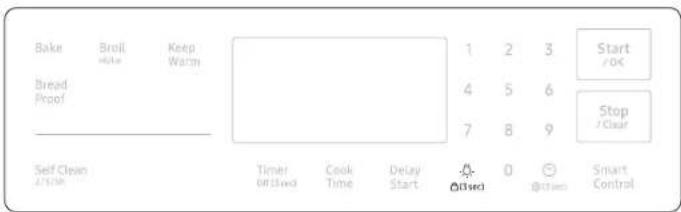
Oven lock
Lock the control panel and the door to prevent accidental operations and/or product tipping. The lock function can prevent children and pets from unintentional oven operation.
text_image
Bake Broll Help Keep Warm Bread Proof 1 2 3 Start 4 5 6 Stop 7 8 9 / Clear Self Clean 2/1/200 Timer @1.5w3 Cook Time Delay Start @1.5w3 @1.5w3 Smart ControlPress and hold for 3 seconds to lock or unlock both the control panel and the door. When the Oven Lock is on, the oven panel does not operate and the oven door is locked and cannot be opened.
Changing settings
Press and hold for 3 seconds to change various settings of the range to your preference. The Setting menu is available only when the oven is off.
| Setting Description | ||
| - Demo mode Used by retailers for display purposes only. | ||
| 1 Temperature adjust Recalibrate the oven temperature. | ||
| 2 Temp. Unit (°F / °C) | Set the oven control to display temperatures in Fahrenheit or Celsius. | |
| 3 | Time format(12hr / 24hr) | Set the clock to display the time in the 12-hour or 24-hour format. |
| 4 | Energy saving | Automatically turns off the oven 12 hours after baking starts or 3 hours after broiling starts. |
| 5 | Sound Turn the oven's sound (beeps) on or off. | |
| 6 | Wi-Fi On/Off Set the Wi-Fi mode to On/Off | |
Gas oven
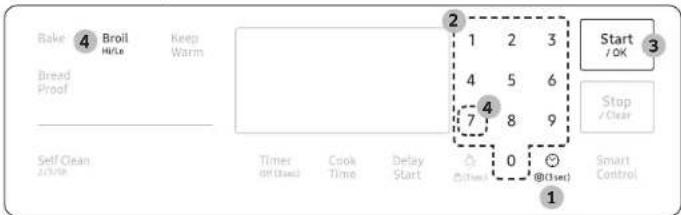
Demo mode
This is used by retailers for display purposes only. In this mode, the heating element does not operate.
text_image
Bake 4 Broil Keep H/Le Warm Bread Proof Self Clean 2/7/10 Timer on (used) Cook Time Delay Start 1 2 3 4 5 6 -4 7 8 9 @(used) 0 @(used) Start /OK Stop /Clear Smart Control 1- Press
- Set the clock time to 12:34.
- Press Start/OK to save change.
- Press 7 and Broll at the same time for 5 seconds.
Temperature adjust
The oven temperature has been calibrated at the factory. When first using the oven, follow the recommended recipe times and temperatures. If it appears that the oven is too hot or too cool, you can recalibrate the oven temperature. Before recalibrating, test a recipe by using a temperature setting that is higher or lower than recommended. The baking results should help you decide how much of an adjustment is needed. The oven temperature can be adjusted by ±35^ ( ±19^ ).
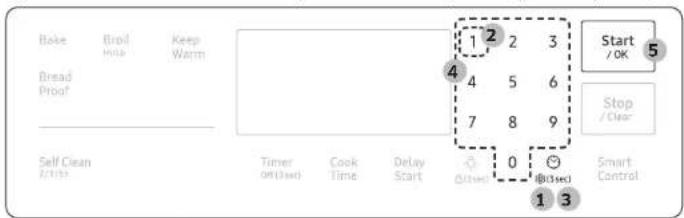
text_image
Bake Bread Proof Keep Warm 1 2 3 4 5 6 7 8 9 Start /OK Stop /Clear Self Clean 2/1/32 Timer Off (End) Cook Time Delay Start 0 (Based) Smart Control 1 3- Press and hold @0sec for 3 seconds.
- Press 1 to enter Temperature adjust.
- Press ☑ pad to select a higher(+) or lower(-) temperature.
- Enter and adjusting temperature value(0 - 35) using the number pad.
- Press Start/OK to save the change.
NOTE
This adjustment does not affect the broiling or the self-cleaning temperature, and is retained in memory after a power failure.
Temp. Unit (°F / °C)
Change the temperature format of the oven to Fahrenheit or Celsius. The default is Fahrenheit.
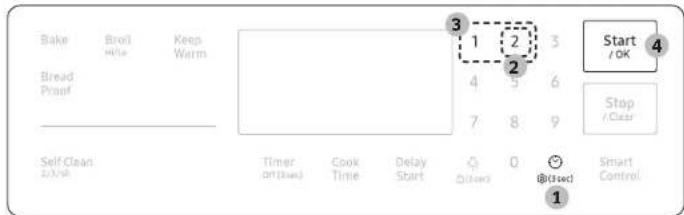
text_image
Bake Broil Hite Keep Warm Bread Proof 1 2 3 4 5 6 7 8 9 Start /OK Stop /Clear Self-Clean EX/WR Timer on (fixed) Cook Time Delay Start @start 0 @Close Smart Control- Press and hold Ⓤ (3sec) for 3 seconds.
- Press 2 to enter Temperature unit.
- Press 1 or 2 to change the temperature units. (1 to Fahrenheit, 2 to Celsius.)
- Press Start/OK to save the change.
Timeformat
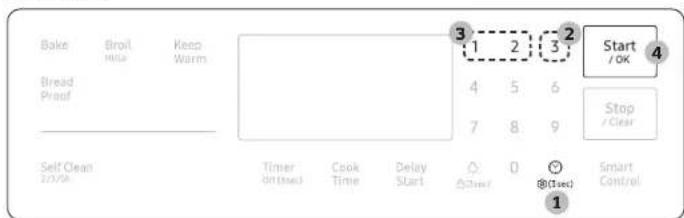
text_image
Bake Broil Hula Keep Warm Bread Proof - Self Clean 25/PA Timer On/Used Cook Time Delay Start 3 1 2 3 2 Start /OK 4 5 6 7 8 9 Stop /Clear @ (Tsec) 1 @(Tsec) Smart Control- Press and hold Ⓤ(3sec) for 3 seconds.
- Press 3 to enter Time format.
- Press 1 or 2 to change the time format. (1 to 12hr, 2 to 24hr)
- Press Start/OK to save the change.
Energysaving
This will automatically turn off the oven 12 hours after baking starts or 3 hours after broiling starts.
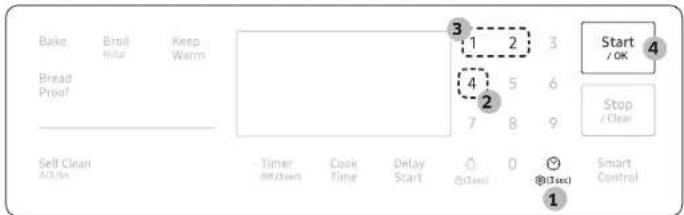
text_image
Bake Bread Proof Self Clean 3 1 2 3 4 5 6 7 8 9 Start /OK Stop /Clear Timer on clean Cook Time Delay Start 0 @Close! @Close! Smart Control 1- Press and hold ⏻ for 3 seconds.
- Press 4 to enter Energy saving.
- Press 1 or 2 to turn Energy saving on or off. (1 to on(12Hr), 2 to off(-Hr).)
- Press Start/OK to save the change.
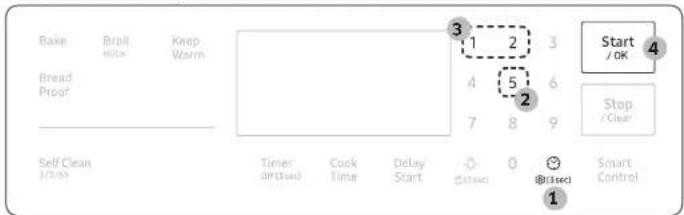
Sound
Mute/unmute the range.
text_image
Bake Bread Proof Self Clean 3 1 2 3 4 5 6 7 8 9 Timer or Closed Cook Time Delay Start 0 @lscct Start /OK Stop /Clear Smart Control- Press and hold ⏻ for 3 seconds.
- Press 5 to enter Sound.
- Press 1 or 2 to turn sound on or off. (1 to on, 2 to off.)
- Press Start/OK to save the change.
Gas oven
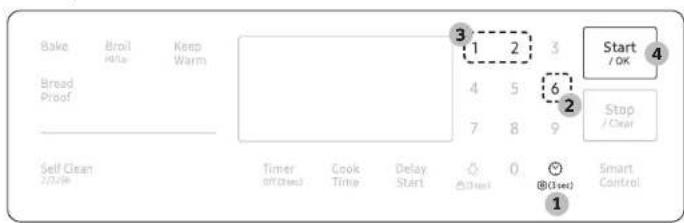
Wi-FiOn/Off
text_image
Bake Broil Keep Hills Warm Bread Proof Self Clean 2/2/16 Timer on (set) Cook Time Delay Start 3 1 2 3 4 5 6 7 8 9 Start / OK Stop / Clear @(sec) 1 Smart Control- Press and hold for 3 seconds.
- Press 6 to enter Wi-Fi.
- Press 1 or 2 to turn Wi-Fi on or off. (1 to on, 2 to off.)
- Press Start/OK to save the change.
Smart control
Before using smart control feature, set Wi-Fi mode to on (See page 30).
How to connect the oven
- Download and open the SmartThings app on your smart device.
- Follow the app's on-screen instructions to connect your range.
- Once the process is complete, the connected 🔔 icon located on your range displays and the app will confirm you are connected.
- If the connection icon does not turn on, follow the instruction on the app to reconnect.
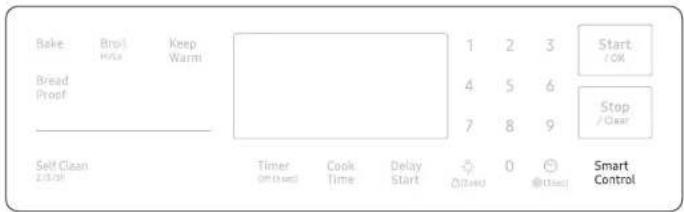
text_image
Bake Bread Proof Keep Warm 1 2 3 4 5 6 7 8 9 Start /OK Stop /Clear Self Clean 2:30:01 Timer Offused Cook Time Delay Start 0 @Cloud Smart ControlTo control the oven remotely
- Press Smart Control. 📋 appears in the display. The oven can now be controlled remotely with a connected device.
- Select the oven icon on the SmartThings app to open the Oven Control app. When the app is connected to the oven, you can perform the following functions through the application:
| Oven remote control using the SmartThings app | |
| Oven/ Cooktop Monitoring | Check the status of the oven.Monitor the on/off status of each cooktop burner. |
| Oven Remote Control • Set or adjust oven settings remotely. | |
| My Cooking | Turn the oven off remotely.Once cooking starts, change the set cooking time and temperature remotely. |
| Error Check • Automatically recognize errors. | |
| Temp Probe | Monitor the current temperature and reset the probe setting. (Available models only.) |
| • If ☐ is not shown in the display, you are still able to monitor the oven and cooktop status and turn the oven off. | |

NOTE
- Opening the oven door or pressing Smart Control will delete ☐ from the display and prevent most of the remote functions from operating.
- When oven cooking is finished or cancelled, it is removed from the display.
- For safety reasons, you cannot turn on the gas oven remotely.
- For safety reasons, you must specify the cooking time to enable remote control.
- The oven continues operating even if the Wi-Fi connection is lost.
- Smart Control will not work properly if the Wi-Fi Connection is unstable.
• See the SmartThings app manual for detailed information.
Voice control
To use the Range's Voice Control function, you need Bixby / Amazon Alexa App / Google Assistant App on your mobile device. Refer to the table below for all available functions.
Bixby
- Bixby is the name of Samsung's artificial intelligence solution that makes it possible to control the product by voice.
- To use the voice recognition function, you need to connect the SmartThings app and the product on your smartphone.
- For models that do not directly recognize voice input for the product after connecting to the app, some functions can still be controlled through Bixby on Samsung smartphones.
- SmartThings App → Voice Assistant → Bixby, you can refer to the Bixby utterance of device.
Amazon Alexa & Google Assistant
Samsung smart home appliances are supported by SmartThings skill in Alexa & action in Google Assistant.
Installation Guide
Here's how to link SmartThings account into Amazon Alexa or Google Assistant. SmartThings App and Alexa App(or Google Assistant App) Should be installed on your phone.
- Setup supported devices on SmartThings
- After device setup, tap 'Voice assistant' and link your Samsung account to Amazon Alexa.
- Check to see if the devices are visible on Amazon Alexa app. If visible, account linking is complete. (Check that the devices are visible and set the location (home & room) of devices in Google home app. Then account linking is complete.)

NOTE
On/Off spec of smart control is same as guided in SmartThings app.
Maintenance
Cleaning
CAUTION
Wear the glove during cleaning.
Control panel
First, lock the control panel and the door to prevent accidental operations and/or product tipping.
- Press and hold ⚙ for 3 seconds to lock both the control panel and the door.
- Clean the control panel using a soft cloth dampened with plain water, warm soapy water, or glass cleaner. Do not spray cleansers directly onto the control panel.
- When done, press and hold again for 3 seconds.
WARNING
- Make sure the control panel turns off and all surfaces of the range are cool before cleaning. Otherwise, you can get burned.
- If the range has been moved away from the wall, make sure the Anti-Tip device is reinstalled properly when the range has been put into place again. Otherwise, the range may tip over, causing physical injuries.
- Do not use steel-wool or abrasive cleansers of any kind. These can scratch or damage the surface.
Stainless steel surface
- Remove any spills, spots, and grease stains using a soft, wet cloth.
- Apply an approved stainless steel cleanser to a cloth or paper towel.
- Clean one small area at a time, rubbing with the grain of the stainless steel if applicable.
- When done, dry the surface using a soft, dry cloth.
- Repeat steps 2 through 4 as many times as necessary.
CAUTION
- Do not use a steel-wool pad or abrasive cleanser on stainless steel surfaces. It will scratch the surface.
- Do not spray any type of cleanser into the manifold holes. The ignition system is located in those holes and must be kept free of moisture.
Racks
To keep the racks clean, remove them from the cavity, and soak them in lukewarm soapy water. Then, scour soil off of the racks using a plastic scouring pad. If the racks do not slide in and out smoothly after you have cleaned them, rub the side rail guides with wax paper or a cloth containing a few drops of cooking oil. This will help the racks glide more easily on their tracks.

NOTE
- Do not put the racks in a dishwasher.
- If a rack does not slide in and out smoothly, apply a few drops of cooking oil to the oven rack guides.
- If a rack becomes too difficult to slide in or out, lubricate the rack with graphite lubricant.
• To purchase the graphite lubricant, contact us at 1-800-SAMSUNG (726-7864). - For online shopping, visit http://www.samsungparts.com/Default.aspx and search for part DG81-01629A.

CAUTION
- Do not leave the racks in the oven during the self-cleaning cycle. The extreme heat generated in this cycle can permanently peel off the rack coating and make it difficult to slide the racks on the guide rails.
- Do not spray cooking oil or lubricant directly onto the racks.
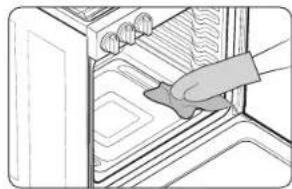
Oven
natural_image
Illustration of a hand placing insulation onto an oven (no text or symbols)Wear the glove during cleaning.
Door
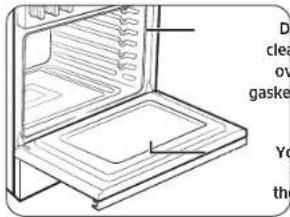
Do not remove the inner gasket of the oven door for cleaning.
text_image
Dr clea ov gasket Yo the- Use soap and water to thoroughly clean the top, sides, and front of the oven door. Rinse well. You may use a glass cleaner on the outside glass of the oven door. DO NOT immerse the door in water. DO NOT spray or allow water or the glass cleaner more enter the door vents. DO NOT use oven and clean cleaners, cleaning powders, or any harsh abrasive cleaning materials on the outside of the oven door.
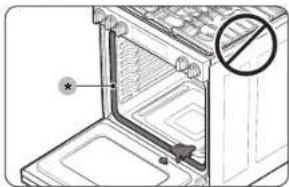
- DO NOT clean the oven door gasket. The oven door gasket is made of a woven material which is essential for a good seal. Care should be taken not to rub, damage, or remove this gasket.
Door inner side
- Inner surface: Clean the inner side of the door manually using a soapy plastic scouring pad, and then wipe with a dry cloth. Take care not to get the gasket wet or allow moisture into the door.
- Inner glass: The inner glass is cleaned automatically during the self-cleaning cycle.
Maintenance
Door outer side
- Outer surface: Follow the cleaning instructions for the stainless steel surface in the previous section.
- Outer glass: Clean the outer glass using a glass cleanser or soapy water. Rinse and dry thoroughly. Take care not to get the gasket wet or allow moisture into the door.
natural_image
Diagram of an oven with a door and a warning symbol (no text or labels present)CAUTION
Do not let moisture enter the door or contact the door gasket. Moisture may reduce the gasket's performance.
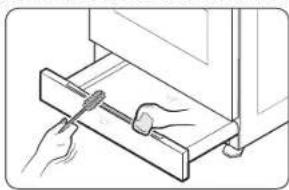
Drawer Handle
Remove dust with soft brush or soft cloth covered with water.
natural_image
Line drawing of a hand using a tool to adjust or install a wooden shelf (no text or symbols)CAUTION
- Do not use alkaline detergents, sulfuric acid, hydrochloric acid, organic solvents, or disinfectants. - Surface can be damaged.
Burner controls
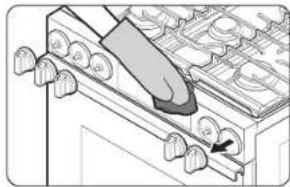
Make sure all surface burner knobs are in the Off position.
natural_image
Diagram of a kitchen appliance with a knife inserted into a pan, showing no text or symbols- Pull knobs off the control valve stems.
- Clean the knobs in warm, soapy water. Then, rinse and dry them thoroughly.
- Clean the stainless steel surfaces using stainless steel cleaner.
- Re-attach the knobs to the control valve slems.
CAUTION
- Do not clean the control knobs in a dish washer.
- Do not spray cleansers directly onto the control panel. Moisture entering the electric circuits may cause electric shock or product damage.
Cooktop surface
The porcelain-enameled cooktop surface needs to be kept clean. We recommend that you remove food spills immediately after they take place.
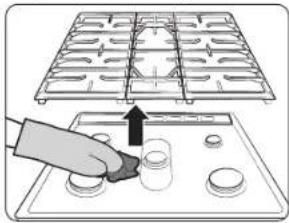
natural_image
Illustration of a hand placing small circular objects onto a tray with a grid pattern above (no text or symbols)- Turn off all surface burners.
- Wait until all burner grates and griddle cool down, and then remove them.
- Clean the cooktop surface using a soft cloth. If food spills run into gaps of the burner components, remove the burner cap and the head, and wipe up the spills.
- When cleaning is finished, reinsert the burner components, and then put the burner grates and griddle back into position.
CAUTION
- Do not use a steel-wool pad or abrasive cleaner, which can scratch or damage the enamel surface.
- Do not remove the cooktop surface to clean it. The gas lines leading to the burner manifolds can be damaged, resulting in a fire or system failure.
- Do not pour water into the cooktop well while cleaning the cooktop. This could leak down into the range gas and electrical systems creating a risk of electrical shock or high levels of carbon monoxide due to corrosion of the gas valves or ports.
- Keep oven vent ducts unobstructed. Clean vents frequently to avoid grease buildup.
Burner grates and components
Turn off all surface burners and make sure they have all cooled down.
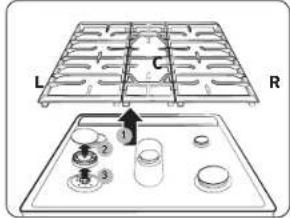
text_image
L C R 1- Remove the center burner grate (C) following both sides grates. (L/R)
- Remove the burner caps from the burner heads.
- Remove the burner heads from the valve manifolds to reveal the starter electrodes.
- Clean all removable grates, griddle and burner components in warm, soapy water. Do not use steel-wool pads or abrasive cleaners.
- Rinse and dry grates, griddle and burner components thoroughly.
- Return the burner heads to their positions on top of the manifold valves. Make sure a starter electrode is inserted through the hole in each burner head.

text_image
Diagram showing a mechanical assembly with labeled components, including parts numbered 5 to 8 and a downward arrow indicating direction.NOTE
See the next page for detailed burner component re-assembly instructions.
- Return the burner caps to their positions on top of the burner heads. To ensure proper and safe operation, make sure the burner caps lie flat on top of the burner heads.
- Reinstall the burner grates and griddle in their respective positions.
- Turn on each burner and check if it operates properly. After verifying that a burner operates normally, turn it off.
Maintenance
NOTE
• After cleaning, confirm that the burner port openings aren't plugged.
- Shake out any excess water and then let burner heads and caps dry thoroughly.
Placing the center burner upside down will allow the water to drain out more easily.
- Do not wash any burner components in a dish washer.
CAUTION
• The starter electrodes are not removable. Do not attempt to remove them by force.
- To avoid chipping, do not bang grates and caps against each other or against hard surfaces, such as cast iron cookware.
- The burner head can be blocked by food or dust. Clean the head if it appears blocked. If you clean the head with water, assemble it only after it is completely dry. If the head is wet, it might prevent the burners from igniting.
• To avoid falling down the grates, make sure to remove both sides grates first.
- Do not attempt to remove center oval burner cap from the head.
Burner reinstall guide
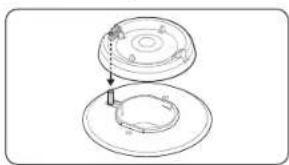
natural_image
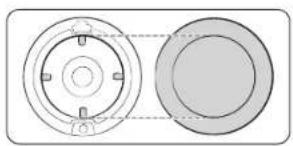
Technical line drawing of a mechanical assembly with two views (top and side), no text or symbols present.Round burner head
- Orient the burner head so that the opening for the electrode lines up with the electrode.
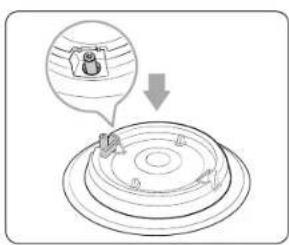
text_image
Diagram showing a person on a circular platform with a magnified inset highlighting a figure labeled '8' and a downward arrow.- Install the burner head so that the electrode passes through the opening for the electrode. Make sure the burner head lies flat on the stove top.
natural_image
Diagram of two circular components with internal features, one connected by a dashed line (no text or symbols)Burner cap
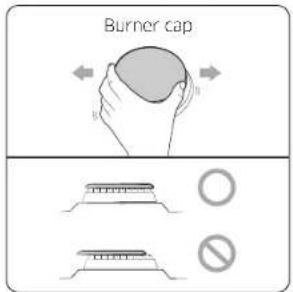
Match the burner caps to the burners by size, and then reinstall the caps on the burner heads.
CAUTION
Make sure each cap is reinstalled on the correct burner head, is centered on the burner head, and lies flat.
text_image
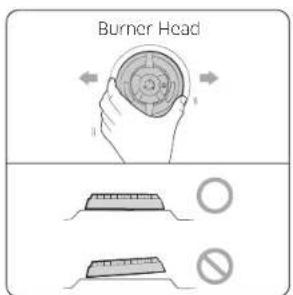
Burner Head ○ ○CAUTION
Make sure all burner components (heads and caps) are reinstalled properly. They will be stable and rest flat when correctly installed.
text_image
Burner cap B O O NoSelf-cleaning
This self-cleaning oven uses high temperatures (well above cooking temperatures) to burn off leftover grease and residue completely or reduce them to a finely powdered ash that you can wipe away with a damp cloth.
CAUTION
- Do not leave small children unattended near the range during the self-cleaning cycle. The outside surfaces of the range can get extremely hot.
- Some birds are extremely sensitive to fumes from a self-cleaning oven. Relocate birds to a well-ventilated room away from the range.
- Do not line the oven, oven racks, or oven bottom with aluminum foil. Doing so will result in poor heat distribution, produce poor baking results, and cause permanent damage to the oven interior. The aluminum foil will melt onto and adhere to the interior oven surfaces.
- Do not force the oven door open during the self-cleaning cycle. This will damage the automatic door-locking system. The door automatically locks when the self-cleaning cycle is started and stays locked until the cycle is cancelled and the oven temperature is below 400 °F.
- Use caution when opening the oven door after the self-cleaning cycle. The gas oven will still be VERY HOT and hot air and steam might escape when the door is open.
- Wipe off any excess spillage before using the self-cleaning operation.
- Do not use oven cleaners. Commercial oven cleaners or oven liners should NEVER be used in or around any part of the oven. Residue from oven cleaners will damage the inside of the oven during a self-cleaning operation.
- Do not turn off the surface burner while the oven is performing a self cleaning cycle. Self-clean will not operate if a surface burner is on.
To perform the self-cleaning cycle
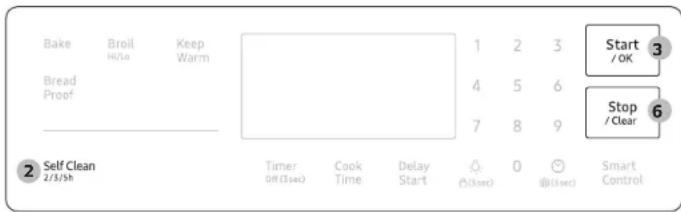
Make sure the door lock is released. Remove all racks from the oven cavity.
text_image
Bake Broil Keep H/10 Warm Bread Proof 1 2 3 Start /OK 4 5 6 Stop /Clear 7 8 9 Self Clean 2/3/5h Timer Cook Delay 0 Smart Off (3sec) Time Start @(3sec) @(3sec) Control- Make sure the oven door is closed completely and unlocked.
- Press Self Clean once. Then, select the cleaning time by pressing Self Clean one or more times in accordance with the table below.
- Press Start/OK. The oven door is locked and the oven begins to heat up.
- When the self-cleaning cycle is complete, the oven beeps 10 times. The door will remain locked and the Lock icon will blink until the oven temperature falls below 400 °F (204 °C).
- When the Lock icon changes to an open lock, you can open the oven door. The Lock icon changes to an open lock when the oven temperature drops below 400 °F (204 °C).
- Press Stop/Clear to display the time of the day.
| Once Twice Three times | |
| 3 - hour cycle 5 - hour cycle 2 - hour cycle |
CAUTION
Do not use the surface burners while the gas oven is performing a self-cleaning cycle.
WARNING
Be sure all controls are OFF and all surfaces are COOL before cleaning any part of the range.
Maintenance

natural_image
Illustration of a hand inserting a switch into a rack with a prohibition symbol (no text or labels)NOTE
Make sure all surface burners are off while the oven is performing a self cleaning cycle. Self-clean will not operate if a surface burner is on.
To delay starting a self-cleaning cycle
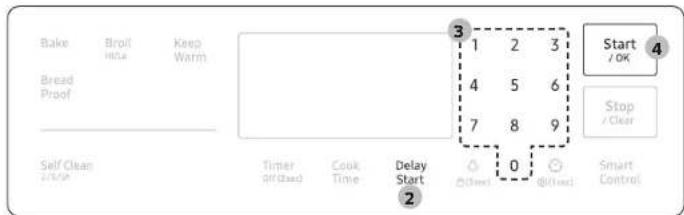
text_image
Bake Broil Keep Hike Warm Bread Proof 3 1 2 3 4 5 6 7 8 9 Self Clean Timer Cook Delay Start 0 @(Text) @(Text) Smart 2 Start / OK Stop / Clear Control- Repeal steps 1 and 2 from the column on the left.
- Press Delay Start. The oven door locks.
- Set the time you want the oven to start self-cleaning using the number pad.
- Press Start/OK. The oven will start self-cleaning at your specified time.
To cancel the self-cleaning cycle
You may find it necessary to stop or interrupt a self-cleaning cycle due to smoke in the oven. To turn off the self-cleaning cycle, press Stop/Clear. The cycle turns off, but the door remains locked and the Lock icon blinks until the oven temperature falls below 400 °F (204 °C).
After self-cleaning
- The door stays locked until the internal oven temperature falls below 400 °F.
- When the oven has cooled down, wipe the oven surfaces with a cloth to remove ash residue.
- Stubborn stains can be removed using a steel-wool pad. Lime deposits can be removed using a vinegar-soaking cloth.
- If you are not satisfied with the cleaning results, repeat the cycle. "HOT" appears on the display until the oven cools down. Wait until the message disappears, and then start a new cycle.
- The cooling fan automatically runs for certain amount of time after self-cleaning.
- Self-cleaning does not operate within 2 hours after running the self-cleaning cycle.
CAUTION
Do not attempt to open the oven door immediately after the self-cleaning cycle is complete. The oven is still very hot when the door unlocks. Escaping hot air and/or steam could burn you.
Replacing the oven light
Oven light
The oven light is a standard 40-watt appliance bulb. It comes on when you open the oven door.
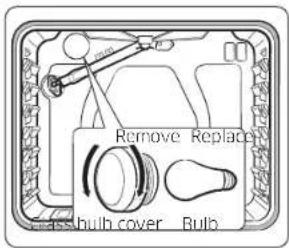
text_image
Remove Replace Fuel bulb cover Bulb- Turn off the oven.
- Make sure the oven and oven light are cool.
- Open the door, and remove the glass cover by turning it counterclockwise.
- Remove the oven light from the socket by turning it counterclockwise.
- Insert a new 40-watt appliance bulb into the socket, and then turn it clockwise to tighten.
- Reinsert the glass cover, and then turn it clockwise to tighten.
CAUTION
To prevent electric shock, make sure the oven is turned off and cool before replacing the oven light.
NOTE
• The oven light does not operate during the self-cleaning cycle.
- Remove the racks if they prevent you from accessing the oven light.
Removing and reinstalling the oven door
How to remove the door
CAUTION
- The door is very heavy. Be careful when removing and lifting the door. Do not lift the door by the handle.
- Turn the power off before removing the door.
- Open the door completely.
- Pull the hinge locks down toward the door frame to the unlocked position.
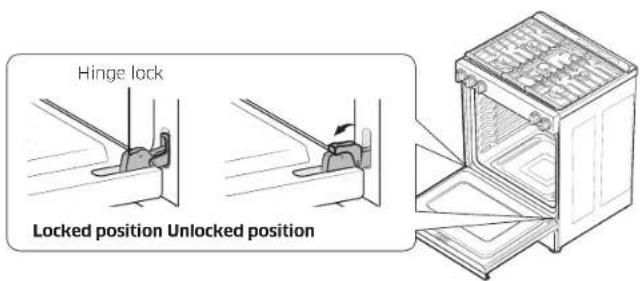
text_image
Hinge lock Locked position Unlocked position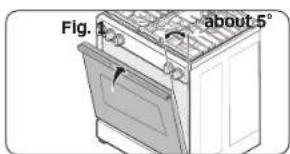
text_image
Fig. 1 about 5°- Firmly grasp both sides of the door at the top.
- Close the door to the door removal position, which is approximately 5 degrees from vertical (Fig. 1).
- Lift the door up and out until the hinge arms are clear of the slots (Fig. 2).
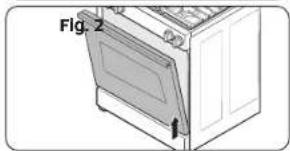
natural_image
Line drawing of a kitchen oven with a door and front panel, labeled Fig. 2 (no text or symbols on the diagram itself)Maintenance
How to reinstall the door
- Firmly grasp both sides of the door at the top.
- With the door at the same angle as the removal position, slide the indentations of the hinge arms into the bottom edges of the hinge slots. The notches in each hinge arm must be fully inserted into the bottoms of each slot.
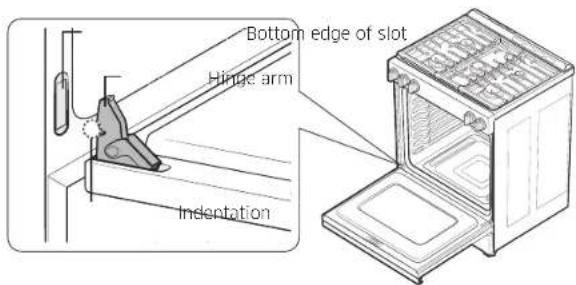
text_image
Bottom edge of slot Hinge arm Indentation- Open the door fully. If the door will not open fully, the indentations are not inserted correctly in the bottom edges of each slot.
- Push the hinge locks up against the front frame of the oven cavity into the locked position.
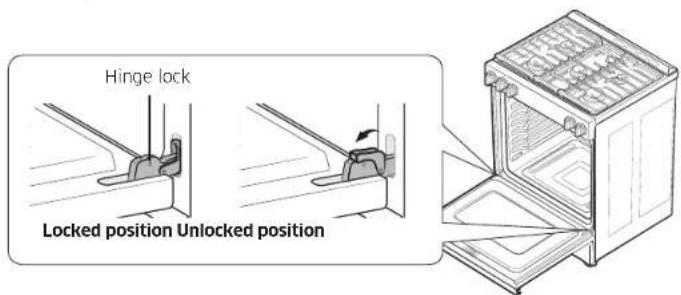
text_image
Hinge lock Locked position Unlocked position- Close the oven door.
How to remove and reinstall the Storage drawer
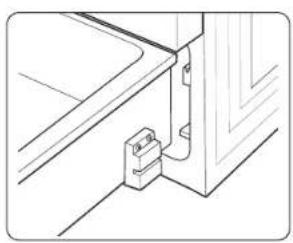
natural_image
Line drawing of a door hinge with a bracket and mounting base (no text or symbols)- Slide open the drawer until it stops.
- Pull the drawer with lifting it for removal.
- Clean the drawer in warm, soapy water using a cloth or soft brush. Then, rinse and dry it thoroughly.
- Push in the drawer while slightly lifting the front to close it.
Troubleshooting
If you encounter a problem with the range, check the tables starting below, and then try the suggested actions.
Checkpoints
Gas safety
| Problem Possible cause Action | ||
| You smell gas. The | surface burner knob is not in the off position and the burner is not lit. | Turn the burner knob to Off. |
| There is a gas leak. Clear the room, building, or area of all occupants. Immediately call your gas supplier from a neighbor's phone. Do not call from your phone. It is electrical and could cause a spark that could ignite the gas. Follow the gas supplier's instructions. If you cannot reach your gas supplier, call the fire department. | ||
Surface burner
| Problem Cause | Action | |
| All burners do not light. | The power cord is not plugged into the electrical outlet. | Make sure the electrical plug is plugged into a live, properly grounded outlet. |
| A fuse in your home may be blown or the circuit breaker may have tripped. | Replace the fuse or reset the circuit breaker. | |
| The gas supply is not properly connected or turned on. | See the Installation Instructions that came with your range. | |
| Surface burners do not light. | The control knob is not set properly. | Push in the control knob and turn it to the Lite position. |
| The burner caps are not in place. The burner base is misaligned. | Clean the electrodes. Put the burner cap on the burner head. Align the burner base. | |
| Surface burner clicks during operation. | The control knob has been left in the Lite position. | After the burner lights, turn the control knob to a desired setting. If the burner still clicks, contact a service technician. |
| The burners do not burn evenly. | Surface burner components and caps are not assembled correctly and level. | See page 35. |
| The surface burners are dirty. | Clean the surface burner components. (See page 36.) |
Troubleshooting
| Problem Cause | Action | |
| Very large or yellow surface burner flames. | The wrong burner orifice is installed. | Check the burner orifice size. Contact your installer if you have the wrong orifice (LP gas instead of natural gas or natural gas instead of LP gas). |
| Surface burners light but oven burners do not light. | The oven door lock is turned on. | The display will show the Lock icon. Hold the oven door open and press kg for 3 seconds. The oven will beep and the Lock icon will turn off. |
| The Gas Pressure Regulator shut off switch is in the off position. | Call a qualified service technician. |
Oven
| Problem Cause | Action | |
| The oven control beeps and displays an information code. | There may be an issue with your oven. See the "Information codes" chart on page 46. | Press Stop/Clear, and then restart the oven.If the problem persists, disconnect all power to the range for at least 30 seconds and then reconnect the power.If this does not solve the problem, call for service. |
| Problem Cause | Action | |
| The oven will not turn on. | The oven is not completely plugged into the electrical outlet. | Make sure the electrical plug is fully inserted into a live, properly grounded outlet. |
| A fuse in your home may be blown or the circuit breaker may have tripped. | Replace the fuse or reset the circuit breaker. | |
| The oven temperature is too hot or cold. | The oven temperature needs to be adjusted and recalibrated. | See page 28. |
| The oven burner will not shut off. | The oven door lock is turned on. | The display will show the Lock icon. Hold the oven door open and press 610 for 3 seconds. The oven will beep and the Lock icon will turn off. |
| The Sabbath function has been activated. | SAb and the time of day will show in the display. All other controls and signals will be deactivated. To turn off the oven only, press Stop/Clear. To cancel the Sabbath function and reactivate the controls and signals, press and hold Bake and NUM 1 simultaneously for 3 seconds. | |
| Oven fan is making a noise, or won't turn off.* Slide-In oven model only. | The cooling fan is not visible, but you will hear it running whenever the electronics get hot and turn off when the electronics are cool. | This is normal operation to cool the oven, cooling fan automatically shuts down when the oven cools. |
| The oven light (lamp) will not turn on. | The oven door lock is turned on. | The display will show the Lock icon. Hold the oven door open, and then press _(3sec) for 3 seconds. The oven will beep and the Lock icon will turn off. |
| The Sabbath function has been activated. | SAb and the time of day will show in the display. All other controls and signals will be deactivated. To cancel the Sabbath function and reactivate the light switch and other controls, press and hold Bake and NUM 1 simultaneously for 3 seconds. | |
| A loose or burned-out bulb. | See page 39. | |
| The switch operating the oven light needs to be replaced. | Call for a qualified service technician. | |
| The oven smokes excessively during broiling. | Meat or food was not properly prepared before broiling. | Cut away excess fat and/or fatty edges that may curl. |
| Improperly positioned top oven rack. | See the broiling guide on page 23. | |
| The controls are not being set properly. | See page 23. | |
| Greasy buildup on oven surfaces. | Regular cleaning is necessary when broiling frequently. |
| Problem Cause | Action | |
| Cooking is finished, but the cooling fan is still running. | The fan automatically runs for a certain amount of time to ventilate the inside of the oven. | This is not a product malfunction. The fan is designed to run automatically for a period of time to cool down the oven. |
| The oven will not self-clean. | The oven door lock is turned on. | The display will show the Lock icon. Hold the oven door open, and then press for 3 seconds. The oven will beep and the Lock icon will turn off. |
| The oven is too hot. Let the | oven cool down, and then reset the controls. The self-clean cycle will not lock the oven door if the oven temperature is too hot. The door must lock before the self-clean cycle can start. | |
| The self-cleaning oven controls are not properly set. | Reset the self-cleaning oven controls. (See page 37.) | |
| A surface burner is on. Turn | off the surface burner. Self-clean will not operate if a surface burner is on. | |
| A crackling or popping sound. | This is normal. This is the sound of the metal heating and cooling during any cooking or cleaning function. | |
Troubleshooting
| Problem Cause | Action | |
| Excessive smoking during a self-cleaning cycle. | This is the first time the oven has been cleaned. | This is normal. The oven will always smoke more the first time it is cleaned.Wipe up all excessive soil before starting the self-cleaning cycle.If smoke persists, pressStop/Clear.Open the windows to clear the smoke from the room. After the oven has cooled and unlocked, wipe up excessive soil, and then reset the oven for self-cleaning. |
| The oven door will not open after a self-cleaning cycle. | This is normal. The oven door will stay locked until the oven temperature drops below 400 °F. | |
| The oven is not clean after a self-cleaning cycle. | A fine dust or ash is normal. | This can be wiped clean with a damp cloth.Set the self-cleaning cycle for a longer cleaning time.The cycle was not long enough to burn off the dirt buildup.Extremely dirty ovens require hand-cleaning of excessive spillovers and food buildup before you start a self-cleaning cycle. Multiple self-cleaning cycles may be necessary to completely clean the oven. |
| Problem Cause | Action | |
| There is steam or smoke coming from under the control panel. | This is normal. The oven vent is located there.More steam is visible when you are using the convection functions or when baking or roasting multiple items at the same time. | |
| A burning or oily odor coming from the vent. | This is normal for a new oven and will disappear within 1/2 hour of the first bake cycle. | To speed the process, set a self-cleaning cycle for a minimum of 3 hours.(See page 37.) |
| Strong odor. This is temporary. The insulation around the inside of the oven emits an odor the first few times the oven is used. | ||
| The oven racks are difficult to slide. | This is normal. Apply a small amount of vegetable oil to a paper towel, and then wipe the edges of the oven racks with the paper towel. Racks become dull and hard to slide if they are left in the oven during a self-clean cycle. | |
| Fan noise. This is normal. The convection fan runs until the function is over or the door is opened. | ||
| The convection fan is not working. | This is normal. The fan starts automatically when the oven reaches the preheat temperature. | |
Others
| Problem Cause | Action | |
| The product is not level. | The appliance has been installed improperly.The leveling leg(s) is (are) damaged or uneven. | Make sure the floor is level, strong, and stable. If the floor sags or slopes, contact a carpenter.Check and level the range.(See the Installation Instructions.) |
| The kitchen cabinets are not properly aligned and make the range appear to be not level. | Ensure that cabinets are square and provide sufficient room for installation. | |
| The display goes blank. | The electrical outlet Ground Fault Interrupter (GFI or GFCI) has been tripped and needs to be reset.Your digital control has been damaged. | Replace the fuse or reset the circuit breaker. |
| Problem Cause | Action | |
| Food does not bake or roast properly in the oven. | The wrong cooking mode was selected. | See page 21. |
| The oven racks have not been positioned properly for the foods being cooked. | See page 20. | |
| Incorrect cookware or cookware of improper size is being used. | See page 18. | |
| The oven temperature needs to be adjusted and recalibrated. | See page 28. | |
| There is aluminum foil on racks and/or oven bottom. | Remove foil. | |
| The clock or timers are not set correctly. | See pages 15 and 23. | |
| Food does not broil properly in the oven. | The oven controls are not set properly. | See page 23. |
| The oven door was not closed during broiling. | See page 21. | |
| The rack has not been properly positioned. | See the broiling guide on page 23. |
Troubleshooting
Informationcodes
| Code symbol | Meaning Solution | |
| C-20 | Oven sensor malfunction. | 1. Press Stop/Clear, and then restart the oven.2. If the problem persists, disconnect all power to the oven range for at least 30 seconds and then reconnect the power. |
| C-21 | The oven is overheating. | |
| C-22 | Check the Control PBA NTC Sensor. | |
| C-30 | Check the PBA NTC Sensor. | |
| C-31 | Check the PBA NTC Sensor. | |
| C-A2 | Check the cooling system. | |
| C-d0 | Control pad malfunction. | |
| C-d1 | Door lock malfunction. | |
| C-F0 | PCB signal malfunction. | |
| C-F2 | Touch IC and PCB signal malfunction. | |
| C-24 | Oven vent blocked. | 1. If oven vent or cover air is blocked by aluminum foil or others, remove that and restart oven.2. To reset error, disconnect power or tap Stop/Clear after opening the oven door at least 60 seconds. |
| Code symbol | Meaning Solution | |
| C-d6 | Gas leakage in the gas connection section. | 1. Disconnect power. Open the back cover. Check there are signs of combustion in the gas connection section.2. If there are signs of combustion, replace GPR and TCO and check the gas leakage.3. If there are no signs of combustion, check wire-TCO, Wire main - sub connection status and PBA S/W version. |
| ** If these solutions do not solve the problem, contact a local Samsung service center or call 1-800-SAMSUNG (1-800-726-7864). | ||
PLEASE DO NOT DISCARD. THE PAGE REPLACES THE WARRANTY PAGE IN THE USE & CARE GUIDE
This SAMSUNG brand product, as supplied and distributed by SAMSUNG ELECTRONICS AMERICA INC. (SAMSUNG) and delivered new, in the original carton to the original consumer purchaser, is warranted by SAMSUNG against manufacturing defects in materials or workmanship for the limited warranty period, starting on the date of delivery to the original consumer purchaser, of:
One (1) Year Parts and Labor
This limited warranty is valid only on products purchased and used in the United States that have been installed, operated, and maintained according to the instructions attached to or furnished with the product. To receive warranty service, the purchaser must contact SAMSUNG at the address or phone number provided below for problem determination and service procedures. Warranty service can only be performed by a SAMSUNG authorized service center. The original dated bill of sale and/or proof of delivery must be presented upon request as proof of purchase to SAMSUNG or SAMSUNG's authorized service center to receive warranty service.
SAMSUNG will provide in-home service within the contiguous United States during the warranty period at no charge, subject to availability of SAMSUNG authorized servicers within the customer's geographic area. If in-home service is not available, SAMSUNG may elect, at its option, to provide transportation of the product to and from an authorized service center. If the product is located in an area where service by a SAMSUNG authorized servicer is not available, you may be responsible for a trip charge or required to bring the product to a SAMSUNG authorized service center for service.
To receive in-home service, product must be unobstructed and accessible to the service agent.
During the applicable warranty period, a product will be repaired, replaced, or the purchase price refunded, at the sole option of SAMSUNG. SAMSUNG may use new or reconditioned parts in repairing a product, or replace the product with a new or reconditioned product. Replacement parts and products are warranted for the remaining portion of the original product's warranty or ninety (90) days, whichever is longer. All replaced parts and products are the property of SAMSUNG and you must return them to SAMSUNG.
This limited warranty covers manufacturing defects in materials or workmanship encountered in normal household, noncommercial use of this product and shall not cover the following: damage that occurs in shipment, delivery, installation, and uses for which this product was not intended; damage caused by unauthorized modification or alteration of the product; product where the original factory serial numbers have been removed, defaced, changed in any way, or cannot be readily determined; cosmetic damage including scratches, dents, chips, and other damage to the product's finishes; damage caused by abuse, misuse, pest infestations, accident, fire, floods, or other acts of nature or God; damage caused by use of equipment, utilities, services, parts, supplies, accessories, applications, installations, repairs, external wiring or connectors not supplied or authorized by SAMSUNG; damage caused by incorrect electrical line current, voltage, fluctuations and surges; damage caused by failure to operate and maintain the product according to instructions; in-home instruction on how to use your product; and service to correct installation not in accordance with electrical or plumbing codes or correction of household electrical or plumbing (i.e., house wiring, fuses, or water inlet hoses). In addition, damage to the glass cooktop caused by (i) use of cleaners other than the recommended cleaners and pads or (ii) hardened spills of sugary materials or melted plastic that are not cleaned according to the directions in the use and care guide are not covered by this limited warranty.
The cost of repair or replacement under these excluded circumstances shall be the customer's responsibility.
Visits by an authorized servicer to explain product functions, maintenance or installation are not covered by this limited warranty. Please contact SAMSUNG at the number below for assistance with any of these issues.
Warranty (U.S.A)
EXCLUSION OF IMPLIED WARRANTIES
IMPLIED WARRANTIES, INCLUDING THE IMPLIED WARRANTIES OF MERCHANTABILITY OR FITNESS FOR A PARTICULAR PURPOSE, ARE LIMITED TO ONE YEAR OR THE SHORTEST PERIOD ALLOWED BY LAW. Some states do not allow limitations on how long an implied warranty lasts, so the above limitations or exclusions may not apply to you. This warranty gives you specific rights, and you may also have other rights, which vary from state to state.
LIMITATION OF REMEDIES
YOUR SOLE AND EXCLUSIVE REMEDY IS PRODUCT REPAIR, PRODUCT REPLACEMENT, OR REFUND OF THE PURCHASE PRICE AT SAMSUNG'S OPTION, AS PROVIDED IN THIS LIMITED WARRANTY. SAMSUNG SHALL NOT BE LIABLE FOR SPECIAL, INCIDENTAL OR CONSEQUENTIAL DAMAGES. INCLUDING BUT NOT LIMITED TO TIME WAY FROM WORK, HOTELS AND/OR RESTAURANT MEALS, REMODELING EXPENSES, LOSS OF REVENUE OR PROFITS, FAILURE TO REALIZE SAVINGS OR OTHER BENEFITS REGARDLESS OF THE LEGAL THEORY ON WHICH THE CLAIM IS BASED, AND EVEN IF SAMSUNG HAS BEEN ADVISED OF THE POSSIBILITY OF SUCH DAMAGES. Some states do not allow exclusion or limitation of incidental or consequential damages, so the above limitations or exclusions may not apply to you. This warranty gives you specific rights, and you may also have other rights, which vary from state to state.
SAMSUNG does not warrant uninterrupted or error-free operation of the product. No warranty or guarantee given by any other person, firm, or corporation with respect to this product shall be binding on SAMSUNG.
To obtain warranty service, please contact SAMSUNG at:
Samsung Electronics America, Inc.
85 Challenger Road
Ridgefield Park, NJ 07660
1-800-SAMSUNG (726-7864) and www.samsung.com/us/support
Registration
Please register your product online at www.samsung.com/register.
Questions
For questions about features, operation/performance, parts, accessories, or service, call 1-800-SAMSUNG (726-7864), or visit our Web site at www.samsung.com/us/support.
Model # Serial #
Please attach your receipt (or a copy) to this manual. You may need it, along with your model and serial number, when calling for assistance.
Warranty (CANADA)
PLEASE DO NOT DISCARD. THE PAGE REPLACES THE WARRANTY PAGE IN THE USE & CARE GUIDE
This SAMSUNG brand product, as supplied and distributed by SAMSUNG ELECTRONICS CANADA INC. (SAMSUNG) and delivered new, in the original carton to the original consumer purchaser, is warranted by SAMSUNG against manufacturing defects in materials and workmanship for a limited warranty period of:
One (1) Year Parts and Labor
This limited warranty begins on the original date of purchase, and is valid only on products purchased and used in Canada. To receive warranty service, the purchaser must contact SAMSUNG for problem determination and service procedures. Warranty service can only be performed by a SAMSUNG-authorized service center, and any unauthorized service will void this warranty. The original dated bill of sale must be presented upon request as proof of purchase to SAMSUNG or SAMSUNG's authorized service center. Samsung will provide in-home service during the one (1) year warranty period at no charge subject to availability within the contiguous Canada. In-home service is not available in all areas. To receive in-home service, product must be unobstructed and accessible to the service agent. If service is not available, Samsung may elect to provide transportation of the product to and from an authorized service center.
SAMSUNG will repair or replace this product, at our option and at no charge as stipulated herein, with new or reconditioned parts or products if found to be defective during the limited warranty period specified above. All replaced parts and products become the property of SAMSUNG and must be returned to SAMSUNG. Replacement parts and products assume the remaining original warranty, or ninety (90) days, whichever is longer.
This limited warranty shall not cover cases of incorrect electric current, voltage or supply, light bulbs, house fuses, house wiring, cost of a service call for instructions, or fixing installation errors. Furthermore, damage to the cooktop caused by the use of cleaners other than the recommended cleaners and pads and damage to the cooktop caused by hardened spills of sugary materials or melted plastic that are not cleaned according to the directions in the use and care guide are not covered. SAMSUNG does not warrant uninterrupted or error-free operation of the product.
EXCEPT AS SET FORTH HEREIN, THERE ARE NO WARRANTIES OR CONDITIONS ON THIS PRODUCT EITHER EXPRESS OR IMPLIED AND SAMSUNG DISCLAIMS ALL WARRANTIES AND CONDITIONS INCLUDING, BUT NOT LIMITED TO, ANY IMPLIED WARRANTIES AND CONDITIONS OF MERCHANTABILITY, INFRINGEMENT, OR FITNESS FOR A PARTICULAR PURPOSE.
NO WARRANTY OR GUARANTEE GIVEN BY ANY PERSON, FIRM, OR CORPORATION WITH RESPECT TO THIS PRODUCT SHALL BE BINDING ON SAMSUNG.
SAMSUNG SHALL NOT BE LIABLE FOR LOSS OF REVENUE OR PROFITS, FAILURE TO REALIZE SAVINGS OR OTHER BENEFITS, OR ANY OTHER GENERAL, INDIRECT, SPECIAL, INCIDENTAL, OR CONSEQUENTIAL DAMAGES CAUSED BY THE USE, MISUSE, OR INABILITY TO USE THIS PRODUCT, REGARDLESS OF THE LEGAL THEORY ON WHICH THE CLAIM IS BASED, AND EVEN IF SAMSUNG HAS BEEN ADVISED OF THE POSSIBILITY OF SUCH DAMAGES.
NOR SHALL RECOVERY OF ANY KIND AGAINST SAMSUNG BE GREATER IN AMOUNT THAN THE PURCHASE PRICE OF THE PRODUCT SOLD BY SAMSUNG AND CAUSING THE ALLEGED DAMAGE WITHOUT LIMITING THE FOREGOING, PURCHASER ASSUMES ALL RISK AND LIABILITY FOR LOSS, DAMAGE, OR INJURY TO PURCHASER AND PURCHASER'S PROPERTY AND TO OTHERS AND THEIR PROPERTY ARISING OUT OF THE USE, MISUSE, OR INABILITY TO USE THIS PRODUCT.
THIS LIMITED WARRANTY SHALL NOT EXTEND TO ANYONE OTHER THAN THE ORIGINAL PURCHASER OF THIS PRODUCT, IS NONTRANSFERABLE, AND STATES YOUR EXCLUSIVE REMEDY.
Warranty (CANADA)
Some states or provinces do not allow limitations on how long an implied warranty lasts, or the exclusion or limitation of incidental or consequential damages, so the above limitations or exclusions may not apply to you.
This warranty gives you specific legal rights, and you may also have other rights which vary from state to state or province to province.
To obtain warranty service, please contact SAMSUNG at:
Samsung Electronics Canada Inc.
2050 Derry Road West, Mississauga, Ontario L5N 0B9 Canada
1-800-SAMSUNG (726-7864) and www.samsung.com/ca/support (English)
www.samsung.com/ca_fr/support (French)
Registration
Please register your product online at www.samsung.com/register.
Questions
For questions about features, operation/performance, parts, accessories, or service, call 1-800-SAMSUNG (726-7864), or visit our Web site at www.samsung.com/ca/support (English), or www.samsung.com/ca_fr/support (French).
Model # Serial #
Please attach your receipt (or a copy) to this manual. You may need it, along with your model and serial number, when calling for assistance.
Appendix
Open Source Announcement
The software included in this product contains open source software.
The following URL http://opensource.samsung.com/opensource/SMART_TP1_0/seq/0 leads to open source license information as related to this product.
text_image
QR code image containing encoded data, no visible human-readable textEnglish 51
Scan the QR code* or visit
www.samsung.com/spsn
to view our helpful
How-to Videos and Live Shows
* Requires reader to be installed on your smartphone
Scan this with your smartphone
Please be advised that the Samsung warranty does NOT cover service calls to explain product operation, correct improper installation, or perform normal cleaning or maintenance.
QUESTIONS OR COMMENTS?
| COUNTRY CALL OR VISIT US ONLINE AT | ||
| U.S.AConsumer Electronics | 1-800-SAMSUNG (726-7864) www.samsung.com/us/support | |
| CANADA 1-800-SAMSUNG (726-7864) | www.samsung.com/ca/support (English)www.samsung.com/ca_fr/support (French) | |

DG68-01612A-00
Estufa deslizante de gas
Manual del usuario
NSG6**81*****
text_image
SAMSUNGADVERTENCIA
natural_image
Illustration of a hand placing food items into a rack with a prohibition symbol (no text or labels)text_image
Diagram showing a power plug connected to an electrical outlet with a prohibition symbol nearbynatural_image
Illustration of office supplies including a computer monitor, documents, and tools (no text or symbols)natural_image
Illustration of a kitchen appliance with a smokestack and a prohibition symbol (no text or labels)natural_image
Diagram of a battery pack with no visible text or symbols, featuring a prohibition symbol (no text or labels)natural_image
Illustration of a hand pressing down on a device with a prohibition symbol (no text or labels)natural_image
Diagram of a device with a prohibition symbol (no text or labels present)natural_image
Illustration of a hand reaching toward a window with a prohibition symbol (no text or labels)text_image
Labeled diagram of a microwave oven with numbered parts for identificationtext_image
Bake Bread Proof Keep Warm Self Clean 2/3/0h Timer On (Oct) Cook Time. Delay Start 1 2 3 4 5 6 7 8 9 0 @ Oct Start /OK Stop / Clear Smart Control 1 2natural_image
Diagram of a grid structure with three upward arrows indicating direction (no text or symbols)natural_image
Line drawing of a hand inserting a circular component into a machine (no text or symbols)PASO 3
text_image
LR RR C LF RFtext_image
Diagram showing a cooking pan with a stopper and a prohibition symbol, indicating a stopper and no stop.Límites de tamaño
PRECAUCIÓN
natural_image
Line drawing of a kitchen appliance with a chicken on the tray and an oven on the right (no text or symbols)PASO 3
natural_image
Line drawing of an open oven with a plate and fan inside (no text or symbols)PASO 4
text_image
Technical diagram of a device casing with numbered components and labeled partsnatural_image
Illustration of an oven with a black tag pointing to the interior (no text or symbols)natural_image
Simple line drawing of a kitchen appliance with a handle and tray (no text or symbols)natural_image
Two identical trays with four circular cavities, labeled 3 and 5 (no text or symbols on the trays themselves)natural_image
Two stacked trays with circular indentations, labeled 3 and 5 (no text or symbols on the trays themselves)natural_image
Diagram of a battery with no visible text or symbols, featuring internal circuit lines and a prohibition symbol (no text or labels present)text_image
Bake Broil Keep Hilo Warm Bread Proof Self Clean 2/3/15s Timer off(1sec) Cook Time Delay Start 0 1 2 3 4 5 6 7 8 9 0 13sec Smart Control Start /OK Stop / Cleartext_image
Bake Broil Bread Proof ② Keep Warm 1 2 3 Start /OK ③ 4 5 6 Stop Clear 7 8 9 Self Clean 2/30/04 Timer Original Cook Time Delay Start @check @check Smart Controltext_image
Bake 4 Broil Keep H/Le Warm Bread Proof Self Clean 2 1 2 3 4 5 6 7 8 9 Timer Cook Delay Start @Closed @Closed Start /OK Stop /Clear Smart Control 1text_image
Bake Broil Milo Keep Warm Bread Proof 1 2 3 4 5 6 7 8 9 Start /OK 5 Stop / Clear Self Clean 2/3/Fm Turner Off/Check Cook Time Delay Start 0 @Check Smart Control 1 3text_image
Bake Broil Mole Keep Warm Bread Proof 3 1 2 3 4 5 6 7 8 9 Start /OK Stop /Clear Self-Clean 200% Timer Original Cook Time Delay Start 0 @Check Smart Control 1text_image
Bake Broll Keep Warm Bread Proof 1 2 3 4 5 6 7 8 9 Start /OK Stop /Clear Self Clean (2/3/01) Timer Off Closed Cook Time Delay Start @Closed 0 @Closed Smart Controlnatural_image
Illustration of a hand inserting a component into an oven (no text or symbols visible)natural_image
Diagram of an oven with a door and a warning symbol (no text or labels present)PRECAUCIÓN
natural_image
Line drawing of hands using a tool to adjust or install a wooden latch (no text or symbols)PRECAUCIÓN
natural_image
Mechanical assembly diagram showing a tool interacting with a component (no text or symbols visible)natural_image
Illustration of a hand placing small containers onto a tray with a ruler, next to a grid-patterned plate (no text or symbols)text_image
Diagram showing a mechanical assembly with labeled components and an arrow indicating direction of movement or assembly.natural_image
Diagram showing two circular components with arrows indicating assembly or movement, no text or symbols presentnatural_image
Diagram of a mechanical device on a circular base with a magnified inset showing a gear (no text or symbols)natural_image
Diagram of a mechanical component with two circular parts connected by a dashed line (no text or symbols)Tapa de quemador
natural_image
Hand inserting a switch into an oven with a prohibition symbol (no text or labels)
NOTA
text_image
Bake Broil Hike Keep Warm 3 1 2 3 4 5 6 7 8 9 Start / OK Stop / Clear Bread Proof Self Clean 2/1/24 Timer Offboard Cook Time Delay Start 0 @Cloud @Cloud Smart Controlnatural_image
Line drawing of a door hinge with attached electrical outlet (no text or symbols)Ridgefield Park, NJ 07660
1-800-SAMSUNG (726-7864) y www.samsung.com/ca/support
Garantía (CANADÁ)
Registro
Samsung Electronics Canada Inc.
2050 Derry Road West, Mississauga, Ontario L5N 0B9 Canada 1-800-SAMSUNG (726-7864) y www.samsung.com/ca/support (inglés) www.samsung.com/ca_fr/support (Francés)
Anexo
Registro
text_image
QR code image containing encoded data, no visible human-readable textnatural_image
Illustration of a hand using a tool to remove or remove food from a tray (no text or symbols visible)natural_image
Illustration of a wall-mounted electrical socket with a bulb and a no-smoking symbol (no text or labels)natural_image
Illustration of office supplies including a computer monitor, scissors, and documents (no text or symbols)natural_image
Illustration of a kitchen stove with a smokestack and a prohibition symbol (no text or labels)natural_image
Diagram of a battery pack with no visible text or symbols, featuring a prohibition symbol (no text or labels)natural_image
Illustration of a person lying on a bed with a prohibition symbol (no text or labels)text_image
Labeled diagram of a microwave oven with numbered parts for identificationtext_image
Bake Broil Milk Keep Warm Bread Proof Self Clean 25/10h Timer Off (End) Cook Time Delay Start 3 1 2 3 4 5 6 7 8 9 0 ✓ ✓ ✓ ✓ Start /OK Stop / Clear Smart Control 1 2natural_image
Diagram of a grid-like structure with three upward arrows indicating direction (no text or symbols)natural_image
Hand inserting a coin into a machine (no text or symbols visible)ÉTAPE 3
text_image
Diagram showing a cooking pan with a stopper and a prohibition symbol, indicating a stopper and no stop.Limites de taille
MISE EN GARDE
natural_image
Line drawing of a kitchen appliance with a chicken on a tray, placed inside an oven (no text or symbols)ÉTAPE 3
natural_image
Line drawing of an open oven with a tray holding a small bowl (no text or symbols)ÉTAPE 4
text_image
Technical diagram of a device casing with numbered components and labeled partsnatural_image
Line drawing of an oven with a black arrow pointing to the interior (no text or symbols)natural_image
Diagram of a kitchen appliance with a black arrow pointing to a window (no text or symbols)natural_image
Two identical trays with four circular containers, one placed on top and the other on bottom, both covered in a mesh grid (no text or symbols)natural_image
Two stacked trays with circular indentations, labeled 3 and 5 (no text or symbols on the trays themselves)natural_image
Diagram of a stove interior with no visible text or symbols, featuring a prohibition symbol (no text or labels present)text_image
Bake 2 Broil Keep Hi/La Warm Bread Proof 1 2 3 Start 3 4 5 6 Stop / Clear 7 8 9 Self Clean 2/3/10 Timer offused Cook Time Delay Start (3mm) 0 (3mm) Smart Controltext_image
② Bake Bread Proof ③ 1 2 3 6 4 5 6 7 8 9 Start / OK Stop / Clear ② Self Clean 2/3/sh Timer onboard Cook Time Delay Start 0 (Shaw) (Churn) Smart Controltext_image
Bake Broil Keep 4/16/20 Warm 1 Bread Proof Start / OK 2 3 4 5 6 Stop / Clear 7 8 9 Sell Clean 2/3/04 Timer Off (See) Cook Time Delay Start @ (check) 0 @ (check) Smart Controltext_image
Bake 4 Broil Keep Hi/Lo Warm Bread Proof Self Clean 2.0 L/s Timer on/Used Cook Time Delay Start 2 1 2 3 4 5 6 7 8 9 @Check 0 @Check Start / OK Stop / Clear Smart Control 1text_image
Bake Broil Keep Hill Warm Bread Proof 3 1 2 3 4 5 6 7 8 9 Start /OK Stop /Clear Self Clean 2/3/3h Timer on (Last) Cock Time Delay Start 0 0 Smart Control 1text_image
Bake Bread Proof Self Clean 2/1/36 Keep Warm Timer on 1/36nd Cook Time Delay Start 3 1 2 3 4 5 6 7 8 9 Stop / Clear Start / OK Stop / Clear 1 Smart Controltext_image
Bake Broiler Keep Hike Warm Bread Proof 3 1 2 3 4 5 6 2 7 8 9 Stop /Clear Self Clean 2/30x Timer Cook Delay @Closed 0 @Closed Smart on (Hold) Time Start @Closed Controlnatural_image
Illustration of a hand inserting a tray into an oven (no text or symbols visible)natural_image
Diagram of an oven with a door and a warning symbol (no text or labels present)MISE EN GARDE
natural_image
Line drawing of hands using a tool to adjust or install a wooden shelf (no text or symbols)MISE EN GARDE
natural_image
Mechanical assembly diagram showing a tool interacting with a component (no text or symbols visible)natural_image
Illustration of a hand placing small containers onto a tray with a grid pattern above (no text or symbols)text_image
Diagram showing a mechanical assembly with labeled components and directional arrows indicating motion or assembly.natural_image
Diagram showing two circular components with arrows indicating assembly or transformation (no text or symbols)natural_image
Diagram of a mechanical component with a circular base and a magnified inset showing a numbered component (no text or symbols present)natural_image
Technical diagram showing two circular components with mounting holes and a shaded outer ring (no text or symbols)Chapeau de brûleur
natural_image
Hand holding a rotary switch with a prohibition symbol (no text or labels present)REMARQUE
natural_image
Line drawing of a door hinge with attached electrical outlet (no text or symbols)Ridgefield Park, NJ 07660
1-800-SAMSUNG (726-7864) et www.samsung.com/us/support
Garantie (CANADA)
Enregistrement
Samsung Electronics Canada Inc.
2050 Derry Road West, Mississauga, Ontario L5N 0B9 Canada 1-800-SAMSUNG (726-7864) et www.samsung.com/ca/support (anglais) www.samsung.com/ca_fr/support (français)
Annexe
Enregistrement
text_image
QR code image containing encoded data, no visible human-readable textDES QUESTIONS OU DES COMMENTAIRES?
| PAYS APPELEZ-NOUS OU VENEZ NOUS VOIR EN LIGNE À L'ADRESSE | ||
| ÉTATS-UNISConsumer Electronics | 1-800-SAMSUNG (726-7864) www.samsung.com/us/support | |
| CANADA 1-800-SAMSUNG (726-7864) | www.samsung.com/ca/support (anglais)www.samsung.com/ca_fr/support (français) | |

DC68-01612A-00